
www.iosrjen.org
ISSN (e): 2250-3021, ISSN (p): 2278-8719
Vol. 04, Issue 02 (February. 2014), ||V3|| PP 30-37
Applying Encryption Algorithm Practically On M-commerce
Background: Observing Security and Crucial Performance
Trivedi Jaydipkumar H
1Patel Jagdishkumar M
2Trivedi Harakh J
3Kuldip Dhirajbhai Pipaliya
41.Assistant Professor MCMSR College,Visnagar. 2.Assistant Professor MCMSR College,Visnagar. 3.
Lt.Scientist, Vikram A Sarabhai Community Science Center. Ahmedabad 4.SVIPL PVT LTD
Abstract: - The encryption algorithm is applying on M-commerce background and consequently observing
security and performance. The work is observing website based performance as well as wireless toolkit 2.5, emulator based performance. The customers are establishing their m-commerce transaction on broadcasting agents based m-commerce background. For achieving system side as well as customer side security both the participant need encryption algorithm. The work shows the curtail role of the performance of the encryption algorithm practically on M-commerce background. The system is using customer credit conformation system. And if the customer found authentic he will be allowed for doing transaction. The work also indicates and explains how the algorithm is functioning.
Keywords: - M-Commerce.
I.
INTRODUCTION
Encryption algorithm is using for security purpose as well as it is stimulating efficient m-commerce transaction. The customer is establishing his m-commerce transaction on broadcasting agents based back ground.[1] Any would be infiltrator is using the normal system facilities to access the database. The work is instructing the applications of encryption algorithm on m-commerce background. Encryption algorithm is stand for encrypting the data and storing the data into database in encrypted style. The work is suggesting the use of encryption algorithm and showing the practical approach in the application.[2]
II.
LITERATURE REVIEW
Trivedi J H, Darji J H, Patel H D, Trivedi P H, have depicted designing and prototyping encryption algorithm: Working as secure M-commerce transaction of broadcasting and its receiving agent based m-commerce model. The work has explored the study of encryption algorithm and considering the user name of the e-mail address as the secure encryption key. The work has explored the real designing of encryption algorithm and indicated secure transaction. ”M-payment between banks using sms” have depicted by Soni P, written about payment systems and sms played important role.
III.
OBJECTIVES
(1) Study the encryption algorithm.
(2) Applying encryption algorithm practically on M-commerce background. (3) Observing security and crucial performance as result of encryption algorithm (4) Study the m-commerce model.
IV.
RESEARCH METHODOLOGY
Research Methodology used in this research paper is purely excremental.
V.
HYPOTHESIS
-There is security on m-commerce background if we are using encryption algorithm.
VI.
ENCRYPTION ALGORITHM
Encryption algorithm has been used for encrypting the text[2] Encrypted text is to be stored in to database. The encrypted text is in not understandable format so it very secure from user as well as System administrator. Present work proves that the encryption algorithm is initiating the M-commerce transaction.
Step 1: TRIVEDI-PRATIKSHA-J
Step 2: 20180922050409001618 012009111908010010
(Decide the digital block of the string as per the length of user name of e-mail address’s digit)
Step 3: Pbpathak1978(Got from [email protected].
The encryption key formed on the basis of user name of e-mail address taken form e-mail message for business Transaction is taking user name of e-mail address only without “@” and rest of the address like yahoo mail.com)
16021601090801111978 (Encryption key got from username, Converts the character to its related alphabetical Digit like A=01, B=02, C=03, D=04 …..)
Step 4: 20180922050409001618 012009111908010010 16021601090801111978 160216010908011119 36202523141210113596 172225122816021129 ( Sum the digital block of the string with Encryption key)
Step 5: CFB0BEBCADABA0AACEIF AGBBBEABBHAF0BAABI
( The obtained result of the sum from step 4 converted digital string into alphabetical String like 3=C, 9=I, and keep Zero 0 remain Same for further task, It means 0 is encrypted as 0.
Encrypted Message:
CFB0BEBCADABA0AACEIF AGBBBEABBHAF0BAABI
Step 6: CFB0BEBCADABA0AACEIF AGBBBEABBHAF0BAABI
36202523141210113596 1 72225 1228 16021129
( Converted the alphabetical string into digital String like C=3, I=9, and keep Zero “0” remain Same for further task, It means “0” is encrypted as “0” only.)
Step 7: 36202523141210113596 172225122816021129 16021601090801111978 160216010908011119 20180922050409001618 012009111908010010 (Subtracted the digital block of string with Encryption key)
Step 8: 20180922050409001618 012009111908010010 T R I V E D I - P R A T I K S H A - J
(Alphabetical string on the basis of result acquired from subtraction)
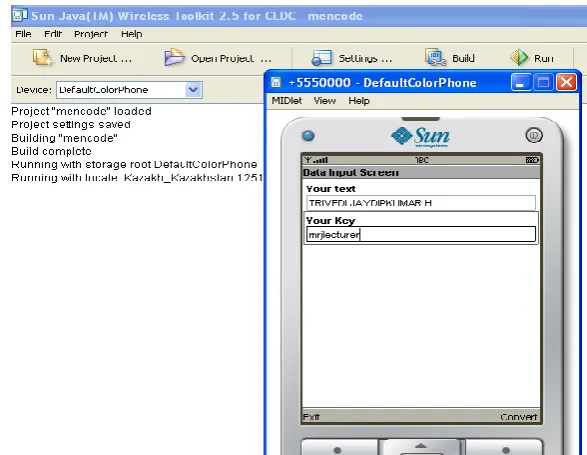
The under mention screen shot of Simulator of Wireless Toolkit 2.5 with Java Code on which the encrypting algorithm is performing practically.
/* * To change this license header, choose License Headers in Project Properties. * To change this template file, choose Tools | Templates
// * and open the template in the editor. */ //package encoder; import javax.microedition.lcdui.*; import javax.microedition.midlet.*; /** * Pt */
public class mencode extends MIDlet implements CommandListener{ private Display display; private Form inputForm, convertedForm, encodedForm, resultForm;
private TextField iT1, iT2, cT1, cT2, eT1, eT2, rT1, rT2;
private Command iC, cC, eC, rC, exit; public mencode() {
initInputForm();
display = Display.getDisplay(this); } public void initInputForm() {
inputForm = new Form("Data Input Screen"); iT1 = new TextField("Your text", null, 255, TextField.ANY);
iT2 = new TextField("Your Key", null, 255, TextField.ANY);
inputForm.append(iT1); inputForm.append(iT2); iC = new Command("Convert", Command.ITEM, 1);
exit = new Command("Exit", Command.EXIT, 2);
inputForm.addCommand(iC); inputForm.addCommand(exit);
inputForm.setCommandListener(this); } public void initConvertedForm() {
convertedForm = new Form("Converted Data Screen");
cT1 = new TextField("Your text", null, 255, TextField.ANY);
cT2 = new TextField("Your Key", null, 255, TextField.ANY);
convertedForm.append(cT1); convertedForm.append(cT2); cC = new Command("Encoded", Command.ITEM, 1);
exit = new Command("Exit", Command.EXIT, 2);
convertedForm.addCommand(cC); convertedForm.addCommand(exit);
convertedForm.setCommandListener(this); } public void initEncodedForm() {
encodedForm = new Form("Encoded Data Screen");
eT1 = new TextField("Your text", null, 255, TextField.ANY);
eT2 = new TextField("Your Key", null, 255, TextField.ANY);
encodedForm.append(eT1);
encodedForm.append(eT2);
eC = new Command("Result", Command.ITEM, 1);
exit = new Command("Exit", Command.EXIT, 2);
encodedForm.addCommand(eC); encodedForm.addCommand(exit); encodedForm.setCommandListener(this); } public void initResultForm() {
resultForm = new Form("Result Data Screen"); rT1 = new TextField("Your text", null, 255, TextField.ANY);
rT2 = new TextField("Your Key", null, 255, TextField.ANY);
resultForm.append(rT1); resultForm.append(rT2);
rC = new Command("Home", Command.ITEM, 1);
exit = new Command("Exit", Command.EXIT, 2);
resultForm.addCommand(rC); resultForm.addCommand(exit);
resultForm.setCommandListener(this); } public void startApp() {
display.setCurrent(inputForm); } public void pauseApp() { }
public void destroyApp(boolean unconditional) { }
protected void convertData() { char[] orgText;
String convertedString = ""; int asciiValue;
orgText = iT1.getString().toCharArray(); for (int i = 0; i < orgText.length; i++) { asciiValue = (int) orgText[i];
if (asciiValue >= 65 && asciiValue <= 90) { asciiValue = asciiValue - 64;
if (asciiValue <= 9) { // if substraction is less than 10 than '0' is append to that sub
convertedString = convertedString + "0" + asciiValue;
} else { convertedString = convertedString + asciiValue;
} } // FOR SYMBOLES
if (asciiValue >= 97 && asciiValue <= 122) { asciiValue = asciiValue - 96;
convertedString = convertedString + "0" + asciiValue;
} else {
convertedString = convertedString + asciiValue;
} }
if (asciiValue == 32) {
convertedString = convertedString + "00"; }
}
cT1.setString(convertedString); }
protected void convertedKey() { if (iT2.toString().length() == 7) { iT2.setString(null); } char[] orgText;
String convertedString = ""; int asciiValue;
orgText = iT2.getString().toCharArray(); for (int i = 0; i < orgText.length; i++) { asciiValue = (int) orgText[i];
if (asciiValue >= 65 && asciiValue <= 90) { asciiValue = asciiValue - 64;
if (asciiValue <= 9) {
convertedString = convertedString + "0" + asciiValue;
} else { convertedString = convertedString + asciiValue; } }
if (asciiValue >= 97 && asciiValue <= 122) { asciiValue = asciiValue - 96;
if (asciiValue <= 9) {
convertedString = convertedString + "0" + asciiValue;
} else { convertedString = convertedString + asciiValue; } }
if (asciiValue == 32) {
convertedString = convertedString + "00"; } }
cT2.setString(convertedString); } protected void encodedData() {
int dataLen = cT1.getString().length(); int keyLen = cT2.getString().length(); String data = cT1.getString();
String key = cT2.getString();
int partData = 0, partKey = 0, dataStrTrack = 0, keyStrTrack = 0, resultData;
String resultStr = "", tmpStr = ""; boolean flag = false;
// encodedForm.append("\nDATA:-" + data); // encodedForm.append("\nKEY:-" + key); // encodedForm.append("\ndata:-" + dataLen); int a = 1;
for (int i = 0; i < dataLen; i++) { if (dataStrTrack + 2 == dataLen) { partData =
Integer.parseInt(data.substring(dataStrTrack)); flag = true;
} else if (dataStrTrack < dataLen) {
partData =
Integer.parseInt(data.substring(dataStrTrack, dataStrTrack + 2)); }
partKey =
Integer.parseInt(key.substring(keyStrTrack, keyStrTrack + 2));
resultData = partData + partKey; tmpStr = String.valueOf(resultData); if (resultData <= 9) {
tmpStr = "0" + tmpStr; }
// encodedForm.append("\n" + partData + "+" + partKey + "=" + tmpStr);
resultStr += tmpStr; if (flag) {
break; }
keyStrTrack = keyStrTrack + 2; dataStrTrack = dataStrTrack + 2; if (keyStrTrack >= keyLen/*6*/) { keyStrTrack = 0; } }
eT1.setString(resultStr); } protected void decodeData() {
int dataLen = eT1.getString().length(); int keyLen = cT2.getString().length(); String data = eT1.getString();
String key = cT2.getString();
int partData = 0, partKey = 0, dataStrTrack = 0, keyStrTrack = 0, resultData;
String resultStr = "", tmpStr = ""; boolean flag = false;
int a = 1;
for (int i = 0; i < dataLen; i++) { if (dataStrTrack + 2 == dataLen) { partData = Integer.parseInt(data.substring(dataStrTrack)); flag = true;
} else if (dataStrTrack < dataLen) { partData = Integer.parseInt(data.substring(dataStrTrack, dataStrTrack + 2)); }
partKey =
Integer.parseInt(key.substring(keyStrTrack, keyStrTrack + 2));
resultData = partData - partKey; tmpStr = String.valueOf(resultData); if (resultData <= 9) {
tmpStr = "0" + tmpStr; }
encodedForm.append("\n" + partData + "+" + partKey + "=" + tmpStr);
resultStr += tmpStr; if (flag) {
break; }
keyStrTrack = keyStrTrack + 2; dataStrTrack = dataStrTrack + 2; if (keyStrTrack >= keyLen/*6*/) { keyStrTrack = 0; } } int len = resultStr.length(), tmpA, tmpB; data = resultStr;
dataStrTrack = 0; String tmpres = ""; flag = false;
if (dataStrTrack + 2 == len) { partData =
Integer.parseInt(data.substring(dataStrTrack)); flag = true;
} else if (dataStrTrack < len) { partData =
Integer.parseInt(data.substring(dataStrTrack, dataStrTrack + 2)); } if (partData >= 1 && partData <= 27) {
partData += 64;
tmpres = tmpres + (char) partData; } else { tmpres = tmpres + " "; }
dataStrTrack += 2; if (flag) {
break; } } rT1.setString(tmpres); }
public void commandAction(Command c, Displayable d) {
if (c == iC) {
initConvertedForm();
display.setCurrent(convertedForm); convertData();
convertedKey(); } else if (c == cC) { initEncodedForm(); encodedData();
display.setCurrent(encodedForm); } else if (c == eC) {
initResultForm(); decodeData();
display.setCurrent(resultForm); } else if (c == rC) {
initInputForm();
display.setCurrent(inputForm); } else if (c == exit) {
notifyDestroyed(); } } }
VII.
M-COMMERCE BACKGROUND
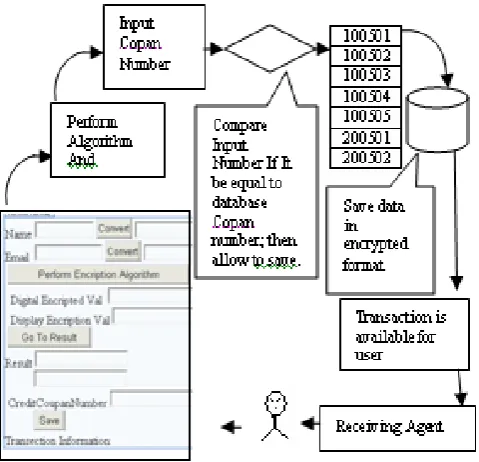
Encryption module is utilized for security purpose in websites and on mobile phone. Here security is estimated from customer or user and system side. The customer want to do the transaction of purchasing an item from a websites either using computer or mobile phone. Customer will purchase the Copan of worth Rs.200 from the market. The Copan contains number. Custer will scratch the number and removed the layer on it. The system administrator has inserted Copan number 111, 222, 333, 444 etc this numbers previously. The data base contains these numbers. The customer came with the same Copan number of above mention, he will be allowed for transaction. The Copan will be compared with database as in the figure no (3). Because the person has paid for it so he can enter in to the system for their transaction.
The inserted data would be encrypted and database will be implemented with the encrypted form as in the figure no 1. The first page contains the inputs of the data like (1) Name (2) e-mail which are the real parameterized input of the encryption algorithm. On the basis of these data and (3) Copan Number collectively enter and user will enter in the website module. So the algorithm inputs are important for initiating the transaction.
VIII.
PRACTICAL USE OF ALGORITHM
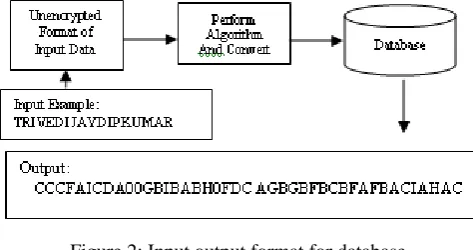
The encryption algorithm is encrypting the input text using encryption algorithm. The text is converting in not to understanding format. The encrypted text is stored in database as encrypted format.
Figure 2: Input output format for database
Figure 3, General Architecture for Data input, performance of algorithm, store the data and customer credit conformation.
IX.
DATA AND ANALYSE
The parameterized data to be inserted in the simulator for encrypting the data for establishing transaction. And seems to be secure in the database from customer side as well as from system side.
1. Input Data:
Name: GANESH E-mail: G@yahoo Copan Number: 111
Figure 4: Input The Data Into Encryption Module
1. Out Put Data:
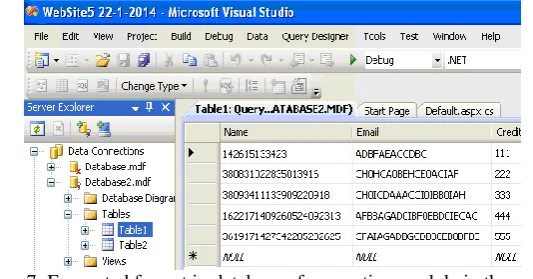
Name Encrypted Format: 142615133423 E-mail Encrypted Format: ADBFAEACCDBC Out put can be seen in the figure 7: Encrypted format. 2.Input Data:
Copan Number:222
Figure 5: Input the Data Into Encryption Module
2. Out Put Data:
Name Encrypted Format: 380831022835013916 E-mail Encrypted Format: CHOCHA0BBHCE0ACIAF Out put can be seen in the figure 7: Encrypted format.
3. Input Data:
Name: SANGITABEN E-mail: sht@dd Copan Number: 333
Figure 7: Input The Data Into Encryption Module
3. Out Put Data:
Name Encrypted Format:
E-mail Encrypted Format:
Out put can be seen in the figure 7: Encrypted format.
X.
RESULT AND TEST THE HYPOTHESIS
Encrypted format of the inputs in the module could not be understood by the customer from the customer side as well as system administrator from system side. Here, the under mention (figure 7) database instruction of encryption module proves the result. The database table1 contain encryption module and Name Column, E-mail Column contain encrypted format of the data.
Crucial Performance of Algorithms:
- Data entry can be performed at Input 1,2 and 3 using encryption algorithm is impotent matter What the work is indicating in the Figure No 4,5 and 6.
- Encryption algorithm is helping for convert the data in to Encrypted format is essential for database. What the figure
7 is indicating.
XI.
CONCLUSION
Thus the work indicated the instruction of “Applying encryption algorithm practically on m-commerce background” and at the end obtained security and crucial performance.
REFERENCES
[1] Trivedi J H, Trivedi P H, Thakker S T, Makwana M N , Automatic and Semi Automatic Transaction of roadcasting and It’s Receiving Agent Based M- commerce Business Model
[2] Trivedi J H, Trivedi P H, Darji J H, Patel H D, Designing and prototyping encryption algorithms: Working as secure M-commerce transaction of broadcasting and its receiving agent based m-commerce model, IOSRJEN,Vol.3,Issue 8, pp.25-33 (2013) ISSN: 2250- 3021
![(E) 3 [2,5 Dioxo 3 (propan 2 ylidene)pyrrolidin 1 yl]acrylic acid](data:image/gif;base64,R0lGODlhAQABAIAAAP///wAAACH5BAEAAAAALAAAAAABAAEAAAICRAEAOw==)