Developing a Three-level Framework for Building
Information Modeling Education in
Construction Management
Yilei Huang
Department of Construction & Operations Management, South Dakota State University, Brookings SD, 57007, United States
Copyright©2018 by authors, all rights reserved. Authors agree that this article remains permanently open access under the terms of the Creative Commons Attribution License 4.0 International License
Abstract As Building Information Modeling (BIM)
became the gold standard of the architecture, construction, and engineering industry, lack of skilled BIM professionals is considered one of the major challenges. While numerous studies have identified different approaches to introduce BIM in construction management (CM) programs, comprehensive frameworks have not been found. To bridge the gap, this paper proposes a three-level framework that provides a systematic coverage of BIM through the entire CM curriculum. The framework consists of a fundamentals level covering BIM contents in most CM subjects, an application level where BIM is applied to solve real-world problems, and an advanced level that focuses on the latest and advanced topics of BIM. The framework aligns most CM subjects to their respective BIM components and exposes CM students to BIM from entry to exit. This paper serves as a case study of how BIM education has been implemented in an undergraduate CM program.Keywords Construction Management, Building
Information Modeling, Undergraduate Education1. Introduction
Building Information Modeling (BIM) has been developing quickly during the past decade and has now become the gold standard of the architecture, construction, and engineering (AEC) industry [1]. The McGraw-Hill Smart Market Reports showed that according to the survey results of 582 stakeholders, BIM was adopted by 71% of AEC firms in North America in 2012, a 75% surge over five years [1,2], and 86% of them had been using BIM for more than 3 years by 2013 [3]. Although BIM has become the trending technology, its uses and benefits have not been
maximized in the AEC industry. Some of the predominant reasons included BIM standards not being adopted across the industry, BIM models not being part of a contract, not enough incentives for the designers to provide complete BIM models, etc. Lack of skilled BIM professionals has been identified as another major reason by several previous studies [4-7]. To apply BIM technology effectively and efficiently, an AEC practitioner must be cross-trained with both construction knowledge and IT skills [8]. Lack of adequate training has been one of the challenges to move the industry into the BIM era [9, 10].
2. Background
CM undergraduate education is a holistic subject that focuses on the management of the construction process with the changing technology of the industry [11, 12]. Due to the rapid development of BIM during the last couple decades, the academia has not agreed on what needs to be included in the CM curriculum [13,14]. 2D computer-aided design (CAD) drafting has been traditionally used in CM curriculum as a pedagogical tool across various subjects including estimating quantity and cost, developing construction sequence and schedule, and analyzing site layout and safety risks [15]. While 2D drawings are widely used in the AEC industry, the ability to interpret them mostly depends on students’ prior experience. Students must mentally visualize the components of a structure from the lines and symbols in different drawings and combine them into a virtual structure. CM students with little or no previous experience often face challenges and must spend more time interpreting the drawings [16].
BIM can assist CM students to understand the complexity of construction projects in both the process and product [17, 18]. BIM as a buzzword in the industry, however, often shifts the focus away from its benefits of sharing and simulating information and misleads students to see it as a software program or an acronym for 3D design and modeling [12,19]. Only knowing how to use BIM software to model building systems is not a true understanding of BIM. To be effective BIM users, students should be able to extract the information needed efficiently from building models to manage the construction process [6].
Since there is no commonly agreed approach to introduce BIM, many CM programs have been struggling to understand what and how to teach [20, 21]. The various implementation strategies that CM programs have employed to incorporate BIM into the curriculum can be grouped into four categories: standalone courses, cross-discipline courses, capstone/project courses, and integration into existing courses.
Introducing BIM in standalone courses is an effective approach to quickly cover BIM components. Many CM programs introduce BIM in courses such as Digital Graphical Representation, Graphical Communication, and Construction Information Technology [20,22]. These courses often replace an existing lower level CAD course and thus focus on the specific skills of modeling and basic analysis [7,21,23,24]. This approach has been adopted widely because most CM subjects can benefit more with BIM, and in many cases, CAD is no longer needed. Some CM programs introduce BIM by allowing students to take cross-discipline courses from other programs such as civil engineering workshops and architecture studios [7]. While this approach is efficient at some extent and takes the
maximal use of existing resources, these cross-discipline courses often focus towards design and away from CM topics. Implementing BIM in a capstone project allows students to learn the BIM process in various CM subjects throughout the project cycle. However, teaching BIM within a one- or even two-semester capstone project limits the use of BIM in each CM discipline to only a couple of weeks due to time constraint. As a result, students get only a basic understanding of the BIM process and their BIM skills fall short of the expectation to become fluent.
Integrating BIM into existing courses is considered the most practical way to offer BIM [6]. This strategy typically divides BIM contents into smaller and manageable topics, and thus can provide CM students with a rich and rigorous learning environment and consequently better quality of education [6,21]. It is also generally accepted that BIM integration should be distributed over all years of the CM curriculum instead of only in lower or upper level courses. Sacks and Pikas [21] summarized from an Internet discussion in 2011 that BIM education should focus on the fundamental knowledge in the first two years, such as modeling skills, the parametric concept, and constraints, followed by the implementation of specific BIM functionalities in different CM subjects, such as estimating, scheduling, visualization, coordination, system analysis, etc. In the last few semesters, BIM should be incorporated into the broader picture of construction projects to create a holistic understanding of the use of BIM process in professional practice [21].
Wu et al. [25] recently developed a BIM body of knowledge (BOK) that benchmarks desired learning outcomes and career-specific competency and enables BIM education accreditation and training credentialing for educational purposes. This holistic and robust framework also captures BIM concepts, standards, best practices, and state-of-the-art innovations and identifies foundational knowledge, skills, and abilities to meet workplace BIM job task performance requirements for professional applications. 67 instances of knowledge, skills, and abilities were developed within the dynamic framework and a lack of lucidity in foundational BIM education and training was identified, suggesting gaps that needed to be filled in order to help young professionals grow into true BIM experts [26]. Mayo et al. [27] further implemented the BIM BOK for course content planning in three educational programs with various teaching methods and student learning outcomes to identify target BIM competency in alignment with program priorities and institutional contexts.
3. The Three-level Framework
that are able to provide a systematic coverage of BIM in a CM curriculum. To bridge the gap, this paper proposes a three-level framework for BIM education in CM programs. The proposed framework utilizes the most accepted strategy, integrating BIM into existing courses, and follows the approach concluded by Sacks and Pikas [21] that BIM integration should be distributed over all years of the CM curriculum. The framework allows individual CM faculty to introduce BIM in the curriculum only in their specialized areas, which significantly reduces the workload needed to develop new BIM courses. At the same time, CM students will be exposed to BIM progressively from their entry to the exit, allowing a gradual increase of interest and reception of BIM. When CM students complete the program, they will have acquired adequate BIM knowledge and skills on all relevant CM topics and will be ready for the upcoming career.
The proposed framework consists of three-levels of BIM components: a fundamentals level - various CM core courses covering BIM contents in most CM subjects, an application level - CM elective courses where BIM contents are applied to solve real-world problems, and an advanced level - a series of elective BIM courses that
focus on the latest and advanced topics of BIM. The framework employs the most commonly used BIM platform, Autodesk software package [24,28], and covers the primary BIM features of its two main software Revit and Navisworks Manage. While Autodesk products were selected for its popularity and comprehensive coverage of BIM, other BIM software can also be used separately or in combination in the framework, such as Bentley products, Nemetschek (Allplan, Bluebeam, Graphisoft, Solibri, Vectorworks), Trimble (Gehry, Tekla, SketchUp, Vico), and Synchro products.
3.1. Fundamentals Level: CM Core Courses
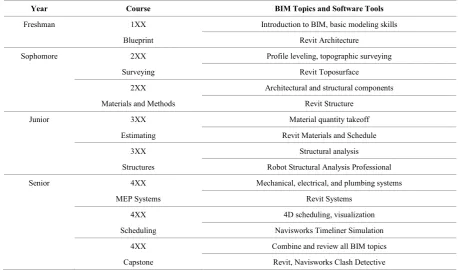
[image:3.595.67.526.396.666.2]The fundamentals level integrates BIM contents with various CM core courses over all four years of the program, and a detailed course list is presented in Table 1 as well as the integrated BIM topics. The fundamentals level starts with an introductory course of blueprint reading and drawing, followed by the various core courses that most CM programs already have in their curriculum, and concludes with a capstone course to review and summarize all BIM knowledge learned.
Table 1. List of CM Core Courses and BIM Topics
Year Course BIM Topics and Software Tools
Freshman 1XX Introduction to BIM, basic modeling skills
Blueprint Revit Architecture
Sophomore 2XX Profile leveling, topographic surveying
Surveying Revit Toposurface
2XX Architectural and structural components
Materials and Methods Revit Structure
Junior 3XX Material quantity takeoff
Estimating Revit Materials and Schedule
3XX Structural analysis
Structures Robot Structural Analysis Professional
Senior 4XX Mechanical, electrical, and plumbing systems
MEP Systems Revit Systems
4XX 4D scheduling, visualization
Scheduling Navisworks Timeliner Simulation
4XX Combine and review all BIM topics
3.1.1. Freshman Year
1XX Blueprint. This course is usually an entry-level course focused on blueprint reading and drawing, and is often named as Graphics, Drawings, or Plans. Many CM programs used to have it as the introductory course to CAD and are restructuring it into a BIM introductory course. Using BIM in a CM preparation course affords students a better understanding of construction tasks and enhances their spatial perception [29,30]. The restructured course will focus on BIM fundamental knowledge as well as basic modeling skills using Revit general modeling features.
3.1.2. Sophomore Year
2XX Surveying. Surveying is not a typical course to include BIM contents since most surveying topics are not directly related to the structure itself. A few specific surveying methods, however, can be used to develop a site and topography model, such as profile leveling and topographic surveying. Profile leveling is a repeated leveling process to obtain grid-pattern elevation data within the construction site. Elevation data can be easily reformatted and imported into Revit to create a model of the existing site topography. Contour lines can be generated from the elevations with Revit Toposurface, and students are able to observe the site topography. Topographic surveying uses a total station to record the position and elevation of other site features besides the contour lines. The position and elevation data can be imported into Revit first, and then the site features can be modeled individually. AutoCAD Civil 3D also provides similar but more robust features for site modeling.
2XX Materials and Methods. Since construction methods are practical topics, the traditional approach requires extensive field experiences from the instructor, and students often learn from the instructor’s past experiences. This approach usually focuses on specific projects that the instructor has worked on and thus does not enhance student comprehension of how to apply the methods in other projects [31,32]. Using BIM models allows to demonstrate different architectural and structural components of the building and helps students visually see how they are connected to form a system, and further understand what methods are needed to complete the system [18]. For example, in classroom instruction, students are able to see through concrete and find out how reinforcement is placed or cut a wall and see the interior materials and structures. One shortcoming of using Revit to demonstrate the structural systems is that for some components such as walls, floors, roofs, and concrete members, it does not depict the actual construction sequence [16,33]. Walls are modeled in Revit by structuring all the elements first including stud framing, insulation, sheathing, and interior and exterior finishes, and then placing the single entity in the building model.
Floors and roofs are modeled in a similar way. Concrete components do not need formwork when modeling, and reinforcement, if modeling is needed, is added after the concrete member is placed in the model.
3.1.3. Junior Year
3XX Estimating. Traditional estimating courses use CAD drawings for quantity takeoff, either with hard copy plans or computer programs such as Onscreen Takeoff. A main problem of using CAD drawing for takeoff is that since each individual sheet (plans, elevations, and sections) were produced independently, the possibility of inconsistent information between each other is high [6,16,18]. With BIM integration, model-based estimating can eliminate these errors because a building component has the same dimensions in any sheet. Revit Schedule can automatically calculate the quantities and dimensions of most building components, thus reduce the time-consuming manual calculation process. The taking-off and pricing process in cost estimating can further be streamlined by using 5D BIM software. Sage eTakeoff Bridge provides a Navisworks Integrator that allows quantity takeoff from Navisworks, essentially with BIM models from Revit, to be connected directly to the cost databases in Sage Estimating. However, estimating with BIM is currently only limited to checking and verifying quantities and dimensions instead of a fully automated estimating process due to several reasons. Estimators usually use gross quantities to allow for work not modeled, whereas Revit only calculates net quantities. Models are sometimes created with incorrect dimensions and materials so that the drawings and renderings look better.
3.1.4. Senior Year
4XX Mechanical, Electrical and Plumbing (MEP) Systems. This course is sometimes separated into a mechanical course and an electrical course, and it usually serves only as an introductory course to the building systems for CM students since in-depth knowledge is covered in architectural engineering and mechanical engineering programs. The traditional teaching approach is to use CAD drawings to explain the design and layout of the ducts, pipes, and conduits, and the challenge is that it is usually difficult to perceive the spatial location of the systems. BIM models can be used in classroom instruction to provide students with 3D presentation of the systems as well as obstruction-free views to help them understand the system design. In addition, CM students will have a better understanding of the concept of systems since the MEP components in BIM are grouped by their individual systems and the information of all the ducts, pipes, and conduits are linked to their respective MEP equipment, such as an air handling unit, boiler, switchboard, etc.
4XX Scheduling. Scheduling requires CM students to develop a logical sequence of construction. CAD drawings have been traditionally used to develop network models to present activity relationships and create bar charts to depict the construction sequence [16]. The challenge is that it requires much experience and practice to obtain a full understanding of the structure from a complete set of CAD drawings. Students with weak background usually have difficulties interpreting the drawings and visualizing the structure [16,36]. With the help of BIM, students can see the virtual building and are even able to take it apart to see all the interior components. It significantly assists students to understand the physical constraints and how all the elements are connected to each other, and eventually to develop a logical construction sequence. In addition, once the network model or bar chart has been created, the construction schedule can then
be integrated with the BIM model to generate a 4D schedule [6]. A construction schedule from Microsoft Project or Primavera P6 can be easily imported into Naviswork Manage, and each activity can be linked to its respective building components in the BIM model. Using the Timeliner Simulation feature, the BIM model will be virtually constructed based on the construction sequence from the imported schedule. Students will then be able to visually inspect if the animated construction sequence includes all building components and meets all physical constraints.
4XX Capstone. Capstone, as the concluding course of a CM program, usually uses interdisciplinary student collaboration and integrates all aspects of project management and administration for problem solving and decision making to successfully deliver a project [18]. The existing approach makes the course an excellent one to review and summarize all the BIM topics covered in previous courses, including modeling, estimating, scheduling, and at the same time introduce BIM applications for construction coordination [6,18]. Trade or subcontractor coordination is one subject that BIM is most commonly used in project management. Navisworks Clash Detective has been used extensively in the industry to perform conflict checks, particularly between the BIM models from different trades or subcontractors. At the completion of this course, students will have acquired the fundamentals of BIM knowledge and software skills in all relevant CM subjects.
3.2. Application Level: CM Elective Courses
[image:5.595.62.524.565.645.2]The application level integrates BIM contents with existing CM elective courses to solve real-world problems, depending on the available elective courses in the curriculum. An example of the CM elective courses is presented in Table 2 as well as the integrated BIM topics.
Table 2. List of CM Elective Courses and BIM Topics
Year Course BIM Topics and Software Tools
Junior 3XX Site logistics, laser scanning
Preconstruction Navisworks Animator, ReCap 360 Pro
3XX Advanced modeling skills, visualization
3.2.1. Junior Year
3XX Preconstruction. Some CM programs offer this elective course to cover the preconstruction services that are typically provided under design-build and CM at risk contracts. Preconstruction services focus on project scope, constructability review, site evaluation, budget development, logistics planning, value engineering, risk analysis, bid packaging, etc., that happen before the construction process and sometimes at the very early stage of a project. Since both the designer and contractor are involved early with design-build or CM at risk, BIM can be used most efficiently to facilitate coordination and integration. As a result, this course is a good entry to applying BIM to solve these real-world preconstruction problems. Navisworks Animator can depict how the construction site is laid out and how all construction equipment is going to move, such as the range of cranes and truck routes. ReCap 360 Pro can also be introduced in this course as a tool to manipulate and edit point clouds obtained from laser scanning for site evaluation.
3XX Competition. Some CM programs offer this elective course to better prepare students for regional and national CM student competitions. Several well-known CM student competitions are sponsored by various industry organizations, include the Associated Builders and Contractors (ABC), the Associated Schools of Construction (ASC), the Design-Build Institute of America (DBIA), the National Association of Home Builders (NAHB), as well as the Mechanical Contractors Association of America (MCAA), the National Electrical Contractors Association (NECA), and the National Roofing Contractors Association (NRCA). Although focusing on different subjects, all competitions give CM students excellent opportunities to learn what the industry is expecting and what other CM programs are teaching. The use of BIM has become an increasing trend in these competitions and sometimes as a requirement. In most competitions, students will concentrate on a real-world project from an industry partner, and as a result, this
course is a good entry to introducing advanced modeling skills as well as different visualization methods for presentations with Revit and Navisworks, such as image renderings and walkthrough animations.
3.3. Advanced Level: Elective BIM Courses
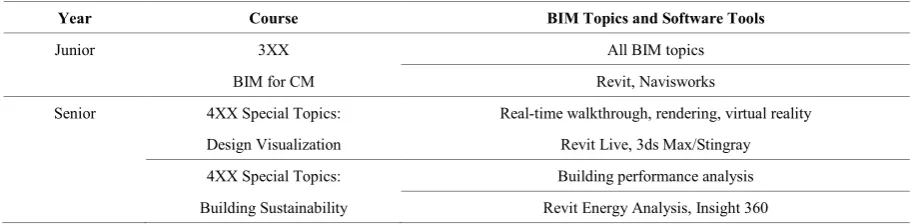
The advanced level contains a series of upper-level elective courses that specifically focus on BIM as well as the latest and advanced topics of BIM. These courses are designed for CM students who are interested in learning more in-depth knowledge and advanced skills of BIM and have a goal of seeking a BIM-related position in their career. An example of the elective BIM courses is presented in Table 3 as well as their BIM topics.
3.3.1. Junior Year
[image:6.595.69.528.578.690.2]3XX BIM for CM. This course aims to introduce the BIM workflow in a construction project and develop a BIM execution plan. The course focuses on BIM implementation from the planning and preconstruction phase to the construction and administration process, and eventually project close out [37]. This course typically uses computer labs to cover all BIM topics that have appeared in previous courses, but with more in-depth knowledge and in case study scenarios, including model-based estimating and scheduling, clash detection, construction coordination, visualization, etc. [38]. The course can also be used to introduce BIM certification programs to CM students who have a goal of seeking a BIM-related position in their career, such as BIM coordinator or BIM manager. Autodesk offers a certified user level certification for Revit Architecture and certified professional level certifications for Revit Architecture, Structure, MEP Electrical, and MEP Mechanical. The Associated General Contractors of America (AGC) also provides courses and exams to achieve its Certificate of Management-Building Information Modeling (CM-BIM).
Table 3. List of Elective BIM Courses and Topics
Year Course BIM Topics and Software Tools
Junior 3XX All BIM topics
BIM for CM Revit, Navisworks
Senior 4XX Special Topics: Real-time walkthrough, rendering, virtual reality
Design Visualization Revit Live, 3ds Max/Stingray
4XX Special Topics: Building performance analysis
3.3.2. Senior Year
4XX Special Topics. This could be a series of upper-level elective courses and at the same time cross-listed as graduate level courses based on the research areas of CM faculty. These courses aim to introduce to the latest technology advances in the AEC industry that utilize BIM as well as establish cross-discipline connections between construction, architecture, and other engineering disciplines.
One example topic could be Design Visualization. This topic focuses on real-time walkthrough visualizations. Traditional BIM walkthroughs are created with either Revit, Navisworks, or Synchro as videos where the audience follow the view of the video and thus have no control over what is being presented. Real-time walkthroughs enable the audience to determine what to see in model visualizations by employing game engines. Autodesk introduced a game engine called Stingray in 2015 which creates real-time design visualizations. It is particularly beneficial to the AEC industry in that it provides a seamless workflow to bring a design directly from Revit to 3ds Max and then to Stingray. A building model is first imported from Revit to 3ds Max to optimize its visual accuracy, and then deployed with Stingray as an interactive game experience for real-time walkthroughs. Based on this workflow, Stingray has now been merged into 3ds Max for better interactive features and a simplified process. Autodesk later released Revit Live in 2016 which offers similar interactive visualization through cloud services. Revit Live is further capable of converting real-time walkthroughs into virtual reality environments that enables building users to navigate through and inspect the building with an immersive sense of presence in the virtual building.
Another example topic could be Building Sustainability. This topic focuses on using BIM as a platform to analyze, simulate, visualize, and optimize building performance. The topic teaches the principles and practice of sustainability in engineering and design, and could involve multidisciplinary collaboration between architecture, architectural engineering, mechanical engineering, etc. Revit provides the Energy Analysis tool for building performance analysis. Autodesk Insight 360, as a Revit plug-in, has more enhanced capabilities in simulations of heating, cooling, daylighting, and solar radiation, as well as whole building energy optimization. Autodesk also offers the Building Performance Analysis Certificate (BPAC) program for architects and engineers to incorporate high performance building design into their
workflows. This topic has a great potential to maximize the benefits of BIM as a tool for building information sharing.
4. Alignment with Bloom’s Taxonomy
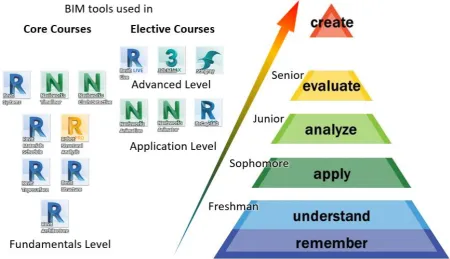
The learning process of BIM within the proposed three-level framework was designed to align with Bloom’s Taxonomy. Anderson et al. [39] revised the original taxonomy and defined the cognitive learning process as “remember, understand, apply, analyze, evaluate, and create” from lower- to higher-order thinking skills, which includes:
Remember
Recognizing
Recalling
Understand
Interpreting
Exemplifying
Classifying
Summarizing
Inferring
Comparing
Explaining
Apply
Executing
Implementing
Analyze
Differentiating
Organizing
Attributing
Evaluate
Checking
Critiquing
Create
Generating
Planning
Producing
Figure 1. BIM Software Tools and Skills Aligned with Bloom’s Taxonomy through the Four-Year Framework
The fundamentals level of the framework covers the first five levels of the cognitive learning process. In the freshman year, the framework focuses on the two lower-order thinking skills of BIM, “remember and understand,” when students take the introductory course and use the basic tools to develop a fundamental understanding of BIM. In the sophomore year, students will “apply” BIM tools to create a topographic surface for construction sites and learn the connections between building systems. In the junior year, the framework emphasizes students’ ability to “analyze” material quantities a well as structural behavior by using analytical tools through various BIM software. In the senior year, students will “evaluate” a construction project as a process in terms of its systems, schedule, and coordination. The application level of the framework aligns with the top level of cognitive learning process, “create.” In the example junior year elective courses, students are expected to create visualization renderings, walkthrough animations, logistics animations, and laser-scanned point clouds. The advanced level of the framework also aligns with the “create” level in the taxonomy in that the various special topic upper-level elective BIM courses aim to develop BIM execution plans, real-time design visualizations, or building energy analysis.
5. Assessment and Recommendations
The proposed framework takes a four-year cycle to be fully implemented in a CM curriculum, and it is thus recommended to begin the assessment of the complete
framework by the time a full cycle of implementation is completed. The initial assessment methods can include student evaluations, student exit questionnaires, and employer surveys. Student evaluations in each individual course can be first analyzed to determine the effectiveness of integrating BIM contents in the individual courses. Exit questionnaires can be distributed next to graduates to evaluate student perspectives on the entire framework. Employer surveys can be conducted finally to obtain industry opinions towards adding BIM contents into a CM curriculum. The results and feedback from the initial assessment is critical for adjusting the framework for its next implementation cycle, and the framework and each individual course will make continuous improvements based on the assessment results in each cycle.
6. Conclusions
To bridge the gap, this paper proposes a three-level framework for BIM education in CM programs. The framework integrates BIM contents with over ten CM courses in all four years of the program, covering most CM subjects, relevant BIM topics, and software features. Based on existing approaches, a three-level framework was proposed which included a fundamentals level - various CM core courses covering BIM contents in most CM subjects, an application level - CM elective courses where BIM contents are applied to solve real-world problems, and an advanced level - a series of elective BIM courses that specifically focus on the latest and advanced topics of BIM. When CM students finish the degree, they will be well-equipped with BIM knowledge and skills and will be ready for various career opportunities that requires BIM. This paper serves as a case study of how BIM education has been implemented in an undergraduate CM program.
REFERENCES
[1] Zhao, D., McCoy, A.P., Bulbul, T., Fiori, C., and Nikkhooa, P. (2015). Building Collaborative Construction Skills through BIM-integrated Learning Environment. International Journal of Construction Education and Research, 11(2), 97-120.
[2] McGraw-Hill Construction. (2012).The Business Value of BIM in North America: Multi-Year Trend Analysis and User Ratings (2007-2012). McGraw-Hill Construction, Bedford, MA.
[3] McGraw-Hill Construction. (2014). The Business Value of BIM for Construction in Major Global Markets: How Contractors Around the World Are Driving Innovation With Building Information Modeling. McGraw-Hill Construction, Bedford, MA.
[4] Gu, N. and London, K. (2010). Understanding and Facilitating BIM Adoption in the AEC Industry. Automation in Construction, 19(8), 988-999.
[5] Wong, K.A., Wong, K.F., and Nadeem, A. (2011). Building Information Modeling for Tertiary Construction Education in Hong Kong. Journal of Information Technology in Construction, 16, 467-476.
[6] Lee, N. and Dossick, C.S. (2012). Leveraging Building Information Modeling Technology in Construction Engineering and Management Education. Proceedings of the 119th ASEE Annual Conference and Exposition, San Antonio, TX, June 10-13, 2012.
[7] Lee, N. and Hollar, D.A. (2013). Probing BIM Education in Construction Engineering and Management Programs Using Industry Perceptions. Proceedings of the 49th ASC Annual International Conference, San Luis Obispo, CA, April 10-13, 2013.
[8] Cook, C. (2004). Scaling the Building Information Mountain. CAD User AEC Magazine, 17(3), March/April 2004.
[9] Hartmann, T. and Fischer, M. (2008). Applications of BIM and Hurdles for Widespread Adoption of BIM. The 2007 AISC-ACCL eConstruction Roundtable Event Report, New Orleans, LA, April 17, 2007.
[10] McGraw-Hill Construction. (2009). The Business Value of BIM: Getting Building Information Modeling to the Bottom Line. McGraw-Hill Construction, Bedford, MA.
[11] Badger, W. and Robson, K. (2000). Raising Expectations in Construction Education. Proceedings of the 6th Construction Congress, Orlando, FL, February 20-22, 2000, pp 1151-1164.
[12] Ghosh, A., Parrish, K., and Chasey, A.D. (2013). From BIM to Collaboration: A Proposed Integrated Construction Curriculum. Proceedings of the 120th ASEE Annual Conference and Exposition, Atlanta, GA, June 23-26, 2013. [13] Raphael, B. (2009). Promoting Efficient Use of
Visualization Tools through Education. Journal of Computing in Civil Engineering, 23(6), 428-435.
[14] Eastman, C., Teicholz, P., Sacks, R., and Liston, K. (2011). BIM Handbook: A Guide to Building Information Modeling for Owners, Managers, Designers, Engineers and Contractors, 2nd Edition. Wiley, Hoboken, NJ. ISBN: 978-0-470-54137-1.
[15] Zolfagharian, S., Gheisari, M., Irizarry, J., and Meadati, P. (2013). Exploring the Impact of Various Interactive Displays on Student Learning in Construction Courses. Proceedings of the 120th ASEE Annual Conference and Exposition, Atlanta, GA, June 23-26, 2013.
[16] Irizarry, J., Meadati, P., Barham, W.S., and Akhnoukh, A. (2012). Exploring Applications of Building Information Modeling for Enhancing Visualization and Information Access in Engineering and Construction Education Environments. International Journal of Construction Education and Research, 8(2), 119-145.
[17] Boon, J. and Prigg, C. (2011). Releasing the Potential of BIM in Construction Education. Proceedings of the Management and Innovation for Sustainable Build Environment, Amsterdam, Netherlands, June 20-23, 2011. [18] Pikas, E., Sacks, R., and Hazzan, O. (2013). Building
Information Modeling Education for Construction Engineering and Management. II: Procedures and Implementation Case Study. Journal of Construction Engineering and Management, 139(11), 05013002.
[19] Ghosh, A., Parrish, K., and Chasey, A.D. (2015). Implementing a Vertically Integrated BIM Curriculum in an Undergraduate Construction Management Program. International Journal of Construction Education and Research, 11(2), 121-139.
[20] Barison, M.B., and Santos, E.T. (2010). Review and Analysis of Current Strategies for Planning a BIM Curriculum. Proceedings of the 27th CIB W78 International Conference, Cairo, Egypt, November 16-19, 2010.
[22] Taylor, M., Liu, J., and Hein, M. (2008). Integration of Building Information Modeling (BIM) into an ACCE Accredited Construction Management Curriculum. Proceedings of the 44th ASC Annual International Conference, Auburn, AL, April 2-5, 2008.
[23] Sacks, R. and Barak, R. (2010). Teaching Building Information Modeling as an Integral Part of Freshman Year Civil Engineering Education. Journal of Professional Issues in Engineering Education and Practice, 136(1), 30-38. [24] Joannides, M.M., Olbina, S., and Issa, R.R.A. (2012).
Implementation of Building Information Modeling into Accredited Programs in Architecture and Construction Education. International Journal of Construction Education and Research, 8(2), 83-100.
[25] Wu, W., Mayo, G., McCuen, T.L., Issa, R.R.A., and Smith, D.K. (2018). Building Information Modeling Body of Knowledge. I: Background, Framework, and Initial Development. Journal of Construction Engineering and Management, 144(8), 04018065.
[26] Wu, W., Mayo, G., McCuen, T.L., Issa, R.R.A., and Smith, D.K. (2018). Building Information Modeling Body of Knowledge. II: Consensus Building and Use Cases. Journal of Construction Engineering and Management, 144(8), 04018066.
[27] Mayo, G., Wu, W., McCuen, T.L., Issa, R.R.A., and Smith, D.K. (2018). Implementation of the BIM Body of Knowledge (BOK) Framework for Program Planning in Academia. Proceedings of the 12th BIM Academic Symposium & Job Task Analysis Review, Orlando, FL, March 26-27, 2018, pp 2-9.
[28] Chen, D. and Gehrig, G. B. (2011). Implementing Building Information Modeling in Construction Engineering Curricula. Proceedings of the 118th ASEE Annual Conference and Exposition, Vancouver, BC, Canada, June 26-29, 2011.
[29] Glick, S., Clevenger, C., and Porter, D. (2011). Integrating 3D Models in Construction Education: Masonry Interactive Homework. Proceedings of the 47th ASC Annual International Conference, Omaha, NE, April 6-9, 2011. [30] Lu, W., Peng, Y., Shen, Q., and Li, H. (2013). Generic
Model for Measuring Benefits of BIM as A Learning Tool in Construction Tasks. Journal of Construction Engineering and Management, 139(2), 195-203.
[31] Clevenger, C., Glick, S., and Del Puerto, C.L. (2012). Interoperable Learning Leveraging Building Information Modeling (BIM) in Construction Education. International Journal of Construction Education and Research, 8(2), 101-118.
[32] Thomas, J. and Mengel, T. (2008). Preparing Project Managers to Deal with Complexity Advanced Project Management Education. International Journal of Project Management, 26(3), 304-315.
[33] Goedert, J.D. and Meadati, P. (2008). Integrating Construction Process Documentation into Building Information Modeling. Journal of Construction Engineering and Management, 134(7), 509-516.
[34] Richards, E.L. and Clevenger, C.M. (2011). Interoperable Learning Leveraging Building Information Modeling (BIM) in Construction Management and Structural Engineering Education. Proceedings of the 47th ASC Annual International Conference, Omaha, NE, April 6-9, 2011. [35] Nawari, N., Chichugova, T., Mansoor, S., and Delfin, L.
(2014). BIM in Structural Design Education. Proceedings of the 2014 International Conference on Computing in Civil and Building Engineering, Orlando, FL, June 23-25, 2014, pp 2143-2150.
[36] Messner, J.I., Yerrapathruni, S.C.M., Baratta, A.J., and Whisker, V.E. (2003). Using Virtual Reality to Improve Construction Engineering Education. Proceedings of the 110th ASEE Annual Conference and Exposition, Nashville, TN, June 22-25, 2003.
[37] Hardin, B. and McCool, D. (2015). IM and Construction Management: Proven Tools, Methods, and Workflows, 2nd Edition. Wiley, Indianapolis, IN. ISBN:
978-1-118-94276-5.
[38] Liu, R. and Hatipkarasulu, Y. (2014). Introducing Building Information Modeling Course into a Newly Developed Construction Program with Various Student Backgrounds. Proceedings of the 121st ASEE Annual Conference and Exposition, Indianapolis, IN, June 15-18, 2014.