Display Terminals
Alphanumeric Display Terminals-Management
Perspective and Equipment Specifications
Alphanumeric display terminals are today the most
common interface between man and the computer.
Probably any American between the ages of five and
sixty-five could identify one of these terminals because of
having seen them in bank branches, schools, the credit
office of a department store, where the individual works,
or simply from watching television. The use of
alpha-numeric display terminals (or CRTs, as they are frequently
referred to) is now so widespread, that the evolution
of this market has stabilized after several years of explosive
growth.
One of the major controlling factors of the display
terminal market is price. Historically, price has been in
. proportion to capability: dumb terminals have carried the
lowest price tags, while fully-featured editing terminals
occupied the high end of the pricing structure. While this is
basically still true, the lines of distinction have been
smeared somewhat by a price war which is currently taking
place in the low end of the market.
The roots of this price war can be traced to the fact that, as
in other segments of the computer market, technological
advances have driven down the costs of display terminal
hardware. The effect has been that terminal manufacturers
can add more and more advanced features to their
products while holding down, or even lowering, the price.
The current battle, which can be considered a skirmish in
the long-term ongoing fight to control this market, began
in March 1981, when Applied Digital Data Systems, a
leader in the ASCII terminal market, introduced a new
low-end terminal, the Viewpoint, which carried a price tag
of $650 (quantity one). At the time, the Viewpoint was the·
lowest priced terminal of its kind. Soon, ADDS'
competitors responded by offering low-priced models of
their own. Today, nearly all of the major ASCII terminal
makers offer a low-end unit with a price tag below $800.
And these prices are even lower when the terminals are
purchased in large quantities. As an example of the
benefits of this new price trend for the terminal buyer, one
An overview of the general-purpose,
non-user-programmable alphanumeric display terminal
market. Included in this report is a brief historical
summary of the display terminal market; a look at
the two major segments of the market; and an
extensive feature on display terminal ergonomics,
an area which is currently growing in importance.
Datapro's annual display terminal user survey is
included, with a summary of user experiences with
over 15,000 installed units. Finally, comparison
charts are included detailing the features of 260
terminal models currently available from 77
vendors. This year's comparison charts contain
several new feature entries, in response to
subscriber requests for added information,
particu-larly in the area of ergonomics.
large terminal user told Datapro that his company now
only purchases terminals in large quantities, and never
pays more than $500 per unit.
General Categories
All the terminals covered in this report have three features
in common: I) each has a keyboard that can generate and a
monitor that can display a full alphanumeric character/
code set; 2) each has the capability to send and receive data
via communications lines to a remote host computer; and
3) each is marketed for general-purpose usage in the
United States and Canada, and is identified as a distinct
product to end users.
Display terminals fall into one of three general categories:
dumb, smart, and user-programmable. This report
con-cerns itself with dumb and smart terminals, according to
Datapro's definitions. User-programmable terminals have
been placed into a distinct and separate section (C21)
because of their sophistication, features, and price.
1:>
Telex Computer Products iva major
participant in the IBM
3270-com-patible market. Shown here arefour
members of the company
s
270
Information Display System. They
are. from left to right, the 276
Control Unit Display (a
plug-compatible replacement for the
IBM 3276); the 278 DiYplay (a
plug-compatible replacement for the
IBM 3278); the 279 Display (a
plug-compatible replacement for the
IBM 3279); and the new 178
Display, a small cabinet/screen
version of the 278. The 270
fami~1'also includes several control unit
and printer models.
APRIL 1982 © 1982 DATAPRO RESEARCH CORPORATION, DELRAN, NJ 08075 USA
C25-01 0-1 02
Display Terminals
Alphanumeric Display Terminals-Management
Perspective and Equipment Specifications
1>
Naturally, there
is
some overlap between dumb, smart,
and user-programmable terminals. The definitions of
these categories are given as follows:
Dumb terminals offer a limited number of functions; most
feature Teletype compatibility.
Smart terminals offer extended functions, such as editing
and formatted data entry. In some cases, the user can tailor
the terminal to fit his own application via a limited degree
of programming, such as format creation and parameter
definition.
User-programmable (or intelligent) terminals feature
software support. The vendor typically provides an
operating system, an assembler- or compiler-driven
programming language, subroutines, I/O utilities, one or
more protocol emulators, and one or two application
programs, such as data entry and text editing.
For more information on user-programmable terminals,
see report number C21-01O-101 entitled "Distributed
Data Processing Systems and Intelligent Terminals."
Microprocessor Control
Virtually all display terminals currently being
manu-factured are microprocessor-controlled.
Microprocessor-based programs (firmware) reside in ROM or PROM
memory. ROM-resident programs, which are inexpensive
when reproduced in large quantities, control those features
which are permanent and unchangeable; while
PROM-resident programs are typically produced in smaller
quantities and implement customized or modifiable
features. Either type can be replaced by simply removing
the old chip and putting in a new one. This flexibility is
highly beneficial to the manufacturer, since older
equipment can be updated and non-standard customer
specifications fulfilled without costly hardware changes.
Theoretically, program interchangeability might also
benefit the user, but in practice it is doubtful that the
requirements of a particular user will change often enough
to make it a great advantage. The fact that PROM
replacement generally must be done at the factory or by a
field service technician precludes frequent PROM
replacement.
In addition to controlling basic terminal functions, the
microprocessor firmware can provide protocol emulation,
define the character/code sets to be generated by the
keyboard and displayed on the screen, implement special
features, set control parameters, etc. Firmware
specifica-tions are generally determined at the time of order, and
once the firmware is in place, execution is transparent to
the user. Some vendors have predetermined programs
from which to choose; a few permit the user to submit his
own firmware specifications.
Display Media
The vast majority of display terminals manufactured
today employ a cathode ray tube (CRT) as the display
TeleVideo Systems. founded in 1975. has
quick~1'become a
leader in the ASCII terminal market. The company began
commercial deliveries in 1979. and recerulv announced that it had
shipped its 100.000th terminal. Model 920C. shown here,
is
one
of the first members qf the company
s
terminalfamib·. The unit
features block mode as well as conversational operation. and also
includes editing capabilities.
medium. The popularity of this device stems from its
flexibility, high character capacity, and relatively low cost.
In addition to being able to display alphabetic and numeric
characters in virtually any format, the CRT can highlight
characters by means of underscoring, reverse video,
blinking, or several levels of brightness. Some CRT
terminals can display double size characters. Many CRT
terminals have a graphics character set for creating forms
and report formats on the screen. Some CRTs also permit
the creation of business graphics-for example, bar,
column, and pie charts reflecting sales, income and
expense, inventory levels, etc. Interactive graphics or
engineering graphics on the other hand, is a completely
different discipline which requires a graphics terminal, the
subject of report 7005-010-92 in OAT APRO 70.
Graphics terminals can also display alphanumeric
characters, but they are considerably more expensive.
Other types of alphanumeric displays have existed for
years, and at one time were thought to be a serious
challenge to the CR T. Examples of these are LEOs
(Iight-emitting diodes) which are very popular in calculators and
point of sale (PaS) terminals, and gas discharge displays
such as Burroughs Self-Scan, which are common in bank
teller terminals, ATMs (automatic teller machine), factory
data collection equipment, general-purpose data entry
equipment and hand-held display terminals. Liquid crystal
displays (LCD) were also thought to be applicable to the
terminal areas, but a clear, legible, alphabetic character
has only recently been produced via liquid crystal.
Consequently, use of these is confined primarily to digital
watches and calculators which require only numerics.
Some pocket computers employ a single-line
alpha-numeric LCD display.
t>
© 1982 DATAPRO RESEARCH CORPORATION. DELRAN. NJ 08075 USA APRIL 1982
Alphanumeric Display Terminals- Management
Perspective and Equipment Specifications
Display Terminals
!>
The above-mentioned alternate types of displays are
advantageous where a limited number of characters are
needed, where format flexibility is not important, and
space restrictions (particularly depth) may be severe. But
for general-purpose dialog with a computer, the CRT has
no peer and is here to stay.
Ergonomics
According to the American National Standard ANSI
294.1-1972, Ergonomics is defined as: "A
multi-disciplinary activity dealing with the interactions between
man and his total working environment, plus such
traditional and environmental aspects as atmosphere,
heat, light, and sound, as well as of tools and equipment of
the workplace."
. Recently, display terminal manufacturers have become'
increasingly aware of the need to consider human factors,
or ergonomics, in the design of their equipment. The trend
toward making CRTs more "operator-friendly'" began in
Europe, particularly the Scandinavian countries, where
powerful unions representing clerical workers have
implemented rigid guidelines as to what types of display
terminals their members will use.
While no such guidelines are currently in effect in the
United States, many CRT manufacturers are beginning to
recognize market opportunities in ergonomic designs, and
are appealing to the user through marketing campaigns
emphasizing the human factors which influenced the
design of their terminals.
The average operator of a display terminal is concerned
primarily with two components with which he or she has
the most interaction: the keyboard, for inputting of data,
and the display screen, for verifying what was keyed and
for reading the outputted data. Ergonomic design
improvements are therefore concentrated on these two
components.
The majority of display terminal vendors now offer
keyboards that are detached or detachable. Connected to
the display console via a cable or coiled wire, these
keyboards may be placed at some distance (usually 3 to 6
feet) from the console, allowing the operator to place the
keyboard in the most comfortable position(s) while
working at the terminal.
The layout of the keyboard is also a concern. Most
keyboards feature a typewriter-style layout, for ease of
training personnel already familiar with a typewriter's key
arrangement. Dedicated (separate) numeric keypads are
also generally available, duplicating the key arrangement
of a pocket calculator or adding machine, for fast numeric
entry. In addition, some vendors have added a palm rest
for the numeric pad, for operator comfort. Many vendors
also offer sculptured key caps in place of flat key caps, to
facilitate speed of data entry and improve operator
comfort. For keyboard feedback, vendors may offer either
audible or tactile (touch-sensitive) key click, which tells the
operator that the key has been depressed far enough to
register.
Another important design factor to be considered is the
slope and thickness of the keyboard assembly itself. Most
keyboards manufactured today are either sloped or
stepped, and the optimum profile angle is generally
believed to
be
between 5 and 15 degrees. It has also been
determined in studies that the thickness of the keyboard,
,or the distance from the base of the keyboard to the home
row of keys, generally should not exceed 30 mm.
Operator eye strain or fatigue is a consideration which
must be dealt with when designing a CRT display screen.
Most display screens produced today are etched or contain
a bonded faceplate to' reduce glare. Another method of
glare reduction being utilized by more and more
manufacturers is the addition of tilt and/ or swivel
adjustments. These adjustments not only allow the
operator to place the viewing area in a position to avoid
glare, but also to place the screen at the most comfortable
viewing angle.
The phosphor color and size of characters also contributes
to their legibility. White or green phosphor characters are
generally used in the United States; green phosphor
characters are becoming increasingly popular, and in
Europe they are considered easier on the eyes than the
standard white. Amber phosphors are also used in Europe,
and some domestic vendors who also have large European
markets are beginning to offer amber phosphor characters
in this country. The vast majority of display terminals on
the market today utilize the dot matrix technique to form
t>
Teletype:s 4424 Interactive Buffered Display is designedfor use
on point-to-point systems. The terminal is ergonomicalzl'
designed. featuring a rotatable base. a tilt tube. a non-glare
smudge-resistant display screen. and a detached keyboard.
APRIL 1982 © 1982 DATAPRO RESEARCH CORPORATION. DELRAN. NJ 08075 USA
C25-01 0-1
04
Display Terminals
Alphanumeric Display Terminals-Management
Perspective and Equipment Specifications
Beehive International:I' new D M78 display is an A SCllterminal
designed to emulate the IBM
3278
di.lp/ar when aI/ached to a
protocol converter. Beehil'e:I' line o(di.lplay terminals includes a
wide variety o( Teletype-compatible models, an IBM 3101
emulator, an IBM
3275/3276
emulator, and a Burroughs TD
830/ MT
983
replacement.
1:>
characters. The more dots that are contained in the
character cell, the sharper the character will appear. For
years,S x 7 characters were the standard of the industry;
today, 7 x 7 and 7 x 9 characters are more common, and
they provide a clearer character. Some vendors have
incorporated higher refresh rates to reduce image
instability, or flicker, in the characters, further improving
their legibility. One vendor, DatagraphiX. uses a patented
Charactron-shaped beam technique to generate
fully-formed, high-resolution, flicker-free characters. This
results in a physically larger and somewhat more expensive
terminal, but one in which eye fatigue has been virtually
eliminated.
The size of the characters generated depends on the size of
the screen and the display format used. Characters will be
larger on
15" (diagonally measured) screens than on 12"
screens; likewise, characters will be larger in an 80
character-per-line format than in a
132 character-per-line
format. Display enhancements such as double-height and
doublc-width characters can alleviate this problem, but are'
generally included to highlight significant data, not for
general usage.
To facilitate specialized data entry, some vendors offer a
light-pen option, which allows the user to enter data via a
light-pen for applications involving menu selection. A
variation of this is the touch-sensitive screen, offered by a
small number of vendors, which allows the user to input
data by touching the screen with a finger or a pen. Finally,
LSI circuitry has contributed to the use of smaller power
supplies. Some CRT terminals have smaller cooling fans
than before, resulting in reduccd noise level. Individually,
these improvements may be slight, but when considered
cumulatively, they represent a vast improvement over the
terminals of say, five years ago.
All of the above features should merit serious
consideration from potential terrninal buyers. Although
many ergonomic features may be ordered from the
terminal manufacturer, the increased emphasis of
ergonomics has led to the springing up of a number of
specialty companies that offer devices which can be
added
to terminals to make them more user-friendly. Several
companies market optical display filters, glare shields,
noise shields, etc., which are designed to fit most major
displays. Modular office furniture manufacturers also
offer work stations that provide
tiltl swivel bases for
terminals not equipped with these features.
As user awareness of human factors grows, we see
ergonomic considerations in the U.S. becoming not simply
a market opportunity, but a mandate. Even now,
controversy is mounting on what effects constant use of a
CRT has on the health of the operator. Workers whose
jobs require that. they sit at the display all day have
complained of headaches, dizziness, back pains, and
nausea. The National Institute for Occupational Safety
and Health (NIOSH) has conducted research studies on
this subject (copies of these reports can be obtained from
NIOSH). While no definite conclusions have as yet
resulted from these studies, it is clear that these concerns
are now a significant matter that must be addressed by
both vendors and buyers.
Major Display Markets
The alphanumeric display tcrminal market is generally
acknowledged to contain two major segments: the ASCII
(asynchronous) terminal market, and the IBM 3270
(synchronous) terminal replacement market. Both
segments continuc to cnjoy healthy growth. particularly
the ASCII market. And. as mcntioned prcviously, low
prices and increascd pricel pcrforma
ve madc display
terminals more attrac .
n ever to potential users, and
continue to plaY'"il-major role in thc direction of each of
thesc segmcnts.
IBM's Best-Seller, the 3270
The IBM 3270 has strongly impacted the alphanumeric
display terminal market since deliveries began late in 1971.
The first generation of devices included the 3271
13272
control units, 3275 display station, 3277 display, and
3284/3286/3288 printers. In 1977, the product line was
radically overhauled, resulting in trhe announcement of a
second generation of components (the 3274 control unit,
3276 control
I
display, 3278 display, and 3287/3289
printers) that offers increased capabilities at prices much
lower than comparable older models. Along with that
announcement came major price reductions on the older
equipment.
The 1977 announcement boosted the 3270 family into a
favorable position in the highly competitive terminal
marketplace, and it has maintained that position. In late
1979, color displays and printers were added to the family.
t>
© 1982 DATAPRO RESEARCH CORPORATION, DELRAN, NJ 08075 USA REPRODUCTION PROHIBITED
Alphanumeric Display Terminals-Management
Perspective and Equipment Specifications
Display Terminals
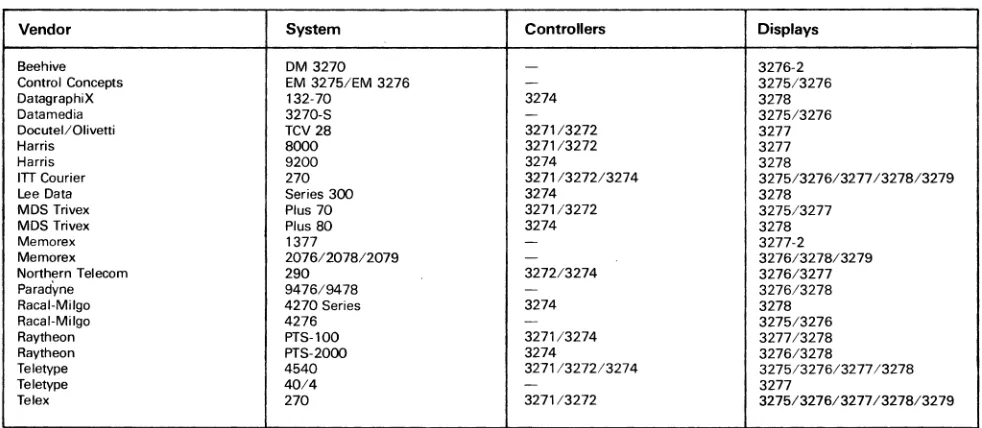
TABLE 1. IBM 3270 COMPATIBILITY
Vendor System
Beehive DM 3270
Control Concepts EM 3275/EM 3276
DatagraphiX 132-70
Datamedia 3270-S
Docutel/Olivetti TCV 28
Harris 8000
Harris 9200
ITT Courier 270
Lee Data Series 300
MDS Trivex Plus 70
MDS Trivex Plus 80
Memorex 1377
Memorex 20761207812079
Northern Telecom 290
Parad\tne 9476/9478
Racal-Milgo 4270 Series
Racal-Milgo 4276
Raytheon PTS-100
Raytheon PTS-20oo
Teletype 4540
Teletype 40/4
Telex 270
~
IBM 3270-type terminals account for approximately
one-fourth of all CRT terminals currently installed in the
United States_ Of these, about one-half are actually IBM
terminals-the rest are compatible models offered by
vendors such as Harris, ITT Courier, Lee Data, Memorex,
Teletype, Telex, Raytheon, and several others. These
vendors utilize various strategies in an attempt to capture a
share of the 3270 terminal market. The two most prevalent
of these strategies are: to offer their 3270-compatible
equipment at a price lower than what IBM is charging; and
to feature faster delivery of their equipment than IBM
(delivery time for IBM components currently is about II
months ARO). In many cases, these are the only ways a
new vendor can hope to penetrate an installation that has
traditionally used only IBM equipment. Other strategies
include offering increased price/ performance, or
enhanced ergonomic features.
A buyer who is looking to an independent vendor for
3270-compatible equipment should be aware that there are
differing degrees of compatibility among the
indepen-dents. Most major vendors offer full
plug-compatibility-that is, when you plug the equipment in, it will operate in
exactly the same way as the IBM unit it is replacing with
regards to function and capability. Not all
3270-compatible gear, however, is fully plug-3270-compatible.
Although this equipment will replace the IBM equipment
and operate on the network, not all of the features of the·
IBM unit will be available. A specific concern in this area is
the question of Bse and SNA/SDLC protocol
compatibility. The original 3270 components operated
under BSC protocol; SNA/SDLC protocol compatibility
was implemented following IBM's unveiling of SNA in
1974. Although most major vendors now offer both, there
are some independents who have yet to implement SDLC
compatibility. Moreover, even those implementing the
Controllers Displays
- 3276-2
-
3275/32763274 3278
-
3275/3276327113272 3277
3271/3272 3277
3274 3278
3271/3272/3274 3275/3276/3277/3278/3279
3274 3278
3271/3272 3275/3277
3274 3278
-
3277-2- 3276/3278/3279
327213274 3276/3277
- 3276/3278
3274 3278
-
3275/32763271/3274 327713278
3274 3276/3278
3271/3272/3274 3275/3276/3277/3278
- 3277
3271/3272 3275/3276/3277/3278/3279
basic BSC or SDLC compatibility might not observe all of
the finer points of IBM's own versions.
One trend which has seen increasing popularity in the past
few months is that of replacing 3270-type terminals with
ASCII terminals on a 3270 network. The replacement of
synchronous terminals with asynchronous units is
achieved through the use of a protocol converter (see'
report number C29-O I 0-20 I for a detailed discussion of
protocol converters). The protocol converter allows the
ASC
II
terminal to support the functional characteristics of
the 3270-type unit. The advantage to this strategy is
obvious-ASCII terminals are considerably less expensive
than their 3270 counterparts. One terminal vendor,
Beehive, has recently introduced an ASCII terminal
which, when combined with a protocol converter, is
intended to emulate the IBM 3278 display station. There is
reason to believe that other ASCII terminal vendors may
follow suit.
Table I provides a list of the major independent vendors
that offer IBM 3270-compatible equipment.
The ASCII Terminal Market
The ASCII display terminal market is the largest segment
of the two major display markets, with regard to number
of vendors, number of units marketed, and quantity sold.
This market originated as the Teletype replacement
market, with units intended to replace the highly popular
Teletype ASR 33/35 terminals. Although today not many
of the ASCII terminals purchased are actually replacing
the older Teletype units, the ASCII terminal market is still
universally referred to as the Teletype-compatible market.
t:>
APRIL 1982 © 1982 DATAPRO RESEARCH CORPORATION, DELRAN, NJ 08075 USA
[image:5.612.49.540.108.322.2]C25-01 0-1 06
Display Terminals
Alphanumeric Display Terminals-Management
Perspective and Equipment Specifications
USERS' RATINGS OF ALPHANUMERIC DISPLAY TERMINALS
No. of Weighted Av-._ .nd RMpanee eoun.
DIopI . . ~ u_ No. of 0-01 E_of I);opIoy
--
-
..
-
....
-
...
.nd Model Re-
D_
I n _- . .
--
C_
...
~ _1Ii1ly-
T_nlcol Support--
WA E G F P WA E G F P WA E G F PWA E G F P WA E G F P WA E G F P WA E G F P
ADDS-Rege ... s._ 5 lOG 3.4 2 3 o 0 3.2 2 2 1 0 3.4 2 3 0 0 32 2 2 1 0 3.2 1 4 0 0 3.0 2 1 2 0 2.8 0 3 1 0 ... ot .... 5 tt8 3.2 2 2 1 0 3.2 2 2 1 0 3.0 2 1 2 0 3.0 2 1 2 0 2.8 2 1 1 1 "8 0 0 3 1 2.8 0 3 1 0
s.-... 10 221 3.3 4 6 1 0 3.2 4 4 2 0 3.2 4 4 2 0 3.1 4 3 3 0 30 3 5 1 1 2.' 2 1 5 1 2.8 0 8 2 0
Burroughs-TD830ITOBOO 12 478 3.3 5
•
1 0 3.3 4 7 1 0 3.3 4 7 1 0 3.3 4 7 1 0 3.4 6"
1 0 3.0 3"
3 0 2.4 3 2 4 3MT 983 10 24B 3.0 3 4 3 0 3.1 2 7 1 0 2.8 1 8 3 0 3.0 3
"
1 1 3.0 2 8 2 0 2 .• 2 5 3 0 2.1 2 1 3 4 SublDlall 22 727 3.2 8 10 4 0 3.2 8 14 2 0 3.0"
13 4 0 3.1 7 12 2 1 32 8 tt 3 0 3.0 5 10 6 0 2.3"
3 7 7Datapoint, aU models 4 12 3.8 3 1 o 0 3." 2 2 o 0 3.B 3 1 0 0 3.3 2 1 1 0 3.8 3 1 0 0 .. 8 3 1 0 0 3.3 2 1 1 0
DEC vnOONT52 17 307 3.7 12
"
o 0 3.4 8 8 1 0 3.3 6 10 1 0 3.3 7 8 2 0 3.2 9 3 6 0 3.0"
7 3 1 3.0"
6 3 1Harris 8000 Series 3 324 3.3 2 0 1 0 3.3 1 2 0 0 3.0 1 1 1 0 3.3 2 0 1 0 3.7 2 1 0 0 1 1 0 0 0 2 0 0
Hazeltine, all modets 6 tt7 3." 3 3 o 0 3.0 1 4 1 0 2.7 0 4 2 0 2.8 0 6 1 0 3.3 2 4 0 0 2.7 0 4 2 0 2.0 0 1 3 1
Hew ...
·Pac:kard-2640 4
..
3.8 3 1 o 0 3.5 3 0 1 0 3.8 3 1 0 0 3.5 2 2 o 0 3.8 3 1 0 0 3 .• 3 0 1 0 3.0 1 2 1 0 2845 4 33 4.0 4 0 o 0 4.0 4 0 0 0 4.0 4 0 0 0 3.8 3 1 o 0 4.0 4 0 0 0 4.0 4 0 0 0 3.8 3 1 0 026471284812649 4 21 4.0 4 0 o 0 4.0 4 0 0 0 3." 2 2 0 0 3 .• 2 2 0 0 4.0 4 0 0 0 3.6 2 2 0 0 2.6 1 1 1 1 2621 7 62 3.7
"
2 o 0 3.S 4 3 0 0 3.7 6 2 0 0 3.6 4 3 o 0 3.7 5 2 0 0 3.3 2 4 0 0 3.3 3 3 1 0 26 . . 3 9 4.0 3 0 o 0 4.0 3 0 0 0 3.7 2 1 0 0 3.7 2 1 o 0 4.0 3 0 0 0 1 1 0 0 3.3 2 0 1 0Subtotals 22 171 3.9 1. 3 o 0 3.8 18 3 1 0 3.7 18 6 0 0 3.8 13 9 0 0 3.9 19 3 0 0 3.8 12 7 1 0 3.2 10 7 4 1
Honeo,well VIP 7100/7700 6 tt9 3.3 2 4 o 0 3.0 2 2 2 0 3.3 2 4 o 0 3.3 2 4 o 0 3.7 4 2 0 0 4.0 6 0 0 0 2.8 1 3 2 0
IBM-3276 tt 24B 3.7 8 3 o 0 3.4 4 7 0 0 3.5 6 5 0 0 3.6 7 3 1 0 3.B 7
•
0 0 3.3•
6 1 0 3.6 5 8 0 032n 20 630 3.2
•
"
1 0 3.2 4 16 0 0 3.1 5 12 3 0 3.0•
10•
0 3.1 6 9 4 0 3.0•
12•
0 3.2•
1. 1 0 3278 56 5.672 3.S 36 21 o 0 3.3 22 29"
0 3.4 2. 27 3 0 3.3 26 23 7 0 3.7 40 15 1 0 3.4 25 27 4 0 3.2 22 2B 3 3 3279 16 61. 3.9 15 1 o 0 3.5 9•
1 0 3.S 10"
1 0 3.6 12 2 2 0 .. 8 13 3 0 0 3.5 8 8 0 0 3.3 6 9 1 0 3270, others & unspecified 6 1.046 37 4 2 o 0 3.3 2•
0 0 32 1•
0 0 3.6 3 3 o 0 3.5 3 3 0 0 3.3 2 4 0 0 3." 3 3 0 0 5251 5 88 3.6 3 2 o 0 3.4 2 3 0 0 3." 3 2 0 0 3.4 2 3 o 0 3.8 3 2 0 0 3.8 4 1 0 0 3.8 4 1 0 0All others 3 87 3.3 1 2 o 0 2.7 0 2 1 0 4.0 3 0 0 0 3.0 1 1 1 0 3.3 1 2 0 0 3.0 0 3 0 0 3.0 0 3 0 0
Subtotals 117 B.38B 3.S 71
..
1 0 3.3 43 67 7 0 3.4 54 56 7 0 3.3 56 4" 16 0 3." 73 38•
0 3.3 47 81 9 0 3.3 44 66 6 3ITT Couner 21012700 22 1.146 3.6 13 8 1 0 3." 12 8 2 0 3.3 7 14 1 0 3.3 8 12 2 0 3.2 7 13 1 1 2.9 4 13 4 1 2." 2 tt 8 1
Lear
SIIIgIer-ADM lA/3A+ 6 371 3.7 4 2 0 0 3.2 1
"
0 0 3.0 1 4 1 0 2.8 0 6 1 0 3.7 5 0 1 0 0 2 0 0 3.3 2 1 1 0ADM 31/42 6 231 3.5 4 1 1 0 3." 4 1 1 0 2.8 0
•
1 0 3.0 2 2 2 0 3.3 3 2 1 0 3.0 2 0 2 0 2." 0 3 2 0Subtotals 12 602 3.6 8 3 1 0 3.3 6 6 1 0 2.9 1 9 2 0 2.9 2 7 3 0 3.6 8 2 2 0 3.0 2 2 2 0 2.9 2 4 3 0
MDS Tnvex Plus 80 (M781 4 70 2." 0 2 2 0 3.0 0 4 0 0 3.0 1 2 1 0 2.5 0 2 2 0 1.8 0
,
1 2 3.0,
2,
0 2.6,
0 3 0Memorex-13n 12 562 35 6 6 0 0 3.3 6 6 1 0 3.4 5 7 0 0 2.9 2 7 1
,
3.3 4 8 0 0 3.3 4 8 0 0 3.0 2 8 2 0 2078 S 187 3.3 2 4 0 0 3.7 4 2 0 0 33 3 2 1 0 3.2 1 5 0 0 2.8 1 3 2 0 2.8 0 6 1 0 2.8 0 6 1 0Subtotals 18 739 3.4 8 10 0 0 3.4 9 8 1 0 3.4 8 9 1 0 3.0 3 12 1 1 32 5 tt 2 0 3.2 4 13 1 0 2.9 2 13 3 0
NCR 796/7900
"
47 3.0 1 3 1 0 2.S 0 3 2 0 2.6 1 1 3 0 2.4 0 2 3 .0 2.6 0 3 2 0 2.2 1 1 1 2 2.4 0 3 1 1 Raytheon PTS-l00IPTS-2000 3 66 2.3 0 1 2 0 2.7 0 2 1 0 30 0 3 o 0 2.0 0 0 3 0 1.7 0 1 0 2 2.3 0 1 2 0 2.0 0 1 1 1 Tektronix. aU modaIs 4 66 4.0 4 0 o 0 3.6 3 0,
0 4.0 4 0 0 0 3.6 3 0 1 0 3." 2 2 0 0 3." 2 2 0 0 3.3 2 1 1 0Teletype--Model 40 6 9 4.0 6 0 0 0 3.8 6 1 0 0 3.8 5 1 0 0 3.8 6 1 0 0 3.8 5 1 0 0 3.8 5 1 0 0 3.8 5 1 0 0
All others 5 B3 3.8 4 1 0 0 3.8 4 1 0
•
3.8 4 1 0 0 3.6 4 0 1 0 3.8 4 1 0 0 3.6 4 0 1 0 3.0 2 2 0 1Subtotals tt 92 3.9 10 1 0 0 3.8 9 2 0 0 38 9 2 0 0 3.7 9 1 1 0 3.8 9 2 0 0 3.7 9 1 1 0 3.5 7 3 0 1
TeleVldeo-912/920 4 66 3.6 2 2 0 0 4.0 4 0 0 0 30 0 4 0 0 3.7 2 1 0 0 3.3 2 1 1 0 2.6 0 2 2 0 2.7 0 2 1 0 960 4 74 3.8 3 1 0 0 3.3 2 1 1 0 3.8 3 1 0 0 2.6 0 3 0 1 3.6 2 2 0 0 0 1 0 0 2.3 0 2 0 1
SU ... 8 129 3.6 5 3 0 0 3S
"
1 1 0 3.4 3 5 0 0 3.0 2 4 0 1 3.4 4 3 1 0 2.8 0 3 2 0 2." 0•
1 1le_-277 5 320 3.4 2 3 o 0 3.4 2 3 0 0 2.8 0 4 1 0 3.0 0 5 o 0 3.4 2 3 0 0 3.0
,
3,
0 2.6 0 2 2 0 278 9 347 3.3 3 6 o 0 3.4 4 5 0 0 3.2 3"
1 0 3.3 4 4 1 0 3.3 3 6 0 0 3.4 4 6 0 0 3.4 3 6 0 0SubtotalS 14 887 3.4 5 8 o 0 3.4 S 8 0 0 3.1 3 9 2 0 3.2 4 9 1 0 3.4 5 9 0 0 3.3 5 8 1 0 3.1 3 7 2 0
Texas Instrunwnts. all models 3
..
4.0 3 0 o 0 4.0 3 0 o 0 4.0 3 0 o 0 3.3 1 2 o 0 3.7 2 1 0 0 3.0 0 3 0 0 3.0 0 3 0 0 Sperry Univec. all models 7 218 3.1 4 1 1 1 34 4 2 1 0 3.3 3 3 1 0 3.3 3 3 1 0 3.0 3 2 1 1 2.9 3 2 0 2 2.3 0 4 1 2All Others 3B 806 3.3 15 17 6 0 3.2 16 17 6 0 3.2 13 18 7 0 3.1 9 23 6 0 3.2 18 10 9 1 2.7 5 19 6 6 2.7 6 17 8 4
I
GRAND TOTALS.
356 1 5 _ 3.5 200 134 20 1 3.4 167 '67 32 0 3.3 '47 174 35 0 32 137,
..
60 3 3.4,,..
128 33 8 3.1 tt7 162 47 12 3.0 92 166 60 24 LEGEND: Weighted Average twA) is based on assigning a weight of 4 to each user rating of Excellent (E), 3 to Good (G), 2 to Fair (F), and 1 to Poor (P).*Weighted Average invalid if fewer than three responses are received.
I:>
Manufacturers of ASCII terminals generally aim their
products at educational and commercial users requiring
large numbers of low-priced terminals for applications
such as order entry and time-sharing,
As was mentioned earlier in this report, price is a key factor
for success in this market. The current price war involving
the low end entries in the ASCII terminal market has made
the recent activity in this segment even greater than in the
past. Initially, only the truly "dumb" terminals (like the
original dumb unit. the Lear Siegler ADM 3A) were
available for less than $1,000. Now, features such as block
mode transmission and editing capabilities are available at
below traditional dumb terminal prices. In addition to
price cutting, vendors are attempting to make their
offerings more attractive to potential buyers by adding
enhanced features such as business graphics, split screens
or windowing, and a variety of visual attributes. ASCII
terminal vendors are also paying a lot of attention to
ergonomics.
Leaders in the ASCI I field generally provide a full range of
terminal models ranging from low end units to editing
models. The current readers include ADDS, Hazeltine,
Lear Siegler, and a relative newcomer, TeleVideo. An
active ... but somewhat separate subsection of the ASCII
terminal market consists of the Digital Equipment
Corporation (DEC) VT100 and those terminals that offer
VT100 (or VT52) emulation. The VT100 emulators differ
from the other major ASCI I terminals in that they offer
132-column display capability.
IBM entered the TTY-compatible market with the
introduction of the Model 3101 ASCII terminal in
. October, 1979. The IBM unit is priced somewhat higher
Ithan the competition. IBM offers the 310 I for purchase
1>
© 1982 DATAPRO RESEARCH CORPORATION, DELRAN, NJ 08075 USA REPRODUCTION PROHIBITED
Alphanumeric Display Terminals-Management
Perspective and Equipment Specifications
Display Terminals
=--
only, with quantity discounts available for high volume
orders. The company provides maintenance/repair service
only through IBM Service Centers, to which the customer
must mail the defective part, after removing it himself. As
of today, the 310 I still has not achieved the popularity
enjoyed by some of the older established lines of ASCII
terminals, such as the ADDS Regent Series, the Hazeltine
1400 and 1500 Series, and the Lear Siegler ADM Series.
The message from this is that in a price-sensitive market
with established suppliers, IBM cannot walk in as the new
kid on the block and pick up all of the marbles just because
it is IBM. We think that that is the sign of a mature market.
User Experience
To assess the current level of user satisfaction with display
terminals, and to determine the patterns of usage of these
terminals, Datapro conducted an extensive user survey. A
Reader Survey form was included in the January 1982
supplements to DATAPRO REPORTS ON DATA
COMMUNICATIONS and DATAPRO 70, and mailed
to all subscribers. By February 25, usable responses had
been received from 176 users with a total of 15,046
installed display stations.
Because many of the users reported on more than one
model of display, the user replies generated a total of 356
responses or individual equipment ratings and profiles.
The orientation of the users participating in the survey can
be shown by the following table:
Responses
Displays
Responses on:
Number
Percent
Number
Percent
IBM displays
117
33%
8,388
56%
Other displays
239
67
6.658
44
Total
356
15.046
Overall, the average number of displays per response was
42, while the average number of displays per responding
user was 85; these averages are somewhat misleading,
however, because of a few responses from some
exceptionally large IBM users (one user reported on a total
of 1100 installed units).
The users were asked to rate the overall performance, ease
of operation, display clarity, keyboard feel and usability,
hardware reliability, maintenance service, and technical
support for each display by assigning a rating of excellent,
good. fair, or poor. The resulting ratings for display
. models or families are summarized in the accompanying
table. Any model or category that received more than two
user responses is identified by manufacturer; models.
categories, or manufacturers receiving only one or two
responses were categorized as "other."
To put the raw counts into a form more readily grasped,
Datapro calculated a weighted average for each rating
category. Each user response was assigned a weight of one,
and the ratings were weighted on the conventional scale of
4, 3, 2, and I for excellent, good, fair, and poor,
respectively. Prospective buyers should note that the small
sample sizes for some of these models make it unwise to
draw firm conclusions from the indicated ratings. The data
is presented as an additional information source, not as the
final word on the worth of the displays represented.
The ratings assigned by the responding users can also be
combined to form this overall picture of current user
satisfaction with the IBM displays, other manufacturers'
displays, and all displays:
Weighted Averages
IBM
Other
All
displays displays displays
Overall performance
3.6
3.5
3.5
Ease of operation
3.3
3.4
3.4
Display clarity
3.4
3.3
3.3
Keyboard feel
&usability
3.3
3.2
3.2
Hardware reliability
3.6
3.3
3.4
Maintenance service
3.3
3.0
3.1
Technical support
3.3
2.8
3.0
Number of responses
117
239
356
When queried about what applications they presently used
their terminals for, most users indicated inter,active data
entry
&
inquiry and program development. The current
applications are noted in the following table:
Total
Percent
Interactive data entry
298
84o/c
&
inquiry
Program development
287
81
System console
138
39
Text editing/word
123
35
processing
Intracompany message
70
20·
traffic
Business graphics
37
10
Other
16
4
The users were also asked what special terminal features
had an influence on their buying decisions. The most
frequently mentioned features are listed in the following
table:
Detachable keyboard
Local editing
Additional pages/ memory
Green/ amber characters
Split screen
Tilt/swivel display
I
32-column display
Business graphics
Color
Total
102
93
52
47
35
29
26
23
17
Percent
29o/c
26
15
13
10
8
7
6
5
When asked who performs maintenance and repair service
on their display terminals, most users indicated the
manufacturer. The responses were as follows:
1:>
APRIL 1982 © 1982 DATAPRO RESEARCH CORPORATION, DELRAN, NJ 08075 USA
[image:7.612.306.537.222.350.2]C25-01 0-1 08 Display Terminals
Alphanumeric Display Terminals-Management
Perspective and Equipment Specifications
Maintenance'
Manufacturer
In-house
Third-party
Total
Percent
278
78%
32
9
48
13
The final question in our survey asked the users if they
would recommend the display they were using to others
with similar applications. The overwhelming majority
indicated that they would.
Yes, would recommend to
others
No, would not recommend
Total
302
,33
Display Terminal Characteristics
Percent
85%
9
The accompanying comparison charts summarize the
characteristics of 260 commercially available
alpha-numeric display terminals from 77 vendors. Nearly all of
the information was supplied by the manufacturers during
the months of February and March 1982. Their
cooperation is acknowledged and greatly appreciated.
Datapro sent repeated requests for information to
approximately 95 companies known or believed to be in
the display terminal business. The usable responses
summarized in our charts provide a comprehensive picture
of the commercial display terminals that are currently
available in the United States and Canada.
The absence of
any specific company from our charts means that the
company either failed to respond to our repeated
information requests or was unknown to us.
The chart entries and their significance are explained in the
following paragraphs.
Terminal Description
Display terminals are available in one of two basic
terminal configurations:
stand-alone and cluster.
Stand-alone units are typically those that contain all
components that support the operation of the terminal
including display, keyboard, interface, and power supply
within a single cabinet. Auxiliary units such as printers,
cassette tape drives, etc., are usually external devices.
Sometimes a stand-alone unit includes separate cabinets
for terminal control and keyboard/display sections, and it
may even include one or two separate displays. A cluster
configuration typically includes a terminal control unit
and a number of individual cable-connected keyboard/
display units, which can often be located several thousand
feet from the controller. In some cases, the vendor
provides a multiplexer that accommodates a cluster of
stand-alone terminals. The size of a cluster arrangement is
defined by the
maximum number of displays per
controller.
Terminals that are designed to be held or to be
hand-carried, are noted in the entry
transportability.
Some terminals are designed as direct replacements for
other terminals. In the alphanumeric display terminal
market, replacement terminals fall into two principal
categories: those designed to replace an IBM family
terminal are indicated as having
IBM compatibility; and
those designed to replace a terminal in the ASCII/
Teletype market are indicated as having
Teletype
compatibility.
Some vendors provide
other compatibility, and ,can
replace terminals such as those produced by Burroughs,
Digital Equipment, Honeywell, and Univac. For example,
a wide variety of vendors market terminals which are
compatible with the DEC VT100 (or VT52, the VT100's
predecessor).
Either of two types of compatibility may be offered:
transmission compatibility or "plug-to-plug"
compati-bility. Transmission compatibility requirements include
, identical protocol, code and unit code structure, timing,
asynchronous or synchronous operation, and
transmis-sion speed. Some vendors even provide identical cables,
which is a cost-effective consideration in a local cluster
environment. Most vendors with transmission-compatible
units offer additional features and functions that the
original vendor's equipment does not have, implemented
via minor changes in host software. Units with true
plug-to-plug compatibility not only have identical transmission
parameters, but also identical features and functions; no
altera tion to host software is necessary, but no
enhancements beyond the original vendor's equipment are
available. For example, although numerous vendors offer
IBM 3270 compatibility, only a few, including ITT
Courier, Memorex, Telex, and MDS Trivex, make a true
plug-for-plug replacement for the 3277/3278 display
stations.
Display Parameters
Information displayed on the screen of a CRT is generally
arranged according to an orderly format consisting of a
maximum number of printed lines per screen and
characters per line. The electronic circuitry that produces
the display image is designed to a specified set of
parameters that define the
display capacity (i.e., the
maximum number of display positions) and the
screen
arrangement (i.e., the maximum number of displayable
lines and displayable characters per line). The most
common display capacity is 1920 characters arranged in 24
lines of 80 characters. Many vendors offer 132-character
display lines, which can eliminate the need to revise or
patch software designed for standard I 32-column printers
or to maintain dual sets of programs for SO-column and
132-column output.
In most terminals, the number of characters that can be
stored by the terminal's display memory equals the
maximum screen capacity. In some terminals, however,
storage is provided for more characters than can be
displayed on the screen at one time. This additional data
I>-© 1982 DATAPRO RESEARCH CORPORATION, DELRAN, NJ 08075 USA REPRODUCTION PROHIBITED
Alphanumeric Display Terminals-Management
Perspective and Equipment Specifications
Display Terminals
~
may be stored character-by-character, by the line, or by the
"page" (a full screen of data).
Memot:r capacity defines the
total number of characters, lines, and pages that can be
stored in the terminal's display memory.
Information is displayed in a rectangular area, slightly
smaller than the total surface of the display screen. The
factors that determine the required size of the
scr.een area
are the display arrangement and the size of the displayable
characters. For example, the typical 1920-character
display utilizes a 12- or 15-inch (diagonal) screen area.
Egonomic factors are becoming increasingly important as
terminal features. One such feature gaining in popularity is
a
tilt and/or swivel screen. This feature provides for the
mounting of the display monitor onto a separate desktop
base or pedestal, aHd allows the operator to twist the
screen vertically ("tilt") and/ or horizontally ("swivel") to
the most advantageous position for viewing. The set of
total displayable symbols and the method of symbol
formation are functions of the character generator, which
accepts coded characters (typically ASCII or EBCDIC)
from the computer and keyboard and converts them to a
number of dots or strokes so that the form of the symbol or
image can be displayed. In CRTs, characters are formed
almost exclusivi:ly by the dot matrix technique. Each
character is formed within a matrix of dots, and only those
dots required to form the specific character are intensified.
For example, a dot matrix that contains 35 dots is typically
arranged 7 dots high by 5 dots wide. Characters can be
made clearer by increasing the number of dots within the
matrix. The stroke technique forms characters by drawing
short straight lines between specified points.
Character
phosphor refers to the physical coating of phosphorous on
the back side of the screen which, when illuminated,
creates the displayed characters. The type of phosphor
used defines the color of the displayed character, as well as
the persistence of the phosphor (a long-persistence
phosphor is less likely to cause image flicker problems than
a short-persistence phosphor; however, the image of a
long-persistence phosphor is more likely to smear when
lines are scrolled). Among the more common phosphors
available are P4 (white), and P3l or P39 (green). Amber
and yellow-green phosphors are also available on some
terminals.
Display arrangement, display medium, character
phosphor, and symbol formation all have a great impact
on display clarity. Test several units to decide which is
easiest on the operator's eyes.
Attention can be drawn to vital information and different
types of significant data can be visually separated by the
use of the following display features:
• Color-characters or fields can be separated by color,
which can also be used to identify conditions or types of
data. IBM's color display, the 3279, is currently
emulated by a few independent vendors.
• Underline-highlights significant information by
underlining.
• Blink-highlights significant information by causing it
to blink off and on.
• Blank (security}-sensitive information is transmitted,
but not shown on the screen.
• Bold-highlights significant information by displaying
it at a different brightness level.
• Reverse-highlights significant information by
displaying a negative image of it; e.g., when normal data
is displayed in white on a dark background, the
highlighted character or field is displayed in dark on a
white background.
• Double size-highlights significant information by
displaying it in characters which are of a larger size than
normal. Double height, double width, and/ or double
height/width characters may be supported.
Some terminals offer several of these display features.
which can be combined to produce even more effective
results. The features are programmable (usually via the
keyboard), and can be used on a character-by-character
basis. or in a designated field.
Some applications require viewing more data than can be
displayed at one time. The following features satisfy this
need:
• Scroll-this feature moves all displayed lines of data up
or down by one line as a new line is added and an
existing one removed. In some cases. the first line is,
linked with the last so that the data is rolled but not lost.
In others, data is lost as it rolls off the screen. This
feature permits the user to scan through a volume of
data to locate key information.
Many vendors now feature smooth scrolling. in which
data is rolled or scrolled smoothly up or down (much
the same as the credits at the end of a movie).
I:>
Cohar. Incorporated. is a mam40ClUrer of DEC-compatible
displays. The
company:~products include the Model 3100 (Ie/i).
a
i
TI()()/ VTlOI / VT!02-compatihle unit. and the Mode13132. a
replacement for the VT! 31 and VT!
32.
Cohar o.tlers quantity
discounts on both modeL5.
APRIL 1982 © 1982 DATAPRO RESEARCH CORPORATION. DELRAN. NJ 08075 USA
C25-01 0-11 0
Display Terminals
Alphanumeric Display Terminals-Management
Perspective and Equipment Specifications
The Esprit is
Hazeltine:~entry in the low-end ASCII terminal
market. Priced at
$695
(single quantity). the Esprit provides
enhancedfeatures such as block mode transmission and editing.
Like many other maior vendors involved in the current price war
in this market. Hazeltine utilizes off.i;hore manufacturing
facilities to reduce costs.
I> •
Paging-this
feature defines and stores two or more
discrete frames or pages of data and displays any
selected page.
Although scroll and paging features can be software
implemented in the host computer. the comparison chart
entry applies to only those terminals that implement the
feature via hardware or firmware.
Many terminals provide the scroll feature. but relatively
few provide paging. Some provide both features.
The cursor marks the position on the screen where the next
character will be read or written from memory. Cursor
. controls enable the operator to maneuver the cursor on the
screen and facilitate the input and output of data. Different
manufacturers use a variety of symbols to indicate the
cursor position on the screen, for example, an underline, a
reverse video block, or a blinking character. Some
terminals allow the operator to choose amon:g several
types of cursor symbols; the most typical feature being'
selectable blinking cursor.
Some terminals also have
addressable / readable cursors,
which enable the position of
the cursor to be written or read by the host computer under
program control.
Most businesses use printed forms for daily activities such
as billing. ordering. payroll. etc. Some CR T terminals can
duplicate the printed form on the face of the screen. and
data can be keyed into the blank spaces just as the typist
enters data into a printed form. This "fill-in-the-blanks"
approach to data entry requires a
protected format
capability. Display terminals that incorporate this feature
treat the fixed format differently from keyed data. Field
identifiers such as "name" or "salesman number" are
protected from inadvertent key entry, and data entry is
confined to the variable fields (blank spaces) following the
field identifiers.
Having completed entry into the fixed format, the
operator transmits the data to the central computer. A
feature called
partial screen transmit
promotes line
economies by transmitting only the keyed data; the fixed
format remains displayed and the "blanks" are erased for
the next entry. This feature is also useful for transmitting
only a portion of the displayed data such as a field, line, or
block.
A few vendors now offer a
split screen
and/ or
"windows"
feature on their terminals, in which the display screen can
be divided or partitioned into a number of separate
workspaces. Data in these workspaces can be manipulated
(e.g., scrolled, stored. or transmitted) independently of the'
rest of the screen.
Tabulation
capabilities allow some
terminals to automatically move the cursor to the
beginning of the next line. or to the beginning ofthe next
variable field within a line of formatted data immediately
following the entry of the character that completes the end
of the current line or field. The tab key needs to be used
only when the current line/field is to remain partially
filled.
Editing features in a display terminal can consist of any
combination of the functions listed below, although the
best terminal for editing purposes would include all of
them. Each function is performed with respect to the
current position of the cursor. The desirable editing
functions are:
• Character insert-the
capability to insert a character
into an existing line of displayed text; the remaining
characters shift to the right or"spread"to accommodate
the added character. The spreading capability may
terminate at the last character position of the line or at
the last displayable position on the screen. Data is lost
when it is spread beyond the termination point.
• Character delete-the
capability to delete a character
from an existing line of displayed text; the remaining
text closes up when the character is deleted.
• Line insert-the
capability to insert a line of text into
existing text; the text spreads to accommodate the
added line.
• Line delete-the
capability to delete a line of text from
existing text; the remaining text closes up when the line
is deleted.
• Erase-the
capability to erase a character, line of text.
message. field, or the complete screen. Most terminals
include character erase and some form of display erase,
which may erase the entire contents of the display, just
that portion following the cursor location, or a
combination of both functions. Line erase is optional in
many terminals.
1>
© 1982 DATAPRO RESEARCH CORPORATION, DELRAN, NJ 08075 USA REPRODUCTION PROHIBITED
Alphanumeric Display Terminals-Management
Perspective and Equipment Specifications
Display Terminals
• Keyboard Parameters
Keyboard style defines the general arrangement of keys;
e.g., typewriter- or data entry (keypunch)-style. Data
entry keyboards have a numeric keypad embedded in the
alphabetic part of the keyboard which is accessed via
numeric shift. The character/code set refers to the set of
symbols that appear on the keytops and, in many cases, to
the actual character codes generated for each key
depression, such as ASCII, EBCDIC, APL, etc. Some
terminals are available with more than one keyboard style
to satisfy particular user needs.
Keyboards that can either fit flush against the display or be
locatep some distance away via cable connection are.
referred to as detachable keyboards. This feature provides
increased configuration flexibility and operator
conven-Ience.
Some terminals are available with program function keys.
These are special keys whose character codes are
interpreted by the user's program. A function key is used to
reduce the number of required input .keystrokes to save
time and reduce the number of input errors. Depressing
one key could instruct the system to "sell one seat" or "call
Chart
A,"
for example.
A numeric keypad is a special keyboard feature that
includes a set or block of 10 numeric keys, usually located
to the right of the main keygroup. These numeric keys are
arranged in an adding-machine format and are
particularly useful for applications that require a high
volume of numeric entries or arithmetic calculations.
Ancillary Devices
External 1/
a
devices can add considerable flexibility to the
applications possibilities for display terminals. Many
vendors provide serial printers or line printers for use with
their terminal families.
. Composite video output allows the terminal to drive an
auxiliary monitor. This capability is useful in applications
such as computer-aided instruction, where there is a need
to display the screen image to a group of people.
Other devices supplied and supported by the terminal
vendor, such
i!-S
diskette drives, cassette tape drives, light
pens, magnetic stripe (lD card) readers, bar code readers,
etc., are also listed. Even if they supply no auxiliary devices
themselves, most vendors supply a port through which
another vendor's printer or other device may be attached
t6 the display.
Transmission Parameters
Nearly every display terminal contains a communications
interface that enables communications between the
terminal and the central computer site. Mode and
technique define the operating mode and the method in
which data is transmitted. There are two operating modes:
At
$995.
General Terminal:\' SW/O display is the lowest priced
DEC VT100/ VT52 emulator current(J' on the market. The
compact display cabinetfeatures a 12-inch (diagonal) screen with
a 24-line by 80-character capacity. The typewriter-style keyboard
is detachable.
half duplex (transmission both directions, but not
simultaneously), and full duplex (simultaneous
transmis-sion in both directions).
Data is transmitted synchronously or asynchronously.
Asynchronous transmission is characterized by the
transmission of data in irregular spurts, where the duration
of time can vary between successive transmitted
characters; the transmission from an unbuffered
teletypewriter is a good example. Synchronous
transmis-sion implies the transmistransmis-sion of data in a steady stream.
The time interval between successive characters is always
precisely the same. The communications interface either
provides clocking or accepts external clocking signals from
the data set.
Communications protocol refers to the type of line
discipline (control code sequence and control characters)
that the terminal employs. The three most commonly used
protocols are ASCII, IBM's Binary Synchronous
Communications (BSC) technique, and IBM's
Syn-chronous Data Line Control (SDLC) line discipline. Other
large mainframe vendors such as Burroughs, Honeywell,
and Digital Equipment Corporation (DEC) have
produced their own communications protocols.
The transmission code refers to the bit pattern of the
transmitted characters. Two codes are prominent:
EBCDIC and ASCII. The latter has been accepted as an
industry and government standard, and is now the most·
commonly used code by display terminals. EBCDIC is
most commonly used with IBM equipment and its
replacements.
The CRT terminal is a high-speed device that is usually
capable of transmitting and receiving several thousand
1:>
APRIL 1982 © 1982 DATAPRO RESEARCH CORPORATION, DELRAN, NJ 08075 USA