January 22, 2002
SRC
Research
Report
177
The Vesta Software Configuration
Management System
Allan Heydon
Roy Levin
Timothy Mann
Yuan Yu
Systems Research Center 130 Lytton Avenue
Palo Alto, California 94301
Compaq Systems Research Center
SRC’s charter is to advance the state of the art in computer systems by doing basic and applied research in support of our company’s business objectives. Our interests and projects span scalable systems (including hardware, networking, distributed systems, and programming-language technology), the Internet (including the Web, e-commerce, and information retrieval), and human/computer interaction (includ-ing user-interface technology, computer-based appliances, and mobile comput(includ-ing). SRC was established in 1984 by Digital Equipment Corporation.
We test the value of our ideas by building hardware and software prototypes and assessing their utility in realistic settings. Interesting systems are too complex to be evaluated solely in the abstract; practical use enables us to investigate their properties in depth. This experience is useful in the short term in refining our designs and invaluable in the long term in advancing our knowledge. Most of the major advances in information systems have come through this approach, including personal computing, distributed systems, and the Internet.
We also perform complementary work of a more mathematical character. Some of that lies in established fields of theoretical computer science, such as the analysis of algorithms, computer-aided geometric design, security and cryptography, and formal specification and verification. Other work explores new ground motivated by problems that arise in our systems research.
The Vesta Software Configuration
Management System
Allan Heydon, Roy Levin, Timothy Mann, and Yuan Yu
Allan Heydon, Roy Levin, and Timothy Mann are no longer with Compaq. They can be reached by electronic mail at the [email protected],
[email protected], [email protected].
The Vesta project’s Web site is athttp://www.vestasys.org/.
c Compaq Computer Corporation 2002
Abstract
Contents
1 Introduction 1
2 Related Work 5
2.1 RCS . . . 5
2.2 CVS . . . 6
2.3 Make . . . 7
2.4 DSEE . . . 9
2.5 ClearCASE . . . 10
2.6 Vesta-1 . . . 11
2.7 Other Systems . . . 12
3 System Overview 14 3.1 System Components . . . 14
3.1.1 Source Control Components . . . 15
3.1.2 Build Components . . . 17
3.1.3 Storage Components . . . 20
3.1.4 Models and Modularity . . . 21
3.2 Foundations . . . 22
3.3 Design Targets . . . 23
4 Repository 25 4.1 The User’s View . . . 25
4.1.1 Source Namespace . . . 26
4.1.2 Versioning . . . 27
4.1.3 Naming Convention . . . 28
4.1.4 Development Cycle Tools . . . 30
4.1.5 Mutable Files and Directories . . . 35
4.1.6 Mutable Attributes . . . 36
4.2 The Evaluator’s View . . . 41
4.2.1 Derived Files and Shortids . . . 41
4.2.2 Evaluator Directories and Volatile Directories . . . 43
4.2.3 Fingerprints . . . 44
4.3 The Implementor’s View . . . 46
4.3.1 Shortids and Files . . . 46
4.3.2 Directories . . . 47
4.3.3 Longids . . . 49
4.3.4 Copy on Write . . . 51
4.3.5 NFS Interface . . . 52
4.3.6 RPC Interfaces . . . 53
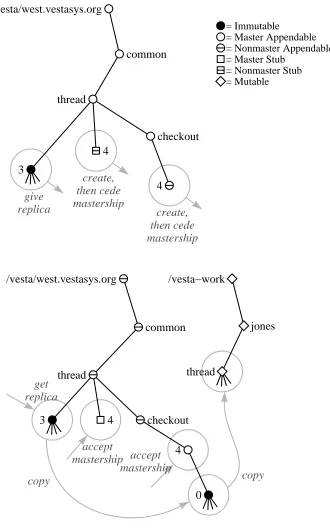
4.4 Replication . . . 53
4.4.1 Global Namespace . . . 54
4.4.2 Mastership . . . 55
4.4.3 Replication Example . . . 56
4.4.4 Agreement . . . 57
4.4.5 Agreement-Preserving Primitives . . . 59
4.4.6 Propagating Attributes . . . 62
4.4.7 Replication Access Control . . . 63
4.4.8 The Replicator . . . 63
4.4.9 Cross-Repository Checkout . . . 64
5 System Modeling Language 68 5.1 Motivation . . . 69
5.2 Language Highlights . . . 70
5.2.1 The Environment Parameter . . . 72
5.2.2 Bindings . . . 72
5.2.3 Tool Encapsulation . . . 75
5.2.4 Closures . . . 76
5.3 Model Organization . . . 76
5.3.1 Properties of Models . . . 77
5.3.2 Requirements on Model Organization . . . 78
5.3.3 Model Hierarchies . . . 79
5.3.4 Imports . . . 81
5.3.5 Control Panel Models . . . 82
5.4 The Standard Construction Environment . . . 83
5.4.1 Components of the Standard Environment . . . 84
5.4.2 Building Library Models . . . 84
5.4.3 Building Application Models . . . 86
5.4.5 Handling Large Scale Software . . . 90
6 Function Cache 91 6.1 Dynamic, Fine-Grained Dependencies . . . 92
6.2 The Caching Problem . . . 93
6.3 Interface . . . 98
6.4 System Requirements . . . 99
6.5 Implementation . . . 101
7 Evaluator 106 7.1 Overview . . . 106
7.2 Representing Dependencies . . . 108
7.3 Caching External Tool Invocations . . . 109
7.4 Caching User-Defined Function Evaluations . . . 111
7.4.1 Computing Primary and Secondary Cache Keys . . . 112
7.4.2 Relation to Caching . . . 113
7.4.3 Dependency Types . . . 114
7.4.4 Dependency Calculation Rules . . . 115
7.4.5 Example . . . 117
7.4.6 Correctness . . . 118
7.5 Caching Model Evaluations and Model Values . . . 119
7.5.1 Model Evaluations . . . 119
7.5.2 Model Values . . . 121
7.6 Example Evaluation Call Graphs . . . 122
7.6.1 Scratch Build of the Standard Environment . . . 122
7.6.2 Scratch Build of the Vesta Umbrella Library . . . 122
7.6.3 Scratch and Incremental Builds of the Evaluator . . . 125
7.7 Error Handling . . . 127
8 Weeder 129 8.1 Motivation . . . 129
8.2 Weeding Instructions . . . 131
8.3 Implementation . . . 131
9 Performance 135 9.1 Hardware Configuration . . . 136
9.2 Overall System Performance . . . 136
9.2.1 Performance Comparison with Make . . . 137
9.2.2 Performance Breakdown . . . 139
9.2.4 Resource Usage . . . 142
9.3 Repository Performance . . . 144
9.3.1 Speed of File Operations . . . 145
9.3.2 Disk and Memory Consumption . . . 148
9.3.3 Speed of Repository Tools . . . 151
9.3.4 Speed of Cross-Repository Tools . . . 152
9.3.5 Speed of the Replicator . . . 154
9.4 Function Cache Performance . . . 155
9.4.1 Server Performance . . . 155
9.4.2 Stable Cache Attributes . . . 156
9.4.3 Resource Usage . . . 157
9.4.4 Scalability . . . 158
9.5 Weeder Performance . . . 159
9.6 Interprocess Communication . . . 160
10 Conclusions 161 A The Vesta System Description Language 164 A.1 Introduction . . . 164
A.2 Lexical Conventions . . . 165
A.2.1 Meta-notation . . . 165
A.2.2 Terminals . . . 166
A.3 Semantics . . . 166
A.3.1 Value Space . . . 167
A.3.2 Type Declarations . . . 168
A.3.3 Evaluation Rules . . . 168
A.3.3.1 Expr . . . 170
A.3.3.2 Literal . . . 171
A.3.3.3 Id . . . 171
A.3.3.4 List . . . 171
A.3.3.5 Binding . . . 174
A.3.3.6 Select . . . 176
A.3.3.7 Block . . . 177
A.3.3.8 Stmt . . . 177
A.3.3.9 Assign . . . 178
A.3.3.10 Iterate . . . 178
A.3.3.11 FuncDef . . . 179
A.3.3.12 FuncCall . . . 182
A.3.3.13 Model . . . 183
A.3.3.15 Imports . . . 188
A.3.3.16 Filename Interpretation . . . 192
A.3.4 Primitives . . . 193
A.3.4.1 Functions on Type t bool . . . 193
A.3.4.2 Functions on Type t int . . . 194
A.3.4.3 Functions on Type t text . . . 195
A.3.4.4 Functions on Type t list . . . 197
A.3.4.5 Functions on Type t binding . . . 199
A.3.4.6 Special Purpose Functions . . . 202
A.3.4.7 Type Manipulation Functions . . . 203
A.3.4.8 Tool Invocation Function . . . 205
A.3.4.9 Diagnostic Functions . . . 210
A.4 Concrete Syntax . . . 211
A.4.1 Grammar . . . 211
A.4.2 Ambiguity Resolution . . . 214
A.4.3 Tokens . . . 214
Chapter 1
Introduction
This report describes Vesta [25, 26, 35], a system that addresses two core problems in developing large software projects: versioning and building.
Versioning is a significant problem for large-scale software systems because software evolves and changes over time. Serious disparities often exist between the source code used to produce the last shipped version of a software product and the current sources under development, yet bugs need to be fixed in both. Many developers may be working on the current sources at the same time, yet each needs to test his changes in isolation from changes made by others. Thus a powerful versioning system is essential: developers must be able to create, name, track, and control many versions of the sources.
Building is also a significant problem. Without some form of automated sup-port, the task of compiling or otherwise processing source files and combining them into a finished system would be time-consuming, error-prone, and likely to produce inconsistent results. As a software system grows, this task becomes increasingly difficult. No existing automated build system is reliable, efficient, easy-to-use, and general enough to handle a multi-million line software project satisfactorily.
Versioning and building are two parts of a larger problem area that is often called software configuration management (SCM). Considered broadly, SCM is sometimes taken to include such areas as software life-cycle management, process management, and the specific tools used to develop and evolve software compo-nents. We take the view that these aspects of SCM, although important to the overall software development process, are secondary to the core issues of version-ing and buildversion-ing. We have therefore focused the Vesta project on solvversion-ing the core problems, constructing a solid base upon which we believe solutions to the other problems can be built.
version management and source control. Building breaks down into system mod-eling and model evaluation. We now define these terms.
Version Management. Version management is the process of assigning names to a series of related source files and supporting retrieval of those files by name. Version management can also apply to derived files (files created mechanically by the build system). Vesta’s version management system, however, deals only with sources; derived files (or deriveds for short) are managed entirely by the build system.
Source Control. Source control is the process of controlling or regulating the pro-duction of new versions of source files. Operations commonly associated with source control include checkout and checkin, which respectively reserve a new version name (typically a number) and supply the data for a previously reserved version. Source control may be coupled with concurrency control as well, so that checking out a particular version limits the ability of other users to check out re-lated versions.
System Modeling. A system model names the software components that are to be combined to produce larger components or entire systems, names the tools that are to be used to combine them, and specifies how the tools are to be applied.
Configuration description is an equivalent term.
Model Evaluation. A system model can be viewed either as a static description of a system’s configuration, or as an executable program that describes how to build the system. Model evaluation means taking the second view: running a builder or
evaluator against a model, in order to construct a complete system by processing
and combining its components according to the model’s instructions.
The SCM problem becomes more difficult as the size of the software under development grows, as the number of developers using the SCM system increases, as the number of geographically distributed development sites grows, and as more releases are produced. To handle large-scale, developer, site, multi-release software development, we believe an SCM system must guarantee that builds are repeatable, incremental, and consistent. Existing SCM systems often fail to provide these properties.
Repeatability. In an environment where multiple versions are being developed in parallel, the ability to exactly repeat a previous build is invaluable. For example, if a customer reports a bug in an older version of a product, it is important to be able to quickly recreate the faulty executable, debug it, and develop a modified version that fixes the bug.
their build results are dependent on some aspect of the building environment that the system does not control. Hence, the all too common “it works on my machine” syndrome. The first vital step to achieving repeatability is to store source files and build tools immutably and immortally, so that they are available when needed. The second is to ensure that system models are complete, recording precisely which versions of which sources went into a build, which versions of tools (such as the compiler) were used, which command-line switches were supplied to those tools, and all other relevant aspects of the building environment.
Incrementality. It is crucial for performance that the builder be incremental, reusing the results of previous builds wherever possible. Without reliable incre-mental building, a development organization is forced to perform some (if not all) of its builds from scratch. The slow turnaround time of such scratch builds in-creases the time required for development and testing. Incremental building, on the other hand, allows many developers to efficiently edit, build, debug, and test different parts of the source base in parallel. Even large integration builds that com-bine work from many developers can be accelerated by incremental building—any components that have already been built, whether in the last integration build or in isolation by individual developers, are candidates for reuse.
Good performance in the incremental builder itself is also important. As soft-ware systems grow, even incremental building can be too slow if the running time of the builder (exclusive of the compilers and other tools it invokes) depends on the total size of the system to be built rather than the size of the change. This problem can easily arise; for example, a simple incremental builder might work by check-ing each individual tool invocation in the build to see whether it must be redone. If these checks have significant cost, such a builder will scale poorly.
Consistency. A build is consistent if every derived file it incorporates is up to date relative to the sources from which it was produced. One way to achieve con-sistency is to perform every build from scratch. The potential for inconcon-sistency arises, however, if builds are done incrementally. In particular, if some derived file used in a build is out of date with respect to a source file, to another derived file, or to any aspect of the build environment on which it depends, the build will be inconsistent and hence, unsound. An inconsistently built program may fail to link or may exhibit mysterious bugs that are not evident in the source code.
An incremental build can be made consistent by recording every dependency of every derived file on the environment in which it was built. This includes depen-dencies on source files, other derived files, environment variables, the tools used in the build, and the building instructions themselves. Then, if any element on which a derived file depends has changed, the need to rebuild it can be detected.
large software, is easy to use, and produces repeatable, incremental, and con-sistent builds. Although we can directly demonstrate the claims of repeatability,
incrementality, and consistency, our arguments about scale and ease of use are in-direct. To support the latter points, we describe the design decisions we made to ensure that the system will scale well and be easy to use, and we cite our expe-rience with the Vesta-1 and Vesta-2 prototypes, both of which saw serious use. We also present performance measurements of our current system on small and medium-sized builds, and extrapolate from those experiments.
The rest of this report is organized as follows. First, we describe some widely used SCM systems and their shortcomings. Next, we give an overview of the Vesta system, stressing the technical features that guarantee repeatable, incremental, and consistent builds. We continue by describing the five major components of our implementation in detail: the repository, the system modeling language, the func-tion cache, the evaluator, and the weeder. We then discuss the performance of our Vesta-2 prototype, comparing it to traditional SCM tools. We conclude by recapit-ulating the strengths and weaknesses of the Vesta approach. An appendix presents the detailed syntax and semantics of the Vesta system modeling language.
The majority of this report was written more than four years before its eventual publication. We have updated it to reflect subsequent developments, but in some places the four year delay really shows, most notably in the performance chapter.
Chapter 2
Related Work
Most software configuration management systems in use today are a collection of loosely integrated tools. These tools were initially developed with small-scale systems in mind, so problems arise when they are applied to larger systems. As a result, development organizations tend to build upon and modify the core tools to suit their own needs. But because the core tools were never designed to scale well, because they were not designed in an integrated way, and most importantly, because there are serious flaws in their approach to the SCM problem, these cus-tomized solutions still have problems. Since these tools are so widely used, it is worth considering some of them in more detail.
Perhaps the most common SCM tools in use today are RCS (the Revision Con-trol System) [47, 48], CVS (the Concurrent Versions System) [22], and Make [17]. They are often used together, with RCS or CVS handling version management and source control, and Make handling system modeling and building. Later in this chapter we also discuss the integrated systems DSEE, ClearCASE, and Vesta’s predecessor Vesta-1. We conclude the chapter with a brief survey of ideas from other systems.
2.1
RCS
RCS is a tool for storing multiple versions of individual source files. A file’s ver-sion history can branch into an arbitrarily complex tree. RCS provides locking to enforce source control, and includes tools for merging changes made by different developers.
particular version cannot be accessed directly, but must be extracted into a separate file first. In a modern computing system, the benefits of storing multiple versions of a source file compactly are slight, since the disk requirements of most development environments are dominated by the space consumed by derived files. Moreover, the price of disk space is dropping exponentially, while the programmers who create source files are not typing any faster.
In place of RCS, some organizations use SCCS (the Source Code Control Sys-tem) [43], an older but essentially similar system.
2.2
CVS
One disadvantage of both RCS and SCCS is that source files are versioned indi-vidually. Although RCS provides mechanisms for tagging a group of versioned files, those mechanisms are manual and error-prone. CVS attempts to remedy this problem. CVS is a front-end to RCS that extends the notion of version control from individual files to arbitrary directory trees called modules. In CVS, the unit of checkout is an entire module. Hence, it is easier to work on a group of related files with CVS. A drawback is that whenever a user checks out a module for the first time, all the files are copied, which can be slow.
There is another important difference between CVS and the other systems: CVS does not use locking to enforce source control. Instead, it uses an optimistic concurrency control model in which each developer is free to modify (a copy of) any source in the central repository at any time. CVS includes a facility for me-chanically merging changes made by other developers into one’s own source tree. Developers typically apply this facility just before checking in their own changes, without giving much thought to whether the two sets of changes are compatible. The assumption is that if the changes do not both affect the same region of the same file, there is no problem. Changes in the same region are reported as conflicts, and the developer is required to fix them before checking in. But if two developers make semantically conflicting edits to different files, or even to distinct portions of the same file, such conflicting changes are not reported. Despite these dangers, some people prefer the CVS approach to concurrency control.
A problem with the CVS implementation is that operations on the CVS repos-itory are not atomic: if user A is checking in a module while user B is checking it out, B may get some but not all of A’s changes. Hence, there are time windows in which users can see inconsistent versions of the same CVS module.1
1This problem is documented as existing in the current release of CVS at this writing, version
2.3
Make
Make is a widely used system modeling and building tool. Make is driven by
makefiles, which specify the dependencies between the components of a system
and provide instructions for building them. When it is run, Make examines the dependencies and rebuilds any components that are out of date. People like Make because the makefile syntax is simple (if a little cryptic), the tool is fairly easy to use, and it can be adapted to other tasks besides building software.
The biggest problems with Make are that (1) it does not maintain dependencies automatically, and (2) many dependencies are simply inexpressible or too costly to express in practice [18]. Because the dependency relation is complicated and changes frequently over time, it is easy to specify too few or too many depen-dencies. Specifying too many dependencies can lead to unnecessary work being done during a build, while specifying too few dependencies can lead to inconsistent builds.
To alleviate the first problem, tools like makedepend [12] have been developed to compute dependencies automatically. But makedepend suffers from at least two deficiencies. First, it detects only certain kinds of dependencies, namely, depen-dencies between C/C++ source files and any files directly or indirectly included by them. Second, there is no mechanism to run makedepend automatically when dependencies change. Since makedepend can take a substantial amount of time to run, developers tend not to use it as often as necessary. Failure to do so can result in inconsistent builds.
There are no solutions to the problem that some dependencies are impossible or too costly to express in a makefile. Even if makedepend is used religiously, make-files rarely if ever capture all the dependencies on the environment. For example, every derived file produced by a makefile depends on the building instructions in the makefile itself, but developers typically omit this dependency, because includ-ing it would force every derived file to be rebuilt any time the makefile changed. They must thus resort to manually invalidating or deleting those derived files that are affected by such makefile changes, an error-prone process. Other dependen-cies that are cumbersome or impossible to specify in Make include dependendependen-cies on the particular versions of tools (compilers and linkers) used, on command-line switches, and on environment variables.
of every source and derived file comprising a system. Although some of these timestamps may be cached by the file system, they often require network round-trips to file servers and/or disk reads. Thus, Make’s dependency checking can be an extremely time-consuming process for multi-million line software systems. Ironically, the Make approach requires all of those dependency checks even if the entire system to be built is up to date!
A big problem with Make is that it is not integrated with any of the version management tools described above. The lack of integration manifests itself in two important respects. The first and most obvious problem is that the sources to be built must be explicitly checked out before they can be built. Some variants of Make have been hacked to do RCS checkouts on missing source files, but such support is limited. The second problem is that explicit source versions are not specified in Makefiles. Put another way, Make provides no configuration manage-ment support: it does not give developers a way to specify which source versions go together. It is the developer’s responsibility to check out the correct versions of all components before performing a build, a laborious and error-prone process if one is not building the latest version.
Another problem with Make is that it does not lend itself to hierarchical de-scriptions. It is possible to get Make to build a hierarchically arranged collection of software components by invoking itself recursively, but there are some problems with doing so. The main impediments to structuring Makefiles recursively are that all subcomponents must be checked out before building and that there are perfor-mance costs associated with invoking Make recursively. Specifically, the recursion always has to be done in full—there is no way for Make to determine that a particu-lar recursive invocation can be skipped, except by copying all its dependencies into the parent Makefile, which would defeat the purpose of the recursive structuring. The larger the scale of the software being built, the worse these problems become. Make’s reliance on last-modified times can lead to inconsistent builds in several ways. One instance of this problem occurs when building an older version of a system. When the old source versions are checked out, they may have timestamps that precede the timestamps of the derived files from the most recent build. Hence, Make will conclude that the derived files are up to date. The developer’s only safe recourse is to force a scratch build by deleting all of the derived files.
lan-guage. Nmake includes an improved timestamp checking algorithm that fails only when an erroneous system clock gives two different versions of a file the same timestamp, and it caches timestamps and other state to speed up its dependency analysis somewhat.
2.4
DSEE
The DOMAIN Software Engineering Environment (DSEE) effectively addressed many of the problems with Make and standard version management systems [31, 30].
For source control, DSEE used a custom file system that allowed individual versions of source files to be named directly; no separate checkout step was re-quired. However, source files were not usually referenced using explicit version numbers. Instead, files were named without version numbers, and the user’s cur-rently selected configuration thread would bind a file name to a particular version of the file in the file system. A configuration thread was a list of rules for mak-ing such associations. For example, a configuration thread could specify that the checked-out version of a file would be used if one existed, or that the latest version on the main branch would be used otherwise. Hence, the meaning of a name could change over time. In particular, an action taken by one developer could change the meaning of a name used by another developer, a dangerous situation. When many developers are working on a system in parallel, any one of them could “break the build”, thereby interrupting everyone else’s work.
For building, DSEE read system models that enumerated the sources to be built, their dependencies (e.g., header files), and the build rules for constructing the soft-ware. DSEE provided automatic derived file management and the capability for the derived files produced by one build to be reused in another. Unfortunately, the DSEE papers do not describe the system modeling language in any detail, nor do they discuss either the consistency guarantees or the performance characteristics of building with derived reuse.
modi-fied, a technical writer would be informed of the need to update the documentation.
2.5
ClearCASE
In the early 1990s, the DSEE developers started a company to build ClearCASE [4], a commercial SCM system based on the DSEE philosophy and now sold by Rational Software Corporation.
ClearCASE’s source control mechanism is quite similar to DSEE’s. In Clear-CASE, the configuration threads are called views, but the idea is exactly the same: rules are used to map unversioned file names to particular source versions. Clear-CASE views are implemented by a custom multiversioned file system that plugs into the operating system’s file system switch. As in DSEE, looking up a file in a ClearCASE view requires some form of database access, so an extra step is re-quired on each file access.
ClearCASE differs from DSEE in two important respects. First, ClearCASE is more portable. It runs on both Windows and Unix systems. Second, ClearCASE is Make-based. That is, ClearCASE system models retain the syntax and semantics of Make. However, ClearCASE includes an alternative builder called ClearMake that corrects many of Make’s problems. In particular, ClearMake includes a mechanism that, during a build, automatically records the file dependencies and results of each external tool invocation (e.g., compilers and linkers). These cached dependencies and results are then used during subsequent builds to bypass tool invocations if the specified files are unchanged. This produces more reliable incremental builds than standard Make, since it does not depend for correctness on dependency lists created by a user. However, build-order dependencies and dependencies on files outside of ClearCASE’s control must still be listed explicitly.
Although the test for stale dependencies has been automated, it is no faster than with standard Make. Only invocations of external tools are cached, so as with Make, ClearMake builds programs upwards from the leaves, rather than down-wards from the root. As noted above in the discussion on Make, this approach has serious performance problems in building large systems.2
One advantage provided by ClearMake over standard Make is that derived files are managed by the system, and can be shared. Hence, developers can benefit from each other’s builds. However, heuristics are used to select the candidate derived files for sharing, so the exact cases in which such sharing is possible are not clear. It is possible for the heuristics to fail to select a valid candidate for sharing, in which case an unnecessary tool invocation will occur. In Vesta, these events are
2In Vesta parlance, the ClearMake strategy is analogous to caching only run toolcalls. We
termed false cache misses, and they are quite rare. Worse, ClearMake’s dependency detection is incomplete, so it can sometimes produce inconsistent builds. In Vesta, dependency detection is automatic and complete, and inconsistent builds do not occur.
The ClearCASE MultiSite product supports replication of ClearCASE source repositories across multiple, geographically distributed sites [3]. Vesta’s approach to replication (Section 4.4) differs sharply from that of ClearCASE. In ClearCASE, the choice of what to replicate is made at a coarse grain—an entire Versioned Ob-ject Base, of which there are typically only one or a few per site. In Vesta, one can choose what to replicate down to the level of individual versions of software packages, if desired. ClearCASE replicas exhibit eventual consistency; that is, an update algorithm is used that would eventually make the replicas identical if they all were to stop changing for sufficiently long, but there are no clear guar-antees on what differences can exist between replicas when changes have been made recently, and an unchanging backup copy of old versions is not consistent with current replicas in any useful sense. Vesta defines a simple, flexible notion of consistency for its replicas that takes advantage of the fact that sources are im-mutable once they have been added to the repository. ClearCASE’s replica update algorithm is operation-based and requires knowledge of the full set of replicas; that is, each ClearCase replica must keep a history of recent operations that have changed it and keep track of which changes have not yet been propagated to each other replica. Vesta’s algorithm is state-based and works when the set of replicas is unknown and changing; the replication tool simply compares the states of two replicas, copying any data from the first that is missing and desired in the second. The ClearCASE approach has some advantages; in particular, fewer administrative decisions are required as to what to replicate, and the operation-based approach to updates should scale better when replicas share a great deal of data but very little is changing. However, the Vesta approach is much simpler, provides a clearly defined level of consistency, supports usage patterns where the replicas are more loosely coupled, and has performed well in our experience.
2.6
Vesta-1
The Vesta-2 system described in this report is a follow-on to the earlier Vesta-1 work [11, 13, 24, 32]. Both Vesta-1 and Vesta-2 were based on the idea of building from immutable source files using complete build descriptions. As a result, Vesta-1 shared Vesta-2’s benefits of producing repeatable, incremental, and consistent builds of large-scale software.
group of 25 programmers. It was used to build a sophisticated experimental soft-ware environment, which included a custom operating system, a file server, a novel compiling system, an experimental multi-threaded window system, a number of mathematical, graphical, and symbol-manipulation libraries, and a spectrum of ap-plications, including a text editor, a graphical editor, ray-tracing software, an algo-rithm animation system, some mathematical tools, and Vesta-1 itself. In aggregate, this code base comprised 1.4 million source lines. Most of the components were built with the experimental compiling system (which was continually evolving), and were targeted for two different platforms: a VAX multiprocessor running our in-house operating system, and a MIPS uniprocessor running Unix. In short, this workload provided a serious test of the Vesta approach on a scale comparable to many real-world development projects.
Although Vesta-1 demonstrated the promise of the Vesta approach, like most experimental prototypes it suffered from several design and implementation flaws. Vesta-2 was designed and implemented to address these problems. In particular, Vesta-2’s caching is more comprehensive than Vesta-1’s, its system modeling lan-guage is simpler, its performance is better, its repository is more general, and its implementation is more portable.
Throughout this report, the name Vesta refers to Vesta-2. Where a distinction with Vesta-1 is required, the names Vesta-1 and Vesta-2 are used explicitly.
2.7
Other Systems
We have chosen to discuss only a few software configuration management tools and systems in this chapter, but numerous others are described in the research literature, available commercially, or available as open source [2, 5, 8, 14, 33, 34, 37, 41, 46, 49, 50]. Many of these systems do their version management and source control using paradigms very similar to that of RCS or CVS, and a great many handle system modeling and building using versions of Make with various improvements. Thus, although RCS, CVS, and Make are now very old tools, they are still all too representative of the state of the industry. Of course, the commercial systems often have sophisticated features for bug tracking, workflow management, high-level project dependencies, and graphical user interfaces that go beyond the scope of what we have attempted in Vesta, while the research and open source systems explore a wide variety of ideas.
Chapter 3
System Overview
In this chapter, we describe Vesta’s main components, the foundations of the Vesta approach, and the system’s design parameters.
3.1
System Components
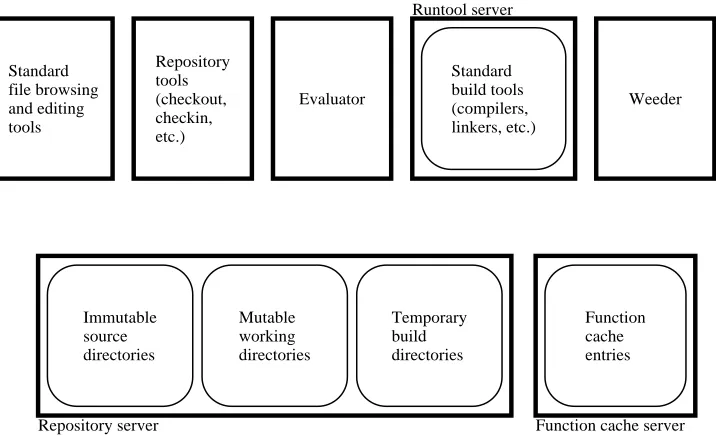
Figure 3.1 shows the major components of the Vesta implementation. In the figure, components that are highly visible to the ordinary user appear toward the left; those that are mostly hidden within the implementation or visible only to administrators appear toward the right. The components in the bottom row are shared servers; at each Vesta installation, or site, there is exactly one instance of each. In contrast, the components in the top row can run on any user machine.
We now give a brief overview of each component, then describe in a bit more detail how the components interact.
The repository server (lower left) is responsible for long-term data storage in files and directories. Versioned, immutable sources1are stored in immutable source
directories. Developers use mutable working directories while editing sources to
create new source versions. Vesta’s build process uses temporary build directories while running tools like compilers and linkers to create new derived files; these directories are not directly visible to users. The immutable source directories and the mutable working directories are typically mounted as/vestaand /vesta-work, respectively.
Standard file browsing and editing tools are not a part of Vesta proper, but
we include them in the diagram to stress that developers can use all their familiar
1By source, we mean any file stored in the Vesta repository that is not derived mechanically by
Standard file browsing and editing tools
Repository tools (checkout, checkin, etc.)
Evaluator
Standard build tools (compilers, linkers, etc.)
Weeder
Immutable source directories
Mutable working directories
Temporary build directories
Function cache entries
Repository server Function cache server
[image:27.612.103.461.130.349.2]Runtool server
Figure 3.1:The major components of the Vesta implementation.
text browsing, comparing, editing, and processing tools on files in the repository. Developers invoke the repository tools to create new source versions or to do other operations on the repository that do not fit directly into the standard file system paradigm.
The evaluator is Vesta’s builder; it evaluates system models written in Vesta’s system description language to construct complete software systems from their components. The evaluator makes use of the runtool server to run standard build tools like compilers and linkers when needed; it makes use of the function cache
server to store intermediate and final results of each build for later reuse.
Finally, the weeder is a garbage collector for long-term storage; it triggers the deletion of cache entries and derived files when an administrator declares they are no longer needed.
3.1.1 Source Control Components
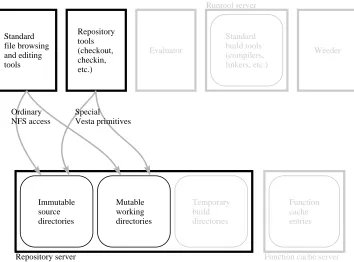
Figure 3.2 highlights Vesta’s source control components and shows how they in-teract. Chapter 4 describes these components in detail.
dis-Standard file browsing and editing tools
Repository tools (checkout, checkin, etc.)
Evaluator
Standard build tools (compilers, linkers, etc.)
Weeder
Function cache entries
Function cache server Runtool server
Immutable source directories
Mutable working directories
Temporary build directories
Repository server Ordinary NFS access
[image:28.612.154.508.120.382.2]Special Vesta primitives
Figure 3.2:Source control components and their interactions.
tinguished by having a version name or number as one pathname component. As shown, the repository makes this tree available as a network-accessible file system, using the standard NFS protocol [44]. Thus, ordinary file browsing and editing tools running on any user workstation that supports NFS can access all versions of all sources directly.
In the repository, sources are conventionally organized in packages. A package is a collection of related files, such as the sources to build a single program or library. By convention, Vesta sources are versioned at the package level, not at the level of individual files. Thus a version of a package consists of a directory tree of related files. Contrast this with the more conventional (RCS) method of versioning every source file, which provides no natural method for identifying which versions go together.
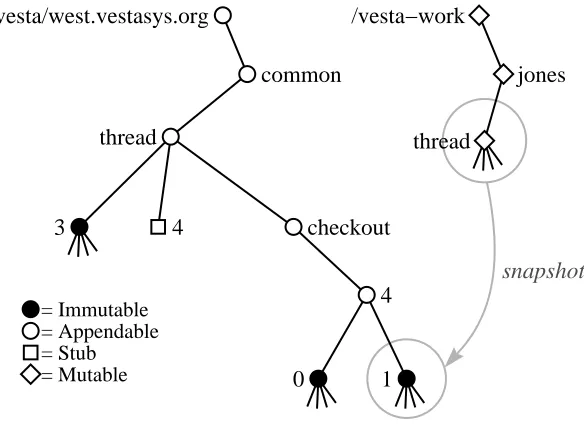
can then be used to modify, create, delete, or rename files and directories in the working copy. To ensure that builds are reproducible, the builder operates only on immutable snapshots of the working copy, not on the working copy itself. Check-ing in the package binds the previously reserved version name to the final snapshot of the working copy. Checkin, snapshotting, checkout, and other repository oper-ations that do not fit the NFS file access paradigm are handled by the repository tools; as shown in Figure 3.2, the tools work by invoking special repository primi-tives through an RPC (remote procedure call) interface.
To support development of software across geographically distributed sites, the repository server at one site can replicate some or all of its sources from repository servers at other sites. Vesta’s support for such partial replication is described in Section 4.4. To achieve partial replication, repository servers at different sites com-municate with each other through the RPC interface (not shown in the figure).
3.1.2 Build Components
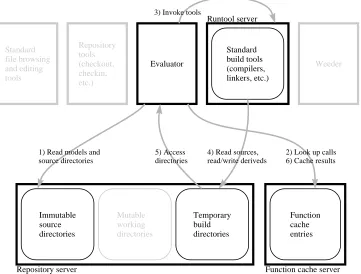
Figure 3.3 highlights the components that participate in Vesta builds and shows how they interact. Building is quite a complex process, involving many compo-nents that interact in subtle ways to ensure that builds are reproducible, incremen-tal, and consistent.
The Vesta evaluator is the center of the build process. The evaluator reads a system model and acts on it, building what the model describes. As shown in Figure 3.3 (arrow 1), models are always read from the immutable part of the repos-itory, to help ensure that builds are always reproducible. A model describes how to build a software artifact from source, and the sources it refers to are also stored in the immutable part of the repository. Models are written in the Vesta system description language (SDL), a small functional programming language whose data types and primitives are specialized for software construction. Chapter 5 describes the language in general, Appendix A gives its complete syntax and semantics, and Chapter 7 describes the evaluator.
Whenever the evaluator encounters a function call in a model, it looks in the function cache (arrow 2) to see if a sufficiently similar call has already been evalu-ated in a previous build. If so, it reads the result from the cache instead of evaluat-ing the function again. Function cache hits can occur at any level in the call graph, from the leaves (usually individual calls to a standard build tool such as a compiler or linker) up to the root (the entire build being requested). Unlike Vesta, most other build systems cache only at the leaves, and thus do not scale well to large builds. Chapter 6 describes the function cache.
Standard file browsing and editing tools Repository tools (checkout, checkin, etc.) Weeder Evaluator Standard build tools (compilers, linkers, etc.) Immutable source directories Mutable working directories Temporary build directories Function cache entries
Repository server Function cache server
Runtool server
1) Read models and source directories
2) Look up calls 6) Cache results 3) Invoke tools
4) Read sources, read/write deriveds 5) Access
[image:30.612.153.514.135.409.2]directories
Figure 3.3:Component interactions during a build.
a sufficiently similar naming environment, including both arguments and names bound from the function’s static scope, that the result is guaranteed to be the same. It would of course be correct to check that all names in the environment are the same, but doing so would give us an unacceptably low cache hit rate. For example, when the C compiler is invoked, all of the .h files in /usr/include are in its envi-ronment, but a typical .c file uses only a few of these .h files. The result of the compilation does not depend on the whole environment, only on the part that is actually referenced.
Therefore, when Vesta evaluates a function, it records the dynamic fine-grained
dependencies of the function’s result on its naming environment. By dynamic,
for the current function whose dependencies were bound to the same values in both the entry’s original environment and the current environment. Vesta’s dependency analysis does not make use of any knowledge of how the build tools work; it is thus
semantics-independent in the terminology of Gunter [23].
When a call to a build tool misses in the cache, the evaluator must invoke the tool itself to do the work. It does so by making a remote procedure call to the runtool server (arrow 3), which is responsible for starting the tool, waiting for it to complete, and reporting its outcome back to the evaluator. We place this functionality in a separate server so that the evaluator can invoke tools on remote machines. This lets us support parallel compilation (by invoking runtool servers on multiple machines), and cross-platform development (by invoking the runtool server on a machine with a different architecture from the local machine, when a cross-compiler is not available).
Build tools are run in an encapsulated environment. That is, Vesta controls not only the tool’s command line and environment variables, but also the entire file system content that the tool sees. Moreover, Vesta monitors and records each file system reference that the tool makes. We accomplish this by forcing all of the tool’s file and directory references to go through the repository (arrow 4).2
The files and directories that an encapsulated tool sees are defined as a data structure within the ongoing model evaluation, but it is the repository that man-ifests this data structure to the tool, as a tree of temporary build directories (see figure). The evaluator does not pass the data structure to the repository all at once; instead, whenever the tool makes a directory reference that the repository has not seen before, the repository calls back to the evaluator (arrow 5) to obtain the cor-responding value, and the evaluator notes the reference as a dependency. Thus the evaluator is able to record fine-grained dependencies not only for functions written entirely in the Vesta SDL, but also for tool invocations. At the end of a tool execu-tion, the repository reports to the evaluator what new files and directories the tool created (and any other changes the tool made) as its output. Section 4.2.2 describes the repository machinery for tool encapsulation in more detail.
After the evaluator finishes executing a function, it writes a new cache entry (arrow 6) to record the function result and its dependencies. Vesta uses a persistent, shared cache server so that a build done today can benefit from work already done in the past, and so that a build requested by one user can benefit from work already done on behalf of another user.
As a final step, not shown in the figure, the evaluator can optionally ship the results of the build. That is, it can copy out some or all of the results of the
evalu-2Under Unix, we use thechroot system call to redefine the tool’s root directory (“/”), thus
Standard file browsing and editing tools Repository tools (checkout, checkin, etc.) Evaluator Standard build tools (compilers, linkers, etc.) Runtool server Weeder Immutable source directories Mutable working directories Temporary build directories Function cache entries
Repository server Function cache server
List of builds to keep
3) Scan directories 4) Delete source and derived files
1) Scan cache 2) Delete entries
Directory storage
Source and derived file storage
[image:32.612.157.509.120.447.2]Entry storage
Figure 3.4:Disk storage and the weeder.
ation’s top-level function call to permanent files and directories. Note that even if the results of a build are not shipped, they remain in the function cache and can be quickly retrieved by repeating the build.
3.1.3 Storage Components
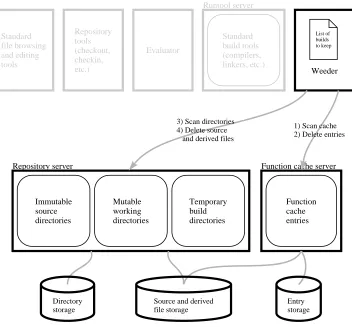
Figure 3.4 shows the three pools of long-term disk storage used by Vesta compo-nents and illustrates the operation of the weeder, an administrative tool for reclaim-ing storage that is no longer needed.
a function cache entry points to a file, it can be deleted. At different times in its history, the same file can be pointed to by a directory entry, a cache entry, or both. Section 4.2.1 describes the file pool in more detail.
As builds are performed, cache entries and derived files accumulate in the func-tion cache and file pool, and can eventually grow to fill the available disk space. Fortunately, any or all cache entries can be deleted without affecting the repeatabil-ity or consistency of builds; however, some future builds that would otherwise get cache hits (and hence be incremental) may have to be done partly or entirely from scratch. Deciding which entries are best to remove and which should be retained is a task that cannot be entirely automated; users and Vesta administrators must decide which ones are worth keeping, based on their knowledge of what builds are likely to be requested in the future.
Unwanted cache entries and derived files are deleted by the Vesta weeder, an administrative program that is run periodically. Given a specification of which package builds to keep, it deletes all cache entries that did not participate in those builds (steps 1 and 2 in the figure). It then contacts the repository (steps 3 and 4) and deletes all files in the shared pool that are neither pointed to by remaining cache entries nor pointed to by the repository directory structure. Since weeding can take a relatively long time (minutes to hours), the function cache, repository, and weeder have been designed so that the weeder can be run concurrently with client builds without adversely affecting normal build performance. The weeder is described in Chapter 8.
3.1.4 Models and Modularity
Vesta system models are modular—that is, each model can import other models and use the functions they define. A model can describe how to build a collection of sources into a subsystem, then export that subsystem as a unit, for use by higher-level models that assemble the subsystems into a complete system.
Vesta’s implementation, more advanced users can extend, modify, or replace the standard environment to suit their unique needs.
Models for ordinary applications are typically written so that they can be im-ported too. One can then write a release model that imports one version of the standard environment and builds a whole collection of applications against it. Thus a development shop that maintains a suite of applications can easily create a con-sistent release, in which all the applications are known to have been built with the same tools against the same libraries.
The system modeling language, system models, and the standard environment are described more fully in Chapter 5.
3.2
Foundations
We have claimed that Vesta provides repeatability, consistency, incrementality, and scalability in software version management and building. The foundation for these claims lies in Vesta’s novel combination of structural features. Now that we have given an overview of these features, we are prepared to summarize the essential contributions of each one to Vesta’s overall goals.
Immutable, Immortal, Versioned Sources. All Vesta builds are performed on immutable, immortal, versioned sources. Before each build, a developer’s muta-ble sources are copied to an immutamuta-ble, versioned form. The immutability and immortality of sources are essential for achieving repeatable builds.
Complete, Source-Based Build Descriptions. A Vesta build description gives a complete recipe for building a software artifact from versioned sources. By com-plete we mean that no aspect of the build relies on any aspect of the computing environment outside of Vesta’s control, including environment variables, library archives, and build tools. The complete nature of Vesta’s build descriptions is es-sential for achieving consistent builds. Because build descriptions name versioned sources, the meaning of a name cannot change over time.
Automatic Dependency Detection. A build system that aspires to perform con-sistent builds must know the dependencies of every derived file. Vesta detects and records all such dependencies automatically. By using automatic detection rather than relying on user-supplied (and thus error-prone) dependency specifica-tions, Vesta can collect all the information needed to determine when (re)building is necessary, and can thereby ensure that the results of its builds are consistent.
cached. Because Vesta uses a shared site-wide cache, each developer can benefit from the builds of all others.
Hierarchical Build Descriptions. The Vesta system modeling language allows build descriptions to be structured hierarchically. Hierarchical, modular structuring is the only effective way we know to describe large-scale software configurations. It also permits re-use of common build functionality, such as that provided by Vesta’s standard construction environment.
Source Replication. As software grows larger and as long-distance telecommut-ing becomes more common, the need for development of software systems across multiple, geographically-distributed sites increases. However, groups at different sites may need to share only some of their sources. Vesta allows some or all of the sources at one site to be replicated at other sites, using an algorithm that avoids copying sources unnecessarily. Moreover, control of each package can be shifted to the site developing it most actively, allowing users at that site to create new versions autonomously.
3.3
Design Targets
Before designing and implementing Vesta-2, we needed to decide how large a soft-ware system we expected it to be able to handle. That decision had immediate consequences on the load imposed on each of the system’s components and on the system’s overall resource usage. Once chosen, these targets also played a critical role in our subsequent engineering decisions.
The Vesta-2 design targets given below were based on our experience with Vesta-1, which had been used to build an actively changing code base of 1.4 million source lines. Our goal for Vesta-2 was that it build software systems at least an order of magnitude larger than those built with Vesta-1.
Code Size. Vesta-2 should be able to build a system comprising approximately 20 million lines of source code.
Derived Files. There should be approximately 1 million derived files of interest at each site. Hence, the system should be able to accommodate 2 million derived files comfortably (before weeding becomes necessary).
Cache Entries. We expect 5–6 cache entries for each derived file. Hence, the function cache must support 10–12 million cache entries.
system should continue to work; it should not suffer any major performance prob-lems. Our intent in setting these targets was not to place an upper bound on the size of system Vesta could handle, but a lower bound. The targets reminded us to “think big” throughout the design process.
Chapter 4
Repository
The Vesta repository is responsible for long term storage of source and derived files. The repository provides two distinct sets of services to two kinds of clients: users and the evaluator. Users are mainly concerned with sources; they read exist-ing source files and create new ones. The evaluator is concerned with both sources and deriveds; it reads system models (which are sources), and it runs tools that read sources and deriveds and write out new deriveds. The source storage service and its replication support are sufficiently comprehensive and independent that the repository could be useful alone, without the evaluator or the rest of Vesta.
The repository is implemented in two layers. The repository server is respon-sible for source naming and storage, while the repository tools provide a user in-terface to the server. The distinction between the server and the tools is significant. The tools we have built support a particular style of naming sources and carrying out common development tasks, but the repository server itself is quite general and could support other styles of use. Most of the complexity of the system is in the repository server. The existing repository tools are short command-line programs, each less than 1000 lines of code.
In the next three sections, we discuss the main features of the repository from the user’s point of view, from the evaluator’s point of view, and from the implemen-tor’s point of view. In the final section of the chapter, we discuss the repository’s support for source replication and the replication tools we have built.
4.1
The User’s View
4.1.1 Source Namespace
The Vesta repository provides a hierarchical source namespace, similar to a Unix or Windows directory tree, but with a few additional features and restrictions to support configuration management.
For user convenience, Vesta makes the source namespace available as a subtree of the file namespace on each client machine. Users can apply all their existing, familiar tools for browsing ordinary files and directories to repository files and di-rectories. The repository server makes this possible by exporting the source tree as an NFS volume that can be imported and mounted by client machines. The server also exports two remote procedure call (RPC) interfaces for access to features that do not map well onto NFS.
To support Vesta’s goal of repeatable builds, all source files accessible to the evaluator are immutable. Once a file is created and placed in the source namespace, the file’s contents cannot be modified. In addition, Vesta’s philosophy of software development says that source code ought to be immortal; all sources should be kept permanently so that builds can always be reproduced. We recognize, however, that sources sometimes must be deleted for practical reasons, such as a lack of disk space or the expiration of a licensing agreement. So we do allow source files and directories to be deleted, but to preserve consistency in builds, we do not allow a deleted source’s full pathname to be reused later for a different source. Thus, repeating a build will either succeed and produce an identical result, or will fail because some source file has been explicitly deleted. The latter case will not occur if users follow our development philosophy.
Vesta source directories thus must not be arbitrarily mutable. Vesta in fact sup-ports two kinds of directory with limited mutability: immutable and appendable.
Like an immutable file, an immutable directory cannot be changed once it is populated with files and subdirectories and placed in the source namespace. Every file in such a directory must be immutable, and so must every subdirectory, so that the entire tree rooted at it can be treated as one immutable unit.
Appendable directories support and enforce Vesta’s rule that names cannot be reused. An appendable directory is similar to an append-only file. New names can be created in the directory, but existing names cannot be unbound or freely rebound to different contents.
another.
Ghosts support Vesta’s deletion semantics. When a user deletes an object from an appendable directory, Vesta replaces the object with a ghost. The ghost keeps the old name from being reused; Vesta does not allow a name bound to a ghost to be rebound to a new object, and attempting to delete a ghost has no effect.
Stubs support more specialized features of Vesta—name reservation and partial replication—which we describe in Sections 4.1.4 and 4.4 below. A stub is a place-holder for a file or directory that may be supplied in the future. It is permissible to replace an existing file or directory with a stub, as long as it is guaranteed that only the same file or directory will later replace the stub.
Both ghosts and stubs are manifested through the NFS interface as zero-length files that cannot be read or written. Their access permission bits are set to distinc-tive values that make them distinguishable from real files in a directory listing.
4.1.2 Versioning
How can an append-only namespace of immutable files and directories support software development? Software systems that are under active development con-stantly grow and change through modification of the files they contain. The solu-tion, of course, is to adopt a naming convention in which each pathname includes a version number. Then instead of modifying a file or directory in place, one creates a new version.
The repository server makes no judgment as to what part of a pathname should be the version number, but for several reasons, we have found versioning at the level of directory trees to be convenient, and have designed the repository tools to use it.
Most programs consist of several files that make up a logical unit, which we call a package. At minimum a package includes one file of source code and one of building instructions. A package can also be larger, consisting typically of several closely related files of code, interfaces, and documentation, perhaps organized in a tree of subdirectories. Large programs can generally be decomposed into several packages, each relatively independent of the others. It is convenient to store each package as a separate directory or directory tree.
versions 5 and 10 of the thread package, and the filesthread/5/foo.c and
thread/5/foo.h would be consistent versions of its components foo.c and foo.h. If foo.c is unchanged between two versions of a package, the repository links the same immutable file into both version directories; only one copy exists on disk.
All package versions are directly available for browsing and building at all times. A user can easily see what is in a particular version by changing to its directory and looking around, and can easily compare two versions with existing tools like diff. There is no need to check out a private copy of a package unless it is to be modified.
A secondary reason for versioning at the level of directories is that existing Unix and Windows tools are not prepared to deal with version numbers in file names. Vesta “hides” the numbers from them by placing them earlier than the last component in the pathname. For example, a Unix or Windows C compiler is better adapted to deal with file names of the form2/foo.c than foo.c/2
orfoo.c;2. The repository server could support any of these three versioning schemes, as it allows immutable files to be placed directly in appendable directo-ries, but the repository tools support only the first.
Of course, when a large software system is made up of several separately ver-sioned packages, we still need a way to keep track of which versions of the
pack-ages go together to make a coherent system. Rather than trying to solve that
prob-lem within the repository, Vesta deals with it in the system modeling language; see Section 5.3.3. One might argue that if a mechanism for naming package versions is required in the modeling language, we might just as well use that mechanism to name individual file versions and dispense with package-level versioning in the repository. But although this approach would be technically feasible, it would be far less convenient for users than the approach we have chosen—models would be cluttered with large numbers of versioned file names instead of containing only a few versioned package names.
4.1.3 Naming Convention
A hierarchical namespace gives great freedom in assigning names to files. To avoid chaos, one needs to organize the namespace: to establish conventions on how files are named so that people can find them. Vesta’s repository server does not enforce any particular naming convention, but the repository tools do. Figure 4.1 shows part of a typical repository directory structure.
/vesta/west.vestasys.org
common cxx
private
text table
thread 1
2
2.fast
3
4
0 1 2
thread.c thread.h
build.ves
= Immutable = Appendable = Stub
= Ghost smith jones
doc
Figure 4.1:Naming convention example.
Below the root is a tree of appendable directories used for categorizing pack-ages. In this example, packages that are generally useful are placed in thecommon
directory, packages that are part of the C++ compilation system are in cxx, and private packages owned by users Smith and Jones are in private/smithand
private/jones. This directory tree can have arbitrary shape; the repository tools place no restrictions on it.
At the next level down in the tree are individual packages such astext, ta-ble, andthread. The thread package is shown in detail in the figure. The im-mutable subdirectoriesthread/2andthread/3are versions of the package; the latter is shown as containing three immutable files and an immutable subdirec-tory. Versionthread/1has been deleted, leaving a ghost in its place to keep the name from being reused. The namethread/4is bound to a stub, reserving it for a new version that a user is working on and has not checked in yet.
possi-ble; for example, a branch fromthread/2.fast could be named thread/ 2.fast/1.bugfix.
4.1.4 Development Cycle Tools
The development cycle is Vesta’s name for the sequence of steps that users typically go through when developing software. The outline below shows the cycle and gives the name of the Vesta command used in each step. The command vesta is the Vesta evaluator; the other commands shown are repository tools.
1. Check out a package: vcheckout
2. Modify the package
(a) Edit: any text editor
(b) Advance: vadvance
(c) Build: vesta
(d) Test
(e) Go back to step 2a until done.
3. Check in the results: vcheckin.
4. Optionally go back to step 1.
Outer Loop
In the outer loop of the development cycle, one checks out a package (1), modifies it (2), and checks in the result as the next version (3). We call one trip around this cycle a session. Checkout creates a mutable working copy of the package. Modification is the inner loop of development, discussed next. Checkin writes an immutable snapshot of the working copy into the repository. Both checkout and checkin use copy-on-write to improve performance and space efficiency, as described in Section 4.3.4 below.
For example, in Figure 4.1, a user (say, Smith) has checked out the thread pack-age with the command vcheckout common/thread, thereby reserving the name
/vesta/west.vestasys.org/common/thread/4 for the next version. The reservation is manifested in the repository namespace as a stub, owned and writable only by Smith. If user Jones asks to check out the thread package too, he will be told that version 4 is already reserved by Smith. Jones is thus alerted to speak to Smith and make sure their intended changes will not be redundant or conflicting.
If Jones wants to proceed in parallel with Smith, he can ask vcheckout to re-serve a different version number, in any of several ways. In the unusual case where Jones’s changes are meant to completely subsume Smith’s, Jones can leapfrog Smith by asking to reserve versionthread/5. If Jones is just making one vari-ant version, he can choose a name outside the main sequence of versions, say
thread/3-jones. If Jones is starting a new line of development that may pro-ceed for several versions before merging back into the main line, or may never merge back in, he can create a branch using the vbranch tool. In our exam-ple, Jones could type vbranch common/thread/3.jones, which would create a new package with the specified name. Version common/thread/3.jones/0
would be identical tocommon/thread/3. Jones could then check out the branch and work on it as in a normal package.
In none of these cases does Jones need to “break a lock.” Unlike RCS, Vesta does not lock the old version that Smith started from; instead, Vesta locks the new version by creating a stub for it. So there is nothing to interfere with Jones starting a different line of development that branches off from the same old version.
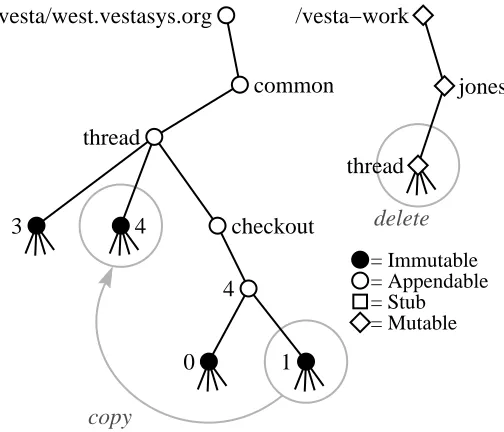
Returning to the main line of the outer loop, when Smith has finished mod-ifying the package, he simply types vcheckin. The vcheckin tool replaces the reservation stub that was created by vcheckout with an immutable snapshot of Smith’s mutable working copy. It also deletes Smith’s working copy, so that he cannot inadvertently continue to edit it after his session has ended.
Inner Loop
= Immutable = Appendable = Stub = Mutable
copy
create
create
copy
4
4
0
thread /vesta/west.vestasys.org
common
thread
checkout 3
/vesta−work
[image:44.612.180.490.130.352.2]jones
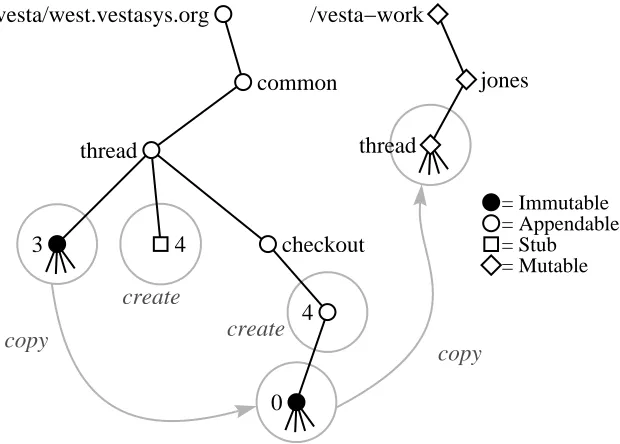
Figure 4.2:Action of the command vcheckout common/thread.
number within the session.
To keep the many snapshots created during a session from cluttering up the shared namespace, the repository tools put them in a directory that is separate from the main-line versions of the package, called the session directory. A session di-rectory is essentially a branch with a special name, created by vcheckout.
Repository Tool Details
Figure 4.2 illustrates the complete operation of vcheckout. Initially,thread/3
is the latest version of the thread package. When user Jones types vcheckout common/thread, the system creates the reservation stubthread/4and the ses-sion directorythread/checkout/4in the repository’s appendable source tree
/vesta. It creates the mutable working copyjones/threadin a separate mu-table directory tree named/vesta-work. The session is given an initial version
thread/checkout/4/0whose contents are immutable and identical to the last checked-in version in the main line of development,thread/checkout/3. The working copy initially has the same contents as well, but it is fully mutable.