Database Programming
Denise Gosnell
Matthew Reynolds
Database Programming
© 2001 Wrox Press
All rights reserved. No part of this book may be reproduced, stored in a retrieval system or transmitted in any form or by any means, without the prior written permission of the publisher, except in the case of
brief quotations embodied in critical articles or reviews.
The author and publisher have made every effort in the preparation of this book to ensure the accuracy of the information. However, the information contained in this book is sold without warranty, either express or implied. Neither the authors, Wrox Press, nor its dealers or distributors will be held liable for
any damages caused or alleged to be caused either directly or indirectly by this book.
Published by Wrox Press Ltd,
Arden House, 1102 Warwick Road, Acocks Green, Birmingham, B27 6BH, UK
Wrox has endeavored to provide trademark information about all the companies and products mentioned in this book by the appropriate use of capitals. However, Wrox cannot guarantee the accuracy of this information.
Credits
Authors Technical Editors
Denise Gosnell Victoria Blackburn
Matthew Reynolds Richard Deeson
Bill Forgey
Author Agent Technical Reviewers Laura Jones Beth Breidenbach
PJ Burke Project Administrator
Mike Clark Rob Hesketh
Simon Delamare
Damien Foggon Category Manager
Zach Greenvoss Sarah Drew
Mark Horner
Wendy Lanning Production Manager
Carl Mayes Liz Toy
Dale Onyon
Sumit Pal Production Coordinator
Rachelle Reese Pip Wonson
Sean M Schade
David Schultz Production Assistant
Brian Sherwin Matt Clark
Phillip Sidari
Konstantinos Vlassis Index
David Williams Michael Brinkman
Thearon Willis
Proof Reader Agnes Wiggers
Technical Architect Cover
Denise Gosnell
Denise Gosnell is a consultant in the Microsoft Consulting Services Public Sector Practice at Microsoft ([email protected]). Denise has a unique background in both law and technology and uses her background to help federal, state, and local governments implement hi-tech solutions.
She received a bachelor's degree in Computer Science – Business (summa cum laude) from Anderson University and a Doctor of Jurisprudence from Indiana University School of Law in Indianapolis. Denise is an attorney licensed to practice law in Indiana and is an active member of the Indiana and Indianapolis Bar Associations. Her legal areas of expertise are intellectual property law and real estate law. Denise is also a Microsoft Certified Solution Developer.
Denise has worked in the computer industry since 1994 in a variety of roles ranging from Systems Engineer, Programmer, IS Manager, and Senior Consultant. Denise is also an avid writer, and has co-authored the following books: MSDE Bible (IDG Books), Professional SQL Server 2000 XML (Wrox Press), and Professional .NET Framework (Wrox Press).
When Denise isn't working, writing, or studying, she and her husband Jake enjoy traveling around the globe to interesting places such as Russia, China, and Poland.
To my husband Jake for his patience and understanding this year while I was simultaneously working on three books with Wrox on most evenings and weekends. To the fine folks at Wrox Press for making this book a reality.
Matthew Reynolds
After working with Wrox Press on a number of projects since 1999, Matthew is now an in-house author for Wrox Press writing about and working with virtually all aspects of Microsoft .NET. He's also a regular contributor to Wrox's ASPToday and C#Today, and Web Services Architect. He lives and works in North London and can be reached on [email protected].
For Fanjeev Sarin.
Bill writes: "I began my career in the early 1990's, originally an Electronic Engineering major and, soon after, the U.S. Navy. I soon found myself in a shut down engineering firm and was too stubborn to take anything less. My shipmate introduced me to VB 3.0 and Access 2.0 and, for the next few months, I found myself learning everything I could about VB. I began developing a phonebook program using VB and MS Access. I would program 12 to 14 hours a day, including all nighters or until my hands got numb. I read every book I could on VB, many of which were references and how to's. Everything I wanted to do in VB I was able to, thanks to the language. After four months of steady learning, I landed a contract position writing VB software to control data acquisition modules – luckily the majority of the work was with VB and Access. I thought I knew everything after that. I earned a grand a week and soon forgot about school. For my first three years I worked very hard and put in lots of hours, and I bought and read even more books. Books like Dan Appleman's Programmer's API, which I didn't understand for over a year after I bought it. As soon as Wrox books came out I was hooked. My first book was the Revolutionary Guide to Visual C++. I liked the style as well as the straight forward information not found anywhere else. As the years have passed, I have found learning new and other types of technology much easier. I found it just takes time, dedication, and some common sense to succeed in this business. I am the Technical Lead in my current position, introducing project methodology, new technologies, standards, and training to development teams. I have spent some time consulting and have been exposed to technologies such as ASP, Delphi, Pascal, COM, C/C++, SQL, Java, ADO, Visual Basic, and now .NET. I currently live in Sacramento, California, and can be contacted via e-mail at [email protected]."
Thanks goes out to Wrox Press, Paul, Richard, Rob, Laura, these are wonderful people to work with. Also thanks to the team of technical reviewers.
Introduction
All software is based on the principle of manipulating data. Whether it's the code that runs inside your VCR to start recording at a specific time, or air traffic control software, code is always working with data in one form or another.
Today, we find that sophisticated applications store their data in a "database", a central repository of data overseen by a Database Management System, or DBMS. A DBMS does two things. Firstly, it handles the storage of the data. Secondly, it provides mechanisms for retrieving data as well as adding, removing, and changing data. A DBMS endeavors to do this in the most efficient way possible.
Over the years, the DBMS market has grown into a mature sophisticated industry in its own right, offering products designed for use in large enterprise environments like Oracle 9i or Microsoft SQL Server 2000, down to products designed for use on the desktop like Microsoft Access. In some cases, you even find that software packages include their own DBMS software for managing their own proprietary databases. You'll find in your work as a programmer that applications often require access to data managed by a DBMS. In fact, you'll most likely find that using a DBMS is the easiest way to store and manipulate your application's data. However, with a wide variety of vendors to choose from, how can we write
application code that can work with any database our customer cares to choose?
This book is all about building Visual Basic .NET applications that harness the power of ADO.NET. We will show how to use this technology in a variety of different ways: with desktop applications using Windows Forms; with Web applications using ASP.NET; and with Web Services.
Who Is This Book For?
This book is for programmers with some basic experience of Visual Basic .NET, who want to begin programming database applications.
It might be useful if you have some limited experience of Access, although this is not strictly necessary. Note that this book is not an introduction to Visual Basic .NET. If you are completely new to Visual Basic .NET, you will probably find Beginning Visual Basic .NET (Wrox Press, ISBN 1861004966) a better choice to get you off the ground.
Likewise, this book is not aimed at getting experienced VB6 developers up to speed with the changes between VB6 and Visual Basic .NET. If you fall into this category, try Professional VB.NET (Wrox Press, ISBN 1861004974) instead.
What Does This Book Cover?
Visual Basic .NET is tightly coupled to very comprehensive and flexible data access technologies, so the potential range of things that might fall under the title of this book is huge. Rather than trying to cover too much, we have concentrated on providing a detailed introduction to the following strands:
❑ Basic database design principles. ❑ The SQL Server Desktop Engine. ❑ Querying the database using T-SQL.
❑ Using Visual Studio .NET's Server Explorer to run queries, views, stored procedures, etc. ❑ ADO.NET and the DataSet object.
❑ Reading data into the DataSet, binding it to a control on the user interface, changing data in the DataSet, and saving those changes back in the underlying database.
❑ XML's role in ADO.NET.
❑ Internet database applications using Web Forms and Web Services.
What Do I Need to Use this Book?
All you'll need is a PC running:❑ Windows 2000, XP, or NT4 Server.
❑ Internet Explorer. ❑ Access XP (or 2000).
❑ Visual Studio .NET Professional edition. (Higher versions of Visual Studio, e.g. the Enterprise editions, should work fine too. However, at the time of writing, they were unavailable and so this book was written using the Professional edition.)
❑ SQL Server 2000 Desktop Engine. This comes with Visual Studio .NET.
This book was written before the final release of Visual Studio .NET. If there are any substantial changes between the instructions given in this book and those required to work with the final release of Visual Studio .NET, we will provide free updates on the Wrox online errata service.
Conventions
We've used a number of different styles of text and layout in this book to help differentiate between the different kinds of information. Here are examples of the styles we used and an explanation of what they mean.
Try It Outs – How Do They Work?
1.
Each step has a number.2.
Follow the steps through.3.
Then read the How It Works section to find out what's going on.These boxes hold important, not-to-be forgotten, mission-critical details that are directly relevant to the surrounding text.
Background information, asides, and references appear in text like this.
Bullets appear indented, with each new bullet marked as follows:
❑ Important words are in a bold type font
❑ Words that appear on the screen, or in menus like the File or Window, are in a similar font to the one you would see on a Windows desktop
❑ Keys that you press on the keyboard, like Ctrl and Enter, are in italics
Private Sub btnAdd_Click(ByVal sender As System.Object, _ ByVal e As System.EventArgs) Handles btnAdd.Click Dim n As Integer
n = 27
MessageBox.Show(n) End Sub
Sometimes we'll see code in a mixture of styles, like this:
Private Sub btnAdd_Click(ByVal sender As System.Object, _ ByVal e As System.EventArgs) Handles btnAdd.Click Dim n As Integer
n = 27 n = n + 2
MessageBox.Show(n) End Sub
In cases like this, the code with a white background is code that we are already familiar with; the line highlighted in gray is a new addition to the code since we last looked at it.
Customer Support
We always value hearing from our readers, and we want to know what you think about this book: what you liked, what you didn't like, and what you think we can do better next time. You can send us your comments, either by returning the reply card in the back of the book, or by e-mail to
[email protected]. Please be sure to mention the book title in your message.
How to Download the Sample Code for the Book
When you visit the Wrox site, http://www.wrox.com/, simply locate the title through our Search facility or by using one of the title lists. Click on Download in the Code column, or on Download Code on the book's detail page.
Errata
We've made every effort to make sure that there are no errors in the text or in the code. However, no one is perfect and mistakes do occur. If you find an error in one of our books, like a spelling mistake or a faulty piece of code, we would be very grateful for feedback. By sending in errata, you may save another reader hours of frustration and, of course, you will be helping us provide even higher quality information. Simply e-mail the information to [email protected]. Your information will be checked and, if correct, posted to the errata page for that title, or used in subsequent editions of the book.
To find errata on the web site, go to http://www.wrox.com/ and simply locate the title through our Advanced Search or title list. Click on the Book Errata link, which is below the cover graphic on the book's detail page.
E-mail Support
If you wish to directly query a problem in the book with an expert who knows the book in detail then e-mail [email protected], with the title of the book and the last four numbers of the ISBN in the subject field of the e-mail. A typical e-mail should include the following things:
❑ The title of the book, last four digits of the ISBN, and page number of the problem in the Subject field
❑ Your name, contact information, and the problem in the body of the message
We won't send you junk mail. We need the details to save your time and ours. When you send an e-mail message, it will go through the following chain of support:
❑ Customer Support – Your message is delivered to our customer support staff, who are the first people to read it. They have files on most frequently asked questions and will answer anything general about the book or the web site immediately.
❑ Editorial – Deeper queries are forwarded to the technical editor responsible for that book. They have experience with the programming language or particular product, and are able to answer detailed technical questions on the subject.
❑ The Authors – Finally, in the unlikely event that the editor cannot answer your problem, he or she will forward the request to the author. We do try to protect the author from any
distractions to their writing; however, we are quite happy to forward specific requests to them. All Wrox authors help with the support on their books. They will e-mail the customer and the editor with their response, and again all readers should benefit.
p2p.wrox.com
For author and peer discussion, join the P2P mailing lists. Our unique system provides programmer to programmer™ contact on mailing lists, forums, and newsgroups, all in addition to our one-to-one e-mail support system. If you post a query to P2P, you can be confident that it is being examined by the many Wrox authors and other industry experts who are present on our mailing lists. At p2p.wrox.com you will find a number of different lists that will help you, not only while you read this book, but also as you develop your own applications. Particularly appropriate to this book are the beginning_vb,
vbbegin_databases, and vb_dotnet lists.
To subscribe to a mailing list just follow these steps:
1.
Go to http://p2p.wrox.com/.2.
Choose the appropriate category from the left menu bar.3.
Click on the mailing list you wish to join.4.
Follow the instructions to subscribe and fill in your e-mail address and password.5.
Reply to the confirmation e-mail you receive.6.
Use the subscription manager to join more lists and set your e-mail preferences.Why This System Offers the Best Support
Relational Database Design
In this chapter, we'll cover some of the background details for the design and implementation of a database. The great majority of applications, whether developed with Visual Basic .NET or some other programming language, involve a database in some capacity, so it is crucial to have a firm
understanding of the principles of good database design. After a brief introduction to databases in general, the chapter narrows its focus to designing and implementing one specific type of database – the relational database. Don't worry if you don't understand all the database terms at the moment as, by the end of the chapter, you will have a good understanding of:
❑ What a database is
❑ How relational databases compare to flat file databases ❑ The advantages of relational databases
❑ How to analyze business needs to identify what information a database should contain ❑ How to identify suitable elements that a database will need to include based on the
requirements of a particular business ❑ How to define keys and relationships
❑ The objectives of data normalization and the advantages it can bring ❑ How to define indexes
❑ Putting it all together to create the physical database
What is a Database?
A database is essentially an electronic means of storing data in an organized manner. Data can be anything that a business or individual needs to keep track of and that, prior to computers, could have only been tracked on one or more paper documents. Once stored, data in the database can be retrieved, processed, and displayed by programs as information to the reader. The actual structure that a database uses to store data can take one of many different forms, each which offers certain advantages when that information is to be retrieved or updated. In the next section, we will look at how storing the database in a flat file structure differs from a relational database structure, and the advantages and disadvantages that each of those presents.
Flat File versus Relational Databases
Flat files are the most basic form of database – all of the information is stored in a single file. A flat file includes a field for every item of information that you need to store. While they are easy to create and can be useful in certain situations, flat files are not very efficient. They can be quite wasteful of storage space, containing a lot of duplicated information, especially in a complex system where multiple files hold connected information. This can make information harder to maintain and retrieve. If you have worked with spreadsheets before, then you have already worked with one of the most common examples of a flat file database. To further demonstrate how the data in flat files is organized and why this can be problematic, let's walk through a hypothetical example.
Suppose you use the spreadsheet shown in the table below to track orders placed by your customers:
Ord er # Ord e r Da te Item Descri p ti o
n Qu
a n ti ty Q u a n ti ty P er U n it Pr ic e Cu st o m er Na me Cu st o m er A ddr e ss 1000 1-Aug-01
Tofu 1 40
-100 g pkgs 23.25 Jane Doe 123 Somewhere St., Anytown, IN 46060 USA
1000 1-Aug-01 Jack's New England Clam Chowder
1 12 - 12
oz cans 9.65 Jane Doe 123 Somewhere St., Anytown, IN 46060 USA
1000 1-Aug-01
Grandma's Boysenberry Spread
3 12 - 8
oz jars
25 Jane
Doe
123 Somewhere St., Anytown, IN 46060 USA
1001 2-Aug-01
Uncle Bob's Organic Dried Pears
1 12 - 1
lb pkgs
30 John
Smith
345 Anywhere St., Somewhere, IN 46001 USA
1001 2-Aug-01
Tofu 1 40
Notice how this spreadsheet contains order information as well as customer information. Jane Doe, for example, placed order #1000 for Tofu, Jack's New England Clam Chowder, and Grandma's
Boysenberry Spread. Each of those items is listed on a separate row in the spreadsheet. Further notice how the Order #, Order Date, as well as Jane Doe's name and address, are listed multiple times for each item in the order, as indicated by the gray entries above.
We say that the Order #, Order Date, Customer Name, and Customer Address fields contain redundant information – that is, the same information duplicated in several places. Redundant information causes a database to be larger than it really needs to be because it contains multiple entries with the same information. It also causes extra work when recording information about the order in the spreadsheet, due to the fact that the same information must be typed repeatedly. Unfortunately, typing the
information multiple times greatly increases the likelihood that a mistake will be made – such as the misspelling of a name or address in one of the order items.
Another problem with flat files is maintenance. What happens, for example, when Jane Doe moves and you need to update her address in your spreadsheet? Well, in this flat file format, you will have to update her address multiple times – once for each item she has ever ordered. If she is a really good customer, that could mean hundreds of changes. If her address were stored in one place only, then that would be the only place you would have to update it. But that certainly isn't the case in our example spreadsheet above. In this simple example, you have witnessed first hand some of the most common problems of flat file databases: data redundancy and excessive maintenance requirements.
Now that we understand what a flat file database is, and are aware of areas where the format can be problematic, we ready to look at a database type that addresses these shortcomings: the relational database. In its simplest terms, a relational database can be thought of as a collection of informational items broken down into different groups interrelated with each other in one or more ways. In database terms, these groups are often called tables. This concept may sound complicated, but it isn't really that bad. Let's modify our previous example to demonstrate what it would look like in a relational format – and then you can see for yourself that the big-picture concept isn't too complicated to understand.
Recall that our flat file spreadsheet contained information about Orders and Customers. Each order consisted of multiple order items and each order was placed by a single customer. A relational database storing this information might be split into three separate tables: Customers, Orders, and
OrderItems, depicted in the diagram below:
Customers Orders OrderItems
Customer_Id Order_Id Item_Id
Customer_First_Name Customer_Id Order_Id
Customer_Last_Name Order_Date Item_Description
Customer_Address1 Quantity_Ordered
Customer_City Item_Price
Customer_State Quantity_Per_Unit
Customer_Zip
The Customers table above contains a single entry for each customer. The Orders table contains a single entry for each order. And, finally, the OrderItems table contains a single entry for each item in the order, meaning there can be one or more items per order. Thus, customer information is stored separately from each order and each item of an order is stored separately from the orders themselves. Notice that the Orders
table contains a Customer_Id that relates to the Customer_Id field in the Customers table. Further notice that the OrderItems table contains an Order_Id that relates to the Order_Id field in the Orders
table. We will look at this concept of how tables relate together in the Defining Relationships section of this chapter. For now, just know that this is the mechanism that eliminates data redundancy, a problem we saw in the flat file format that duplicated customer names and addresses and so on. There is no such duplication in this relational database. If we want to update Jane Doe's address, for example, we merely have to update the single entry she has in the Customers table. Better yet, when Jane Doe places her order, we do not have to type in her address multiple times. If she has already ordered from us before, her details will already be held by an entry in the Customers table, and we simply have to use the Customer_Id from that existing entry. If she is a new customer on the other hand, all we need do is add her details once to the Customers table, where it will remain, ready to be reused should she reorder further items from us.
You may be wondering at this point how we came up with all these items for the above tables, or what exactly they mean. Don't worry too much about such details, the main thing is that, at this point, you at least have a grasp of the high level concepts behind the relational database format: that it stores data in logical interrelated groups and that it eliminates redundant data. As long as this makes sense, we can move on to the details of how to determine database requirements and how we can then create a relational database from such requirements.
Determining Database Requirements
Before we jump in and start designing a database, we first need to undertake a variety of investigation and analysis processes to determine the information that needs to be captured. This section explores the steps that you should take to facilitate this process.
Analyzing our Business Needs
The first step in determining the requirements for a database is a thorough analysis of the needs of the business or individual for whom the database is intended. Your objective at this stage is to invest the time to learn the customer's business and fully understand what they wish to accomplish. It can be tempting to skip this step and jump straight to creating the physical structure of the database. Of course, we are too wise to succumb to such a poor design strategy. In order to construct a database that truly meets the needs of the customer, it is critical to have a complete understanding of their objectives beforehand. The physical structure we then decide on will be heavily influenced by the particular objectives of their business.
Here are some guidelines to follow when completing an analysis:
❑ Interview one-on-one and in groups to discuss the current procedures with people at every level of the business that will interact with the database or use the reports that it generates. Devise questions to find the objectives that they would like to accomplish, the information that they need to track, any frustrations of the present system, and details of how they presently work with the database.
❑ Get copies of existing forms and reports – whether paper or electronic – that are used in the data handling process. After obtaining these paper and electronic copies, make sure that they are populated with sample data so you can further clarify the type of information that they represent. From this information, and from talking with the employees, you are ready to start drafting a high-level "wish list" of the information that needs to be dealt with. This wish list will later be used to help determine the fields and tables in the database that need to be created.
❑ Carefully analyze existing reports and create drafts on paper of reports that you think will be needed, based on your fact-finding. Once you have some ideas on paper of the reports that will be needed, you will start to get an idea of the fields that will be required by the database. You can't generate a report from data that doesn't exist in the database, right?
❑ Make sure that you do a good job of documenting your analysis, what you learned, from whom, why it is important, and any other details that you feel may be relevant.
Once you have conducted the interviews, hosted group meetings, and have analyzed the current process and systems, you should compile a summary of what overall objectives are to be accomplished. As an example, this summary could look like the following for a typical hypothetical business:
❑ The overall objective of the database is to store information about products on offer, the company's inventory, outstanding and completed sales, and
customers.
❑ They have several products available for order.
❑ Customers can place orders for one or more products at a time. Typically, an order is for one to three products, but no order is for more than four products.
❑ Each order will belong to just one customer, although it may include multiple products.
❑ They want to be able to take customer orders over the phone and enter them into the database application directly. In order to do this, they need accessible product information – such as quantity in stock and price – to allow product availability to be confirmed at the time that the order is placed.
❑ They need to be able to generate various reports from the data to show sales totals, orders awaiting fulfillment, out of stock products, and grand total orders for each customer.
The summary should be a concise high-level recap of what you need to accomplish. It is essential that you share your findings with the company that you're doing the analysis for, so they can give feedback on whether you understand their needs correctly. You should also be able to hand the summary to a total stranger and they should be able to understand the purpose of the database at an abstract level. This summary and the detailed data that you compile and refine will then be used to further design the database.
Determining the Information to be Tracked
Now that you have interviewed as many people as possible, studied the current process, and compiled all your findings, you can review your conclusions so far to determine individual data elements that need to be tracked. For example, read through your notes and, any time that you see something that you know will have to be tracked in the database, write it somewhere separately with all the other items that are likely to be required as a field. Continue this process until you have listed all of the pieces of information that need to be tracked.
When writing down this information, don't worry about any particular order or grouping of the items. At this stage, simply list anything that you feel is data that should be tracked. Also, list an example beside each element to show typical values that it might contain. This will come in handy later when you have to determine the appropriate data type that a particular field will allow. We are still early in the process and it is important to try to get a solid overall feel for the database's contents – there's no need to worry about being exact at this point.
From the requirements gathered in previous stages, our list of fields might look something like this:
Product Identifier
(e.g. 12345)
Product Description
(e.g. Tofu)
Product Unit Price
(e.g. $23.25)
Product Quantity on Hand
(e.g. 50)
Product Unit of Measure
(e.g. 40 – 100 g pkgs)
Customer Name
(e.g. Jane A. Doe)
Customer Number
(e.g. 123456)
Customer Address
(e.g. 123 Somewhere St., Anytown, IN 46060 USA)
Customer Email
(e.g. [email protected])
Customer Telephone
(e.g. 317-111-2222)
Product Identifier for Items Ordered
(e.g. 12345 for Tofu)
Quantity Ordered
(e.g. 3)
Ordered by Customer Number
(e.g. 123456)
Order Ship Date
(e.g. Aug. 3, 2001)
Order Number
(e.g. 1000)
Order Date
(e.g. Aug. 1, 2001)
Unit Price as Ordered
Notice how the fields are listed in no particular order and that they each contain typical examples in parentheses. The table includes fields that will allow us to connect information about customers, products, and sales orders.
In the next section, we look at how to use this sort of list to determine the structure for our database.
Determining the Logical Database Design
After you have determined high-level requirements and objectives for the database, you can begin to implement the relational database design on paper – a phase commonly termed logical database design. You need to have a sketch drafted out – a roadmap – detailing how your database is to look before you actually begin the task of creating it electronically.
Defining Tables (Entities) and Fields (Attributes)
The first step in creating the logical database design is to define your tables and fields. Tables, also called entities, are logical groupings of related information. Recall that, when we converted our flat file spreadsheet into tables at the beginning of the chapter, we ended up with the following Customers,
Orders, and OrderItems tables:
Customers Orders OrderItems
Customer_Id Order_Id Item_Id
Customer_First_Name Customer_Id Order_Id
Customer_Last_Name Order_Date Item_Description
Customer_Address1 Quantity_Ordered
Customer_City Item_Price
Customer_State Quantity_Per_Unit
Customer_Zip
Customer_Country
Fields, also called attributes, are the individual data elements within the table – or you could say the attributes that together describe the entity. You see above that the Customers table contains several individual bits of information for any customer: Customer_Id, Customer_First_Name, Customer_Last_Name, and so on. We refer to these as the fields of the Customers table, or equivalently as the attributes that describe the
Customers entity. Either terminology is acceptable, but the terms tables and fields tend to be the terms most commonly used so we shall use them throughout the remainder of the chapter.
Identifying Tables and Fields
Looking at the business requirements, we previously determined that the following fields need to be tracked, shown below in no particular order:
Product Identifier
(e.g. 12345)
Product Description
(e.g. Tofu)
Product Unit Price
(e.g. $23.25)
Product Quantity on Hand
(e.g. 50)
Product Unit of Measure
(e.g. 40 – 100 g pkgs)
Customer Name
(e.g. Jane A. Doe)
Customer Number
(e.g. 123456)
Customer Address
(e.g. 123 Somewhere St., Anytown, IN 46060 USA)
Customer Email
(e.g. [email protected])
Customer Telephone
(e.g. 317-111-2222)
Product Identifier for Items Ordered
(e.g. 12345 for Tofu)
Quantity Ordered
(e.g. 3)
Ordered by Customer Number
(e.g. 123456)
Order Ship Date
(e.g. Aug. 3, 2001)
Order Number
(e.g. 1000)
Order Date
(e.g. Aug. 1, 2001)
Unit Price as Ordered
(e.g. $23.25)
What we can do now is take a detailed look at all elements to be covered by the system, and try to break them down into tables and fields. To do this, take a look over the list and see what could be readily grouped together into a table – as we now know, a table is a logical grouping of related data. This step is not an exact science. We can do our best to group the data into suitable tables but, depending on how many fields you have altogether and how complicated the requirements are, it will almost always take multiple attempts to get right – at this point in the process, you aren't even expected or likely to get the tables and fields exactly right. The later steps that we will look at help us to decide on the modifications we should make to ensure that our database meets the requirements of good design.
So, let's see if we can turn our above example into a set of tables. Scan through all the elements in the list and see what type of information they each relate to. For example, in scanning the list above, each element either describes one of: the product, the customer, or the order. In database terms, this step is called defining the entities. An entity is used to describe a group of related information. After
identifying the entities themselves, you can then create an entity relationship diagram (ERD), which shows the information describing each entity and the relationship each entity has to the other.
Products Product Identifier Product Description Product Unit Price Product Quantity in Stock Product Unit of Measure
Customers Customer Name Customer Number Customer Address Customer Email Customer Telephone Orders
Product Identifier for Items Ordered Quantity Ordered
Ordered by Customer Number Order Ship Date
Order Number Order Date
Unit Price as Ordered An Order can
have one or more products
An Order can have only one Customer
A Customer can have one or more Orders
From the ERD, you can then begin to easily formulate ideas on what tables it looks like the database will need to contain. Upon analyzing the ERD above, for example, it looks like we will at least need the following tables:
❑ Products – to store information about all the products that our company offers for sale ❑ Customers – to store information for each customer
❑ Orders – to store information about each order
Now that we have some potential tables identified, let's assign fields for each of these tables. What this really means is that you will translate the pieces of information in the ERD that describe each entity into a name that will be meaningful in the database.
There are a couple of guidelines that we need to be aware of before we start this process. First, use a new sheet of paper (or file if you prefer to write on screen) for each potential table, and put each field as you consider it onto the sheet for the table that it seems to relate to the most. Always try to give fields meaningful names that concisely describe the kind of information they contain, thus facilitating the task of retrieving information in your applications later. Say, for example, that you called the customer number field something arbitrary like
field1, and the customer name field2. When you come to retrieve the customer name in your applications later, you're in danger of having to open database fields at random to try to locate the one containing the customer name, unless you happen to remember which is which. Even if you do know that field2 is the customer name, your code will be littered with confusing and unhelpful names, making it much harder to understand. In many cases, third party developers will use your database in their applications, making the situation a potential nightmare. Choosing appropriate and descriptive field names is an aspect of good database design that is all too often neglected, and yet it is something that should never be underestimated.
Here is another essential tip when naming fields: use case appropriately to make the name easier on the eye. For example, instead of naming a field customername in all lower case, use the alternative form CustomerName. This mix of upper and lower case is sometimes referred to as "camel case", and it can make identifiers much easier to read than if just a single case is employed. Spaces are usually not allowed in field names but
underscores can be used to designate spaces. You could use an underscore to separate CustomerName, making
In the previous example, I used underscores. But from this point onward, I'm going to leave them out. I have purposely included them so far to show you how each style looks so you can decide which is your own personal preference. Whichever form you plump for, try to be consistent, using the same standard throughout your database.
After listing each field under the most appropriate table and giving each a meaningful name, next to every field give an example of the data that it will contain, the type of data it is (text, date, number, and so on), and how big you think the field needs to be. If it is a text field, list the number of characters it must handle. If it is a number field, list the range of values that it may contain. This is where the example data that you compiled earlier comes in handy. By examining it, you should be able to make some educated guesses about the type and size of the information fields will contain.
With these rules in mind, let's list each of the fields identified so far under the most appropriate of the three tables. This will result in something like the following:
PRODUCTS TABLE
Field Example Type of Data Estimated Size of
Data
ProductIdentifier 12345 Numeric Positive number
with no decimals
ProductDescription Tofu Text 25 characters
ProductUnitPrice $23.25 Currency $00.00 to
$10,000.00
ProductQuantityOnHand 50 Numeric 0 to 9,999
ProductUnitOfMeasure 40 – 100 g pkgs Text 25
CUSTOMERS TABLE
Field Example Type of Data Estimated Size of Data
CustomerNumber 123456 Numeric Positive number with no
decimals
CustomerName Jane A. Doe Text 45 characters
CustomerAddress 123 Somewhere
St., Anytown, IN 46060 USA
Text 65 characters
CustomerTelepho
ne 317-111-2222 Text 12 characters
ORDERS TABLE
Field Example Type of Data Estimated Size of Data
OrderNumber 1000 Numeric Positive number with
no decimals
OrderDate Aug. 1, 2001 Date Valid date
ProductIdentifier1 12345 Numeric Positive number with
no decimals
PriceItem1 $19.00 Currency $00.00 to $10,000.00
QuantityItem1 2 Numeric 0 to 9,999
ProductIdentifier2 2345 Numeric Positive number with
no decimals
PriceItem2 $8.50 Currency $00.00 to $10,000.00
QuantityItem2 3 Numeric 0 to 9,999
ProductIdentifier3 3456 Numeric Positive number with
no decimals
PriceItem3 $13.00 Currency $00.00 to $10,000.00
QuantityItem3 4 Numeric 0 to 9,999
ProductIdentifier4 4567 Numeric Positive number with
no decimals
PriceItem4 $15.00 Currency $00.00 to $10,000.00
QuantityItem4 5 Numeric 0 to 9,999
CustomerNumber 123456 Numeric Positive number with
no decimals
OrderShipDate Aug. 3, 2001 Date Valid date
Notice how we have listed our fields in the three tables called Products, Customers, and Orders. The
Products table comprises fields that describe the products for sale – and include product description, price, and so on. In the Customers table, we list fields pertinent to individual customers – and include the customer name, address, and so on. Lastly, we have listed details pertaining to individual orders in the
Orders table, including the order number, products ordered, customer number, and order ship date. We allow up to four products to be ordered and have corresponding fields for the price and quantity of each.
Identifying Keys
Once we have drawn up the above lists of possible tables and fields, the next step in the logical database design is to identify the primary and foreign keys for each table.
Primary Keys
A primary key (PK) consists of a field or a set of fields that uniquely identify each record in that table. The primary key is defined by the "primary" field. For example, in the Customers table, the
CustomerNumber is the primary key. The customer number must be unique for every customer, and an attempt to add a new customer record with an existing number will fail. ProductIdentifier in the Products table is another example of a primary key, as is the OrderNumber in the Orders table. Each product in the Products table is uniquely defined by the ProductIdentifier, and every order must be allocated a unique value to use for the OrderNumber field. Because primary keys must be unique, they must contain a value (that is, they cannot be empty).
When deciding which field or fields to use as the primary key, try to pick numeric values whenever possible. This is because the primary key constitutes the main method of access to a record in the table and, as a rule, numeric keys generally out-perform non-numeric keys. However, text-based keys do work and may be used when a suitable numeric key isn't available. Text fields can pose problems of uniqueness, such that the customer name would not make a suitable primary key because many people share the same name. In such cases, you could make a composite key with a key based on the combination of multiple fields, such as the Name and
Address fields. These two fields, when combined, would then constitute the primary key to uniquely identify any customer. Such a text-based key would work but is less suitable than a key based on a unique customer number, because it is possible that two people with the same name could share the same address.
In some cases, you may want to create a primary key that is system generated. A system-generated key is a key that the database assigns automatically when the record is inserted. You may already be familiar with what is called an AutoNumber in Access, which is one example of a system-generated key. Continuing with our example, suppose that you created a system-generated key for the ProductIdentifier field. Then, when a new product record is added to the database, the ProductIdentifier field gets filled in by the database automatically. You do not have to write any code in your programs to assign or insert the value in such a case. With non-system generated keys, on the other hand, you must assign and specifically insert a value into that key field when inserting a record into that table. When you design the keys for a table in the physical database, you must specify that a key field is to be system generated or, by default, it will not be.
The most important aspect of assigning keys is to make absolutely sure that the field or fields you pick for the key will always be unique. This means that you should not choose a field as the key that can possibly be duplicated in the same table for multiple records. As an example, you would not want to make the OrderDate the primary key in the Orders table because there could be more than one order for a given date in the table. If you did have the OrderDate as the primary key, when the second record with that same date is inserted, a key violation will occur because the new record has an
Foreign Keys
A foreign key (FK) is a key comprised of a field or multiple fields that link to the primary key of another table. A good example of a foreign key is the CustomerNumber in the Orders table. The
CustomerNumber is the primary key in the Customers table but, in the Orders table, it is a foreign key. Each Order contains a unique OrderNumber as the primary key, but it also contains a CustomerNumber
foreign key to let us reference the details of the customer who placed the order, as contained in the
Customers table. Of course, the CustomerNumber in the Orders table doesn't uniquely identify the order (the OrderNumber does) – it is just another piece of information about the order that happens to be the primary key of another table. The ProductIdentifier fields in the Orders table are also foreign keys, as they refer to the ProductIdentifier primary key of the Products table.
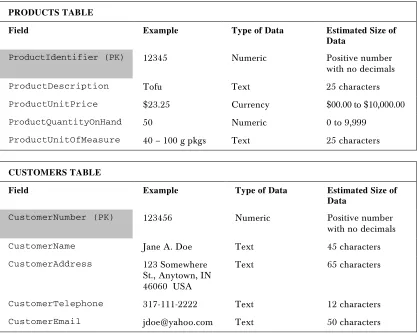
Shown below are our tables as before, but with the primary and foreign keys highlighted. Note that, for clarification, we've added PK for primary key and FK for foreign key for each field name cell as appropriate, but these designations won't actually be part of the field name in our database:
PRODUCTS TABLE
Field Example Type of Data Estimated Size of
Data
ProductIdentifier (PK) 12345 Numeric Positive number
with no decimals
ProductDescription Tofu Text 25 characters
ProductUnitPrice $23.25 Currency $00.00 to $10,000.00
ProductQuantityOnHand 50 Numeric 0 to 9,999
ProductUnitOfMeasure 40 – 100 g pkgs Text 25 characters
CUSTOMERS TABLE
Field Example Type of Data Estimated Size of
Data
CustomerNumber (PK) 123456 Numeric Positive number with no decimals
CustomerName Jane A. Doe Text 45 characters
CustomerAddress 123 Somewhere
St., Anytown, IN 46060 USA
Text 65 characters
CustomerTelephone 317-111-2222 Text 12 characters
ORDERS TABLE
Field Example Type of Data Estimated Size of
Data
OrderNumber (PK) 1000 Numeric Positive number
with no decimals
OrderDate Aug. 1, 2001 Date Valid date
ProductIdentifier1 (FK) 12345 Numeric Positive number
with no decimals
PriceItem1 $19.00 Currency $00.00 to
$10,000.00
QuantityItem1 2 Numeric 0 to 9,999
ProductIdentifier2 (FK) 2345 Numeric Positive number
with no decimals
PriceItem2 $8.50 Currency $00.00 to
$10,000.00
QuantityItem2 3 Numeric 0 to 9,999
ProductIdentifier3
(FK) 3456 Numeric Positive numberwith no decimals
PriceItem3 $13.00 Currency $00.00 to
$10,000.00
QuantityItem3 4 Numeric 0 to 9,999
ProductIdentifier4
(FK) 4567 Numeric Positive numberwith no decimals
PriceItem4 $15.00 Currency $00.00 to
$10,000.00
QuantityItem4 5 Numeric 0 to 9,999
CustomerNumber (FK) 123456 Numeric Positive number
with no decimals
OrderShipDate Aug. 3, 2001 Date Valid date
Defining Relationships
The next step in our logical database design is to define the relationships between the tables. A relationship is the term used to describe a connection between related tables. Stated another way, it means having shared fields in different tables that allow records to reference records in other tables. For example, suppose we want to find the description of a product that a customer ordered. The Orders table doesn't need the full product description, but simply the ProductIdentifier for each product ordered. We can use these fields (ProductIdentifier1 is the first product code, ProductIdentifier2 the second, and so on) to pull out the corresponding product record from the Products table – the entry in that table with the same
ProductIdentifier entry – and so we can retrieve the ProductDescription for any ordered item. In Chapter 3, we will cover how to use Structured Query Language (SQL) for this very purpose.
Now that we have an understanding of what we mean by the term relationship in this context, we're ready to look at the three possible types of relationships: One-To-One, One-To-Many, and Many-To-Many.
One-To-One Relationships
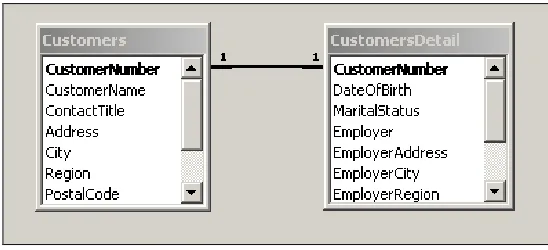
A one-to-one relationship indicates that each record in a table may relate to only one record in another table. For example, suppose that we have three hundred fields for each customer. Further, suppose that our database doesn't support records with this many fields. One solution would be to break the customers table into two separate tables, such as Customers and CustomersDetail. Tables with one-to-one relationships have the same primary key, which serves to link two related records – this field is sometimes referred to as the join column. In our hypothetical scenario, the tables would link to each other by both using the unique CustomerNumber field as their primary key. Tables that have such a one-to-one relationship can be viewed as simply extensions of each other. In practice, true one-to-one relationships do not actually occur very often. Often, when they are found in a database system, they are there to get around some limitation of the database such as the one we've just described.
An example of our hypothetical one-to-one relationship is shown here:
Notice how the hypothetical Customers table above joins to the hypothetical CustomersDetail
table by the common CustomerNumber field. This field is the primary key for both tables and the information contained in each table is, in effect, just an extension of the other.
One-To-Many Relationships
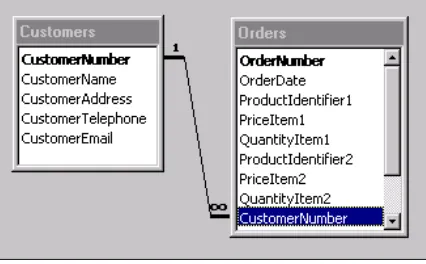
In a one-to-many relationship, any record in a table can relate to multiple records in a second table. This is the type of relationship that will exist between the Customers and Orders tables of our example database setup. A single customer can place many orders, but each order may have only one customer – we say that the Customers table has a one-to-many relationship with the Orders table (one customer to many orders). Note that this means that any record in the first table (Customers) can have zero or one corresponding records in the second table (Orders), though not necessarily more than one. Looked at from another angle, each customer in the Customers table can place zero, one, or many orders.
An example of this one-to-many relationship from our work-in-progress database structure is shown below:
Notice how the CustomerNumber entry in the Customers table relates directly to multiple
CustomerNumber entries in the Orders table, and that a customer may not have any outstanding orders in the Orders table, even though they have a record in the Customers table. The symbols above are the standard typically employed for designating relationships – with the one symbol ("1") next to the
CustomerNumber in the Customers table and the many symbol ("∞") next to the CustomerNumber in the Orders table. This scenario is a very common example of a one-to-many relationship: we have a primary key for one table relating to another table where that same key is the foreign key.
Don't get too used to the table structure shown in the figure above. We will change it shortly to better meet the rules of good database design. The purpose of showing it here is merely as an example of a one-to-many relationship between database tables.
Many-To-Many Relationships
With a many-to-many relationship, many records in one table can link to many records in the second table. Many-to-many relationships are resolved by use of a third table, created especially to store the relationships between records in the other two tables. This table breaks the relationship down into multiple one-to-many relationships. Without this third table, many-to-many relationships would be impossible to implement due to restrictions of database systems.
Notice how there is a one-to-many relationship between the Roles and UserRoles tables, as designated by the one and many symbols. This means that for each role, there can be many users. Further notice how there is a one-to-many relationship between the Users and UsersRoles tables. This means that each user can have many roles. You can see how the intermediate table, UserRoles, brings these two tables together. A good way of thinking of it is that the UsersRoles is a bride table which brings the Roles
and Users tables together. The diagram below shows some sample data to further illustrate this concept:
Notice that in the UsersRoles table, the user jdoe is assigned the RoleIds of 2 and 5. By looking at the RoleId
in the Roles table, you will see that this means he has been assigned to the Edit and View roles. You will also notice that the same role is contained multiple times in the UsersRoles table: both jdoe and jsmith have
Referential Integrity
By defining our table relationships in the physical database (which we discuss later in the chapter), we are setting ourselves up to take advantage of referential integrity. When enabled for a database, referential integrity automatically ensures that, whenever data is inserted, updated, or deleted, these defined relationships remain consistent. For example, the foreign key fields of a new or altered record can be checked to ensure that there is a matching entry in the table where that field is the primary key, thus avoid adding records that have invalid references.
With referential integrity in place, you may also take advantage of features known as cascade update and cascade delete. Cascade update means that, if a key changes in any table, the value in all tables where that key is present will be updated to reflect the new value. Similarly, with the cascade delete option enabled, if a record is deleted, all related records in the database will be deleted. By enforcing referential integrity, you can save yourself a lot of extra coding effort to modify multiple tables any time that a key value changes or records are deleted that would impact multiple tables.
We have already mentioned that referential integrity is a very important consideration. It is important to note that there are times, however, when referential integrity and cascading updates or deletes are problematic. Let's take a look at an example to further illustrate this concept of referential integrity, as well as to describe the problems that can occur when you do or don't take advantage of it.
Suppose that you have a database containing the table structure that we have designed so far in this chapter. Further, suppose that the database tables do not have referential integrity enabled. If you change the ProductIdentifier value of a given product in the Products table, you then would have to write code to manually change every occurrence of that same ProductIdentifier in every single place where it is used in the Orders table. If you do not, then the records in the Orders table will become orphaned. Orphaned recordsno longer contain the link back to the parent key that they were based on. To state it another way – the value for ProductIdentifier in the Orders table no longer exists in the Products table, so the Order record has become an orphan and cannot be joined back to the Products table because the values no longer match.
Also, depending on the way that your database has been designed, there are situations when enabling cascading deletes may not be exactly what you want. For example, suppose you need to remove a customer from the Customers table (maybe they haven't placed an order in the past year and you want to archive them). If you have cascading deletes enabled and you delete the customer record, then all of the orders that that customer placed are also deleted. You would be losing valuable sales data in such a case. Whenever you enable cascade deletes, you should make doubly sure that it will have the effect you desire.
Normalizing the Data
In the real world, a database is generally said to be of good design if it meets the third normal form. In fact, there are normal forms beyond the third but, since such forms have little practical use in most real world situations, we only need concern ourselves with the first three. So, let's jump right in and take a look at the first three normal forms and start to apply their rules to our work-in-progress example.
First Normal Form
To achieve First Normal Form, we must eliminate any repeating groups.
In First Normal Form, we simplify our database structure to eliminate any repeating groups. In other words, First Normal Form includes the concept that fields must be "atomic" or a field represents one type of value for all records. Examples of these repeating groups can be:
❑ A list of multiple values in the same field. An example would be a field containing the single string "5 – Tofu, 4 – Jack's New England Clam Chowder". The problem here is that it is inefficient to retrieve individual items from such fields, as the contents have to be laboriously read and split up (parsed). It wouldn't be easy to examine the different products ordered by a customer. It would be an even more difficult a task to examine products according to the quantities ordered.
❑ Repeated fields – that is, multiple occurrences of very similar fields to hold similar data (Product1, Price1, Quantity1, Product2, Price2, Quantity2, for example). Such fields are problematic for a couple of reasons. Firstly, they could impose a limit on how many products a customer might order at one time. You would have to modify the database structure to add additional columns if you wish to change this maximum later. Secondly, you waste space every time a customer places an order for less than the number of columns you have allocated. In other words, if you have fields to hold up to five products, and the customer only orders one product, then space in the database is taken up unnecessarily for the other four empty product fields. The third problem with repeating fields is that data analysis is much more complicated. For example, the analysis of sales data would be an awkward task if you had to join to each of the repeating fields to find the total of what was sold to each customer.
So, now that we know what we're looking for, let's look at our in-progress table structure to see where it violates first normal form, and make any necessary changes for compliance. The following figures recap the current table structure:
PRODUCTS TABLE
Field Example Type of Data Estimated Size of Data
ProductIdentifier (PK) 12345 Numeric Positive number with no
decimals
ProductDescription Tofu Text 25 characters
ProductUnitPrice $23.25 Currency $00.00 to $10,000.00
ProductQuantityOnHand 50 Numeric 0 to 9,999
CUSTOMERS TABLE
Field Example Type of Data Estimated Size of Data
CustomerNumber (PK) 123456 Numeric Positive number with no
decimals
CustomerName Jane A. Doe Text 45 characters
CustomerAddress 123 Somewhere
St., Anytown, IN 46060 USA
Text 65 characters
CustomerTelephone 317-111-2222 Text 12 characters
CustomerEmail [email protected] Text 50 characters
ORDERS TABLE
Field Example Type of Data Estimated Size of Data
OrderNumber (PK) 1000 Numeric Positive number with no
decimals
OrderDate Aug. 1, 2001 Date Valid date
ProductIdentifier1
(FK) 12345 Numeric Positive number with nodecimals
PriceItem1 $19.00 Currency $00.00 to $10,000.00
QuantityItem1 2 Numeric 0 to 9,999
ProductIdentifier2 (FK)
2345 Numeric Positive number with no
decimals
PriceItem2 $8.50 Currency $00.00 to $10,000.00
QuantityItem2 3 Numeric 0 to 9,999
ProductIdentifier3
(FK) 3456 Numeric Positive number with nodecimals
PriceItem3 $13.00 Currency $00.00 to $10,000.00
QuantityItem3 4 Numeric 0 to 9,999
ProductIdentifier4
(FK) 4567 Numeric Positive number with nodecimals
PriceItem4 $15.00 Currency $00.00 to $10,000.00
QuantityItem4 5 Numeric 0 to 9,999
CustomerNumber (FK) 123456 Numeric Positive number with no
decimals
Look at the tables and fields above – can you spot any multiple values listed together in a single field? The Products table doesn't include any – all of its fields contain just a single, discreet data item. Is the same true for the Customer table though? Well, not really. Notice how one field holds the complete customer name, including the first name, middle initial, and last name:
CustomerName Jane A. Doe Text 45 characters
If we wanted to analyze the data by last name, for example, such a structure would require us to devise an algorithm that would reliably split up the string held in this field. This is prone to error and would certainly have a negative impact on our database performance. It makes sense for us to separate the
CustomerName field out into three separate fields; say CustomerFirstName, CustomerLastName, and CustomerMiddleName. The same holds true for the CustomerAddress field as well, where we have the entire customer address in just one field:
CustomerAddress 123 Somewhere
St., Anytown, IN 46060 USA
Text 65 characters
Once again, to achieve a first normal form, we need to break the street address, city, state, zip, and country values into separate fields as well. After our modifications to the Customers table to eliminate such multiple data items in a single field, the new structure looks something like this:
CUSTOMERS TABLE
Field Example Type of Data Estimated Size of
Data
CustomerNumber (PK) 123456 Numeric Positive number with no decimals
CustomerFirstName Jane Text 15 characters
CustomerMiddleName A. Text 15 characters
CustomerLastName Doe Text 25 characters
CustomerAddress 123 Somewhere
St.
Text 30 characters
CustomerCity Anytown Text 20 characters
CustomerState IN Text 2 characters
CustomerZip 46060 Text 9 characters
CustomerCountry USA Text 20 characters
CustomerTelephone 317-111-2222 Text 12 characters
Now that we have separated the Name and Address fields so that each data item has its own field, data will be much easier to retrieve using this revised format. It greatly facilitates such things as retrieving information about all customers in the state of Indiana for example. Before, you would have been required to parse the entire address field to search for the state part of the field, and there'd be no guarantee that that information had even been included for every customer.
The Customers table is, in fact, the only table with fields containing multiple values in the same field. Now let's look to see whether we have any tables that actually have fields that repeat themselves. We don't have to look very hard to see that our Orders table has several repeating fields for each product ordered, namely ProductIdentifier, PriceItem, and QuantityItem, as listed below:
ProductIdentifier1 (FK) 12345 Numeric Positive number with
no decimals
PriceItem1 $19.00 Currency $00.00 to $10,000.00
QuantityItem1 2 Numeric 0 to 9,999
ProductIdentifier2 (FK) 2345 Numeric Positive number with
no decimals
PriceItem2 $8.50 Currency $00.00 to $10,000.00
QuantityItem2 3 Numeric 0 to 9,999
ProductIdentifier3 (FK) 3456 Numeric Positive number with
no decimals
PriceItem3 $13.00 Currency $00.00 to $10,000.00
QuantityItem3 4 Numeric 0 to 9,999
ProductIdentifier4 (FK) 4567 Numeric Positive number with
no decimals
PriceItem4 $15.00 Currency $00.00 to $10,000.00
QuantityItem4 5 Numeric 0 to 9,999
ORDERS TABLE
Field Example Type of Data Estimated Size of Data
OrderNumber (PK) 1000 Numeric Positive number with no
decimals
ProductIdentifier (PK) 12345 Numeric Positive number with no
decimals
OrderDate Aug. 1, 2001 Date Valid date
CustomerNumber (FK) 123456 Numeric Positive number with no
decimals
Price $ 15.00 Currency $00.00 to $10,000.00
Quantity 5 Numeric 0 to 9,999
OrderShipDate Aug. 3, 2001 Date Valid date
Below is a screenshot showing how our database might look after this modification:
Notice that now there are multiple records for each product in a given order. You might think this to be an inefficient duplication of data – you'd be right, but don't worry because we will address this when we refine the design to Second Normal Form in a minute. The important thing is that we are no longer limited to how many products can be included in a given order and, in addition, we could now easily retrieve the totals for each product ordered. With this format, if an order consists of just one product, then only one record need be created in the Orders table. On the other hand, if the order consisted of five separate products, then five records would be created in the Orders table. To allow this and yet ensure that each record in the Orders table still has a unique primary key, the primary key has to be changed to a combination of the OrderNumber and ProductIdentifier fields.
With respect to the Products table, we do not need to make any modifications to make it comply with First Normal Form. None of the fields in the Products table violate the two rules described above. In other words, none of the fields in the Products table contain multiple values in the same field, nor do they contain any repeated fields.
Second Normal Form
To achieve Second Normal Form, we make sure that non-key fields depend on all of the fields in the primary key.
In Second Normal Form, we aim to streamline our design to ensure that every field that is not itself a key is specific to the entire primary key. Every field in the table should be dependent upon the entire primary key so that, when new records are added, the same values will not be repeated from record to record unnecessarily. Let's look at our sample database design to illustrate this issue.
In the First Normal Form step, we modified the Orders table to allow multiple records for every product ordered (as opposed to having a fixed set of fields for up to four products). To allow this, the
OrderNumber and ProductIdentifier fields became the primary key for the Orders table. While that satisfied the rule for first normal form, it violates Second Normal Form because the OrderDate,
CustomerNumber, and OrderShipDate fields are not dependent solely on the entire primary key – that is, the combination of OrderNumber and ProductIdentifier. These fields depend only on the
OrderNumber and are irrespective of the ProductIdentifier field. It should be possible to find values for the OrderDate, CustomerNumber, and OrderShipDate fields without needing to know the value of ProductIdentifier of any products that were ordered. The effect of this is that the current design repeats information (CustomerNumber and OrderShipDate) in multiple records of the Orders
table when, ideally, we should only provide this information once. By duplicating the CustomerNumber
and OrderShipDate multiple times for each item in the order, you open yourself up to the same maintenance nightmare associated with spreadsheets, as discussed earlier in this chapter. If either of those fields ever needs to be updated, you would have multiple places to update the information.
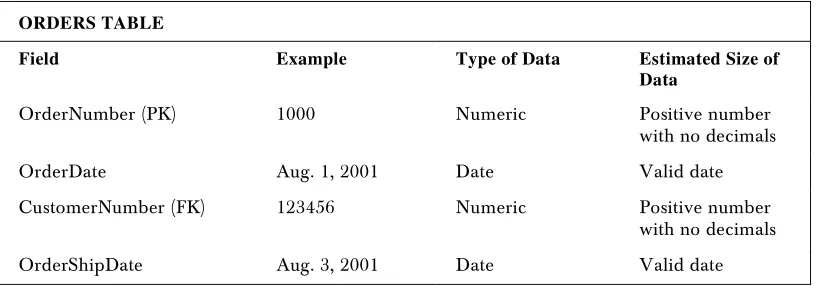
So how do we solve this problem and make the database comply with the Second Normal Form? The answer is that we must create a new table (OrdersProducts) to store multiple products for each order. Fields specific to the order in general can remain in the Orders table, but the details for each product of an individual order will be moved into the new OrdersProducts table. Here is how the modified Orders table and the new OrdersProducts table might look:
ORDERS TABLE
Field Example Type of Data Estimated Size of
Data
OrderNumber (PK) 1000 Numeric Positive number
with no decimals
OrderDate Aug. 1, 2001 Date Valid date
CustomerNumber (FK) 123456 Numeric Positive number
with no decimals