< Day Day Up >
• Table of Contents
• Index
• Reviews
• Reader Reviews
• Errata
• Academic
Learning PHP 5
By David Sklar
Publisher: O'Reilly Pub Date: June 2004
ISBN: 0-596-00560-1 Pages: 368
Learning PHP 5 is the ideal tutorial for graphic designers, bloggers, and other web crafters who want a thorough but non-intimidating way
to understand the code that makes web sites dynamic. The book begins with an introduction to PHP, then moves to more advanced features: language basics, arrays and functions, web forms, connecting to databases, and much more. Complete with exercises to make sure the lessons stick, this book offers the ideal classroom learning experience whether you're in a classroom or on your own.
< Day Day Up >
< Day Day Up >
• Table of Contents
• Index
• Reviews
• Reader Reviews
• Errata
• Academic
Learning PHP 5
By David Sklar
Publisher: O'Reilly Pub Date: June 2004
ISBN: 0-596-00560-1 Pages: 368
Copyright
Dedication
Preface
Who This Book Is For
Contents of This Book
Other Resources
Conventions Used in This Book
Using Code Examples
Comments and Questions
Acknowledgments
Chapter 1. Orientation and First Steps
Section 1.1. PHP's Place in the Web World
Section 1.2. What's So Great About PHP?
Section 1.3. PHP in Action
Section 1.4. Basic Rules of PHP Programs
Section 1.5. Chapter Summary
Chapter 2. Working with Text and Numbers
Section 2.1. Text
Section 2.2. Numbers
Section 2.3. Variables
Section 2.4. Chapter Summary
Section 2.5. Exercises
Chapter 3. Making Decisions and Repeating Yourself
Section 3.1. Understanding true and false
Section 3.2. Making Decisions
Section 3.3. Building Complicated Decisions
Section 3.4. Repeating Yourself
Section 3.5. Chapter Summary
Section 3.6. Exercises
Chapter 4. Working with Arrays
Section 4.1. Array Basics
Section 4.2. Looping Through Arrays
Section 4.3. Modifying Arrays
Section 4.4. Sorting Arrays
Section 4.5. Using Multidimensional Arrays
Section 4.6. Chapter Summary
Section 4.7. Exercises
Chapter 5. Functions
Section 5.1. Declaring and Calling Functions
Section 5.2. Passing Arguments to Functions
Section 5.3. Returning Values from Functions
Section 5.4. Understanding Variable Scope
Section 5.5. Chapter Summary
Section 5.6. Exercises
Chapter 6. Making Web Forms
Section 6.1. Useful Server Variables
Section 6.2. Accessing Form Parameters
Section 6.3. Form Processing with Functions
Section 6.4. Validating Data
Section 6.5. Displaying Default Values
Section 6.6. Putting It All Together
Section 6.7. Chapter Summary
Section 6.8. Exercises
Chapter 7. Storing Information with Databases
Section 7.1. Organizing Data in a Database
Section 7.2. Connecting to a Database Program
Section 7.3. Creating a Table
Section 7.4. Putting Data into the Database
Section 7.5. Inserting Form Data Safely
Section 7.6. Generating Unique IDs
Section 7.7. A Complete Data Insertion Form
Section 7.8. Retrieving Data from the Database
Section 7.9. Changing the Format of Retrieved Rows
Section 7.10. Retrieving Form Data Safely
Section 7.11. A Complete Data Retrieval Form
Section 7.12. MySQL Without PEAR DB
Section 7.13. Chapter Summary
Section 7.14. Exercises
Chapter 8. Remembering Users with Cookies and Sessions
Section 8.1. Working with Cookies
Section 8.2. Activating Sessions
Section 8.3. Storing and Retrieving Information
Section 8.4. Configuring Sessions
Section 8.5. Login and User Identification
Section 8.6. Why setcookie( ) and session_start( ) Want to Be at the Top of the Page
Section 8.7. Chapter Summary
Section 8.8. Exercises
Chapter 9. Handling Dates and Times Section 9.1. Displaying the Date or Time
Section 9.2. Parsing a Date or Time
Section 9.3. Dates and Times in Forms
Section 9.4. Displaying a Calendar
Section 9.5. Chapter Summary
Section 9.6. Exercises
Chapter 10. Working with Files
Section 10.1. Understanding File Permissions
Section 10.2. Reading and Writing Entire Files Section 10.3. Reading and Writing Parts of Files
Section 10.4. Working with CSV Files
Section 10.5. Inspecting File Permissions
Section 10.6. Checking for Errors
Section 10.7. Sanitizing Externally Supplied Filenames
Section 10.8. Chapter Summary
Section 10.9. Exercises
Chapter 11. Parsing and Generating XML
Section 11.1. Parsing an XML Document
Section 11.2. Generating an XML Document
Section 11.3. Chapter Summary
Section 11.4. Exercises Chapter 12. Debugging
Section 12.1. Controlling Where Errors Appear
Section 12.2. Fixing Parse Errors
Section 12.3. Inspecting Program Data
Section 12.4. Fixing Database Errors
Section 12.5. Chapter Summary
Section 12.6. Exercises
Chapter 13. What Else Can You Do with PHP?
Section 13.1. Graphics
Section 13.2. PDF
Section 13.3. Shockwave/Flash
Section 13.4. Browser-Specific Code
Section 13.5. Sending and Receiving Mail
Section 13.6. Uploading Files in Forms
Section 13.7. The HTML_QuickForm Form-Handling Framework
Section 13.8. Classes and Objects
Section 13.9. Advanced XML Processing
Section 13.10. SQLite
Section 13.11. Running Shell Commands
Section 13.12. Advanced Math
Section 13.13. Encryption
Section 13.14. Talking to Other Languages
Section 13.15. IMAP, POP3, and NNTP
Section 13.16. Command-Line PHP
Section 13.17. PHP-GTK
Section 13.18. Even More Things You Can Do with PHP
Appendix A. Installing and Configuring the PHP Interpreter
Section A.1. Using PHP with a Web-Hosting Provider
Section A.2. Installing the PHP Interpreter
Section A.3. Installing PEAR
Section A.4. Downloading and Installing PHP's Friends Section A.5. Modifying PHP Configuration Directives
Section A.6. Appendix Summary
Appendix B. Regular Expression Basics
Section B.1. Characters and Metacharacters
Section B.2. Quantifiers
Section B.3. Anchors
Section B.4. Character Classes
Section B.5. Greed
Section B.6. PHP's PCRE Functions
Section B.7. Appendix Summary
Section B.8. Exercises
Appendix C. Answers To Exercises
Section C.1. Chapter 2
Section C.2. Chapter 3
Section C.3. Chapter 4
Section C.4. Chapter 5
Section C.5. Chapter 6
Section C.6. Chapter 7
Section C.7. Chapter 8
Section C.8. Chapter 9
Section C.9. Chapter 10
Section C.10. Chapter 11
Section C.11. Chapter 12
Section C.12. Appendix B
Colophon
Index
< Day Day Up >
< Day Day Up >
Copyright © 2004 O'Reilly Media, Inc. Printed in the United States of America.
Published by O'Reilly Media, Inc., 1005 Gravenstein Highway North, Sebastopol, CA 95472.
O'Reilly books may be purchased for educational, business, or sales promotional use. Online editions are also available for most titles (http://safari.oreilly.com). For more information, contact our corporate/institutional sales department: (800) 998-9938 or
Nutshell Handbook, the Nutshell Handbook logo, and the O'Reilly logo are registered trademarks of O'Reilly Media, Inc. Learning PHP 5, the image of an eagle, and related trade dress are trademarks of O'Reilly Media, Inc.
Many of the designations used by manufacturers and sellers to distinguish their products are claimed as trademarks. Where those designations appear in this book, and O'Reilly Media, Inc. was aware of a trademark claim, the designations have been printed in caps or initial caps.
While every precaution has been taken in the preparation of this book, the publisher and authors assume no responsibility for errors or omissions, or for damages resulting from the use of the information contained herein.
< Day Day Up >
< Day Day Up >
Dedication
To Jacob, who can look forward to so much learning.
< Day Day Up >
< Day Day Up >
Preface
Boring web sites are static. Interesting web sites are dynamic. That is, their content changes. A giant static HTML page listing the names, pictures, descriptions, and prices of all 1,000 products a company has for sale is hard to use and takes forever to load. A dynamic web product catalog that lets you search and filter those products so you see only the six items that meet your price and category criteria is more useful, faster, and much more likely to close a sale.
The PHP programming language makes it easy to build dynamic web sites. Whatever interactive excitement you want to create—such as a product catalog, a blog, a photo album, or an event calendar—PHP is up to the task. And after reading this book, you'll be up to the task of building that dynamic web site, too.
< Day Day Up >
< Day Day Up >
Who This Book Is For
This book is for:
A hobbyist who wants to create an interactive web site for himself, his family, or a nonprofit organization. A web site builder who wants to use the PHP setup provided by an ISP or hosting provider.
A small business owner who wants to put her company on the Web.
A page designer who wants to communicate better with her developer co-workers.
A JavaScript whiz who wants to build server-side programs that complement her client-side code. A blogger or HTML jockey who wants to easily add dynamic features to her site.
A Perl, ASP, or ColdFusion programmer who wants to get up to speed with PHP.
Anybody who wants a straightforward, jargon-free introduction to one of the most popular programming languages for building an interactive web site.
PHP's gentle learning curve and approachable syntax make it an ideal "gateway" language for the nontechnical web professional.
Learning PHP 5 is aimed at both this interested, intelligent, but not necessarily technical individual as well as at programmers familiar
with another language who want to learn PHP.
Aside from basic computer literacy (knowing how to type, moving files around, surfing the Web), the only assumption that this book makes about you is that you're acquainted with HTML. You don't need to be an HTML master, but you should be comfortable with the HTML tags that populate a basic web page such as <html>, <head>, <body>, <p>, <a>, and <br>. If you're not familiar with HTML, read
HTML & XHTML: The Definitive Guide, Fifth Edition, by Bill Kennedy and Chuck Musciano (O'Reilly).
< Day Day Up >
< Day Day Up >
Contents of This Book
This book is designed so that you start at the beginning and work through the chapters in order. For the most part, each chapter depends on material in the previous chapters. Chapter 2, through Chapter 12 and Appendix B, each end with exercises that test your understanding of the content in the chapter.
Chapter 1, provides some general background on PHP and how it interacts with your web browser and a web server. It also shows some PHP programs and what they do to give you an idea of what PHP programs look like. Especially if you're new to programming or building dynamic web sites, it is important to read Chapter 1.
The next four chapters give you a grounding in the fundamentals of PHP. Before you can write great literature, you need to learn a little grammar and some vocabulary. That's what these chapters are for. (Don't worry—you'll learn enough PHP grammar and vocabulary right away to start writing some short programs, if not great literature.) Chapter 2 shows you how to work with different kinds of data such as pieces of text and numbers. This is important because the web pages that your PHP programs generate are just big pieces of text. Chapter 3, describes the PHP commands with which your programs can make decisions. These decisions are at the heart of the "dynamic" in "dynamic web site." The concepts in Chapter 3 are what you use, for example, to display only items in a product catalog that fall between two prices a user enters in a web form.
Chapter 4, introduces arrays, which are collections of a bunch of individual numbers or pieces of text. Many frequent activities in PHP programs, such as processing submitted web form parameters or examining information pulled out of a database, involve using arrays. As you write more complicated programs, you'll find yourself wanting to repeat similar tasks. Functions, discussed in Chapter 5, help you reuse pieces of your programs.
The three chapters after that cover three essential tasks in building a dynamic web site: dealing with forms, databases, and users. Chapter 6, supplies the details on working with web forms. These are the primary way that users interact with your web site. Chapter 7, discusses databases. A database holds the information that your web site displays, such as a product catalog or event calendar. This chapter shows you how to make your PHP programs talk to a database. With the techniques in Chapter 8, your web site can do user-specific things such as display sensitive information to authorized people only or tell someone how many new message board posts have been created since she last logged in.
Then, the next three chapters examine three other areas you're likely to encounter when building your web site. Chapter 9, highlights the steps you need to take, for example, to display a monthly calendar or to allow users to input a date or time from a web form. Chapter 10, describes the PHP commands for interacting with files on your own computer or elsewhere on the Internet. Chapter 11, supplies the basics for dealing with XML documents in your PHP programs, whether you need to generate one for another program to consume or you've been provided with one to use in your own program.
Chapter 12 and Chapter 13 each stand on their own. Chapter 12, furnishes some approaches for understanding the error messages that the PHP interpreter generates and hunting down problems in your programs. While it partially depends on earlier material, it may be worthwhile to skip ahead and peruse Chapter 12 as you're working through the book.
Chapter 13 serves a taste of many additional capabilities of PHP, such as generating images, running code written in other languages, and making Flash movies. After you've gotten comfortable with the core PHP concepts explained in Chapter 1 through Chapter 12, visit Chapter 13 for lots of new things to learn.
The three appendixes provide supplementary material. To run PHP programs, you need to have a copy of the PHP interpreter installed on your computer (or have an account with a web-hosting provider that supports PHP). Appendix A, helps you get up and running, whether you are using Windows, OS X, or Linux.
Many text-processing tasks in PHP, such as validating submitted form parameters or parsing an HTML document, are made easier by using regular expressions, a powerful but initially inscrutable pattern matching syntax. Appendix B, explains the basics of regular expressions so that you can use them in your programs if you choose.
Last, Appendix C, contains the answers to all the exercises in the book. No peeking until you try the exercises!
< Day Day Up >
< Day Day Up >
Other Resources
The online annotated PHP Manual (http://www.php.net/manual) is a great resource for exploring PHP's extensive function library. Plenty of user-contributed comments offer helpful advice and sample code, too. Additionally, there are many PHP mailing lists covering installation, programming, extending PHP, and various other topics. You can learn about and subscribe to these mailing lists at http://www.php.net/mailing-lists.php. A read-only web interface to the mailing lists is at http://news.php.net. Also worth exploring is the PHP Presentation System archive at http://talks.php.net. This is a collection of presentations about PHP that have been delivered at various conferences.
After you're comfortable with the material in this book, the following books about PHP are good next steps:
Programming PHP, by Rasmus Lerdorf and Kevin Tatroe (O'Reilly). A more detailed and technical look at how to write PHP
programs. Includes information on generating graphics and PDFs.
PHP Cookbook, by David Sklar and Adam Trachtenberg (O'Reilly). A comprehensive collection of common PHP
programming problems and their solutions.
Essential PHP Tools, by David Sklar (Apress). Examples and explanations about many popular PHP add-on libraries and
modules including HTML_QuickForm, SOAP, and the Smarty templating system.
Upgrading to PHP 5, by Adam Trachtenberg (O'Reilly). A comprehensive look at the new features of PHP 5, including
coverage of features for XML handling and object-oriented programming.
These books are helpful for learning about databases, SQL, and MySQL:
Web Database Applications with PHP & MySQL, by David Lane and Hugh E. Williams (O'Reilly). How to make PHP and
MySQL sing in harmony to make a robust dynamic web site.
SQL in a Nutshell, by Kevin E. Kline (O'Reilly). The essentials you need to know to write SQL queries. Covers the SQL
dialects used by Microsoft SQL Server, MySQL, Oracle, and PostgreSQL.
MySQL Cookbook, by Paul DuBois (O'Reilly). A comprehensive collection of common MySQL tasks.
MySQL Reference Manual (http://dev.mysql.com/doc/mysql). The ultimate source for information about MySQL's features and SQL dialect.
These books are helpful for learning about HTML and HTTP:
HTML & XHTML: The Definitive Guide, by Bill Kennedy and Chuck Musciano (O'Reilly). If you've got a question about HTML,
this book answers it.
Dynamic HTML: The Definitive Reference, by Danny Goodman (O'Reilly). Full of useful information you need if you're using
JavaScript or Dynamic HTML as part of the web pages your PHP programs output.
HTTP Developer's Handbook, by Chris Shiflett (Sams Publishing). With this book, you'll better understand how your web
browser and a web server communicate with each other.
These books are helpful for learning about security and cryptography:
Web Security, Privacy & Commerce, by Simson Garfinkel (O'Reilly). A readable and complete overview of the various
aspects of web-related security and privacy.
Practical Unix & Internet Security, by Simson Garfinkel, Alan Schwartz, and Gene Spafford (O'Reilly). A classic exploration of
all facets of computer security.
Applied Cryptography, by Bruce Schneier (John Wiley & Sons). The nitty gritty on how different cryptographic algorithms
work and why.
These books are helpful for learning about supplementary topics that this book touches on like XML processing and regular expressions:
Learning XML, by Erik T. Ray (O'Reilly). Where to go for more in-depth information on XML than Chapter 11.
Learning XSLT, by Michael Fitzgerald (O'Reilly). Your guide to XML stylesheets and XSL transformations.
Mastering Regular Expressions, by Jeffrey E.F. Friedl (O'Reilly). After you've digested Appendix B, turn to this book for everything you ever wanted to know about regular expressions.
< Day Day Up >
< Day Day Up >
Conventions Used in This Book
The following programming and typesetting conventions are used in this book.
Programming Conventions
The code examples in this book are designed to work with PHP 5.0.0. They were tested with PHP 5.0.0RC2, which was the most up-to-date version of PHP 5 available at the time of publication. Almost all of the code in the book works with PHP 4.3 as well. The PHP 5-specific features discussed in the book are as follows:
Chapter 7: the mysqli functions
Chapter 10: the file_put_contents( ) function Chapter 11: the SimpleXML module
Chapter 12: the E_STRICT error-reporting level
Chapter 13: some new features related to classes and objects, the advanced XML processing functions, the bundled SQLite database, and the Perl extension
Typographical Conventions
The following typographical conventions are used in this book:
Italic
Indicates new terms, example URLs, example email addresses, filenames, file extensions, pathnames, and directories.
Constant width
Indicates commands, options, switches, variables, attributes, keys, functions, types, classes, namespaces, methods, modules, properties, parameters, values, objects, events, event handlers, XML tags, HTML tags, macros, the contents of files, or the output from commands.
Constant width italic
Shows text that should be replaced with user-supplied values.
This icon signifies a tip, suggestion, or general note.
This icon indicates a warning or caution.
< Day Day Up >
< Day Day Up >
Using Code Examples
Typing some of the example programs in the book yourself is instructive when you are getting started. However, if your fingers get weary, you can download all of the code examples from http://www.oreilly.com/catalog/learnphp5.
This book is here to help you get your job done. In general, you may use the code in this book in your programs and documentation. You do not need to contact the publisher for permission unless you're reproducing a significant portion of the code. For example, writing a program that uses several chunks of code from this book does not require permission. Selling or distributing a CD-ROM of examples from O'Reilly books does require permission. Answering a question by citing this book and quoting example code does not require permission. Incorporating a significant amount of example code from this book into your product's documentation does require permission.
We appreciate, but do not require, attribution. An attribution usually includes the title, author, publisher, and ISBN. For example: "Learning PHP 5 by David Sklar Copyright 2004 O'Reilly Media, Inc., 0-596-00560-1." If you feel your use of code examples falls outside fair use or the permission given above, feel free to contact the publisher at [email protected].
< Day Day Up >
< Day Day Up >
Comments and Questions
Please address comments and questions concerning this book to the publisher: O'Reilly Media, Inc.
1005 Gravenstein Highway North Sebastopol, CA 95472
(800) 998-9938 (in the United States or Canada) (707) 829-0515 (international or local)
(707) 829-0104 (fax)
There is a web page for this book, where we list errata, examples, and any additional information. You can access this page at: http://www.oreilly.com/catalog/learnphp5
To comment or ask technical questions about this book, send email to: [email protected]
Or you can contact the author directly via his web site: http://www.sklar.com
For more information about our books, conferences, Resource Centers, and the O'Reilly Network, see our web site at: http://www.oreilly.com
< Day Day Up >
< Day Day Up >
Acknowledgments
This book is the end result of the hard work of many people. Thank you to:
The many programmers, testers, documentation writers, bug fixers, and other folks whose time, talent, and devotion have made PHP the first-class development platform that it is today. Without them, I'd have nothing to write about.
The Apple WWPM Hardware Placement Lab for the loan of an iBook, and to Adam Trachtenberg, George Schlossnagle, and Jeremy Zawodny for advice on some code examples.
My diligent reviewers: Griffin Cherry, Florence Leroy, Mark Oglia, and Stewart Ugelow. They caught plenty of mistakes, turned confusing explanations into clear ones, and otherwise made this book far better than it would have been without them. Robert Romano, who turned my blocky diagrams and rustic pencil sketches into high-quality figures and illustrations. Tatiana Diaz, who funneled all of my random questions to the right people, kept me on schedule, and ultimately made sure that whatever needed to get done, was done.
Nat Torkington, whose editorial guidance and helpful suggestions improved every part of the book. Without Nat's feedback, this book would be twice as long and half as readable as it is.
For a better fate than wisdom, thank you also to Susannah, with whom I enjoy ignoring the syntax of things.
< Day Day Up >
< Day Day Up >
Chapter 1. Orientation and First Steps
There are lots of great reasons to write computer programs in PHP. Maybe you want to learn PHP because you need to put together a small web site for yourself that has some interactive elements. Perhaps PHP is being used where you work and you have to get up to speed. This chapter provides context for how PHP fits into the puzzle of web site construction: what it can do and why it's so good at what it does. You'll also get your first look at the PHP language and see it in action.
< Day Day Up >
< Day Day Up >
1.1 PHP's Place in the Web World
PHP is a programming language that's used mostly for building web sites. Instead of a PHP program running on a desktop computer for the use of one person, it typically runs on a web server and is accessed by lots of people using web browsers on their own computers. This section explains how PHP fits into the interaction between a web browser and a web server.
When you sit down at your computer and pull up a web page using a browser such as Internet Explorer or Mozilla, you cause a little conversation to happen over the Internet between your computer and another computer. This conversation and how it makes a web page appear on your screen is illustrated in Figure 1-1.
Figure 1-1. Client and server communication without PHP
Here's what's happening in the numbered steps of the diagram:
You type www.example.com/catalog.html into the location bar of Internet Explorer. 1.
Internet Explorer sends a message over the Internet to the computer named www.example.com asking for the /catalog.html page.
2.
Apache, a program running on the www.example.com computer, gets the message and reads the catalog.html file from the disk drive.
3.
Apache sends the contents of the file back to your computer over the Internet as a response to Internet Explorer's request. 4.
Internet Explorer displays the page on the screen, following the instructions of the HTML tags in the page. 5.
Every time a browser asks for http://www.example.com/catalog.html, the web server sends back the contents of the same catalog.html file. The only time the response from the web server changes is if someone edits the file on the server.
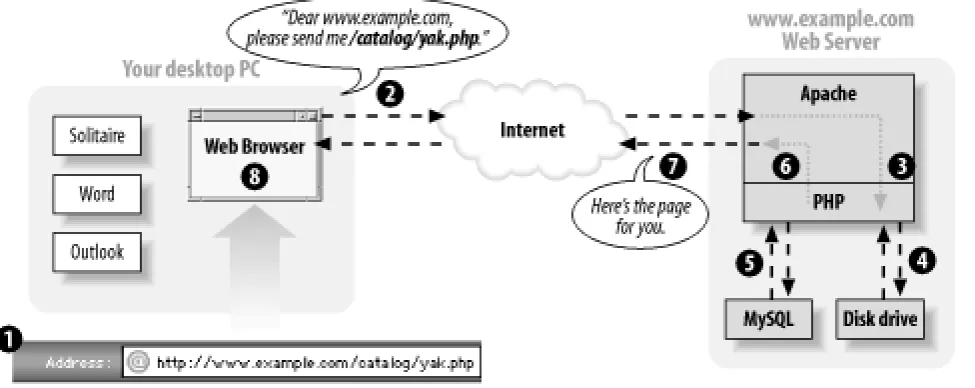
browser asks for a page that is generated by PHP.
Figure 1-2. Client and server communication with PHP
Here's what's happening in the numbered steps of the PHP-enabled conversation:
You type www.example.com/catalog/yak.php into the location bar of Internet Explorer. 1.
Internet Explorer sends a message over the Internet to the computer named www.example.com asking for the
/catalog/yak.php page.
2.
Apache, a program running on the www.example.com computer, gets the message and asks the PHP interpreter, another program running on the www.example.com computer, "What does /catalog/yak.php look like?"
3.
The PHP interpreter reads the file /usr/local/www/catalog/yak.php from the disk drive. 4.
The PHP interpreter runs the commands in yak.php, possibly exchanging data with a database program such as MySQL. 5.
The PHP interpreter takes the yak.php program output and sends it back to Apache as an answer to "What does
/catalog/yak.php look like?"
6.
Apache sends the page contents it got from the PHP interpreter back to your computer over the Internet in response to Internet Explorer's request.
7.
Internet Explorer displays the page on the screen, following the instructions of the HTML tags in the page. 8.
"PHP" is a programming language. Something in the web server reads your PHP programs, which are instructions written in this programming language, and figures out what to do. The " PHP interpreter" follows your instructions. Programmers often say "PHP" when they mean either the programming language or the interpreter. In this book, I mean the language when I say "PHP." When I say "PHP interpreter," I mean the thing that follows the commands in the PHP programs you write and that generates web pages.
If PHP (the programming language) is like English (the human language), then the PHP interpreter is like an English-speaking person. The English language defines various words and combinations that, when read or heard by an English-speaking person, translate into various meanings that cause the person to do things such as feel embarrassed, go to the store to buy some milk, or put on pants. The programs you write in PHP (the programming language) cause the PHP interpreter to do things such as talk to a database, generate a personalized web page, or display an image.
This book is concerned with the details of writing those programs — i.e., what happens in Step 5 of Figure 1-2 (although Appendix A contains details on configuring and installing the PHP interpreter on your own web server).
PHP is called a server-side language because, as Figure 1-2 illustrates, it runs on a web server. Languages and technologies such as JavaScript and Flash, in contrast, are called client-side because they run on a web client (like a desktop PC). The instructions in a PHP program cause the PHP interpreter on a web server to output a web page. The instructions in a JavaScript program cause Internet Explorer, while running on your desktop PC, to do something such as pop up a new window. Once the web server has sent the generated web page to the client (Step 7 in the Figure 1-2), PHP is out of the picture. If the page content contains some JavaScript, then that JavaScript runs on the client but is totally disconnected from the PHP program that generated the page.
A plain HTML web page is like the "sorry you found a cockroach in your soup" form letter you might get after dispatching an angry complaint to a bug-infested airline. When your letter arrives at airline headquarters, the overburdened secretary in the customer service department pulls the "cockroach reply letter" out of the filing cabinet, makes a copy, and puts the copy in the mail back to you. Every similar request gets the exact same response.
In contrast, a dynamic page that PHP generates is like a postal letter you write to a friend across the globe. You can put whatever you like down on the page — doodles, diagrams, haikus, and tender stories of how unbearably cute your new baby is when she spatters mashed carrots all over the kitchen. The content of your letter is tailored to the specific person to whom it's being sent. Once you put that letter in the mailbox, however, you can't change it any more. It wings its way across the globe and is read by your friend. You don't have any way to modify the letter as your friend is reading it.
Now imagine you're writing a letter to an arts-and-crafts-inspired friend. Along with the doodles and stories you include instructions such as "cut out the little picture of the frog at the top of the page and paste it over the tiny rabbit at the bottom of the page," and "read the last paragraph on the page before any other paragraph." As your friend reads the letter, she also performs actions the letter instructs her to take. These actions are like JavaScript in a web page. They're set down when the letter is written and don't change after that. But when the reader of the letter follows the instructions, the letter itself can change. Similarly, a web browser obeys any JavaScript commands in a page and pops up windows, changes form menu options, or refreshes the page to a new URL.
< Day Day Up >
< Day Day Up >
1.2 What's So Great About PHP?
You may be attracted to PHP because it's free, because it's easy to learn, or because your boss told you that you need to start working on a PHP project next week. Since you're going to use PHP, you need to know a little bit about what makes it special. The next time someone asks you "What's so great about PHP?", use this section as the basis for your answer.
1.2.1 PHP Is Free (as in Money)
You don't have to pay anyone to use PHP. Whether you run the PHP interpreter on a beat-up 10-year-old PC in your basement or in a room full of million-dollar "enterprise-class" servers, there are no licensing fees, support fees, maintenance fees, upgrade fees, or any other kind of charge.
Most Linux distributions come with PHP already installed. If yours doesn't, or you are using another operating system such as Windows, you can download PHP from http://www.php.net/. Appendix A has detailed instructions on how to install PHP.
1.2.2 PHP Is Free (as in Speech)
As an open source project, PHP makes its innards available for anyone to inspect. If it doesn't do what you want, or you're just curious about why a feature works the way it does, you can poke around in the guts of the PHP interpreter (written in the C programming language) to see what's what. Even if you don't have the technical expertise to do that, you can get someone who does to do the investigating for you. Most people can't fix their own cars, but it's nice to be able to take your car to a mechanic who can pop open the hood and fix it.
1.2.3 PHP Is Cross-Platform
You can use PHP with a web server computer that runs Windows, Mac OS X, Linux, Solaris, and many other versions of Unix. Plus, if you switch web server operating systems, you generally don't have to change any of your PHP programs. Just copy them from your Windows server to your Unix server, and they will still work.
While Apache is the most popular web server program used with PHP, you can also use Microsoft Internet Information Server and any other web server that supports the CGI standard. PHP also works with a large number of databases including MySQL, Oracle, Microsoft SQL Server, Sybase, and PostgreSQL. In addition, it supports the ODBC standard for database interaction.
If all the acronyms in the last paragraph freak you out, don't worry. It boils down to this: whatever system you're using, PHP probably runs on it just fine and works with whatever database you are already using.
1.2.4 PHP Is Widely Used
companies that provide support and training for PHP. In short, if you are a PHP user, you are not alone.
1.2.5 PHP Hides Its Complexity
You can build powerful e-commerce engines in PHP that handle millions of customers. You can also build a small site that automatically maintains links to a changing list of articles or press releases. When you're using PHP for a simpler project, it doesn't get in your way with concerns that are only relevant in a massive system. When you need advanced features such as caching, custom libraries, or dynamic image generation, they are available. If you don't need them, you don't have to worry about them. You can just focus on the basics of handling user input and displaying output.
1.2.6 PHP Is Built for Web Programming
Unlike most other programming languages, PHP was created from the ground up for generating web pages. This means that common web programming tasks, such as accessing form submissions and talking to a database, are often easier in PHP. PHP comes with the capability to format HTML, manipulate dates and times, and manage web cookies — tasks that are often available only as add-on libraries in other programming languages.
< Day Day Up >
< Day Day Up >
1.3 PHP in Action
Ready for your first taste of PHP? This section contains a few program listings and explanations of what they do. If you don't understand everything going on in each listing, don't worry! That's what the rest of the book is for. Read these listings to get a sense of what PHP programs look like and an outline of how they work. Don't sweat the details yet.
When given a program to run, the PHP interpreter pays attention only to the parts of the program between PHP start and end tags. Whatever's outside those tags is printed with no modification. This makes it easy to embed small bits of PHP in pages that mostly contain HTML. The PHP interpreter runs the commands between <?php (the PHP start tag) and ?> (the PHP end tag). PHP pages typically live in files whose names end in .php. Example 1-1 shows a page with one PHP command.
Example 1-1. Hello, World!
<html>
<head><title>PHP says hello</title></head>
<body>
<b>
<?php
print "Hello, World!";
?>
</b>
</body> </html>
The output of Example 1-1 is:
<html>
<head><title>PHP says hello</title></head>
<body>
<b>
Hello, World!
</b>
</body>
</html>
In your web browser, this looks like Figure 1-3.
Figure 1-3. Saying hello with PHP
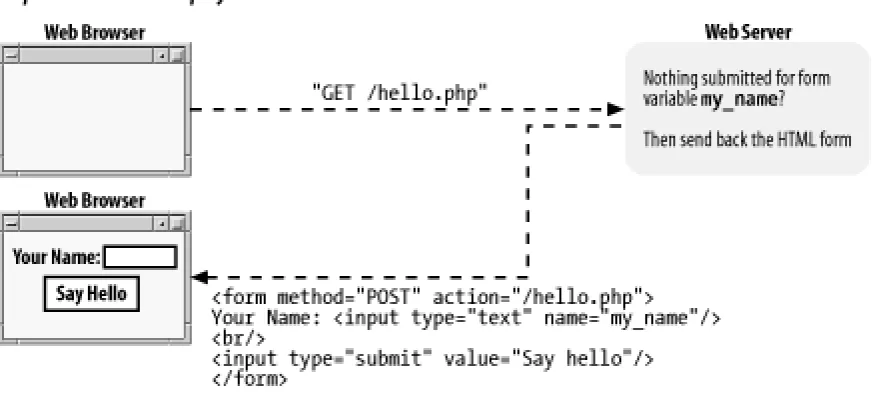
Printing a message that never changes is not a very exciting use of PHP, however. You could have included the "Hello, World!" message in a plain HTML page with the same result. More useful is printing dynamic data — i.e., information that changes. One of the most common sources of information for PHP programs is the user: the browser displays a form, the user enters information into that and hits the "submit" button, the browser sends that information to the server, and the server finally passes it on to the PHP interpreter where it is available to your program.
Example 1-2 is an HTML form with no PHP. The form consists simply of a text box named user and a Submit button. The form submits to
sayhello.php, specified via the <form> tag's action attribute.
Example 1-2. HTML form for submitting data
<form method="POST" action="sayhello.php">
Your Name: <input type="text" name="user">
<br/>
<input type="submit" value="Say Hello">
</form>
Your web browser renders the HTML in Example 1-2 into the form shown in Figure 1-4.
Figure 1-4. Printing a form
Example 1-3 shows the sayhello.php program that prints a greeting to whomever is named in the form's text box.
Example 1-3. Dynamic data
<?php
print "Hello, ";
// Print what was submitted in the form parameter called 'user'
print $_POST['user'];
print "!";
?>
If you type Ellen in the text box and submit the form, then Example 1-3 prints Hello, Ellen!. Figure 1-5 shows how your web browser displays that.
Figure 1-5. Printing a form parameter
$_POST holds the values of submitted form parameters. In programming terminology, it is a variable, so called because you can change the values it holds. In particular, it is an array variable, because it can hold more than one value. This particular array is discussed in Chapter 6. Arrays are discussed in Chapter 4.
ignored by the PHP interpreter. Comments are useful for annotating your programs with information about how they work. Section 1.4.3, later in this chapter, discusses comments in more detail.
You can also use PHP to print out the HTML form that lets someone submit a value for user. This is shown in Example 1-4.
Example 1-4. Printing a form
<?php
print <<<_HTML_
<form method="post" action="$_SERVER[PHP_SELF]">
Your Name: <input type="text" name="user">
<br/>
<input type="submit" value="Say Hello">
</form>
_HTML_;
?>
Example 1-4 uses a string syntax called a here document. Everything between the <<<_HTML_ and the _HTML_ is passed to the print
command to be displayed. Just like in Example 1-3, a variable inside the string is replaced with its value. This time, the variable is
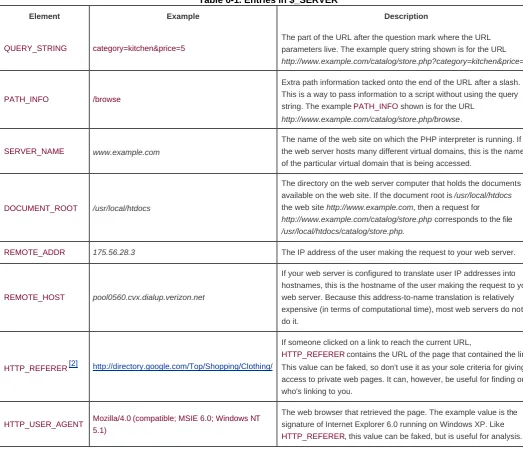
$_SERVER[PHP_SELF]. This is a special PHP variable that contains the URL (without the protocol or hostname) of the current page. If the URL for the page in Example 1-4 is http://www.example.com/users/enter.php, then $_SERVER[PHP_SELF] contains
/users/enter.php.
With $_SERVER[PHP_SELF] as the form action, you can put the code for printing a form and for doing something with the submitted form data in the same page. Example 1-5 combines Examples Example 1-3 and Example 1-4 into one page that displays a form and prints a greeting when the form is submitted.
Example 1-5. Printing a greeting or a form
<?php
// Print a greeting if the form was submitted
if ($_POST['user']) {
print "Hello, ";
// Print what was submitted in the form parameter called 'user'
print $_POST['user'];
print "!";
} else {
// Otherwise, print the form
print <<<_HTML_
<form method="post" action="$_SERVER[PHP_SELF]">
Your Name: <input type="text" name="user">
<br/>
<input type="submit" value="Say Hello">
</form>
_HTML_;
}
?>
Example 1-5 uses the if( ) construct to see whether the browser sent a value for the form parameter user. It uses that to decide which of two things to do: print a greeting or print a form. Chapter 3 talks about if( ). Using $_SERVER[PHP_SELF] and processing forms is discussed in Chapter 6.
PHP has a huge library of internal functions that you can use in your programs. These functions help you accomplish common tasks. One built-in function is number_format( ), which provides a formatted version of a number. Example 1-6 uses number_format( ) to print out a number.
Example 1-6. Printing a formatted number
<?php print "The population of the US is about:";
print number_format(285266237);
?>
Example 1-6 prints:
The population of the US is about: 285,266,237
Chapter 5 is about functions. It shows you how to write your own and explains the syntax for calling and handling the results of functions. Many functions, including number_format( ), have a return value. This is the result of running the function. In Example 1-6, the data that second print statement is given to print is the return value from number_format( ). In this case, it's the the comma-formatted population number.
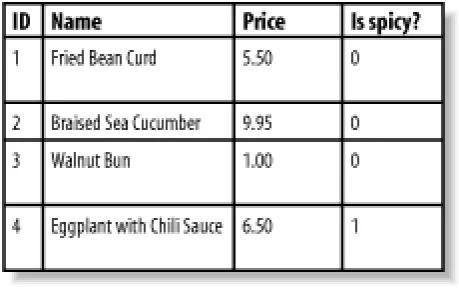
One of the most common types of programs written in PHP is one that displays a web page containing information retrieved from a database. When you let submitted form parameters control what is pulled from the database, you open the door to a universe of interactivity on your web site. Example 1-7 shows a PHP program that connects to a database server, retrieves a list of dishes and their prices based on the value of the form parameter meal, and prints those dishes and prices in an HTML table.
Example 1-7. Displaying information from a database
<?php
require 'DB.php';
// Connect to MySQL running on localhost with username "menu"
// and password "good2eaT", and database "dinner"
$db = DB::connect('mysql://menu:good2eaT@localhost/dinner');
// Define what the allowable meals are
$meals = array('breakfast','lunch','dinner');
// Check if submitted form parameter "meal" is one of
// "breakfast", "lunch", or "dinner"
if (in_array($meals, $_POST['meal'])) {
// If so, get all of the dishes for the specified meal
$q = $dbh->query("SELECT dish,price FROM meals WHERE meal LIKE '" .
$_POST['meal'] ."'");
// If no dishes were found in the database, say so
if ($q->numrows == 0) {
print "No dishes available.";
} else {
// Otherwise, print out each dish and its price as a row
// in an HTML table
print '<table><tr><th>Dish</th><th>Price</th></tr>';
while ($row = $q->fetchRow( )) {
print "<tr><td>$row[0]</td><td>$row[1]</td></tr>";
}
print "</table>";
}
} else {
// This message prints if the submitted parameter "meal" isn't
// "breakfast", "lunch", or "dinner"
print "Unknown meal.";
}
?>
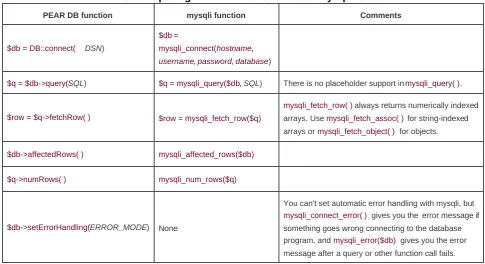
There's a lot going on in Example 1-7, but it's a testament to the simplicity and power of PHP that it takes only about 15 lines of code (without comments) to make this dynamic, database-backed web page. The following describes what happens in those 15 lines. The DB::connect( ) function at the top of the example sets up the connection to the MySQL database with appropriate authentication information such as a username and a password. These functions, like the other database functions used in this example (query( ),
numrows( ), and fetchRow( )), are explained in more detail in Chapter 7.
Things in the program that begin with a $, such as $db, $_POST, $q, and $row, are variables. Variables hold values that may change as the program runs or that are created at one point in the program and are saved to use later. Chapter 2 talks about variables.
After connecting to the database, the next task is to see what meal the user requested. The $meals array is initialized to hold the allowable meals: breakfast, lunch, and dinner. The statement in_array($meals, $POST['meal']) checks whether the submitted form parameter meal (the value of $_POST['meal']) is in the $meals array. If not, execution skips down to the end of the example, after the last
else, and prints Unknown meal.
If an acceptable meal was submitted, query( ) sends a query to the database. For example, if the meal is breakfast, the query that is sent is as follows:
SELECT dish,price FROM meals WHERE meal LIKE 'breakfast'
Queries to MySQL and most other databases are written in a language called Structured Query Language (SQL). Appendix B provides the basics of SQL. The query( ) function returns an identifier that we can use to get further information about the query.
The numrows( ) function uses that identifier to see how many matching meals the query found in the database. If there are no applicable meals, the program prints Nodishes available. Otherwise, it displays information about the matching meals.
The program prints the beginning of the HTML table. Then, it uses the fetchRow( ) function to retrieve each dish that the query found. The print statement uses elements of the array returned by fetchRow( ) to display one table row per dish.
< Day Day Up >
< Day Day Up >
1.4 Basic Rules of PHP Programs
This section lays out some ground rules about the structure of PHP programs. More foundational than the basics such as "how do I print something" or "how do I add two numbers", these proto-basics are the equivalent of someone telling you that you should read pages in this book from top to bottom and left to right, or that what's important on the page are the black squiggles, not the large white areas. If you've had a little experience with PHP already or you're the kind of person that prefers playing with all the buttons on your new DVD player before going back and reading in the manual about how the buttons actually work, feel free to skip ahead to Chapter 2 now and flip back here later. If you forge ahead to write some PHP programs of your own, and they're behaving unexpectedly or the PHP interpreter complains of "parse errors" when it tries to run your program, revisit this section for a refresher.
1.4.1 Start and End Tags
Each of the examples you've already seen in this chapter uses <?php as the PHP start tag and ?> as the PHP end tag. The PHP interpreter ignores anything outside of those tags. Text before the start tag or after the end tag is printed with no interference from the PHP interpreter.
A PHP program can have multiple start and end tag pairs, as shown in Example 1-8.
Example 1-8. Multiple start and end tags
Five plus five is:
<?php print 5 + 5; ?>
<p>
Four plus four is:
<?php
print 4 + 4;
?>
<p>
<img src="vacation.jpg" alt="My Vacation">
The PHP source code inside each set of <?php?> tags is processed by the PHP interpreter, and the rest of the page is printed as is. Example 1-8 prints:
Five plus five is:
10<p>
Four plus four is:
8<p>
<img src="vacation.jpg" alt="My Vacation">
Some older PHP programs use <? as a start tag instead of <?php. The <? is called the short open tag, since it's shorter than <?php. It's usually better to use the regular <?php open tag since it's guaranteed to work on any server running the PHP interpreter. The short tag can be turned on or off with a PHP configuration setting. Appendix A shows you how to modify your PHP configuration to control which open tags are valid in your programs.
The rest of the examples in this chapter all begin with the <?php start tag and end with ?>. In subsequent chapters, not all the examples have start and end tags — but remember, your programs need them for the PHP interpreter to recognize your code.
1.4.2 Whitespace and Case-Sensitivity
Like all PHP programs, the examples in this section consist of a series of statements, each of which end with a semicolon. You can put multiple PHP statements on the same line of a program as long as they are separated with a semicolon. You can put as many blank lines between statements as you want. The PHP interpreter ignores them. The semicolon tells the interpreter that one statement is over and another is about to begin. No whitespace at all or lots and lots of whitespace between statements doesn't affect the program's execution. (Whitespace is programmer-speak for blank-looking characters such as space, tab, and newline.)
In practice, it's good style to put one statement on a line and to put blank lines between statements only when it improves the readability of your source code. The spacing in Examples Example 1-9 and Example 1-10 is bad. Instead, format your code as in Example 1-11.
Example 1-9. This PHP is too cramped
<?php print "Hello"; print " World!"; ?>
Example 1-10. This PHP is too sprawling
<?php
print "Hello";
print " World!";
?>
Example 1-11. This PHP is just right
<?php
print "Hello";
print " World!";
?>
In addition to ignoring whitespace between lines, the PHP interpreter also ignores whitespace between language keywords and values. You can have zero spaces, one space, or a hundred spaces between print and "Hello, World!" and again between "Hello, World!" and the semicolon at the end of the line.
Good coding style is to put one space between print and the value being printed and then to follow the value immediately with a semicolon. Example 1-12 shows three lines, one with too much spacing, one with too little, and one with just the right amount.
Example 1-12. Spacing
<?php
print "Too many spaces" ;
print"Too few spaces";
print "Just the right amount of spaces";
?>
Language keywords (such as print) and function names (such as number_format) are not case-sensitive. The PHP interpreter doesn't care whether you use uppercase letters, lowercase letters, or both when you put these keywords and function names in your programs. The statements in Example 1-13 are identical from the interpreter's perspective.
Example 1-13. Keywords and function names are case-insensitive
// These four lines all do the same thing
print number_format(285266237);
PRINT Number_Format(285266237);
Print number_format(285266237);
pRiNt NUMBER_FORMAT(285266237);
1.4.3 Comments
As you've seen in some of the examples in this chapter, comments are a way to explain to other people how your program works. Comments in source code are an essential part of any program. When you're coding, what you are writing may seem crystal clear to you at the time. A few months later, however, when you need to go back and modify the program, your brilliant logic may not be so obvious. That's where comments come in. By explaining in plain language how the programs work, comments make programs much more understandable.
Comments are even more important when the person who needs to modify the program isn't the original author. Do yourself and anyone else who might have occasion to read your source code a favor and fill your programs with a lot of comments.
Perhaps because they're so important, PHP provides many ways to put comments in your programs. One syntax you've seen already is to begin a line with //. This tells the PHP interpreter to treat everything on that line as a comment. After the end of the line, the code is treated normally. This style of comment is also used in other programming languages such as C++, JavaScript, and Java. You can also put // on a line after a statement to have the remainder of the line treated as a comment. PHP also supports the Perl- and shell-style single-line comments. These are lines that begin with #. You can use # to start a comment in the same places that you can use //, but the modern style prefers // over #. Some single-line comments are shown in Example 1-14.
Example 1-14. Single-line comments with // or #
// This line is a comment
print "Smoked Fish Soup ";
print 'costs $3.25.';
# Add another dish to the menu
print 'Duck with Pea Shoots ';
print 'costs $9.50.';
// You can put // or # inside single-line comments
// Using // or # somewhere else on a line also starts a comment
print 'Shark Fin Soup'; // I hope it's good!
print 'costs $25.00!'; # This is getting expensive!
# Putting // or # inside a string doesn't start a comment
print 'http://www.example.com';
print 'http://www.example.com/menu.php#dinner';
For a multiline comment, start the comment with /* and end with */. Everything between the /* and */ is treated as a comment by the PHP interpreter. Multiline comments are useful for temporarily turning off a small block of code. Example 1-15 shows some multiline comments.
Example 1-15. Multiline comments
/* We're going to add a few things to the menu:
- Smoked Fish Soup
- Duck with Pea Shoots
- Shark Fin Soup
*/
print 'Smoked Fish Soup, Duck with Pea Shoots, Shark Fin Soup ';
print 'Cost: 3.25 + 9.50 + 25.00';
/* This is the old menu:
The following lines are inside this comment so they don't get executed.
print 'Hamburger, French Fries, Cola ';
print 'Cost: 0.99 + 1.25 + 1.50';
*/
There is no strict rule in PHP about which comment style is the best. Multiline comments are often the easiest to use, especially when you want to comment out a block of code or write a few lines describing a function. However, when you want to tack on a short explanation to the end of a line, a //-style comment fits nicely. Use whichever comment style you feel most comfortable with.
< Day Day Up >
< Day Day Up >
1.5 Chapter Summary
Chapter 1 covers:
PHP's usage by a web server to create a response or document to send back to the browser.
PHP as a server-side language, meaning it runs on the web server. This is in contrast to a client-side language such as JavaScript.
What you sign up for when you decide to use PHP: it's free (in terms of money and speech), cross-platform, popular, and designed for web programming.
How PHP programs that print information, process forms, and talk to a database appear.
Some basics of the structure of PHP programs, such as the PHP start and end tags (<?php and ?>), whitespace, case-sensitivity, and comments.
< Day Day Up >
< Day Day Up >
Chapter 2. Working with Text and Numbers
PHP can work with different types of data. In this chapter, you'll learn about individual values such as numbers and single pieces of text. You'll learn how to put text and numbers in your programs, as well as some of the limitations the PHP interpreter puts on those values and some common tricks for manipulating them.
Most PHP programs spend a lot of time handling text because they spend a lot of time generating HTML and working with information in a database. HTML is just a specially formatted kind of text, and information in a database, such as a username, a product description, or an address is a piece of text, too. Slicing and dicing text easily means you can build dynamic web pages easily.
In Chapter 1, you saw variables in action, but this chapter teaches you more about them. A variable is a named container that holds a value. The value that a variable holds can change as a program runs. When you access data submitted from a form or exchange data with a database, you use variables. In real life, a variable is something such as your checking account balance. As time goes on, the value that the phrase "checking account balance" refers to fluctuates. In a PHP program, a variable might hold the value of a submitted form parameter. Each time the program runs, the value of the submitted form parameter can be different. But whatever the value, you can always refer to it by the same name. This chapter also explains in more detail what variables are: how you create them and do things such as change their values or print them.
< Day Day Up >
< Day Day Up >
2.1 Text
When they're used in computer programs, pieces of text are called strings. This is because they consist of individual characters, strung together. Strings can contain letters, numbers, punctuation, spaces, tabs, or any other characters. Some examples of strings are I would like 1 bowl of soup, and "Is it too hot?" he asked, and There'sno spoon!. A string can even contain the contents of a binary file such as an image or a sound. The only limit to the length of a string in a PHP program is the amount of memory your computer has.
2.1.1 Defining Text Strings
There are a few ways to indicate a string in a PHP program. The simplest is to surround the string with single quotes:
print 'I would like a bowl of soup.';
print 'chicken';
print '06520';
print '"I am eating dinner," he growled.';
Since the string consists of everything inside the single quotes, that's what is printed:
I would like a bowl of soup.chicken06520"I am eating dinner," he growled.
The output of those four print statements appears all on one line. No linebreaks are added by print.[1]
[1] You may also see echo used in some PHP programs to print text. It works just like print.
The single quotes aren't part of the string. They are delimiters, which tell the PHP interpreter where the start and end of the string is. If you want to include a single quote inside a string surrounded with single quotes, put a backslash (\) before the single quote inside the string:
print 'We\'ll each have a bowl of soup.';
The \' sequence is turned into ' inside the string, so what is printed is:
We'll each have a bowl of soup.
something special with the character that comes after it. Inside a single-quoted string, a single quote usually means "end of string." Preceding the single quote with a backslash changes its meaning to a literal single quote character.
Curly Quotes and Text Editors
Word processors often automatically turn straight quotes like ' and " into curly quotes like , , , and . The PHP interpreter only understands straight quotes as string delimiters. If you're writing PHP programs in a word processor or text editor that puts curly quotes in your programs, you have two choices: tell your word processor to stop it or use a different one. A program such as emacs, vi, BBEdit, or Windows Notepad leaves your quotes alone.
The escape character can itself be escaped. To include a literal backslash character in a string, put a back slash before it:
print 'Use a \\ to escape in a string';
This prints:
Use a \ to escape in a string
The first backslash is the escape character: it tells the PHP interpreter that something different is going on with the next character. This affects the second backslash: instead of the special action ("treat the next character literally"), a literal backslash is included in the string. Note that these are backslashes that go from top left to bottom right, not forward slashes that go from bottom left to top right. Remember that two forward slashes ( //) indicate a comment.
You can include whitespace such as newlines in single-quoted strings:
print '<ul>
<li>Beef Chow-Fun</li>
<li>Sauteed Pea Shoots</li>
<li>Soy Sauce Noodles</li>
</ul>';
This puts the HTML on multiple lines:
<ul>
<li>Beef Chow-Fun</li>
<li>Sauteed Pea Shoots</li>
<li>Soy Sauce Noodles</li>
</ul>
Since the single quote that marks the end of the string is immediately after the </ul>, there is no newline at the end of the string. The only characters that get special treatment inside single-quoted strings are backslash and single quote. Everything else is treated literally.
You can also delimit strings with double quotes. Double-quoted strings are similar to single-quoted strings, but they have more special characters. These special characters are listed in Table 2-1.
Table 2-1. Special characters in double-quoted strings
Character Meaning
\n Newline (ASCII 10)
\r Carriage return (ASCII 13)
\t Tab (ASCII 9)
\\ \
\$ $
\" "
\0 .. \777 Octal (base 8) number
\x0 .. \xFF Hexadecimal (base 16) number
The biggest difference between single-quoted and double-quoted strings is that when you include variable names inside a double-quoted string, the value of the variable is substituted into the string, which doesn't happen with single-quoted strings. For example, if the variable
$user held the value Bill, then 'Hi $user' is just that: Hi$user. However, "Hi $user" is Hi Bill. I get into this in more detail later in this chapter in Section 2.3.
As mentioned in Section 1.3, you can also define strings with the here document syntax. A here document begins with <<< and a delimiter word. It ends with the same word at the beginning of a line. Example 2-1 shows a here document.
Example 2-1. Here document
<<<HTMLBLOCK
<html>
<head><title>Menu</title></head>
<body bgcolor="#fffed9">
<h1>Dinner</h1>
<ul>
<li> Beef Chow-Fun
<li> Sauteed Pea Shoots
<li> Soy Sauce Noodles
</ul>
</body>
</html>
HTMLBLOCK
In Example 2-1, the delimiter word is HTMLBLOCK. Here document delimiters can contain letters, numbers, and the underscore character. The first character of the delimiter must be a letter or the underscore. It's a good idea to make all the letters in your here document delimiters uppercase to visually set off the here document. The delimiter that ends the here document must be alone on its line. The delimiter can't be indented and no whitespace, comments, or other characters are allowed after it. The only exception to this is that a semicolon is allowed immediately after the delimiter to end a statement. In that case, nothing can be on the same line after the semicolon. The code in Example 2-2 follows these rules to print a here document.
Example 2-2. Printing a here document
print <<<HTMLBLOCK
<html>
<head><title>Menu</title></head>
<body bgcolor="#fffed9">
<h1>Dinner</h1>
<ul>
<li> Beef Chow-Fun
<li> Sauteed Pea Shoots
<li> Soy Sauce Noodles
</ul>
</body>
</html>
HTMLBLOCK;
Here documents obey the same escape-character and variable substitution rules as double-quoted strings. These make them especially useful when you want to define or print a string that contains a lot of text or HTML with some variables mixed in. Later on in the chapter, Example 2-22 demonstrates this.
print 'bread' . 'fruit';
print "It's a beautiful day " . 'in the neighborhood.';
print "The price is: " . '$3.95';
print 'Inky' . 'Pinky' . 'Blinky' . 'Clyde';
The combined strings print as:
breadfruit
It's a beautiful day in the neighborhood.
The price is: $3.95
InkyPinkyBlinkyClyde
2.1.2 Manipulating Text
PHP has a number of built-in functions that are useful when working with strings. This section introduces the functions that are most helpful for two common tasks: validation and formatting. The "Strings" chapter of the PHP online manual, at http://www.php.net/strings, has information on other built-in string handling functions.
2.1.2.1 Validating strings
Validation is the process of checking that input coming from an external source conforms to an expected format or meaning. It's making
sure that a user really entered a ZIP Code in the "ZIP Code" box of a form or a reasonable email address in the appropriate place. Chapter 6 delves into all the aspects of form handling, but since submitted form data is provided to your PHP programs as strings, this section discusses how to validate those strings.
The trim( ) function removes whitespace from the beginning and end of a string. Combined with strlen( ), which tells you the length of a string, you can find out the length of a submitted value while ignoring any leading or trailing spaces. Example 2-3 shows you how. (Chapter 3 discusses in more detail the if( ) statement used in Example 2-3.)
Example 2-3. Checking the length of a trimmed string
// $_POST['zipcode'] holds the value of the submitted form parameter
// "zipcode"
$zipcode = trim($_POST['zipcode']);
// Now $zipcode holds that value, with any leading or trailing spaces
// removed
$zip_length = strlen($zipcode);
// Complain if the ZIP code is not 5 characters long
if ($zip_length != 5) {
print "Please enter a ZIP code that is 5 characters long.";
}
Using trim( ) protects against someone who types a ZIP Code of 732 followed by two spaces. Sometimes the extra spaces are accidental and sometimes they are malicious. Whatever the reason, throw them away when appropriate to make sure that you're getting the string length you care about.
You can chain together the calls to trim( ) and strlen( ) for more concise code. Example 2-4 does the same thing as Example 2-3.
Example 2-4. Concisely checking the length of a trimmed string
if (strlen(trim($_POST['zipcode'])) != 5) {
print "Please enter a ZIP code that is 5 characters long.";
}
Four things happen in the first line of Example 2-4. First, the value of the variable $_POST['zipcode'] is passed to the trim( ) function. Second, the return value of that function — $_POST['zipcode'] with leading and trailing whitespace removed — is handed off to the strlen( ) function, which then returns the length of the trimmed string. Third, this length is compared with 5. Last, if the length is not equal to 5, then the print statement inside the if( ) block runs.
To compare two strings, use the equality operator (= =), as shown in Example 2-5.
Example 2-5. Comparing strings with the equality operator
if ($_POST['email'] == '[email protected]') {
print "Welcome, Mr. President.";
}
The print statement in Example 2-5 runs only if the submitted form parameter email is the all-lowercase [email protected]. When you compare strings with = =, case is important. [email protected] is not the same as [email protected] or
To compare strings without paying attention to case, use strcasecmp( ). It compares two strings while ignoring differences in capitalization. If the two strings you provide to strcasecmp( ) are the same (independent of any differences between upper- and lowercase letters), it returns 0. Example 2-6 shows how to use strcasecmp( ).
Example 2-6. Comparing strings case-insensitively
if (strcasecmp($_POST['email'], '[email protected]') == 0) {
print "Welcome back, Mr. President.";
}
The print statement in Example 2-6 runs if the submitted form parameter email is [email protected],
[email protected], [email protected], or any other capitalization of [email protected].
2.1.2.2 Formatting text
The printf( ) function gives you more control (compared to print) over how the output looks. You pass printf( ) a format string and a bunch of items to print. Each rule in the format string is replaced by one item. Example 2-7 shows printf( ) in action.
Example 2-7. Formatting a price with printf( )
$price = 5; $tax = 0.075;
printf('The dish costs $%.2f', $price * (1 + $tax));
This prints:
The dish costs $5.38
In Example 2-7, the format rule %.2f is replaced with the value of $price * (1 +$tax) and formatted so that it has two decimal places. Format string rules begin with % and then have some optional modifiers that affect what the rule does:
A padding character
zeroes.
A sign
For numbers, a plus sign (+) makes printf( ) put a + before positive numbers (normally, they're printed without a sign.) For strings, a minus sign (-) makes printf( ) right justify the string (normally, they're left justified.)
A minimum width
The minimum size that the value replacing the format rule should be. If it's shorter, then the padding character is used to beef it up.
A period and a precision number
For