Expert Python Programming
Learn best practices to designing, coding, and
distributing your Python software
Tarek Ziadé
Expert Python Programming
Copyright © 2008 Packt Publishing
All rights reserved. No part of this book may be reproduced, stored in a retrieval system, or transmitted in any form or by any means, without the prior written permission of the publisher, except in the case of brief quotations embedded in critical articles or reviews.
Every effort has been made in the preparation of this book to ensure the accuracy of the information presented. However, the information contained in this book is sold without warranty, either express or implied. Neither the author, Packt Publishing, nor its dealers or distributors will be held liable for any damages caused or alleged to be caused directly or indirectly by this book.
Packt Publishing has endeavored to provide trademark information about all the companies and products mentioned in this book by the appropriate use of capitals. However, Packt Publishing cannot guarantee the accuracy of this information.
First published: September 2008
Production Reference: 1110908
Published by Packt Publishing Ltd. 32 Lincoln Road
Olton
Birmingham, B27 6PA, UK. ISBN 978-1-847194-94-7
www.packtpub.com
Credits
Author Tarek Ziadé
Reviewers
Shannon -jj Behrens Paul Kennedy Wendy Langer
Senior Acquisition Editor Douglas Paterson
Development Editor Ved Prakash Jha
Technical Editor Siddharth Mangarole
Copy Editor Sneha Kulkarni
Editorial Team Leader Mithil Kulkarni
Project Manager Abhijeet Deobhakta
Project Coordinator Patricia Weir
Indexer Rekha Nair
Proofreader Chris Smith
Production Coordinators Aparna Bhagat
Rajni Thorat
Foreword
Python has come a long way.
There was a time when companies would call me crazy when I insisted on using Python. These days, there simply aren't enough Python coders to go around. Major companies such as Google, YouTube, VMware, and DreamWorks are in a constant scramble to snatch up all the good Python talent they can find.
Python used to lag behind Perl because Perl had CPAN. These days, setuptools and PyPI have led to an explosion of readily available, high-quality, third-party Python libraries. Python also used to lag behind Java Servlets and Ruby on Rails because there was no standard API for interacting with web servers. These days, the Web Server Gateway Interface (WSGI) has led to a renaissance in the Python web world. Thanks to Google App Engine, I think we'll see even more.
Python seems to attract programmers who are highly opinionated and have a real taste for elegance. Very few people become Python programmers because it's what they learned in college, or because it's what all the big companies are using. Rather, people are drawn to Python when they discover its intrinsic beauty. Because of this, there are a surprising number of Python books. I don't have the statistics to prove it, but it seems to me that Python has a higher ratio of books to programmers than any other language. However, historically, there haven't been enough advanced Python books. That's about to change.
If you're looking to progress from knowing Python to mastering Python, this is the book for you. In fact, this is exactly the type of book I wish I had had five years ago. What took me years to discover by steadfastly attending talks at PyCon and my local Python users' group is now available in a succinct book form.
There has never been a more exciting time to be a Python programmer!
Shannon -jj Behrens
About the Author
Tarek Ziadé
is CTO at Ingeniweb in Paris, working on Python, Zope, and Plone technology and on Quality Assurance. He has been involved for five years in the Zope community and has contributed to the Zope code itself.Tarek has also created Afpy, the French Python User Group and has written two books in French about Python. He has gave numerous talks and tutorials in French and international events like Solutions Linux, Pycon, OSCON, and EuroPython.
Before starting with Chapter 1, I would like to thank a few people that helped me while I was writing this book:
The whole Python community of course, the AFPY user group, Stefan Schwarzer for his slides on optimization, his quote and his great feedback and reviews, Georg Brandl for reviewing Chapter 10 about Sphinx, Peter Bulychev for assistance on CloneDigger, Ian Bicking for assistance on minimock, the Logilab team for assistance on PyLint, Gael Pasgrimaud, Jean-François Roche, and Kai Lautaportti for their work on collective.buildbot, Cyrille Lebeaupin, Olivier Grisel, Sebastien Douche and Stéfane Fermigier for various reviews.
Thanks to the OmniGroup and their great OmniGraffle tool; all diagrams were made with it (see http://www.omnigroup.com/ applications/OmniGraffle).
About the Reviewers
Shannon
-jj
Behrens
is the moderator of the San Francisco Bay Area Python Interest Group. While not technical editing Python books and hopping from startup to startup, he enjoys playing with his four kids and blogging at http://jjinux. blogspot.com.I'd like to thank Tarek for patiently listening to all my critiques, and I'd like to thank my lovely wife, Gina-Marie Behrens, for protecting me from the kids long enough to finish editing the book.
Wendy
Langer
first learned to program in Microbee Basic, in between bouts of playing 'Hunt the Wumpus' and 'Colossal Caves'. This all happened a long time ago, in a galaxy far, far, away. Many years later, she learned Fortran whilst studying for a physics degree at University. Finally, after a long period of wandering in the outer darkness, she discovered the perfect programming language—Python! Even though she currently spends more actual coding time using C++, her heart will always belong to Python.She has worked as a programmer in web development using technologies such as Python, Zope, Django, MySQL, and PostgreSQL, and was a reviewer on the previous Packt title Learning Website Development with Django by Ayman Hourieh.
Table of Contents
Preface
1
Chapter 1: Getting started
9
Installing Python 10
Python Implementations 10
Jython 10
IronPython 11
PyPy 11
Other Implementations 11
Linux Installation 12
Package Installation 12
Compiling the Sources 13
Windows Installation 14
Installing Python 14
Installing MinGW 15
Installing MSYS 16
Mac OS X Installation 17
Package Installation 17
Compiling the Source 18
The Python Prompt 18
Customizing the Interactive Prompt 19
iPython: An Advanced Prompt 20
Installing setuptools 21
Understanding How It Works 21
setuptools Installation Using EasyInstall 22 Hooking MinGW into distutils 23
Working Environment 24
Using an Editor and Complementary Tools 24
Code Editor 25
Installing and Configuring Vim 25
Using Another Editor 27
Multi-User Applications 310
Simple Example 310
Multiprocessing 314
Pyprocessing 315
Caching 317
Deterministic Caching 318
Non-Deterministic Caching 321
Pro-Active Caching 322
Memcached 322
Summary 323
Chapter 14: Useful Design Patterns
325
Creational Patterns 325
Singleton 326
Structural Patterns 328
Adapter 329
Interfaces 331
Proxy 332
Facade 333
Behavioral Patterns 334
Observer 334
Visitor 336
Template 339
Summary 341
Preface
Python rocks!
From the earliest version in the late 1980s to the current version, it has evolved with the same philosophy: providing a multi-paradigm programming language with readability and productivity in mind.
People used to see Python as yet another scripting language and wouldn't feel right about using it to build large systems. But through the years and thanks to some pioneer companies, it became obvious that Python could be used to build almost any kind of a system.
In fact, many developers that come from another language are charmed by Python and make it their first choice.
This is something you are probably aware of if you have bought this book, so there's no need to convince you about the merits of the language any further.
This book was written to express many years of experience in building all kinds of applications with Python, from small system scripts done in a couple of hours to very large applications written by dozens of developers over several years. It describes the best practices used by developers to work with Python.
What This Book Covers
Chapter 1 explains how to install Python and makes sure all readers have the closest, standardized environment. I almost removed this chapter since the book is not intended for beginners. But it was kept because there are definitely some experienced Python programmers out there who are not aware of some of the things presented. If you are, don't feel frustrated about it, as the rest of the book will probably meet your needs.
Chapter2 is about syntax best practices, below the class level. It presents iterators, generators, descriptors, and so on, in an advanced way.
Chapter3 is also about syntax best practices, but focuses above the class level.
Chapter4 is about choosing good names. It is an extension to PEP 8 with naming best practices, but also gives tips on designing good APIs.
Chapter5 explains how to write a package and how to use code templates and then focuses on how to release and distribute your code.
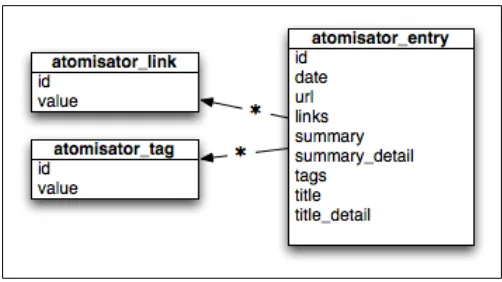
Chapter6 extends Chapter5 by describing how a full application can be written. It demonstrates it through a small case study called Atomisator.
Chapter7 is about zc.buildout, a system for managing a development environment and releasing applications, which is widely used in the Zope and Plone community and is now used outside the Zope world.
Chapter8 gives some insight on how a project code base can be managed and explains how to set up continuous integration.
Chapter9 presents how to manage software life cycle through an iterative and incremental approach.
Chapter10 is about documentation and gives tips on technical writing and how Python projects should be documented.
Chapter11 explains Test-Driven Development and the tools that can be used to do it. Chapter12 is about optimization. It gives profiling techniques and an optimization strategy guideline.
Chapter13 extends Chapter12 by providing some solutions to speed up your programs.
Last, keep an eye on http://atomisator.ziade.org, which is the website that was build throughout the book. It has all code sources presented and will contain errata and other add-ons.
What You Need for This Book
This book is written for developers who work under Linux, Mac OS X or Windows. All pre-requisites are described in the first chapter to make sure your system is Python-enabled and meets a few requirements.
This is important for Windows developers because they need to make sure they have a command-line environment that is close to what Mac OS X and Linux users have from scratch. In general, all the examples should work on any platform.
Last, keep in mind that this book is not intended to replace online resources, but rather aims at complementing them. So obviously you will need internet access to complete your reading experience at some points, through provided links.
Who This Book Is For
This book was written for Python developers who wish to go further in mastering Python. Some sections of the book, such as the section on continuous integration, are targeted at project leads.
It complements the usual How To Program In Python reference books and online resources and goes deeper in the syntax usage.
It also explains how to be agile while coding. While this can be applied to any language, the book concentrates on providing examples with Python. So, if you are not practicing tests nor using version control systems, you will probably learn a lot through this book that will help you even in other languages.
From Test-Driven Development to distributed version control systems and continuous integration, you will learn the latest programming techniques used by experienced Python developers on big projects.
While these topics are quickly evolving, this book will not get obsolete that easily because it rather focuses on whys instead of hows.
Conventions
In this book, you will find a number of styles of text that distinguish between different kinds of information. Here are some examples of these styles, and an explanation of their meaning.
Code words in text are shown as follows: This environment can be built using the buildout command. A block of code will be set as follows:
>>> from script_engine import run
>>> print run('a + b', context={'a': 1, 'b':3}) 4
Any command-line input and output is written as follows: $ python setup.py --help-commands
New terms and important words are introduced in a bold-type font. Words that you see on the screen, in menus or dialog boxes for example, appear in our text like this: "clicking the Next button moves you to the next screen".
Warnings or important notes appear in a box like this.
Tips and tricks appear like this.
Reader Feedback
Feedback from our readers is always welcome. Let us know what you think about this book, what you liked or may have disliked. Reader feedback is important for us to develop titles that you really get the most out of.
To send us general feedback, simply drop an email to [email protected], making sure to mention the book title in the subject of your message.
If there is a book that you need and would like to see us publish, please send us a note in the SUGGEST A TITLE form on www.packtpub.com or email
Customer Support
Now that you are the proud owner of a Packt book, we have a number of things to help you to get the most from your purchase.
Downloading the Example Code for the Book
Visit http://www.packtpub.com/files/code/4947_Code.zip to directly download the example code.
The downloadable files contain instructions on how to use them.
The author owns a site: http://atomisator.ziade.org where the code mentioned in this book are available.
Errata
Although we have taken every care to ensure the accuracy of our contents, mistakes do happen. If you find a mistake in one of our books—maybe a mistake in text or code—we would be grateful if you would report this to us. By doing this you can save other readers from frustration, and help to improve subsequent versions of this book. If you find any errata, report them by visiting http://www.packtpub. com/support, selecting your book, clicking on the let us know link, and entering the details of your errata. Once your errata are verified, your submission will be accepted and the errata added to the list of existing errata. The existing errata can be viewed by selecting your title from http://www.packtpub.com/support.
Piracy
Piracy of copyright material on the Internet is an ongoing problem across all media. At Packt, we take the protection of our copyright and licenses very seriously. If you come across any illegal copies of our works in any form on the Internet, please provide the location address or website name immediately so we can pursue a remedy.
Please contact us at [email protected] with a link to the suspected pirated material.
We appreciate your help in protecting our authors, and our ability to bring you valuable content.
Questions
Getting started
Python is good for developers.
No matter what operating system you or your customers are running, it will work. Unless you are coding platform-specific things, or using a platform-specific library, you can work on Linux and deploy on other systems, for example. However, thats not uncommon anymore. (Ruby, Java, and many other languages work
in the same way.) Combined with the other qualities that we will discover throughout this book, Python becomes a smart choice for a company's primary development language.
This chapter gathers everything required to get started with Python, no matter what your environment is. It presents:
How to install Python
How to use and enhance the prompt
How to be ready to extend Python, by installing setuptools
How to set up a development environment, using the old school or the new school ways
A book always starts with some appetizers. So if you are already familiar with Python, and have it installed and reachable from your favorite code editor, you can skip the first section of this chapter, and just read other sections quickly. You might find in them interesting points to enhance your environment. Be sure to read the section on setuptools though, as its installation is mandatory for the rest of the book.
If you are using Windows, make sure you have installed the software described in this chapter, as it will be required to run all the examples this book provides.
Installing Python
The Python programming language runs on almost any system such as Linux, Macintosh, and Windows. The distributions are made available by the core team on the main download page of the Python website at: http://www.python.org/ download. Other platforms are maintained by the people from the community, and summarized on a dedicated page. (See http://www.python.org/download/other.) Here, you'll probably find the distributions for operating systems that will remind you of your college years, if you are thirty-years old or more.
If you have a computer, you will be able to use Python no matter what operating system this computer runs on.
If not, ditch it.
Before installing Python, let's have a quick tour of the existing implementations.
Python Implementations
The main Python implementation is written in the C language and is called CPython. It is the one that majority of people refer to, when they talk about Python. When the language evolves, the C implementation is changed accordingly. Besides C, Python is available in a few other implementations that are trying to keep up with the mainstream. Most of them are a few milestones behind CPython, but provide a great opportunity to use and promote the language in a specific environment.
Jython
Jython is a Java implementation of the language. It compiles the code into Java byte code, and allows the developers to seamlessly use Java classes within their Python modules. (In Python, a file containing code is called a module.) Jython allows people to use Python as the top-level scripting language on complex application systems, for example J2EE. It also brings Java applications into Python applications. Making Apache Jackrabbit (which is a document repository API based on JCR; see http:// jackrabbit.apache.org) available in a Python program is a good example of what Jython allows. The current milestone is 2.2.1, but the Jython team is heading over to 2.5. Some Python web frameworks such as Pylons are currently boosting Jython development to make it available in Java world.
IronPython
IronPython brings Python into .NET. The project is supported by Microsoft, where IronPython's lead developers work. The latest stable version is 1.1 (released in April 2007) and implements Python 2.4.3. It is available in ASP.NET, and lets people use the Python code in their .NET application in the same way as Jython does in Java. It is quite an important implementation for the promotion of a language. Besides Java, the .NET community is one of the biggest developer communities out there. The TIOBE community index also shows that .NET languages are among the rising stars. (For more information, visit http://www.tiobe.com/tpci.htm.)
Also see http://www.codeplex.com/Wiki/View.aspx?ProjectName=IronPython.
PyPy
PyPy is probably the most exciting implementation, as its goal is to rewrite Python into Python. In PyPy, the Python interpreter is itself written in Python. We have a C code layer carrying out the nuts-and-bolts work for the CPython implementation of Python. But in the PyPy implementation, this C code layer is rewritten in pure Python. This means that you can change the interpreter's behavior during execution time, and implement code patterns that couldn't be easily done in CPython. (See http://codespeak.net/pypy/dist/pypy/doc/objspace-proxies.html.) PyPy used to be 2000 times slower than CPython, but this has improved a lot in the past years. The introduction of techniques such as the JIT (Just-In-Time) compiler is promising. The current speed factor is between 1.7 and 4, and the current implementation target is Python 2.4. PyPy can be seen as the head of R&D in the compilation matters, and the starting point of many innovations that the mainstream implementation can benefit from later. On the whole though, PyPy is interesting for theoretical reasons, and interests those who enjoy going deep into the internals of the language. It is not generally used in production.
See http://codespeak.net/pypy.
Other Implementations
There are other implementations and ports of Python. For example, Nokia has made Python 2.2.2 available in the S60 phone series ( http://opensource.nokia.com/ projects/pythonfors60/), and Michael Lauer maintains a port on ARM Linux that makes it available in devices such as Sharp Zaurus (http://www.vanille-media. de/site/index.php/projects/python-for-arm-linux).
Linux Installation
If you are running Linux, you probably have Python installed. So, try to call it from the shell:
tarek@dabox:~$ python
Python 2.3.5 (#1, Jul 4 2007, 17:28:59)
[GCC 4.1.2 20061115 (prerelease) (Debian 4.1.1-21)] on linux2
Type "help", "copyright", "credits" or "license" for more information. >>>
If the command is found, you will be placed into the interactive shell that comes with Python, represented by the >>> sign. The information about the compiler used to build Python (here GCC) and the target system (Linux) is displayed. If you are using Windows, you will get Microsoft Visual Studio as the compiler. The Python version is also displayed in the result. Make sure you are running the latest stable release (probably 2.6 by the time this book is printed).
If it is not the case, you can install several versions of Python on your system without any unexpected interaction. Each Python version will be reachable with its full name, or with the Python command, depending on your path environment:
tarek@dabox:~$ which python /usr/bin/python
tarek@dabox:~$ python<tab>
python python2.3 python2.5 python2.4
If the command is not found, which is very uncommon under Linux, you need to install it using the package-management tools for your Linux system, such as apt for Debian, or rpm for Red Hat, or by compiling the sources.
While it is preferable to stick with a package installation, we will now discuss each of the two installation methods (package-managed installation and source installation) in a little more detail. However, the latest Python version might not always be available in your package-management tools as yet.
Package Installation
Using the Linux package system of the Linux distribution is the common way to install Python, and to make sure that you can easily upgrade it. Depending on your system, you will have to run one of these commands:
apt-get install python for Debian-based distributions, such as Ubuntu urpmi python for rpm-based ones, such as Fedora or Red Hat series emerge python for Gentoo
If the latest version does not show up, a manual installation will be needed.
Finally, some extra packages should be installed in order to have a full installation. They are optional and you can work without them. But they are useful if you want to code C extensions, or to profile your programs. The packages that should be installed in order to have a full installation are:
python-dev: It contains Python headers needed when the C modules are compiled.
python-profiler: It contains non-GPL modules (Hotshot profiler) for full GPL distributions such as Debian or Ubuntu.
gcc: It is used to compile extensions that contain C code.
Compiling the Sources
A manual installation is done with the cmmi process (configure, make, makeinstall sequence) that performs a compilation of Python and deploys it on the system. The latest Python archive can be found on http://python.org/download.
Using wget for downloads:
The wget program, from the Gnu project, is a command line utility that can perform downloads. It is available under all platforms. Under Windows, you can get a binary distribution at: http://gnuwin32. sourceforge.net/packages/wget.htm.
On Linux or Mac OS X, it is installable through the package systems such as apt or MacPorts.
See http://www.gnu.org/software/wget.
To build Python, we will use make and gcc.
make is a program that is used to read configuration files, usually named Makefile, and check that all requirements to compile the program are met. It is also used to drive the compilation. It is invoked with the configure and make commands.
gcc is the GNU C Compiler, an open-source compiler widely used to build programs.
Make sure they are both installed on your system. Under some versions of Linux such as Ubuntu, you can install build tools with the build-essentials package. To build and install Python, run this sequence:
cd /tmp
wget http://python.org/ftp/python/2.5.1/Python-2.5.1.tgz tar -xzvf tar -xzvf Python-2.5.1.tgz
•
•
•
•
cd Python-2.5.1 ./configure make
sudo make install
This installation will also install the headers provided for binary installations that are usually included in the python-dev package. The Hotshot profiler is also bundled into the source releases. The result should be the same when you are done, that is, Python should be reachable in the shell.
At this point, your system is Python-enabled. So, let's celebrate!
Windows Installation
Python can be compiled on Windows in the same way as for Linux. But this can be quite painful because you will need to set up a complicated compilation environment. Standard installers are provided in the python.org download section, and the wizard to achieve the installation is pretty straightforward.
Installing Python
The last step is changing your PATH environment variable, so that we can call Python from the DOS shell.
On most Windows installations, this is done by:
Right-clicking on the My Computer icon that is located on the desktop or the start menu, to get to the System Properties dialog box
Getting in the Advanced tab
Clicking on the Environment Variables button
Editing the PATH system variable to add two new paths, separated by ";" (a semi-colon)
The paths to be added are:
c:\Python25, to be able to call python.exe
c:\Python25\Scripts, to be able to call third-party scripts that are installed in your Python by extensions
You should be able to run Python in the Command Prompt. To get there, open the Run shortcut in the Start menu, open cmd, and then call python:
C:\> python
Python 2.5.2 (#71, Oct 18 2006, 08:34:43) [MSC v.1310 32 bit (Intel)] on win32
Type "help", "copyright", "credits" or "license" for more information. >>>
This is enough to run Python. But this environment is not quite complete, when compared to that of a Linux user. To perform everything that is presented in this book, MinGW needs to be installed.
Installing MinGW
MinGW is a compiler for Windows platforms. It provides the gcc compiler in all flavors, and a set of libraries and headers. MinGW can be used as a full replacement for Microsoft's Visual C++. You could also choose to keep both compilers on your system and use them for different purposes, depending upon your requirements. To install MinGW, get the distribution from http://sourceforge.net/project/ showfiles.php?group_id=2435&package_id=240780. There you will find a link to Sourceforge. (See http://sourceforge.net, the largest developer website for Open Source projects.) The automated installer is the best choice, as everything will be bundled. Get the installer and run it.
•
• • •
Just as for Python, the PATH environment variable in the system properties needs to be extended with c:\MinGW\bin, in order to be able to invoke its commands. You should be able to run MinGW commands from the shell after the path is set: C:\>gcc -v
Reading specs from c:/MinGW/bin/../lib/gcc-lib/mingw32/3.2.3/specs Configured with: ../gcc/configure --with-gcc --with-gnu-ld --with-gnu-as --host=
mingw32 --target=mingw32 --prefix=/mingw --enable-threads --disable-nls --enable
-languages=c++,f77,objc disable-win32-registry disable-shared --enable-sjlj-
exceptions
Thread model: win32
gcc version 3.2.3 (mingw special 20030504-1)
These commands will never be run manually, but are used automatically by Python when a compiler needs to be used.
Installing MSYS
Another tool that should be installed under Windows is MSYS (Minimal SYStem). It provides a Bourne Shell command-line interpreter environment under Windows that provides all the usual commands Linux or Mac OS X has, such as cp, rm and so on.
This may sound overkill, since Windows has the same set of tools whether they are graphical or available in an MS-DOS prompt. But this helps the developers who work on several systems to have a universal set of commands to work with. Get the download link for MSYS from http://sourceforge.net/project/
showfiles.php?group_id=2435&package_id=240780 and install it on your system. If you perform a standard installation, MSYS will be installed in c:\msys. You must add C:\msys\1.0\bin in your PATH variable in the same way as you added MinGW. The rest of this book uses Bourne Shell commands in its examples. So if you are under Windows, you should install MSYS.
Mac OS X Installation
Mac OS X is based on Darwin, which in turn is based on FreeBSD. This makes the platform quite similar and compatible to Linux. Apple, on the top of it, added a graphical engine (Quartz) and a specific file tree.
From the shell point of view, the major difference is how the system tree is organized. You will not find, for example a /home root folder, but you can find a /Users folder. The applications are also usually installed in /Library. /usr/bin is used though, as it is used on Linux.
Just as for Linux and Windows, there are two ways you can install Python on Mac OS X. You can install it using a package installer, or you can compile it from the source. The package installation is the simplest way, but you might want to build Python yourself. However, the latest version might not be available yet, as a binary distribution.
Package Installation
This will install Python in the /Library folder and create the proper links in the system so you can run it from the shell.
Compiling the Source
To compile Python, you need to install:
The gcc compiler: It is provided in the Xcode Tools, and is available on the install disk or online at: http://developer.apple.com/tools/xcode. MacPorts: This is a package system comparable to Debian's
package-management system apt that will help you install dependencies, for instance the same way Linux users can with apt. See http://www.macports.org. From here, you can follow the same process explained for compiling under Linux.
The Python Prompt
The Python prompt, which comes when the python command is called, allows you to interact with the interpreter. It is very common, for example, to use it as a small calculator:
macziade:/home/tziade tziade$ python
Python 2.5 (r25:51918, Sep 19 2006, 08:49:13)
[GCC 4.0.1 (Apple Computer, Inc. build 5341)] on darwin
Type "help", "copyright", "credits" or "license" for more information. >>>1 + 3
4
>>>5 * 8 40
When the enter key is hit, the line is interpreted and the result is immediately displayed. This particularity, inherited from the ABC language, affects the way Python the programmers work. In code documentation, all usage examples are shown in small prompt sessions.
Getting out of the prompt:
To get out of the prompt, use Ctrl+D under Linux or Mac OS X, and Ctrl+Z under Windows.
Since the prompt interactive mode will play an important role in the coding process, we need to make it very easy to use.
•
Customizing the Interactive Prompt
The interactive prompt can be configured with a startup file. When it starts, it looks for the PYTHONSTARTUP environment variable and executes the code in the file
pointed to by this variable. Some Linux distributions provide a default startup script, which is generally located in your home directory. It is called .pythonstartup. Tab completion and command history are often provided to enhance the prompt, and are based on the the readline module. (You need the readline library.) If you don't have such a file, you can easily create one.
Here's an example of the simplest startup file that adds completion with the <Tab> key, and history:
# python startup file import readline import rlcompleter import atexit import os
# tab completion
readline.parse_and_bind('tab: complete') # history file
histfile = os.path.join(os.environ['HOME'], '.pythonhistory') try:
readline.read_history_file(histfile) except IOError:
pass
atexit.register(readline.write_history_file, histfile) del os, histfile, readline, rlcompleter
Create this file in your home directory and call it .pythonstartup. Then add a PYTHONSTARTUP variable in your environment using the path of your file.
The python script is available in the pbp.script package under the
'pythonstartup.py' name. You can get this file at http://pypi.python. org/pypi/pbp.scripts and rename it to '.pythonstartup'
Setting up the PYTHONSTARTUP environment variable:
If you are running Linux or Mac OS X, the simplest way is to create the startup script in your home folder. Then link it with a PYTHONSTARTUP environment variable set into the system shell startup script. For example, Bash and Korn shell use the .profile file, where you can insert a line such as:
export PYTHONSTARTUP=~/.pythonstartup
When the interactive prompt is called for, the .pythonstartup script should be executed, and the new functionalities made available. For instance, tab completion is really useful to recall module contents:
>>> import md5 >>> md5.<tab>
md5.__class__ md5.__file__ md5.__name__ md5.__repr__ md5.digest_size
md5.__delattr__ md5.__getattribute__ md5.__new__ md5.__setattr__ md5.md5
md5.__dict__ md5.__hash__ md5.__reduce__ md5.__str__ md5.new
md5.__doc__ md5.__init__ md5.__reduce_ex__ md5. blocksize
You can adapt the script for more automation, as Python provides an entry point with a module. Further, a module provides the interpreter base classes. (See the code module at: http://docs.python.org/lib/module-code.html.) But if you want an advanced interactive prompt, you can use an existing tool: iPython.
iPython: An Advanced Prompt
iPython (http://ipython.scipy.org) is a project aiming to provide an extended prompt. Among the features provided, the most interesting ones are:
Dynamic object introspection System shell access from the prompt Profiling direct support
Debugging facilities
See the full list at: http://ipython.scipy.org/doc/manual/index.html. To install iPython, go to the download page http://ipython.scipy.org/moin/ Download and follow the instructions in accordance with your platform.
The iPython shell in action looks like this: tarek@luvdit:~$ ipython
Python 2.4.4 (#2, Apr 5 2007, 20:11:18)
Type "copyright", "credits" or "license" for more information. IPython 0.7.2 -- An enhanced Interactive Python.
? -> Introduction to IPython's features.
%magic -> Information about IPython's 'magic' % functions. help -> Python's own help system.
object? -> Details about 'object'. ?object also works, ?? prints more. In [1]:
iPython and application debugging:
iPython is a friendly prompt when it comes to debugging, especially for server-side code that runs daemonized.
Installing setuptools
Perl has a great collection of third-party libraries, and a simple way to install them. The Perl CPAN system lets any developer publish a new library with a simple set of commands. A similar technology has been used in the Python world for the past few years, and is becoming the standard way to install extensions. It is based on:
A centralized repository on Python's official website called the Python PackageIndex (PyPI), which was formerly the Cheeseshop (with reference to a Monty Python sketch from the BBC)
A packaging system called setuptools that is based on distutils, to deliver the code in archives and interact with PyPI
Before installing these extensions, a few explanations are necessary to get the whole picture.
Understanding How It Works
Python comes with a module called distutils that provides a set of tools to distribute your Python applications. It provides the following:
A skeleton to provide standard metadata fields such as the author name, the license type, and many others
A set of helpers who know how to build a distribution over the code of a package (in Python, a package is a system folder containing one or more modules) and let you create either a set of pre-compiled python files, or a real installer for Windows.
But distutils is limited to the package, and doesn't provide a way to define its dependencies over other packages. setuptools enhances this by adding a basic dependency system and a lot of other features. It also provides an automatic package finder that knows how to fetch dependencies, and install them automatically. In other words, setuptools is to Python what apt is to Debian.
Preparing a setuptools wrapper in Python is becoming the standard way to deploy it. Chapter 5 will cover it extensively.
•
•
•
This tool has become very popular, and is now almost mandatory when writing Python applications that are meant to be distributed to others. It will hopefully be integrated in the standard library that comes with Python within the next few years. Until then, if you want a fully-enabled Python system for yourself with all the power of setuptools, you will need to separately install setuptools. This is because it is not yet a part of the standard Python install.
setuptools Installation Using EasyInstall
To install setuptools, you need to install EasyInstall, which is a package
downloader and installer. This program is complementary to setuptools because it knows how to handle packages built with it. Installing it will also install setuptools. Download and run the ez_setup.py script provided on Peak's website. You can find it on http://peak.telecommunity.com/DevCenter/EasyInstall, and its location is usually http://peak.telecommunity.com/dist/ez_setup.py:
macziade:~ tziade$ wget http://peak.telecommunity.com/dist/ez_setup.py 08:31:40 (29.26 KB/s) - « ez_setup.py » saved [8960/8960]
macziade:~ tziade$ python ez_setup.py setuptools Searching for setuptools
Reading http://pypi.python.org/simple/setuptools/ Best match: setuptools 0.6c7
...
Processing dependencies for setuptools
Finished processing dependencies for setuptools
If you have a previous installation, you will get a warning, and you will need to use the upgrade option (-U setuptools):
macziade:~ tziade$ python ez_setup.py
Setuptools version 0.6c7 or greater has been installed. (Run "ez_setup.py -U setuptools" to reinstall or upgrade.)
macziade:~ tziade$ python ez_setup.py -U setuptools Searching for setuptools
Reading http://pypi.python.org/simple/setuptools/ Best match: setuptools 0.6c7
...
Processing dependencies for setuptools
When everything is installed, a new command is available on your system called easy_install. Any installation or upgrade of an extension will be done through this command. For example, if the py.test extension (which is a set of tools to practice agile development; see http://codespeak.net/py/dist) needs to be installed, you can run the following code:
tarek@luvdit:/tmp$ sudo easy_install py Searching for py
Reading http://cheeseshop.python.org/pypi/py/ Reading http://codespeak.net/py
Reading http://cheeseshop.python.org/pypi/py/0.9.0 Best match: py 0.9.0
Downloading http://codespeak.net/download/py/py-0.9.0.tar.gz ...
Installing pytest.cmd script to /usr/local/bin
Installed /usr/local/lib/python2.3/site-packages/py-0.9.0-py2.3.egg Processing dependencies for py
Finished processing dependencies for py
If you are under Windows, the script is called easy_install.exe, and is located in the Scripts folder of your Python installation. So as long as this folder, similar to the one configured in the Windows installation section, is in your PATH, you will be able to call it with easy_install as well (without the sudo prefix that is used to have root privileges under Linux and Mac OS X).
This tool makes it really easy to extend Python, as every dependency is automatically installed. If an extension needs to be compiled when you are under Windows, an extra step is needed for MinGW to be automatically called.
Hooking MinGW into distutils
When a compilation is needed, a compiler can be indicated to Python with a configuration file. This has to be done explicitly under Windows. Create a new file called distutils.cfg, in the python-installation-path\lib\distutils folder (Lib folder comes with a capital L under Windows) with the following content:
[build]
compiler = mingw32
This will link MinGW and Python, so that every time Python builds a package that has some C code inside, it will use MinGW transparently.
Working Environment
Taking time to set up the working environment is important for productivity. The time used to sharpen the tools is never wasted. It is a bad idea to force the usage of a specific set of tools on all developers when you lead a project. It is better to let each person take care of his or her desk as long as a common set of standards is adopted. Working on a Python project means writing code, but it also means interacting with data files and third-party servers such as code repositories.
A developer spends most of his or her time doing something else on his computer, other than writing code.
There are two paths to set such an environment: either by building it with a
composition of small tools (the old school way), or by using an all-in-one tool (the new school way). Of course, there are various blends between these, and every developer should build his or her environment the way he or she likes it.
Using an Editor and Complementary Tools
This kind of environment is the longest one to prepare, but probably the most productive one. This is because you will be able to tweak it to make it fit with the way you are working. If you always use the same computer, it is easier to install and configure a set of chosen tools. But preparing a portable environment is even better. You can bundle it, for example, in a USB key and use it on any computer. It is also a good practice to use the same tools no matter what the platform is. This will help you in working efficiently anywhere.
Portable Python and similar projects:
Portable Python is a project that provides such a feature for Windows, by offering a ready-to-use embedded version of Python and a code editor. We will not create such an exhaustive environment if the target already has Python installed. But this project has an interesting approach and should be looked over. See http://www.portablepython.com.
DamnSmallLinux (DSL) is also an interesting solution to embed a set of tools in a USB drive. It knows how to run a Linux embed into a system emulator called Qemu, which runs on any platform. So having a tweaked DSL with Python installed can provide the same features. See http://www.damnsmalllinux.org/usb-qemu.html.
Starting from there, a working environment will be composed of:
A codeeditor that can be found on all platforms, preferably open-source and free
A few extrabinaries that provide some features we do not want to rewrite in Python
Code Editor
Many editors are available that are compatible with Python. In a working
environment composed of multiple tools, the best pick is an editor that is focused on editing the code and nothing else. That said, the boundary between a simple code editor and an IntegratedDevelopmentEnvironment (IDE) will always be a bit fuzzy. Even simple editors provide ways to extend or interact with the system. But a well-configured code editor will not bother you with superfluous features.
For many years, the best choices in this area have been Vim(http://www.vim.org) or Emacs (http://www.gnu.org/software/emacs). They seem unfriendly at first because they have their own standards based on specific keyboard shortcuts, and it takes quite a while to get familiar with them. But when the commands are under control, they are the most productive tools a developer can have. They provide Python-specific modes, and know how to edit other files with a dedicated mode on each format.
Vim is a Python-friendly editor, and lately, the community has shown a lot of interest in it. It can be easily extended with Python. As an example, look up this Pycon 2007 talk: http://www.tummy.com/Community/Presentations/vimpython-20070225/vim.html.
A big advantage of Vim is that it has been installed on all Linux systems for years, so if you have to work on someone else's system or on a server, it will be available.
The next section presents Vim installation and configuration. If you are more likely to use Emacs, a good starting point is this page: http://www.python.org/emacs.
Installing and Configuring Vim
The latest version is 7.1 and comes with nice features such as a bundled code completer.
If you are under Linux, a version of Vim should already be installed, but probably a version older than 7.1. Check this with the vim --version command. If your version is below 7.0, you should upgrade it either by using the package system of your distribution, or by compiling Vim.
•
On other systems, Vim needs to be installed. Windows users can get the
self-installing executable that provides gvim (a version that comes with a graphical user interface) and also a console version. Mac OS X users need to compile the 7.1 version because binaries for the latest version are not currently available.
Get the right version from the download page here: http://www.vim.org/ download.php, and compile if necessary.
If you need to compile Vim while working with multi-byte characters (such as accented letters in French), you need to call configure with the --enable-multibyte command. The compilation sequence will look like this:
./configure --enable-multibyte make
sudo make install
This will install Vim in /usr/local, and the binary will be available at: /usr/local/bin/vim.
The last thing to do is to create a .vimrc file in your home directory if you are under Linux or Mac OS X, and a _vimrc file under Windows. In this last case, you should save it in the installation folder, and add an environment variable called VIM containing this path, so Vim will know where to get it.
The vimrc file content is as follows: set encoding=utf8
set paste set expandtab set textwidth=0 set tabstop=4 set softtabstop=4 set shiftwidth=4 set autoindent
set backspace=indent,eol,start set incsearch
set ignorecase set ruler set wildmenu
set commentstring=\ #\ %s set foldlevel=0
For instance, the tabstop option will transform a <Tab> stroke into four spaces.
Remember that the :help command under Vim can be called on each option, to understand what it does.
For example, :help ruler will display a help screen on the ruler option.
Vim should be ready to run from here.
Using Another Editor
If you cannot get used to Vim or Emacs and want a visual mode editor that interacts a little more with the mouse, you can pick another editor. But it should provide a Python mode and respect the following criteria:
Replacing the <Tab> keystroke by four spaces: This is the most important feature and is now handled correctly by most editors. If the editor you try does not have it, just drop it. Otherwise, you will end up with mixing the tab and spaces in your code, which is a mess for the compiler.
Removing the trailing spaces on save •
Offering smart cursor placement on new lines, to speed up the writing Providing a standard color-code highlighting
Offering simple code completion
There are a lot of other criteria that can be looked over to compare the code editors. Some are a bit unnecessary such as the code folding, whereas others are quite useful such as API searching. But having the Python interactive prompt, besides the editor, covers enough features to be efficient with the five criteria just mentioned.
If you really feel uncomfortable with editors such as Vim or Emacs, you probably belong to the new school crew.
Extra Binaries
To complete the editor, a few binaries can be installed to cover common needs: diff, from GNU diffutils, helps comparing the content of two folders or files. This program is available by default on all Linux distributions and Mac OS X. It has to be installed on Windows, and an installer can be found here: http://gnuwin32.sourceforge.net/packages/diffutils.htm. When it is installed, the diff command is available in the prompt.
grep provides a command-line utility to search for strings from files. It is more powerful than the system tools, and works in the same way on all platforms. It is available by default on Linux and Mac OS X. It has to be installed on Windows, and can be found here: http://gnuwin32. sourceforge.net/packages/grep.htm.
Notice that both grep Under Windows, these are available with MSYS.
Using an Integrated Development
Environment
Besides a code editor, all complementary tools are integrated in an IDE. This makes it really fast to deploy and use.
• • •
•
The best free open-source IDE for Python available at this time is Eclipse (http://www.eclipse.org) combined with the PyDev (http://pydev. sourceforge.net) plug-in. This add-on is not free.
A very good commercial alternative is Wingware IDE. See http://wingware.com.
Eclipse is portable and will let you work in the same way on any computer. PyDev is a plug-in that enriches Eclipse with certain Python features such as:
Code completion Syntax highlighting
QualityAssurance (QA) tools such as PyLint and Bicycle Repair Man Code coverage
An integrated debugger
Installing Eclipse with PyDev
Eclipse is written in Java, so the first step is to install the JavaRuntimeEnvironment (JRE). If you are running Mac OS X, JRE is already installed. The latest version of JRE can be found on Sun's website at: http://java.sun.com/javase/downloads/ index.jsp. Download the correct installer and follow the instructions to deploy it on your system.
Eclipse does not provide an installer, since it is just a folder with Java scripts. So its installation is just a matter of getting an archive and uncompressing it on the system. The plug-ins can then be added through the Eclipse interface with a neat package system. But it can be really painful to install the correct set of plug-ins as the latest Eclipse version might not be compatible with them.
Since the extra plug-ins can be bundled in an archive, the simplest way is to get a custom distribution of Eclipse. There are no specialized distributions for Python, but you can create them online on your own.
Summary
This chapter covered four points:
Python installation: Python comes in many flavors, but this book focuses on CPython. It can be installed on Linux, Mac OS X, and Windows, but can also be compiled. Using available binaries is simple, though.
setuptools installation: To complete Python-based installation, setuptools has to be deployed as well.
Prompt customization: Python comes with an interactive prompt that can be customized using a startup file. It plays an important role when writing code because small sequences of code can be tested in it.
Working environment: Lastly, to complete the prompt, the developers can use:
A classical code editor such as Vim or Emacs, or any other can be used as long as it provides a friendly mode for Python code. This editor has to be completed with a set of tools. An Integrated Development Environment that integrates everything can be used. Eclipse with PyDev is the best pick at this time.
The next chapter covers the syntax best-practices below the class level. •
•
•
•
°
Syntax Best Practices—
Below the Class Level
The ability to write an efficient syntax comes naturally with time. If you take a look back at your first program, you will probably agree with this. The right syntax will appear to your eyes as a good-looking piece of code, and the wrong syntax as something disturbing.
Besides the algorithms that are implemented and the architectural thought for your program, taking great care over how it is written weighs heavily on how it will evolve. Many programs are ditched and rewritten from scratch because of their obtuse syntax, unclear APIs, or unconventional standards.
But Python has evolved a lot in the last few years. So if you were kidnapped for a while by your neighbor (a jealous guy from the local Ruby developers' user group) and kept away from the news, you will probably be astonished by its new features. From the earliest version to the current one (2.6 at this time), a lot of enhancements have been made to make the language clearer, cleaner, and easier to write. Python basics have not changed drastically, but the tools to play with them are now a lot more ergonomic. This chapter presents the most important elements of modern syntax, and the tips on their usage:
List comprehensions Iterators and generators Descriptors and properties Decorators
with and contextlib
Code performance tips such as for speed improvement or memory usage are covered in Chapter 12.
If you need a reminder on the Python syntax throughout the chapter, the three elements from the official documentation that you can refer to are:
The help function at the prompt
The online tutorial at: http://docs.python.org/tut/tut.html The style guide at: http://www.python.org/dev/peps/pep-0008
List Comprehensions
As you probably know, writing a piece of code such as this is painful: >>> numbers = range(10)
>>> size = len(numbers) >>> evens = []
>>> i = 0
>>> while i < size: ... if i % 2 == 0: ... evens.append(i) ... i += 1
... >>> evens [0, 2, 4, 6, 8]
This may work for C, but it actually makes things slower for Python because: It makes the interpreter work on each loop to determine what part of the sequence has to be changed.
It makes you keep a counter to track what element has to be treated.
A list comprehension is the correct answer to this pattern. It uses wired features that automate parts of the previous syntax:
>>> [i for i in range(10) if i % 2 == 0] [0, 2, 4, 6, 8]
Besides the fact that this writing is more efficient, it is way shorter and involves fewer elements. In a bigger program, this means less bugs and code that is easy to read and understand.
Another typical example of a Pythonic syntax is the usage of enumerate. This built-in function provides a convenient way to get an built-index when a sequence is used in a loop. For example, this piece of code:
• • •
•
>>> i = 0
>>> seq = ["one", "two", "three"] >>> for element in seq:
... seq[i] = '%d: %s' % (i, seq[i]) ... i += 1
... >>> seq
['0: one', '1: two', '2: three']
can be replaced by the following shorter code: >>> seq = ["one", "two", "three"] >>> for i, element in enumerate(seq): ... seq[i] = '%d: %s' % (i, seq[i]) ...
>>> seq
['0: one', '1: two', '2: three']
and then refactored in a list comprehension like this: >>> def _treatment(pos, element):
... return '%d: %s' % (pos, element) ...
>>> seq = ["one", "two", "three"]
>>> [_treatment(i, el) for i, el in enumerate(seq)] ['0: one', '1: two', '2: three']
This last version is also making it easy to vectorize the code, by sharing small functions that work over a single item of a sequence.
What does a Pythonic syntax mean?
A Pythonic syntax is a syntax that uses the most efficient idioms for the small code patterns. This word can also apply to high-level matters such as libraries. In that case, the library will be considered Pythonic if it plays well with the Pythonic idioms. This term is used sometimes in the community to classify pieces of code, and a tentative definition can be found here: http://faassen.n—tree.net/blog/view/ weblog/2005/08/06/0.
Iterators themselves are a low-level feature and concept, and a program can live without them. But they provide the base for a much more interesting feature: generators.
Generators
Since Python 2.2, generators provide an elegant way to write simple and efficient code for functions that return a list of elements. Based on the yield directive, they allow you to pause a function and return an intermediate result. The function saves its execution context and can be resumed later if necessary.
For example (this is the example provided in the PEPabout iterators), the Fibonacci series can be written with an iterator:
>>> def fibonacci(): ... a, b = 0, 1 ... while True: ... yield b
... a, b = b, a + b ...
>>> fib = fibonacci() >>> fib.next()
1
>>> fib.next() 1
>>> fib.next() 2
>>> [fib.next() for i in range(10)] [3, 5, 8, 13, 21, 34, 55, 89, 144, 233]
This function returns a generator object, a special iterator, which knows how to save the execution context. It can be called indefinitely, yielding the next element of the suite each time. The syntax is concise, and the infinite nature of the algorithm does not disturb the readability of the code anymore. It does not have to provide a way to make the function stoppable. In fact, it looks similar to how the series would be designed in pseudo-code.
In the community, generators are not used so often because the developers are not used to thinking this way. The developers have been used to working with straight functions for years. generators shouldbeconsideredeverytimeyoudealwitha functionthatreturnsasequenceorworksinaloop. Returning the elements one at a time can improve the overall performance, when they are passed to another function for further work.
In that case, the resources used to work out one element are most of the time less important than the resources used for the whole process. Therefore, they can be kept low, making the program more efficient. For instance, the Fibonacci sequence is infinite, and yet the generator that generates it does not require an infinite amount of memory to provide the values one at a time. A common use case is to stream data buffers with generators. They can be paused, resumed, and stopped by third-party code that plays over the data, and all the data need not be loaded before starting the process.
The tokenize module from the standard library, for instance, generates tokens out of a stream of text and returns an iterator for each treated line, that can be passed along to some processing:
>>> import tokenize
>>> reader = open('amina.py').next
>>> tokens = tokenize.generate_tokens(reader) >>> tokens.next()
(1, 'from', (1, 0), (1, 4), 'from amina.quality import
similarities\n') >>> tokens.next()
(1, 'amina', (1, 5), (1, 10), 'from amina.quality import
similarities\n') >>> tokens.next()
Here we see that open iterates over the lines of the file and generate_tokens iterates over them in a pipeline, doing additional work.
generators can also help in breaking the complexity, and raising the efficiency of some data transformation algorithms that are based on several suites. Thinking of each suite as an iterator, and then combining them into a high-level function is a great way to avoid a big, ugly, and unreadable function. Moreover, this can provide a live feedback to the whole processing chain.
In the example below, each function defines a transformation over a sequence. They are then chained and applied. Each call processes one element and returns its result:
>>> def power(values): ... for value in values:
>>> free.next()
Please tell me your problems >>> free.send('I feel bad') Don't be so negative
>>> free.send("Why I shouldn't ?") Don't ask yourself too much questions
>>> free.send("ok then i should find what is good for me") A that's good, go on
send acts like next, but makes yield return the value passed. The function can, therefore, change its behavior depending on the client code. Two other functions were added to complete this behavior: throw and close. They raise an error into the generator:
throw allows the client code to send any kind of exception to be raised. close acts in the same way, but raises a specific exception: GeneratorExit. In that case, the generator function must raise GeneratorExit again, or StopIteration.
Therefore, a typical template for a generator would look like the following: >>> def my_generator():
... try:
... yield 'something' ... except ValueError:
... yield 'dealing with the exception' ... finally:
... print "ok let's clean" ...
>>> gen = my_generator() >>> gen.next()
'something'
>>> gen.throw(ValueError('mean mean mean')) 'dealing with the exception'
>>> gen.close() ok let's clean >>> gen.next()
Traceback (most recent call last): File "<stdin>", line 1, in <module> StopIteration
The finally section, which was not allowed on previous versions, will catch any close call or throw call that is not caught, and is the recommended way to do some cleanup. The GeneratorExit exception must not be caught in the generator because it is used by the compiler to make sure it exits cleanly, when close is called. If some code is associated with this exception, the interpreter will raise a system error and quit.
These three new methods make it possible to use generators to write coroutines.
Coroutines
A coroutine is a function that can be suspended and resumed, and can have multiple entry points. Some languages provide this feature natively such as Io (http://iolanguage.com) or Lua (http://www.lua.org). They allow the implementation of cooperative multitasking and pipelines. For example, each
coroutine consumes or produces data, then pauses until other data are passed along. Threading is an alternative to coroutines in Python. It can be used to run an
interaction between pieces of code. But they need to take care of resource locking since they behave in a pre-emptive manner, whereas coroutines don't. Such code can become fairly complex to create and debug. Though generators are almost coroutines, the addition of send, throw, and close was originally meant to provide a coroutine-like feature to the language.
PEP 342 (http://www.python.org/dev/peps/pep-0342) that initiated the new behavior of generators also provides a full example on how to create a coroutine scheduler. The pattern is called Trampoline, and can be seen as a mediator between coroutines that produce and consume data. It works with a queue where coroutines are wired together.
The multitask module available at PyPI (install it with easy_install multitask) implements this pattern and can be used straightforwardly:
>>> import multitask >>> import time
>>> def coroutine_1(): ... for i in range(3): ... print 'c1' ... yield i ...
>>> def coroutine_2(): ... for i in range(3): ... print 'c2' ... yield i ...
if __name__ == '__main__': import sys
hostname = None port = 1111
if len(sys.argv) > 1: hostname = sys.argv[1] if len(sys.argv) > 2: port = int(sys.argv[2])
multitask.add(echo_server(hostname, port)) try:
multitask.run() except KeyboardInterrupt: pass
contextlib is discussed a bit later in this chapter.
Another coroutine implementation:
greenlet (http://codespeak.net/py/dist/greenlet.html) is another library that provides a good implementation of coroutines for Python, among other features.
Generator Expressions
Python provides a shortcut to write simple generators over a sequence. A syntax similar to list comprehensions can be used to replace yield. Parentheses are used instead of brackets:
>>> iter = (x**2 for x in range(10) if x % 2 == 0) >>> for el in iter:
... print el ...
0 4 16 36 64
The itertools Module
When iterators were added in Python, a new module was provided to implement common patterns. Since it is written in the C language, it provides the most efficient iterators. itertools covers many patterns, but the most interesting ones are islice, tee, and groupby.
islice: The Window Iterator
islice returns an iterator that works over a subgroup of a sequence. The following example reads the lines in a standard input, and yields the elements of each line starting from the fifth one, as long as the line has more than four elements:
>>> import itertools
>>> def starting_at_five():
... value = raw_input().strip() ... while value != '':
... for el in itertools.islice(value.split(), ... 4, None): ... yield el
... value = raw_input().strip() ...
>>> iter = starting_at_five() >>> iter.next()
one two three four five six 'five'
>>> iter.next() 'six'
>>> iter.next() one two
one two three four five six 'five'
>>> iter.next() 'six'
>>> iter.next() one
one two three four five six seven eight 'five'
>>> iter.next() 'six'
>>> iter.next() 'seven'
One can use islice every time to extract data located in a particular position in a stream. This can be a file in a special format using records for instance, or a stream that presents data encapsulated with metadata, like a SOAP envelope, for example. In that case, islice can be seen as a window that slides over each line of data.
tee: The Back and Forth Iterator
An iterator consumes the sequence it works with. There is no turning back. tee provides a pattern to run several iterators over a sequence. This helps us to run over the data again, if provided with the information of the first run. For instance, reading the header of a file can provide information on its nature before running a process over it:
>>> import itertools
>>> def with_head(iterable, headsize=1): ... a, b = itertools.tee(iterable)
... return list(itertools.islice(a, headsize)), b ...
>>> with_head(seq)
([1], <itertools.tee object at 0x100c698>) >>> with_head(seq, 4)
([1, 2, 3, 4], <itertools.tee object at 0x100c670>)
In this function, if two iterators are generated with tee, then the first one is used with islice to get the first headsize elements of the iteration, and return them as a flat list. The second element returned is a fresh iterator that can be used to perform work over the whole sequence.
groupby: The uniq Iterator
This function works