NDA-24272 ISSUE 1 STOCK # 152008
CCIS Features and Specifications
®
LIABILITY DISCLAIMER
NEC America, Inc. reserves the right to change the specifications, functions, or features, at any time, without notice.
NEC America, Inc. has prepared this document for use by its employees and customers. The information contained herein is the property of NEC America, Inc. and shall not be reproduced without prior written approval from NEC America, Inc.
NEAX and Dterm are registered trademarks of NEC Corporation.
Copyright 2000
NEC America, Inc.
ISSUE 1 ISSUE 2 ISSUE 3 ISSUE 4 DATE MAY, 2000 DATE DATE DATE
ISSUE 5 ISSUE 6 ISSUE 7 ISSUE 8 PAGE No.
ISSUE No.
1 2 3 4 5 6 7 8 i 1 ii 1 iii 1 iv 1 v 1 vi 1 1 1 2 1 3 1 4 1 5 1 6 1 7 1 8 1 9 1 10 1 11 1 12 1 13 1 14 1 15 1 16 1 17 1 18 1 19 1 20 1 21 1 22 1 23 1 24 1 25 1 26 1 27 1 28 1 29 1 30 1 31 1 32 1 33 1 34 1 35 1 36 1 37 1 38 1 39 1 40 1 41 1 42 1 43 1 44 1 45 1 46 1 47 1 48 1 49 1 50 1 51 1 52 1 53 1 54 1 55 1 56 1 57 1 58 1 59 1 60 1 61 1 62 1 63 1 64 1 65 1 66 1 67 1 68 1 69 1 70 1 PAGE No. ISSUE No.
ISSUE 1 ISSUE 2 ISSUE 3 ISSUE 4 DATE MAY, 2000 DATE DATE DATE
ISSUE 5 ISSUE 6 ISSUE 7 ISSUE 8
DATE DATE DATE DATE
NEAX2000 IVS
2CCIS Features and Specifications
Revision Sheet 2/2NDA-24272
71 1 72 1 73 1 74 1 75 1 76 1 77 1 78 1 79 1 80 1 81 1 82 1 83 1 84 1 85 1 86 1 87 1 88 1 89 1 90 1 91 1 92 1 93 1 94 1 95 1 96 1 97 1 98 1 99 1 100 1 101 1 102 1 103 1 104 1 PAGE No. ISSUE No.1 2 3 4 5 6 7 8
PAGE No.
ISSUE No.
NEAX2000 IVS
2
CCIS Features and Specifications
TABLE OF CONTENTS
Page
ATTENDANT CAMP-ON WITH TONE INDICATION - CCIS. . . 1
ATTENDANT CONTROLLED CONFERENCE - CCIS . . . 5
BROKERAGE - HOT LINE - CCIS. . . 6
BUSY VERIFICATION - CCIS . . . 7
CALL BACK - CCIS . . . 10
CALL FORWARDING - ALL CALLS - CCIS . . . 15
CALL FORWARDING - BUSY LINE - CCIS . . . 19
CALL FORWARDING - DON’T ANSWER - CCIS . . . 23
CALL FORWARDING - INTERCEPT - CCIS. . . 27
CALL FORWARDING - OVERRIDE - CCIS . . . 29
CALL TRANSFER - ALL CALLS - CCIS . . . 30
CALL TRANSFER - ATTENDANT - CCIS . . . 33
CALLING NAME DISPLAY - CCIS . . . 34
CALLING NUMBER DISPLAY - CCIS . . . 35
CENTRALIZED BILLING - CCIS . . . 43
CENTRALIZED DAY/NIGHT MODE CHANGE - CCIS . . . 47
CONSULTATION HOLD - ALL CALLS - CCIS . . . 48
DELUXE TRAVELING CLASS MARK - CCIS . . . 50
DIAL ACCESS TO ATTENDANT - CCIS . . . 51
DIRECT-IN TERMINATION - CCIS . . . 53
DISTINCTIVE RINGING - CCIS. . . 54
DO NOT DISTURB - CCIS. . . 55
DUAL HOLD - CCIS. . . 57
ELAPSED TIME DISPLAY - CCIS . . . 58
FLEXIBLE NUMBERING OF STATIONS - CCIS. . . 59
HANDS-FREE ANSWERBACK - CCIS . . . 60
HOT LINE - CCIS. . . . . 61
HOUSE PHONE - CCIS. . . 62
INCOMING CALL IDENTIFICATION - CCIS . . . 63
INDIVIDUAL ATTENDANT ACCESS - CCIS. . . 64
LDN NIGHT CONNECTION - CCIS. . . 65
LINK ALARM DISPLAY - CCIS . . . 66
MESSAGE WAITING LAMP SETTING - ATTENDANT - CCIS. . . 67
MESSAGE WAITING LAMP SETTING - STATION - CCIS. . . 69
TABLE OF CONTENTS
Page
MULTIPLE CALL FORWARDING - DON’T ANSWER - CCIS . . . 81
NIGHT CONNECTION - FIXED - CCIS . . . 85
NIGHT CONNECTION - FLEXIBLE - CCIS. . . 86
OUTGOING TRUNK QUEUING - CCIS . . . 87
PAGING ACCESS - CCIS . . . 89
RESTRICTION FROM OUTGOING CALLS - CCIS . . . 90
SINGLE-DIGIT STATION CALLING - CCIS . . . 91
STATION-CONTROLLED CONFERENCE - CCIS . . . 92
STATION-TO-STATION CALLING - CCIS . . . 93
STATION-TO-STATION CALLING - OPERATOR ASSISTANCE - CCIS . . . 94
TOLL RESTRICTION - 3/6 DIGITS - CCIS . . . 95
TRUNK ANSWER FROM ANY STATION - CCIS . . . 96
TRUNK-TO-TRUNK RESTRICTION - CCIS . . . 97
UNIFORM NUMBERING PLAN - CCIS. . . 98
VOICE CALL - CCIS . . . 100
VOICE MAIL INTEGRATION - CCIS. . . 101
APPENDIX A: Dterm FIXED FUNCTION KEYS . . . 103
LIST OF FIGURES
Page
Figure 1 Linking Two Offices (1 of 2) . . . 3
Figure 2 Linking Two Switching Offices . . . 9
Figure 3 Call Back . . . 12
Figure 4 Established Link with Call Back . . . 13
Figure 5 Call Back when On Hook . . . 14
Figure 6 Linking Two Offices Using Call Transfer - All Calls (1 of 2) . . . 31
Figure 7 Inter-Office Connections for Multiline Terminal to Multiline Terminal . . . 36
Figure 8 Inter-Office Connections for Multiline Terminal to Attendant Console . . . 37
Figure 9 Inter-Office Connections for Multiline Terminal to Trunk. . . 38
Figure 10 Inter-Office Connections for Attendant Console to Multiline Terminal . . . 39
Figure 11 Inter-Office Connections for Trunk to Multiline Terminal. . . 40
Figure 12 Inter-Office Connections for Intermediate Station Number Display (1) . . . 41
Figure 13 Inter-Office Connections for Intermediate Station Number Display (2) . . . 42
Figure 14 Office Location and Station Numbers . . . 59
Figure 15 Multiple Call Forwarding - All Calls (1 of 2) . . . 76
Figure 16 Multiple Call Forwarding - Busy Line (1 of 2) . . . 80
Figure 17 Multiple Call Forwarding - Don’t Answer (1 of 2). . . 84
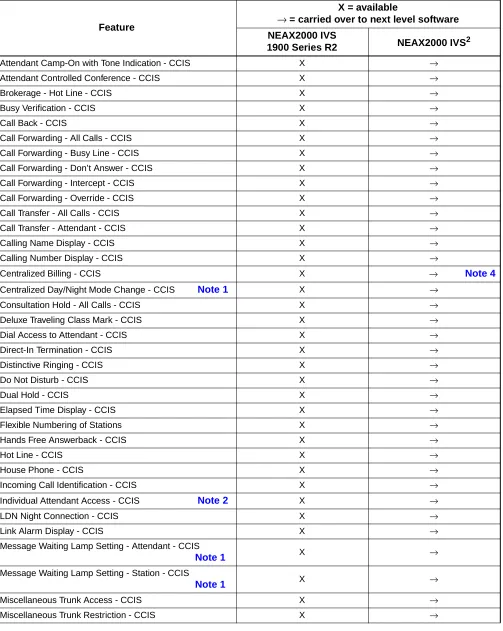
TABLE OF FEATURES
Feature
X = available
→ = carried over to next level software NEAX2000 IVS
1900 Series R2 NEAX2000 IVS2
Attendant Camp-On with Tone Indication - CCIS X →
Attendant Controlled Conference - CCIS X →
Brokerage - Hot Line - CCIS X →
Busy Verification - CCIS X →
Call Back - CCIS X →
Call Forwarding - All Calls - CCIS X →
Call Forwarding - Busy Line - CCIS X →
Call Forwarding - Don’t Answer - CCIS X →
Call Forwarding - Intercept - CCIS X →
Call Forwarding - Override - CCIS X →
Call Transfer - All Calls - CCIS X →
Call Transfer - Attendant - CCIS X →
Calling Name Display - CCIS X →
Calling Number Display - CCIS X →
Centralized Billing - CCIS X → Note 4
Centralized Day/Night Mode Change - CCIS Note 1 X →
Consultation Hold - All Calls - CCIS X →
Deluxe Traveling Class Mark - CCIS X →
Dial Access to Attendant - CCIS X →
Direct-In Termination - CCIS X →
Distinctive Ringing - CCIS X →
Do Not Disturb - CCIS X →
Dual Hold - CCIS X →
Elapsed Time Display - CCIS X →
Flexible Numbering of Stations X →
Hands Free Answerback - CCIS X →
Hot Line - CCIS X →
House Phone - CCIS X →
Incoming Call Identification - CCIS X →
Individual Attendant Access - CCIS Note 2 X →
LDN Night Connection - CCIS X →
Link Alarm Display - CCIS X →
Message Waiting Lamp Setting - Attendant - CCIS
Note 1 X →
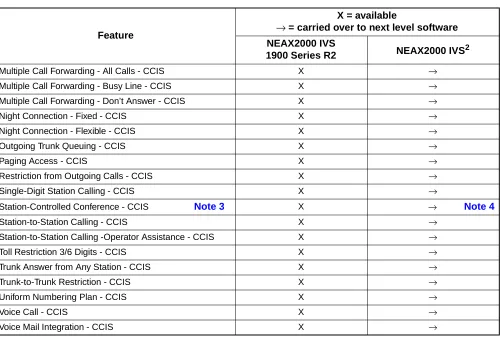
TABLE OF FEATURES
Note 1: As a remote office, this feature is avilable on the NEAX2000 IVS2 or smaller.
Note 2: This service is available when the Attendant Console is provided at the NEAX2400 IMX on the network. Note 3: An attendant/extension of the NEAX2400 IMX must be a conference leader.
Note 4: This service is not available in the NEAX EXPRESS.
Multiple Call Forwarding - All Calls - CCIS X →
Multiple Call Forwarding - Busy Line - CCIS X →
Multiple Call Forwarding - Don’t Answer - CCIS X →
Night Connection - Fixed - CCIS X →
Night Connection - Flexible - CCIS X →
Outgoing Trunk Queuing - CCIS X →
Paging Access - CCIS X →
Restriction from Outgoing Calls - CCIS X →
Single-Digit Station Calling - CCIS X →
Station-Controlled Conference - CCIS Note 3 X → Note 4
Station-to-Station Calling - CCIS X →
Station-to-Station Calling -Operator Assistance - CCIS X →
Toll Restriction 3/6 Digits - CCIS X →
Trunk Answer from Any Station - CCIS X →
Trunk-to-Trunk Restriction - CCIS X →
Uniform Numbering Plan - CCIS X →
Voice Call - CCIS X →
Voice Mail Integration - CCIS X →
Feature
X = available
→ = carried over to next level software NEAX2000 IVS
ATTENDANT CAMP-ON WITH TONE INDICATION - CCIS
ATTENDANT CAMP-ON WITH TONE INDICATION - CCIS
General Description
This feature permits the Attendant, when the desired station at another switching office is busy, to hold an incoming call in a special waiting mode. A distinctive Camp-On tone is sent to the busy station when the Attendant sets Camp-On. When that station becomes idle, it is automatically rung and connected to the waiting trunk party.
Station Application
Attendant Consoles
Operating Procedure
To activate an Attendant Camp-on with Tone Indication - CCIS from an Attendant Console: 1. Dial the desired station number at another switching office and receive busy tone. 2. Press the RELEASE key.
3. A Camp-On tone is sent to the busy station and Camp-On is set.
To cancel an Attendant Camp-on with Tone Indication - CCIS from an Attendant Console: 1. Press the LOOP key corresponding to the held call and connect to the waiting trunk party. 2. Press the DEST key and receive busy tone.
3. Press the CANCL key.
Service Conditions
1. This feature is available from an Attendant Console of either the NEAX2400 IMX or NEAX2000 IVS2 through the CCIS Network.
2. This feature is limited to one call waiting per station line. 3. The maximum number of simultaneous Camp-On calls is 32. 4. Attendant Camp-On may be denied if the busy station is:
• Dialing or in Line Lockout mode • Receiving a System Generated Tone • Being rung
• Protected from Camp-On by Class of Service • Being connected to an Attendant.
ATTENDANT CAMP-ON WITH TONE INDICATION - CCIS
5. The connecting link between the calling party and the called party will be reserved in the normal manner, and the RELEASE key will be inoperative when the link between the two switching offices cannot be reserved.
6. All calls completed by the Attendant to a busy station are held waiting. A single 128 millisecond burst tone is directed toward the busy station every eight seconds.
ATTENDANT CAMP-ON WITH TONE INDICATION - CCIS
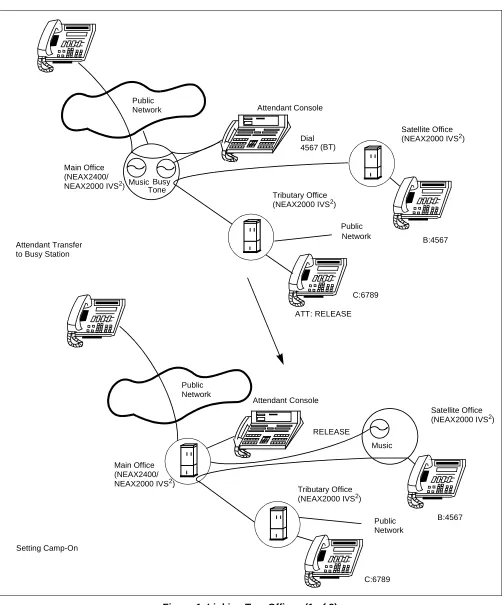
The linking procedure between two switching offices is as shown in Figure 1:
Music Public Tributary Office Public Attendant Console Music Busy Dial RELEASE C:6789 ATT: RELEASE B:4567 B:4567 Setting Camp-On Main Office Tributary Office Satellite Office Public Attendant Console Main Office Satellite Office Public (NEAX2000 IVS2)
(NEAX2400/ NEAX2000 IVS2)
(NEAX2000 IVS2)
(NEAX2000 IVS2)
(NEAX2400/ NEAX2000 IVS2)
(NEAX2000 IVS2) Network Network Tone (BT) 4567 Network Network Attendant Transfer
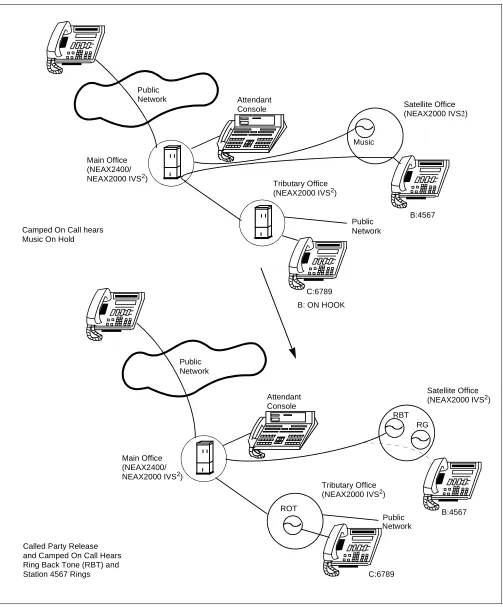
ATTENDANT CAMP-ON WITH TONE INDICATION - CCIS
Figure 1 Linking Two Offices (2 of 2)
RBT Main Office Main Office Public Music Public RG C:6789 B:4567
Called Party Release
B:4567
C:6789
ROT
B: ON HOOK Attendant Tributary Office Satellite Office Public Attendant Tributary Office Satellite Office Public
(NEAX2000 IVS2) Console
Network
(NEAX2400/ NEAX2000 IVS2)
(NEAX2000 IVS2)
Network
Network
Console (NEAX2000 IVS
2)
(NEAX2400/ NEAX2000 IVS2)
(NEAX2000 IVS2)
Network Camped On Call hears
Music On Hold
ATTENDANT CONTROLLED CONFERENCE - CCIS
ATTENDANT CONTROLLED CONFERENCE - CCIS
General Description
This feature permits an Attendant (NEAX2400 IMX) to establish a conference, through CCIS, with up to eight parties of stations and/or trunks (inside and outside parties).
Operating Procedure
To activate an Attendant Controlled Conference - CCIS:
1. A station (conference leader) calls an Attendant (NEAX2400 IMX only) to request a conference. 2. The Attendant connects the conference leader to one of the assigned line circuits.
3. The Attendant sequentially calls all desired parties and connects them to the other assigned line circuits. 4. Once all the parties are connected, any conferee with a push-button telephone may dial a "9" to block
additional participants, thereby assuring privacy.
5. If any push-button station user connected to the conference trunk dials "0", all the conferees will be disconnected. Otherwise, the conference is terminated only after all the parties hang up.
6. To be released from the conference trunk individually, a station user hangs up. The remaining conferees can continue without interruption.
Service Conditions
1. A conference unit (PA-CFTB) must be mounted on the NEAX2400 IMX.
2. Stations and Attendants of the NEAX2000 IVS2 system cannot be the conference leader.
NEAX2000 IVS2
CCIS
BROKERAGE - HOT LINE - CCIS
BROKERAGE - HOT LINE - CCIS
General Description
This feature provides a ringdown connection between two stations, each using a Multiline Terminal, in different offices in the CCIS Network.
Operating Procedure
To access a Brokerage - Hot Line - CCIS from a Multiline Terminal: 1. Lift the handset or press the Speaker key.
2. Press the line/feature key associated with the preassigned station. The destination station is automatically dialed, ringback tone is heard and the destination station answers.
3. After completing the conversation, hang up or press the Speaker key.
To make another Brokerage - Hot Line - CCIS call immediately, press another line/feature key without going on hook and off hook.
Service Conditions
Calling party:
1. Any Multiline Terminal, used for this feature, must be assigned a Primary Extension.
2. When a Brokerage - Hot Line - CCIS call is made from a Multiline Terminal with LCD, the LCD shows the destination station number.
3. The feature is applicable for inter-office connections on the CCIS Network. The destinations must be a station or an Attendant Console at different offices.
4. There is a maximum of 100 Brokerage - Hot Line - CCIS destination assignments.
5. Attendant CampOn, ExecutiveRightOfWay, and Busy Verification can be prohibited to the Brokerage -Hot Line - CCIS connection through Class Of Service-Individual.
Called party:
1. A Brokerage - Hot Line - CCIS call can be transferred to another station using the Call Transfer feature. 2. Call Forwarding is applied whenever the destination station of the Brokerage - Hot Line - CCIS call has set
Call Forwarding (All Calls, Busy and Don’t Answer).
3. Station hunting works if the destination station is a pilot in a hunt group. The UCD function works if the destination station is a pilot of a UCD group.
BUSY VERIFICATION - CCIS
BUSY VERIFICATION - CCIS
General Description
This feature permits an Attendant, via the Attendant Console on the NEAX2400 IMX or the NEAX2000 IVS2, to interrupt a busy station’s call at another switching office connected through CCIS.
Operating Procedure
To activate a Busy Verification - CCIS: 1. Press an idle LOOP key.
2. Dial the desired station number and receive busy tone. 3. Press the BV key.
4. A two-burst tone is sent to the connected parties. 5. The Attendant may monitor or join the conversation. 6. Press the RELEASE key to disengage.
Service Conditions
1. This feature can be activated from an Attendant Console of either the NEAX2400 IMX or the NEAX2000 IVS2 in the CCIS network.
2. This feature can be used to monitor two-party calls (station and trunk or another station). 3. This feature cannot be established to a busy station when the station is:
• Dialing
• Listening to a tone • Being rung
BUSY VERIFICATION - CCIS
NEAX2000 IVS2
CCIS
ATT To STA/CO/TIE/CCIS
BV STA
NEAX2400 /NEAX2000 IVS2
PBX-A PBX-B
BUSY VERIFICATION - CCIS
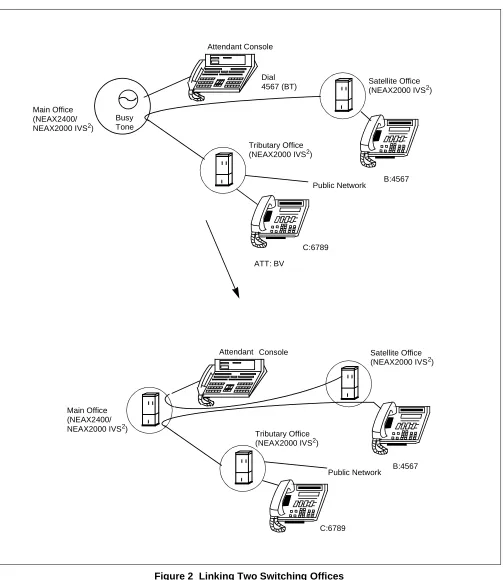
The linking procedure between two switching offices is shown in Figure 2:
Main Office Busy Main Office
Tributary Office
ATT: BV Dial
C:6789
C:6789
B:4567
B:4567 Attendant Console
Satellite Office
Public Network
Tributary Office
Attendant Satellite Office
Public Network (NEAX2400/
NEAX2000 IVS2) Tone
4567 (BT) (NEAX2000 IVS2)
(NEAX2000 IVS2)
Console
(NEAX2000 IVS2)
(NEAX2400/ NEAX2000 IVS2)
CALL BACK - CCIS
CALL BACK - CCIS
General Description
This feature provides inter-office Call Back. A station who has dialed a busy station at another office can set Call Back - CCIS by dialing a feature access code. When this feature has been set, the setting station will ring as soon as the busy station becomes available.
Operating Procedure
To set a Call Back - CCIS from a Single Line Telephone: 1. Dial the desired station number and receive busy tone. 2. Press the hook switch and receive Feature Dial Tone.
3. Dial the Call Back feature access code and receive Service Set Tone. 4. Replace the handset.
5. When the busy station becomes idle, the setting station will ring. 6. When the setting station answers, the originally called station will ring. To cancel a Call Back - CCIS from a Single Line Telephone:
1. Lift the handset; receive dial tone.
2. Dial the Call Back cancellation code and receive Service Set Tone. To set a Call Back - CCIS from a Multiline Terminal:
1. Dial the desired station number and receive busy tone.
2. Press the Call Back feature key and receive Service Set Tone. The LCD shows:
3. Replace the handset.
4. When the busy station becomes idle, the setting station will ring. The LCD shows:
5. When the setting station answers, the originally called station will ring. Called station number
Series III Series E
SET XXXX
(TIME DISPLAY)
SET XXXX
(TIME DISPLAY)
Called station number flashes at calling station
Series III Series E
CB XXXX
(TIME DISPLAY)
CALL BACK - CCIS
6. The originally called station's LCD shows:
To cancel a Call Back - CCIS from a Multiline Terminal: 1. Lift the handset or press the Speaker key; receive dial tone.
2. Press the Call Back feature key and receive Service Set Tone. The feature is canceled. 3. The LCD shows:
Service Conditions
1. If Call Back - CCIS is not answered within 30 seconds (at the calling station), ringing will stop and Call Back - CCIS is automatically canceled.
2. Call Back - CCIS is allowed or denied via Class Of Service.
3. Call Back - CCIS to a busy station cannot be established if that station is in the Line Lockout mode. 4. There is no time limit for Call Back - CCIS. Once Call Back - CCIS is activated, it will remain in status
memory until completed or manually canceled.
5. Call Back - CCIS cannot be set to more than one station at a time.
6. A station can utilize Call Back - CCIS and Outgoing Queuing - CCIS at the same time. 7. When the setting station is called back, Station Hunting and Call Pickup will not apply. 8. A maximum of 32 stations can access this feature simultaneously.
9. A station user calling a busy station line can be automatically connected to the called station when both stations are idle. The activating station may originate and receive calls while Call Back - CCIS is active. 10. Call Back - CCIS records are lost when the system is initialized.
11. If Call Back - CCIS is activated from a NEAX2000 IVS2 station and both the activating and called stations become idle, the activating station receives distinctive ringing. If the called station lift the handset before the activating station answers, ringback tone is heard at the called station and distinctive ringing is provided at the activating station. When the activating station answers, a two-party talk state is established.
12. When Call Back - CCIS is activated from a NEAX2400 IMX, both the activating and called stations will receive ringing at the same time. If either station lift the handset before the other, ringback tone is heard by the first station. When the other station answers, a two-party talk state is established.
Calling station number
Series III Series E
XXXX (TIME DISPLAY)
XXXX (TIME DISPLAY)
CB CNCL XXXX CANCEL XXXX
(TIME DISPLAY) (TIME DISPLAY)
CALL BACK - CCIS
13. When the calling party dials the Call Back - CCIS feature access code or presses the CALL BACK key, if the called party goes idle (while the calling party is still off hook), the calling party hears ringback tone and the called party hears ringing. If the called party lift the handset, the parties can talk with each other.
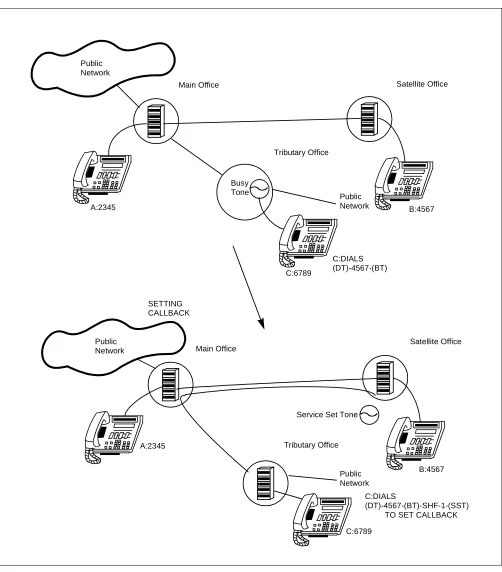
Figure 3 Call Back
Tributary Office Service Set Tone Busy
C:6789 A:2345
C:DIALS
C:6789
B:4567
B:4567 SETTING
A:2345
C:DIALS Public
Tributary Office
Satellite Office
Public Main Office
Public Satellite Office
Public Main Office
Network
Tone
(DT)-4567-(BT)
(DT)-4567-(BT)-SHF-1-(SST) TO SET CALLBACK CALLBACK
Network
CALL BACK - CCIS
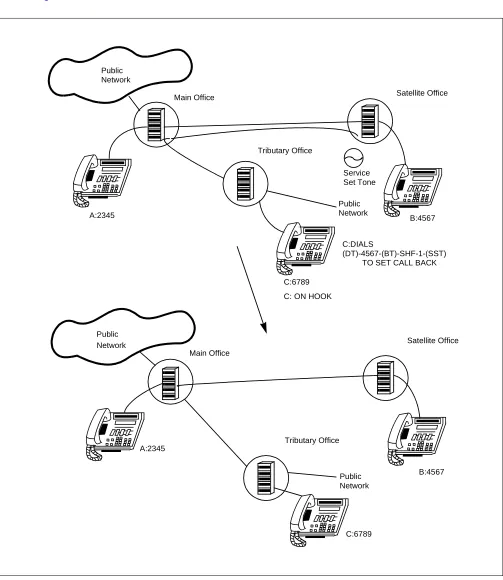
14. When the calling party waits on hook after having set Call Back-CCIS, the link is established as shown in
Figure 4:
Main Office Main Office
Service Tributary Office
C:6789 A:2345
C:6789
B:4567
B:4567 C: ON HOOK
A:2345
C:DIALS Public
Satellite Office
Public
Tributary Office Public
Satellite Office
Public Network
Set Tone
Network
(DT)-4567-(BT)-SHF-1-(SST) TO SET CALL BACK
Network
CALL BACK - CCIS
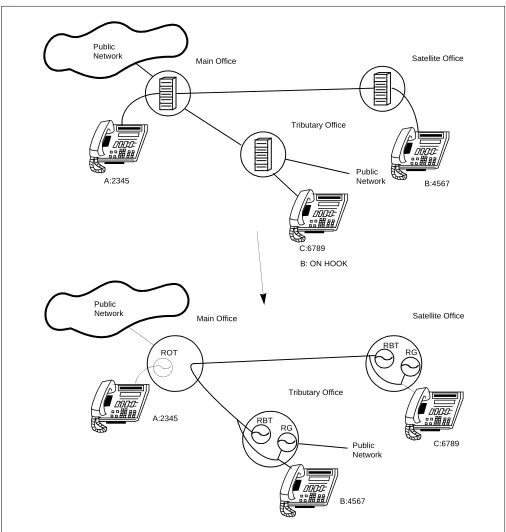
15. If the called party goes on hook while the calling party is waiting on hook for Call Back-CCIS, both the calling and called parties will be rung simultaneously, if the setting station is in the NEAX2400 IMX system.
When both parties go off hook, they can talk with each other. The party who answers first hears ringback tone. If the setting station is in the NEAX2000 IVS2 system, the calling station is called first.
Figure 5 Call Back when On Hook
C:6789
ROT
RG RBT A:2345
B: ON HOOK
C:6789 B:4567
B:4567 A:2345
RG RBT Public
Main Office
Tributary Office
Satellite Office
Public
Public
Main Office
Tributary Office
Satellite Office
Public Network Network
Network
CALL FORWARDING - ALL CALLS - CCIS
CALL FORWARDING - ALL CALLS - CCIS
General Description
This feature permits all calls destined for a particular station to be routed to another station or to an Attendant Console, in another office in the CCIS network, regardless of the status (busy or idle) of the called station. The activation and cancellation of this feature may be accomplished by either the station user or an Attendant.
Operating Procedure
To set a Call Forwarding - All Calls - CCIS from a Single Line Telephone: 1. Lift the handset and receive dial tone.
2. Dial the Call Forwarding - All Calls feature access code and receive Feature Dial Tone. 3. Dial the outgoing trunk access code and receive a single burst of Service Set Tone.
(This operation is required for a network using Open Numbering Plan.) 4. Dial the desired target station number and receive Service Set Tone. 5. Wait approximately five seconds and receive Service Set Tone.
To cancel a Call Forwarding - All Calls - CCIS from a Single Line Telephone: 1. Lift the handset and receive dial tone.
2. Dial the Call Forwarding - All Calls cancellation code and receive Service Set Tone. To set a Call Forwarding - All Calls - CCIS from an Attendant Console:
1. Press an idle LOOP key.
2. Dial the Call Forwarding - All Calls feature access code and receive Feature Dial Tone. 3. Dial the originating station number.
4. Dial the outgoing trunk access code and receive a single burst of Service Set Tone. (This operation is required for a network using Open Numbering Plan.)
5. Dial the desired target station number and receive Service Set Tone. 6. Press the RELEASE key.
To cancel a Call Forwarding - All Calls - CCIS from an Attendant Console: 1. Press an idle LOOP key.
2. Dial the Call Forwarding - All Calls cancellation code and receive Feature Dial Tone. 3. Dial the originating station number and receive Service Set Tone.
4. Press the RELEASE key.
To set a Call Forwarding - All Calls - CCIS from a Multiline Terminal: 1. Lift the handset or press the Speaker key and receive dial tone.
2. Press the Call Forwarding - All Calls feature key and receive Feature Dial Tone. 3. Dial the outgoing trunk access code and receive a single burst of Service Set Tone.
CALL FORWARDING - ALL CALLS - CCIS
5. Replace the handset or press the Speaker key.
To cancel a Call Forwarding - All Calls - CCIS from a Multiline Terminal: 1. Lift the handset or press the Speaker key and receive dial tone.
2. Press the Call Forwarding - All Calls feature access key. The LCD shows:
3. Dial “*” and receive Service Set Tone. The LED of the associated feature key will go out. The LCD shows:
4. Replace the handset or press the Speaker key.
Service Conditions
1. Stations with this feature set may originate calls.
2. A maximum of 240 stations can set Call Forwarding (including All Calls, Busy Line, Don’t Answer -CCIS) across CCIS simultaneously.
3. Stations can be allowed or denied this feature by Class Of Service-Individual programming.
4. Call Forwarding-All Calls - CCIS can be set from a Multiline Terminal primary or secondary extension. 5. Call Forwarding-All Calls - CCIS may be set or canceled by either a station user or an Attendant. The
Attendant can set or cancel this service only for a station in the same switching office.
6. Call Forwarding-All Calls - CCIS to an Attendant, when the system is in Night mode, will not be forwarded. 7. Call Forwarding-All Calls - CCIS can be used from any number of forwarding stations to the same
designated station.
SET XXXX
(TIME DISPLAY)
Forwarding station number Series III Series E
SET XXXX
(TIME DISPLAY)
FDA YYY CF ALL YYY
(TIME DISPLAY) (TIME DISPLAY)
Series III Series E
CNCL CANCEL
(TIME DISPLAY) (TIME DISPLAY)
CALL FORWARDING - ALL CALLS - CCIS
8. When calls are forwarded to the Attendant, the Incoming Call Identification feature does not allow the Attendant to identify the call as a forwarded call.
9. When Outgoing Trunk Queuing is provided, ringback is applied to the forwarding station and not to the designated station.
10. When a call is forwarded, the station number recorded for Station Message Detail is the forwarding station. 11. When an ACD/UCD group station activates call forwarding, only calls directed to that telephone number
are forwarded. Calls directed to the ACD/UCD pilot will bypass member stations that are forwarded. 12. If the forwarding station is the pilot station and the designated station is idle, a call to the ACD/UCD group
is routed immediately to the designated station. If the designated station is busy, a call to the ACD/UCD group receives a busy tone.
13. When a forwarding station places a call using the Call Back - CCIS feature, the automatic callback rings at the forwarding station, not the designated station.
14. When Attendant Camp-On is directed toward a station with Call Forwarding-All Calls - CCIS in effect, the busy designated station receives call waiting treatment if the designated station is involved in a steady two-party talking state and there is no call already waiting.
15. If a call with the Attendant Camp-On feature in effect is forwarded to a busy station which has Station Hunting, the call hunts for an idle line and then waits on the designated station if no idle line is found. 16. If either of the restriction features listed below are active for the designated station, Call Forwarding - All
Calls - CCIS to that station should not be allowed. It should be noted that a non-restricted station can activate Call Forwarding - All Calls - CCIS to the stations below, but incoming trunk calls that are forwarded will not be completed (intercept arrangements will apply).
• Fully Restricted Station • Inward Restricted Station
17. When a call is forwarded through CCIS by Call Forwarding - All Calls/Busy Line/Don’t Answer, the kind of Call Forwarding and the station number which is setting the service can be indicated on the LCD of the forwarding destination Multiline Terminal.
PBX-A PBX-B
STATION /TRUNK
CCIS
STATION 2000
Kind of Call Forwarding
Call Forwarding-All Calls/ /Busy Line/Don’t Answer. Call is forwarded from Station 2000 by
CALL FORWARDING - ALL CALLS - CCIS
18. When a call is forwarded through CCIS, and then forwarded to another station by Call Forwarding - All Calls/Busy Line/Don’t Answer or UCD Hunting, the last forwarding station number or the pilot station number of UCD Group is indicated.
PBX-A PBX-B
STATION /TRUNK
CCIS
STATION 2000
Kind of Call Forwarding Call Forwarding-All Calls/
/Busy Line/Don’t Answer. Call is forwarded from Station 2000 by
and station number “3000” are indicated on LCD. STATION 3001 STATION 3000
CALL FORWARDING - BUSY LINE - CCIS
CALL FORWARDING - BUSY LINE - CCIS
General Description
This feature permits a call to a busy station to be immediately forwarded to a predesignated station or to an Attendant Console in another office in the CCIS network.
Operating Procedure
To set a Call Forwarding-Busy Line - CCIS from a Single Line Telephone: 1. Lift the handset and receive dial tone.
2. Dial the Call Forwarding-Busy Line feature access code and receive Feature Dial Tone. 3. Dial the outgoing trunk access code and receive a single burst of Service Set Tone.
(This operation is required for a network using Open Numbering Plan.) 4. Dial the desired target station number and receive Service Set Tone. 5. Wait approximately five seconds and receive Service Set Tone.
To cancel a Call Forwarding-Busy Line - CCIS from a Single Line Telephone: 1. Lift the handset and receive dial tone.
2. Dial the Call Forwarding-Busy Line cancellation code and receive Service Set Tone. To set a Call Forwarding-Busy Line - CCIS from an Attendant Console:
1. Press an idle LOOP key.
2. Dial the Call Forwarding-Busy Line feature access code and receive Feature Dial Tone. 3. Dial the originating station number.
4. Dial the outgoing trunk access code and receive a single burst of Service Set Tone. (This operation is required for a network using Open Numbering Plan.)
5. Dial the desired target station number and receive Service Set Tone. 6. Press the RELEASE key.
To cancel a Call Forwarding-Busy Line - CCIS from an Attendant Console: 1. Press an idle LOOP key.
2. Dial the Call Forwarding-Busy Line cancellation code and receive Feature Dial Tone. 3. Dial the originating station number and receive Service Set Tone.
To set a Call Forwarding-Busy Line - CCIS from a Multiline Terminal; 1. Lift the handset or press the Speaker key and receive dial tone.
2. Press the Call Forwarding-Busy Line feature access key and receive Feature Dial Tone. 3. Dial the desired target station number and receive Service Set Tone.
CALL FORWARDING - BUSY LINE - CCIS
5. Wait approximately five seconds and receive Service Set Tone. The LED lights and the LCD shows:
6. Replace the handset or press the Speaker key.
To cancel a Call Forwarding-Busy Line - CCIS from a Multiline Terminal: 1. Lift the handset or press the Speaker key and receive dial tone.
2. Press the Call Forwarding-Busy Line key. The LCD shows:
3. Dial “*” and receive Service Set Tone. The LED of the associated feature key will go out. The LCD shows:
4. Replace the handset or press the Speaker key.
Service Conditions
1. This feature may be set and canceled by either a station user or an Attendant in the same switching office. 2. Call Forwarding-Busy Line - CCIS data remains programmed even if the system is reinitialized or a power
failure occurs.
3. If the called station is the pilot of an ACD/UCD group and activates Call Forwarding-Busy Line - CCIS, the calling station will Call Forward if all ACD/UCD group stations are busy.
4. If a calling Attendant Console receives busy tone after being Call Forwarded Busy and activates Camp -On, these services will be activated at the destination station.
5. Stations can be allowed or denied this feature by Class Of Service - Individual.
6. A station programmed for access to Call Forwarding-Busy Line - CCIS is automatically allowed Call Forwarding - Don’t Answer - CCIS.
7. If separate access codes are programmed into system data for Call Forwarding-Don’t Answer - CCIS and Call Forwarding-Busy Line - CCIS, separate feature access keys must be programmed on the Multiline Terminal.
8. There is a maximum of 240 stations which can set Call Forwarding (including -All Calls, -Busy Line, -Don’t Answer - CCIS) across CCIS simultaneously.
9. Call Forwarding-Busy Line - CCIS can be set from a Multiline Terminal primary or a secondary extension. 10. Individual Call Forwarding-Busy Line - CCIS supersedes system Call Forwarding.
Forwarding station number Series III Series E
SET XXXX
(TIME DISPLAY)
SET XXXX
(TIME DISPLAY)
Series III Series E
FDB YYY CF BUSY YYY
(TIME DISPLAY) (TIME DISPLAY)
Series III Series E
CNCL CANCEL
CALL FORWARDING - BUSY LINE - CCIS
11. Call Forwarding-Busy Line - CCIS, when set in a Station Hunting group member, is effective only when the entire hunt group is busy.
12. If the forwarding number is an ACD/UCD group number and a member of the group is idle, the call rings at the idle group member’s station. If all members of the group are busy, the call remains in queue waiting for a member to become available.
13. If any of the restriction features listed below are active for the designated station, call forwarding to that station should not be allowed. It should be noted that a non-restricted station can activate Call Forwarding-Busy Line - CCIS to the stations below, but incoming trunk calls that are forwarded will not be completed (intercept arrangements will apply).
• Fully Restricted Station • Inward Restricted Station
14. Non-controlling ACD/UCD stations can activate Call Forwarding-Busy Line. All calls directed to the extension are forwarded.
15. Call Forwarding-Busy Line - CCIS to an operator will receive reorder tone when the system is in Night mode.
16. When the Call Forwarding-Busy Line - CCIS feature is in effect, if the forwarding station is idle and the designated station is busy, the forwarding station continues to ring.
17. Call Forwarding-Busy Line - CCIS can be used from any number of forwarding stations to the same designated station.
18. When calls are forwarded to the operator, the Incoming Call Identification feature allows the Attendant to identify the call as a forwarded call.
19. When Outgoing Trunk Queuing is provided, ringback is provided to the forwarding station and not to the designated station.
20. When a call is forwarded, the station number recorded for Station Message Detail Recording (SMDR) is the forwarding station.
21. When a call is forwarded through CCIS by Call Forwarding-All Calls/-Busy Line/-Don’t Answer, the kind of Call Forwarding and the station number which is setting the service can be indicated on the LCD of the forwarding destination Multiline Terminal.
PBX-A PBX-B
STATION /TRUNK
CCIS
STATION 2000
Kind of Call Forwarding
Call Forwarding-All Calls/ /Busy Line/Don’t Answer. Call is forwarded from Station 2000 by
CALL FORWARDING - BUSY LINE - CCIS
22. When a call is forwarded through CCIS, and then forwarded to another station by Call Forwarding - All Calls/Busy Line/Don’t Answer or UCD Hunting, the last forwarding station number or the pilot station number of UCD Group is indicated.
PBX-A PBX-B
STATION /TRUNK
CCIS
STATION 2000
Kind of Call Forwarding Call Forwarding-All Calls/
/Busy Line/Don’t Answer. Call is forwarded from Station 2000 by
and station number “3000” are indicated on LCD. STATION 3001 STATION 3000
CALL FORWARDING - DON’T ANSWER - CCIS
CALL FORWARDING - DON’T ANSWER - CCIS
General Description
This feature permits a call to an unanswered station to be forwarded to a predesignated station or to an Attendant Console in another office, when the called station does not answer after a predetermined time period.
Operating Procedure
To set a Call Forwarding-Don’t Answer - CCIS from a Single Line Telephone: 1. Lift the handset and receive dial tone.
2. Dial the Call Forwarding-Don’t Answer feature access code and receive Feature Dial Tone. 3. Dial the outgoing trunk access code and receive a single burst of Service Set Tone.
(This operation is required for a network using Open Numbering Plan.) 4. Dial the desired target station number and receive Service Set Tone. 5. Wait approximately five seconds and receive Service Set Tone.
To cancel a Call Forwarding-Don’t Answer - CCIS from a Single Line Telephone: 1. Lift the handset and receive dial tone.
2. Dial the Call Forwarding-Don’t Answer cancellation code and receive Service Set Tone. To set a Call Forwarding-Don’t Answer - CCIS from an Attendant Console:
1. Press an idle LOOP key.
2. Dial the Call Forwarding-Don’t Answer feature access code and receive Feature Dial Tone. 3. Dial the originating station number.
4. Dial the outgoing trunk access code and receive a single burst of Service Set Tone. (This operation is required for a network using Open Numbering Plan.)
5. Dial the desired target station number and receive Service Set Tone. 6. Press the RELEASE key.
To cancel a Call Forwarding-Don’t Answer - CCIS from an Attendant Console: 1. Press an idle LOOP key.
2. Dial the Call Forwarding-Don’t answer cancellation code and receive Feature Dial Tone. 3. Dial the origination station number and receive Service Set Tone.
4. Press the LOOP key.
To set a Call Forwarding-Don’t Answer - CCIS from a Multiline Terminal; 1. Lift the handset or press the Speaker key and receive dial tone.
2. Press the Call Forwarding-Don’t Answer feature access key and receive Feature Dial Tone. 3. Dial the outgoing trunk access code and receive a single burst of Service Set Tone.
CALL FORWARDING - DON’T ANSWER - CCIS
5. Wait approximately five seconds and receive Service Set Tone. The LED lights. The LCD shows:
6. Replace the handset or press the Speaker key.
To cancel a Call Forwarding-Don’t Answer - CCIS from a Multiline Terminal: 1. Lift the handset or press the Speaker key and receive dial tone.
2. Press the Call Forwarding-Don’t Answer feature access key. The LCD shows:
3. Dial “*” and receive Service Set Tone. The LED of the associated feature key will go out. The LCD shows:
4. Replace the handset or press the Speaker key.
Service Conditions
1. This feature may be set and canceled by a station user or an Attendant in the same switching office. 2. Stations can be allowed or denied this feature by to Class Of Service - Individual programming in system
data.
3. A station programmed for access to Call Forwarding-Don’t Answer - CCIS is automatically allowed Call Forwarding-Busy Line - CCIS.
4. If separate access codes are programmed into system data for Call Forwarding-Don’t Answer CCIS and Call Forwarding-Busy Line - CCIS, separate feature access keys must be programmed on Multiline Terminals to equip them with both features.
5. A maximum number of 240 stations can set Call Forwarding (including-All Calls, -Busy Line, -Don’t Answer - CCIS) across CCIS simultaneously.
6. Call Forwarding-Don’t Answer - CCIS can be provided on either a Tenant or an individual basis. 7. Individual Call Forwarding-Don’t Answer - CCIS supersedes Tenant-basis Call Forwarding.
8. Call Forwarding-Don’t Answer - CCIS is applicable to Consultation Hold - All Calls - CCIS and Call Transfer - All Calls - CCIS.
9. Call Forwarding on a system basis allows direct incoming trunk calls which encounter a don’t answer condition to be forwarded to a predetermined station or the attendant console.
Forwarding station number Series III Series E
SET XXXX
(TIME DISPLAY)
SET XXXX
(TIME DISPLAY)
Series III Series E
FDN YYY CF NANS YYY
(TIME DISPLAY) (TIME DISPLAY)
Series III Series E
CNCL CANCEL
CALL FORWARDING - DON’T ANSWER - CCIS
10. The operator answering a Call Forwarding call can identify the called station number on the Attendant Console display if the calling party line is a trunk.
11. When the Attendant extends a call to a station in the same switching office which has set Call Forwarding-Don’t Answer - CCIS, the called station will ring for 30 seconds. If, after this time the call has not been answered, Automatic Recall is activated. If desired, this timing can be changed through the Variable Timing Parameter feature.
12. When the Attendant extends a call to a station in another switching office in the CCIS network, which has set Call Forwarding-Don’t Answer - CCIS, the call will be forwarded if the called station does not answer within a predetermined time period.
13. If any of the restriction features listed below are active for the designated station, call forwarding to that station should not be allowed. It should be noted that a non-restricted station can activate call forwarding to the stations below, but incoming trunk calls that are forwarded will not be completed (intercept arrangements will apply).
• Fully Restricted Station • Inward Restricted Station
14. If the forwarding number is an ACD/UCD group number and a member of the group is idle, the call rings at the idle station. If all members of the group are busy, the call remains in queue until a member becomes available.
15. Non-controlling ACD/UCD stations can activate Call Forwarding-Don’t Answer - CCIS. Only calls to the extension number are forwarded.
16. Call Forwarding-Don’t Answer - CCIS to an Attendant will continue to ring the called station when the system is in Night mode.
17. When the Call Forwarding-Don’t Answer - CCIS feature is in effect, if the forwarding station is idle and the designated station is busy, the forwarding station continues to ring beyond the no answer time period. 18. Call Forwarding can be used from any number of forwarding stations to the same designated station. 19. When calls are forwarded to the operator, the Incoming Call Identification feature allows the Attendant to
identify the call as a forwarded call.
20. When Outgoing Trunk Queuing is provided, ringback is provided to the forwarding station and not to the designated station.
21. When a call is forwarded, the station number recorded for Station Message Detail Recording (SMDR) is the forwarding station.
22. When a call is forwarded through CCIS by Call Forwarding-All Calls/-Busy Line/-Don’t Answer, the kind of Call Forwarding and the station number which is setting the service can be indicated on the LCD of the forwarding destination Multiline Terminal.
PBX-A PBX-B
STATION /TRUNK
CCIS
Kind of Call Forwarding Call is forwarded from
Station 2000 by
CALL FORWARDING - DON’T ANSWER - CCIS
23. When a call is forwarded through CCIS, and then forwarded to another station by Call Forwarding - All Calls/Busy Line/Don’t Answer or UCD Hunting, the last forwarding station number or the pilot station number of UCD Group is indicated.
PBX-A PBX-B
STATION /TRUNK
CCIS
STATION 2000
Kind of Call Forwarding Call Forwarding-All Calls/
/Busy Line/Don’t Answer. Call is forwarded from Station 2000 by
and station number “3000” are indicated on LCD. STATION 3001 STATION 3000
CALL FORWARDING - INTERCEPT - CCIS
CALL FORWARDING - INTERCEPT - CCIS
General Description
This feature allows calls to an inoperative number, through a CCIS trunk, to be intercepted and automatically routed to a recorded announcement informing the caller that an inoperative number was dialed and giving the Listed Directory Number for information.
Operating Procedure
DIGITAL ANNOUNCEMENT
B:4567
C:6789
Satellite Office
Tributary Office
Public Main Office
Network TRUNK CARD Public
CALL FORWARDING - INTERCEPT - CCIS
Service Conditions
1. This feature requires a Digital Announcement Trunk Card (DAT). 2. This feature is provided on a system basis.
3. Calls to restricted codes will receive reorder tone.
4. Only one common message can be provided for the different intercept conditions. 5. The following call conditions are routed to Call Forwarding - Intercept - CCIS:
• Vacant level
CALL FORWARDING - OVERRIDE - CCIS
CALL FORWARDING - OVERRIDE - CCIS
General Description
This feature allows a target station user (Station A) to call a station (Station B) which has Call Forwarding - All Calls - CCIS set.
Operating Procedure
No manual operation is required.
Service Conditions
1. This feature is allowed to all stations in the system, except Attendant Console(s).
CALL TRANSFER - ALL CALLS - CCIS
CALL TRANSFER - ALL CALLS - CCIS
General Description
This feature allows a station user to transfer incoming or outgoing Central Office, intra-office and inter-office calls to another station in the CCIS network, without Attendant assistance.
Operating Procedure
To transfer a call in progress from a Single Line Telephone:
1. Press the hookswitch momentarily and receive Feature Dial Tone. 2. Dial the third party and receive ringback tone.
3. Wait for the third party to answer and announce the transfer while keeping the first party on Consultation Hold - All Calls - CCIS. When the station user hangs up, the first and third parties will automatically be connected.
To transfer a call in progress from a Multiline Terminal: 1. Press the Transfer key and receive Feature Dial Tone. 2. Dial the third party and receive ringback tone.
3. Wait for the third party to answer and announce the transfer while keeping the first party on Consultation Hold -ALL Calls -CCIS. When the station user hangs up, the first and third parties will automatically be connected.
Service Conditions
1. When Trunk-To-Trunk Connection is provided, an incoming or outgoing network or Tie Line call may be transferred to an outgoing network trunk, provided that the trunk can provide release supervision. The station user who transfers the call gives line control to the two remaining parties upon hanging up. Therefore, if the trunk is loop-start, Call Transfer - All Calls - CCIS from trunk to trunk will not function when loop release supervision is not provided.
CALL TRANSFER - ALL CALLS - CCIS
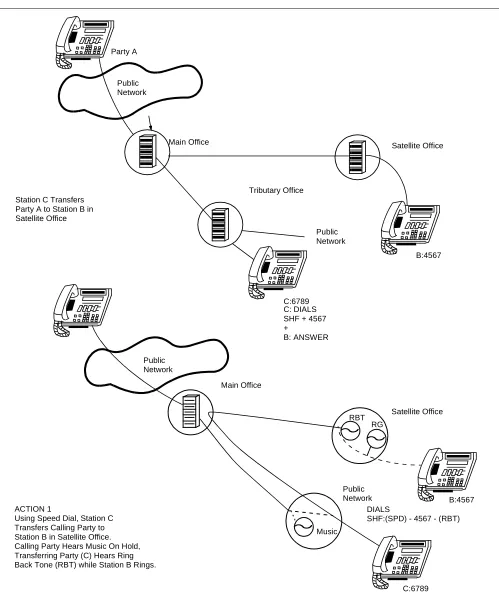
The linking procedure between two switching offices is as follows in Figure 6:
RG RBT
B:4567
C:6789
Satellite Office
Tributary Office
Public Main Office
Network
C: DIALS SHF + 4567 +
B: ANSWER
B:4567 Public
Network DIALS
SHF:(SPD) - 4567 - (RBT) Satellite Office Main Office
Public Network
Music Station C Transfers
Party A to Station B in Satellite Office
Party A
ACTION 1
Using Speed Dial, Station C Transfers Calling Party to Station B in Satellite Office. Calling Party Hears Music On Hold, Transferring Party (C) Hears Ring
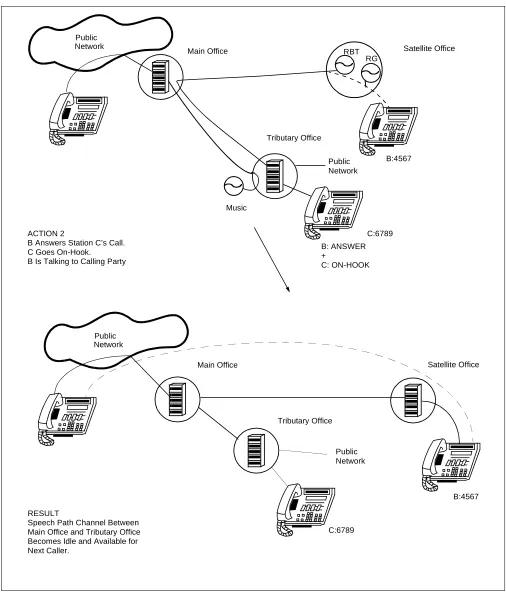
CALL TRANSFER - ALL CALLS - CCIS
Figure 6 Linking Two Offices Using Call Transfer - All Calls (2 of 2)
C:6789 B: ANSWER
C:6789
B:4567
B:4567 RG
RBT Main Office
Tributary Office
Satellite Office Public
Main Office
Tributary Office
Satellite Office
Public Network Network
+
C: ON-HOOK Music
Public Network
Public Network ACTION 2
B Answers Station C’s Call. C Goes On-Hook.
B Is Talking to Calling Party
RESULT
CALL TRANSFER - ATTENDANT - CCIS
CALL TRANSFER - ATTENDANT - CCIS
General Description
This feature permits a station user, while connected to a CCIS network call, to transfer a call to an Attendant Console via the CCIS network.
Operating Procedure
To transfer a call to an Attendant Console:
1. While engaged in a Central Office trunk call, press the hookswitch momentarily and receive Feature Dial Tone.
2. Dial the operator access code.
3. The ATND lamp on the Attendant Console flashes and the buzzer sounds. The station receives ringback tone.
To answer from an Attendant Console:
1. Refer to the “NEAX2400 IMX Attendant Console User Guide.”
If the station wishes to return to the Central Office trunk call while the Attendant Console is being called: 1. Press the hookswitch momentarily. The ATND lamp on the Attendant Console goes out and the buzzer
stops.
2. Ringback tone ceases; the station returns to the Central Office trunk call.
Service Conditions
1. This feature is activated to an Attendant Console is in the NEAX2000 IVS2 or the NEAX 2400 IMX in the CCIS network.
2. This feature is available for incoming or outgoing Central Office trunk calls and for station-to-station calls. 3. The feature allows a station user, while participating in a two-party connection (two stations or a station and a trunk), to call the operator so that the operator may transfer the call or provide other assistance as required. 4. If all registers are busy and the station user switch hook flashes, the switch hook flash is ignored by the
CALLING NAME DISPLAY - CCIS
CALLING NAME DISPLAY - CCIS
General Description
This feature permits the station name of a calling or called party at another switching office, through the CCIS network, to be displayed either on a Multiline Terminal or an Attendant Console.
Operating Procedure
No manual operation is required.
Service Conditions
1. The calling/called station name (maximum of sixteen characters) is displayed on the lower line of the LCD of a Multiline Terminal or an Attendant Console.
2. The called station name will be displayed on the calling Multiline Terminal or Attendant Console during ringing period and for six seconds after the called party answers the call.
3. The calling station name will be displayed when the Multiline Terminal is ringing on its Prime Line or the Attendant Console and for six seconds after the called party answers the call.
4. If the called party is forwarded by Call Forwarding - Outside, the called name displayed at the calling Multiline Terminal or Attendant Console will be the name of the station which answers the call.
5. If the network includes the office which Calling Name Display is restricted, or is connected by no CCIS line, this feature may not be allowed.
6. If the network includes 2400 RDS, MDS, HDS, they must have L version software for Name Display to work.
CALLING NUMBER DISPLAY - CCIS
CALLING NUMBER DISPLAY - CCIS
General Description
This feature permits the number of a calling or called party at another switching office to be displayed either on a Multiline Terminal or an Attendant Console.
Operating Procedure
No manual operation is required.
Service Conditions
1. The called party’s number (maximum of sixteen digits) will be displayed on the Multiline Terminal when the called party answers the call.
2. The calling party’s number will be displayed when the Multiline Terminal is ringing on its Prime Line. 3. If the called party is forwarded via Call Forwarding - All Calls, Call Forwarding - Busy Line, etc., the called
number display at the calling Multiline Terminal will be the number of the station which answers the call. 4. When a call with calling party number information (ISDN CPN/Caller-ID/T1-ANI) is received over CCIS,
the information can be transferred transparently, a maximum of 16 digits can be displayed on the LCD of the Multiline Terminal, and it also can be sent to the SMDR, or MCI with ANI if provided. Below shows the conditions whether the calling party number is displayed or not when the call is transferred or forwarded to another station.
• When the call is transferred or forwarded to the station in the same office, the LCD of the transferred/ forwarded station displays the calling party number.
• When the call is transferred to the station of another office over CCIS, the LCD, SMDR, MCI, or ANI of the transferred station does not display the calling party number.
• When the call is forwarded to the station of another office over CCIS, the LCD of the forwarded station displays the calling party number.
5. Examples of number displays for inter-office connections are shown in the attached diagrams for the following cases:
• Multiline Terminal to Multiline Terminal (Figure 7) • Multiline Terminal to Attendant Console (Figure 8) • Multiline Terminal to Trunk (Figure 9)
• Attendant Console to Multiline Terminal (Figure 10) • Trunk to Multiline Terminal (Figure 11)
CALLING NUMBER DISPLAY - CCIS
Figure 7 Inter-Office Connections for Multiline Terminal to Multiline Terminal
IVS-NEXT/2400
Elapsed time Called station CALLED
CALLING CCIS
820 822
NEAX2000 IVS2 B: 4211 A: 2000
A: Dial 8224211
Calling party (A) Called party (B)
Called station
NEAX2000 IVS2
(Time Display)
(Time Display)
CCIS Link
CCIS Link
821
(Time Display)
8202000
number
Calling station number flashes office code + station number (Max. 8 digits)
PARTY ANSWERS
8224211
8224211 8202000 (Time Display)
Elapsed time Calling station
CALLING NUMBER DISPLAY - CCIS
Figure 8 Inter-Office Connections for Multiline Terminal to Attendant Console
NEAX2000 IVS2/2400
Elapsed time Called party CALLED
CALLING CCIS
820 822
NEAX2000 IVS2 B: ATT A: 2000
A: Dial 0
Calling party (A) Called party (B)
Called station
NEAX2000 IVS2 821
number
PARTY ANSWERS
0
822
Trunk number TIE lamp lights
Office code
Trunk Group Number
TIE lamp lights
CALLING NUMBER DISPLAY - CCIS
Figure 9 Inter-Office Connections for Multiline Terminal to Trunk
NEAX2000 IVS2/2400
Called party CALLED
CALLING CCIS
820 822
NEAX2000 IVS2 A: 2000
A: Dial
Calling party (A)
NEAX2000 IVS2 821
Dialed number
PARTY ANSWERS
Type of trunk TIE
TIE
824-4211
(Time Display)
(Time Display)
8244211
. .
CALLING NUMBER DISPLAY - CCIS
Figure 10 Inter-Office Connections for Attendant Console to Multiline Terminal
1 1 2 3 4
820 OPR
820 OPR
2 2 4 2 1
NEAX2000 IVS2/2400
Elapsed time Calling party CALLED
CALLING CCIS
820 822
NEAX2000 IVS2 B: 4211 A: ATT
Calling party (A) Called party (B)
Called station
NEAX2000 IVS2 821
number
PARTY ANSWERS
Office code Trunk Group Number
Office code (Time Display)
(Time Display) Calling party number flashes
Trunk number 1
CALLING NUMBER DISPLAY - CCIS
Figure 11 Inter-Office Connections for Trunk to Multiline Terminal
. .
.
. . .
CCSA
OPR NEAX2000 IVS2/2400
Elapsed time Calling party CALLED
CALLING CCIS
820 822
NEAX2000 IVS2 B: 4211
Called party (B) NEAX2000 IVS2 821
PARTY ANSWERS
Type of trunk Type of trunk (Time Display)
(Time Display) Calling party number flashes RT= 10
CALLING NUMBER DISPLAY - CCIS
Figure 12 Inter-Office Connections for Intermediate Station Number Display (1)
8202000 NEAX2000 IVS2/2400
Elapsed time Calling station CALLED
CALLING CCIS
820 822
NEAX2000 IVS2
B: 4211
Called party (C) NEAX2000 IVS2 821
PARTY ANSWERS
Type of trunk (Time Display)
Calling party number flashes A: 2000
A: Dial 822-4211
C: 5000
B: Intermediate station
B C Call forwarding all calls
8224211 Calling party (A)
(Time Display)
Dialed number Type of forwarding
Intermediate station number (B)
8225000 (Time Display)
8202000 (Time Display)
number Elapsed time Called station
CALLING NUMBER DISPLAY - CCIS
Figure 13 Inter-Office Connections for Intermediate Station Number Display (2)
8202000 NEAX2000 IVS2/2400
Elapsed time Calling station CALLED
CALLING CCIS
820 822
B: 4211
Called party (C) 821
PARTY ANSWERS
(Time Display)
Calling party number flashes A: 2000
A: Dial 822-4211
C: 5000
B: Intermediate station
B C Call forwarding all calls
4211 Calling party (A)
(Time Display)
Dialed number
8225000 (Time Display)
8202000 (Time Display)
number Elapsed time Called station
CENTRALIZED BILLING - CCIS
CENTRALIZED BILLING - CCIS
General Description
This feature is used to collect billing information from each office within the network and to direct it to the associated center office. Billing information is then forwarded to the central billing centers via RS-232C interfaces.
Operating Procedure
No manual operation is required. The call record outputs are produced automatically.
Service Conditions
1. The NEAX2000 IVS2 is generally used as a local office, however, it can be used as a center office for centralized billing if all the PBXs within the network are NEAX2000 IVS2.
2. The information storage capacity of the local office is approximately 1,000 calls.
3. If billing information in excess of the above mentioned storage capacity is required for a local office, then the addition of a memory card with SRAM card allows 12,000 records of storage per system.
4. When the NEAX2000 IVS2 is used as a center office, the billing information is sent to a SMDR system with NEAX2400 IMX format.
5. When the NEAX2000 IVS2 is used as a center office, a maximum number of call records which can be sent to the SMDR system is about 4000 per hour at 4800 bps on the RS-232C port.
When the AP of the center office can not send the call records to the SMDR, due to such as a failure of the SMDR system, call records are stored in the memory buffer on the AP (about 500 call records). Moreover, if the memory buffer is filled, the call records are stored in an AP of a local office.
6. When a NEAX2400 is used as a center office, either the Sub Line or the My Line number can be selected by system programming to be sent to the SMDR terminal.
CENTRALIZED BILLING - CCIS
8. Billing messages are made in each gateway to the public network.
CCIS Link CCIS Link
CCIS Link
NEAX2000 IVS2
NEAX2000 IVS2 NEAX2000 IVS2
LOCAL
LOCAL
BILLING MSG
BILLING LOCAL
BILLING MSG RS-232C CENTER OFFICE
BILLING MSG
CENTRALIZED
MSG
BILLING CENTER NEAX2400/
OFFICE
OFFICE
OFFICE
CENTRALIZED BILLING - CCIS
9. Billing messages at each location can be sent to Billing Center 1 or Billing Center 2. Example: Location A B Billing Center 2
Location B Billing Center 2 Location C D Billing Center 1 Location D Billing Center 1
NEAX2000 IVS2
NEAX2000 IVS2 NEAX2000 IVS2
LOCAL
LOCAL
BILLING MSG
BILLING LOCAL
BILLING MSG RS-232C CENTER OFFICE
BILLING MSG
CENTRALIZED
MSG
BILLING CENTER 1 NEAX2400/
OFFICE
OFFICE
OFFICE
CENTRALIZED BILLING CENTER 2 A
B
C D
CENTRALIZED BILLING - CCIS
10. When a call is originated from a station (Station A) of a local office (without AP00), via a COT of a center office (with AP00), a message is sent to the center office from the local office via CCIS. According to the station number of the calling party the AP00 of the center office generates billing information to the SMDR terminal.
11. When a call is originated from a Sub Line on the Multiline Terminal station (Station A) of the local office, either the Sub Line or the Primary Extension number can be selected by system programming to be sent to the SMDR terminal.
12. When a call is originated from a station (Station B) of the center office, only the Primary Extension number can be sent to the SMDR terminal.
13. By predetermined office data, Local Office Number of the calling station can be forwarded to the center office, and output to the SMDR terminal.
AP00
SMDR Terminal Center Office
COT Station B
Station A
without AP00 L ocal Office
CCIS
CENTRALIZED DAY/NIGHT MODE CHANGE - CCIS
CENTRALIZED DAY/NIGHT MODE CHANGE - CCIS
General Description
This feature switches the Day/Night mode of a remote office, linked to the main office NEAX2400 IMX via CCIS, in accordance with the Day/Night mode switching on the Attendant Console at the main office.
Operating Procedure
Main Office:
1. The Attendant executes Day/Night mode changeover operation using the normal Attendant Consoles (no master) method or the master Attendant Console method.
2. After a specified time, the Day/Night mode at the remote office is changed over. Remote Office:
1. No operation is required.
Service Conditions
1. The NEAX2000 IVS2 can only be used as a remote office.
2. At a remote office, only one Tenant (Tenant number 01) can use this feature.
3. When a remote office is equipped with an Attendant Console, a changeover of the remote office’s Day/ Night mode should not be performed from the Attendant Console of the remote office.
4. An indication on external equipment at a remote office can be provided when Day/Night mode status is changed by the Attendant Console of the main office. The external equipment is to be provided by the customer and to be connected with a PN-DK00 card. The indication is as follows:
Status Indication
NIGHT mode ON
CONSULTATION HOLD - ALL CALLS - CCIS
CONSULTATION HOLD - ALL CALLS - CCIS
General Description
This feature permits a station user, within the CCIS network, to hold any incoming or outgoing public network or Tie Line call while originating a call to another station within the CCIS network.
Operating Procedure
To hold the original call and place a second call from a Single Line Telephone: 1. Press the hookswitch momentarily and receive Feature Dial Tone.
2. The original call is placed on hold and receives Music On Hold, if provided. 3. Dial the second station number and receive ringback tone.
4. The second station answers. The original call is now on Consultation Hold - All Calls - CCIS. To return to the original call from a Single Line Telephone:
1. In any of the following cases, the calling station can return to the original call by momentarily pressing the hookswitch:
a. The second station called is busy.
b. The calling station cannot gain access to the second station due to restriction. c. The second station does not answer.
2. If the second party hangs up, the calling station will automatically be returned to the original call. 3. If the originating station momentarily presses the hookswitch, a three-party Conference will be initiated. To hold the original call and place a second call from a Multiline Terminal:
1. Press the Transfer key and receive Feature Dial Tone.
2. The original call is placed on hold and receives Music On Hold, if provided. 3. Dial the second station number and receive ringback tone.
CONSULTATION HOLD - ALL CALLS - CCIS
To return to the original call from a Multiline Terminal:
1. In any of the following cases, the calling station can return to the original call by pressing the Transfer key: a. The second station called is busy.
b. The calling station cannot gain access to the second station due to a restriction. c. The second station does not answer.
2. If the second station hangs up, the calling station will automatically be returned to the original call. 3. If the second station remains in the conversation, pressing the Trasfer or Answer key returns the original
call to the Multiline Terminal while the second call enters Consultation Hold -All Calls - CCIS. 4. By pressing the Conf key, a three-party conference will be initiated.
Service Conditions
DELUXE TRAVELING CLASS MARK - CCIS
DELUXE TRAVELING CLASS MARK - CCIS
General Description
This feature provides outgoing call restrictions within the CCIS network. The following three types of restrictions are allowed:
• Deluxe Traveling Class Mark Restriction • Route Restriction
• Numbering Restriction
Operating Procedure
No manual operation is required.
Service Conditions
1. The Route Restriction Class (RSC) of the calling party is sent to the called office as a Deluxe Traveling Class Mark (TCM), which is used for call restriction.
2. A maximum of eight restriction levels can be sent as a TCM.
3. The Transmitted Restriction Class (TRC) is used to check restrictions on calls outside the CCIS network, from a different switch.
4. The Route Restriction method is used to restrict a call based on the caller’s restriction class and the selected route.
5. Numbering Toll Restriction is used to restrict a call based on the number dialed.
6. The following additional restriction features can be used by an office within the CCIS network: • Time of Day Change
DIAL ACCESS TO ATTENDANT - CCIS
DIAL ACCESS TO ATTENDANT - CCIS
General Description
This feature allows a station user to call an Attendant Console by dialing an operator call code through the CCIS network.
Operating Procedure
To call an Attendant Console:
1. The station user dials the operator call code and receives ringback tone.
2. The ATND lamp for Incoming Call Identification flashes on the Attendant Console; the Attendant answers the call.
Service Conditions
1. The operator call code must be an Individual Attendant Access - CCIS number.
2. This feature allows any station user or dial repeating Tie Trunk to call an Attendant Console by dialing an operator call code.
DIAL ACCESS TO ATTENDANT - CCIS
1 2 0 0 0 822
OPR
NEAX2000 IVS2/2400
Elapsed time Called party CALLED
CALLING CCIS
820 822
NEAX2000 IVS2 B: ATT A: 2000
Calling party (A) Called party (B) NEAX2000 IVS2 821
PARTY ANSWERS
Office code
Trunk RSC (Time Display)
(Time Display) A: Dial 0
2 Dialed number
Station number display on the ATT console can be changed to office code + station number by system data.
Call identification
Calling station number ATND lamp lights