Volume 3, No. 7, Nov-Dec 2012
International Journal of Advanced Research in Computer Science
RESEARCH PAPER
Available Online at www.ijarcs.info
Design and Implementation of a Game for Mobile Phone
Md. Akkas Ali*
Lecturer, Dept. of CSE & IT,
University of Information Tech. and Sciences (UITS) Dhaka-1212, Bangladesh
Mohammad Nuruzzaman Bhuiyan
Lecturer, Dept. of CSE & IT,
University of Information Tech. and Sciences (UITS) Dhaka-1212, Bangladesh
Md. Niaz Imtiaz
Lecturer, Dept. of CSE & IT,
University of Information Tech. and Sciences (UITS) Dhaka-1212, Bangladesh
Abstract: Modern communication devices are no longer used merely for text or voice communication, now a days, it is also in extensive use for entertainment. With the advancement of the technology, the communication devices are now turning to multipurpose smart devices like i-phone, smart phone and many other mobile devices. These multipurpose devices are capable of providing various entertaining functions to its users, likewise, a general form of entertainment in communication devices has been popular that is known as mobile game. A mobile game is one that can be run for user entertainment on the common platforms presently used in modern portable communication devices. In this project, we have designed and developed a mobile game, named The Avoider, which is capable of running on JAVA based portable device platforms. Generically, this game belongs to the category of Adventure Games and uses a straightforward AI strategy in order to achieve user entertainment. We have chosen the geographical area of Chittagong University of Engineering & Technology as the strategic platform of the game, where a user has to travel through from one end to the other and face a number of enemies attacking him. Options have been left for the user to move his/her hero in a four-directional manner in order to save it from the attacks of enemy. The game has been developed using Java 2 Micro Edition (J2ME) standard and the cellular phones or portable communication devices that support this standard can install and enjoy this game.
Keywords: Design, Implementing, Avoider, Measurement, Performance, Mobile Gaming, Titles, Hero, Enemies, Animation.
I. INTRODUCTION
The tremendous growth in mobile devices such as mobile phones and Personal Digital Assistant (PDA) and the recent investment in 3G Technologies have resulted in such devices being used for various purposes [1]. Traditionally Mobile phones are used for making and receiving calls or sending and receiving text messages. Nowadays, they can be used to record and send short videos, taking photos and playing games. With the growth of mobile devices coupled with the growth in the field of pervasive gaming, mobile devices are also being used widely for playing games. Pervasive gaming is an emerging genre in which pre-computer traditional games are being played with pre-computer functionality [2]. Besides mobile phone, there are also other types of handheld devices that offer pervasive gaming experience such as Cybiko, Gameboy Advanced and Game Park GP32. Traditional board games such as Chess, Go and jigsaw puzzle that are now being played using computing technology offer a new and engaging gaming experiences to the players [3]. A tiles based game [4][5] is developed by us that run all mobiles that support the java. The game contains the map of Chittagong University of Engineering and Technology (CUET), a hero, some enemies. When the game is run, the target of my hero is to reach the goal building that is located at the teacher’s quarter of CUET from the out of CUET gate. The enemy positions are set in different location side of the road. The platform that is used in my project is the J2ME and the editor that is used to type the code is the NetBeans IDE 7.0
II. OBJECTIVESANDSPECIFICAIMS
a. To study the literature for developing the mobile games
b. To define the game implementation techniques c. To define the type of game
d. To implement the game for mobile Phone
III. METHODOLOGY
A. Outline of methodology design:
In this section, we have described our proposed methodology in order to design the game. Our proposed methodology contains the several steps. The basic steps are Design, Constructions, Compile, Pre verify Package, Test, Deployment, Install into mobile and Start to run.
a. Design
The design step of figure 1 is the major responsible step of creating the game. The design step contains logic to design the map, create and control the hero and create and control the enemies. The design step is divided into some sub steps as shown in figure. 2.
a) Design the map:
At first the map is drawn in the notepad in symbolically such as following:
Grass=. Road= #
[image:2.595.57.255.82.580.2]Safety building= @ Water= $
Figure 1. Algorithm for Creating Mobile Game
Figure 2. Block diagram for designing the mobile game
Hole= + Tree= ^ Gate= % Goal building= *
Then an array is created by replacing the integer number as following:
Grass=. = 1 Road= # = 2
Safety building= @= 3 Water= $= 4
Hole= += 5 Tree= ^= 6 Gate= %= 7 Goal building= * = 9 Food= 10
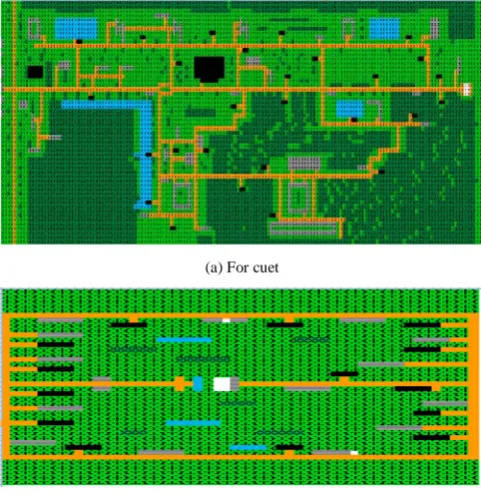
As a result the array found is shown in appendix A. Then the array elements are read from the external file “1.lvl” and “2.lvl” according to the number. If any characters are found in array, it will be skipped. Then the each element of the array is called for individual tile in order to construct the individual cell. The various tiles are saved in the resources file namely the tiles2.png. The view map are set in case of both levels as the same way that are appended in the layer manager [6] but different tiles and resources are used here.
(a) For cuet
[image:2.595.316.557.340.590.2](b) For demo Figure 3. Map
b) Creating the hero:
namely “1.lvl” and “2.lvl”. The sprite type of the hero is set the front.
Figure 4. Icon (hero)
c) Control the hero:
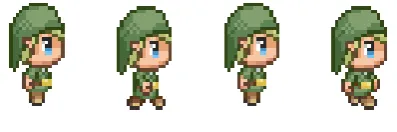
[image:3.595.63.262.269.335.2]In order to make the animation on the hero the sequence of images are used. For example, when the user input as the direction of the hero to move the right direction, then this animation is created by using four images that are shown in following:
Figure 5. Images for right animation
[image:3.595.366.513.378.625.2]In the same way we can use the images as following for creating the left animation.
Figure 6. Images for left animation
In the same way we can use the images as following for creating the top animation.
Figure 7. Images for top animation
[image:3.595.66.251.388.451.2]In the same way we can use the images as following for creating the bottom animation.
Figure 8. Images for bottom animation
In the same way we can use the images as following for creating the animation in the building.
Figure 9. Images for animation in building
The frame sequences are assigned as following:
seqTop = {12, 13, 14, 15},seqBottom = {0, 1, 2, 3},seqLeft = {4, 5, 6, 7},seqRight = {8, 9, 10, 11}, seqFront = {0}, seqBuilding = {16, 18, 17, 19}. The hero walk able tiles are assigned as following: heroWalkableTiles = {2, 3, 9}
The distances that an actor can move at a time are assigned as following: dx = 5, dy = 5
The distances offset to adjust the image with left-top position of cell are xoff = 5, yoff = 24.
d) Creating the enemies:
In order to generate the enemies, an image file namely enemy.png is saved in the resources file. Different holes for enemies are set in the background layer. In my game the enemies’ positions are set in varies places in CUET map. The two positions are set for the enemies. The first position is the hide position and the second position is the road position. These positions are defined in the file namely “1.lvl” in as the element of the array. When the game is run, then the position is called dynamically from the file namely “1.lvl”. The sprite type of the enemy is set the front. In the resources file, enemy.png file is saved. The enemies are appended in the layer manager first. The enemies’ positions are shown in appendix B.
[image:3.595.75.240.503.569.2]
Figure 10. Enemy position
Figure 11. Frame sequence of enemies
e) Control the enemies:
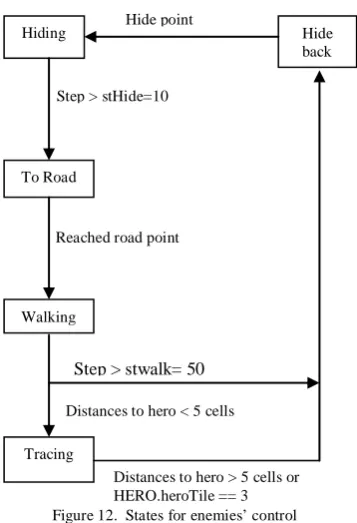
Basically the enemies’ controls are managed by defining the five states. The five enemies’ controlling states are defined as following:
STATE_HIDING = 0, STATE_TOROAD =1, STATE_WALKING = 2 STATE_TRACING = 3 STATE_HIDE_BACK = 4
Hide point
[image:3.595.71.243.616.681.2]Figure 12. States for enemies’ control
The enemies frame sequences are defined as following: SEQ_TOP = {6, 7}
SEQ_BOTTOM = {1, 2} SEQ_LEFT = {11, 12} SEQ_RIGHT = {16, 17} SEQ_FRONT = {0} SEQ_BITE = {3, 9}
The enemy walk able tiles are defined as following: WALKABLE_OFFROAD = {1, 2, 5, 6}
WALKABLE_ONROAD = {2}
The time that the enemies stay in the hide state and walking state are defined as following: stHide = 10, stWalk = 50
[image:4.595.370.502.48.415.2]When the enemy comes in the road point, she is assigned the road state to walking state. The walk in the road in forward and backward in her assigns time. If the enemies get the hero in between five cells, then the enemies trace the hero. If the enemies get the hero in the same cell, then the enemies go her bite state and start to bite the hero. When the enemies are five cells far from the hero, she cannot trace the hero. After the finished of the enemies walking or tracing state, then the enemies are assigned the hide back state.
Figure 13. Enemy in hide state
Figure 14. Enemy in road state
Figure 15. Enemy in walking state
Figure 16. Enemy in tracing state
Figure 17. Enemy in biting state
Figure 18. Enemy in hide back state
f) Flow of control in game:
The game contains three packages that are given below. The packages are divided into three groups because the utils package contains those classes that can be used in different games. The avoider package contains those classes that can be used in my avoider game.
a) Utils b) Avoider c) Ui
The Utils package contains eight classes that are given below:
a) SplashScreen b) MenuCanvas c) InfoCanvas d) Navigator e) ModelMidlet f) FileUtil
g) BaseChildCanvas h) Point
The avoider package contains six classes that are given below: The Avoider, Game Screen, Actor, Hero Actor, Enemy Actor, Settings.
The ui package contains four classes that are given below:
a) Music Controller b) Progress Bar c) UIBase
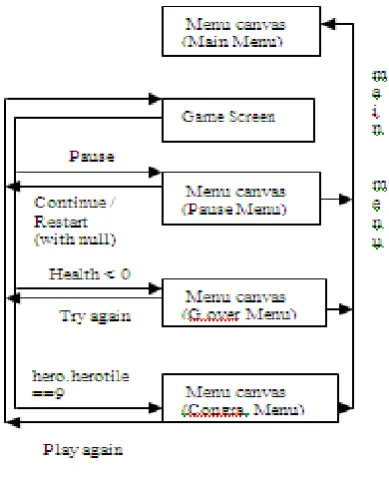
The block diagram of flowing the control in the game is shown in figure 19. When one starts the game, at first the
Hiding
To Road
Step > stHide=10
Walking
Tracing
Hide back Hide point
Distances to hero > 5 cells or HERO.heroTile == 3 Distances to hero < 5 cells
Step > stwalk= 50
[image:4.595.88.226.588.777.2]avoider class is called, then the Splash Screen class is called to display “The Avoider”. Then the control goes to the Menu canvas, if any one selects the play option from the main menu, then the control goes to the Game Screen and so on as shown in fig. 19 & 20.
Figure 19. Block diagram of flowing control in the game
[image:5.595.54.270.120.377.2]The control flows from the game screen are given below:
Figure 20. Continue figure 19
The sequences of flowing the control in the game are described in pictorially as following:
[image:5.595.60.255.418.659.2]IV. FUTURESTUDY
We have decided to implement the building and tree as look like the real building and tree in future. We shall implement the easy, medium, hard mode in playing the game. We shall implement the high score option. We shall implement the vibration option.
V. APPENDIX
A. Array for creating map for level 1(cuet map):
56 159 1,1,6,1,2,1,1,6,6,6,6,6,6,6,6,6,6,6,6,6,6,6,6,6,6,6,6,6,6,6,6,6, 6,6,6,6,6,6,6,6,6,6,6,6,6,6,6,6,6,6,6,6,6,6,6,6,6,6,6,6,6,6,6,6, 6,6,6,6,6,6,6,6,6,6,6,1,6,6,6,6,6,6,6,6,6,6,6,6,6,6,6,6,6,6,6,6, 6,6,6,6,6,6,6,6,6,6,6,6,6,6,6,6,6,6,6,6,6,6,6,6,6,6,6,6,6,6,6,6, 6,6,6,6,6,6,6,6,6,6,6,6,6,6,6,6,6,6,6,6,6,6,6,6,6,6,6,6,6,1,1,1, 1,1,1,2,1,1,6,6,6,6,6,6,6,6,6,6,6,6,6,6,6,6,6,6,6,6,6,6,6,6,6,6, 6,6,6,6,6,6,6,6,6,6,6,6,6,6,6,6,6,6,6,6,6,6,6,6,6,6,6,6,6,6,6,6, 6,6,6,6,6,6,6,6,6,6,1,6,6,6,6,6,6,6,6,6,6,6,6,6,6,6,6,6,6,6,6,6, 6,6,6,6,6,6,6,6,6,6,6,6,6,6,6,6,6,6,6,6,6,6,6,6,6,6,6,6,6,6,6,6, 6,6,6,6,6,6,6,6,6,6,6,6,6,6,6,6,6,6,6,6,6,6,6,6, ……….. 1,1,1,1,2,1,1,1,1,6,6,6,6,6,6,6,6,6,6,6,6,6,6,6,6,6,6,6,6,6,6,6, 6,6,6,6,6,6,6,6,6,6,6,6,6,1,1,1,1,1,1,1,1,1,1,1,1,1,1,1,1,1,1,1, 1,6,6,6,6,6,1,6,6,6,6,6,6,6,6,6,6,6,6,6,6,6,6,6,6,6,6,6,6,6,6,6, 6,6,6,6,6,6,6,6,6,6,6,6,6,6,6,6,6,6,6,6,1,6,6,6,6,6,6,6,1,6,6,6, 6,6,6,6,6,1,6,6,6,6,6,6,6,6,6,6,6,6,6,6,6,6,6,6,6,6,6,6, 4, 20 4 6,20,1 4,22,4 4,17,3 2, 20, 2 31 0, 21, 1 Bacha baba 3, 16, 4 Phahartoli 3, 22, 4 Kaptai 6, 25, 1 Guardroom 7, 21, 4 Gate 9, 27, 4 Bank 15, 32, 1
Extension of South Hall 9, 35, 1
Extension of New Hall 9, 9, 1
New Hall 19, 16, 1 Medical center 32, 16, 1 Canteen 2 40, 16, 1 Canteen 1 36, 8, 1 South Hall
56, 8, 1 North Hall 51, 4, 1 Hall Office 78, 9, 1 Q.K. Hall 52, 18, 1 Goal-Chatter 63, 27, 4 P eng. Building 53, 33, 4 Register Office 57, 38, 1 Central Library 56, 43, 4 Civil Building 46, 50, 1 Auditorium 65, 53, 1 Canteen 3 81, 16, 1 Center Mosque 88, 190,1 Oju Khana 94, 41, 4 EME building 98, 39, 1 Workshop 121, 26, 1 Ladies Hall 109, 9, 1
School & College 142, 9, 1
Teacher’s Quarter
B. Array for creating map for level 2 (demo map):
2,2,2,2,5,5,5,5,1,1,1,1,1,1,1,1,1,1,4,4,4,4,4,4,1,1,1,1,1,1,1,1, 1,1,1,1,1,1,1,1,1,1,1,1,1,1,1,1,1,1,1,2
2,1,1,1,1,1,1,1,1,1,1,1,1,1,1,1,1,1,1,1,1,1,1,1,1,1,1,1,1,1,1,1, 1,1,1,1,1,1,1,1,1,3,3,3,3,3,2,2,2,2,2,2
2,1,1,1,1,1,1,1,1,1,1,1,1,6,6,6,1,1,1,1,1,1,1,1,1,1,1,1,6,6,6,6, 6,1,1,1,1,1,1,1,1,1,1,1,1,1,1,1,1,1,1,2
2,1,1,1,1,1,1,1,1,1,1,1,1,1,1,1,1,1,1,1,1,1,1,1,1,1,1,1,1,1,1,1, 1,1,1,1,1,1,1,1,1,1,1,1,1,5,5,5,5,2,2,2
2,3,3,3,3,3,1,1,1,1,1,1,1,1,1,1,1,1,1,1,1,1,1,1,1,1,1,1,1,1,1,1, 1,1,1,1,1,1,1,1,1,1,1,1,1,1,1,1,1,1,1,2
2,1,1,1,1,1,1,5,5,5,5,1,1,1,1,1,1,1,1,1,1,1,1,1,1,4,4,4,4,1,5,5, 5,1,1,1,1,1,1,1,1,1,1,1,1,1,1,1,1,1,1,2
2,1,1,1,1,1,1,1,2,1,1,1,1,1,1,3,3,3,3,3,1,1,1,1,1,1,1,1,1,1,1,2, 1,1,3,3,3,3,10,1,1,1,1,1,1,1,1,1,1,1,1,2,2,2,2,2,2,2,2,2,2,2,2,2 ,2,2,2,2,2,2,2,2,2,2,2,2,2,2,2,2,2,2,2,2,2,2,2,2,2,2,2,2,2,2,2, 2,2,2,2,2,2,2,
2,1,1,1,1,1,1,1,1,1,1,1,1,1,1,1,1,1,1,1,1,1,1,1,1,1,1,1,1,1,1,1, 1,1,1,1,1,1,1,1,1,1,1,1,1,5,5,5,2,2,2,2
2,1,1,1,1,1,1,1,1,1,1,1,1,1,1,1,1,1,1,1,1,1,1,1,1,1,
1,1,1,1,1,1,1,1,1,1,1,1,1,1,1,1,1,1,1,1,1,1,1,1,1,1,2,2,1,1,1,1, 1,1,1,1,1,1,1,1,1,1,1,1,4,4,4,4,4,4,1,1,
2,2,1,1,1,1,1,1,1,1,1,1,1,1,1,1,1,1,4,4,4,4,4,4,1,1,1,1,1,1,1,1, 1,6,6,6,6,1,1,1,1,1,1,1,1,1,3,3,3,3,2,2,
C. Array for position of enemies for level 1 (cuet map):
27
11,16,11,20 25, 9,24,9 29,22,29,21 46, 8,47,9 48,35,50,35 57,52,56,51 58,34,56,34 58,14,57,14 68,17,66,19 69, 7,70,8 68,34,66,34 80,11,78,11 81,43,80,42 87,38,88,38 89,49,91,49 93, 7,92,8 95,17,95,18 95,23,95,22 103, 13, 105, 13 117, 27, 115, 27 123, 17, 124, 18 126, 39, 124, 39
135, 8, 134, 9 137, 26, 135, 26 138, 13, 140, 13 144, 17, 145, 18 146, 23, 145, 22
D. Array for position of enemies for level 2 (demo
map): 14 12, 7,14,6 29, 7,31,6 43, 7,47,7 7, 11,3,11 44,12,48,12 7, 20,3,20 44,20,47,20 45,26,48,26 7, 27,3,27 45,30,48,30 7, 32,9,33 31,33,32,34
VI. REFERENCES
[1] Bjork S., Holopainen, Ljungstrand P., and Akesson K. “Designing ubiquitous computing games – a report from a workshop exploring ubiquitous computing entertainment,” Personal and Ubiquitous, Vol. 6, Issue 5-6, 2002.
[2] Magerkurth C., Cheok D. Adrian., Mandryk L. Regan., and Nilsen T. “Pervasive games: bringing computer entertainment back to the real world,” ACM Computers in Entertainment, Vol. 3, No. 3, July 2005.I. S. Jacobs and C. P. Bean, “Fine particles, thin films and exchange anisotropy,” in Magnetism, vol. III, G. T. Rado and H. Suhl, Eds. New York: Academic, 1963, pp. 271–350. [3] Wolverton, Mark. "The Father of Video Games". American
Heritage. Retrieved March 31, 2010.
[4] Bohn J. “The smart jigsaw puzzle assistant: using RFID technology for building augmented real-world games,”
[5] "The Tile Game" RICHARD C. BANKS Boise State University 1910 Universi- ty Drive Boise, ID 83725,