Papers presented in NCRET-2K16 Conference can be accessed from
A Virtual Mobile Assistant System Using NOVNC Framework
Miss. Snehal Shahaji Varpe
(Author)
BE Dept. of CSE From SP’s INSTITUTE OF KNOWLEDGE COLLEGE OF ENGINEERING, PUNE.
Email Id - [email protected]
Mr. Somnath Sakore
(Author)
BE Dept. of CSE From SP’s INSTITUTE OF KNOWLEDGE COLLEGE OF ENGINEERING, PUNE.
Email Id - [email protected]
Mr. Vishal Mate
(Author)
BE Dept. of CSE From SP’s INSTITUTE OF KNOWLEDGE COLLEGE OF ENGINEERING, PUNE.
Email Id - [email protected]
Prof. Ritesh Thakur
(HOD, Computer Engg. Department) BE Dept. of CSE From SP’s INSTITUTE OF KNOWLEDGE COLLEGE
OF ENGINEERING, PUNE.
Email ID - [email protected]
Abstract:
Remote control systems are used to control and
monitor devices. It is very important for testing
software and hardware developments in several real
devices. The virtual network computing is used to
access the desktop of remote computer system with
the help of an Android based cellular phone. By using
VNC architecture, user can access and manipulate
the desktop within Wi-Fi range. It can be used on
cross-platform also like, Windows, Mac or Linux. In
this before transmitting the image to the cellular
phone it is compressed. Ideally all the VNC
applications has encryption mechanisms like RAW,
XLIB, Hexical, Tight, etc. These existing mechanisms
takes lot of bandwidth for sending the data. So, in this
project we are going to implement a new protocol
named COREE which is based on NOVNC
architecture. In our concept we are directly capture
the screen pixels from display driver before it is
displaying on screen and do encryption and send to it
to our VNC client. The method which we are going to
implement is very effective because it
saves lots of bandwidth and eventually provides very
good performance.
Keywords:
Android; Remote Control; VNC; Java;
Mobile Devices; Security solutions of Mobile
devices; Remote Visualization; COREE; NOVNC;
etc.
1.
INTRODUCTION
In this paper, we propose an expeditious screen sharing method to ameliorate screen update rate in mobile VNC systems. In case of mobile contrivances, high intricacy video compression techniques cannot be employed due to their rigorous computation limit. However, the bandwidth constraint requires a certain level of compression ratio. Thus, there subsists a trade-off between encoder involution and compression ratio for expeditious mobile VNC systems. We first integrate sundry video encoders into our prototype system, and explore their felicitousness for mobile VNC. Withal, the subsisting RFB protocol for VNC is elongated to facilely integrate video encoders in a rearward-compatible way. We proposed an incipient modified region coding method which transmits only modified regions between current and anterior screen images. It can further reduce encoder computation and resultantly increase screen update rate. We implemented a prototype mobile VNC system genuinely, and its practical performance is widely evaluated. In recent years, there have been popularly relinquished a variety of multimedia mobile contrivances such as smart phone and tablet PC. The accommodation that the today's mobile contrivances provide to users is virtually commensurable to desktops or homogeneous contrivances. This trend requires the essentiality of collaboration among these systems such as sharing multimedia contents and applications. VNC has been utilized as an implement for a multiplatform application suite sanctioning users to access graphic exhibits remotely. It is predicated on the thin-client architecture and utilizes the RFB (remote frame buffer) protocol for sharing a screen between distinct contrivances. The client software runs on the local user’s machine while the server part operates at the target host. In this way, VNC brings remote exhibit to the local user’s machine. Prosperous application of VNC to mobile contrivances should assure rapid screen image transfer from server to client.
2.
RELATED WORK
Existing System
The remote desktop can be used for accessing and controlling the desktop PC remotely. There ar very few initiatives like Samsung KIES which is used to controlling and accessing the cellular phone remotely. In the existing system server passively allows the client to take control of it. The VNC client (or viewer) is the program that watches,
controls, and interacts with the server. The client controls the server. The VNC protocol (RFB) is very simple, based on one graphic primitive from server to client ("Put a rectangle of pixel data at the specified X,Y position") and event messages from client to server.VNC server can handle multiple clients at the same time. It uses Remote Frame Buffer protocol to communicate or share information between client and server.
It utilizes two technologies for engendering connection COM ports and JSR-82. Personal Computers do not fortify the JSR-82 API by default. The connection is established utilizing 802.11 links. The client is a PDA. There are cyclopean projects and initiatives designed that sanction remote control between contrivances. Even there are some initiatives that aim to control mobile contrivances. But most of them lack in utilization of Open source platforms. So, we present an initiative in open source that covers this particular area of interest. The proposed platform is flexible and scalable. This paper fixates on controlling through Android Platforms. This is an open platform that sanctions utilizing other technologies (additionally open). In integration, Android platform sanction the development of incipient conceptions facilely and test them with a set of open standards. The prototype engendered as implementation of the proposed architecture will be provided additionally as gratuitous software. According to data relinquished by Nielsen a moiety of the consumers who recently purchased a Smartphone culled an Android Smartphone.
Disadvantages
Transferring files requires other mechanisms (e.g. ftp). Access to non-Unix platforms does not have good multi-user support.
Doesn’t have modem access or features.
Display can be a bit slow, jerky, and/or incomplete.
Proposed System
Papers presented in NCRET-2K16 Conference can be accessed from
In our project, we have used Tight encoding and Tight Decoding algorithm for encoding and decoding the data respectively. The Zlib compression technique is used for compressing the data.
The pixels are taken before displaying it on the display driver. In this, The pixels are divided into block of rectangles, Continuously data is going to transfer (buffering) from android based cell phone to another smart phone or desktop PC. So in this only changed rectangles are changed and other rectangles remains as it is. So data compression done in very effective manner and saves lot of bandwidth.
This should be performed within the Wi-Fi range. Now-a-days there are many applications available for sharing the desktop between two or more PCs. This paper focuses on remote controlling of android device through remote PC and also access the android device. It can be used for file transfer, file handling and managing between client and server. It can also be used in customer care services and any software company. Some features of this application include downloading and uploading files, installing applications and starting applications etc. It can also be used to carry out remote sessions or conferences.
Advantages:
Clients compatible with the Remote Desktop Protocol run on a number of different operating systems.
Users do not, however, need a broadband connection to access their desktop, as even a 56K modem provides enough speed to provide 5-6 screen refreshes per second.
Private network to communicate confidentially over a public network.
Can send data, video or combination of both of these Medias across secured and encrypted and private channels between these two points.
Only changed rectangles are changed, So bandwidth utilization done effectively.
Applications:
System administration IT support and helpdesks.
It can be used for educational purposes. For example students in a distributed g
Group can view the computer screen which is been manipulated by the instructor.
It can be used by the android application for remote administration at the time of practical exams by the supervisor.
3.
IMPLEMENTATION
3.1.
Remote Visualization ServiceThe main function of VNC server is to share the graphic information with the client layer. The VNC service should be configured in such manner that it makes use of Tight encoding. This will be helpful to achieve smooth display. The display will be smooth even if the network is slow. The client makes request to the server with connection parameters and establishes a connection. The client layer requests the server to show the display of device. A raw display can be used as alternative if the server does not support the VNC system.
3.2.Application Management Service
Application Management service is used for centralized management of applications. The client layer can access the information about the applications and also modify the same. This would enable to perform software updates on all monitored devices. For Example, the client can request the server to install an application and the server has to install the application sent by the client.
3.3.Service and Process Management Service
There are number of processes running on a device at any instance of time. This task could use resources badly to complete its task. The server is used to give information about these processes and services and the client layer is responsible to manage these processes and services.
Figure 1: Basic Architecture
3.4.File System Management Service
In computing, the main function of a file system is to store and retrieve the information. Most of the devices require the transfer of files between different systems. File system management service is used to provide a central location for sharing files between both systems. The client can also add files into the device, for example to make some data available to users or update the files. The server will allow the client to update, add, perform any operations related to file or remove file.
3.5.Device Status Service
Device status service is used to check the status of a device. It provides the general information of the device to the clients. Using this, user can determine the device that requires immediate attention. For example, server could notify a client about a problem.
4.
DESIGNING
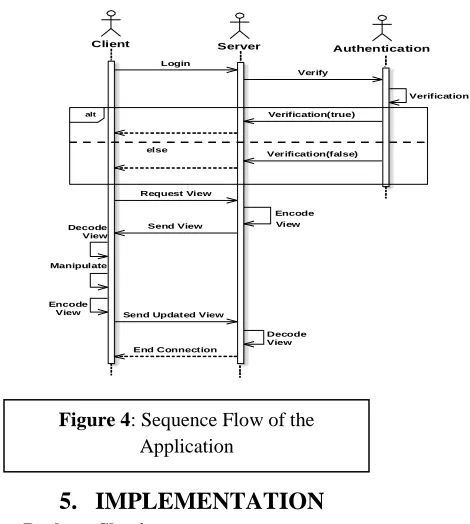
Client Server Authentication
Login
Verify
alt
Verification Verification(true)
Verification(false) else
Request View
Send View Decode
View
Encode View
Manipulate
Send Updated View
End Connection
Decode View Encode
View
5.
IMPLEMENTATION
Desktop Sharing:
In this module the remote desktop screen will be shared. This can be implemented with the help of the VNC protocol. VNC protocol is based on the concept of a remote frame buffer (RFB). The protocol simply allows a server to update the frame buffer displayed on a viewer. Because it works at the frame buffer level it is potentially applicable to all operating systems, windowing systems and applications. The protocol will operate over any reliable transport such as TCP/IP.
Panning and zooming:
The user can move the viewport horizontally and vertically. The viewport can be widened (zoom out) to browse its contents and narrowed (zoom in) to see the display in greater detail.[1]
Over viewing and twin view:
In order to browse the entire area of the desktop display and to choose a specific area within it, the over viewing mode is provided. When the user turns this mode on, the aspect ratio is changed so that the whole area is rendered to fit the screen of the cellular phone. This helps the user adjust the viewport to the desired area of the desktop display. [1] Sometimes, it is convenient to display two areas of the desktop simultaneously. We can enter test conditions and observe the results simply by moving our line-of-sight slightly
Figure:2 Client Side Flow of the System
Figure: 3 Server Side Flow of the System
Papers presented in NCRET-2K16 Conference can be accessed from
Pointing and clicking:
The user can move the pointer on the remote desktop display vertically and horizontally by pressing keys. Dragging can be executed by pressing a key to specify the start of the dragging operation, then moving the pointer, and finally pressing the same key to indicate the end of the dragging operation
Inputting text:
Text is entered and edited locally on the cellular phone using the built-in text input capability of the cellular phone.
Shortcut Assignment:
Common GUI operations, such as pressing GUI buttons and opening pull-down menus become very tiresome when only basic operations are provided.
6.
ALGORITHM
Algorithm: VNC System:
COREE Encoding
#include <CORRE-encoder.h> ...
{
TIGHT_ENCODER encoder; /* structure maintaining the state of the encode*/
charbuf[BIG_NUMBER]; /* in real programs, don't use fixed-size buffers */
intnum_bytes; ...
/* For each rectangle: */
Capture the screen bytes from display driver with NO-VNC
Identify the screen rectangle where value is changed Store the value in X,Y, Width and Hight
num_bytes = tight_encoder_start(&encode, x, y, width, height);
while (num_bytes> 0) {
/* write num_bytes to buf[] here. */
num_bytes = tight_encode_continue(&encoder, buf);
}
if (num_bytes< 0) { /* Handle errors. */ }
/* Rectangle has been encoded successfully. */
COREE Decoding
#include < CORRE-decoder.h>
{
TIGHT_DECODER decoder; /* structure maintaining the state of the decoder */
charbuf[BIG_NUMBER]; /* in real programs, don't use fixed-size buffers */
intnum_bytes; ...
/* For each rectangle: */
num_bytes = tight_decode_start(&decoder, x, y, width, height);
while (num_bytes> 0) { ...
/* Read num_bytes to buf[] here. */ ...
num_bytes = tight_decode_continue(&decoder, buf); }
if (num_bytes< 0) { /* Handle errors. */ }
/* Rectangle has been decoded successfully. */
7.
RESULT
We have implemented totally five modules namely as login, data server, VNC server, network logging and COREE graph module. With the help of data server we can perform multiple operations such as file transferring and from data server we can access and control whole screen of android based cellular phone from other smartphone or desktop PC.
8.
FUTURE SCOPE
9.
CONCLUSION
The conclusion of Remote controlling PC with Smartphone (Android mobile) Inputs from remote place with intranet project is Smart phone and tablet universal remote software is usually highly customizable. As with traditional universal remotes some are programmed using the handset (phone/tablet) itself and others are programmed using a computer. remote control features, you can finally clean up your coffee table and put your extra remotes away in a drawer somewhere. Now your phone (or tablet) is your remote. At last your whole family (and even guests) will be able to figure out how to control all the different devices and inputs you have in the living room. A customizable remote control interface, where you decide exactly which buttons appear when you want them to. The dominant remotecontrol technology in home-theater applications is infrared (IR). Infrared light is also known as plain-old "heat." The basic premise at work in an IR remote control is the use of light to carry signals between a remote control and the device it's directing.
10.
REFERENCES
[1] Remote Control of Mobile Devices in Android Platform, Angel Gonzalez Villan, Student Member, IEEE and Josep Jorba Esteve, Member,IEEE.
[2] Scott Hawkins. “Apache Web Server Administration & E-commerce Handbook”. Published Edition Wesley Longman (Singapore) Pte Ltd, ISBN NO 81-7808-278-0, January 2001.
[3] Gerry O’Briena. “Microsoft IIS 5 Administration”. PUBLISHED By C.G.JAIN For TECHMEDIA, ISBN NO 81-7635-480-5, January 2000.
[4] Jeff Frentzen and Henry Sobotka. ”Javascript Annotated Archieves”. PUBLISHED BY TATA MC GRAWHILL TEC, ISBN NO 0-07-463612-x, January 1999.
[5] KhannaSamratVivekanandOmprakash “Email Scripting Language “. The 2008 International Conference on Internet Computing, PUBLISHED BY 2008 CSREA PRESS.
[6] Jaya BharathiChintalapati,SrinivasaRao T.Y.S, “Remote Computer Access Through Android Mobiles”, International Journal of Computer Science Issues,2012 vol.9,Issue 5,No.3
[7] Ha-Young Ko, Jae-Hyeok Lee, Jong-Ok Kim, Member, IEEE, Implementation and evaluation of fast mobile VNC Systems, IEEE Transactions on Consumer Electronics, Vol. 58, No. 4, nov 2012.
[8] H. Shen, “A high-performance remote computing platform,” Proc. of IEEE International Conference on Pervasive Computing and Communication (PerCom 2009), pp. 1-6, Mar. 2009.
[9] Justin Grover a,b,"Android forensics: Automated data collection and reporting from a mobile device", Digital Investigation 10 (2013) S12–S20, 2013