BLM eOPF
Control Number:
Subject Code:
Date of Issuance:
12/07/2010
Date of Update:
(First Issuance)
Supersedes:
Initial Draft
Approved By:
Signature:
Revision/Change Record
Revision Date Revision/Change Descriptionv0.1 06/01/2010 Initial draft release
v0.2 06/07/2010 Incorporated comments from OC200 and WO590 v0.3 10/15/2010 Incorporated comments from OC363
V0.4 12/01/2010 Changed from TECHNICAL IMPLEMENTATION GUIDE to technical specifications document
1. PURPOSE:
The purpose of this document is to deliver the standard configurations and security specifications to Bureau of Land Management (BLM) IT support staff. This document is intended for use only by knowledgeable IT personnel; it is not a user-level operating manual. This standard establishes the requirements and implementation instructions to ensure this electronic document conversion task is accomplished in a consistent and secure manner.
2. SCOPE:
These configurations encompass both the HR eOPF Full-Access Workstations and the HR eOPF Read-Only Workstations.
2.1. HR eOPF Full-Access Workstations are capable of performing all of the functions defined for an HR eOPF employees with full licensing. The HR eOPF Full-Access Workstations are installed with the standard workstation install and with the following listed additional Applications:
McAfee‟s DAR whole disk encryption software,
Symantec's Host Data Loss Prevention software (formerly known as Vontu), OMB’s eOPF software,
AVI software,
Kofax scanner software, and A scanner.
2.2. The HReOPF Read-Only Workstations are capable of „reading‟ OPF files, downloading selected OPF files, and printing said files as required. No other functionality is envisioned or allowed for the HR eOPF Read-Only Workstations. The HR eOPF Read-Only Workstations are installed with the standard workstation install and with the following listed additional Applications:
McAfee‟s DAR whole disk encryption software,,
Symantec's Host Data Loss Prevention software (formerly known as Vontu), and OMB’s eOPF software.
3. REQUIREMENTS:
3.1. Business Requirements 3.1.1. Record File Format
3.1.1.1. Adobe Portable Document format (PDF) records created by the scanning software shall be compliant with PDF versions 1.0 through 1.4.
3.1.1.2. PDF records created by the scanning software shall be free of all security settings and restrictions that prevent third parties from opening, viewing, or printing the record.
3.1.1.3. PDF records created by the scanning software that reference fonts other than the “base 14 fonts” shall have those fonts referenced in the record embedded within the PDF file.
3.1.2. Optical Character Recognition
3.1.2.1. PDF records that contain embedded searchable text based on Optical Character Recognition (OCR) must be identical in content and appearance to the source document.
3.1.2.2. PDF records that have been OCR‟d by the scanning software shall not substitute OCR output text for the original text in the source record.
3.1.2.3. PDF records that have been OCR‟d by the scanning software shall not be saved using any process which compresses the output file based on loss or other compression methods.
3.1.3. Image Scan Quality
3.1.3.1. Bi-tonal (1-bit) scanning shall be processed between 300ppi and 600ppi. 3.1.3.2. Gray Scale (8-bit) scanning shall be processed between 300ppi and 400ppi. 3.1.3.3. Color (24-bit RGB) scanning shall be processed between 300ppi and 400ppi. 3.2. IT Security Requirements
All requirements in this section apply only to those Human Resources machines that are configured / enabled to perform electronic document conversion in support of the OPM eOPF system:
3.2.1. Client Computer Configuration Requirements
3.2.1.1. All computers, excluding thin-clients, shall be encrypted using the Department of the Interior‟s standardized Data at Rest (DAR) Encryption solution.
3.2.1.2. All computers, including thin client machines, shall have host/endpoint level Data Loss Prevention software installed and active at all times.
3.2.1.3. All computers shall be configured to store scanned / converted eOPF documents to a standardized directory on the local system (or local instance on the central / Terminal server in the case of Thin Clients).
3.2.1.4. All computers, including thin client machines, shall be configured with an active BIOS password.
3.2.1.5. All computers, excluding thin client machines, shall have their BIOS configured to boot directly from the computer‟s internal Hard Disk Drive and shall disable boot from external media, including CD and USB media.
3.2.1.6. All computers and thin client machines shall be physically locked to the desk or workstation at which they are used.
3.2.2. Data Loss Prevention
3.2.2.1. The host / endpoint Data Loss Prevention capability shall be integrated into the Department of the Interior‟s central Data Loss Prevention management infrastructure. 3.2.2.2. The host/endpoint Data Loss Prevention capability shall be configured to block and
centrally log attempts to write unencrypted files and documents containing
Personally Identifiable Information (PII) and other sensitive data to removable media at all times (for non FOIA-Officers).
3.2.2.3. The host/endpoint Data Loss Prevention capability shall be configured to block and centrally log attempts to attach unencrypted files and documents containing PII and other sensitive data to electronic mail documents.
3.2.2.4. The host/endpoint Data Loss Prevention capability shall be configured to block and centrally log attempts to upload unencrypted files and documents containing PII and other sensitive data through unencrypted internet sessions (i.e. HTTP, FTP, Telnet). 3.2.2.5. The host/ endpoint Data Loss Prevention capability shall be configured to centrally
log attempts to copy (using the copy/paste functionality) PII and other sensitive data to the operating system clipboard.
3.2.2.6. The host/endpoint Data Loss Prevention capability shall be configured to centrally log attempts to write unencrypted files and documents containing PII and other sensitive data to removable media when the write attempt is completed by a designated FOIA Officer.
3.2.2.7. The host/endpoint Data Loss Prevention capability shall be configured to centrally log and/or block attempts to print files and documents containing PII and other sensitive data.
3.2.2.8. The host/endpoint Data Loss Prevention capability shall be configured to centrally log and/or block attempts to upload unencrypted files and documents containing PII and other sensitive data to unauthorized encrypted internet sessions (i.e. HTTPS, SFTP, etc).
3.2.3. Encryption Requirements
3.2.3.1. All files and documents containing PII and other sensitive data written to removable media shall be encrypted.
3.2.3.2. All files and documents containing PII and other sensitive data shall be encrypted prior to being sent through e-mail.
3.2.3.3. The Lotus Domino / Notes Encryption capability shall NOT be a sufficient means of encryption for sending PII and other sensitive data to sources outside the Bureau. 3.2.4. Active Directory Requirements
3.2.4.1. eOPF related documents shall not, at any time, be stored in a user‟s roaming profile. 3.2.4.2. An Active Directory security group shall be created to track all BLM personnel
authorized to perform eOPF related electronic document conversion tasks.
3.2.4.3. The eOPF Active Directory group membership shall be centrally maintained by BLM National Operations Center Human Resource Management personnel.
3.2.4.4. The Department of the Interior Enterprise Active Directory log management system shall be configured to alert on any changes to the eOPF Active Directory security group.
3.2.5. Scanning Requirements
3.2.5.1. Scanners used to support eOPF electronic document conversion shall not store scanned data to any means or type of internal storage device (permanent or removable) at any time.
3.2.5.2. Scanners shall be within a reasonable distance from the scanning party‟s work area so as to ensure documents left on the scanner are monitored and controlled. 3.2.5.3. The software used to perform scanning shall be configured to perform text on image
optical character recognition (OCR) during document conversion to PDF. 3.2.5.4. The software used to perform scanning shall be configured to embed a uniform
electronic tag into each converted document to assist in the identification of documents converted under the eOPF project.
4. SOLUTION DETAILS: 4.1. Data at Rest Encryption
BLM uses the Department of the Interior‟s standardized Data at Rest (DAR) encryption tool, McAfee Endpoint Encryption for PC‟s (MEE-PC), formerly known as Safeboot to protect sensitive data. The
MEE-PC solution shall be the only authorized means of meeting DAR encryption requirements on eOPF authorized electronic document conversion computers.
All machines, excluding thin-clients, which are authorized to perform eOPF related electronic
document conversions (i.e. day-forward scanning) shall have the DAR software installed. Where thin client machines are designed to store operating data on a central server, the encryption of the limited local storage capability on the thin-client machine itself does not enhance the overall security of the system. In addition, the MEE-PC agent is not compatible with Microsoft Windows XP Embedded, and other such limited operating systems normally associated with thin-client computing.
When implemented on non thin-client machines, the DAR encryption software shall be configured as follows:
The McAfee ePO agent shall be installed and active on all eOPF machines The MEE-PC agent shall be installed and active on all eOPF machines
Full Disk Encryption (FDE) shall be in use on all eOPF machines (i.e. all fixed storage shall be encrypted using the MEE-PC solution, simply having the agent installed is not sufficient) Pre-Boot Authentication (via username/password or DOIAccess Card) shall be required by the MEE-PC agent on all eOPF machines
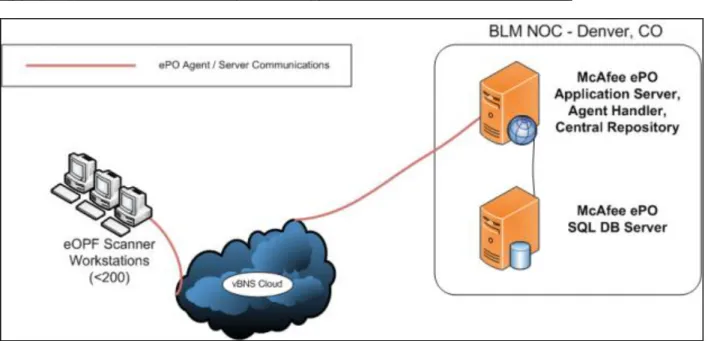
The Bureau DAR communications and management architecture is depicted in Appendix A to this Standard.
4.2. Data in Transit Protection
In some limited cases it may be necessary to transmit eOPF related documents, or other documents containing sensitive data, via e-mail or websites other than OPM‟s eOPF application. In these cases, the files and documents must be encrypted to protect against inadvertent disclosure of Privacy Act and/or other sensitive data.
The use of the Lotus Domino / Notes encryption is an unacceptable encryption method. Note that the Data Loss Prevention capability discussed in section 3.3 of this standard will be configured to monitor the transmission of sensitive data via Lotus Domino / Notes, as well as via the Web. Any attempt to transmit sensitive data via either of these methods without properly encrypting the data first will be blocked and centrally logged. Such attempts may be logged as IT Security incidents and reported to the Bureau Privacy Officer for follow up and remedial actions.
4.3. Data Loss Prevention
BLM owns and uses the Department of the Interior‟s standardized Data Loss Prevention (DLP) tool, Symantec Vontu (Vontu). The Vontu solution shall be the only authorized means of meeting DLP requirements on eOPF authorized electronic document conversion computers.
All machines, INCLUDING thin-clients, which are authorized to perform eOPF related electronic document conversions (i.e. Day-Forward scanning) shall have the DLP software agent installed. When implemented, the DLP software shall be configured as follows:
The Vontu agent shall be installed on all eOPF machines, including thin-client installations The Vontu agent shall be configured to report to ilmocop3vmapdlp.blm.doi.net
All management and configuration of data control rule-sets to be applied to the Vontu agent shall be controlled by WO590 staff co-located at the Department of the Interior Advanced Security Operations Center (ASOC) in Reston, VA. At a minimum, the following rule-sets shall be applied:
Discover, log, and report on all use and movement of PII and other sensitive data on eOPF machines
Discover, log, and block attempts to move PII and other sensitive data onto removable media unless the data is properly encrypted
Discover, log, and block attempts to move PII and other sensitive data via e-mail unless the data is properly encrypted by means other than Lotus Notes internal encryption
Discover, log, and block attempts to move PII and other sensitive data via the web unless the data is properly encrypted and destined for a known web address or domain.
Discover and log attempts to copy PII and other sensitive data to the operating system clipboard
Potential incidents shall be managed through the Symantec Vontu Enforce server located in the Department ASOC in Reston, VA. WO590 personnel shall monitor incoming events and filter out false-positives. Actual and potential violations of established policies for the care, use, and protection of PII and other sensitive data shall be logged as a potential security incident and referred to the Bureau Privacy Officer and responsible IT Security Manager for follow-up, confirmation, and remediation.
Note that due to the architecture used to implement DLP within the Department, local and Bureau SA personnel will not have visibility into the Vontu Enforce management application. If the Vontu agent installed on the client is suspected as a root cause during system troubleshooting activities
responsible SA personnel should contact WO590 for assistance.
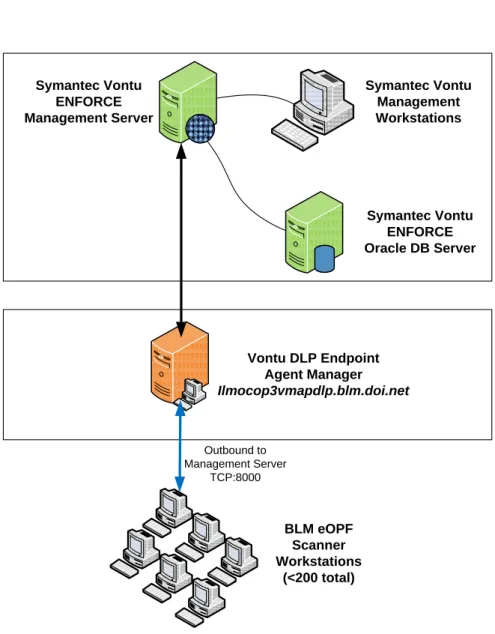
The Bureau DLP communications and management architecture is depicted in Appendix B to this Standard.
4.4. Scanning & Electronic Document Conversion Process 4.4.1. Software Solution
In order to meet the combined Business and IT Security requirements associated with eOPF related electronic document conversion the Bureau is implementing a standardized document batch-scanning and governance capability. This capability requires the use of Kofax Express Desktop batch scanning software. This software has been customized by NOC and WO590 personnel to support the underlying document conversion and governance requirements. The use of software other than Kofax Express Desktop when fulfilling eOPF “day-forward” scanning requirements is expressly prohibited. Any use of software other than Kofax Express Desktop by BLM personnel to support eOPF electronic document conversion will be logged and reported as an IT Security incident.
The following specific customizations have been applied to Kofax Express Desktop to meet the eOPF electronic document conversion requirements:
Documents shall be scanned at 300dpi
Documents shall be automatically converted using “Text on Image” Optical Character Recognition (OCR) to create searchable Adobe Portable Document Format (.pdf) files Documents shall be automatically “tagged” with specific meta-data strings which help to identify them as eOPF related electronic documents (such meta-data strings will be used by the Data Loss Prevention system to automatically segregate eOPF scanned files from other documents containing sensitive data when applying rule-sets)
Documents shall be exported to a specific / known location on user‟s local drive which is outside of their roaming profile
In order to be compliant with this standard Kofax Express Desktop shall be installed according to the instructions in section 4. Any exceptions to the instructions in section 4 must be approved by the NOC Branch of IRM Operations and the Bureau CISO.
4.4.2. Hardware Requirements
The selection of Kofax Express Desktop brings with it specific requirements for supported
scanner hardware. Kofax certifies scanners for use with this software package, and only certified scanners are authorized for use in support of the eOPF electronic document conversion
requirement. This standard presents three lists of scanners as follows:
Certified & Tested by BLM: These scanners have been tested with Kofax Express by the vendor as well as by BLM. Advanced features (multi-feed, color drop out, and feeder speed), if available from the scanner, are available directly from the Kofax Express Interface.
Certified by Vendor: These scanners have been tested with Kofax Express by the Vendor, but not by BLM. Advanced features (multi-feed, color drop out, and feeder speed), if available from the scanner, are available directly from the Kofax Express Interface.
Compatible: The scanner has not been tested with Kofax Express by the vendor or by BLM. However, these scanners are compatible with other Kofax products, and as such, have been rated as “compatible” by the vendor. Advanced features (multi-feed, color drop out, and feeder speed) are configured through the scanner driver instead of the Kofax Express interface. NOTE: The use of these models is recommended only if already in use at your organization.
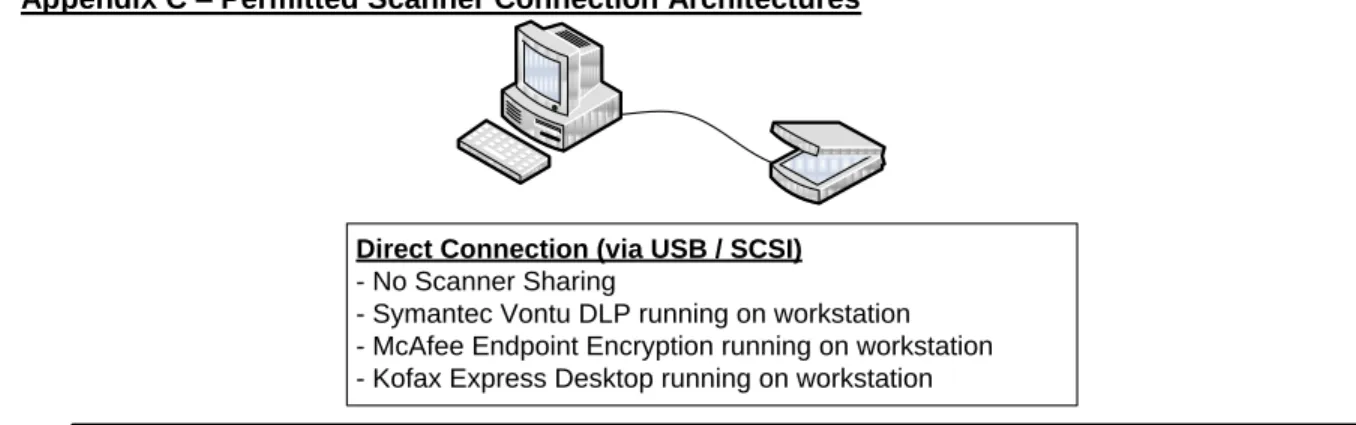
Depictions of the allowable scanner connection methods are included in Appendix C to this document.
Scanners Certified by the Vendor & Tested by BLM WO-590 Staff Scanner Model Simplex Speed
@ 300dpi
Duplex Speed
@ 300dpi Interface
Est. GSA Cost
Epson GT-2500 4ppm 1ipm USB $450
Epson GT-S80 30ppm 60ipm USB $750
Fujitsu fi-6130 30ppm 60ipm USB $900
Table 3 – 1, Scanner Hardware – Vendor Certified & BLM Tested
Approved Scanners Certified by the Vendor
Scanner Model Simplex Speed @ 300dpi
Duplex Speed
@ 300dpi Interface
Est. GSA Cost
Canon DR-3010C 22ppm 44ipm USB $725
Epson GT-S50 19ppm 38ipm USB $400
Fujitsu fi-5120C 18ppm 36ipm USB / SCSI $900
Fujitsu fi-6230 30ppm 60ipm USB $1,300
Kodak ScanMate i1120 15ppm 30ipm USB $425
Kodak i1210 / i1220 22ppm 44ipm USB $610
Panasonic KV-S1025C
Panasonic KV-S1045C 30ppm 60ipm USB $900 Table 3 – 2, Scanner Hardware – Vendor Certified
Approved Compatible Scanners
Scanner Model Simplex Speed @ 300dpi (estimated)
Duplex Speed
@ 300dpi (estimated) Interface Bowe Bell & Howell
SideKick 1200 18ppm 36ipm USB
Canon DR-1210C 4ppm N/A USB
Canon DR-2010C 17ppm 34ipm USB
Canon DR-2050C 14ppm 28ipm USB
Canon DR-2080C 14ppm 28ipm USB / SCSI
Canon DR-2510C 22ppm 44ipm USB
Canon DR-2580C 15ppm 30ipm USB
Epson GT-20000 1ppm N/A USB / SCSI
Epson GT-1500 1ppm N/A USB
Fujitsu fi-4120C 21ppm (SCSI) 11ppm (USB)
21ipm (SCSI)
11ipm (USB) USB/SCSI
Fujitsu fi-4120C2 19ppm 38ipm USB
Fujitsu fi-4220C 21ppm (SCSI) 11ppm (USB)
21ipm (SCSI)
11ipm (USB) USB/SCSI
Fujitsu fi-4220C2 19ppm 28ipm USB
Fujitsu fi-5015C 12ppm N/A USB
Fujitsu fi-5110C 13ppm 26ipm USB
Fujitsu fi-5220C 18ppm 36ipm USB
HP Scanjet 7800 18ppm 36ipm USB
HP Scanjet 8270C 15ppm <1ipm USB / SCSI
HP Scanjet 8290C 18ppm 1ipm USB
HP Scanjet 8350 18ppm 36ipm USB
HP Scanjet 8390 27ppm 54ipm USB
HP Scanjet N7710 26ppm 52ipm USB
HP Scanjet N8420 18ppm 36ipm USB
HP Scanjet N8460 22ppm 44ipm USB
Kodak i30 21ppm N/A USB
Kodak i40 21ppm 42ipm USB
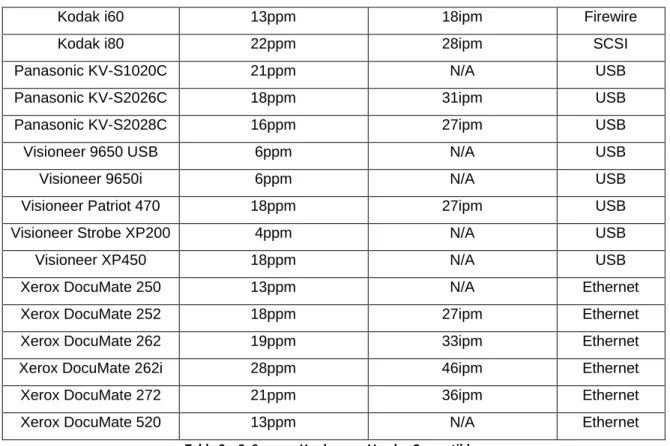
Kodak i60 13ppm 18ipm Firewire
Kodak i80 22ppm 28ipm SCSI
Panasonic KV-S1020C 21ppm N/A USB
Panasonic KV-S2026C 18ppm 31ipm USB
Panasonic KV-S2028C 16ppm 27ipm USB
Visioneer 9650 USB 6ppm N/A USB
Visioneer 9650i 6ppm N/A USB
Visioneer Patriot 470 18ppm 27ipm USB
Visioneer Strobe XP200 4ppm N/A USB
Visioneer XP450 18ppm N/A USB
Xerox DocuMate 250 13ppm N/A Ethernet
Xerox DocuMate 252 18ppm 27ipm Ethernet
Xerox DocuMate 262 19ppm 33ipm Ethernet
Xerox DocuMate 262i 28ppm 46ipm Ethernet
Xerox DocuMate 272 21ppm 36ipm Ethernet
Xerox DocuMate 520 13ppm N/A Ethernet
Table 3 – 3, Scanner Hardware – Vendor Compatible
Note that if the scanner model you wish to use is NOT listed in one of the tables above it may not function. If it doesn‟t function, you may to procure one of the above listed scanners.
4.4.3. Network (i.e. Direct Ethernet Connection) Scanners
The use of networked scanners is allowed, so long as the implementation meets the following requirements / restrictions:
The scanner shall not at any time write the scanned image to its internal storage capability (if one is present)
Scans shall always be initiated from the Kofax Express Desktop software, the use of “Direct to Network” scanners which copy scanned images to an open network share without interacting with scanner software is expressly prohibited
The client machine (where the user initiates the scan) and the scanner itself must be in the same IP subnet / VLAN
Network scanners used to support eOPF related electronic document conversion shall be physically located in a locked and controlled space within a reasonable distance from the user‟s work area so as to ensure documents left on the scanner can be monitored by responsible HR personnel
4.4.4. Shared Scanners
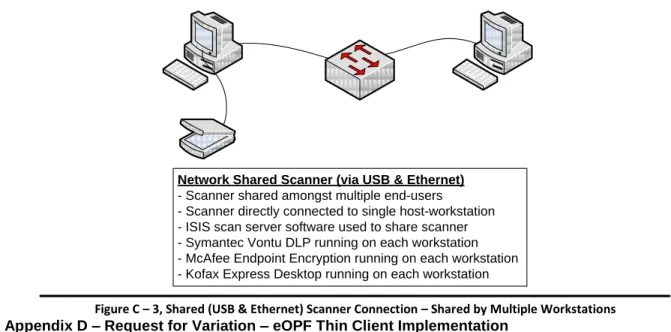
Certain direct-connect (i.e. via USB) scanners have the capability to be “shared” from a computer over the network using an ISIS network server. Some of the scanners in Tables 3-1, 3-2, and 3-3 have this capability. It is acceptable to use a shared-network scanner so long as the following restrictions are in place:
The scanner must be connected to a machine which is otherwise authorized to perform electronic document conversion in support of eOPF
The client machine (where the user initiates the scan) and the server machine (where the scanner is connected) must be in the same IP subnet / VLAN
The scanner must be within a reasonable distance from the user‟s work area so as to ensure documents left on the scanner can be monitored by responsible HR personnel Note that should an organization wish to share a USB-connected scanner over the network it is their responsibility to configure and test the scanner to ensure proper functionality. Such a configuration may require changes to BLM‟s standard system configurations including file sharing and firewall configurations. Such changes shall be identified and coordinated by the requesting organization; no central support for this configuration shall be supplied.
4.5. Local Configurations
Local System Administration personnel shall ensure the following local physical security measures have been implanted on systems used to support eOPF Electronic Document Conversion tasks:
Enable the BIOS password on the workstation
Configure the workstation BIOS to only allow the system to boot from the internal Hard Drive, disable all means of booting from removable or external media
Install a cable lock to secure the system to the systems furniture or desk at which the system is installed
Ensure the installed scanner is listed in Table 3-1, 3-2, or 3-3 of this document.
For Xerox DocuMate scanner models, ensure the scanner is configured to purge all scanned images from persistent storage devices within the scanner
Ensure the installed scanner is located within a reasonable distance from the Human Resource Management employee so as to ensure documents left on the scanner can be monitored
4.6. Active Directory Configurations
The NOC Branch of IRM Operations / IT Systems Management Section (OC363) will create an Active Directory security group to track Human Resource Management personnel whose systems will be used to perform eOPF related Electronic Document Conversion tasks. Membership in this group will be managed by the NOC Division of Human Resource Services (OC200). OC200 staff will perform periodic audits of this group‟s membership to ensure that unauthorized personnel do not have access to the eOPF system.
An Active Directory logoff script will be created and linked to the Active Directory security group created above. This logoff script will purge all files from the c:\tmp\eOPF\scans and
c:\tmp\eOPF\batches directories whenever a user logs off the system. This will ensure no PII or other sensitive data is orphaned on a system which could be accessed by non-Authorized users.
4.7. Requirements Traceability Matrix 4.7.1. Business / Functional Requirements
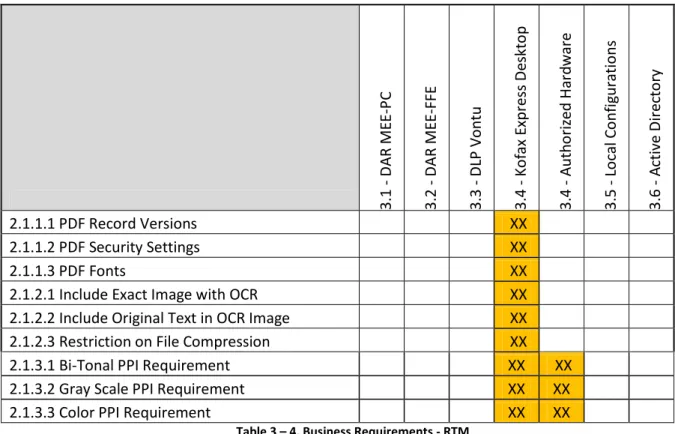
The matrix below provides a visual cross-reference between the Business / Functional
requirements presented in section 2.1 and the solution details presented in sections 3.1 through 3.6.
3
.1
-
D
AR
M
EE
-PC
3
.2
-
D
AR
M
EE
-FFE
3
.3
-
D
LP
V
o
n
tu
3
.4
-
Ko
fax
Express
D
eskt
o
p
3
.4
-
Au
th
o
riz
ed Ha
rd
ware
3
.5
-
Lo
cal C
o
n
fig
u
ratio
n
s
3
.6
-
A
ctiv
e
D
irec
to
ry
2.1.1.1 PDF Record Versions
XX
2.1.1.2 PDF Security Settings
XX
2.1.1.3 PDF Fonts
XX
2.1.2.1 Include Exact Image with OCR
XX
2.1.2.2 Include Original Text in OCR Image
XX
2.1.2.3 Restriction on File Compression
XX
2.1.3.1 Bi-Tonal PPI Requirement
XX
XX
2.1.3.2 Gray Scale PPI Requirement
XX
XX
2.1.3.3 Color PPI Requirement
XX
XX
Table 3 – 4, Business Requirements - RTM 4.7.2. IT Security Requirements
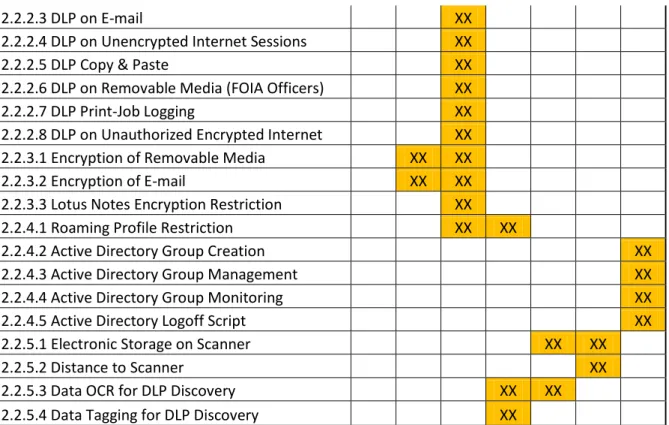
The matrix below provides a visual cross-reference between the IT Security requirements presented in section 2.2 and the solution details presented in sections 3.1 through 3.6.
3
.1
-
D
AR
M
EE
-PC
3
.2
-
D
AR
M
EE
-FFE
3
.3
-
D
LP
V
o
n
tu
3
.4
-
Ko
fax
Express
D
eskt
o
p
3
.4
-
Au
th
o
riz
ed Ha
rd
ware
3
.5
-
Lo
cal C
o
n
fig
u
ratio
n
s
3
.6
-
A
ctiv
e
D
irec
to
ry
2.2.1.1 DOI DAR Installation
XX
XX
2.2.1.2 DLP Installation
XX
2.2.1.3 Local Storage for Scans
XX
2.2.1.4 BIOS Password
XX
2.2.1.5 BIOS Configuration
XX
2.2.1.6 Physical Security
XX
2.2.2.1 DOI DLP System
XX
2.2.2.3 DLP on E-mail
XX
2.2.2.4 DLP on Unencrypted Internet Sessions
XX
2.2.2.5 DLP Copy & Paste
XX
2.2.2.6 DLP on Removable Media (FOIA Officers)
XX
2.2.2.7 DLP Print-Job Logging
XX
2.2.2.8 DLP on Unauthorized Encrypted Internet
XX
2.2.3.1 Encryption of Removable Media
XX
XX
2.2.3.2 Encryption of E-mail
XX
XX
2.2.3.3 Lotus Notes Encryption Restriction
XX
2.2.4.1 Roaming Profile Restriction
XX
XX
2.2.4.2 Active Directory Group Creation
XX
2.2.4.3 Active Directory Group Management
XX
2.2.4.4 Active Directory Group Monitoring
XX
2.2.4.5 Active Directory Logoff Script
XX
2.2.5.1 Electronic Storage on Scanner
XX
XX
2.2.5.2 Distance to Scanner
XX
2.2.5.3 Data OCR for DLP Discovery
XX
XX
2.2.5.4 Data Tagging for DLP Discovery
XX
Table 3 – 5, IT-Security Requirements - RTM
5. IMPLEMENTATION INSTRUCTIONS
5.1. Minimum / Recommended Client System Requirements
5.1.1. The following represent the minimum system requirements necessary to support eOPF Electronic Document Conversion tasks:
Intel Pentium 4 (or equivalent) processor at 2Ghz 1GB of RAM
1GB of available Hard Disk Space
Windows XP 32-bit (Windows 7, 32 and 64-bit, is supported)
5.1.2. The requirements below are the recommended system configurations for workstations supporting eOPF Electronic Document Conversion tasks.
Note
The scan speeds shown in Table 3-1, 3-2, and 3-3 assume the recommended system configuration shown below is in use.
Intel Core 2 Duo (or equivalent dual-core model) processor at 1Ghz or higher 2GB of RAM
1GB of available Hard Disk Space
5.2. McAfee Data at Rest Encryption 5.2.1. Licensing Considerations
The McAfee Endpoint Encryption for PC licensing is centrally procured and supported. Local States / Centers bear no direct responsibility to fund this licensing. Sufficient licensing was procured to cover all Bureau users and workstation class devices.
5.2.2. Software Installation Procedures
Installation of the McAfee ePO and MEE-PC agents is the responsibility of the NOC Branch of IRM Operations, IT Systems Management Section (OC363). A central deployment plan and capability that utilizes the Bureau‟s systems management software, Microsoft System Center Configuration Manager (SCCM), was developed in coordination with WO590. Procedures to accomplish the installation and configuration of this toolset are beyond the scope of this Standard. Local SA personnel should contact the NOC IT Systems Management Section (OC363) for additional assistance.
5.2.3. BLM DAR Capability System Architecture
The Bureau DAR communications and management architecture is depicted in Appendix A to this Standard.
5.3. Symantec Vontu Data Loss Prevention 5.3.1. Licensing Considerations
The Symantec Vontu licensing will be centrally procured and supported. Local States / Centers bear no direct responsibility to fund this licensing. Sufficient licensing will be procured to cover all Bureau users and workstation class devices.
5.3.2. Software Installation Procedures
Installation of the Symantec Vontu Endpoint Prevent DLP agent is the responsibility of the NOC Branch of IRM Operations, IT Systems Management Section (OC363). A central deployment plan and capability that utilizes the Bureau‟s systems management software, Microsoft System Center Configuration Manager (SCCM), was developed in coordination with WO590. Procedures to accomplish the installation and configuration of this toolset are beyond the scope of this Standard. Local SA personnel should contact the NOC IT Systems Management Section (OC363) for additional assistance.
5.3.3. BLM DLP Capability System Architecture
The Bureau DLP communications and management architecture is depicted in Appendix B to this Standard.
5.4. Kofax Express Desktop Batch Scanning Software 5.4.1. Licensing Considerations
The NOC Division of Human Resources Management (OC200) is providing 200 licenses of Kofax Express Desktop for use by Bureau Human Resources personnel in support of eOPF “Day-Forward” scanning requirements. Licenses shall be managed by OC200 personnel. The Kofax Express Desktop software shall not be installed on State / Center computers until OC200 confirms a license is available for installation on each system, or until a separate license is procured by the responsible State / Center. Procurement of licenses in excess of the 200 provided by the NOC shall be the responsibility of the requesting State / Center HR organization and their supporting IRM organization.
5.4.2. Software Installation Procedures
The installation of Kofax Express Desktop must be completed by a user who has local Administrator rights on the target machine. Non-Administrative users should contact their local help desk or system administrator for assistance prior to proceeding.
5.4.2.1. Obtain a copy of the software from the National Configuration Management repository. NOTE: The ONLY authorized installation package is the one posted in the CM repository. This installation package was customized to meet the Business and IT security requirements defined in section 2.2 of this document. Use of
installation media other than the package posted to the CM repository will result in a non-compliant configuration. Unauthorized installations will be reported to WO590 and logged as a potential security incident.
5.4.2.2. Extract the installation package to the c:\tmp directory on the target machine. 5.4.2.3. Open the directory c:\tmp\kofax-express\blm.
5.4.2.4. Execute the batch file machineprep.bat. This batch file will call a Visual Basic script intended to prepare the machine to support BLM‟s specific implementation of the Kofax Express Desktop product in support of eOPF. The following steps will be completed and acknowledged to the screen;
Check to ensure c:\tmp directory exists Create c:\tmp\eOPF directory
Create c:\tmp\eOPF\batches directory Create c:\tmp\eOPF\scans directory Create c:\tmp\eOPF\scripts directory
Copy eopf-delete.vbs script to the c:\tmp\eOPF\scripts directory Create Desktop shortcut to c:\tmp\eOPF\scans directory Create Desktop shortcut to c:\tmp\eOPF\scripts\eopf-delete.vbs 5.4.2.5. Navigate to the directory c:\tmp\kofax-express.
Execute the setup program called setup.exe in the c:\tmp\kofax-express directory.
Click finish.
5.4.2.6. When the setup program has completed navigate to the directory c:\tmp\kofax-express\servicepacks.
Execute the setup program called setup.exe in the
c:\tmp\kofax-express\servicepacks directory to install Kofax Express Desktop Service Pack 1.
.
Run the setup.exe
Click on FINISH to complete SP1 upgrade.
4.4.27 Each individual scanner type has its own executable installation file. These files are located at http://www.kofax.com/support/Express/2.0/2.0_downloads.asp
Download the executable for the Approved scanner being used to the c:\tmp folder and run it with elevated privileges.
When the Component Installer completes click finish and close out all folder windows. Proceed to Step 4.4.3 to verify the software installed properly, and to register the license keys.
4.4.3 Open the Kofax express icon on the desktop
Enter the license information provided to you for this activation.
Click on cancel.
You will get the following message:
Click ok again.
Go to c:\documents and settings\All Users\Application Data\Kofax\Kofax Express 2.0\activate.txt
Open the Activate.txt file and copy and paste the info to the web page for activation.
Once you have the activation code paste it to the activation window in Kofax
Kofax will now be activated. 1.1.1. Verifying Software Configurations
Execute the file verifyinstall.bat. This batch file will call a Visual Basic script that will check to make sure the installation went as planned. This script will check the following items for compliance:
Verify c:\tmp\eOPF\batches directory exists Verify c:\tmp\eOPF\scans directory exists Verify c:\tmp\eOPF\scripts directory exists Verify c:\tmp\eOPF\scripts\eopf-delete.vbs exists
Verify BLM Custom Document Exporter has been installed properly Verify BLM eOPF custom Job file has been installed properly 1.1.2. First Time Software Load
Have the end-user log on to the system and launch Kofax Express Desktop using
the link on the user‟s desktop.
Above is the actual screenshot verifying Kofax is installed.
If there are no error messages or warnings about activation, it is properly installed.
1.2. Considerations for Thin-Client Implementations
Some BLM Human Resource Management users have been assigned thin clients that rely on a back-end server infrastructure to provide their core functionality. This architecture will require some of the above installation steps be modified to address the specifics of the thin client implementation. Whereas thin client implementations have not been standardized across the Bureau, WO590 cannot
accurately predict the exact changes required to meet the noted requirements on each thin client implementation.
States / Centers that wish to use thin client machines to perform eOPF related Electronic Document Conversion shall take the following steps in order to standardize and document their implementation:
Review the requirements presented in Sections 2.1 and 2.2 to determine if the target thin client architecture is compliant
NOTE:
Thin client implementations do not generally support DAR encryption and thus do not need to establish compliance with the DAR requirement in paragraph 2.2.1.1.
Review the implementation instructions in section 4 and determine changes / modifications which are required to accommodate the thin client implementation
Document and test the desired changes
Submit a “Request for Variation – eOPF Thin Client Implementation” memorandum to WO590 for review and approval. This request shall:
o Document all changes required to make the eOPF Electronic Document Conversion process work within the thin client environment
o Include an affirmative statement that the thin client environment does not rely on persistent storage which is local to the thin client machine itself which would require Data at Rest protection measures to secure
o Be signed by the responsible State / Center Chief Information Officer and IT Security Manager
The Bureau CISO will review the request for variation and work with the requesting State / Center to resolve any issues before issuing approval to proceed as requested
2. SAFETY WARNINGS:
No specific safety notices or warnings apply to this Standard. 3. APPLIES TO:
This Standard applies to all Human Resource Management personnel located throughout the Bureau who have access to the eOPF system.
4. REFERENCES:
BLM Information Technology Security Policy Manual (M-1264-1) BLM Information Technology Security Policy Handbook (H-1264-1) Kofax Express 2.0 Getting Started Guide
Kofax Express 2.0 Release Notes
Kofax Express 2.0 Service Pack 1 Release Notes
* All Referenced documents are published on the BLM IT Security MEO SharePoint site located at the following link: http://teamspace/sites/bitsm/default.aspx
This TECHNICAL IMPLEMENTATION GUIDE is maintained by the Bureau eOPF IT project lead at the National Operations Center
6. DOES THIS CHANGE OR REVOKE ANOTHER TECHNICAL IMPLEMENTATION GUIDE: This Standard is a “first-issue” document for management and governance of electronic document conversion tasks associated with the OPM‟s eOPF application and does NOT supersede any previously published Standard(s).
7. HOW CAN THIS TECHNICAL IMPLEMENTATION GUIDE BE UPDATED:
Updates and problems with this TECHNICAL IMPLEMENTATION GUIDE should be brought to the attention of the eOPF IT project lead at the NOC
8. DATA AND RECORDS MANAGEMENT:
This document is stored and accessible on the BLM IT site located at the following link:
http://teamspace/sites-oc/sa/Shared%20Documents/Forms/AllItems.aspx?RootFolder=%2fsites%2doc%2fsa%2fShared%20Doc uments%2feOPF%20IT%20documentation&FolderCTID=&View=%7bA9FE50C3%2d1411%2d4D90%2d 9D2F%2dB0163A9F8DA9%7d
9. WHO SHOULD RECEIVE AND COMPLY WITH THIS TECHNICAL IMPLEMENTATION GUIDE: This Standard applies to all Human Resources offices and personnel located throughout the Bureau who have access to the eOPF system. This document should be distributed to and implemented by all such HR personnel with assistance from Bureau and local IT System Administration personnel.
10. WHO HAS APPROVED THIS TECHNICAL IMPLEMENTATION GUIDE:
This TECHNICAL IMPLEMENTATION GUIDE was reviewed and approved by the following parties prior to publication:
Melissa Lindholm (WO590), BLM Chief Information Security Officer Joseph Yellope (WO590), BLM Deputy Chief Information Security Officer Ken Wilbert (OC360), NOC IRM Operations Branch Chief
Scott Herbert (OC363), NOC IT Systems Management Section Chief Annette Martinez (OC200), NOC Division of Human Resource Services
Appendix A – McAfee ePO & Endpoint Encryption Communications Architecture
Figure A – 1, McAfee ePO Communications Architecture
Boise, ID Datacenter (NIFC)
Denver, CO Datacenter (NOC)
Figure A – 2, McAfee Endpoint Encryption Communications Architecture
Appendix B – Symantec Vontu Endpoint DLP Communications Architecture
Symantec Vontu ENFORCE Management Server Symantec Vontu ENFORCE Oracle DB Server Vontu DLP Endpoint Agent Manager Ilmocop3vmapdlp.blm.doi.net BLM eOPF Scanner Workstations (<200 total) DOI Advanced Security Operations Center (ASOC) Reston, VA BLM National Operations Center Datacenter Denver, CO Outbound to Management Server TCP:8000 Symantec Vontu Management Workstations
Appendix C – Permitted Scanner Connection Architectures
Direct Connection (via USB / SCSI)
- No Scanner Sharing
- Symantec Vontu DLP running on workstation - McAfee Endpoint Encryption running on workstation - Kofax Express Desktop running on workstation
Network Connected Scanner (via Ethernet)
- Scanner shared amongst multiple end-users - Symantec Vontu DLP running on each workstation - McAfee Endpoint Encryption running on each workstation - Kofax Express Desktop running on each workstation
Figure C – 2, Networked (Ethernet) Scanner Connection – Shared by Multiple Workstations
Network Shared Scanner (via USB & Ethernet)
- Scanner shared amongst multiple end-users
- Scanner directly connected to single host-workstation - ISIS scan server software used to share scanner - Symantec Vontu DLP running on each workstation - McAfee Endpoint Encryption running on each workstation - Kofax Express Desktop running on each workstation
Figure C – 3, Shared (USB & Ethernet) Scanner Connection – Shared by Multiple Workstations
Appendix D – Request for Variation – eOPF Thin Client Implementation
**This template document is posted to the BLM IT Security MEO SharePoint at
United States Department of the Interior
BUREAU OF LAND MANAGEMENT Washington, D.C. 20240-0036
http://www.blm.gov In Reply Refer To:
xxxx (xxx)
Memorandum
To: Melissa Lindholm
Bureau Chief Information Security Officer
From: <Insert Name of State / Center ITSM>
IT Security Manager, <Insert State / Center Name>
Through: <Insert Name of State / Center CIO>
Chief Information Officer, <Insert State / Center Name>
Subject: Request for Variation – eOPF Thin Client Implementation
<Insert State / Center Name> is currently using a thin client system to support Human Resource Management personnel responsible for performing Electronic Document Conversion tasks associated with the Bureau’s transition to the Office of Personnel Management’s (OPM) Electronic Official Personnel Folder (eOPF) capability. Our specific thin client system requires certain changes to, and variations from, the implementation instructions and restrictions spelled out in BLM IT Security Technical Implementation Guide entitled “eOPF Electronic Document
Conversion, Implementation Requirements & Instructions” version 1.0. This memorandum
defines the specific variances required and requests approval to proceed with these modifications within our environment.
The specific variances for which we’re seeking security approval are:
Relief from the requirement to install Data at Rest Encryption technology on the user workstation (See paragraph #2.2.1.1 from the referenced Implementation Guide) due to the lack of persistent storage capability on the thin client workstations currently in use Variance #2
Variance #3
Detailed modifications to the implementation instructions contained in the referenced Technical Implementation Guide are attached.