Qualcomm Technologies, Inc.
© 2015 Qualcomm Technologies, Inc. All rights reserved.
MSM and Qualcomm Snapdragon are products of Qualcomm Technologies, Inc. Other Qualcomm products referenced herein are products of Qualcomm Technologies, Inc. or its other subsidiaries.
DragonBoard, MSM, Qualcomm and Snapdragon are trademarks of Qualcomm Incorporated, registered in the United States and other countries. All Qualcomm Incorporated trademarks are used with permission. Other product and brand names may be trademarks or registered trademarks of their respective owners.
This technical data may be subject to U.S. and international export, re-export, or transfer (“export”) laws. Diversion contrary to U.S. and international law is strictly prohibited.
Use of this document is subject to the license set forth in Exhibit 1.
Questions or comments: https://www.96boards.org/DragonBoard410c/forum
DragonBoard™ 410c based on Qualcomm
®
Snapdragon™ 410 processor
Peripherals Programming Guide,
Linux Android
LM80-P0436-5 Rev E
December 2015
Revision history
Revision Date Description
E December 8, 2015 Fixed BLSP address table for SPI for APQ8016.
D August 28, 2015 Added info for UART baud rates in 3.1.2 and I2C core in 4.1.1; fixed a lunch command typo, removed / in the path for kernel.
C June 1, 2015 Added details to BLSP in section 3.
B May 20, 2015 Updated Revision history and © date for Rev B. A April 2015 Initial release.
Contents
1 Introduction ... 6
1.1 Purpose ... 6
1.2 Conventions ... 6
1.3 Acronyms, abbreviations, and terms ... 6
1.4 Cloning the kernel and LK boot loader code and flashing the images to the DragonBoard 410c ... 7
1.5 Additional information ... 8
2 Device Tree ... 9
2.1 Device tree components ... 9
3 Universal Asynchronous Receiver/ Transmitter ...11
3.1 Hardware overview ... 11 3.1.1 BLSP ... 11 3.1.2 UART core ... 12 3.2 Configure LK UART ... 14 3.2.1 Code changes ... 14 3.2.2 Debug LK UART ... 18
3.3 Configure kernel low-speed UART... 18
3.3.1 Code changes ... 19
3.3.2 Debug low-speed UART ... 21
3.3.3 Optional configuration changes ... 23
3.4 Configure kernel high-speed UART ... 23
3.4.1 Debug high-speed UART... 26
3.5 Code walkthrough – High-speed UART driver ... 27
3.5.1 Probing ... 27 3.5.2 Port open ... 29 3.5.3 Power management ... 31 3.5.4 Port close ... 33
4 Inter-Integrated Circuit ...35
4.1 Hardware overview ... 354.1.1 Qualcomm Universal Serial Engine ... 35
4.1.2 QUP I2C configuration parameters ... 35
4.1.3 Bus scale ID ... 36
4.2 Configure LK I2C ... 37
4.2.1 Test code ... 41
4.2.2 Debug LK I2C ... 42
4.3 Configure kernel low-speed I2C ... 43
4.3.1 Code changes ... 43
4.3.2 Test code ... 47
4.3.3 Debug low-speed I2C ... 48
4.3.4 Register a slave device using the device tree ... 49
4.4 Configure kernel high-speed I2C ... 52
4.4.1 Code changes ... 52
4.5 Disabling BAM mode ... 53
4.7.1 Default values ... 54
4.7.2 Set values ... 54
4.7.3 Dividers vs clock frequency ... 55
4.8 I2C power management ... 56
4.9 Pseudocode ... 58
4.9.1 QUP operational states... 59
4.9.2 I2C V1 TAG ... 60
4.10 Debug log ... 60
4.10.1 i2c-msm-v2.c – FIFO mode ... 60
4.10.2 i2c-msm-v2.c – BAM mode ... 62
5 Serial Peripheral Interface ...64
5.1 Hardware overview ... 64
5.1.1 SPI core ... 64
5.1.2 QUP SPI parameters ... 64
5.2 Configure kernel low-speed SPI... 66
5.2.1 Code changes ... 66
5.2.2 Register a slave device using the device tree ... 69
5.3 Configure kernel high-speed SPI ... 73
5.3.1 Code changes ... 73
5.4 SPI power management ... 74
5.5 Code walkthrough ... 74 5.5.1 Probing ... 74 5.5.2 SPI transfer ... 77
6 BLSP BAM ...79
6.1 Source code ... 79 6.2 Key functions ... 79 6.2.1 sps_phy2h() ... 79 6.2.2 sps_register_bam_device() ... 79 6.2.3 sps_alloc_endpoint() ... 79 6.2.4 sps_connect() ... 80 6.2.5 sps_register_event() ... 80 6.2.6 sps_transfer_one() ... 80 6.2.7 bam_isr() ... 80 6.2.8 sps_disconnect() ... 806.3 Key data structures ... 81
6.3.1 sps_drv * sps ... 81 6.3.2 sps_bam ... 81 6.3.3 sps_pipe ... 82 6.3.4 Struct sps_connect ... 82 6.3.5 sps_register_event ... 83 6.3.6 sps_bam_sys_mode ... 83
7 GPIO ...84
7.1 Critical registers ... 84 7.1.1 GPIO_CFGn ... 84 7.1.2 GPIO_IN_OUTn ... 85 7.1.3 GPIO_INTR_CFGn ... 85 7.1.4 GPIO_INTR_STATUSn ... 867.2 Configuring GPIOs in Linux kernel ... 86
7.2.1 Define pin controller node in DTS ... 87
7.2.2 Accessing GPIOs in driver ... 88
7.3 Call flow for GPIO interrupt ... 90
Figures
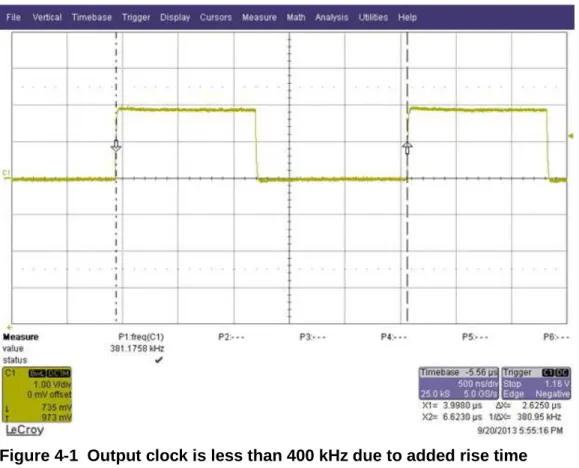
Figure 4-1 Output clock is less than 400 kHz due to added rise time... 55
Figure 4-2 Output clock is 400 kHz due to excluded rise time ... 56
Figure 5-1 SPI message queue... 77
Figure 7-1 Register a GPIO IRQ (1 of 2) ... 90
Figure 7-2 Register a GPIO IRQ (2 of 2) ... 91
Figure 7-3 Fire a GPIO interrupt... 92
Tables
Table 1-1 Acronyms, abbreviations, and terms ... 6Table 2-1 Device tree advantages and disadvantages ... 9
Table 2-2 Device tree components ... 9
Table 3-1 BLSP Functions ... 11
Table 3-2 UART_DM physical address, IRQ numbers, Kernel UART clock name, consumer, producer pipes, BLSP_BAM physical address, and BAM IRQ number for Snapdragon 410 (APQ8016) ... 13
Table 3-3 UART_DM BLSP bus master ID for APQ8016/MSM8916 ... 13
Table 3-4 Configuring BLSP1 UART1 to use the low-speed UART ... 19
Table 3-5 Resources required for UART registration ... 28
Table 4-1 QUP physical address, IRQ numbers, Kernel I2C clock name, consumer, producer pipes, BLSP_BAM physical address, BAM IRQ number for Snapdragon 410 (APQ8016) ... 36
Table 4-2 BLSP bus master ID... 36
Table 4-3 Configuring a QUP core as an I2C in the kernel ... 43
Table 4-4 Default I2C values ... 54
Table 4-5 I2C V1 TAG ... 60
Table 5-1 QUP physical address, IRQ numbers, Kernel SPI clock name, Consumer, producer pipes, BLSP_BAM physical address, BAM IRQ number for Snapdragon 410 (APQ8016) ... 65
Table 5-2 Configuring a QUP core as an SPI device in the kernel ... 66
Table 5-3 SPI master registration resources required for BAM ... 74
Table 5-4 Device tree and clock resources required for SPI BAM ... 75
1 Introduction
1.1 Purpose
This document describes how to configure, use, and debug the Bus Access Manager (BAM)
Low-Speed Peripherals (BLSP) for Linux Android available on the DragonBoard™ 410c based
on Qualcomm® Snapdragon™ 410 (APQ8016) processor.
1.2 Conventions
Function declarations, function names, type declarations, attributes, and code samples appear in a
different font, for example,
#include.
Code variables appear in angle brackets, for example,
<number>.
Commands to be entered appear in a different font, for example.,
copy a:*.* b:.
Button and key names appear in bold font, for example, click
Save
or press
Enter
.
1.3 Acronyms, abbreviations, and terms
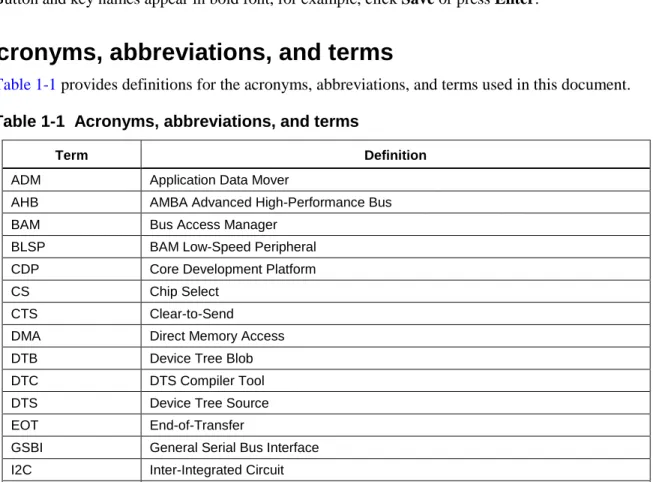
Table 1-1
provides definitions for the acronyms, abbreviations, and terms used in this document.
Table 1-1 Acronyms, abbreviations, and terms
Term Definition
ADM Application Data Mover
AHB AMBA Advanced High-Performance Bus BAM Bus Access Manager
BLSP BAM Low-Speed Peripheral CDP Core Development Platform CS Chip Select
CTS Clear-to-Send
DMA Direct Memory Access DTB Device Tree Blob DTC DTS Compiler Tool DTS Device Tree Source EOT End-of-Transfer
GSBI General Serial Bus Interface I2C Inter-Integrated Circuit
Term Definition
LK Little Kernel
PNoC Peripheral Network on a Chip
QUP Qualcomm Universal Peripheral (Serial) RFR Ready for Receiving
SPI Serial Peripheral Interface SPS Smart Peripheral Subsystem
UART Universal Asynchronous Receiver/Transmitter UIM User Identity Module
1.4 Cloning the kernel and LK boot loader code and flashing
the images to the DragonBoard 410c
The kernel and LK boot loader code is available on
www.codeaurora.org
. Download the code
using the following commands:
1.
repo init -u git://codeaurora.org/platform/manifest.git -b release -m <Release>.xml
--repo-url=git://codeaurora.org/tools/repo.git
Check the release notes located at:
https://developer.qualcomm.com/hardware/dragonboard-410c/tools
to use the right .xml
manifest file. Please note that there can be multiple release notes and you need to use the
latest or earlier one’s depending on your needs.
2.
repo sync -j8
-j<n> depending on how many cores available on the Linux machine.
Once the clone is complete folders kernel and bootable correspond to the source code of
kernel and LK boot loader respectively. Note that all code referring to MSM8916 in kernel
and LK boot loader is valid for APQ8016 also.
3.
Commands to build the kernel and LK boot loader images after setting up the Android build
environment for Android:
source build/envsetup.sh
lunch msm8916_64-userdebug
make –j8 bootimage to build kernel, generates boot.img in
out/target/product/msm8916_64
make –j8 aboot to build LK boot loader, geneartes emmc_appsboot.mbn in
out/target/product/msm8916_64
After making the changes as necessary, use fastboot commands to flash the images to the
device. Holding VOL- during power up puts the device in fastboot:
fastboot flash aboot emmc_appsboot.mbn
fastboot flash boot boot.img
1.5 Additional information
For additional information, go to
https://developer.qualcomm.com/hardware/dragonboard-410c/tools
2 Device Tree
The device tree is a standard used by Open Firmware to represent hardware. Instead of compiling
multiple board support package files into the kernel, a separate OS-independent binary describes
the target. The data structure is loaded into the operating system at boot time. The device tree is
composed of trees, nodes, and properties that are similar to XML.
Table 2-1
lists the advantages and disadvantages of the device tree.
Table 2-1 Device tree advantages and disadvantages
Pros Cons
Formal and clear hardware description
Multiplatform kernels are possible
Less board-specific code, more efficient device driver binding
Not a complete built-in dependency solution
For more detailed information on the device tree, see the Device Tree Wiki
(
http://www.devicetree.org/Main_Page
).
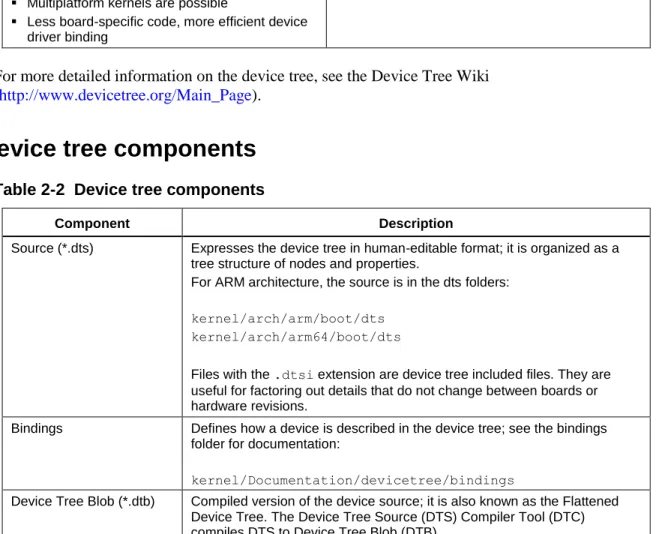
2.1 Device tree components
Table 2-2 Device tree components
Component Description
Source (*.dts) Expresses the device tree in human-editable format; it is organized as a tree structure of nodes and properties.
For ARM architecture, the source is in the dts folders:
kernel/arch/arm/boot/dts kernel/arch/arm64/boot/dts
Files with the .dtsi extension are device tree included files. They are useful for factoring out details that do not change between boards or hardware revisions.
Bindings Defines how a device is described in the device tree; see the bindings folder for documentation:
kernel/Documentation/devicetree/bindings
Device Tree Blob (*.dtb) Compiled version of the device source; it is also known as the Flattened Device Tree. The Device Tree Source (DTS) Compiler Tool (DTC) compiles DTS to Device Tree Blob (DTB).
Component Description
Chip-specific components Chipset-specific files include the chip ID as shown in the following examples:
Main DTS that contains chipset and peripheral information that is common for all hardware variants:
kernel/arch/arm/boot/dts/qcom/msm8916.dtsi
DTS file that is used by the DragonBoard 410c:
kernel/arch/arm/boot/dts/qcom/msm8916-sbc.dts
Bus Scale Topology (ID) list:
3 Universal Asynchronous Receiver/
Transmitter
This chapter describes the Universal Asynchronous Receiver/Transmitter (UART) and explains
how to configure it in the boot loader and kernel.
3.1 Hardware overview
3.1.1 BLSP
APQ8016 supports many peripherals via the generic serial bus interface supported by the BAM
Low Speed Peripherals (BLSP) core. It has single BLSP instance which supports up to six serial
interfaces (BLSP1…..BLSP6) on GPIOs. Each 4-pin interface can be configured for the functions
listed in
Table 3-1
.
The APQ8016 BLSP block includes six (6) QUP and two (2) UART cores. In general, all BLSP
interfaces are functionally the same. Exceptions are noted below.
3.1.1.1
SPI
Additional SPI chip selects are only pinned out for BLSP1, BLSP2 and BLSP3. This allows up to
three chip selects to be used for each of these. Other BLSP interfaces can only support a single
chip select. All BLSPs support 52 MHz SPI operation.
3.1.1.2
UART
UART (4-wire or 2-wire) can only be configured through BSLP1, BLSP2.
3.1.1.3
BLSP UIM
BLSP UIM can only be configured through BSLP1, BLSP2.
The Qualcomm Universal Peripheral (QUP) Serial Engine provides a general purpose datapath
engine to support multiple mini cores. Each mini core implements protocol-specific logic. The
common FIFO provides a consistent system IO buffer and system DMA model across widely
varying external interface types. For example, one pair of FIFO buffers can support Serial
Peripheral Interface (SPI) and I2C mini-cores independently.
BAM is used as a hardware data mover. Each BLSP peripheral:
Is statically connected to a pair of BAM pipes
Consists of 12 pipes that can be used for data move operations for APQ8016
Supports BAM- and non-BAM-based data transfers
3.1.2 UART core
Key features added for the chipset include the following:
BAM support
Single-character mode
Baudrates 300 bps up to 4M bps
Detail information in msm_hsl_set_baud_rate() of
kernel/drivers/tty/serial/msm_serial_hs_lite.c
Detail information in msm_hs_set_bps_locked() of kernel/drivers/tty/serial/msm_serial_hs.c
The UART core is used for transmitting and receiving data through a serial interface. It is used
for communicating with other UART protocol devices. Configuration of this mode is primarily
defined by the UART_DM_MR1 and UART_DM_MR2 registers (APQ8016/MSM8916
Software Interface document has the register information).
To match the labeling in the software interface manual, each UART is identified by the BLSP
core and UART core (0 to 5). The max transfer rate of the UART core is up to 4M bps.
Table 3-2 UART_DM physical address, IRQ numbers, Kernel UART clock name, consumer, producer pipes, BLSP_BAM
physical address, and BAM IRQ number for Snapdragon 410 (APQ8016)
BLSP hardware
ID
UART_DM core Physical address (UART_DM_BASE_
ADDRESS)
IRQ number
Kernel UART clock name Consumer, producer
pipes
BLSP_BAM physical address, IRQ number
BLSP1 BLSP 1 UART 0 0x78AF000 107 clock_gcc_blsp1_uart1_apps_clk 0,1 0x07884000, 238 BLSP2 BLSP 1 UART 1 0x78B0000 108 clock_gcc_blsp1_uart2_apps_clk 2,3 0x07884000, 238
Bus scale ID
Table 3-3
lists the BLSP master IDs.
Table 3-3 UART_DM BLSP bus master ID for APQ8016/MSM8916
BLSP hardware ID UART_DM cores BLSP bus master ID
BLSP[1:6] BLSP1_UART[0:5] 86 BLSP[7:12] BLSP2_UART[0:5] 84
For the latest information, check the following file:
kernel/arch/arm/boot/dts/qcom/<chipset>-bus.dtsi
Where <chipset> corresponds to the applicable product, for example:
kernel/arch/arm/boot/dts/qcom/msm8916-bus.dtsi
IDs are listed under mas-blsp-1 and slv-ebi-ch0.
3.2 Configure LK UART
In the Little Kernel (LK) boot loader, a UART may be needed for debug logs.
3.2.1 Code changes
This section describes the changes required to configure a UART in the LK boot loader. The
following files are used to configure UART in the boot loader:
/bootable/bootloader/lk/project/<chipset>.mk /bootable/bootloader/lk/target/<chipset>/init.c
/bootable/bootloader/lk/platform/<chipset>/include/platform/iomap.h /bootable/bootloader/lk/platform/<chipset>/acpuclock.c
/bootable/bootloader/lk/platform/<chipset>/<chipset>-clock.c /bootable/bootloader/lk/platform/<chipset>/gpio.c
kernel/arch/arm/mach-msm/include/mach/msm_iomap-<chip>.h
Where <chipset> corresponds to the applicable chipset, and <chip> corresponds to the 4-digit
chip number, for example:
/bootable/bootloader/lk/project/msm8916.mk
kernel/arch/arm/mach-msm/include/mach/msm_iomap-8916.h
1.
Enable the UART for debugging.
a.
Open the project make file.
Project_Root/bootable/bootloader/lk/project/<chipset>.mk
Where <chipset> corresponds to the applicable chipset, for example:
Project_Root/bootable/bootloader/lk/project/msms8916.mkb.
Set the
WITH_DEBUG_UARTflag to TRUE.
DEFINES += WITH_DEBUG_UART=1
2.
Set the base address.
a.
Open the init.c file located at:
Project_Root/bootable/bootloader/lk/target/<chipset>/init.c
Where <chipset> corresponds to the applicable chipset, for example:
Project_Root/bootable/bootloader/lk/target/msm8916/init.cb.
Set the applicable parameters for the base address. The following example shows setting
the base address.
void target_early_init(void) {
#if WITH_DEBUG_UART
uart_dm_init(1, 0, BLSP1_UART1_BASE);
#endif
Represents the BLSP ID (1 - 12). Based on the chipset it may not be used.
Set to 0 if it is a GSBI base.
Physical address for UART CORE defined in
/bootable/bootloader/lk/platform/msm8974/include/platform/iomap.h
For the DragonBoard 410c UART is configured as below:
uart_dm_init(2, 0, BLSP1_UART1_BASE);
3.
Configure the clocks. Modify the
acpuclock.cfile located at:
Project_Root/bootable/bootloader/lk/platform/<chipset>/acpuclock.c
Where <chipset> corresponds to the applicable chipset, for example:
Project_Root/bootable/bootloader/lk/platform/MSM8916/acpuclock.c
The following example illustrates enabling the BLSP Advanced High-Performance Bus
(AHB) and UART core clocks. These clocks are both required for UART to function
correctly on the MSM8916/APQ8016 device.
4.
Register the clocks with the clock regime. The BLSP1_AHB clock is enabled by default.
a.
Add the physical addresses to the
iomap.hfile located at:
Project_Root/bootable/bootloader/lk/platform/msm8916/include/platform /iomap.h
The following example shows support for BLSP1_AHB clock.
/*
NOTE: Implementation of this function might be slightly different between different chipsets.
*/
void clock_config_uart_dm(uint8_t id) {
int ret; /*
NOTE: In clock regime clocks are # from 1 to 6 so UART0 would be identified as UART1
*/
//iface_clk is BLSP clk,clk_get_set_enable(char *id, unsigned long rate, bool enable);
ret = clk_get_set_enable(iclk, 0, 1); //core_clock is UART clock.
ret = clk_get_set_enable(cclk, 7372800, 1); }
b.
Open the <chipset>
-clock.cfile located at:
Project_Root/bootable/bootloader/lk/platform/<chipset>/ <chipset>-clock.c
Where <chipset> corresponds to the applicable chipset, for example:
Project_Root/bootable/bootloader/lk/platform/msm8916/msm8916-clock.c
c.
Create a new clock entry.
d.
Register the uart_iface clock (BLSP_AHB clock) with the clock driver by adding it to the
clock table.
e.
Register the uart_core clock with the clock driver by adding it to the clock table.
Only UART1 to UART2 are available on BLSP1 to be used by the boot loader. UART2
is configured by default for DragonBoard 410c.
Configure the GPIO.
f.
Open the gpio.c file located at:
Project_Root/bootable/bootloader/lk/platform/<chipset>/gpio.c
//Project_Root/bootable/bootloader/lk/platform/msm8916/msm8916-clock.c //Use gcc_blsp1_ahb_clk as an example and define gcc_blsp1_ahb_clk static struct vote_clk gcc_blsp1_ahb_clk = {
.cbcr_reg = (uint32_t *) BLSP1_AHB_CBCR,
.vote_reg = (uint32_t *) APCS_CLOCK_BRANCH_ENA_VOTE, .en_mask = BIT(10), .c = { .dbg_name = "gcc_blsp1_ahb_clk", .ops = &clk_ops_vote, }, }; //Project_Root/bootable/bootloader/lk/platform/msm8916/msm8916-clock.c static struct clk_lookup msm_clocks_8916[] =
{
//Name should be same as one you add on clock_config_uart_dm
CLK_LOOKUP("uart2_iface_clk", gcc_blsp1_ahb_clk.c),
//Project_Root/bootable/bootloader/lk/platform/msm8916/msm8916-clock.c static struct clk_lookup msm_clocks_8916[] =
{ ...
//Name should be same as one you add on clock_config_uart_dm
g.
Configure the correct GPIO.
NOTE:
See the device pinout for information about the GPIO function. BLSPs 4, 5, 6, 7, 9, and 11 have
different function assignments compared to other BLSPs.
5.
Configure Early Printk
Additional changes are needed during kernel configuration if the following features are
enabled in the
kernel/arch/arm/configs/<chipset>_defconfigfile:
CONFIG_DEBUG_LL=y
CONFIG_EARLY_PRINTK=y
There is a dependency between UART configuration on the little kernel and the Early Printk
driver in the kernel. If the configuration settings listed above are enabled, the following
message is displayed using the Early Printk driver:
"Uncompressing Linux..."
The message output is defined in the Early Printk driver.
void gpio_config_uart_dm(uint8_t id) {
/*
Configure the RX/TX GPIO Argument 1: GPIO #
Argument 2: Function (Please see device pinout for more information) Argument 3: Input/Output (Can be 0/1)
Argument 4: Should be no PULL Argument 5: Drive strength
Argument 6: Output Enable (Can be 0/1) */
gpio_tlmm_config(5, 2, GPIO_INPUT, GPIO_NO_PULL, GPIO_8MA, GPIO_DISABLE);
gpio_tlmm_config(4, 2, GPIO_OUTPUT, GPIO_NO_PULL, GPIO_8MA, GPIO_DISABLE);
}
void
decompress_kernel(unsigned long output_start, unsigned long free_mem_ptr_p,
unsigned long free_mem_ptr_end_p,
int arch_id) { int ret; ... arch_decomp_setup();
putstr("Uncompressing Linux..."); //uses early printk driver
ret = do_decompress(input_data, input_data_end - input_data, ...
a.
The Early Printk driver depends on the little kernel to configure the UART port. Open the
msm_iomap-8916.hfile located at:
Project_Root kernel/arch/arm/mach-msm/include/mach/msm_iomap-<chip>.h
Where
<chip>corresponds to the 4-digit chip number, for example:
Project_Root kernel/arch/arm/mach-msm/include/mach/msm_iomap-8916.h
b.
Ensure the UART port being configured in the little kernel is the same UART port that is
used by the kernel.
3.2.2 Debug LK UART
If the UART is properly configured, the following message appears on the serial console:
Android Bootloader - UART_DM Initialized!!!If you do not see the message, verify that the GPIOs are correctly configured. Check the GPIO
configuration register, GPIO_CFGn, to ensure that the GPIO settings are valid.
Physical Address: 0x01000000 + (0x1000 * n) = GPIO_CFGn n = GPIO #
Example Address:
0x01000000 = GPIO_CFG0 0x01001000 = GPIO_CFG1 Bit definition for GPIO_CFGn Bits 31:11 Reserved
Bit 10 GPIO_HIHYS_EN Control the hihys_EN for GPIO
Bit 9 GPIO_OE Controls the Output Enable for GPIO when in GPIO mode.
Bits 8:6 DRV_STRENGTH Control Drive Strength
000:2mA 001:4mA 010:6mA 011:8mA 100:10mA 101:12mA 110:14mA 111:16mA Bits 5:2 FUNC_SEL Make sure Function is GSBI
Check Device Pinout for Correct Function Bits 1:0 GPIO_PULL Internal Pull Configuration
00:No Pull 01: Pull Down 10:Keeper 11: Pull Up NOTE:
For UART, 8 mA with no pull is recommended.
3.3 Configure kernel low-speed UART
The low-speed UART driver (kernel/drivers/tty/serial/msm_serial_hs_lite.c) is a FIFO-based
UART driver designed to support small data transfer at a slow rate, such as for console debugging
or IrDA transfer. The high-speed UART driver (kernel/drivers/tty/serial/msm_serial_hs.c) is a
BAM-based driver that should be used if a large amount of data is transferred or for situations
#ifdef CONFIG_DEBUG_MSM8916_UART
#define MSM_DEBUG_UART_BASE IOMEM(0xFA0B0000) #define MSM_DEBUG_UART_PHYS 0x78B0000
3.3.1 Code changes
Table 3-4
lists the files used to configure BLSP1 UART1 to use the low-speed UART driver.
Table 3-4 Configuring BLSP1 UART1 to use the low-speed UART
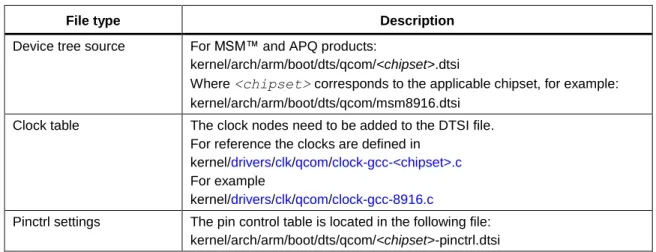
File type Description
Device tree source For MSM™ and APQ products:
kernel/arch/arm/boot/dts/qcom/<chipset>.dtsi
Where <chipset> corresponds to the applicable chipset, for example: kernel/arch/arm/boot/dts/qcom/msm8916.dtsi
Clock table The clock nodes need to be added to the DTSI file. For reference the clocks are defined in
kernel/drivers/clk/qcom/clock-gcc-<chipset>.c
For example
kernel/drivers/clk/qcom/clock-gcc-8916.c
Pinctrl settings The pin control table is located in the following file: kernel/arch/arm/boot/dts/qcom/<chipset>-pinctrl.dtsi
The following procedure describes how to configure BLSP1 UART2 to use the low-speed UART
driver using the MSM8916 chipset as an example.
1.
Create a device tree node.
a.
Open the <chipset>
.dtsifile located at:
kernel/arch/arm64/boot/dts/qcom/<chipset>.dtsi
Where <chipset> corresponds to the applicable chipset, for example:
kernel/arch/arm64/boot/dts/qcom/msm8916.dtsib.
Add a new device tree node as shown in the following example.
For detailed information, refer to the device tree documentation located at:
kernel/Documentation/devicetree/bindings/tty/serial/msm_serial.txt
.
/* If multiple UARTs are registered, add aliases to identify the UART ID.*/
aliases {
serial2 = & blsp1_uart2; //uart2 will be registered as ttyHSL2
}; blsp1_uart2: serial@78b0000 { compatible = "qcom,msm-lsuart-v14"; reg = <0x78b0000 0x200>; interrupts = <0 108 0>; status = "disabled";
clocks = <&clock_gcc clk_gcc_blsp1_uart2_apps_clk>, <&clock_gcc clk_gcc_blsp1_ahb_clk>;
clock-names = "core_clk", "iface_clk"; };
2.
Set the Pinctrl settings.
a.
Open the
.dtsifile located at:
kernel/arch/arm/boot/dts/qcom/<chipset>-pinctrl.dtsi
b.
Update the pin settings.
3.3.2 Debug low-speed UART
1.
Check the UART registration. Ensure that the UART is properly registered with the TTY
stack.
2.
Run the following commands:
adb shell -> start a new shell
ls /dev/ttyHSL* -> Make sure UART is properly registered
If you do not see your device, check your code modification to ensure that all the information
is defined and correct.
3.
Check the bus scale registration. Ensure that the UART is properly registered with the bus
scale driver.
a.
Run the following commands:
adb shellmount -t debugfs none /sys/kernel/debug -> mount debug fs cat /dev/ttyHSL# -> Open the UART port
b.
Go to the bus scale directory.
cd /sys/kernel/debug/msm-bus-dbg/client-data ls
c.
Confirm that the name that was put on msm-bus is there, for example, blsp1_uart1.
d.
Cat client_name, for example:
cat blsp1_uart1
Output: Confirm curr = 1, and rest of values. curr : 1 masters: 86 slaves : 512 ab : 500000 ib : 800000 pmx-uartconsole {
qcom,pins = <&gp 4>, <&gp 5>; qcom,num-grp-pins = <2>; qcom,pin-func = <2>; label = "uart-console"; uart_console_sleep: uart-console { drive-strength = <2>; bias-pull-down; }; };
If you do not see your device, check your code modification to ensure that all of the
information is defined and correct.
4.
Check the internal loopback. Run the following commands to enable loopback:
adb shellmount -t debugfs none /sys/kernel/debug -> mount debug fs
cd /sys/kernel/debug/msm_serial_hsl -> directory for Low Speed UART echo 1 > loopback.# -> enable loopback. # = device # cat loopback.# -> make sure returns 1
5.
Open another shell to dump the UART Rx data.
adb shellcat /dev/ttyHSL# ->Dump any data UART Receive
6.
Transmit some test data through a separate shell.
adb shell
echo "This Document Is Very Much Helpful" > /dev/ttyHSL# ->Transfer data
If the loopback works:
–
Test message loop appears continuously in the command shell until you exit the cat
program. This is because of the internal loopback and how the cat program opens the
UART.
–
It is safe to assume that the UART is properly configured and only the GPIO settings
must be confirmed.
If loopback does not work:
i
Ensure that the UART is still in the Active state. Open the UART from the shell:
adb shell
cat /dev/ttyHSL# ->Dump any data UART Receive
ii
Check the clock settings.
iii
Measure the clocks from the debug-fs command.
Make sure the Peripheral Network on a Chip (PNoC) clock is running.
cat /sys/kernel/debug/clk/pcnoc_clk/measure
Measure the BLSP AHB clock.
label: gcc_blsp1:2_ahb_clk
For example,
cat /sys/kernel/debug/clk/gcc_blsp1_ahb_clk/measure Measure the UART core clock.
label: gcc_blsp1:2_uart1:6_apps_clk
For example,
cat /sys/kernel/debug/clk/gcc_blsp1_uart2_apps_ clk/measure
Loopback works, but there is no signal output to check the GPIO settings. For
3.3.3 Optional configuration changes
After basic UART functionality is verified, enhance UART_DM functionality by configuring
runtime GPIO and preventing system suspend.
3.3.3.1
Prevent system suspend
If required when the UART is in operation, the UART driver can prevent system suspend by
automatically holding a wakelock.
1.
Update the device tree. Open the device tree file located at:
kernel/arch/arm/boot/dts/qcom/<chipset>-sbc.dtsi2.
Add the use-pm node.
3.
Confirm that the UART driver is holding the wakelock.
a.
Open the UART port.
adb shell
cat /dev/ttyHSL#
b.
Dump the wake-up sources.
cat /sys/kernel/debug/wakeup_sources
msm_serial_hslite_port_open 2 2 0 0 1430 - Confirm active_since != 0
4.
Close the UART port. Confirm that active_since returns to zero.
For more information, see
kernel/Documentation/devicetree/bindings/tty/serial/msm_serial.txt
.
3.4 Configure kernel high-speed UART
UART_DM can be configured as a BAM-based UART. This driver is designed for high-speed,
large data transfers, such as Bluetooth communication.
The following procedure describes how to configure BLSP1_UART1 as a high-speed UART.
1.
Create a device tree node.
a.
Open the device tree file located at:
kernel/arch/arm/boot/dts/qcom/msm8916.dtsi
//Add following additional nodes to enable wakelock BLSP1_UART1
b.
Modify the configuration. The elements described in the following example are the
minimum requirements.
Additional information
Location
Device tree kernel/Documentation/devicetree/bindings/tty/serial/msm_serial_hs.txt UART_DM interrupt values kernel/Documentation/devicetree/bindings/arm/gic.txt Device tree bindings kernel/Documentation/devicetree/bindings/arm/msm/msm_bus.txt Master ID kernel/arch/arm/boot/dts/<chip>-bus.dtsi
Pin control kernel/Documentation/devicetree/bindings/pinctrl/msm-pinctrl.txt
2.
Set the Pinctrl settings.
a.
Open the
.dtsifile located at:
kernel/arch/arm/boot/dts/qcom/<chipset>-pinctrl.dtsi
b.
Modify the pin control settings as shown in the following example. For more
information, refer to pin control documentation located at:
kernel/Documentation/devicetree/bindings/pinctrl/msm-pinctrl.txt. blsp1_uart1: uart@78af000 {
compatible = "qcom,msm-hsuart-v14"; reg = <0x78af000 0x200>,
<0x7884000 0x23000>;
reg-names = "core_mem", "bam_mem";
interrupt-names = "core_irq", "bam_irq", "wakeup_irq"; #address-cells = <0>; interrupt-parent = <&blsp1_uart1>; interrupts = <0 1 2>; #interrupt-cells = <1>; interrupt-map-mask = <0xffffffff>; interrupt-map = <0 &intc 0 107 0 1 &intc 0 238 0 2 &msm_gpio 1 0>; qcom,bam-tx-ep-pipe-index = <0>; qcom,bam-rx-ep-pipe-index = <1>; qcom,master-id = <86>;
clocks = <&clock_gcc clk_gcc_blsp1_uart1_apps_clk>, <&clock_gcc clk_gcc_blsp1_ahb_clk>;
clock-names = "core_clk", "iface_clk"; qcom,msm-bus,name = "blsp1_uart1"; qcom,msm-bus,num-cases = <2>; qcom,msm-bus,num-paths = <1>; qcom,msm-bus,vectors-KBps = <86 512 0 0>, <86 512 500 800>; pinctrl-names = "sleep", "default"; pinctrl-0 = <&hsuart_sleep>;
pinctrl-1 = <&hsuart_active>; status = "ok";
3.4.1 Debug high-speed UART
1.
Check the registration. Ensure that the UART is properly registered with the TTY stack by
running the following commands:
adb shell -> start a new shell
ls /dev/ttyHS* -> Make sure UART is properly registered
If the device does not appear, check your code modification to ensure that all information is
defined and correct.
2.
Check the internal loopback.
a.
Run the following commands to enable loopback:
adb shellmount -t debugfs none /sys/kernel/debug -> mount debug fs
cd /sys/kernel/debug/msm_serial_hs -> directory for High Speed UART
echo 1 > loopback.# -> enable loopback. # is device #
cat loopback.# -> make sure returns 1
b.
Open another shell to dump the UART Rx data.
adb shell
cat /dev/ttyHS# ->Dump any data UART Receive
c.
Transmit some test data through a separate shell.
adb shell
echo "This Is A Helpful Document" > /dev/ttyHS# ->Transfer data &soc {
tlmm_pinmux: pinctrl@10000000 {
//snip
blsp1_uart1_active {
qcom,pins = <&gp 0>, <&gp 1>, <&gp 2>, <&gp 3>; qcom,num-grp-pins = <4>; qcom,pin-func = <2>; label = "blsp1_uart1_active"; hsuart_active: default { drive-strength = <16>; bias-disable; }; }; blsp1_uart1_sleep {
qcom,pins = <&gp 0>, <&gp 1>, <&gp 2>, <&gp 3>; qcom,num-grp-pins = <4>; qcom,pin-func = <0>; label = "blsp1_uart1_sleep"; hsuart_sleep: sleep { drive-strength = <2>; bias-disable; }; };
If loopback works:
Your test message loops continuously in the command shell until you exit the cat
program. This is because of the internal loopback and how the cat program opens the
UART.
UART is properly configured and only the GPIO settings need to be confirmed.
If loopback works but there is no output:
Check the GPIO settings as described in Section
7
.
3.
Check the clock settings.
a.
Ensure that the UART is still in Active state.
b.
Open the UART from the shell:
adb shell
cat /dev/ttyHS# ->Dump any data UART Receive
For instructions on checking the clock settings, see Section
3.2.2
.
3.5 Code walkthrough – High-speed UART driver
This section explains the details of implementing a high-speed UART driver for debugging or
modifications.
3.5.1 Probing
If UARTs are defined in the device tree, the msm_hs_probe() function is called, as shown in the
following call flow.
msm_serial_hs_init() -> platform_driver_register(&msm_serial_hs_platform_driver) -> drv = &msm_serial_hs_platform_driver.driver; drv->bus = &platform_bus_type; driver_register (drv) -> bus_add_driver(drv) -> driver_attach(drv) -> bus_for_each_dev(drv->bus,..., drv,..)
Iterate thru bus list of devices (bus->p->klist_devices) driver_attach(drv, dev) ->
platform_match() ->
Checks if the current dev match drv by comparing drv.of_match_table with dev.of_node. If match found calls driver_probe_device
driver_probe_device(drv, dev) -> platform_drv_probe(..) -> msm_hs_probe()
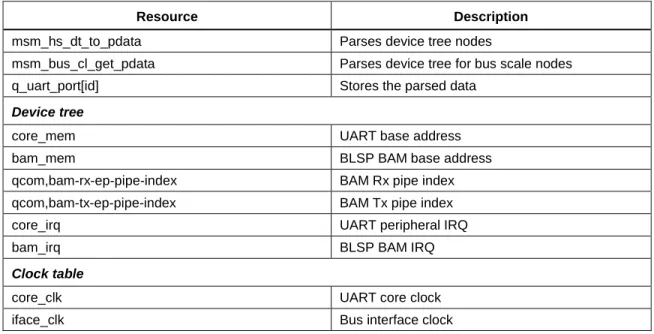
Table 3-5 Resources required for UART registration
Resource Description
msm_hs_dt_to_pdata Parses device tree nodes
msm_bus_cl_get_pdata Parses device tree for bus scale nodes q_uart_port[id] Stores the parsed data
Device tree
core_mem UART base address
bam_mem BLSP BAM base address qcom,bam-rx-ep-pipe-index BAM Rx pipe index qcom,bam-tx-ep-pipe-index BAM Tx pipe index core_irq UART peripheral IRQ
bam_irq BLSP BAM IRQ
Clock table
core_clk UART core clock
iface_clk Bus interface clock
Bus scale information is parsed by the bus scale driver.
3.5.1.1
Registration with the SPS driver
During a probe, the UART driver registers BLSP BAM with the Smart Peripheral Subsystem
(SPS)/BAM driver, as shown in the following call flow.
msm_hs_probe()->
msm_hs_sps_init()-->
sps_phy2n()-->sps_register_bam_device() msm_hs_sps_init_ep_conn(Producer Info) msm_hs_sps_init_ep_conn(Consumer Info)
The
msm_hs_probe()function performs the following actions:
Calls sps_phy2h() to check if the current BLSP BAM is already registered with the SPS
driver. If the current BAM is registered, it returns the handler for the BAM.
Calls sps_register_bam_device() to register the BLSP BAM with the SPS driver if the BAM
is not registered.
Calls msm_hs_sps_init_ep_conn() to initialize BAM connection information:
Allocates memory for descriptor FIFO (sps_config to desc.base, sps_config to desc.size)
The event mode is a function callback:
–
For UART Rx operations, the callback is called when the descriptor is complete.
–
For UART Tx operations, the callback is called when the End-Of-Transfer (EOT) bit
is set.
3.5.1.2
UART port registration
The UART driver registers the current UART port with the Linux TTY stack, as shown in the
following call flow.
msm_hs_probe()->
uart_add_one_port()-> uart_configure_port()->
msm_hs_config_port()-Sets uart->type to PORT_MSM
msm_hs_set_mctrl_locked()-Set RFR High (not accepting data) <-
tty_register_device()- Registers with tty framework
3.5.2 Port open
The following call flow shows critical events that occur when the client opens a UART port.
tty_open()-> uart_open()-> uart_startup()-> uart_port_startup()-> msm_hs_startup()--> msm_hs_resource_vote()()-Turns on clks msm_hs_config_uart_gpios()-request GPIOs msm_hs_spsconnect_tx/rx() sps_connect() sps_register_event() <--
Configure UART Hardware msm_hs_start_rx_locked() sps_transfer_one() <--- uart_change_speed()--> msm_hs_set_termios()--> msm_hs_set_bps_locked() <-- sps_disconnect() <-- msm_hs_spsconnect_rx() <-- msm_serial_hs_rx_work()--> msm_hs_start_rx_locked() <---
The uart_open() function performs the following actions:
Increments port->count.
If a port is not initialized (port->flags and ASYNC_INITIALIZED):
Allocates and clears a Tx buffer (uart_state->xmit.buf)
Calls msm_hs_startup()
The msm_hs_startup() function initializes the low-level UART core:
Maps the Tx buffer to be a Direct Memory Access (DMA) capable buffer.
Turns on all necessary clocks, including the bus scale request.
If runtime GPIO configuration is enabled, requests the GPIOs (see Section
3.3.3
).
Initializes the BAM connection.
Initializes the UART hardware:
UART_DM_MR1 – Sets the Ready for Receiving (RFR) watermark to FIFOSIZE-16
ART_DM_IPR – Sets RXSTALE interrupt counter to 0x1F
UART_DM_DMEN – Enables the Tx/Rx BAM
UART_DM_CR – Resets the transmitter
UART_DM_CR – Resets the receiver
UART_DM_CR – Clears the error status
UART_DM_CR – Clears the Break Change interrupt status bit
UART_DM_CR – Clears the Stale interrupt status bit
ART_DM_CR – Clears the Clear-to-Send (CTS) input change interrupt status bit
UART_DM_CR – Asserts the RFR signal
UART_DM_CR – Enables the receiver
UART_DM_CR – Turns on the transmitter
UART_DM_TFWR – Sets the Tx FIFO watermark to zero
Enables the interrupt, and registers the ISR handler:
If the Wake Up interrupt is supported and enabled, it registers the ISR handler but
disables the interrupt.
Enables Rx transfer (msm_hs_start_rx_locked()):
Configures the UART hardware:
–
UART_DM_CR – Clears the Stale interrupt
–
UART_DM_RX – Programs the maximum transfer length
(UARTDM_RX_BUF_SIZE)
–
UART_DM_CR – Enables the Stale Event mechanism
–
UART_DM_DMEN – Enables Rx BAM mode
–
UART_DM_RX_TRANS_CTRL – Enables automatic retransfer
–
UART_DM_CR – Initializes the BAM producer sideband signals
Queues a BAM descriptor, and initiates a transfer.
The msm_hs_set_termios() function performs the following actions:
Disables UART interrupts and Rx BAM mode:
UART_DM_IMR – Sets to 0
UART_DM_DMEN – Clears the RX_BAM_EN bit
Sets UART clock rates via msm_hs_set_bps_locked().
Programs the UART hardware:
UART_DM_MR1, UART_DM_MR2 – For parity, flow controls, etc.
UART_DM_CR – Resets the receiver
UART_DM_CR – Resets the transmitter
Disconnects from the SPS driver (sps_disconnect()).
Reconnects the producer pipe with the SPS function (msm_hs_spsconnect_rx()).
msm_serial_hs_rx_work():
Enables an Rx transfer via msm_hs_start_rx_locked()
3.5.3 Power management
The high-speed UART driver defines power management APIs as follows:
static const struct dev_pm_ops msm_hs_dev_pm_ops = { .runtime_suspend = msm_hs_runtime_suspend, .runtime_resume = msm_hs_runtime_resume, .runtime_idle = NULL, .suspend_noirq = msm_hs_pm_sys_suspend_noirq, .resume_noirq = msm_hs_pm_sys_resume_noirq, };
In msm_hs_pm_sys_suspend_noirq(),
1.
Clocks are turned OFF.
2.
Core IRQ is disabled.
3.
Wakeup IRQ, flow control is enabled if Out-of-Band Sleep not set.
4.
BAM pipes are disconnected.
5.
Runtime PM framework is notified of the suspend state.
The driver maintains the following power states:
MSM_HS_PM_ACTIVE – if driver is in Active state (i.e., all clocks are ON)
3.5.3.1
In Band and Out Band Sleep modes
The UART driver defines the following sleep modes:
In Band Sleep – This suggests UART’s wakeup IRQ (RX line) is enabled and RFR line
asserted when it goes into a suspend state. This is so that the UART client can wake it up by
sending some data on the RX line.
This mode is enabled by the following DTS entries in UART node:
Out of Band Sleep – This suggests that the UART client will explicitly call the UART clock
ON API to turn ON the clocks before doing a transfer.
This mode is enabled by the following DTS entry:
qcom,msm-obs;
3.5.3.2
Methods to control UART clocks
The UART clocks can be turned ON/OFF in either of the following ways:
sys_fs call
echo 0|1 > /sys/devices/soc.0/BaseAddress.uart/clock: ex: turn off/on clock echo 0 > /sys/devices/soc.0/78af000.uart/clock echo 1 > /sys/devices/soc.0/78af000.uart/clock
Kernel API
msm_hs_get_uart_port, msm_hs_request_clock_on|offExample usage:
interrupt-names = "core_irq", "bam_irq", "wakeup_irq"; //add "wakeup_irq" to the other IRQs list
#address-cells = <0>;
interrupt-parent = <&blsp1_uart1>; interrupts = <0 1 2>;
#interrupt-cells = <1>;
interrupt-map-mask = <0xffffffff>; interrupt-map = <0 &intc 0 107 0 1 &intc 0 238 0
2 &msm_gpio 1 0>;//RX GPIO number is set as Wakeup IRQ qcom,rx-char-to-inject = <0xFD>; //This character is injected on TX when wakeup IRQ received
qcom,inject-rx-on-wakeup; //This enables the above character injection
IOCTL from the user space
IOCTL cmd
MSM_ENABLE_UART_CLOCK -request clk on MSM_DISABLE_UART_CLOCK - request clk off
MSM_GET_UART_CLOCK_STATUS - get current status
After turning off the clocks, it is important that no UART functions are called before the clocks
are turned back on, including the UART close function.
3.5.4 Port close
The following call flow shows critical events that occur when the client closes the UART port.
tty_release()--> uart_close()--> tty_port_close_start() <-- msm_hs_stop_rx_locked() <-- uart_wait_until_sent()-->
msm_hs_tx_empty() returns UART_DM_SR TXEMT <--- uart_shutdown()--> uart_update_mctrl()--> msm_hs_set_mctrl_locked() <-- uart_port_shutdown()--> msm_hs_shutdown() <---
*Can run anytime after msm_hs_stop_rx_locked() while uart_close()
hsuart_disconnect_rx_endpoint_work()-->
sps_disconnect()--Disconnect/disable BAM connection and set msm_uport->rx.flush = FLUSH_SHUTDOWN;
<--
The uart_close() function performs the following actions:
Calls tty_port_close_start() to decrement port->counts.
/* Get the UART Port with port ID */
struct uart_port *port = msm_hs_get_uart_port(0);
/* Request turn off Clocks */
msm_hs_request_clock_off(port);
/* Request turn on clock */
Calls msm_hs_stop_rx_locked():
Clears the RX_BAM_ENABLE bit in UART_DM_DMEN to disable the Rx BAM
interface.
Sets the rx.flush state to FLUSH_STOP.
Schedules the BAM work queue to be disconnected
(hsuart_disconnect_rx_endpoint_work()).
uart_wait_until_sent():
Continuously polls by calling msm_hs_tx_empty() until the UART_DM_SR[TXEMT]
bit is set by the hardware.
Calls uart_shutdown():
Sets the TTY_IO_ERROR bit to tty->flags.
Clears the ASYNCB_INITIALIZED bit to port->flags.
De-asserts RFR, and disables the Auto Ready to Receive bit.
msm_hs_shutdown():
If a Tx is pending (which should not occur), it disables and disconnects by calling
sps_disconnect().
Waits until the hsuart_disconnect_rx_endpoint_work() function runs, and then sets
rx.flush to FLUSH_SHUTDOWN.
Configures the UART hardware:
–
UART_DM_CR – Disables the transmitter.
–
UART_DM_CR – Disables the receiver.
–
UART_DM_IMR – Clears the interrupt mask register.
Turns off the clocks, and sets clk_state to MSM_HS_CLK_PORT_OFF.
Frees IRQ resources.
Releases any GPIO resources.
Frees allocated memory.
4 Inter-Integrated Circuit
This chapter describes the Inter-Integrated Circuit (I2C) and explains how to configure it in the
kernel.
4.1 Hardware overview
4.1.1 Qualcomm Universal Serial Engine
The supported mini cores are as follow:
I2C
SPI (see Chapter 5)
I2C core
On the APQ8016 chipset, the Linux I2C driver supports Fast mode plus (up to 1 MHz). The
following key features have been added:
Duty-cycle control
BAM integration
Support for I2C tag version 2
The following features are not supported:
Multi Master mode.
10-bit slave address, and also the 10-bit extend address (for example, 1111 0XX) listed in I2C
specification cannot be used by any slave device.
HS mode (3.4 Mhz clock frequency).
4.1.2 QUP I2C configuration parameters
To match the labeling in the software interface manual, each QUP is identified by a BLSP core
and QUP core (0 to 5). In hardware design documents, BLSPs are identified as BLSP[1:12].
The APQ8016 (and MSM8916) chipsets contain a single BLSP core.
Table 4-1 QUP physical address, IRQ numbers, Kernel I2C clock name, consumer, producer pipes, BLSP_BAM physical
address, BAM IRQ number for Snapdragon 410 (APQ8016)
BLSP hardware
ID
QUP core Physical
address (QUP_BASE_
ADDRESS)
IRQ number
Kernel UART clock name Consumer, producer pipes BLSP_BAM physical address, IRQ number BLSP1 BLSP 1 QUP 0 0x78B5000 95 clk_gcc_blsp1_qup1_i2c_apps_clk 12,13 0x07884000, 238 BLSP2 BLSP 1 QUP 1 0x78B6000 96 clk_gcc_blsp1_qup2_i2c_apps_clk 14,15 0x07884000, 238 BLSP3 BLSP 1 QUP 2 0x78B7000 97 clk_gcc_blsp1_qup3_i2c_apps_clk 16,17 0x07884000, 238 BLSP4 BLSP 1 QUP 3 0x78B8000 98 clk_gcc_blsp1_qup4_i2c_apps_clk 18,19 0x07884000, 238 BLSP5 BLSP 1 QUP 4 0x78B9000 99 clk_gcc_blsp1_qup5_i2c_apps_clk 20,21 0x07884000, 238 BLSP6 BLSP 1 QUP 5 0x78BA000 100 clk_gcc_blsp1_qup6_i2c_apps_clk 22,23 0x07884000, 238
4.1.3 Bus scale ID
In hardware design documents, BLSPs are identified as BLSP[1:12].
The APQ8016 (and MSM8916) chipsets contain a single BLSP core.
Table 4-2
lists the BLSP master ID. For the most up-to-date information, check the following file:
kernel/arch/arm/boot/dts/qcom/<chipset>-bus.dtsi
IDs are listed under mas-blsp-1 and slv-ebi-ch0.
Table 4-2 BLSP bus master ID
BLSP hardware ID QUP cores BLSP bus master ID
4.2 Configure LK I2C
This section describes how to configure and use any of the available QUP cores in the chipset as
an I2C device.
In the entire LK session, only one QUP core can be used. This means that if BLSP1QUP1 is
already initialized by the LK, BLSP1QUP2 cannot be initialized without a reboot.
The following files are used to configure a QUP core as an I2C in an LK:
/bootable/bootloader/lk/project/<chipset>.mk /bootable/bootloader/lk/target/<chipset>/init.c
/bootable/bootloader/lk/platform/<chipset>/include/platform/iomap.h /bootable/bootloader/lk/platform/<chipset>/acpuclock.c
/bootable/bootloader/lk/platform/<chipset>/<chipset>-clock.c /bootable/bootloader/lk/platform/<chipset>/gpio.c
The following procedure is used for example purposes on an APQ8016 chipset. Similar changes
can be applied to other chipsets.
NOTE:
After you try this test, your device will not continue to boot kernel but will be stuck at a fastboot
console accessible via COM port. You will have to boot the device from an SD card by changing
the switch settings to 0100 on DragonBoard 410c and reflash the original binaries to emmc. Then
change the switch back to 0000 to boot from emmc.
1.
Enable the console shell to demonstrate I2C.
a.
Open the following file:
Project_root/bootable/bootloader/lk/project/<chipset>.mk
b.
To demonstrate I2C, create an LK shell program using the serial port.
MODULE +=app/shell
NOTE:
This is for testing and demonstration purposes only and is not required for I2C.
c.
To test, connect the serial terminal to the device. After compiling is finished, flash the
aboot and reboot the device into fastboot. The following message appears on the
terminal:
console_init: entry starting app shell
entering main console loop
d.
Test the shell by entering
help
in the terminal program.
Sample output: command list:help : this list
2.
Create a test program. This is an optional process to demonstrate I2C functionality.
a.
Create a test application in
/bootable/bootloader/lk/app/tests/my_i2c_test.c.
b.
Modify
/bootable/bootloader/lk/app/tests/rules.mkto enable the test
application.
LOCAL_DIR := $(GET_LOCAL_DIR) INCLUDES += -I$(LOCAL_DIR)/include OBJS += $(LOCAL_DIR)/my_i2c_test.o
c.
Modify
/bootable/bootloader/lk/project/<chipset>.mkto compile the test
application.
MODULES += app/tests
d.
Verify that the
i2c_testcommand is available as part of the shell command.
cmd "help"command list:
help : this list
test : test the command processor
i2c_test : i2c test cmd cmd "i2c_test" Entering i2c_test #include <ctype.h> #include <debug.h> #include <stdlib.h> #include <printf.h> #include <list.h> #include <string.h> #include <arch/ops.h> #include <platform.h> #include <platform/debug.h> #include <kernel/thread.h> #include <kernel/timer.h> #ifdef WITH_LIB_CONSOLE #include <lib/console.h>
static int cmd_i2c_test(int argc, const cmd_args *argv); STATIC_COMMAND_START
{ "i2c_test", "i2c test cmd", &cmd_i2c_test }, STATIC_COMMAND_END(my_i2c_test);
static int cmd_i2c_test(int argc, const cmd_args *argv) {
printf("Entering i2c_test\n");
return 0; }
3.
Configure the I2C bus in LK.
a.
Initialize the I2C bus. The following code sample is for the BLSP2 QUP4 and uses
my_i2c_test.cas the client driver.
b.
Configure the GPIO. Modify
/bootable/bootloader/lk/platform/<chipset>/gpio.c
and change the
gpio_config_blsp_i2cfunction by adding the
appropriate GPIO configuration for the correct BLSP configuration.
c.
Register a clock. Modify
/bootable/bootloader/lk/platform/<chipset>/msm8916-clock.c
and add the clock node and corresponding QUP clock.
#include <i2c_qup.h>
#include <blsp_qup.h>
{
struct qup_i2c_dev *dev;
/*
1 arg: BLSP ID can be BLSP_ID_1 or BLSP_ID_2 2 arg: QUP ID can be QUP_ID_0:QUP_ID_5
3 arg: I2C CLK. should be 100KHZ, or 400KHz 4 arg: Source clock, should be set @ 19.2MHz */
dev = qup_blsp_i2c_init(BLSP_ID_1, QUP_ID_4, 100000, 19200000);
if(!dev){
printf("Failed to initialize\n");
return; }
}
void gpio_config_blsp_i2c(uint8_t blsp_id, uint8_t qup_id) {
if(blsp_id == BLSP_ID_1) { switch (qup_id) { case QUP_ID_1:
/* configure I2C SDA gpio */
gpio_tlmm_config(6, 3, GPIO_OUTPUT, GPIO_NO_PULL,
GPIO_8MA, GPIO_DISABLE); /* configure I2C SCL gpio */
gpio_tlmm_config(7, 3, GPIO_OUTPUT, GPIO_NO_PULL, GPIO_8MA, GPIO_DISABLE); break;
default:
dprintf(CRITICAL, "Incorrect QUP id %d\n",qup_id); ASSERT(0);
}; } else {
dprintf(CRITICAL, "Incorrect BLSP id %d\n",blsp_id); ASSERT(0);
} }
d.
Add the clock structure if it is not defined yet.
4.
Test the I2C transfer functionality.
void my_i2c_test() { .. char buf[10]; struct i2c_msg msg; //Create a msg header msg.addr = 0x52; msg.flags = I2C_M_RD; msg.len = 10; msg.buf = buf; //Transfer the data
ret = qup_i2c_xfer(dev, &msg, 1);
static struct clk_lookup msm_clocks_<chip>[] = {
/**
Add Clock node for BLSP_AHB_CLOCK For BLSP1 you would add:
"blsp1_ahb_clk", gcc_blsp1_ahb_clk.c
*/
CLK_LOOKUP("blsp1_qup2_ahb_iface_clk", gcc_blsp1_ahb_clk.c), /**
Add corresponding QUP Clock. Clocks are indexed from 1 to 6. So QUP4 would refer to QUP5 in clock regime
*/
CLK_LOOKUP("gcc_blsp1_qup2_i2c_apps_clk", gcc_blsp1_qup2_i2c_apps_clk.c),
static struct branch_clk gcc_blsp1_qup2_i2c_apps_clk = {
/*
.cbcr_reg value is defined on bootable/bootloader/ lk/platform/<chipset>/include/platform/iomap.h If its not defined, get the value from
kernel/arch/arm/mach-msm/clock-<chip>.c */
.cbcr_reg = GCC_BLSP1_QUP2_APPS_CBCR, /*
.parent you can get from
kernel/arch/arm/mach-msm/clock-<chip>.c */ .parent = &cxo_clk_src.c, .c = { .dbg_name = "gcc_blsp1_qup2_i2c_apps_clk", .ops = &clk_ops_branch, }, };
4.2.1 Test code
Output
i2c_dev Ptr 0x<…..>
[64420] QUP IN:bl:8, ff:32, OUT:bl:8, ff:32 [64420] Polling Status for state:0x0
#include <i2c_qup.h>
#include <blsp_qup.h>
#include <board.h>
void my_i2c_test() {
struct qup_i2c_dev *dev;
char buf[10];
struct i2c_msg msg;
int ret,i;
int soc_ver = board_soc_version(); //Get the CHIP version /*
1 arg: BLSP ID needs to be BLSP_ID_1 2 arg: QUP ID can be QUP_ID_0:QUP_ID_5 3 arg: I2C CLK. should be 100KHZ, or 400KHz
4 arg: Source clock, should be set @ 19.2 MHz for V1 and 50MHz for V2
or Higher Rev */
if( soc_ver >= BOARD_SOC_VERSION2 ){
dev = qup_blsp_i2c_init(BLSP_ID_1, QUP_ID_4, 100000, 50000000); }
else{
dev = qup_blsp_i2c_init(BLSP_ID_1, QUP_ID_4, 100000, 19200000); }
if(!dev){
printf("Failed to initializing\n");
return; }
//Received valid ptr
printf("i2c_dev Ptr %p \n", dev);
//Test Transfer
msg.addr = 0x52; msg.flags = I2C_M_RD; msg.len = 10;
msg.buf = buf;
ret = qup_i2c_xfer(dev, &msg, 1);
printf("qup_i2c_xfer returned %d \n", ret);
for(i = 0; i < 10; i++) printf("%x ", buf[i]); printf("\n");
[64430] Polling Status for state:0x10 [64430] Polling Status for state:0x0 [64430] Polling Status for state:0x1 [64440] Polling Status for state:0x0 [64440] Polling Status for state:0x3
[64440] RD:Wrote 0x40a01a5 to out_ff:0xf9967110 [64450] Polling Status for state:0x0
[64450] Polling Status for state:0x1 [64450] idx:4, rem:1, num:1, mode:0 qup_i2c_xfer returned 1
ff ff ff ff ff ff ff ff ff ff
4.2.2 Debug LK I2C
This section provides debugging tips for situations where the I2C fails for simple read/write
operations.
1.
Check SDA/SCL idling. Scope the bus to ensure that the SDA/SCL is idling at the high logic
level. If it is not idling high, either there is a hardware configuration problem or the GPIO
settings are invalid.
2.
Check the GPIO configuration. Check the GPIO configuration register, GPIO_CFGn, to
ensure that the GPIO settings are valid.
Physical Address: 0x01000000 + (0x1000 * n) = GPIO_CFGn n = GPIO #
Example Address:
0x01000000 = GPIO_CFG0 0x01001000 = GPIO_CFG1 Bit definition for GPIO_CFGn Bits 31:11 Reserved
Bit 10 GPIO_HIHYS_EN Control the hihys_EN for GPIO
Bit 9 GPIO_OE Controls the Output Enable for GPIO when in GPIO mode.
Bits 8:6 DRV_STRENGTH Control Drive Strength
000:2mA 001:4mA 010:6mA 011:8mA 100:10mA 101:12mA 110:14mA 111:16mA Bits 5:2 FUNC_SEL Make sure Function is GSBI
Check Device Pinout for Correct Function Bits 1:0 GPIO_PULL Internal Pull Configuration
00:No Pull 01: Pull Down 10:Keeper 11: Pull Up NOTE:
For I2C, QTI recommends 2 mA with no pull.
4.3 Configure kernel low-speed I2C
4.3.1 Code changes
Table 4-3
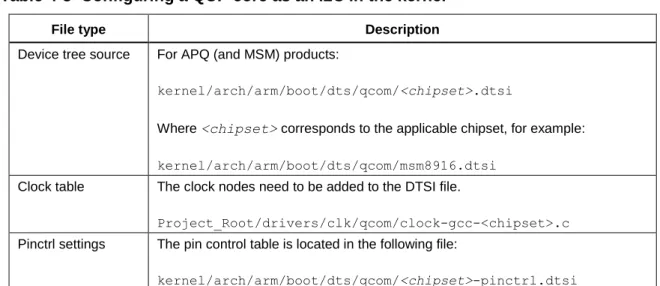
lists the files that are used to configure a QUP core as an I2C in the kernel.
Table 4-3 Configuring a QUP core as an I2C in the kernel
File type Description
Device tree source For APQ (and MSM) products:
kernel/arch/arm/boot/dts/qcom/<chipset>.dtsi
Where <chipset> corresponds to the applicable chipset, for example:
kernel/arch/arm/boot/dts/qcom/msm8916.dtsi
Clock table The clock nodes need to be added to the DTSI file.
Project_Root/drivers/clk/qcom/clock-gcc-<chipset>.c
Pinctrl settings The pin control table is located in the following file:
kernel/arch/arm/boot/dts/qcom/<chipset>-pinctrl.dtsi
I2C driver
i2c-msm-v2.csupports Block and BAM modes along with FIFO mode. Hence, it
supports I2C Fast mode plus (up to 1 MHz).
The following steps are required to configure and use any of the QUP cores (specifically,
BLSP1_QUP1) as an I2C device.
1.
Create a device tree node. Modify the following file to add a new device tree node.
kernel/arch/arm/boot/dts/qcom/msm8916.dtsi
For details, refer to the follow file:
kernel/Documentation/devicetree/bindings/i2c/i2c-msm-v2.txt.
2.
Set the Pinctrl settings.
a.
Open the
.dtsifile located at:
kernel/arch/arm/boot/dts/qcom/<chipset>-pinctrl.dtsi /* If multiple I2Cs are registered, add aliases to identify the I2C Device ID.*/
aliases {
i2c0 = &i2c_0; /* I2C0 controller device */
};
i2c_0: i2c@78b6000 { /* BLSP1 QUP2 */
compatible = "qcom,i2c-msm-v2"; #address-cells = <1>;
#size-cells = <0>;
reg-names = "qup_phys_addr", "bam_phys_addr"; reg = <0x78b6000 0x600>,
<0x7884000 0x23000>;
interrupt-names = "qup_irq", "bam_irq"; interrupts = <0 96 0>, <0 238 0>;
clocks = <&clock_gcc clk_gcc_blsp1_ahb_clk>, <&clock_gcc
clk_gcc_blsp1_qup2_i2c_apps_clk>;
clock-names = "iface_clk", "core_clk"; qcom,clk-freq-out = <100000>;
qcom,clk-freq-in = <19200000>;
pinctrl-names = "i2c_active", "i2c_sleep"; pinctrl-0 = <&i2c_0_active>; pinctrl-1 = <&i2c_0_sleep>; qcom,noise-rjct-scl = <0>; qcom,noise-rjct-sda = <0>; qcom,bam-pipe-idx-cons = <6>; qcom,bam-pipe-idx-prod = <7>; qcom,master-id = <86>; };
b.
Modify the pin control settings as shown in the following example. For more
information, refer to pin control documentation located at:
kernel/Documentation/devicetree/bindings/pinctrl/msm-pinctrl.txt
.
3.
Verify the I2C bus. Ensure that the bus is registered. If all information is entered correctly,
you should see the I2C bus registered under /dev/i2c-#, where the cell-index matches the bus
number.
adb shell --> Get adb shell cd /dev/
ls i2c* --> to List all the I2C buses root@android:/dev # ls i2c* ls i2c* i2c-0 i2c-4 i2c-5 i2c-6 &soc { tlmm_pinmux: pinctrl@1000000{ ::::::::::: //snip i2c_0_active: i2c_0_active { drive-strength = <2>; /* 2 MA */ bias-disable; /* No PULL */ }; i2c_0_sleep: i2c_0_sleep { drive-strength = <2>; /* 2 MA */ bias-disable; /* No PULL */ }; :::::::::: };