Chapter VI
OpenLearn and Knowledge
Maps for Language Learning
Alexandra Okada
The Open University, UK
Copyright © 2009, IGI Global, distributing in print or electronic forms without written permission of IGI Global is prohibited.
abstract
This chapter presents new methodologies designed to facilitate language acquisition in open learning
communities via open educational resources and knowledge mapping. It specifically focuses on the
OpenLearn project developed by The Open University. This offers a virtual learning environment based on Moodle platform with free educational materials and knowledge media tools such as the instant messaging MSG, the Web videoconferencing application, FlashMeeting, and the knowledge mapping software tool Compendium. In this chapter, these technologies and mapping techniques are introduced in order to promote open language learning. Ways in which teachers and students can make use of these
OpenLearn tools and resources are discussed and some benefits fully described.
introduction: thE opEn
LEarning MoVEMEnt and
LanguagE LEarning
Open content resources have been growing rapidly, opening up new possibilities for ac-tive language learning. Free innovaac-tive tools, open access content, and collaborative learning strategies provide new opportunities for learners engaging in widening communication and col-lective construction of knowledge (Willinsky, 2006; Cedergren, 2003). These new resources
and new methodologies can bring new ways to foster meaningful learning.
The Open Content Initiative is a growing movement in the promotion of open learning which involves institutions, universities, research-ers, teachresearch-ers, and scientists in the free access to world knowledge resources (O’Mahony & Ferraro, 2003). Its aim is to provide free access to qual-ity teaching materials from the public domain from which open educational resources can be customized, improved, and shared with local communities. These can be personalized to match
local contexts and cultural aspects such as
lan-guage, level of study, pre-requirements, learning outcomes, and so forth (Downes, 2006; Dholakia, King, & Baraniuk, 2006; Jarman, 2006).
Open learning communities are defined as a
set of people with common interests who interact collaboratively in order to learn together. There
are five important features in an open learning
community: open products, integrity, transpar-ency, non-discrimination, and non-interference (Reagle, 2004, 2006). Open communities are open to receive new members, share informa-tion, reconstruct knowledge, and learn together developing open products. Participants ensure the integrity of the process and their contributions. They are transparent in self-organizing, making
their own rules and defining their process. They
do not discriminate between people, individuals, or groups. Members can interact and work under their own understanding or conceptualization without interference. They are active contributors (Aigrain, 2004; Stadler & Hirsh, 2002).
Open learning environments can be considered a new methodology for informal learning.
Aca-demics, teachers, and students alike can benefit
from the Open Educational Resource Movement. Teachers can select high-quality materials, use free tools and resources, and engage their students in open learning communities in order to develop skills such as:
• Selecting extra and relevant learning materi-als,
• Managing their own learning, • Contacting new fellow students, and • Developing learning communities.
More specifically in language learning, open
communities can be very useful in promoting meaningful learning. Students can become ac-tive learners by:
• Communicating with people from different countries,
• Practicing the language in real situations, • Sharing their personal context and
creat-ing meancreat-ingful opportunities for learncreat-ing, and
• Using technology collaboratively to improve their understanding together.
Knowledge mapping can be an efficient strategy for educators, learners, professionals, and researchers to deal with a large quantity of information on the Web, select what is relevant, and make connections structuring knowledge in a meaningful way (Okada & Buckingham Shum, 2006; Okada, 2007). Learning requires the ability to organize relevant information, connect it with previous knowledge, engage in critical thinking, and construct arguments. Students struggle with many of these skills. Knowledge cartography can greatly facilitate these processes of learning, research, and knowledge management. Well-de-signed maps are effective resources for building knowledge. They act as a concentrated database and are powerful graphic tools for classifying, representing, and communicating the connec-tions between all kinds of information. Through knowledge mapping, learners can:
• Exploit the mind’s ability to establish rela-tionships between thoughts and ideas; • Build graphical schemes that enable
under-standing through spatial relations;
• Link arguments and relevant information
together in flexible structures;
• Re present opi n ion s, alter nat ive perspectives, different contexts; and • Reduce search time and reveal connections
that might otherwise not be noticed (Okada, Buckingham Shum, & Sherborne, 2008).
In this chapter, some examples from O p e n L e a r na n o p e n e d u c a t i o n a l environmentare analyzed in order to illus-trate knowledge mapping techniques and open educational resources as applied to language learning. OpenLearn was developed by The Open University in Moodle, a course management system. This project was launched at the end of 2006, and open language learning communities are still developing. Thus, data at this moment are not enough for a case study. However, the intention of this work is to present possibilities and introduce new strategies that can be useful to foster language-learning communities.
thE opEnLEarn proJEct and
opEn LanguagE LEarning
rEsourcEs
Project “OpenLearn” (http://openlearn.open. ac.uk), sponsored by the William and Flora Hewlett Foundation, provides free online learning material taken from The Open University courses. It also offers free knowledge media technologies on a large scale, connecting learners with learn-ers and learnlearn-ers with educators. OpenLearn also aims to help teachers reconstruct their own ma-terials from existing open educational resources, downloading, editing, remixing, and publishing new courses. The intention of OpenLearn is to enable a basis for worldwide collaborations over the development and dissemination of supported
open learning in several fields including language
learning.
The OpenLearn based on the open source Moodle platform consists of two virtual learning environments:
• LearningSpace (http://openlearn.open. ac.uk/) hosts a list of open educational resources. It is an area to access free educa-tional resources organized in units and areas of knowledge. These units are initially in
English and based on The Open University’s courses.
• LabSpace (http://labspace.open.ac.uk/) is the laboratory area to download Learning-Space materials to remix and reuse. • Both areas integrate new technologies
de-veloped by the Knowledge Media Institute (KMi) to foster learning communities. Through OpenLearn, students interested in learning a foreign language can access materials
in their own time and find peers from different
countries all over the world. It is an opportunity for informal and collaborative study in areas of common interest. Participants can learn at their own pace, alone or in communities. They can manage their own progress by keeping a learning journal, by discussing the topics with other online learners in forums, and by completing self-assess-ment exercises. In this way, participants can study high-quality materials free, develop their online communities, and manage their own language learning process (OpenLearn, 2007).
The target audience of OpenLearn comprises governmental and non-governmental entities interested in promoting continuing professional development to:
• Public and private higher education institutes interested in Open Educational Resources (OER) partnerships;
• Academic teachers, tutors, training course designers, graduate and post-graduate stu-dents;
• Educational researchers;
• Professionals interested in specialization courses; and
• Anyone interested in learning.
In October 2006 OpenLearn published 900 learning hours in the LearningSpace; currently its goal is to make a further 8,100 hours of mate-rial available within the LabSpace by the end of 2008. The Open Educational Resources, published
mostly in English, are grouped into different
categories: Arts and History, Business and Man-agement, Education, Health and Lifestyle, IT and Computing. In the Modern Languages category, there are several language courses including English, French, German, and Spanish.
The OpenLearn courses denominated “units”
are self-contained and offer a mix of multimedia and Web-based materials. These open educational resources include texts, activities, quizzes, fo-rum, videos, presentations in Web conferences, and knowledge maps. They are designated at a particular academic level and take from 3 to 15 hours of study time. The initial materials published were constructed from current OU courses plus other Web-based materials. However, OpenLearn expects to increase its OER through collaboration with interested participants willing to contribute to the open learning movement.
OpenLearn integrates three free knowledge media technologies in Moodle: the instant mes-saging MSG, the video Web conference Flash-Meeting, and the knowledge mapping software
tool Compendium. These free knowledge media technologies are accessible to everyone in Lab-Space and LearningLab-Space.
coMpEndiuM: a LEarning
Mapping tooL
Compendium (http://www.compendiuminstitute. org) is a knowledge mapping software tool, ini-tially developed by Verizon in 1993 and then by the Knowledge Media Institute at The Open Univer-sity in the UK. Through Compendium, language learners can represent their thoughts, ideas, and information. They can select and connect interest-ing resources and structure their knowledge of the content. Diverse mapping techniques can help learners to model problems, connect concepts, and map arguments in discussions. This knowl-edge-mapping tool can be used as an individual or group tool to summarize discussions in forum, chats, and Web videoconference; and to develop brainstorming activities to explore new ideas, Figure 1. Compendium—dragging and dropping information to facilitate reading and interpretation through icons, comments, and tags
organize key concepts from text, and structure arguments to write essays. Figure 1 shows an example of Compendium task.
Compendium allows users to include any kind
of files in the map, for example video, text, Web pages, figures, tables, graphics, and sound. Its
key feature is its ability to categorize information through a set of different types of icons which represent questions, ideas, pros, cons, references, notes, decisions, lists, and maps. The tool allows users to develop their own sets of icons and groups these using stencils.
Each icon in Compendium can be classified by keywords called “tags.” When the map contains
a lot of information, users can search by tags and types of icons, which facilitates the construction
of new maps based on specific themes. Knowl -edge maps are a very useful strategy to select, connect, and share meaningful information from open sources available on the Web. It is a way of integrating different viewpoints, interpretations, and meanings facilitating the process of sense making. (Compendium, 2007; Buckingham Shum, 2005a, 2005b).
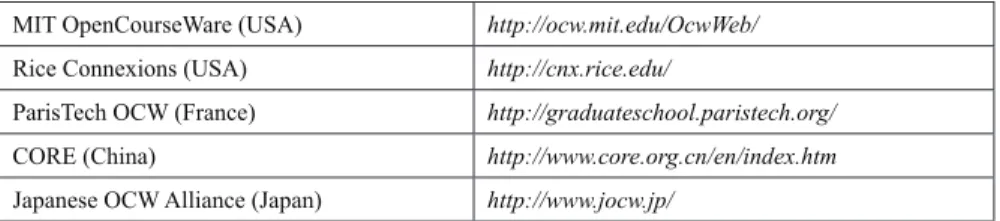
There are many free language materials not only in the OpenLearn project, but also in other open content initiatives developed by academic institutions, indicated in Table 1.
In order to learn about specific topics, teachers
canremix the most interesting learning resources by selecting, ordering, and sharing OER from different sources through maps. Then learners can visualize a meaningful sequence of different
possibilities and navigate easily through different resources, saving a reasonable amount of time. They can also download these maps and gather more language learning materials from various sources by dragging and dropping them onto Compendium, sequence them into their own learning path, and publish their maps helping their peers with new combinations.
A learning path map is similar to “my favorite list” or the “del.icio.us” Web application. It can
easily combine a sequence of the most exciting Web pages about language learning. However, this graphical representation is a more attractive and meaningful diagram (map) than a simple sequence of URLs (list). Moreover, it has the advantage of offering more possibilities: multiple sequences, extra information, personal comments represented
by symbols and classified by categories.
There are many mapping techniques used to create maps, such as mind mapping, concept mapping, Web mapping, and argument mapping. Theses mapping techniques can be very useful for teachers while designing learning activities, and for students when planning their tasks and answering questions while developing reading and writing skills. The next section will discuss further information on some mapping tech-niques. The examples illustrating each technique are from the OpenLearn unit, L550-3 Business English—Presenting the Decision. These maps were created by CoLearn Community and can be accessed in the LearningSpace (http://labspace. open.ac.uk/colearn).
Table 1. Open content initiatives. More examples can be accessed at http://www.hewlett.org/Programs/ Education/OER/OpenContent/
MIT OpenCourseWare (USA) http://ocw.mit.edu/OcwWeb/
Rice Connexions (USA) http://cnx.rice.edu/
ParisTech OCW (France) http://graduateschool.paristech.org/
CORE (China) http://www.core.org.cn/en/index.htm
knoWLEdgE Mapping
tEchniQuEs appLiEd to
LanguagE LEarning
Mind Mapping
Mind mapping was developed by Buzan around 1974 in the popular book Use Your Head. Thoughts
are often difficult to represent in a linear order and
initially appear without logical structure. Mind mapping allows ideas to be represented non-lin-early, using keywords, sentences, and pictures in graphic form. The elements are connected by lines and arrows, with short descriptions.
Mind mapping is a useful technique by which to generate new ideas, like brainstorming. Through mind maps, students can generate a large number of keywords as an initial step for solving a problem. This technique is helpful in developing creativ-ity, and learners can organize their initial ideas related to a subject to develop a project, write an essay, or prepare a presentation.
For example, Figure 2 shows a mind map con-structed to answer the activity: What questions
could you elaborate about relocation during an interview? Using Compendium, students can map their initial ideas, bringing in as many keywords as possible. Then, for each keyword, they can elaborate a question.
concept Mapping
Concept mapping was developed by Novak in the 1970s based on Ausubel’s theory of meaningful learning. This constructivist approach empha-sized that learning with understanding only takes place when new concepts are connected to what is already known. Concept maps externalize a learner’s current knowledge structure, helping them to see connections with new information and make sense of it (Novak, 1990).
Concept mapping is a mapping technique used to construct relationships between concepts. Learners can create concept maps to show im-portant keywords from a Web page, explain their
meaning, and connect them to other definitions
from the Internet and to familiar keywords rep-resenting their existing knowledge.
Figure 2. Mind map created with Compendium, questions about “relocation,” Business English (http:// kmi.open.ac.uk/projects/osc/compendium/mmap/)
0
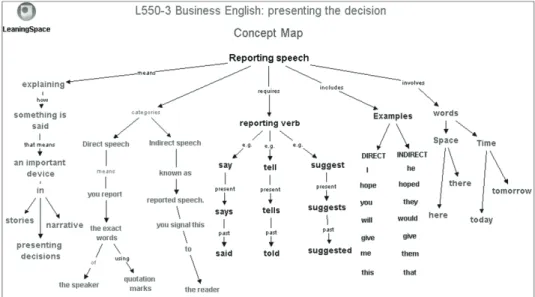
For example, the concept map created through Compendium in Figure 3 shows keywords used
to describe “reported speech.” It represents a
network of key concepts and the relationships between them.
dialogue Mapping
Dialogue mapping was developed by Conklin (2006) to solve wicked problems and share an understanding of these during discussion. It is alsoderived from the Issue-Based Information System (IBIS) developed by Rittel in the 1970s to solve ill-structured problems. IBIS is a rhetori-cal grammar with three core elementsissues, positions, and argumentsall of which can be rendered as textual outlines and graphical maps that grow with the conversation.
Dialogue mapping is a sense-making strategy useful for structuring reasoning based on ques-tions, statements, pros, cons, and conclusions. Dialogue maps can be applied to prepare and present a set of arguments, develop a logical line of reasoning, and facilitate critical thinking.
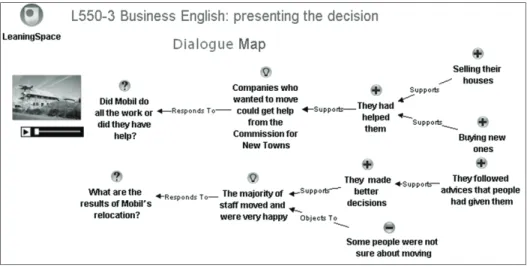
Learners can create these maps with Compendium to organize argumentation in face-to-face meet-ings and online conversations such as discussion forums, Web videoconferences, chats, or from texts and video clips. Dialogue maps can contain many kinds of resources such as videos, pictures, audio, graphs, text, forums, or Web conferences. Figure 4 is an example of a dialogue map.
Figures 4 and 5 show the process in which a dialogue map was created from an audio clip about “interviewing for relocation.” This dialogue map was a useful strategy for taking notes and recording the main statements made during the conversation. After constructing the map, students can export using “outline view,” which shows a linear sequence of arguments. They can then produce a text using reported speech.
argument Mapping
Argument mapping was developed by J.H. Wig-more in 1913 to help in the analysis of legal argu-ments by showing the evidence for each claim and how it is related in the structure of the argument. Figure 3. Concept map created with Compendium, questions about “relocation,” Business English (http://kmi.open.ac.uk/projects/osc/compendium/cmap/)
This mapping technique is also widely used in
informal logic and in the teaching of philosophy and critical thinking (Harrell, 2005; van Gelder, 2001; Van Gelder, Bissett, & Cumming, 2004).
Therefore it is another technique which can be used to develop critical and logic thinking. In an argument map, statements are organized in
a coherent structure based on claims, reasons, and objections. In order to develop reasoning, several questions can be asked: What is the main preposition? What are the evidences? What are the reasons for and against? Through questioning, stronger arguments can be selected and a better conclusion can be reached. Argument maps are Figure 4. Dialogue map created with Compendium, interview about relocation (http://kmi.open.ac.uk/ projects/osc/compendium/dmap/)
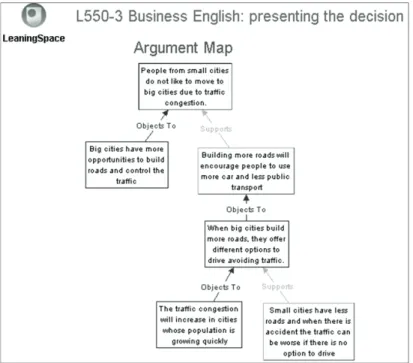
also an efficient way to represent the key line of reasoning because they extract the logical and coherent essence of thinking, leaving out what is not relevant or what does not add value. Visual-izing the process of thinking through argument helps students reflect on content and develop better structures. Figure 6 shows an example of an argument map about moving from small towns to big cities. As we can see, through this argument map created in Compendium, learners can draw their reasoning by structuring claims, objections, and reasons.
Web Mapping
The technique known as Web mapping developed in response to the rapid growth of the Internet.
The huge number of Web sites and overflow of
information can cause users to become lost in cyberspace. Web maps enable users to record
their navigation using icons, hypertext, and hyperlinks. Cartography tools permit selection of what is relevant in cyberspace, indexing and retrieving hypermedia Web material (Dodge & Kitchin, 2000). Web mapping is a useful technique to group and share important references from learning materials and from the Web.
The example of a Web map in Figure 7, which was created in Compendium, shows interesting
Web sites relating “Business Englishpresenting
Decisions” grouped by categories such as activi -ties, videos, Web pages, vocabulary lists, PDF
files, and maps. Teachers and students can select
not only material from the OpenLearn environ-ment, but also from other learning resources avail-able on the Web, such as concepts in Wikipedia, videos in YouTube, and pictures in Flickr. Figure 6. Argument map created with Compendium, outline view and reported speech on relocation (http://kmi.open.ac.uk/projects/osc/compendium/amap/)
FostEring opEn LanguagE
coMMunitiEs
Open educational resources and tools are not
restricted to academic or scientific institutions,
but comprise all learning communities. These include communities of practice, knowledge-creating communities, groups of peers, and all individual learners interested in learning about similar topics. However, there are challenges facing open learning communities. These
chal-lenges, such as finding new peers and interacting
to keep the community alive, and managing their own learning through assessment, are discussed in the following subsections.
Finding new peers to interact
and Learn Language together
In addition to Compendium, OpenLearn inte-grates two other knowledge media technologies, FlashMeeting and MSG. These tools can be used
to find new peers, foster language learning com -munities, and promote the collective building of knowledge.
Firstly, MSG is an instant messaging applica-tion with geolocaapplica-tion maps that allow students to
find fellow learners. Like ‘personal radar’, it shows
who is online and where. With one click, language students can chat by sending instant messages. A key advantage of MSG, compared to other instant messenging systems such as MSN Messenger, AIM, and GTalk, is its full integration into the LearningSpace and LabSpace environments. Participants can see who is currently online and can immediately communicate synchronously. Participants can access a list of contacts automati-cally generated in MSG based on the courses they have enrolled in (MSG, 2007).
Secondly, FlashMeeting is a Web-based video-conferencing application. This new media system offers instant meetingany time, any place, and any platform. The applet is implemented in Adobe Flash, a widely available and highly compatible Figure 7. Web map created with Compendium, interesting resources about Business English—Decisions (http://kmi.open.ac.uk/projects/osc/compendium/wmap/)
Figure 8. FlashMeeting is a Web videoconferencing application offering instant online meetings
Figure 9. FlashMeeting Memo applet showing a peer-to-peer event (left), chat (right), and timeline (bottom) (http://flashmeeting.open.ac.uk/)
type of browser plug-in. It is incredibly
light-weight, efficient, and pleasing to the eye. Based
on Flash MX Server technology, through Flash-Meeting it is possible organize, record, edit, and share virtual meetings. Meeting recordings can be annotated with comments and tags. Every part
of the meeting is a URL, so any event, comment, text chat, or speaker in the meeting can be directly referred to (FlashMeeting, 2007). Figure 8 shows the FlashMeeting screen where participants were discussing the OpenLearn project. A language learner or a teacher can book a meeting and the
system generates a URL. This URL can then be
shared to the language learning community by e-mail or via MSG.
The replay is browsed by navigating through the names of the attendees or via the timeline which represents the length of each broadcast. There are different kinds of FlashMeeting events such as seminars held by experts, video lectures on a variety of topics, Webcast talks, interviews of e-learning specialists, moderated project meet-ings, peer-to-peer student meetmeet-ings, and many other examples.
resources for open Learning
assessment
Through FlashMeeting, participants can exchange interesting URLs, questions, possible answers, arguments, and some possible conclusions. Flash-Meeting allows participants to create labels to
mark specific segments in the meeting, and they
can also type keywords in the FlashMeeting chat log. After the event, the FlashMeeting Memos generate a set of metadata, available in an XML
file, which can be imported into Compendium and
turned automatically into knowledge maps. Through these maps, participants can visual-ize a summary of key information exchanged in the meeting, including temporal and conceptual references:
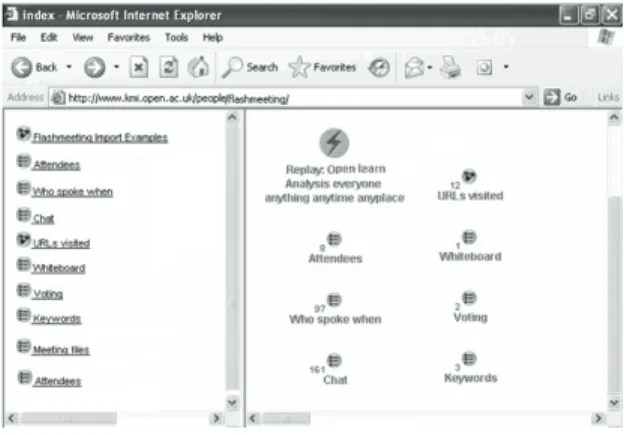
• Figure 10 shows several Compendium maps related to a FlashMeeting about the OpenLearn project. These maps introduce an overview of the Web conference: attend-ees, who spoke when, chat, URLS visited, whiteboard, voting, keywords, and meeting
files chat.
• The map in Figure 11 allows the user to keep track of who spoke when.
• The map in Figure 12 includes all URLs shared and visited during the event. Users can click and navigate on the Web sites sug-gested by attendees in the meeting.
Figure 12. Mapping the URLs visited along with their time during the event
Figure 10. A FlashMeeting maps in Compen-dium
• The map in Figure 13 presents questions, ideas, pros, and cons discussed on the Web conference.
All the elements in the knowledge maps il-lustrated by Figures 10-13 and created in Com-pendium are automatically linked to the Web videoconference. Therefore, participants can use them to replay only interesting segments. Through the maps, they can evaluate the content of the meeting and also their learning during the event. They can edit maps and organize new con-nections in a strategy to reorganize their learning and reconstruct their knowledge.
using graphs to Evaluate
participation in Language
Learning Meetings
Another way of evaluating participation language
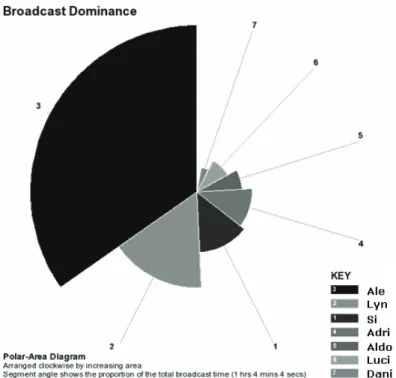
learning meeting is through “linear and polar visualizations” of the broadcast and chat domi -nance per attendee automatically generated by FlashMeeting. Through these graphs, students and teachers can visualize how knowledge is transferred via a range of communication chan-nels, such as audio, video, and text chat (Scott, Tomadaki, & Quick, 2007b).
Students can use these communication chan-nels provided in FlashMeeting differently, which also includes whiteboard, URLs, lists, and a vot-ing system. Through these graphs, it is possible to identify participation according to:
• Each user’s percentage of the total event audio-visual talk time, and
• The proportion of the number of chat mes-sages that the user made compared to the number of messages of the most active participant.(Scott, Quick, Tomadaki, & Linney, 2007a).
Some events in FlashMeeting present graphs with similar features. For instance, in virtual seminars and lectures, the main presenter takes up nearly all of the broadcast time, and the graphs will show the dominance of one person. Interviews will show the presence of the interviewee and the interviewer. A collaborative student meeting will show similar participation among participants, which can be a good indicator for quantitative analyses. The knowledge map can show the content of contributions, which can be tagged to indicate the quality of participation. Therefore, through graphs and knowledge maps, the Open-Learn community can identify if the meeting was productive, if time was well shared between all participants, and if the quality of content was meaningful. Sometimes, some participants may talk less than others, but their contribution in terms of ideas, references, and questions can be of more quality than that of colleagues who are more talkative. Additionally, graphs and maps can offer data for both quantitative and qualita-tive analysis.
Mapping social presence using
Msg and FlashMeeting
Social presence is an indispensable feature for language learning communities. In Biocca, Burgoon, Harms, and Stoner (2001) (Okada et Figure 13. Mapping questions, ideas, pros and
Figure 14. The broadcast dominance
al., forthcoming), social presence is described as “being there in other places” and “being there with other people.” Mapping social presence can be a strategy in visualizing collective intelligence, diversity of participants from different countries, the most popular events, the biggest communities, and so forth. Students and teachers can identify who and where specialists are, the most interac-tive communities, and the most popular events. By providing geo-locations of the individuals who may be relevant to a specific knowledge domain, students can easily contact people available online or face to face. An instant messaging system, MSG offers a set of presence attributes such as time, context, availability, location, and activ-ity. All these indicators can help students meet other fellow learners with similar interests or in interesting and interactive language learning com-munities. They can then access a list of contacts which may provide peer support during learning activities. Figure 16 illustrates the availability of contacts throughout the globe, mapping who is online and available to be contacted.
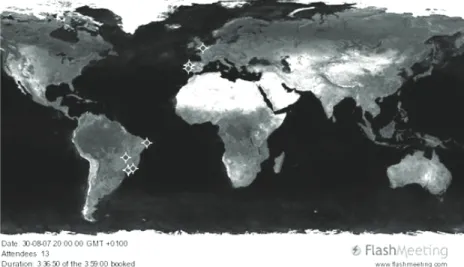
FlashMeeting also shows geographic maps on the location of participants. Through these geographic maps, which are generated automati-cally, participants in the community and possible new members can see the distribution of users for both the attendance of live FlashMeeetings and FlashMeeting replay access.
These maps are useful in illustrating:
1. How the tool is being used to connect people from the same social network or community of practice, and
2. The learning impact of the event reuse in different parts of the world.
The geographic maps in Figures 17 and 18 re-lated to a FlashMeeting event, the live OpenLearn Web Conference’ (FlashMeetingCompendium) on Open Content and Metadata, which was held in March 2006 and attended by 14 participants located in different parts of Europe and South America. The public replay was viewed 228 times by different users in Europe, Australia, Asia, and Figure 16. MSG, displaying the availability on contacts of the same course worldwide. (kmi.open. ac.uk/technologies/msg/about/)
Figure 17. 13 Live FlashMeeting attendees of the OpenLearn webconference in March 2006
Figure 18. 228 unique IPs of the viewers—OpenLearn webconference replay in October 2007
Africa, as well as in South and North America, in March 2007.
concLusion and FuturE
rEsEarch
In conclusion, a heightened understanding of
influential factors that shape the effectiveness of
peer interactions is essential to fostering open learning communities. Knowledge media tools such as Compendium, FlashMeeting, and MSG have indicated new possibilities for language acquisition. New strategies such as knowledge mapping, interactive discussions through Web
videoconferencing, and finding new peers through
geolocation instant messaging have been seen to be very useful in the development of
language-00
learning skills. Open learning communities are a valuable opportunity for students to manage their own process of learning by:
• Learning to learn,
• Encouraging time management, • Self-motivating,
• Developing critical thinking,
• Mapping information and knowledge, • Organizing their own learning path, and • Exploring new learning styles.
The are also valuable to learn with others by:
• Collaborative/cooperative learning, • Studying in groups,
• Solving conflict and difficulties together,
• Encouraging peer mediation, • Active listening,
• Sense making,
• Broadening their network of social relation-ships,
• Facilitating situated language learning in real context, and
• Encouraging collective feedback and self-assessment
In our future research, our aim is to investi-gate how participants of language learning com-munities in the OpenLearn project can develop their abilities to foster their language learning communities through these tools and contribute with the open content initiative. OpenLearn is potentially an effective learning environment for language acquisition.
The concept of openness marks a profound shift in theories and methods of language learn-ing, involving developing skills, constructing and sharing knowledge collaboratively, and participating as active learners. Students move from simply following information/instructions/ rules to discussing and making sense of these, as well as reconstructing and sharing meanings collectively.
rEFErEncEs
Aigrain, P. (2004). The individual and the collec-tive in open information communities. Proceed-ings of the 16th BLED Electronic Commerce Conference (pp. 9-11). Retrieved January 17, 2007, from http://opensource.mit.edu/papers/ai-grain3.pdf
Biocca, F., Burgoon, J., Harms, C., & Stoner, M. (2001). Criteria and scope conditions for a theory and measure of social presence. Proceedings of the Presence 2001 Conference, Philadelphia. Buckingham Shum, S. (2005a). Knowledge tech-nologies in context. Open University Press Buckingham Shum, S. (2005b, September). From open content repositories to open sensemaking communities. Proceedings of the Conference on Open Educational Resources, Logan, UT. Buzan, T. (1974). Use your head. London: BBC Books.
Conklin, J. (2006). Dialogue mapping: Building shared understanding of wicked problems. New York: John Wiley & Sons.
Cedergren, M. (2003). Open content and value creation. First Monday, 8(8). Retrieved January
17, 2007, from http://www.firstmonday.dk/is
-sues/issue8_8/cedergren/
Dholakia, U.M., King, J.W., & Baraniuk, R. (2006). What makes an open education program sustainable? The case of Connexions. Retrieved January 17, 2007, from http://www.oecd.org/ dataoecd/3/6/36781781.pdf
Dodge, M., & Kitchin, R. (2000). Mapping cy-berspace. London: Routledge.
Downes, S. (2006). Models for sustainable open educational resources. Retrieved January 17, 2007, from http://www.downes.ca/cgi-bin/page. cgi?post=33401
0 Einsenstadt, M., & Vicent, T. (1998). The
knowl-edge Web learning and collaborating on the Net. London: Kogan Page.
FlashMeeting. (2007). FlashMeeting: The simple meeting tool that works in a Web browser and creates instant Web replays. Retrieved from
http://flashmeeting.open.ac.uk/
Jarman, S. (2005). Open content initiative ap-plication to the William and Flora Hewlett Foundation. Retrieved January 17, 2007, from
http://www.open.ac.uk/openlearn/__assets/
06sngpqpwminsmwxov.pdf
Jefferson, C.A., Kirschner, P., Carr, C., & Bucking-ham-Shum, S. (2003). Visualizing argumentation: Software tools for collaborative and educational sense-making. London: Springer.
Hurley, P. (2003). A concise introduction to logic. Wadsworth.
MSG. (2007). MSG—The world’s simplest in-stant messenger. Retrieved from http://kmi.open. ac.uk/technologies/msg/launch/
Novak, J.D. (1990). Concept maps and vee diagrams: Two metacognitive tools to facilitate meaningful learning. Instructional Sciences, 19, 29-52.
Novak, J.D., & Gowin, B.D. (1984). Learning how to learn. New York: Cambridge University Press.
Okada, A., Buckingham Shum, S., Bachler, M., Tomadaki, E., Scott, P., & Eisenstadt, A. (forth-coming). Knowledge media tools to foster social learning. In S. Hatzipanagos & S. Warburton (Eds.), Social Software and developing Commu-nity Ontology. Hershey, PA: IGI Global.
Okada, A. (2007, January). Technologies for open learning in collaborative communities. Proceed-ings of the Technology, Knowledge and Society Conference (TKS 2007), Cambridge, UK.
Okada, A., & Buckingham Shum, S. (2006, Sep-tember 3-6). Knowledge mapping with Compen-dium in academic research and online education. Proceedings of the 22nd ICDE World Conference, Rio de Janeiro (www.icde22.org.br).
Okada, A., Buckingham Shum, S., & Sherborne, T. (2008). Knowledge cartography: Mapping tech-niques and software tools. London: Springer. Okada, A., Tomadaki, E., Buckingham Shum, S., & Scott, P. (2007). Combining knowledge map-ping and videoconferencing for open sensemaking communities. Proceedings of Open Education 2007: Localizing and Learning 4th Annual Open Education Conference. Retrieved from http://cosl. usu.edu/conferences/opened2007/
Open Source Initiative. (2007). Homepage. Retrieved January 17, 2007, from http://www. opensource.org/
Reagle, J. (2004). Open content communities. M/ C: A Journal of Media and Culture, 7. Retrieved January 17, 2007, from
http://journal.media-cul-ture.org.au/0406/06_Reagle.rft.php
Reagle, J. (2006). Notions of openness. Retrieved January 17, 2007, from http://numenor.lib.uic. edu/fmconference/viewpaper.php?id=36
Scott, P., Quick, K., Tomadaki, E., & Linney, J. (2007a, January). Ambient video-awareness for building working communities. Proceedings of the Technology, Knowledge and Society Confer-ence (TKS 2007), Cambridge, UK.
Scott, P.J., Tomadaki, E., & Quick, K. (2007b). The shape of live online meetings. International Journal of Technology, Knowledge and Society, 3.
Stadler, F., & Hirsh, J. (2002). Open source intel-ligence. First-Monday, 7(6). Retrieved January 17,
2007, from http://www.firstmonday.dk/issues/is
0
Van Gelder, T. (2001). How to improve criti-cal thinking using educational technology. Retrieved from http://www.philosophy.unimelb. edu.au/reason/papers/ASCILITE2001.pdf Van Gelder, T.J., Bissett, M., & Cumming, G. (2004). Cultivating expertise in informal reason-ing. Canadian Journal of Experimental Psychol-ogy, 58, 142-152.
Willinsky, J. (2006). The access principle: The case for open access to research and scholarship. Cambridge, MA: MIT Press.
kEY tErMs
Argument Mapping: A visual representation of the structure of an argument in informal logic. It includes the components of an argument such as a main contention, premises, co-premises, objections, rebuttals, and lemmas. Argument maps are often used in the teaching of reasoning and critical thinking, and can support the analysis of pros and cons when deliberating over wicked problems.
Concept Mapping: A technique for visual-izing the relationships between different concepts. A concept map is a diagram showing the relation-ships between concepts. Concepts are connected with labeled arrows, in a downward-branching hierarchical structure. The relationship between concepts is articulated in linking phrases, for example, “gives rise to,” “results in,” “is required by,” or “contributes to.”
Dialogue Mapping: A structural augmenta-tion of group communicaaugmenta-tion. As the conversaaugmenta-tion unfolds and the map grows, each person can see a summary of the discussion so far. The map
serves as a “group memory,” virtually eliminating
the need for participants to repeat themselves to
get their points made. Other benefits of dialogue
mapping include: the group sees where they are,
where they have come from, and where they are
going to, and is thus self-correcting if they get “off topic.” The shared display map shifts the dynamic of the group into a collaborative mode: “What can we think and learn together?” The map focuses the group on a kind of “lightly logical” perspec -tive as they work on the issues at hand. The map increases the group’s shared understanding about the problem at hand, possible solutions, meaning issues, roles and responsibilitiesall of the key elements of a successful project.
Knowledge Mapping: A technique for knowledge visualization that aims to facilitate the creation and communication of knowledge through the use of computer and non-computer-based, complementary, graphic representation techniques. Examples of such visual formats are information graphics, sketches, diagrams, images, maps, interactive visualizations, dy-namic visuals (animations), imaginary visual-izations, storyboards, or even physical objects for inspection. While information visualization concentrates on the use of computer-supported tools to explore a large amount of abstract data, knowledge visualization focuses on the transfer or creation of knowledge among people. Beyond the mere transfer of facts, knowledge visualization aims to further create or transfer insights, experi-ences, attitudes, values, expectations, perspec-tives, opinions, and predictions by using various complementary visualizations. Dynamic forms of visualization such as educational animation have the potential to enhance understandings of systems that change over time.
Mind Mapping: A diagram used to represent words, ideas, tasks, or other items linked to and arranged radially around a central keyword or idea. Used to generate, visualize, structure, and classify ideas, and as an aid in study, organiza-tion, problem solving, and decision making. It is an image-centered diagram that represents semantic or other connections between portions of information. By presenting these connections
0 in a radial, non-linear graphical manner, it
en-courages a brainstorming approach to any given organizational task, eliminating the hurdle of ini-tially establishing an intrinsically appropriate or relevant conceptual framework to work within.
Open Educational Resources: Term first adopted at UNESCO’s 2002 Forum on the Im-pact of Open Courseware for Higher Education in Developing Countries funded by the William and Flora Hewlett Foundation. Open educational resources are educational materials and resources offered freely and openly for anyone to use, and under some licenses remix, improve, and re-distribute. Open educational resources include: learning content: full courses, course materials, content modules, learning objects, collections, and journals; tools: software to support the creation, delivery, use, and improvement of open learning content including searching and organization of content, content and learning management systems, content development tools, and online learning communities; and implementation re-sources: intellectual property licenses to promote open publishing of materials, design-principles, and localization of content.
Open Language Learning: A teaching method for language acquisition based on open educational resources, open source technolo-gies, and online communities. Open learning was founded on the work of Célestin Freinet and Maria Montessori. Open learning aims to allow pupils self-determined, independent, and inter-est-guided learning. More recent work on open learning has been conducted by pedagogues Hans
Brügelmann, Falko Peschel, Jörg Ramseger, and
Wulf Wallrabenstein. Due to the rapid develop-ment of information and communication technolo-gies, open learning has been associated with free learning resources, collaborative study, and open communities.
Web Mapping: The process of designing, implementing, generating, and delivering maps on the World Wide Web. While Web mapping primarily deals with technological issues, Web cartography additionally studies theoretic aspects: the use of Web maps, the evaluation and optimiza-tion of techniques and workflows, the usability of Web maps, social aspects, and more.