Alphanumeric Display Terminals
The video display terminal (VDT, or CRT, as it is
com-monly referred to) is the principal interface between people
and computers. As the computer becomes pervasive in
today's business world, more and more people are being
exposed to this popular business tool. Originally invented
as a "glass teletype," an alternative to using a teleprinter
terminal as a computer operator console, the display
termi-nal has evolved to the point where it is a primary
compo-nent in the vast majority of modern computer applications,
including data entry, inquiry/response, program
develop-ment, business and scientific graphics, word processing!
text editing, CAD/CAM, and many others. For the purpose
of this report, we will focus on alphanumeric display
termi-nals designed for general purpose business applications.
The steady intt:oduction of improvements in CRT design
and functional capability, such as editing, highlighting,
protected fields, split-screen functions, color screens, and
ergonomic housing, has contributed to the growth of the
market. However, the single most important factor in
today's display terminal market, in terms of how it affects
both the vendor and the end-user, is the continuing
down-ward trend in pricing. Historically, price has been set in
proportion to capability; dumb terminals have carried the
lowest price tags, with fully featured smart editing
termi-nals on the high-end of the price scale. While this is still
true, advances in technology have caused the lines of
distinction between what is dumb and what is smart to be
blurred; meanwhile, prices have fallen, drastically in some
cases.
As with all segments of the hardware industry,
technologi-cal improvements have led to lower prices for the user.
Nowhere is this more obvious than in the terminal market.
Consider that about five years ago only the most basic
dumb ASCII terminals carried a price tag below $1,000.
Today, the low-end price seems to have settled in the
$450-to-$500 area, with a wide variety of smart terminals
avail-able in the $600-to-$800 range. Prices in the IBM 3270
segment of the market, traditionally much higher than in
the asynchronous segment, have also fallen, although not
quite so drastically.
These lower prices have reduced profit margins for vendors
and have made competition in the terminal market tougher
and riskier than ever. Still, the market remains vigorous,
and new vendors continue to enter. The real winner in all of
this, obviously, is the user, who continues to gain more
functionality per terminal dollar.
Today, there are somewhere in the neighborhood of 10
million display terminals installed throughout the United
This report focuses on non-user-programmable
al-phanumeric display terminals designed for
gener-al-purpose business applications. It includes a
brief historical summary of the market; current
market trends; developments in ergonomics; and
a look at the industry's major segments. Also
included are comparison columns detailing the
specifications of 361 display terminal models
of-fered by 91 vendors.
mainframe links improve, more and more microcomputers
will be able to perform terminal tasks in addition to
micro-computing tasks. Datapro has seen a drop in the number of
companies entering the terminal market in the past year, as
well as a small shakeout. These factors can be attributed to
the growth of the microcomputer industry.
GENERAL CATEGORIES
All of the terminals covered in this report have three
features in common: 1) each has a keyboard that can
generate and a monitor that can display a full alphanumeric
character/code set; 2) each has the capability to send and
receive data via communications lines to a remote host
computer; and 3) each is marketed for general-purpose
usage in the United States and Canada, and is identified as
a distinct product to end users.
Display terminals fall into one of three general categories:
dumb, smart, and user-programmable. This report
con-cerns itself with dumb and smart terminals, according to
Datapro's definitions. User-programmable terminals have
been placed into a distinct and separate section (C21)
because of their sophistication, features, and price.
t>
States. However, the healthy growth of this market has
The VT220 from Digital Equipment Corporation (DEC) is the
been jeopardized by the popular acceptance of the micro-
successor to the company's VT100, which created an industry
computer by corporations. As microcomputer prices also
standard. The VT220 provides all of the functionality of its
tumble, many firms are using them as multipurpose work-
predecessor in a more compact, ergonomically improved
pack-stations that usurp some of the functions traditionally
age. Standard features include 132-column display capability
performed by display terminals. As
microcomputer-to~~.and ANSI X3.64 compatibility.
C2S-010-102
Display Terminals
Alphanumeric Display Terminals
The Miracle
178
from Term-Tronics is a plug-compatible
replacement for the IBM
3178.
The terminal carries a
single-quantity purchase price of
$995,
making it the lowest priced
3178 replacement on the market. A separately addressable
printer port is available as an option.
t>
Naturally, there is some overlap among dumb, smart, and
user-programmable terminals. The definitions of these
cat-egories are given as follows:
Dumb
terminals offer a limited number of functions; most
feature teletype compatibility.
Smart
terminals offer extended functions, such as editing
and formatted data entry. In some cases, the user can tailor
the terminal to fit his/her own application via aHmited
degree of programming, such as format creation and
pa-rameter definition.
User-programmable
(or intelligent) terminals feature
soft-ware support. The vendor typically provides an operating
system, an assembler- or compiler-driven programming
language, subroutines, I/O utilities, one or more protocol
emulators, and one or two application programs, such as
data entry and text editing.
For more information on user-programmable terminals,
see Report
C21-01D-Ol,
"Distributed Data Processing
Systems."
MICROPROCESSOR CONTROL
Virtually all display terminals currently manufactured are
microprocessor-controlled. Microprocessor-based
pro-grams (firmware) reside in ROM or PROM memory.
ROM-re~dent
programs, which are inexpensive when
re-produced in large quantities, control those features which
are permanent and unchangeable; while PROM-resident
programs are typically produced in smaller quantities and
implement customized or modifiable features. Either type
can be replaced by simply removing the old chip and
putting in a new one. This flexibility is highly beneficial to
the manufacturer, since older equipment can be updated
and nonstandard customer
sper~cationscan.
be fulfilled
without costly hardware changes. Theoretically, program
interchangeability might also benefit the user, but in
prac-tice it is doubtful that the requirements of a particular user
will change often enough to make it a great advantage. The
fact that PROM replacement generally must be done at the
factory or by a field service technician precludes frequent
PROM replacement.
In addition to controlling basic terminal functions, the
microprocessor firmware
can
provide protocol emulation,
define the character/code sets to be generated by the
key-board and displayed on the screen, implement special
features, set control parameters, etc. Firmware
specifica-tions are generally determined at the time of order, and
once the firmware is in place, execution is transparent to
the user. Some vendors have predetermined programs
from which to choose; a few permit users to submit their
own firmware specifications.
DISPLAY MEDIA
The vast majority of display terminals manufactured today
use a cathode ray tube (CRT) as the display medium. The
popularity of this device stems from its flexibility,
high-character capacity, and relatively low cost.
In addition to being able to display alphabetic and numeric
characters in virtually any format, the CRT can highlight
characters by means of underscoring, reverse video,
blink-ing, or varying levels of brightness. Some CRT terminals
can display double-size characters. Today, more and more
CRT terminals have a graphics character set for creating
forms and report formats on the screen. Some CRTs also
permit the creation of business graphics-for example, bar,
column, and pie charts reflecting sales, income and
ex-pense, inventory levels, etc. Interactive graphics or
engi-neering graphics on the other hand, is a completely
differ-ent discipline which requires a high-resolution graphics
terminal. Graphics terminals can also display
alphanumer-ic characters, but they are considerably more expensive.
Other types of alphanumeric displays have existed for
years, and at one time were thought to be a serious
chal-lenge to the CRT. Examples of these are LEDs
(light-emitting diodes), which are very popular in calculators and
point-of-sale (PaS) terminals, and gas-discharge displays
such as IBM's new 3290. These alternate types of displays
provide extremely sharp images. However, as of this time,
they are still quite expensive, and have found only a small
niche in certain specialty applications.
ERGONOMICS
According to the American National Standard ANSI
294.1-1972,
ergonomics
is defined as "A multidisciplinary
activity dealing with the interactions between man and his
J:
©
1985 DATAPRO RESEARCH CORPORATION, DELRAN. NJ 08075 USA REPRODUCTION PROHIBITEDt:>
total working environment, plus such traditional and
envi-ronmental aspects as atmosphere, heat, light, and sound, as
well as of tools and equipment of the workplace."
Display terminal manufacturers have become increasingly
aware of the need to consider human factors, or
ergonom-ics, in the design of their equipment. The trend toward
making CRTs more "operator-friendly" began in Europe,
particularly in the Scandinavian countries, where powerful
unions representing clerical workers have implemented
rigid guidelines as to what types of display terminals their
members will use.
While no such guidelines are currently in effect in the
United States, virtually all CRT manufacturers have
recog-nized market opportunities in ergonomic designs, and are
attempting to attract customers through marketing
cam-paigns emphasizing the human factors which influenced
the design of their terminals.
The average operator of a display terminal is concerned
primarily with two components with which he or she has
the most interaction; the keyboard, for input of data, and
the display screen, for verifying what was keyed and for
reading the output data. Ergonomic design improvements
are therefore concentrated on these two components.
The vast majority of display terminal vendors now offer
keyboards that are detached or detachable. Connected to
the display console via a cable or coiled wire, these
key-boards may be placed at some distance (usually 3 to 6 feet)
from the console, allowing the operator to place the
key-board in the most comfortable position(s) while working at
the terminal.
.
The layout of the keyboard is also a concern. Most
key-boards feature a typewriter-style layout, for ease of training
personnel already familiar with a typewriter's key
arrange-ment. Dedicated (separate) numeric keypads are also
gen-erally available for applications requiring fast numeric
entry; these duplicate the key arrangement of a pocket
calculator or adding machine. In addition, some vendors
have added a palm rest for the numeric pad, for operator
comfort. Many vendors also offer sculptured key caps in
place of flat key caps, to facilitate speed of data entry and
improve operator comfort. For keyboard feedback,
ven-dors may offer either audible or tactile (touch-sensitive)
key click, which tells the operator that the key has been
depressed far enough to register.
Another important design factor to be considered is the
slope and thickness of the keyboard assembly itself. Most
keyboards manufactured today are either sloped or
stepped, and the optimum profile angle generally is
be-lieved to be between 5 and 15 degrees. It has also been
determined in studies that the thickness of the keyboard, or
the distance from the base of the keyboard to the home row
of keys, generally should not exceed 30 mm. The vast
majority of keyboards manufactured today have a
low-profile design that conforms to the German DIN
(Deutsches Institute
fur
Normen) standard for ergonomics.
TeleVideo's 925E display terminal mirrors the trend in the
terminal market toward compact, ergonomically improved
dis-play designs. The 925Efeatures a tilt/swivel disdis-play, low-profile
keyboard, and small footprint size. The older TeleVideo 925,
featuring the company's previous display design, is shown in the
background.
Operator eye strain or fatigue is a consideration which must
be dealt with when designing a CRT display screen. Most
display screens produced today are etched or contain a
bonded faceplate to reduce glare. Another method of glare
reduction being utilized by more and more manufacturers
is the addition of tilt and/or swivel adjustments. These
adjustments not only allow the operator to place the
view-ing area in a position to avoid glare, but also to place the
screen at the most comfortable viewing angle.
The phosphor color and size of characters also contributes
to their legibility. Green phosphor has replaced white as the
standard for the majority of display terminal models.
Am-ber phosphors are now very popular in Europe, and many
domestic vendors are beginning to offer amber phosphor
characters in this country. However, there is currently no
scientific proof that one phosphor color is easier on the eyes
than another. Character phosphor remains a matter of
personal preference. The vast majority of display terminals
on the market today utilize the dot matrix technique to
form characters. The more dots that are contained in the
character cell, the sharper the character will appear. For
years, 5-by-7 characters were the standard of the industry;
today, 7-by-7 and 7-by-9 characters are more common, and
they provide a clearer character. Some vendors have
incor-porated higher refresh rates to reduce image instability, or
flicker, in the characters, further improving their legibility.
The size of the characters generated depends on the size of
the screen and the display format used. Characters will be
larger on 15-inch (diagonally measured) screens than on
12-inch screens; likewise, characters will be larger in an 80
character-per-line format than in a 132 character-per-line
format. For applications requiring a 132-column format, a
14- or 15-inch display screen is preferable.
To facilitate specialized data entry, some vendors offer a
light-pen option, which allows the user to enter data via a
light-pen for applications involving menu selection. A vari-
t:>
C25-01 0-1 04
Display Terminals
Alphanumeric Display Terminals
t>
ation of this is the touch-sensitive screen, offered by a small
number of vendors, which allows the user to input data by
touching the screen With a finger or a pen. Finally, LSI
circuitry has contributed to the use of smaller power
sup-plies. Some CRT terminals have smaller cooling fans than
before, which result in reduced noise level. Individually,
these improvements may be slight, but when considered
cumulatively, they represent a marked improvement over
the terminals of five years ago.
All of the above features should merit serious consideration
from potential terminal buyers. Although many ergonomic
features may be ordered from the terminal manufacturer,
the increased emphasis of ergonomics has led to the
spring-ing up of a number of specialty companies that offer
devices which can be
added
to terminals to make them
more user-friendly. Several companies market optical
dis-play filters, glare shields, noise shields, etc., which are
designed to fit most major displays. Modular office
furni-ture manufacfurni-turers also offer work stations that provide
tilt/sWivel bases for terminals not equipped with these
features.
As user awareness of human factors grows, we see
ergo-nomic considerations in the U.S. becoming not simply a
market opportunity, but a mandate. Controversy continues
to grow regarding the effects that constant use of a CRT has
on the health of the operator. Workers whose jobs require
them to sit at the display all day have complained of
headaches, dizziness, back pains, and nausea. The National
Institute for Occupational Safety and Health (NIOSH) has
conducted research studies on this subject (copies of these
reports can be obtained from NIOSH). While no definite
conclusions have as yet resulted from these studies, it is
clear that these concerns are a significant matter that must
be addressed by both vendors and buyers. As of this time,
they are being addressed out of concern for market share in
a highly competitive market.
It
is expected, however, that
Micro-Term's Twist is a dual-format display terminal.
featur-ing a 24-line by 80-column landscapeformat. and a 72-line by
80-column full-page format. The display screen is rotated 90
degrees to achieve a new format.
domestic unions will follow. the lead of European unions
and place standards for VDT use
ir
future contracts.
Ergonomic features will then be mar .!atory.
MAJOR DISPLAY MARKETS
The alphanumeric display terminal market generally is
acknowledged to contain two major segments: the ASCII
(asynchronous) terminal market, and the IBM 3270
(syn-chronol's) terminal replacement market. Both segments
continue to enjoy healthy growth, partkularly the ASCII
market. And, as mentioned previol""ly, low prices and
increased price/performance have made display terminals
more attractive than ever to potential users, and continue
to play a major role in the direction of each of these
segments.
IBM's Best-Seller. the 3270
The IBM 3270 has strongly impacted the alphanumeric
display terminal market since deliveries began late in 1971.
The first generation of devices, which were discontinued as
IBM products in late 1982, included the 3271/3272 control
units, 3275 display station, 3277 display, and 3284/3286/
3288 printers. In 1977, the product line was radically
overhauled, resulting in the announcement of a second
generation of components (the 3274 control unit, 3276
control/display, 3278 display, and 3287/3289 printers) that
offered increased capabilities at prices much lower than
comparable older models. Along with that announcement
came major price reductions on the older equipment. In
late 1979, color displays and printers were added to the
family.
In March 1983, IBM made some long-awaited changes and
enhancements to the 3270 product line. Unveiled were: the
3178 Display Station, a smaller and less expensive version
of the popular 3278 Model 2 display; new versions of the
3274 Control Unit, offering improved price/performance;
the 3290 Information Panel, a gas plasma display; the 3299
Terminal Multiplexer, a coaxial cable eliminator; price
reductions of approximately 10 percent on older existing
3270 models; purchase discounts of 40 percent on the 3178
for quantities of 3,000 or more, With the conversion of
leased 3278s applying to that quantity; and an option
permitting the attachment of the IBM Personal Computer
to the 3278 Display Station. These announcements were
followed in October With the introduction of the 3270
Personal Computer, a version of the firm's PC for use as
part of a 3270 cluster. The 3179 color display and 3180
display, both compact terminals along the same line as the
3178, were unveiled in March 1984.
These changes were made by IBM to protect their large
(and lucrative) 3270 installed base. This installed base
numbers well over 1 million units. The independent
3270-compatible terminal vendors, through lower prices or
im-proved price/performance, were seriously eroding IBM's
share of the market. These independents include vendors
such as ITT Courier, Telex, AT&T Teletype,
Lee
Data,
Memorex, and several others. In order to remain competi-
t
©
1985 DAT APRO RESEARCH CORPORATION. DELRAN. NJ 08075 USAREPRODUCTION PROHIBITED
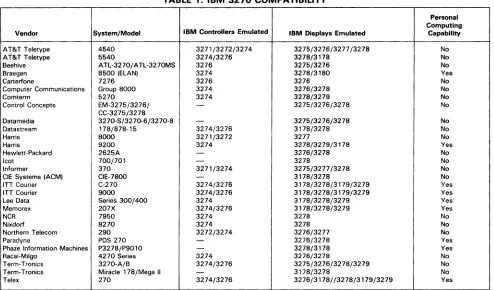
TABLE 1. IBM 3270 COMPATIBILITY
Personal IBM Controllers Emulated Computing Vendor System/Model IBM Displays Emulated Capability AT&T Teletype 4540 3271/3272/3274
AT&T Teletype 5540 3274/3276 Beehive ATL-3270/ ATL-3270MS 3276 Braegen 8500 (ELAN) 3274
Carterfone 7276 3276
Computer Communications Group 8000 3274
Comterm 5270 3274
Control Concepts EM-3275/3276/
-CC-3275/3278
Datamedia 3270-5/3270-6/3270-8
-Datastream 178/878-15 3274/3276
Harris 8000 3271/3272
Harris 9200 3274
Hewlett-Packard 2625A
-Icot 700/701
-Informer 370 3271/3274
CIE Systems (ACM) CIE-7800
-ITT Courier C-270 3274/3276 ITT Courier 9000 3274/3276 Lee Data Series 300/400 3274
Memorex 207X 3274/3276
NCR 7950 3274
Nixdorf 8270 3274
Northern Telecom 290 3272/3274
Paradyne PDS 270
-Phaze Information Machines P3278/P9010
-Racal-Milgo 4270 Series 3274 Term-Tronics 3270-A/B 3274/3276 Term-Tronics Miracle 178/Mega II
-Telex 270 3274/3276
>
tive, these vendors have been forced to reply to the IBM
announcements with new products and/or price reductions
of their own. By now, most 3270-compatible vendors have
announced new product generations of their own. A small
shakeout also has occurred, with Raytheon Data Systems
(once IBM's number-one competitor in this market) and
MDS Trivex exiting the market.
By adding the 3270-PC, as well as Personal Computer
attachability, to the 3270 system, IBM has addressed a
threat which is as much internal as it is competitive. The
overwhelming acceptance and popularity of the IBM
Per-sonal Computer poses a real threat to the entire display
terminal industry. As personal computing becomes the
rule, and not the exception, in most major corporations,
laM is moving to protect its huge 3270 installed base by
incorporating personal computing into the 3270 system.
Most of the independents now offer some type of personal
computing with their product lines, either via their own
equipment or through IBM Personal Computer
attachabi-lity. In the near future, some type of personal computing
capability is likely to become requisite for competing in this
market.
With the increased pressure from IBM, it is now more
important than ever for the independent vendors to offer a
complete line of 3270-compatible products_ Today's
suc-cessful independents must couple a full range of products
with lower prices, improved price/performance, and added
value, in order to create an opportunity to penetrate an
IBM shop. International Data Corporation, a market
re-search firm located in Framingham, Massachusetts,
esti-3275/3276/3277/3278 No
3278/3178 No
3275/3276 No
3278/3180 Yes
3276 No
3276/3278 No
3278/3279 No
3275/3276/3278 No 3275/3276/3278 No
3178/3278 No
3277 No
3278/3279/3178 Yes
3276/3278 No
3278 No
3275/3277/3278 No
3178/3278 No
3178/3278/3179/3279 Yes 3178/3278/3179/3279 Yes 3178/3278/3279 Yes 3178/3278/3279 Yes
3278 No
3278 No
3276/3277 No
3276/3278 Yes
3278/3178 Yes
3276/3278 No
3275/3276/3278/3279 No
3178/3278 No
3276/3178//3278/3179/3279 Yes
mates the installed base of IBM 3270 and plug-compatible
terminals at 31 percent of the total U.S. installed terminal
base of over 6.6 million. Clearly, even a small percentage of
this market can be extremely profitable for an independent
vendor.
In addition to the 3270-compatible vendors, some ASCII
terminal vendors have invaded the 3270 market through
protocol conversion. On a 3270 network, synchronous
terminals can be replaced with asynchronous terminals
coupled with protocol converters. These devices allow the
ASCII terminal to support the functional characteristics of
the 3270 terminal. The advantages of this strategy are
twofold-ASCII terminals remain less expensive than their
3270 counterparts, and users with both IBM and non-IBM
hosts may utilize the same terminals to access each.
Table 1 provides a summary of the major 3270-compatible
vendors and their products. This table does not include
those products that require a protocol converter for 3270
emulation.
The ASCII Terminal Market
The ASCII display terminal market is the largest segment
of the two major display markets, with regard to number of
vendors, number of units marketed, and quantity sold.
This market originated as the Teletype replacement
mar-ket, with units intended to replace the highly popular
Teletype ASR 33/35 terminals. Although today not many
of the ASCII terminals purchased are actually replacing the
older Teletype units, the ASCII terminal market is still
often referred to as the teletype-compatible market.
1:>
[image:5.612.56.550.89.379.2]C25-010-106
Display Terminals
Alphanumeric Display Terminals
The
3178
was the first member of a new generation of 3270
displays from IBM. The modular design of the
3178
can be
found on two newer IBM displays, the
3179
and 3180. The 3178
also heralded a trend toward lower prices for the 3270 family
components.
t>
Manufacturers of ASCII terminals generally aim their
products at educational and commercial users requiring
large numbers oflow-priced terminals for applications such
as order entry and time-sharing.
As was mentioned earlier in this report, price is a key factor
for success in this market. The continuing price war
involv-ing the low-end entries in the ASCII terminal market has
made the recent activity in this segment even greater than
in the past. Initially, only the truly "dumb" terminals (like
the original dumb unit, the Lear Siegler ADM 3) were
available for less than $1,000. Now, features such as block
mode transmission and editing capabilities are available at
below traditional dumb terminal prices. In addition to
price cutting, vendors are attempting to make their
offer-ings more attractive to potential buyers by adding
en-hanced features such as business graphics, split-screen or
windowing capabilities, and a variety of visual attributes.
ASCII terminal vendors are also paying a lot of attention to
ergonomics, incorporating features such as tilt/swivel
screens and low-profile keyboards into their products.
Leaders in the ASCII field generally provide a full range of
terminal models ranging from low-end units to editing
models. The current leaders include TeleVideo Systems,
Applied Digital Data Systems (ADDS), Lear Siegler, and
Esprit Systems. An active, but somewhat separate
subsec-tion of the ASCII terminal market consists of the Digital
Equipment Corporation (DEC) VT100, its successor, the
VT220, and those terminals that offer DEC emulation. A
large number of vendors are involved in the DEC
emula-tion market, including those general-purpose terminal
ven-dors mentioned above; in fact, most major ASCII terminal
manufacturers provide at least one DEC emulator in their
product line.
As a by-product of DEC emulation, vendors are now
providing ANSI X3.64 code compatibility on their
termi-nals. The American National Standards Institute (ANSI)
first. published the X3.64 standard for two-dimensional
data devices in 1977. The goal of the standard was to
standardize control codes for all terminals. The DEC
VT 1 00 was the first display terminal to conform to the
ANSI standard, and the VT220 also conforms. In order to
provide true DEC emulation, the makers of DEC
emula-tors also are required to provide ANSI X3.64 code
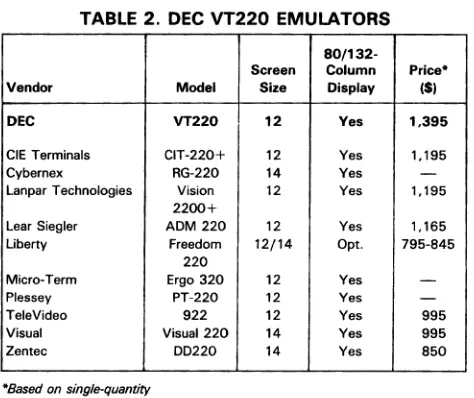
com-patibility· on their products. Table 2 provides a look at
those vendors who have introduced new terminal models
offering DEC VT220 emulation.
In addition to DEC, most of the major mainframe and
minicomputer vendors offer terminal product lines for use
with their computer systems. Hewlett-Packard claims a
large installed base of display terminals, as do Burroughs,
Data General, and Sperry.
DISPLAY TERMINAL CHARACTERISTICS
The accompanying comparison charts summarize the
char-acteristics of 361 commercially available alphanumeric
display terminals from 91 vendors. Nearly all of the
infor-mation was supplied by the manufacturers during October
and November 1984. Their cooperation is acknowledged
and greatly appreciated.
Datapro sent repeated requests for information to nearly
100 companies known or believed to be in the display
terminal business. The usable responses summarized in
our charts provide a comprehensive picture of the
commer-cial display terminals that are currently available· in the
United States and Canada. The absence of any specific
company from our charts means that the company either
failed to respond to our repeated information requests or
was unknown to us.
The chart entries and their significance are explained in the
following paragraphs.
TERMINAL DESCRIPTION
Display terminals are available in one of two basic terminal
configurations: stand-alone and cluster. Stand-alone units
are typically those that contain all components that support
the operation of the terminal including display, keyboard,
interface, and power supply within a single cabinet.
Auxil-iary units such as printers, cassette .tape drives, etc., are
usually external devices. Sometimes a stand-alone unit
includes separate cabinets for terminal control and
key-board/display sections, and it may even include one or two
separate displays. A cluster configuration typically includes
a terminal control unit and a number of individual
cable-connected keyboard/display units that can be located
sev-eral thousand feet from the controller. In some cases, the
vendor provides a multiplexer that accommodates a cluster
of stand-alone terminals. The size of a cluster arrangement
is defined by the maximum number of displays per
controller.
©
1985 DA T APRO RESEARCH CORPORATION, DELRAN. NJ 08075 USA REPRODUCTION PROHIBITEDTABLE 2. DEC VT220 EMULATORS
80/132-Screen Column Price* Vendor Model Size Display (SI
DEC VT220 12 Yes 1.395 CIE Terminals CIT-220+ 12 Yes 1.195 Cybernex RG-220 14 Yes
-Lanpar Technologies Vision 12 Yes 1,1952200+
Lear Siegler AOM 220 12 Yes 1,165 Uberty Freedom 12/14 Opt. 795-845
220
Micro-Term Ergo 320 12 Yes
-Plessey PT-220 12 Yes
-TeleVideo 922 12 Yes 995 Visual Visual 220 14 Yes 995 Zentec 00220 14 Yes 850*8ased on single-quantity
>
Terminals that are designed to be held or to be
hand-carried, are noted in the entry transportability.
Some terminals are designed as direct replacements for
other terminals. In the alphanumeric display terminal
mar-ket, replacement terminals fall into two principal
catego-ries: those designed to replace an IBM family terminal are
indicated as having IBM compatibility; and those designed
to replace a terminal in the ASCII/Teletype market are
indicated as having teletype compatibility.
Some vendors provide other compatibility, and can replace
terminals such as those produced by Burroughs, Digital
Equipment, Honeywell, and Sperry. For example, a wide
variety of vendors market terminals which are compatible
with the DEC VT100 or newer VT220.
Either of two types of compatibility may be offered:
trans-mission compatibility or "plug-to-plug" compatibility.
Transmission compatibility requirements include identical
protocol, code and unit code structure, timing,
asynchro-nous or synchroasynchro-nous operation, and transmission speed.
Some vendors even provide identical cables, which is a
cost-effective consideration in a local cluster environment.
Most vendors with transmission-compatible units offer
additional features and functions that the original vendor's
equipment does not have, implemented via minor changes
in host software. Units with true plug-to-plug compatibility
not only have identical transmission parameters, but also
identical features and functions; no alteration to host
soft-ware is necessary, but no enhancements beyond the
origi-nal vendor's equipment are available.
DISPLAY PARAMETERS
Information displayed on the screen of a CRT is generally
arranged according to an orderly format consisting of a
maximum number of printed lines per screen and
charac-ters per line. The electronic circuitry that produces the
display image is designed to a specified set of parameters
that define the display capacity (i.e., the maximum number
of display positions) and the screen arrangement (i.e., the
maximum number of displayable lines and displayable
characters per line). The most common display capacity is
1920 characters arranged in 24 lines of 80 characters. Many
vendors offer 132-character display lines, which can
elimi-nate the need to revise or patch software designed for
standard 132-column printers or to maintain dual sets of
programs for 80-column and 132-column output.
In most terminals, the number of characters that can be
stored by the terminal's display memory equals the
maxi-mum screen capacity. In some terminals, however, storage
is provided for more characters than can be displayed on
the screen at one time. This additional data may be stored
character-by-character, by the line, or by the "page" (a full
screen of data). Memory capacity defines the total number
of characters, lines, and pages that can be stored in the
terminal's display memory.
Information is displayed in a rectangular area, slightly
smaller than the total surface of the display screen. The
factors that determine the required size of the screen area
are the display arrangement and the size of the displayable
characters. For example, the typical 1920-character display
utilizes a 12- or 15-inch (diagonal) screen area.
Ergonomic factors are becoming increasingly important as
terminal features. One such feature gaining in popularity is
a tilt and/or swivel screen. This feature provides for the
mounting of the display monitor onto a separate desktop
base or pedestal, and allows the operator to twist the screen
vertically ("tilt") and/or horizontally ("swivel") to the
most advantageous position for viewing.
The set of total displayable symbols. and the method of
symbol formation
are functions of the character generator,
which accepts coded characters (typically ASCII or
EBCDIC) from the computer and keyboard and converts
them to a number of dots or strokes so that the form of the
symbol or image can be displayed. In CRTs, characters are
formed almost exclusively by the dot matrix technique.
Each character is formed within a matrix of dots, and only
those dots required to form the specific character are
intensified. For example, a dot matrix that contains 35 dots
is typically arranged 7 dots high by 5 dots wide.
Characters can be made clearer by increasing the number of
dots within the matrix. The stroke technique forms
charac-ters by drawing short straight lines between specified
points. Character phosphor refers to the physical coating of
phosphorous on the back side of the screen which, when
illuminated, creates the displayed characters. The type of
phosphor used defines the color of the displayed character,
as well as the persistence of the phosphor (a
long-persis-tence phosphor is less likely to cause image flicker
prob-lems than a short-persistence phosphor; however, the
im-age of a long-persistence phosphor is more likely to smear
when lines are scrolled). Among the more common
phos-phors available are P4 (white), and P31 or P39 (green).
Amber and yellow-green phosphors are also available on
some terminals.
1:>
[image:7.612.56.293.82.281.2]C25-01 0-1 08
Display TerminalsAlphanumeric Display Terminals
t:>
Display arrangement, display medium, character
phos-phor, and symbol formation all have a great impact on
display clarity. Several units should
be
tested to decide
which is easiest on the operator's eyes.
Attention can be drawn to vital information and different
types of significant data can be visually separated by the use
of the following display features:
• Color-characters or fields can be separated by color,
which also can be
used to identify conditions or types of
data. IBM's color display, the 3279, is currently emulated
by many of the independent 3270-compatible vendors.
• Graphics-bar charts, pie charts, and graphs may be used
to present certain types of information. In most cases, an
affirmative answer in this category indicates the presence
of line drawing or special graphics character sets.
It
generally does
not indicate the presence of highly
sophis-ticated graphics capabilities found on graphics-dedicated
terminals.
• Underline-highlights significant information by
underlining.
• Blink-highlights significant information by causing it to
blink off and on.
• Blank (security)-sensitive information is transmitted,
but not shown on the screen.
• Bold-highlights significant information by displaying it
at a different brightness level.
• .8everse-highlights significant information by
display-ing a negative image of it, e.g., when normal data is
Human Designed Systems provides APL terminal capability
with the Concept AVT-APL+. The Concept AVT-APL+
con-tains a I32-column display format and conforms to the ANSI
X3.64 standard. Full/true overstrike APL is standard.
displayed in white on a dark background, the highlighted
character or field is displayed in dark on a white
background.
• Double size-highlights significant information by
dis-playing it in characters which are of larger size than
normal. Double height, double width, and/or double
height/width characters may be
supported.
Some terminals offer several of these display features,
which can be combined to produce even more effective
results. The features are programmable (usually via the
keyboard), and can be used on a character-by-character
basis, or in a designated field.
Some applications require viewing more data than can be·
displayed at one time. The following features satisfy this
need:
• Scroll-this feature moves all displayed lines of data up
or down by one line as a new line is added and an existing
one removed. In some cases, the first line is linked with
the last so that the data is rolled but not lost. In others,
data is lost as it rolls off the screen. This feature permits
the user to scan through a volume of data to locate key
information.
Many vendors now feature smooth scrolling, in which data
is rolled or scrolled smoothly up or down (much the same
as the credits at the end of a movie).
• Paging-this feature defines and stores two or more
discrete frames or pages of data and displays any selected
page.
Although scroll and paging features can be software
imple-mented in the host computer, the comparison chart entry
applies only to those terminals that implement the feature
via hardware or firmware. Many terminals provide the
scroll feature, but relatively few provide paging. Some
provide both features.
The cursor marks the position on the screen where the next
character will be read or written from memory. Cursor
controls enable the operator to maneuver the cursor on the
screen and facilitate the input and output of data. Different
manufacturers use a variety of symbols to indicate the
cursor position on the screen, for example, an underline, a
reverse video block, or a blinking character. Some
termi-nals allow the operator to choose among several types of
cursor symbols; the most typical feature being
selectable
blinking cursor. Some terminals also have addressable/
readable cursors that enable the position of the cursor to
be
written or read by the host computer under program
control.
Most businesses use printed forms for daily activities such
as billing, ordering, payroll, etc. Some CRT terminals can
duplicate the printed form on the face of the screen, and
data can be keyed into the blank spaces just as the typist
enters data into a printed form. This "fill-in-the-blanks"
1
©
1985 DA T APRO RESEARCH CORPORATION, DELRAN, NJ 08075 USAREPRODUCTION PROHIBITED
1>
approach to data entry requires a protected format
capabili-ty. Display terminals that incorporate this feature treat the
fixed format differently than they treat keyed data. Field
identifiers such as "name" or "salesperson number" are
protected from inadvertent key entry, and data entry is
confined to the variable fields (blank spaces) following the
field identifiers.
After having completed entry into the fixed format, the
operator transmits the data to the central computer. A
feature called partial screen transmit promotes line
econo-mies by transmitting only the keyed data; the fixed format
remains displayed and the "blanks" are erased for the next
entry. This feature is also useful for transmitting only a
portion of the displayed data such as a field, line, or block.
A few vendors now offer a split-screen and/or "windows"
feature on their terminals, in which the display screen can
be divided or partitioned into a number of separate
work-spaces. Data in these workspaces can be manipulated (e.g.,
scrolled, stored, or transmitted) independently of the rest of
the screen. Tabulation capabilities allow some terminals to
automatically move the cursor to the beginning of the next
line, or to the beginning of the next variable field within a
line of formatted data immediately following the entry of
the character that completes the end of the current line or
field. The tab key needs to be used only when the current
line/field is to remain partially filled.
Editing features in a display terminal can consist of any
combination of the functions listed below, although the
best terminal for editing purposes would include all of
them. Each function is performed with respect to the
current position of the cursor. The desirable editing
func-tions are:
• Character insert-the
capability to insert a character into
an existing line of displayed text; the remaining
charac-ters shift to the right or "spread" to accommodate the
added character. The spreading capability may terminate
at the last character position of the line or at the last
displayable position on the screen. Data is lost when it is
spread beyond the termination point.
• Character delete-the
capability to delete a character
from an existing line of displayed text; the remaining text
closes up when the character is deleted.
• Line insert-the
capability to insert a line of text into
existing text; the text spreads to accommodate the added
line.
• Line delete-the
capability to delete a line of text from
existing text; the remaining text closes up when the line is
deleted.
• Erase-the
capability to erase a character, line of text,
message, field, or the complete screen. Most terminals
include character erase and some form of display erase,
which may erase the entire contents of the display, just
that portion following the cursor location, or a
combina-tion of both funccombina-tions. Line erase is opcombina-tional in many
terminals.
KEYBOARD PARAMETERS
Keyboard style defines the general arrangement of keys;
e.g., typewriter- or data entry (keypunch)-style. Data entry
keyboards have a numeric keypad embedded in the
alpha-betic part of the keyboard which is accessed via numeric
shift. The character/code set refers to the set of symbols that
appear on the key tops and, in many cases, to the actual
character codes generated for each key depression, such as
ASCII, EBCDIC, APL, etc. Some terminals are available
with more than one keyboard style to satisfY particular user
needs.
Keyboards that can either fit flush against the display or be
located some distance away via cable connection are
re-ferred to as detachable keyboards. This feature provides
increased configuration flexibility and operator
convenience.
Some terminals are available with program function keys.
These are special keys whose character codes are
interpret-ed by the user's program. A function key is usinterpret-ed to rinterpret-educe
the number of required input keystrokes to save time and
reduce the number of input errors. Depressing one key
could instruct the system to "sell one seat" or "call Chart
A," for example.
A numeric keypad is a special keyboard feature that
in-cludes a set or block of 10 numeric keys, usually located to
the right of the main keygroup. These numeric keys are
arranged in an adding-machine format and are particularly
useful for applications that require a high volume of
nu-meric entries or arithmetic calculations.
The KT-7 from Kimtron is a low-priced
($595)
display terminal
that offers a variety of terminal emulations. The display can be
tilted, swiveled, or adjusted for height.
JANUARY 1985
©
1985 DATAPRO RESEARCH CORPORATION, DELRAN, NJ 08075 USA REPRODUCTION PROHIBITEDC2~-010-110
Display Terminals
Alphanumeric Display Terminals
Virtually all IBM 3270-compatible terminal systems now
pro-vide for the addition of some form of personal computing.
Memorex offers the PC Attach feature for adding personal
computing capabilities to its 207 X Display System. This photo
shows the new 2178 display station configured with PC Attach.
t>
ANCILLARY DEVICES
External I/O devices can add considerable flexibility to the
applications possibilities for display terminals. Many
ven-dors provide
serial printers
or
line printers
for use with their
terminal families. In the case ofIBM 3270-type terminals,
these devices usually connect to the control unit, not to the
display terminal itself.
Composite video
output allows the terminal to drive an
auxiliary monitor. This capability is useful in applications
such as computer-aided instruction, where there is
a
need
to display the screen image to a group of people.
Other devices
supplied and supported by the terminal
ven-dor, such as diskette drives, cassette tape drives, light pens,
magnetic stripe (ID card) readers, bar code readers, etc., are
also listed. Even if
they supply no auxiliary devices
them-selves, most vendors supply a
port
through wl1ich another
vendor's printer or other device may be attached to the
display.
TRANSMISSION PARAMETERS
Nearly every display terminal contains a communications
interface that enables communications between the
termi-nal and the central computer site.
Mode
and
technique
define the operating mode and the method in which data is
transmitted. There are two operating modes: half duplex
(transmission in both directions, but not simultaneously),
and full duplex (simultaneous transmission in both
directions).
Data is transmitted synchronously or asynchronously.
A-synchronous transmission is characterized by the
transmis~sion of data in irregular spurts, where the duration of time
can vary between successive transmitted characters; the
transmission from an unbuffered teletypewriter is a good
example. Synchronous transmission implies the
transmis-sion of data in a steady stream. The time interval between
successive characters is always precisely the same. The
communications interface either provides clocking or
ac-cepts external clocking signals from the data set.
Communications protocol
refers to the type of line
disci-pline (control code sequence and control characters) that
the terminal employs. The three most commonly used
protocols are ASCII, IBM's Binary Synchronous
Commu-nications (BSC) technique, and IBM's Synchronous Data
Link
Control (SDLC) line discipline. Other large
main-frame vendors such as Burroughs, Honeywell, and Digital
Equipment Corporation (DEC) have produced their own
communications protocols. Many display terminals now
also conform to the ANSI X3.64 standard for control
codes; if ANSI standard conformity exists, it will be
indi-cated here.
The transmission
code
refers to the bit pattern of the
transmitted characters. Two codes are prominent: EBCDIC
and ASCII. The latter has been accepted as an industry and
government standard, and is now the most commonly used
code by display terminals. EBCDIC is most commonly
used with IBM equipment and its replacements.
The CRT terminal is a high-speed device that is usually·
capable of transmitting and receiving several thousand
characters per second; however, it must run at a speed that
is compatible with the communications system in which it
is used. Most terminals are used on voice-grade facilities,
which limit the transmission
speed
to a practical maximum
of 4800 bits per second over the diai network and 9600 bits
per second over leased or private lines.
Message
format
refers to the way data is transmitted (e.g.,
by block, by line, or by character). Terminals that are
designed to be transmission-compatible with a teletype
unit transmit a character for each key depression. Buffered
terminals transmit data in multicharacter blocks. The line
or block mode permits data to be composed and edited
prior to each transmission and generally permits more
efficient utilization of the communications facility. Some
terminals offer manual selection between the modes.
Multipoint operation
characterizes terminals that are
capa-ble of operating in a multiple-terminals-per-line
environ-ment such as that employed by the IBM 3270 display
terminals. Basic to implementing this capability is the
ability of a terminal to· distinguish a control message
in-tended for it alone. Polling invites the terminals to send
data. Addressing informs the terminal that a
mes~efrom
the central computer is coming, so that it
will
be
condi-tioned to receive. Central control of the message traffic is
maintained by the central computer.
Display terminals usually· have a
terminal interface
that
meets the standards of the EIA RS-232-C specification or
the 20rnA current loop, and connects to an external modem
or acoustic telephone coupler. Other interface types include
RS-422, RS-423, and MIL-I88 (military).
Some terminals contain an
integral modem
that can be
connected directly to a communications line. In some
©
1985 DATAPRO RESEARCH CORPORATION, DELRAN, NJ 08075 USA REPRODUCTION PROHIBITEDt>
cases, the vendor provides an integral acoustic telephone
coupler,
so that the terminal can be connected to a
conven-tional telephone handset.
PRICING AND AVAILABILITY
Terminal pricing is provided for unit quantities (one
termi-nal) unless otherwise specified. Purchase prices are shown
for the complete terminal (including keyboard, display, and
controller) for stand-alone units, and for the keyboard/
display station and terminal controller for cluster units.
The monthly and annual prime-shift maintenance charges
show the cost of service during regular business hours
(usually 9 a.m. to 5 p.m., Monday through Friday).
Single entries generally indicate the price of the basic unit
without options; price ranges show the price of the basic
unit and the price of an expanded unit with all options, or
the price of the low-end and high-end of a multiple-unit
family. In general, all prices exclude ancillary devices.
Date of announcement
indicates the date that the terminal
was unveiled to the public.
Date of first production delivery
indicates when the first
production model of each terminal was delivered (or is
scheduled to be delivered) to a customer.
Display units installed to date
shows how many display
units of each type had been delivered to customers as of
approximately October 25, 1984. All figures were supplied
by the vendors themselves, and a number of companies
chose not to release this information.
Serviced by
specifies the party responsible for maintaining
the terminal. In some cases, the vendor provides total
service; in others, a national service organization is
respon-sible. Service is sometimes rendered under the combined
efforts of both the vendor and an independent service
organization; usually in this situation, the vendor handles
those areas close to its headquarters or where it has a
multiplicity of installations, and the service company
han-dles other geographical areas.
COMMENTS
Comments
at the bottom of the charts describe significant
or unusual features, capabilities, or applications which are
not reflected in the standard entries.
VENDORS
Listed below, for your convenience in obtaining additional
information, are the full names and addresses of the 91
vendors whose products are summarized in the
compari-son charts.
Altos Computer Systems, 2641 Orchard Parkway, San Jose,
CA 95134. Telephone (408) 946-6700.
Ampex Corporation, Computer Products Division, 10435 N.
Tantau Avenue, Cupertino, CA 95014. Telephone (408)
255-4800.
The introduction of the DEC VT220 has spurred a flurry of
emulation products. Lear Siegler has recently introduced the
ADM 220, a VT220 emulator that features 80/I32-column
display capability, ANSI X3.64 code compatibility, and the
company's High Touch enclosure styling.
Anderson Jacobson, Inc., 521 Charcot Avenue, San Jose, CA
95131. Telephone (408) 263-8520.
Ann Arbor Terminals, Inc., 6175 Jackson Road, Ann Arbor,
MI 48103. Telephone (313) 663-8000.
Applied Digital Data Systems, Inc. (ADDS), 100 Marcus
Boulevard, Hauppauge, NY 11787. Telephone (516) 231-5400.
AT&T Teletype Corporation, 5555 Touhy Avenue, Skokie, IL
60077. Telephone (312) 982-2000.
Beehive International, 4910 Amelia Earhart Drive, Salt Lake
City, UT 84125. Telephone (801) 355-6000.
The Braegen Corporation, 525 Los Coches Street, Milpitas, CA
95035. Telephone (408) 945-1900.
Burroughs Corporation, Burroughs Place, Detroit, MI 48232.
Telephone (313) 972-7000.
C & W Distribution Products, 1111 W. Mockingbird Lane,
Suite 1400, Dallas, TX 75247. Telephone (214) 630-9700.
Carterfone Communications Corporation, 1111 W.
Mocking-bird Lane, Suite 1400, Dallas, TX 75247. Telephone (214)
630-9700.
CIE Systems (ACM: Exclusive Marketer), 3857 Birch Street,
Suite 540, Newport Beach, CA 92660. Telephone (800)
854-5959.
CIE Terminals, Inc., 2505 McCabe Way, Irvine, CA
92714-6297. Telephone (714) 660-1421.
Cobar, Inc., 2570 E. Cerritos Avenue, Anaheim, CA 92806.
Telephone (714) 937-1954.
Computer Communications, Inc., (CCI), 2610 Columbia
Street, Torrance, CA 90503. Telephone (213) 320-9101.
t>
C25-010-112
Display Terminals