
Gestural Interface Interaction: A Methodical Review
Barinder Pal Singh Ahluwalia
MCA ScholarInstitute of Information Technology and Management
Ritika Wason
Assistant ProfessorInstitute of Information Technology and Management
ABSTRACT
This paper critically analyzes how different gestural interface techniques contribute to simplifying the usability of modern gadgets. It also examines the architecture and implementation of some such smart tools that attempt to simplify utilization of modern gadgets by using different gestural interface techniques. The paper also analyzes the scope and applications of various gesture recognition technologies in employing human gestures for device control.
General Terms
Gestural Interface, Gestural Recognition, Human Machine Interaction (HMI), User Interface, Hand Gesture, Facial Expressions.
Keywords
Gestural Interface Applications, SixthSense, Gestural Recognition.
1.
INTRODUCTION
Gesture Recognition research in computer science and language technology has been popular as it helps decode human gestures [1]. Gestures are being employed to convey information for device control [15]. According to biological sciences, Gestures may originate from any bodily motion or state [16]. However, gestures most commonly originate from the face or hand. Current research impetus in the field hence is on emotion recognition from the face [17] and hand gesture recognition [3].
Smart gadgets like laptops and smart phones have become an indispensable part of human life. These gadgets are no longer limited to offices but are also used to access information on the way. To use such gadgets, any user has to take the gadget out of his pocket and navigate through its menu. Time, effort and logic are three important things that any person must expend before using such gadgets properly. Gesture Recognition research aims at simplifying such tasks by empowering humans to use gadgets through their gestures. Some smart tools have already been developed to accomplish the above goals.
The rest of the paper is organized as follows: Section 2 introduces the basic idea of gestures and discusses how gestural interface techniques became an interesting research domain. The section also highlights the need of gestural interface techniques. Section 3 reviews the different gestural interface techniques available. Section 4 discusses the basic idea of Sixth Sense, a gestural interface application. Section 5 concludes the discussion. Section 6 predicts the future trends for gestural interface techniques in controlling machines using human gestures as an input.
2.
HUMAN BEINGS AND GESTURAL
INTERFACE
Smart gadgets like the Apple IPhone5, Sony PSP and many others are increasingly becoming popular. A major disadvantage of these tools is that their interface requires all
inputs either through the keyboard or the touch screen. In order to further simplify the usage of such devices by all men able or disable alike, a bridge between machines and humans popularly known as HMI (Human Machine Interaction) [10] is required.
2.1
History
Since the beginning, interaction with machines required human body parts. Samuel C. Hurst created the Elograph, the first touch device in 1971[2]. By 1974, Hurst and his new company, Elographics, developed a five-wire resistive technology that is still a popular basis for touch screen technology. In 1977, Elo of Elographics under a project backed by Siemens, created ACCOUTOUCH, the first true touch screen device [2]. Accutouch was basically a curved glass sensor that was increasingly refined over the next decade. A step further, Willaim Hewlett and David Packard at Hewlet Packard in 1983 made the first personal computer called HEWLETT-PACKARD150, featuring a touch-sensitive screen that allowed users to position the cursor and select on-screen buttons. In 1994, IBM attempted smart phone known as THE IBM SIMON PERSONAL COMMUNICATOR. In 2004 Steve Jobs at Apple got IPATENT for its touch device using Gestural Interface using which it launched it first smart phone in 2007 called APPLE I Phone2G [19]. From 1971, gestural interface research is growing with human imagination. Developed gesture recognition technology is already generating favorable results in terms of successful applications of the same [12]. The technology is increasingly being utilized in many commercial products like NaviGaze head- and eye-movement based cursor and mouse interface technology; UseYourHead game controller etc. Table 1 below enlists the first as well as notable gestural interface tools available in the market:
Device Description Refer
ACCOUTOUCH
Elo (1977)
First touch screen device available as a curved glass touchscreen sensor.
[2]
HEWLETT-PACKARD 150
Willaim Hewlett & David Packard(1983)
First personal computer with a touch-sensitive screen that allows users to position the cursor and make choices.
[4]
CLAPPER
Joseph Pedoot(1986)
Human clap controls analog objects in a room. First consumer device with an auditory sensor.
[9]
IBM SIMON PERSONAL COMMUNICATO R
IBM(1994)
First commercially viable Smartphone, with a touch screen mobile phone, a pager, PDA and fax machine.
ESSENTIAL REA LITY P5 GLOVE
Sayre Glove(2001)
A special glove to control the Black & White game that can translate physical gestures into movements on the screen. First commercial controller for gestural interfaces.
[18]
IPATENT
Steve Jobs(2004)
Apple’s patented touch device using gestural interface.
[19]
IPHONE
Steve Jobs(2007)
Apple announces its first Smartphone called I Phone
[19]
MICROSOFT SURFACE
Microsoft (2007),
A multi-touch product that uses software and hardware to offer image manipulation through hand gestures and physical objects.
[13]
REACTRIX Robert Hoffer (2008)
A gesture-based interface that allows user interaction with interfaces using their limb movement.
[14]
Table 1: Gestural Interface Tools
2.2
Need and Importance of Gestural
Interface for Humans
Use of smart gadgets can be further simplified by using human gestures as an interface to provide input. In such situations the user can directly navigate with the tool via hand or face gestures, hence simplifying the usability of the tool to natural and simplified motions with minimum interference of any mechanical device. In such a circumstance, the tool shall also become more wearable. The power of gesture recognition can be interpreted from the example where cursor movement on the computer screen can be realized with motions of the human finger.
2.3
Elements of Human Machine
Interaction (HMI)
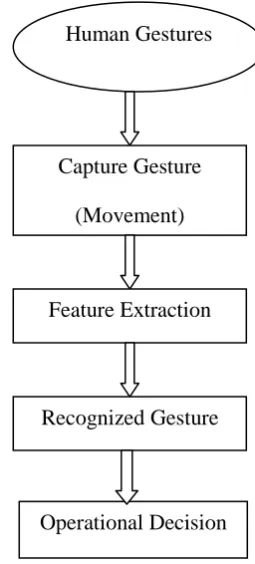
[image:2.595.329.457.89.372.2]Gesture Recognition technology enables humans to interface directly with the machine. Popularly known as Human Machine Interaction (HMI), this technology helps humans interact naturally with limited use of mechanical devices. HMI can be formally defined as the virtual space where interaction between humans and machines occur. The primary goal of HMI is enabling effective operation and control of the machine, and feedback from the machine which aids the operator in making operational decisions [3]. Figure 1 below depicts the basic phases of any device that can capture human gestures and then convert the same to meaningful operational decisions for the computer or smart gadget.
Fig 1: Basic architecture for Gesture Recognition
2.4
Types of HMI
On the basis of the human senses employed as the basis for interaction different Human Machine Interaction (HMI) applications can be classified as follows:
1. Visual-Based: Visual based Human Machine Interaction is probably the most widespread area in HMI research [26]. Considering the extent of applications and variety of open problems and approaches, researchers have been tackling different aspects of human responses which can be recognized as a visual signal. Some of the main research areas in this category are Facial Expression Analysis, Body Movement Tracking (Large-scale), Gesture Recognition, Gaze Detection (Eyes Movement Tracking).
2. Audio-Based: Audio based interaction between a computer and a human are another popular type of HMI system. This category deals with information acquired through the use of diverse audio signals. While the nature of audio signals may not be as variable as visual signals but the information gathered from audio signals can be more trustable, helpful, and in some cases serve as unique providers of information. Research areas in this section can be further classified into the following parts: Speech Recognition, Speaker Recognition, Auditory Emotion Analysis, Human-Made Noise/Sign Detections (Gasp, Sigh, Laugh, Cry, etc.), and Musical Interaction.
3. Sensor-Based: Sensor based HMI are a combination of variety of senses used in a wide range of applications. The similarity of these different areas is that at least one physical sensor is used between the user and machine to provide the interaction. These sensors can be either primitive or sophisticated. For example: Pen-Based Interaction [22],
Human Gestures
(
(Hand/Face/etc)
Capture Gesture
(Movement)
Feature Extraction
Recognized Gesture
Mouse & Keyboard [24] [25], Joysticks [24][25], Motion Tracking Sensors and Digitizers [24], Pressure Sensors [25], Taste/Smell Sensors [23].
2.5 Working of HMI
A user (human) interface is the system by which people interact with a machine. It includes both hardware (physical) and software (logical) components. User interfaces exist for various systems, and provide a means of:
Input, allowing the users to manipulate a system.
Output, allowing the system to indicate the effects of the users' manipulation.
Incomputer scienceandhuman-machine interaction, theuser interface (of a computer program)refers to the graphical, textual and auditory information the program presents to the user, and the control sequences (such as keystrokes with thecomputer keyboard, movements of thecomputer mouse, and selections with thetouch screen) the user employs to control the program [3]. The different kinds of interfaces available for this purpose are discussed below:
1. Graphical user interfaces (GUI) accept input via devices such as computer keyboard and mouse and provide articulated graphical output on the computer monitor. 2. Web-based user interfaces or web user interfaces (WUI) are a subclass of GUIs that accept input and provide output by generating web pages which are transmitted via the Internet and viewed by the user using a web browser. 3. Touch screens are displays that accept input by touch of fingers or a stylus. They are being employed in a growing amount of mobile devices and many types of point of sale and machines like self-service machines etc.
4. Multi-screen interfaces, simulate multiple displays to provide a more flexible user interaction. This technique is popularly used in computer game interaction in both commercial arcades and the handheld markets.
5. Motion tracking interfacesmonitor the user's body motions and translate them into commands. The interface is currently being developed by Apple.
6. Zooming user interfacesare graphical user interfaces in which information objects are represented at different levels of scale and detail, and where the user can change the scale of the viewed area in order to show more detail.
3.
GESTURAL INTERFACE
TECHNIQUES: BRIEF REVIEW
Based on the type of input data provided, there can be different approaches present for interperating gestures. However, most of the techniques rely on key pointers represented in a 3D coordinate system. Based on the relative motion of these, the gesture can be detected with a high accuracy, depending of the quality of the input and the
algorithm’s approach.
In order to interpret movements of the body, one has to classify them according to common properties and the message the movements may express.
3.1
Cross-Dimensional Gestural
Interaction Techniques
This technique builds one and two handed gestures that support the seamless transition of data between co-located 2D and 3D contexts. It combines a 2D multi-user, multi-touch,
projection surface with 3D tracked, see-through, head-worn displays and 3D tracked gloves to form a multi-display augmented reality. The technique also addresses some of the ways in which users can interact with private data in a collaborative, heterogeneous workspace.
Image
Representation
Input Gestures
Selecting the 2D object and beginning to form a grabbing gesture.
The 2D object disappears, while the 3D object appears from the table.
Holding the 3D object.
Push gesture begins by pressing on the table through the 3D object.
The 3D object disappears and the 2D object appears.
[image:3.595.309.552.128.562.2]The 2Dobject, projected on the table
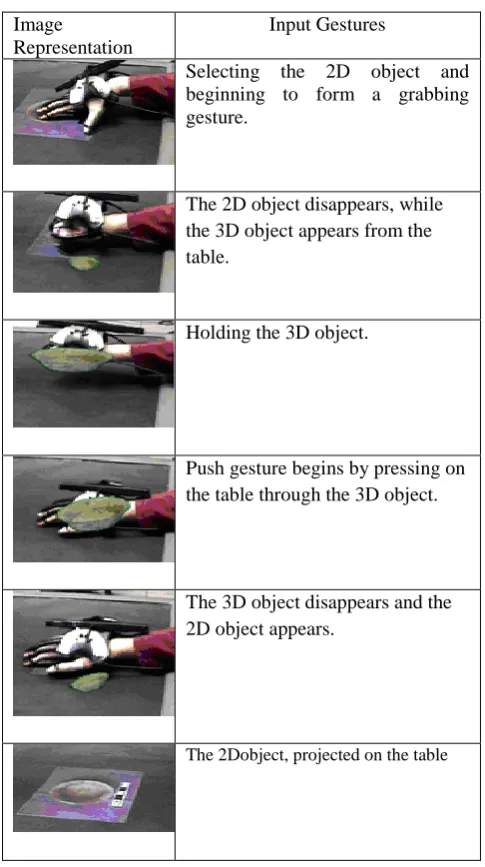
Fig 2: Phases in Cross Dimensional Gestural Interaction The cross-dimensional interaction techniques are divided into two main classes i.e. one-handed techniques and two-handed techniques. One-handed techniques are generally simpler and more intuitive, thus forming a set of basic interactions for a hybrid environment, while two-handed techniques comprise a more complex set that addresses higher-level concepts, such as privacy. Figure 2 below depicts the steps involved in cross-dimensional gestural interaction techniques.
3.2
Vision based Tracking Technique
be attributed to the presence of hands in the field of view of the camera. The tracking layer is responsible for performing temporal data association between successive image frames, so that, at each moment in time, the system may be aware of location of each data. Finally, the recognition layer is responsible for grouping the spatiotemporal data extracted in the previous layers and assigning the resulting groups with labels associated to particular classes of gestures.
3.3
Skeleton Based Shape Matching and
Retrieval Technique
[image:4.595.318.525.244.358.2]Popularly known as Pose Recognition Technique [21]. This technique encodes the geometric and topological information in the form of a skeletal graph and uses graph matching techniques to match the skeletons and to compare them. It takes as input, foreground sequences from multiple viewpoints and computes, for each frame, the skeleton pose which best fits the body poses. It encodes mostly motion information and allow therefore to separate motion estimation from shape estimation for which solution exist and focusing on motion parameters significantly reduces the dependency on specific body shapes, yielding thus more flexible solution for body motion capture.
Figure 3: Skeleton-Based Shape Matching Technique
3.4
Appearance-based face recognition
Technique
In appearance-based object recognition, the features are chosen to be the pixel intensity values in an image of the object. These pixel intensities correspond directly to the radiance of light emitted from the object along certain rays in space. All of the pixels, whichever image they come from, are treated equally and used to estimate the (Eigen) light-field of the object [6]. The Eigen light-field is then used as the set of features on which to base recognition, analogously to how the pixel intensities are used in appearance-based face and object recognition. An “appearance based” virtual view generation
method for temporarily-varying events taken by multiple cameras of the “3D Room”. With this method one can generate images from any virtual view point between two selected real views. The virtual appearance view generation method is based on simple interpolation between two selected views.
[image:4.595.61.260.347.472.2]The correspondences between the views are automatically generated from the multiple images by use of the volumetric model shape reconstruction framework. Since the correspondences are obtained by the recovered volumetric model, even occluded regions in the views can be correctly interpolated in the virtual view images. The virtual view image sequences are presented for demonstrating the performance of the virtual view image generation in the 3D Room.
Figure 4: Appearance-Based Face Recognition Technique
3.5
Comparison of Gestural Interface
Techniques
Table 2: Comparison of Gestural Interface Techniques
Characteristics Appearance Based Cross Dimensional Vision Based
Tracking
Skelton Based
Features Pixels/instruments of light in the scene
2D and 3D Modalities Camera Based LED Marker Reconstruction
Tracing for motion Capture
Common Application Face Recognisation System
2D-3D transformation, Augmented Reality
Tracking Objects like traffic monitoring
Animation
Popular Techniques PCA, support vector, LDA machines ICA
Single-Handed Interaction, Two- Handed Interaction
Localized Incident Detection, Individual
Tracking
2D Shape Deformation, Motion
Capture and Retargeting
Transition Input / Phases
Uses Statistical analysis and machine learning techniques to
learn face characteristics from a
large set of images
Source Object, Type of Transformation, Destination Location
3D perspective mapping from scene to
image, plumblone projection
Silhoeette detection
Skeletonization and decomposition
Shape Deformation
Depth Adjustment in between
Advantages Requirements,
Very Successful, Fast, Robust
Requiremnts, Fast and Simple
Low Computational requirements, Old Technique, Low Cost.
2D character animation is the traction technique for cartoon
production
Disadvantages High Computational, Large set of training experience required, Texture Formation
Quality can vary, Suffers from illumination variation.
High Computational Installation and maintenance requires
man-power, Information Redundancy
3D techniques can be difficult to implement.
4. CASE STUDY: SixthSense
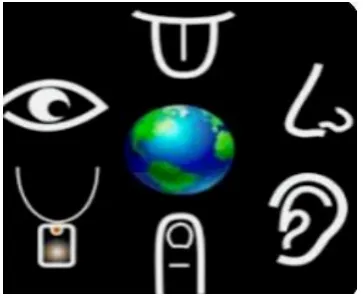
SixthSense is a wearable gestural interface that allows the physical world to directly interact with online data, information and knowledge. Critical analysis of the idea and scope of this technique which can be extended to serve as a sixth sense organ (five human senses: Tactioception, Opthalmoception, Audioception, Gustaoception, Olfacoception) for the mankind follows in the section below:
4.1 Introduction
SixthSense has revolutionized the way in which humans interact with the digital world integrating the physical and
4.2 What is SixthSense?
[image:6.595.319.557.134.270.2]SixthSense is a wearable gesture interface which augments the physical world around us with the online digital information by the use of gestures [20]. The prototype model of SixthSense costs approximately $350. This prototype model of SixthSense runs on Windows platform and most of the code is written in C++ and C#. Research is continuing to make SixthSense compatible with other platforms like Linux. The mobile version of this model is also to be released soon.
Figure 5: SixthSense as an additional Sense Organ
4.3 How It Works?
Figure 6: Working of SixthSense
As depicted in Figure 6, SixthSense prototype consists of three main components: A pocket projector, Mirror and Camera [12]. The interface employs colored fingertips as markers. The prototype model of this device is currently available with four colors: Red, Green, Blue and Yellow. Most of the applications are executed using the four basic colors. The Sixth Sense prototype consists of a Camera, Projector, Mirror, Coloured caps and Smart phone (or laptop/desktop). The Camera acts as digital eye for the device. The projector helps in projecting on to a particular surface with the help of the mirror. Colored caps are used as markers which are used in color recognition. The Camera captures the gestures made in front of it and it is processed as binary images by the Smart Phone with the help of numerous complex algorithms and the relevant information related to the gesture is projected by the projector on any interface. For example if you do a Namaste gesture (a spiritual way of greeting in India) in front of the Camera, application menu is opened and we can select a particular application by
[image:6.595.54.236.178.327.2]hand click gesture [20]. You can take pictures by simply enacting a gesture of clicking the picture. As the code is Open Source we can make changes to the device and make it work on a variety of different gestures and not just the original ones.
Figure 7: Basic Components of SixthSense prototype
4.4 SixthSense Applications
A wide range of applications have been developed to ease human life, by using SixthSense. Some notable examples are depicted in Figure 8 and explained below:
Figure 8: Varied SixthSense Applications 4.4.1 Checking Time- One can check time by just drawing a circle on one’s wrist and a analog clock is projected by the projector on your wrist and it disappears when you just strike over it.
4.4.2 Making a Call-One can use one’s palm as a virtual keypad to make a call instead of taking out cell from one’s pocket.
4.4.3 Reading Newspaper- Newspaper reading is a common daily job that can be easily accomplished using SixthSense. One can actually view videos of the articles which you want to read in the newspaper.
4.4.4 Object Recognition- SixthSense interface also helps recognize objects. It gives you reviews and ratings of the objects which you are holding in your hand by matching it with millions of similar objects available online. It can also give you information about your flight status by displaying the details of your flight. It may even recognize people and display information about them. One can also organize pictures by projecting them on any interface and edit them or mail them to your friend. Drawings can also be drawn on any
Imag
e
Capture
Ca
mer
a
Send for Processing
Comp
uter
S
en
d
I
n
fo
Hard - Disk Pro
ject
Im ag e
Moni
tor
Reflect On
Surfa ce Info On
[image:6.595.318.542.354.531.2] [image:6.595.54.273.393.548.2]wall or interface by just simply using gestures. One can also use a piece of paper as a tablet using this SixthSense, one can watch movies, play games and do many more things to make your workflow easy.
4.5 The Verdict on SixthSense
SixthSense promises a number of potential applications especially for the disabled. The technology can be easily used as a replacement of the 5th senses [12] for handicapped people. It can also provide easy control over machineries in industry [20]. SixthSense may also have different applications for different developers just depending upon how they imagine and what they want. Due to its potential in widespread applications the technology is currently open source. This empowers individuals to customize SixthSense to make their own application depending upon their needs and expectations.
The emergence of SixthSense may further lead the way for numerous new devices and hence forth evolve new markets. Mystery made their own tablet computer much before they hit the market, using just a piece of paper, a microphone and a camera [12]. This technology enables one to account, compute and browse data on any piece of paper one can find around. Sixth Sense devices are also contrastingly different from the conventional computer systems. Hence, they will pose a new challenge hackers etc.
SixthSense promises a luring set of applications that shall make all online information available to us using simple gestures just like a magic wand. However, every technology has associated with it lots of wonder and some issues. Similarly, SixthSense also has some issues that might threaten the existence of this technology. Firstly the most important issue would be to provide the security for Sixth Sense applications and devices. Numerous promising technologies perished due to security threats. Further some weaknesses can reduce the accuracy of the data. Finally, there shall also be significant market competition for Sixth Sense technology since it still requires some amount of hardware involvement with the user.
4.6 Developing Your Own SixthSense
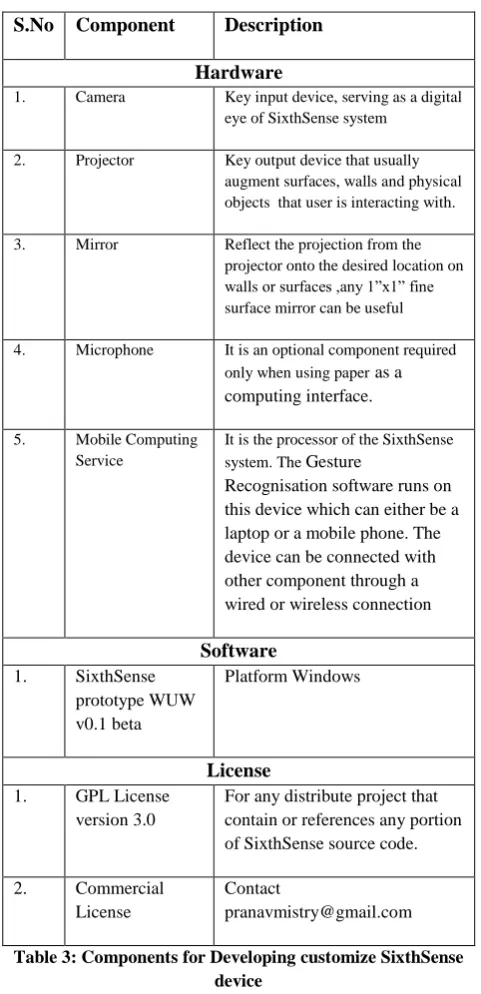
[image:7.595.309.550.68.566.2]Being open-source as of now the steps to develop one’s own SixthSense device are also available [20]. Any technology is combination of hardware, software and licenses for legal usage of the technology. SixthSense though open source technology is a combination of the all above components. Table 3 below enlists the different hardware and software components required to develop a custom SixthSense device. The use of WUW v0.1 beta, SixthSense prototype is allowed under GPL License version 3.0.
Table 3: Components for Developing customize SixthSense device
5. CONCLUSION
Use of gestural interfaces for controlling technology savvy gadgets & other devices is no longer just a futuristic vision. Recent decades gave changed the status quo of these technology from a vision to interactive reality.
Hands and Face are dynamic median that one can see, feel and manipulate; Use of hand and face gestures to control computers and other small devices has surfaced as a promising bridge between humans and machines as compared to the conventional text uses interfaces or even GUI’s. Gesture Recognisation has enabled direct and natural man-machine interaction or HMI which require limited interface of mechanical devices.
From the above study one can conclude that Gestural Recognition, estimation and implementation for device control is popular research domain. Many promising application applying different gestures have also surfaced as a
S.No Component Description
Hardware
1. Camera Key input device, serving as a digital
eye of SixthSense system
2. Projector Key output device that usually
augment surfaces, walls and physical objects that user is interacting with.
3. Mirror Reflect the projection from the
projector onto the desired location on walls or surfaces ,any 1”x1” fine surface mirror can be useful
4. Microphone It is an optional component required
only when using paper as a
computing interface.
5. Mobile Computing
Service
It is the processor of the SixthSense
system. The Gesture
Recognisation software runs on this device which can either be a laptop or a mobile phone. The device can be connected with other component through a wired or wireless connection
Software
1. SixthSense prototype WUW v0.1 beta
Platform Windows
License
1. GPL License version 3.0
For any distribute project that contain or references any portion of SixthSense source code.
2. Commercial License
Contact
result. However complete autonomous devices that can be self executing after taking signals from human gestures is still a high expectation. Along with development of such devices research also need to concentrate on the varied challenges for any Gesture Recognisation software. These challenges deal with issues like accuracy, usefulness as well as security of Gesture Recognisation techniques. Hardware devices limitation is another major issue that will require considerable attention.
6. FUTURE SCOPE AND DISCUSSION
The paper is preliminary work that surveys and analyzes the scope and application of the science of Gesture Recognisation in the real world. In the future, the technology can be applied as a basis for numerous applications which may range from Language Recognisation, Brain Computer Interface to Virtual Reality. A lot of research has been undertaken on hand gesture and facial expression recognisation. A hybridization of both can be potential study in order to build more reliable and accurate Gesture Recognisation system.
7. REFERENCES
[1] Pavlovic, V., Sharma, R. and Huang, T., “Visual interpretation of hand gestures for human-computer interaction: A review", IEEE Trans. Pattern Analysis and Machine Intelligence., vol. 19(7), July, 1997, pp. 677 -695.
[2] Elena Mirčevska. 2011 Design of touchOS. Department: Mälardalen University, School of Innovation.
[3] Mitra, S. and Acharya, T., “Gesture recognition: A survey,” IEEE Trans.Syst., Man, Cybern.,vol. 37, no. 3, May 2007, pp. 311–324.
[4] Lemmons, P. and Barbara R. October 1983. Product Review: The HP 150. BYTE. pp.36-50.
[5] Montes, Carlos A. Wong, Chan. Ziegert, John C. Mears, L., “Vision-based tracking of a dynamic target with application to multi-axis position control”, Journal of Real-Time Image Processing, 14 July 2012, pp. 1-16.
[6] Ekenel, H.K., Stiefelhagen, R..2005. Locol Apperence Based Face Recognisation Using Discrete Cosine Tranform in 13th European Signal Processing Conference EUSIPCO.
[7] Yamato, J. Ohya, J. and Ishii, K. 1992. Recognizing human action in timesequential images using hidden Markov model in Proc. IEEE Int. Conf. Comput. Vis. Pattern Recogn., Champaign, IL, pp. 379–385.
[8] Samaria, F. and Young, S. “HMM-based architecture for face identification,” Image Vis. Comput., vol. 12,1994, pp. 537–543.
[9] Massey, B.W. and Zembal, R., “Vocalizations of the Light Footed Clapper Rail”, Journal of Field Ornithology, 1982.
[10] Hoc,Jean-Michel., “From human machine interaction to human machine cooperation”,Ergonomics, Vol. 43, No. 7, 2000, pp. 833-843.
[11] Chris, O’Malley, “Simonizing the PDA ", BYTE, 1994, vol.19, issue 12, pp.145-148
[12] Mistry, P. and Maes, P. A Computer Mouse as Small as Invisible. in CHI2011. Interactivity. Vancouver, BC, Canada.
[13] Banes, D., "Microsoft Surface - a new approach to access and technology", Journal of Assistive Technologies, vol. 3, issue 1, 2009, pp.29 – 31.
[14] Flass and Rebecca. BLIND AMBITION. Adweek Western Edition. Vol. 52. Issue 47. November, 2002. p4.
[15] Wheeler, K.R. 2003. Device control using gestures sensed from EMG. In Proc. of IEEE Int. Workshop on Soft Computing in Industrial Applications SMcia 03. pp.21-26.
[16] Chen. S. 2011. Recognizing expressions from face and body gesture by temporal normalized motion and appearance features in IEEE Conference on Computer Vision and Pattern Recognition Workshops CVPRW. pp.7-12.
[17] Pantic. M. and Rothkrantz. C.J.M. 2004. Case-based reasoning for user-profiled recognition of emotions from face images in Proc. IEEE Int. Conf. on Multimedia and Expo ICME’04. vol. 1. pp.391-394.
[18] Pamplona, Vitor F. Fernandes, Leandro A. F. Prauchner,J. Nedel, Luciana P. and Oliveira, Manuel M. 2008. The Image-Based Data Glove.in Proc. of X Symposium on Virtual Reality (SVR'2008). pp. 204–211.
[19] Tali,K. A very very Brief History of Gestural Interfaces, Creativity on Design. Oct 27, 2009. Available: http://creativity-online.com/news/a-very-very-brief
-history-of-gestural-interfaces/139976.
[20] Mistry, P. Nanayakkara, S. and Maes. P. 2011. Touch and Copy, Touch and Paste. in CHI2011. Interactivity. Vancouver, BC, Canada.
[21] Shahdi. 2011. Frequency domain feature-based face recognition technique for different poses and low-resolution conditions. in IEEE Int. Conf. on Imaging Systems and Techniques (IST). pp. 322 – 326.
[22] Calusdian. 2010. Testing and evaluation of an inertial/magnetic sensor-based pen input device. In IEEE Int. Conf. on Intelligent Robots and Systems (IROS). pp: 5232 – 5237.
[23] Wide, P. Winquist, F. Bergsten, P. Petriu, E.M. 1998. The human-based multi-sensor fusion method for artificial nose and tongue sensor data. in Proc. of Conf. on Instrumentation and Measurement Technology Conferenc. IMTC/98. IEEE Volume 1. pp: 531 – 536.
[24] Zhang, S. Gong, J. Tham, C.K. Xiao.W. Ang, M.H. Tham, R.Q.F. 2010. Mobile sensing and simultaneously node localization in wireless sensor networks for human motion tracking. in Proc. ICARCV . pp. 2313 – 18.
[25] Jeahyeong Han. Shannon, M.A.,”Smooth Contact Capacitive Pressure Sensors in Touch- and Peeling-Mode Operation”, IEEE Sensors Journal, vol.9., issue 3, 2009, pp.199-206.

![基於深層類神經網路及表示學習技術之文件可讀性分類(Classification of Text Readability Based on Deep Neural Network and Representation Learning Techniques)[In Chinese]](data:image/gif;base64,R0lGODlhAQABAIAAAP///wAAACH5BAEAAAAALAAAAAABAAEAAAICRAEAOw==)