
© 2015, IRJET.NET- All Rights Reserved
Page 360
STUDY OF PERMISSIONS AND RISK COMMUNICATION MECHANISMS IN
ANDROID
Hari H. Rajai, Prof. Sachin Bojewar
P.G. Scholar, Department of Computer Engineering, ARMIET, Maharashtra, India.
Associate Professor, Department of Information Technology, VIT, Maharashtra, India
---***---Abstract -
Mobile phones have come with added functionality and automation. Popularity of mobile phones has made them targets for malicious applications. There is strong security mechanism to protect mobile phones from intrusive and malicious applications. But the protection mechanism fail when there is a reliance on user to make security decisions regarding the protection of data and information of a device. For example, while installing an android application, a list of permissions which the application requires is displayed. Users are expected to understand the permissions which the application is asking. Research has shown that permissions list are not considered by users and those are accepted blindly. We have studied a list of permissions and their detailed categorization. Also we have mentioned a number of ways by which a risk score or a risk indicators can be presented to a user while installing the application and a summary of risk information is shown to the user so that user can effectively decide which application should be installed and which should not be installed. Results of different evaluations are shown which indicates positive effects of introducing risk information to the user.Key Words:
Android, Permissions, Security, Risk
Communication mechanisms.
1. INTRODUCTION
Smartphones and tablet computers have become the need of the day with a lot of functionalities that they provide. In 2008, the Open Handset Alliance, Google, joined the smart phone market with the open source software stack Android. By now, it has become the most popular operating system for these devices. In the current scenario of mobile platforms, Android is among the most popular open source software stacks for mobile devices. Introduced by Google, it includes an operating system, middleware in the form of a virtual machine, system utilities, and a set of core applications. Third party
developers create applications for Android, these applications are submitted to android market and these applications can be downloaded by the users and installed on their devices. Along with the availability and variety of applications there arise security concerns about the user data and information. Mobile devices stores a lot of information about our personal lives and the sensors such as GPS, camera, microphone, etc., also has a lot of information which can help to track us .Social networking applications were recently criticized for silently downloading and storing user contacts to their network servers. Users are often not aware of what information does an application accesses from the user’s mobile phone. During installation android presents a list of permissions which has to be given by the user so that user can use that applications but here the user has to allow all the permission requested by the application or the user is not able to install and use the application. If the user approves the permissions then there is no way a user can revoke the permissions from an installed application. These permissions should be well understood to the user. This risk of installation of an application which can use permissions to access user data should be presented to the user so that the user can understand the risk content of that application. Many experiments were conducted to find different ways through which this risk information can be communicated to the user.
2. ANDROID OPERATING SYSTEM
Android is a mobile operating system based in Linux kernel. It has a user interface which supports direct manipulation. This operating system was specially designed for smart phones, tablet computers, specialized user interface android televisions and handheld devices like android wrist watches. The operating system uses touch input actions like tap, pinch, swipe, reverse swipe, etc.
Till May 2015, Google Play store had over 1.5 million applications published and over 90 billion applications downloaded from the play store.
© 2015, IRJET.NET- All Rights Reserved
Page 361
permissions for accessing the resources that an application will use. For example, a gaming application may need the permission to vibrate the phone or save the score data to the SD card but a gaming application should not ask for a permission to read the sms or access the user’s phone book. After viewing the list of the permissions the user has to decide whether to accept or refuse the installation of the application. Sandboxing and displaying the list of permissions may reduce the security threat but the limited documentation by developer often leads to applications requesting unnecessary permissions thus reducing the security and being prone to malware. These malware applications can display unwanted intrusive adverts on the device or can send the personal information of the user to the unauthorized third parties. Individual application permission management is only possible through third party tools only after having the root access of the device.
Google Bouncer is a malware scanner currently being used by Google to check the nature of applications on the Google Playstore. [1]
3. USER ATTENTION, COMPREHENSION &
BEHAVIOR
Android permission system warns the user by showing the list of permissions required by the application before installation. The user reviews all the permissions while installing the application and the decision is taken by the user whether to install the application or not. While evaluating the fact that whether the android user reads the permission requests, pays attention to it and understands all the risks involved in installing the application, it was found that only 17% of the total participants actually paid attention to the permission requests by the applications while installations and only 3% could actually answer what those permissions actually meant.[4]
Table -1: Types of studies performed
Types of studies
performed
Number of participants
Internet survey 308
Laboratory interviewing 25
If an application needs to use camera, it needs to acquire permission from the user to use the camera or microphone or access to the contact list of the user. There are 2 steps involved in granting permission to an application to access the user resources.
Step 1: Application developer declares all the permission required by his application in file and attaches this file along with his application.
Step 2: User of the application is shown the list of all the permission before installation.
Users can compare the application against their privacy concerns and the trust of the source of the application. There have been models of how human mind processes the warning messages. One of the models was proposed by Wogalter [2] which is known as Communication- Human Information Processing model (C-HIP). This model formalized the steps of showing a warning message to a human and whether it paid heed to the shown warning. This model assumed one of the facts that the user should act upon the warning when shown.
[image:2.595.307.560.464.693.2]Following are the observations of a survey conducted on users’ knowledge about android permissions.
Table -2: Internet Survey Details [4]
Year of survey 2011
Type of survey Internet Survey
Purpose
To know how widely users understand the android permissions and consider those permissions before installing the applications
Number of genuine
participants 308
Percentage of participants who noticed permissions during installation of applications
17%
Table -3: Laboratory Survey Details [4]
Year of survey 2011
Type of survey Laboratory Survey
Purpose
To know how widely users understand the android permissions and consider those permissions before installing the applications
Number of genuine participants 25
Number of users who were unaware of the permissions
10 Number of users who noticed the permissions 4 Number of users who did not noticed the permissions
10
A set of issues were discovered which impeded
[image:2.595.39.282.571.657.2]© 2015, IRJET.NET- All Rights Reserved
Page 362
4. APPLICATION INSTALLATION AND VIEWING OF
PERMISSIONS
[image:3.595.36.290.314.539.2]Enck et al [5] contribution along with TaintDroid [5] has removed the gap between user permissions and system security. It mainly focused on the fact that which of the applications is requesting information by the means of permission and then sending the user data. Hornyack et al [5] described one of the methods of intercepting these permissions and then replacing them with non-sensitive information. This made the user capable of manipulating privacy controls post installation of the application.
Table -4: Details of analysis by Enck et al.
Number of applications analyzed 1100 Year of analysis 2010 November
Purpose of analysis Testing users’ understanding of most common resource access permissions in android
Conclusion Users’ have great difficulty in understanding the meaning of these permissions
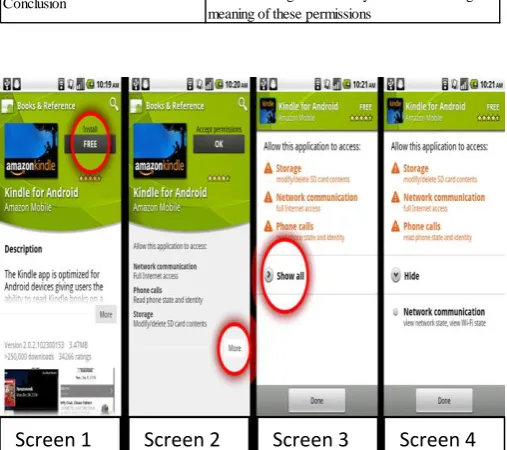
Fig -1:Application installation and viewing permissions [5]
Browsing of applications is shown in Screen 1. A truncated description of information about reviews, screenshots, etc., .is shown. If a user wants to install an application then the user has to click in the button labeled with price of the application which is FREE in above case. This takes the user to screen 2 which shows a list of permissions. If users double tap FREE button then the approve the application permissions without having a look at them. Screen 2 has all the information about the permission but here also the complete list of permissions is not displayed. If the user wants to see the whole list of permissions that the application requires then the user has to click on an expander button which will show a more complete list of permissions.
5. PERMISSION CATEGORIES
Studies were performed on two platforms, Android OS and Google Chrome Extension system. Both of these platforms require application permissions. Evaluation was done from the data whether these permission are effective in protecting users or not. It showed that permission have a positive impact on security only if these permissions were declared to the user in an upfront manner. As third party authors are not security experts and some of them can be malicious so third party author code can create vulnerabilities. With the help of the permissions users decide whether to allow the applications to access any of the resources.
Most device access in android is controlled by permissions. Applications can define their own extra permissions, but here the permissions defined by Android OS are considered only. There are 134 permissions in Android2.2.
Permissions are categorized into following threat levels Normal: API calls with annoying but not harmful consequences are protected with Normal permissions. Example: accessing information about available Wi-Fi networks, vibrating the phone, and setting the wallpaper. Dangerous: API calls with potentially harmful consequences.
Example: Opening a network socket, recording audio, and using the camera.
Signature: The most sensitive operations are protected with Signature permissions. These permissions are only granted to applications that have been signed with the device manufacturer’s certificate.
Example: Ability to inject user events.
SignatureOrSystem: This category includes signed applications and applications that are installed into the/system/app folder.
Example: Preinstalled applications, applications protecting the ability to turn off the phone.
During installation permission prompt is displayed to the user for Dangerous permissions. Warnings are categorized according to functionality. For example, Dangerous location related permissions are included in location related warning. Normal permissions are hidden in a collapsed menu. Signature/System permissions are not shown at all.[5]
5.1 Dangerous Permissions
Dangerous permissions can cause serious security issues if not used properly so that is the prime are of focus. It was found that 93% of free applications and 82% of paid applications requested for at least one dangerous permission.
© 2015, IRJET.NET- All Rights Reserved
Page 363
of the protected API are used by applications. All of the permissions in a category display the same permission prompt, so Table 5(a) also indicates how often users see each type of permission request. A small number of permissions are requested very frequently.
Table 5(b) shows the most popular Dangerous permissions. In particular, the INTERNET permission is heavily used. We find that 14% of free and 4% of paid applications request INTERNET permission. The applications were collected in October 2010.
It was founded that most of the free applications requested both internet access and location data which points to leakage of location data to advertisers in free applications.
Table -5(a): Prevalence of dangerous permissions by category [5]
Category
Free (%) Paid (%)
NETWORK**
87.3
66
SYSTEM.TOOLS
39.7
50
STORAGE**
34.1
50
LOCATION**
38.9
25
PHONE.CALLS
32.5
35
PERSONAL_INFO
18.4
13
HARDWARE_CONTROLS
12.5
17
COST_MONEY
10.6
9
MESSAGES
3.7
5
ACCOUNTS
2.6
2
DEVELOPMENT_TOOLS
0.35
0
Table -5(b): The most frequent dangerous permissions and their categories [5]
Permission (Category) Free (%) Paid (%)
INTERNET** (NETWORK) 86.6 65
WRITE EXTERNAL STORAGE** (STORAGE) 34.1 50
ACCESS COARSE LOCATION** (LOCATION) 33.4 20
READ PHONE STATE (PHONE CALLS) 32.1 35
WAKE LOCK** (SYSTEM TOOLS) 24.2 40
ACCESS FINE LOCATION (LOCATION) 23.4 24
READ CONTACTS (PERSONAL INFO) 16.1 11
WRITE SETTINGS (SYSTEM TOOLS) 13.4 18
GET TASKS* (SYSTEM TOOLS) 4.4 11
Above mentioned survey was conducted on 856 free and 100 paid android applications [5].
5.2 Incentives for Developers
Developer incentives has a direct impact on number of permissions that the application requests.
Current incentives include review process length, user pressure and treatment by automatic application update system.
Review Process: Developers are often concerned about length of review process as Dangerous permissions increase the review time and hence it acts as a incentive for the developer.
User Pressure: If users are not interested to install applications that require certain permissions then this motivates the developer to avoid those permissions. Automatic Updates: Automatic application updates do not proceed for applications which require extra permissions during updating. Here the user needs to install the update manually. This also encourages developers not to include any extra permission requests in application updates so that applications can be updated manually.
5.3 Permission Granularity
[image:4.595.37.249.309.492.2]Evaluation is done whether fine-grained permissions are better than coarse grained permissions.
Fig -2: Android Permission Categories
Android permission categories are divided into functionality groups. Multiple permissions are involved in different categories but these permissions are requested individually by developers.
Coarse grained system may have one permission per category but it was found that most of the applications do not require all permissions under that category.
Coarse grained. Android controls access to data with separate read and write permissions. For example, access to contacts is governed by READ CONTACTS and WRITE CONTACTS. We find that 149 applications request one of the contacts permissions, but none requests both. Text messages are controlled by three primary permissions whereas very less number of applications request all the three permissions. This shows that separate permissions are more effective than coarse grained permission categories.
[image:4.595.307.561.370.441.2] [image:4.595.37.288.539.667.2]© 2015, IRJET.NET- All Rights Reserved
Page 364
6.
DIFFERENT
METHODS
OF
RISK
COMMUNICATION
Due to limited effectiveness of current risk display mechanism in android following are some of the mechanisms used for risk communication.
Felt et al proposed following improvements 1. Changing permission category headers. 2. Emphasizing more on risk part.
3. Reducing number of permissions. 4. Enabling customized permission list. 5. Incorporating user reviews
6. Reviewing the timing of when and how permissions are granted.
Lin et al proposed following improvements
1. Presenting the expectations of users on the permission page.
Kelley et al proposed the following improvements
1. Presenting to user at higher level the type of information that the current application has an access to.
Peng et al proposed a method for generating a principled metric which ranks an application based upon the number of permissions it requests.
Further works were also done presenting the risk information to the user in the form of text and symbols. Experiments were conducted for the same as stated below. Following four experiments were conducted as shown in following table [4]
Tab 6(a): Experimental Results [4]
EXPERIMENT NUMBER 1
Conducted via Amazon Mechanical Turk (MTURK).
Risk presented in
form of Text.
Test Conducted for Determining whether risk category affects users’ choices.
Method
Summary risk information was provided to the users and their choices were noted in
both the cases when summary rusk
information was provided and when
summary risk information was not
provided.
Results
It was confirmed that providing users with summary information caused users to choose applications having lower risk
Tab 6(b): Experimental Results [4]
EXPERIMENT NUMBER 2 & 3
Conducted In Lab Environment.
Risk presented in form
of Symbols (Similar to user ratings).
Test Conducted for Determining whether risk information in the form of symbols affects users’ choices.
Method More risk stars convey greater safety of
application.
Results It was found to produce higher perceived risk
than text.
Tab 6(c): Experimental Results [4]
EXPERIMENT NUMBER 4
Conducted via Amazon Mechanical Turk (MTURK).
Risk presented in form of
Text (Safety scores were presented to the participants).
Test Conducted for Determining whether risk category affects users’ choices.
Method
Summary risk information was provided to the users and their choices were noted in both the cases when summary rusk information was provided and when summary risk information was not provided.
Results
It was confirmed that providing users with summary information caused users to choose applications having lower risk
7. PERFORMANCE EVALUATION
An online survey was conducted in which 77 people participated, out of whom 20 completed lab interview. Out of 20, 10 were male and 10 were female. The age of the participants is between 19 to 48, average age is 29.
First 6 participants were from Seattle, rest all were from Pittsburgh.
Various observations were done based on questions asked to 20 participants about various permissions.
1) Network communication: full Internet access: - 85.5% of total applications required full access to the internet. Participants knew about this fact and also knew what is internet, but they failed to answer what is the need of internet in that particular application and how the application will perform without internet.
2) Phone calls: read phone state and identity: - In this permissions, users could only identify that this permission is related to phone. They failed to identify that each phone has a unique ID and that are also revealed in this application.
© 2015, IRJET.NET- All Rights Reserved
Page 365
Table 7: Survey on understanding of application permissions
Phone Provider
1 Female 24 Education Verizon LG Ally - 1-6 months 10-Jan 5-Jan
2 Male 48 Other Verizon HTC
Incredible Froyo 1-6 months 25-Nov 5-Jan
3 Male 44 Agriculture T-Mobile Motorola Cliq Cupcake 1-2 years 101+ 20+
4 Male 19 Food Service T-Mobile Galaxy S Éclair 1-6 months 25-Nov 20-Jun
5 Female 45 Legal Sprint HTC EVO 4G Honeycomb 1-6 months 10-Jan 20-Jun
6 Female 26 Retail Sprint Samsung
Replenish - 6-Jan 10-Jan 20-Jun
7 Female 24 Engineering T-Mobile LG Optimus Éclair 7 months-1year 25-Nov 5-Jan
8 Male 23 Computers Verizon Motorola
DroidX Éclair 7 months-1year 25-Nov 5-Jan
9 Female 25 Other Verizon Motorola
DroidX Gingerbread 7 months-1year 26-100 20+
10 Male 32 Engineering T-Mobile HTC G2 - Less than 1 month 10-Jan 5-Jan
11 Female 21 Entertainme
nt Sprint Samsung - - 1-6 months 5-Jan
12 Female 22 Other T-Mobile HTC Mytouch Gingerbread 7 months-1year 25-Nov 5-Jan
13 Female 21 Don’t Work Sprint HTC EVO - 1-2 years 25-Nov 5-Jan
14 Male 20 Real Estate Verizon Motorola
DroidX Gingerbread 1-2 years 101+ 20-Jun
15 Male 36 Media Verizon Motorola Froyo 7 months-1 year 10-Jan 5-Jan
16 Male 22 Engineering Sprint HTC EVO 4G Gingerbread 1-6 months 26-100 20-Jun
17 Male 22 Other Verizon Motorola - 1-2 years 26-100 20-Jun
18 Female 23 Don’t Work T-Mobile HTC Gingerbread More than 2 years 26-100 20-Jun
19 Male 46 Engineering AT & T Google Nexus Gingerbread 1-2 years 26-100 20-Jun
20 Female 21 Engineering AT & T Gingerbread Less than 1 month 10-Jan 5-Jan
Time using Android Apps downloaded Apps really used
© 2015, IRJET.NET- All Rights Reserved
Page 366
4) Your location: coarse (network-based) location: - Participants understood that this permission was based on location of the phone. But they failed to understand how exact the location is.
5) Your personal information: read contact data: - All participants understood that this permission is regarding accessing contact list.
6) Your accounts: act as an account authenticator: - None of the participants could get what exactly this permission was based on.
8. CONCLUSIONS
It was observed that there must be an effective method through which risk information can be communicated to the user. Also it was observed that if this risk information is available to the user and the user is able to understand risk involved in installing the application which eventually help user make effective application choice while installing applications for similar purpose. Also it helps user makes better comparison and it acts as an incentive for developers for requesting lesser number of permissions.
ACKNOWLEDGEMENT
I would like to thank Prof. Sachin Bojewar for his valuable time and guidance throughout the making of this survey paper.
REFERENCES
[1] https://en.wikipedia.org/wiki/Android_(operating_s ystem).
[2] M. S. Wogalter, Communication-Human Information Processing (C-HIP) Model. In Handbook of Warnings. Lawrence Erlbaum Associates, 2006.
[3] Patrick Gage Kelley et al, A Conundrum of Permissions: Installing Applications on an Android Smartphone, In FC'12 Proceedings of the 16th international conference on Financial Cryptography and Data Security,2012.
[4] Adrienne Porter Felt et al, Android Permissions: User Attention, Comprehension, and Behavior, In SOUPS '12 Proceedings of the Eighth Symposium on Usable Privacy and Security, Article No. 3, 2012.
[5] Adrienne Porter Felt et al, The effectiveness of application permissions, In WebApps'11 Proceedings
of the 2nd USENIX conference on Web application development, 2011.
[6] Jing Chen et al, Effective Risk Communication for Android Apps, In IEEE JOURNALS & MAGAZINES, 2014.
BIOGRAPHIES3
Mr. Hari Rajai is an android application developer, currently a PG Scholar from ARMIET College,
Department of Computer
Engineering. He is currently working as a Teaching Assistant in K.C. College of Engineering & Management Studies & Research
Mr. Sachin Bojewar has 25 years of rich teaching experience and he is currently working as an
Associate Professor in
![Table -2: Internet Survey Details [4]](https://thumb-us.123doks.com/thumbv2/123dok_us/8210290.818224/2.595.39.282.571.657/table-internet-survey-details.webp)
![Table -5(b): The most frequent dangerous permissions and their categories [5]](https://thumb-us.123doks.com/thumbv2/123dok_us/8210290.818224/4.595.37.288.539.667/table-b-frequent-dangerous-permissions-categories.webp)
