
Turbo
Assemble~
Reference Guide
Version 1.0
Copyright!!:> 1988 All rights reserved
R3
This manual was produced with
Sprint® The Professional Word Processor
All Borland products are trademarks or registered trademarks of Borland International, Inc. Other brand and product names are trademarks
or registered trademarks of their respective holders. Copyright= 1988 Borland International.
Printed in the U.S.A.
Table of Contents
Introduction
1Hard ware and Software Requirements ... 1
What's in This Manual. . . .. 1
Notational Conventions . . . .. 2
How to Contact Borland ... 3
Chapter 1 Predefined Symbols
5 @code ... 6®CodeSize ... 6
®Cpu ... 7
@curseg ... 8
@data ... 8
@DataSize . . . .. 9
??date ... 9
@fardata ... 9
@fardata? ... 10
@FileN"ame ... ~ ... 10
??filename ... 10
??time ... 10
??version . . . .. 11
@WordSize ... 11
Chapter 2 Operators
13 Arithmetic Precision ... 13Operator Precedence ... 14
() ... 15
It • • • • • • • • • • • • • • • • • • • • • • • • • • • • • • • • • • • • • • • • • • • • • • • • • • • • • • • • • • • • • • 16 + (Binary) ... 16
+ (Unary) ... 16
- (Binary) ... 17
- (Unary) . . . .. 18
... 18
/ ... 19
... 19
? ... 20
[ ] operator ... 21
AND ... 21
ByTE ... 22
DUP ... 23
DWORD ... 23
EQ ... 24
FAR ... 24
FWORD ... 25
GE ... 25
GT ... 26
HIGH ... 26
LARGE ... 27
LE ... 28
LENGTH ... 28
LOW ... 29
LT ... 30
MASK ... 30
MOD ... 31
NE ... 31
NEAR ... 32
NOT ... 32
OFFSET ... 33
OR ... 33
PROC ... 34
PTR ... 34
PWORD ... 36
QWORD ... 36
SEG ... 36
SHL ... 37
SHORT ... 37
SHR ... 38
SIZE ... 38
SMALL ... 39
SYMTYPE ... 40
TBYTE ... 40
THIS ... 41
.TYPE ... 41
TYPE ... 42
UNKNOWN ... 43
WIDTH ... 44
WORD ... 45
XOR ... 45
The Special Macro Operators ... 46
& ... 46
<> ... 47
! ... ~ ... 48
;; ... 49
Chapter 3 Directives 51 Sample Directive . . . .. 52
.186 ... 53
.286 ... 53
.286C ... 53
.286P ... 54
.287 ... 54
.386 ... 54
.386C ... 55
.386P ... 55
.387 ... 55
.8086 ... 56
.8087 ... 56
: ... 57
= ... 58
ALIGN ... 58
.ALPHA ... 59
ARG ... 60
ASSUME ... 62
%BIN ... 63
CA1'STR ... 64
.CODE ... 64
CODESEG ... 65
COMM ... 65
COMMENT ... 66
%CONDS ... 67
.CONST ... 67
CONST ... 68
.CREF ... 68
%CREF ... 68
%CREFALL ... 69
%CREFREF . . . .. 69
%CREFUREF . . . .. 70
%CTLS ... 70
.DATA ... 71
.DATA? ... 71
DATASEG ... 72
DB ... 72
DD ... 73
%DEPTH ... 74
DF ... 75
DISPLAy ... 76
DP ... 77
DQ ... 77
DT ... 78
DW ... 79
ELSE ... 80
ELSEIF ... 80
EMUL ... 81
END ... 82
ENDIF ... 82
ENDM ... 83
ENDP ... 83
ENDS ... 84
EQU ... 84
.ERR ... 85
ERR ... 86
.ERR1 ... 86
.ERR2 ... 86
.ERRB ... 87
.ERRDEF ... 87
.ERRDIF ... 88
.ERRDIFI ... 88
.ERRE ... 89
.ERRIDN ... 89
.ERRIDNI ... 90
ERRIF ... 91
ERRIF1 ... 91
ERRIF2 ... 91
ERRIFB ... 91
ERRIFDEF ... 91
ERRIFDIF ... . . . .. 92
ERRIFDIFI ... 92
ERRIFE ... 92
ERRIFIDN ... 92
ERRIFIDNI . . . .. 92
ERRIFNB ... 93
ERRIFNDEF . . . .. 93
.ERRNB ... 93
.ERRNDEF ... . . . .. 94
.ERRNZ ... 94
EVEN ... 94
EVENDATA ... 95
EXITM ... 96
EXTRN ... 96
.FARDATA? ... 98
FARDATA ... 99
GLOBAL ... 100
GROUP ... 101
IDEAL ... 102
IF ... 103
IFl ... 103
IF2 ... 104
IFB ... 105
IFDEF ... 105
IFDIF, IFDIFI ... 106
IFE ... 106
IFIDN, IFIDNI ... 107
IFNB ... 108
IFNDEF ... 108
%INCL ... 109
INCLUDE. . . .. 109
INCLUDE LIB ... 110
INS1R ... 110
IRP ... 111
IRPC ... 111
JUMPS ... 112
LABEL ... 113
.LALL ... 114
.LFCOND ... 114
%LINUM ... 114
%LIST ... 115
.LIST ... 115
LOCAL ... 115
LOCALS ... 117
MACRO ... 119
%MACS ... 119
MASM ... 120
MASM51 ... 120
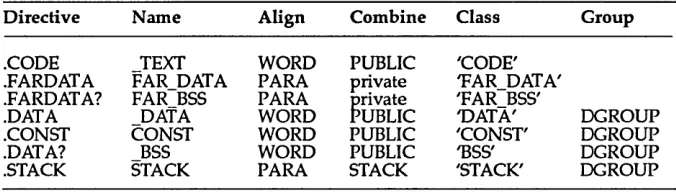
.MODEL ... 121
MODEL ... 124
MULTERRS ... 124
NAME ... 125
%NEWPAGE ... 125
%NOCONDS . . . .. 125
%NOCREF .... . . .. 126
%NOCTLS ... 126
NOEMUL ... 127
NOJUMPS ... 128
%NOLIST . . . .. 128
NOLOCALS . . . .. 128
%NOMACS ... 129
NOMASM51 ... 129
NOMULTERRS ... 130
%N()5YMS . . . .. 131
%NOTRUNC . . . .. 131
NOWARN ... 132
ORC ... 132
%OUT ... 133
P186 ... 133
P286 ... 133
P286N ... 134
P286P ... 134
P287 ... 134
P386 ... 134
P386N ... 134
P386P ... 135
P387 ... 135
P8086 ... 135
P8087 ... 135
PAGE ... 135
%PAGESIZE . . . .. 136
%PCNT ... 137
PN087 ... 137
%POPLCTL ... 138
PROC ... 138
PUBLIC ... 141
PURGE ... 141
%PUSHLCTL . . . .. 142
QUIRKS ...•... 142
.RADIX ... 143
RADIX ... 143
RECORD ... 143
REPT ... 144
.SALL ... 145
SEGMENT ... 145
.SEQ ... 148
.SFCOND ... 148
SIZESTR ... 148
.STACK ... 149
STACK ... 149
SUBSlR ... 151
SUBTIL ... 152
%SUBTIL . . . .. 152
%SYMS ... 153
% TABSIZE ... 153
%TEXT ... 154
.TFCOND ... . . . .. 154
TITLE ... 154
%TITLE ... 155
%TRUNC ... 155
UDATASEG ... 156
UFARDATA ... 156
UNION ... 156
USES ... 158
WARN ... 159
.XALL ... 160
.XCREF ... 160
.XLIST ... 160
Appendix A
Turbo Assembler Syntax Summary 161 Lexical Grammar ... 161valid_line ... 161
white_space ... 161
space_char ... 162
id_string ... 162
id_strng2 . . . .. 162
id_char ... 162
id_chr2 ... 162
number_string . . . .. 162
num_string . . . .. 162
digits ... 162
digit ... 162
alphanums ... 163
alpha ... 163
exp ... 163
str_string . . . .. 163
punctuation ... 163
MASM Mode Expression Grammar. . . .. 164
mexprl ... 164
mexpr2 ... 164
mexpr3 ... 164
mexpr4 ... 164
mexpr5 ... 164
mexpr6 ... 165
mexpr8 ... 165
mexpr9 ... 165
mexpr10 ... 165
mexpr11 ... 166
mexpr12 ... 166
mexpr13 ... 166
Ideal Mode Expression Grammar . . . .. 166
pointer. . . .. 166
type ... 166
pointer2 . . . .. 167
pointer3 . . . .. 167
expr ... 167
expr2 ... 167
expr3 ... 167
expr4 ... 168
expr5 ... 168
expr6 ... 168
expr7 ... 168
expr8 ... 168
expr9 ... 168
exprl0 ... 169
Appendix B
Compatibility Issues 171 Environment Variables. . . .. 172Microsoft Binary Floating-Point Format ... 172
Turbo Assembler Quirks Mode. . . .. 172
Byte Move to / from Segment Register ... . . . .. 173
Erroneous Near Jump to Far Label or Procedure ... 173
Loss of Type Information with
=
and EQU Directive ... 173Segment-Alignment Checking ... 174
Signed Immediate Arithmetic and Logical Instructions ... 174
Masm 5.1 Features. . . .. 174
Masm 5ol/Quirks Mode Features ... 175
Appendix C
Turbo Assembler Highlights 177 Extended Command-Line Syntax ... 177GLOBAL Directive ... 177
Local Symbols ... 178
Conditional Jump Extension ... 178
Ideal Mode ... . . . .. 178
UNION Directive/STRUC Nesting ... 178
EMUL and NOEMUL Directives ... 179
Explicit Segment Overrides . . . .. 179
Constant Segments ... 179
Extended Listing Controls ... 180
Alternate Directives ... 180
Predefined Variables ... 180
Masm 5.0 and 5.1 Enhancements ... 180
Improved SHL and SHR Handling ... 181
Appendix D
Turbo Assembler Utilities 183 The Stand-Alone MAKE Utility ... 183A Quick Example ... 184
Creating a Makefile ... 185
U sing a Makefile ... 186
Stepping Through ... . . . .. 187
Creating Makefiles ... 188
Componen ts of a Makefile . . . .. 188
Comments ... 189
Explicit Ru1es ... . . . .. 189
Special Considera tions ... 190
Implicit Ru1es ... 191
Special Considera tions ... . . . .. 193
Examples ... 194
Command Lists ... 194
Prefix ... 194
Command Body. . . .. 195
Examples ... 195
Macros ... " .. 196
Defining Macros ... 197
Using Macros ... 197
Special Considera tions ... . . . .. 198
Predefined Macros ... 198
Directives ... 200
File-Inclusion Directive ... 201
Conditional Directives ... 201
Error Directive . . . .. 204
Undef Directive ... . . .. 204
Using MAKE ... 204
Command-Line Syntax ... 204
A Note About Stopping MAKE ... 205
The BUlL TINS.MAK File . . . .. 205
How MAKE Searches for Makefiles . . . .. 206
The TOUCH Utility. . . .. 206
MAKE Command-Line Options ... 206
MAKE Error Messages . . . .. 207
Fatals ... 207
Errors ... 208
Invoking TLINK ... 210
Using Response Files ... 211
TLINK Options ... 213
The
lx, 1m, Is
Options ... 213The
11
Option ... 214The
Ii
Option ... 214The
In
Option ... 214The
I
c Option ... 214The
I
d Option ... 215The Ie Option ... 215
The
It
Option ... 216The
Iv
Option ... 216The
13
Option ... 216Restrictions ... 216
Error Messages ... 217
Fatal Errors ... 217
Nonfatal Errors ... 219
Warnings. . . .. 220
TLIB: The Turbo Librarian . . . .. 220
The Advantages of Using Object Module Libraries ... 221
The Components of a TLIB Command Line .... . . .. 221
The Operation List ... 222
File and Module Names . . . .. 223
TLIB Operations ... 223
Creating a Library ... 224
Using Response Files ... 224
Advanced Operation: The
IC
Option ... 225Examples ... 226
Creating an Extended Dictionary: The
IE
Option ... 226GREP: A File-Search Utility . . . .. 227
The GREP Options ... 227
Order of Precedence ... .. 229
The Search String ... 229
Operators in Regular Expressions ... 229
The File Specification ... 230
Examples with Notes ... 231
OBJXREF: The Object Module Cross-Reference Utility . . . .. 234
The OBJXREF Command Line ... 234
Command-Line Options ... 235
Control Options ... 235
Report Options ... 235
Response Files ... 236
Freeform Response Files ... 236
The
ID
ComlI1and . . . .. 237The
10
Command ... 237The
IN
Command ... 238Sample OBJXREF Reports ... 238
Report by Public Names (lRP) ... 239
Report by Module (/RM) . . . .. 240
Report by Reference (/RR) (Default) ... 240
Report by External References (/RX) ... 240
Report of Module Sizes (IRS) ... 241
Report by Class Type (/RC) ... 241
Report of Unreferenced Symbol Names (/RU) ... 242
Verbose Reporting (/RV) ... 242
Examples Using OBJXREF ... , 243
OBJXREF Error Messages and Warnings . . . .. 243
Error Messages ... 243
Warnings. . . .. 244
TCREF: The Source Module Cross-Reference Utility ... 244
Response Files ... 245
Compa tibility with TLINK ... 245
Switches ... 245
Output ... 246
The Global (or Linker-Scope) Report ... 246
The Local (or Module-Scope) Report .. . . .. 246
Appendix E
Error Messages 249 Information Messages ... 249Warning and Error Messages ... 250
Fatal Error Messages ... 272
List of Tables
Table 2.1: MASM Mode Operator Precedence ... 14
Table 2.2: Ideal Mode Operator Precedence ... 15
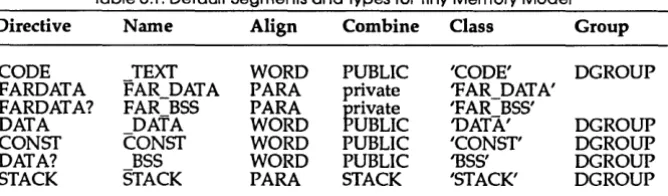
Table 3.1: Default Segments and Types for Tiny Memory Model ... 122
Table 3.2: Default Segments and Types for Small Memory Model ... 123
Table 3.3: Default Segments and Types for Medium Memory Model .... 123
Table 3.4: Default Segments and Types for Compact Memory Model ... 123
Table 3.5: Default Segments and Types for Large or Huge Memory Model ... 123
N T R
o
Du
c
To
NThis book is the second of the two books accompanying the Turbo Assembler package. Now that you've probably thoroughly perused the first manual (User's Guide) in this set, you'll want to look at this one for all the nitty-gritty in fo rma tion.
The Reference Guide is just that-a straight and to-the-point reference about Turbo Assembler. If you find you still need to know more about the basics of assembly language, go back to the User's Guide for some in-depth discussions.
Hardware and Software Requirements
Turbo Assembler runs on the IBM PC family of computers, including the XT, AT, and PS/2, along with all true compatibles. Turbo Assembler requires MS-DOS 2.0 or later and at least 256K of memory.
Turbo Assembler generates instructions for the 8086, 80186, 80286, and 80386 processors. It also generates floating-point instructions for the 8087, 80287, and 80387 numeric coprocessors.
What's in This Manual
Here's what we discuss in this manual:
Chapter 1: Predefined Symbols tells you about Turbo Assembler's equates. Chapter 2: Operators describes the various operators Turbo Assembler provides.
Chapter 3: Directives provides, in alphabetical order, detailed information about all the Turbo Assembler directives.
Appendix B: Compatibility Issues covers the differences between MASM and Turbo Assembler MASM mode.
Appendix C: Turbo Assembler Highlights details Turbo Assembler's enhancements that add to those of MASM.
Appendix D: Turbo Assembler Utilities describes six utilities that come with this package: MAKE, TLINK, TLIB, GREP, OBJXREF, and TCREF.
Appendix E: Turbo Assembler Error Messages describes all the error messages that can be generated when using Turbo Assembler: information messages, fatal error messages, warning messages, and error messages.
Notational Conventions
When we talk about IBM PCs or compatibles, we're referring to any computer that uses the 8088, 8086, 80186, 80286, and 80386 chips (all of these chips are commonly referred to as 80x86). When discussing PC-DOS, DOS, or MS-DOS, we're referring to version 2.0 or greater of the operating system.
All typefaces were produced by Borland's Sprint: The Professional Word Processor, output on a PostScript printer. The different typefaces displayed are used for the following purposes:
Italics In text, italics represent labels, placeholders, variables, and arrays. In syntax expressions, placeholders are set in italics to indicate that they are user-defined.
Boldface Boldface is used in text for directives, instructions, symbols, and operators, as well as for command-line options.
CAPITALS In text, capital letters are used to represent instructions, directives, registers, and operators.
Monospace Monospace type is used to display any sample code, text or code that appears on your screen, and any text that you must actually type to assemble, link, and run a program.
How to Contact Borland
If, after reading this manual and using Turbo Assembler, you would like to contact Borland with comments, questions, or suggestions, we suggest the following procedures:
13 The best way is to log on to Borland's forum on CompuServe: Type GO BPROGB at the main CompuServe menu and follow the menus to Turbo Assembler. Leave your questions or comments here for the support staff to process.
EI If you prefer, write a letter detailing your problem and send it to
Technical Support Department Borland International
P.O. Box 660001 1800 Green Hills Drive Scotts Valley, CA 95066 U.S.A.
ID You can also telephone our Technical Support department at (408)
438-5300. To help us handle your problem as quickly as possible, have these items handy before you call:
o product name and version number
o product serial number
• computer make and model number • operating system and version number
c
H A p T E R1
Predefined Symbols
Turbo Assembler provides a number of predefined symbols that you can use in your programs. These symbols can have different values at different places in your source file. They are similar to equated symbols that you define using the EQU directive. When Turbo Assembler encounters one of these symbols in your source file, it replaces it with the current value of that predefined symbol.
Some of these symbols are text (string) equates, some are numeric equates, and others are aliases. The string values can be used anywhere that you would use a character string, for example to initialize a series of data bytes using the DB directive:
NOW DB ??time
Numeric predefined values can be used anywhere that you would use a number:
IF ??version GT lOOh
Alias values make the predefined symbol into a synonym for the value it represents, allowing you to use the predefined symbol name anywhere you would use an ordinary symbol name:
ASSUME cs:@code
All the predefined symbols can be used in both MASM and Ideal mode.
The following rule applies to predefined symbols starting with an at-sign
(@): The first letter of each word that makes up part of the symbol name is an uppercase letter (except for segment names); the rest of the word is lowercase. As an example,
@CodeSize @FileName @WordSize
The exception is redefined symbols, which refer to segments. Segment names begin with an at-sign (@) and are all lowercase. For example,
@curseg @fardata
For symbols that start with two question marks (??), the letters are all lowercase. For example,
??data ??version
@code
Function
Remarks
Example
@CodeSize
Function
Remarks
Alias equate for .CODE segment name
When you use the simplified segmentation directives (.MODEL, and so on), this equate lets you use the name of the code segment in expressions, such as ASSUMEs and segment overrides.
• CODE
mov ax,@code mov dx,ax ASSUME ds:@code
Numeric equate that indicates code memory model
@CodeSize is set to 0 for the small and compact memory models that use near code pointers, and is set to 1 for all other models that use far code pointers.
Example
@Cpu
Function
Remarks
IF @CodeSize EQ 0
procptr DW PROCl ipointer to near procedure ELSE
procptr DD PROCl ENDIF
ipointer to far procedure
Numeric equate that returns information about current processor
The value returned by @Cpu encodes the processor type in a number of single-bit fields:
Bit Description
o
8086 instructions enabled 1 80186 instructions enabled 2 80286 instructions enabled 3 80386 instructions enabled 7 Privileged instructions enabled(80286 and 80386)
8 8087 numeric processor instructions 10 80287 numeric processor instructions 11 80387 numeric processor instructions
The bits not defined here are reserved for future use. Mask them off when using @Cpu so that your programs will remain compatible with future versions of Turbo Assembler.
Since the 8086 processor family is upward compatible, when you enable a processor type with a directive like .286, the lower processor types (8086, 80186) are auto-matically enabled as well.
Example
@curseg
Function
Remarks
Example
@data
Function
Remarks
Example
IPUSH
=
@Cpu AND 2 ;allow immediate push on 186 and above IF IPUSHPUSH 1234 ELSE
mov ax,1234 push ax ENDIF
Alias equate for current segment
@curseg changes throughout assembly to reflect the current segment name. You usually use this after you have used the simplified segmentation directives (.MODEL, and so on).
Use @curseg to generate ASSUME statements, segment overrides, or any other statement that needs to use the current segment name.
• CODE
ASSUME cs:@curseg
Alias equate for near data group name
When you use the simplified segmentation directives (.MODEL, and so on), this equate lets you use the group name shared by all the near data segments (.DATA, .CONST, .STACK) in expressions such as ASSUMEs and segment overrides.
@DataSize
Function
Remarks
Example
??date
Function
Remarks
See Also
Example
@fardata
Function
Remarks
Example
Numeric equate that indicates the data memory model
@DataSize is set to 0 for the tiny, small, and medium memory models that use near data pointers, set to 1 for the compact and large models that use far data pointers, and set to 2 for the huge memory model.
You can use this symbol to control how pointers to data are assembled, based on the memory model.
IF @DataSize EO 1 lea si,VarPtr mov aI, [BYTE PTR sil ELSE
les si, VarPtr
mov aI, [BYTE PTR es:sil ENDIF
String equate for today's date
??date defines a text equate that represents today's date. The exact format of the date string is determined by the DOS country code.
??time
asmdate DB ??date i8-byte string
Alias equate for initialized far data segment name
When you use the simplified segmentation directives (.MODEL, and so on), this equate lets you use the name of the initialized far data segment (.FARDATA) in expressions such as ASSUMEs and segment overrides.
mov ax,@fardata mov ds,ax
@fardata?
Function
Remarks
Example
@FileName
Function
See Also
??filename
Function
Remarks
Example
??time
Function
Remarks
See Also
Example
Alias equate for uninitialized far data segment name
When you use the simplified segmentation directives (.MODEL, and so on), this equate lets you use the name of the uninitialized far data segment (.FARDATA?) in expressions such as ASSUMEs and segment overrides.
mov ax,@fardata? mov ds,ax
ASSUME ds:@fardata?
Alias equate for current assembly file
??filename
String equate for current assembly file
??filename defines an eight-character string that repre-sents ,the file name being assembled. If the file name is less than eight characters, it is padded with spaces.
SrcName DB ??filename ;8-bytes always
String equate for the current time
??time defines a text equate that represents the current time. The exact format of the time string is determined by the DOS country code.
??date
??version
Function
Remarks
Example
@WordSize
Function
Remarks
Example
Numeric equate for this Turbo Assembler version
The high byte is the major version number, and the low byte is the minor version number. For example, V2.l would be represented as 201h.
??version lets you write source files that can take ad vantage of features in particular versions of Turbo Assembler.
This equate also lets your source files know whether they are being assembled by MASM or Turbo Assem-bler, since ??version is not defined by MASM.
IFDEF ??version iTurbo Assembler stuff ENDIF
Numeric equate that indicates 16- or 32-bit segments
@WordSize returns 2 if the current segment is a 16-bit segment, or 4 if the segment is a 32-bit segment.
IF @WordSize EQ 4 mov esp,OlOOh ELSE
c
H A p T E R2
Operators
Operators let you fonn complex expressions that can be used as an operand to an instruction or a directive. Operators act upon operands, such as program symbol names and constant values. Turbo Assembler evaluates expressions when it assembles your source file and uses the calculated result in place of the expression. One way you can use expressions is to calculate a value that depends on other values that may change as you modify your source file.
This chapter details the operators Turbo Assembler provides.
Arithmetic Precision
Turbo Assembler uses 16- or 32-bit arithmetic, depending on whether you have enabled the 80386 processor with the .386 or .386P directive. When you are assembling code for the 80386 processor or in Ideal mode, some expressions will yield different results than when they are eva luted in 16-bit mode; for example,
DW (lOOOh
*
lOOOh) / lOOOhOperator Precedence
Turbo Assembler evaluates expressions using the following rules:
• Operators with higher precedence are performed before ones with lower precedence.
• Operators with the same precedence are performed starting with the leftmost one in the expression.
• If an expression contains a subexpression within parentheses, that subexpression is evaluated first because expressions within parentheses ha ve the highest priority.
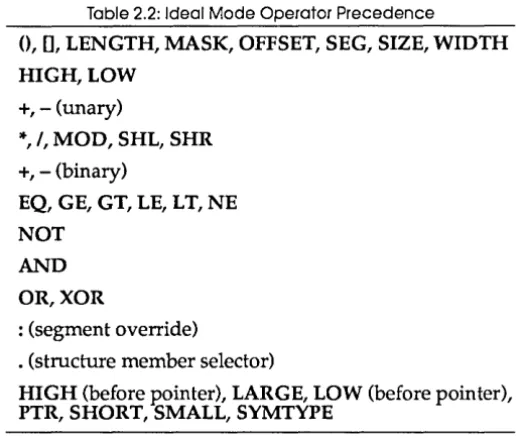
Ideal mode and MASM mode have a different precedence for some operators. The following two tables show the precedence of the operators in both modes. The first line in each table shows the operators with the highest priority, and the last line those operators with the lowest priority. Within a line, all the operators have the same priority.
Table 2.1: MASM Mode Operator Precedence
<>,0, [], LENGTH, MASK, SIZE, WIDTH . (structure member selector)
HIGH,LOW
+, - (unary)
: (segment override)
OFFSET, PTR, SEG, THIS, TYPE
*,
I, MOD, SHL, SHR+, - (binary)
EQ, GE, GT, LE, L T, NE
NOT AND
OR,XOR
Table 2.2: Ideal Mode Operator Precedence
0, [],
LENGTH, MASK, OFFSET, SEG, SIZE, WIDTH HIGH,LOW+,-(unary)
*,
I, MOD, SHL, SHR+, - (binary)
EQ, GE, GT, LE, L T, NE
NOT AND
OR,XOR
: (segment override)
. (structure member selector)
HIGH (before Eointer), LARGE, LOW (before pointer), PTR, SHORT, SMALL, SYMTYPE
The operators allowed in expressions follow in alphabetical order.
()
Function
Mode
Syntax
Remarks
See also
Example
Marks an expression for early evaluation
MASM, Ideal
(expression)
Use parentheses to alter the normal priority of operator evaluation. Any expression enclosed within parentheses will be evaluated before the operator(s) that comes before or after the parentheses.
+, -, *,1, MOD, SHL, SHR
*
Function
Mode
Syntax
Remarks
See also
Example
+
(Binary)
Function
Mode
Syntax
Remarks
See also
Example
+
(Unary)
Function
Mode
Syntax
Remarks
Multiplies two integer expressions
MASM,Ideal
expressionl
*
expression2expressionl and expression2 must both evaluate to integer constants. The '" operator can also be used between a register and a constant to support 386 addressing modes.
+, -, /, MOD, SHL, SHR
SCREENSIZE
=
25 * 80i'
chars onscreenThe '" operator can also be used between a register and a constant to support 386 addressing modes.
Adds two expressions
MASM,Ideal
expressionl + expression2
At least one of expressionl or expression2 must evaluate to a constant. One expression can evaluate to an address.
-, "', /, MOD, SHL, SHR
x ow
4 OUP (?)XPTR
ow x
+ 4 ithird word in bufferIndicates a positive number
MASM,Ideal
+ expression
See also
Example
- (Binary)
Function
Mode
Syntax
Remarks
See also
Example
-, *,1, MOD, SHL, SHR
Foo DB +4 ;redundant +
Subtracts two expressions
MASM,Ideal
expressionl - expression2
There are three combinations of operands you can use with subtraction:
• expression 1 and expression2 can both evaluate to integer constants.
f:I expressionl and expression2 can both be addresses as long as both addresses are within the same segment. When you subtract two addresses, the result is a con-stant. Ideal mode checks expressionl and expression2 for consistency much more stringently than MASM mode. In particular, Ideal mode correctly handles subtracting a segment from a far pointer, leaving just an offset fixup in cases where this is a valid operation . • expressionl can be an address and expression2 can be a constant, but not vice versa. The result is another address.
+,
*, /,
MOD, SHL, SHRDATA SEGMENT DW ? XYZ EQU 10
VALl DW XYZ - 1 ;constant 9 VAL2 DW ?
V1SIZE DW VAL2 - VALl ;constant 2
- (Unary)
Function
Mode
Syntax
Remarks
See also
Example
Function
Mode
Syntax
Remarks
See also
Example
Changes the sign of an expression
MASM,Ideal
- expression
expression must evaluate to a constant. If expression is positive, the result will be a negative number of the same magnitude. If expression is negative, the result will be a positive number.
+,
*, /,
MOD, SHL, SHRLOWTEMP DB -10 ipretty chilly
Selects a structure member
MASM, Ideal
memptr.fieldname
In MASM mode, memptr can be any operand that refers to a memory location, and fieldname can be the name of any member in any structure or even a constant expres-sion. If memptr is the name of a structure (like XINST), there is still no requirement that fieldname be a member in that structure. This operator acts much like the +
operator: It adds the offset within the structure of field-name to the memory address of memptr, but it also gives it the size of field name.
In Ideal mode, its operation is much stricter. memptr must evaluate to a pointer to a structure, and field name must be a member of that structure. This lets you have different structures with the same field names, but a different offset and size. If you want to use a base and/ or index register for memptr, you must precede it with a typecast for the name of the structure you want to access (take a look at the example that follows).
STRUC
/
Function
Mode
Syntax
Remarks
See also
Example
Function
Mode
Syntax
Remarks
MEMBER2 DW ? X ENDS
XINST X <>
ian instance of STRUC X ;MASM mode
mov [bxl.Member2,1 ;Ideal mode
mov [(X PTR bx) .Member2l,1 ;notice typecast
Divides two integer expressions
MASM,Ideal
expressionl / expression2
expressionl and expression2 must both evaluate to integer constants. The result is expressionl is divided by expression2; any remainder is discarded. You can get the remainder by using the MOD operator with the same operands you supplied to the I operator.
+,-, *,
MOD, SHL, SHRX = 55 / 10 ;= 5 (integer divide)
Generates segment or group override
MASM,Ideal
segorgroup : expression
The colon (:) forces the address of expression to be generated relative to the specified segment or group. You use this to force the assembler to use something other than its default method for accessing expression.
You can specify segorgroup in several ways:
II as a segment register: CS, OS, ES, or 55 (or FS or GS if
you have enabled the 80386 processor with the P386
or P386N directive)
Example
?
Function
Mode
Syntax
Remarks
See also
Example
• as a group name defined with the GROUP directive • as an expression starting with the SEG operator
expression
can be a constant- or a memory-referencing expression.mov cl,es: [si+4] VarPtr DD DGROUP:MEMVAR
Initializes with indeterminate data
MASM,Ideal
Dx ?
Dx refers to one of the data allocation directives (DB, DD, and so on). Use? when you want to allocate data but don't want to explicitly assign a value to it.
You should use? when the data area is initialized by your program before being used. Using? rather than 0 makes the initialization method explicit and visible in your source code.
When you use ? as the only value in or outside a DUP expression, no object code is generated. If you use? inside a DUP expression that also contains initialized values, it will be treated as a
o.
Using? outside of a DUP causes the program counter to be advanced but no data to be emitted. You can also use ? for the same purpose in, for example, a structure:
x struc a db 1 x ends
xinst ?
DUP
ideclare structure
iundefined structure instance
[] operator
Function
Mode
Syntax
Remarks
See also
Example
AND
Function
Mode
Syntax
Remarks
Specifies addition or indexed memory operand
MASM,Ideal
[expressionl] [expression2]
This operator behaves very differently in MASM mode and in Ideal mode.
In MASM mode, it can act as an addition operator, simply adding expressionl to expression2. The same limitations on operand combinations apply; for example, expressionl and expression2 can't both be addresses. [] can also indicate register indirect memory operands, using the BX, BP, SI, and DI registers. The indirect register(s) must be enclosed within the []. An indirect displacement may appear either inside or outside the brackets.
In Ideal mode, [] means "memory reference." Any operand that addresses memory must be enclosed in brackets. This provides a clear, predictable, unam-biguous way of controlling whether an operand is immediate or memory-referencing.
+
; MASM mode
mov al,BYTE PTR es:[bx] mov al,cs:l0h
Ideal mode
mov al,[BYTE es:bx] moval,[cs:l0h]
Bitwise logical AND
MASM,Ideal
expressionl AND expression2
See also
Example
BYTE
Function
Mode
Syntax
Remarks
See also
Example
DATAPTR
Function
Mode
Syntax
Remarks
See also
Example
NOT,OR,XOR
mov al,11110000b AND 10100000B ;loads 10100000B
Forces expression to be byte size
Ideal
BYTE expression
expression
must be an address. The result is an expres-sion that points to the same memory address but always has BYTE size, regardless of the original size of expression.You usually use this opera tor to define the size of a forward-referenced expression, or to explicitly state the size of a register indirect expression from which the size cannot be determined.
In MASM mode, you must use the PTR directive preceded with the BYTE type to perform this function.
PTR
mov [BYTE bx],l mov [BYTE X],l X DB 0
;byte immediate move ;forward reference
Forces expression to model-dependent size
Ideal
DATAPTR expression
Declares expression to be a near or far pointer, depending on selected memory model.
PTR, UNKNOWN
DUP
Function
Mode
Syntax
Remarks
Example
DWORD
Function
Mode
Syntax
Remarks
See also
Example
Repeats a data allocation
MASM, Ideal
count DUP (expression (,expression] .•• )
count defines the number of times that the data defined by the expression(s) will be repeated. The DUP operator appears after one of the data allocation directives (DB, DW, and so on).
Each expression is an initializing value that is valid for the particular data allocation type that DUP follows.
You can use the DUP operator again within an expres-sion, nested up to 17 levels.
You must always surround the expression values with parentheses,
O.
WRDBUF DW 40 DUP (1) ;40 words initialized to 1 SQUARE DB 4 DUP (4 DUP (0)) ;4x4 array of 0
Forces expression to be doubleword size
Ideal
DWORD expression
expression must be an address. The result is an expres-sion that points to the same memory address but always has DWORD size, regardless of the original expression size.
You usually use this operator to define the size of a forward-referenced expression.
To perform this function in MASM mode, you must use the PTR directive preceded by the DWORD type.
PTR
EQ
Function
Mode
Syntax
Remarks
See also
Example
FAR
Function
Mode
Syntax
Remarks
See also
Example
Returns true if expressions are equal
MASM,Ideal
expressionl EQ expression2
expressionl
andexpression2
must both evaluate to con-stants. EQ returns true (-1) if both expressions are equal and returns false (0) if they have different values.EQ considers
expressionl
andexpression2
to be signed 32-bit numbers, with the top bit being the sign bit. This means that -1 EQ OFFFFFFFFh evaluates to true.NE, LT, LE, GT, GE
ALIE 4 EQ 3 ;= 0 (false)
ATRUTH = 6 EQ 6 ;= 1 (true)
Forces an expression to be a far code pointer
Ideal
FAR expression
expression
must be an address. The result is an expres-sion that points to the same memory address but is a far pointer with both a segment and an offset, regardless of the original expression type.You usually use this opera tor to call or jump to a forward-referenced label that is declared as FAR later in the source file.
To perform this function in MASM mode, you must use the PTR directive preceded by the FAR type.
NEAR
call FAR ABC ;forward reference
FWORD
FunctionMode
Syntax
Remarks
See also
Example
GE
Function
Mode
Syntax
Remarks
See also
Example
Forces expression to be 32-bit far pointer size
Ideal
FWORD expression
expression must be an address. The result is an expres-sion that points to the same memory address but always has FWORD size, regardless of the original expression size.
You usually use this opera tor to define the size of a forward-referenced expression or to explicitly state the size of a register indirect expression from which the size cannot be determined.
To perform this function in MASM mode, you must use the PTR directive preceded by the FWORD type.
PTR,PWORD
.386
call FWORD [bx] jrnp FWORD funcp funcp DF myproc
;far indirect 48-bit call ;forward reference iindirect pointer to PRoe
Returns true if one expression is greater than another
MASM,Ideal
expressionl GE expression2
expressionl and expression2 must both evaluate to con-stants. GE returns true (-1) if expressionl is greater than or equal to expression2 and returns false (0) if it is less.
GE considers expressionl and expression2 to be signed 33-bit numbers, with the top bit being the sign bit. This means that 1 GE -1 evaluates to true, but 1 GE OFFFFFFFFh evaluates to false.
EQ, GT, LE, LT, NE
GT
Function
Mode
Syntax
Remarks
See also
Example
HIGH
Function
Mode
Syntax
Remarks
See also
Returns true if one expression is greater than another
MASM, Ideal
expressionl GT expression2
expressionl and expression2 must both evaluate to con-stants. GT returns true (-1) if expression1 is greater than expression2, and returns false (O) if it is less than or equal.
GT considers expressionl and expression2 to be signed 33-bit numbers, with the top bit being the sign bit. This means that 1 GT -1 evaluates to true, but 1 GT OFFFFFFFFh evaluates to false.
EQ, GE, LE, LT, NE
AFACT = 10 GT 9 NOTSO = 10 GT 11
Returns the high part of an expression
MASM, Ideal
HIGH expression
Ideal mode only:
type HIGH expression
HIGH returns the top 8 bits of expression, which must evaluate to a constant.
In Ideal mode, HIGH in conjunction with LOW becomes a powerful mechanism for extracting arbitrary fields from data items. type specifies the size of the field to extract from expression and can be any of the usual size specifiers (BYTE, WORD, DWORD, and so on). You can apply more than one HIGH or LOW operator to an expression; for example, the following is a byte address pointing to the third byte of the doubleword DBL VAL:
BYTE LOW WORD HIGH DBLVAL
Example
LARGE
Function
Mode
Syntax
Remarks
;MASM and Ideal modes magic EQU 1234h mov cl,HIGH magic Ideal
;Ideal mode only big DD 12345678h
mov ax, [WORD HIGH big] ;loads 1234h into AX
Sets an expression's offset size to 32 bits
MASM, Ideal (386 modes only)
LARGE expression
expression is any expression or operand, which LARGE converts into a 32-bit offset. You usually use this to remove ambiguity about the size of an operation. For example, if you have enabled the 80386 processor with the P386 directive, this code can be interpreted as either a far call with a segment and 16-bit offset or a near call using a 32-bit offset:
jmp [DWORD PTR ABC]
You can remove the ambiguity by using the LARGE directive:
jmp LARGE [nWORD PTR ABC] ;32-bit offset near call
In this example, LARGE appears outside the brackets, thereby affecting the interpretation of the DWORD read from memory. If LARGE appears inside the brackets, it determines the size of the address from which to read the operand, not the size of the operand once it is read from memory. For example, this code means XYZ is a 4-byte pointer:
jmp LARGE [LARGE nWORD PTR XYZ]
Treat it as a 32-bit offset, and ]MP indirect through that address, reading a ]MP target address that is also a 32-bit offset.
See also
Example
LE
Function
Mode
Syntax
Remarks
See also
Example
LENGTH
Function
Mode
Syntax
You can alsq use LARGE to a void erroneous assump-tions when accessing forward-referenced variables:
mov ax, [LARGE FOOBAR] ;FOOBAR is in a USE32 segment
LARGE and SMALL can be used with other ambiguous instructions, such as LIDT and LGDT.
SMALL
;MASM and Ideal modes magic EQU 1234h mov bl, HIGH magic Ideal
iIdeal mode only big DD 12345678h
mov ax, [word HIGH big] ;leads 1234h into AX
Returns true if one expression is less than or equal to another
MASM,Ideal
expressionl LE expression2
expressionl
andexpression2
must both evaluate to con-stants. LE returns true (-1) ifexpressionl
is less than or equal toexpression2
and returns false (0) if it is greater.LE considers
expressionl
andexpression2
to be signed 33-bit numbers, with the top 33-bit being the sign 33-bit. This means that 1 LE -1 evaluates to false, but 1 LE OFFFFFFFFh evaluates to true.EQ, GE, GT, LT, NE
YUP = 5 LT 6 ;true = -1
Returns number of allocated data elements
MASM,Ideal
Remarks
See also
Example
LOW
Function
Mode
Syntax
Remarks
See also
name
is a symbol that refers to a data item allocated with one of the data allocation directives (DB, DD, and so on). LENGTH returns the number of repeated elements inname.
Ifname
was not declared using the DUP operator, it always returns 1.LENGTH returns 1 even when
name
refers to a data item that you allocated with multiple items (by separating them with commas).SIZE, TYPE
MSG DB "Hello" array DW 10 DUP(O) numbrs DD 1,2,3,4 var DQ?
Imsg = LENGTH MSG Iarray = LENGTH ARRAY Inumbrs = LENGTH NUMBRS Ivar = LENGTH VAR
;= 1, no DUP
;=10, DUP repeat count ;= 1, no DUP
;= 1, no DUP
Returns the low part of an expression
MASM,Ideal
LOW expression
Ideal mode only:
type LOW expression
LOW returns the bottom 8 bits of expression, which must evaluate to a constant.
In Ideal mode, LOW in conjunction with HIGH becomes a powerful mechanism for extracting arbitrary fields from data items.
type
specifies the size of the field to extract fromexpression
and can be any of the usual size specifiers (BYTE, WORD, DWORD, and so on). You can apply more than one LOW or HIGH operator to an expression; for example,BYTE LOW WORD HIGH DBLVAL
is a byte address pointing to the third byte of the doubleword DBL VAL.
Example
LT
Function
Mode
Syntax
Remarks
See also
Example
MASK
Function
Mode
Syntax
Remarks
iMASM and Ideal modes magic EQU 1234h mov bl,LOW magic
ideal
iIdeal mode only big DD 12345678h
mov ax, [WORD LOW big] iloads 5678h into AX
Returns true if one expression is less than another
MASM,Ideal
expression1 LT expression2
expressionl and expression2 must both evaluate to con-stants. LT returns true (-1) if expressionl is less than expression2 and returns false (0) if it is greater than or equal.
LT considers expressionl and expression2 to be signed 33-bit numbers, with the top 33-bit being the sign 33-bit. This means that 1 L T -1 evaluates to false, but 1 L T OFFFFFFFFH evaluates to true.
EQ, GE, GT, LE, NE
JA = 3 LT 4 ;true = -1
Returns a bit mask for a record field
MASM, Ideal
MASK recordfieldname
MASK record
recordfieldname is the name of any field name in a pre-viously defined record. MASK returns a value with bits turned on to correspond to the position in the record that recordfieldname occupies.
See also
Example
MOD
Function
Mode
Syntax
Remarks
See also
Example
NE
Function
Mode
Syntax
Remarks
See also
Example
You can use MASK to isolate an individual field in a record by ANDing the mask value with the entire record.
WIDTH
STAT RECORD A:3,b:4,c:5 NEWSTAT STAT <0,2,1>
mov al,NEWSTAT iget record and al,MASK B ;isolate B
mov al,MASK STAT ;get mask for entire record
Returns remainder (modulus) from dividing two ex-pressions
MASM, Ideal
expressionsl MOD expression2
expressionl and expression2 must both evaluate to integer constants. The result is the remainder of expressionl divided by expression2.
+,-,
*,1, SHL, SHRREMAINS = 17 / 5 ;= 2
Returns true if expressions are not equal
MASM,Ideal
expressionl NE expression2
expressionl and expression2 must both evaluate to con-stants. NE returns true (-1) if both expressions are not equal and returns false (0) if they are equal.
NE considers expressionl and expression2 to be signed 32-bit numbers, with the top bit being the sign bit. This means that -1 NE OFFFFFFFFh evaluates to true.
EQ, GE, GT, LE, LT
NEAR
Function
Mode
Syntax
Remarks
See also
Example
NOT
Function
Mode
Syntax
Remarks
See also
Example
Forces an expression to be a near code pointer
Ideal
NEAR expression
expression
must be an address. The result is an expres-sion that points to the same memory address but is a NEAR pointer with only an offset and no segment, regardless of the original expression type.You usually use this operator to call or jump to a far label or procedure with a near jump or call instruction. See the example section for a typical scenario.
To perform this function in MASM mode, you must use the PTR directive preceded with the NEAR type.
FAR
Ideal PROC farp FAR
ibody of procedure ENDP farp
istill in same segment push cs
call NEAR PTR farp ifasterlsmaller than far call
Bitwise complement
MASM,Ideal
NOT expression
NOT inverts all the bits in
expression,
turning 0 bits into 1 and 1 bits into O.AND,OR,XOR
OFFSET
Function Mode Syntax Remarks
See also Example
OR
Function Mode Syntax Remarks
Returns an offset within a segment
MASM,Ideal
OFFSET expression
expression can be any expression or operand that references a memory location. OFFSET returns a con-stant that represents the number of bytes between the start of the segment and the referenced memory location.
If you are using the simplified segmentation directives
(MODEL, and so on) or Ideal mode, OFFSET automatically returns offsets from the start of the group that a segment belongs to. If you are using the normal segmentation directives, and you want an offset from the start of a group rather than a segment, you must explicitly state the group as part of expression. For example,
mov si,OFFSET BUFFER
is not the same as
mov si,OFFSET DGROUP:BUFFER
unless the segment that contains BUFFER happens to be the first segment in DGROUP.
SEG
• DATA
msg DB "Starting analysis" • CODE
mov si,OFFSET msg iaddress of MSG
Bitwise logical OR
MASM, Ideal
expressionl OR expression2
See also
Example
PROC
Function
Mode
Syntax
Remarks
See also
Example
PTR
Function
Mode
Syntax
Remarks
position that had a 1 in either or both expressions, and a
o
in all other bit positions.AND,NOT,XOR
mov al,11110000b OR 10101010b iloads 11111010b
Forces an expression to be a near or far code pointer
Ideal
PRoe expression
expression must be an address. The result is an expres-sion that points to the same memory address but is a near or far pointer, regardless of the original expression type. If you specified the TINY, SMALL, or COMPACT memory model with the .MODEL directive, the pointer will be near. Otherwise, it will be a far pointer.
You usually use PROC to call or jump to a forward-referenced function when you are using the simplified segmentation directives. The example section shows a typical scenario.
To perform this function in MASM mode, you must use the PTR directive preceded with the PROC type.
NEAR, FAR
.MODEL large . CODE Ideal
call PROC Testl
PROC Testl iactually far due to large model
Forces expression to have a particular size
MASM,Ideal
type PTR expression
See also
Example
Typically, this operator is used to explicitly state the size of an expression whose size is undetermined, but required. This can occur if an expression is forward referenced, for example.
type
must be one of the following in Ideal mode:• UNKNOWN, BYTE, WORD, DWORD, FWORD, PWORD, QWORD, TBYTE, DATAPTR, or the name of a structure, for data
• SHORT, NEAR, FAR, PROC for code
In Ideal mode, you don't need to use the PTR operator. You can simply follow the
type
directly withexpression.
In MASM mode,
type
can be any of the following numbers:.0
=
UNKNOWN, 1=
BYTE, 2=
WORD, 4=
DWORD,6=
PWORD, 8=
QWORD, 10=
TBYTE for data.0FFFFh
=
NEAR, OFFFEh=
FAR for codeCorres pondingly, in MASM mode the following key-words are recognized as having these values:
• UNKNOWN
=
0, BYTE=
1, WORD=
2, DWORD=
4, PWORD=
6, FWORD=
6, QWORD=
8, TBYTE=
10, DATAPTR = 2 or 4 (depending on MODEL in use) for data• NEAR
=
OFFFFh, FAR=
OFFFEh, PROC=
OFFFFh or OFFFEh (depending on MODEL in use) for codeBYTE, WORD, DWORD, QWORD, FWORD, PWORD, TBYTE, NEAR, FAR, PROC, DATAPTR
PWORD
Function
Mode
See also
QWORD
Function
Mode
Syntax
Remarks
See also
Example
SEG
Function
Mode
Syntax
Remarks
Forces expression to be 32-bit, far pointer size
MASM,Ideal
FWORD
Forces expression to be quadword size
Ideal
QWORD expression
expression
must be an address. The result is an expres-sion that points to the same memory address but always has QWORD size, regardless of the original size ofexpression.
You usually use QWORD to define the size of a forward-referenced expression, or to explicitly state the size of a register indirect expression from which the size cannot be determined.
To perform this function in MASM mode, you must use the PTR directive preceded by the QWORD type.
PTR
fadd [QWORD BXl ;sizeless indirect fsubp [QWORD Xl ;forward reference
• DATA X DQ 1.234
Returns the segment address of an expression
MASM,Ideal
SEG expression
See also
Example
SHL
Function
Mode
Syntax
Remarks
See also
Example
SHORT
Function
Mode
Syntax
Remarks
that represents the segment portion of the address of the referenced memory location.
OFFSET
• DATA
temp DW 0 .CODE
mov ax,SEG temp mov ds,ax ASSUME ds:SEG temp
iset up segment register itell assembler about it
Shifts the value of an expression to the left
MASM,Ideal
expression SHL count
expression
andcount
must evaluate to constants. SHL performs a logical shift to the left of the bits inexpression.
Bits shifted in from the right contain 0, and the bits shifted off the left are lost.
A negative count causes the data to be shifted the opposite way.
SHR
mov al,00000011b SHL 3 iloads 00011000B
Forces an expression to be a short code pointer.
MASM, Ideal
SHORT expression
expression
references a location in your current code segment. SHORT informs the assembler thatexpression
is within -128 to +127 bytes from the current code location, which lets the assembler generate a shorter IMP instruction.
See also
Example
SHR
Function
Mode
Syntax
Remarks
See also
Example
SIZE
Function
Mode
Syntax
Remarks
See also
generates the short jumps if it already knows how far away
expression
is.NEAR,FAR
jmp SHORT done igenerate small jump instruction iless than 12B bytes of code here Done:
Shifts the value of an expression to the right
MASM,Ideal
expression SHR count
expression
andcount
must evaluate to constants. SHR performs a logical shift to the right of the bits inexpression.
Bits shifted in from the left contain 0, and the bits shifted off the right are lost.A negative count causes the data to be shifted the opposite way.
SHL
mov al,BOh SHR 2 iloads 20h
Returns size of allocated data item
MASM, Ideal
SIZE name
name
is a symbol that refers to a data item allocated with one of the data allocation directives (DB, DD, and so on). In MASM mode, SIZE returns the value of LENGTH name multiplied by TYPE name. Therefore, it does not take into account multiple data items, nor does it account for nested DUP operators.In Ideal mode, SIZE returns the byte count within a DUP. To get the byte count ofDUP, use LENGTH.
Example
SMALL
Function
Mode
Syntax
Remarks
msg DB II Hello"
array DW 10 DUP(4 DUP (1), 0) numbrs DD 1,2,3,4
var DQ
iMASM mode smsg = SIZE msg sarray = SIZE array snumbrs = SIZE numbrs svar = SIZE var iIdeal mode smsg = SIZE msg sarray = SIZE array snumbrs = SIZE numbrs svar = SIZE var
iI, string has length 1
i= 20, 10 DUPS of DW i4, length = 1, DD = 4 bytes ;= 8, 1 element, DQ = 8 bytes
iI, string has length 1
i= 20, 10 DUPS of DW i4, length = 1, DD = 4 bytes ;=8, 1 element, DQ = 8 bytes
Sets an expression's offset size to 16 bits
MASM, Ideal (386 code generation only)
small expression
expression
is any expression or operand. SMALL converts it into a 16-bit offset. You usually use this to remove ambiguity about the size of an operation. For example, if you have enabled the 80386 processor with the P386 directive,jmp [DWORD PTR ABC]
can be interpreted as either a far call with a segment and 16-bit offset or a near call using a 32-bit offset. You can remove the ambiguity by using the SMALL directive:
jmp small [DWORD PTR ABC] il6-bit offset far call
In this example, SMALL appears outside the brackets, thereby affecting the interpretation of the DWORD read from memory. If SMALL appears inside the brackets, it determines the size of the address from which to read the operand, not the size of the operand once it is read from memory. For example,
CODE SEGMENT USE32
jmp small [small DWORD PTR XYZ]
See also
SYMTYPE
Function
Mode
Syntax
Remarks
See also
TBYTE
Function
Mode
Syntax
Remarks
See also
address, reading a near JMP target address that is also a 16-bit offset.
By combining the LARGE and SMALL operators, both inside and outside brackets, you can effect any combi-nation of an indirect JMP or CALL from a 16- or 32-bit segment to a 16- or 32-bit segment. LARGE and SMALL can also be used with other ambiguous instructions, such as LIDT and LGDT.
LARGE
Returns a byte describing a symbol
Ideal
SYMTYPE <expression>
SYMTYPE functions very similarly to . TYPE, with one minor difference: If
expression
contains an undefined symbol, SYMTYPE returns an error, unlike .TYPE..TYPE
Forces expression to be 10-byte size
Ideal
TBYTE expression
expression
must be an address. The result is an expres-sion that points to the same memory address but always has TBYTE size, regardless of the original size ofexpression.
You usually use TBYTE to define the size of a forward-referenced expression, or to explicitly state the size of a register indirect expression from which the size cannot be determined.
To perform this function in MASM mode, you must use the PTR directive preceded by the TBYTE type.
Example
THIS
Function
Mode
Syntax
Remarks
Example
. TYPE
Function
Mode
Syntax
Remarks
fld [TBYTE bxl ;sizeless indirect fst [TBYTE Xl ;forward reference
X DT 0
Creates an operand whose address is the current seg-ment and location counter
MASM,Ideal
THIS type
type describes the size of the operand and whether it refers to code or data. It can be one of the following:
• NEAR, FAR, or PROC (PROC is the same as either NEAR or FAR, depending on the memory set using the MODEL directive)
.BYTE, WORD, DATAPTR, DWORD, FWORD, PWORD, QWORD, TBYTE, ora structure name
You usually use this operator to build EQU and
=
statements.ptrl EQU THIS WORD ;same as following statement ptr2 LABEL WORD
Returns a byte describing a symbol
MASM
.TYPE name
See also
Example
TYPE
Function
Mode
Syntax
Remarks
Bit Description
o
Program relative symbol 1 Data relative symbol 2 Constant3 Direct addressing mode
4 Is a register 5 Symbol is defined 7 Symbol is external
If bits 2 and 3 are both zero, the expression uses register indirection (like [BX], and so on).
If .TYPE returns zero, the expression contained an undefined symbol.
• TYPE is usually used in macros to determine how to process different kinds of arguments.
SYMTYPE
IF (.TYPE ABC) AND 3
ASSUME ds:SEG abc mov ax,SEG abc mov ds,ax
ENDIF
;is it segment-relative?
Returns a number indicating the size or type of symbol
MASM,Ideal
TYPE expression
See also
Example
BYTE 1 WORD 2 DWORD 4 FWORD 6 PWORD 6 QWORD 8 TBYTE 10 NEAR OFFFFHh FAR OFFFEh
constant 0
structure t of bytes in structure
LENGTH, SIZE
bvar DB
darray DD 10 DUP (1) X STRUC
DW ?
DT ?
X ENDS fp EQU THIS FAR tbvar = TYPE bvar tdarray = TYPE darray tx = TYPE x
tfp = TYPE fp
;= 1
;= 4 ;=12
;OFFFEh
UNKNOWN
Function
Mode
Syntax
Remarks
Removes type infonnation from an expression
Ideal
UNKNOWN expression
expression
is an address. The result is the same expres-sion, but with its type (BYTE, WORD, and so on) removed.Use UNKNOWN to force yourself to explicitly mention a size whenever you want to reference a location. This is useful if you want to treat the location as a type of union, allowing the storage of many different data types. Incorrectly then, if you define another name without an explicit size to reference the location, the assembler can't use the original data allocation size.
See also
Example
WIDTH
Function
Mode
Syntax
Remarks
See also
Example
the operation by using a register for the other operand. By defining a name as UNKNOWN, you can use it exactly as you would an anonymous register expression such as [BX].
To perform this function in MASM mode, you must use the PTR directive preceded by the BYTE type.
PTR
• DATA workbuf DT 0
workptr EQU UNKNOWN WORKBUF .CODE
;EXAMPLE 1
mov [BYTE PTR WORKPTR],l fstp [QWORD PTR WORKPTR] mov [WORKPTR],l ;EXAMPLE 2
mov aI, [WORKPTR] mov ax, [WORKPTR]
;can hold up to a DT ;anonymous pointer
;store a byte ;store a qword ;error--no type
;no complaint ;no complaint either!
Returns the wid th in bits of a field in a record
MASM, Ideal
WIDTH recordfieldname
WIDTH record
recordfieldname is the name of any field name in a previously defined record. WIDTH returns a value of the number of bits in the record that recordfieldname occupies.
record is the name of a previously defined record. WIDTH returns a value of the total number of bits for all the fields in the record.
MASK
;Macro determines maximum value for a field maxval MACRO FIELDNAME
value=2
REPT WIDTH FIELDNAME - 1 value = value * 2;
WORD
Function
Mode
Syntax
Remarks
See also
Example
XOR
Function
Mode
Syntax
Remarks
See also
Example
value = value - 1
ENDM
Forces expression to be word size
Ideal
WORD expression
expression
must be an address. The result is an expres-sion that points to the same memory address but always has WORD size, regardless of the original size of<
pyridinophane κ4N,N′,N′′,N′′′)(1,6,7,12 tetraazaperylene κ2N1,N12)ruthenium(II) bis(hexafluoridophosphate) acetonitrile 1 422 solvate](data:image/gif;base64,R0lGODlhAQABAIAAAP///wAAACH5BAEAAAAALAAAAAABAAEAAAICRAEAOw==)