Spring 2019
Android third-party library detection
Android third-party library detection
Brody Concannon
Iowa State University, [email protected]
Follow this and additional works at: https://lib.dr.iastate.edu/creativecomponents
Part of the Other Computer Engineering Commons
Recommended Citation Recommended Citation
Concannon, Brody, "Android third-party library detection" (2019). Creative Components. 153. https://lib.dr.iastate.edu/creativecomponents/153
by
Brody J Concannon
A creative component submitted to the graduate faculty
in partial fulfillment of the requirements for the degree of
MASTER OF SCIENCE
Major: Computer Engineering
Program of Study Committee: Dr. Yong Guan, Co-major Professor
Dr. Neil Gong, Co-major Professor
The student author, whose presentation of the scholarship herein was approved by the program of study committee, is solely responsible for the content of this creative component. The Graduate College will ensure this dissertation is globally accessible and
will not permit alterations after a degree is conferred.
Iowa State University
Ames, Iowa
2018
TABLE OF CONTENTS
Page
LIST OF FIGURES ... iii
LIST OF TABLES ... iv
ABSTRACT ...v
CHAPTER 1. INTRODUCTION...6
CHAPTER 2. BACKGROUND ...9
Android Application Basics ...9
Control Flow Graph ... 10
Data Flow Graph ... 11
Package Dependency Graph ... 11
CHAPTER 3. LITERATURE REVIEW ... 13
Early Approaches ... 13
Obfuscation Tools and Techniques ... 13
Stable Feature Selection ... 15
Library Classification Approaches ... 16
Applications of Third-Party Library Detection ... 18
Case Study ... 19
CHAPTER 4. CONCLUSION ... 21
Future Work ... 21
Final Remarks ... 21
REFERENCES ... 23
ACRONYMS ... 26
LIST OF FIGURES
LIST OF TABLES
Page
ABSTRACT
Third-party library analysis research is important to many research fields like
program analysis, clone-detection, security and privacy. There are many considerations
taken when developing a third-party library analysis approach. The approach must be
resilient to common obfuscation techniques and be able to determine similarity between
two libraries with a high level of confidence. This paper explores this research and the
problems that have been solved and reviews the improvements and shortcomings within
CHAPTER 1. INTRODUCTION
There are 3.6 million Android applications in the Google Play Store as of March 2018
[1]. There are apps for nearly everything including apps for social media, gaming, banking,
maintaining your calendar, getting the news and much, much more. Behind many of these
apps are third-party libraries. According to [3], third-party libraries contribute to 60% or
more of the code in Android applications. As well as experiments from [12] has found that
each application uses an average of 3.45 libraries.
Third-party libraries provide developers functionality that is common to many other
applications such as calendars, weather forecasts, advertisement libraries to provide a
revenue source, mapping and navigation, application analytics, etc. Many of these libraries
are developed by other companies or can be found on the internet as open source solutions.
Developers choose to use third-party libraries for many reasons, like saving time and
resources. The library may also be more efficient than what they could develop with the
resources they have available. It is convenient for developers to be able to add libraries
through their development environment using Maven or Gradle. With such a wide usage
within the Android development community, there are many areas of concern motivat ing the
research in the third-party library research domain and more broadly program analysis.
A major security or privacy concern is when a third-party library possesses a
vulnerability or data leak. This does not affect only the user base of the application that it was
found on, but the possibility that a library could potentially be used in tens of thousands of
applications. Thus, expanding the effect well beyond the initial impact.
There is research that explores the many malicious security and privacy topics and
application and operating system (OS) to observe the call stack of an application when
sensitive application program interface (API) methods were called [4]. Another concern is
that applications behave differently when they are in a virtualized environment. In [5] they
use DroidBox [6] as the sandboxed environment in which they execute the application. Using
a modified version of TaintDroid [7], they find that the entertainment category of apps had
40% of data leaks, which is significantly higher than the 13% average of other categories.
The most common data leakage that they found was the International Mobile Equipment
Identity (IMEI) ID, which is used to build an advertising profile for the user. Many other
research projects [7]-[10] focus on data and privacy leakages as well.
Third-party library analysis serves an important role when it comes to clone detection
research. This allows researchers to separate third-party library code and the core code within
the application. Clone-detection research relies on only using the core code to greatly reduce
the amount of analysis required, saving computing resources and time. Most importantly it
allows clone detection programs to provide an approach that will scale to the whole Android
marketspace.
Third-party library analysis can be broken down to four general stages that are
necessary to create a complete approach. The four stages are classification, characterization,
comparison and collection. The first stage, classification, is how the boundaries of third-party
libraries are set and defined. The second stage, characterization, is taking each of the
individual libraries and creating a set of features that can be derived from third-party library
code. It is important to consider features that are stable and won’t change using various
obfuscation techniques. Now that we have features representing a third-party library we can
are to one another. As we will see, there are two systems to gauge this similarity function.
One is called strict-comparison, which is defined as an exact match between feature sets. The
other is partial-comparison, which is when a similarity score must be drawn from how
similar two feature sets are. LibScout [11] introduced the partial-comparison methodology to
the third-party library analysis field. If stable features were not selected many libraries would
not be considered similar (i.e. false positives are introduced). Collection is the last stage in
our third-party library analysis journey. This includes the collection of Android applications
and recent research from LibScout and LibPecker also regard collection of individual
third-party libraries directly to be used as reference libraries.
The rest of this report is structured as follows: CHAPTER 2. covers information
relevant to third-party library analysis research like Android application basics, control flow
graphs (CFGs), data flow graphs (DFGs) and package dependency graphs. CHAPTER 3. is
a literature review of third-party library analysis and related works and finish-up with a
CHAPTER 2. BACKGROUND
The section is designed to introduce concepts that are relevant to understanding
third-party analysis research at a deeper level. The third-third-party library analysis that we are
concentrating on is analyzing Android applications. Then, we’ll introduce control flow
graphs that describe the execution steps in the program. We will then describe package
dependency graph, which outlines the file structure that developers use to organize the code
in the Android application.
Android Application Basics
Android application uses Gradle [13], a build system that converts the code and files
used in development to an Android package (APK) file that is used to distribute the
application to Android devices. Android modules are used keep source code, resource files
and app settings together. One application can have the core module that does the main
functionality unique to the application and include many other library modules to incorporate
other functionality. Library modules are used to package code that can be used in many
applications. These libraries can be added as dependencies and managed by Gradle when the
application is built. The settings for each of the modules resides in the Android manifest file,
which keeps track of items like build targets and dependencies of each of the modules.
Libraries can be imported into an Android project that are compiled Android archive (AAR)
or Java archives (JAR).
When an APK file is built, all the modules are compiled into Dalvik Executable form,
which is also known as DEX format. Now that the application has been compiled the DEX
bytecode is used by the Android Runtime (ART), which runs on the Dalvik Virtual Machine
modules are built and combined into the single DEX file to be able to run the Android
application. Since the modules are all in a single file, it requires third-party library analysis to
be able to try and separate the code back into its previously distinct modules. This is
necessary because an analyst does not have access to the source code of an application unless
it is available through open source repositories. Androguard [18], apktool [19] and Soot [20]
are a few tools that exist to transform the Dalvik bytecode into an intermediary language
such as Smali [21]. Now that we have the application’s code into an intermediary language,
which is a form of code that makes it easier to read for humans, we will introduce a common
way to depict the code execution paths with the control flow graph.
Control Flow Graph
Control Flow Graphs are used to represent possible execution paths from one node to
the next. Each node represents a basic block. A basic block is a set of instructions that has
one entry instruction and one exit instruction. The rest of the instructions are then executed in
order. The edges in the control flow graph represent a control dependency between two
nodes. The edge is directed and shows the possible execution path from any of the given
nodes. It is easy to design additional basic blocks that have no chance of being executed to be
a part of the control flow graph when the program is analyzed only statically.
Static program analysis only analyzes the code without executing it. This requires it
to explore each of the possible execution paths within the control flow graph as a possible
route that a program may follow. You could imagine a control flow graph that has code to
select a different path using if-statements or case-statements. This is where dynamic analysis
is beneficial because it can monitor the values of variables and follow the actual execution
path. This observed execution path is commonly called a trace. The downside is that every
coverage of the control flow graph. The other common type of graph that represents
information flow in an application is the data flow graph.
Data Flow Graph
A data flow graph represents which statements rely on previous statements to be
evaluated before they can execute. The edges of a data flow graph show a data dependence
between two nodes (statements). There may be multiple nodes that have a data dependence
on the previous statement. The data flow graph can show which statements can be executed
in parallel and more importantly which statements do not have any downstream data
dependence. This situation highlights which statements are not useful to the execution of the
program. The terminology for this case is called dead code. It is important for third-party
library analysis to ignore this dead code because it adds irrelevant information about the
code. Dead code is commonly added to obfuscate naïve program analysis techniques that
assume that each statement is important to the application. We will cover dead code and
other obfuscation techniques in more depth in CHAPTER 3. When control dependencies
and data dependencies are combined into a singular graph, this is called a program
dependency graph. Some research will refer to this as a PDG. This is not to be confused with
the package dependency graph, which can also be represented by the PDG acronym. We will
always use the full name in this paper to avoid such confusion.
Package Dependency Graph
The package dependency graph (PDG) is used to show how each of the packages of
the application code structure are related to one another. The nodes of a package dependency
graph are a package in the application. The edges show a relationship between two packages.
This could be inheritance relationships, method calls, field references, etc. Each of the types
LibSift [14] where they use inheritance, method calls and member variable references
weighted as 10, 2, 1, respectively. LibD [17], LibRadar [16], LibScout [11] and LibPecker
[12] use the relationships between packages that could be represented by a package
CHAPTER 3. LITERATURE REVIEW
This section explains more of the deeper concepts and details used in third-party
library analysis approaches. In this section we will cover some of the early approaches in
determining which code belonged to a third-party library. Then, we will explore obfuscation
tools and techniques that make third-party library analysis and more generally program
analysis difficult. There are also limitations that if implemented extensively will severely
damage the effectiveness of program analysis. Next, we will investigate the necessary
consideration of stable feature selection. We will then review recent library classification
approaches and various applications of third-party library detection. Lastly, we will discuss
why there is a need for tailored designs suited to the criteria required by the tools that
leverage third-party library program analysis.
Early Approaches
Early approaches like the work done by Wukong [15] and LibRadar [16] use
clustering techniques and API calls to find third-party libraries. They both use
strict-comparison to classify third-party libraries and highly depend on the analysis of an immense
number of applications. This is improvement over previous whitelist-based approaches where
libraries were classified by their names or a hash value of the whole library. LibRadar
introduced added value of hashing features to do strict comparison on third-party libraries.
These early techniques could easily report bad results when they analyze applications that
have utilized common obfuscation tools and techniques.
Obfuscation Tools and Techniques
There are many different tools and techniques that developers use to make it difficult
are ProGuard [22], Allatori [23], DashO [24], Legu [25] and Bangcle [26]. ProGuard is the
most popular because it is included in the integrated development environment (IDE)
Android studio, which is the recommended IDE for Android application development.
ProGuard is a Google product.
Common functionality provided by obfuscation tools are name-based obfuscation,
flow control obfuscation, string encryption, dead code removal and a technique known as
packing. Name-based obfuscation does exactly what it sounds like. It renames packages,
classes, methods and fields. The tool saves a mapping of the name used in development to
the new obfuscated names to aid in debugging. Without the development names it requires a
lot of analysis to interpret what each the package, class, method or fields represents in the
larger picture. Whereas, the development name nearly reveals its purpose immediately if the
developer is using good coding practices.
The next technique is control flow obstruction. This occurs when an obfuscation tool
modifies the control flow graph with the potential to obscure every individual execution path
that may easily recognized without obfuscation. The way control flow obfuscation is so
complex to reverse engineer is the fact that the obfuscation may be done in varying degrees.
It may difficult to compare the exact same library when one is barely obfuscated and the
other one has had every control flow path obfuscated. Therefore, control flow graphs are not
used as a stable feature for third-party library comparisons.
The next techniques are string encryption and dead code removal. String encryption is
as straight forward as it sounds. Constant strings are encrypted and get decrypted at runtime.
Strings used in XML files may also be encrypted. Dead code elimination uses data flow
Bangcle will go to the effort of inserting dummy code to make program analysis more
difficult to analyze.
The last type of obfuscation technique is called packing. Packing is where an
obfuscation tool creates wrapper classes. The real classes are packed into a file and
encrypted. The modified wrapper classes dynamically decrypt the real classes at runtime.
This makes it extremely difficult for any static analysis tool effective. If this technique is
widely adopted by the development community, static analysis tools may become obsolete.
As of now it is not widely adopted most likely due to the performance trade-off to
dynamically decrypt the necessary classes or methods. This method to many companies is
not worth the degraded user experience.
Another obfuscation technique that developers commonly used is called package and
class flattening. Package flattening is where all the packages with files directly beneath it are
put in one common parent package. Class flattening occurs when all class files are placed in
a shared package. These techniques are used to disrupt analysis of package relationships.
Obfuscation tools usually have a configuration file that is used to select which
obfuscation techniques that a developer would like to include. Research by Wang and
Rountev [27] uses machine learning to determine if an application has been obfuscated,
which obfuscation tool was used and what configuration was used. With all these obfuscation
techniques available to developers, it is easy to understand the importance of making stable
feature selections that are resilient to many of these common obfuscation techniques.
Stable Feature Selection
Due to the prevalence of obfuscation to develop an effective third-party library
analysis approach it is imperative to have stable feature selection to maintain resiliency. The
obfuscation, but there is still information that can be extracted at this level. As used in
AnDarwin [28], semantic vector type counts of each operation can be extracted (i.e. count the
# of binary operation, # of moves, # of constant declarations, etc.). To avoid a high
probability of matching smaller methods, it common to keep methods containing a
configurable threshold of basic blocks. The other important feature to extract is the method
signature (the types of method inputs and outputs). The method signature types are primitive
types and because of name obfuscation it is not advised to use object name, but to just record
the type as an object. This is known as a fuzzy descriptor. This approach is used in both
LibScout [11] and LibPecker [12]. To use these method level features for strict comparison, a
hash value can be saved to compare the hash values directly.
Other features that can be captured at the class level include class member types and a
hash value representing the combined features for strict comparison of classes. Other
information that can be useful at this level is class inheritance to be used in determining class
and package relationships along with member variables and method calls that are referenced
from other classes and packages to build a package dependency graph.
Library Classification Approaches
There has been a progression of better third-party library analysis tools in recent
years. Third-party library analysis tools have utilized better stable feature selection.
Approaches must also consider ways to store library features for future recall and
comparison. This is important when designing an approach that will scale to the millions of
Android applications existing across many application marketplaces. There was also a need
for more robust comparison methods. This extended similarity techniques beyond
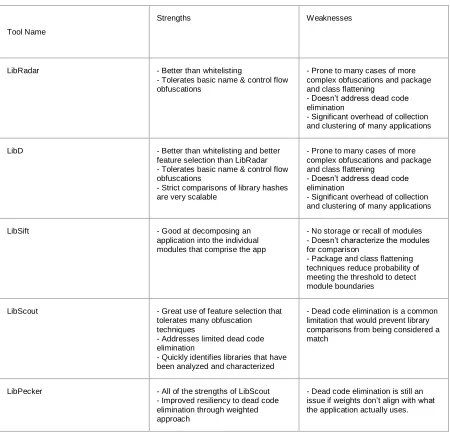
strict-comparison to include partial-strict-comparison techniques. The third-party library analysis
Tool Name
Strengths Weaknesses
LibRadar - Better than whitelisting
- Tolerates basic name & control flow obfuscations
- Prone to many cases of more complex obfuscations and package and class flattening
- Doesn’t address dead code elimination
- Significant overhead of collection and clustering of many applications
LibD - Better than whitelisting and better feature selection than LibRadar - Tolerates basic name & control flow obfuscations
- Strict comparisons of library hashes are very scalable
- Prone to many cases of more complex obfuscations and package and class flattening
- Doesn’t address dead code elimination
- Significant overhead of collection and clustering of many applications
LibSift - Good at decomposing an
application into the individual modules that comprise the app
- No storage or recall of modules - Doesn’t characterize the modules for comparison
- Package and class flattening techniques reduce probability of meeting the threshold to detect module boundaries
LibScout - Great use of feature selection that tolerates many obfuscation techniques
- Addresses limited dead code elimination
- Quickly identifies libraries that have been analyzed and characterized
- Dead code elimination is a common limitation that would prevent library comparisons from being considered a match
LibPecker - All of the strengths of LibScout - Improved resiliency to dead code elimination through weighted approach
[image:18.612.91.541.67.504.2]- Dead code elimination is still an issue if weights don’t align with what the application actually uses.
Table 1: TPL Community Capabilities
There are many considerations made to create the current state of the art approach
LibPecker [12] uses that other approaches have missed or neglected. Most approaches take
feature storage to use for later recall. LibSift [14] doesn’t implement this because their focus
was just to be able to separate modules using a package dependency graph. This makes the
tool to fill the gaps to be useful for library identification. All approaches know better than to
use features that are prone to name-based and control flow obfuscations. All the recent
approaches, except LibRadar [16], value the package relationships to determine library
boundaries. This can be disrupted by package and class flattening techniques and needs to be
addressed differently. All the approaches that consider library recall as important take full
advantage of the speed and efficiency of comparing hash values directly (i.e.
strict-comparison). The novelty in latest research is the use of partial-comparison. This allows for
minor differences that fall within a threshold to still detect libraries that are similar. The
extension LibPecker [12] makes is within their comparison method. They weight classes that
are more important. The weight is comprised of the basic block count and the number of
classes that depends on the class. This use of their similarity addresses cases where large
amounts of library code is removed due to dead code elimination where the remaining code
would not meet the threshold set by LibScout [11] or would require a threshold too low that
would identify many false positives. This is the featured improvement LibPecker [12]
contributed to third-party library analysis research.
Applications of Third-Party Library Detection
There are many positive applications of third-party library analysis research. Some of
the first uses of third-party library detection were used in clone-detection tools to be able to
detect libraries and exclude them from the core application module when analyzing and
searching for other cloned applications. Their techniques of detecting third-party libraries
were primitive methods using whitelists and SHA-1 hashes of libraries to remove them
during analysis. Clone-detection relies on detecting third-party libraries.
Other applications of third-party library detection and identification are used in
vulnerabilities and to identify these libraries when they were found in Android applications.
Because a single third-party library can be widely used, when a library contains a
vulnerability it can have enormous impacts if the whole picture isn’t identified. Third-party
library analysis helps combat this. The same principles can be applied if a library is found to
have privacy concerns as well. Different applications may require different feature
configurations or similarity method to match third-party libraries. This would need to be
tailorable for each application to choose.
Case Study
In the case study, we use LibScout to try and identify a third-party library
advertisement library called airpush. Cheng and others in EviHunter [29] discovered a
number of applications that had the airpush library that would write the GPS location and
time to a database on the device it was run on. We set up LibScout to analyze 149
applications to confirm EviHunter’s findings that each of the applications contain the airpush
library and the package name for this library is com.yrkfgo.assxqx4.
After building the LibScout tool, it is required to “profile” the libraries that you are
searching for. The original library is compared against that classes and packages that are
found in each application. Each time the library is used in an application, it may only contain
a subset of all of the classes and packages that would be in the original library. This is a
direct result of dead code elimination removing unused classes and packages.
After analyzing 149 Android applications, LibScout reported that only 10 out of the
149 applications even detected the com.yrkfgo.assxqx4 package from the library root node
using its heuristic, presumed to be matching the package name. None of the applications had
full nor partial matches of the suspected library they were each to contain. No full matches
There are many reasons why would see these results. First, it is necessary to start with
a full version of the original library because comparisons between the same libraries in
different applications may have limited number of packages and classes that intersect.
Second, each of the applications may not have had the com.yrkfgo.assxqx4 library package
but an updated version of the airpush library. This would put a great burden on selecting a
good threshold value to determine matches only if you didn’t have access to the updated
version’s original library. Next, the threshold doesn’t account for the significant amount of
dead code that was removed because it was unnecessary for the applications’ functionality.
Since airpush is an advertisement library it can be expected that the library provides many
style and design options for developers to use within the application. If a developer only
selects a few out of the many options the rest is removed. This may not be significant enough
to exceed the threshold set for a partial match. This can be improved by using a weighted
approach as we’ve seen in LibPecker, but I presume that it would still be especially difficult
to do so with many advertisement libraries. The last point to make is that better results may
be achieved by doing partial comparisons at the class level providing more granularity than
the default of the package level. This would be useful in future development of the LibScout
CHAPTER 4. CONCLUSION
Third-party library analysis has developed more sophisticated techniques to better
detect and compare third-party libraries. It is important to ensure that any third-party library
analysis tool that you use is resilient to various obfuscation techniques. The other strong
consideration that must be made is that the similarity methodology that the analysis tool
implements aligns with the project’s goals. Even with the improvements that have been made
there is still work that remains.
Future Work
With applications available in many different markets, there is a good amount of
work taken to develop web and app store crawlers to collect Android applications. LibScout
[11] and LibPecker [12] also use reference libraries to use for comparison. This would
require crawlers to save the amount of manual labor required to collect third-party libraries.
There is also a constant need to pull the latest version each time an application or library is
updated.
All the third-party library analysis techniques to date have used static program
analysis techniques. These are prone to have degraded performance with the use of packers
and reflection method calls. Reflection method calls utilize Java APIs to dynamically use
method or class names to invoke methods or load classes. The variables’ values are only
determined at run-time. This may lead to a hybrid of static and dynamic program analysis
techniques to detect third-party libraries.
Final Remarks
With more robust third-party library analysis programs available it is more likely to
continuous search to make Android applications more secure and recognize privacy
concerns. For these tools to gain wider use and ease of adoption, there is a need for
configurable feature selection. Third-party library analysis tools will need to remain resilient
REFERENCES
[1] Statista.com. (2018). Number of Available Applications in the Google Play Store from December 2009 to September 2018. [online] available at:
https://www.statista.com/statistics/266210/number-of-available-applications-in-the-google-play-store/ [Accessed 11 Nov. 2018].
[2] Google.com. (2018). Google AdMob - Mobile App Monetization & In App Advertising. [online] Available at: https://www.google.com/admob/index.html [Accessed 11 Nov. 2018].
[3] H. Wang, z. Ma, y. Guo, and x. Chen. Wukong: a scalable and accurate two-phase approach to android app clone detection. In issta’15, 2015.
[4] Moonsamy, V.; Batten, L. Android applications: Data leaks via advertising libraries. Information Theory and its Applications (ISITA), 2014, pp.314,317, 26-29 Oct. 2014.
[5] A. Short and F. Li. Android smartphone third party advertising library data leak analysis. in Mobile Ad Hoc and Sensor Systems (MASS), 2014 IEEE 11th International Conference on, Oct 2014, pp. 749–754.
[6] P. Lantz. An Android Application Sandbox for Dynamic Analysis. Master’s Thesis. Department of Electrical and Information Technology. Lund University, Sweden. 2011.
[7] W. Enck, P. Gilbert, B.-g. Chun, L. P. Cox, J. Jung, P. Mc- Daniel, and A. N. Sheth, Taintdroid: an information-flow tracking system for realtime privacy monitoring on smart- phones. in Proceedings of the 9th USENIX Symposium on Operating Systems Design and Implementation, 2010.
[8] S. Arzt, S. Rasthofer, C. Fritz, E. Bodden, A. Bartel, J. Klein, Y. le Traon, D. Octeau, and P. McDaniel. Flowdroid: Precise context, flow, field, object-sensitive and
lifecycle-aware taint analysis for Android apps. In PLDI’14, 2014.
[9] F. Wei, S. Roy, X. Ou, and Robby. Amandroid: A Precise and General
Inter-component Data Flow Analysis Framework for Security Vetting of Android Apps. In CCS’14. ACM, 2014.
[10] M. Backes, S. Bugiel, E. Derr, S. Gerling, and C. Hammer. R-Droid: Leveraging Android App Analysis with Static Slice Optimization. In ASIACCS ’16. ACM, 2016.
http://doi.acm.org/10.1145/2976749.2978333
[12] Y. Zhang, J. Dai, X. Zhang, S. Huang, Z. Yang, M. Yang and H. Chen. Detecting third-party libraries in Android applications with high precision and recall. In IEEE 25th International Conference on Software Analysis, Evolution and Reengineering,
2018.
[13] Gradle. (2018). Gradle Build Tool. [online] Available at: https://gradle.org/
[Accessed 10 Nov. 2018].
[14] C. Soh, H. B. K. Tan, Y. L. Arnatovich, A. Narayanan and L. Wang, "LibSift: Automated Detection of Third-Party Libraries in Android Applications," 2016 23rd Asia-Pacific Software Engineering Conference (APSEC), Hamilton, 2016, pp. 41-48.
[15] H. Wang, Y. Guo, Z. Ma, and X. Chen, “Wukong: A scalable and accurate two-phase approach to android app clone detection,” in Proceedings of the 2015 International Symposium on Software Testing and Analysis, ser. ISSTA 2015. New York, NY, USA: ACM, 2015, pp. 71–82. [Online]. Available: http://doi.acm.org/10.1145/2771783.27 71795
[16] Z. Ma, H. Wang, Y. Guo, and X. Chen, “Libradar: Fast and accurate
detection of third-party libraries in android apps,” in Proceedings of the 38th International Conference on Software Engineering Companion, ser. ICSE ’16. New York, NY, USA: ACM, 2016, pp. 653–656. [Online]. Available:
http://doi.acm.org/10.1145/2889160.2889178
[17] M. Li, W. Wang, P. Wang, S. Wang, D. Wu, J. Liu, R. Xue, and W. Huo, “Libd: Scalable and precise third-party library detection in android markets,” in Proceedings of the 39th International Conference on Software Engineering, ser. ICSE ’17. Piscataway, NJ, USA: IEEE Press, 2017, pp. 335–346.
[Online]. Available: https://doi.org/10.1109/ICSE.2017.38
[18] Androguard, github.com/androguard/androguard.
[19] Apktool, ibotpeaches.github.io/Apktool/.
[20] Soot Analysis Framework, www.sable.mcgill.ca/soot.
[21] Baksmali, github.com/JesusFreke/smali.
[22] ProGuard, developer.android.com/studio/build/shrink-code.html. [23] Allatori, www.allatori.com/.
[25] Legu, legu.qcloud.com/.
[26] Bangcle, www.bangcle.com/.
[27] Y. Wang and A. Rountev. 2017. Who Changed You? Obfuscator
Identification for Android. In 2017 IEEE/ACM 4th International Conference on Mobile Software Engineering and Systems (MOBILESoft). 154-164. https://doi.org/10.1109/MOBILESoft.2017.18
[28] J. Crussell, C. Gibler, and H. Chen, “Andarwin: Scalable detection of Android application clones based on semantics,” IEEE Trans. Mobile Computing, vol. 14, pp. 2007–2019, 2015.
ACRONYMS
AAR Android Archive
API Application Program Interface
APK Android Package
ART Android Runtime
CFG Control Flow Graph
DEX Dalvik Executable
DFG Data Flow Graph
IMEI International Mobile Equipment Identity
JAR Java Archive
OS Operation System
PDG Program Dependency Graph or
Package Dependency Graph
APPENDIX A. Overview of Author’s Work
The author created a prototype of a third-party library analysis tool during his
researching of third-party library analysis papers. The code is included as an example of
extracting stable features and separating libraries in an application modeled after LibSift’s
algorithm.
import sys
from pathlib import Path
import subprocess
import pickle
import hashlib
import os
APKTOOL_PATH = "C:/Windows/apktool.bat" D_APK_PATH = ""
FILTER_ANDROID_PACKAGES = True
DEBUG = True
INHERITANCE_WEIGHT = 10
METHOD_CALL_WEIGHT = 2
MEMBER_REFERENCE_WEIGHT = 1
LIB_EDGE_WEIGHT_THRESHOLD = 15
class Vertex:
def __init__(self, node_id): self.id = node_id
self.adj_dict = {}
# Add edge to out_node
# If out_node exists, add the weight
def add_out_edge(self, out_node, weight=0): if out_node in self.adj_dict:
self.adj_dict[out_node] += weight else:
self.adj_dict[out_node] = weight
def get_id(self): return self.id
def get_weight(self, out): return self.adj_dict[out]
class Graph:
def __init__(self): self.vertex_list = []
def __iter__(self):
def add_vertex(self, node): i = self.get_vertex(node) if i < 0:
v = Vertex(node)
self.vertex_list.append(v) return v
else:
return self.vertex_list[i]
def get_vertex(self, node): i = 0
for v in self.vertex_list: if v.get_id() == node: return i
else: i += 1 return -1
def add_edge(self, start_node, end_node, weight): i = self.get_vertex(start_node)
if i < 0: return
v = self.vertex_list[i] if v is not None:
v.add_out_edge(end_node, weight)
def print_usage():
print('Usage: \ttplanalyzer apkfile')
def check_arguments(): if len(sys.argv) != 2: print_usage()
apk_file = Path(sys.argv[1]) if apk_file.exists() == False: print("File doesn't exist") return None
elif apk_file.suffix != ".apk": print("File is not an apk file") return None
else:
print(apk_file) return apk_file
def disassemble_apk(apk_file_path=None): d_apk_path = D_APK_PATH
if apk_file_path is not None:
err = subprocess.run([APKTOOL_PATH, "d", "-f", "-o", d_apk_path, str(apk_file_path)])
print(err)
print(err.check_returncode()) return d_apk_path
# Parse smali method starting after the '(' until determining return type after ')' def parse_method_signature(method_str):
i = 0
for c in method_str: if c == 'Z':
input_vector[0] += 1 elif c == '[':
input_vector[1] += 1
elif c == 'B' or c == 'S' or c == 'C' or c == 'I' or c == 'J' or c == 'F'
or c == 'D':
input_vector[2] += 1 elif c == ';':
input_vector[3] += 1 elif c == ')':
output_type = method_str[i+1] break
i += 1
return input_vector, output_type
def extract_class_features(class_path):
# Vars to keep info about package interactions, exclude current package # pf will be used for package feature extraction
pf_inheritance_package = None pf_member_references = []
# Saved as a list of classes (i.e. Lcom/packageName/example) pf_method_calls = []
# Vector of constant counts - <string, object, integer (any size)> const_ct = [0, 0, 0]
method_list = []
is_inside_method = False current_method_features = []
# Vector of method operation counts - <move, const, new-instance, goto, conditionals (cmp and if),
# arithmetic operations, method calls (invoke)>
method_feature_vector = [0, 0, 0, 0, 0, 0, 0]
with open(str(class_path)) as file: # Parse class file
for line in file: # Strip whitespace line = line.strip() if not is_inside_method:
# Save this class name for comparison with possible pf candidates if line[:6] == ".class":
# Save smali style class and package name
class_package_name = line[line.find('L'):line.rfind('/')]
# Save package inheritance info elif line[:6] == ".super":
super_class = line[7:line.find(';')] # Skip normal objects
if super_class.find("Ljava/lang/Object") != -1: continue
# Save inherited class info
elif super_class.find(class_package_name) == -1: pf_inheritance_package =
# Record constants
elif line[:6] == ".field":
colon_index = line.index(':')
# Increment string count, may just count it as an object
if colon_index != -1 and line.find('Ljava/lang/String;') != -1: const_ct[0] += 1
# Increment object count
elif line.find('L') != -1 and line.find(';') != -1: const_ct[1] += 1
# Add as member reference for pf
if line.find(class_package_name) == -1:
pf_member_references.append(line[line.find('L',colon_index):line.find(';',colon_ind ex)-1])
# Increment integer count else:
const_ct[2] += 1
# Find and parse methods elif line[:7] == ".method": method_in, method_out = parse_method_signature(line[line.index('(')+1:]) is_inside_method = True
current_method_features.append(method_in) current_method_features.append(method_out) # if line.find("constructor") != -1:
# current_method_features.append(method_feature_vector) # method_list.append(current_method_features)
else:
if line[:4] == "move":
method_feature_vector[0] += 1 elif line[:5] == "const":
method_feature_vector[1] += 1 elif line[:12] == "new-instance": method_feature_vector[2] += 1
# Add as member reference for pf if it isn't from the same package
if line.find(class_package_name) == -1:
pf_member_references.append(line[line.find('L'):line.rfind('/')]) elif line[:4] == "goto":
method_feature_vector[3] += 1
elif line[:3] == "cmp" or line[:2] == "if": method_feature_vector[4] += 1
elif (line[:3] == "add" or line[:3] == "sub" or line[:3] == "mul"
or line[:3] == "div" or
line[:3] == "rem" or line[:3] == "and" or line[:2] == "or" or
line[:3] == "xor" or line[:3] == "shl" or line[:3] == "shr" or line[:4] == "ushr"): method_feature_vector[5] += 1
elif line[:6] == "invoke":
method_feature_vector[6] += 1
# Save called class for pf level
called_class = line[line.find('L'):line.find(';')] if called_class.find(class_package_name) == -1: # Remove semicolon
elif line[:6] == "return": is_inside_method = False
current_method_features.append(method_feature_vector) method_list.append(current_method_features)
current_method_features = []
method_feature_vector = [0, 0, 0, 0, 0, 0, 0]
# Combine set of class features print(str(method_list))
class_data = {'const_ct': const_ct, 'method_list': method_list}
m = hashlib.sha1()
m.update((str(class_data)).encode()) class_hash = m.digest()
pf_data = {'package_name': class_package_name,
'pf_inheritance_package': pf_inheritance_package, 'pf_member_references': pf_member_references, 'pf_method_calls': pf_method_calls}
if DEBUG:
print("Class hash - " + str(class_hash)) print(class_data)
# Save class data to pkl file pkl_file_path = str(class_path)
pkl_file_path = pkl_file_path[:pkl_file_path.rfind('.')] + ".class.pkl" print(pkl_file_path)
with open(pkl_file_path, 'wb') as pkl_file: pickle.dump(class_data, pkl_file) pickle.dump(class_hash, pkl_file) pickle.dump(pf_data, pkl_file)
def extract_package_features(dir_path):
# Create list of class data with each element being (class_data, class_hash) class_list = []
package_hash = None pf_inheritance_list = [] pf_member_reference_list = [] pf_method_call_list = []
# Find all class pkl files in the given directory path pkl_file_list = Path(str(dir_path)).glob('**/*.class.pkl') for pkl_file in pkl_file_list:
pkl_file_path = str(pkl_file)
print('Pkl file -- ' + pkl_file_path)
# Load pkl file
with open(pkl_file_path, 'rb') as pkl_in: rcv_class_data = pickle.load(pkl_in) rcv_class_hash = pickle.load(pkl_in) rcv_pf_data = pickle.load(pkl_in)
if DEBUG:
print("Rcv pkl -- " + str(rcv_class_data)) print("Rcv pkl hash -- " + str(rcv_class_hash))
str(rcv_pf_data['pf_inheritance_package'])) print("rcv_pf_member_references: " + str(rcv_pf_data['pf_member_references']))
print("rcv_pf_method_calls: " + str(rcv_pf_data['pf_method_calls'])) print("rcv_class_pkg_name: " + str(rcv_pf_data['package_name']))
class_info = (rcv_class_data, rcv_class_hash) class_list.append(class_info)
# Add package features (pf) from class feature pickle files if rcv_pf_data['pf_inheritance_package'] is not None:
pf_inheritance_list.append(rcv_pf_data['pf_inheritance_package'])
pf_member_reference_list.extend(rcv_pf_data['pf_member_references']) pf_method_call_list.extend(rcv_pf_data['pf_method_calls'])
# Find all pkg pkl files (if any) in the given directory path pkl_file_list = Path(str(dir_path)).glob('**/*.pkg.pkl')
# Extract pkg features from pkg pkl files for pkl_file in pkl_file_list:
pkl_file_path = str(pkl_file)
with open(pkl_file_path, 'rb') as pkl_in: in_package_data = pickle.load(pkl_in) in_package_hash = pickle.load(pkl_in)
if in_package_data is not None:
pf_inheritance_list += in_package_data['inheritance_list'] pf_member_reference_list +=
in_package_data['member_reference_list']
pf_method_call_list += in_package_data['method_call_list']
# Compile class pickle files within given dir_path # Sort classes based on hash value
class_list.sort(key=lambda x:x[1])
# Create package hash from class hashes m = hashlib.sha1()
for c in class_list:
m.update((str(c[1])).encode()) package_hash = m.digest()
if DEBUG:
# Print sorted hash values, package hash and pf lists print("Class list: ")
for c in class_list: print(str(c[1]))
print("Package hash: " + str(package_hash))
print("pf_inheritance_package combined list: " + str(pf_inheritance_list)) print("pf_member_reference combined list: " +
str(pf_member_reference_list))
print("pf_method_calls combined list: " + str(pf_method_call_list))
# Set up package data for pkl file
package_data = {'inheritance_list': pf_inheritance_list,
'member_reference_list': pf_member_reference_list, 'method_call_list': pf_method_call_list}
# Save compiled package feature file as pickle file pkl_file_path = str(dir_path)
pkl_file_path += ".pkg.pkl"
pickle.dump(package_data, pkl_file) pickle.dump(package_hash, pkl_file)
pickle.dump(rcv_pf_data['package_name'], pkl_file)
# Extracts features from disassembled apk given the disassembled path # Returns - list of package paths
# Each path has smali files directly below it
# They will be used as nodes to build the package graph def extract_features(d_apk_path):
# Class feature extraction
# Recursively extract features from disassembled smali files file_paths = Path(d_apk_path).glob('**/*.smali')
for class_path in file_paths:
class_path_str = str(class_path)
# Filter out Android system packages if (FILTER_ANDROID_PACKAGES == True and
(class_path_str.find('android\\support') != -1 or
class_path_str.find('android/support') != -1 or class_path_str.find('android\\arch') != -1 or class_path_str.find('android/arch') != -1)): continue
print(class_path_str)
extract_class_features(class_path)
print('extract_class_features - COMPLETED')
# Package feature extraction
# Find all directories with smali files directly below package_paths = []
# Check all files within disassembled file file_paths = Path(d_apk_path).glob('**') for file in file_paths:
if file.is_dir():
file_str = str(file)
if (FILTER_ANDROID_PACKAGES == True and
(file_str.find('android\\support') != -1 or
file_str.find('android/support') != -1 or file_str.find('android\\arch') != -1 or file_str.find('android/arch') != -1)): continue
# Check if there are any smali files in dir file_list = Path(str(file)).glob('*/*.smali') for smali_file in file_list:
# Full path of directory dir_str = str(smali_file)
slash_index = max(dir_str.rfind('/'), dir_str.rfind('\\')) # Strip the filename
dir_str = dir_str[:slash_index] package_paths.append(dir_str) break
# Sort package paths by deepest first
package_paths.sort(key=lambda x: max(str(x).count('/'), str(x).count('\\')),
reverse=True)
# Combine all class feature files into a package feature file with extract_package_features(dir_path)
for directory_path in package_paths:
return package_paths
# Build graph from package pkl files
# Input list of package_paths in the app # Return app_graph
def build_app_graph(package_path_list):
if package_path_list is None: return None
print("Number of packages: " + str(len(package_path_list)))
# Initialize graph
num_packages = len(package_path_list) if num_packages < 1:
return None
graph = Graph()
# Add this package as a node
# Add edges and weights to outgoing nodes
for pkl_file_path in package_path_list: pkl_file_path = str(pkl_file_path) pkl_file_path += ".pkl"
# Open package pickle file and read package feature data with open(pkl_file_path, 'rb') as pkl_in:
test_package_data = pickle.load(pkl_in) test_package_hash = pickle.load(pkl_in) test_package_name = pickle.load(pkl_in)
if DEBUG:
print("Package_data: " + str(test_package_data)) print("Package_data -> inheritance_list: " + str(test_package_data['inheritance_list']))
print("Package_data -> method_call_list: " + str(test_package_data['method_call_list']))
print("Package_data -> member_reference_list: " + str(test_package_data['member_reference_list']))
print("Package_hash: " + str(test_package_hash)) print("Package_name: " + str(test_package_name))
pkg_name = str(test_package_name)
pkg_inheritance_list = test_package_data['inheritance_list'] pkg_method_call_list = test_package_data['method_call_list']
pkg_member_references_list = test_package_data['member_reference_list']
# Add package to graph graph.add_vertex(pkg_name)
# Add edges to graph with corresponding weight if pkg_inheritance_list is not None:
for pkg in pkg_inheritance_list:
graph.add_edge(pkg_name, pkg, INHERITANCE_WEIGHT)
if pkg_method_call_list is not None: for pkg in pkg_method_call_list:
if pkg_member_references_list is not None: for pkg in pkg_member_references_list:
graph.add_edge(pkg_name, pkg, MEMBER_REFERENCE_WEIGHT)
print(str(graph.vertex_list))
# Remove any edges that don't have existing packages because of filtering system
for v in graph.vertex_list: remove_list = []
print(v.adj_dict)
for edge_name in v.adj_dict:
if graph.get_vertex(edge_name) < 0: remove_list.append(edge_name)
for edge_name in remove_list: print(edge_name in v.adj_dict) v.adj_dict.pop(edge_name)
return graph
# todo
def define_library(graph): lib_graph = Graph()
# List libraries based on LibSift definition for v1 in graph.vertex_list:
for v2_id, edge_weight in v1.adj_dict.items(): if edge_weight > LIB_EDGE_WEIGHT_THRESHOLD: if have_homogeneity(v1.get_id(), v2_id):
# Retrieve v2 and add merged vertex to lib_graph print()
# todo
def cluster(): print()
# todo
def make_predictions(): print()
# todo
def have_homogeneity(v1, v2): print()
def main():
apk_file_path = check_arguments()
# d_apk_path = disassemble_apk(apk_file_path) # Used for testing - fixme
d_apk_path = D_APK_PATH
package_path_list = extract_features(d_apk_path) app_graph = build_app_graph(package_path_list) define_library(app_graph)
cluster()