Guide to Migrating from DB2 to SQL Server
SQL Server Technical Article
Authors: Yuri Rusakov (DB Best Technologies), Alexander Pavlov (DB Best Technologies), Yuri Kovtun (DB Best Technologies), Alexander Shumeiko (DB Best Technologies), Arthur Alchangian (DB Best Technologies)
Technical Reviewers: Dmitry Balin (DB Best Technologies)
Published: April 2009
Applies to: Microsoft® SQL Server® 2005 and SQL Server 2008
Summary
In this migration guide you will learn the differences between the IBM DB2 and Microsoft SQL Server database platforms, and the steps necessary to convert a DB2 database to SQL Server.
Created by: DB Best Technologies LLC P.O. Box 7461, Bellevue, WA 980008 Tel.: (408) 202-4567
E-mail: [email protected] Web: www.dbbest.com
The information contained in this document represents the current view of Microsoft Corporation on the issues discussed as of the date of publication. Because Microsoft must respond to changing market conditions, it should not be interpreted to be a commitment on the part of Microsoft, and Microsoft cannot guarantee the accuracy of any information presented after the date of publication.
This White Paper is for informational purposes only. MICROSOFT MAKES NO WARRANTIES, EXPRESS, IMPLIED OR STATUTORY, AS TO THE INFORMATION IN THIS DOCUMENT.
Complying with all applicable copyright laws is the responsibility of the user. Without limiting the rights under copyright, no part of this document may be reproduced, stored in or introduced into a retrieval system, or transmitted in any form or by any means (electronic, mechanical, photocopying, recording, or otherwise), or for any purpose, without the express written permission of Microsoft Corporation.
Microsoft may have patents, patent applications, trademarks, copyrights, or other intellectual property rights covering subject matter in this document. Except as expressly provided in any written license agreement from Microsoft, the furnishing of this document does not give you any license to these patents, trademarks, copyrights, or other intellectual property.
© 2009 Microsoft Corporation. All rights reserved.
Microsoft, SQL Server, and Visual Studio are trademarks of the Microsoft group of companies. All other trademarks are property of their respective owners.
Contents
1.0 Introduction... 5
2.0 DB2 to SQL Server Migration... 5
2.1 Overview of Migration Steps ... 5
2.2 Migrating Security Items ... 5
2.2.1 Authentication ... 6
2.2.2 Authorization ... 6
2.2.3 Privileges ... 6
2.2.4 Converting Users ... 6
2.3 Mapping Data Types ... 7
2.4 Converting Database Objects ... 8
3.0 DB2 Migration Issues ... 9
3.1 CREATE Statements ... 9
3.1.1 Migrating Tables – CREATE TABLE Statement ... 9
3.1.2 Migrating Views – CREATE VIEW Statement ... 11
3.1.3 Migrating Indexes – CREATE INDEX Statement ... 12
3.2 Triggers ... 16
3.2.1 AFTER / FOR EACH ROW Trigger ... 16
3.2.2 AFTER /FOR EACH STATEMENT Trigger ... 17
3.2.3 BEFORE / FOR EACH ROW and INSTEAD OF / FOR EACH ROW Triggers ... 17
3.2.4 Column Update ... 20
3.3 Sequences ... 20
3.4 Data Manipulation Statements ... 22
3.4.1 SELECT Statement ... 22 3.4.2 VALUES Statement ... 28 3.4.3 INSERT Statement ... 29 3.4.4 UPDATE Statement ... 30 3.4.5 MERGE Statement ... 31 3.4.6 DELETE Statement ... 33 3.5 Routines ... 34 3.5.1 Procedures ... 34 3.5.2 User-Defined Functions ... 35
3.5.3 Flow Control Constructs ... 36
3.5.4 Cursors... 49
3.6 Exceptions, Handlers, and Conditions ... 53
3.6.1 EXIT Handlers ... 53
3.6.2 UNDO Handlers ... 54
3.6.3 CONTINUE Handlers ... 55
3.7 Dynamic SQL ... 56
3.7.1 DESCRIBE Statement ... 56
3.7.2 Caching Dynamic SQL: PREPARE Statement ... 56
3.7.3 Dynamic SQL ... 57
3.8.1 Declaring a Global Temporary Table ... 60
3.8.2 Creating a Temporary Table with Defined Columns ... 61
3.8.3 Creating a Temporary Table with Defined Columns and Defaults ... 61
3.8.4 Creating a Temporary Table with Columns Returned by the SELECT statement ... 61
3.8.5 Creating an Index for a Temporary Table ... 62
3.8.6 Reusing a Temporary Table ... 63
3.8.7 Declaring a Temporary Table ... 64
3.8.8 Deleting Rows After Commit ... 64
3.9 Aliases ... 64
3.10 Nicknames ... 65
3.10.1 References to Other Databases ... 65
3.10.2 References to Data from a Nonrelational Wrapper ... 65
3.11 User-Defined Types ... 66 3.11.1 Distinct Type ... 66 3.11.2 Structured Type ... 66 3.12 Special Registers ... 67 3.12.1 CURRENT TIMESTAMP ... 67 3.12.2 CURRENT DATE ... 67 3.12.3 CURRENT TIME ... 68 3.12.4 CURRENT USER ... 68
3.12.5 SESSION USER or USER ... 68
3.12.6 SYSTEM_USER ... 68
3.12.7 CURRENT CLIENT APPLNAME ... 69
3.12.8 CURRENT CLIENT WRKSTNNAME ... 69
3.12.9 CURRENT LOCK TIMEOUT ... 69
3.12.10 CURRENT SCHEMA ... 69
3.12.11 CURRENT SERVER... 70
3.12.12 CURRENT ISOLATION ... 70
4.0 Migrating DB2 Standard Functions ... 71
4.1 Equivalent Functions ... 71
4.2 Emulated Functions ... 71
4.2.1 Functions with a Variable Parameter Number ... 71
4.2.2 CHAR(expression) ... 71
4.2.3 CHR(expression) ... 71
4.2.4 CONCAT(expression1, expression2) ... 72
4.2.5 COSH(expression) ... 72 4.2.6 DAYNAME(expression) ... 72 4.2.7 DAYOFWEEK(expression) ... 72 4.2.8 DAYOFWEEK_ISO(expression) ... 73 4.2.9 DAYOFYEAR(expression) ... 73 4.2.10 DECFLOAT(expression) ... 73 4.2.11 DECIMAL(expression) ... 73
4.2.12 DECODE(expression1, expression2, …)... 73
4.2.13 DOUBLE(string-expression) ... 74
4.2.14 FLOAT(expression) ... 74
4.2.16 GRAPHIC(expression) ... 74
4.2.17 HOUR(expression) ... 74
4.2.18 INSERT(source-string, start, length, insert-string) ... 75
4.2.19 INTEGER(expression) ... 75
4.2.20 LCASE(expression) ... 75
4.2.21 LENGTH(expression) ... 75
4.2.22 LOCATE(search-string, source-string, start) ... 75
4.2.23 MICROSECOND(expression) ... 76
4.2.24 MINUTE(expression) ... 76
4.2.25 MONTHNAME(expression) ... 76
4.2.26 NVL(expression1, expression2,…) ... 76
4.2.27 POSITION(search-string, source-string, string-unit) ... 77
4.2.28 POSSTR(source-string, search-string) ... 77
4.2.29 QUARTER(expression)... 77
4.2.30 REAL(expression) ... 77
4.2.31 REPEAT(expression1, expression2) ... 77
4.2.32 SECOND(expression) ... 78
4.2.33 SINH(expression) ... 78
4.2.34 SMALLINT(expression)... 78
4.2.35 SUBSTR(string, start, length) ... 78
4.2.36 TANH(expression) ... 79
4.2.37 TIMESTAMP(expression) ... 79
4.2.38 TIMESTAMP_FORMAT(string-expression, format-string) ... 79
4.2.39 TIMESTAMPDIFF(expression, format-string) ... 79
4.2.40 TO_CHAR(timestamp-expression,format-string) ... 79
4.2.41 TO_DATE(string-expression, format-string) ... 80
4.2.42 UCASE(expression) ... 80
4.2.43 TOTALORDER(expression1, expression2) ... 80
4.2.44 VALUE(expression, expression) ... 80
4.2.45 VARCHAR(character-expression, integer) ... 81
4.2.46 VARCHAR_FORMAT(timestamp-expression, format-string) ... 81
4.2.47 WEEK(expression) ... 81
5.0 Data Migration ... 82
5.1 Pre-Implementation Tasks ... 82
5.2 Implementation Tasks ... 83
5.2.1 One-Step Process Using SSIS Import and Export Wizard ... 83
5.2.2 Two-Step Process Using the bcp Utility ... 84
5.2.3 Two-Step Process Using BULK INSERT... 84
5.2.4 Two-Step Process Using SSIS ... 85
5.2.5 Methods for Optimizing Bulk Import Performance ... 86
5.3 Post-Implementation Tasks ... 86
6.0 Terminology Mapping ... 88
7.0 Conclusion ... 90
1.0 Introduction
This migration guide outlines the procedures, issues, and solutions for migrating from IBM DB2 version 9.x for Linux, UNIX, or Windows® to Microsoft® SQL Server® 2005 or SQL Server 2008
database software. The solutions provided here can also be applied to DB2 UDB for z/OS (version 8) and DB2 UDB for iSeries (version 5).
2.0 DB2 to SQL Server Migration
In this section, first a high-level view of the steps for migrating a DB2 database to SQL Server 2005 and SQL Server 2008 is summarized. Then you are given an overview of what you must know about converting security items and database objects. The section concludes with a table of recommended type mappings for converting table columns.
2.1 Overview of Migration Steps
To migrate a DB2 database, take the following actions, in this order:1. Decide how you will map DB2 databases to SQL Server 2005 or SQL Server 2008. You have two main options:
Map each DB2 database to a separate SQL Server database. For example, if one of your DB2 databases is named MyDB, you could map the MyDB database to one of your SQL Server databases.
Map each DB2 database to a separate schema within a single SQL Server database. For example, you could map your MyDB database to the schema MyDB of your SQL Server database.
Note: In SQL Server, schemas are not necessarily linked to a specific user or login ID, and one server can contain multiple databases.
2. Migrate security items: the users and login IDs. (See section 2.2.)
3. Map data types from the DB2 data type to a corresponding SQL Server data type. (See section 2.3.)
4. Convert database objects: table columns, triggers, views, sequences, and routines. (See section 2.4.)
5. Rewrite your views, procedures, and functions according to SQL Server syntax. For a description of various issues related to this process, see section 3.0.
6. Change your applications as necessary so that they can work with SQL Server.
7. After a successful database conversion, migrate your data from the old DB2 database to the newly created SQL Server database. For this task you could use SQL Server Integration Services (SSIS), for example.
2.2 Migrating Security Items
There are three main mechanisms within DB2 that allow you to implement a database security plan: authentication, authorization, and privileges. This section first covers these security items, which differ from those used in SQL Server. A separate issue addressed in this section is the conversion of database users.
2.2.1 Authentication
In DB2 client-server applications, login and password checking can be performed on a server, a client, or an intermediate DB2 Connect gateway. Five different types of authentication are available for defining the location: SERVER, SERVER_ENCRYPT, CLIENT, KERBEROS, and
KRB_SERVER_ENCRYPT.
Authentication in SQL Server is always performed on the server side only, and is implemented in a different way than in DB2. Because SQL Server offers two different modes: Windows Authentication and Mixed Authentication. Depending on the system architecture, authentication should be adjusted during the conversion.
To adjust a trusted connection, DB2 uses the instance configuration parameters TRUST_ALLCLNTS and TRUST_CLNTAUTH. When a user connects to SQL Server using Windows Authentication (by means of a Windows login), SQL Server relies on (―trusts‖) the operating system to perform authentication checking, and checks only if the Windows use name corresponds to a login that is defined in this instance of SQL Server or if the user’s login belongs to a Windows group with a login that is defined in SQL Server. Thus, it is enough to use Windows Authentication mode to implement a trusted connection in SQL Server.
2.2.2 Authorization
User authorization defines the list of the commands and objects that are available for a user. This list thereby controls user actions.
In DB2, there are predetermined groups of privileges for authorization, both at the instance level and at the level of a DB2 database.
Instance level: The privileges at the instance level—SYSADM, SYSCTRL, and
SYSMAINT—can be granted only to users and user groups of the operating system. Database level: DBADM and LOAD privileges are granted only on a particular database.
Using the GRANT command, the DBADM and LOAD privileges can be granted to an existing user group of the operating system, to a DB2 user group, and to individual users of the operating system or database.
SQL Server has a similar authorization mechanism. Some DB2 privileges of the instance level or the database level can be replaced in SQL Server with predefined server roles, database roles, or a combination. Some privileges can also be replaced by creating new roles at the database level, which can be assigned to users and groups.
2.2.3 Privileges
DB2 privileges generally fall into two main categories: database-level privileges, which span all objects within the database, and object-level privileges, which are associated with a specific object. Converting privileges to SQL Server permissions is performed by means of permission sets, which can be granted to both users and groups. Depending on whether database-level or object-level privileges are being converted, access permissions to a definite database or its objects are granted to either groups or users in SQL Server. All existing DB2 privileges can be replaced with the equivalent SQL Server permissions or a combination of permissions.
2.2.4 Converting Users
In DB2, both users and groups can access an instance or a database. These users and groups can be registered in the operating system or can simply have been granted access to it. Also, access can be given to users and groups that belong to a domain in which the DB2 database server or the user workstation is included.
SQL Server also supports such possibilities. Thus, to move users or groups to SQL Server, first create those users or groups in the new operating system; next, create a login for each group and user in SQL Server and then create a user in the SQL Server target database for each login. To create a new login for the Login Name field in the master database, choose the user or group from a list of those registered in the operating system or domain. (You can also perform this step by means of SQL CREATE LOGIN command.) Finally, after creating server logins and database users, grant permissions corresponding to the privileges that these users and groups had in DB2.
2.3 Mapping Data Types
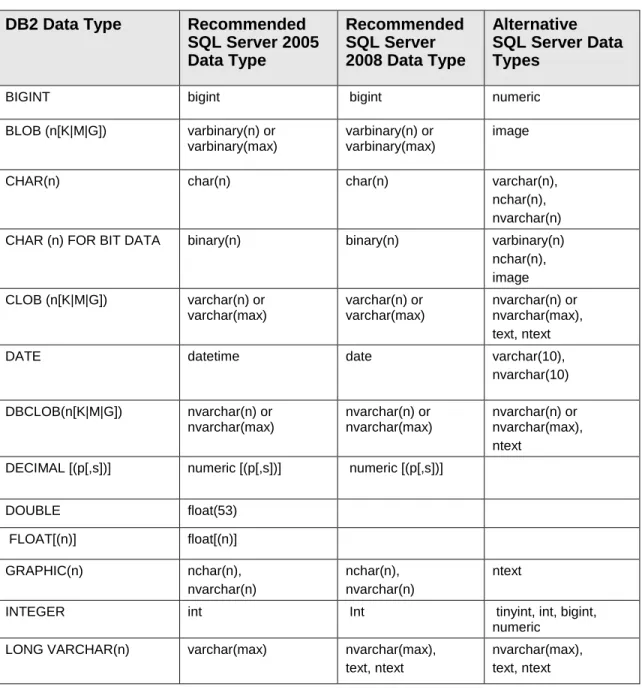
Table 1 lists the recommended type mappings for converting table columns. (Section 3.11, ―User-Defined Types,‖ covers migration of user-defined types.)
Table 1: Type Mappings for Converting Table Columns from DB2 to
SQL Server
DB2 Data Type
Recommended
SQL Server 2005
Data Type
Recommended
SQL Server
2008 Data Type
Alternative
SQL Server Data
Types
BIGINT bigint bigint numeric
BLOB (n[K|M|G]) varbinary(n) or varbinary(max)
varbinary(n) or varbinary(max)
image
CHAR(n) char(n) char(n) varchar(n),
nchar(n), nvarchar(n) CHAR (n) FOR BIT DATA binary(n) binary(n) varbinary(n)
nchar(n), image CLOB (n[K|M|G]) varchar(n) or varchar(max) varchar(n) or varchar(max) nvarchar(n) or nvarchar(max), text, ntext
DATE datetime date varchar(10),
nvarchar(10) DBCLOB(n[K|M|G]) nvarchar(n) or nvarchar(max) nvarchar(n) or nvarchar(max) nvarchar(n) or nvarchar(max), ntext
DECIMAL [(p[,s])] numeric [(p[,s])] numeric [(p[,s])]
DOUBLE float(53) FLOAT[(n)] float[(n)] GRAPHIC(n) nchar(n), nvarchar(n) nchar(n), nvarchar(n) ntext
INTEGER int Int tinyint, int, bigint, numeric
LONG VARCHAR(n) varchar(max) nvarchar(max), text, ntext
nvarchar(max), text, ntext
[LONG] VARCHAR (n) FOR BIT DATA
varbinary(n), varbinary(max) binary(n), varbinary(n), varbinary(max), image binary(n), varbinary(n), varbinary(max), image
NUMERIC [(p[,s])] numeric [(p[,s])] numeric [(p[,s])]
REAL real
SMALLINT smallint smallint tinyint, int, bigint, numeric
TIME* smalldatetime time datetime
TIMESTAMP datetime datetime2 varchar(26)
VARCHAR(n) varchar(n), varchar(max) varchar(n), varchar(max) nvarchar(n), nvarchar(max), text, ntext VARGRAPHIC (n) nvarchar(n), nvarchar(max) nvarchar(n), nvarchar(max) ntext XML xml xml varchar(n), nvarchar(n), varchar(max), nvarchar(max)
* When a converted TIME column is retrieved in SQL Server 2005, it should be used together with the DATEPART function, which picks the time element out of the smalldatetime type.
2.4 Converting Database Objects
This section briefly describes methods of conversion for miscellaneous database objects.
Tables, indexes: The data type of table columns should be converted using selected data type mapping. For information about recommended type mappings, see section 2.3, ―Mapping Data Types.‖ See the issues related to table conversion in section 3.1.1, ―Migrating Tables – CREATE TABLE Statement.‖
To learn about the differences between index definitions, see the CREATE INDEX description in section 3.1.3, ―Migrating Indexes – CREATE INDEX Statement.‖
Triggers: Generally, DB2 triggers are converted to SQL Server triggers. The type of a trigger may need to be changed; for example, you should convert the BEFORE trigger to INSTEAD OF. Also, some additional code may need to be added to a trigger, and references to new/old tables and rows should be replaced. For details, see section 3.2, ―Triggers.‖
Views: In most cases, views are compatible and problems appear only when converting an underlying SELECT statement.
Sequences: We suggest emulation of DB2 sequences using two SQL Server tables. For details, see section 3.3, ―Sequences.‖
Routines: Routines include stored procedures and user-defined functions. To read details about their conversion, see section 3.5.1, ―Procedures‖ and section 3.5.2, ―User-Defined Functions.‖
3.0 DB2 Migration Issues
This section identifies problems that may occur when migrating from DB2 9.x to SQL Server, and suggests ways to handle those problems.
3.1 CREATE Statements
This section compares the CREATE TABLE, CREATE VIEW, and CREATE INDEX statements in DB2 and SQL Server.
3.1.1 Migrating Tables – CREATE TABLE Statement
This section describes the differences between DB2 and SQL Server in creating tables, and covers a few incompatible clauses of CREATE TABLE statement.
3.1.1.1 LIKE Clause
In DB2, the LIKE clause specifies that the columns of the created table have exactly the same name and description as the columns of the identified source table, view, or nickname. The name specified after LIKE must identify a table, view, nickname, or temporary table. The LIKE clause can also be used for defining default constraints and identity columns in the target table. This is controlled by the clauses INCLUDING/EXCLUDING COLUMN DEFAULTS and INCLUDING/EXCLUDING IDENTITY COLUMN ATTRIBUTES.
DB2 Example 1:
create table t1 (
c1 integer not null generated always as identity ( start with 1 increment by 1),
c2 varchar(50) with default 'a' )!
create table t2 like t1
including identity column attributes!
DB2 Example 2:
create table t1 (
c1 integer not null generated always as identity ( start with 1 increment by 1),
c2 varchar(50) with default 'a' )!
create table t2 like t1 including column defaults
including identity column attributes!
Solution:
SQL Server does not have similar functionality. Use the default CREATE TABLE or SELECT…INTO statement to create a table that will have columns with the same name and description as the columns of another table. The SQL Server statement SELECT…INTO allows you to create
IDENTITY fields but does not allow you to add defaults and calculated fields. Thus you can convert SELECT…INTO statements, which do not contain the clause INCLUDING/EXCLUDING COLUMN DEFAULTS.
SQL Server Example 1:
go
create table t1 (
c1 int identity(1,1), c2 varchar(50)
); go
select * into t2 from t1;
SQL Server Example 2:
create table t1 (
c1 int identity(1,1), c2 varchar(50) default 'a' );
create table t2 (
c1 int identity(1,1), c2 varchar(50) default 'a' );
3.1.1.7 COMPRESS Clause
In DB2, the COMPRESS clause specifies whether data compression applies to the rows of the table. DB2 Example:
create table t1
(c1 int, c2 varchar(50) ) compress yes!
Solution:
There is no similar clause in SQL Server. To compress data in a SQL Server table, use the WITH DATA_COMPRESSION statement.
SQL Server Example:
create table t1
(c1 int, c2 nvarchar(50) ) with (data_compression = page);
3.1.1.8 VALUE COMPRESSION Clause
In DB2, the VALUE COMPRESSION clause determines the row format that is to be used. Each data type has a different byte count, depending on the row format that is used. The NULL value is stored using three bytes. Whether a column is defined as nullable has no effect on the row size calculation. The zero-length data values for columns whose data type is VARCHAR, VARGRAPHIC, LONG VARCHAR, LONG VARGRAPHIC, CLOB, DBCLOB, BLOB, or XML are to be stored using two bytes only, which is less than the storage required when VALUE COMPRESSION is not active.
DB2 Example:
create table t1
(c1 int, c2 varchar(50) ) value compression!
Solution:
In SQL Server, you can emulate this clause by using the WITH DATA_COMPRESSION statement. SQL Server Example:
create table t1
(c1 int, c2 nvarchar(50) ) with (data_compression = row);
3.1.1.11 CCSID [ASCII / UNICODE] Clauses
In DB2, the CCSID clause specifies the encoding scheme for string data stored in the table. If the CCSID clause is not specified, the default is CCSID UNICODE for Unicode databases, and CCSID ASCII for all other databases.
ASCII specifies that string data is encoded in the database code page. If the database is a Unicode database, CCSID ASCII cannot be specified.
UNICODE specifies that string data is encoded in Unicode. If the database is a Unicode database, character data is in UTF-8, and graphic data is in UCS-2. If the database is not a Unicode database, character data is in UTF-8.
DB2 Example 1: create table t1 (c1 int, c2 varchar(50) ) ccsid ascii! DB2 Example 2: create table t1 (c1 int, c2 varchar(50) ) ccsid unicode! Solution:
SQL Server supports NCHAR, NVARCHAR, and NTEXT data types for storing Unicode character data. SQL Server Example 1: create table t1 (c1 int, c2 varchar(50) ); SQL Server Example 2: create table t1 (c1 int, c2 nvarchar(50) );
3.1.2 Migrating Views – CREATE VIEW Statement
This section describes the options of DB2 views that are incompatible with SQL Server views.
3.1.2.1 WITH LOCAL CHECK OPTION Clause
In DB2, the WITH LOCAL CHECK OPTION constraint on a view means that the search condition of the view is applied as a constraint for an insert or update of the view, or for any other view that is dependent on this view. In contrast to a view with the cascaded check option, a view with the local check option doesn’t inherit the search conditions as constraints from any updatable view on which it is dependent.
SQL Server supports only views with the cascaded check option. DB2 Example:
create view v2 as select id, v from v1 where id<5 with local check option;
Solution:
Create the view without the check option, and INSTEAD OF, INSERT, UPDATE, or DELETE triggers on it. Then implement the check in the triggers by raising errors when the condition is false.
3.1.2.2 Computed Columns
In DB2, a computed column is defined in a base table where the stored value is computed using an expression. One or more generated columns can be added to a table.
In SQL Server, a computed column is a virtual column that is not physically stored in a table, unless the column is marked PERSISTED. The column is computed from an expression that uses other columns in the same table.
DB2 Example:
create table orderdetails( orderid int NOT NULL, itemid int NOT NULL, quantity int,
unitprice decimal(8,2),
price decimal(8,2) GENERATED ALWAYS AS (quantity * unitprice))
Solution:
In SQL Server, the PERSISTED column is the best approximation for a DB2 calculated column. The column definition syntax is slightly different.
SQL Server Example:
create table [orderdetails]( [orderid] int NOT NULL, [itemid] int NOT NULL, [quantity] int,
[unitprice] decimal(8,2),
[price] decimal(8,2) AS ([quantity] * unitprice) PERSISTED)
3.1.2.3 Primary Key Constraint
Both DB2 and SQL Server support column constraints on tables. DB2 Example:
CREATE TABLE EMPLOYEE
(EMPNO SMALLINT GENERATED ALWAYS AS IDENTITY NOT NULL PRIMARY KEY, NAME CHAR(30),
SALARY DECIMAL(5,2))
Solution:
In SQL Server, the only difference in primary key constraint syntax is that SQL Server does not require the NOT NULL keyword to be added.
SQL Server Example:
CREATE TABLE EMPLOYEE
(EMPNO SMALLINT IDENTITY PRIMARY KEY, NAME CHAR(30),
SALARY DECIMAL(5,2))
3.1.3 Migrating Indexes – CREATE INDEX Statement
This section describes the differences between DB2 and SQL Server in the syntax of the CREATE INDEX statement.
3.1.3.1 CLUSTER Keyword
DB2 uses the CLUSTER keyword to create a clustered index, which is incompatible with SQL Server.
DB2 Example:
create table tabindex (id int, at1 varchar(50)); create index idx_tabindex_a on tabindex (id asc) cluster;
Replace the CLUSTER keyword with CLUSTERED. There is also a slight difference in the syntax of creating clustered indexes.
SQL Server Example:
go
create table tabindex (id int, at1 varchar(50))
create clustered index idx_tabindex_a on tabindex (id asc) go
3.1.3.2 Filling Index Pages
In DB2, you can leave a percentage of each index page as free space when building the index. DB2 Example:
create index idx_tabindex_a on tabindex (id asc) cluster pctfree 30 allow reverse scans;
Solution:
In SQL Server, you can emulate this feature by using the FILLFACTOR keyword and a value of the filled percentage of each index page (the reverse percentage of the PCTFREE clause in DB2). SQL Server Example:
go
create clustered index idx_tabindex_a on tabindex (id asc) with fillfactor = 70
go
3.1.3.3 Collecting Statistics
DB2 includes a set of COLLECT STATISTICS clauses that specify which basic index statistics are to be collected during index creation.
COLLECT DETAILED STATISTICS specifies that extended index statistics are also to be collected during index creation. COLLECT SAMPLED DETAILED STATISTICS specifies that sampling can be used when compiling extended index statistics.
DB2 Example 1:
create index idx1 on tab1 (col1) collect statistics;
DB2 Example 2:
create index idx2 on tab1 (col2) collect detailed statistics;
DB2 Example 3:
create index idx3 on tab1 (col3) collect sampled detailed statistics;
Solution:
This clause can be partially emulated in SQL Server using the WITH STATISTICS_NORECOMPUTE statement.
SQL Server Example 1:
go
create index idx1 on tab1 (col1) with (statistics_norecompute = off) go
3.1.3.5 Unique XML Indexes
In DB2, for indexes on XML data, the UNIQUE keyword enforces uniqueness within a single XML column across all documents whose nodes are qualified by the XML pattern.
DB2 Example:
generate key using xmlpattern '/company/emp/name/last' as sql varchar(100);
Solution:
A SQL Server table needs to have a clustered primary key to create a primary XML index on it. The SQL Server statement PRIMARY XML INDEX contains the primary key of the parent table, so the unique requirement is always achieved automatically.
SQL Server Example:
go
-- create primary index.
create primary xml index empindex on company(doc) go
-- create secondary index.
create xml index empindex_path on company(doc) using xml index empindex
for path go
3.1.3.6 Indexing of XML Data
Indexing of XML data depends on which pattern expression the data has. The XML pattern affects what exactly will be indexed: the paths or the nodes of the XML document. To index on an XML pattern, you provide the index specification clause GENERATE KEY USING XMLPATTERN during index creation.
DB2 Example 1:
create index empindex on company(doc)
generate key using xmlpattern '/company/emp/@id' as sql double;
DB2 Example 2:
create index empindex on company(doc) generate key using xmlpattern
'/child::company/child::emp/attribute::id' as sql double;
DB2 Example 3:
create index idindex on company(doc) generate key using xmlpattern '//@id' as sql double;
DB2 Example 4:
create index idindex on company(doc)
generate key using xmlpattern '/descendant-or-self::node()/attribute::id'
as sql double;
DB2 Example 5:
create index empindex on company(doc)
generate key using xmlpattern '/company/emp/name/last/text()' as sql varchar(25);
Solution:
In SQL Server, create a secondary XML index using the FOR PATH or FOR VALUE clause. SQL Server Example 1:
go
-- create primary index.
go
-- create secondary index.
create xml index empindex_path on company(doc) using xml index empindex
for path go
SQL Server Example 2:
go
-- create primary index.
create primary xml index empindex on company(doc); go
-- create secondary index.
create xml index empindex_path on company(doc) using xml index empindex
for path go
SQL Server Example 3:
go
-- create primary index.
create primary xml index empindex on company(doc); go
-- create secondary index.
create xml index empindex_value on company(doc) using xml index empindex
for value go
SQL Server Example 4:
go
-- create primary index.
create primary xml index empindex on company(doc); go
-- create secondary index.
create xml index empindex_value on company(doc) using xml index empindex
for value go
SQL Server Example 5:
go
-- Create primary index.
create primary xml index empindex on company(doc); go
-- create secondary index.
create xml index empindex_path on company(doc) using xml index empindex
for path go
3.2 Triggers
This section explains how to convert DB2 triggers to SQL Server triggers.
3.2.1 AFTER / FOR EACH ROW Trigger
DB2 supports the FOR EACH ROW triggers, which are not supported in SQL Server. These triggers are fired as many times as there are rows changed by the triggering statement.
Inside a DB2 trigger, you can refer to columns in the subject table (the table associated with the trigger) by using the OLD and NEW aliases that are specified in the REFERENCING clause. The ―OLD AS O‖ O.col_name refers to a column in an existing row before it is updated or deleted. The ―NEW AS N‖ N.col_name refers to the column of a new row to be inserted or an existing row after it is updated.
DB2 Example:
create trigger TrgName after update on test referencing new as N old as O for each row when (N.id=5 and O.id=1)
begin atomic
insert into debug values (N.id, O.v || N.v); end!
Solution:
The functionality offered by the AFTER / FOR EACH ROW trigger can be emulated by using a SQL Server cursor in an AFTER trigger.
For this solution, you need to add a new column to the table: This column will be used to uniquely identify the row being updated, so we will name it rowid and assign SQL Server type uniqueidentifier to it. Thus this column is used to synchronize old and new values of each row.
SQL Server Example:
create trigger dbo. trgname$AfterUpdate on dbo. test
after update as
begin
set nocount on
/* column variables declaration*/ declare @new$0 uniqueidentifier, @old$0 uniqueidentifier, @new$ID numeric(38, 0), @old$ID numeric(38, 0), @new$V varchar(100), @old$V varchar(100) declare
ForEachInsertedRowTriggerCursor cursor local forward_only read_only for
select rowid, id, v from inserted
open ForEachInsertedRowTriggerCursor fetch ForEachInsertedRowTriggerCursor into @new$0, @new$ID, @new$V
while @@fetch_status = 0 begin
select @old$0 = rowid, @old$ID = id, @old$V = v from deleted
/* trigger implementation: begin*/ begin
if (@new$ID = 5 AND @old$ID = 1) begin
insert dbo.debug(id, v)
values (@new$ID, isnull(@old$V, '') + isnull(@new$V, ''))
end end
/* trigger implementation: end*/ fetch ForEachInsertedRowTriggerCursor into @new$0, @new$ID, @new$V end
close ForEachInsertedRowTriggerCursor deallocate ForEachInsertedRowTriggerCursor end
go
3.2.2 AFTER /FOR EACH STATEMENT Trigger
DB2 supports the AFTER / FOR EACH STATEMENT trigger, which indicates that the trigger is invoked once after the execution of the triggering statement. This kind of trigger is also supported in SQL Server. But there is one small difference.
Inside a DB2 FOR EACH STATEMENT trigger, you can refer to special tables (called inserted and
deleted tables in SQL Server) by using the aliases OLD_TABLE and NEW_TABLE that are specified in the REFERENCING clause. OLD_TABLE refers to rows before they are updated or deleted. NEW_TABLE refers to new rows that were inserted, or existing rows after they were updated. DB2 Example:
create trigger TrgName after update on test referencing new_table as N old_table as O for each statement when ((select count(*) from N)>1) begin atomic
insert into debug select N.id, O.v || N.v from N join O on N.id=O.id;
end!
Solution:
The functionality offered by the AFTER / FOR EACH STATEMENT triggers can be emulated by using INSERTED and DELETED aliases instead of NEW_TABLE and OLD_TABLE aliases respectively.
SQL Server Example:
create trigger TrgName on test after update AS
if ((select count(*) from inserted)>1) begin
insert into debug select N.id, O.v + N.v from inserted N join deleted O on N.id=O.id;
end GO
3.2.3 BEFORE / FOR EACH ROW and INSTEAD OF / FOR
EACH ROW Triggers
DB2 supports BEFORE and INSTEAD OF triggers only for each row. In these DB2 triggers, the BEFORE keyword indicates that the trigger is invoked before the execution of the triggering
statement. The INSTEAD OF keyword indicates that the trigger is invoked instead of the execution of the triggering statement.
Inside a DB2 trigger, you can refer to columns in the subject table (the table associated with the trigger) by using the OLD and NEW aliases that are specified in the REFERENCING clause. The ―OLD AS O‖ O.col_name refers to a column in an existing row before it is updated or deleted. The ―NEW AS N‖ N.col_name refers to the column of a new row to be inserted, or an existing row after it is updated.
DB2 Example 1:
create trigger TrgName before update on test referencing new as N old as O for each row when (N.id=5 AND O.id=1)
begin atomic
set N.v=O.v || N.v; end!
DB2 Example 2:
create trigger TrgName instead of update on testview referencing new as N old as O for each row
begin atomic
insert into debug values (N.id, O.v || N.v); end!
Solution:
BEFORE and INSTEAD OFF triggers can be emulated by using a SQL Server INSTEAD OF trigger. Note that for this solution, you need to add a new column to the subject table. This column will be used to uniquely identify the row being updated, so we will name it rowid and assign SQL Server type uniqueidentifier to it. Thus this column lets us synchronize old and new values of each row. For the INSTEAD OF trigger that is based on a view, the view should be modified in such a way that a rowid column is present there.
SQL Server Example 1:
create trigger [dbo].[InsteadOfUpdateOn$TEST] on [dbo].[test]
instead of update as
begin
set nocount on
/* column variables declaration*/ declare @new$0 uniqueidentifier, @new$ID numeric(38, 0), @old$ID numeric(38, 0), @new$V varchar(100), @old$V varchar(100) declare
ForEachInsertedRowTriggerCursor cursor local forward_only read_only for
select rowid, id, v from inserted
open ForEachInsertedRowTriggerCursor fetch ForEachInsertedRowTriggerCursor into @new$0, @new$ID, @new$V
while @@fetch_status = 0 begin
select @old$ID = id, @old$V = v from deleted
where rowid = @new$0
/* row-level triggers implementation: begin*/ begin
if (@new$ID = 5 AND @old$ID = 1) begin
set @new$V = isnull(@old$V, '') + isnull(@new$V, '')
end end
/* row-level triggers implementation: end*/ /* DML-operation emulation*/
update dbo.TEST set
id = @new$ID, v = @new$V where rowid = @new$0
fetch ForEachInsertedRowTriggerCursor into @new$0, @new$ID, @new$V end close ForEachInsertedRowTriggerCursor deallocate ForEachInsertedRowTriggerCursor end go SQL Server Example 2:
create trigger dbo.InsteadOfUpdateOn$testview on dbo.testview
instead of update as
begin
set nocount on
/* column variables declaration*/ declare
@new$ID numeric(38, 0), @new$V varchar(100), @old$V varchar(100) declare
ForEachInsertedRowTriggerCursor cursor local forward_only read_only for
select id, v from inserted
open ForEachInsertedRowTriggerCursor fetch ForEachInsertedRowTriggerCursor into @new$ID, @new$V
declare
ForEachDeletedRowTriggerCursor cursor local forward_only read_only for
select v from deleted open ForEachDeletedRowTriggerCursor fetch ForEachDeletedRowTriggerCursor into @old$V while @@fetch_status = 0 begin
/* triggers implementation: begin*/ begin
begin
values (@new$ID, isnull(@old$V, '') + isnull(@new$V, ''))
end end
/* triggers implementation: end*/ fetch ForEachInsertedRowTriggerCursor into @new$ID, @new$V
fetch ForEachDeletedRowTriggerCursor into @old$V end close ForEachInsertedRowTriggerCursor deallocate ForEachInsertedRowTriggerCursor close ForEachDeletedRowTriggerCursor deallocate ForEachDeletedRowTriggerCursor end go
3.2.4 Column Update
In DB2, sometimes a trigger is defined for a specific column with the UPDATE OF column clause. DB2 Example:
create trigger tr_emp
after update of salary on emp referencing old as o new as n for each row
begin atomic
-- executable-statements end
Solution:
In SQL Server, the UPDATE() function checks whether a specific column was modified. You can place the body of the trigger in a single IF statement to emulate DB2 behavior.
SQL Server Example:
create trigger tr_emp on authors for update as if update (salary) -- executable-statements go
3.3 Sequences
A DB2 sequence is a user-defined object that generates a series of numeric values based on the specification with which the sequence was created. The most common purpose of a sequence is to provide unique values for the primary key column of a table. DB2 sequences are not associated with tables. Applications refer to a sequence object to get the current or next value of that sequence. DB2 keeps the set of generated values of a sequence in a cache, and a unique set of cached values is created for each session.
In DB2, the NEXTVAL expression generates and returns the next value for the specified sequence. The DB2 PREVVAL expression returns the most recently generated value of the previous NEXTVAL expression for the same sequence within the current application process. In DB2, the value of the PREVVAL expression persists until the next value is generated for the sequence, the sequence is dropped, or the application session ends.
Solution:
SQL Server does not support objects with functionality similar to that of a DB2 sequence. In SQL Server, you generate unique values for a primary key by creating a numeric column and
defining it as IDENTITY. The IDENTITY property is a property of a table. It is not possible to explicitly specify the value of the IDENTITY property when inserting a row unless a special SET
IDENTITY_INSERT mode is set for the table. You can never update the IDENTITY value after it has been saved in the database.
Two distinct scenarios of DB2 sequence usage exist: a table with a primary key that is automatically generated, and an auxiliary table that represents a DB2 sequence.
SQL Server Scenario 1: Converting a DB2 table with automatically generated primary key
In the first scenario, a sequence is used to generate unique values for a single numeric column of a single table. This is fully compatible with SQL Server usage, and in this case you should define this column in the target SQL Server table as IDENTITY. You can specify the DB2 START value as the identity seed parameter, and the DB2 INCREMENT value as the identity increment.
create table T1 (
id int IDENTITY(1 /* seed */, 1 /* increment*/ ) primary key, name varchar(200)
) go
In this case, we don’t need any emulation for NEXTVAL, because the values for ID will be assigned automatically. Therefore, we should get rid of all cases of NEXTVAL calls in INSERT statements or in triggers for INSERT,
SQL Server Scenario 2: Converting an auxiliary table representing a DB2 sequence
In the second scenario, a DB2 sequence is used in a way that is incompatible with SQL Server identity. For example, one sequence can feed two or more columns in one table, or in several tables. Another common case of incompatibility is the conditional inserting of a sequence, when the value of a sequence is inserted or not inserted into a table column depending on some condition.
In this case, you can create an auxiliary table to represent the DB2 sequence object. This table contains a single column declared as IDENTITY. When you need to get a new sequence value, you insert a row in this auxiliary table and then retrieve the automatically assigned value from the new row.
create table MY_SEQUENCE (
id int IDENTITY(1 /* seed */, 1 /* increment*/ ) )
go
To maintain such emulation of NEXTVAL, you must clean up the added rows to avoid unrestricted growth of the auxiliary table. The fastest way to do this in SQL Server is to use a transactional approach:
declare @tran bit,
@nextval int set @tran = 0 if @@trancount > 0 begin
save transaction seq set @tran = 1
end
else begin transaction
insert into MY_SEQUENCE default values set @nextval = SCOPE_IDENTITY()
rollback transaction seq else rollback
In SQL Server, IDENTITY is generated in a transaction-independent way and, as in DB2, rolling back the transaction does not affect the current IDENTITY value.
In both scenarios, we can emulate PREVVAL by using SQL Server @@IDENTITY or
SCOPE_IDENTITY() functions. @@IDENTITY returns the value for the last INSERT statement in the session, and SCOPE_IDENTITY() gets the last IDENTITY value assigned within the scope of current Transact-SQL module. Note that the values returned by these two functions can be
overwritten by next INSERT statement in the current session, so we highly recommend that you save the value in an intermediate variable, if PREVVAL is used afterwards in the source code. Both @@IDENTITY and SCOPE_IDENTITY() are limited to the current session scope, which means that as in DB2, the identities generated by concurrent processes are not visible.
3.4 Data Manipulation Statements
This section explains how to migrate commonly used DML statements from DB2 to SQL Server.
3.4.1 SELECT Statement
3.4.1.1 FETCH FIRST Clause
In DB2, the FETCH FIRST clause sets a maximum number of rows that can be retrieved. DB2 Example:
select id, val from
( select id, val from table_ff order by id desc
fetch first 10 rows only ) a
order by id, val
fetch first 5 row only
Solution:
In SQL Server, emulate the FETCH FIRST clause by using the TOP clause of a SELECT statement. SQL Server Example:
select top 5 id, val from
( select top 10 id, val from table_ff
order by id desc ) a
order by id, val
3.4.1.2 OPTIMIZE FOR Clause
In DB2, if the OPTIMIZE FOR clause is specified, it is assumed that the number of rows retrieved will probably not exceed n, where n is the value of integer.
DB2 Example:
select id, val from table_ff
optimize for 5 rows
In SQL Server, emulate an OPTIMIZE FOR clause by using the FAST query hint. SQL Server Example:
select id, val from table_ff option (fast 5);
3.4.1.3 Isolation Level and Lock Type Differences
In DB2, the isolation clause (WITH {RR|RS|CS|UR}) specifies the isolation level at which the statement is executed, and whether a specific type of lock is to be acquired.
The lock request clause (USE AND KEEP) specifies the type of lock that the database manager is to acquire and hold.
DB2 Example 1:
select id, val from table_ff
where id between 65 and 90 with ur
DB2 Example 2:
select id, val from table_ff
where id between 65 and 90
with rs use and keep exclusive locks
Solution:
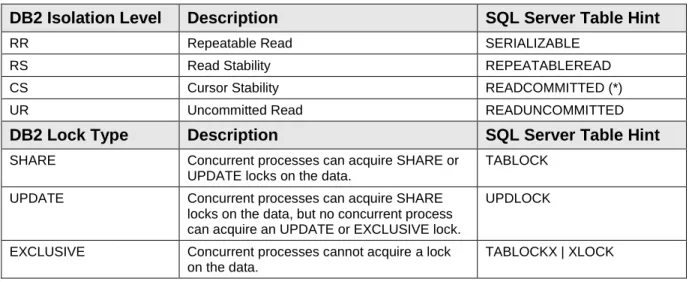
In SQL Server, use table hints to set the isolation level and lock type. Correspondence between the DB2 and SQL Server isolation levels and lock types is presented in Table 2.
Table 2: Isolation Level and Lock Type Differences Between DB2
and SQL Server
DB2 Isolation Level
Description
SQL Server Table Hint
RR Repeatable Read SERIALIZABLE
RS Read Stability REPEATABLEREAD
CS Cursor Stability READCOMMITTED (*)
UR Uncommitted Read READUNCOMMITTED
DB2 Lock Type
Description
SQL Server Table Hint
SHARE Concurrent processes can acquire SHARE orUPDATE locks on the data.
TABLOCK
UPDATE Concurrent processes can acquire SHARE locks on the data, but no concurrent process can acquire an UPDATE or EXCLUSIVE lock.
UPDLOCK
EXCLUSIVE Concurrent processes cannot acquire a lock on the data.
TABLOCKX | XLOCK
(*) Note that unlike DB2, SQL Server does not lock the current cursor row in this isolation level.
SQL Server Example 1:
select id, val
from table_ff with (readuncommitted) where id between 65 and 90
SQL Server Example 2:
select id, val
where id between 65 and 90
3.4.1.4 INTERSECT ALL and EXCEPT ALL Operators
DB2 supports two set operators that are incompatible with SQL Server:
INTERSECT ALL returns the exact number of rows that appear in both combined result sets.
EXCEPT ALL removes from the first result set the exact number of rows that appear in the second set.
The ALL versions of the INTERSECT and EXCEPT operators are not supported in SQL Server. DB2 Example 1:
SELECT X, Y FROM R1 EXCEPT ALL SELECT X, Y FROM R2
DB2 Example 1:
SELECT X, Y FROM R1 INTERSECT ALL SELECT X, Y FROM R2
Here is an illustration of the INTERSECT ALL and EXCEPT ALL functionality in DB2 on a sample of data:
R1 R2 INTERSECT ALL EXCEPT ALL
X Y X Y X Y X Y A 1 A 1 A 1 A 1 A 1 A 1 A 1 C 5 A 1 B 3 B 3 B 3 B 2 C 5 Solution:
In SQL Server, emulate INTERSECT ALL and EXCEPT ALL by using an additional numeric column (Tmp$Num) with INTERSECT and EXCEPT as shown:
select <select_columns_or_alias> from ( select <first_select_columns_with_alias>, row_number() over(partition by
<first_select_columns_without_alias> order by (select 1)) as Tmp$Num from ...
{ intersect | except }
select <second_select_columns_with_alias>, row_number() over(partition by
<second_select_columns_without_alias> order by (select 1)) as Tmp$Num
from ...
) <sub query table name>You number, in the new column Tmp$Num, all duplicate rows in both SELECT statements:
R1 R2
X Y Tmp$Num X Y Tmp$Num
A 1 1 A 1 1
A 1 3 B 3 1
B 3 1 B 2 1
C 5 1
This set no longer contains duplicates, so you can now use INTERSECT or EXCEPT. Then you can select the result without the Tmp$Num column.
SQL Server Example 1:
select x, y from
( select x, y, row_number()
over(partition by x, y order by (select 1)) as Tmp$Num from r1 except
select x, y, row_number()
over(partition by x, y order by (select 1)) as Tmp$Num from r2 ) r3
SQL Server Example 2:
select x, y from
( select x, y, row_number()
over(partition by x, y order by (select 1)) as Tmp$Num from r1 intersect
select x, y, row_number()
over(partition by x, y order by (select 1)) as Tmp$Num from r2 ) r3
3.4.1.6 ORDER BY and ORDER OF in a Subquery
In DB2, the ORDER BY clause can be used in subqueries. The ORDER OF clause specifies that the same ordering that is used in an aliased query should be applied to the result table of the subselect. This functionality of ORDER BY and ORDER OF is not supported in SQL Server.
DB2 Example:
select *
from ( select val_a as a , val_b as b, val_c as c from table_order order by val_b ) as sq
order by a, order of sq
Solution:
In SQL Server, replace the ORDER OF clause with a list of fields or aliases from the subquery sort specification. Then either remove the ORDER BY clause from the subquery (see example 1), or add the TOP clause to the subquery (see example 2).
SQL Server Example 1:
select *
from ( select val_a as a , val_b as b, val_c as c from table_order ) as sq
order by a, b
SQL Server Example 2:
select *
from ( select top 100 percent val_a as a , val_b as b, val_c as c from table_order order by val_b ) as sq
3.4.1.7 Column Names in a Correlation Clause
In DB2, when a correlation name is specified, column names can also be specified to give names to the columns of the table name, view name, nickname, function name reference, or nested table expression.
In SQL Server, column aliases can be specified only after the user-defined function, derived table, and XQuery reference.
DB2 Example:
select a, b
from (select id, val from table_c) as c (a,b) order by a;
select a, b
from table_c as c (a,b) order by a;
Solution:
In SQL Server, replace the column aliases with the column names. SQL Server Example:
select a, b
from (select id, val from table_c) as c (a,b) order by a;
select id, val from table_c order by id;
3.4.1.8 Alias for a Nested Table Expression
In DB2, you do not need to specify an alias for a nested table expression. In SQL Server, you must include an alias for a derived table (subquery).
DB2 Example:
select val
from (select id, val from table_c) order by id;
Solution:
In SQL Server, add an alias for the nested table expression. SQL Server Example:
select val
from (select id, val from table_c) as c order by id;
3.4.1.9 Table-Valued Function Call in a FROM Clause
In DB2, the syntax of a table-valued function call in a FROM clause is different from that in SQL Server.
DB2 Example:
create function func_table_list
(par_schema varchar(8), par_name varchar(8)) returns table (name varchar(128), ctime timestamp) language sql
reads sql data no external action deterministic return
from sysibm.systables where
(upper(creator)=upper(par_schema)) and (upper(substr(name,1,1))=upper(par_name)); select *
from table (sa.func_table_list('sa','a')) as tl;
Solution:
In SQL Server, remove the TABLE keyword and the parentheses around the function name in the FROM clause.
SQL Server Example:
create function func_table_list
(@par_schema varchar(8), @par_name varchar(8)) returns table
as return
( select so.name as name, so.create_date as ctime
from sys.objects so join sys.schemas ss on so.schema_id=ss.schema_id where (upper(ss.name)=upper(@par_schema)) and (upper(substring(so.name,1,1))=upper(@par_name))); select * from dbo.func_table_list('dbo','a') as tl;
3.4.1.10 Data–change-table-reference Clause
A data-change-table-reference clause specifies an intermediate result table. This table is based on the rows that are directly changed by the searched UPDATE, searched DELETE, or INSERT statements that are included in the clause.
In DB2, the table types for the data-change-table-reference are:
OLD: Returns the state of the data prior to the statement being run. This is allowed for an update and a delete.
NEW: Returns the state of the data prior to the application of any AFTER triggers or referential constraints. Data in the table will not equal what is returned if it is subsequently changed by AFTER triggers or referential constraints. This is allowed for an insert and an update.
FINAL: Returns the final state of the data. If there are AFTER triggers that alter the target table after running of the statement, an error is returned. Ditto for a view that is defined with an INSTEAD OF trigger. This is allowed for an insert and an update.
If an INCLUDE clause is specified within a data change statement, the intermediate result table will contain these additional columns.
DB2 Example:
/* INSERT */
select id, val, ts
from new table (insert into table_dc (id,val) values (1,'ABCDEFG')); select id, val, ts, comment
from new table (insert into table_dc (id,val) include (comment varchar(128)) values (1,'ABCDEFG','Insert Comment'));
/* UPDATE */
select id, val, ts
from old table (update table_dc set id=id+1, val=val||'<PLUS>' where id=1);
select id, val, ts, comment
from old table (update table_dc include (comment varchar(128)) set id=id+1, val=val||'<PLUS>', comment='Update Comment' where id=1); select id, val, ts
from new table (update table_dc set id=id+1, val=val||'<PLUS>' where id=1);
/* DELETE */
select id, val, ts
from old table (delete from table_dc where id=2); select id, val, ts, comment
from old table (delete from table_dc include (comment varchar(128)) set comment='Delete Comment' where id=2);
Solution:
in SQL Server, rewrite the SELECT statement with the data-change-table-reference clause in SQL Server syntax, using the OUTPUT clause in the nested INSERT, UPDATE, and DELETE
statements. For data types, make the following changes:
To emulate the DB2 OLD table prefix, use the DELETED column prefix. To emulate the DB2 NEW table prefix, use the INSERTED column prefix.
You can emulate the included columns of the data change statement by adding constants to the output select list.
SQL Server Example:
/* INSERT */
insert into table_dc (id,val)
output inserted.id, inserted.val, inserted.ts values (1,'ABCDEFG');
insert into table_dc (id,val)
output inserted.id, inserted.val, inserted.ts,'Insert Comment' as comment
values (1,'ABCDEFG'); /* UPDATE */
update table_dc set id=id+1, val=val+'<PLUS>' output deleted.id, deleted.val, deleted.ts where id=1;
update table_dc set id=id+1, val=val+'<PLUS>'
output deleted.id, deleted.val, deleted.ts, 'Update Comment' as comment where id=1;
update table_dc set id=id+1, val=val+'<PLUS>' output inserted.id, inserted.val, inserted.ts where id=1;
/* DELETE */
delete from table_dc
output deleted.id, deleted.val, deleted.ts where id=2;
delete from table_dc
output deleted.id, deleted.val, deleted.ts, 'Delete Comment' as comment where id=2;
3.4.2 VALUES Statement
In DB2, the VALUES statement derives a result table by specifying the actual values, using expressions, for each column of a row in the result table. Multiple rows can be specified. The VALUES statement is not supported in SQL Server.
DB2 Example:
values (0, 'Text'); -- 1 row
values (1,'Test A'),(2,'Test B'),(3,'Text C'); -- 3 rows values 'A'; -- 1 row
values 'A',('B'),NULL,'D'; -- 4 rows
Solution:
In SQL Server, replace each single-row VALUES statement with a simple SELECT statement. Replace each multiple-row VALUES statement by combining simple SELECT statements with UNION.
SQL Server Example:
select 0, 'Text'; -- 1 row
select 1,'Test A' union all select 2,'Test B' union all select 3,'Text C'; -- 3 rows
select 'A'; -- 1 row
select 'A' union all select ('B') union all select NULL union all select 'D'; -- 4 rows
3.4.3 INSERT Statement
3.4.3.1 Values Without Parentheses
In DB2, you can write single values in a VALUES clause with or without parentheses. In SQL Server, the values list must be always enclosed in parentheses.
DB2 Example:
insert into table_ins (id) values 1;
insert into table_ins (id) values 1,(2),3;
Solution:
In SQL Server, add parentheses to all single-row values. SQL Server Example:
insert into table_ins (id) values (1);
insert into table_ins (id) values (1),(2),(3);
3.4.3.2 Subquery (fullselect) as Object of the INSERT Operation
In DB2, you can use a subquery (fullselect, insertable view) as the object of the INSERT operation. DB2 Example:
insert into (select * from table_ins) values (1,'ABC');
Solution:
In SQL Server, use the common table expression (CTE) to emulate this functionality. SQL Server Example:
with plus as (select * from table_ins) insert into plus values (1,'ABC');
3.4.3.3 Common Table Expression (CTE) in INSERT Statement
DB2 and SQL Server have different syntaxes for the common table expression (CTE) in an INSERT statement. In DB2, a CTE can be used only with the SELECT part of an INSERT SELECT
statement. In SQL Server, you can specify the CTE within the scope of the INSERT statement. DB2 Example:
insert into table_ins (id, val) with plus as (
select td.id, td.val, ti.id as new
from table_del td left outer join table_ins ti on td.id=ti.id )
select id, val from plus where new is null;
Solution:
In SQL Server, place the CTE before the INSERT statement. SQL Server Example:
with plus as (
select td.id, td.val, ti.id as new
from table_del td left outer join table_ins ti on td.id=ti.id )
insert into table_ins (id, val)
select id, val from plus where new is null;
3.4.4 UPDATE Statement
3.4.4.1 Issue: Subquery (fullselect) as Object of the UPDATE
Operation
In DB2, you can use a subquery (fullselect, updatable view) as the object of the UPDATE operation. DB2 Example:
update (select * from table_upd) set val_c = val_a || val_b
where id < 20;
Solution:
In SQL Server, use the CTE to emulate this functionality by moving the updatable subquery to the CTE.
SQL Server Example:
with plus as (select * from table_upd) update plus
set val_c = val_a + val_b where id < 20;
3.4.4.2 Column Groups in a SET Clause
In DB2, you can update a few columns from a single subquery result. DB2 Example:
update table_upd u
set (id, val_a) = (select id, val from table_del d where d.id=u.id), (val_b, val_c) = (val_a, val_a || val_b);
Solution:
In SQL Server, remove from all subqueries the conditions that reference the up-level objects, and move the subqueries from the SET clause to the CTE.
Generate a single assignment for each column from the column group. Use the expression from the appropriate CTE for the assignment.
To generate join conditions, use the conditions that were removed from the original subqueries. SQL Server Example:
with plus as (select id, val from table_del d) update u
set id = plus.id, val_a = plus.val, val_b = val_a, val_c = val_a + val_b
from table_upd u left outer join plus on u.id=plus.id; -- or --
update u
set id = d.id, val_a = d.val, val_b = val_a, val_c = val_a + val_b from table_upd u left outer join table_del d on d.id=u.id;
3.4.5 MERGE Statement
3.4.5.1 Single vs Multiple Occurrences of Each Clause
SQL Server doesn’t support multiple uses of each clause in a MERGE statement. DB2 Example:
merge into debug d
using (select id, v from debug union values (4, 'd') union values (5, 'e') union values (6, 'f')) as b (id,v)
on (d.id=b.id)
when matched and d.id=2 then update set v='x'
when matched and d.id=3 then update set v='y'
when matched and d.id<2 then delete
when not matched then insert values (b.id,b.v);
Solution:
In SQL Server, you can use the CASE statement to emulate multiple uses. You can use the condition (1=1) to emulate the Searched WHEN clause.
Note: In the CASE statement you can’t use the DEFAULT value. You must write the default
value manually. SQL Server Example:
merge into debug d
using (select id, v from debug union select 4, 'd' union select 5, 'e' union select 6, 'f') as b (id,v)
on (d.id=b.id)
when matched and 1=1 then
update set v=case when d.id=2 then 'x' when d.id=3 then 'y' end when matched and d.id<2 then
delete
when not matched then insert values (b.id,b.v);
3.4.5.2 SIGNAL Clause in MERGE
In DB2, you can use the SIGNAL exception to make the MERGE statement fail. DB2 Example:
merge into debug d
on (d.id=b.id)
when matched and d.id=1 then
signal sqlstate '70102' set message_text = 'Error' when matched then
update set v='x' when not matched then insert values (b.id,b.v)
Solution:
In SQL Server, you can generate a conversion exception in UPDATE or INSERT, so that the MERGE statement will fail.
SQL Server Example:
merge into debug d
using (select id, v from debug union select 3, '33') as b (id,v) on (d.id=b.id)
when matched then
update set v=case when d.id=1 then cast(cast('adc' as int)as varchar) else 'x' end
when not matched then insert values (b.id,b.id)
3.4.5.3 Mixed UPDATE and DELETE Clauses in a MERGE Statement
In DB2, a MERGE statement can have mixed UPDATE and DELETE clauses with intersects conditions. This cannot be emulated in SQL Server.
DB2 Example:
delete from debug;
insert into debug values (1, 'a'); insert into debug values (2, 'b'); insert into debug values (3, 'c'); merge into debug d
using (select id, v from debug union values (4, 'd') union values (5, 'e') union values (6, 'f')) as b (id,v)
on (d.id=b.id)
when matched and d.id=1 then update set v='x'
when matched and d.id<3 then delete
when matched then update set v='y' when not matched then insert values (b.id,b.v); select * from debug;
Solution:
SQL Server does not have similar functionality; there is no migration solution for this DB2 capability yet.
3.4.5.4 Subquery (fullselect) as Object of a MERGE Operation
DB2 Example:
merge into (select * from table_merge) as tm using
( select *
from (values (1,'R','RRR'),(5,'Z','ZZZ')) as v (a,b,c) ) as r
on tm.id=r.a
when matched then update set (tm.vala,tm.valb) = (r.b,r.c)
when not matched then insert (id, vala, valb) values (r.a,r.b,r.c);
Solution:
In SQL Server, you can use a common table expression (CTE) to emulate this functionality. SQL Server Example:
with tm as (select * from table_merge) merge into tm
using ( select *
from (select 1,'R','RRR' union all select 5,'Z','ZZZ') as v (a,b,c) ) as r
on tm.id=r.a
when matched then update set tm.vala = r.b, tm.valb = r.c
when not matched then insert (id, vala, valb) values (r.a,r.b,r.c);
3.4.5.5 Column Groups in an UPDATE SET Clause
In DB2, in a MERGE statement you can use the UPDATE SET clause to update several columns from a single subquery result.
DB2 Example:
merge into table_merge tm using
(select id, val from table_a) as a on tm.id=a.id
when matched then update set (tm.vala, tm.valb) = (select tm.vala||'+'||b.val, b.val from table_b b where b.id=tm.id) else ignore;
Solution:
In SQL Server, you can generate a single assignment and a duplicate subquery for each column from a column group.
SQL Server Example:
merge into table_merge tm using
(select id, val from table_a) as a on tm.id=a.id
when matched then update set
tm.vala = (select tm.vala+'+'+b.val from table_b b where b.id=tm.id), tm.valb = (select b.val from table_b b where b.id=tm.id);
3.4.6 DELETE Statement
3.4.6.1 Correlation Clause in DELETE Statement
In DB2, a correlation clause can be used in a DELETE statement to designate a table, view, nickname, fullselect, or column names.
delete from table_del as d (a,b,c,d) where d.a between 100 and 109;
Solution:
In SQL Server, replace the column aliases with the column names in a search condition, and remove the correlation clause from the DELETE statement.
SQL Server Example:
delete from table_del where id between 100 and 109;
3.4.6.2 Subquery (fullselect) as Object of DELETE
In DB2, the syntax of using a subquery as the object of the DELETE operation is different from that in SQL Server.
DB2 Example:
-- deleting duplicates delete from
(select rownumber() over (partition by id, val) as rn from table_del)
where rn > 1;
Solution:
In SQL Server, convert such queries by assigning an alias to the subquery and then adding a FROM clause with this alias.
SQL Server Example:
-- deleting duplicates delete from e
from
(select row_number() over (partition by id, val order by id) as rn from table_del) as e
where rn > 1;
3.5 Routines
This section describes migration issues for DB2 stored procedures and user-defined functions.
3.5.1 Procedures
3.5.1.1 Overloaded Procedures
In DB2, two procedures can exist in one schema with the same name but different parameter types or a different number of parameters. SQL Server does not support this.
Solution:
In SQL Server, you must choose distinct names for procedures that have the same DB2 name but different parameter signatures.
3.5.1.3 OUT and INOUT Parameters
In DB2, if a procedure has an OUT parameter, it always returns a value in a call variable. In SQL Server this construct cannot return any value.
DB2 Example:
Call proc (a)
Solution:
In SQL Server, when you call a procedure using EXEC for each OUT variable, you must add the OUTPUT keyword.
SQL Server Example:
Exec proc @a OUTPUT
3.5.2 User-Defined Functions
3.5.2.1 Overloaded Functions
In DB2, two functions can exist in one schema with the same name but different parameter types or a different number of parameters. SQL Server does not support this.
Solution:
In SQL Server, you must choose distinct names for the functions that have the same DB2 name but different parameter signatures.
3.5.2.2 RETURNS ROW Function
In DB2, the RETURNS ROW function specifies that the output of the function is a single row. If the function returns more than one row, an error is raised (SQLSTATE 21505).
Solution:
In SQL Server, create a table-valued function and make sure that the SELECT statement returns one row. See RETURN Statement in Table Functions or Procedureslaterin this section for more details.
3.5.2.3 MODIFIES SQL DATA Clause
In DB2, the MODIFIES SQL DATA clause is used when a function can change data in a table (using Data Manipulation Language, or DML), either directly or by a call procedure.
Solution:
In SQL Server, user-defined functions (UDFs) can’t use DML statements or executing procedures. You can emulate the MODIFIES SQL DATA clause by using an extended stored procedure.
3.5.3 Flow Control Constructs
This section covers differences in behavior between DB2 and SQL Server versions of various commands used in routines that control the flow of execution.
3.5.3.1 CALL