©
2014 Siemens Product Lifecycle Management Software Inc. All Rights Reserved. This software and related documentation are proprietary to Siemens Product Lifecycle Management Software Inc.NASTRAN is a registered trademark of the National Aeronautics and Space Administration. NX Nastran is an enhanced proprietary version developed and maintained by Siemens Product Lifecycle Management Software Inc.
MSC is a registered trademark of MSC.Software Corporation. MSC.Nastran and MSC.Patran are trademarks of MSC.Software Corporation.
All other trademarks are the property of their respective owners. TAUCS Copyright and License
TAUCS Version 2.0, November 29, 2001. Copyright (c) 2001, 2002, 2003 by Sivan Toledo, Tel-Aviv University, [email protected]. All Rights Reserved.
TAUCS License:
Your use or distribution of TAUCS or any derivative code implies that you agree to this License.
THIS MATERIAL IS PROVIDED AS IS, WITH ABSOLUTELY NO WARRANTY EXPRESSED OR IMPLIED. ANY USE IS AT YOUR OWN RISK.
Permission is hereby granted to use or copy this program, provided that the Copyright, this License, and the Availability of the original version is retained on all copies. User documentation of any code that uses this code or any derivative code must cite the Copyright, this License, the Availability note, and "Used by permission." If this code or any derivative code is accessible from within MATLAB, then typing "help taucs" must cite the Copyright, and "type taucs" must also cite this License and the Availability note. Permission to modify the code and to distribute modified code is granted, provided the Copyright, this License, and the Availability note are retained, and a notice that the code was modified is included. This software is provided to you free of charge.
Availability
As of version 2.1, we distribute the code in 4 formats: zip and tarred-gzipped (tgz), with or without binaries for external libraries. The bundled external libraries should allow you to build the test programs on Linux, Windows, and MacOS X without installing additional software. We recommend that you download the full distributions, and then perhaps replace the bundled libraries by higher performance ones (e.g., with a BLAS library that is specifically optimized for your machine). If you want to conserve bandwidth and you want to install the required libraries yourself, download the lean distributions. The zip and tgz files are identical, except that on Linux, Unix, and MacOS, unpacking the tgz file ensures that the configure script is marked as executable (unpack with tar zxvpf), otherwise you will have to change its permissions manually.
NX Nastran Numerical Methods User’s Guide
Preface ■ About this Book, 10
1
Utility Tools and Functions
■ Utility Tools, 2 ■ System Cells, 3
■ Diagnostic (DIAG) Flags, 7 ■ Matrix Trailers, 8
❑ Indexed Matrix File Structure, 10 ■ Kernel Functions, 11 ■ Timing Constants, 13 ■ Time Estimates, 16 ■ Storage Requirements, 18 ■ Performance Analysis, 19 ■ Parallel Processing, 20
2
Matrix Multiply-Add Module ■ Multiply-Add Equation, 22■ Theory of Matrix Multiplication, 23 ❑ Method One (Dense x Dense), 24 ❑ Method Two (Sparse x Dense), 28 ❑ Method Three (Sparse x Sparse), 28 ❑ Method Four (Dense x Sparse), 29 ❑ Sparse Method, 30
❑ Triple Multiply Method, 31 ❑ Parallel Multiply Method, 34 ■ MPYAD Methods, 36
■ DMAP User Interface, 38
■ Method Selection/Deselection, 39 ❑ Automatic Selection, 39 ❑ Automatic Deselection, 39 ❑ User-Specified Deselection, 40
NX Nastran Numerical Methods User’s Guide
■ Diagnostics, 44
❑ Performance Diagnostics, 44 ❑ Submethod Diagnostics, 44 ❑ Error Diagnostics, 45
■ MPYAD Estimates and Requirements, 47
3
MatrixDecomposition
■ Decomposition Process, 50 ■ Theory of Decomposition, 51
❑ Symmetric Decomposition Method, 51 ❑ Mathematical Algorithm, 51
❑ Symbolic Phase, 52 ❑ Numeric Phase, 53
❑ Numerical Reliability of Symmetric Decomposition, 54 ❑ Unsymmetric Decomposition, 54
❑ Partial Decomposition, 55 ❑ Distributed Decomposition, 56 ❑ Diagonal Scaling Option, 56 ■ User Interface, 58
■ Method Selection, 61 ■ Option Selection, 62
❑ Minimum Front Option, 62 ❑ Reordering Options, 62 ❑ Compression Options, 62
❑ Non-Sparse SDCOMP Options, 63 ❑ Non-Sparse UDCOMP Option, 63 ❑ Perturbation Options, 63
❑ High Rank Options, 64 ❑ Diagnostic Options, 64 ■ Diagnostics, 66 ❑ Numerical Diagnostics, 66 ❑ Performance Diagnostics, 67 ❑ Statistical Diagnostics, 68 ❑ Error Diagnostics, 69
■ Decomposition Estimates and Requirements, 71 ■ References, 73
4
Direct Solution of Linear Systems
■ Solution Process, 76
■ Theory of Forward-Backward Substitution, 78 ❑ Right-Handed Method, 78
❑ Left-Handed Method, 78 ❑ Sparse Method, 78
■ Method Selection, 82 ❑ FBS Method Selection, 82 ■ Option Selection, 83 ❑ Right-handed FBS Options, 83 ❑ Left-handed FBS Option, 83 ❑ Parallel FBS Solution, 84 ■ Diagnostics, 85 ❑ Numerical Diagnostics, 85 ❑ Performance Messages, 85 ❑ Error Diagnostics, 85
■ FBS Estimates and Requirements, 87 ❑ Sparse FBS Estimates, 87 ■ References, 88
5
Iterative Solution of Systems of Linear Equations ■ Iterative Solutions, 90 ❑ Methods, 90■ Theory of the Conjugate Gradient Method, 92 ❑ Convergence Control, 92
❑ Block Conjugate Gradient Method (BIC), 93 ❑ Real and Complex BIC, 95
■ Preconditioning Methods, 98 ❑ Scaling, 99
❑ Numerical Reliability of Equation Solutions, 99 ■ User Interface, 101
■ Iterative Method Selection, 107 ■ Option Selection, 108
❑ Preconditioner Options, 108
❑ Convergence Criterion Options, 109 ❑ Diagnostic Output Options, 110 ❑ Element Iterative Solver Options, 110 ❑ In-core Frequency Response Options, 111 ❑ Incomplete Cholesky Density Options, 111
❑ Extraction Level Options for Incomplete Cholesky, 112 ❑ Recommendations, 112
■ Global Iterative Solution Diagnostics, 114 ❑ Accuracy Diagnostics, 114
❑ Performance Diagnostics, 116
■ Global Iterative Solver Estimates and Requirements, 118 ■ Element Iterative Solver Memory Requirements, 120 ■ References, 121
Real Symmetric Eigenvalue Analysis
■ Real Eigenvalue Problems, 124
■ Theory of Real Eigenvalue Analysis, 125 ❑ Reduction (Tridiagonal) Method, 126 ❑ Real Symmetric Lanczos Method, 144 ■ Solution Method Characteristics, 169 ■ DMAP User Interface, 170
■ Method Selection, 174 ■ Option Selection, 176
❑ Normalization Options, 176
❑ Frequency and Mode Options, 176 ❑ Performance Options, 177
❑ Miscellaneous Options, 180
❑ Mass Matrix Analysis Options, 181 ■ Real Symmetric Eigenvalue Diagnostics, 184
❑ Execution Diagnostics, 184 ❑ Table of Shifts, 184
❑ Numerical Diagnostics, 185 ❑ Performance Diagnostics, 187 ❑ Lanczos Diagnostics, 188
■ Real Lanczos Estimates and Requirements, 191 ■ References, 192
7
Complex Eigenvalue Analysis ■ Damped Models, 194■ Theory of Complex Eigenvalue Analysis, 195
❑ Canonical Transformation to Mathematical Form, 195 ❑ Dynamic Matrix Multiplication, 200
❑ Physical Solution Diagnosis, 202 ❑ Hessenberg Method, 203
❑ QR Iteration Using the Householder Matrices, 207 ❑ Eigenvector Computation, 210
❑ The Complex Lanczos Method, 214 ❑ The Single Vector Method, 214
❑ The Adaptive Block Lanczos Method, 225 ❑ Singular Value Decomposition (SVD), 233
❑ The Iterative Schur-Rayleigh-Ritz Method (ISRR), 234 ■ Solution Method Characteristics, 236
■ User Interface, 237 ■ Method Selection, 239 ■ Option Selection, 245
❑ Damping Options, 245 ❑ Normalization Options, 245
❑ Hessenberg and Lanczos Options, 245 ❑ Alternative Methods, 247
❑ Performance Diagnostics, 254
■ Complex Lanczos Estimates and Requirements, 256 ■ References, 257
Glossary of Terms
Preface
About this Book
NX Nastran is a general-purpose finite element program which solves a wide variety
of engineering problems. This book is intended to help you choose among the different numerical methods and to tune these methods for optimal performance. This guide also provides information about the accuracy, time, and space
requirements of these methods.
This edition covers the major numerical methods available in NX Nastran Version 5, including parallel eigenvalue analysis for use in high-performance normal modes analysis, frequency response, and optimization. Further details about configuring and running such jobs can be found in the NX Nastran Parallel Processing Guide.
Introduction
This guide is designed to assist you with method selection and time estimation for the most important numerical modules in NX Nastran. The guide is separated into seven chapters:
•
“Utility Tools and Functions” on page 1•
“Matrix Multiply-Add Module” on page 21•
“Matrix Decomposition” on page 49•
“Direct Solution of Linear Systems” on page 75•
“Iterative Solution of Systems of Linear Equations” on page 89•
“Real Symmetric Eigenvalue Analysis” on page 123•
“Complex Eigenvalue Analysis” on page 193These topics are selected because they have the biggest impact on the performance of the software. To obtain the most accurate solutions, you should read this guide carefully. Some of the numerical solutions exhibit different characteristics with different problems. This guide provides you with tools and recommendations for how to select the best solution.
Using This Guide
This guide assumes that you are familiar with the basic structure of NX Nastran, as well as with methods of linear statics and normal modes. A first-time reader of this guide should read Chapter 1 to become familiar with the utility tools and functions. After that, you can move directly to the chapters containing the topic you’re trying to apply and tune (see Chapters 2 through 7). Each chapter contains general time estimates and performance analysis information as well as resource estimation formulae for some of the methods described in the chapter.
stand-alone document except for a few references to the NX Nastran Quick Reference Guide.
CHAPTER
1
Utility Tools and Functions
■ Utility Tools ■ System Cells
■ Diagnostic (DIAG) Flags ■ Matrix Trailers ■ Kernel Functions ■ Timing Constants ■ Time Estimates ■ Storage Requirements ■ Performance Analysis ■ Parallel Processing
1.1
Utility Tools
In this chapter the following utility tools are described:
•
System cells•
DIAG flags•
Matrix trailers•
Kernel functions•
Timing constantsSince these utilities are of a general nature, they are used in the same way on different computers and solution sequences. They are also used to select certain numerical methods and request diagnostics information and timing data. For these reasons, the utility tools are overviewed here before any specific numerical method is discussed.
1.2
System Cells
One of the most important communication utilities in NX Nastran is the SYSTEM common block. Elements of this common block are called system cells. Some of the system cells have names associated with them. In those cases, the system cell can be referred to by this name (commonly called a keyword).
Performance Cells. Some of the system cells related to general performance and
timing issues are
Method Cells. System cells directly related to some numerical methods are
Execution Cells. System cells related to execution types are
The binary system cells are organized so that the options are selected by the decimal values of the powers of 2. This organization makes the selection of multiple options possible by adding up the specific option values. The decimal cells use integer numbers. The mixed cells use both decimal and binary values.
The following several system cells are related to machine and solution accuracy:
where MCHEPSS and MCHEPD are the machine epsilons for single- and double-precision, respectively, MCHINF is the exponent of the machine infinity, and MCHUFL is the exponent of machine underflow.
BUFFSIZE = SYSTEM(1) HICORE = SYSTEM(57)
REAL = SYSTEM(81)
IORATE = SYSTEM(84) BUFFPOOL = SYSTEM(119)
SOLVE = SYSTEM(69) – mixed MPYAD = SYSTEM(66) – binary FBSOPT = SYSTEM(70) – decimal
SHARED PARALLEL = SYSTEM(107) – mixed
SPARSE = SYSTEM(126) – mixed
DISTRIBUTED PARALLEL = SYSTEM(231) – decimal
USPARSE = SYSTEM(209) – decimal
MCHEPSS = SYSTEM(102) MCHEPSD = SYSTEM(103)
MCHINF = SYSTEM(100) on LP-64, SYSTEM(98) on ILP-64 MCHUFL = SYSTEM(99) on LP-64, SYSTEM(97) on ILP-64
Note that these system cells are crucial to proper numerical behavior; their values should never be changed by the user without a specific recommendation from UGS support.
Setting System Cells
The following are several ways a user can set a system cell to a certain value:
The first pair of techniques is used on the NASTRAN entry, and the effect of these techniques is global to the run. The second pair of techniques is used for local settings and can be used anywhere in the DMAP program; PUTSYS is the recommended way.
To read the value of a system cell, use:
VARIABLE = GETSYS (TYPE, CELL) or
VARIABLE = GETSYS (VARIABLE, CELL)
SPARSE and USPARSE Keywords. The setting of the SPARSE keyword
(SYSTEM(126)) is detailed below:
Combinations of values are valid. For example, SPARSE = 24 invokes a sparse run, except for SPMPYAD.
Value Meaning
1 Enable SPMPYAD T and NT 2 Deselect SPMPYAD NT 3 Force SPMPYAD NT 4 Deselect SPMPYAD T 5 Force SPMPYAD T
6 Deselect SMPMYAD T and NT 7 Force SPMPYAD T and NT 8 Force SPDCMP
16 Force SPFBS
NASTRAN SYSTEM (CELL) = value NASTRAN KEYWORD = value PUTSYS (value, CELL)
PARAM //’STSR’/value/ − CELL NASTRAN Entry
In the table below, the following naming conventions are used:
The default value for SPARSE is 25.
Another keyword (USPARSE = SYSTEM(209)) is used to control the unsymmetric sparse decomposition and FBS. By setting USPARSE = 0 (the default is 1, meaning on), the user can deselect sparse operation in the unsymmetric decomposition and forward-backward substitution (FBS).
Shared Memory Parallel Keyword. The SMP (or PARALLEL) keyword controls
the shared memory (low level) parallel options of various numerical modules. The setting of the SMP keyword (SYSTEM(107)) is as follows:
Combinations are valid. For example, PARALLEL = 525314 means a parallel run with two CPUs, except with FBS methods.
Module Naming Conventions. In the table above, the following naming
conventions are used:
SPMPYAD SPARSE matrix multiply
SPDCMP SPARSE decomposition (symmetric)
Value Meaning 1 − 1023 No. of Processors 1024 Deselect FBS 2048 Deselect PDCOMP 4096 Deselect MPYAD 8192 Deselect MHOUS 16384 Unused 32768 Deselect READ 262144 Deselect SPDCMP 524288 Deselect SPFBS FBS Forward-backward substitution PDCOMP Parallel symmetric decomposition MHOUS Parallel modified Householder method READ Real eigenvalue module
Distributed Parallel Keyword. For distributed memory (high level) parallel
processing, the DISTRIBUTED PARALLEL or DMP (SYSTEM (231)) keyword is used. In general, this keyword describes the number of subdivisions or
subdomains (in geometry or frequency) used in the solution. Since the value of DMP in the distributed memory parallel execution of NX Nastran defines the number of parallel Nastran jobs spawned on the computer or over the network, its value may not be modified locally in some numerical modules.
MPYAD Multiply-Add
1.3
Diagnostic (DIAG) Flags
To request internal diagnostics information from NX Nastran, you can use DIAG flags. The DIAG statement is an Executive Control statement.
DIAG Flags for Numerical Methods. The DIAG flags used in the numerical and
performance areas are:
For other DIAG flags and solution sequence numbers, see the "Executive Control Statements" in the NX Nastran Quick Reference Guide.
Always use DIAG 8, as it helps to trace the evolution of the matrices throughout the NX Nastran run, culminating in the final matrices given to the numerical solution modules.
The module-related DIAGs 12, 16, 19 are useful depending on the particular solution sequence; for example, DIAG 12 for SOL 107 and 111, DIAG 16 for SOL 103, and DIAG 19 for SOL 200 jobs.
DIAG 58 is to be used only at the time of installation and it helps the performance timing of large jobs.
DIAG 8 Print matrix trailers
12 Diagnostics from complex eigenvalue analysis
13 Open core length
16 Diagnostics from real eigenvalue analysis
19 FBS and Multiply-Add time estimates 58 Print timing data
1.4
Matrix Trailers
The matrix trailer is an information record following (i.e., trailing) a matrix containing the main characteristics of the matrix.
Matrix Trailer Content. The matrix trailer of every matrix created during an NX
Nastran run is printed by requesting DIAG 8. The format of the basic trailer is as follows:
•
Name of matrix•
Number of columns: (COLS)•
Number of rows: (ROWS)•
Matrix form (F) = 1 square matrix = 2 rectangular = 3 diagonal = 4 lower triangular = 5 upper triangular = 6 symmetric = 8 identity matrix = 10 Cholesky factor= 11 partial lower triangular factor = 13 sparse symmetric factor = 14 sparse Cholesky factor = 15 sparse unsymmetric factor
•
Matrix type (T)= 1 for real, single precision = 2 for real, double precision
= 3 for for complex, single precision = 4 for complex, double precision
•
Number of nonzero words in the densest column: (NZWDS)•
Density (DENS)Calculated as:
number of terms COLS ROWS•
Trailer Extension. In addition, an extension of the trailer is available that contains
the following information:
•
Number of blocks needed to store the matrix (BLOCKS)•
Average string length (STRL)•
Number of strings in the matrix (NBRSTR)•
Three unused entries (BNDL, NBRBND, ROW1)•
Average bandwidth (BNDAVG)•
Maximum bandwidth (BNDMAX)•
Number of null columns (NULCOL)This information is useful in making resource estimates. The terms in parentheses match the notation used in the DIAG8 printout of the .f04 file.
The matrices of NX Nastran were previously stored as follows:
The matrix header record was followed by column records and concluded with a trailer record. The columns contained a series of string headers, numerical terms of the string and optionally a string trailer. The strings are consecutive nonzero terms. While this format was not storing zero terms, a must in finite element analysis, it had the disadvantage of storing topological integer information together with numerical real data.
Currently, the following indexed matrix storage scheme is used on most matrices:
Indexed Matrix Structure. An Indexed Matrix is made of three files, the Column,
String and Numeric files.
Each file consists of only two GINO Logical Records:
•
HEADER RECORD. For the Column file, it contains the Hollerith name of the data block (NAME) plus application defined words. For the String file, it contains the combined data block NAME and the Hollerith word STRING. For the Numeric file, it contains the combined data block NAME and the Hollerith word NUMERIC.•
DATA RECORD. It contains the Column data (see Indexed Matrix Column data Descriptions) for the Column file, the String data for the String file and the numerical terms following each other for the Numeric file.Indexed Matrix File Structure
Column File String File Numeric File
Header
Record 0 as written by
application (Data block NAME + application defined words)
Data block NAME + “STRING”
Data block NAME + “NUMERIC” Data Record
*6\3 words per Column Entry
Word 1\first 1/2 of 1:
Column Number, negative if the column is null
Word 2\second 1/2 of 1:
Number of Strings in Column
Word 3 and 4\2:
String Relative
Pointer to the first String of Column
Word 5 and 6\3:
Relative Pointer to the first Term of Column
Note: If null column, then word(s) 3 to 4\2 points to the last non null column
String Pointer, word(s) 5 to 6\3 points to the last non-null column Numeric Pointer
*2\1 word(s) per String Entry
Word 1\first 1/2 of 1:
Row number of first term in String
Word 2\second 1/2 of 1:
Number of terms in String
All matrix numerical terms following each
other in one Logical GINO Record
*n1\n2 words, where
•
n1 is the number of words on short word machines•
n2 is the number of words on long words machines1.5
Kernel Functions
The kernel functions are internal numerical and I/O routines commonly used by the functional modules.
Numerical Kernel Functions. To ensure good performance on a variety of
computers, the numerical kernels used in NX Nastran are coded into regular and sparse kernels as well as single-level and double-level kernels. The regular (or vector) kernels execute basic linear algebraic operations in a dense vector mode. The sparse kernels deal with vectors described via indices. Double-level kernels are block (or multicolumn) versions of the regular or sparse kernels.
The AXPY kernel executes the following loop:
where:
The sparse version (called AXPl) of this loop is
where
In these kernels, and are vectors. INDEX is an array of indices describing the sparsity pattern of the vector. A specific NX Nastran kernel used on many occasions is the block AXPY (called XPY2 in NX Nastran).
where:
Here , are blocks of vectors (rectangular matrices), is an array of scalar multipliers, and is the number of vectors in the block.
Similar kernels are created by executing a DOT product loop as follows: =
= a scalar
= the vector length
= = Y i( ) = s • X i( ) + Y i( ) i 1 2, , …, n s n Y INDEX i( ( )) = s • X i( ) + Y INDEX i( ( )) i = 1 2, , …, n X Y Y Y i j( , ) = S j( ) • X i j( , ) + Y i j( , ) i 1 2, , …, n j 1 2, , …, b X Y S b DOT: Sum X i( ) i = 1 n
∑
= • Y i( )where:
Indexed versions of the XPY2 and DOT2 kernels also exist.
To increase computational granularity and performance on hierarchic (cache) memory architectures, the heavily used triangular matrix update kernels are organized in a triple loop fashion.
The DFMQ kernel executes the following mathematics:
where is a triangular or trapezoidal matrix (a portion of the factor matrix) and are vectors.
The DFMR kernel executes a high rank update of the form
where now and are rectangular matrices. All real, complex, symmetric, and unsymmetric variations of these kernels exist, but their description requires details beyond the scope of this document.
Triple Loop Kernels. Additional triple loop kernels are the triple DOT (DOT3)
and SAXPY (XPY3) routines. They are essentially executing matrix-matrix operations. They are also very efficient on cache-machines as well as very amenable to parallel execution.
I/O Kernel Functions. Another category of kernels contains the I/O kernels. The
routines in this category are invoked when a data move is requested from the memory to the I/O buffers.
Support Kernels. Additional support kernels frequently used in numerical
modules are ZEROC, which zeroes out a vector; MOVEW, which moves one vector into another; and SORTC, which sorts the elements of a vector into the user-requested (ascending or descending) order.
= the block size = DOT1: Su m X i( ) i = 1 n
∑
• Y i( ) = DOT2: S u m j( ) X i j( , ) i = 1 n∑
= • Y i j( , ) b j 1 2, , …, b A = A + u vT A u v, A = A + UVT U V1.6
Timing Constants
Single Loop Kernel Performance. Timing constants are unit (per term) execution
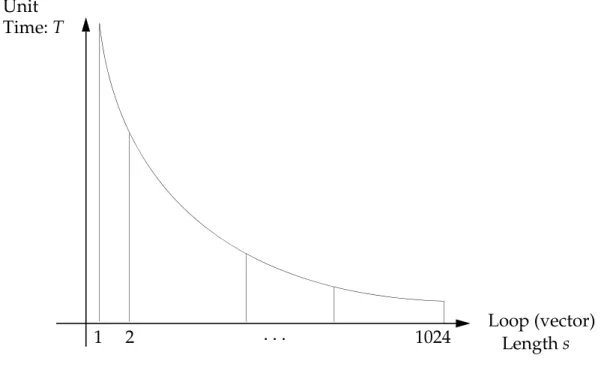
times of numerical and I/O kernels. A typical numerical kernel vector performance curve shows unit time T as a function of the loop length. A loop is a structure that executes a series of similar operations. The number of repetitions is called the loop length.
Figure 1-1 Single-Level Kernel Performance Curve
The kernel performance curve can be described mathematically as
Eq. 1-1
where the constant is characteristic of the asymptotic performance of the curve since
Eq. 1-2 The constant represents the startup overhead of the loop as
Eq. 1-3 These constants for all the NX Nastran numerical kernels can be printed by using DIAG 58. Loop (vector) Length s Unit Time: T 1 2 . . . 1024 T = A B s ---+ A T s( → ∞) → A B T s( = 1) = A + B
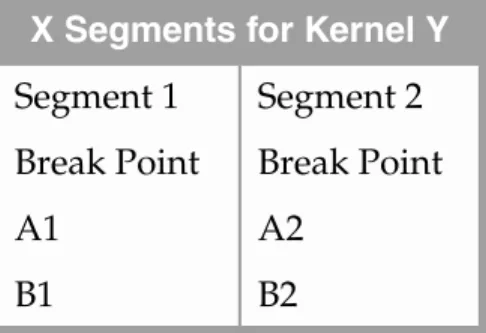
Sometimes it is impossible to have a good fit for the datapoints given by only one curve. In these cases, two or more segments are provided up to a certain break point in the following format:
where X is the number of segments and Y is the name of the particular kernel.
Double Loop Kernel Performance. In the case of the double loop kernels, the
unit time is a function of both the inner loop length and the number of columns, which is the outer loop length. The unit time is described by a surface as shown in Figure 1-2.
Figure 1-2 Double-Level Kernel Performance Surface
The surface on Figure 1-2 is built from curves obtained by fixing a certain outer loop length and varying the inner loop length. Intermediate values are found by interpolation. Another set of curves is obtained by fixing the inner loop length and varying the outer loop length.
X Segments for Kernel Y Segment 1 Segment 2 Break Point Break Point
A1 A2
B1 B2
Unit Time: T
Outer Loop Length Inner Loop Curves Outer Loop Curves
1
2
1024
Inner Loop Length . .
I/O Kernels. There are also many I/O kernels in NX Nastran.
The unit time for these kernels for string or term operations is
Eq. 1-4 For column operations (PACK, UNPACK),
Eq. 1-5 and the two values are given for real and complex and values.
Triple Loop Kernels. The triple loop kernels are now included in the time estimate
(GENTIM) process of NX Nastran.
While difficult to show diagramatically, the timing model for the triple loop kernels can be thought of as families of double loop surfaces as shown in Figure 1-2. A family is generated for specified lengths of the outermost loop. Values intermediate to these specified lengths are determined by interpolation.
Many of the numerical kernels are standard BLAS/LAPACK library routines, such as the AXPY kernels (described earlier) and the generalized matrix-multiply GEMM kernels. On certain platforms, vendor specific non-BLAS library routines are used as well. The speed and accuracy of these kernels has a large effect on numerical performance and stability. Therefore, NX Nastran may be linked against external libraries for best performance. Which external libraries are required will vary across hardware platforms, operating systems, and NX Nastran versions. The correct versions of all external libraries must be installed as part of the NX Nastran installation procedure.
Ts = number of strings • A + number of nonzeroes • B
Tc = Ts + rows • columns • A
1.7
Time Estimates
Calculating time estimates for a numerical operation in NX Nastran is based on analytical and empirical data. The analytical data is an operation count that is typically the number of multiply (add) operations required to execute the operation. In some cases the number of data movements is counted also.
The empirical data is the unit time for a specific kernel function, which is taken from the timing tables obtained by DIAG 58 and explained in “Timing Constants” on page 13.These tables are generated on the particular computer on which the program is installed and stored in the database.
The operation count and the execution kernel length are calculated using
information contained in the matrix trailers. Sometimes trailer information from the output matrix generated by the particular operation is required in advance. This information is impossible to obtain without executing the operation. The parameters are then estimated in such cases, resulting in less reliable time estimates.
Available Time. Time estimates in most numerical modules are also compared
with the available time (TIME entry). Operations are not started or continued if insufficient time is available.
I/O time estimates are based on the amount of data moved (an analytical data item) divided by the IORATE and multiplied by the I/O kernel time. Since the user can overwrite the default value of the IORATE parameter, it is possible to increase or decrease the I/O time calculated, which also results in varying the method selection.
In most numerical modules, NX Nastran offers more than one solution method. You can select the method used. The method automatically selected by NX Nastran is based on time estimates. The estimated (CPU) execution time is calculated by multiplying the number of numerical operations by the unit execution time of the numerical kernel executing the particular operation. In addition, an estimation is given for the (I/O) time required to move information between the memory and secondary storage. After the estimates for the CPU execution time and the I/O time are added together, NX Nastran selects the method that uses the least time.
Matrix Methods. Several methods are offered because each of them is best suited
to certain types of matrices. The difference in cost among the methods for specific cases can be an order of magnitude or more. As each matrix is generated, the parameters describing its size and the distribution of nonzero terms are stored in a matrix trailer. (The parameters that define the properties of the matrices were described in “Matrix Trailers” on page 8.) For each matrix, these parameters include the number of rows and columns, the form (for example, square or
symmetric), the type (for example, real or complex), the largest number of nonzero words in any column, and the density. Some of the newer methods also record the number of strings in the matrix. Other descriptive parameters may be added in the future.
The only empirical data used in deriving the timing equations is the measurement of the time per operation for the kernels. These measurements are computed at the time of installation on each computer and are stored in the delivery database for later use. After the system is installed, the measurements may be updated if faster hardware options are installed on the computer. The remaining terms in the equations are derived from careful operation counts, which account for both arithmetic and data storage operations.
Timing Equations. Timingequations are derived for all major numerical modules.
Conservative upper bounds are the best estimates that can be calculated. At present, these estimates are not used for method selection. Instead, the user is required to input the total amount of available CPU time to solve the total run. The amount of time remaining at the start of the numerical solution modules is
compared with the estimate. The run is terminated before the numerical module starts execution if the amount of time remaining is less than the estimate. The goal is to minimize wasted computer resources by terminating expensive operations before they start, rather than terminating them midway before any output is available.
The many types of machine architecture which NX Nastran supports and the great differences in operation between scalar, vector, and parallel computing operations result in a challenge to the numerical method developers to provide correct
estimation and method selection. There are a number of diagnostic tools which can be used to print out the estimates and the other parameters affecting computation cost. These tools are generally activated by the DIAG flags described earlier.
1.8
Storage Requirements
Main storage in NX Nastran is composed of the space used for the code, the space used for the Executive System, and the actual working space used for numerical operations.
Working Space. The actual working space available for a numerical operation
can be obtained using DIAG 13.
Disk storage is needed during the execution of an NX Nastran job to store temporary (scratch) files as well as the permanent files containing the solution.
Memory Sections. The Executive System provides the tools needed to optimize
the execution using a trade-off between memory and disk usage. The main memory is organized as follows:
RAM, MEM, BUFFPOOL. The RAM area holds database files, while the MEM
area holds scratch files. The BUFFPOOL area can act as a buffer memory. The user-selectable sizes of these areas have an effect on the size of the working storage and provide a tool for tuning the performance of an NX Nastran job by finding the best ratios.
A general (module-independent) user fatal message associated with storage requirements is:
UFM 3008:
INSUFFICIENT CORE FOR MODULE XXXX
This message is self explanatory and is typically supported by messages from the module prior to message 3008.
Working Storage Executive RAM MEM BUFFPOOL Printed on DIAG 13 User-Controllable
1.9
Performance Analysis
.f04 Event Statistics. The analysis of the performance of an NX Nastran run is
performed using the .f04 file.
Disk Usage. The final segment of the .f04 file is the database usage statistics. The
part of this output most relevant to numerical modules is the scratch space usage (the numerical modules are large consumers of scratch space). SCR300 is the internal scratch space used during a numerical operation and is released after its completion. The specific SCR300 table shows the largest consumer of internal scratch space, which is usually one of the numerical modules. The output
HIWATER BLOCK shows the maximum secondary storage requirement during the execution of that module.
Memory Usage. Another table in this final segment shows the largest memory
usage in the run. The output HIWATER MEMORY shows the maximum memory requirement combining working storage and executive system areas, described in
1.10
Parallel Processing
Parallel processing in NX Nastran numerical modules is a very specific tool. It is very important in enhancing performance, although its possibilities in NX Nastran and in specific numerical modules are theoretically limited.
The parallelization possibilities in NX Nastran consist of three different categories:
•
High levelFrequency domain
•
Medium levelGeometry domain
•
Low levelBlock kernels (high rank updates)
The currently available methods of parallel processing in NX Nastran numerical modules are:
•
Shared memory parallel Medium, low levelMPYAD, DCMP, FBS modules
•
Distributed memory parallelHigh, medium level
SOLVIT, DCMP, FBS, READ modules
Details of the various parallel methods are shown in the appropriate Modules’ sections throughout.
CHAPTER
2
Matrix Multiply-Add Module
■ Multiply-Add Equation
■ Theory of Matrix Multiplication ■ MPYAD Methods
■ DMAP User Interface
■ Method Selection/Deselection ■ Option Selection
■ Diagnostics
2.1
Multiply-Add Equation
The matrix multiply-add operation is conceptually simple. However, the wide variety of matrix characteristics and type combinations require a multitude of methods.
The matrix multiply-add modules (MPYAD and SMPYAD) evaluate the following matrix equations:
(MPYAD)
Eq. 2-1 or
(SMPYAD)
Eq. 2-2 The matrices must be compatible with respect to the rules of matrix
multiplication. The stands for (optional) transpose. The signs of the matrices are also user parameters. In Eq. 2-2, any number (between 2 and 5) of input matrices can be present.
The detailed theory of matrix multiply-add operation is described in “Theory of
Matrix Multiplication” on page 23. Subsequent sections provide
comprehensive discussions regarding the selection and use of the various methods. D [ ] = ±[ ]A ( )T [ ]B ± [ ]C G [ ] = [ ]A ( )T [ ]B ( )T [ ]C T[ ]D TE ± F T ( )
2.2
Theory of Matrix Multiplication
The matrix multiplication module in NX Nastran evaluates the following matrix equations:
Eq. 2-3 or
where , , , and are compatible matrices. The calculation of Eq. 2-3 is carried out by the following summation:
Eq. 2-4
where the elements , , , and are the elements of the corresponding matrices, and is the column order of matrix and the row order of matrix . The sign of the matrices and the transpose flag are assigned by user-defined parameters. NX Nastran has four major ways to execute Eq. 2-3 and performs the selection among the different methods automatically. The selection is based on the density pattern of matrices and and the estimated time required for the different kernels.
These methods are able to handle any kind of input matrices (real, complex, single, or double precision) and provide the appropriate result type. Mixed cases are also allowed and are handled properly.
The effective execution of multiplication is accomplished by invoking the NX Nastran kernel functions.
The four methods are summarized in the following table and explained in more detail below. Method Combination 1 Dense×Dense 2 Sparse×Dense 3 Sparse×Sparse 4 Dense×Sparse D = ±[ ]A [ ]B ± [ ]C D = ±[ ]A T[ ]B ± [ ]C A B C D dij aikbk j ± cij k = 1 n
∑
± = a b c d n A B A BMethod One (Dense x Dense)
Method one consists of several submethods. The submethod designated as method one storage 1 is also known as basic method one.
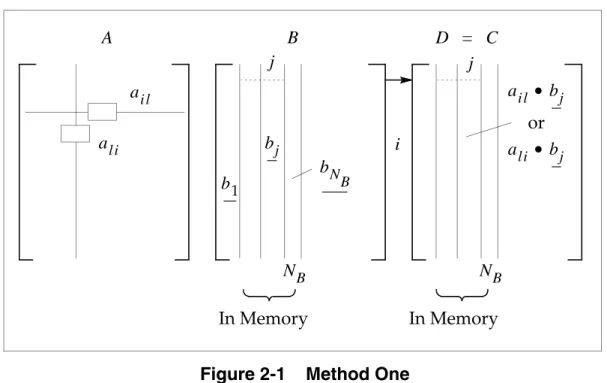
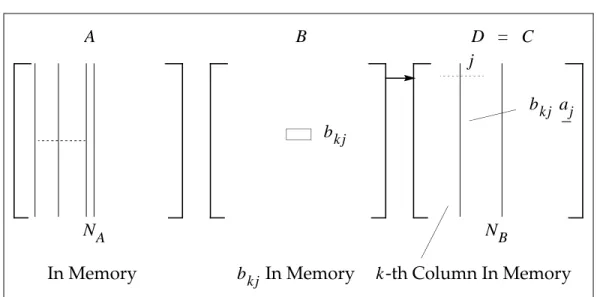
Inbasicmethod one, enough storage is allocated to hold as many non-null columns of matrices and as memory allows. The columns of matrix corresponding to the non-null columns of are initially read into the location of matrix (the result). Matrix is processed on a string-by-string basis. The complete multiplication operation may require more than one pass when all the non-null columns of matrices and cannot fit into memory. The number of passes can be calculated as follows:
Eq. 2-5
where:
The basic procedure of method one (storage 1) can be viewed as follows:
Figure 2-1 Method One
= order of problem = number of passes
= number of non-null columns of in memory
Note: The underlined quantities in Figure 2-1 represent vectors.
B D C B D A B D Np N NB ---= N Np NB B bN B bj ai l B A NB al i j b1 D = C j i NB ail • bj or ali • bj In Memory In Memory
For each nonzero element of , all corresponding terms of currently in memory are multiplied and accumulated in . columns of matrix are calculated at the end of one complete pass of matrix through the processor. Next, the
completed columns of are packed out, along with any non-null columns of that correspond to null columns of skipped in this pass (as they are columns of
). This part is saved, non-null columns of and the corresponding columns of are loaded, and the process continues. The effective execution ofthe
multiplication depends on whether or not the transpose flag is set.
Nontranspose:
Eq. 2-6
Transpose:
Eq. 2-7 The other submethods provide for different handling of matrix and for carrying out the multiplication operations. The main features of the submethods vary depending on the different ways of handling the strings (series of consecutive nonzero terms in a matrix column). A comparison of the main method and the submethods is shown as follows:
Table 2-1 Nontranspose Cases
Storage A: Unpacked columns of and Processing string by string
is in the inner loop
Storage B: Unpacked columns of and Processing string by string
is in the outer loop Storage C: Unpacked partial rows of
Processing string by string is in the inner loop
Storage D: Partial rows of in string format Processing string by string
is in the outer loop
Storage E: Unpacked columns of and
Unpacked columns of (band only) is in the outer loop
Storage F: Partial rows of in string format Unpacked columns of
is in the outer loop
A B D NB D A D C B D NB B C dij ← ail blj + dij dij ← ali blj + d ij A B D A A B D A A B A A B A A B D A A B A A
Storage 2: Unpacked non-null columns of and Unpacked columns of
Loops are the same as in storage 1, except that the outermost loop is pulled inside the kernel (triple loop kernel)
Storage 3: Unpacked non-null columns of and Unpacked columns of
Loops are the same as in storage 1, except that the outermost loop is pulled inside the kernel (BLAS level 3)
B D
A
B D
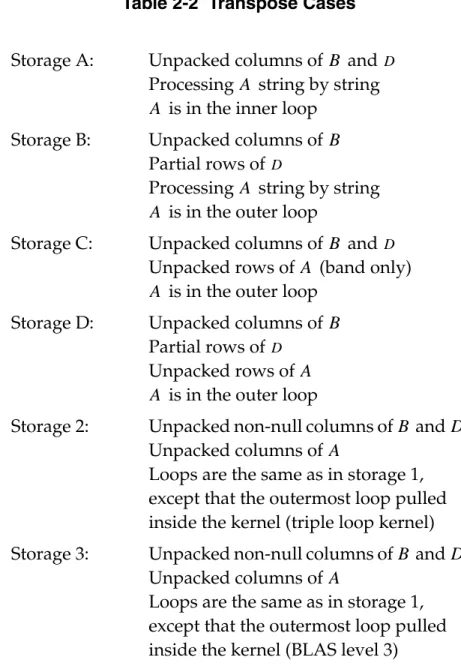
Table 2-2 Transpose Cases
The effective execution of the multiplication operation in method one subcases (and other methods with the exception of method three) isaccomplished by involvingthe NX Nastran kernel functions. In method one submethods, except for storage 2, the double loop kernels of DOT2 and XPY2 are used. In storage 2, the triple loop kernels of DOT3 are used.
Depending on whether the length of the current string of is or , the string is in the innerloop or in the outer loop. This explains the comments: " is in the inner loop" or " is in the outer loop" in Table 2-1. The selection between the previous two possible usagesof the kernel functions depends on the density of matrices and . If is sparse, it is inthe inner loop; otherwise, is in the outer loop.
Storage A: Unpacked columns of and Processing string by string
is in the inner loop Storage B: Unpacked columns of
Partial rows of
Processing string by string is in the outer loop
Storage C: Unpacked columns of and Unpacked rows of (band only)
is in the outer loop Storage D: Unpacked columns of
Partial rows of Unpacked rows of
is in the outer loop
Storage 2: Unpacked non-null columns of and Unpacked columns of
Loops are the same as in storage 1, except that the outermost loop pulled inside the kernel (triple loop kernel) Storage 3: Unpacked non-null columns of and
Unpacked columns of
Loops are the same as in storage 1, except that the outermost loop pulled inside the kernel (BLAS level 3)
B D A A B D A A B D A A B D A A B D A B D A A N M A A A A B A A
Method Two (Sparse x Dense)
In the nontranspose case of this method, a single term of and one full column of the partially formed are in the main memory. The remaining main memory is filled with as many columns of aspossible. These columns of matrix are in stringformat. This method is effective when is large and sparse;otherwise, too many passesof are required. The number of passes in is calculated from
Eq. 2-5.
The method can be graphically represented as follows:
Figure 2-2 Method Two
When is in memory, the k-th column of is processed against it and the result is accumulated into the k-th column of . In the transpose case, one column of is held in memory while holds only a single term at a time. This method provides an alternative means of transposing matrix by using the identity matrix and the zero matrix when the transpose module of NX Nastran is inefficient.
Method Three (Sparse x Sparse)
Inmethod three, the transpose and nontranspose cases are essentially the same except for the initial transpose of matrix in the transpose case. In both cases, matrix is stored in the same way as in method two, i.e., in string format. Matrix is processed on an element-by-element basis, and the products of each
term are calculated using the corresponding terms of in memory. However, in method three, the results and storage are different from method two. Inmethod three, “storage bins” are established for the columns of matrix
. The number of these bins is based on the anticipated density of matrix and is calculated as follows: B D A A A B B B A NB D = C bk j aj bk j NA j
bk j In Memory k-th Column In Memory
In Memory bkj A D B D A B C A A B bkj A D D
Eq. 2-8
where:
The size of the bins is calculated as follows:
Eq. 2-9
This manner of storing the results takes advantage of the sparsity of matrix . However, it requires sorting in the bins before packing out the columns of .
Method Four (Dense x Sparse)
This method has two distinct branches depending on the transpose flag.
Nontranspose Case
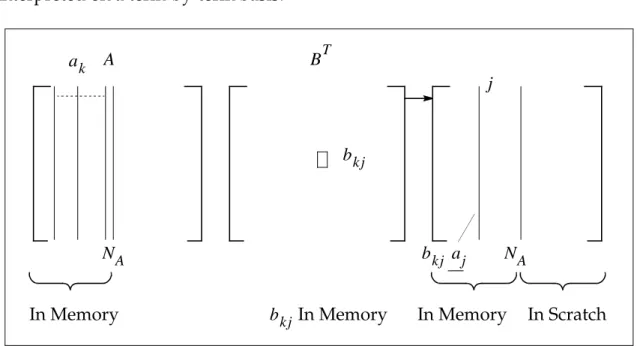
First, matrix is transposed and written into the results file. This operation is performed with the assumption that is sparse. As many columns of as possible are unpacked into memory and the columns of (rows of ) are interpreted on a term-by-term basis.
Figure 2-3 Nontranspose Method Four
For each nonzero term of , the scalar product with the columns of is formed and written into the scratch file. When all columns of and rows of are processed, the scratchfile contains one column foreach nonzero term in . Therefore, a final pass must be made to generate matrix .
= order of the problem = density of (estimated) Number of bins = Nρ N ρ D Size of bins N Number of bins --- 1 ρ ---= = B D B B A BT B BT A NA bk j NA j bk j In Memory In Memory ak bkj aj In Memory In Scratch BT A A B B D
Transpose Case
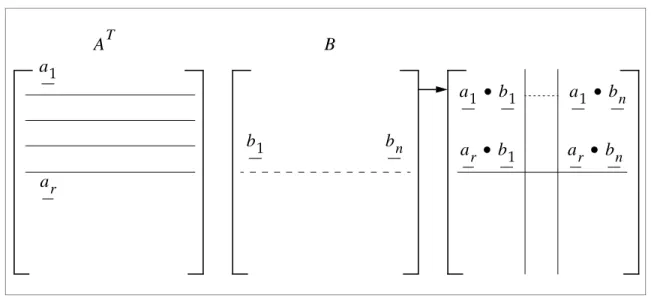
Inthis case, a set of rows of (columns of ) are stored in unpacked form. These rows build a segment. Matrix is processed on a string-by-string basis, providing the dot products of the strings and the columns of the segments.
Figure 2-4 Transpose Method Four
The results are sequentially written into the scratchfile continuously. The structure of this file is as follows:
The number of segments is (see Figure 2-4):
Eq. 2-10
Finally, the product matrix must be assembled from the scratch file, and matrix , if present, must be added.
Sparse Method
The sparse multiply method is similar to regular method three. Whenthe transpose case is requested, matrix is transposed prior to the numerical operations. This step is typically not very expensive since is sparse when this method is selected.
The significance of this method is that matrix is stored in a new sparse form. Specifically, all nonzero terms of a column are stored in a contiguous real memory region, and the row indices are in a separate integer array. The sparse kernel AXPI is used for the numerical work. The scheme of this method is shown on the following figure.
AT A B AT B a1 ar b1 bn a1 • b1 a1 • bn ar • b1 ar • bn
CoI 1 CoI 2 ... CoI n CoI 1 ... CoI nEOF
Seg 1 Seg 1 Seg 1 Seg 2 Seg n
k n r ---= C A A A
Figure 2-5 Sparse Method
From the figure, it is clear that matrix is processed on an element-by-element basis. When all the nonzero terms of do not fit into memory at once, multiple passes are executed on matrix , and only partial results are obtained in each pass. These results are summed up in a final pass.
The sparse method is advantageous when both matrices are sparse.
Triple Multiply Method
InNX Nastran a triple multiplication operation involving only two matrices occurs in several places. The most common is the modal mass matrix calculation of . Note that in this multiplication operation the matrix in the middle is symmetric. Therefore, the result is also symmetric. No symmetry or squareness is required for the matrices on the sides. Historically, this operation was
performed by two consecutive matrix multiplications which did not take advantage of the symmetry or the fact that the first and third matrices are the same.
The operation in matrix form is
Eq. 2-11 A A, T In Memory j D B C + i k i j Bk j aij dij dij p a r t i a l = + • B A B φTMφ C = [ ]A T[ ]B [ ]A ± D
where:
Any element of matrix can be calculated as follows:
Eq. 2-12
where:
It can be proven by symmetry that
Eq. 2-13
Based on the equality in Eq. 2-13, a significant amount of work can be saved by calculating only one-half of matrix .
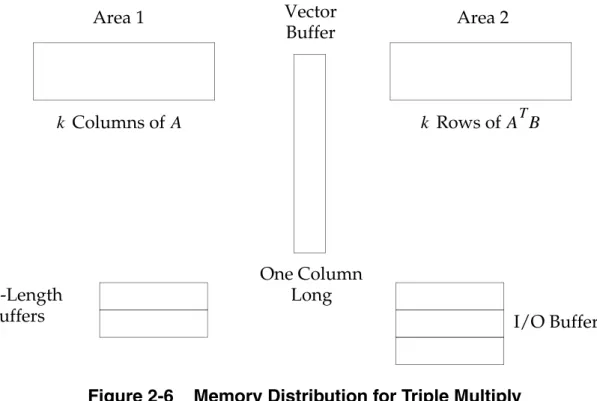
When designing the storage requirements, advantage is taken of the fact that matrix is only needed once to calculate the internal sums. Based on this observation, it is not necessary to have this matrix in the main memory. Matrix
can be transferred through the main memory using only one string at a time. The main memory is equally distributed among , , and three vector buffers. One of the vector buffers must be a full column in length. Therefore, the structure of the main memory is as follows:
= order of
= symmetric matrix = symmetric matrix = symmetric matrix
= the row index, = the column index,
A n × m (n rows × m columns) B n × n C m × m D m × m clk C clk ajk ail bij i = 1 n
∑
⎝ ⎠ ⎜ ⎟ ⎜ ⎟ ⎛ ⎞ dlk + j = 1 n∑
= l 1 ≤ ≤l m k 1 ≤ ≤k m ajl ai k bij i = 1 n∑
⎝ ⎠ ⎜ ⎟ ⎜ ⎟ ⎛ ⎞ ajk ail bij i = 1 n∑
⎝ ⎠ ⎜ ⎟ ⎜ ⎟ ⎛ ⎞ j = 1 n∑
= j = 1 n∑
C B B AT ATBFigure 2-6 Memory Distribution for Triple Multiply
Three I/O buffers must be reserved for the three simultaneously open files of , , and the scratch file containing partial results. Therefore, the final main memory size is
Eq. 2-14 From Eq. 2-14, the number of columns fitting into memory can be calculated as follows:
Eq. 2-15
The number of passes is calculated as follows:
Eq. 2-16
which is equal to the number of times the triple multiply operation reads through the matrix .
The number of times the triple multiply operation reads through the matrix can be approximated as follows: One Column Long Columns of k A k Rows of ATB Vector Buffer Area 1 Area 2 -Length
Buffersk I/O Buffers
A B nz = 2k • n + n + 3 BUFFSIZE• + 2k A k nz – 3 BUFFSIZE• – n 2n + 2 ---= p m k ---- if m k ---- = integer int m k ---- + 1 ⎝ ⎠ ⎛ ⎞if m k ---- ≠ integer ⎩ ⎪ ⎪ ⎨ ⎪ ⎪ ⎧ = B A
Eq. 2-17
The triple multiply method is implemented with a block spill logic where the result of the matrix is generated in blocks.
The above triple multiply is called the triple multiply with sparse middle matrix. The triple multiply with dense middle matrix is introduced below.
When both matrices and are dense, it is more efficient to apply dense multiply with BLAS, which is applied in the triple multiply with dense middle matrix. For the triple multiply with dense middle matrix, the main memory is equally distributed among , , , two vector buffers and three (or four if matrix D exists) I/O buffers. The stucture of main memory is similar to Figure 2-6, except that the vector buffer for is replaced by columns of . The final main memory size is
Eq. 2-18 and the number of columns fitting into memory can be calculated as follows:
Eq. 2-19
The estimation of the numbers of passes with the triple multiply with dense middle matrix operation through the matrices and is the same as that of the triple multiply with sparse middle matrix.
Parallel Multiply Method
The parallel multiply method, which is only used when parallel processing is requested, is basically a parallel version of method one designed to solve the CPU-intensive multiplication of dense matrices.
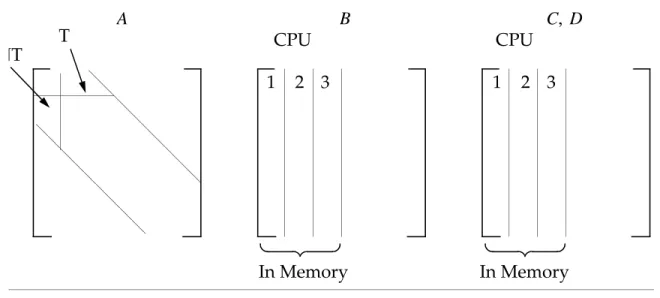
The storage structure of thismethod is the same as that of method one. However, the columns of matrix are distributed among the processors. Consequently, although is stored in the main (shared) memory, the processors access different portions of it.
At the beginning of each pass, subtasks are created. These subtasks wait for the columns of matrix to be brought into memory. Once a column of is in the main memory, all subtasks process this column with their portion of matrix . When all of the subtasks are finished, the main processor brings in a new column of and the process continues. The parallel method is advantageous when matrix is very dense and multiple processors are available.
pA p 2 ---= C k × k A B A B ATB B k B nz = 3k • n + 3 BUFFSIZE• + 2k A k nz – 3 BUFFSIZE• 3n + 2 ---= A B B B A A B A B
Algorithms 1TC and 1NTE (see “MPYAD Methods” on page 36) are executed in parallel when parallel MPYAD is requested. The parallel methods are represented in Figure 2-7.
Figure 2-7 Parallel Multiply Method
The triple loop kernels used in Method 1 Storage 2 are also parallelized by some machine vendors providing another way to execute parallel MPYAD.
In Memory In Memory
A B C D,
1 2 3 1 2 3
2.3
MPYAD Methods
The methods in the MPYAD module are divided into six main categories: four methods for different density combinations, one method for parallel execution, and one method for sparse operations. These methods are summarized in the following table:
There are no fixed density boundaries set for these methods. Method selection is a complex topic. Within method one, there are also ten submethods for the special handling of the matrices.
Methods two and three are only selected in special cases. In most cases, the sparse method replaces both methods two and three.
The parallel multiply method is aimed at shared memory parallel computers. It does not run on distributed memory parallel computers.
The method 1 submethods (A-F) are automatically deselected in some cases. One example is when the and matrices are the same; another is when any of the matrices are non-machine precision.
MPYAD Method Identifiers. For selection and deselection purposes, identifiers
are assigned to certain methods. However, these identifiers are bit oriented, and in some cases their decimal equivalents are used:
Method Combination 1 2 3 4 P S
Method Bit Decimal
1NT 0 1 1T 1 2 2NT 2 4 2T 3 8 3NT 4 16 Dense × Dense Sparse × Dense Sparse × Sparse Dense × Sparse Dense × Dense Sparse × Sparse A B
In the above table, T represents transpose, NT indicates nontranspose, and A, B, C, D, E, F, 2 are submethod names when they appear as the last character. For example, 1NTD is a method one, nontranspose case, D submethod operation. Bit 21 (with the corresponding decimal value of 2097152) is reserved for submethod diagnostics. 3T 5 32 4NT 6 64 4T 7 128 1NTA 8 256 1NTB 9 512 1NTC 10 1024 1NTD 11 2048 1NTE 12 4096 1NTF 13 8192 1TA 14 16384 1TB 15 32768 1TC 16 65536 1TD 17 131072 Deselect 20 1048576 DIAG 21 2097152 22 4194304 1NT2 23 8388608 1T2 24 16777216 AutoS2 25 33554432 1NT3 26 67108864 1T3 27 134217728
2.4
DMAP User Interface
The DMAP call for the MPYAD module executing the operation in Eq. 2-1 is
where:
An alternative MPYAD call is to use the SMPYAD module as follows :
where:
This module executes the operation in Eq. 2-2.
MPYAD A,B,C/D/T/SIGNAB/SIGNC/PREC/FORM
T = 0,1: Non-transpose or transpose (see “Multiply-Add Equation” on page 22)
PREC = 0,1,2: Machine, single, double, etc. (see “Matrix Trailers” on page 8) FORM = 0,1,2: Auto, square, rectangular, etc. (see “Matrix Trailers” on page 8)
SMPYAD A,B,C,D,E,F/G/N/SIGNG/SIGNF/PREC/TA/TB/TC/TD/FORM
N = number of matrices given TA,TB,TC,T
D = transpose flags FORM = as above
2.5
Method Selection/Deselection
MPYAD automatically selects the method with the lowest estimate of combined cpu and I/O time from a subset of the available methods. Also, those methods that are inappropriate for the user’s specific problem are automatically deselected. The user can override the automatic selection and deselection process by manual selection, subject to certain limitations. The details of both automatic and user selection and deselection criteria are described below.
Automatic Selection
By default, methods 1 (all submethods), 3, 4, and Sparse are available for automatic selection. Methods 2 and P are excluded from automatic selection unless bit 25 of System Cell 66 has been set (decimal value 33554432) or all of the default methods have been deselected. Also, if all of the default methods have been deselected, method 2 will be used, provided it was not deselected. If all methods have been deselected, a fatal error occurs.
Automatic Deselection
If a method is determined to be inappropriate for the user’s problem, it will be automatically deselected. Except in those cases noted below, an automatically deselected method will be unavailable for either automatic selection or manual user selection. Note that any method that has insufficient memory to execute the user’s problem will be deselected. The other automatic deselection criteria are described below for each method. In this discussion "mpassI" stands for the number of passes required by method I. and represent the densities of the
matrix and matrix, respectively. Also, unless the method name is qualified by NT (non-transpose) or T (transpose), the criteria applies to both.
Method 1 – All Submethods If method S is not deselected and mpass1 is greater than 5×mpass3 and and are less than 10%. If MPYAD was called by the transpose module. Method 1 – Storage A-F If the type of matrix is real and either or is
complex.
If the type of matrix is complex and both and are real.
Method 1NT – Storage A, D, and F
Unless explicitly user selected.
Method 1T – Storage B and C
1TB unless 1TA deselected. 1TD unless 1TC is deselected.
Method 2 If method S is not deselected, unless user selected.
ρA ρB A B ρA ρB A B C A B C
User-Specified Deselection
For method deselection, the following is required:
Main Methods – Deselection
SYSTEM(66) = decimal value of method
If the matrix is non-null and the type of is not machine precision or the , , and matrices are not all real or all complex.
If MPYAD was called by the transpose module. Method 3 If method S is not deselected, unless user selected.
If matrix is real and the and/or matrix is complex.
Method 3NT If the requested type of the matrix is real and any of the input matrices are complex, or if the requested type of is complex and all of the input matrices are real.
Method 4 If methods 1, 2, 3, and S are not deselected and greater than 10%, unless method 4 has been user selected.
If matrix is non-null and its type is not equal to machine precision or the and matrices are not both real or not both complex.
Method 4T If more than 100 "front-end" (R4) passes or more than 10 "back-end" (S4) passes.
Method Sparse If the type of matrix is not machine precision. If matrix is non-null and and are not both real or both complex.
If matrix is complex and matrix is real. Method Parallel NT Unless 1NTE is not deselected.
If the number of columns per pass for 1NTE is less than the number of available processors.
Method Parallel T Unless 1TC is available.
If the number of columns per pass for 1TC is less than the number of available processors.
C C A B C A B C D D ρA C B C B C A C A B
Submethods – Deselection
SYSTEM(66) = decimal value of submethod
Sparse Method – Deselection
where SYSTEM (126) is equivalent to the SPARSE keyword.
Parallel Method – Deselection
where ncpu = number of CPUs and SYSTEM (107) is equivalent to the PARALLEL. keyword.
The philosophy of method selection is to deselect all the methods except for the one being selected.
Triple Loop Method – Deselection
SYSTEM(252) = 0 or > 100: Do not use triple loops in 1T,1NT
User-Specified Selection
For method selection, the following is required:
Main Methods – Selection
SYSTEM(66) = 255 – decimal value of method identifier
Main or Submethods – Selection
SYSTEM(66) = 1048576 + bit value of method or submethod identifier
Triple Multiply Method – Selection
SYSTEM(129) = 0 : Default, automatic selection
SYSTEM(129) = 1 : Two Multiply, i.e. pre-MSC.Nastran Version 67 method SYSTEM(129) = 2 : Triple multiply for sparse middle matrix
SYSTEM(129) = 3 : Triple multiply for dense middle matrix SYSTEM(126) = 0: Deselect all sparse methods SYSTEM(126) = 2: Deselect sparse NT only SYSTEM(126) = 4: Deselect sparse T only
SYSTEM(107) = 0: Deselect all parallel modules
Sparse Method – Selection
Parallel Method – Selection
SYSTEM(126) = 1: Auto selection (This is the default.) SYSTEM(126) = 3: Force sparse NT method
SYSTEM(126) = 5: Force sparse T method SYSTEM(126) = 7: Force either T or NT sparse
SYSTEM(107) > 0 and
2.6
Option Selection
The following table shows the type combination options that are supported (R stands for real, C for complex). These options are automatically selected based on matrix trailer information. When the user selects one particular method with an option not supported with that method, an alternate method is chosen by MPYAD unless all of them are deselected.
Method R • R + R C • C + C R • C + R R • C + C
1T YES YES YES YES
1NT YES YES YES YES
2T YES YES YES YES
2NT YES YES NO NO
3T YES YES NO NO
3NT YES YES NO NO
4T YES YES NO YES
4NT YES YES NO NO
S YES YES NO NO
2.7
Diagnostics
The MPYAD module outputs diagnostic information in two categories: performance diagnostics and error diagnostics.
Performance Diagnostics
DIAG 19 Output. The following performance diagnostics is received by setting
DIAG 19.
Figure 2-8 Excerpt from the DIAG19 Output
In the above figure, “passes” means the number of partitions needed to create the result matrix.
To prevent creating huge .f04 files when many MPYAD operations are executed, NX Nastran has a machine-dependent time limit stored in SYSTEM(20). When a time estimate is below this value, it is not printed. To print all time estimates, the user should set SYSTEM(20) = 0.
Most of the diagnostics information mentioned in the above table is self
explanatory. Notice the presence of the MPYAD keyword (SYSTEM(66)) used to verify the method selection/deselection operation.
Whenever a method is deselected, its time estimate is set to 999999.
Submethod Diagnostics
For special diagnostics on the submethods, the user must add 2097152 to the value of SYSTEM(66) (i.e. turn on bit 21). The format of this diagnostic is shown
in Table 2-3. The first column heading indicates the selected submethod, the
DESELECT column contains either YES or NO for each submethod, and the last four columns contain the appropriate times.
M MATRIX A Trailer(COLS ROWS FORM TYPE NZ DENS) METHOD 1 Passes = XX CPU = XX I/O = XX Total = XX P MATRIX B Trailer(COLS ROWS FORM TYPE NZ DENS) METHOD 2 Passes = XX CPU = XX I/O = XX Total = XX Y MATRIX C Trailer(COLS ROWS FORM TYPE NZ DENS) METHOD 3 Passes = XX CPU = XX I/O = XX Total = XX A Working Memory = XX SYSTEM (66) = XX METHOD 4 Passes = XX CPU = XX I/O = XX Total = XX D Transpose Flag = XX SYSTEM (126) = XX METHOD S Passes = XX CPU = XX I/O = XX Total = XX
Table 2-3 Method One Submethods
NEW1 = B DESELECT NCPP PASSES KERNEL CPU I/O TOTAL
A YES x x x x x x
B NO x x x x x x
C NO x x x x x x
where:
Error Diagnostics
Error messages are abbreviated as follows:
The following error-related messages may be received from MPYAD:
UFM 3055:
AN ATTEMPT TO MULTIPLY NONCONFORMABLE MATRICES.
The message is given if the number of columns of A is not equal to the number of rows in B, the number of rows of C is not equal to the number of rows of A, or the number of columns of C is not equal to the number of columns of B. This message is also given when MPYAD is called from another module.
SFM 5423:
ATTEMPT TO MULTIPLY INCOMPATIBLEMATRICES.
The cause for this message is the same as for UFM 3055. However, this message is more elaborate and prints the trailers for all matrices involved. This message comes from the MPYAD module.
UFM 6199:
INSUFFICIENT CORE AVAILABLE FOR MATRIX MULTIPLY.
E YES x x x x x x
F YES x x x x x x
1 YES x x x x x x
2 YES x x x x x x
Table 2-3 Method One Submethods (continued)
NEW1 = B DESELECT NCPP PASSES KERNEL CPU I/O TOTAL
NCPP = number of columns per pass
NEW1 = B indicates that submethod B is chosen
UFM User Fatal Message SFM System Fatal Message UWM User Warning Messages SWM System Warning Messages UIM User Informa