Volume 4, No. 6, May 2013 (Special Issue)
International Journal of Advanced Research in Computer Science
REVIEW ARTICAL
Available Online at www.ijarcs.info
CONFERENCE PAPER
Advancement in Image processing using Android
Mr. Sadanand S. Muktawar
B.E-I.T(Final Year),Jawaharlal Darda Institute Of Engineering & Technology,
Yavatmal (MS) INDIA [email protected]
Miss.Juhi R. Bobade
B.E-I.T(Final Year),Jawaharlal Darda Institute Of Engineering & Technology,
Yavatmal (MS) INDIA [email protected]
Prof.S.A. Kahate
Assistant professor I.T. Dept J.D.I.E.T, Yavatmal (MS) INDIA
Abstract: This paper deals about the introduction of android in mobile devices. The recent trends in android give the future development in software development kit (SDK) which is ubiquitous in all mobile phones. With this use of android in our mobile phone the compatibility accessibility and the interface of the mobile phone version ones has been considerably increased. The latest of android allows the speech recognition facility in the mobile devices. With this further development of android allows us to install video or picture recognition with moving sensors in our mobile phones.
The widespread use of android application is required to use in general life. The computation time of several common image processing on the hardware platform with the android operating system. Image processing on mobile phone is a new and exciting field with many challenges due to limited hardware and connectivity. Image processing is a software application that perform image editing and enhancement such as Adobe Photoshop. This project is to focus on the image acquisition i.e. image gaining and pre-processing through implementing image addition convolution, thresholding and edge detection on mobile phone. This software must measure the processing time of processing an individual image independent of decoding the image and displaying it. The image processing library called JJIL is used for its image decoding function. Keyword : SDK- Software development.
I. INTRODUCTION
There were nearly 700 million cell phones sold each year compared with fewer than 200 million PCs — and the gap was widening. Increasingly, phones were the way people wanted to connect with each other and with everything else. Phones were going to replace PCs as the main gateway to the Internet, and they were going to do it soon. The cell phones ran on different software, had less memory, and operated under the constraints of pay-per-byte wireless networks; the mobile Web was a stripped-down, mimeographed version of the real thing. To avoid this, Android had the solution. Android is a free, open source mobile platform that any coder could write for and any handset maker could install It would be a global, open operating system for the wireless future. Android is software stack for mobile devices that includes operating system, middleware and key applications. Android is an Open Platform for Mobile development. It is based on Linux operating system and developed by Google and Open Handset Alliance. Using the HTC G1 as the hardware for testing is advantageous because it is the first phone that was officially release with the android operating system and is therefore a good platform to benchmark and begin developing image processing application. The capabilities for this hardware include still images at a resolution of 1536 x 2048 and video at resolution of 320 x 240.By benchmarking key processing function in Acquisition and Pre-Processing the design of complex image processing and
computer vision application can be designed with this information in mind.
II. ANDROID RUNTIME
A. Dalvik virtual machine:
Every Android application runs in its own process, with its own instance of the Dalvik virtual machine. Dalvik has been written so that a device can run multiple VMs efficiently. The Dalvik VM executes files in the Dalvik Executable (.dex) format which is optimized for minimal memory footprint. The VM is register-based, and runs classes compiled by a Java language compiler that have been transformed (as ByteCodes, which is good for run fast) into the .dex format by the included "dx" tool.
B. Core Libraries:
It contains all of the collection classes, utilities, io etc.
a. Linux Kernel:
III. DEVELOPMENT ENVIRONMENT
A. Supported Operating Systems:
a. Windows XP (32-bit) or Vista (32- or 64-bit) Mac OS b. X 10.4.8 or later
c. Linux
B. Supported Development Environments:
a. Eclipse IDE
b. Eclipse 3.3 (Europa), 3.4 (Ganymede)
Recommended Eclipse IDE packages: Eclipse IDE for Java EE Developers, Eclipse IDE for Java Developers, Eclipse for RCP/Plug-in Developers Eclipse JDT plugin Eclipse Classic IDE package is not supported.JDK 5 or JDK 6 (JRE alone is not sufficient)Android Development Tools plugin.
IV. SOFTWARE DEVELOPMENT KIT
It is a typically a set of development tools that allows a engineer to create applications for a certain software package, software framework, hardware platform, computer system, video game console, operating system or similar platform.
A. Android 1.1:
a. External Libraries:
The system image includes these external libraries, which you can access from your application by adding a <uses-library>.
b. Built-in Applications:
The system image includes these built-in applications: Alarm Clock, API Demos, Browser, Calculator, Camera, Contacts, Dev tools, Dialer, Email, Maps (and Street View), Messaging, Music, pictures and settings.
c. Resolved Issues:
Alarm Clock alert now plays audio/vibe directly, rather than through Alarm Manager. Alarm Clock alert starts playing audio/vibe audio/vibe in its Intent Rreceiver, rather than on activity start. These changes should prevent alarms from being blocked by modal dialogs. Fixes to device sleep. Single tap no longer opens the in-call dial pad; users now need to touch a and drag it. Fixes a bug causing approximately 1 in 25 outbound messages to free up the IMAP connection (to a Gmail based server) when transferred to the Sent folder. Removes automatic account setup entries that were broken or not testable. Adds minor fixes to a few of the remaining entries. Makes improvements to warning dialogs used for a few special cases. Changes default mail checking interval to every 15 minutes (instead of defaulting to "never"). Fixes password-quoting bugs in IMAP, so that users can include special characters in passwords (e.g. spaces). Fixes various errors in auto and manual account setup Improves reporting for various connection errors, making it easier for to the user desire failed account setups. Fixes new-mail notifications for POP3 accounts. Ensures proper auto-checking of accounts
marked as "never check". Now displays date and time using user preference (e.g. 24 hr vs. AM/PM). Now shows cc: in message view. Improves recovery from POP3 connection failures. POP3 parser rules loosened, so the application can work with complaint email servers.
d. Features:
a) Maps: Adds details and reviews when a user does a search on Maps and clicks on a business to view its details.
b) Dialer: In-call screen timeout default is now longer when using the speakerphone.
c) Dialer: Adds a "Show dial pad" / "Hide dial pad" item to the in-call menu, to make it easier to discover the DTMF dial pad.
d) Adds support for saving attachments from MMS Adds support for marquee in layouts.
e. Overview:
a. Adds annotations for test systems, no actual (nontest) API changes.
b. Adds a method to allow a process to easily determine its UID.
c. Adds support for marquee in layouts.
d. Adds new methods for determining padding inviews. Adds new permissions that allow an application to broadcast an SMS or WAP Push message.
e. API cleanup: removes protected constructor from SDK-bound system images.
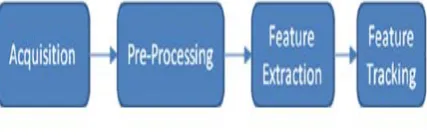
V. IMAGE ACQUISITION REFERS TO THE CAPTURING OF
Image data by a particular sensor or data repository. Once the image data is acquired, Pre-Processing often includes rendering the acquired data to a format that can be handled by a set of algorithms for Feature Extraction that transform sub image data to information which are often in turn maintained over time to provide temporal information.
Figure 5.1: image processing routine.
CONFERENCE PAPER
VI. IMAGE RECOGNITION
Image processing can be described as every possible action performed on an image. This can be as simple as cropping an image, increasing contrast or scaling. Ever since digitalization of images came into the computer world, there was demand for image recognition. Image recognition is a classical problem in image processing.
While humans can easily extract objects from an image, computers can’t. For a computer an image is no more than a matrix of pixels. The artificial intelligence required for recognizing objects in this matrix, has to be created by a programmer. Therefore the most existing methods for this problem apply for specific objects or tasks only.
Examples:
a. Optical character recognition or OCR transforms images into text.
b. Recognizing human faces, often used in digital cameras.
c. Pose estimation for estimating the orientation and position of an object to the camera.
d. Content-based image retrieval for finding an image in a larger set of images.
A widely used technique to recognize content in an image is shown in figure and consists of the following two parts:
a. Determining features specific for a certain image. b. Matching different images based on those features
.
Figure 7.1.: Image recognition principle
VII. DATABASE
In order to find a match for a certain picture of a painting and provide information about that painting, we needed a database. Several things were to be considered when working with a database. The first and most important step was developing a good structure for the database. After constructing the database we had to find an intuitive interface providing an easy way to load data in the database and modify it. Our database must be able to provide all the data needed to make our application work. Therefore we need to create sufficient tables with their data fields and the tables should be linked in such a way that it can easily provide related data. The database has to hold a library of paintings.
Basically this information consists of: a. the name
b. the artist
c. an image of the painting d. other optional info
e. the vector of invariants of a photograph taken of the painting
VIII. AVAILABLE METHODS FOR IMAGE RECOGNITION
a. SIFT or Scale-invariant Feature Transform b. SURF or Speeded-Up Robust Features
The easiest way of image recognition by far is pixel-by-pixel matching. Every pixel-by-pixel from the source image gets compared to the corresponding pixel in a library picture. The image has to be exactly the same in order to match. This method is not interesting at all, as it doesn’t account for changes in viewing angle, lighting, or noise. Therefore, in order to compare pictures taken by an Android-cell phone with images in a database of museum-pieces, we need more advanced methods. One method uses local features of an image; there are two commonly used algorithms
A. SIFT or Scale-invariant Feature Transform:
It is an algorithm that uses features based on the appearance of an object at certain interest points. These features are invariant of changes in noise, illumination and viewpoint. They are also relatively easy to extract, which makes them very suitable to match against large databases. These interest points or key points are detected by convolving an image with Gaussian filters at different scales resulting in Gaussian-blurred images. Key points are the maxima and minima of the difference of successive blurred images. However, this produces too many key points, so some will be rejected in later stages of the algorithm because they have low contrast or are localized along an edge.
B. SURF or Speeded-Up Robust Features:
It is based on SIFT, but the algorithm is faster than SIFT and it provides better invariance of image transformations. It detects key points in images by using a Hessian-matrix. This is a method using global features, and not based on local features as SIFT and SURF use. When using local features, every feature has to be compared, and processing time is significantly higher than when using global features. Local features could be used though, and they will perform better on 3D objects. Our main goal however is 2D recognition, and we think color moments can handle this with a good balance of recognition rate and speed. Color moments combine the power of pixel coordinates and pixel intensities. These color moments can be combined in many different ways in order to create color moment invariants.
IX. EXAMPLE
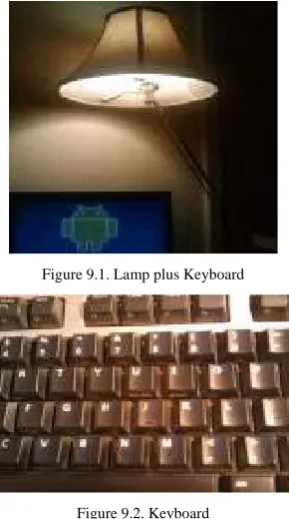
Figure 9.1. Lamp plus Keyboard
Figure 9.2. Keyboard
When we do the image processing then it will look like
Figure 9.3. Lamp
Figure 9.4. Negative or Sabel of Lamp
This operation is done in very less time, doesn’t how many time we do processing it will gives the output very quickly.
X. CONCLUSION
Android is very flexible and provides many tools for developing applications. This allowed users to develop different image processing application in a limited amount of time. Developers can use a wide range of Android’s
possibilities. User can use its SQLite database management system. Developer can filled database using XML files, for which we needed the XML parser. User can created Java classes which extend the Activity and Service classes, both core components of an Android application. Developer can pass information to these Activities and Services in several ways: using global variables, intents and the database.. One optimizes code by, among others, using the OpenGL libraries. For this, the usage of threads was needed. In XML-based GUIs one can also used many different elements such as Linear Layouts, Table Layouts, Buttons, Web Views, Image Views, and Tabs. With its all feature rich package android provides very sophisticated development environment to the user, which is more flexible and can be manipulated according to developers comfort especially in developing complex application on image processing
XI. REFERENCES
[1]. Google [2009a], “Android API Demos”.
URL:
http://developer.android.com/guide/samples/ApiDemos/ind ex.html (Last consulted:04/05/2009)
[2]. Wagner, Daniel and Langlotz, Tobias and Schmalsteig,
Dieter. “Robust and Unobtrusive Marker Tracking on Mobile Phones,” IEEE International Symposium on Mixed and Augmented Reality 15-18 September 2008. Cambridge UK.
[3]. Chen, Wei-Chao and Xiong, Yingen and Gao, Jiang and
Gelfand, Natasha and Grzeszczuk,Radek. , [2007]“Efficient Extraction of Robust Image Features on Mobile Devices.” In Proc. ISMAR 2007.
[4]. H. Bay, T. Tuytelaars, and L. Van Gool. , [2006] “SURF: Speeded Up Robust Features. In ECCV “ pages 404-417
[5]. Bay, H., Fasel, B. and Gool, L. V. [2006], Interactive museum guide: Fast and robust recognition of museum objects, in “Proceedings of the first international workshop on mobile vision”.
[6]. Föckler, P., Zeidler, T., Brombach, B., Bruns, E. and
Bimber, O. [2005], “PhoneGuide: Museum Guidance Supported by On-Device Object Recognition on Mobile Phones”, Proceedings of International Conference on Mobile and Ubiquitous Computing (MUM’05) .
URL:
http://www.uniweimar.de/medien/ar/PhoneGuide/results.ht m
[7]. Van Riper, A. Bowdoin (2002). Science in popular culture: a reference guide. Westport: Greenwood Press. p. 10. ISBN 0–313–31822–0.
[8]. Dinello, Daniel (2005). Technophobia!: Science Fiction Visions of Posthuman Technology. University of Texas Press. p. 109.
CONFERENCE PAPER 162820.html
[10]. "Android 1.5 Version Notes". Android Developers, April 2009. http://developer.android.com/sdk/android- 1.5.html# features. Retrieved 2009-09-03
[11]. Android Overview. Open Handset Alliance.
http://www.openhandsetalliance.com/android_overview. htm Retrieved 2008-09-23
[12]. Wii technical notes- Nitendo of Europe.