Enhancing Classroom Performance:
A Technology Design To Support
The Integration Of Collaborative Learning
And Participative Teams
Michael T. Marsh, Shippensburg University Ronald Taylor, Shippensburg University Stephen J. Holoviak, Shippensburg University
ABSTRACT
Integral components of today’s successful business models frequently include information technology, effective collaboration, and participative teamwork among employees. It is in the best interest of students for educators to provide classrooms that reflect a profitable practitioner’s environment. Students studying for careers in business should learn the advantages of teamwork and apply what they learn by participating as members of project teams as part of curriculum activities. Organizations are incorporating collaborative hardware, software, and spaces at an unprecedented pace and rapid advancements in technology are continuously changing collaboration and teamwork strategies. To better prepare students to perform in this type of environment, the John L. Grove College of Business at Shippensburg University of Pennsylvania has recently designed and equipped classrooms to support intellectual teamwork activities. The intent of this paper is to share the details regarding the teaching/learning experiences of the faculty and students using the facilities, the physical design of the spaces, and the technology that was incorporated into the designated spaces. The discussion of lessons learned and recommendations for designing and implementing a “real learning for real life” classroom should be particularly useful to institutions planning or actively involved in designing technology-enhanced collaborative or teamwork activity facilities.
Keywords: teamwork, collaboration, information technology, classroom organization
INTRODUCTION
schools provide the critical academic training necessary for students to learn team skills so, as new employees, they would be more productive and able to integrate into the organization more easily
Teaching teamwork activities that have intellectual components to students in business classes with more than 10 students frequently requires both innovative teaching strategies and special classroom facilities. Technology enhanced classroom facilities can be used to enhance students’ experiences in a number of ways. High tech facilities can be used to give students hands-on experiences with technology currently in use in the business world. Teaching the time-honored standards of team concepts such as building the team; developing team strategies; gathering, analyzing, and distributing information; and critiquing the team experience can be facilitated using classroom facilities designed to support teamwork activities. This paper discusses the experiences of John L. Grove College of Business students in such a classroom and provides recommendations for including instructional technology into the college classroom.
THE TECHNOLOGY ENHANCED CLASSROOM
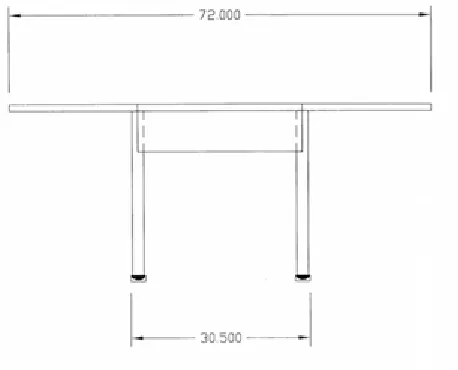
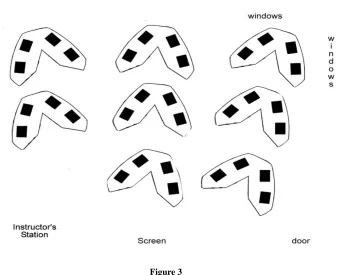
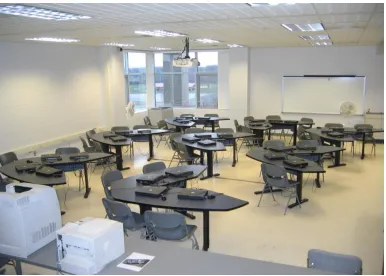
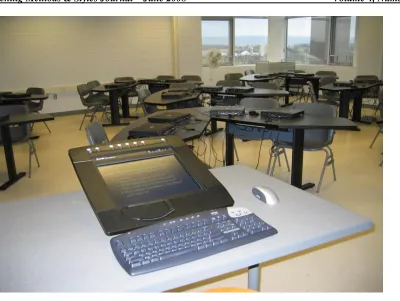
The feature that ties the technology into an integrated teamwork teaching/learning lab is the custom designed teamwork stations. Working with Thomas Huntz Associates, a commercial furniture manufacture located in Quakertown, PA, (http://www.thafurniture.com), the design team created teamwork stations that both facilitated teamwork activities and performed as traditional classroom desks. During the search for appropriate teamwork stations, the design team found many workstation solutions that were adequate, but none were exactly what were wanted or were not within the grant’s budget criteria. The final (proprietary) table design specifications are shown in Figures 1 and 2; they are patterned after the "tulip-shaped" tables used very successfully in Rensselaer Collaborative “Classroom-in-the-Round”. (Dugan, 1998; Rogers, 1997) The arrangement of the tables in the room is shown in Figure 3. The workstation design allows easy face-to-face communications among team members while still permitting unimpeded views of the instructor, fixed screen, or plasma display. Photographs of the room are shown in Figures 4, 5, 6 and 7.
Classroom management software is integral to teamwork exercises and activities. (Manning, 2000) It allows the instructor to exercise considerable control over activities in the classroom. The instructor can lock all computers, form groups, take over control of any student’s computer from the instructor’s station, observe the screen display of any (or all) computers, and select any computer’s display for projection onto the screen. The wireless network and laptops allow considerable flexibility in that student’s can physically move to another table or group. Laptops, instead of desktops, also allow a “convertible classroom” since, when the lid is closed and laptop moved aside, the arrangement resembles a traditional classroom with room on the desktop for texts and note taking
INITIAL EXPERIENCES
Courses from several disciplines in the College of Business were conducted in the new Business Learning Lab. They included Introduction to Business Computer Systems, C++ Programming, Business Information Processing, Marketing Research, Organizational Behavior, and Marketing Analysis and Strategy Development. Data regarding students’ experiences in this last course were gathered using a questionnaire given at the end of the semester. Three sections of Marketing Analysis and Strategy Development were offered in the spring semester. Two sections totaling 43 students met in the BLL and one section with 28 students were assigned a traditional classroom having only an instructor’s computer and LCD projector. By the end of the semester, students from both classroom expressed strong opinions on how the classroom affected their experience in the course. The students in the traditional classroom generally felt they did not receive the same instruction and experiences their counterparts received in the BLL. In fact the means were significantly different between the two classrooms. The students in the BLL were extremely satisfied and felt they received the best team training in their entire four years. Chart 1 shows the distribution and degree of support students in this marketing course would give towards the designing and equipping the type of classroom they used for the course. Students were also asked to quantify their satisfaction (or dissatisfaction) with the learning environment for the semester. Chart 2 shows the distribution of responses. During end-of-the-semester discussion about the course and classroom setting, students assigned to the traditional classroom were nearly unanimous in their feelings of being “cheated” out of an innovative and enjoyable learning experience by not being able to use the BLL.
Chart 1 14% 26% 58% 18% 18% 29% 14% 20% 30% 40% 50% 60% 70%
Business Learning Lab
Traditional Classroom
0% 0% 0% 0%
7% 28% 65% 29% 39% 21% 4% 7% 0% 0% 0% 10% 20% 30% 40% 50% 60% 70%
1 2 3 4 5 6 7
Business Learning Lab
Traditional Classroom
RECOMMENDATIONS AND LESSONS LEARNED
The first semester’s use of the BLL provided the facility’s designers and users with important information about designing and using technology-enhanced classroom. Comments and suggestions regarding various aspects of the facility are included below.
WORKSTATIONS/CONFERENCE TABLES
The workstation tables’ size and shape worked as planned. They were large enough to accommodate a laptop, textbook, and a writing surface while retaining a sense of community for the students at each table. The tables as installed consist of two attached units. They can easily be disassembled to stand as single units or a third unit incorporated forming a roughly circular conference table.
SECURITY CONCERNS
Several security enhancements were added as the use of the lab changed. To make the facility available for as many hours as possible, including evenings and weekends, two security features were added. Two security cameras were included into the classroom. A brief faculty discussion ensued regarding how they might be used to evaluate faculty performance and general privacy issues. The camera system is set up to alternate between two cameras, is primarily oriented towards the entrances to the room and workstations, and includes no audio. Faculty and administrators that viewed videos taken during typical class times and all were satisfied that the output was unusable for anything but security identification purposes.
Laptops are also locked to the tables with security tables. These allow the computers to be moved on the desktops but prevent thefts of opportunity. Instructors that use the classroom are provided a master key to the computer locks, which allows the laptops to be unlocked quickly and easily for use as appropriate.
Three computer security carts are available for longer terms storage, such as during semester breaks, or for easy transport to other classrooms. An important lesson learned from a previous experience is that one large laptop security cabinet for 32 computers is too heavy and unwieldy. Three 15 unit carts proved to be much more manageable.
WIRELESS NETWORK
The room selected for the Business Learning Lab was not originally planned to be a technology classroom. As a result the number of Ethernet outlets was minimal and poorly located for a wired classroom. Current bandwidth technology is adequate but not optimal; ideally, a hardwired network is preferable. Most of the difficulty was attributed to the classroom management software. Installing additional access points and a sub-network just for the classroom management software solved the vast majority of network overload problems.
SYNCHRONEYES™, THE CLASSROOM MANAGEMENT SOFTWARE
PROJECTORS AND DISPLAYS
A strong recommendation is not to scrimp on projectors. While it is tempting to cut costs here because of the wide range of prices and sizes, it will be in your best interest to purchase a top-of-the-line system. A critical feature is the brightness, measured in lumens. Turning out the lights to view the screen has a well-known effect on students’ eyelids. We elected to install a rather large (18 lb) Panasonic LCD with a 3700 lumen output. Its output is bright enough to enable the lights to remain on and window shades open. The resolution quality is sufficient to show video and DVD with excellent clarity.
A 50-inch plasma display is also incorporated into the classroom technology. We opted for mounting it as a self-contained unit on a movable stand. This turned out to be a good choice because it is not used daily and can easily be transported to other classroom. However, having a second display unit available is an important feature since dual displays during presentations, especially multimedia, are becoming commonplace.
SOUND SYSTEM
On the advice of several students a sound system was integrated into the ceiling. Student noted that using speakers integral to the instructor’s computer, plasma, or TV are too loud to students near the speakers while just audible to students distant from the speakers. By installing a sound system in the ceiling, balancing and modulating sound to appropriate levels is a simple operation. Lavaliere microphones with a belt-attached remote amplifier are available. Students enjoy trying these out during presentations; it made them “feel so professional.”
INSTRUCTOR’S STATION
The students are not the only ones who enjoy high tech instructional technology. The instructor’s station includes a high end Dell desktop system. In addition to the typical peripherals, a Sympodium™ (www.smarttech.com) unit is included. This device acts as a miniature interactive whiteboard, with capabilities similar to tablet computers. The instructor can stand (or sit) at the device while facing the class and annotate whatever is on the screen. Using a wireless remote mouse and keyboard enhance the capabilities and ease of use. The display is WYSIWYG (what you see is what you get), that is, the instructor's annotations show up directly on the screen and can even be saved for future use.
A small but useful addition to the station is a motion sensing remote mouse. (http://www.gyration.com) It works like a traditional mouse but the instructor can manipulate the cursor on the screen with hand, arm, and finger movements from anywhere in the classroom.
PERIPHERALS
Other technologies available in the lab include a high-speed black/white laser printer, a color laser printer, a scanner, a digital camera, and a digital camcorder. All of these are available to students, albeit limitations have had to be installed on the printers.
FACULTY TRAINING
CONCLUSION
This technology-enhanced classroom/lab is a single but important iteration in provide the most meaningful educational experience to students. The College is planning facilities that focus on a formal presentation environment and videoconferencing. The lessons learn during the design and implementation of the Business Learning Lab will make designing future facilities quicker, better, and more cost effective.
ACKNOWLEDGEMENTS
This activity is supported in part by funds from the Commonwealth of Pennsylvania.
AUTHOR INFORMATION
Dr. Michael T. Marsh, a member of the Shippensburg faculty since 1991, is a Professor of Management Information Systems at the John L. Grove College of Business, Shippensburg University. His academic credentials include a B.S. in Mathematics, a M.S. in Computer Science, an MBA, and a doctorate in Operations Research. He is a university leader in the use of instructional technology and taught a variety of classes including Business Computer Systems, Computer Programming, and Instructional Technology. Dr. Marsh has written and been the project director for several successful technology grants and serves on the University Emerging Technology Committee.
Dr. Ronald K. Taylor is a Professor of Marketing at the John L. Grove College of Business, Shippensburg University. His academic credentials include a B.S. and a M.S. in Business & Education, and a Doctorate in Marketing. His teaching and research interests are in marketing education, marketing management & strategy, retail and sales management. His research has been published in a variety of journals. He consults in the retail and sales management areas and sits on the board of directors for several professional and nonprofit organizations.
Dr. Stephen J. Holoviak has been serving as the Dean of the John L. Grove College of Business at Shippensburg University for the past ten years. Prior to this he was a faculty member in the management/marketing department for eighteen years. During his tenure at Shippensburg University he directed the H.R. Frehn Center for Management, a research and consulting outreach arm of the College of Business. Dr. Holoviak is the author/coauthor of six books and over 150 referred publications and the former contributing editor of the Human Resource Management Report magazine.
REFERENCES
1. Dugan, Robert F., et al. (1998), Exploring Collaborative Learning in Rensselaer's Classroom-in-the-Round, Rensselaer Polytechnic Institute Technical Report 98-1, http://www.cs.rpi.edu/tr/98-1.pdf, retrieved February 15, 2008.
2. Manning, Linda M. & Riordan, C.A (2000), Using Groupware Software to Support Collaborative Learning in Economics. The Journal of Economic Education, 31 (3), 244-252.
3. Robinson, Stephen P. (2001), Organizational Behavior, 9th ed., (Upper Saddle River, NJ: Prentice Hall). Chapter 8
4. Rogers, Edwin H. & Geisler, C. (1997), A Collaborative Learning Environment for Intellectual Teamwork Across the Curriculum. ASEE/IEEE Frontiers in Education Conference Proceeding,
http://fie.engrng.pitt.edu/fie97/papers/1491.pdf retrieved February 15, 2008.
5. Schellhardt, T.D., (1994), To Be a Star among Equals, Be a Team Player, Wall Street Journal, April 20, 1994, pB1.