Department of Computer Science
Magnus Persson
A Comparative Study of Security Features
in FreeBSD and OpenBSD
Master’s Thesis 2006:02
A Comparative Study of Security Features
in FreeBSD and OpenBSD
Magnus Persson
c
This thesis is submitted in partial fulfillment of the requirements for the Masters degree in Computer Science. All material in this thesis which is not my own work has been identified and no mate-rial is included for which a degree has previously been conferred.
Magnus Persson
Approved, March 1, 2006
Opponent: Thijs Holleboom
Advisor: Simone Fischer-Hubner
Examiner: Donald F. Ross
Abstract
Security in operating systems is a highly topical subject nowadays as the Internet keeps expanding. The larger the Internet gets the more systems, with valuable information, get connected, which could be subjects of attacks. An operating system needs to protect its information from these attacks. Many servers are using UNIX based operating systems and the security in these systems is a widely discussed topic. This project is going to test and investigate the security in two of the most common UNIX distributions, both based on the Berkley Software Distribution (BSD). The selected systems are FreeBSD and OpenBSD. The Add-on called TrustedBSD/SEBSD for FreeBSD will also be a subject for this project. A comparison of the security features in the two systems was performed both theoretically and practically and this report reflects the results of these experiments and comparisons. A conclusion is that each system suits best in different environments with different needs. The selected distributions also have different level of security in specific areas. An introduction to security in operating systems on a general basis is provided before the actual comparison begins.
Contents
1 Background 1
1.1 Introduction . . . 1
1.2 About the Project . . . 2
1.2.1 Selected Systems . . . 2
1.2.2 Security Aspects . . . 3
1.2.3 Comparison Method . . . 4
1.3 Structure of the Thesis . . . 5
2 Operating Systems and Network Security 7 2.1 Design Principles and Features of Secure Operating System . . . 7
2.2 Access Control . . . 13
2.3 Authentication . . . 17
2.4 Auditing and Logging . . . 20
2.5 Cryptography . . . 22
2.6 Network Security . . . 26
2.6.1 Firewalls . . . 26
2.6.2 Intrusion Detection Systems . . . 28
2.7 Encryption Protocols . . . 29
2.7.1 IPSec . . . 29
2.7.2 SSH . . . 32 vii
2.9 Summary . . . 36
3 Security Enhanced UNIX Systems 39 3.1 SELinux and Flask . . . 39
3.2 TrustedBSD and SEBSD . . . 40
3.3 RSBAC . . . 43
3.4 Summary . . . 45
4 Attacks and Defense 47 4.1 Attacks . . . 47
4.2 Defense Tactics . . . 51
4.3 Vulnerbility Analysis Tools . . . 52
4.3.1 Nessus . . . 52
4.3.2 SARA . . . 53
4.4 Summary . . . 54
5 Comparison of Security 55 5.1 Introduction . . . 55
5.1.1 OpenBSD . . . 55
5.1.2 FreeBSD . . . 56
5.1.3 TrustedBSD . . . 56
5.2 Authentication . . . 57
5.3 Access Control . . . 59
5.4 Cryptography . . . 61
5.5 Auditing and Logging . . . 63
5.6 Firewalls . . . 65
5.7 Discussion . . . 67 viii
5.8 Summary . . . 69
6 Vulnerability Experiment 71 6.1 Experiment Configuration . . . 71
6.2 FreeBSD . . . 73
6.2.1 Open Ports . . . 73
6.2.2 Security Risks (FreeBSD 5.3-BETA2) . . . 73
6.2.3 Security Risks (FreeBSD 5.4) . . . 74
6.2.4 SARA Vulnerability Test . . . 75
6.2.5 Summary and Discussion . . . 75
6.3 OpenBSD . . . 76
6.3.1 Open Ports . . . 76
6.3.2 Security Risks (OpenBSD 3.6) . . . 76
6.3.3 SARA Vulnerability Test . . . 77
6.3.4 Summary and Discussion . . . 77
6.4 Experiment Results . . . 78
6.5 Summary . . . 80
7 Discussion 81 7.1 Project Description . . . 81
7.2 Project Results . . . 82
7.3 Author’s Point of View . . . 85
7.4 Further Investigation . . . 88
7.5 Conclusions . . . 89
References 91
A Wordlist 95
List of Figures
1.1 The BSD hierarchy. . . 4
2.1 The security mechanisms for a secure operating system.[35] . . . 10
2.2 Security kernel and operating system intergrated. [35] . . . 12
2.3 Security kernel and operating system separated. [35] . . . 13
2.4 A backup of the logs may be stored on a another host. [17] . . . 21
2.5 Illustration of Cipher Block Chaining. . . 23
2.6 A firewall protects the internal network from an external network like the Internet.[17] . . . 27
2.7 Authentication Header for IPSec. . . 30
2.8 Encapsulated Security Payload for IPSec. . . 30
2.9 Security Association with the use of Authentication Header (Transport Mode). 31 2.10 SA with the use of Authentication Header (Tunnel Mode). . . 31
2.11 ESP with the use of encryption and authentication (Transport Mode) . . . 31
2.12 ESP with the use of encryption and authentication (Tunnel Mode) . . . 32
2.13 Kerberos mechanism for user authentication and ticket passing. . . 34
3.1 SELinux Framework structure. [8] . . . 41
3.2 SEBSD Framework structure. [8] . . . 42
3.3 RSBAC security mechanism structure. [34] . . . 44
4.1 The Nessus client user interface after a scan has been performed. . . 53 xi
List of Tables
5.1 Summary of the security in the systems. . . 70
6.1 Open ports for the FreeBSD 5.3-BETA2 distribution. . . 73
6.2 Open ports for the FreeBSD 5.4 distribution. . . 73
6.3 Open ports for the OpenBSD 3.6 distribution. . . 76
Chapter 1
Background
This chapter will explain the purpose of this project and present the selected systems that were used in the experiment and explain how the comparison was conducted. Also the structure for the thesis is presented.
1.1
Introduction
UNIX based operating systems are today widely used both by private users as well as by companies.[23] There are many threats against an operating system. Often the threats are from attackers that want to gain administrator access to the computer. In a UNIX operating system the administrator account which has full access rights to the system is calledroot, also known as super-user account. Gaining administrator access will make the attacker get full control over the attacked computer. This threat may come from both remote and local directions. To get administrator access is just one way of many to attack an operating system. For example daemons, i.e. applications that run in the background as services, with super-user permission, may have so called backdoors. Backdoors are flaws in the software that the developers have left there by purpose or by mistake. A backdoor is like an open hole in an application that may give and attacker administrator access or
may let the attacker get hold of information from the system. There are many other attack methods for getting root access and there are a lot of different methods to prevent this from happening, but some systems do not have this protection by default. This project is going to compare the security features in two selected UNIX distributions and one security add-on for one of the systems. UNIX distributions will from now on be referred to as UNIX systems, which in this report mainly refer to the selected distributions. The purpose of this comparison is to analyze if the selected UNIX systems are secure in an installation with minimal configurations made.
1.2
About the Project
1.2.1
Selected Systems
There are many different UNIX systems today, but some of the most common systems for private users as well as for companies are the BSD systems. As BSD is a free alternative to other operating systems many private users finds them attractive. But new users may use the systems without really knowing much about them and are not having too much experience with security concerning operating systems. This is the main reason for inves-tigating the security in these systems. Companies are often aiming for higher security in their systems compared to most private users. But security for private users is also very important with today’s highly expanding networks and accessibility through Internet. A system that is not secure may be hijacked by an attacker and used to attack other systems. The hijacked system may as well act as an e-mail spamming host or as a branch for other illegal activities. Hence an unsecured private system may not be a major problem for the owner, but if the system is used by an attacker to obtain control over other systems, which may be company systems, it may be a problem for other people.
The BSD distributions are under active development and have many contributions from users. As the distributions are developed under open source license there could be
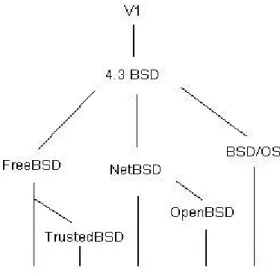
1.2. ABOUT THE PROJECT 3 more exploitable flaws discovered faster but at the same time the flaws could be found by attackers first, which would use them to gain access to a system. Also systems that are widely used are having a higher risk to be attacked. With this in mind this project is going to investigate which of the BSD systems selected below are most secure with as little configuration as possible, which for example means configuration of network interface and keyboard. The definition of default installation in this project is that it should be a regular installation of the system, with the minimum of configuration made. The applications and services that have been installed depend on what has been included in the default installation for each system. The selected operating systems that will be compared for security features are the two UNIX systems FreeBSD[1], OpenBSD[2] and the add-on for FreeBSD called TrustedBSD[3]. Figure 1.1 show the BSD family hierarchy. Even though the TrustedBSD distribution is an add-on for FreeBSD it will in this project be treated as an own system in some parts, because of its major difference in security. Another reason for these selected UNIX systems is that FreeBSD and OpenBSD are both siblings from the same system, NetBSD. TrustedBSD may be seen as a sibling from both FreeBSD as well as from SELinux[26]. The base of TrustedBSD is FreeBSD and the add-on parts are from SELinux.
A comparison between these three systems will hopefully show which of them are most secure by default and perhaps what system to use if high security is needed. The developers of OpenBSD have a main goal of very strict security. FreeBSD is aiming more to user-friendly system administration and stability but of course to security as well. The study will show which of these systems to prefer depending on different situations. For a more detailed description of the selected operating systems see chapter 5.
1.2.2
Security Aspects
The definition of security in a system includes three different aspects, which is system availability, data integrity and data confidentiality. These three aspects are the backbone
Figure 1.1: The BSD hierarchy.
in operating system security. System availability is whether the system and resources are available for use and should only be available for the intended users. Downtime of the system may be very costly and perhaps stop users to be able to do their work. An attacker may not break into the system, but the attacker may stop users to login or access a service, which could be just as bad as downtime or a system crash. Data integrity is whether the information on the system is unmodified. The user should be able to trust that the information is correct and has not been altered in an unauthorized manner. The last aspect is data confidentiality where the information on the system should be protected against unauthorized people. This is a measure of the ability of the system to protect the secrecy of its data.[35]
1.2.3
Comparison Method
The comparison in the project was performed theoretically and practically. The theoretical part consists of literature studies for the systems and the different areas of security. The
1.3. STRUCTURE OF THE THESIS 5 practical part was based on experiments to the selected systems. The method of compari-son was consisting of several sub comparicompari-sons of different security aspects. Some tests will be done to the different systems with vulnerability scanners to see what system has highest security by default according to known security issues. The details of the tests will be pre-sented in chapter 6. The main security features that will be compared are Access Control, Authentication, Auditing and Logging, Encryption and some network security features in-cluding firewall installations. Also a general comparison will be done to the systems to see if there exists any major difference that may impact the results. The reason for the choice of security features is based on the most common and most important security areas that may exist on operating and networked systems. Access control manages the access of subjects (users, processes) to objects (files, directories, IPC, processes). Authentication manages the access to the system itself in different ways that is verifying the identity of a user. Logging is a way to collect information about what is happening or what has happened in the system and for different services that are running on the system. These logs may contain information about possible attacks or security breaches. Encryption is used for encryption of data over network, on the hard disk drive or other devices. Network security is about how to protect against remote threats like DoS (Denial of Service), how to deny specific IP addresses from accessing the system and how to transfer data secure over the network. A detailed description of the security features can be found in chapter 2.
1.3
Structure of the Thesis
Chapter 2 describes the design and structure of a secure operating system. It also describes a number of different security aspects to a system; Access Control, Authentication, Audit-ing and LoggAudit-ing, Cryptography, Firewalls and Intrusion Detection Systems as well as some cryptographically based network protocols. An introduction to the Common Criteria[33]
for IT evaluation is also described in this chapter. Chapter 3 describes the security en-hanced UNIX and Linux[30] add-ons that are discussed in this project. The chapter 4 discusses possible attacks to an operating system and gives an introduction how to secure a system against these attacks. Vulnerability analysis tools are used in this project to test the selected systems for exploitable bugs or weaknesses. These tools are described in a general introduction and then each selected tool that was used during this project is described. Chapter 5 is the chapter that compares the systems in the different areas described in chapter 2. It first gives a brief introduction to the selected UNIX systems and then the comparison is discussed for each area. A discussion for the comparison is given at the end of this chapter. This chapter is more of a theoretically comparison than the following experiment chapter 6, which is more practical. The experiment chapter is about the tests that were performed. Information about the experiment setup and the experiment results are given in this chapter. The last chapter, chapter 7, is discussing the project results and the authors point of view. Besides, it gives a short listing about what could be further tested to perform a in depth security analysis of the operating systems.
Chapter 2
Operating Systems and Network
Security
This chapter explains each area of operating systems and network security in detail. The topics that are explained are the ones that will be compared for the selected operating sys-tems. An introduction to how secure operating systems are structured and a brief introduc-tion to the Common Criteria for IT-security evaluaintroduc-tion is given.
2.1
Design Principles and Features of Secure
Operat-ing System
A secure operating system should not only be implemented with security in mind, it should also be checked for the security it provides after the implementation. This makes it hard to create a secure operating system from an already existing operating system that was not designed with this security from scratch. The TrustedBSD project made its own framework for the FreeBSD kernel (MAC-Framework) that was implemented after the FreeBSD was developed, which made it a hard task to create a secure operating system based on an already existing one. There are several design principles that make a secure operating
system more secure than a regular operating system. A regular operating system could be seen as an operating system that has been developed for functionality with less security in mind. The design principles are for example the following[40]:
• Least privilege
• Economy of mechanisms
• Open Design
• Complete mediation
• Permission Based
• Separation of privilege
• Least common mechanism
• Easy of use
All users in a system should operate with the least privilege possible at all time. This prevents malicious software from gaining resources on the system and stops them from doing any harm. The design of the security in the system should be as simple as possible as the system should be easy to be tested and analysed and of course reliable (Economy of mechanisms). The protection mechanisms in the system should not ignore possible attacks and should be open for the public so the design of the security mechanisms can be confirmed by independent people (Open Design). All access to the system should be carefully checked and there should not be any way to go around the access paths in the system (Complete mediation). The system should be built up on permissions (Permission based) and as the default scheme for the system there should be denial of access for resources in the system. The objects that may be accessed should be identified. The access for these objects should preferably not rely on one condition but at least two conditions before access
2.1. DESIGN PRINCIPLES AND FEATURES OF SECURE OPERATING SYSTEM 9 to the objects can be granted (Separation of privilege). As these objects may be shared between users or processes the information flow creates channels that may be attacked. Therefore the separation of logical and/or physical environment is needed to reduce these risks (Least common mechanism). Logical separation separates the objects of one user from those of another. Physical separation is when processes use different hardware facilities like separation between sensitive computation and non-sensitive computation. Temporal separation is also a choice where the sensitive and non-sensitive computation is computed in different time periods. A security mechanism should be easy to use, so that it is actually used, which is the last general design issue in a secure operating system. The figure 2.1 show the security mechanisms in a secure operating system with its secure access control for hardware and services.
The previous listed parts of a secure operating system were the design principles of a secure operating system. Security features such a system applies are [35]:
• User identification and authentication
• Access Control
• Object reuse protection
• Complete Meditation
• Audit
• Audit log reduction
• Trusted path
• Intrusion detection
A regular operating system usually has password authentication. In a secure operating system the authentication are performed with more secure methods that are explained in
Figure 2.1: The security mechanisms for a secure operating system.[35]
chapter 2.3, Authentication. Another security issue in an operating system is to protect the memory from unauthorized access, i.e. Users reading other users/system data. This is usually done by virtual memory management or segmentation on hardware level. Access control is usually used to handle the access of subjects to objects such as directories, I/O devices, files and to prevent unauthorized access. Objects in an operating system needs to be protected as it may be shared objects between users and between processes. The allo-cation and access of objects can be done by lookup tables and the system needs to control the integrity and consistency of the objects. Scheduling algorithms make sure that users do not starve, that is running out of resources, while other users may hog resources. The
2.1. DESIGN PRINCIPLES AND FEATURES OF SECURE OPERATING SYSTEM11 inter-process communication and synchronization is managed with access control tables for processes and users. All this protection and security attributes managed by a regular operating system is stored in databases. This data needs to be highly protected as if this data is changed the basic security in the system may fail to work. The protection of this security data is managed by hardware control, encryption and isolation that prevents the data to be deleted or modified.
A huge difference between a regular and a secure operating system is the separation and isolation of the security mechanisms. In a regular operating system the security kernel and operating system are used together, which creates security activities at several places in the system. This makes it harder to control all the security relevant issues and makes the system a lot more open for attacks, see figure 2.2 to get an overview of this issues. Figure 2.2 also illustrates the different places where security management is handled and there are many places where security breaches may arise.
In a secure operating system the security kernel is separated from the operating system activities and all security activities in the system is performed at one place in the system, in the security kernel. Having the security related issues handled at one single place in the system makes it a lot easier to control the system resources and services, it is also a lot more secure against attacks as it can be monitored and has only one access point. See figure 2.3 for an overview of the operating system with separated security kernel. The figure shows how the security is handled in just one place, the security kernel, instead of having security management in several different places in the design.[35]
There are even more strict specifications of an operating system than the secure oper-ating system specification. A system with even stricter security specifications is called a
trusted operating system. There are special demands for a secure operating system to be called a trusted operating system. All implementations of the security mechanisms need
Figure 2.2: Security kernel and operating system intergrated. [35]
to be specified and verified. These verifications are very strict and there are a lot to verify before a secure operating system may be called trusted. This may be accomplished with the Common Criteria[33] by following the directives in Common Criteria and choose a level of evaluation that suites the specific project. The Common Criteria provide guidelines how to build a secure system and is explained in more detail in chapter 2.8.
2.2. ACCESS CONTROL 13
Figure 2.3: Security kernel and operating system separated. [35]
2.2
Access Control
Access control is not just access to the system itself (see chapter 2.3, ”Authentication”) but rather access to different objects, such as files in the file system. Not only files need to be controlled for access but also interprocess communication objects , devices, directories and other objects in a system. Many of these objects could be represented as files, for example in a UNIX operating system. Files have several types of attributes including;
• Name- Symbolic name for a file.
• Identifier- A unique tag for the file known to the file system.
• Type- The file suffix, depends if the file system support different types.
• Location - On which device a file is located.
• Protection- Access control information for the file.
• Time, date, User identification - Information about creation, modification and usage of the file.
The attributes that are important to access control are protection, time, date and user identification. The protection mechanism determines who can read, write and execute the specific files. The time and date at when a file was created, modified or used may be important for monitoring access to certain files. Monitoring of file access may be important in systems with high security. Operating systems can have seven basic file operations; append, create, write, read, repositioning, deleting and truncating of files. All of these seven operations need to be protected from users that should not have access to apply any of these operations. The most common approach to manage these access rights is by letting the access to the files depend on the identity of the user (known as discretionary access control, which is explained further in this chapter). Different users may need different access rights to same files or directory. The most general way to apply this user-identity access control is with Access Control Lists (ACL), which specifies the user name and access rights to each file or directory. If a user wants access to a file, the operating system searches for the access list associated with that specific file. If the user is included in the access control list for that file with the requested access, the user is allowed access. Otherwise the user is denied access to perform the specified operation to the file. The problem with access control lists is their length. With many users in the system the size of the access lists would be very long. The UNIX systems solution for this problem is by having three different classifications of subject groupings[43];
• Owner - The user that created the file is the owner of the file.
• Group- A set of users that needs the same access to the file.
2.2. ACCESS CONTROL 15 Combining this access scheme with access control lists will give much smaller access lists for each file or directory as the access control lists do not have to contain all users if a file only has permissions for one group.
Capabilities is another way to control access rights to files or devices by giving a list to each user on the system that state what permissions the user has to each file on the system. Capabilities are more suitable for distributed systems but are still hard to give a good overview of the access rights for a given object. Another issue with capabilities is that it is hard to revoke a capability. A more lightweight protection scheme is the three field’s protection used in UNIX. In this protection scheme there are only three fields that specify the access control for each file or directory. Each field are a collection of bits, which each prevent or allow access. Read, write and execute are the most common bits that can be set (rwx). r controls the read access, w controls the write access and x controls the execution access of the file. The three fields that contain these set of bits are for owner, group and universe (also called world in some operating systems). There are nine bits needed to have access control of the files or directory’s with this scheme. This scheme is usually used in combination with access control lists in most UNIX systems. Some UNIX system has a + after the access rights (rwx) for the files if an access control list is present. The disadvantage with the three field’s protection scheme is that it is not very fine-grained access control.[43]
Access control can also be controlled with security policy models. These can be grouped into two main classes [35]:
• DAC - Discretionary Access Control
• MAC - Mandatory Access Control
Access with DAC is based on the identity of the requestor (user) and access rules for the requestor. The access rights with MAC are based on a centralized control authority that sets the permissions. DAC does not distinguish between a user and a process executed by
the user in the means of access control. This is mainly the problem with DAC because malicious software like Trojan horses may execute programs on the user’s behalf that may gather information or abusing of the system. Even if every single access request is controlled against the authorizations information may leak through a process, as DAC does not enforce any control on the flow of information.
Access control with MAC enforces the security policy by having a centralized authority that set the rules. The most common MAC policy is multilevel security policy which is based on subjects and objects in a system. Objects are files, directories or devices while subjects are divided into two subcategories, users and processes. With this type of access control the system is more secure against malicious software but MAC is not totally secure, as there could exists so-called covert channels. This is an information channel that is not intended to perform a normal communication, which could be exploited to get hold of information. A programmer should never be able to get secret information from an application when it is deployed for usage. But a programmer can always find ways to get hold of this information from the application covertly. The programmer may alter the output for a application by changing only small parts of the output that would not be noticeable by the users. An example of this change could be the word ’TOTALS’ which the programmer may output as ’TOTAL’ and the users would not notice the difference that leaves 1-bit of information open for the programmer. This is one way of many how to create covert channels.
RBAC (Role Based Access Control) could either be based on DAC or MAC. RBAC is constructed with different roles that have specific permissions. RBAC is more used in organizations as it maps to the organizations structure. This policy handles more of the responsibilities that each user has than who the person really is as this is more important in an organizational view. Each role has its responsibilities and each role could consist of many different users. The roles are building up a hierarchy and users belong to the different roles.[36] There are other ways of access control for files and directory’s. One
2.3. AUTHENTICATION 17 way is to use passwords for each file. If the password is changed often and is randomly generated this could be an effective way of access control but there are some disadvantages of this protection mechanism. If there are many files that need protection, there will also be a lot of different passwords to remember for the users. If only one password is used for all the files, and this password is discovered, the access is granted to all of these protected files.[43]
2.3
Authentication
There are many different types of authentication systems when it comes to computers in general. The most common security issues deal with the access to the operating system itself.
In general the authentication may be performed with something the user knows (pass-words), something the user is (biometric) or something a user has (smartcards). This is the identification of the user. The most common way to authenticate is by using a login name combined with a password. Once the identification has been made, the next step is to authenticate the user so it is actually the real user. This is actually a verification of the identification, which is traditionally accomplished with a password that matches the iden-tification. The passwords should be properly formed to be secure, usually with a length of at least eight characters mixed with numbers. This password is kept secret from others and only the user should know it. These passwords are secure, if they are properly formed and if only the user knows it, usually the operating system only knows the encrypted form of the password.
But there are several ways to get hold of the password. One way is by a dictionary attack. Another way is through social engineering, which means that the attacker is trying to find out relevant information about the person and then for example trying to guess the password. If the attacker succeeds, access to the system is possible with the users account.
It is also important that the authentication process is secure with no plain-text pass-words passed over network. Only encrypted connections are secure, as long as the attacker cannot decrypt the data that have been sent. Encrypted connections are protecting against packet sniffing, in the way that the attacker cannot read the password without decrypting the packets.
To get a more secure login system to the computer a biometric fingerprint scanner could be used to access the system. The advantages to use biometric fingerprint recognition are that users do not need to remember passwords and login names. Users that need to remember such details usually write it down, which implies a risk that intruders get hold of this information. However biometric fingerprint recognition is not totally secure and has disadvantages. They are very costly to implement because they need special equipment. Intruders can still get hold of a fake fingerprint of some person that has access to the system through the fingerprint scanner. This might be accomplished by collecting the persons fingerprint and reconstruct a fake fingerprint out of plastic that is added to the intruders own finger. Some people also think biometric scanning violates their privacy.
Having a biometric scanner before the usual login phase with passwords could be a good solution, but costly. When using both techniques it is harder for an intruder to get access to the system as the intruder needs both a fake fingerprint and the login information.
A more secure biometric scanner is an iris scanner that scans the human eye for unique patterns. This device is a lot more expensive than a fingerprint scanner and not as common. Another way to secure the authentication for the system is to use smart cards. A smart card is a small plastic card with embedded microprocessor and memory. Smart cards could be used to login to the system both locally and remotely. There are applications that could be used together with smart cards to get access withSSH[48] to a system, one application that allows this is SSH-smart[12]. SSH is a protocol that provides encryp-tion while connecting to remote computers, see chapter 2.7.2. There are also pluggable authentication modules (PAM)[27] that support smart cards on UNIX systems, which use
2.3. AUTHENTICATION 19
RSA[7] cryptography. Combining smart cards with biometric scanning is the best way of authentication but it is very expensive.
Another common way to authenticate users to a server is by using an authentication system named Kerberos[18]. This authentication system is used to eliminate the risk of an attacker pretending to be a authorized user of the system, or an attacker that alters the network address or perhaps is trying to get into the system by eavesdropping the connection and then is doing a replay attack. Kerberos provides a centralized authentication server that is used to authenticate users to servers or servers to users. The authentication system uses symmetric encryption (see chapter 2.5 Cryptography) for this purpose. The idea is that the server generates so-called tickets that the user receives when the user connects to the server for the first time in the session. The user than decrypts the ticket and sends it backs to the server to verify the identity of the user. Figure 2.13 shows an overview how the kerberos system works. The chapter 2.7.3 explains more in detail how the Kerberos system works.
There are also a lot of security issues concerning the authentication for system services like the File Transfer Protocol (FTP), which is a common way to share files between computers. Access to FTP server is usually performed with authentication such as a login name and password. Some systems have anonymous FTP as default, which is a potential security risk. A default configuration of the FTP server could make the anonymous login to have access to files that should not be allowed to be accessed through the FTP login or make anonymous users upload files to the computer. Another way of sharing files between computers is distributed file systems (DFS). DFS is more complex compared to FTP. The server in distributed file systems share files to clients that are specified on the server side. With this method there needs to be strong authentication and not only by IP which can be spoofed (imitated). This is usually solved with encrypted keys. In UNIX the distributed file system is called network file system (NFS). The authentication in NFS is accomplished through the client networking information by default. In this type of authentication the
users ID must match on the client and server. If this is not the case the server would be unable to determine the access rights to the files.[43]
2.4
Auditing and Logging
After a system has been installed and configured it needs to be monitored for all the security relevant activism to detect and determine intruders on the system. This is a way to make sure that the security in the system is actually working. Monitoring the system will also make the administrator aware of any failures or abnormal behaviours in the system. Monitoring is also called auditing. In an operating system there are usually a lot of different log files that keep track of what has been going on in the system. In the first operating systems there were only some logging facilities to keep track on what users did and for who logged in and out in the system. In more recent operating systems there are a lot more logging performed. There are logs for what files have been transferred over the network, users that changed to super-user, hardware events, and almost all services on the system that runs as server are logging much of its activities. The logs are divided into operating system level, application level and network level of logging. On the operating system level there are logs about hardware behaviours, kernel messages and also login failures as well as succeeded logins. On the application level the applications that are running on the system collect information about different events and failures. There are usually different logs for each application. The network level is logging incoming and outgoing packets on the network interface.
Log files are forming an audit trail, which is a recorded history of events that has happened in the system. These log files are a good way to keep track of possible problems or attacks to the system. The logs are also a source of information to see what caused the failure and perhaps what to do to insure that it will not happen again. These detailed logs are always a subject for an attack. Deleting or alteration of the logs makes the attacker
2.4. AUDITING AND LOGGING 21 invisible for the system administrator. But there are ways to make it harder for the attacker to overcome the log files. To have strict access control to the log files is one way. Another way is to send the logs to another machine, so the system logs are always on a backup. The backup machine could be an even harder system to break through. The backup machine could also be connected directly to the log host and not over a network. [17] Figure 2.4 illustrates a log backup host that is not connected over any network but directly with a serial line, which would be a more secure way to perform backup of logs.
Figure 2.4: A backup of the logs may be stored on a another host. [17]
In UNIX there is a service called syslog, which was first developed for the Berkley sendmail[10] application by the University of California at Berkley software division. The system that uses syslog has a centralized system logging process running as a service.
Other applications that need to have information logged send the information to thissyslog
service. The log messages can be stored to files locally or on other computers depending of the sender and configuration ofsyslog. The information that is sent to thesyslog service is the following; program name, facility, priority and log message. There is also the possibility to log over network with syslog, which is a good way to have backup of the logs.
Log watchers are good add-ons for the logging and auditing of the system. Log watchers allow the administrator to view logs in an effective way. There are also log watchers that let the administrator see the logs in real-time for active surveillance. These log watchers are usually shell scripts combined from different basic UNIX applications likeawk[14], sed[15] and wc[16] but could also be more complex applications. An intrusion detection system is one example of a more complex application for this purpose, which also provides other features for system monitoring. Intrusion detection systems is described in more detail in chapter 2.6.2.
2.5
Cryptography
Cryptography is all about securing information. Encryption is where a message in plain-text is transformed into another message in cipher plain-text using a mathematical function and a special password for the encryption process. This password is usually referred to as the
key for the algorithm. Decryption is the opposite of encryption. The encrypted message is transformed from cipher text into plaintext through the mathematical function with the key. There are two types of encryption, symmetric and asymmetric. Symmetric encryp-tion can be used to have a secure encrypted connecencryp-tion over networks, e.g. the Internet. Symmetric encryption is using the same key for encryption as for decryption. A symmetric encryption algorithm often uses Feistel (Horst Feistel, IBM 1973) cipher structure, confu-sion, diffusion and mode of operation. Diffusion means that a small change in the message gives a big change in the cipher text. With confusion, the key and cipher text should have
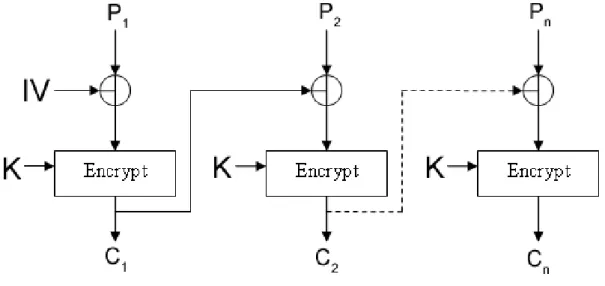
2.5. CRYPTOGRAPHY 23 as small relationship as possible. Feistel cipher structure is a method to encrypt a mes-sage with diffusion and confusion applied. The mode of operation may be an Electronic Code Book (ECB). This electronic codebook is always producing the same block of cipher code for the same given plain text. ECB is not very secure and Cipher Block Chaining (CBC) could be used instead. Figure 2.5 illustrates how CBC works. In the figure IV is the initialization vector, K is the key, P is the raw data and C is the encrypted data. The initialization vector for the next encryption is the previous output except for the first encryption. By using the previous initialization vector makes the encryption more secure as the initialization vector is different every stage in the process.
Figure 2.5: Illustration of Cipher Block Chaining.
Some algorithms that use symmetric encryption are DES[41], 3DES[41] and AES[11]. The last algorithm, AES, does not use Feistel cipher structure. 3DES is a lot better to use than the regular DES because it uses 168 bit (56*3 bit) keys instead of 56 bit keys, which DES does..
Asymmetric encryption is using two keys, one for encryption and the other one for decryption. Both keys can also switch places, at one time the first key can be used to
encrypt, and at another time the same key can be used for decryption. The most used asymmetric algorithms are RSA (Rivest, Shamir, Aldeman) and Diffie-Hellman[13]. This encryption method is also known as public-key cryptography. The key to encrypt the message with is open for public and the key to decrypt the message is private.
There is a cryptography method that is called ”One-way Hash”, which is used for creating a fingerprint for a message. This is used to see if someone has changed the information in the message or to create a digital signature for the message that proves the identity of the author. The most common algorithms that are using this type of fingerprint encryption are MD5[41] and SHA-1[41]. The cryptographic hash functions have several properties for it to work, but two of the most important features are that inputs should not have the same output and a different input for a given input should not give the same output. Regarding hashed passwords, there is only one way to get hold of the hashed password and that is to brute force search the whole domain of possible passwords. That is searching all possible passwords to get hold of the corresponding hash value as the same plain text always generates the same hash value.
”Digital Signatures” is using the one-way hash method. One commonly used digital signature algorithm is DSS[19]. An authenticator is created by using hash-value of the message and is in turn encrypted by the sender’s private key. The receiver decrypts the authenticator using the sender’s public key. If the authenticators do not match, the message has been altered. The message could be sent in clear text. The problem with symmetric encryption is that the key need to be shipped to the receiver and cannot be encrypted with symmetric encryption itself. But combining both these encryption techniques, sym-metric and asymsym-metric, will create a rather secure information flow. The symsym-metric key would be encrypted with the public asymmetric key. There are four desirable properties of cryptography, which are:
• Confidentiality - Only the authorized person or application should be able to de-crypt an ende-crypted message.
2.5. CRYPTOGRAPHY 25
• Integrity - It should be able to detect any type of alteration of the message during transfer from one source to another.
• Authentication - It should be able to identify the sender of the message, so it is really the supposed sender.
• Non-repudiation - The sender should not be able to deny that the message was sent.
These four properties are not always needed in all areas of cryptography. For example if the sender would like to be anonymous after he sent the message, non-repudiation is not desirable.
There are many types of usage for cryptography within an operating system. First there is usually some sort of encryption of passwords for the system and for other services. Second there is encryption of data over network and third there is encryption of hard disk drives. In all of these three cases, it is all about protecting data from unauthorized people. The only person that can access all files in a UNIX system is the administrator, i.e. root. But the administrator can be an attacker that has gained administrator privileges. This is where cryptography is good, even if the administrator is authorized to view all files in the system, the administrator cannot read the encrypted files even if he can access the files. The key is needed to decrypt the encrypted files and is not stored on the system. The algorithm that has been used is usually known and not kept secret.
Cryptography can also be used to detect alteration in data that may be accidental or intentional. By using digital signatures, the author of a document can be proven. Even if the data is encrypted there are ways for an attacker to get hold of the data. The attacker may try to brute force search for the used key. Depending on what the country allows in encryption techniques there are different algorithms used. United States has very strict laws that operating system need to obey when it comes to cryptography. The export of strong encryption is not legal in U.S. This is why some systems use other cryptography algorithms
in their US versions that are not as strong as the newer algorithms used, for example AES. The information that is protected with encryption is protected with the strength of the key, the strength of the encryption algorithm and the specific implementation of the algorithm.[17]
2.6
Network Security
This section will discuss security regarding the network parts of the operating system, which includes firewalls and intrusion detection systems.
2.6.1
Firewalls
Firewalls are used to defend both systems and whole computer networks. The name firewall comes from the construction industry where they place special walls between sections in houses that are resistant to fire, which will slow the process of spreading of fire. The same idea is behind computer firewalls where the firewall is used to slow down or stop a possible attack. Firewalls also have other usages. Some of them are:
• Block access to specific Internet sites
• Block access to system services like ftpd or httpd
• Monitor network traffic between networks or the network traffic on a local machine
• Block specific IP addresses to access the machine
Even though firewalls are powerful tools, they should never be used instead of other security mechanisms. An attack may not come from a remote host but to the computer itself. The attack could also come from a trusted host, which the firewall lets through. Firewalls should be used in addition with all other security mechanisms that are used on a system. Firewalls are often used in company networks and other large networks to protect their
2.6. NETWORK SECURITY 27 local network from outside threats. But firewalls can also be used, and are often used, on the system itself. This is to protect the machine from attacks aimed for different services that the machine offers. Attacks are often targeting specific services like httpd or ftpd. If a firewall only lets through IP addresses that are specified by the system administrator the firewall will not accept incoming connections from other hosts, which are one way to improve the system security. Firewalls (usually personal firewalls) may also protect against worms and other malicious software in one aspect. This is by blocking malicious software from opening new ports, connect to remote hosts or let other remote hosts connects to the local host, which is something a worm usually do.
Figure 2.6: A firewall protects the internal network from an external network like the Internet.[17]
The main function of a firewall is to restrict the information flow between two networks, often local and global network, as mentioned above. Figure 2.6 illustrates how a firewall protects an internal network from an external, usually the Internet. The information control is controlled by different policies that the administrator set up. There are two basic ways of defining a policy for a firewall, which are default permit and default deny. With the first policy it is defined to let information that is not denied to pass through. The second strategy is to deny all information that is not specific defined to pass. Both these strategies have advantages and disadvantages. The ”permit-all” strategy is easy to maintain but not that secure. The second strategy is hardening the security but may cause programs not to function correctly and users might need to use protocols that the policy deny. Combining these two strategies will create a good filter for packets streaming in and out on the system. There are different types of firewalls for networks and operating systems. There are chokes, gates and personal firewalls. Chokes are firewalls that might be a computer, a router or other communication device. The choke controls the flow of packets between networks. Gates are applications, devices or a computer that get incoming connections from external networks and forwards them by specific rule sets. Personal firewall is a system firewall that controls the flow of information in and out on a single computer by controlling the network interface. It acts as a gate but is only used for the system itself.
2.6.2
Intrusion Detection Systems
An intrusion detection system inspects all network traffic and identifies different specified patterns that may be a system or network attack. There are several different types of an IDS system. There is misuse detection where the IDS analyzes the information gathered from the network traffic and compares it to a database of attack signatures. The signatures in the database are for already known attacks. An IDS that use misuse detection is as good as the database is filled with signatures. Another type of IDS are anomaly detection where the system administrator defines the usual amount of network traffic, protocols,
2.7. ENCRYPTION PROTOCOLS 29 typical packet size etc, and the IDS look for anomalies from the specified settings. These definitions can also be based on statistics that the IDS itself gather from the network or system. These statistics are the regular amount of traffic and usual system behaviour.
An IDS can be network based or host based. An networked intrusion detection system is checking network traffic over the whole network and the host based IDS are only checking the system activities on the particular host. The IDS can also be passive or reactive. The passive IDS detects an attack or security breach and sends an alert to the system administrator. The reactive IDS will take actions to the attack like logging off a user from the system, or perhaps changing the firewall rules to stop the current attack. Changing firewall rules may also provide protection against further attacks.[46] One of the most commonly used intrusion detection systems at the moment is Snort[32].
2.7
Encryption Protocols
This section will discuss encrypted protocols and login systems like secure IP packets, ker-beros and secure remote connections through SSH.
2.7.1
IPSec
IPSec[47] is a protocol that supports encryption of its data packets on the IP-layer. IPSec consists of three parts:
• Authentication Header - Authentication between hosts
• Encapsulated Security Payload- Encryption of the packets payload
• Security Association- Connection between two hosts over network like the Inter-net.
IPSec has some important features that the regular IP protocol lacks. IPSec supports access control, connectionless integrity, data origin authentication, and rejection of replayed
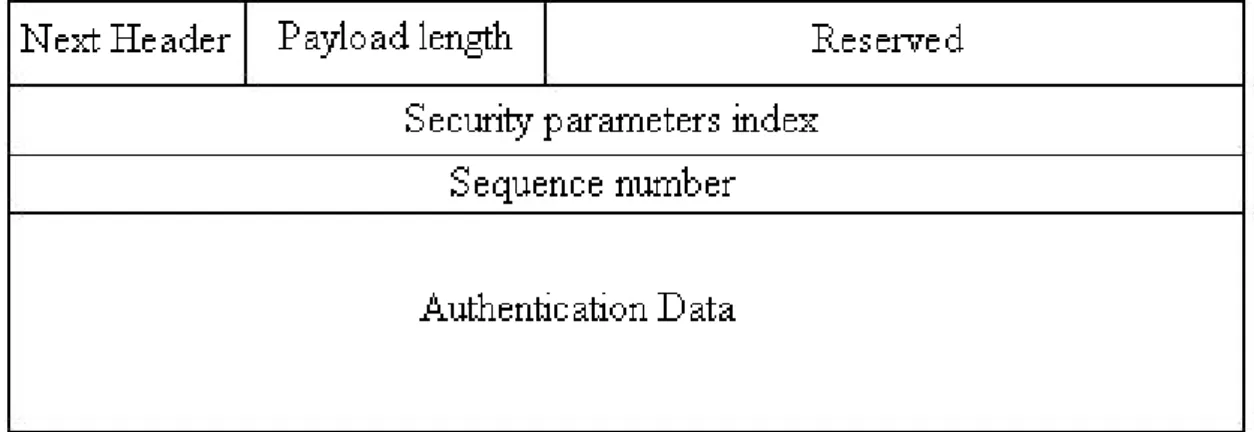
packets, confidentiality and limited traffic flow confidentiality. The Security Association is a connection between two hosts that can offer security services to the traffic. Security Association can either be used for Authentication Header (AH, figure 2.7) or Encapsulated Security Payload (ESP, figure 2.8) but not both on the same Security Association.
Figure 2.7: Authentication Header for IPSec.
Figure 2.8: Encapsulated Security Payload for IPSec.
There are two types of Security Associations, which are Transport Mode and Tunnelling Mode. Transport mode creates an association between two hosts while Tunnelling mode lets the Security Association be applied to an IP tunnel. The figure 2.9 and 2.10 are illustrating how the Security Association is handled for IPv4 (IP version 4) in transport
2.7. ENCRYPTION PROTOCOLS 31 mode and tunnel mode for the use of Authentication Header. The same principle is applied for IPv6 (IP version 6).
Figure 2.9: Security Association with the use of Authentication Header (Transport Mode).
Figure 2.10: SA with the use of Authentication Header (Tunnel Mode).
Another way to use IPSec is by using the Encrypted Security Payload functionality, which provides confidentiality services and encrypts the payload of the IP-packets. Figure 2.11 and 2.12 illustrates how this is accomplished over IP-packets for IPv4, which is the same way as IPv6 packets are treated.
Figure 2.11: ESP with the use of encryption and authentication (Transport Mode) Authentication Header and Encrypted Security Payload can be combined if several overlaying tunnels of Security Associations are used. IPSec is mandatory for IPv6 but could be used with IPv4 as well.
Figure 2.12: ESP with the use of encryption and authentication (Tunnel Mode)
2.7.2
SSH
Secure SHell is a protocol for securely connecting to remote hosts. It provides encrypted data transfer and let the user execute commands on the remote host. The SSH protocol is a replacement for the old rsh[39] and rlogin[38] which are not encrypted protocols. Connections to X-Windows[29] servers can also be forwarded over the secure connection, which means that the user can execute X-Windows based application on the remote host but view them on the local host through SSH. The user that connects to a SSH server needs to prove the identity before the login may succeed. How this is accomplished depends on which version of the protocol is being used. It is possible to just execute one command on the remote host if thecommand option is specified. This makes the server execute the command instead of starting a remote shell for the user.
The SSH protocol version 1 is based on RSA host authentication. This encryption method is based on public-key cryptography. The authentication method is secure against IP spoofing, domain name system (DNS) spoofing and routing spoofing. The user can automatically login if the user generates the RSA key with the key generator (ssh-keygen) and stores the key information files in the users home directory. SSH protocol version 2 has three ways of authentication for the user. First the client tries to authenticate using host based method, if this method fails the public-key method is used and at last the password authentication with user input is acquired. The password is sent encrypted to the remote host. The public-key method is using both RSA (as protocol version 1) and DSA[19] algorithm. The data sent between the hosts when using protocol version 2 is
2.7. ENCRYPTION PROTOCOLS 33 encrypted with AES, 3DES, Blowfish[41], CAST128 or Arcfour[31].
The differences between protocol version 1 and protocol version 2 are that the first protocol is lacking a strong mechanism for ensuring the integrity of the connection while the second protocol are using MD5[41], SHA1[41] and RIPEMD-160[41] for ensuring the integrity. The second protocol is supporting a wide range of encryption algorithms for the data transfer that the first protocol do not. [48]
2.7.3
Kerberos
One way to authenticate users to a server is by using a system named Kerberos[18]. This authentication system is used to eliminate the risk of an attacker pretending to be an authorized user of the system. It also eliminates the risk of an attacker that alters the net-work address or perhaps by trying to get into the system by eavesdropping the connection and then to do a replay attack. Kerberos provides a centralized authentication server that is used to authenticate users to servers or servers to users. The authentication system uses symmetric encryption (see chapter 2.5 Cryptography) for this purpose. To provide secure transferring of the keys for the symmetric encryption, asymmetric encryption can be used. The idea is that the server generates so-called tickets that the users receive when the users connect to the server for the first time in the session. The user then decrypts the ticket and sends it backs to the server to verify the identity of the user. Figure 2.13 illustrates how the Kerberos system works. First the user has to request (1) a ticket that the user needs to decrypt (2). The authentication ticket is sent back to the ticket granting service (3). If the user has access with a correct ticket the ticket granting service sends back a ticket to the network services (4). The user can then authenticate with this ticket to the network service (5) and a regular client/server session is established between the user and the network service. Another authentication system like Kerberos is X.509 [4] which is based on certificate authentication with public key cryptography.
Figure 2.13: Kerberos mechanism for user authentication and ticket passing.
2.8
Common Criteria
The Common Criteria is a criteria catalogue for evaluation of IT security. It is designed to be used by the international community to have compatible results of a security evaluation of IT products or systems done by different national evaluation parties. It also provides an objective yardstick for comparing the levels of security of different systems or products. There are three parts in the Common Criteria; Introduction and general model, security functional requirements and security assurance requirements, and all these are applied for consumers, developers and evaluators in different ways. The security criteria catalogue has five parts of concepts:
• Security Environment - Laws, Organisation policies etc.
or-2.8. COMMON CRITERIA 35 ganisational security policies.
• Target of Evaluation Security Requirements- Technical requirements
• Target of Evaluation Security Specifications- Define a implementation scheme for the target of evaluation.
• Target of Evaluation implementation- Realisation of the Target of Evaluation according to the specification.
The Target of Evaluation is the objective to secure including its environment. The Common Criteria are not aiming for only software development but also for evaluation of already existing systems and applications. When an evaluation is about to be performed usually a protection profile is identified. The protection profile is defining security requirements and objectives. The protection profile is implementation-independent and forms the profile for a certain category of products, which has the same needs for IT security. There has already been developed protection profile’s for firewalls and databases etc. A security target contains IT security objectives, requirements and forms the basis of an evaluation based on the TOE. The security target may need several protection profile’s if the target of evaluation consists of different categories. There are several areas for the evaluation that aim for specific environments, for example trusted paths, authentication, auditing, communications etc. The security assurance for the target of evaluation has seven different hierarchically structured security levels where each level explains what the evaluated system needs to fulfil to reach that specific level. These levels are called Evaluation Assurance Levels.
• EAL1- Minimal Protection
• EAL2- Discretionary Security Protection
• EAL4- Labeled Security Protection
• EAL5- Structured Protection
• EAL6- Security Domains
• EAL7- Verified Design
The first four levels of assurance are pretty basic and without specialised security engineer-ing techniques. These levels are not too hard to reach for developers without too much cost involved. Though the forth level is quite advanced but everything is relative depending on resources and economy. The next three levels, five to seven, are much more complex and are reached if the target of evaluation was designed with strict requirements from the scratch. These systems are usually military systems and trusted systems. The evaluation of a system is specified by following the advices in the Common Criteria and see if the sys-tem follows the evaluation assurance levels and requirement specifications. The protection profile, security target and target of evaluation are evaluated to see if they correspond to the defined criteria.[33]
2.9
Summary
This chapter has described the basics in computer security regarding operating systems and networks. The parts described are the ones that are about to be compared in the chapter Comparison of Security (chapter 5) and also some parts in the vulnerability experiment chapter (chapter 6). Access Control, authentication, auditing, logging and cryptography were briefly described as were the security issues related to these topics. The network security section describes firewalls and intrusion detection systems that could be used to prevent or detect attacks. The most common secure protocols were described, which could be used in the tested operating systems. The cryptographically based protocols that were discussed were; IPSec that is used for the IP layer, SSH that is the most common
2.9. SUMMARY 37 encrypted remote login protocol and Kerberos, which is a common authentication system. The last section in this chapter describes Common Criteria, which is a common framework for evaluating a system or software. This is discussed as it could have been in theory used for this project but is way too massive to use in this particular case. The main goal for this chapter was to give an introduction to computer security in general and at the same time give relevant information about what is going to be compared between the operating systems.
Chapter 3
Security Enhanced UNIX Systems
The following chapter explains the SELinux/Flask and TrustedBSD/SEBSD security ar-chitectures. Also a Linux specific security architecture called RSBAC is presented.
3.1
SELinux and Flask
The National Security Agency[5] (NSA) started to develop the SELinux distribution from the Flask[22] architecture, which had been developed with mandatory access control. There are also parts taken from the Linux Security Module Framework[28] (LSM). The security mechanism can decide access control decisions based on configurations by the administrator in forms of labels. Labels are structured information regarding the security system that contain error messages and other security specific access control information. SELinux was at first developed as a set of patches to the existing Linux kernel but has become a more standalone distribution. In SELinux the policy decision logic and the policy enforcement logic have been completely separated from each other. The policy decision logic is placed in the security server, based on Flask, and the policy enforcement logic is implemented with the LSM framework interface. The Flask architecture has an access vector cache which provides help to minimize the computation time for the access control system. To make
the system easier to use there are some modified user applications and applications to help the policy creation. A policy compiler, a file system labelling tool, role management tools and policy querying tools are some of the help tools to administrate the security system. User applications liketar,login,sshd and some file utilities have been modified for handling label information from the security system.[8] The figure 3.1 illustrates the structure of the SELinux framework and what specific kernel services it supports. The figure also illustrates the user processes and its interface to the system. The system interface is using different kernel services, which in their turn go through the LSM framework that is controlled by SELinux security system, which is based on different security policies. At this place the security decisions are made before letting the user processes perform the requested operations.
3.2
TrustedBSD and SEBSD
To add a security enhancement to an operating system is not an easy task. There are a lot of different concerns regarding the flexibility, maintenance, correctness and costs of implementing security enhancements to a system. This is why both Linux and the FreeBSD project started to work out a generic solution to these problems. Network Associates Laboratories and the TrustedBSD project started to implement a mandatory access control framework for the FreeBSD kernel. The TrustedBSD project addresses a lot of these issues, for example regarding flexibility for policy models and costs of using the security enhancement mechanisms in the system. The Security Enhanced BSD (SEBSD) project was started after the TrustedBSD project and is actually using the TrustedBSD framework combined with techniques from the Flask[22] implementation. The security server and access vector cache were taken from Flask to use for policy decisions. SEBSD project also added new structure for the kernel with new information for structures, this to have access control and at the same time generate valuable information. The figure 3.2 show
3.2. TRUSTEDBSD AND SEBSD 41
Figure 3.1: SELinux Framework structure. [8]
the structure of the SEBSD framework and what specific kernel services it supports. The figure shows the user processes and its interface to the system. The system interface is using different kernel services, which in their turn go through the MAC framework that is controlled by one or more security policies. The MAC framework is were the mandatory access control is managed. At this place the security decisions are made before letting the user processes perform the requested operations. There is no big difference between the SELinux and the TrustedBSD/SEBSD framework, which could be seen in the figures 3.1 and 3.2.
Figure 3.2: SEBSD Framework structure. [8]
Both TrustedBSD and SELinux have the same goals and problems to solve. But the main goal they have in common is to have modularity between the policy modules so the system does not get tied up to a specific set of policy models or implementations. TrustedBSD operates totally transparent for users and applications. Access control denials are reported as standard errors that the applications are generally taking care of in one way or another. Applications could be developed to take care of specific error reporting (labels) from the security system as well, but this is not necessary as general applications would not work in a TrustedBSD/SEBSD environment. There are some of the general system commands that have been ported with label aware implementations, for example
3.3. RSBAC 43
ls, ps and login. These labels contain security system specific information regarding errors and other messages that the security system produce. TrustedBSD was developed to be tightly connected with the kernel to provide good support for systems with multiple CPUs. Multiple policy models may be loaded into the security server and the decisions are combined from all of the loaded policy models. The compositions of the decision making are performed by the TrustedBSD framework and not by the policy module developers. SEBSD is a ported version of SELinux and has about the same features. The only thing that was not ported was the labelling mapping system that SELinux uses, because of the different file system structure between Linux and UNIX, FreeBSD uses UNIX File System (UFS) or UNIX File System 2 (UFS2), while SELinux uses Extended file system (Ext) or Extended file system 2 (Ext2). Both SELinux and SEBSD are using Mandatory Access Control, Role Based Access Control, Type Enforcement and Multi-Level Security.[8]
3.3
RSBAC
RSBAC[34] (Rule Set Based Access Control) is an extension for the Linux kernels and it is based on the Generalized Framework for Access Control (GFAC)[24]. GFAC is a very general framework for access control that both RSBAC and SELinux use. RSBAC is open source and is reviewed by independent researchers. The extension provides a flexible system for access control and comes with several modules that implement different security policies.
RSBAC consist of three elements ADF (Access Decision Control Facility), AEF (Access Enforcement Facility) and ACI (Access Control Information), which is illustrated in figure 3.3. The elements act between the subject and the objects. The figure 3.3 shows how a process wants to access some system object, which could be a file, directory, device etc. The system call goes through the AEF (1) and this element checks the ACI for information regarding the access rights (2). AEF passes the request to ADF for decision (3), which
![Figure 2.1: The security mechanisms for a secure operating system.[35]](https://thumb-us.123doks.com/thumbv2/123dok_us/8559098.2313608/26.892.195.716.196.694/figure-security-mechanisms-secure-operating.webp)
![Figure 2.2: Security kernel and operating system intergrated. [35]](https://thumb-us.123doks.com/thumbv2/123dok_us/8559098.2313608/28.892.175.717.195.653/figure-security-kernel-operating-intergrated.webp)
![Figure 2.3: Security kernel and operating system separated. [35]](https://thumb-us.123doks.com/thumbv2/123dok_us/8559098.2313608/29.892.171.722.192.558/figure-security-kernel-operating-separated.webp)
![Figure 2.4: A backup of the logs may be stored on a another host. [17]](https://thumb-us.123doks.com/thumbv2/123dok_us/8559098.2313608/37.892.106.824.433.912/figure-backup-logs-stored-host.webp)
![Figure 2.6: A firewall protects the internal network from an external network like the Internet.[17]](https://thumb-us.123doks.com/thumbv2/123dok_us/8559098.2313608/43.892.103.822.551.1014/figure-firewall-protects-internal-network-external-network-internet.webp)