This chapter examines the most fundamental element of the C language: the expression. Expressions in C are substantially more flexible and powerful than in many other computer languages.
Expressions are formed from these atomic elements: data and operators. Data may be represented by variables, constants, or values returned by functions. C supports several different types of data. It also provides a wide variety of operators.
The Basic Data Types
C89 defines five foundational data types: character, integer, floating-point, double floating-point, and valueless. These are declared using char, int, float, double, and void, respectively. These types form the basis for several other types. The size and range of these data types may vary among processor types and compilers. However, in all cases an object of type char is 1 byte. The size of an
int is usually the same as the word length of the execution environment of the program. For most 16-bit environments, such as DOS or Windows 3.1, an int is 16 bits. For most 32-bit environments, such as Windows 95/98/NT/2000, an int is 32 bits. However, you cannot make assumptions about the size of an integer if you want your programs to be portable to the widest range of environments. It is important to understand that C stipulates only the minimal range of each data type, not its size in bytes.
NOTE
To the five basic data types defined by C89, C99 adds three more: _Bool, _Complex, and _Imaginary. They are described in Part Two.
The exact format of floating-point values will depend upon how they are implemented. Variables of type char are generally used to hold values defined by the ASCII character set. Values outside that range may be handled differently by different compilers.
The range of float and double will depend upon the method used to represent the floating-point numbers. Standard C specifies that the minimum range for a floating-point value is 1E–37 to 1E+37. The minimum number of digits of precision for each floating-point type is shown in Table 2-1.
The type void either explicitly declares a function as returning no value or creates generic pointers. Both of these uses are discussed in subsequent chapters.
Modifying the Basic Types
signed unsigned long short
The int base type can be modified by signed, short, long, and unsigned. The char type can be modified by unsigned and signed. You may also apply longtodouble. (C99 also allows long to modifylong, thus creating long long. See Part Two for details.) Table 2-1 shows all valid data type combinations supported by C, along with their minimal ranges and typical bit widths. Remember, the table shows the minimum range that these types will have, not their typical range. For example, on computers that use two's complement arithmetic (which is nearly all), an integer will have a range of at least 32,767 to –32,768.
Type
Typical Size in
Bits Minimal Range
char 8 –127 to 127
unsigned char 8 0 to 255
signed char 8 –127 to 127
int 16 or 32 –32,767 to 32,767
unsigned int 16 or 32 0 to 65,535
signed int 16 or 32 Same as int
short int 16 –32,767 to 32,767
unsigned short int 16 0 to 65,535
signed short int 16 Same as short int
long int 32 –2,147,483,647 to 2,147,483,647
long long int 64 –(263– 1) to 263– 1 (Added by C99)
signed long int 32 Same as long int
unsigned long int 32 0 to 4,294,967,295
unsigned long long int 64 264– 1 (Added by C99)
float 32 1E –37 to 1E+37 with six digits of precision
double 64 1E –37 to 1E+37 with ten digits of precision
long double 80 1E –37 to 1E+37 with ten digits of precision
The use of signed on integers is allowed, but it is redundant because the default integer declaration assumes a signed number. The most important use of signed is to modify char in implementations in which char is unsigned by default.
Signed and unsigned integers differ in the way that the high-order bit of the integer is interpreted. If you specify a signed integer, the compiler generates code that assumes the high-order bit of an integer is to be used as a sign flag. If the sign flag is 0, the number is positive; if it is 1, the number is negative.
In general, negative numbers are represented using the two's complement approach, which reverses all bits in the number (except the sign flag), adds 1 to this number, and sets the sign flag to 1.
Signed integers are important for a great many algorithms, but they only have half the absolute magnitude of their unsigned relatives. For example, here is 32,767 in binary:
0 1 1 1 1 1 1 1 1 1 1 1 1 1 1 1
If the high-order bit were set to 1, the number would be interpreted as –1. However, if you declare this to be an unsigned int, the number becomes 65,535 when the high-order bit is set to 1.
When a type modifier is used by itself (that is, when it does not precede a basic type), then int is assumed. Thus, the following sets of type specifiers are equivalent:
Specifier Same As
signed signed int
unsigned unsigned int
long long int
short short int
Although the int is implied, it is common practice today to specify the int anyway.
Identifier Names
In C, the names of variables, functions, labels, and various other user-defined items are called identifiers. The length of these identifiers can vary from one to several characters. The first character must be a letter or an underscore, and subsequent characters must be either letters, digits, or
underscores. Here are some correct and incorrect identifier names:
Correct Incorrect
count 1count
test23 hi!there
In C, identifiers may be of any length. However, not all characters will necessarily be significant. C defines two kinds of identifiers: external and internal. An external identifier will be involved in an external link process. These identifiers, called external names, include function names and global variable names that are shared between source files. If the identifier is not used in an external link process, then it is internal. This type of identifier is called an internal name and includes the names of local variables, for example. In C89, at least the first 6 characters of an external identifier and at least the first 31 characters of an internal identifier will be significant. C99 has increased these values. In C99, an external identifier has at least 31 significant characters, and an internal identifier has at least 63 significant characters. As a point of interest, in C++, at least the first 1,024 characters of an identifier are significant. These differences may be important if you are converting a program from C89 to C99, or from C to C++.
In an identifier, upper- and lowercase are treated as distinct. Hence, count, Count, and COUNT are three separate identifiers.
An identifier cannot be the same as a C keyword and should not have the same name as functions that are in the C library.
Variables
As you probably know, a variable is a named location in memory that is used to hold a value that can be modified by the program. All variables must be declared before they can be used. The general form of a declaration is
type variable list;
Here,type must be a valid data type plus any modifiers, and variable_list may consist of one or more identifier names separated by commas. Here are some declarations:
int i, j, l; short int si; unsigned int ui;
double balance, profit, loss;
Remember, in C the name of a variable has nothing to do with its type.
Where Variables Are Declared
Local Variables
Variables that are declared inside a function are called local variables. In some C literature, these variables are referred to as automatic variables. This book uses the more common term local variable. Local variables can be used only by statements that are inside the block in which the variables are declared. In other words, local variables are not known outside their own code block. Remember, a block of code begins with an opening curly brace and terminates with a closing curly brace.
Local variables exist only while the block of code in which they are declared is executing. That is, a local variable is created upon entry into its block and destroyed upon exit. Furthermore, a variable declared within one code block has no bearing on or relationship to another variable with the same name declared within a different code block.
The most common code block in which local variables are declared is the function. For example, consider the following two functions:
void func1(void) {
int x;
x = 10; }
void func2(void) {
int x;
x = -199; }
The integer variable x is declared twice, once in func1( ) and once in func2( ). The x in func1( ) has no bearing on or relationship to the x in func2( ). As explained, this is because each x is known only to the code within the block in which it is declared.
The C language contains the keyword auto, which you can use to declare local variables. However, since all nonglobal variables are, by default, assumed to be auto, this keyword is virtually never used. Hence, the examples in this book will not use it.
void f(void) {
int t;
scanf("%d%*c", &t);
if(t==l) {
char s[80]; /* this is created only upon entry into this block */ printf(''Enter name:");
gets(s);
/* do something . . . */ }
/* s not known here */ }
Here, the local variable sis created upon entry into the if code block and destroyed upon exit. Furthermore, sis known only within the if block and cannot be referenced elsewhere—even in other parts of the function that contains it.
Declaring variables within the block of code that uses them helps prevent unwanted side effects. Since the variable does not exist outside the block in which it is declared, it cannot be accidentally altered by other code.
When a variable declared within an inner block has the same name as a variable declared by an enclosing block, the variable in the inner block hides the variable in the outer block. Consider the following:
#include <stdio.h>
int main(void) {
int x;
x = 10;
if(x == 10) {
int x; /* this x hides the outer x */
x = 99;
printf("Outer x: %d\n", x);
return 0; }
The program displays this output:
Inner x: 99 Outer x: 10
In this example, the x that is declared within the if block hides the outer x. Thus, the inner x and the outer x are two separate and distinct objects. Once that block ends, the outer x once again becomes visible.
In C89, you must declare all local variables at the start of a block, prior to any ''action" statements. For example, the following function is in error if compiled by a C89-compatible compiler.
/* This function is in error if compiled as a C89 program.
*/
void f(void) {
int i;
i = 10;
int j; /* this line will cause an error */
j = 20; }
However, in C99 (and in C++), this function is perfectly valid because you can declare local variables at any point within a block, prior to their first use.
Because local variables are created and destroyed with each entry and exit from the block in which they are declared, their content is lost once the block is left. This is especially important to
remember when calling a function. When a function is called, its local variables are created, and upon its return they are destroyed. This means that local variables cannot retain their values between calls. (However, you can direct the compiler to retain their values by using the static modifier.)
Unless otherwise specified, local variables are stored on the stack. The fact that the stack is a dynamic and changing region of memory explains why local variables cannot, in general, hold their values between function calls.
TEAMFLY
You can initialize a local variable to some known value. This value will be assigned to the variable each time the block of code in which it is declared is entered. For example, the following program prints the number 10 ten times:
#include <stdio.h>
void f(void);
int main(void) {
int i;
for(i=0; i<10; i++) f();
return 0; }
void f(void) {
int j = 10;
printf("%d ", j);
j++; /* this line has no lasting effect */ }
Formal Parameters
If a function is to use arguments, it must declare variables that will accept the values of the
arguments. These variables are called the formal parameters of the function. They behave like any other local variables inside the function. As shown in the following program fragment, their declarations occur after the function name and inside parentheses.
/* Return 1 if c is part of string s; 0 otherwise */ int is_in(char *s, char c)
{
while(*s)
if(*s==c) return 1; else s++;
The function is_in( ) has two parameters: s and c. This function returns 1 if the character specified in
c is contained within the string s, 0 if it is not.
Even though the formal parameters receive the value of the arguments passed to the function, they otherwise act like ''normal" local variables. For example, you can make assignments to a parameter or use one in any allowable expression. Keep in mind that, as local variables, they are also dynamic and are destroyed upon exit from the function.
Global Variables
Unlike local variables, global variables are known throughout the program and may be used by any piece of code. Also, they will hold their value throughout the program's execution. You create global variables by declaring them outside of any function. Any expression may access them, regardless of what block of code that expression is in.
In the following program, the variable counthas been declared outside of all functions. Although its declaration occurs before the main( ) function, you could have placed it anywhere before its first use as long as it was not in a function. However, it is usually best to declare global variables at the top of the program.
#include <stdio.h>
int count; /* count is global */
void func1(void); void func2(void);
int main(void) {
count = 100; func1();
return 0; }
void func1(void) {
int temp;
temp = count; func2();
printf("count is %
d", count); /* will print 100 */ }
{
int count;
for(count=l; count<10; count++) putchar('.');
}
Look closely at this program. Notice that although neither main( ) nor func1( ) has declared the variable count, both may use it. func2( ), however, has declared a local variable called count. When
func2( ) refers to count, it refers to only its local variable, not the global one. If a global variable and a local variable have the same name, all references to that variable name inside the code block in which the local variable is declared will refer to that local variable and have no effect on the global variable.
Storage for global variables is in a fixed region of memory set aside for this purpose by the
compiler. Global variables are helpful when many functions in your program use the same data. You should avoid using unnecessary global variables, however. They take up memory the entire time your program is executing, not just when they are needed. In addition, using a global where a local variable will do makes a function less general because it relies on something that must be defined outside itself. Finally, using a large number of global variables can lead to program errors because of unknown and unwanted side effects. A major problem in developing large programs is the accidental changing of a variable's value because it was used elsewhere in the program. This can happen in C if you use too many global variables in your programs.
The Four C Scopes
In the preceding discussion (and throughout the remainder of this book) the terms local and global are used to describe in a general way the difference between identifiers that are declared within a block and those declared outside all blocks. However, these two broad categories are more finely subdivided by C. Standard C defines four scopes that determine the visibility of an identifier. They are summarized here:
Scope Meaning
Scope Meaning
Block scope Begins with the opening { of a block and ends with its associated closing }. However, block scope also extends to function parameters in a function definition. That is, function parameters are included in a function's block scope. Variables with block scope are local to their block.
Function prototype scope
Identifiers declared in a function prototype; visible within the prototype.
Function scope Begins with the opening { of a function and ends with its closing }. Function scope applies only to labels. A label is used as the target of a goto statement, and that label must be within the same function as the goto.
For the most part, this book will continue to use the more general categories of local and global. However, when a more finely grained distinction is required, one or more of the preceding scopes will be explicitly used.
Type Qualifiers
C defines type qualifiers that control how variables may be accessed or modified. C89 defines two of these qualifiers: const and volatile. (C99 adds a third, called restrict, which is described in Part Two.) The type qualifiers must precede the type names that they qualify.
const
Variables of type const may not be changed by your program. (A const variable can be given an initial value, however.) The compiler is free to place variables of this type into read-only memory (ROM). For example,
const int a=10;
creates an integer variable called a with an initial value of 10 that your program may not modify. However, you can use the variable a in other types of expressions. A const variable will receive its value either from an explicit initialization or by some hardware-dependent means.
following program prints a dash for each space in its string argument. That is, the string ''this is a test" will be printed as "this-is-a-test". The use of const in the parameter declaration ensures that the code inside the function cannot modify the object pointed to by the parameter.
#include <stdio.h>
void sp to dash(const char *str);
int main(void) {
sp to dash("this is a test");
return 0; }
void sp_to_dash(const char *str) {
while(*str) {
if(*str== ' ') printf("%c", '-'); else printf("%c", *str);
str++; }
}
If you had written sp_to_dash( ) in such a way that the string would be modified, it would not compile. For example, if you had coded sp_to_dash( ) as follows, you would receive a compile-time error:
/* This is wrong. */
void sp_to_dash(const char *str) {
while(*str) {
if(*str==' ' ) *str = '-'; /* can't do this; str is const */ printf("%c", *str);
str++; }
}
Many functions in the standard library use const in their parameter declarations. For example, the
strlen( ) function has this prototype:
Specifyingstr as const ensures that strlen( ) will not modify the string pointed to by str. In general, when a standard library function has no need to modify an object pointed to by a calling argument, it is declared as const.
You can also use const to verify that your program does not modify a variable. Remember, a variable of type const can be modified by something outside your program. For example, a hardware device may set its value. However, by declaring a variable as const, you can prove that any changes to that variable occur because of external events.
volatile
The modifier volatile tells the compiler that a variable's value may be changed in ways not explicitly specified by the program. For example, a global variable's address may be passed to the operating system's clock routine and used to hold the system time. In this situation, the contents of the variable are altered without any explicit assignment statements in the program. This is important because most C compilers automatically optimize certain expressions by assuming that a variable's content is unchanging if it does not occur on the left side of an assignment statement; thus, it might not be reexamined each time it is referenced. Also, some compilers change the order of evaluation of an expression during the compilation process. The volatile modifier prevents these changes.
You can use const and volatile together. For example, if 0x30 is assumed to be the value of a port that is changed by external conditions only, the following declaration would prevent any possibility of accidental side effects:
const volatile char *port = (const volatile char *) 0x30;
Storage Class Specifiers
C supports four storage class specifiers:
extern static register auto
These specifiers tell the compiler how to store the subsequent variable. The general form of a variable declaration that uses one is shown here:
storage_specifier type var_name;
Notice that the storage specifier precedes the rest of the variable declaration.
NOTE
extern
Before examining extern, a brief description of C linkage is in order. C defines three categories of linkage: external, internal, and none. In general, functions and global variables have external linkage. This means they are available to all files that constitute a program. File scope objects declared as static (described in the next section) have internal linkage. These are known only within the file in which they are declared. Local variables have no linkage and are therefore known only within their own block.
The principal use of extern is to specify that an object is declared with external linkage elsewhere in the program. To understand why this is important, it is necessary to understand the difference
between a declaration and a definition. A declaration declares the name and type of an object. A definition causes storage to be allocated for the object. The same object may have many
declarations, but there can be only one definition.
In most cases, variable declarations are also definitions. However, by preceding a variable name with the extern specifier, you can declare a variable without defining it. Thus, when you need to refer to a variable that is defined in another part of your program, you can declare that variable using
extern.
Here is an example that uses extern. Notice that the global variables first and last are declared after
main( ).
#include <stdio.h>
int main(void) {
extern int first, last; /* use global vars */
printf("%d %d", first, last);
return 0; }
/* global definition of first and last */ int first = 10, last = 20;
This program outputs 10 20 because the global variables firstand last used by the printf( )
statement are initialized to these values. Because the extern declaration tells the compiler that first
andlast are declared elsewhere (in this case, later in the same file), the program can be compiled without error even though first and last are used prior to their definition.
would have been no need for the externstatement. Remember, if the compiler finds a variable that has not been declared within the current block, the compiler checks whether it matches any of the variables declared within enclosing blocks. If it does not, the compiler then checks the global variables. If a match is found, the compiler assumes that is the variable being referenced. The extern
specifier is needed when you want to use a variable that is declared later in the file.
As mentioned, extern allows you to declare a variable without defining it. However, if you give that variable an initialization, the extern declaration becomes a definition. This is important because, as stated earlier, an object can have multiple declarations, but only one definition.
An important use of extern relates to multiple-file programs. C allows a program to be spread across two or more files, compiled separately, and then linked together. When this is the case, there must be some way of telling all the files about the global variables required by the program. The best (and most portable) way to do this is to declare all of your global variables in one file and use extern
declarations in the other, as in Figure 2-1.
In File 2, the global variable list was copied from File 1, and the extern specifier was added to the declarations. The extern specifier tells the compiler that the variable types and names that follow it have been defined elsewhere. In other words, extern lets the compiler know what the types and names are for these global variables without
File One File Two
int x, y; char ch;
int main(void) {
/* . . . */ }
void func1(void) {
x = 123; }
extern int x, y; extern char ch; void func22(void) {
x = y / 10; }
void func23(void) {
y = 10; }
Figure 2-1
actually creating storage for them again. When the linker links the two modules, all references to the external variables are resolved.
One last point: In real-world, multiple-file programs, externdeclarations are normally contained in a header file that is simply included with each source code file. This is both easier and less error prone than manually duplicating externdeclarations in each file.
NOTE
extern can also be applied to a function declaration, but doing so is redundant.
static Variables
Variables declared as staticare permanent variables within their own function or file. Unlike global variables, they are not known outside their function or file, but they maintain their values between calls. This feature makes them useful when you write generalized functions and function libraries that other programmers may use. The staticmodifier has different effects upon local variables and global variables.
static Local Variables
When you apply the static modifier to a local variable, the compiler creates permanent storage for it, much as it creates storage for a global variable. The key difference between a static local variable and a global variable is that the static local variable remains known only to the block in which it is declared. In simple terms, a staticlocal variable is a local variable that retains its value between function calls.
staticlocal variables are very important to the creation of stand-alone functions because several types of routines must preserve a value between calls. If static variables were not allowed, globals would have to be used, opening the door to possible side effects. An example of a function that benefits from a static local variable is a number -series generator that produces a new value based on the previous one. You could use a global variable to hold this value. However, each time the
function is used in a program, you would have to declare that global variable and make sure it did not conflict with any other global variables already in place. The better solution is to declare the variable that holds the generated number to be static, as shown here:
int series(void) {
static int series_num;
series_num = series_num+23; return series_num;
}
each call to series( ) can produce a new member of the series based on the preceding number without declaring that variable globally.
You can give a static local variable an initialization value. This value is assigned only once, at program start-up—not each time the block of code is entered, as with normal local variables. For example, this version of series( ) initializes series num to 100:
int series(void) {
static int series_num = 100;
series_num = series_num+23; return series_num;
}
As the function now stands, the series will always begin with the value 123. While this is acceptable for some applications, most series generators need to let the user specify the starting point. One way to give series_num a user-specified value is to make series_numa global variable and then let the user set its value. However, not defining series_numas global was the point of making it static. This leads to the second use of static.
static Global Variables
Applying the specifier staticto a global variable instructs the compiler to create a global variable known only to the file in which it is declared. Thus, a static global variable has internal linkage (as described under the extern statement). This means that even though the variable is global, routines in other files have no knowledge of it and cannot alter its contents directly, keeping it free from side effects. For the few situations where a local static cannot do the job, you can create a small file that contains only the functions that need the global static variable, separately compile that file, and use it without fear of side effects.
To illustrate a global static, the series generator example from the previous section is recoded so that a seed value initializes the series through a call to a second function called series_start( ). The entire file containing series( ), series start( ), and series numis shown here:
/* This must all be in one file - preferably by itself. */
static int series_num;
void series_start(int seed); int series(void);
int series(void) {
TEAMFLY
series_num = series_num+23; return series_num;
}
/* initialize series_num */ void series_start(int seed) {
series_num = seed; }
Callingseries_start( ) with some known integer value initializes the series generator. After that, calls to series( ) generate the next element in the series.
To review: The names of local static variables are known only to the block of code in which they are declared; the names of global static variables are known only to the file in which they reside. If you place the series( ) and series_start( ) functions in a library, you can use the functions but cannot reference the variable series_num, which is hidden from the rest of the code in your program. In fact, you can even declare and use another variable called series_num in your program (in another file, of course). In essence, the static modifier permits variables that are known only to the functions that need them, without unwanted side effects.
By using static variables, you can hide portions of your program from other portions. This can be a tremendous advantage when you are trying to manage a very large and complex program.
register Variables
The register storage specifier originally applied only to variables of type int, char, or pointer types. However, in Standard C, register's definition has been broadened so that it can be applied to any type of variable.
Originally, the register specifier requested that the compiler keep the value of a variable in a register of the CPU rather than in memory, where normal variables are stored. This meant that operations on a register variable could occur much faster than on a normal variable because the
register variable was actually held in the CPU and did not require a memory access to determine or modify its value.
Today, the definition of register has been greatly expanded, and it now may be applied to any type of variable. Both C89 and C99 simply state that ''access to the object be as fast as possible." In practice, characters and integers are still stored in registers in the CPU. Larger objects, such as arrays, obviously cannot be stored in a register, but they may still receive preferential treatment by the compiler. Depending upon the implementation of the C compiler and its operating environment,
for a compiler to ignore the register specifier altogether and treat variables modified by it as if they were ''normal" variables, but this is seldom done in practice.
You can only apply the register specifier to local variables and to the formal parameters in a
function. Global register variables are not allowed. Here is an example that uses register variables. This function computes the result of Me for integers.
int int pwr(register int m, register int e) {
register int temp;
temp = 1;
for(; e; e--) temp = temp * m; return temp;
}
In this example, e, m, and temp are declared as register variables because they are all used within the loop. The fact that register variables are optimized for speed makes them ideal for control of or use in loops. Generally, register variables are used where they will do the most good, which is often in places where many references will be made to the same variable. This is important because you can declare any number of variables as being of type register, but not all will receive the same access speed optimization.
The number of register variables optimized for speed allowed within any one code block is
determined by both the environment and the specific implementation of C. You don't have to worry about declaring too many register variables because the compiler automatically transforms register
variables into nonregister variables when the limit is reached. (This ensures portability of code across a broad line of processors.)
Usually at least two register variables of type charorint can actually be held in the registers of the CPU. Because environments vary widely, consult your compiler's user manual to determine whether you can apply any other types of optimization options.
In C, you cannot obtain the address of a register variable by using the & operator (discussed later in this chapter). This makes sense because a register variable may be stored in a register of the CPU, which is not usually addressable.
Although the description of register has been broadened beyond its traditional meaning, in practice it still generally has a significant effect only with integer and character types. Thus, you should probably not count on substantial speed improvements for other variable types.
Variable Initializations
You can give variables a value as you declare them by placing an equal sign and a constant after the variable name. The general form of initialization is
Some examples are
char ch = 'a'; int first = 0;
double balance = 123.23;
Global and static local variables are initialized only at the start of the program. Local variables (excludingstatic local variables) are initialized each time the block in which they are declared is entered. Local variables that are not initialized have unknown values before the first assignment is made to them. Uninitialized global and static local variables are automatically set to zero.
Constants
Constants refer to fixed values that the program may not alter. Constants can be of any of the basic data types. The way each constant is represented depends upon its type. Constants are also called literals.
Character constants are enclosed between single quotes. For example, 'a' and '%' are both character constants. C defines both multibyte characters, which consist of one or more bytes, and wide characters (which are usually 16 bits long). Multibyte and wide characters are used primarily to represent languages that have large character sets. To specify a multibyte character, enclose the characters within single quotes, for example, 'xy'. To specify a wide character constant, precede the character with an L. For example:
wchar_t wc; wc = L'A';
Here,wc is assigned the wide-character constant equivalent of A. The type of wide characters is
wchar_t, which is defined in the <stddef.h> header file, and is not a built-in type.
Integer constants are specified as numbers without fractional components. For example, 10 and –100 are integer constants. Floating-point constants require the decimal point followed by the number's fractional component. For example, 11.123 is a floating-point constant. C also allows you to use scientific notation for floating-point numbers.
By default, the compiler fits a numeric constant into the smallest compatible data type that will hold it. Therefore, assuming 16-bit integers, 10 is int by default, but 103,000 is a long int. Even though the value 10 could fit into a character type, the compiler will not cross type boundaries. The only exception to the smallest type rule is floating-point constants, which are assumed to be doubles.
floating-point types, if you follow the number with an F, the number is treated as a float. If you follow it with an L, the number becomes a long double. For integer types, the U suffix stands for
unsigned and the L for long. The type suffixes are not case dependent, and you can use lowercase, if you like. For example, both F and f specify a floatconstant. Here are some examples:
Data Type Constant Examples
int 1 123 21000 –234
long int 35000L –34L
unsigned int 10000U 987u 40000U
float 123.23F 4.34e–3f
double 123.23 1.0 –0.9876324
long double 1001.2L
C99 also allows you to specify a long long integer constant by specifying the suffix LL (or 11).
Hexadecimal and Octal Constants
It is sometimes easier to use a number system based on 8 or 16 rather than 10. The number system based on 8 is called octal and uses the digits 0 through 7. In octal, the number 10 is the same as 8 in decimal. The base 16 number system is called hexadecimal and uses the digits 0 through 9 plus the letters A through F, which stand for 10, 11, 12, 13, 14, and 15, respectively. For example, the hexadecimal number 10 is 16 in decimal. Because these two number systems are used frequently, C allows you to specify integer constants in hexadecimal or octal instead of decimal. A hexadecimal constant must consist of a Ox followed by the constant in hexadecimal form. An octal constant begins with a 0. Here are some examples:
int hex = 0x80; int oct = 012;
/* 128 in decimal */ /* 10 in decimal */
String Constants
C supports another type of constant: the string. A string is a set of characters enclosed in double quotes. For example, ''this is a test" is a string. You have seen examples of strings in some of the
printf( ) statements in the sample programs. Although C allows you to define string constants, it does not formally have a string data type.
Backslash Character Constants
Enclosing character constants in single quotes works for most printing characters. A few, however, such as the carriage return, can't be. For this reason, C includes the special backslash character constants, shown in Table 2-2, so that you may easily enter these special characters as constants. These are also referred to as escape sequences. You should use the backslash codes instead of their ASCII equivalents to help ensure portability.
For example, the following program outputs a new line and a tab and then prints the string This is a test.
#include <stdio.h>
int main(void) {
printf(''\n\tThis is a test.");
return 0; }
Code Meaning
\b Backspace
\f Form feed
\n New line
\r Carriage return
\t Horizontal tab
\" Double quote
\' Single quote
\ \ Backslash
\v Vertical tab
\a Alert
\? Question mark
\N Octal constant (where N is an octal constant)
\xN Hexadecimal constant (where N is a hexadecimal constant)
Operators
C is very rich in built-in operators. In fact, it places more significance on operators than do most other computer languages. There are four main classes of operators: arithmetic, relational, logical, andbitwise. In addition, there are some special operators, such as the assignment operator, for particular tasks.
The Assignment Operator
You can use the assignment operator within any valid expression. This is not the case with most computer languages (including Pascal, BASIC, and FORTRAN), which treat the assignment operator as a special case statement. The general form of the assignment operator is
variable_name = expression;
where an expression may be as simple as a single constant or as complex as you require. C uses a single equal sign to indicate assignment (unlike Pascal or Modula-2, which use the := construct). The target, or left part, of the assignment must be an object, such as a variable, that can receive a value.
Frequently in literature on C and in compiler error messages you will see these two terms: lvalue and rvalue. Simply put, an lvalue is an object. If that object can occur on the left side of an
assignment statement, it is called a modifiable lvalue. Thus, for all practical purposes, a modifiable lvalue means ''variable." The term rvalue refers to expressions on the right side of an assignment and simply means the value of an expression.
Type Conversion in Assignments
When variables of one type are mixed with variables of another type, a type conversion will occur. In an assignment statement, the type conversion rule is easy: The value of the right side (expression side) of the assignment is converted to the type of the left side (target variable), as illustrated here:
int x; char ch; float f;
void func(void) {
ch = x; x = f; f = ch; f = x; }
In line 1, the left high-order bits of the integer variable x are lopped off, leaving ch with the lower 8 bits. If x were between 255 and 0, ch and x would have identical values. Otherwise, the value of ch
would reflect only the lower-order bits of x. In line 2, x will receive the nonfractional part of f. In line 3, f will convert the 8-bit integer value stored in ch to the same value in the floating-point format. This also happens in line 4, except that f will convert an integer value into floating-point format.
When converting from integers to characters and long integers to integers, the appropriate amount of high-order bits will be removed. In many 16-bit environments, this means that 8 bits will be lost when going from an integer to a character, and 16 bits will be lost when going from a long integer to an integer. For 32-bit environments, 24 bits will be lost when converting from an integer to a
character, and 16 bits will be lost when converting from an integer to a short integer.
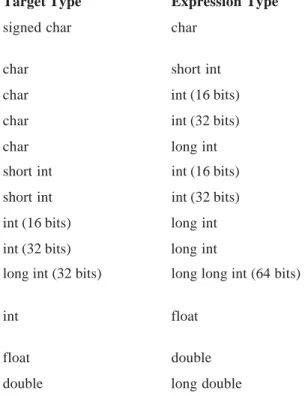
Table 2-3 summarizes several common assignment type conversions. Remember that the conversion of an intto a float, or a float to a double, and so on, does not add any precision or accuracy. These kinds of conversions only change the form in which
Target Type Expression Type Possible Info Loss
signed char char If value > 127, target is
negative
char short int High-order 8 bits
char int (16 bits) High-order 8 bits
char int (32 bits) High-order 24 bits
char long int High-order 24 bits
short int int (16 bits) None
short int int (32 bits) High-order 16 bits
int (16 bits) long int High-order 16 bits
int (32 bits) long int None
long int (32 bits) long long int (64 bits) High-order 32 bits (applies to C99 only)
int float Fractional part and possibly
more
float double Precision, result rounded
double long double Precision, result rounded
the value is represented. In addition, some compilers always treat a char variable as positive, no matter what value it has, when converting it to an intorfloat. Other compilers treat char variable values greater than 127 as negative numbers when converting. Generally speaking, you should use
char variables for characters and use ints, short ints, or signed chars when needed to avoid possible portability problems.
To use Table 2-3 to make a conversion not shown, simply convert one type at a time until you finish. For example, to convert from double to int, first convert from double to float and then from
float to int.
Multiple Assignments
You can assign many variables the same value by using multiple assignments in a single statement. For example, this program fragment assigns x, y, and zthe value 0:
x = y = z = 0;
In professional programs, variables are frequently assigned common values using this method.
Compound Assignments
There is a variation on the assignment statement, called compound assignment, that simplifies the coding of a certain type of assignment operations. For example,
x = x+10;
can be written as
x += 10;
The operator += tells the compiler to assign to x the value of x plus 10.
Compound assignment operators exist for all the binary operators (those that require two operands). In general, statements like
var = var operator expression
can be rewritten as
For another example,
x = x-100;
is the same as
x -= 100;
Because compound assignment is more compact than the corresponding = equivalent, compound assignment is also sometimes referred to as shorthand assignment. Compound assignment is widely used in professionally written C programs; you should be familiar with it.
Arithmetic Operators
Table 2-4 lists C's arithmetic operators. The operators +, –,*, and / work as they do in most other computer languages. You can apply them to almost any built-in data type. When you apply / to an integer or character, any remainder will be truncated. For example, 5/2 will equal 2 in integer division.
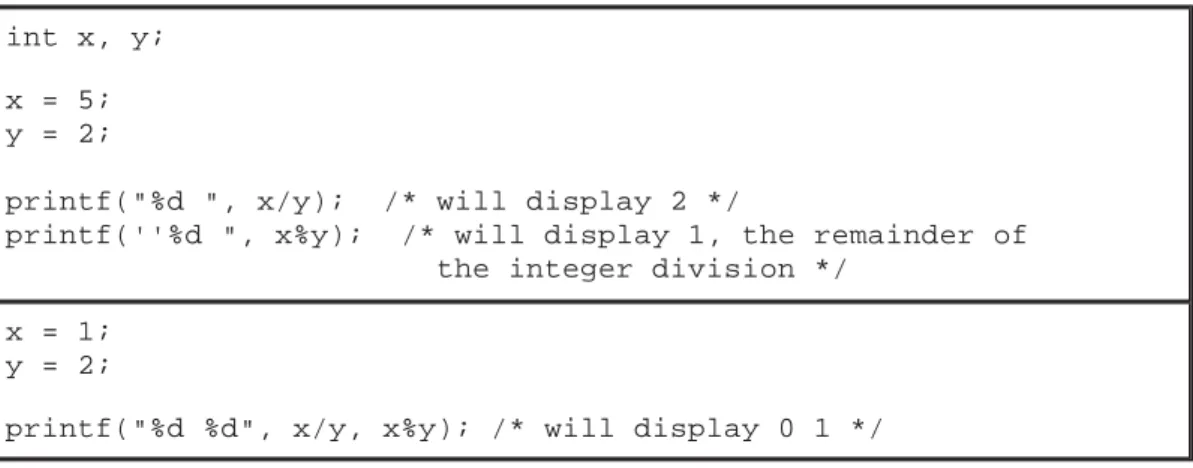
The modulus operator % also works in C as it does in other languages, yielding the remainder of an integer division. However, you cannot use it on floating-point types. The following code fragment illustrates %:
int x, y;
x = 5; y = 2;
printf("%d ", x/y); /* will display 2 */
printf(''%d ", x%y); /* will display 1, the remainder of the integer division */
x = 1; y = 2;
printf("%d %d", x/y, x%y); /* will display 0 1 */
Operator Action
– Subtraction, also unary minus
+ Addition
* Multiplication
/ Division
% Modulus
–– Decrement
++ Increment
Table 2 -4. Arithmetic Operators
The unary minus multiplies its operand by –1. That is, any number preceded by a minus sign switches its sign.
The Increment and Decrement Operators
C includes two useful operators that simplify two common operations. These are the increment and decrement operators, ++ and – –. The operator ++ adds 1 to its operand, and – –subtracts 1. In other words:
x = x+1;
is the same as
++x;
and
x = X–1;
is the same as
x––;
TEAMFLY
Both the increment and decrement operators may either precede (prefix) or follow (postfix) the operand. For example,
x = x+1;
can be written
++x;
or
x++;
There is, however, a difference between the prefix and postfix forms when you use these operators in a larger expression. When an increment or decrement operator precedes its operand, the
increment or decrement operation is performed before obtaining the value of the operand for use in the expression. If the operator follows its operand, the value of the operand is obtained before incrementing or decrementing it. For instance,
x = 10; y = ++x;
setsy to 11. However, if you write the code as
x = 10; y = x++;
y is set to 10. Either way, x is set to 11; the difference is in when it happens.
Most C compilers produce very fast, efficient object code for increment and decrement operations— code that is better than that generated by using the equivalent assignment statement. For this reason, you should use the increment and decrement operators when you can.
Here is the precedence of the arithmetic operators:
Highest ++ – –
– (unary minus)
* / %
Operators on the same level of precedence are evaluated by the compiler from left to right. Of course, you can use parentheses to alter the order of evaluation. C treats parentheses in the same way as virtually all other computer languages. Parentheses force an operation, or set of operations, to have a higher level of precedence.
Relational and Logical Operators
In the term relational operator, relational refers to the relationships that values can have with one another. In the term logical operator, logical refers to the ways these relationships can be connected. Because the relational and logical operators often work together, they are discussed together here.
The idea of true and false underlies the concepts of relational and logical operators. In C, true is any value other than zero. False is zero. Expressions that use relational or logical operators return 0 for false and 1 for true.
NOTE
Like C89, C99 defines true as nonzero and false as zero. However, C99 also defines the _Bool data type, which can hold the values 1 and 0. See Part Two for details.
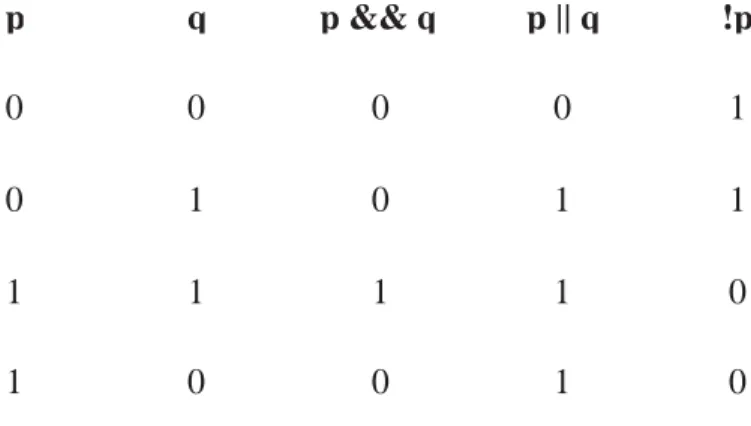
Table 2-5 shows the relational and logical operators. The truth table for the logical operators is shown here using 1's and 0's.
p q p && q p || q !p
0 0 0 0 1
0 1 0 1 1
1 1 1 1 0
1 0 0 1 0
Both the relational and logical operators are lower in precedence than the arithmetic operators. That is, an expression like 10 > 1+12 is evaluated as if it were written 10 > (1+12). Of course, the result is false.
You can combine several operations into one expression, as shown here:
10>5 && !(10<9) | | 3<=4
In this case, the result is true.
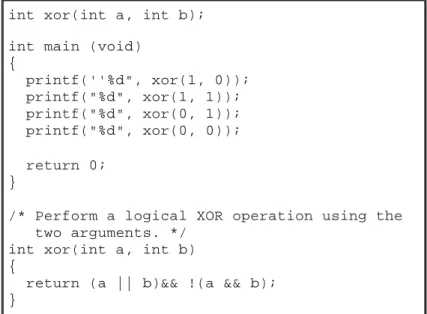
Although C does not contain an exclusive OR (XOR) logical operator, you can easily create a function that performs this task by using the other logical operators. The outcome of an XOR operation is true if and only if one operand (but not both) is true. The following program contains the function xor( ), which returns the outcome of an exclusive OR operation performed on its two arguments.
int xor(int a, int b);
int main (void) {
printf(''%d", xor(1, 0)); printf("%d", xor(1, 1)); printf("%d", xor(0, 1)); printf("%d", xor(0, 0));
return 0; }
/* Perform a logical XOR operation using the two arguments. */
int xor(int a, int b) {
return (a || b)&& !(a && b); }
Relational Operators
Operator Action
> Greater than
>= Greater than or equal
< Less than
<= Less than or equal
= = Equal
!= Not equal
Logical Operators
Operator Action
&& AND
| | OR
! NOT
The following table shows the relative precedence of the relational and logical operators:
As with arithmetic expressions, you can use parentheses to alter the natural order of evaluation in a relational and/or logical expression. For example,
is false. However, when you add parentheses to the same expression, as shown here, the result is true.
Remember, all relational and logical expressions produce a result of either 1 or 0. Therefore, the following program fragment is not only correct, but will print the number 1.
Unlike many other languages, C supports a full complement of bitwise operators. Since C was designed to take the place of assembly language for most programming tasks, it needed to be able to support many operations that can be done in assembler, including operations on bits. Bitwise
operation refers to testing, setting, or shifting the actual bits in a byte or word, which correspond to the standard charandint data types and variants.
Highest !
> >= < <= = = != &&
Lowest | |
!0&&0 | | 0
!(0 && 0) | | 0
int x;
x = 100;
printf(''%d", x>10);
You cannot use bitwise operations on float, double, long double, void, or other more complex types. Table 2-6 lists the operators that apply to bitwise operations. These operations are applied to the individual bits of the operands.
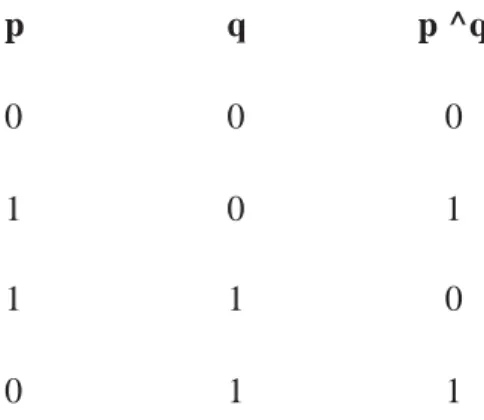
The bitwise AND, OR, and NOT (one's complement) are governed by the same truth table as their logical equivalents, except that they work bit by bit. The exclusive OR has the truth table shown here:
p q p ^q
0 0 0
1 0 1
1 1 0
0 1 1
As the table indicates, the outcome of an XOR is true only if exactly one of the operands is true; otherwise, it is false.
Bitwise operations most often find application in device drivers—such as modem programs, disk file routines, and printer routines—because the bitwise operations can be used to mask off certain bits, such as parity. (The parity bit confirms that the rest of the bits in the byte are unchanged. It is often the high-order bit in each byte.)
Operator Action
& AND
| OR
^ Exclusive OR (XOR)
~ One's complement (NOT)
>> Shift right
<< Shift left
Think of the bitwise AND as a way to clear a bit. That is, any bit that is 0 in either operand causes the corresponding bit in the outcome to be set to 0. For example, the following function reads a character from the modem port and resets the parity bit to 0:
char get_char_from_modem(void) {
char ch;
ch = read_modem(); /* get a character from the modem port */
return(ch & 127); }
Parity is often indicated by the eighth bit, which is set to 0 by ANDing it with a byte that has bits 1 through 7 set to 1 and bit 8 set to 0. The expression ch & 127 means to AND together the bits in ch
with the bits that make up the number 127. The net result is that the eighth bit of ch is set to 0. In the following example, assume that ch had received the character A and had the parity bit set:
The bitwise OR, as the reverse of AND, can be used to set a bit. Any bit that is set to 1 in either operand causes the corresponding bit in the outcome to be set to 1. For example, the following is 128 | 3:
Remember, relational and logical operators always produce a result that is either true or false, whereas the similar bitwise operations may produce any arbitrary value in accordance with the specific operation. In other words, bitwise operations may produce values other than 0 or 1, while logical operators will always evaluate to 0 or 1.
The bit-shift operators, >> and <<, move all bits in a variable to the right or left as specified. The general form of the shift-right statement is
variable >> number of bit positions
The general form of the shift-left statement is
variable << number of bit positions
As bits are shifted off one end, zeroes are brought in the other end. (In the case of a signed, negative integer, a right shift will cause a 1 to be brought in so that the sign bit is preserved.) Remember, a shift is not a rotate. That is, the bits shifted off one end do not come back around to the other. The bits shifted off are lost.
Bit-shift operations can be very useful when you are decoding input from an external device, such as a D/A converter, and reading status information. The bitwise shift operators can also quickly
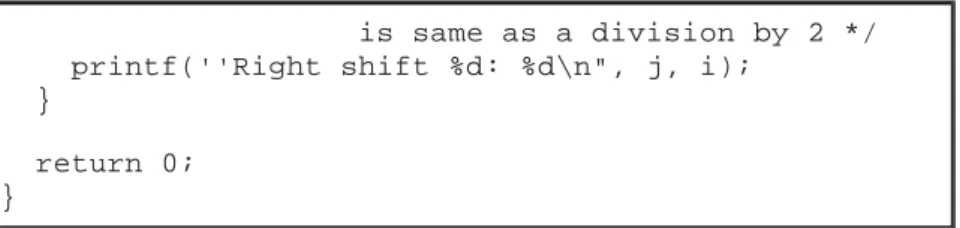
multiply and divide integers. A shift right effectively divides a number by 2 and a shift left multiplies it by 2, as shown in Table 2-7. The following program illustrates the shift operators:
/* A bit shift example. */ #include <stdio.h>
int main(void) {
unsigned int i; int j;
i = 1;
/* left shifts */ for(j=0; j<4; j++) {
i = i << 1; /* left shift i by 1, which is same as a multiply by 2 */ printf(''Left shift %d: %d\n", j, i);
}
/* right shifts */ for(j=0; j<4; j++) {
is same as a division by 2 */ printf(''Right shift %d: %d\n", j, i);
}
return 0; }
The one's complement operator, ~, reverses the state of each bit in its operand. That is, all 1's are set to 0, and all 0's are set to 1.
The bitwise operators are often used in cipher routines. If you want to make a disk file appear unreadable, perform some bitwise manipulations on it. One of the simplest methods is to
complement each byte by using the one's complement to reverse each bit in the byte, as is shown here:
Notice that a sequence of two complements in a row always produces the original number. Hence, the first complement represents the coded version of that byte. The second complement decodes the byte to its original value.
unsigned char x;
x as each statement
executes value of x
x = 7; 00000111 7
x = x<<l; 00001110 14
x = x<<3; 01110000 112
x = x<<2; 11000000 192
x = x>>l; 01100000 96
x = x>>2; 00011000 24
Each left shift multiplies by 2. Notice that information has been lost after x<<2 because a bit was shifted off the end.
Each right shift divides by 2. Notice that subsequent divisions do not bring back any lost bits.
You could use the encode( ) function shown here to encode a character.
/* A simple cipher function. */ char encode(char ch)
{
return(~ch); /* complement it */ }
Of course, a file encoded using encode( ) would be very easy to crack!
The ? Operator
C contains a powerful and convenient operator that replaces certain statements of the if-then-else form. The ternary operator ? takes the general form
Exp1 ? Exp2: Exp3;
whereExp1, Exp2, and Exp3 are expressions. Notice the use and placement of the colon.
The ? operator works like this: Exp1 is evaluated. If it is true, Exp2 is evaluated and becomes the value of the expression. If Exp1 is false, Exp3 is evaluated, and its value becomes the value of the expression. For example, in
x = 10;
y = x>9 ? 100 : 200;
y is assigned the value 100. If x had been less than 9, y would have received the value 200. The same code written using the if-else statement is
x = 10;
if(x>9) y = 100; else y = 200;
The ? operator will be discussed more fully in Chapter 3 in relationship to the other conditional statements.
The & and * Pointer Operators
functions to modify their calling parameters. They support linked lists, binary trees, and other dynamic data structures. Chapter 5 is devoted exclusively to pointers. This chapter briefly covers the two operators that are used to manipulate pointers.
The first pointer operator is &, a unary operator that returns the memory address of its operand. (Remember, a unary operator requires only one operand.) For example,
m = &count;
places into m the memory address of the variable count. This address is the computer's internal location of the variable. It has nothing to do with the value of count. You can think of & as meaning ''the address of." Therefore, the preceding assignment statement means "m receives the address of
count."
To better understand this assignment, assume that the variable count is at memory location 2000. Also assume that count has a value of 100. Then, after the previous assignment, m will have the value 2000.
The second pointer operator is *, which is the complement of &. The * is a unary operator that returns the value of the object located at the address that follows it. For example, if m contains the memory address of the variable count,
q = *m;
places the value of count into q. Now q has the value 100 because 100 is stored at location 2000, the memory address that was stored in m. Think of * as meaning "at address." In this case, you could read the statement as "q receives the value at address m."
Unfortunately, the multiplication symbol and the "at address" symbol are the same, and the symbol for the bitwise AND and the "address of" symbol are the same. These operators have no relationship to each other. Both & and * have a higher precedence than all other arithmetic operators except the unary minus, with which they share equal precedence.
Variables that will hold pointers must be declared as such, by putting * in front of the variable name. This indicates to the compiler that it will hold a pointer to that type of variable. For example, to declarech as a pointer to a character, write
char *ch;
It is important to understand that ch is not a character but a pointer to a character—there is a big difference. The type of data that a pointer points to, in this case char, is called the base type of the pointer. The pointer variable itself is a variable that holds the address to an object of the base type. Thus, a character pointer (or any type of pointer) is of sufficient size to hold an address as defined by the architecture of the host computer. It is the base type that determines what that address contains.
TEAMFLY
You can mix both pointer and nonpointer variables in the same declaration statement. For example,
int x, *y, count;
declaresx and count as integer types and yas a pointer to an integer type.
The following program uses * and & operators to put the value 10 into a variable called target. As expected, this program displays the value 10 on the screen.
#include <stdio.h>
int main(void) {
int target, source; int *m;
source = 10; m = &source; target = *m;
printf("%d", target);
return 0; }
The Compile-Time Operator sizeof
sizeof is a unary compile-time operator that returns the length, in bytes, of the variable or
parenthesized type specifier that it precedes. For example, assuming that integers are 4 bytes and
doubles are 8 bytes, this fragment will display 8 4.
double f;
printf("%d ", sizeof f); printf(''%d", sizeof(int));
Remember, to compute the size of a type, you must enclose the type name in parentheses. This is not necessary for variable names, although there is no harm done if you do so.
practical purposes, however, you can think of it (and use it) as if it were an unsigned integer value.
sizeof primarily helps to generate portable code that depends upon the size of the built-in data types. For example, imagine a database program that needs to store six integer values per record. If you want to port the database program to a variety of computers, you must not assume the size of an integer, but must determine its actual length using sizeof. This being the case, you could use the following routine to write a record to a disk file:
/* Write 6 integers to a disk file. */ void put_rec(int rec[6], FILE *fp) {
int len;
len = fwrite(rec, sizeof(int)*6, 1, fp); if(len != 1) printf(''Write Error"); }
Coded as shown, put_rec( ) compiles and runs correctly in any environment, including those that use 16- and 32-bit integers.
One final point: sizeof is evaluated at compile time, and the value it produces is treated as a constant within your program.
The Comma Operator
The comma operator strings together several expressions. The left side of the comma operator is always evaluated as void. This means that the expression on the right side becomes the value of the total comma-separated expression. For example,
x = (y=3, y+1);
first assigns y the value 3 and then assigns x the value 4. The parentheses are necessary because the comma operator has a lower precedence than the assignment operator.
Essentially, the comma causes a sequence of operations. When you use it on the right side of an assignment statement, the value assigned is the value of the last expression of the comma-separated list.
The comma operator has somewhat the same meaning as the word "and" in English, as used in the phrase "do this and this and this."
The Dot (.) and Arrow (–>) Operators
The dot operator is used when working with a structure or union directly. The arrow operator is used with a pointer to a structure or union. For example, given the fragment,
struct employee {
char name[80]; int age;
float wage; } emp;
struct employee *p = &emp; /* address of emp into p */
you would write the following code to assign the value 123.23 to the wage member of structure variable emp:
emp.wage = 123.23;
However, the same assignment using a pointer to emp would be
p->wage = 123.23;
The [ ] and ( ) Operators
Parentheses are operators that increase the precedence of the operations inside them. Square brackets perform array indexing (arrays are discussed fully in Chapter 4). Given an array, the expression within square brackets provides an index into that array. For example,
#include <stdio.h> char s[80];
int main(void) {
s[3] = 'X'; printf(''%c", s [3]);
return 0; }
Precedence Summary
Table 2-8 lists the precedence of all operators defined by C. Note that all operators, except the unary operators and ?, associate from left to right. The unary operators (*, &,–) and? associate from right to left.
Expressions
Operators, constants, functions, and variables are the constituents of expressions. An expression in C is any valid combination of these elements. Because most expressions tend to follow the general rules of algebra, they are often taken for granted. However, a few aspects of expressions relate specifically to C.
Order of Evaluation
C does not specify the order in which the subexpressions of an expression are evaluated. This leaves the compiler free to rearrange an expression to produce more
Highest ( ) [ ] –>.
! ~ ++ – – – (type) * & sizeof
* / %
+ –
<< >>
< <= > >=
== !=
&
^
|
&&
| |
?:
= += –= *= /= etc.
Lowest ,
optimal code. However, it also means that your code should never rely upon the order in which subexpressions are evaluated. For example, the expression
x = f1() + f2();
does not ensure that f1( ) will be called before f2( ).
Type Conversion in Expressions
When constants and variables of different types are mixed in an expression, they are all converted to the same type. The compiler converts all operands up to the type of the largest operand, which is calledtype promotion. First, all char and short int values are automatically elevated to int. This process is called integral promotion. (In C99, an integer promotion may also result in a conversion tounsigned int.) Once this step has been completed, all other conversions are done operation by operation, as described in the following type conversion algorithm:
IF an operand is a long double
THEN the second is converted to long double
ELSE IF an operand is a double
THEN the second is converted to double
ELSE IF an operand is a float
THEN the second is converted to float
ELSE IF an operand is an unsignedlong
THEN the second is converted to unsigned long
ELSE IF an operand is long
THEN the second is converted to long
ELSE IF an operand is unsignedint
THEN the second is converted to unsigned int
There is one additional special case: If one operand is long and the other is unsigned int, and if the value of the unsigned int cannot be represented by a long, both operands are converted to unsigned long.
NOTE
See Part Two for a description of the C99 integer promotion rules.
Once these conversion rules have been applied, each pair of operands is of the same type, and the result of each operation is the same as the type of both operands.
Figure 2-2
A type conversion example
Casts
You can force an expression to be of a specific type by using a cast. The general form of a cast is
(type) expression
wheretype is a valid data type. For example, to cause the expression x/2 to evaluate to type float, write
(float) x/2
Casts are technically operators. As an operator, a cast is unary and has the same precedence as any other unary operator.
Casts can be very useful. For example, suppose you want to use an integer for loop control, yet to perform computation on it requires a fractional part, as in the following program:
#include <stdio.h>
int main(void) /* print i and i/2 with fractions */ {
int i;
for(i=l; i<=100; ++i)