www.FindBestStuff.com
* Updated Most Popular Stuff On The Net.
Memory Management
Algorithms and
Implementation in C/C++
by
Bill Blunden
Memory management: algorithms and implementation in C/C++ / by Bill Blunden.
p. cm.
Includes bibliographical references and index. ISBN 1-55622-347-1
1. Memory management (Computer science) 2. Computer algorithms. 3. C (Computer program language) 4. C++ (Computer program language) I. Title.
QA76.9.M45 .B558 2002
005.4'35--dc21 2002012447 CIP
© 2003, Wordware Publishing, Inc. All Rights Reserved 2320 Los Rios Boulevard
Plano, Texas 75074
No part of this book may be reproduced in any form or by any means without permission in writing from
Wordware Publishing, Inc.
Printed in the United States of America
ISBN 1-55622-347-1 10 9 8 7 6 5 4 3 2 1 0208
Product names mentioned are used for identification purposes only and may be trademarks of their respective companies.
All inquiries for volume purchases of this book should be addressed to Wordware Publishing, Inc., at the above address. Telephone inquiries may be made by calling:
And also to David M. Lee
“I came to learn physics, and I got Jimmy Stewart”
Acknowledgments . . . xi
Introduction . . . xiii
Chapter 1 Memory Management Mechanisms. . . 1
Mechanism Versus Policy . . . 1
Memory Hierarchy . . . 3
Address Lines and Buses. . . 9
Intel Pentium Architecture . . . 11
Real Mode Operation. . . 14
Protected Mode Operation. . . 18
Protected Mode Segmentation . . . 19
Protected Mode Paging . . . 26
Paging as Protection . . . 31
Addresses: Logical, Linear, and Physical . . . 33
Page Frames and Pages . . . 34
Case Study: Switching to Protected Mode . . . 35
Closing Thoughts . . . 42
References . . . 43
Chapter 2 Memory Management Policies. . . 45
Case Study: MS-DOS . . . 46
DOS Segmentation and Paging . . . 46
DOS Memory Map . . . 47
Memory Usage . . . 49
Example: A Simple Video Driver . . . 50
Example: Usurping DOS . . . 52
Jumping the 640KB Hurdle . . . 56
Case Study: MMURTL . . . 59
Background and Design Goals . . . 60
MMURTL and Segmentation . . . 61
Paging Variations . . . 63
MMURTL and Paging . . . 64
Memory Allocation . . . 66
Case Study: Linux . . . 67
History and MINIX . . . 67
Design Goals and Features. . . 68
Linux and Segmentation . . . 69
Linux and Paging . . . 72
Three-Level Paging . . . 72
Page Fault Handling . . . 76
Memory Allocation . . . 76
Memory Usage . . . 81
Example: Siege Warfare . . . 82
Example: Siege Warfare, More Treachery . . . 87
Case Study: Windows . . . 92
Historical Forces . . . 92
Memory Map Overview . . . 96
Windows and Segmentation . . . 99
Special Weapons and Tactics . . . 99
Crashing Windows with a Keystroke . . . 102
Reverse Engineering the GDT . . . 102
Windows and Paging . . . 105
Linear Address Space Taxonomy . . . 105
Musical Chairs for Pages. . . 106
Memory Protection . . . 108
Demand Paging . . . 109
Memory Allocation . . . 110
Memory Usage . . . 114
Turning Off Paging . . . 117
Example: Things That Go Thunk in the Night . . . . 118
Closing Thoughts . . . 122
References . . . 123
Books and Articles . . . 123
Web Sites . . . 125
Chapter 3 High-Level Services. . . 127
View from 10,000 Feet . . . 127
Compiler-Based Allocation . . . 129
Data Section . . . 132
Code Section . . . 134
Stack . . . 136
Activation Records . . . 138
Scope . . . 144
Static or Dynamic? . . . 150
Heap Allocation . . . 151
System Call Interface . . . 151
The Heap . . . 156
Manual Memory Management. . . 157
Example: C Standard Library Calls . . . 158
Automatic Memory Management . . . 160
Example: The BDW Conservative Garbage Collector . . . 161
Manual Versus Automatic?. . . 164
The Evolution of Languages. . . 168
Case Study: COBOL . . . 171
Case Study: FORTRAN. . . 177
Case Study: Pascal . . . 181
Case Study: C . . . 184
Case Study: Java. . . 192
Language Features . . . 192
Virtual Machine Architecture . . . 194
Java Memory Management . . . 196
Memory Management: The Three-layer Cake . . . 202
References . . . 204
Chapter 4 Manual Memory Management . . . 207
Replacements formalloc()andfree() . . . 207
System Call Interface and Porting Issues . . . 208
Keep It Simple . . . Stupid! . . . 211
Measuring Performance . . . 212
The Ultimate Measure: Time . . . 212
ANSI and Native Time Routines . . . 213
The Data Distribution: Creating Random Variates . 215 Testing Methodology . . . 219
Indexing: The General Approach . . . 224
malloc()Version 1: Bitmapped Allocation. . . 224
Theory . . . 224
Implementation . . . 226
tree.cpp . . . 227
bitmap.cpp . . . 232
memmgr.cpp . . . 236
mallocV1.cpp . . . 239
perform.cpp . . . 241
driver.cpp . . . 241
Tests . . . 242
Trade-Offs . . . 247
malloc()Version 2: Sequential Fit . . . 248
Theory . . . 249
Implementation . . . 251
memmgr.cpp . . . 251
mallocV2.cpp . . . 260
driver.cpp . . . 261
Tests . . . 262
Trade-Offs . . . 264
malloc()Version 3: Segregated Lists . . . 265
Theory . . . 265
Implementation . . . 266
memmgr.cpp . . . 267
mallocV3.cpp . . . 274
Tests . . . 275
Trade-Offs . . . 279
Performance Comparison . . . 279
Chapter 5 Automatic Memory Management . . . 281
Garbage Collection Taxonomy . . . 281
malloc()Version 4: Reference Counting . . . 283
Theory . . . 283
Implementation . . . 284
driver.cpp . . . 285
mallocV4.cpp . . . 287
perform.cpp . . . 288
memmgr.cpp . . . 289
Tests . . . 299
Trade-Offs . . . 302
malloc()Version 5: Mark-Sweep . . . 304
Theory . . . 304
Implementation . . . 307
driver.cpp . . . 307
mallocV5.cpp . . . 309
perform.cpp . . . 311
memmgr.cpp . . . 312
Tests . . . 325
Trade-Offs . . . 330
Performance Comparison . . . 332
Potential Additions . . . 332
Object Format Assumptions . . . 333
Variable Heap Size . . . 335
Indirect Addressing . . . 335
Real-Time Behavior . . . 337
Life Span Characteristics . . . 338
Multithreaded Support . . . 339
Chapter 6 Miscellaneous Topics . . . 343
Suballocators . . . 343
Monolithic Versus Microkernel Architectures . . . 348
Closing Thoughts . . . 351
Index . . . 355
Publishing a book is an extended process that involves a number of people. Writing the final manuscript is just a small part of the big picture. This section is dedicated to all the people who directly, and indirectly, lent me their help.
First and foremost, I would like to thank Jim Hill of Wordware Publishing for giving me the opportunity to write a book and believ-ing in me. I would also like to extend thanks to Wes Beckwith and Beth Kohler. Wes, in addition to offering constant encouragement, does a great job of putting up with my e-mails and handling the vari-ous packages that I send. Beth Kohler, who performed the
incredible task of reading my first book for Wordware in a matter of days, has also been invaluable.
I first spoke with Barry Brey back in the mid-1990s when I became interested in protected mode programming. He has always taken the time to answer my questions and offer his insight. Barry wrotethefirst book on the Intel chip set back in 1984. Since then, he has written well over 20 books. His current textbook on Intel’s IA32 processors is in its sixth edition. This is why I knew I had to ask Barry to be the technical editor for this book. Thanks, Barry.
“Look, our middleware even runs on that little Windows NT piece of crap.”
— George Matkovitz
“Hey, who was the %&^$ son of a &*$# who wrote this optimized load of . . . oh, it was me.”
— Mike Adler
Mike Adler and George Matkovitz are two old fogeys who worked at Control Data back when Seymour Cray kicked the tar out of IBM. George helped to implement the world’s first message-passing operating system at Control Data. Mike also worked on a number of groundbreaking system software projects. I met these two codgers while performing R&D for an ERP vendor in the Midwest. I hadn’t noticed how much these engineers had influenced me until I left
Minnesota for California. It was almost as though I had learned through osmosis. A lot of my core understanding of software and the computer industry in general is based on the bits of hard-won advice and lore that these gentlemen passed on to me. I distinctly remember walking into Mike’s office and asking him, “Hey Mike, how do you build an operating system?”
I would also like to thank Frank Merat, a senior professor at Case Western Reserve University. Frank has consistently shown interest in my work and has offered his support whenever he could. There is no better proving ground for a book than an established research university.
Finally, I would like to thank SonicWALL, Inc. for laying me off and giving me the opportunity to sit around and think. The days I spent huddled with my computers were very productive.
“Pay no attention to the man behind the curtain.”
—The Wizard of Oz
There are a multitude of academic computer science texts that dis-cuss memory management. They typically devote a chapter or less to the subject and then move on. Rarely are concrete, machine-level details provided, and actual source code is even scarcer. When the author is done with his whirlwind tour, the reader tends to have a very limited idea about what is happening behind the curtain. This is no surprise, given that the nature of the discussion is rampantly ambiguous. Imagine trying to appreciate Beethoven by having someone read the sheet music to you or experience the Mona Lisa by reading a description in a guidebook.
This book is different. Very different.
In this book, I am going to pull the curtain back and let you see the little man operating the switches and pulleys. You may be excited by what you see, or you may feel sorry that you decided to look. But as Enrico Fermi would agree, knowledge is always better than ignorance.
This book provides an in-depth look at memory subsystems and offers extensive source code examples. In cases where I do not have access to source code (i.e., Windows), I offer advice on how to gather forensic evidence, which will nurture insight. While some books only give readers a peak under the hood, this book will give readers a power drill and allow them to rip out the transmission. The idea behind this is to allow readers to step into the garage and get their hands dirty.
My own experience with memory managers began back in the late 1980s when Borland’s nifty Turbo C 1.0 compiler was released. This was my first taste of the C language. I can remember using a disassembler to reverse engineer library code in an attempt to see how themalloc()andfree()standard library functions
operated. I don’t know how many school nights I spent staring at an 80x25 monochrome screen, deciphering hex dumps. It was tough going and not horribly rewarding (but I was curious, and I couldn’t help myself). Fortunately, I have done most of the dirty work for you. You will conveniently be able to sidestep all of the hurdles and tedious manual labor that confronted me.
If you were like me and enjoyed taking your toys apart when you were a child to see how they worked, then this is the book for you. So lay your computer on a tarpaulin, break out your compilers, and grab an oil rag. We’re going to take apart memory management sub-systems and put them back together. Let the dust fly where it may!
Historical Setting
In the late 1930s, a group of scholars arrived at Bletchley Park in an attempt to break the Nazis’ famous Enigma cipher. This group of codebreakers included a number of notable thinkers, like Tommy Flowers and Alan Turing. As a result of the effort to crack Enigma, the first electronic computer was constructed in 1943. It was named
Colossusand used thermionic valves (known today asvacuum tubes)
for storing data. Other vacuum tube computers followed. For
exam-ple,ENIAC(electronic numerical integrator and computer) was
built by the U.S. Army in 1945 to compute ballistic firing tables.
NOTE Science fiction aficionados might enjoy a movie called
Colos-sus: The Forbin Project. It was made in 1969 and centers around Colossus, a supercomputer designed by a scientist named Charles Forbin. Forbin convinces the military that they should give control of the U.S. nuclear arsenal to Colossus in order to eliminate the potential of human error accidentally starting World War III. The movie is similar
in spirit to Stanley Kubrick’s2001: A Space Odyssey, but without the
happy ending: Robot is built, robot becomes sentient, robot runs amok. I was told that everyone who has ever worked at Control Data has seen this movie.
The next earth-shaking development arrived in 1949 when ferrite (iron) core memory was invented. Each bit of memory was made of a small, circular iron magnet. The value of the bit switched from “1” to “0” by using electrical wires to magnetize the circular loops in one of two possible directions. The first computer to utilize ferrite core memory was IBM’s 705, which was put into production in 1955. Back in those days, 8KB of memory was considered a huge piece of real estate.
Everything changed once transistors became the standard way to store bits. The transistor was presented to the world in 1948 when Bell Labs decided to go public with its new device. In 1954, Bell Labs constructed the first transistor-based computer. It was named
TRADIC(TRAnsistorized DIgital Computer). TRADIC was much
smaller and more efficient than vacuum tube computers. For exam-ple, ENIAC required 1,000 square feet and caused power outages in Philadelphia when it was turned on. TRADIC, on the other hand, was roughly three cubic feet in size and ran on 100 watts of electricity.
NOTE Before electronic computers became a feasible alternative,
heavy mathematical computation relied onhuman computers. Large
groups of people would be assembled to carry out massive numerical algorithms. Each person would do a part of a computation and pass it on to someone else. This accounts for the prevalance of logarithm tables in mathematical references like the one published by the Chem-ical Rubber Company (CRC). Slide rules and math tables were
standard fare before the rise of the digital calculator.
ASIDE
“After 45 minutes or so, we’ll see that the results are obvious.”
— David M. Lee
I have heard Nobel laureates in physics, like Dave Lee, complain that students who rely too heavily on calculators lose their mathematical intuition. To an extent, Dave is cor-rect. Before the dawn of calculators, errors were more com-mon, and developing a feel for numeric techniques was a useful way to help catch errors when they occurred.
During the Los Alamos project, a scientist named Dick Feynman ran a massive human computer. He once mentioned that the performance and accuracy of his group’s computa-tions were often more a function of his ability to motivate people. He would sometimes assemble people into teams and have them compete against each other. Not only was this a good idea from the standpoint of making things more interesting, but it was also an effective technique for catching discrepancies.
In 1958, the first integrated circuit was invented. The inventor was a fellow named Jack Kilby, who was hanging out in the basement of Texas Instruments one summer while everyone else was on vaca-tion. A little over a decade later, in 1969, Intel came out with a 1 kilobit memory chip. After that, things really took off. By 1999, I was working on a Windows NT 4.0 workstation (service pack 3) that had 2GB of SDRAM memory.
The general trend you should be able to glean from the previous discussion is that memory components have solved performance requirements by getting smaller, faster, and cheaper. The hardware people have been able to have their cake and eat it too. However, the laws of physics place a limit on how small and how fast we can actually make electronic components. Eventually, nature itself will stand in the way of advancement. Heisenberg’s Uncertainty Princi-ple, shown below, is what prevents us from building infinitely small components.
x p (h/4 )
For those who are math-phobic, I will use Heinsenberg’s own words to describe what this equation means:
“The more precisely the position is determined, the less pre-cisely the momentum is known in this instant, and vice versa.”
In other words, if you know exactly where a particle is, then you will not be able to contain it because its momentum will be huge. Think of this like trying to catch a tomato seed. Every time you try to squeeze down and catch it, the seed shoots out of your hands and flies across the dinner table into Uncle Don’s face.
Einstein’s General Theory of Relativity is what keeps us from building infinitely fast components. With the exception of black holes, the speed limit in this universe is 3x10⁸meters per second. Eventually, these two physical limits are going to creep up on us.
When this happens, the hardware industry will have to either make larger chips (in an effort to fit more transistors in a given area) or use more efficient algorithms so that they can make better use of existing space. My guess is that relying on better algorithms will be the cheaper option. This is particularly true with regard to memory management. Memory manipulation is so frequent and crucial to performance that designing better memory management subsys-tems will take center stage in the future. This will make the time spent reading this book a good investment.
Impartial Analysis
In this book, I try very hard to offer memory management solutions without taking sides. I have gone to great lengths to present an unbiased discussion. This is important because it is extremely tempting to champion a certain memory management algorithm (especially if you invented it). There are some journal authors who would have you believe that their new algorithm is a panacea to cure the ills of the world. I do not have the ulterior motives of a col-lege professor. I am here to offer you a set of tools and then let you decide how best to use them. In this book, I will present you with different techniques and try to point out the circumstances in which they perform well.
The question “Which is the best memory management algo-rithm?” is very similar in spirit to any of the following questions:
“Which operating system is the best?” “Which programming language is the best?” “Which data structure is the best?”
“Which type of screwdriver is the best?”
I can recall asking a program manager at Eaton Corp., John
Schindler, what the best operating system was. John was managing at least a dozen different high-end platforms for Eaton, and I thought he would know. I was expecting him to come right back with a quick answer like: “Oh, OpenBSD is the best.” What actually happened was something that surprised me. He looked at me for a minute, as if the question was absurd. Then he smiled and said, “Well, it really depends on what you’re going to use the machine for. I use Solaris for networking, HP-UX for app servers, AIX to talk to our mainframe, NT for mail, . . . ”
The truth is there is no “best” solution. Most solutions merely offer certain trade-offs. In the end, the best tool to use will depend upon the peculiarities of the problem you are trying to solve.
This is a central theme that appears throughout the domain of computer science. Keep it in the back of your mind, like some sort of Buddhist mantra:
“There is no best solution, Grasshopper, only trade-offs.”
For example, linked lists and arrays can both represent a linear set of items. With a linked list, you get easy manipulation at the expense of speed. Adding an element to a linked list is as easy as modifying a couple of pointers. However, to find a given list
element, you may have to traverse the entire list manually until you find it. Conversely, with an array, you get access speed at the expense of flexibility. Accessing an array element is as easy as add-ing an integer to a base address, but addadd-ing and deletadd-ing array elements requires a lot of costly shifting. If your code is not going to do a lot of list modification, an array is the best choice. If your code will routinely add and delete list members, a linked list is the better choice. It all depends upon the context of the problem.
Audience
This book is directed toward professional developers and students who are interested in discovering how memory is managed on pro-duction systems. Specifically, engineers working on PC or
embedded operating systems may want to refresh their memory or take a look at alternative approaches. If this is the case, then this book will serve as a repository of algorithms and software compo-nents that you can apply to your day-to-day issues.
Professionals who design and construct development tools will also find this book useful. In general, development tools fall into the class of online transaction processing (OLTP) programs. When it comes to OLTP apps, pure speed is the name of the game. As such, programming language tools, like compilers, often make use of suballocators to speed up the performance of the code that manipu-lates their symbol table.
With regard to compiling large software programs consisting of millions of lines of code, this type of suballocator-based optimization can mean the difference between waiting for a few minutes and waiting for a few hours. Anyone who mucks around with suballocators will find this book indispensable.
Software engineers who work with virtual machines will also be interested in the topics that I cover. The Java virtual machine is famous for its garbage collection facilities. In this book I explore several automatic memory management techniques and also pro-vide a couple of concrete garbage collection implementations in C++.
Finally, this book also targets the curious. There is absolutely nothing wrong with being curious. In fact, I would encourage it. You may be an application developer who has used memory manage-ment facilities countless times in the past without taking the time to
determine how they really work. You may also have nurtured an interest that you have had to repress due to deadlines and other pri-orities. This book will offer such engineers an opportunity to indulge their desire to see what is going on under the hood.
Organization
This book is divided into six chapters. I will start from the ground up and try to provide a comprehensive, but detailed, view of mem-ory management fundamentals. Because of this, each chapter builds on what has been presented in the previous one. Unless you are a memory management expert, the best way to read this book is straight through.
Chapter 1 – Memory Management Mechanisms
The first chapter presents a detailed look at the machinery that allows memory management to take place. Almost every operating system in production takes advantage of facilities that are provided by the native processor. This is done primarily for speed, since pushing repetitive bookkeeping down to the hardware benefits over-all performance. There have been attempts by some engineers to track and protect memory strictly outside of the hardware. But speed is key to the hardware realm, and this fact always forces such attempts off of the playing field. The end result is that understand-ing how memory management is performed means takunderstand-ing a good look at how memory hardware functions.
Chapter 2 – Memory Management Policies
Computer hardware provides the mechanism for managing memory, but the policy decisions that control how this mechanism is applied are dictated by the operating system and its system call interface to user programs. In this chapter, the memory management compo-nents provided by the operating system are analyzed and dissected. This will necessarily involve taking a good, hard look at the inter-nals of production operating systems like Linux and Windows.
In general, hardware always provides features that are ahead of the software that uses it. For example, Intel’s Pentium provides four distinct layers of memory protection. Yet, I could not find a single
operating system that took advantage of all four layers. All the sys-tems that I examined use a vastly simplified two-layer scheme.
NOTE The relationship between hardware and software is
analo-gous to the relationship between mathematics and engineering. Mathematics tends to be about 50 years ahead of engineering, which means that it usually takes about 50 years for people to find ways to apply the theorems and relationships that the mathematicians uncover.
Chapter 3 – High-Level Services
Above the hardware and the cocoon of code that is the operating system are the user applications. Because they are insulated from the inner workings of the operating system, applications have an entirely different way to request, use, and free memory. The man-ner in which a program utilizes memory is often dependent on the language in which the program was written. This chapter looks at memory management from the perspective of different program-ming languages. This chapter also serves as a launch pad for the next two chapters by presenting an overview of memory manage-ment at the application level.
Chapter 4 – Manual Memory Management
In Chapter 4, a number of manual memory management algorithms are presented in explicit detail. The algorithms are presented in the-ory, implemented in C++, and then critiqued in terms of their strengths and weaknesses. The chapter ends with suggestions for improvements and a look at certain hybrid approaches.
Chapter 5 – Automatic Memory Management
In Chapter 5, a number of automatic memory management algo-rithms are examined. The algoalgo-rithms are presented in theory, implemented in C++, and then critiqued in terms of their strengths and weaknesses. A significant amount of effort is invested in mak-ing this discussion easy to follow and keepmak-ing the reader focused on key points. Two basic garbage collectors are provided and compared to other, more advanced collection schemes.
Chapter 6 – Miscellaneous Topics
This chapter covers a few special-purpose subjects that were diffi-cult to fit into the previous five chapters. For example, I describe how to effectively implement a suballocator in a compiler. I also take a look at how memory management subsystems can be made to provide dynamic algorithm support at run time via a microkernel architecture.
Approach
When it comes to learning something complicated, like memory management, I believe that the most effective way is to examine a working subsystem. On the other hand, it is easy to become lost in the details of a production memory manager. Contemporary mem-ory managers, like the one in Linux, are responsible for keeping track of literally hundreds of run-time quantities. Merely tracking the subsystem’s execution path can make one dizzy. Hence, a bal-ance has to be struck between offering example source code that is high quality and also easy to understand. I think I have done a suffi-cient job of keeping the learning threshold low without sacrificing utility.
NOTE I am more than aware of several books where the author is
more interested in showing you how clever he is instead of actually try-ing to teach a concept. When at all possible, I try to keep my examples relatively simple and avoid confusing syntax. My goal is to instruct, not to impress you so much that you stop reading.
In this book, I will follow a fairly standard three-step approach: 1. Theory
2. Practice 3. Analysis
I will start each topic by presenting a related background theory. Afterwards, I will offer one or more source code illustrations and then end each discussion with an analysis of trade-offs and alterna-tives. I follow this methodology throughout the entire book.
Typographical Conventions
Words and phrases will appear initalicsin this book for two reasons:
n To place emphasis
n When defining a term
Thecourierfont will be used to indicate that text is one of the following:
n Source code
n An address in memory n Console input/output
n A filename or extension
Numeric values appear throughout this book in a couple of different formats. Hexadecimal values are indicated by either prefixing them with “0x” or appending “H” to the end.
For example:
0xFF02 0FF02H
The C code that I include will use the former notation, and the assembler code that I include will use the latter format.
Binary values are indicated by appending the letter “B” to the end. For example:
0110111B
Prerequisites
“C makes it easy to shoot yourself in the foot; C++ makes it harder, but when you do, it blows away your whole leg.”
— Bjarne Stroustrup
In this book, I have primarily used three different development languages:
n 80x86 assembler n C
n C++
For some examples, I had no other choice but to rely on assembly language. There are some things, like handling processor
interrupts, that can only be fleshed out using assembler. This is one reason why mid-level languages, like C, provide syntactic facilities for inline assembly code. If you look at the Linux source code, you will see a variety of inline assembly code snippets. If at all possible, I wrapped my assembly code in C. However, you can’t always do this.
Learning assembly language may seem like an odious task, but there are several tangible and significant rewards. Assembly lan-guage is just a mnemonic representation of machine instructions. When you have a complete understanding of a processor’s assembly language, including its special “privileged” instructions, you will also have a fairly solid understanding of how the machine functions and what its limitations are. In addition, given that compilers gener-ate assembly code, or at least spit it out in a listing file, you will also be privy to the inner workings of development tools.
In short, knowing assembly language is like learning Latin. It may not seem immediately useful, but it is . . . just give it time.
I use C early in the book for small applications when I felt like I could get away with it. Most of the larger source code examples in this book, however, are written in C++. If you don’t know C or C++, you should pick up one of the books mentioned in the “Refer-ences” section at the end of the Introduction. After a few weeks of cramming, you should be able to follow my source code examples.
I think C++ is an effective language for implementing memory management algorithms because it offers a mixture of tools. With C++, you can manipulate memory at a very low, bit-wise level and invoke inline assembly code when needed. You can also create high-level constructs using the object-oriented language features in C++. Encapsulation, in particular, is a compiler-enforced language feature that is crucial for maintaining large software projects.
NOTE At times, you may notice that I mix C libraries and
conven-tions into my C++ source code. I do this, most often, for reasons
related to performance. For example, I think that C’sprintf()is
much more efficient thancout.
C++ is often viewed by engineers, including myself, as C with a few object-oriented bells and whistles added on. Bjarne Stroustrup, the inventor of C++, likes to think of it as a “better form of C.” According to Stroustrup, the original C++ compiler (namedCfront, as in “C front end”) started off as an elaborate preprocessor that produced C code as output. This C code was then passed on to a
full-fledged C compiler. As time progressed, C++ went from being a front end to a C compiler to having its own dedicated compiler. Today, most software vendors sell C++ compilers with the implicit understanding that you can also use them to write C code.
In general, C is about as close to assembly language as you can get without losing the basic flow-control and stack-frame niceties that accompany high-level languages. C was because Ken Thomp-son got tired of writing assembly code. The first version of UNIX, which ran on a DEC PDP-7 in the late 1960s, was written entirely in assembler (and you thought that Mike Podanoffsky had it tough). Ken solved his assembly language problems by creating a variation of BCPL, which he called B. The name of the programming lan-guage was then changed to “C” by Dennis Ritchie, after some overhauling. Two Bell Labs researchers, Brian Kernighan and Den-nis Ritchie, ended up playing vital roles in the evolution of the language. In fact, the older form of C’s syntax is known as Kernighan and Ritchie C (or justK&R C).
C and C++ are both used to implement operating systems. Linux, for example, is written entirely in C. Although C is still the dominant system language for historical reasons, C++ is slowly beginning to creep into the source code bases of at least a couple commercial operating systems. Microsoft’s Windows operating sys-tem has chunks of its kernel written in C++. One might speculate that this trend can be directly linked to the rapidly increasing com-plexity of operating systems.
Companion Files
Software engineering is like baseball. The only way you will ever acquire any degree of skill is to practice and scrimmage whenever you get the chance. To this end, I have included the source code for most of the examples in this book in a downloadable file available at www.wordware.com/memory.
Dick Feynman, who was awarded the Nobel Prize in physics in 1965, believed that the key to discovery and insight was playful experimentation. Dick was the kind of guy who followed his own advice. In his biography,Surely You’re Joking, Mr. Feynman, Dick recounts how spinning plates in a dining hall at Cornell led to his-toric work in quantum mechanics. By testing a variety of new ideas and comparing the results to your predictions, you force yourself to
gain a better understanding of how things work. This approach also gives you the hands-on experience necessary to nurture a sense of intuition.
It is in this spirit that I provide this book’s source code in the downloadable files. By all means, modify it, hack it, and play with it. Try new things and see where they lead you. Make predictions and see if empirical results support your predictions. If the results don’t, then try to determine why and construct alternative explanations. Test those explanations. Add new functionality and see how it affects things. Take away components and see what happens. Bet a large sum of money with a friend to see who can implement the best improvement. But above all, have fun.
References
Brey, Barry.The Intel Microprocessors: 8086/8088, 80186, 80286,
80386, 80486, Pentium, Pentium Pro, and Pentium II. 2000,
Prentice Hall, ISBN: 0-13-995408-2.
This is a fairly recent book and should take care of any ques-tions you may have. Barry has been writing about Intel chips since the first one came out.
Kernighan, Brian and Dennis Ritchie.The C Programming
Lan-guage.1988, Prentice Hall, ISBN: 0131103628.
This is a terse, but well-read introduction to C by the founding fathers of the language.
Reid, T. R.The Chip: How Two Americans Invented the Microchip
and Launched a Revolution.2001, Random House, ISBN:
0375758283.
Schildt, Herbert.C++ From the Ground Up.1998, Osborne McGraw-Hill, ISBN: 0078824052.
If you have never programmed in C/C++, read this book. It is a gentle introduction written by an author who knows how to explain complicated material. Herb starts by teaching you C and then slowly introducing the object-oriented features of C++.
Stroustrup, Bjarne and Margaret Ellis.The Annotated C++
Refer-ence.1990, Addison-Wesley, ISBN: 0201514591.
Once you have read Schildt’s book, you can use this text to fill in the gaps. This book is exactly what it says it is — a reference — and it is a good one.
Stroustrup, Bjarne.The Design and Evolution of C++.1994, Addison-Wesley Pub. Co., ISBN: 0201543303.
This is an historical recount of C++’s creation by the man who invented the language. The discussion is naturally very technical and compiler writers will probably be able to appreciate this book the most. This is not for the beginner.
Warning
In this book I provide some rather intricate, and potentially danger-ous, source code examples. This is what happens when you go where you are not particularly supposed to be. I recommend that you use an expendable test machine to serve as a laboratory. Also, you might want to consider closing all unnecessary applications before experimenting. If an application dies in the middle of an access to disk, you could be faced with a corrupt file system.
If you keep valuable data on the machine you are going to use, I suggest you implement a disaster recovery plan. During the writing of this book’s manuscript, I made a point to perform daily incremen-tal backups and complete weekly backups of my hard drive. I also had a secondary machine that mirrored by primary box. Large cor-porations, like banks and insurance companies, have truly extensive emergency plans. I toured a production site in Cleveland that had two diesel fuel generators and a thousand gallons of gas to provide backup power.
Neither the publisher nor author accept any responsibility for any damage that may occur as a result of the information contained within this book. As Stan Lee might say, “With great power comes great responsibility.”
Bill Blunden has been obsessed with systems software since his first exposure to the DOSdebugutility in 1983. His single-minded pursuit to discover what actually goes on under the hood led him to program the 8259 interrupt controller and become an honorable member of the triple-fault club. After obtaining a BA in mathemati-cal physics and an MS in operations research, Bill was unleashed upon the workplace. It was at an insurance company in the beautiful city of Cleveland, plying his skills as an actuary, that Bill got into his first fist fight with a cranky IBM mainframe. Bloody but not beaten, Bill decided that groking software beat crunching numbers. This led him to a major ERP player in the midwest, where he developed CASE tools in Java, wrestled with COBOL middleware, and was assailed by various Control Data veterans. Having a quad-processor machine with 2GB of RAM at his disposal, Bill was hard pressed to find any sort of reason to abandon his ivory tower. Nevertheless, the birth of his nephew forced him to make a pilgrimage out west to Sil-icon Valley. Currently on the peninsula, Bill survives rolling power blackouts and earthquakes, and is slowly recovering from his initial bout with COBOL.
Memory Management
Mechanisms
“Everyone has a photographic memory. Some people just don’t have film.”
— Mel Brooks
NOTE In the text of this book,italicsare used to define or
emphasize a term. TheCourierfont is used to denote code, memory
addresses, input/output, and filenames. For more information, see the section titled “Typographical Conventions” in the Introduction.
Mechanism Versus Policy
Accessing and manipulating memory involves a lot of accounting work. Measures have to be taken to ensure that memory being accessed is valid and that it corresponds to actual physical storage.
Ifmemory protectionmechanisms are in place, checks will also need
to be performed by the processor to ensure that an executing task does not access memory locations that it should not. Memory pro-tection is the type of service that multiuser operating systems are built upon. Ifvirtual memoryis being used, a significant amount of bookkeeping will need to be maintained in order to track which disk sectors belong to which task. It is more effort than you think, and all the steps must be completed flawlessly.
NOTE On the Intel platform, if the memory subsystem’s data
struc-tures are set up incorrectly, the processor will perform what is known as atriple fault. Adouble faultoccurs on Intel hardware when an exception occurs while the processor is already trying to handle an exception. A triple fault occurs when the double-fault handler fails and the machine is placed into the SHUTDOWN cycle. Typically, an Intel machine will reset when it encounters this type of problem.
For the sake of execution speed, processor manufacturers give their chips the capacity to carry out advanced memory management chores. This allows operating system vendors to effectively push most of the tedious, repetitive work down to the processor where the various error checks can be performed relatively quickly. This also has the side effect of anchoring the operating system vendor to the hardware platform, to an extent.
The performance gains, however, are well worth the lost porta-bility. If an operating system were completely responsible for implementing features like paging and segmentation, it would be noticeably slower than one that took advantage of the processor’s built-in functionality. Imagine trying to play a graphics-intensive, real-time game like Quake 3 on an operating system that manually protected memory; the game would just not be playable.
NOTE You might be asking if I can offer a quantitative measure of
how much slower an operating system would be. I will admit I have been doing a little arm waving. According to a 1993 paper by Wahbe, Lucco, et al. (see the “References” section), they were able to isolate modules of code in an application using a technique they labeled as sandboxing. This technique incurred a 4% increase in execution speed. You can imagine what would happen if virtual memory and access privilege schemes were added to such a mechanism.
ASIDE
Anarm-wavingexplanation is a proposition that has not been
established using precise mathematical statements. Mathe-matical statements have the benefit of being completely un-ambiguous: They are either true or false. An arm-waving explanation tends to eschew logical rigor entirely in favor of arguments that appeal to intuition. Such reasoning is at best dubious, not only because intuition can often be incorrect, but also because intuitive arguments are ambiguous. For example, people who argue that the world is flat tend to rely on arm-waving explanations.
NOTE Back when Dave Cutler’s brainchild, Windows NT, came out,
run on anything but Intel. So much for an object technology based on a binary standard!
The solution that favors speed always wins. I was told by a former Control Data engineer that when Seymour Cray was designing the 6600, he happened upon a new chip that was quicker than the one he was currently using. The problem was that it made occasional computational errors. Seymour implemented a few slick work-arounds and went with the new chip. The execs wanted to stay out of Seymour’s way and not disturb the maestro, as Seymour was probably the most valuable employee Control Data had. Unfortu-nately, they also had warehouses full of the original chips. They couldn’t just throw out the old chips; they had to find a use for them. This problem gave birth to the CDC 3300, a slower and less expen-sive version of the 6600.
My point: Seymour went for the faster chip, even though it was less reliable.
Speed rules.
The result of this tendency is that every commercial operating system in existence has its memory management services firmly rooted in data structures and protocols dictated by the hardware. Processors provide a collection of primitives for manipulating mem-ory. They constitute themechanismside of the equation. It is up to the operating system to decide if it will even use a processor’s memory management mechanisms and, if so, how it will use them. Operating systems constitute thepolicyside of the equation.
In this chapter, I will examine computer hardware in terms of how it offers a mechanism to access and manipulate memory.
Memory Hierarchy
When someone uses the term “memory,” they are typically refer-ring to the data storage provided by dedicated chips located on the motherboard. The storage these chips provide is often referred to
asRandom Access Memory(RAM),main memory, andprimary
stor-age. Back in the iron age, when mainframes walked the earth, it was called thecore. The storage provided by these chips isvolatile, which is to say that data in the chips is lost when the power is switched off.
There are various types of RAM:
n DRAM
n SDRAM
n SRAM
Chapter
n VRAM
Dynamic RAM(DRAM) has to be recharged thousands of times
each second.Synchronous DRAM(SDRAM) is refreshed at the clock speed at which the processor runs the most efficiently.Static RAM(SRAM) does not need to be refreshed like DRAM, and this makes it much faster. Unfortunately, SRAM is also much more expensive than DRAM and is used sparingly. SRAM tends to be used in processor caches and DRAM tends to be used for wholesale memory. Finally, there’s Video RAM (VRAM), which is a region of memory used by video hardware. In the next chapter, there is an example that demonstrates how to produce screen messages by manipulating VRAM.
Recent advances in technology and special optimizations imple-mented by certain manufacturers have led to a number of additional acronyms. Here are a couple of them:
n DDR SDRAM
n RDRAM
n ESDRAM
DDR SDRAM stands for Double Data Rate Synchronous Dynamic Random Access Memory. With DDR SDRAM, data is read on both the rising and the falling of the system clock tick, basically doubling the bandwidth normally available. RDRAM is short for Rambus DRAM, a high-performance version of DRAM sold by Rambus that can transfer data at 800 MHz. Enhanced Synchronous DRAM (ESDRAM), manufactured by Enhanced Memory Systems, provides a way to replace SRAM with cheaper SDRAM.
Abitis a single binary digit (i.e., a 1 or a 0). A bit in a RAM chip is basically a cell structure that is made up of, depending on the type of RAM, a certain configuration of transistors and capacitors. Each cell is a digital switch that can either be on or off (i.e., 1 or 0). These cells are grouped into 8-bit units callbytes. The byte is the funda-mental unit for measuring the amount of memory provided by a storage device. In the early years, hardware vendors used to imple-ment different byte sizes. One vendor would use a 6-bit byte and another would use a 16-bit byte. The de facto standard that every-one seems to abide by today, however, is the 8-bit byte.
There is a whole set of byte-based metrics to specify the size of a memory region:
1 byte = 8 bits
1 word = 2 bytes
1 quad word = 8 bytes 1 octal word = 8 bytes 1 paragraph = 16 bytes 1 kilobyte (KB) = 1,024 bytes
1 megabyte (MB) = 1,024KB = 1,048,576 bytes 1 gigabyte (GB) = 1,024MB = 1,073,741,824 bytes 1 terabyte (TB) = 1,024GB = 1,099,511,627,776 bytes 1 petabyte (PB) = 1,024TB = 1,125,899,906,842,624 bytes
NOTE In the 1980s, having a megabyte of DRAM was a big deal.
Kids used to bug their parents for 16KB memory upgrades so their Atari 400s could play larger games. At the time, having only a mega-byte wasn’t a significant problem because engineers tended to program in assembly code and build very small programs. In fact, this 1981 quote is often attributed to Bill Gates: “640K ought to be enough for anybody.”
Today, most development machines have at least 128MB of DRAM. In 2002, having 256MB seems to be the norm. Ten years from now, a gigabyte might be the standard amount of DRAM (if we are still using DRAM). Hopefully, someone will not quote me.
RAM is not the only place to store data, and this is what leads us to the memory hierarchy. The range of different places that can be used to store information can be ordered according to their proxim-ity to the processor. This ordering produces the following hierarchy:
1. Registers 2. Cache 3. RAM 4. Disk storage
The primary distinction between these storage areas is their
mem-ory latency, or lag time. Storage closer to the processor takes less
time to access than storage that is further away. The latency experi-enced in accessing data on a hard drive is much greater than the latency that occurs when the processor accesses memory in its cache. For example, DRAM latency tends to be measured in nano-seconds. Disk drive latency, however, tends to be measured in milliseconds! (See Figure 1.1 on the following page.)
Registers are small storage spaces that are located within the processor itself. Registers are a processor’s favorite workspace. Most of the processor’s day-to-day work is performed on data in the registers. Moving data from one register to another is the single most expedient way to move data.
Chapter
Software engineers designing compilers will jump through all sorts of hoops just to keep variables and constants in the registers. Having a large number of registers allows more of a program’s state to be stored within the processor itself and cut down on memory latency. The MIPS64 processor has 32, 64-bit, general-purpose reg-isters for this very reason. The Itanium, Intel’s next generation 64-bit chip, goes a step further and has literally hundreds of registers.
The Intel Pentium processor has a varied set of registers (see Figure 1.2). There are six, 16-bit, segment registers (CS, DS, ES, FS, GS, SS). There are eight, 32-bit, general-purpose registers (EAX, EBX, ECX, EDX, ESI, EDI, EBP, ESP). There is also a 32-bit error flag register (EFLAGS) to signal problems and a 32-bit
instruction pointer (EIP).
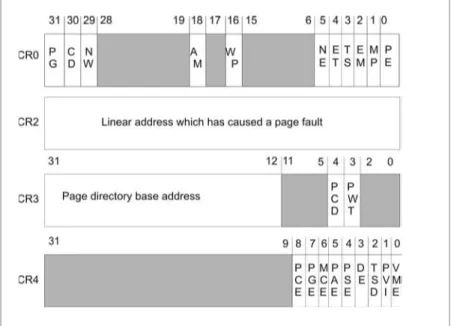
Advanced memory management functions are facilitated by four system registers (GDTR, LDTR, IDTR, TR) and five mode control registers (CR0, CR1, CR2, CR3, CR4). The usage of these registers will be explained in the next few sections.
NOTE It is interesting to note how the Pentium’s collection of
regis-ters has been constrained by historical forces. The design requirement demanding backward compatibility has resulted in the Pentium having only a few more registers than the 8086.
A cache provides temporary storage that can be accessed quicker than DRAM. By placing computationally intensive portions of a pro-gram in the cache, the processor can avoid the overhead of having
to continually access DRAM. The savings can be dramatic. There are different types of caches. AnL1 cacheis a storage space that is located on the processor itself. AnL2 cacheis typically an SRAM chip outside of the processor (for example, the Intel Pentium 4 ships with a 256 or 512KB L2 Advanced Transfer Cache).
NOTE If you are attempting to optimize code that executes in the
cache, you should avoid unnecessary function calls. A call to a distant function requires the processor to execute code that lies outside the cache. This causes the cache to reload. This is one reason why certain C compilers offer you the option of generating inline functions. The other side of the coin is that a program that uses inline functions will be much larger than one that does not. The size-versus-speed trade-off is a balancing act that rears its head all over computer science.
Disk storage is the option of last resort. Traditionally, disk space has been used to createvirtual memory. Virtual memory is memory that is simulated by using disk space. In other words, portions of memory, normally stored in DRAM, are written to disk so that the amount of memory the processor can access is greater than the actual amount of physical memory. For example, if you have 10MB of DRAM and you use 2MB of disk space to simulate memory, the processor can then access 12MB of virtual memory.
Chapter
1
NOTE A recurring point that I will make throughout this book is the high cost of disk input/output. As I mentioned previously, the latency for accessing disk storage is on the order of milliseconds. This is a long time from the perspective of a processor. The situation is analogous to making a pizza run from a remote cabin in North Dakota. If you are lucky, you have a frozen pizza in your freezer/cache and it will only take 30 minutes to heat up. If you are not lucky, you will have to call the pizza delivery guy (i.e., access the data from disk storage) and wait for five hours as he makes the 150-mile trek to your cabin.
Using virtual memory is like making a deal with the devil. Sure, you will get lots of extra memory, but you will pay an awful cost in terms of performance. Disk I/O involves a whole series of mandatory actions, some of which are mechanical. It is estimated that paging on Windows accounts for roughly 10% of execution time. Managing virtual memory requires a lot of bookkeeping on the part of the pro-cessor. I will discuss the precise nature of this bookkeeping in a later section.
ASIDE
I worked at an ERP company where one of the VPs used to fine engineers for performing superfluous disk I/O. During code reviews, he wouldgrepthrough source code looking for thefopen()andfread()standard library functions. We were taught the basic lesson that you cached everything you possibly could in memory and only moved to disk storage when you absolutely had no other alternative (and even then you needed permission). To the VP’s credit, the company’s three-tier middleware suite was the fastest in the industry.
Address Lines and Buses
Each byte in DRAM is assigned a unique numeric identifier called
anaddress, just like houses on a street. An address is an integer
value. The first byte in memory is assigned an address of zero. The region of memory near address zero is known as thebottom of
mem-ory, orlow memory. The region of memory near the final byte is
known ashigh memory. The number of physical (i.e., DRAM) bytes that a processor is capable of addressing is known as the processor’s
physical address space. (See Figure 1.3.)
The physical address space of a processor specifies thepotential
number of bytes that can be addressed,notthe actual number of physical bytes present. People normally don’t want to spend the money necessary to populate the entire physical address space with DRAM chips. Buying 4GB of DRAM is still usually reserved for high-end enterprise servers.
The physical address space of a processor is determined by the number of address lines that it has. Address lines are a set of wires connecting the processor to its DRAM chips. Each address line specifies a single bit in the address of a given byte. For example, the Intel Pentium has 32 address lines. This means that each byte is assigned a 32-bit address so that its address space consists of 232 addressable bytes (4GB). The 8088 had 20 address lines, so it was capable of addressing 220, or 1,048,576, bytes.
NOTE If virtual memory is enabled on the Pentium 4, there is a way
to enable four additional address lines using what is known as Physical Address Extension (PAE). This allows the Pentium processor’s physical address space to be defined by 36 address lines, which translates into
an address space of 236bytes (64GB).
Chapter
1
To access and update physical memory, the processor uses a control bus and a data bus. Abusis a collection of related wires that connect the processor to a hardware subsystem. The control bus is used to indicate if the processor wants to read from memory or write to memory. The data bus is used to ferry data back and forth between the processor and memory. (See Figure 1.4.)
When the processor reads from memory, the following steps are performed:
1. The processor places the address of the byte to be read on the address lines.
2. The processor sends the read signal on the control bus. 3. The DRAM chip(s) return the byte specified on the data bus.
When the processor writes to memory, the following steps are performed:
1. The processor places the address of the byte to be written on the address lines.
2. The processor sends the write signal on the control bus. 3. The processor sends the byte to be written to memory on the
data bus.
This description is somewhat of an oversimplification. For example, the Pentium processor reads and writes data 4 bytes at a time. This is one reason why the Pentium is called a 32-bit chip. The processor will refer to its 32-bit payload using the address of the first byte (i.e., the byte with the lowest address). Nevertheless, I think the general operation is clear.
Intel Pentium Architecture
You have seen how a processor reads and writes bytes to memory. However, most processors also support two advanced memory man-agement mechanisms: segmentation and paging.
Segmentation is instituted by breaking up a computer’s address space into specific regions, known assegments. Using segmentation is a way to isolate areas of memory so that programs cannot inter-fere with one another. Segmentation affords what is known as
memory protection. It is possible to institute memory segmentation
without protection, but there are really no advantages to such a scheme.
Under a segmentation scheme that enforces memory protection, each application is assigned at least one segment. Large applications often have several segments. In addition, the operating system will also have its own custom set of segments. Segments are assigned a specific set of access writes so that policies can be created with regard to who can update what. Typically, the operating system code segments will execute with the highest privilege and applications will be loaded into segments with less authority.
Paging is a way to implement virtual memory. The physical memory provided by DRAM and disk storage, which is allocated to simulate DRAM, are merged together into one big amorphous collection of bytes. The total number of bytes that a processor is capable of addressing, if paging is enabled, is known as itsvirtual address
space.
Chapter
1
The catch to all this is that the address of a byte in this artifi-cial/virtual address space is no longer the same as the address that the processor places on the address bus. This means that transla-tion data structures and code will have to be established in order to map a byte in the virtual address space to a physical byte (regard-less of whether that byte happens to be in DRAM or on disk).
When the necessary paging constructs have been activated, the virtual memory space is divided into smaller regions calledpages. If the operating system decides that it is running low on physical memory, it will take pages that are currently stored in physical memory and write them to disk. If segmentation is being used, bookkeeping will have to be performed in order to match a given page of memory with the segment that owns it. All of the account-ing work is done in close conjunction with the processor so that the performance hit associated with disk I/O can be kept to a minimum.
NOTE When pages of data are stored in physical memory (i.e.,
DRAM), they are placed in page-sized slots that are known aspage
frames. In addition to keeping track of individual pages, most operat-ing systems also monitor page frame usage. The number of page frames is usually much smaller than the number of pages, so it is in the best interest of the operating system to carefully manage this pre-cious commodity.
NOTE It is possible to use paging without using disk space. But in
this case, paging transforms into a hybrid form of segmentation that deals with 4KB regions of memory.
Because Intel’s Pentium class of processors is easily accessible, I decided to use the Pentium to help illustrate segmentation and pag-ing. I would love to demonstrate theory with a MIPS64 processor, but I can’t afford an SGI server (sigh). Being inexpensive is one of the primary reasons for Intel’s continued success. Hackers, like me, who couldn’t afford an Apple IIe back in the 1980s were left
scrounging for second-hand Intel boxes. There were thousands of people who had to make this kind of financial decision. So, in a sense, the proliferation of Intel into the workplace was somewhat of a grass roots movement.
The Pentium class of processors is descended from a long line of popular CPUs:
CPU Release Date Physical Address Space
8086 1978 1MB
8088 1979 1MB
80286 1982 16MB
80386 1985 4GB
80486 1989 4GB
Pentium 1993 4GB
Pentium Pro 1995 64GB
Pentium II 1997 64GB
Pentium III 1999 64GB
Pentium 4 2000 64GB
NOTE When the IBM PC came out in 1981, it shipped with a 4.77
MHz 8088. Without a doubt, mainframe developers were overjoyed. This was because the PC gave them a place of their own. In those days, the standard dummy terminals didn’t do anything more than shuttle a data buffer back and forth to a mainframe. In addition, an engineer had little or no control over when, or how, his code would be run. The waiting could be agonizing. Tom Petty was right. Bribing a sysop with pizza could occasionally speed things up, but the full court grovel got tiring after a while. With an IBM PC, an engineer finally had a build machine that was open all night with no waiting.
ASIDE
I know one CDC engineer, in particular, who ported a FOR-TRAN ’77 compiler to a PC in 1982 for this very reason. His supervisor would walk over and say: “Why do you want to run on that little three-wheeler instead of the production ma-chine?” His answer: “Because it is mine, damn it.” This one statement probably summarizes the mindset that made PCs wildly successful.
Chapter
In an attempt to keep their old customers, Intel has gone to great lengths to make their 32-bit processors backward compatible with the previous 16-bit models. As testimony to Intel’s success, I can boot my laptop with a DOS 6.22 boot disk and run most of my old DOS applications (including Doom and Duke Nukem).
A product of the requirement for backward compatibility is that the Pentium chip operates in a number of different modes. Each mode dictates how the processor will interpret machine instructions and how it can access memory. Specifically, the Pentium is capable of operating in four modes:
n Real mode
n Protected mode
n System management mode (SMM) n Virtual 8086 mode
System management mode and virtual 8086 mode are both special-purpose modes of operation that are only used under special cir-cumstances. I will focus primarily on the first two modes of
operation: real mode and protected mode. In addition, I will investi-gate how each of these modes support segmentation and paging.
Having the processor operate in different modes is not a feature limited to the Intel platform. The MIPS64 processor, for example, also operates in four modes:
n Kernel mode
n User mode
n Debug mode n Supervisor mode
Real Mode Operation
The first IBM PC ran strictly in real mode. Furthermore, all 32-bit Intel computers also start in real mode when they are booted. This sort of provides a least common denominator behavior that back-ward compatibility depends upon.
Real mode operating systems tend to be very small (i.e., less than 128KB) because they rely on the BIOS to provide an interface to the hardware. This allows them to easily fit on a 1.44MB floppy diskette. Virus protection rescue disks rely on this fact, as do sys-tem repair disks. I have also bought drive partitioning software that can be run from a boot disk.
and instruction pointer registers. The real mode register setup is displayed in Figure 1.7.
As you can see, the “E” prefix has been removed from the regis-ter names. In addition, each of the 16-bit general regisregis-ters, AX, CX, DX, and EX, can be manipulated in terms of two 8-bit registers. For example, the AX register can be seen as the combination of the AH and AL registers. The AH register refers to the high byte in AX, and the AL register refers to the low byte in AX.
NOTE The memory and mode registers shown in Figure 1.2 are still
visible in real mode. They still exist if the processor is a 32-bit class CPU but they have no significance or use in real mode. The only exception to this rule is if you are trying to switch to protected mode.
A machine in real mode can address 1MB of DRAM. This implies that only 20 address lines are used in real mode. The address of a byte in memory, for a processor real mode, is formed by adding an offset address to a segment address. The result of the sum is always a 20-bit value (remember this fact; it is important), which confirms our suspicion that there are 20 address lines.
The address formed by the sum of the segment and offset addresses corresponds directly to the value that is placed on the processor’s address lines. Now you can get a better idea of why they call it “real” mode. The address of a byte in real mode maps directly to a “real” byte in physical memory.
Chapter
1
An address is denoted, in Intel assembly language, by a seg-ment:offsetpair. For example, if a byte is located in segment 0x8200and is situated at an offset of0x0100, the address of this byte is specified as:
0x8200:0x0100
Sometimes, for reasons that I will explain later, this is also written as:
0x8200[0]:0x0100
The real mode address resolution process is displayed in Figure 1.8.
Segment addresses denote a particular memory segment and are always stored in one of the 16-bit segment registers. Specifically, a segment address specifies thebase address, the lowest address, of a memory segment. Each segment register has a particular use:
Register Use
CS Segment address of code currently being executed SS Segment address of stack
DS Data segment address
ES Extra segment address (usually data) FS Extra segment address (usually data) GS Extra segment address (usually data)
NOTE The fact that there are six segment registers means that at
any time, only six segments of memory can be manipulated. A pro-gram can have more than six segments, but only six can be accessible at any one point in time.
Offset addresses can be stored in the general registers and are 16 bits in size. Given that an offset address is 16 bits, this limits each segment to 64KB in size.
QUESTION
If the segment address and offset address are both stored in 16-bit registers, how can the sum of two 16-bit values form a 20-bit value?
ANSWER
The trick is that the segment address has an implicit zero added to the end. For example, a segment address of 0x0C00 is treated as 0x0C000 by the processor. This is denoted, in practice, by placing the implied zero in brackets (i.e., 0x0C00[0]). This is where the processor comes up with a 20-bit value.
As you can see, the real mode segment/offset approach does provide a crude sort of segmentation. However, at no point did I mention that the boundaries between segments are protected. The ugly truth is that there is no memory protection in real mode. When you run a program in real mode, it owns everything and can run amok if it wants.
Running an application in real mode is like letting a den of Cub Scouts into your home. They’re young, spirited, and all hopped-up on sugar. If you’re not careful, they will start tearing the house down. Crashing a real mode machine is simple, and there is little you can do to prevent it (other than back up your work constantly).
In case you are wondering, and I’m sure some of you are, here is an example of a C program that can crash a computer running in real mode:
/* --crashdos.c-- */
void main() {
unsigned char *ptr; int i;
ptr = (unsigned char *)0x0; for(i=0;i<1024;i++)
{
ptr[i]=0x0; }
return; }
See how little effort it takes? There is nothing special or secret about this attack. I just overwrite the interrupt vector table that is
Chapter
located at the bottom of memory. If you wanted to hide this type of code in a large executable, you could probably cut down the program to less than five lines of assembly code.
If you really wanted to be malicious, you could disable the key-board and then start reformatting the hard drive. The only defense a person would have is to yank the power cord, and even then, by the time they realize what is going on, it would probably be too late. My point, however, is not to tell you how to immobilize a DOS machine. Nobody uses them anymore, anyway. My motive is to demonstrate that real mode is anything but a secure environment.
To make matters worse, real mode does not support paging. All you have to play with is 1MB of DRAM. In reality, you actually have less than 1MB because the BIOS and video hardware consume size-able portions of memory. Remember the Bill Gates quote?
NOTE No memory protection? No paging? Now you understand
how the first version of PC-DOS was less than 5,000 lines of assem-bler. Perhaps “real” mode is called such because it is really minimal.
Intel’s processors would never have made inroads into the enter-prise with this kind of Mickey Mouse memory management. In an attempt to support more robust operating systems and larger address spaces, Intel came out with the 80386. The 80386 had a physical address space of 4GB and supported a new mode of opera-tion: protected mode.
Protected Mode Operation
Protected mode supplies all the bells and whistles that are missing in real mode. The Pentium processor was specifically designed to run in protected mode. Its internal plumbing executes 32-bit instructions more efficiently than it executes 16-bit instructions. Having the Pentium start in real mode during a machine’s power-up was sort of a courtesy that the Intel engineers have extended to help operating systems bootstrap.