RESOURCE AND PATIENT MANAGEMENT SYSTEM
Office of Information Technology
Division of Information Resource Management
Clinical Reporting System
(BGP)
Installation Guide and Release Notes
Version 14.1
May 2014
Installation Guide and Release Notes
Table of Contents
May 2014
Table of Contents
1.0
Introduction ... 1
1.1
Key Changes in Version 14.1 ... 1
1.1.1
Logic Changes to National GPRA/GPRAMA Report Measures... 1
1.1.2
Key Logic Changes to Non-GPRA Measures ... 2
1.1.3
Additional Key Enhancements and Revisions ... 2
2.0
Installation Notes ... 3
2.1
CRS Distribution Contents and Required Resources ... 3
2.1.1
Contents of Distribution ... 3
2.1.2
Required Resources ... 3
2.2
Visual CRS (GUI) Distribution Contents and Required Resources ... 4
2.2.1
Contents of GUI CRS Distribution ... 4
2.2.2
Required Resources for GUI CRS ... 4
2.3
Before You Begin... 4
3.0
Installation Instructions ... 5
3.1
Installation of the CRS GUI ... 6
3.1.1
Installation on the RPMS server ... 6
3.1.2
Installation on each user’s (client) PC ... 7
4.0
Sample Installations ... 8
4.1
Sample Installation of CRS on RPMS Server ... 8
4.2
Sample Installation of the CRS GUI... 15
Acronym List ... 18
Installation Guide and Release Notes
Preface
May 2014
Preface
The Government Performance and Results Act (GPRA) requires federal agencies to
report annually on how the agency measured against the performance targets set in its
annual plan. The Indian Health Service (IHS) GPRA measures include clinical
prevention and treatment, quality of care, infrastructure, and administrative efficiency
functions.
The IHS Clinical Reporting System (CRS) is a Resource and Patient Management
System (RPMS) software application designed for national reporting, as well as Area
Office and local monitoring of clinical GPRA and developmental measures. CRS was
first released for FY 2002 performance measures (as GPRA+) and is based on a
design by the Aberdeen Area Office (GPRA2000).
This manual provides instructions on using the CRS. Version 14.1 adds fiscal year
(FY) 2014 clinical performance measures to existing FY 2002 through FY 2013
measures.
CRS is the reporting tool used by the IHS Office of Planning and Evaluation to
collect and report clinical performance results annually to the Department of Health
and Human Services and to Congress.
Each year, an updated version of CRS software is released to reflect changes in the
logic descriptions of the different denominators and numerators. Additional
performance measures may also be added. Local facilities can run reports as often as
they want and can also use CRS to transmit data to their Area Office. The Area Office
can use CRS to produce an aggregated Area Office report for either annual GPRA or
Area Office director performance reports.
CRS produces reports on demand from local RPMS databases for both GPRA and
developmental clinical performance measures that are based on RPMS data, thus
eliminating the need for manual chart audits for evaluating and reporting clinical
measures.
To produce reports with comparable data across every facility, the GPRA measures
definitions were “translated” into programming code with the assistance of clinical
subject matter experts. CRS uses predefined taxonomies to find data items in the
RPMS Patient Care Component to determine if a patient meets the performance
measure criteria. Taxonomies contain groups of codes (e.g., diagnoses or procedures)
or site-specific terms. Each performance measure topic has one or more defined
denominators and numerators.
Installation Guide and Release Notes
Preface
May 2014
Administrative and clinical users can review individual or all measures at any time to
•
Identify potential data issues in their RPMS; for example, missing or incorrect
data.
•
Monitor their site’s performance against past national performance and upcoming
agency goals
•
Identify specific areas where the facility is not meeting the measure in order to
initiate business process or other changes
•
Quickly measure impact of process changes on performance measures
•
Identify IHS Area Offices meeting or exceeding measures to provide lessons
learned
Users of the RPMS CRS include
•
Area Office and site quality improvement staff
•
Compliance officers
•
GPRA coordinators
•
Clinical staff, such as physicians, nurses, nurse practitioners, and other providers
•
Area Office directors
•
Any staff involved with quality assurance initiatives
Installation Guide and Release Notes
Introduction
May 2014
1.0
Introduction
This manual provides user instructions on installing Version 14.1 of the Clinical
Reporting System (CRS). The manual provides installation instructions for both the
Resource and Patient Management System (RPMS) server side software and the
Visual CRS graphical user interface (GUI).
1.1
Key Changes in Version 14.1
1.1.1
Logic Changes to National GPRA/GPRAMA Report Measures
•
GPRA Developmental Measures:
−
Added the following new GPRA Developmental measures: Diabetes: Blood
Pressure Control (BP less than (<)140/90, or less than (<) 150/90 for ages 60
and older); Adult Immunizations (Tdap/Td, Tdap, Influenza, Zoster,
Pneumovax, combination measures); Childhood Immunizations
(4:3:1:3*:3:1:3); Controlling High Blood Pressure (BP less than (<) 140/90, or
less than (<) 150/90 for ages 60 and older); Chlamydia Testing (added age
breakdowns)
−
Changed Childhood Immunizations measure for Hepatits A to one dose
−
Changed Cancer Screening: Mammogram Rates denominator to ages 52
through 74
−
Updated codes in the following measures: Childhood Immunizations;
Comprehensive Cancer Screening
•
Diabetes: LDL Assessment: Changed measure from LDL less than or equal to
(=<) 100 to LDL less than (<) 100.
•
Diabetes: Nephropathy Assessment: Added CPT code S2065 to ESRD definition.
•
Access to Dental Service: (1) Added ADA code 0191 to documented dental visit.
(2) Added CPT codes D0190 and D0191 to documented dental visit.
•
Influenza: Removed Procedure code 99.52 from influenza definition.
•
Adult Immunizations: Removed Procedure code 99.55 from Pneumococcal
definition.
Installation Guide and Release Notes
Introduction
May 2014
•
Childhood Immunizations: (1) Removed Procedure code 99.39 from DTP
definition. (2) Removed Procedure code 99.36 from Diptheria definition. (3)
Removed Procedure code 99.38 from Tetanus definition. (4) Removed Procedure
code 99.37 from Acellular Pertussis definition. (5) Removed Procedure code
99.41 from IPV definition. (6) Removed Procedure code 99.48 from MMR
definition. (7) Removed Procedure code 99.45 from Measles definition. (8)
Removed Procedure code 99.46 from Mumps definition. (9) Removed Procedure
code 99.47 from Rubella definition.
•
Cancer Screening: Pap Smear Rates: (1) Removed CPT code 88155 from Pap
Smear definition. (2) Removed Procedure code 91.46 from Pap Smear definition.
(3) Added ICD-10 code Z12.4 to Pap Smear definition.
•
Controlling High Blood Pressure – Million Hearts: (1) Added CPT code S2065 to
ESRD definition.
•
Comprehensive CVD-Related Assessment: (1) Added CPT codes 92920, 92924,
92928, 92933, 92937, 92941, and 92943 to PCI definition.
1.1.2
Key Logic Changes to Non-GPRA Measures
For key logic changes to non-GPRA measures, please refer to the CRS 2014 (version
14.1) Selected Measures Report Performance Measure List and Definitions document
located on the CRS Web site at
http://www.ihs.gov/crs/documents/crsv14/SelectedMeasuresV14_1.pdf
.
1.1.3
Additional Key Enhancements and Revisions
Added the ability to run National GPRA/GPRAMA by Designated Provider and
GPRA Dashboard reports for multiple primary care providers at once.
Installation Guide and Release Notes
Installation Notes
May 2014
2.0
Installation Notes
Note:
Read the entire Notes File prior to attempting any
installation.
Prefix:
BGPCurrent Version:
14.1Note:
This distribution of the CRS contains Version 14.1 of CRS
and the GUI front end to the CRS system. The server-side
(i.e. “roll-and-scroll” or backend) version 14.1 of the
package can be installed alone or both the GUI and the
server-side versions can be installed. Currently, there is no
requirement to install the GUI.
Please install version 14.1 of CRS (bgp_1410.k) at all sites
regardless of whether the site opts to install and use the
GUI portion of the package. Version 14.1 of CRS and the
GUI have different requirements so please take note of the
requirements section for each piece of the software.
2.1
CRS Distribution Contents and Required Resources
2.1.1
Contents of Distribution
File
Description
bgp_1410.k Kernel Installation and Distribution System (KIDS) file containing software
bgp_141i.pdf Installation guide in PDF format (this manual) bgp_141t.pdf Technical Manual in PDF format
bgp_141u.pdf User Manual in PDF format
bgp_141u_logicselected.pdf CRS Clinical Performance Measure Logic Manual in PDF format
bgp_141u_visual.pdf Visual CRS User Manual in PDF format bgp_1410client.zip Visual CRS software for Client’s PC
2.1.2
Required Resources
Installation Guide and Release Notes
Installation Notes
May 2014
2.2
Visual CRS (GUI) Distribution Contents and Required
Resources
2.2.1
Contents of GUI CRS Distribution
•
bgp_1410client.zip
The following two files are contained in the zip file:
•
bgp_1410setup.exe
•
bgp_1410.msi
2.2.2
Required Resources for GUI CRS
Additional requirements for installing and using Visual CRS on a client’s PC:
•
On the RPMS Server
:
−
BMX v4.0
−
IHS Clinical Reporting System version 14.1
•
On the Client (User’s) PC:
−
Windows XP Service Pack 3 or higher
−
Microsoft Office 2003 or later
−
.NET Framework v4.0
−
If the CRS GUI is not going to be installed, ignore these requirements.
−
If the .NET Framework v4.0 is not installed it will automatically be
downloaded and installed when the client installation is started.
2.3
Before You Begin
•
Make a copy of this distribution for offline storage
•
Print all notes/readme files
•
Create a printed audit trail, in case there are any problems with the installation
To capture terminal output during the installation, use an auxport printer attached to
the terminal on which the installation is being performed.
Installation Guide and Release Notes
Installation Instructions
May 2014
3.0
Installation Instructions
Note:
This installation is a KIDS install. For any questions on
how to do a KIDS installation, please contact your Area
Office information systems support personnel.
In all UCIs running the IHS CRS:
1.
Ensure that users are unable to use the CRS for the duration of this installation.
2.
Save all routines (^%RO (CACHE) in the BGP4* namespace for use in returning
to the prior existing version, if needed.
Note:
If no problems are noted with the new installation, remove
saved routines from your system 7–10 days after this
install.
3.
Install bgp_1410.k. This file is the KIDS file for the IHS CRS.
a.
Load the distribution into KIDS using
Option 1
on the
KIDS Installation
menu
. The distribution was released in a file named bgp_1410.k
b.
Verify the load using
Option 2
on the
KIDS Installation menu
.
c.
Consider using
Options 3
and
4
on the
KIDS Installation menu
to print and
compare the Transport global.
d.
Install the distribution using option 6 on the Installation menu.
e.
For results, use the
KIDS Install File Print
option to view/print the IHS
CLINICAL REPORTING SYSTEM V14.1 entry.
Note:
For assistance with a KIDS install, call your Area Office
support personnel.
4.
After the install completes, assign security keys, as appropriate, using the
following table:
Installation Guide and Release Notes
Installation Instructions
May 2014
Name
Descriptive Name
Description
BGPZAREA BGP Area Report This key unlocks the Area Office report options on the main BGPMENU. Note: This key should be assigned only at the Area Office level.
BGPZMENU BGP Main Menu–CRS This key unlocks the main CRS menu. It should be assigned to all users who need to run
GPRA/CRS reports.
BGPZ PATIENT LISTS BGP Patient Lists This key allows the holder to obtain patient lists. The patient lists contain sensitive
patient/clinical information. This key should be given only to those users who have a need for such information.
BGPZ SITE PARAMETERS
BGP Site Parameters This key should be given to those with authority to update the site parameters.
BGPZ TAXONOMY EDIT BGP Taxonomy Edit This key should be given only to users who will need to update taxonomies.
3.1
Installation of the CRS GUI
There are two parts to the CRS GUI install: installation on the RPMS server and
installation on the local (client) PC. See the steps below for installation instructions.
3.1.1
Installation on the RPMS server
1.
Make sure BMX Version 4.0 has been installed in RPMS on the RPMS Server.
2.
Make sure CRS version 14.1 has been installed in RPMS on the RPMS server.
(See instructions above.)
Note
: If a previous version of Visual CRS is being used you will
not need to perform Steps 3 and 4. If this is the first time
Visual CRS is being used perform Steps 3 and 4.
3.
Assign option BGPGRPC as a secondary menu option with a synonym of
BGPG
for each user.
4.
Assign option BMXRPC as a secondary menu option with a synonym of
BMX
Installation Guide and Release Notes
Installation Instructions
May 2014
3.1.2
Installation on each user’s (client) PC
1.
Place bgp_1410client.zip into a directory of your choice and unzip the file. There
are two files included in the zip file: bgp_1410.msi and bgp_1410setup.exe.
2.
If a previous version of the Visual CRS product is installed it will need to be
removed. Go to the
Start
menu. Then go to
Control Panel
then click
Add/Remove Programs
and select and remove
Visual CRS
.
3.
Double click the
bgp_1410setup.exe
file that was distributed with Visual CRS. If
asked, accept the License Agreement and follow the instructions for downloading
and installing Microsoft .Net Framework v4.0 (this will only occur if the most
current version of Microsoft.Net Framework v4.0 is not on the local PC). This
step takes approximately 20-30 minutes over a DSL connection.
4.
Follow the prompts on the
Visual CRS Setup Screens
and accept all of the
defaults.
5.
Double click the
Visual CRS
shortcut that appears on the desktop.
6.
If this is the first install you will need to add a new connection. Please refer to the
BMX 4.0 User Manual for instructions.
7.
When the
RPMS Login
window appears, enter your RPMS access and verify
codes, and then click
OK
.
8.
If data for multiple facilities is stored on the same RPMS database, the Select
Division window is displayed. Select a Division, and then click
OK
.
Installation Guide and Release Notes
Sample Installations
May 2014
4.0
Sample Installations
4.1
Sample Installation of CRS on RPMS Server
D ^XPDKRN
Select KIDS OPTION: LOAD A DISTRIBUTION Enter a Host File: Q:\bgp_1410.k
KIDS Distribution saved on Apr 23, 2014@09:59:25 Comment: BGP AS OF 042314
This Distribution contains Transport Globals for the following Package(s): IHS CLINICAL REPORTING 14.1
Distribution OK!
Want to Continue with Load? YES// Loading Distribution...
Build IHS CLINICAL REPORTING 14.1 has an Environmental Check Routine Want to RUN the Environment Check Routine? YES//
IHS CLINICAL REPORTING 14.1
Will first run the Environment Check Routine, BGP4POS
Use INSTALL NAME: IHS CLINICAL REPORTING 14.1 to install this Distribution.
CDAD>d ^XPDKRN
KIDS 8.0
Select KIDS OPTION: INSTALL PACKAGE(S)
Select INSTALL NAME: IHS CLINICAL REPORTING 14.1 Loaded from Distribution Loaded from Distribution 4/23/14@12:26:32
=> IHS Clinical Reporting System v14.1 ;Created on Apr 23, 2014@09:59:25 This Distribution was loaded on Apr 23, 2014@12:26:32 with header of
BGP AS OF 042314 ;Created on Apr 23, 2014@09:59:25 It consisted of the following Install(s):
IHS CLINICAL REPORTING 14.1
Checking Install for Package IHS CLINICAL REPORTING 14.1 Will first run the Environment Check Routine, BGP4POS
Install Questions for IHS CLINICAL REPORTING 14.1 Incoming Files:
90241.01 BGP CONTROL FILE (including data) Note: You already have the 'BGP CONTROL FILE' File. I will REPLACE your data with mine.
Installation Guide and Release Notes
Sample Installations
May 2014
90241.02 BGP SITE PARAMETERS
Note: You already have the 'BGP SITE PARAMETERS' File.
90241.03 BGP SUMMARY CATEGORIES (including data) Note: You already have the 'BGP SUMMARY CATEGORIES' File. I will REPLACE your data with mine.
90241.04 BGP CLIENT AUTOMATED GPRA EXTRACT PARAMS
Note: You already have the 'BGP CLIENT AUTOMATED GPRA EXTRACT PARAMS' File.
90245 BGP AREA AUTOMATED GPRA PARAMS
Note: You already have the 'BGP AREA AUTOMATED GPRA PARAMS' File.
90245.1 BGP GPRA FLAT FILE DATA
Note: You already have the 'BGP GPRA FLAT FILE DATA' File.
90552.01 BGP 14 MEASURES (including data) Note: You already have the 'BGP 14 MEASURES' File. I will REPLACE your data with mine.
90552.02 BGP 14 INDIVIDUAL MEASURES (including data) Note: You already have the 'BGP 14 INDIVIDUAL MEASURES' File. I will REPLACE your data with mine.
90552.03 BGP 14 DATA CURRENT
Note: You already have the 'BGP 14 DATA CURRENT' File.
90552.04 BGP 14 DATA PREVIOUS
Note: You already have the 'BGP 14 DATA PREVIOUS' File.
90552.05 BGP 14 DATA BASELINE
Note: You already have the 'BGP 14 DATA BASELINE' File.
90552.06 BGP 14 NATIONAL PATIENT LISTS (including data) Note: You already have the 'BGP 14 NATIONAL PATIENT LISTS' File. I will REPLACE your data with mine.
90552.08 BGP 14 TAXONOMIES (including data) Note: You already have the 'BGP 14 TAXONOMIES' File. I will REPLACE your data with mine.
90552.09 BGP 14 TAXONOMY TEMP (including data) Note: You already have the 'BGP 14 TAXONOMY TEMP' File. I will REPLACE your data with mine.
Installation Guide and Release Notes
Sample Installations
May 2014
90552.1 BGP 14 MEASURE GROUPS (including data) Note: You already have the 'BGP 14 MEASURE GROUPS' File. I will OVERWRITE your data with mine.
90552.12 BGP 14 PATIENT ED DATA CURRENT
Note: You already have the 'BGP 14 PATIENT ED DATA CURRENT' File.
90552.13 BGP 14 PATIENT ED DATA PREVIOUS
Note: You already have the 'BGP 14 PATIENT ED DATA PREVIOUS' File.
90552.14 BGP 14 PATIENT ED DATA BASELINE
Note: You already have the 'BGP 14 PATIENT ED DATA BASELINE' File.
90552.15 BGP 14 PAT ED MEASURES (including data) Note: You already have the 'BGP 14 PAT ED MEASURES' File. I will OVERWRITE your data with mine.
90552.17 BGP 14 ICARE GROUPS (including data) Note: You already have the 'BGP 14 ICARE GROUPS' File. I will OVERWRITE your data with mine.
90552.18 BGP 14 ICARE CATEGORIES (including data) Note: You already have the 'BGP 14 ICARE CATEGORIES' File. I will OVERWRITE your data with mine.
90552.19 BGP 14 GUI REPORT OUTPUT
Note: You already have the 'BGP 14 GUI REPORT OUTPUT' File.
90553.02 BGP 14 ELDER INDIVIDUAL MEASURES (including data) Note: You already have the 'BGP 14 ELDER INDIVIDUAL MEASURES' File. I will OVERWRITE your data with mine.
90553.03 BGP 14 ELDER DATA CURRENT
Note: You already have the 'BGP 14 ELDER DATA CURRENT' File.
90553.04 BGP 14 ELDER DATA PREVIOUS
Note: You already have the 'BGP 14 ELDER DATA PREVIOUS' File.
90553.05 BGP 14 ELDER DATA BASELINE
Note: You already have the 'BGP 14 ELDER DATA BASELINE' File.
90553.06 BGP 14 ELDER MEASURES (including data) Note: You already have the 'BGP 14 ELDER MEASURES' File. I will OVERWRITE your data with mine.
Installation Guide and Release Notes
Sample Installations
May 2014
Enter the Device you want to print the Install messages. You can queue the install by enter a 'Q' at the device prompt. Enter a '^' to abort the install.
DEVICE: HOME// VIRTUAL TERMINAL
qqqqqqqqqqqqqqqqqqqqqqqqqqqqqqqqqqqqqqqqqqqqqqqqqqqqqqqqqqqqqqqqqqqqqqqqqqqqqqqq
Install Started for IHS CLINICAL REPORTING 14.1 : Apr 23, 2014@12:26:43
Build Distribution Date: Apr 23, 2014
Installing Routines:
Apr 23, 2014@12:26:47
Running Pre-Install Routine: PRE^BGP4POS
Installing Data Dictionaries: ... Installing Data Dictionaries: ... Installing Data Dictionaries: ... Installing Data Dictionaries: ... Installing Data Dictionaries: ... Installing Data Dictionaries: ...
Installing Data Dictionaries: ... Apr 23, 2014@12:26:54...
Installing Data:
Apr 23, 2014@12:27:04
Installing PACKAGE COMPONENTS:
Installing SECURITY KEY
Installing INPUT TEMPLATE
Installing PROTOCOL
Installing REMOTE PROCEDURE
Installing LIST TEMPLATE
Installing OPTION
Apr 23, 2014@12:27:09
Running Post-Install Routine: POST^BGP4POS Updating [BGP ESRD CPTS] taxonomy...
Creating [BGP DENTAL EXAM CPT 0190] taxonomy... Updating [BGP ASTHMA LABA NDC] taxonomy... Updating [BGP HEDIS ANTIBIOTICS NDC] taxonomy... Updating [BGP HEDIS ANTIDEPRESSANT NDC] taxonomy... Updating [BGP HEDIS ASTHMA NDC] taxonomy...
Updating [BGP HEDIS ASTHMA LEUK NDC] taxonomy... Updating [BGP HEDIS ASTHMA INHALED NDC] taxonomy... Updating [BGP HEDIS PRIMARY ASTHMA NDC] taxonomy... Updating [BGP HEDIS ANTICHOLINERGIC NDC] taxonomy... Updating [BGP HEDIS ANTITHROMBOTIC NDC] taxonomy... Updating [BGP HEDIS ANTI-INFECTIVE NDC] taxonomy... Updating [BGP HEDIS CARDIOVASCULAR NDC] taxonomy...
Installation Guide and Release Notes
Sample Installations
May 2014
Updating [BGP HEDIS CENTRAL NERVOUS NDC] taxonomy... Updating [BGP HEDIS NONBENZODIAZ NDC] taxonomy... Updating [BGP HEDIS ENDOCRINE NDC] taxonomy...
Updating [BGP HEDIS GASTROINTESTINAL NDC] taxonomy... Updating [BGP HEDIS PAIN NDC] taxonomy...
Updating [BGP HEDIS SKL MUSCLE RELAX NDC] taxonomy... Updating [BGP HEDIS ACEI NDC] taxonomy...
Updating [BGP HEDIS ARB NDC] taxonomy...
Updating [BGP HEDIS BETA BLOCKER NDC] taxonomy... Updating [BGP HEDIS OSTEOPOROSIS NDC] taxonomy... Updating [BGP PQA BETA BLOCKER NDC] taxonomy... Updating [BGP PQA RASA NDC] taxonomy...
Updating [BGP PQA CCB NDC] taxonomy... Updating [BGP PQA BIGUANIDE NDC] taxonomy... Updating [BGP PQA SULFONYLUREA NDC] taxonomy... Updating [BGP PQA THIAZOLIDINEDIONE NDC] taxonomy... Updating [BGP PQA DPP IV NDC] taxonomy...
Updating [BGP PQA DIABETES ALL CLASS NDC] taxonomy... Updating [BGP PQA STATIN NDC] taxonomy...
Updating [BGP PQA ANTIRETROVIRAL NDC] taxonomy... Updating [BGP PQA SABA NDC] taxonomy...
Updating [BGP PQA CONTROLLER NDC] taxonomy...
Creating [BGP PQA NON-WARF ANTICOAG NDC] taxonomy... Creating [BGP PQA WARFARIN NDC] taxonomy...
Creating [BGP PQA ASTHMA INHALE STER NDC] taxonomy... Creating [BGP PQA COPD NDC] taxonomy...
Updating [BGP CPT PAP] taxonomy... Updating [BGP PCI CPTS] taxonomy... Creating [BGP ZOSTER IZ CPTS] taxonomy... BGP CMS ACEI MEDS CLASS
Creating BGP CMS ACEI MEDS Taxonomy...
BGP CMS BETA BLOCKER CLASS BGP CMS BETA BLOCKER NDC Creating BGP CMS BETA BLOCKER MEDS Taxonomy... BGP CMS ANTIBIOTICS MEDS CLASS
Creating BGP CMS ANTIBIOTIC MEDS Taxonomy... BGP CMS ARB MEDS CLASS
Creating BGP CMS ARB MEDS Taxonomy...
Creating DM AUDIT ASPIRIN DRUGS Taxonomy... BGP CMS ANTI-PLATELET CLASS
Creating BGP ANTI-PLATELET DRUGS Taxonomy... BGP HEDIS OSTEOPOROSIS NDC
Creating BGP HEDIS OSTEOPOROSIS DRUGS Taxonomy... BGP ASTHMA CONTROLLER NDC
Creating BGP ASTHMA CONTROLLERS Taxonomy... BGP ASTHMA INHALED STEROID VAP
Creating BGP ASTHMA INHALED STEROIDS Taxonomy... BGP ASTHMA LEUKOTRIENE NDC
Creating BGP ASTHMA LEUKOTRIENE Taxonomy... BGP HEDIS ANTIDEPRESSANT NDC
Creating BGP HEDIS ANTIDEPRESSANT MEDS Taxonomy... BGP RA OA NSAID VAPI
Creating BGP RA OA NSAID MEDS Taxonomy...
BGP RA GLUCOCORTICOIDS CLASS BGP RA GLUCOCORTICOIDS VAPI Creating BGP RA GLUCOCORTICOIDS MEDS Taxonomy...
BGP HEDIS ANTIBIOTICS NDC
Creating BGP HEDIS ANTIBIOTICS MEDS Taxonomy... BGP HEDIS ASTHMA LEUK NDC
Installation Guide and Release Notes
Sample Installations
May 2014
BGP HEDIS ASTHMA NDC
Creating BGP HEDIS ASTHMA MEDS Taxonomy... BGP HEDIS PRIMARY ASTHMA NDC
Creating BGP HEDIS PRIMARY ASTHMA MEDS Taxonomy... BGP HEDIS ASTHMA INHALED NDC
Creating BGP HEDIS ASTHMA INHALED MEDS Taxonomy... BGP HEDIS BETA BLOCKER NDC
Creating BGP HEDIS BETA BLOCKER MEDS Taxonomy... BGP RA IM GOLD NDC
Creating BGP RA IM GOLD MEDS Taxonomy... BGP RA AZATHIOPRINE VAPI
Creating BGP RA AZATHIOPRINE MEDS Taxonomy... BGP RA LEFLUNOMIDE VAPI
Creating BGP RA LEFLUNOMIDE MEDS Taxonomy... BGP RA ORAL GOLD VAPI
Creating BGP RA ORAL GOLD MEDS Taxonomy... BGP RA CYCLOSPORINE NDC
Creating BGP RA CYCLOSPORINE MEDS Taxonomy... BGP RA METHOTREXATE VAPI
Creating BGP RA METHOTREXATE MEDS Taxonomy... BGP RA MYCOPHENOLATE VAPI
Creating BGP RA MYCOPHENOLATE MEDS Taxonomy... BGP RA PENICILLAMINE VAPI
Creating BGP RA PENICILLAMINE MEDS Taxonomy... BGP RA SULFASALAZINE VAPI
Creating BGP RA SULFASALAZINE MEDS Taxonomy... BGP THROMBOLYTIC AGENT CLASS
Creating BGP CMS THROMBOLYTIC MEDS Taxonomy... BGP HEDIS ANTICHOLINERGIC NDC
Creating BGP HEDIS ANTICHOLINERGIC MEDS Taxonomy... BGP HEDIS ANTITHROMBOTIC NDC
Creating BGP HEDIS ANTITHROMBOTIC MEDS Taxonomy... BGP HEDIS ANTI-INFECTIVE NDC
Creating BGP HEDIS ANTI-INFECTIVE MEDS Taxonomy... BGP HEDIS CARDIOVASCULAR NDC
Creating BGP HEDIS CARDIOVASCULAR MEDS Taxonomy... BGP HEDIS CENTRAL NERVOUS NDC
Creating BGP HEDIS CENTRAL NERVOUS MEDS Taxonomy... BGP HEDIS NONBENZODIAZ NDC
Creating BGP HEDIS NONBENZODIAZ MEDS Taxonomy... BGP HEDIS ENDOCRINE NDC
Creating BGP HEDIS ENDOCRINE MEDS Taxonomy... BGP HEDIS GASTROINTESTINAL NDC
Creating BGP HEDIS GASTROINTESTINAL MED Taxonomy... BGP HEDIS PAIN NDC
Creating BGP HEDIS PAIN MEDS Taxonomy... BGP HEDIS SKL MUSCLE RELAX NDC
Creating BGP HEDIS SKL MUSCLE RELAX MED Taxonomy... BGP HEDIS ACEI NDC
Creating BGP HEDIS ACEI MEDS Taxonomy... BGP HEDIS ARB NDC
Creating BGP HEDIS ARB MEDS Taxonomy... BGP HEDIS STATIN NDC
Creating BGP HEDIS STATIN MEDS Taxonomy... BGP CMS WARFARIN VAPI
Creating BGP CMS WARFARIN MEDS Taxonomy... BGP PQA BETA BLOCKER NDC
Creating BGP PQA BETA BLOCKER MEDS Taxonomy... BGP PQA RASA NDC
Installation Guide and Release Notes
Sample Installations
May 2014
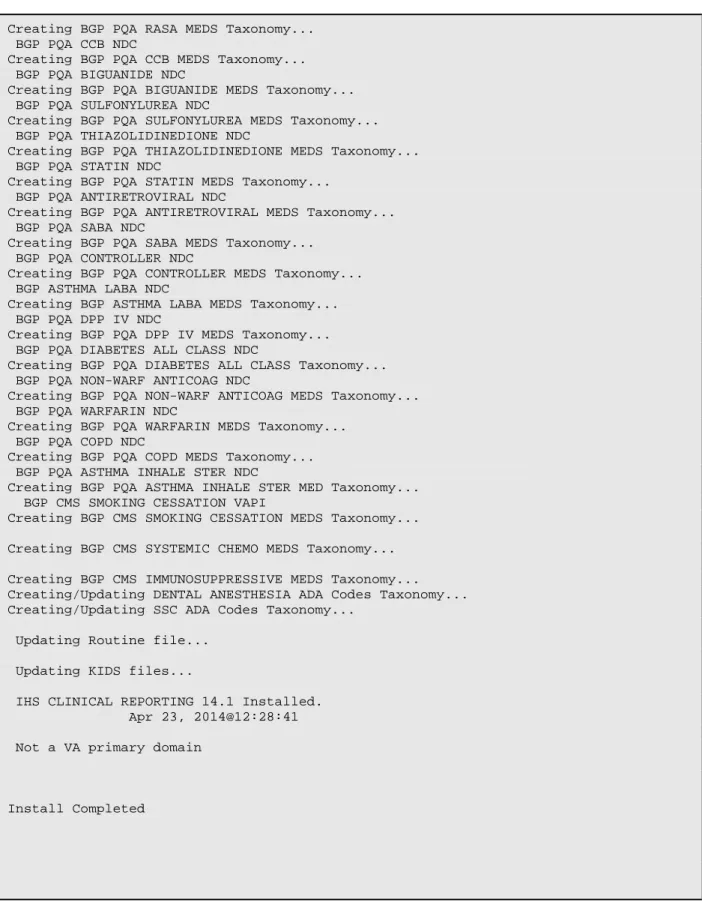
Creating BGP PQA RASA MEDS Taxonomy... BGP PQA CCB NDC
Creating BGP PQA CCB MEDS Taxonomy... BGP PQA BIGUANIDE NDC
Creating BGP PQA BIGUANIDE MEDS Taxonomy... BGP PQA SULFONYLUREA NDC
Creating BGP PQA SULFONYLUREA MEDS Taxonomy... BGP PQA THIAZOLIDINEDIONE NDC
Creating BGP PQA THIAZOLIDINEDIONE MEDS Taxonomy... BGP PQA STATIN NDC
Creating BGP PQA STATIN MEDS Taxonomy... BGP PQA ANTIRETROVIRAL NDC
Creating BGP PQA ANTIRETROVIRAL MEDS Taxonomy... BGP PQA SABA NDC
Creating BGP PQA SABA MEDS Taxonomy... BGP PQA CONTROLLER NDC
Creating BGP PQA CONTROLLER MEDS Taxonomy... BGP ASTHMA LABA NDC
Creating BGP ASTHMA LABA MEDS Taxonomy... BGP PQA DPP IV NDC
Creating BGP PQA DPP IV MEDS Taxonomy... BGP PQA DIABETES ALL CLASS NDC
Creating BGP PQA DIABETES ALL CLASS Taxonomy... BGP PQA NON-WARF ANTICOAG NDC
Creating BGP PQA NON-WARF ANTICOAG MEDS Taxonomy... BGP PQA WARFARIN NDC
Creating BGP PQA WARFARIN MEDS Taxonomy... BGP PQA COPD NDC
Creating BGP PQA COPD MEDS Taxonomy... BGP PQA ASTHMA INHALE STER NDC
Creating BGP PQA ASTHMA INHALE STER MED Taxonomy... BGP CMS SMOKING CESSATION VAPI
Creating BGP CMS SMOKING CESSATION MEDS Taxonomy...
Creating BGP CMS SYSTEMIC CHEMO MEDS Taxonomy...
Creating BGP CMS IMMUNOSUPPRESSIVE MEDS Taxonomy... Creating/Updating DENTAL ANESTHESIA ADA Codes Taxonomy... Creating/Updating SSC ADA Codes Taxonomy...
Updating Routine file...
Updating KIDS files...
IHS CLINICAL REPORTING 14.1 Installed. Apr 23, 2014@12:28:41
Not a VA primary domain
Install Completed
Installation Guide and Release Notes
Sample Installations
May 2014
4.2
Sample Installation of the CRS GUI
1.
Double click
bgp_1410setup.exe
to launch the
Visual CRS Setup Wizard
(Figure 4-2):
Figure 4-2: Visual CRS Setup Wizard, Welcome dialog
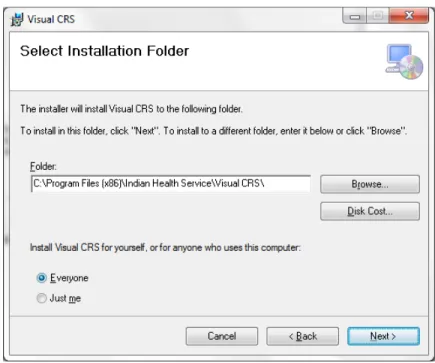
2.
Click
Next
to display the
Select Installation Folder
dialog (Figure 4-3):
Installation Guide and Release Notes
Sample Installations
May 2014
3.
Click
Next
to display the
Confirm Installation
dialog (Figure 4-4):
Figure 4-4: Visual CRS SetupWizard, Confirm Installation dialog
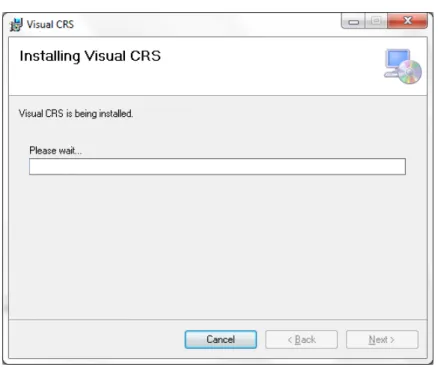
4.
Click
Next
to display the
Installing Visual CRS
dialog (Figure 4-5):
Installation Guide and Release Notes
Sample Installations
May 2014
5.
Wait while the application is installed. When the installation is complete, the
Installation Complete
dialog (Figure 4-6) displays:
Figure 4-6: Visual CRS Setup Wizard, Installation Complete dialog