Design And Implementation Of A Door Locking
System Using Android App
Agbo David O., Madukwe Chinaza, Odinya Jotham O.
Abstract: The Android Operating System finds wide use in smart phones and tablets and is thus suitable for home controllers. This project presents a smart home controller that uses the Bluetooth in an Android device to control the operation of an automated security door system. The software was designed using an Android app that generates a password that is recognized by the Bluetooth to control the opening and closing of the door located at some distance from the user. The Bluetooth module that is installed on the door receives the commands from the android phone, and passes these commands to the microcontroller that controls the opening and closing of the door. The design was simulated in Proteus integrated development environment after which the hardware was built on experimental boards. The performance of the system agrees excellently with its conception. The system can be used in various situations where access to an enclosure need to be secured
Keywords: Android Smart Phone, Arduino Uno, Door Automation, Bluetooth, Servomotor, Bluetooth module (HC-05), Liquid Crystal display, Proteus, Door security system.
————————————————————
1.0
I
NTRODUCTIONBluetooth is a wireless technology standard for exchanging data over short distances (using short-wavelength UHF radio waves in the ISM band from 2.4 to 2.485 GHz) from fixed and mobile devices, and for building personal area networks (PANs). Invented by telecom vendor Ericsson in 1994 [1], it was originally conceived as a wireless alternative to RS-232 data cables. It can connect to several devices [2], overcoming problems of synchronization. Bluetooth exists in many products, such as telephones, tablets, media players, robotics systems, handheld, laptops and console gaming equipment, and some high definition headsets, modems, and watches. The technology is useful when transferring information between two or more devices that are near each other in low-bandwidth situations.
1.1 LITERATURE REVIEW
In this section, we review projects and paper works related to this project. We focus on papers studying Bluetooth enabled door lock. In [3], the Bluetooth communication link was between two laptops with Bluetooth stack resident on the Laptop connected with the Ericsson ROK 101007 Bluetooth module via the Universal Serial Bus (USB). The motion detector was connected to one of the laptop via the serial link (serial cable between the motion detector and the laptop) and the status of the system, connection and detection was monitored directly on computer screen. This project had more focus on PIR sensor where the distance of detection is configured and monitored in real time. In spite of having Bluetooth technology, the system’s drawback is that it is not portable since it uses two laptops. SOREX Wireless Solution GmbH [4] had commercialized their Bluetooth based alarm security system. Their product was very similar to the project being developed but different in approach.
SOREX uses Bluetooth as a key where mobile phone Bluetooth used to open auto gate and magnetic locked doors. Taking SOREX Wireless Key Basic for example, it uses mobile phone Bluetooth’s as access key and registered device can be up to ten (10) phones. As the user approaches a door, the mobile communicates automatically with the SOREX module. It is up to the user if the door shall open automatically when they approach or push a button as alternative. The product seems to be more passive since it is physical key replacement. There also will be issue on locking function during electricity blackout. Richard Hoptroff [5] developed an access control system in which each user has a separate password, and a log is kept of time and person accordingly. No custom transmitter is needed but any suitable mobile phone or handhelds would do. Relay is used to provide an isolated switch for opening the electric lock. Relay and electric lock usually require high voltage to operate which make the system require supply from main or socket outlet. During electrical blackouts, the system becomes easily vulnerable and a user will be trapped until the supply is restored. This system is low cost, easy to implement and use for home security.
2. Materials and Methods
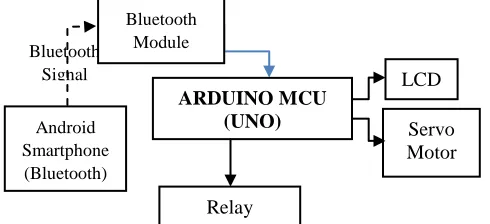
Figure 1 shows the block diagram of the automated door security system using Android app. The android app was designed to first display menu to enter password before the menu of the command of either open or closing will appear if the right password was entered. The app can be installed on any android phone to control a hardware section installed on a door that controls the locking or unlocking and to control closing or opening of the door where it is installed.
Bluetooth Signal Relay ARDUINO MCU (UNO) Android Smartphone (Bluetooth) LCD Bluetooth Module (Hc-05) Servo Motor _____________________
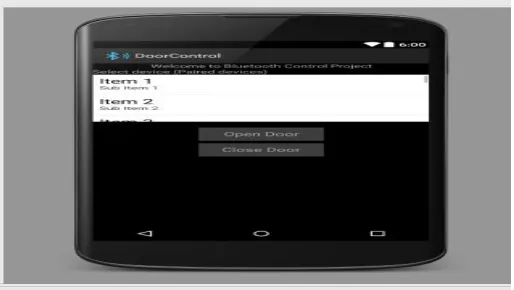
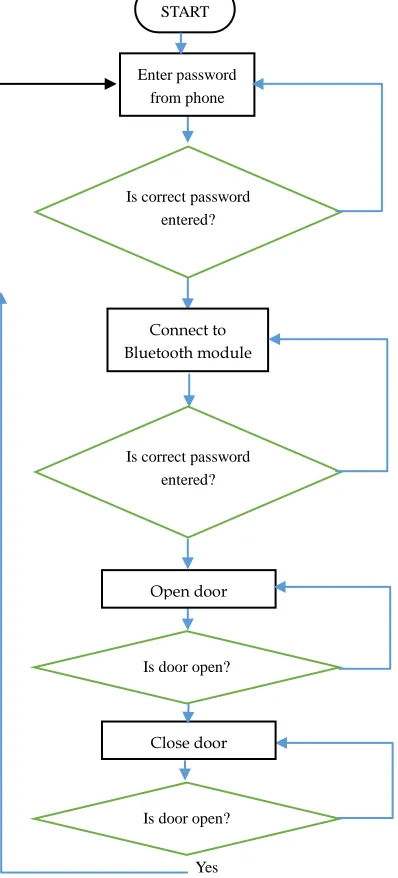
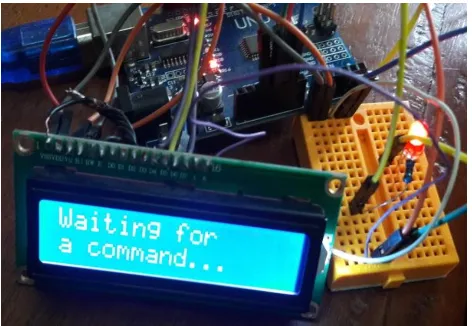
The Android app based door Security System consists of an android app that can be installed on android phones as shown in Figure 2. The hardware that can be installed on the door is shown in Figure 3. The android app was designed using android studio (A complete development environment Android Studio was installed which is then used to design the application with the help of java development kit (JDK) and software development kit (SDK)) [6].The Android platform includes support for the Bluetooth network stack, which allows a device to wirelessly exchange data with other Bluetooth devices. The application framework provides access to the Bluetooth functionality through the Android Bluetooth Application Program Interface (API). These APIs let applications connect wirelessly to other Bluetooth devices, enabling point-to-point and multipoint wireless features. All of the Bluetooth APIs is available in the Android Bluetooth package, which can be installed on any android phone. The app displays the first menu where the correct password has to be entered before the second menu can appear for the connection to the Bluetooth module of the door. The Bluetooth module used in this project is HC-05[7].The Bluetooth module (HC-05) pops up in the smartphone waiting for a pairing process to establish communication between the smartphone and the HC-05.When the android app has connected to the HC-05,the displays to either open or close the door becomes active. The app uses the Bluetooth of the android phone to send a serial command of either open or close message to the external Bluetooth module (HC-05) that is connected to the Arduino Uno that controls the locking or unlocking operation of the door. The opening or closing of the door forms the hardware of the security door locking system. If the right password is entered the menu for opening and closing will pop up, but if a wrong password is entered the menu for opening and closing will not pop up. The entire operation of the hardware section of the project is centred on the Arduino Uno that has been programmed. Upon power ON the liquid crystal display (LCD), initializes its programme by displaying “Welcome to Door Automation” then it displays “System Initialization” and finally displays “Waiting for a command…” on the LCD’s screen. When the open door button on the menu is pressed, the phone sends strings command to the HC-05 Bluetooth which sends the command to automatically open the door. The LCD displays “Waiting for a command…” on the LCD’s screen again, waiting for close door button on the menu to be pressed. If the button is pressed the phone sends strings command to the HC-05 Bluetooth which sends the command to automatically close the door. The servomotor is a high quality geared DC motor fitted with an electronic circuit for controlling the direction and position of the DC motor rotation. A standard servo is capable of rotating somewhere around 120- 180 degrees in the clockwise and counter clockwise directions [8]. The servomotor is used for the opening and closing of the door while relay is used for the locking and unlocking of the door.
Figure 2: Two Buttons Display on the app
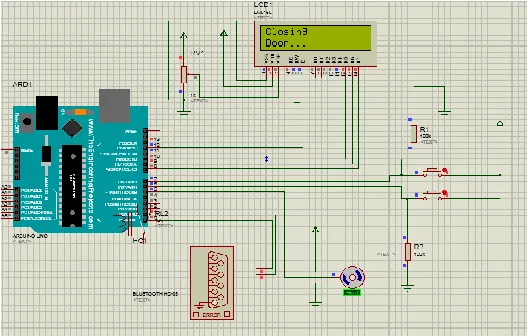
Figure 3: The circuit diagram of the android based automated door security system
Figure 4: Flowchart of the designed android based door lock
3. Results and Discussion
The program for theArduino Uno microcontroller was written in C language and was then compiled into an executable file using the ArduinoIDE [9]. The executable file was next imported into the Proteus Design Suite IDE [10], where the hardware circuit shown in figure 3 was designed and simulated. Figure 5 shows the installed android app on a Samsung J7 phone, Figures 6(a) to 6(f) show the Proteus simulation of the door security system results for each process of entering the correct and wrong passwords respectively. Upon successful completion of the software simulation, the system’s hardware was constructed on a bread board and programming of the arduino microcontroller was carried out using Arduino IDE. The hardware construction with connections and various operations of the system are shown in Figure 7. Figure 8(a) to 8(f) shows the operations of the
Figure 5: The picture of the installed android app.
(6a): Initialization of the door security hardware design
(6b): Door opening operation of the door security hardware design
Yes START
Enter password from phone
Is correct password entered?
Connect to Bluetooth module
Is correct password entered?
Open door command
Is door open?
Close door command
(6c): Door closing operation of the door security hardware design
Figure 6: Proteus simulations of the door security hardware design
Figure 7: Implementation of the door security hardware design
(8a): Door security app.
(8b): Entering of password
(8c): When the correct password is entered
(8e) Opening of door command
(8f)Closing of door command
Figure 8: Implementation results of android app communicating with the hard ware.
(9a): Powering of the hardware
(9b) Initialization of the hardware
(9c) Waiting for command from the app
(e) Waiting for command from the android phone
(f) When the command close door is selected
Figure 9: Implementation of the hardware door security system communicating with the android phone app.
5.3 CONCLUSION
In conclusion, it was discovered that the project performed according to specification and can be implemented or set up in various places such as home, offices and industrial areas. The Automated door lock system can provide added security to institution or organizations that use the system. It can thus be concluded that the initial objectives which we set out to achieve as stated in this report has being successfully attained which were:
1. To design password GUI in an android phone
2. Develop mobile phone application that can be installed in any android operated phone.
3. To design a hardware Bluetooth locking system
4. To interface the Android phone to the hardware locking system by writing a C program
REFERENCE
[1]. Operation of Bluetooth. Available: https://en.wikipedia.org/wiki/Bluetooth#cite_note-5
[2]. Brief history of Phone Bluetooth. Available: https://en.wikipedia.org/wiki/Bluetooth#cite_note-8
[3]. Specification of devices which Bluetooth operates on Available:
https://en.wikipedia.org/wiki/Bluetooth#cite_note-7
[4]. SOREX Wireless Solution GesmbH. Available:http://www.herold.at/gelbe-seiten/wiener-neustadt/8PD4x/sorex-wireless-solutions-gmbh/ 2004
[5]. Richard Hoptroff”Remote Control from Your Mobile
Phone”. Available:
http://www.flexipanel.com/Docs/Bluetooth%20Remote %20Control...%20From%20Your%20Mobile%20Phon e.pdf 2004
[6]. Android studio. Available:
https://developer.android.com/studio/index.html
[7]. HC-05 datasheet. Available:
https://www.gme.cz/data/attachments/dsh.772-148.1.pdf
[8]. Servomotor operation.
Available:http://mechatronics.mech.northwest.edu/des ign_ref/actuators/servomotor_intro.html
[9]. Arduino IDE. Available:
http://www.arduino.org/downloads