Computational Thinking with Spreadsheet:
Convolution, High-Precision Computing and Filtering
of Signals and Images
K. P. Soman, Sachin Kumar S., Soumya V., Shajeesh K. U.
Center for Excellence in Computional Engineering and Networking (CEN)Amrita Vishwa Vidyapeetham, Coimbatore, Tamil Nadu, India-641112.
ABSTRACT
Modern day innovations in sciences and engineering are direct outcome of human’s capacity for abstract thinking thereby cre-ating effective computational models of the problems that can be solved efficiently by the number crunching and massive data handling capabilities of modern networked computers. Survival of any economy now depends on innovating-capacity of its cit-izens. Thus capacity for computational thinking has become an essential skill for survival in the 21stcentury. It is necessitating a fundamental change in our curriculum in schools. Computational thinking need to be introduced incrementally along with standard content in a way that makes the standard content easier to learn and vice versa. When learners successfully combine disciplinary knowledge and computational methods they develop their iden-tity as Computational Thinkers. The need for trainers, training content and training methodology for imparting computational thinking has become subject of discussion in many international forums. In this article the use of spreadsheet as a tool for devel-oping computational-thinking -capabilities by integrating it with existing curricula is explored. Concept of convolution which ev-erybody uses when one does any multiplication is taken as a ve-hicle to develop exercises that enhance computational thinking. It is shown how convolution is visualized and implemented and also discussed a wide variety of computational experiments that students at various levels can do with the help of spreadsheet.
Keywords:
Computational Thinking, Convolution, Filtering, High-Precision Computing.
1. INTRODUCTION
We are living in a world where every new scientific discovery is assisted by data flowing from massively deployed sensors and ever scaling computational power of modern computers. Even theoretical discovery in mathematics is assisted by symbolic computing capability of modern software systems like ’Math-ematica’, ’Maple’ and ’Sage’. The non-linear nature of natural systems like weather, climate, galaxy formation etc are impossi-ble to study without massive data handling and ultra fast numeri-cal computing capability of modern computers. The same is true of modern day business. Modern economy being knowledge-intensive, thriving is quite difficult without adequate ICT in-frastructure in place. Customers are online and finding, reaching and providing instant services to them is vital to the survival of any business. Modern agriculture is gradually becoming digital; monitored and controlled to negate the effects of global
warm-ing and accompanywarm-ing climate change. It is becomwarm-ing increas-ingly evident that any citizen of future society will more and more depend on computers and sensors for day to day activities. His/her survival will greatly depend on the easiness with which he/she can harness the power of computers and one’s own men-tal prowess. It is in this context that ’Computational Thinking’ is thought to be developed as a necessary and essential mental faculty of any future citizen of this glob.
Computational Thinking (CT) aims at creating sophisticated problem solvers instead of software users. It emphasizes creat-ing knowledge and designcreat-ing processes that can be automated. It is necessitated by the rapid growth in computing power and spread of internet that changed the speed with which society got transformed. Such rapid changes rarely happened in the history of mankind. The rate is steadily growing making the economy more and more knowledge and computing oriented. Comput-ing and communication devices have become the essential and unavoidable tools for fast innovation. The economic vibrancy and competitiveness of any country in future will depend on its citizen’s readiness to equip computational thinking. Citizens equipped with CT can make continuous innovation happen at faster and faster rates.
Computational Thinking is basically a modern approach to prob-lem solving that combines the modeling and abstraction power of human brain, computing power of networked computers and data acquisition capability of ubiquitous sensors. It is not just about using computers and sensors. We acquire technical skills not by the use of a technology. One won’t become a Automobile Engineer by learning to drive an automobile or an aeronautical engineer by just flying an aero plane. CT is more than using tech-nology and computers; it involves thinking processes and strate-gies that are characteristic of Computer Science. As per the op-erational definition of CT , it is an approach to problem solving, which uses abstraction to create algorithmic solutions that can be automated with computational processes [1]-[2]. Key elements of computational thinking are ability to do abstraction, logical&
ence subjects since computation as a method of inquiry is al-ready a part of modern science. With computational thinking, ed-ucators can facilitate all kinds of modeling activities in science that really represent ways of actually doing real-world science as opposed to just sort of learning about science [3]. Important ideas in computational thinking can be introduced incrementally along with standard content in a way that makes the standard content easier to learn (and vice versa). When learners success-fully combine disciplinary knowledge and computational meth-ods they develop their identity as Computational Thinkers.
1.2 Model for imparting CT: Use-Modify-Create
One generally agreed upon model to impart computational think-ing is the so calledUse-Modify-Create modelin which student start working with an existing model and tool and try for modi-fication and innovation [3]. At the end, students become capable of using computational media to create, build, and invent solu-tions to new problems. In order to achieve this, students must be able to express themselves and their ideas in computational terms in a computational media. This should be part of the motivation to learn computational thinking. Microsoft Excel or any spread-sheet is one such media with which students can express their thoughts and do many computational modeling and simulation. If the computational model is rich enough, many modifications can be tried at and some time invent new models. When young people learn about language, we don’t just teach them linguistics or grammar; we let them express themselves. Similar thing must happen with computational thinking.
1.3 Context for computational thinking
To realize the full potential of computational thinking one should apply it in a domain in which he or she has a passion to explore. For example a biologist may couple the concepts of mutation and crossing over of genes in genetics and computational thinking to fathom the human genome.Such contexts are infinite and illus-trate its power. Developing expertise in computational thinking involves learning to recognize its application and use across do-mains.
2. EDUCATING THE EDUCATORS AND
CREATING INNOVATIVE EXERCISES
Teacher development is the one main issue in introducing CT in schools. Teachers themselves should learn it by directly in-volving in computational thinking related projects and activi-ties. Computational thinking is difficult to learn from rote lec-ture. Teachers should learn much like their prospective students learn. The challenges ahead now are creating of innovative ex-ercises with appropriate computational tool into consideration. The aim of this paper is to introduce such exercises. In this arti-cle we show how to do multi-precision computing (with respect to multiplication) in Excel spreadsheet using the concept of con-volution. The idea then is extended to variety of other interesting applications.
2.1 What is multiple precision arithmetic?
Most programming languages, in particular ISO-C and java only have fixed precision data types that on their own cannot be used to represent values larger than their precision will allow. The pur-pose of multiple precision algorithms is to use fixed precision data types to create and manipulate multiple precision integers
Convolution is a ubiquitous operation in science and engineer-ing. Interestingly it is an operation one is learning in primary schools though at that time the steps followed are not given a name. Later one learns it in engineering in discrete and contin-uous domain with an exotic name called ”Convolution” with a well defined formula. In discrete domain the operands are In this at first we formally define discrete convolution of two sequences
{x(k)}, k= 1 to m and{y(k)}, k= 1 to n as a sequence operation involving folding, multiplying, shifting and adding and then show that multiplication operation is basically a convolution operation with one difference. It involves convolution and carry over operation. Consider {7, 2, 4} , {6, 2}. We assume all sequence index are starting at zero. The process involved are Step 1: Arrange the two sequences one below the other starting from index 0
7 2 4 6 2
Step 2: Fold the second sequence at index zero to obtain
7 2 4 2 6
Step 3: Multiply the overlapping elements in the first and second (folded version) sequences . With no shift , we obtain z(0) = 42. Here index of z indicates number of shifts made.
Step 4: shift the folded sequence, and do step 3.
Step 5: Repeat step 4 until there is no overlap between elements of the two sequences The subsequent output for the example are:
7 2 4 2 6
⇒z(1) = (7×2) + (2×6) = 26
7 2 4 2 6
⇒z(2) = (2×2) + (4×6) = 28
7 2 4 2 6
⇒z(3) = (4×2) = 8
The final output sequence is 42, 26, 28, 8.
Now if we consider the sequence elements as individual digits of operands of two numbers, the multiplication output can be produced by a carryover operation, starting from the rightmost elements. The output starting the right is then 8, 8, 8, 4, 4. So the output of multiplication is 44888.
3. COMPUTING CONVOLUTION IN EXCEL
Consider convolving sequence{1, 2, 3}with{3, 1, 2}. From the previous example one can see that we need shifting of one folded sequence relative to the other. Folded sequence is just the reversed version of the sequence. Let sequence{3, 1, 2}be the sequence undergoing folding and shifting. We use excel’s rela-tive and absolute addressing scheme, ’sumproduct’ function and copying of formula by dragging to achieve the required task. In figure 1, sequence{3,1,2}is the folded sequence. In the folded form the sequence is{2, 1, 3}.
The convolution operation is done as follows.
Fig. 1. Two sequences in which one is folded for doing convolution
[image:3.595.58.280.227.345.2]Fig. 2. Output of Inner product (sumproduct) operation with no shift
Fig. 3. Output of Inner product (sumproduct) operation for zero to 5 shifts (shown in grey cells)
(2) In D6 enter the formula=sumproduct (B4:D4,$B$5:$D$5). Note that absolute addressing is used for the folded se-quence.
(3) Drag the formula H6 to right to get the required output. Total number of cells up to which the formula to be copied is given by m+n-1 where m and n are lengths of the two sequences. See figure 2 and 3 for the output.
Now consider multiplication of a 18 digit number by another 8 digit number. Calculators cannot give the right answer. It always approximates and give the answer in scientific notation. Can computational thinking help us to get exact answer in spread-sheet?. Yes!.
Problem involves the following.
(1) Parse each operand strings into a sequence of individual dig-its
(2) Do convolution with the two sequences
(3) Apply carry over operation to produce the final sequence
3.1 Excel Functions for doing Multi-precision Computing
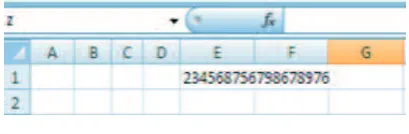
Let the following number say z = 234568756798678976 and y = 56089567 is to be multiplied whose output is x = 13156848950360615265843392. Putting this big number in an excel cell as number is problematic. The moment one type the first number, Excel approximate and show it as 2.3457E+17.
Fig. 4. Entering a big number as a string
Even changing number format won’t help. To avoid being ap-proximated, one can type it as a string by putting ’ (single quote) at the left end of the number. That is enter single quote ’ before entering the big numbers. Since the entered number is a string, one can use all string manipulation functions in Excel. For exam-ple the function LEN can be used for finding length of the string. It won’t count the single quote used for converting the number into string.
The next problem is parsing above string into individual digits. The MID function can be used for parsing. It returns the char-acter or charchar-acters from the middle of a string given the ’text’, ’starting position’ and ’number of characters from starting po-sition’ as the argument. Assume one needs parsing the string named x from left and parsed digits is to be in vertical column. The function ’ = mid(x, row(A1),1) written in any cell returns the first letter and on dragging the formula down will parse the digits in x one by one. Note that row(A1) in the argument re-turns 1 which represent starting position and on dragging down causes starting position to be subsequent integers. The net effect is parsing from left. One can also do parsing from right which give reversed or folded string. This is achieved by the function =mid(x, len(x)+1-Row(A1), 1). For efficiency of computation one can pre-compute len(x) in a cell and refer in the formula. The above formula on dragging down will parse the string in re-verse order. Since the input is a string , the output of the parsing is a character. To convert it back to the integer one can use int function . So to get forward parsed integer string use the formula =int(mid(x,row(A1),1).
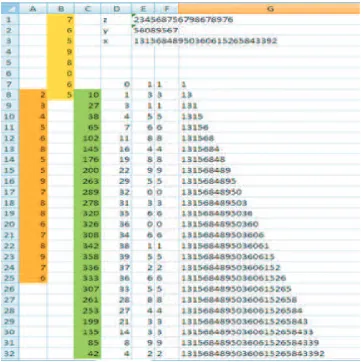
Rest of the procedure is explained with respect to the figure 5. Steps:
(1) Enter ’234568756798678976 in cell E1. Name this cell as z by typing z in the name box and then pressing ENTER key. Use of named cells avoids the need for putting $ sign that is required when one needs absolute addressing in a formula. (2) Enter ’56089567 in E2 and name the cell as y
(3) Enter =INT(MID(y, LEN(y)+1-ROW(A1), 1)) in B1 and drag till last digit appears. Since the number y has 8 dig-its, the digits occupy cells B1 to B8. These digits constitute folded integer string.
(4) Enter =INT(MID(z, ROW(A1), 1)) in A8 so that first digit of the string is aligned with the last digit of the folded string. Drag till last digit appears in a cell.
(5) Select cell B1 to B8 and name the array of cells as ’string1’. (6) Enter =SUMPRODUCT (string1, A1:A8) in cell C8 and drag till last sumproduct number appear in a cell. The num-ber of cells to drag is given by m+n-1 where m and n are the string lengths.
(7) Now we need to do carry over operation starting from cell C32
[image:3.595.58.280.368.473.2](9) Enter = CHAR(48+E7) in F7 and drag till F32
(10) Enter = CONCATENATE (F7) in G7 and =CONCATE-NATE (G7, F8) in G8. Copy the formula in G8 to cell G32. (11) Enter =G32 in E3. This is the output of multiplication as a
character string.
3.2 Convolution for creating Pascal Triangle
Convolution can be readily applied to create Pascal Triangle in Excel. The entries in Pascal triangle can be obtained by repeated convolution of sequence{1, 1}with itself. They are also bino-mial coefficients of expansion of (1+x)n. The procedure for
cre-ating the coefficients is explained with respect to figure 6. (1) Enter 1 in cell B2, C2 and B6. Select B1:C1 and name it as
’s’ (use name box)
(2) Enter = IF(SUMPRODUCT(s, A6:B6)>0, SUMPROD-UCT(s, A6:B6), ” ”) in B7 and drag the formula vertically and horizontally. Pascal Triangle is ready. One may go for conditional formatting to get the triangle in figure 6. Note that A6 and other cells below it are blank. But when doing the sumproduct, value in those cells is taken as zero. The mean-ing of above formula in step 2 is that if sumproduct value in the current cell is nonzero print the same or print null.
4. OTHER APPLICATIONS OF CONVOLUTION
IN HIGHER SECONDARY SCHOOLS
In higher secondary schools, convolution can be utilized in sev-eral contexts. Some of them are as follows
(1) Multiplication of a polynomial by another polynomial (so-lution: Convolve the coefficient sequences)
(2) Finding probability mass of sum of two independent discrete distributions given probability mass functions of each. (con-volve probability mass functions)
(3) Tossing a die (say ) 5 times and finding how many ways various sum can happen. That is finding number of ways the sum on 5 dice is 5 to 30 happen. (Convolving sequences{1, 1, 1, 1, 1, 1}5 times with itself).
5. CONVOLUTION IN SIGNAL PROCESSING
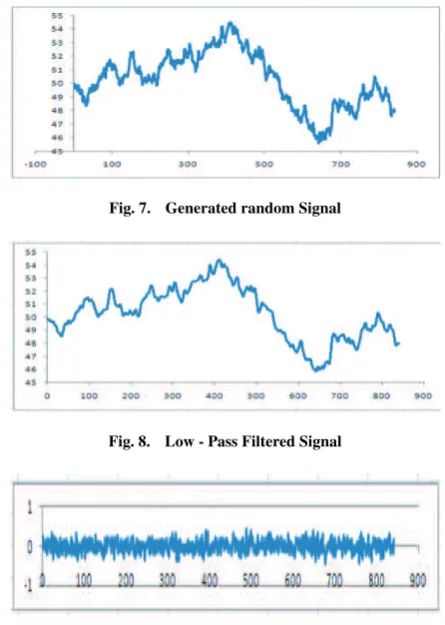
One main application of convolution in signal processing is fil-tering. Digital filters which come under category called FIR (fi-nite impulse response) filters are a short sequence of numbers which when convolved with digital signal sequence change the frequency content of the signal. A variety of experiments in sig-nal processing can be done in excel with the function sumprod-uct to the task of convolution. Excel itself can generate random signal for experimenting. For Example following signal is gen-erated as follows. In the cell A5 enter 50. In the cell A6 enter = A5+norminv(rand( ), 0, 0.2) and drag down . The function norminv(rand( ), 0, 0.2) generate random number from normal distribution with mean 0 and standard deviation 0.2. The out-put of above process produce a sequence called one-dimensional random walk (See Figure 7). It is then filtered (convolved) with sequence{1/5, 1/5, 1/5, 1/5, 1/5}to produce a smoothed version as in Figure 8. Original signal is then filtered with{0.707, -707}
[image:4.595.316.539.94.407.2]to produce a high pass filtered signal. Figure 9 shows the re-sult. Since the formula involve use of rand( ) function, pressing function key F9 in keyboard causes re-computation of random numbers and produces a new signal on the spreadsheet.
Fig. 7. Generated random Signal
Fig. 8. Low - Pass Filtered Signal
Fig. 9. High - Pass Filtered Signal
Fig. 10. Lena Image
5.1 Use of FFT for Convolution
Convolution can be performed very fast using Fast Fourier Transform (FFT). Excel has built-in tool for doing FFT compu-tations. Engineering students may leverage these tools for doing several computational experiments involving Convolution.
5.2 Filtering an Image in Excel
The image pixel values are read using matlab and copied to excel sheet using the matlab function ’xlswrite()’.
Low pass filtering (smoothing) and high pass filtering (edge ex-traction) exercises can be easily done using sumproduct func-tion acting as convolufunc-tion operator when formula is dragged. The process is as follows.
Fig. 5. Multi-precision Multiplication in Excel Spreadsheet
Fig. 11. Sample pixel values
(2) In sheet-2, enter Gaussian filter as shown in figure 12. Name the range of cells as ’filter’.
[image:5.595.355.503.494.642.2](3) In sheet-3 in Cell A1 enter = INT(SUMPRODUCT(Sheet1!A1:E5, filter) / 159) and
Fig. 12. Gaussian Low - Pass filter coefficients
drag (copy) the formula till 256 rows and columns are covered. The number 159 in denominator is normalizing constant of the filter.
(4) Select the cells and use format icon to change rowhight = 2 and columnwidth to 0.17. See figure 13 for format icon. (5) Use conditional formatting to color the cells
Fig. 6. Pascal Triangle
Fig. 13. Format Icon in Microsoft Excel’s toolbar
Fig. 14. Low pass filtered ’Lena’ Image
The code reads the color values from sheet 1 and then color the cells in sheet ”displayImages”. Before coloring, the cell-size is reduced to minimum possible size so as to mimic a pixel. Sub macro1( )
Dim A(0 To 255, 0 To 255) As Integer Worksheets(”Sheet1”).Activate Range(”A1”).Select
For i = 0 To 255 For j = 0 To 255
A(i, j) = Selection.Cells.Offset(i, j).Value Next j
Next i
Worksheets(”DisplayImages”).Activate Cells.Select
Selection.ColumnWidth = 0.1 Selection.RowHeight = 1 Range(”A1”).Select For i = 0 To 255 For j = 0 To 255 Colorv = A(i, j)
Selection.Cells.Offset(i,j).Interior.Color = RGB(Colorv, Colorv, Colorv)
Next j Next i End Sub
Edge Extraction is done using two high pass filtering one for horizontal and the other for vertical filtering. Its combined (vec-torial) magnitude is then plotted. Steps are as follows.
(1) Enter and Name the filters (corresponding arrays) as filter1 and filter2 in sheet 2. See Figure 15
[image:6.595.96.239.603.744.2]Fig. 15. Vertical and horizontal high pass filter coefficients
Fig. 16. Edge Extraction filters and resulting edges on the ’Lena’ image
+
SUMPRODUCT(Sheet1!A1:C3,filter2)∧2)) and drag to cover 256 rows and columns.
(3) Use a macro as in figure 13 to display the filtered image values as an image. See figure 16.
Implementations of several other techniques using Microsoft Ex-cel are available in [5]-[14]. The implemented spreadsheet is available in [10]
6. SUMMARY AND CONCLUSION
Convolution is a ubiquitous operation in science and Engineer-ing. In spreadsheet, it can be implemented using sumproduct function. A variety of computational experiments can be de-vised and implemented in spreadsheet which is likely to enhance children’s ability for computational thinking. Students should be trained to find answers to problems by using resources around them. Creating several innovative examples and templates in each subject area is the task ahead of researchers and educators working in computational thinking. The article shows such ex-amples. All operations are done in spreadsheet without using any programming. Hence spreadsheet is proposed as a usable frame-work for getting trained in computational thinking.
7. REFERENCES
[1] J.M. Wing,”Computational Thinking”, CACM viewpoint, vol. 49 no. 3, March 2006, pp. 33-35.
[2] J.M. Wing, ”Computational Thinking and Thinking About Computing”, Philosophical Transactions of the Royal
Society, vol. 366, July 2008, pp. 3717-3725.
[3] ”Report of a Workshop Pedagogical Aspects of Compu-tational Thinking”, by Committee for the Workshops on Computational Thinking, National Research Council , Washington DC, 2012.
[4] P. Phillips, ”Computational Thinking: A Problem-Solving Tool for Every Classroom”, in NECC 2007.
[5] K P Soman, Manu Unni V. G, Praveen Krishnan and V Sowmya, ”Enhancing Computational Thinking with Spreadsheet and Fractal Geometry: Part 1”, International Journal of Computer Applications, 55(14):1-8, October 2012.
[6] K P Soman, Manu Unni V. G, Praveen Krishnan and V Sowmya, ”Enhancing Computational Thinking with Spreadsheet and Fractal Geometry: Part 2 - Root-finding using Newton Method and Creation of Newton Fractals”, International Journal of Computer Applications, 55(14):9-15, October 2012.
[7] K P Soman, Manu Unni V. G, Praveen Krishnan and V Sowmya, ”Enhancing Computational Thinking with Spreadsheet and Fractal Geometry: Part 3 - Mandelbrot and Julia Set”, International Journal of Computer Applications 55(14):16-23, October 2012.
[8] K P Soman, Manu Unni V. G, Praveen Krishnan and V Sowmya, ”Enhancing Computational Thinking with Spreadsheet and Fractal Geometry: Part 4 - Plant Growth modeling and Space Filling Curves”, International Journal of Computer Applications, 55(14):24-29, October 2012. [9] Aravind H, C Rajgopal and K P Soman, ”A Simple
Ap-proach to Clustering in Excel”, International Journal of Computer Applications 11(7):19-25, December 2010. [10] http://cen.amritafoss.org/downloads/ (Implementations in
Excel are available at this URL)
[11] http://cen.amritafoss.org/downloads/Books/FractalsForEveryone/ (Online version of ”Computational Thinking with Spreadsheet-1. Fractals for Everyone” is available at this URL)
[12] Anand R, Prabha P, Sikha OK, Suchitra M, Sukanya P, Sowmya V, Soman K.P. ,”Visualization Of OFDM Using Microsoft Excel Spreadsheet In Linear Algebra Perspec-tive”, International Conference on Advances Computing and Communication(ICACC),pg-58-64,Aug 2012.
[13] Prabha P, Sikha OK, Suchitra M, Sukanya P, Sowmya V,Soman KP ,”Computation Of Continuous Wavelet Transform Using Microsoft Excel Spreadsheet ”, In-ternational Conference on Advances in Computing and Communication(ICACC),pg-73-77, Aug 2012.
[image:7.595.98.238.271.415.2]