A Vision Interface Framework for Intuitive Gesture
Recognition using Color based Blob Detection
Saikat Basak
Dept. of MCA
Techno India College of Technology Kolkata, India
Arundhuti Chowdhury
Assistant Professor, Dept. of MCA Techno India College of Technology
Kolkata, India
ABSTRACT
This paper is an illustrative approach for developing a visual interface for an intuitive gesture recognition system using finger gestures and color markers. The objective is to develop a system by which one can communicate with any digital device more interactively and make these interactions more intuitive and cost effective at the same time. Although vision interfaces that work with finger gestures have been researched and developed for some time, this approach of developing the interface is unique in many aspects. The initial goal was to minimize hardware requirements and maximize configurability of the system. To serve the purpose, no external hardware other than an internal or external webcam is used. This makes it cost effective and easier to obtain. Predefined gestures are simple yet intuitive. And thus, using this framework a low cost yet effective gesture interpretation system is developed
General Terms
Computer vision, Gesture recognition, Perpetual computing.
Keywords
Vision interface, vision framework, gesture, finger gesture, mouse control.
1.
INTRODUCTION
The point and click method is arguably the most common way to interact with today's digital devices, such as the personal computer. And nowadays the emergences of computer vision technologies have enabled us to send control instructions to the computers by means of gestures. This paper aims to use computer vision to analyze different sets of gestures or actions done using the human fingers and interpret them as meaningful instruction to be feed to the computer.
Computer vision is nowadays being used in Gaming Industry or in the fields of Perpetual Computing and the aim is to use gestures to interact with the computer or the gaming device. Color based hand tracking systems [1], integrated person tracking with color and pattern detection [2], 3D hand tracking is studied [3] and implemented in several perpetual computing environments. Finger gestures as pointing interfaces have been well studied in [4] and [5]. The approach proposed here is rather simple and cost effective as it will require less hardware to implement and no sensors are required.
The system implemented is capable of interpreting predefined sets of gestures into mouse control instructions. In other words, the aim is to emulate mouse driven point and click events by using finger gestures. The system consists of a built-in or USB webcam and a software system. The camera is put on top of the display screen or the computer monitor
facing the user. The user uses two different color markers on the fingers and when the mouse emulation is started using the graphical user interface provided with the software, the software tracks those markers using the camera. And this information is used to move the mouse pointer on screen. The user can also execute mouse events using gestures. The events that can be executed are left click, right click and scroll. In the following parts we talk about, Gesture Recognition – Here we elaborate the framework that has been developed, using diagrams and algorithms; Software Implementation – We discuss about various components, libraries and language used to develop the software; and finally, Conclusion – Here we conclude with what we could achieve with our research so far and what might be the future possibilities.
2.
PREVIOUS WORK
One main objective of the proposed framework is to overcome the limitations of the previous works mentioned bellow.
2.1
Cave Automatic Virtual Environment
“Hand gesture recognition using blob detection for immersive projection display system” [6] is a hand gesture interface for a virtual reality simulation called Cave Automatic Virtual Environment (better known by the recursive acronym CAVE). It is a video theater with walls made up of rear projection screens. A lifelike visual display is created by projectors positioned outside the walls and controlled by physical movements from a user inside it.
The CAVE system although being a good implementation of computer vision to create a virtual reality environment, lags intuitiveness and user interactions because of the limited hand gestures.
2.2
FingerMouse
37
3.
GESTURE RECOGNITION
3.1
Framework
The current frame is captured using a web-cam. The captured image is in BGR format. The image is flipped because mirror images captured by web-cams are not intuitive.
Then the color space of the image is converted into HSV color space. The regions of the color markers were masked using predefined color range to generate a binary image. An opening operation is then applied to the image to reduce noise.
Later the blobs of the color markers are detected and the gestures are recognized using the detected blobs. Once the gestures are detected and analyzed system calls are sent to control the mouse. A framework diagram is shown in Fig 1.
Fig 1: Framework for gesture recognition using color markers.
3.2
Color Space Conversion
HSV color space is relatively robust to light variations, so it is effective to detect color markers. A comparison of several color models have been studied in [7].
3.3
Noise Reduction
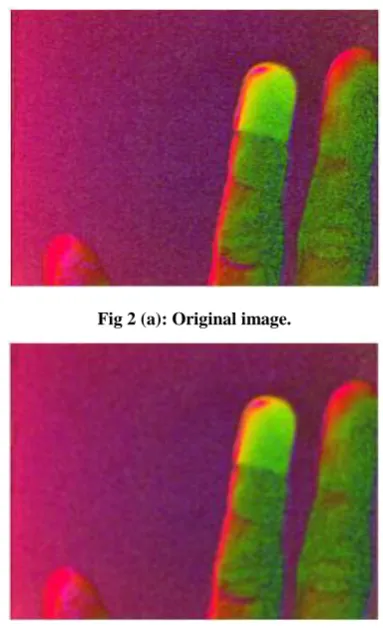
For noise reduction an opening operation is used. Opening consists of an erode operation followed by a dilate operation. A general idea of noise reduction is using a blur operation but opening is used because it does not change the size of the area of the object, blur does, Fig 2.
Erosion with small square structuring elements shrinks an image by removing a layer of pixels from both the inner and outer boundaries of regions. Thus the small details are eliminated. Larger structuring elements have a more pronounced effect, the result of erosion with a large structuring element being similar to the result obtained by iterated erosion using a smaller structuring element of the same shape. Erosion removes small-scale details from a binary image but simultaneously reduces the size of regions of interest, too. Dilation has the opposite effect to erosion - it adds a layer of pixels to both the inner and outer boundaries of regions.
In other words, erosion shrinks the image foreground and expands its background, whilst dilation expands the image foreground and shrinks its background. Resulting is an
opening, one of the most effective ways to reduce unwanted noise from image.
Fig 2 (a): Original image.
Fig 2(b): After Gaussian blur, shows increase in area of the pixels.
Fig 2(c): After Opening operation, shows reduced noise and no increase in pixels.
3.4
Masking With Predefined Color Range
[image:2.595.331.523.95.411.2] [image:2.595.62.271.245.433.2]Fig 3(a): Original image.
Fig 3(b): Masked image.
3.5
Blob Detection
The color blobs are detected using image moments. Object detection using image moments are well surveyed in [8] and [9].
The mathematical formula used to calculate the co-ordinates of the position of the center of the blobs is as follows (1) and (2),
x = moment10 / moment00 (1) y = moment01 / moment00 (2)
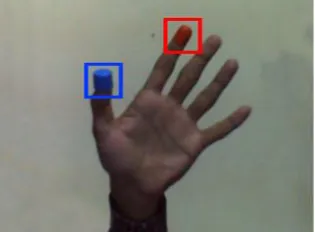
[image:3.595.86.248.81.291.2]Here, (x, y) be the position co-ordinates of the center of the detected blob, moment10 is 1st order spatial moment around x-axis, moment01 is 1st order spatial moment around y-axis, moment00 is 0th order central moment. Here similar methods are applied to detect two different color blobs. The result of blob detection is shown is Fig 4. The blobs are sorted by color. The blob of the marker in the index finger is labeled b1 and the other is labeled b2.
Fig 4: Detected Blobs
3.6
Gesture Recognition
To recognize gestures, the gestures are categorized in two - one finger and two finger gestures. “One-finger gesture” is gesture by one finger, usually the index finger, controls the movement of the mouse cursor on screen. “two-finger gesture” is a combination of gestures by two fingers, usually the index and the thumb, and comprises of „click‟, „right click‟ and „scroll‟ commands. Algorithm of gesture specification follows,
// Gesture specification If number of blob = 1 Then
Perform ‘one finger gesture’ If number of blob = 2 Then
Perform ‘two finger gesture’ End If
End If
The “one-finger gesture” is used to move the mouse pointer on the display screen. We consider a rectangular area of small margin within the image. Inside this area the position of the blob b1 in the current frame is mapped to the display screen. Also let us assume the margin of this area from the image boundaries be m.
Let us assume the height and width of the display screen is hs and ws, respectively. The co-ordinates after mapping the position of the blob b1 to the screen is (xs, ys). The height and width of the image be hi and wi, respectively. If the x-value and y-value of center of b1 be xb1 and yb1, respectively, then, (xs, ys) can be calculated using the following method (3) and (4),
xs = (xb1 - m) * (ws / (wi - 2m)) (3) ys = (yb1 - m) * (hs / (hi - 2m)) (4) Thus the algorithm for “one-finger gesture”,
// One finger gesture
If (xb1> m && yb1> m && xb1< (wi- m) && yb1< (hi -
m)) Then
Move mouse pointer to position (xs, ys) on screen
End If
The “two-finger gesture” comprises of „click gesture‟, „right click gesture‟ and „scroll gesture‟. We assume x-value and y-value of center of b2 is xb2 and yb2, respectively. And let r be a constant, d be the distance between the position of the center co-ordinates of b1 and b2. Let us take a circle around the center of b1 with radius r, Fig 5(a). If the center of b2, represented by (xb2, yb2), is within this circle it is the „click gesture‟, Fig 5(b). The „left mouse button pressed‟ and „left mouse button released‟ events are controlled using the „click gesture‟. The algorithm for „click gesture‟ follows,
// Click gesture If (d < r) Then
Perform event ‘left mouse button pressed’ Else
[image:3.595.89.247.579.695.2]39
Fig 5: (a) Normal hand, (b) Click gesture.
For the „right click gesture‟ a counter c and a timer t which is a constant, has been introduces. Let us assume that the position of the center of the blob b1 in current frame (n) be (xb1, yb1)n. The position of b1 in frame (n+1) is (xb1, yb1) n+1. We also assume that the displacement of the center of b1 in two consecutive frames be D. Let δ be a constant. Then the „right click gesture‟ is determined using the following algorithm,
// Right click gesture
Let c = 0
If (‘left mouse button pressed’ is FALSE) Then
If (D <δ) Then
c = c+1
If (c == t) Then
Perform ‘right click button event’
c = 0
End If
Else
c = 0
End If
End If
In simple words, if the center of the blob b1 stays within a boundary of radius δ in consecutive frames for a certain time identified by t, then it is a „right click gesture‟.
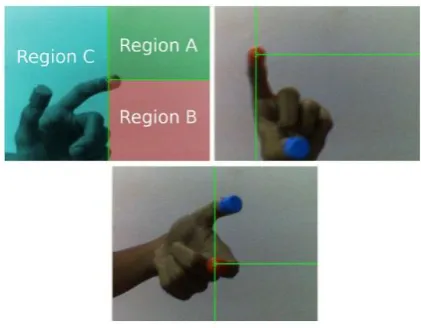
For the „scroll gesture‟, the image is separated in three regions, region A, B and C, Fig 6(a). If the position of the center of the second blob b2 is inside region A then the „upward scroll event‟ is triggered, Fig 6(b). When center of b2 is inside region B, the „downward scroll event‟ is triggered. Fig 6(c) shows gesture for downward scroll. The algorithm is,
// Scroll gesture
If (‘left mouse button pressed’ is FALSE && ‘right click button event’ is FALSE) Then
If (xb2> xb1&& yb2< yb1) Then
Perform ‘upward scroll event’
Else If (xb2> xb1&& yb2> yb1) Then
Perform ‘downward scroll event’
End If
End If
Fig 6: (a) Regions in the image (b) Scroll down gesture, (c) Scroll up gesture.
4.
SOFTWARE IMPLEMENTATION
The whole system is developed and tested in a Gnu/Linux operating system environment. The vision module has been developed using the OpenCV library version 2.4.8. The graphical user interface has been implemented using Qt library version 4.x. The system calls are triggered using Xlib. The system includes a webcam connected to a computer via USB. The resolution of camera input is 640x480.
5.
CONCLUSION
In this paper, a gesture interpretation system capable of controlling the computer mouse using gestures is developed. The framework is presented for gesture recognition using color markers. It uses built in or an USB webcam and there is no need of high cost devices. The system minimizes the need of extra input devises for computer systems. This kind of framework can be used to build gesture based input systems for other digital appliances like televisions, media centers. In future research more gestures can be introduced to control web browsers, media players, and interactive games. The efficiency of the system can also be dramatically improved by background subtraction.
6.
ACKNOWLEDGMENTS
This work was supported by Dept. of MCA, Techno India College of Technology, Newtown, Kolkata.
7.
REFERENCES
[1] K. Imagawa, S. Lu, S. Igi, "Color-Based Hands Tracking System for Sign Language Recognition," Proc. 3rd Int. Conf. on Face and Gesture Recognition, Nara, Japan, April 1998.
[2] T. Darrell, G. Gordon, M. Harville, J. Woodfill, "Integrated Person Tracking Using Stereo, Color, and Pattern Detection," Proc. Conf. on Computer Vision and Pattern Recognition, Santa Barbara, California, June 1998.
[3] Subutai Ahmad, "A usable real-time 3d hand tracker", Conference Record of the Asilomar Conference on Signals, Systems and Computers, pp. 1257-1261, 1994. [4] Thomas A. Mysliwiec, "Fingermouse: A Freehand
computer pointing interface", Technical report VISLab-94-01, University of Illinois at Chicago, 1994.
[image:4.595.322.533.71.235.2] [image:4.595.56.279.72.157.2]Workshop on Automatic Face-and Gesture-Recognition, Zurich, Switzerland, pp. 372-377, June 1995.
[6] Hasup Lee, YoshisukeTateyama, TetsuroOgi, “Hand Gesture Recognition using Blob Detection for Immersive Projection Display System”, World Academy of Science, Engineering and Technology, Vol:62 2012-02-27. [7] Benjamin D. Zarit, Boaz J. Super, Francis K. H. Quek,
“Comparison of Five Color Models in Skin Pixel Classification”, International Workshop on Recognition,
Analysis, and Tracking of Faces and Gestures in Real-time Systems, pp. 58-63, September 1999.
[8] Jan Flusser, “On the independence of rotation moment invariants”, Pattern Recognition - The Journal of the Pattern Recognition Society, 19 May 1999.
[9] Jan Flusser, Tomás Suk, “Rotation Moment Invariants for Recognition of Symmetric Objects”, IEEE transactions on image processing, vol. 15, no. 12, December 2006.