© 2017, IRJET | Impact Factor value: 5.181 | ISO 9001:2008 Certified Journal
| Page 541
Android Security: A Survey of Security Issues
And Defenses
Persin Kaur Granthi
1, Mrs. S. M. Bansode
21
Student, Dept. of Computer Science & Engineering, SGGSIE&T, Maharashtra, India
2Professor, Dept. of Computer Science & Engineering, SGGSIE&T, Maharashtra, India
---***---Abstract - Android is becoming very popular nowadays and
respective devices have acquired huge market share due to the openness of Android architecture and the availability of a variety of the applications provided. As a result, the smartphones users are increasing at a faster rate and it becomes prohibitive for application marketplace, such as Google Play Store, to verify whether an application is genuine or malicious. Due to the increase in popularity of the Android devices, the malware developers have been attracted, causing the big rise of the Android malware applications. The consequence is that the mobile users have to decide for themselves whether an application is secure to use. The recent studies and surveys have shown that over 80% of applications in markets request to collect data irrelevant to the main functions of the applications, which could cause personal information leakage. Generally, the stealth techniques, such as encryption, code modification, are capable of generating various forms of known malware. The single approach may be ineffective against the malware techniques, so multiple approaches can be used for effective detection. Hence, the researchers and industry sources have proposed many security mechanisms for Android devices Based on the mechanisms and techniques which are different in nature and used in proposed works, they can be classified into specific categories. In this survey paper, we discuss the security threats for Android as well as the solutions and try to categorize the works and their functionalities.
Key Words: Static analysis, dynamic analysis, PII (Personally Identifiable Information), privilege escalation, Dalvik Virtual Machine, sandboxing, malware,native libraries
1. INTRODUCTION
Over the last few years, Android has gained a tremendous number of users since the first introduction in 2008. As per the leading information technology research and advisory company, Gartner [1], in the smartphone operating system (OS) market, Google's Android extended its lead by capturing 82 percent of the total market in the fourth quarter of 2016. The rapid increase of Android applications provides an ever-growing application ecosystem. Mobile applications are becoming popular because of the features such as ease of use, robustness and high availability. The current market offers a variety of applications ranging from gaming, health sector, and government to personal security,
and business [2] and users depend on mobile devices and applications at a large scale.
However, Android devices are becoming extremely attractive and useful target for the security attacks on a large scale as the devices are used for sensitive personal information storage more often than other personal devices such as laptops and desktops. Consequently, a malicious third-party application can not only steal private information, such as all the contacts, messages, and location from its user but can also impersonate the user [3]. Due to increasing number of the applications introduced, it is tough for Google Play Store to thoroughly verify if an application is valid or malicious. Therefore, mobile application users have to decide for themselves whether an application has secure usage. Also, unlike iOS, the rooting or jail breaking is not needed for Android device owners to install applications from “unknown sources”. As per the CNBC news report, an Android malware breaches the security of more than 1 million Google accounts [4].
The Android applications growth at higher rate, and the existing security vulnerabilities in Android encourage malware developers to take advantage of such vulnerable OS that may harm the respective organization’s reputation [5]. Moreover, the malware obtain a complete control of the device, steal user’s sensitive data such as bank details, or send messages on behalf of the user [6].
According to the security vulnerability data source, CVE details [7], number of Android vulnerabilities is present which can occur at any layers of Android OS stack. Realizing these shortcomings in the current Android applications scenario, many efforts have been put forward for addressing the security related issues [8].
Section 2 describes the architecture of Android OS and application. The Android security mechanism and its security issues are described in in Section 3 and 4 respectively. Later, we describe the security mechanism and solutions in Section 5. The comparison results of the solutions are shown in section 6. Finally, we conclude in Section 7.
2. ARCHITECTURE-ANDROID OS & APPLICATIONS
© 2017, IRJET | Impact Factor value: 5.181 | ISO 9001:2008 Certified Journal
| Page 542
2.1.
The Framework Architecture
The Android architecture is built on a Linux kernel. The framework consists of following components:
Applications
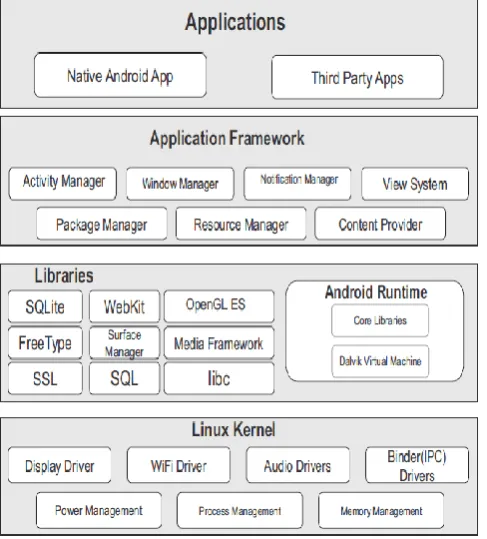
As depicted in Figure 1, the application layer is present at the top of the Android software stack.
Application Framework
[image:2.595.38.282.266.536.2]Application framework includes the following major services [10]:
Figure 1: Android operating system architecture
Activity Manager: Activity Manager gives information
about, and interacts with, activities, services, and the containing process. [10].
Content Providers: Content providers are used to
manage the access to the applications data repository. Data encapsulation and security is provided. The data and service sharing is provided by content provider [10].
Resource Manager: This service provides access to the
resources such as files, static contents, and UI layouts. This service makes it possible to maintain application’s resources independently [10].
Notification Manager: Notifications Manager manages
the application alerts and notifications generated for user.
View System: This service is an extensible set of views
used to create application user interfaces [10].
Android Runtime
This Android runtime describes a key component called Dalvik Virtual Machine (DVM), which is a Java Virtual Machine (JVM) specially designed and optimized for Android.. The Java development environment includes a number of classes that are contained in the core Java runtime libraries [10].
Libraries: The Android’s native libraries were developed on top of the Linux kernel. This layer allows the device to handle different types of data. It provides different libraries written in C or C++ useful for the well-functioning of Android operating system. Examples of some native libraries include the SQLite database engine used for data storage purposes, OpenGL used to render 2D or 3D graphics content to the screen, and SSL libraries for Internet security [10].
Kernel: The Linux kernel forms the base of the entire system. The kernel also acts as an abstraction layer between the hardware and other software layers. The Linux kernel provides the fundamental system functionality such as process management, memory management, and device management. The Kernel also provides an array of device drivers which is useful while interfacing the Android with peripheral devices [10].
2.2.
The Framework Level Permissions
To maintain security for the device and users and to restrict an application from accessing the sensitive functionality like network, contacts/SMS and GPS location, Android requires the applications to request permissions before the applications can use certain features. To accomplish this purpose, it provides permission-based security model in the application framework. Developers declare the permissions needed using the ‘uses−permission’ element in AndroidManifest.XML [11]. The permissions are divided into the following protection levels [12].
Normal: Normal is the default permission value and has a minimal risk for the user, system application or the device. These are granted at the install time.
Dangerous: These permissions are within the high -
risk group due to their capability of accessing the private data and device control that can impact the user negatively. A user has to accept the installation of dangerous permissions at the install time.
Signature: These permissions are granted only if the
requesting application is signed with the same developer certificate of the application that declared the permissions. They are granted automatically at the install time if the certificates match.
© 2017, IRJET | Impact Factor value: 5.181 | ISO 9001:2008 Certified Journal
| Page 543
the requesting application is signed with the samecertificate as the Android system image or with an application that declared these permissions. Generally, the developers use ‘Signature ‘protection level as the same is sufficient for an application. They are granted automatically at installation time.
2.3.
Application Structure
Android applications are written primarily in the Java programming language. In this subsection, the Android application package structure and its main four components are explained.
The apk (Application Package) structure
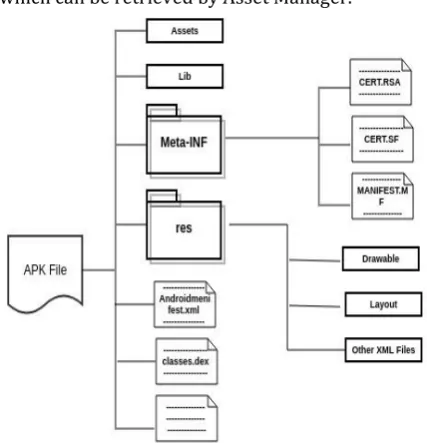
Figure 2 shows the Android APK structure. An Android application consists of an archive which is packed as a package with .apk.
Some specific components in application files play an important role and are as follows:
META-INF directory – The directory includes
MANIFEST.MF, which contains a cryptographic signature and makes the entire contents of the distribution package validated.
The lib directory - contains the compiled code, which is specific to a software layer of a processor.
Assets directory – It contains the application’s assets, which can be retrieved by Asset Manager.
Figure 2: Android APK file structure
AndroidManifest.xml- It is a key file within application structure, which is an additional Android manifest file, describing the name, version, access rights, and referenced library files for the application [13].
The components of the application
Figure 3 shows the Android application components and related interactions.
The application components are classified into four different types [13]. Each component is provided for a specific purpose and lifecycle that defines how the component is created and destroyed.
[image:3.595.331.539.285.434.2] Activities: Activity is an individual user interface screen in an Android Application. For example, it consists of placing the visual elements called Views (also known as widgets) and performing various actions by interacting with it.
Figure 3: Android components and their interactions
Services: Services are used to perform the processing
parts of your application in the background. Services are typically used for processes that take a significant period of time such as playing music, downloading data or uploading photos.
Content Provider: A content provider is a component
for managing a data set. Content providers in Android provide a flexible way to make data available across applications. A simple example of the content provider is the Contacts Manager application.
Broadcasting: Broadcast receivers are one of the
Android application components that are used to receive messages broadcasted by the Android system or other Android applications.
3.
ANDROID SECURITY MECHANISM
3.1.
Application sandboxing
[image:3.595.50.264.451.673.2]© 2017, IRJET | Impact Factor value: 5.181 | ISO 9001:2008 Certified Journal
| Page 544
unless and until the access permissions are explicitly grantedby the user during the application installation. To protect the application’s data from unauthorized access, the Android kernel implements the Linux Discretionary Access Control (DAC) to manage and protect the device’s resources to be misused. Each application process is protected with an assigned unique ID (UID) within an isolated sandbox [16].
4.
Android Inter-Component Communication(ICC)
Android allows applications to communicate with each other through a well-defined Inter-Component Communication (ICC) mechanism or Binder. Android middleware mediates the ICC between application’s components. The Binder or ICC takes care of migration of the execution of a request from the requester to the target process transparently to the applications. Applications can call the components or services of other applications as service [17].
5.
ANDROID SECURITY ISSUES AND THREATS
The permission-based mechanism is provided for Android applications security that regulates the third-party Android applications access to critical resources on the device. This mechanism is highly criticized for its coarse-grained control of application permissions and the inefficient permission management, by developers, and end-users. For example, users are allowed to either accept all permission requests from an application to install it or reject the application installation. The section describes the main security issues of the Android which leads to leakage of user information and leads to user’s privacy loss [17].
5.1.
The data leakage
The leaking Android application may place an information that is sensitive for the user in the insecure location in the device or may send the device identification information e.g. application metadata such as network details. This insecure location of the device may be accessible to other malicious applications on the same device. The sensitive data or information leaked thus causes the device to be is a critical state. The exploitation of this vulnerability is very easy as an attacker can gain an access to the part of the device where the sensitive data is being stored. The impacts of the data leakage of an Android device are severe. As per a security researcher group news website [18], 58% of Android devices have privacy leaks and around 3% have PII (personally identifiable information) leakage.
5.2.
Privilege Escalation
The security deficiencies of Android’s permission mechanism may lead to privilege escalation attacks caused by compromised applications. The authors describe the privilege escalation as [19]: An application with fewer
permissions (a non-privileged caller) is not restricted to access components of a more privileged application (a privileged callee).An example of privilege escalation can be given as – a local malicious can execute an arbitrary code in the kernel without having the privilege to do so. This may lead to complete compromise of the operating system causing corruption of the operating system and complete device repair. As per the Common vulnerabilities and exposures database (CVE) [20], critical privilege escalation vulnerability was found in Android versions 6 and above. The privilege escalation breach in android put millions of users at risk of smartphone hijacking [21].
5.3.
Repackaging of Applications
The process of disassembling/decompiling of .apk files using reverse-engineering techniques and adding (injecting) malicious code into the main source code is known as the repackaging of the Android apps. For an Android user, it becomes difficult to distinguish between a repackaged malicious application and a normal application because the repackaged application usually appears to function in the same way as the legitimate one. The repackaging steps are as follows [22]:
Modification point search: The Android activity
information, UI layout, and application execution flow are gathered and analyzed for the points at which code is inserted. Logcat tool [23] can be used to gather the activity names and obtain information on activities that are run during app execution. Then the OnCreate function of the activities can be decompiled in order to obtain the UI information and XML information used in the UI.
Decompilation: After extracting the DEX file in the APK
file using the dextojar tool [24], a disassembler tool called baksmali [25] is used to generate the smali source code.
Code injection and modification: The code injection consists of the insertion of the code containing arbitrary Dalvik VM instructions at the modification point of existing code.
Manifest change: The package name is changed in the
application manifest. During this, the application can be registered on the Android Market without conflicting with existing applications.
Self-signing: The modified application is then self-signed to complete the repackaging.
5.4.
Distributed Denial of Service (DDos)
© 2017, IRJET | Impact Factor value: 5.181 | ISO 9001:2008 Certified Journal
| Page 545
6.
ANDROID SECURITY SOLUTIONS
For the Android security, some solutions have been proposed and this section tries to categorize the solutions based on the objective of the system: Prevention-based, Analysis-based and Runtime Monitoring
6.1.
Prevention-based Solutions
The subsection covers the works which focus on application repackaging attacks (code modification or code injection) and reverse engineering (code analysis).
Kirin
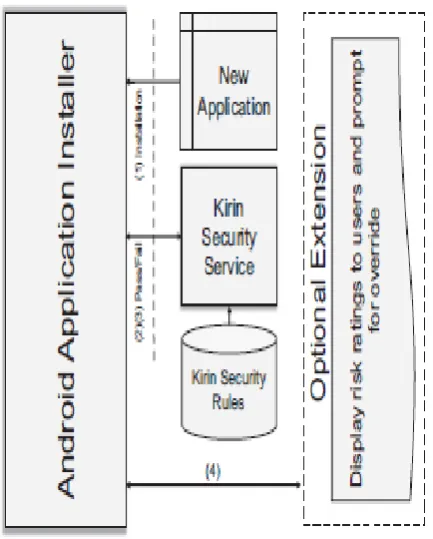
Figure 4 shows the Kirin based software installer flow and its components.
[image:5.595.339.562.222.504.2]Kirin aims at risk assessment and uses static mechanism. A security policy enforcement policy is used in Kirin [27]. Kirin uses a set of predefined security rules on applications requested permissions to find matched malicious permission requests and characteristics. Here, the rules are defined based on those permissions that are sensitive and leads to misusage of permissions and dangerous activities.
Figure 4: Kirin based software installer flow and its components
A static analysis tool called PScout, which is explained in the below section, is used to extract all the permission specifications for Android apps without modifying the apps. Using this, the user can make a real-time decision to install the app or not.
AppInk
Figure 5 shows AppInk architecture and its components.
Figure 5: Overall AppInk architecture
AppInk aims at risk assessment and uses a dynamic mechanism to mitigate application repackaging. Zhou et al. [28] proposed and developed a graph-based dynamic watermarking mechanism for Android apps.
[image:5.595.75.292.432.702.2]© 2017, IRJET | Impact Factor value: 5.181 | ISO 9001:2008 Certified Journal
| Page 546
6.2.
Analysis-based Solutions
In this solution, the main goal is to use static and dynamic analysis to detect security-sensitive and malicious behaviors of applications. The works in this category focus at the malicious behavior detection, application similarity detection in order to detect repackaged applications, misusing the granted permissions and detecting application vulnerabilities. The subsection is aimed to review the works in any of the above subcategories.
PScout
Figure 6 shows architecture of PScout. PScout aims at application similarity detection to check for repackaging with the help of static mechanism.
[image:6.595.333.548.311.646.2]PSCout [29] is a tool which is proposed to extract the permission details (specifications) of Android OS source code. The tool works on a call graph which is constructed from the API calls of the application.
Figure 6: PScout
The permission specifications are extracted through the repeatability analysis between API calls and call graph permission checks that are constructed from the Android framework's code bases. Figure 6 gives a higher level summary of the PSCout analysis flow.
RiskMon
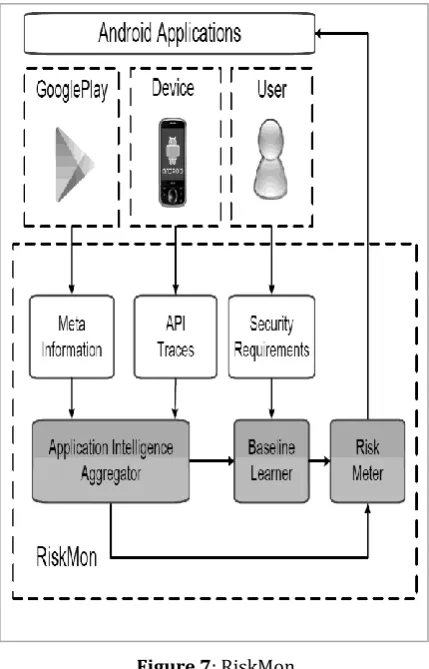
Figure 7 shows the RiskMon architecture. RiskMon aims at malicious behavior detection by using dynamic mechanism. The RiskMon [30] tries to answer the question “are those behaviors necessarily inappropriate?” RiskMon is an approach for coping with this challenge and presenting a continuous and automated risk assessment framework. It generates a risk assessment baseline that captures appropriate behaviors of applications. The important part of the framework is user’s perceptions on the application. Initially, it collects the user’s expectations on the installed applications on the device and the permission ranking of the groups in terms of their relevancy to the corresponding application. Then, based on the information gathered from the user, the risk assessment baseline for the applications is built.
Figure 7: RiskMon
Finally, using the baseline generated, RiskMon ranks installed applications based on the risk of the application's interactions, which is measured by how much it deviates from the risk assessment baseline.
Runtime Monitoring Solutions
[image:6.595.75.271.338.693.2]inter-© 2017, IRJET | Impact Factor value: 5.181 | ISO 9001:2008 Certified Journal
| Page 547
process communication (IPC) mechanism allows theapplication to communicate and share. In the permission mechanism, each service or resource is associated with a certain unique permission tag, and each app must request the permissions to the Android services present on the device which it needs at installation time. Whenever an application requests access to a specific service/resource, Android runtime security monitor checks whether the application has the required permission tags for that particular service/resource it is asking for. In addition to privilege escalation protection, information leakage can be monitored too.
The section studies the works based on app activity monitoring and permissions accesses. Existing or proposed works in this category continuously run on a device to either prevent, detect malicious activity, or enforce a fine-grained policy.
Crowdroid
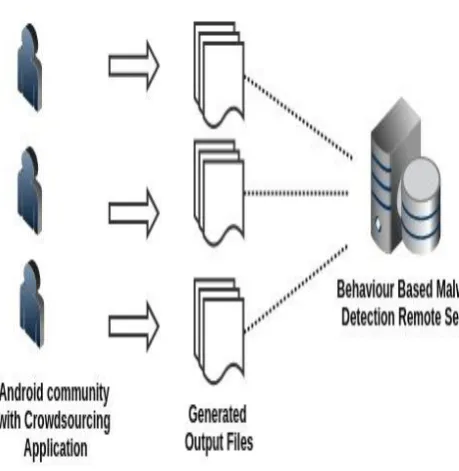
[image:7.595.61.291.480.716.2]Figure 8 shows the Crowdroid architecture.Crowdroid [31] is a behavior-based malware detection system. A crowdsourcing framework is used to detect the anomalously behaving applications through a crowdsourcing framework. A framework is proposed by authors to analyze the behavior of Android applications which is useful to distinguish between applications that have the same names and versions but behave differently.
Figure 8: Crowdroid Architecture
It has two components, a lightweight client application that needs to be installed on devices of users and a malware detection server which is remotely located. The application records the behavior of the installed applications such as system calls and sends them as a log file to the centralized remote server. The system calls are recorded through a system utility called Strace. The log file contains the device information, list of installed applications, and behavioral data.
The remote server will be responsible for parsing the data and creating a system call vector per interaction for users within their applications. Finally, the data clustering occurs by 2-means partition clustering to detect whether the applications are valid or malicious.
Paranoid Android
A security check system is proposed in Paranoid Android [32] that is applied to a remote security server (cloud-based detection framework) that host exact replicas of the phones in virtual environments. The main feature of the Paranoid Android is that the checking process from the user device is moved to a remote server. The main reason behind the security checks on a remote server is the lack of enough computational resources and battery consumption.
© 2017, IRJET | Impact Factor value: 5.181 | ISO 9001:2008 Certified Journal
| Page 548
7.
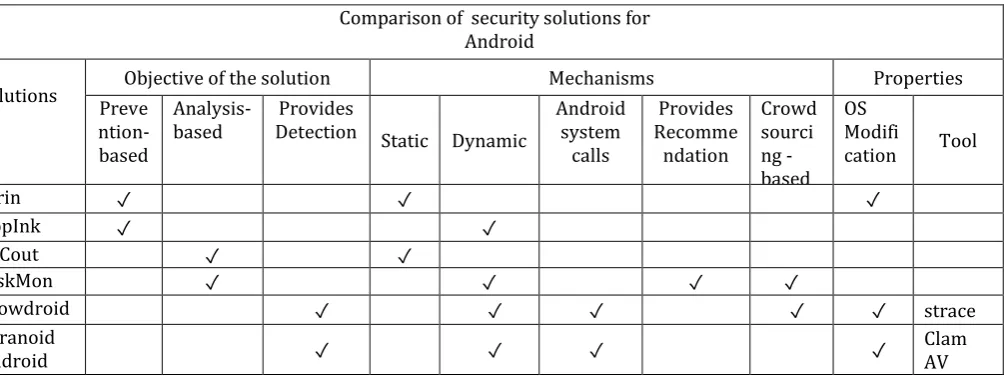
COMPARISON OF THE SECURITY SOLUTIONS
[image:8.595.47.550.177.367.2]Table 1 below compares the Android security solutions.
Table 1: Comparison of the security solutions for Android
8.
CONCLUSION
Along with the increasing prevalence of Android smartphones, the number of Android applications including malware is increasing at a faster rate. In spite of the present Android security mechanisms, the malware takes advantage of the Android security holes to misuse the granted resources. Manual analysis has become infeasible due to the exponential increase in the number of unknown malware samples. The proposed works are primarily behavior-based and their main contribution is tracing the applications' system calls and analyzing the activities to restrict them from high-risk activities. Therefore, the paper tries to analyze the proposed works based on the nature of the solutions suggested for the Android security issues.
REFERENCES
[1] Gartner, in” Gartner Says Worldwide Sales of Smartphones Grew 7 Percent in the Fourth Quarter of 2016”
[2]Number of applications available in leading app stores as of June 2016, http://www.statista.com/
[3]Recent android malware, in
http://www.symantec.com/content/en/us/enterprise/ media/securityresponse/whitepapers/motivations_ of_recent_android_malware.pdf
[4] Android malware breach,
http://www.cnbc.com/2016/12/01/android-
Malware-breaches-security-of-more-than-1-million-google-accounts.html
[5] Android applications worldwide survey,
https://www.appbrain.com/stats/number-of-android-apps
[6] Botnets, https: // www.mcafee.com/resources/ white-papers/wp-new-era-of-botnets.pdf
[7] CVE, in https://www.cvedetails.com/vulnerability- list/vendor_id-1224/product_id-19997/Google-Android.html
[8] W. Enck, “Defending users against smartphone apps: Techniques and future directions,” in Proc. of the 7th International Conference on Information Systems Security (ICISS’11), Kolkata, India, LNCS, S. Jajodia and C. Mazumdar, Eds., vol. 7093. Springer Berlin Heidelberg, December 2011, pp. 49–70.
[9] Android developer’s guide,
https://developer.android.com/guide/platform/index.h tml
[10] Nikolay Elenkov, in Android Security Internals - An in-depth guide to Android’s security architecture
[11]Add permissions to the Manifest,
https://developer.android.com/training/permissions/d eclaring.html
[12] Android protection-Level,
https://developer.android.com/guide/topics/manifest/ permission-element.html
[13] Android components fundamentals, http:// developer.android.com/guide/components/fundamenta ls.html
[14] Android security,
https://source.android.com/security Comparison of security solutions for
Android
Solutions PreveObjective of the solution Mechanisms Properties
ntion-based
Analysis-based Detection Static Dynamic Provides Android system calls
Provides Recomme ndation
Crowd sourci ng - based
OS Modifi
cation Tool
Kirin ✓ ✓ ✓
AppInk ✓ ✓
PSCout ✓ ✓
RiskMon ✓ ✓ ✓ ✓
Crowdroid ✓ ✓ ✓ ✓ ✓ strace
Paranoid
© 2017, IRJET | Impact Factor value: 5.181 | ISO 9001:2008 Certified Journal
| Page 549
[15] Google android documents, android applicationsandboxing mechanism,
http://developer.android.com/training/articles/security-tips.html.
[16] Thomas Bl¨asing, Leonid Batyuk, Aubrey-Derrick Schmidt, “An Android Application Sandbox System for
Suspicious Software Detection”, Available at:
semanticscholar.org
[17] Parvez Faruki, Ammar Bharmal, Vijay Laxmi, Vijay Ganmoor, Manoj Singh Gaur,
Mauro Conti, and Muttukrishnan Rajarajan,” Android Security: A Survey of Issues, Malware Penetration, and Defenses”, IEEE COMMUNICATION SURVEYS & TUTORIALS, VOL. 17, NO. 2, SECOND QUARTER 2015
[18] Android app data leakage,
http://www.appstechnews.com/news/2016/oct/25/resear ch-reveals-ios-and-android-app-data-leakage-and-what-it-means-enterprises/
[19] Privilege Escalation,
https://www.researchgate.net/publication/220905164_Priv ilege_Escalation_Attacks_on_Android
[20] CVE-2017-0415, in
http://www.cvedetails.com/cve/CVE-2017-0415/
[21] Android security breach,
http://www.telegraph.co.uk/technology/internet-security/11788184
[21] Android-security-breach, Android-security-breach-puts-millions-at-risk-of-smartphone-hijacking.html [22] Jin-Hyuk Jung, Ju Young Kim, Hyeong-Chan Lee,
Jeong Hyun Yi, in
https://link.springer.com/article/10.1007/s11277-013-1258-x
[23] Logcat tool,
https:// developer.com/studio/command-line/logcat.html
[24] dex2jar tool,
https://sourceforge.net/p/dex2jar/wiki/UserGuide/ [25] Reverse Engineering, http://tools.kali.org/reverse-engineering/smali
[26]Symantec Internet Security Report, in
https://www.symantec.com/content/dam/symantec/docs/ reports/istr-21-2016-en.pdf
[27] William Enck, Machigar Ongtang, and Patrick McDanielSystems and Internet Infrastructure Security Laboratory, Department of Computer Science and Engineering, The Pennsylvania State University, University Park, PA 16802, in ”On Lightweight Mobile Phone Application Certification”
[28] Wu Zhou, Xinwen Zhang, Xuxian Jiang AppInk, “Watermarking Android Apps for Repackaging Deterrence” [29] Kathy Wain Yee Au, Yi Fan Zhou, Zhen Huang and David Lie, in “PScout: Analyzing the Android Permission Specification”
[30] Yiming Jing, Gail-Joon Ahn, Ziming Zhao, and Hongxin Hu, in “RiskMon: Continuous and Automated Risk Assessment of Mobile Applications”
[31] Iker Burguera and Urko Zurutuza, “Crowdroid: Behavior-Based Malware Detection System for Android”
[32] Philip Homburg, Kostas Anagnostakis, Georgios Portokalidis, “Paranoid Android: Versatile Protection for Smartphones”