DRTC, Bangalore
Paper: P
A Tutorial on WWWISIS
Bibhuti Bhusan Sahoo
and
Dr. A.R.D. Prasad
Documentation and Research Training Centre Indian Statistical Institute,
Bangalore 560 059
email: [email protected]
Abstract
1.
WINISIS
As Win9x is more and more used than DOS, it appears that CDS/ISIS (version 3.08 being the last) is no more supported. Although winisis is not very sturdy, it has many features over CDS/ISIS. Its print formatting language is much more enhanced -- one can generate HTML files, using print formatting assistant. The software can be obtained in a compressed format from the ftp site ftp.bireme.br. One can obtain the password for unzipping by a formal registration (1). The setting up is fairly simple and self-explanatory.
2.
MULTIMEDIA FILES
The multimedia files appear in various file formats. The audio files may be in ‘wav’, ‘mp3’ etc. formats, whereas the photographs may be in ‘gif’ or ‘jpg’ format and the video files may be in ‘mpg’ or ‘avi’ format. Though in the past the database management systems were not tuned to processes digital information, now a days most of the major database software can handle digital information. However, it should be noted that the digital information is not normally stored in the database itself. On the other hand, they will be kept as separate files with usual filenames and a reference is made in the database record. The latest version of WINISIS includes some features that can handle digital information. However, the present approach is taken independent of such capability. The solution is through web interface. As most of the browser software like Netscape Navigator and Internet Explorer can handle multimedia files, we can use the strengths of the browsers to handle multimedia files.
3.
STEPS IN ENTERING DIGITAL INFORMATION
Step –1: Presume that we want to display the cover page of the documents in our database (I am sure nobody wants to do this). To capture the cover pages we normally use a scanner to capture the image and store it as either ‘gif’ file or ‘jpg’ file.
Step – 2: Modify the FDT file of an existing database to add a field to hold the name of the file containing digital data. In the present paper, tag number ‘10^a’ is used to hold the file names of image files and ‘10^b’ is used for the caption of the images.
In the input worksheet, the relevant entry may look like the following:
Images (v10): ^abook-1.gif^bCover page
NOTE: The images files are normally kept in ‘\frontp~1\content\images’ directory. The field ‘10’ can be a repeatable field, so that one can display any number of images if one wishes to.
Similarly, tag ‘v11’ is used for the audio files, where subfield ‘^a’ contains the names of the audio file and the ‘^b’ contains the caption of the audio file.
4
.
INSTALLING APACHE
Apache web server is an open source software developed by the Apache Software Foundation. You can
download the software from http://www.apache.org/dist/httpd/. The software is available for different
operating systems. The software installation manual gives installation process. The apache is installed in the c drive under “programme files” directory. The software will be installed in the path c:\programme files\apache 1\apache\. Once the software is installed, the HTML files we create are to be available. To make sure that the web server recognizes the files we create give the following URLs.
1) “httpd://localhost”
2) Or: httpd://192.168.1.117”
The 1st option should be used if you know your alphabetical IP address, the second if you do not have an alphabetical address. The third option works if you do not have either. If everything works well, one should see the welcome page of the web server.
5
INSTALLING WWWISIS
The WWWISIS and its related programs can be downloaded from the following site: ftp://ftp.bireme.br/wwwisis/pc/windows
The programs include:
wwwi32: the main program to run the web interface
loadiso.bat: the batch file to generate master and cross reference file form
the ISO format file of the given data base.
fullinv.bat: the batch file to generate inverted files
ifload.exe used by the fullinv.bat file
mx.exe used by loadiso.sh and fullinv.bat
All the above programs may be kept in \frontp~1\content\cgi-bin directory, the only essential one is ‘wwwi32’.
5.1. Steps in Generating Database Files
Unlike in the Linux environment, the Winisis files should straight away work with WWWISIS. Enter the following command to copy the required files to the web directory (2).
Copy \winisis\data\cds.* \progra~\apache~1\apache\cgi-bin
To test that the data files are accessible to WWWISIS, enter the following command
wwwi32=cds from=1 to=5 [email protected]
The above command should display first 5 records. This should work even without the inverted index files.
To test with inverted files, enter the following command
wwwi32 db=cds bool=”plant” [email protected]
The above command should display the records having the key word ‘plant’.
5.2. Testing WWWISIS
To test the ‘wwwi32’ program is working, run the following commands at shell prompt
wwwi32 hello wwwi32 menu=1
The above commands should generate a HTML files with some information.
However, to test the CGI (Common Gateway Interface) to web server 1) Run Netscape Navigator
NOTE: you can use server IP address in numeric or alphabetical form instead of 127.0.0.1
The above procedure should result in displaying a web page with information about WWWISIS. You can also try with ‘[menu=1]’ to see that menu ‘1’ is displayed.
If everything works well, we are ready to develop CGI programs.
6.
BASIC CONCEPTS
The Common Gateway Interface (CGI) works as an intermediary between the browser and the web server. The requests from the browser to the server may be sent through CGI scripts. There are many CGI scripting languages like Perl, Tcl etc. Not only these CGI scripts forward the requests from the browser to the web server, they retrieve data from the server and send them to the browser in HTML
format. These CGI programs are normally kept in ‘cgi-bin’ directory.
Briefly, the CGI programs
1) Should collect request from the browser
2) And send data back to the browser in HTML format
The most common method of collecting data from the browser is to use the HTML tag ‘FORM’. The FORM tag contains another element called ‘ACTION’ where we can specify the action (i.e. the program) to be invoked. A brief syntax of the ‘ACTION’ tag is given below
<html> <body> … …
<FORM ACTION=http://127.0.0.1/cgi-bin/search.bat METHOD=”POST”> …
… </body> </html>
NOTE: For a complete explanation of HTML tags, one should refer any book on HTML.
7.
STEPS IN SETTING UP WWWISIS INTERFACE
1) Create at HTML file which serves as the first interface. If we call this file as
‘index.html’, it should be placed in ‘\frontp~1\content\library’. (Refer Appendix–1) (3)
2) Create a program which is to be invoked from the above file. If we call this program
as ‘search.bat’, it should be used with ‘ACTION’ of ‘FORM’ tag in the index.html file and should be in the ‘\frontp~1\content\cgi-bin’ directory. (Refer Appendix –2)
3) Create ‘search.cgi’ file to present the various options for the ‘wwwi32’ command used
in ‘search.bat’ file. The ‘search.cgi’ in turn refers to various other files. This file also should be in the ‘\frontp~1\content\cgi-bin’ directory. (Refer Appendix –3)
4) Copy ‘cds.fst’ file to ‘\frontp~1\content\cgi-bin’ (Refer Appendix–3)
5) Create ‘cds.txt’ file (Refer Appendix–3)
7) Create ‘cds.pft’ file (Refer Appendix–3)
8) Create ‘tail.pft’ file (Refer Appendix–3)
All the above files should be in ‘\frontp~1\content\cgi-bin’, except the ‘index.html’ file.
Now open the browser like Netscape Navigator and enter the URL as http://127.0.0.1/library
NOTE: You cannot simply open the same file by entering the URL as
\frontp~1\content\library\index.html as this cannot establish connection to the web server. This approach
can only be used to view the disk files in html format. Please also note that 127.0.0.1 can be used only if
you want to access from the same machine where the web server is installed. However, to access the web page from some other machine, you should give the IP address of the machine having the web server,
either in alphabetical or numeric form such as ‘http://www.drtc.isibang.ac.in/library’ or
‘http://202.54.37.89/library’.
If everything is alright the following first page should be displayed.
Fig. 1: Search Interface
search in all the indexed fields. Once the search terms are filled in, if the user presses ‘submit’, the system displays the next web page with all the bell and whistles.
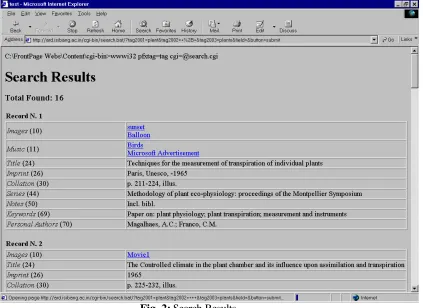
Fig. 2: Search Results
In the above screen by pressing the underlined captions in the column ‘image’ or ‘Music’ one can display or play a multimedia file. The browser takes care of the relevant plug-in to be invoked. Here it should be noted that the multimedia files are kept in ‘\frontp~1\content\images’ directory.
8.
CONCLUSION
The windows version of WWWISIS i.e wwwi32 is somehow is not as sturdy as the Linux version. Firstly,
even after displaying all the retrieved records, still the logo on the left hand side top corner rotates, as though there are a few more records to be retrieved. Besides, the windows version shows the command
line prompts on the display as if ‘echo is on’. Neverthless WWWISIS has many more facilities, the
complete commands can be obtained from the manual which includes the complete listing of the menus, commands and tags of the virtual records. The software along with the documentation can be
9.
REFERENCES
1. WWWISIS: a world-wide web server for ISIS database version 3.0. from ftp://ftp.bireme.br/winisis/cds.zip
2. Paulo, S. (1997, October). WWWISIS: a world-wide web server for ISIS-databases Version
3.0, from ftp://ftp.bireme.br/wwwisis/doc/wwwisis12.doc
3. Prasad, A. R. D. (2001, 26th-28th February). Using multimedia database with WWWISIS on
Win9x/NT. Paper presented at the Workshop on multimedia and Internet technologies, DRTC, Bangalore.
Appendix–1
Step 1: Creation of the first page
This step involves in the creation of the first file i.e. ‘index.html’, if this file is in
‘\frontp~1\content\library directory, one can invoke this file from the browser by enter the following URL
http://127.0.0.1/library (if you know the IP address you can enter here)
The complete listing of the ‘index.html’ file is given below. Listing of index.html
<html> <head>
<title>TEST</title> </head>
<body>
<h1>OPAC OF THE LIBRARY</h1>
<form method="get" action="/cgi-bin/search.sh/">
<p><input type="text" name="tag2001" value=" " size="20">
<select name="tag2002" size="1"> <option value=" * ">AND</option> <option value=" + ">OR</option> <option value="~">NOT</option> </select></p>
<p><input type="text" name="tag2003" value=" " size="20"> </p> <p><select name="field" size="1">
<option value="">ALL</option> <option value="24">Title</option> <option value="70">Author</option> </select></p>
<p> </p> <p> </p> <p> </p> <p> </p>
<p><input type="submit" name="button" value="submit"> </p> </form>
In the above HTML file, we have mentioned the ‘search.bat’ file as the action to be taken once the ‘submit’ button is pressed. We press ‘submit’ button once we enter the search elements. The “input” tag
of HTML describes that the input is “text” TYPE, and the “VALUE” is presently blank and once the
value is entered, it will be captured in the variable called ‘tag2001’. Similarly, the next lines in the file describe the input for the tag2002, tag2003 and ‘field’. That is, the tag2001 captures the input of the first key word, tag2002 captures the choice of Boolean operator like ‘and’, ‘or’, ‘not’; tag2003 captures the next keyword and ‘field’ captures the information whether the keywords should be searched in all fields or only in title or author fields.
In other words , the FORM tag of HTML passes the information you have entered once the ‘submit’
button is pressed.
Appendix–2
STEP – 2: Creation of Search.bat File
The is batch file which invokes the command wwwi32
LISTING OF search.bat
wwwi32 pfxtag=tag [email protected]
In the above program we have used various parameters to wwwi32 program. The ‘pfxtag’ parameter is
meant that the variables ‘tag2001’, ‘tag2002’, ‘tag2003’ should be treated as tags v2001, v2002, v2003 in
the virtual record of CDS/ISIS. Here, it should be noted that the most interesting part of WWWISIS is that
it generates virtual records out of each record generated from CDS/ISIS database. The present paper uses the CDS database for convenience sake. We know that the CDS database contains fields like 24 for Author; 70 for Title etc, in addition each record will contain fields 2001, 2002, 2003 with the
information/data we have entered. The ‘pfxtag’ indicates that we are using the word ‘tag’ as prefix to the
actual tag. It is a good idea to use tags greater than 2000 for the simple reason they will not conflict with the database tags as the data base tags mostly contain 3 digits and the tags greater than 1000 and less than
2000 are used by WWWISIS to hold various other kinds of information, like number of records retrieved
(tag 1002), the Boolean expression (tag 1021) etc.
Appendix–3
STEP – 3: Creation of Search.cgi
The above program ‘search.bat’ in turn refers to another CGI file called ‘search.cgi’. This is only a
matter of convenience and for clarity sake. The contents of ‘search.cgi’ is given below
LISTING OF search.cgi 'db=cds'/
'bool=', (
)/,
'[email protected]'/ '[email protected]'/ '[email protected]'/
In the above program:
The ‘db=cds’ states that the database to be used is ‘cds’.
The ‘bool=’ states that the Boolean search expression is to be prepared from the contents of tag v2001, v2002, v2003.
The ‘prolog=’ states that the output HTML file should contain the contents of ‘head.pft’ as the first few
statements of HTML file.
The ‘pft=’ states that ‘cds.pft’ file is to used for the actual display of the records
The ‘epilog=’ states that the ‘tail.pft’ should be appended to ‘cds.pft’ file
LISTING OF head.pft
The following lines will be prefixing the cds.pft
'<html>'/
'<title>test</title>'/ '<body>'/
'<h1>'/
'Search Results'/ '</h1>'/
Notes on cds.pft
This is the main display format with the necessary HTML tags. In the following file,
if val(v1001) = 1 then 'Total Found: ', v1002,fi/
displays the number of records retrieved for the present query by displaying the tag v1002.
Whereas the following code displays the names of the image file along with captions. The image files are kept in \frontp~1\content\images directory The subfield ‘^a’ contains the name of the image file and the subfield contains the caption of the image. This code can handle all the occurrences of the repeatable fields 10 and 11. While creating this files one should dreadfully careful of inverted quotes.
Listing of cds.pft
if val(v1001) = 1 then '<h3>Total Found: ', v1002'</h3>',fi/
mhl,'<TABLE WIDTH="100%" BORDER=0>'
mhl,'<TR><TD WIDTH="100%"><strong>Record N. ',mfn(1),'</strong></TD></TR></TABLE>' mhl,'<TABLE WIDTH="100%" BORDER>'
MPL,
if p(v11) then '<TR><TD WIDTH="30%"><I>Music </I>(11)</TD><TD>', ('<A HREF="/images/',v11^a,'">',v11^b'<br> </A>'), '</TD></TR>', fi/,
mhl,
if p(v12) then '<TR><TD WIDTH="30%"><I>Conference main entry </I>(12)</TD><TD>',v12,'</TD></TR>'/fi,
if p(v24) then '<TR><TD WIDTH="30%"><I>Title </I>(24)</TD><TD>',v24,'</TD></TR>'/fi, if p(v25) then '<TR><TD WIDTH="30%"><I>Edition </I>(25)</TD><TD>',v25,'</TD></TR>'/fi, if p(v26) then '<TR><TD WIDTH="30%"><I>Imprint </I>(26)</TD><TD>',v26,'</TD></TR>'/fi, if p(v30) then '<TR><TD WIDTH="30%"><I>Collation </I>(30)</TD><TD>',v30,'</TD></TR>'/fi, if p(v44) then '<TR><TD WIDTH="30%"><I>Series </I>(44)</TD><TD>',v44+|; |'</TD></TR>',fi,/ if p(v50) then '<TR><TD WIDTH="30%"><I>Notes </I>(50)</TD><TD>',v50,'</TD></TR>'/fi, if p(v69) then '<TR><TD WIDTH="30%"><I>Keywords </I>(69)</TD><TD>',v69,'</TD></TR>'/fi, if p(v70) then '<TR><TD WIDTH="30%"><I>Personal Authors </I>(70)</TD><TD>',v70+|; |'</TD></TR>',fi,/
if p(v71) then '<TR><TD WIDTH="30%"><I>Corporate Bodies </I>(71)</TD><TD>',v71+|; |'</TD></TR>',fi,/
if p(v72) then '<TR><TD WIDTH="30%"><I>Meetings </I>(72)</TD><TD>',v72+|; |'</TD></TR>',fi,/ if p(v74) then '<TR><TD WIDTH="30%"><I>Added Title </I>(74)</TD><TD>',v74+|;
|'</TD></TR>',fi,/
if p(v76) then '<TR><TD WIDTH="30%"><I>Other language titles </I>(76)</TD><TD>',v76+|; |'</TD></TR>',fi,/
'</TABLE><P>'
LISTING of tail.pft
if (v1091 = '7') then 'No ----Records retrieved'fi,/ if (v1091 = '0') then 'END OF SEARCH RESULTS', fi,/
Alternative Programs
The following list of programs also can be used to get a different set of appearance. Listing of index.html
<html> <head>
<title>Search Single Database</title> </head>
<body>
<h1>Search Single Database</h1>
<body background="beach.jpg" text="#660066" leftmargin="1" topmargin="0" marginwidth="1" marginheight="0" link="#A800A8" vlink="#A800A8" alink="#660066">
<form method = "get" action = "cgi-bin/search.bat/">
<p><input type = "text" name = "tag2001" value = " " size = "20"> <select name="tag6003" size=1>
<option value=" * ">and</option> <option value=" + ">or</option> <option value=" ~ ">and not</option> </select>
</p>
<p><input type = "text" name = "tag2002" value = " " size = "20"></p> <p><select name = "field" size = "1">
<option value = "70"> author </option> </select></p>
<select name="tag6014" size=1>
<option value="Full">Full Record</option> <option value="Citation">Citation</option> </select>
<p><input type=submit name="tag6012" value="Search"> </p> <p><input type=reset name="tag6013" value="Reset"> </p> </form>
<center>
<h2>Browse all</h2>
<form method="get" action="./cgi-bin/browse.bat/">
<p><input type="submit" name="button" value=" Browse "> </p> </form>
</body> </html>
Fig.3: Search Interface
In the above HTML file, we have mentioned the ‘search.bat’ file as the action to be taken once the
‘submit’ button is pressed. We press ‘submit’ button once we enter the search elements. The “input” tag
of HTML describes that the input is “text” TYPE, and the “VALUE” is presently blank and once the
value is entered, it will be captured in the variable called ‘tag2001’. Similarly, the next lines in the file describe the input for the tag2002, tag2003 and ‘field’. That is, the tag2001 captures the input of the first key word, tag6003 captures the choice of Boolean operator like ‘and’, ‘or’, ‘not’; tag2002 captures the next keyword and ‘field’ captures the information whether the keywords should be searched in all fields or only in title or author fields. In other words, the FORM tag of HTML passes the information you have
Appendix –2 STEP – 2: Creation of Search.bat File
The is batch file which invokes the command wwwi32 LISTING OF search.bat
wwwi32 pfxtag=tag [email protected]
In the above program we have used various parameters to wwwi32 program. The ‘pfxtag’ parameter is
meant that the variables ‘tag2001’, ‘tag2002’, ‘tag6003’ should be treated as tags v2001, v2002, v6003 in
the virtual record of CDS/ISIS. Here, it should be noted that the most interesting part of WWWISIS is that
it generates virtual records out of each record generated from CDS/ISIS database. The present paper uses the CDS database for convenience sake. We know that the CDS database contains fields like 24 for Author; 70 for Title etc, in addition each record will contain fields 2001, 2002, 6003 with the
information/data we have entered. The ‘pfxtag’ indicates that we are using the word ‘tag’ as prefix to the
actual tag. It is a good idea to use tags greater than 2000 for the simple reason they will not conflict with the database tags as the data base tags mostly contain 3 digits and the tags greater than 1000 and less than
2000 are used by WWWISIS to hold various other kinds of information, like number of records retrieved
(tag 1002), the Boolean expression (tag 1021) etc.
Appendix–3 STEP – 3: Creation of Search.cgi
The above program ‘search.bat’ in turn refers to another CGI file called ‘search.cgi’.
This is only a matter of convenience and for clarity sake. The contents of ‘search.cgi’
is given below
LISTING OF search.cgi 'db=cds'/
'bool=',
(if p(v2001) then v2001, fi if p(v2002) then v6003,v2002, fi )/,
if v6014='Citation' or v6016='Next 20 Records' then '[email protected]'/,
'[email protected]', else
'[email protected]'/, '[email protected]'/, fi
In the above program:
The ‘db=cds’ states that the database to be used is ‘cds’.
The ‘bool=’ states that the Boolean search expression is to be prepared from the contents of tag v2001, v2002, v6003.
The ‘prolog=’ states that the output HTML file should contain the contents of ‘head.pft’ as the first few
statements of HTML file.
The ‘pft=’ states that ‘cdsw.pft’ file is to used for the actual display of the full records The ‘cita.pft’ file is to used for the actual displa y of citation data which shows minimum information about a record. The ‘epilog=’ states that the ‘tail.pft’ should be appended to ‘cds.pft’ file
LISTING OF head.pft
'<html>'/
'<title>test</title>'/ '<body>'/
'<h1>'/
'<font color=blue>Search Results</font>'/ '</h1>'/
Notes on cdsw.pft
This is the main display format with the necessary HTML tags. In the following file, if val(v1001) = 1 then '<h3>', v1002' <b>Records Found for your query: </b><font color=brown>',v1021'</font></h3>',fi/ displays the number of records retrieved for the present query by displaying the tag v1002. v1001= current hit position tag and v1021= search expression tag like ‘water’ Whereas the following code displays the names of the image file along with captions.
Listing of cdsw.pft
if val(v1001) = 1 then '<h3>', v1002' <b>Records Found for your query: </b><font color=brown>',v1021'</font></h3>',fi/
mhl,'<TABLE WIDTH="100%" BORDER=0>'
mhl,'<TR><TD WIDTH="100%"><font color=blue><strong>Record N. ',v1001' of ',v1002'</strong><font></TD></TR></TABLE>'
mhl,'<TABLE WIDTH="100%" BORDER=0>'
if p(v12) then '<TR><TD WIDTH="25%"><I><b>Conference main entry :</b></I></TD><TD>',v12,'</TD></TR>'/fi,
if p(v24) then '<TR><TD WIDTH="25%" BGCOLOR="#E8E8CC"><font color=brown><b><i>Title :</i></b></font></TD><TD>',v24,'</TD></TR>'/fi,
if p(v25) then '<TR><TD WIDTH="25%" BGCOLOR="#E8E8CC"><font color=brown><b><i>Edition :</i></b></font></TD><TD>',v25,'</TD></TR>'/fi,
if p(v26) then '<TR><TD WIDTH="25%" BGCOLOR="#E8E8CC"><font color=brown><b><i>Imprint :</i></b></font></TD><TD>',v26,'</TD></TR>'/fi,
if p(v30) then '<TR><TD WIDTH="25%" BGCOLOR="#E8E8CC"><font color=brown><b><i>Collation :</i></b></font></TD><TD>',v30,'</TD></TR>'/fi,
if p(v44) then '<TR><TD WIDTH="25%" BGCOLOR="#E8E8CC"><font color=brown><b><i>Series :</i></b></font></TD><TD>',v44+|; |'</TD></TR>',fi,/
if p(v50) then '<TR><TD WIDTH="25%" BGCOLOR="#E8E8CC"><font color=brown><b><i>Notes :</i></b></font></TD><TD>',v50,'</TD></TR>'/fi,
if p(v69) then '<TR><TD WIDTH="25%" BGCOLOR="#E8E8CC"><font
color=brown><b><i>Keywords :</i></b></font></TD><TD>',v69,'</TD></TR>'/fi,
if p(v70) then '<TR><TD WIDTH="25%" BGCOLOR="#E8E8CC"><font color=brown><b><i>Personal Authors :</i></b></font></TD><TD>',v70+|; |'</TD></TR>',fi,/
if p(v71) then '<TR><TD WIDTH="25%" BGCOLOR="#E8E8CC"><font color=brown><b><i>Corporate Bodies :</i></b></font></TD><TD>',v71+|; |'</TD></TR>',fi,/
if p(v72) then '<TR><TD WIDTH="25%" BGCOLOR="#E8E8CC"><font color=brown><b><i>Meetings :</i></b></font></TD><TD>',v72+|; |'</TD></TR>',fi,/
if p(v74) then '<TR><TD WIDTH="25%" BGCOLOR="#E8E8CC"><font color=brown><b><i>Added Title :</i></b></font></TD><TD>',v74+|; |'</TD></TR>',fi,/
if p(v76) then '<TR><TD WIDTH="25%" BGCOLOR="#E8E8CC"><font color=brown><b><i>Other language titles :</i></b></font></TD><TD>',v76+|; |'</TD></TR>',fi,/
width="25%" BGCOLOR="#E8E8CC"><font color=brown><b><I>frontpage </I> </TD><TD><a href="/images/',v999^c, '"> image</a></TD></TR>',fi fi fi
'</TABLE><P>'
LISTING of tail.pft '<html>'
'<body>'
if val(v1002) =1 or val(v1002)> 1 then
'<font color=blue><h2>End search result </h2></font>' else
'<font color=red><h2>No records found</h2></font>', fi,/ '</body>'/