Smartphone-Based Online and Offline Speech Recognition
System for ROS-Based
Robots
Safdar Zaman, Wolfgang Slany
Institute for Software Technology, Graz University of Technology,
Graz, Austria
e-mail: [email protected], [email protected]
Department of Computer Science, COMSATS Institute of Information Technology,
Abbottabad, Pakistan e-mail: [email protected]
http://dx.doi.org/10.5755/j01.itc.43.4.5980
Abstract. Speech recognition is one of the fundamental requirements for fully autonomous robotic systems nowadays. The objective of the presented work is to offer a smartphone based speech recognition system for ROS (Robot Operating System) based autonomous robotic systems. The proposed recognition process consists of three steps, namely acquisition, preprocessing, and result extraction. In the contribution we also present a comparison by applying the proposed recognition process using Online and Offline speech servers. The Online method uses Google
speech server whereas the Offline uses Simon speech server. The speech recognition and the robotic controlling system work under a server-client architecture. For the evaluation of the Online, we used an Android smartphone, a Pioneer
-3DX robot, and Google speech server. For the Offline recognition evaluation, an Android smartphone, a Pioneer-3AT
and a standalone Simon speech server are used. The applications running on the smartphone act like clients and communicate with both speech server and robotic system. The contribution provided in this paper is two fold: One using smartphone with Offline speech recognition server Simon, and on the other hand, utilizing Simon’s voice
recognition feature with robotic navigation on ROS platform.
Keywords: android smartphone; simon speech server; robot operating system (ROS); speech recognition.
1. Introduction
Speech recognition system for autonomy can be helpful in many real time applications. One of the mo-tivating examples could be automatic navigation of a handicap wheelchair on the basis of specific com-mands spoken on smartphone by the disable people. Smartphones are rapidly becoming part of our lives and hence getting more and more importance. The sensing power in the smartphone has been a hot topic for the researchers [1–3].
The presented work is also an attempt towards having a complete navigating robotic system recogni-zing human voice. This work is also an extension to our work [4] where 3-wheel Pioneer 3-DX robot uses ROS-based mapping, localization and navigation stacks, and to the work [5] where 4-wheel Pioneer 3-AT robot navigates in an indoor environment through spoken commands. The significance of the ro-botic system in an indoor environment is growing day
sys-tem. They used Microsoft Speech SDK for speech recognition for some human’s voice commands, and a manipulated robotic arm configured using three stepper motors. Instead of Microsoft Speech SDK, we use Simon1 speech system which is open source and
publicly available. Valin et al. [11] used Geometric Source Separation (GSS) and a multi-channel post-filter for a robot embedded microphone based audition system to recognize simultaneous speeches in the real world. They tested their system on Pioneer2 robot with an array of eight microphones. Later with some modifications in the work [12], Yamamoto et al. [13] presented a FlowDesigner-based architecture to inte-grate Sound Source Localization (SSL), Sound Source Separation (SSS) and Automatic Speech Recognition (ASR). They performed an experiment on two simul-taneous speech signals and recognized one of them correctly. Pires [14] has presented human voice reco-gnition system for the industrial robots. He presented two industrial robotic experiments, one for picking-and-placing objects and the second for welding pur-pose. He has used PC audio system using Microsoft Speech SDK for the speech recognition and operated on industrial robots. Moulton et al. [15] have presen-ted a "wayfinding" assistant using GPS with online Google-Maps to guide the visual impaired people by voice recognition. The research work [16] introduced a MIROAD system that uses smartphone sensors in order to record the driving style like hard acceleration, sudden braking, left and right turns, and swerves. Moreover, it used Dynamic Time Warping (DTW) algorithm to fuse the sensors data to recognize driving actions. Song et al., [17] presented a visual speech recognition (VSR) using smartphone. It captures ima-ge using the camera and finds eye positions, and then tries to track the lips in the sequence of image frames in order to recognize spoken words. Dai et al., [18] used an Android mobile phone accelerometer and orientation sensors in order to alert about dangerous drunk vehicle driving. Hamm et al., [19] presented a system based on smartphone. It collects and automa-tically annotates daily experience from multi-sensory streams on the smartphone. A wide survey on the smartphone has been presented in [20]. Besides cove-ring sensing power of the smartphone it also discusses a number of growing aspects of the smartphone capa-bilities and usefulness in different sectors of the hu-man life. Birk et al., [21] presented a commercial sur-veillance device- the mobile base of RoboGuard. The mobile base is developed with technology and con-cepts from behavior-oriented robotics. Unlike classical robots it does not rely on detailed model and precise mechanics, instead it uses behaviors of running soft-ware modules.
The presented paper is organized in sections: Fol-lowing preliminaries and basic concepts further extend the current Section 1. The detail of the methodology along with algorithms is given in Section 2. Section 3
1 http://www.simon-listens.org
highlights three different setups we considered for the evaluation. The experiments for the evaluation are discussed in Section 4.
1.1. Android Smartphone
Android is basically an operating system for the mobile smartphones. It is developed by Open Handset Alliance led by Google. Android’s kernel is based on Linux kernel and application software runs on an ap-plication framework which includes Java-compatible libraries. The presented methodology uses Android
smartphone because of its acknowledged easy-to-program nature.
1.2. Pioneer Robot
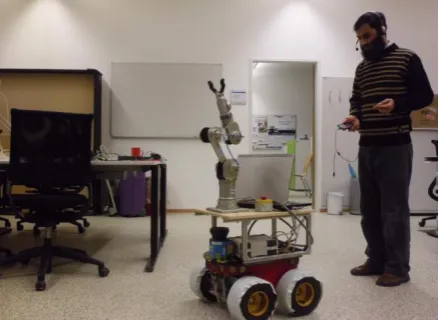
The presented work uses Pioneer-3AT (four wheels) and Pioneer-3DX (three wheels) robots as shown in Fig. 1 and 11, respectively.
Pioneer robot is one of the most popular research robots due to its balanced and modest sizes with a reasonable hardware.
Pioneer-3DX is one of the suitable pioneer robots for the indoor environment. It is a differential drive ro-bot as far as its locomotion is concerned. In the pre-sented work we have used Pioneer-3DX with laser range finder (SICK LMS 200), and a Gripper for the purpose of achieving tasks in the Online speech recog-nition evaluation process.
Pioneer-3AT robot is also a highly versatile four wheel drive robotic platform. It is a popular team per-former robot for especially outdoor or rough-terrain surfaces. In presented work this robot is used for in-door navigation because of its four wheel drive. The robot uses laser range finder (SICK) for creating two dimensional occupancy grid called map. Laser sensor is also used for obstacle avoidance during autonomous navigation [15]. It is also equipped with Intelligent Robotic Arm Katana that can help in grasping objects and carrying them from one location to another.
Figure 1. Robot achieves task on spoken command using smartphone based speech recognition system. The robot
1.3. Robot Operating System (ROS)
Robot Operating System is a robotic software framework operating under Linux operating system.
Packages, Nodes, Topics, Messages and Services are the building units of the ROS based software programs. The executable programs are the nodes
which exchange messages between one another through special ports called topics [8]. Message transmitting node is called publisher while the message receiving node is called subscriber. The
Package is a set of all related nodes in a software.
1.4. Speech Recognition System
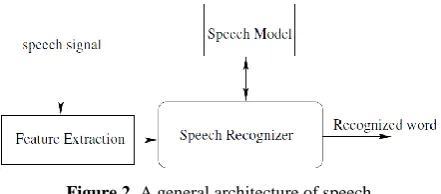
A speech recognition system (e.g., systems pre-sented in [22, 23]) takes voice input, recognizes it, and generates an output in the form of text. Fig. 2 depicts a general architecture of a speech recognition system where speech signal is first passed through a feature extraction process, and the speech recognizer uses the extracted features along with lexicon model in order to recognize the signal into a textual word.
Mostly, a speech recognition system divides into a speech client and a server. The speech client takes input signal and extracts features while recognition takes place at speech server.
Figure 2. A general architecture of speech recognition system
Speech Server
Speech Server is that part of speech recognition system which takes spoken words from speech client as input and converts them into a digital text for the output. Speech server uses a speech model in order to match or mismatch incoming speech signal. The presented methodology uses Google speech server in the Online recognition system while Simon speech server for the Offline speech recognition setup.
1. Google-based Speech Server: It is an Internet based speech server. It can be used by any Internet-based speech recognition client application for voice recognition purpose. In the presented work Android phone acts like a Google speech client. A Java based application Google_AndroidClient has been imple-mented for Android phone acting as a Google client to send and receive signals from Google server.
2. Simon Speech Server: Simon is an open source program for speech recognition solution. The architecture of the Simon recognition system includes a server called simond, a client called simon and a
ksimond which is a graphical user interface (GUI) for the simond. Simon platform uses the fact that spoken
words are composed of individual sounds much like written words are composed of letters. It uses Language Model (LM) for vocabulary and Acoustic Model (AM) for individual sound recognition. Simon speech recognition server has the following features:
(a) Speech Model: A speech model contains two basic models, namely Language Model and
Acoustic Model. The language model is the vocabulary of words. The acoustic model gives pronunciations in a processable format.
(b) Training: It provides a way to include new words in vocabulary and perform training on them in order to improve acoustic model.
(c) Grammar: This feature allows simon’s users to define their own grammar, e.g., Noun Verb Noun.
2. Presented Methodology
The methodology used in the presented work of-fers two main contributions. Firstly, it presents a way to use offline speech recognition system by using Si-mon server and Android smartphone. This capability can be utilized in many applications, e.g., automatic wheel chair for the people with special need. Second-ly, it offers integration of the widely recognized robo-tic software framework ROS with both the Online and
Offline speech recognition systems through smart-phone.
The presented methodology is a server-client ba-sed architecture as depicted in Fig. 3. Android phone as a speech recognition client takes input from the user, and sends it to the Simon speech server after some preprocessing. Speech server uses speech model for recognition and returns back a list of matching textual strings to Android phone application. The application running on Android smartphone searches for a matching command from a predefined list of words against the results received from the speech server. Afterwards it passes a command to the robotic system where another server application receives the command and makes a ROS compatible command to make robot act accordingly.
Audio input is the user spoken words through An-droid smartphone while the speech server is a stand-alone Offline Simon speech server. An Offline speech server means that it does not need to be connected with Internet and hence can be separately deployed on a PC in an indoor environment. The methodology consists of three main phases namely Simon_An-droidClinet, ROS_AndroidClient, and ROS_Android-Server as described and explained below:
2.1. Simon Android Client
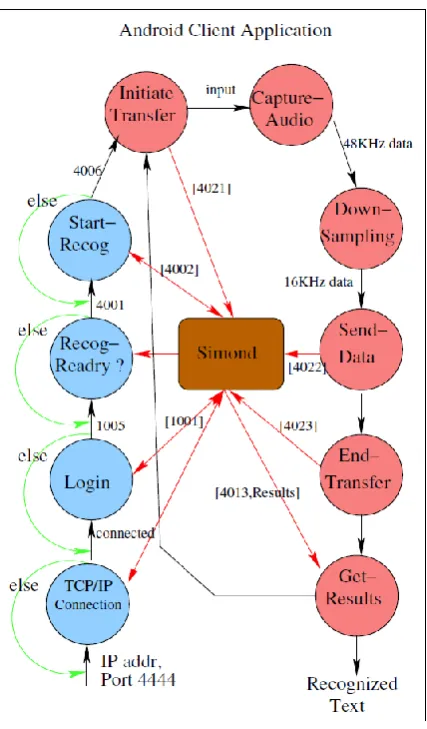
The Android application Simon_AndroidClient as shown in Fig. 4 acts like a speech recognition client for Simon speech server. The client logs into Simon
applica-Figure 3. High level view of the presented
methodology with its components Figure 4. Flow process describing the Simon Android Client Application
tion gets ready for an audio input from user when Simon server sends a recognition ready signal. The protocol followed by Simon server requires a 4-digit command ID with a list of specific parameters. As shown in Fig. 4, the Simon_AndroidClient application connects with Simon server on the port 4444 on TCP connection and then logs in using command 1001. After successful login the Simon server returns 1005 code preceded with code 4001 alarming for Recognition Ready state. Afterwards a command 4002 is sent to the Simon server for being ready for the recognition and it returns back 4006. Then another command 4021 is sent for initiating the transfer of the data. Android smartphone takes the audio data with 48KHz frequency while the Simon server requires 16KHz frequency data for fast processing.
The downsampling technique is carried out on the input data to bring down the frequency from 48K to 16K. These down sampled data are packed in a packet for delivery to Simon server which returns back a list of the possible recognized strings. Depending upon the functionality, the phase is further divided into three sub phases namely Acquisition, Preprocessing, and
Result Extraction as discussed below:
2.1.1. Acquisition
This is the phase where smartphone is ready for the user audio input after getting connected with Simon Server on the port 4444. The volume intensity of each audio bit is a value between 0 and 5000. Higher the voice volume the greater is the audio bit value. An input always starts when bit value of the input sound exceeds the threshold value of 700 as de-scribed in Algorithm 1. The threshold value is adju-stable depending upon the voice and noise level in the environment. The end of the input command becomes active when audio bit value is less than threshold for more than 150 milliseconds. This input is then buffe-red and made ready for the preprocessing.
2.1.2. Preprocessing
Algorithm 1 Find Audio Chunk Command Require: input_audio_stream
Ensure: Audio Command not missed
𝑠𝑖𝑙𝑒𝑛𝑐𝑒 ← 𝐹𝑎𝑙𝑠𝑒
a𝑢𝑑𝑖𝑜_𝑠𝑖𝑔𝑛𝑎𝑙_𝑏𝑖𝑡 ← 𝑖𝑛𝑝𝑢𝑡_𝑎𝑢𝑑𝑖𝑜_𝑠𝑡𝑟𝑒𝑎𝑚[𝑖] 𝑇ℎ𝑟𝑒𝑠ℎ𝑜𝑙𝑑 ← 700
if au𝑑𝑖𝑜_𝑠𝑖𝑔𝑛𝑎𝑙_𝑏𝑖𝑡 > 𝑇ℎ𝑟𝑒𝑠ℎ𝑜𝑙𝑑then
𝑠𝑡𝑎𝑟𝑡_𝑡ℎ𝑟𝑒𝑎𝑑_𝑐ℎ𝑒𝑐𝑘_𝑠𝑖𝑙𝑒𝑛𝑐𝑒
while𝑠𝑖𝑙𝑒𝑛𝑐𝑒 ≠ 𝑇𝑟𝑢𝑒do
𝑠𝑡𝑎𝑟𝑡_𝑏𝑢𝑓𝑓𝑒𝑟𝑖𝑛𝑔_𝑎𝑢𝑑𝑖𝑜_𝑠𝑡𝑟𝑒𝑎𝑚
end while end if
down the frequency from 48000Hz to 16000Hz. The reason behind using the downsampling process is that smartphone takes input audio signal with 48KHz whereas Simon server needs 16KHz frequency audio data for its active processing. The downsampling process extracts every third sample of the audio data to lower its frequency to 16KHz as described in Algorithm 2. The obtained signal is nearly of the same nature but more than three times smaller than the original audio input data. Downsampling is also helpful to overcome processing overhead during recognition process.
Algorithm 2 Downsample Buffered Signal Require: input_buf_signal with 48000Hz
Ensure: generate raw_signal with 16000Hz
𝑙𝑒𝑛𝑔𝑡ℎ_𝑠𝑖𝑔𝑛𝑎𝑙 ← 𝑖𝑛𝑝𝑢𝑡_𝑏𝑢𝑓_𝑠𝑖𝑔𝑛𝑎𝑙. 𝑙𝑒𝑛𝑔𝑡ℎ 𝑖𝑛𝑑𝑥 ← 0
𝑖 ← 0
while𝑖 < 𝑙𝑒𝑛𝑔𝑡ℎ_𝑠𝑖𝑔𝑛𝑎𝑙do
𝑟𝑎𝑤_𝑠𝑖𝑔𝑛𝑎𝑙[𝑖𝑛𝑑𝑥] ← 𝑖𝑛𝑝𝑢𝑡_𝑏𝑢𝑓_𝑠𝑖𝑔𝑛𝑎𝑙[𝑖] 𝑖𝑛𝑑𝑥 ← 𝑖𝑛𝑑𝑥 + 1
𝑖 ← 𝑖 + 3
end while
2.1.3. Result Extraction
This is the sub phase where smartphone using Si-mon_AndroidClient application talks to Simon server in half duplex way. The preprocessed 16KHz data are packed into a packet and sent to Simon server with command 4022 followed by the parameters such as length of the message packet in bytes, mice identifi-cation usually equal to 0, length of audio data in bytes, and the audio data stream itself. After sending audio stream another command with code 4023 is sent to inform the Simon server that transfer of audio data has finished. The GUI for communication between Si-mon_AndroidClient and simon server is shown in Fig. 13. Simon server returns a list of possible matching strings with the command ID 4013. Follow-ing are some Simon commands with parameters:
[1001,len_msg,len_usr,usr_name,len_psw,Sha1_psw] [4021,len_msg,sender_id,num_channels,smpl_rate] [4022,len_msg,mice_id,len_data,audio_data] [4023,sender_id]
where len_msg, len_usr, and len_psw are length of whole message packet, user name and password, re-spectively, in number of bytes. After receiving list of results from Simon server, a result with high probable correctness value is selected by matching with already defined commands and forwarded it to the
ROS_Android_Client.
2.2. ROS Android Client
The ROS_AndroidClient is also a client application running on the smartphone. It establishes a connection with the ROS_AndroidServer application that runs on the robot computer system. Fig. 5 describes the flow of the control of ROS_AndroidClient application.
Figure 5. ROS_AndroidClient Application: First process is invoked only once while other three
This client application takes recognized result from the Simon_AndroidClient and prepares an inter-mediate level command on the basis of selected cor-rect result and transmits to the ROS_AndroidServer for navigating the robot. The intermediate command is an intermediate form for communication between And-roid smartphone and robotic system.
2.3. ROS Android Server
The counterpart of the ROS_AndroidClient is the
ROS_AndroidServer application that runs on robotic computer system parallel to the ROS. Fig. 6 describes how ROS_AndroidServer functions stepwise high-lighting its connectivity with ROS Master. This server application takes intermediate command from ROS_ AndroidClient running on Android smartphone.
Figure 6. Stepwise flow of the control and connectivity describing the ROS_AndroidServer application
On the basis of received intermediate command it prepares a ROS compatible data which are published on the ROS topics to set navigation goal for the robot.
3. Applied Setups
With respect to the type of speech servers, we ap-plied considered configurations or setups. The presen-ted methodology uses Simon speech server which does
not need to be connected to Internet because it uses its own vocabulary and trained model so we call this setup an Offline setup. The Offline setup can be either
distributed or non-distributed as discussed in the following section. The Online setup has also been practiced for comparison with Offline setup. In Online setup, we used Google-based speech server instead of
Simon speech server. Both Offline as well as Online
setups are described in the following subsections:
3.1. Offline Setup
This setup uses an offline server meaning a non Internet-based server running on a computer inside the same indoor environment. The server used here is
Simon speech server. It is initially configured for a set of predefined commands. The presented work used Offline setup in two different configurations:
3.1.1. Non-Distributed Configuration
Fig. 7 shows non distributed configuration where both Simon server and Robot Operating System are running on the same computer. The applications
Simon_AndroidClient and ROS_AndroidClient run on Android smartphone while the application
ROS_AndroidServer runs on the robotic computer system running under ROS. Simon_AndroidClient
takes input from the user and sends it to the Simon server after some preprocessing like trimming and downsampling. Simon server sends back a list of words as results to the Simon_AndroidClient which compares each word with a list of predefined commands and finds matching result and forwards it to the ROS_AndroidClient. The ROS_AndroidClient
application prepares an intermediate command and forwards it to the ROS_AndroidServer where ROS commands are generated to let the robot navigate accordingly.
Figure 7. Offline non-distributed scheme for speech recognition and robot control system
3.1.2. Distributed Configuration
Figure 8. Offline distributed scheme for speech recognition and robot control system.
Fig. 8 shows a distributed configuration which not only decreases the processing load on the robotic com-puter system but also simplifies the setup and lets the Robotic Operating System run smoothly
3.2. Online Setup
This setup is online because it uses an Internet-based online Google-voice server as depicted in Fig. 9. Google based speech recognizer is used as on-line server for speech recognition. The Onon-line Server returns back a list of all possible text against a spoken word. It provides good and reliable results because it uses a vast online vocabulary which is much flexible to the accent of the speaker, however its major draw-back is time delay. It is further observed that the on-line server takes less time for the frequently used com-mands.
Figure 9. Online speech recognition setup describing the flow of the speech recognition and robot
controlling systems
This kind of setup can be used in a situation where robot needs a command at the beginning and becomes ready for the next command after completing the pre-vious task no matter how long does it take.
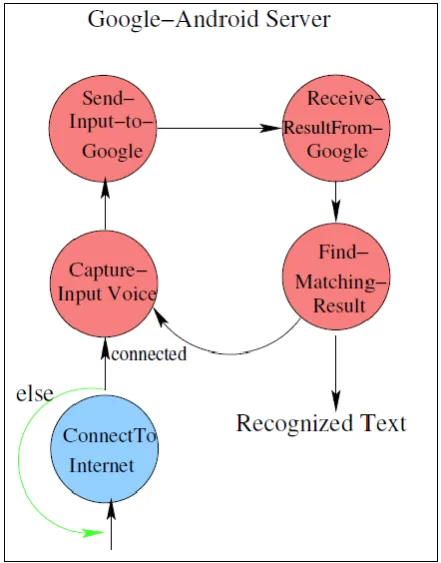
The flow of the Google_AndroidClient application used as a client is shown in Fig. 10. It takes audio command from a user and prepares a command to pass the input to the server. Google Server returns a list of results back to the Android application. Each result is then compared with a list of predefined commands. After having matched the result with a text command
it prepares an intermediate command for the robotic computer system. The robotic computer has a running client application which receives commands from the Android smartphone and generates a ROS understand-able command to actuate the robot accordingly.
Figure 10. Google_AndroidClient application flow
4. Experiments
For experiments the presented work uses Android
smartphone, Pioneer robots, Google-Voice recognition server as online, and Simon speech server as offline server. We performed experiments with different con-figurations and setups as explained below:
4.0.1. Experiment with Online Setup
With this evaluation setup we used Pioneer-3DX
equipped with a gripper, and an Android smartphone connected with Internet. The smartphone application
Google_AndroidClient used Google Server as speech server through its standard GUI (Graphical User Inter-face), and sent recognized command to the robotic system to actuate it accordingly. Some commands used for the robot navigation and gripper movement are stated below:
Stop: Command to stop immediately
Left: Command to turn to left side
Right: Command to turn to right side
Move: Command to move forward
Back: Command to move backwards
Open: Command for opening gripper jaws
Up: Command for moving gripper upwards
Down: Command for moving gripper downwards
The task in this experiment was to move the robot around and pick things with the help of gripper and bring them to the user by calling commands via headset microphone attached with smartphone. Fig. 11 depicts Online setup experiment where Pioneer-3DX robot carries a Juice-Can from place 𝐴 to 𝐵 in its action indoor environment.
The recognition quality is good but the time delay for speech recognition depends upon the speed of the Internet. There is also a risk of uncontrollable longer delay for such real time applications where time is critically important.
Figure 11. Online evaluation with Google based speech recognition using smartphone and
Pioneer-3DX robot
4.0.2. Experiments with Offline Setup
As shown in Fig. 1, for the Offline setup evalua-tion we used Pioneer-3AT robot equipped with SICK laser and Katana robotic arm, Android smartphone as a speech recognition client, and Simon as a speech re-cognition server. Using SICK laser sensor, a two-dimensional occupancy grid map is created as depic-ted in Fig. 12. The map is essential for the automatic navigation inside any indoor environment. To move the robot to a particular location inside the environ-ment, .e.g., kitchen, the command word was associa-ted with relevant coordinate position inside the map of the environment as a goal for the navigation task. Commands used in this evaluation are stated below:
Stop: Command to stop immediately
Left: Command to turn 30° left side
Right: Command to turn 30° right side
Move: Command to move straight
Back: Command to move back slowly
Kitchen: Command to go to kitchen until Stop
Hall: Command to go to hall until Stop
Room: Command to go to room until Stop
Corridor: Command to go to corridor until Stop
Lab: Command to go to lab until Stop
Figure 12. Robot generated map: Left down to the corridor there is a kitchen and room. Hall is in the middle
and then lab on the right side
Both of the configurations, distributed and non-distributed, of the Offline setup gave good quality re-sults and the less average delay time than Online in some cases.
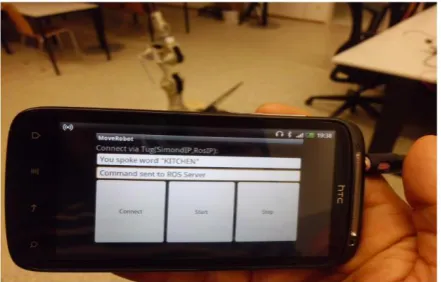
Result of recognizing word "Kitchen" is shown on Graphical User Interface from Simon_AndroidClient
application on Android Smartphone in Fig. 13.
Figure 13. Android Smartphone with GUI for Result showing AndroidClient application
recognizing word "KITCHEN"
5. Observations
Both Online and Offline setups have some pros and cons. The Online setup has been observed more dynamic and flexible as far as speaker’s accent is con-cerned, however it takes longer delay. Moreover, we do not need any other dedicated server in case of On-line setup. The OnOn-line setup can perform good for the applications where time delay is not much important. The Offline setup has also advantages over Online. It takes less time for speech recognition. The disadvan-tage of Offline is that it needs a dedicated server run-ning all the time, so if this server gets down the whole system goes down. In some scenarios Online seems to be suitable while in others the Offline setup is better. Overall accuracy of the Offline setup in an indoor en-vironment is better than the Online setup. The factors observed include:
more flexible and powerful in case of speech impair-ment problems, whereas the Online setup uses online Google speech server which uses already trained model and does not provide good results for different accent in case of speech impairment problems.
Time Delay: The average time delay from getting input from the user till actuating the robot activity is greater in the Online setup as compared to the Offline setup. This means that Offline setup is faster than that of the Online setup. The time delay between Android phone and the robot is same in both Online and Offline setup because it does not depend upon the recognition process in the speech server.
Flexibility in recognizing accent: It is observed that Offline setup is less flexible when accent is chan-ged because of its fixed predefined limited commands. The Online setup is comparatively more flexible in accent recognition because it uses a vast database of vocabulary. While changing the accent the rate of change of result in Online setup is more than the Offline setup.
Vocabulary limit: The Online setup uses a vast vocabulary database and it is not required to setup any set of commands for this as a vocabulary. The Offline setup needs a configured dictionary of the vocabulary which is a set of all the commands used in the envi-ronment for robotic system. Offline uses a limited vo-cabulary as compared to the Online setup.
Resources usage: Online setup needs Android smartphone to be connected with Internet while the Offline setup needs only Simon server running all the time on a PC inside the environment. Both systems use Android smartphone and robotic system as their resources.
Recognition rate: Recognition rate in both of the cases is reasonable and acceptable. We have observed on average 74% of recognition rate which means that out of 10 commands two are likely to be not recognized.
Table 1. The table shows confidence interval (CI) calculated for correctly recognized (True), not recognized (False), and their percentage (%) as reported in the Table 2
∑ 𝝁 𝝈 𝑺𝑬 𝑴𝒐𝑬 𝑪𝑰
TRUE 114 8.142 3.99 1.06 2.093 8.14±2.09
FALSE 41 2.928 2.164 0.578 1.134 2.92±1.13
% 1040 74.285 12.224 3.267 6.403 74.28±6.40
6. Results
A number of commands were used to evaluate the speech recognition quality for robotic navigation system. Recognition correctness and failure are shown in Table 2. Total gives the total number of times a command is used, True means it is recognized, and
False means not recognized. Overall achieved performance in terms of confidence interval (CI) of
recognized commands (True), not recognized commands (False), and their percentage (%), is shown in Table 1 where ∑ is total sum, 𝜇 is average, 𝜎 is standard deviation, 𝑆𝐸 is standard error, and 𝑀𝑜𝐸 is margin of error.
Table 2. The table shows recognition results. True means recognized and False means not recognized
Command Total TRUE FALSE %
Stop 30 21 9 70
Left 10 8 2 80
Right 10 7 3 70
Move 10 6 4 60
Back 10 5 5 50
Kitchen 5 4 1 80
Hall 10 9 1 90
Room 10 6 4 60
Corridor 10 7 3 70
Lab 10 8 2 80
Up 10 9 1 90
Down 10 7 3 70
Open 10 8 2 80
Close 10 9 1 90
7. Conclusion and Future Work
The presented work describes an autonomous ROS-based robotic control system using Android smartphone based speech recognition system. For this purpose, we have developed four applications: three for Android smartphone and one for the ROS based robotic system. We have evaluated two setups: Online and Offline. In Online setup, Android phone using application Google_AndroidClient takes user speech and passes to the Google-voice server. In case of Offline setup the application Simon_AndroidClient on Android smartphone side takes user voice, prepro-cesses it and sends to Simon server. In both cases, ser-ver returns the result which is matched with prede-fined commands. The matched result is then given to the android application ROS_AndroidClient which sends intermediate commands to the application
ROS_AndroidServer running on robotic system, which gives goals to the robotic system using ROS.
the object given by the spoken word command could also be a future direction. Comparisons with other existing voice recognition systems is also one of the future works.
Acknowledgement
First author gratefully acknowledges the support from Higher Education Commission (HEC) of the government of Pakistan funding his Ph.D studies at Graz University of Technology in Austria.
References
[1] Y. Wang, J. Lin, M. Annavaram, Q. A. Jacobson, J. Hong, B. Krishnamachari, N. Sadeh. A Frame-work of Energy Efficient Mobile Sensing for Automa-tic User State Recognition. 7th ACM MobiSys, 2009, pp. 179–192.
[2] D. Peebles, H. Lu, N. D. Lane, T. Choudhury, A. T. Campbell. Community-Guided Learning: Exploiting Mobile Sensor Users to Model Human Behavior. In:
Proc. AAAI(10), AAAI Press, 2010, pp. 1600–1606. [3] M. Azizyan, I. Constandache, R. R. Choudhury.
Surround-Sense: Mobile Phone Localization via Ambience Fingerprinting. In: Proc. 15th ACM MobiCom, 2009, pp. 261–272.
[4] S. Zaman, W. Slany, G. Steinbauer. ROS-based Ma-pping, Localization and Autonomous Navigation Using a Pioneer 3-DX Robot and Their Relevant Issues. Electronics, Communications and Photonics Conference (SIECPC), Saudi Arabia, 2011, Vol. 4, No. 1, pp. 1-5.
[5] S. Zaman. Smart Phone based Offline Speech Reco-gnition System for Robot Navigation: A Step towards Autonomous Handicap Wheelchair. First International Conference on Technology for Helping People with Special Needs, Riyadh, Kingdom of Saudi Arabia, February 18-20, 2013.
[6] D. Di Paola, A. Milella, G. Cicirelli, A. Distante. An Autonomous Mobile Robotic System for Surveillance of Indoor Environments. International Journal of Adv-anced Robotic Systems, 2010, Vol. 7, No. 1, 19–26. [7] E. Marder-Eppstein, E. Berger, T. Foote, B. P.
Ger-key, K. Konolige. The Office Marathon: Robust Navi-gation in an Indoor Office Environment. International Conference on Robotics and Automation (ICRA), Anchorage, AK, USA, 2010, pp. 300–307.
[8] M. Quigley, K. Conley, B. P. Gerkey, J. Faust, T. Foote, J. Leibs, R. Wheeler, A. Y. Ng. ROS: an Open-source Robot Operating System. ICRA Workshop on Open Source Software, 2009.
[9] B. House, J. Malkin, J. Blimes. The VoiceBot: A Voice Controlled Robot Arm. In: Proceedings of ACM CHI Conference on Human Factors in Computing Systems, 2009, pp. 183–192.
[10] M. A. A. Ahasan, M. A. Awal, S. S. Mostafa. Imple-mentation of Speech Recognition Based Robotic Sys-tem. International Journal on Computer Science and Engineering (IJCIT), 2011, Vol. 1, No. 2, 16–19. [11] J. M. Valin, J. Rouat, F. Michaud. Enhanced Robot
Audition Based on Microphone Array Source Separation with Post-Filter. In: Proceedings of 2004 IEEE/RSJ International Conference on Intelligent Robots and Systems, September 28-October 2, 2004, Sendai, Japan, pp. 2128–2133.
[12] B. Moulton, G. Pradhan, Z. Chaczko. Voice Opera-ted Guidance Systems for Vision Impaired People: Investigating a User-Centered Open Source Model.
International Journal of Digital Content Technology and its Applications, 2009, Vol. 3, No. 4, 60–68. [13] S. Yamamoto, K. Nakadai, M. Nakano, H. Tsujino,
J. M. Valin, K. Komatani, T. Ogata, H. G. Okuno. Real-Time Robot Audition System That Recognizes Simultaneous Speech in The Real World. In:
Proceedings of the 2006 IEEE/RSJ, International Conference on Intelligent Robots and Systems, Beijing, China, October 9-15, 2006, pp. 5333–5338.
[14] J. N. Pires. Robot-by-voice: Experiments on Co-mmanding an Industrial Robot Using the Human Voice. Industrial Robot: An International Journal, 2005, Vol. 32, No. 6, pp. 505–511.
[15] D. Fox, W. Burgard, S. Thrun. The Dynamic Win-dow Approach to Collision Avoidance. IEEE Robotics and Automation, 1997, Vol. 4, No. 1, 23–33.
[16] D. A. Johnson, M. M. Trivedi. Driving Style Reco-gnition Using a Smartphone as a Sensor Platform. 14th International IEEE Conference on Intelligent Trans-portation Systems, Washington DC, USA, October 5-7, 2011, pp. 1609–1615.
[17] M. G. Song, M. Tariquzzaman, J. Y. Kim, S. T. Hwang, S. H. Choi. A Robust and Real Time Visual Speech Recognition for Smartphone Application.
International Journal of Innovative Computing, Information and Control, 2012, Vol. 8, No. 4, pp. 2837–2853.
[18] J. Dai, J. Teng, X. Bai, Z. Shen, D. Xuan. Mobile Phone Based Drunk Driving Detection. Pervasive Computing Technologies for Healthcare (Pervasive Health), 4th International Conference on-NO PERMISSIONS, March 2010, pp. 1–8.
[19] J. Hamm, B. Stone, M. Belkin, S. Dennis. Automatic Annotation of Daily Activity from Smartphone-Based Multisensory Streams. Mobile Computing, Applica-tions, and Services Lecture Notes of the Institute for Computer Sciences, Social Informatics and Telecommunications Engineering, 2013, Vol. 110, pp. 328-342.
[20] N. D. Lane, E. Miluzzo, H. Lu, D. Peebles, T. Choudhury. A Survey of Mobile Phone Sensing.
IEEE Communications Magazine, 2010, Vol. 48, No. 9, 140–150.
[21] A. Birk, H. Kenn. An Industrial Application of Beha-vior-Oriented Robotics. In: Proceedings of IEEE Inter-national Conference on Robotics and Automation, Seoul, Korea, May 2001, Vol. 1, pp. 749–754. [22] M. Lowy, H. Murveit, D. M. Mintz, R. W.
Broder-sen. An Architecture for a Speech Recognition System.
IEEE International Solid-State Circuits Conference, 1983, pp. 118–119.
[23] K. Lee, H. Hon, R. Reddy. An Overview of the SPHINX Speech Recognition System. IEEE Trans-actions on Acoustics, Speech and Signal Processing, 1990, Vol. 38, No. 1, 35–45.