API SPECIFICATION FOR MOLPAY INTEGRATION
(Version 10.8)
Last updated June 6, 2013
MOLPay Sdn Bhd
(948015-X)
B-13-3A, Jalan Multimedia 7/AH,
CityPark, i-City, 40000 Shah Alam,
Selangor Darul Ehsan, Malaysia.
+(603) - 5521 8438
+(603) - 5521 8437
[email protected]
www.molpay.com
Award Winner of :
Compliance of :
NetBuilder has won MEPS FPX
MOST OUTSTANDING MERCHANT 2009
TABLE OF CONTENTS
A. INTRODUCTION ... 4
1. BENEFIT ... 4
2. ONLINE PAYMENT TRANSACTION FLOW ... 5
3. REQUIREMENT OF MERCHANT INTEGRATION... 8
B. PAYMENT CHANNEL ACCEPTED ... 9
1. Malaysia Payment Gateway (Credit Card & local debit payment) ... 9
2. Union Pay (Debit payment in RMB) ... 9
3. Alipay (Largest China Online Payment Service Provider) ... 9
4. MOLPay PayPal Express Checkout ... 10
5. MOLPay Crossborder Payment ... 12
6. MOLPay Physical Payment (Cash payment) ... 12
C. MERCHANT INTEGRATION ... 13
1. Front-end payment page URL for online buyer. ... 13
2. Variable passing method. ... 15
3. Default Parameters (required by payment page). ... 15
4. Integration example ... 18
5. Return parameters (by POST Method) ... 22
D. SECURITY ... 27
1. Security Checking ... 27
i. Vcode ... 27
ii. Security Key (skey) ... 29
2. Security Items ... 30
i. Verify Key ... 30
E. PAYMENT STATUS QUERY & NOTIFICATION ... 31
1. Payment Status Query (PSQ) ... 31
i. Indirect PSQ ... 31
ii. Direct PSQ ... 48
iii. Daily PSQ ... 51
iv.Refund Query ... 54
2. PAYMENT STATUS NOTIFICATION ... 57
i. Callback Query with Instant Payment Notification (IPN) ... 57
ii. MOLPay Multiple Return URL ... 61
F. REFERENCES ... 62
REF 1 : List of Country names & code ... 62
REF 2 : PayPal Accepted Currency ... 62
REF 4 : MOLPay Mobile SDK ... 64
REF 5 : MOLPay Supported Shopping Cart ... 65
A.
INTRODUCTION
Dealing with banks and 3rd party payment gateway suppliers are time-consuming and it might cost you a lot of money. We also understand that it’s a hassle for those non-technical people to integrate even one kind of online payment method into their existing website. Thus MOLPay Sdn Bhd proudly presents MOLPay Secure Online Transaction service to cater your requirement.
MOLPay is a service to help merchant to sell online. The service includes a :
front-end page (for online buyer to enter their credit card information)
back-end merchant site (for merchant to track their client payment status) FQDN: www.onlinepayment.com.my (using HTTPs)
This is the URL for starting and ending point of payment process. This domain has been verified and secured by a high-grade 256-bit encryption SSL.
General information about this service could be found here:
http://molpay.com OR
http://www.netbuilder.com.my/html/modules/tinycontent/index.php?id=44
1.
Benefit
Lowest transaction rate (or discounted rate) that charged by bank
Support variety of online payment method in Malaysia
Easy to integrate or no integration required if using NetBuilder EC package
Support well-known online shopping cart system
Save time and money to have all payment channels in a box
High-grade security assurance
NOTE : Fraud Scan will not be activated under a testing account or any non-traditional credit card payment and always return the value, or so called Fraud Score of “-1” or “ - “ or “ n/a “ for the fraud score.
Back-end admin site for merchant:
URL https://www.onlinepayment.com.my/MOLPay/
Requirement Merchant ID & Password are required to logon * Main function Allow merchant to check :
i. Merchant profile, change Password and configure return URL & callback URL.
ii. Transaction listing and details. iii. Settlement listing and details. iv. Transaction reports.
2.
Online Payment Transaction Flow
Below are the steps for merchant to start accepting payment online via MOLPay payment gateway.
i. Merchant have to integrate their online store and passing all the required parameters to MOLPay.
ii. Now, buyer can start to make their order online on merchant’s website and choose MOLPay Payment option to checkout.
iii. Buyer will be redirected to MOLPay Payment page to confirm the information passing from merchant website on step (i). At this stage, if necessary, buyer still able to modify some of the information passing before and choose any payment option available on MOLPay payment page.
iv. For Credit card payment, buyer need to key in their Credit card information in order to proceed.
v. For non-Credit card payment, when reach the bank site, buyer need to key in their username and password for their internet banking account to proceed.
vi. Buyer has to confirm the payment at bank site and wait for bank to process the payment.
vii. Bank will return back the payment status to MOLPay to notify that is captured or failure transaction. At this stage, payment notification will be send to buyer and merchant accordingly.
viii. MOLPay then will notified merchant’s website the status of the payment through merchant’s return URL and merchant need to update the order status of the buyer accordingly.
3.
Requirement of Merchant Integration
Kindly refer below for the requirement before merchant can start to do the integration with MOLPay Payment Gateway.
i. Merchant online store (If any).
ii. MOLPay Merchant ID and Verify Key – compulsory before you can start accept payment online via MOLPay Payment Gateway.
iii. Merchant Return URL – compulsory to allow MOLPay notified payment status to merchant’s system/online store.
iv. Merchant Callback URL – compulsory to allow merchant to receive any updated of payment status after a while the payment has been done. v. Any technical person in charge to handle the integration process from
B.
PAYMENT CHANNEL ACCEPTED
1.
Malaysia Payment Gateway (Credit Card & local debit
payment)
This channel covers most of all payment processor in Malaysia.
Accept payments via :
i. Credit Card – Visa & MasterCard
ii. Internet funds transfer – Maybank2u, MEPS FPX, CIMB Clicks, RHB Online, Hong Leong Online, MEPSCash etc.
2.
Union Pay (Debit payment in RMB)
*
This is a foreign currency payment channel and the currency in actual transaction is China Renminbi (RMB/CNY)
This channel is now connecting to more than 20 China local banks directly and supporting more than 40 debit cards.
Covers more than 98% of your target customers in mainland China.
3.
Alipay (Largest China Online Payment Service Provider)
*
Alipay is committed to providing payment services with “simple, secure and speedy” solutions to China’s e-business.
Through their strategic cooperation with domestic commercial bank, merchants have gained access to a broad online consumer market in mainland China.
All payment under this channel will be converted to USD and recorded into MOLPay database once submitted to Alipay payment gateway. At Alipay, USD amount will then be converted and transacted in RMB.
Refer Figure B-3-i below to understand the currency flow of Alipay channel on MOLPay :
4.
MOLPay PayPal Express Checkout
*
Suitable for merchant to well managed their online business transaction secure and safely.
Accept multiple currencies to make a payment. May refer to a list of PayPal accepted currencies (REF 2) to view the list of currency code available for this channel.
Below are the steps to activate: i. Sign up for PayPal account. ii. Grant 3rd party API access.
iii. Configure PayPal on MOLPay merchant account. iv. Integrate your website with MOLPay.
Merchant may refer Figure B-4-i below for the steps to activate PayPal on MOLPay. RMB (1) (2) (3) (4) MYR USD Figure B-3-i Details :
1) Merchant sends or stores amount in MYR. 2) MOLPay will convert amount from MYR to USD. 3) Alipay converts amount in USD to RMB.
4) When return to MOLPay, it will return MYR to merchant store.
5.
MOLPay Crossborder Payment
*
Transaction will be transacted in currency other than Ringgit Malaysia (MYR).
Support various type of currencies and allow merchant to accept payment worldwide.
No auto-forex conversion occurs on this channel as this is platform for multi-currency payment.
6.
MOLPay Physical Payment (Cash payment)
*
MOLPay is the first multi-currency payment gateway in Southeast Asia that accepts cash payments for online purchases, through physical outlets such as convenience stores and bookstores.
With MOLPay Physical Payment Solution, your customers can now buy products from your online store and pay at over 3,000 physical outlets across Malaysia, Brunei and Singapore (to be added soon).
When the customer pays at the payment outlets, merchant will receive a payment notification and can proceed to deliver the products to your customer.
IMPORTANT NOTICE
C.
MERCHANT INTEGRATION
Below are the basic steps for merchant to integrate their online store/website with MOLPay Payment Gateway:
Must have online store, website, blog, any online medium for them to sell online.
Merchant need to request MOLPay sandbox account for this process. You may contact our sales representative ([email protected]) for this
arrangement.
Start to integrate their online store above using parameters required by MOLPay.
Perform the UAT/SIT to ensure each payment & system flow is on the right track.
Once everything is done, merchant can start to sign up for real MOLPay account.
Done.
Below are the reference that merchant can follow to start the integration.
1.
Front-end payment page URL for online buyer.
https://www.onlinepayment.com.my/MOLPay/pay/MerchantID/Payment_Method MerchantID
o Compulsory.
o Is the merchant login name given by MOLPay.
Payment_Method
o Optional
o Is the identity for the gateway which will process your payment information which has been send to MOLPay.
o Please refer to table below for reference.
Channel Filename
Credit Payment Visa & Mastercard (default) index.php
Mobile Money mobilemoney.php
Ezeelink ezeelink.php
Debit Payment
Maybank2u Fund Transfer maybank2u.php
MEPS FPX fpx.php
CIMB Clicks cimb.php
RHB Online rhb.php
Am Online amb.php
Mepscash Online mepscash.php
Webcash Online webcash.php
Physical Payment (Cash payment)
Esapay (Malaysia) esapay.php
7-Eleven (Malaysia) Coming Soon…
Senheng/SenQ (Malaysia) senheng.php Singpost SAM (Singapore) singpost.php
Crossborder Payment
PayPal paypal.php
2.
Variable passing method.
POST/GET : to front-end URL. POST : to return URL (filled by merchant after logon to Admin site or passing by merchant during the integration)
3.
Default Parameters (required by payment page).
Variable
Name Format Description
amount
Floating point The transaction amount in one bill. Configurable to lock this field.
Min accepted amount : 1.01
orderid Alpha-numeric Bill/invoice number. Configurable to lock this field. bill_name Alpha-numeric Buyer name
- UTF-8 encoding is recommended for Chinese content bill_email Alpha-numeric Buyer email
bill_mobile Alpha-numeric Buyer mobile contact number. bill_desc Alpha-numeric Description of the bill.
country
2 Uppercase character
Destination (Country) that the goods to be shipped or delivered or the buyer country.
2 letter ISO-3166 country code.
* Please refer REF 1 below for more info
returnurl
URL address This URL will be used if merchant intend to use
their merchant account for multiple online shops/websites. - UTF-8 encoding is recommended for Chinese content * Please refer Section E-2-ii below for more info
vcode
MD5 Encrypted String
Additional security code to avoid any changes on any value pass to MOLPay
e.g :
md5($amount.$merchantID.$orderID.$verifyKey) * Kindly refer Section D-1-i below for more info
cur
3 Lowercase character
Different payment channel will have different requirement of currency. Merchant may refer to Additional currency info below for the details.
langcode
2 Lowercase character
Merchant may switch the language display on their payment page by passing the language code to MOLPay during the integration.
Supported language as below : Code Language
en English (default) cn Simplified Chinese
Additional Currency Info
Payment Type Description
1. Malaysia Payment Gateway (Credit Card & local debit payment)
- All transaction are in Ringgit Malaysia (MYR) only.
- Accepted currencies for Auto-forex conversion are US Dollar (USD), New Taiwan Dollar
(NTD/TWD).
- The forex rate is based on MOLPay preferential rate and will be update without prior notice. - Auto-forex conversion is NOT recommended for those merchants who cannot take the risk of fluctuation in forex rate.
Optional accepted values : rm/myr
usd ntd/twd 2. Union Pay (Debit payment
in RMB)
- All transactions are in Chinese Renminbi (RMB/CNY) only.
- Accepted currencies for auto-forex conversion are Malaysian Ringgit (RM/MYR).
- The forex rate is based on MOLPay preferential rate and will be update without prior notice. - Auto-forex conversion is NOT recommended for those merchants who cannot take the risk of fluctuation in forex rate.
Optional accepted values: rm/myr
rmb/cny
3. Alipay - Accepted currencies for auto-forex conversion are US dollar (USD), New Taiwan
Dollar(TWD/NTD)
- The forex rate is based on MOLPay preferential rate and will be update without prior notice. - Auto-forex conversion is NOT recommended for those merchants who cannot take the risk of fluctuation in forex rate.
Optional accepted values: rm/myr
ntd/twd usd 4. MOLPay PayPal Express
Checkout
5. MOLPay Crossborder Payment
Currently only PHP currency accepted for this payment method.
6. MOLPay Physical Payment (Cash payment)
Optional accepted values at the moment are :
- rm/myr : Senheng, Esapay
4.
Integration example
Merchant may refer below for the sample of integration code to MOLPay payment gateway.
Via GET method (Simple HTML hyperlink – All the below in one line) i. For PHP developer
<?PHP
echo “<a
href=https://www.onlinepayment.com.my/MOLPay/pay/test99/?”; echo “amount=”.$amount.”&”;
echo “orderid=”.urlencode($oid).”&”; echo “bill_name=”.urlencode($name).”&”; echo “bill_email=”.urlencode($email).”&”; echo “bill_mobile=”.urlencode($mobile).”&”; echo “bill_desc=”.urlencode($description).”&”; echo “country=”.$country.”&”;
echo “returnurl=”.urlencode($returnurl).”&”; echo “vcode=”.$vcode.”&”;
echo “cur=”.$cur.”&”;
echo “langcode=”.$langcode.”> Pay via MOLPay Here </a>”;
ii. For ASP/ASP.NET developer <%
dim amount, orderid, name, email, mobile, desc, cur, country, langcode
amount = ”12.99” ordered = ”DG873”
name = ”Mr Albert Lim”
email = ”[email protected]” mobile = ”016-2341234”
desc = ”DIGI Reload Coupon RM30” cur = ”rm”
country = ”MY”
returnurl = ”http://www.yourdomain.com/returnurl.php” langcode = ”en”
vcode = md5(amount & merchantID & orderid & xxxxxxxx )
// REPLACE xxxxxxxx with MOLPay Verify Key
response.write("<a
href=https://www.onlinepayment.com.my/MOLPay/pay/test99/?") response.write("amount=” & amount)
response.write("&orderid=” & orderid) response.write("&bill_name=” & name) response.write("&bill_email=” & email) response.write("&bill_mobile=” & mobile) response.write("&bill_desc=” & desc) response.write("&country=” & country) response.write("&returnurl=” & returnurl) response.write("&vcode=” & vcode)
response.write("&cur=” & cur)
response.write("&langcode=” & langcode)
response.write("’> Pay via MOLPay Here </a>”)
Via POST method (Simple HTML Form) i. For PHP developer <?PHP echo “<form action=’https://www.onlinepayment.com.my/MOLPay/pay/test99/’ method=POST >”;
echo “<input type=hidden name=amount value=$amount>”; echo “<input type=hidden name=orderid value=$oid>”; echo “<input type=hidden name=bill_name value=$name>”; echo “<input type=hidden name=bill_email value=$email>”; echo “<input type=hidden name=bill_mobile value=$mobile>;
echo “<input type=hidden name=bill_desc value=$description>”; echo “<input type=hidden name=country value=$country>”; echo “<input type=hidden name=returnurl value=$returnurl>”; echo “<input type=hidden name=vcode value=$vcode>”; echo “<input type=hidden name=cur value=$cur>”; echo “<input type=hidden name=langcode value=$langcode>”; echo “<input type=submit value=’PAY HERE’>”;
echo “</form>”; ?>
ii. For ASP/ASP.NET developer <%
dim amount, orderid, name, email, mobile, desc, cur, country, langcode
amount = ”12.99” ordered = ”DG873”
name = ”Mr Albert Lim”
email = ”[email protected]” mobile = ”016-2341234”
desc = ”DIGI Reload Coupon RM30” cur = ”rm”
country = ”MY”
returnurl = ”http://www.yourdomain.com/returnurl.php” langcode = ”en”
vcode = md5(amount & merchantID & orderid & xxxxxxxx )
// REPLACE xxxxxxxx with MOLPay Verify Key
response.write(“<form
action=’https://www.onlinepayment.com.my/MOLPay/pay/test99/’
method=POST >)
response.write(“<input type=hidden name=amount value=”&amount&”>) response.write(“<input type=hidden name=orderid value=”&oid& ”>) response.write(“<input type=hidden name=bill_name value=”&name& ”>) response.write(“<input type=hidden name=bill_email value=”&email&”>) response.write(“<input type=hidden name=bill_mobile
value=”&mobile&”>)
response.write(“<input type=hidden name=bill_desc value=”&desc&”>) response.write(“<input type=hidden name=country value=”&country&”>) response.write(“<input type=hidden name=returnurl
value=”&returnurl&”>)
response.write(“<input type=hidden name=vcode value=”&vcode&”>) response.write(“<input type=hidden name=cur value=”&cur&”>)
response.write(“<input type=hidden name=langcode value=”&langcode&”>) response.write(“<input type=submit value=’PAY HERE’ ”>)
response.write(“</form>”)
5.
Return parameters (by POST Method)
Variable Name Format Attribute Description
amount (*) Floating-point The transaction amount
in one bill.
orderid Alpha-numeric The bill/invoice number.
appcode (*) Alpha-numeric Bank approval code.
tranID Integer Transaction ID for
tracking purpose
domain Alpha-numeric Merchant ID
status Numeric 00, 11 or 22 (**)
Status of transaction: 00 - success
11 - failure 22 – pending (**)
error_code (*) Alpha-numeric Error code for failure transaction (if any). error_desc (*) Alpha-numeric
Error description for failure transaction (if any).
currency Alpha-numeric Depends on payment
channel.
paydate Date/Time YYYY-MM-DD
HH:mm:ss
Date time of the transaction.
channel Character
Depends to the payment method. Please refer Return Channel Reference below for more info.
skey (*) Alpha-numeric MD5 encryption
Encrypted string to verify whether the transaction is from a valid source.
Verify Key is required.
(*) For failure transaction under test account, there’s no value return for this field.
(**) Applied for FPX transaction only and will be return to merchant’s timeout URL once merchant activated “FPX Asynchronous Payment” feature in merchant profile (Please refer REF 3 for further details)
Return Channel Reference
Channel Payment Method Currency Return
Credit Payment
Visa & Mastercard (default) Credit RM
Mobile Money MM-Weblink RM
Ezeelink MM-Ezeelink RM
Debit Payment
Maybank2u Fund Transfer MB2u RM
MEPS FPX FPX RM
CIMB Clicks CIMB-Clicks RM
RHB Online RHB-ONL RM
Am Online AMB-W2W RM
Hong Leong Bank Online HLB-ONL RM
Mepscash Online MEPSCash RM
Webcash WEBCASH RM
Physical Payment (Cash Payment)
Esapay Cash-Esapay RM
Crossborder Payment
China Union Pay PM-ASIA Depends on
currency code passing during the payment.
PayPal PayPal Depends on
currency code return by PayPal
6.
Example of return script
IMPORTANT NOTICEMultiple md5 encryption is used to verify the secret key (skey) to avoid faked transaction from 3rd party when post the return status from MOLPay to Merchant website. Please keep the Verify Key and encryption method as a secret to protect your Ecommerce website.
Below is the sample of the return script for merchant to refer.
For PHP Developer <?php
$vkey ="xxxxxx"; //Replace xxxxxxxx with your MOLPay Verify Key /********************************
*Don't change below parameters ********************************/ $tranID = $_POST['tranID']; $orderid = $_POST['orderid']; $status = $_POST['status']; $domain = $_POST['domain']; $amount = $_POST['amount']; $currency = $_POST['currency']; $appcode = $_POST['appcode']; $paydate = $_POST['paydate']; $skey = $_POST['skey']; /*********************************************************** * All undeclared variables below are coming from POST method ************************************************************/
$key0 = md5( $tranID.$orderid.$status.$domain.$amount.$currency ); $key1 = md5( $paydate.$domain.$key0.$appcode.$vkey );
if( $skey != $key1 ) $status= -1; // Invalid transaction
if ( $status == "00" ) {
if ( check_cart_amt($orderid, $amount) ) {
/*** NOTE : this is a user-defined function which should be prepared by merchant ***/
// action to change cart status or to accept order
// you can also do further checking on the paydate as well // write your script here ...
}
} else {
// failure action
// write your script here ...
}
For ASP/ASP.NET Developer<!--#include file="md5.asp"--> ‘For ASP Developer
<!--#include file="md5.aspx"--> ‘For ASP.NET Developer
<%
‘ md5.asp/md5.aspx is a 3rd party developed md5 solution for ASP/ASP.NET user
‘ You could get the md5.asp/md5.aspx from MOLPay support team
' Some variables below are coming from POST method
dim key0, key1, tranID, orderid, status, domain, amount, currency, paydate, appcode, skey
tranID = Request.Form(“tranID”) orderid = Request.Form(“orderid”) status = Request.Form(“status”) domain = Request.Form(“domain”) amount = Request.Form(“amount”) currency = Request.Form(“currency”) paydate = Request.Form(“paydate”) appcode = Request.Form(“appcode”) skey = Request.Form(“skey”)
key0 = md5( tranID & orderid & status & domain & amount & currency )
key1 = md5( paydate & domain & key0 & appcode & ”xxxxxx” )
‘Replace xxxxxxxx with your MOLPay Verify Key ‘ invalid transaction if the key is different
If skey <> key1 then status= -1 End if
If status = "00" then
‘ checking the validity of cart amount & orderid.
‘if the verification test passed then can update the order status to paid.
‘ you can also do further checking on the paydate as well
Else
‘ failure action
End if
7.
Testing account
MOLPay DOES NOT provide any testing account for other payment method except for Malaysia Payment Gateway (Credit Card payment: Visa & Mastercard only). Merchant needs to register own Internet Banking Account to do the testing for other payment method.
For Credit Card testing payment, it only verifies VISA and MasterCard number validity and NO actual transaction occurs between bank or payment gateway.
Visa and Mastercard card number for testing as below :
Pattern Mastercard Visa
Positive Test 5105105105105100 5555555555554444
4111111111111111 4012888888881881
D.
SECURITY
1.
Security Checking
MOLPay have implemented two security checking in order to protect payment information from being abused by any other unauthorized parties during the payment.
i. Vcode
MOLPay vcode can be defined as an encrypted security code generated by merchant used to verify a transaction on merchant’s payment page.
Besides that, the purpose of the vcode is to prevent any changes occur to the payment info and to authorize the validity of the payment sources. It is compulsory for each requested transaction after “Enable Verify Payment” setting has been activated in merchant profile (Figure D-i-i).
Figure D-i-i
Vcode was encrypted using MD5 encryption hash function and consist of the following information (must be set in the following orders) :
Transaction amount
MOLPay Merchant ID
Order number
MOLPay Verify key How to generate vcode?
Example to generate vcode for PHP developer.
To ensure the vcode generated was correct, merchant may visit the following link for checking.
URL : https://www.onlinepayment.com.my/MOLPay/query/vcode.php
What happen if merchant wrongly generated vcode?
An error will be displayed on Merchant's secure payment page as below (Figure D-i-ii) : Figure D-i-ii <?php $amount = “27.60”; $merchantID = “ACME”; $orderid = “OD8842”; $verifykey = “xxxxxxxx”;
// Replace xxxxxxxx with your MOLPay Verify Key // vcode formula
$vcode = md5( $amount.$merchantID.$orderid.$verifykey );
// output of the vcode based on above information equals to :
$vcode = “ec7f2c6e85769728a5e9b75893ee6bc1”;
ii. Security Key (skey)
MOLPay skey is a security key defined by MOLPay to avoid faked transaction from 3rd party when MOLPay return the payment status which has been processed to merchant online store.
The combination of parameters and MOLPay verify key then will be encrypted using MD5 encryption to generate the security key and give protection to merchant E-commerce website.
Merchant MUST implement a checking in between security key return by MOLPay (skey) with security key generated on merchant’s E-commerce system (key1) before released/approved any order made from the buyer.
Example to generate security key and perform checking before approved order for PHP developer.
<?php
$vkey ="xxxxxx"; //Replace xxxxxxxx with your MOLPay Verify Key /********************************
*Don't change below parameters ********************************/ $tranID = $_POST['tranID']; $orderid = $_POST['orderid']; $status = $_POST['status']; $domain = $_POST['domain']; $amount = $_POST['amount']; $currency = $_POST['currency']; $appcode = $_POST['appcode']; $paydate = $_POST['paydate'];
$skey = $_POST['skey']; //Security key return by MOLPay /*********************************************************** * All undeclared variables below are coming from POST method ************************************************************/
$key0 = md5( $tranID.$orderid.$status.$domain.$amount.$currency ); $key1 = md5( $paydate.$domain.$key0.$appcode.$vkey );
//key1 : Security key generated on Merchant system
if( $skey == $key1 )
// If matched, perform another extra checking before approved order
elseif( $skey != $key1 )
// If unmatched, reject the order
2.
Security Items
i. Verify Key
MOLPay Verify Key is uniquely encrypted string owned by all MOLPay merchants. The purpose of it is to provide more secure transaction for each transaction that going through with MOLPay.
MOLPay use the Verify Key for various type of function such as:
To integrate MOLPay Online Payment with Merchant Website, to verify MOLPay payment, to do checking with the transaction made on MOLPay, etc.
How to get the verify key?
Logon to MOLPay Merchant Admin site.
Go to Merchant Profile tab.
Scroll down until you see the word “Verify Key”
Get the value and use it on any functions that require it.
Kindly refer figure below.
E.
PAYMENT STATUS QUERY & NOTIFICATION
1.
Payment Status Query (PSQ)
Payment status query are merchant initiated process, which means query sent from merchant’s system to MOLPay to get the updated payment status of any transaction either it has complete the payment loop (returned to merchant site) or not.
IMPORTANT NOTICE
1. Merchant is only allowed to QUERY ONCE FOR EVERY 5 MINUTES or the system will block merchant’s IP/query source automatically.
2. Kindly be informed that this feature is not available for MOLPay Test account.
There have several types of PSQ available: i. Indirect PSQ (Normal PSQ) ii. Direct PSQ (Bank status query) iii. Daily Query
iv. Refund Query
i. Indirect PSQ (Normal PSQ)
i.i TYPE A : PSQ using Single Transaction ID
Input :
One MOLPay Transaction ID(unique) required to query the transaction status from MOLPay.
Output :
MOLPay will return single result based on transaction ID given.
Front-end URL :
https://www.onlinepayment.com.my/MOLPay/q_by_tid.php
Parameter passing method :
Parameters :
TYPE A : PSQ USING SINGLE TRANSACTION ID Variable
Name Format Description
amount Floating point The transaction amount in one bill.
Min accepted amount : 1.01
txID Integer Unique MOLPay Transaction ID
domain
Alpha-numeric MOLPay Merchant ID
type Integer
Method for merchant to receive response data :
Code Definition
0 In Plain text (default)
1 By POST
url URL Address
URL to receive response data from MOLPay.
Data will be returned to merchant’s system via background (doesn’t required browser)
skey
Alpha-numeric Security hash key. Verify key is required.
Integration example (for PHP developer) :
Return data :
Plain text with new line character
(type=0) POST (type=1)
StatCode: 00 StatName: captured TranID: 65234 Amount: 3899.00 Domain: shopA VrfKey: 456cf69e5bddfe8ed47371096 $_POST[StatCode] = “00”;
$_POST [StatName] = “captured”; $_POST [TranID] = “65234”; $_POST [Amount] = “3899.00”; $_POST [Domain] = “shopA”; $_POST[VrfKey:]=
“456cf69e5bddfe8ed47371096”; <?php
$skey = md5($txID . $domain . “xxxxxxx” . $amount);
//Replace xxxxxxxx with your MOLPay Verify Key /*****************
HTML Format
******************/
echo “<a
href=’https://www.onlinepayment.com.my/MOLPay/q_by_tid.php?amount=20&tx ID=12345&domain=shopA&skey=” .$skey. ”’ ”> Update Payment for tranID 12345 </a>”;
Variable Name Format Description StatCode 2-digit numeric Code Status 00 Success 11 Failure 22 Pending StatName Alphabet Code Status
Success captured, settled, ReqCancel, ReqChargeback, authorized Failure failed, cancelled, chargeback,
release, reject, blocked Pending Pending, Unknown, TestOK
TranID Integer MOLPay Transaction ID
Amount Floating point Transaction amount in one bill
Domain
Alpha-numeric MOLPay Merchant ID
VrfKey
Alpha-numeric
MD5 Encrypted string to verify whether the transaction is from valid source. Verify Key
is required.
Was encrypted as (without symbol “&”) : md5(Amount & xxx & Domain & TranID & StatCode)
i.ii TYPE B : PSQ using Single Order ID (Single output)
Input :
One order ID (might be not unique) required to query the transaction status from MOLPay.
Output :
MOLPay will return latest single result based on order ID given.
Front-end URL :
https://www.onlinepayment.com.my/MOLPay/query/q_by_oid.php
Parameter passing method :
POST or GET
Parameters :
TYPE B : PSQ USING SINGLE ORDER ID Variable
Name Format Description
amount Floating point The transaction amount in one bill.
Min accepted amount : 1.01
oID
Alpha-numeric Order ID of the transaction.
domain
Alpha-numeric MOLPay Merchant ID
type Integer
Method for merchant to receive response data :
Code Definition
0 In Plain text (default)
1 By POST
url URL Address
URL to receive response data from MOLPay.
Data will be returned to merchant’s system via background (doesn’t required browser)
skey
Integration example :
Return data :
Plain text with new line character
(type=0) POST (type=1)
StatCode: 00 StatName: captured OrderID : OD001-09 Amount : 59.00 TranID: 65234 Amount: 3899.00 Domain: shopA
BillingName : James Blunt
VrfKey: 456cf69e5bddfe8ed47371096 $_POST[StatCode]= “00”; $_POST[StatName]= “captured”; $_POST[OrderID] = “OD001-09”; $_POST[Amount] = “59.00”; $_POST[TranID]= “65234”; $_POST[Amount]= “3899.00”; $_POST[Domain]= “shopA”;
$_POST[BillingName] = “James Blunt”; $_POST[VrfKey]=
“456cf69e5bddfe8ed47371096”; Variable Name Format Description
StatCode 2-digit numeric Code Status 00 Success 11 Failure 22 Pending StatName Alphabet Code Status
Success captured, settled, ReqCancel, ReqChargeback, authorized Failure failed, cancelled, chargeback,
release, reject, blocked Pending Pending, Unknown, TestOK
OrderID
Alpha-numeric Order ID for that particular transaction. Amount Floating point Transaction amount in one bill
Domain
Alpha-numeric MOLPay Merchant ID <?php
$skey = md5($oID . $domain . “xxxxxxx” . $amount); $skey = md5($oID . $domain . “xxxxxxx” . $amount);
//Replace xxxxxxxx with your MOLPay Verify Key /*****************
HTML Format
******************/
echo “<a
href=’https://www.onlinepayment.com.my/MOLPay/q_by_oid.php?amount=20&oI D=12345&domain=shopA&skey=” .$skey. ”’ ”> Update Payment for Order ID 12345 </a>”;
BillingName
Alpha-numeric Name use to make a transaction
VrfKey
Alpha-numeric
MD5 encrypted string to verify whether the transaction is from valid source. Verify Key
is required.
Was encrypted as :
md5(Amount & xxx & Domain & OrderID & StatCode)
i.iii TYPE C : PSQ using Single Order ID (Batch output)
Input :
One order ID (might be not unique) required to query the transaction status from MOLPay.
Output :
MOLPay will return group of transaction result which belongs to order ID given.
Front-end URL :
https://www.onlinepayment.com.my/MOLPay/query/q_oid_batch.php
Parameter passing method :
POST or GET
Parameters :
TYPE C : PSQ USING SINGLE ORDER ID (BATCH OUTPUT) Variable
Name
Format Description
oID
Alpha-numeric Order ID of the transaction.
domain
Alpha-numeric MOLPay Merchant ID
type Integer
Method for merchant to receive response data :
Code Definition
0 In Plain text (default)
1 By POST
url URL Address
URL to receive response data from MOLPay.
Data will be returned to merchant’s system via background (doesn’t required browser)
format Integer
Code Type
0 Text (each data will be combined by | character)
1 Array
skey
Integration example :
Return data :
Plain text : each transaction is separated by newline character (\n) and each field is delimited by TAB (\t) character. (type=0)
TranID BillingDate StatCode StatName Amount BillingName 418607 2009-11-26 22 pending 25.00 Lenka 418603 2009-11-26 00 captured 125.10 Mika 418583 2009-11-26 00 captured 71.10 Ciara
POST : Return data in text. Info for each transaction will be separated by |
character. (type=1, format=0)
$_POST[TranID] = “418607|418603|418583”;
$_POST[BillingDate] = “2009-11-26|2009-11-26|2009-11-26”;
$_POST[StatCode] = “22|00|00”;
$_POST[StatName] = “pending|captured|captured”;
$_POST[Amount] = “25.00|125.10|71.10”;
$_POST[BillingName] = “Lenka|Mika|Ciara”;
POST : Return data in Array ($_POST[Index][Field]) (type=1, format=1)
$_POST[0][TranID] = “418607”;
$_POST[0][BillingDate] = “2009-11-26”; $_POST[0][StatCode] = “22”;
$_POST[0][StatName] = “pending”;
$_POST[0] [Amount] = “25.00”;
$_POST[0] [BillingName] = “Lenka”;
$_POST[1] [TranID] = “418603”;
$_POST[1] [BillingDate] = “2009-11-26”;
$_POST[1] [StatCode] = “00”; $_POST[1] [StatName] = “captured”;
$_POST[1] [Amount] = “125.10”;
$_POST[1] [BillingName] = “Mika”;
<?php
$skey = md5($oID . $domain . “xxxxxxx”);
//Replace xxxxxxxx with your MOLPay Verify Key /*****************
HTML Format
******************/
echo “<a
href=’https://www.onlinepayment.com.my/MOLPay/q_by_oid.php?amount=20&oI D=12345&domain=shopA&skey=” .$skey. ”’ ”> Update Payment for Order ID 12345 </a>”;
Variable Name Format Description
TranID
Alpha-numeric MOLPay unique Transaction ID BillingDate
YYYY-MM-DD Date & time of the transaction
StatCode 2-digit numeric Code Status 00 Success 11 Failure 22 Pending StatName Alphabet Code Status
Success captured, settled, ReqCancel, ReqChargeback, authorized Failure failed, cancelled, chargeback,
release, reject, blocked Pending Pending, Unknown, TestOK
OrderID
Alpha-numeric Order ID for that particular transaction. Amount Floating point Transaction amount in one bill
BillingName
i.iv TYPE D : PSQ using Multiple Order ID
Input :
Multiple order ID (might be not unique) required to query the transaction status from MOLPay.
Output :
MOLPay will return group of transaction result based on order ID given.
Front-end URL :
https://www.onlinepayment.com.my/MOLPay/query/q_by_oids.php
Parameter passing method :
POST or GET
Parameters :
TYPE D : PSQ USING MULTIPLE ORDER ID Variable
Name
Format Description
oIDs
Alpha-numeric
Combination of Order ID to request the transaction status.
Must be URL encoded.
Max number of Order ID = 100
domain
Alpha-numeric
MOLPay Merchant ID
delimiter Alphabet Symbol used to separate the combination of Order ID.
Make sure symbol you’re using is not apart of the Order ID. You’re not allowed to use below symbol as you delimiter.
Unauthorized symbol : ", % , *, <, >, ?, \, $, &, = Default value = | (Merchant may change the delimiter accordingly)
type Integer Method for merchant to receive response data.
Code Definition
0 In Plain text (default)
1 By POST
url URL Address URL to receive response data from MOLPay.
Compulsory if value of type=1
Data will be returned to merchant’s system via background (doesn’t required browser)
format Integer Code Type
0 Text (each data will be combined by | character)
1 Array
skey
Alpha-numeric
Security hash key. Verify key is required.
Integration example :
Return data :
Plain text : each transaction is separated by newline character (\n) and each field is delimited by TAB (\t) character. (type=0)
OrderID TranID BillingDate StatCode StatName Amount BillingName VrfKey 23734 99876 2011-11-26 22 pending 25.00 Lenka sf98sd8fs9dfs9d 63872 99876 2011-11-26 00 captured 125.10 Mika tryrty9rt9y8t9yt95 8a8b3 83937 2010-11-26 00 captured 71.10 Ciara zxc9zxc0xczdsd4
POST : Return data in text. Info for each transaction will be separated by |
character. (type=1, format=0)
$_POST[OrderID] = “23734|63872|8a8b3”;
$_POST[TranID] = “99876|99876|83937”;
$_POST[BillingDate] = “2009-11-26|2009-11-26|2009-11-26”; $_POST[StatCode] = “22|00|00”;
$_POST[StatName] = “pending|captured|captured”;
$_POST[Amount] = “25.00|125.10|71.10”;
$_POST[BillingName] = “Lenka|Mika|Ciara”;
$_POST[VrfKey] = “sf98sd8fs9dfs9d | tryrty9rt9y8t9yt95| zxc9zxc0xczdsd4”; <?php
$skey = md5($domain . $oIDs . “xxxxxxx”);
//Replace xxxxxxxx with your MOLPay Verify Key /***************** HTML Format ******************/ echo “ <form method=post action='https://www.onlinepayment.com.my/MOLPay/query/q_by_oids.php'> <input type=text name=’oIDs’
value='23734%7C63872%7C8a8b3%7C1ab31%7C08b23'> <input type=text name=’domain’ value=shopA> <input type=text name=’delimiter’ value='|'>
<input type=text name=’skey’ value='fc424f491db75e81a264af9080a18dde'> <input type=submit value='Query Payment Status'>
</form> ”;
POST : Return data in Array ($_POST[OrderID][Field]) (type=1, format=1)
$_POST[23734] [TranID] = “418607”;
$_POST[23734] [BillingDate] = “2009-11-26”; $_POST[23734] [StatCode] = “22”;
$_POST[23734] [StatName] = “pending”; $_POST[23734] [Amount] = “25.00”; $_POST[23734] [BillingName] = “Lenka”; $_POST[23734] [VrfKey] = “sf98sd8fs9dfs9d”; $_POST[63872] [TranID] = “418603”;
$_POST[63872] [BillingDate] = “2009-11-26”; $_POST[63872] [StatCode] = “00”;
$_POST[63872] [StatName] = “captured”; $_POST[63872] [Amount] = “125.10”; $_POST[63872] [BillingName] = “Mika”; $_POST[63872] [VrfKey] = “tryrty9rt9y8t9yt95”;
Variable Name Format Description
OrderID
Alpha-Numeric Order ID for that particular transaction.
TranID
Alpha-numeric MOLPay unique transaction ID BillingDate
YYYY-MM-DD Date & time of the transaction
StatCode 2-digit numeric Code Status 00 Success 11 Failure 22 Pending StatName Alphabet Code Status
Success captured, settled, ReqCancel, ReqChargeback, authorized Failure failed, cancelled, chargeback,
release, reject, blocked Pending Pending, Unknown, TestOK Amount Floating point Transaction amount in one bill
Domain
Alpha-numeric MOLPay Merchant ID BillingName
Alpha-numeric Name use to make a transaction
VrfKey
Alpha-numeric
MD5 encrypted string to verify whether the transaction is from valid source. Verify Key
is required.
Was encrypted as :
md5(Amount & xxx & Domain & OrderID & StatCode)
i.v TYPE E : PSQ using Multiple Transaction ID
Input :
Multiple transaction ID (each transaction ID must be unique) required to query the transaction status from MOLPay.
Output :
MOLPay will return group of transaction result based on transaction ID given.
Front-end URL :
https://www.onlinepayment.com.my/MOLPay/query/q_by_tids.php
Parameter passing method :
POST or GET
Parameters :
TYPE D : PSQ USING MULTIPLE TRANSACTION ID Variable
Name
Format Description
tIDs
Alpha-numeric
Combination of Transaction ID to request the transaction status.
Each transaction ID MUST BE separated by | Must be URL encoded.
Max number of Transaction ID = 100
domain
Alpha-numeric
MOLPay Merchant ID
type Integer Method for merchant to receive response data.
Code Definition
0 In Plain text (default)
1 By POST
url URL Address URL to receive response data from MOLPay.
Compulsory if value of type=1
Data will be returned to merchant’s system via background (doesn’t required browser)
format Integer Code Type
0 Text (each data will be combined by | character)
1 Array
skey
Alpha-numeric
Integration example : <?php
$skey = md5($domain . $tIDS . “xxxxxxx”);
//Replace xxxxxxxx with your MOLPay Verify Key /***************** HTML Format ******************/ echo “ <form method=post action='https://www.onlinepayment.com.my/MOLPay/query/q_by_tids.php'> <input type=text name=’tIDs’
value='23734%7C63872%7C8a8b3%7C1ab31%7C08b23'> <input type=text name=’domain’ value=shopA>
<input type=text name=’skey’ value='fc424f491db75e81a264af9080a18dde'> <input type=submit value='Query Payment Status'>
</form> ”;
Return data :
Plain text : each transaction is separated by newline character (\n) and each field is delimited by TAB (\t) character. (type=0)
TranID BillingDate StatCode StatName Amount BillingName VrfKey 99876 2011-11-26 22 pending 25.00 Lenka sf98sd8fs9dfs9d 99876 2011-11-26 00 captured 125.10 Mika tryrty9rt9y8t9yt95 83937 2010-11-26 00 captured 71.10 Ciara zxc9zxc0xczdsd4
POST : Return data in text. Info for each transaction will be separated by |
character. (type=1, format=0)
$_POST[TranID] = “99876|99876|83937”;
$_POST[BillingDate] = “2009-11-26|2009-11-26|2009-11-26”;
$_POST[StatCode] = “22|00|00”;
$_POST[StatName] = “pending|captured|captured”;
$_POST[Amount] = “25.00|125.10|71.10”; $_POST[BillingName] = “Lenka|Mika|Ciara”;
$_POST[VrfKey] = “sf98sd8fs9dfs9d | tryrty9rt9y8t9yt95| zxc9zxc0xczdsd4”;
POST : Return data in Array ($_POST[TranID][Field]) (type=1, format=1)
$_POST[418607] [BillingDate] = “2009-11-26”; $_POST[418607] [StatCode] = “22”;
$_POST[418607] [StatName] = “pending”; $_POST[418607] [Amount] = “25.00”; $_POST[418607] [BillingName] = “Lenka”; $_POST[418607] [VrfKey] = “sad8asd9aas9da”; $_POST[418603] [BillingDate] = “2009-11-26”; $_POST[418603] [StatCode] = “00”;
$_POST[418603] [StatName] = “captured”; $_POST[418603] [Amount] = “125.10”; $_POST[418603] [BillingName] = “Mika”; $_POST[418607] [VrfKey] = “rr21rt54yrtydgsdg”;
Variable Name Format Description
TranID
Alpha-numeric MOLPay unique transaction ID BillingDate
YYYY-MM-DD Date & time of the transaction
StatCode 2-digit numeric Code Status 00 Success 11 Failure 22 Pending StatName Alphabet Code Status
Success captured, settled, ReqCancel, ReqChargeback, authorized Failure failed, cancelled, chargeback,
release, reject, blocked Pending Pending, Unknown, TestOK Amount Floating point Transaction amount in one bill
BillingName
Alpha-numeric Name use to make a transaction
VrfKey
Alpha-numeric
MD5 encrypted string to verify whether the transaction is from valid source. Verify Key
is required.
Was encrypted as :
md5(Amount & xxx & Domain & TranID & StatCode)
ii. Direct PSQ (Bank status query)
Bank payment status query are merchant initiated process, which allow merchant to get updated status directly from that particular bank for each transaction made with MOLPay payment gateway.
Merchant have to follow below API to make them able to be connected to bank inquiry services to get the updated status for their transaction.
Front-end URL :
https://www.onlinepayment.com.my/MOLPay/API/gate-query/index.php
Parameter passing method :
POST or GET
Parameters : Variable
Name
Format Description
amount Floating point The transaction amount in one bill.
txID Integer MOLPay unique Transaction ID
domain
Alpha-numeric
MOLPay Merchant ID
type Method for merchant to receive response data.
Code Definition
0 In Plain text (default)
1 By POST
url URL Address URL to receive response data from MOLPay.
Data will be returned to merchant’s system via background (doesn’t required browser)
skey
Alpha-numeric
Integration example :
Return data :
Plain text with new line character
(type=0) POST (type=1)
StatCode: 00 StatName: captured TranID: 65234 Amount: 3899.00 Domain: shopA VrfKey: 456cf69e5bddfe8ed47371096 $_POST [StatCode] = “00”; $_POST [StatName] = “captured”; $_POST [TranID] = “65234”; $_POST [Amount] = “3899.00”; $_POST [Domain] = “shopA”; $_POST[VrfKey:]=
“456cf69e5bddfe8ed47371096”;
Variable Name Format Description
StatCode 2-digit numeric Code Status 00 Success 11 Failure 22 Pending StatName Alphabet Code Status
Success captured, settled, ReqCancel, ReqChargeback, authorized Failure failed, cancelled, chargeback,
release, reject, blocked Pending Pending, Unknown, TestOK TranID Integer MOLPay Unique Transaction ID
Amount Floating point Transaction amount in one bill
Domain
Alpha-numeric MOLPay Merchant ID <?php
$skey = md5($txID . $domain. “xxxxxxx” . $amount);
//Replace xxxxxxxx with your MOLPay Verify Key /***************** HTML Format ******************/ echo “ <a href='https://www.onlinepayment.com.my/MOLPay/API/gate-query/index.php?amount=3899&txID=65234&domain=shopA&skey=
e1c4c60c99116fffc3ce77bd5fd0f7b1'> Update payment status for tranID xxx </a>
”;
VrfKey Alpha-numeric
MD5 encrypted string to verify whether the transaction is from valid source. Verify Key
is required.
Was encrypted as :
md5(Amount & xxx & Domain & TranID & StatCode)
iii. Daily PSQ
MOLPay Daily PSQ allow merchant to download a list of transaction of specific date for reconciliation purpose.
Front-end URL :
https://www.onlinepayment.com.my/MOLPay/API/PSQ/psq-daily.php
Parameter passing method
POST or GET Parameters Variable Name Format Description merchantID Alpha-numeric MOLPay Merchant ID rdate YYYY-MM-DD Transaction date. status Alpha-numeric
Status code to filter the output. It could be :
only one status E.g : status=00
combination of more than one status which should be combine using | and must be urlencoded
E.g : status=urlencode(00|22)
let it empty to get the list of transaction for all status. Code Definition 00 Success 11 Failed 22 Pending skey Alpha-numeric
Integration example <?php
$skey = md5($rdate . $merchantID. “xxxxxxx”);
//Replace xxxxxxxx with your MOLPay Verify Key /***************** HTML Format ******************/ echo “ <a href=https://www.onlinepayment.com.my/MOLPay/API/PSQ/psq- daily.php?merchantID=shopA&rdate=2013-04-01&skey=b9d6619ab70e6a9363e8ab426cce326b&status=”.urlencode(“00|11”).”> Update payment status </a>
”;
Return data
Plain text : each transaction is separated by newline character (\n) and each field is delimited by TAB (\t) character. (type=0)
BillingDate OrderID TranID Channel Amount StatCode StatName BillingName 2013-04-01 18:06:26 A001 12345 MB2u 300.00 22 Pending MOLPay Demo 2013-04-01 18:10:45 B001 67895 MB2u 8.01 22 Pending MOLPay Demo
Variable Name Format Description
BillingDate YYYY-MM-DD Date & time of transaction OrderID Alpha-numeric The bill/invoice number
TranID Integer MOLPay Unique Transaction ID
Channel Alpha-numeric Payment method for that particular transaction
Amount Floating-point Transaction amount in one bill
StatCode 2-digit numeric
Code Status 00 Success 11 Failure 22 Pending StatName Alphabet Code Status
Success captured, settled, ReqCancel, ReqChargeback, authorized Failure failed, cancelled, chargeback,
release, reject, blocked Pending Pending, Unknown, TestOK BillingName Alpha-numeric Name use to make a transaction
iv. Refund Query
Payment request refund query are Merchant initiated process, which means query sent from merchant’s system to MOLPay to request refund or request cancel of any successful transaction.
Currently there’s only 1 type of Payment request refund available under MOLPay : i. Single Request – Single unique transaction ID is compulsory to perform request transaction refund for this option. MOLPay will return single result based on transaction ID given.
Front-end URL:
https://www.onlinepayment.com.my/MOLPay/API/refundAPI/refun d.php
Parameter passing method
POST or GET
Parameters Variable
Name
Format Description
txnID Integer MOLPay unique Transaction ID
domain
Alpha-numeric
MOLPay Merchant ID
type Integer Method for merchant to receive response data.
Code Definition
0 In Plain text (default)
1 By POST
url URL Address URL to receive response data from MOLPay.
Data will be returned to merchant’s system via background (doesn’t required browser)
skey
Alpha-numeric
Integration example
Return data
Plain text with new line character
(type=0) POST (type=1)
TranID: 65234 Domain: shopA StatDate: 2012-08-24 12:05:21 StatCode: 00 VrfKey: 456cf69e5bddfe8ed47371096 $_POST [TranID] = “65234”; $_POST [Domain] = “shopA”; $_POST [StatName] = “2012-08-24 12:05:21”;
$_POST[StatCode] = “00”; $_POST[VrfKey:]=
“456cf69e5bddfe8ed47371096”;
Variable Name Format Description
TranID Integer MOLPay Unique Transaction ID
Domain Alpha-numeric MOLPay Merchant ID StateDate YYYY-MM-DD Response date & time
StatCode 2-digit numeric
Code Definition
00 Success
11 Failure
12 Invalid/unmatch security hash key
13 Not a Credit Card transaction 14 Transaction more than 3 days 15 Requested day is on
settlement day
16 Forbidden transaction
VrfKey Alpha-numeric MD5 encrypted string to verify whether the transaction is from valid source. Verify Key
<?php
$skey = md5($txnID . $domain. “xxxxxxx”);
//Replace xxxxxxxx with your MOLPay Verify Key /***************** HTML Format ******************/ echo “ <a href=’https://www.onlinepayment.com.my/MOLPay/API/refundAPI/refund.php?
txnID=65234&domain=shopA&skey= e1c4c60c99116fffc3ce77bd5fd0f7b1’> Request refund for this payment </a>
”;
is required.
Was encrypted as :
md5(xxx & Domain & TranID & StatCode) Replace xxx with MOLPay Verify Key
2.
PAYMENT STATUS NOTIFICATION
i. Callback Query with Instant Payment Notification (IPN)
MOLPay Callback Query is the backend notification system initiated by MOLPay used to inform merchant’s system automatically on any changes of payment status with MOLPay. This system is suitable for transaction that does not complete the payment loop in MOLPay.
By implementing this system, merchant’s website able to do some admin
controlled functions automatically such as completing orders, products controlling or any other which related to the affected transaction.
In order to activate this system, merchant have to defined callback URL on
MOLPay Merchant Profile (Figure E-2-i) and related parameters will be submitted to merchant callback URL by POST method (all these values were returned by MOLPay).
Merchant have to send feedback to MOLPay by display the word
“CBTOKEN:MPSTATOK” on their callback URL (without the double quotes or any HTML tags) to notified that they have received the response status from MOLPay. This is what we called instant payment notification (IPN) which is 2 way communications in between MOLPay and Merchant during the return response process.
1. Return parameters (by POST method)
Variable Name Format Attribute Description
nbcb Numeric 1
Code used to notify the incoming to merchant callback URL.
amount Floating-point The transaction amount
in one bill.
orderid Alpha-numeric The bill/invoice number.
appcode Alpha-numeric Bank approval code.
tranID Integer Transaction ID for
tracking purpose
domain Alpha-numeric Merchant ID
status Numeric 00, 11 or 22
Status of transaction: 00 - success
11 - failure 22 – pending
error_code Alpha-numeric Error code for failure
transaction (if any).
error_desc Alpha-numeric
Error description for failure transaction (if any).
currency Alpha-numeric
paydate Date/Time YYYY-MM-DD
HH:mm:ss
Date time of the transaction.
skey Alpha-numeric MD5 encryption
Encrypted string to verify whether the transaction is from a valid source.
Example of callback URL script
For PHP developer <?php
$vkey ="xxxxxx"; //Replace xxxxxxxx with your MOLPay Verify Key /********************************
*Don't change below parameters ********************************/ $nbcb = $_POST['nbcb']; $tranID = $_POST['tranID']; $orderid = $_POST['orderid']; $status = $_POST['status']; $domain = $_POST['domain']; $amount = $_POST['amount']; $currency = $_POST['currency']; $appcode = $_POST['appcode']; $paydate = $_POST['paydate']; $skey = $_POST['skey']; /*********************************************************** * All undeclared variables below are coming from POST method ************************************************************/
$key0 = md5( $tranID.$orderid.$status.$domain.$amount.$currency ); $key1 = md5( $paydate.$domain.$key0.$appcode.$vkey );
if( $skey != $key1 ) $status= -1; // Invalid transaction
if ( $nbcb==1 ) {
//IPN feedback to notified MOLPay
echo “CBTOKEN:MPSTATOK”; if ( $status == "00" ) {
if ( check_cart_amt($orderid, $amount) ) {
/*** NOTE : this is a user-defined function which should be prepared by merchant ***/
// action to change cart status or to accept order
// you can also do further checking on the paydate as well // write your script here ...
}
} else {
// failure action
// write your script here ...
} }
For ASP/ASP.NET developer
<!--#include file="md5.asp"--> ‘For ASP Developer
<!--#include file="md5.aspx"--> ‘For ASP.NET Developer
<%
‘ md5.asp/md5.aspx is a 3rd party developed md5 solution for ASP/ASP.NET user
‘ You could get the md5.asp/md5.aspx from MOLPay support team
' Some variables below are coming from POST method
dim key0, key1, tranID, orderid, status, domain, amount, currency, paydate, appcode, skey, nbcb
nbcb = Request.Form(“nbcb”) tranID = Request.Form(“tranID”) orderid = Request.Form(“orderid”) status = Request.Form(“status”) domain = Request.Form(“domain”) amount = Request.Form(“amount”) currency = Request.Form(“currency”) paydate = Request.Form(“paydate”) appcode = Request.Form(“appcode”) skey = Request.Form(“skey”)
key0 = md5( tranID & orderid & status & domain & amount & currency )
key1 = md5( paydate & domain & key0 & appcode & ”xxxxxx” )
‘Replace xxxxxxxx with your MOLPay Verify Key ‘ invalid transaction if the key is different
If skey <> key1 then status= -1 End if
‘ IPN feedback to notified MOLPay
Response.Write “CBTOKEN:MPSTATOK” If status = "00" then
‘ checking the validity of cart amount & orderid.
‘if the verification test passed then can update the order status to paid.
‘ you can also do further checking on the paydate as well
Else
‘ failure action
End if
ii. MOLPay Multiple Return URL
IMPORTANT NOTICE
Merchant MUST pay first before you can start using this feature. Kindly contact
our technical support team ([email protected]) for this arrangement.
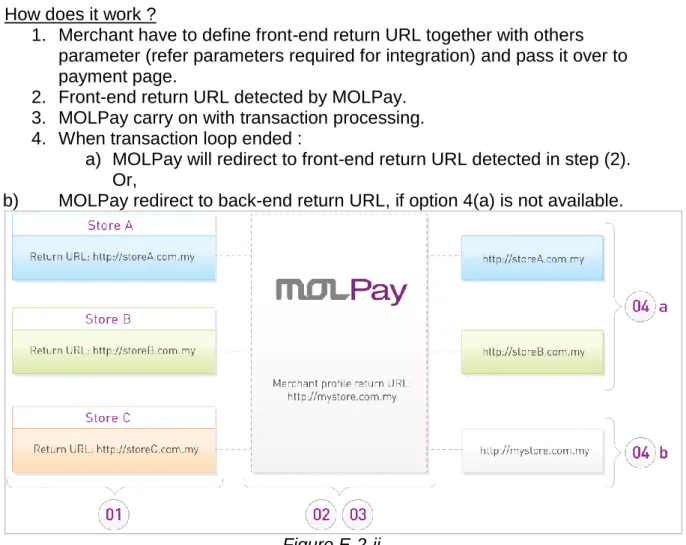
Multiple Return URL (front-end return url) has been designed to allow MOLPay active merchant to integrate this online payment service into multiple online shop. This is the advantage for MOLPay merchant as they can just use only ONE
MOLPay merchant account on multiple websites whenever they needed. In order to do so, merchant just have to define particular return URL in payment page for each online shop available.
At the end of transaction loop, front-end return URL will take an action instead of return URL defined in MOLPay Merchant Profile (back-end return URL). (Refer Figure E-2-ii below)
How does it work ?
1. Merchant have to define front-end return URL together with others parameter (refer parameters required for integration) and pass it over to payment page.
2. Front-end return URL detected by MOLPay. 3. MOLPay carry on with transaction processing. 4. When transaction loop ended :
a) MOLPay will redirect to front-end return URL detected in step (2). Or,
b) MOLPay redirect to back-end return URL, if option 4(a) is not available.
F.
REFERENCES
REF 1 : List of Country names & code
http://www.iso.org/iso/en/prods-services/iso3166ma/02iso-3166-code-lists/list-en1.html
Please note that United Kingdom is GB (instead of UK)
REF 2 : PayPal Accepted Currency
Currency ISO Code Currency ISO Code
U.S Dollar USD Malaysian Ringgit MYR
Australian Dollar AUD Mexican Peso MXN
British Pound GBP New Zealand Dollar NZD
Canadian Dollar CAD Norwegian Krone NOK
Czech Koruna CZK Philippine Peso PHP
Danish Krone DKK Polish Zloty PLN
Euro EUR Singapore Dollar SGD
Hong Kong Dollar HKD Swedish Krona SEK
Hungarian Forint HUF Swiss Franc CHF
Israeli New Shekel ILS Taiwan New Dollar TWD
Japanese Yen JPY Thai Baht THB
For more info :