EMC VSPEX PRIVATE CLOUD
VMware vSphere 5.5 for up to 1,000 Virtual Machines
Enabled by Microsoft Windows Server 2012 R2, EMC VNX Series, and EMC Powered
Backup
EMC VSPEX
AbstractThis document describes the EMC® VSPEX® Proven
Infrastructure solution for private cloud deployments with VMware vSphere 5.5, EMC VNX®,Series , and EMC Powered
Backup for up to 1,000 virtual machines.
2 EMC VSPEX Private Cloud: VMware vSphere 5.5 for up to 1,000 Virtual Machines Enabled by Mircosoft Windows Server 2012 R2, EMc VNX Series, and EMc Powered Backup-Proven Infrastructure Guide
Copyright © 2014 EMC Corporation. All rights reserved. Published in the USA. Published July, 2014
EMC believes the information in this publication is accurate of its publication date. The information is subject to change without notice.
The information in this publication is provided as is. EMC Corporation makes no representations or warranties of any kind with respect to the information in this publication, and specifically disclaims implied warranties of merchantability or fitness for a particular purpose. Use, copying, and distribution of any EMC software described in this publication requires an applicable software license.
EMC2, EMC, and the EMC logo are registered trademarks or trademarks of EMC Corporation in the United States and other countries. All other trademarks used herein are the property of their respective owners.
For the most up-to-date regulatory document for your product line, go to the technical documentation and advisories section on the EMC Online Support website.
EMC VSPEX Private Cloud: VMware vSphere 5.5 for up to 1,000 Virtual Machines Enabled by Microsoft Windows Server 2012 R2, EMC VNX Series, and EMC Powered Backup - Proven Infrastructure Guide
3 EMC VSPEX Private Cloud: VMware vSphere 5.5 for up to 1,000 Virtual Machines Enabled by Mircosoft Windows Server 2012 R2, EMc VNX Series, and EMc Powered Backup-Proven Infrastructure Guide
Contents
Chapter 1
Executive Summary
13
Introduction ... 14
Target audience ... 14
Document purpose ... 14
Business needs ... 15
Chapter 2
Solution Overview
17
Introduction ... 18Virtualization ... 18
Compute ... 18
Network ... 19
Storage ... 19
EMC VNX Series ... 20
EMC backup and recovery ... 26
Chapter 3
Solution Technology Overview
29
Overview ... 30Key components ... 31
Virtualization ... 32
Overview ... 32
VMware vSphere 5.5 ... 32
New VMware vSphere 5.5 features ... 32
VMware vSphere with Operations Management (vSOM) ... 33
VMware vCenter ... 35
VMware vSphere High-Availability ... 35
EMC Virtual Storage Integrator for VMware ... 35
VNX VMware vStorage API for Array Integration support ... 36
Compute ... 36
Network ... 39
Overview ... 39
Storage ... 41
Overview ... 41
EMC VNX series ... 41
VNX Snapshots ... 42
4 EMC VSPEX Private Cloud: VMware vSphere 5.5 for up to 1,000 Virtual Machines Enabled by Mircosoft Windows Server 2012 R2, EMc VNX Series, and EMc Powered Backup-Proven Infrastructure Guide
VNX Virtual Provisioning ... 43
VNX FAST Cache ... 48
VNX FAST VP ... 48
vCloud Networking and Security ... 48
VNX file shares ... 49
ROBO ... 49
Backup and recovery ... 49
Overview ... 49
EMC Avamar deduplication ... 50
EMC Data Domain deduplication storage systems ... 50
VMware vSphere data protection ... 50
vSphere Replication ... 50
EMC RecoverPoint ... 51
Other technologies ... 51
Overview ... 51
VMware vCloud Automation Center ... 51
VMware vCenter Operations Management Suite ... 52
VMware vCenter Single Sign On ... 53
Public-key infrastructure ... 53
EMC Storage Analytics for EMC VNX ... 54
PowerPath/VE (for block) ... 54
EMC XtremCache ... 54
Chapter 4
Solution Architecture Overview
57
Overview ... 58Solution architecture ... 58
Overview ... 58
Logical architecture ... 59
Key components ... 60
Hardware resources ... 62
Software resources ... 66
Server configuration guidelines ... 67
Overview ... 67
Ivy Bridge updates ... 67
VMware vSphere memory virtualization for VSPEX ... 70
Memory configuration guidelines ... 71
Network configuration guidelines ... 71
Overview ... 71
5 EMC VSPEX Private Cloud: VMware vSphere 5.5 for up to 1,000 Virtual Machines Enabled by Mircosoft Windows Server 2012 R2, EMc VNX Series, and EMc Powered Backup-Proven Infrastructure Guide
Enable jumbo frames (for iSCSI, FCoE, and NFS) ... 74
Link aggregation (for NFS) ... 75
Storage configuration guidelines ... 75
Overview ... 75
VMware vSphere storage virtualization for VSPEX ... 78
VSPEX storage building blocks ... 78
VSPEX private cloud validated maximums ... 80
High-availability and failover ... 88
Overview ... 88
Virtualization layer ... 88
Compute layer ... 88
Network layer ... 89
Storage layer ... 90
Validation test profile ... 91
Profile characteristics ... 91
Backup and recovery configuration guidelines... 91
Sizing guidelines ... 91
Reference workload ... 92
Overview ... 92
Defining the reference workload ... 92
Applying the reference workload ... 93
Overview ... 93
Example 1: Custom-built application ... 93
Example 2: Point of sale system ... 93
Example 3: Web server ... 94
Example 4: Decision-support database ... 94
Summary of examples ... 94
Implementing the solution... 95
Overview ... 95
Resource types ... 95
CPU resources ... 95
Memory resources ... 95
Network resources ... 96
Storage resources ... 96
Implementation summary ... 97
Quick assessment ... 98
Overview ... 98
CPU requirements ... 98
6 EMC VSPEX Private Cloud: VMware vSphere 5.5 for up to 1,000 Virtual Machines Enabled by Mircosoft Windows Server 2012 R2, EMc VNX Series, and EMc Powered Backup-Proven Infrastructure Guide
Storage performance requirements ... 99
I/O operations per second ... 99
I/O size ... 99
I/O latency ... 100
Storage capacity requirements ... 100
Determining equivalent reference virtual machines ... 100
Fine-tuning hardware resources ... 107
EMC VSPEX Sizing Tool ... 109
Chapter 5
VSPEX Configuration Guidelines
111
Overview ... 112Pre-deployment tasks ... 113
Overview ... 113
Deployment prerequisites ... 113
Customer configuration data ... 115
Prepare switches, connect network, and configure switches ... 115
Overview ... 115
Prepare network switches ... 115
Configure infrastructure network ... 115
Configure VLANs ... 117
Configure jumbo frames (iSCSI and NFS only) ... 117
Complete network cabling ... 118
Prepare and configure storage array ... 118
VNX configuration for block protocols ... 118
VNX configuration for file protocols ... 121
FAST VP configuration ... 128
FAST Cache configuration ... 130
Install and configure vSphere hosts ... 133
Overview ... 133
Install ESXi ... 133
Configure ESXi networking ... 133
Install and configure PowerPath/VE (block only) ... 134
Connect VMware datastores ... 134
Plan virtual machine memory allocations ... 134
Install and configure SQL server database ... 137
Overview ... 137
Create a virtual machine for SQL Server ... 137
Install Microsoft Windows on the virtual machine ... 137
7 EMC VSPEX Private Cloud: VMware vSphere 5.5 for up to 1,000 Virtual Machines Enabled by Mircosoft Windows Server 2012 R2, EMc VNX Series, and EMc Powered Backup-Proven Infrastructure Guide
Configure database for VMware vCenter ... 138
Configure database for VMware Update Manager... 138
Install and configure VMware vCenter server ... 139
Overview ... 139
Create the vCenter host virtual machine ... 140
Install vCenter guest OS ... 140
Create vCenter ODBC connections ... 140
Install vCenter Server ... 140
Apply vSphere license keys ... 140
Install the EMC VSI plug-in ... 141
Create a virtual machine in vCenter ... 141
Perform partition alignment, and assign File Allocation Unite Size ... 141
Create a template virtual machine ... 141
Deploy virtual machines from the template virtual machine ... 141
Summary ... 141
Chapter 6
Verifying the Solution
143
Overview ... 144Post-install checklist ... 145
Deploy and test a single virtual server ... 145
Verify the redundancy of the solution components ... 145
Block environments ... 145
File environments ... 146
Chapter 7
System Monitoring
147
Overview ... 148Key areas to monitor ... 148
Performance baseline ... 148
Servers ... 149
Networking ... 149
Storage ... 150
VNX resource monitoring guidelines ... 150
Monitoring block storage resources ... 150
Monitoring file storage resources ... 158
Summary ... 163
Appendix A
Bill of Materials
165
Bill of materials ... 166Appendix B
Customer Configuration Data Sheet
175
Customer configuration data sheet ... 1768 EMC VSPEX Private Cloud: VMware vSphere 5.5 for up to 1,000 Virtual Machines Enabled by Mircosoft Windows Server 2012 R2, EMc VNX Series, and EMc Powered Backup-Proven Infrastructure Guide
Appendix C
Server Resource Component Worksheet
179
Server resources component worksheet ... 180
Appendix D
References
181
References ... 182 EMC documentation ... 182 Other documentation ... 182
Appendix E
About VSPEX
183
9 EMC VSPEX Private Cloud: VMware vSphere 5.5 for up to 1,000 Virtual Machines Enabled by Mircosoft Windows Server 2012 R2, EMc VNX Series, and EMc Powered Backup-Proven Infrastructure Guide
Figures
Figure 1. Next-Generation VNX with multicore optimization... 21
Figure 2. Active/active processors increase performance, resiliency, and efficiency ... 22
Figure 3. New Unisphere Management Suite ... 23
Figure 4. Storage processor utilization using Windows deduplication ... 25
Figure 5. Disk IOPS using Windows deduplication... 25
Figure 6. Disk latency using Windows deduplication ... 26
Figure 7. EMC backup and recovery solutions ... 27
Figure 8. Private cloud components ... 30
Figure 9. Compute layer flexibility ... 37
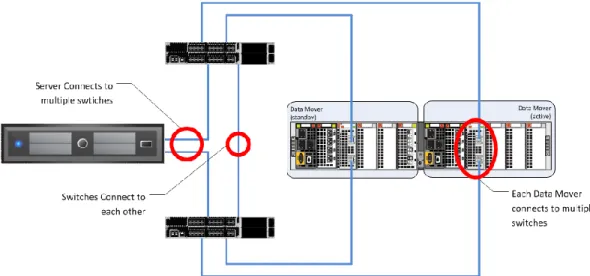
Figure 10. Example of highly available network design—for block ... 39
Figure 11. Example of highly available network design—for file ... 40
Figure 12. Storage pool rebalance progress ... 44
Figure 13. Thin LUN space utilization ... 45
Figure 14. Examining storage pool space utilization... 46
Figure 15. Defining storage pool utilization thresholds ... 47
Figure 16. Defining automated notifications (for block) ... 47
Figure 17. Logical architecture for block storage ... 59
Figure 18. Logical architecture for file storage ... 60
Figure 19. Ivy Bridge processor guidance ... 68
Figure 20. Hypervisor memory consumption ... 70
Figure 21. Required networks for block storage ... 73
Figure 22. Required networks for file storage ... 74
Figure 23. VMware virtual disk types ... 78
Figure 24. Storage layout building block for 13 virtual machines ... 79
Figure 25. Storage layout building block for 125 virtual machines ... 79
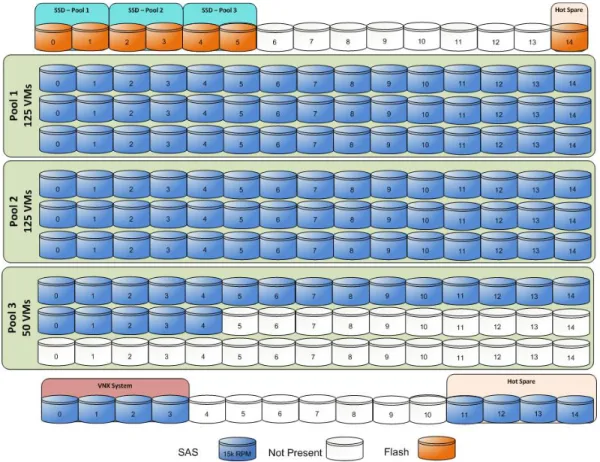
Figure 26. Storage layout for 200 virtual machines using VNX5200 ... 81
Figure 27. Storage layout for 300 virtual machines using VNX5400 ... 82
Figure 28. Storage layout for 600 virtual machines using VNX 5600 ... 84
Figure 29. Storage layout for 1,000 virtual machines using VNX 5800 ... 86
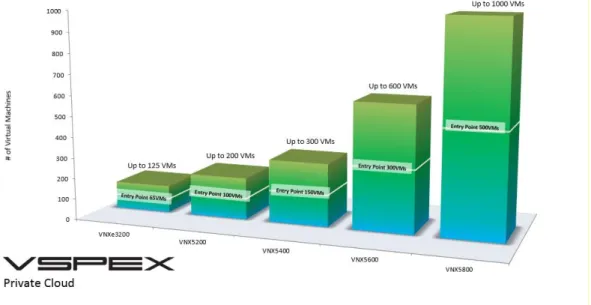
Figure 30. Maximum scale levels and entry points of different arrays ... 88
Figure 31. High availability at the virtualization layer ... 88
Figure 32. Redundant power supplies ... 89
Figure 33. Network layer high availability (VNX) – Block storage ... 89
Figure 34. Network layer high availability (VNX) - File storage ... 90
Figure 35. VNX series high availability ... 90
Figure 36. Resource pool flexibility ... 94
10 EMC VSPEX Private Cloud: VMware vSphere 5.5 for up to 1,000 Virtual Machines Enabled by Mircosoft Windows Server 2012 R2, EMc VNX Series, and EMc Powered Backup-Proven Infrastructure Guide
Figure 38. Aggregate resource requirements – stage 1 ... 103
Figure 39. Pool configuration – stage 1 ... 103
Figure 40. Aggregate resource requirements - stage 2 ... 104
Figure 41. Pool configuration – stage 2 ... 105
Figure 42. Aggregate resource requirements for stage 3 ... 106
Figure 43. Pool configuration – stage 3 ... 107
Figure 44. Customizing server resources ... 107
Figure 45. Sample network architecture – Block storage ... 116
Figure 46. Sample Ethernet network architecture – File storage ... 117
Figure 47. Network settings For file dialog box ... 123
Figure 48. Create Interface dialog box ... 124
Figure 49. Create file system dialog box ... 127
Figure 50. Direct Writes Enabled checkbox... 128
Figure 51. Storage Pool Properties dialog box ... 129
Figure 52. Manage Auto-Tiering dialog box ... 129
Figure 53. Storage System Properties dialog box... 130
Figure 54. Create FAST Cache dialog box ... 131
Figure 55. Advanced tab in the Create Storage Pool dialog box ... 132
Figure 56. Advanced tab in the Storage Pool Properties dialog box ... 132
Figure 57. Virtual machine memory settings ... 136
Figure 58. Storage Pool Alerts ... 151
Figure 59. Storage pools panel ... 152
Figure 60. LUN Properties dialog box ... 153
Figure 61. Monitoring and Alerts panel. ... 154
Figure 62. IOPS on the LUNs ... 155
Figure 63. IOPS on the drives ... 156
Figure 64. Latency on the LUNs ... 156
Figure 65. SP Utilization ... 158
Figure 66. Data Mover statistics ... 159
Figure 67. Front-end Data Mover network statistics ... 159
Figure 68. Storage Pools for File panel ... 160
Figure 69. File Systems panel ... 160
Figure 70. File System property panel ... 161
Figure 71. File system performance panel ... 162
Figure 72. File storage all performance panel ... 162
Figure 73. List of components used in the VSPEX solution for 200 virtual machines ... 166
11 EMC VSPEX Private Cloud: VMware vSphere 5.5 for up to 1,000 Virtual Machines Enabled by Mircosoft Windows Server 2012 R2, EMc VNX Series, and EMc Powered Backup-Proven Infrastructure Guide
Tables
Table 1. VNX customer benefits ... 41
Table 2. Thresholds and settings under VNX OE Block Release 33 ... 48
Table 3. Solution hardware ... 62
Table 4. Solution software ... 66
Table 5. Hardware resources for the compute layer ... 69
Table 6. Hardware resources for network ... 72
Table 7. Hardware resources for storage ... 76
Table 8. Number of disks required for different number of virtual machines ... 80
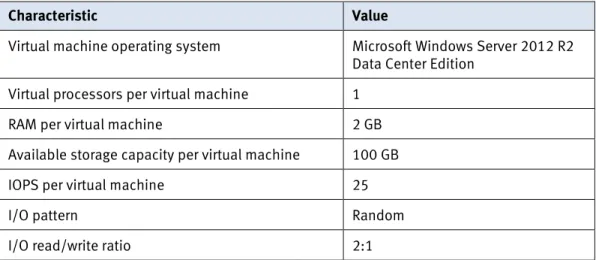
Table 9. Profile characteristics ... 91
Table 10. Virtual machine characteristics... 92
Table 11. Blank worksheet row ... 98
Table 12. Reference virtual machine resources ... 100
Table 13. Example worksheet row ... 101
Table 14. Example applications – stage 1 ... 102
Table 15. Example applications -stage 2 ... 103
Table 16. Example applications - stage 3 ... 105
Table 17. Server resource component totals ... 108
Table 18. Deployment process overview ... 112
Table 19. Tasks for pre-deployment ... 113
Table 20. Deployment prerequisites checklist ... 113
Table 21. Tasks for switch and network configuration ... 115
Table 22. Tasks for VNX configuration ... 118
Table 23. Storage allocation table for block data ... 120
Table 24. Tasks for storage configuration ... 121
Table 25. Storage allocation table for file ... 124
Table 26. Tasks for server installation ... 133
Table 27. Tasks for SQL Server database setup ... 137
Table 28. Tasks for vCenter configuration ... 139
Table 29. Tasks for testing the installation ... 144
Table 30. List of components used in the VSPEX solution for 300 virtual machines ... 168
Table 31. List of components used in the VSPEX solution for 600 virtual machines ... 170
Table 32. List of components used in the VSPEX solution for 1000 virtual machines ... 172
Table 33. Common server information ... 176
Table 34. ESXi server information ... 176
12 EMC VSPEX Private Cloud: VMware vSphere 5.5 for up to 1,000 Virtual Machines Enabled by Mircosoft Windows Server 2012 R2, EMc VNX Series, and EMc Powered Backup-Proven Infrastructure Guide
Table 36. Network infrastructure information ... 177
Table 37. VLAN information ... 178
Table 38. Service accounts ... 178
Table 39. Blank worksheet for server resource totals ... 180
13 EMC VSPEX Private Cloud: VMware vSphere 5.5 for up to 1,000 Virtual Machines Enabled by Mircosoft Windows Server 2012 R2, EMc VNX Series, and EMc Powered Backup-Proven Infrastructure Guide
Chapter 1
Executive Summary
This chapter presents the following topics:
Introduction ... 14
Target audience ... 14
Document purpose ... 14
14 EMC VSPEX Private Cloud: VMware vSphere 5.5 for up to 1,000 Virtual Machines Enabled by Mircosoft Windows Server 2012 R2, EMc VNX Series, and EMc Powered Backup-Proven Infrastructure Guide
Introduction
EMC® VSPEX® validated and modular architectures are built with proven
best-of-breed technologies to create complete virtualization solutions that enable you to make an informed decision in the hypervisor, compute, and networking layers. VSPEX helps to reduce virtualization planning and configuration burdens. When embarking on server virtualization, virtual desktop deployment, or IT consolidation, VSPEX accelerates your IT transformation by enabling faster deployments, expanded choices, greater efficiency, and lower risk.
This document is a comprehensive guide to the technical aspects of this solution. Server capacity is provided in generic terms for required minimums of CPU, memory, and network interfaces; the customer is free to select the server and networking hardware that meet or exceed the stated minimums.
Target audience
The readers of this document must have the necessary training and background to install and configure VMware vSphere 5.5, EMC VNX® series storage systems, and
associated infrastructure as required by this implementation. External references are provided where applicable, and readers should be familiar with these documents. Readers should also be familiar with the infrastructure and database security policies of the customer’s existing installation.
Individuals selling and sizing a VMware Private Cloud infrastructure must pay particular attention to the first four chapters of this document. After purchase,
implementers of the solution should focus on the configuration guidelines in Chapter 5, the solution validation in Chapter 6, and the appropriate references and
appendices.
Document purpose
This document includes an initial introduction to the VSPEX architecture, an explanation of how to modify the architecture for specific engagements, and instructions on how to effectively deploy and monitor the system.
The VSPEX Private Cloud architecture provides customers with a modern system capable of hosting many virtual machines at a consistent performance level. This solution runs on the VMware vSphere virtualization layer backed by highly available VNX family of storage. The compute and network components, which are defined by the VSPEX partners, are designed to be redundant and sufficiently powerful to handle the processing and data needs of the virtual machine environment.
The 200, 300, 600, and 1,000 virtual machine environments discussed are based on a defined reference workload. Since not every virtual machine has the same
requirements, this document contains methods and guidance to adjust your system to be cost-effective when deployed. For smaller environments, solutions for up to 125 virtual machines based on the EMC VNXe® series are described in EMC VSPEX Private
15 EMC VSPEX Private Cloud: VMware vSphere 5.5 for up to 1,000 Virtual Machines Enabled by Mircosoft Windows Server 2012 R2, EMc VNX Series, and EMc Powered Backup-Proven Infrastructure Guide A private cloud architecture is a complex system offering. This document facilitates setup by providing prerequisite software and hardware material lists, step-by-step sizing guidance and worksheets, and verified deployment steps. After the last component has been installed, validation tests and monitoring instructions ensure that your system is running properly. Following the instructions in this document ensures an efficient and painless journey to the cloud.
Business needs
VSPEX solutions are built with proven best-of-breed technologies to create complete virtualization solutions that enable you to make an informed decision in the
hypervisor, server, and networking layers.
Business applications are moving into consolidated compute, network, and storage environments. EMC VSPEX Private Cloud solutions using VMware reduce the
complexity of configuring every component of a traditional deployment model. The complexity of integration management is reduced while maintaining the application design and implementation options. Administration is unified, while process
separation can be adequately controlled and monitored. The business needs for the VSPEX Private Cloud solutions for VMware architectures are listed as follows:
Provide an end-to-end virtualization solution to effectively use the capabilities of the unified infrastructure components.
Provide a VSPEX Private Cloud solution for VMware for efficiently virtualizing up to 1,000 virtual machines for varied customer use cases.
16 EMC VSPEX Private Cloud: VMware vSphere 5.5 for up to 1,000 Virtual Machines Enabled by Mircosoft Windows Server 2012 R2, EMc VNX Series, and EMc Powered Backup-Proven Infrastructure Guide
17 EMC VSPEX Private Cloud: VMware vSphere 5.5 for up to 1,000 Virtual Machines Enabled by Mircosoft Windows Server 2012 R2, EMc VNX Series, and EMc Powered Backup-Proven Infrastructure Guide
Chapter 2
Solution Overview
This chapter presents the following topics:
Introduction ... 18
Virtualization ... 18
Compute ... 18
Network ... 19
18 EMC VSPEX Private Cloud: VMware vSphere 5.5 for up to 1,000 Virtual Machines Enabled by Mircosoft Windows Server 2012 R2, EMc VNX Series, and EMc Powered Backup-Proven Infrastructure Guide
Introduction
The VSPEX Private Cloud for VMware vSphere 5.5 provides complete system architecture capable of supporting up to 1,000 virtual machines with a redundant server and network topology and highly available storage. The core components that make up this solution are virtualization, compute, storage, and networking.
Virtualization
VMware vSphere is the leading virtualization platform in the industry. For years, it has provided flexibility and cost savings to the end users by enabling the consolidation of large, inefficient server farms into nimble, reliable cloud infrastructures. The core VMware vSphere components are the VMware vSphere hypervisor and the VMware vCenter Server for system management.
The VMware hypervisor runs on a dedicated server and allows multiple operating systems to run on the system at one time as virtual machines. These hypervisor systems can be connected to operate in a clustered configuration. These clustered configurations are then managed as a larger resource pool through VMware vCenter, and allow for dynamic allocation of CPU, memory, and storage across the cluster. Features such as VMware vMotion, which allows a virtual machine to move between different servers with no disruption to the operating system, and Distributed Resource Scheduler (DRS) which performs vMotions automatically to balance load, make vSphere a solid business choice.
With vSphere 5.5, a VMware-virtualized environment can host virtual machines with up to 64 virtual CPUs and 1 TB of virtual random access memory (RAM).
Compute
VSPEX provides the flexibility to design and implement the server components that you select. The infrastructure must conform to the following attributes:
Sufficient cores and memory to support the required number and types of virtual machines.
Sufficient network connections to enable redundant connectivity to the system switches.
Excess capacity to withstand a server failure and failover within the environment.
19 EMC VSPEX Private Cloud: VMware vSphere 5.5 for up to 1,000 Virtual Machines Enabled by Mircosoft Windows Server 2012 R2, EMc VNX Series, and EMc Powered Backup-Proven Infrastructure Guide
Network
VSPEX provides the flexibility to design and implement the customer’s choice of network components. The infrastructure must conform to the following attributes:
Redundant network links for the hosts, switches, and storage. Traffic isolation based on industry-accepted best practices. Support for link aggregation.
IP network switches used to implement this reference architecture must have a minimum non-blocking backplane capacity which is sufficient for the target number of virtual machines and their associated workloads. Enterprise-class switches with advanced features such as Quality of Service are highly
recommended.
Storage
The EMC VNX storage family is the leading shared storage platform in the industry. VNX provides both file and block access with a broad feature set, which makes it an ideal choice for any private cloud implementation.
VNX storage includes the following components that are sized for the stated reference architecture workload:
Host Bus Adapter ports (for block) – Provide host connectivity via fabric to the array.
Storage processors (SP) – The compute components of the storage array, which are used for all aspects of data moving into, out of, and between arrays.
Disk drives – Disk spindles and solid state drives (SSDs) that contain the host or application data and their enclosures.
Data Movers (for file) – Front-end appliances that provide file services to hosts (optional if CIFS/SMB, NFS services are provided).
The 200, 300, 600, and 1,000 virtual machine VMware Private Cloud solutions described in this document are based on the VNX5200, VNX5400, VNX5600, and the VNX5800 storage arrays respectively. The VNX5200 can support a maximum of 125 drives, the VNX5400 can support a maximum of 250 drives, the VNX5600 can host up to 500 drives, and the VNX5800 can host up to 750 drives.
The EMC VNX series supports a wide range of business class features ideal for the private cloud environment, including:
Fully Automated Storage Tiering for Virtual Pools (FAST VP™)
FAST Cache
File-level data deduplication/compression Block deduplication
Thin provisioning Replication
20 EMC VSPEX Private Cloud: VMware vSphere 5.5 for up to 1,000 Virtual Machines Enabled by Mircosoft Windows Server 2012 R2, EMc VNX Series, and EMc Powered Backup-Proven Infrastructure Guide
Snapshots/checkpoints File-Level Retention (FLR) Quota management Block compression Features and Enhancements
The EMC VNX flash-optimized unified storage platform delivers innovation and enterprise capabilities for file, block, and object storage in a single, scalable, and easy-to-use solution. Ideal for mixed workloads in physical or virtual environments, VNX combines powerful and flexible hardware with advanced efficiency,
management, and protection software to meet the demanding needs of today’s virtualized application environments.
VNX includes many features and enhancements designed and built upon the first generation’s success. These features and enhancements include:
More capacity through the use of multicore optimization with Multicore Cache, Multicore RAID, and Multicore FAST Cache (MCx)
Greater efficiency with a flash-optimized hybrid array
Better protection by increasing application availability with active/active storage processors
Easier administration and deployment by increasing productivity with a new Unisphere® Management Suite
VSPEX is built with the next generation of VNX to deliver even greater efficiency, performance, and scale than ever before.
Flash-optimized hybrid array
VNX is a flash-optimized hybrid array that provides automated tiering to deliver the best performance to your critical data, while intelligently moving less frequently accessed data to lower-cost disks.
In this hybrid approach, a small percentage of flash drives in the overall system can provide a high percentage of the overall IOPS. A flash-optimized VNX takes full advantage of the low latency of flash to deliver cost-saving optimization and high performance scalability. The EMC Fully Automated Storage Tiering Suite (FAST Cache and FAST VP) tiers both block and file data across heterogeneous drives and
promotes the most active data to the flash drives, ensuring that customers never have to make concessions for cost or performance.
Data is used most frequently at the time it is created; therefore, new data is first stored on flash drives for the best performance. As that data ages and becomes less active over time, FAST VP moves the data from high-performance to high-capacity drives automatically, based on customer-defined policies. EMC has enhanced this functionality with four times better granularity and with new FAST VP solid-state disks (SSDs) based on enterprise multi-level cell (eMLC) technology to lower the cost per gigabyte. FAST Cache assists performance by dynamically absorbing unpredicted spikes in system workloads. All VSPEX use cases benefit from the increased efficiency.
21 EMC VSPEX Private Cloud: VMware vSphere 5.5 for up to 1,000 Virtual Machines Enabled by Mircosoft Windows Server 2012 R2, EMc VNX Series, and EMc Powered Backup-Proven Infrastructure Guide VSPEX Proven Infrastructures deliver private cloud, end-user computing, and
virtualized application solutions. With VNX, customers can realize an even greater return on their investment. VNX also provides out-of-band, block-based deduplication that can dramatically lower the costs of the flash tier.
VNX Intel MCx Code Path Optimization
The advent of flash technology has been a catalyst in totally changing the
requirements of midrange storage systems. EMC redesigned the midrange storage platform to efficiently optimize multicore CPUs to provide the highest performing storage system at the lowest cost in the market.
MCx distributes all VNX data services across all cores—up to 32, as shown in Figure 1. The VNX series with MCx has dramatically improved the file performance for
transactional applications like databases or virtual machines over network-attached storage (NAS).
Figure 1. Next-Generation VNX with multicore optimization
Multicore Cache
The cache is the most valuable asset in the storage subsystem; its efficient use is key to the overall efficiency of the platform in handling variable and changing workloads. The cache engine has been modularized to take advantage of all the cores available in the system.
Multicore RAID
Another important part of the MCx redesign is the handling of I/O to the permanent back-end storage—hard disk drives (HDDs) and SSDs. Greatly increased performance improvements in VNX come from the modularization of the back-end data
management processing, which enables MCx to seamlessly scale across all processors.
VNX performance
Performance enhancements
VNX storage, enabled with the MCx architecture, is optimized for FLASH 1st and
22 EMC VSPEX Private Cloud: VMware vSphere 5.5 for up to 1,000 Virtual Machines Enabled by Mircosoft Windows Server 2012 R2, EMc VNX Series, and EMc Powered Backup-Proven Infrastructure Guide
(cost per IOPS), bandwidth performance (cost per GB/s) with low latency, and providing optimal capacity efficiency (cost per GB).
VNX provides the following performance improvements:
Up to four times more file transactions when compared with dual controller arrays
Increased file performance for transactional applications by up to three times, with a 60 percent better response time
Up to four times more Oracle and Microsoft SQL Server OLTP transactions Up to six times more virtual machines
Active/active array storage processors
The new VNX architecture provides active/active array storage processors, as shown in Figure 2, which eliminate application timeouts during path failover since both paths are actively serving I/O.
Figure 2. Active/active processors increase performance, resiliency, and efficiency
Load balancing is also improved and applications can achieve an up to two times improvement in performance. Active/active for block is ideal for applications that require the highest levels of availability and performance, but do not require tiering or efficiency services like compression or deduplication.
With this VNX release, VSPEX customers can use virtual Data Movers (VDMs) and VNX Replicator to perform automated and high-speed file system migrations between systems. This process migrates all snaps and settings automatically, and enables the clients to continue operation during the migration.
Note:: The active/active processors are only available for RAID logical unit numbers
(LUNs), not for pool LUNs. Unisphere Management Suite
The new Unisphere Management Suite extends Unisphere’s easy-to-use, interface to include VNX Monitoring and Reporting for validating performance and anticipating
23 EMC VSPEX Private Cloud: VMware vSphere 5.5 for up to 1,000 Virtual Machines Enabled by Mircosoft Windows Server 2012 R2, EMc VNX Series, and EMc Powered Backup-Proven Infrastructure Guide capacity requirements. As shown in Figure 3, the suite also includes Unisphere Remote for centrally managing up to thousands of VNX and VNXe systems with new support for XtremCache products.
Figure 3. New Unisphere Management Suite
Virtualization Management VMware Virtual Storage Integrator
EMC Virtual Storage Integrator (VSI) is a no-charge VMware vCenter plug-in available to all VMware users with EMC storage. VSPEX customers can use VSI to simplify management of virtualized storage. VMware administrators can gain visibility into their VNX storage using the same familiar vCenter interface to which they are accustomed.
With VSI, IT administrators can do more work in less time. VSI offers unmatched access control that enables you to efficiently manage and delegate storage tasks with confidence. Perform daily management tasks with up 90 percent fewer clicks and up to 10 times higher productivity.
VMware vStorage APIs for Array Integration
VMware vStorage APIs for Array Integration (VAAI) offloads VMware storage-related functions from the server to the storage system, enabling more efficient use of server and network resources for increased performance and consolidation.
VMware vStorage APIs for Storage Awareness
VMware vStorage APIs for Storage Awareness (VASA) is a VMware-defined API that displays storage information through vCenter. Integration between VASA technology and VNX makes storage management in a virtualized environment a seamless experience.
EMC Storage Integrator
EMC Storage Integrator (ESI) is targeted towards the Windows and application administrator. ESI is easy to use, delivers end-to end monitoring, and is hypervisor agnostic. Administrators can provision in both virtual and physical environments for a Windows platform, and troubleshoot by viewing the topology of an application from the underlying hypervisor to the storage.
24 EMC VSPEX Private Cloud: VMware vSphere 5.5 for up to 1,000 Virtual Machines Enabled by Mircosoft Windows Server 2012 R2, EMc VNX Series, and EMc Powered Backup-Proven Infrastructure Guide
Offloaded Data Transfer
The Offloaded Data Transfer (ODX) feature of Microsoft Windows Server 2012 and later versions enables data transfers during copy operations to be offloaded to the storage array, freeing up host cycles. For example, using ODX for a live migration of a SQL Server virtual machine doubled performance, decreased migration time by 50 percent, reduced CPU on the host sever by 20 percent, and eliminated network traffic.
Block deduplication
Native block deduplication was introduced in Windows Server 2012, and the R2 release contained minor improvements to the offering. It is important to understand the impact of using OS-based deduplication on overall VSPEX performance and this becomes critical if array-based deduplication is enabled. Lab testing has created the following guidance:
If deduplication is enabled, either within the array or within the OS, FAST Cache significantly reduces the overhead impact and minimizes impact on latency; it is considered a best-practice to enable FAST Cache if deduplication is enabled within a VSPEX environment.
VNX array based deduplication provided significantly better deduplication results (approximately 2x improvement in space savings) and proved beneficial to a wider range of workloads than OS-based deduplication. Do not enable OS-based and VNX array-based deduplication on the same
LUNs.
Ensure that the allocation unit size matches the I/O size of the workload. Failure to do so may result in non-optimal deduplication savings.
Windows deduplication will not start if the LUN contains less than 64 GB of data.
Windows deduplication consumes both host and storage array resources and requires monitoring to ensure other storage services on the array are not adversely affected. The following three figures show SP resources consumption values, IOPS, and latency when implementing Windows deduplication.
25 EMC VSPEX Private Cloud: VMware vSphere 5.5 for up to 1,000 Virtual Machines Enabled by Mircosoft Windows Server 2012 R2, EMc VNX Series, and EMc Powered Backup-Proven Infrastructure Guide
Figure 4. Storage processor utilization using Windows deduplication
26 EMC VSPEX Private Cloud: VMware vSphere 5.5 for up to 1,000 Virtual Machines Enabled by Mircosoft Windows Server 2012 R2, EMc VNX Series, and EMc Powered Backup-Proven Infrastructure Guide
Figure 6. Disk latency using Windows deduplication
EMC backup and recovery solutions, EMC Avamar and EMC Data Domain, deliver the protection confidence needed to accelerate the deployment of VSPEX private clouds. Optimized for virtual environments, EMC backup and recovery reduces backup times by 90 percent and increases recovery speeds by 30 times, even offering virtual machine instant access for worry-free protection. EMC backup appliances add another layer of assurance with end-to-end verification and self-healing to ensure successful recoveries.
Our solutions also deliver big saving. With industry-leading deduplication, you can reduce backup storage by 10 to 30 times, backup management time by 81 percent, and WAN bandwidth by 99 percent for efficient disaster recovery, delivering a seven-month payback period on average. You will be able to scale storage easily and efficiently as your environment grows.
For smaller VSPEX Private Cloud deployments, we recommend VDP Advanced for your backup solution. Powered by Avamar technology, VDP Advanced offers the benefits of Avamar's fast, efficient image-level backup and recovery for complete protection confidence.
EMC backup and recovery
27 EMC VSPEX Private Cloud: VMware vSphere 5.5 for up to 1,000 Virtual Machines Enabled by Mircosoft Windows Server 2012 R2, EMc VNX Series, and EMc Powered Backup-Proven Infrastructure Guide
Figure 7. EMC backup and recovery solutions
EMC backup and recovery solutions used in this VSPEX solution include EMC Avamar deduplication software and system, EMC Data Domain deduplication storage system, and VMware vSphere Data Protection Advanced.
28 EMC VSPEX Private Cloud: VMware vSphere 5.5 for up to 1,000 Virtual Machines Enabled by Mircosoft Windows Server 2012 R2, EMc VNX Series, and EMc Powered Backup-Proven Infrastructure Guide
29 EMC VSPEX Private Cloud: VMware vSphere 5.5 for up to 1,000 Virtual Machines Enabled by Mircosoft Windows Server 2012 R2, EMc VNX Series, and EMc Powered Backup-Proven Infrastructure Guide
Chapter 3
Solution Technology Overview
This chapter presents the following topics:
Overview ... 30 Key components ... 31 Virtualization ... 32 Compute ... 36 Network ... 39 Storage ... 41 Backup and recovery ... 49 Other technologies ... 51
30 EMC VSPEX Private Cloud: VMware vSphere 5.5 for up to 1,000 Virtual Machines Enabled by Mircosoft Windows Server 2012 R2, EMc VNX Series, and EMc Powered Backup-Proven Infrastructure Guide
Overview
This solution uses the EMC VNX series and VMware vSphere 5.5 to provide storage and server hardware consolidation in a private cloud. The new virtualized
infrastructure is centrally managed, to provide efficient deployment and management of a scalable number of virtual machines and associated shared storage.
Figure 8 depicts the solution components.
Figure 8. Private cloud components
31 EMC VSPEX Private Cloud: VMware vSphere 5.5 for up to 1,000 Virtual Machines Enabled by Mircosoft Windows Server 2012 R2, EMc VNX Series, and EMc Powered Backup-Proven Infrastructure Guide
Key components
This section describes the key components of this solution. Virtualization
The virtualization layer decouples the physical implementation of resources from the applications that use them. In other words, the applications’ view of the available resources is no longer directly tied to the hardware. This enables many key features in the private cloud concept.
Compute
The compute layer provides memory and processing resources for the virtualization layer software, and for the applications running in the private cloud. The VSPEX program defines the minimum amount of required compute layer resources, and enables the partner to implement the solution by using any server hardware that meets these requirements
Network
The network layer connects the users of the private cloud to the resources in the cloud, and the storage layer to the compute layer. The VSPEX program defines the minimum number of required network ports, provides general guidance on network architecture, and enables the customer to implement the solution by using any network hardware that meets these requirements. Storage
The storage layer is critical for the implementation of the private cloud. With multiple hosts accessing shared data, many of the use cases defined in the private cloud can be implemented. The EMC VNX storage family used in this solution provides high-performance data storage while maintaining high availability.
EMC backup and recovery
The backup and recovery components of the solution provide data protection when the data in the primary system is deleted, damaged, or unusable. The Solution architecture section provides details on all the components that make up the reference architecture.
32 EMC VSPEX Private Cloud: VMware vSphere 5.5 for up to 1,000 Virtual Machines Enabled by Mircosoft Windows Server 2012 R2, EMc VNX Series, and EMc Powered Backup-Proven Infrastructure Guide
Virtualization
The virtualization layer is a key component of any server virtualization or private cloud solution. It decouples the application resource requirements from the underlying physical resources that serve them. This enables greater flexibility in the application layer by eliminating hardware downtime for maintenance, and allows the system to physically change without affecting the hosted applications. In a server virtualization or private cloud use case, it enables multiple independent virtual machines to share the same physical hardware, rather than being directly implemented on dedicated hardware.
VMware vSphere 5.5 transforms the physical resources of a computer by virtualizing the CPU, RAM, hard disk, and network controller. This transformation creates fully functional virtual machines that run isolated and encapsulated operating systems and applications like physical computers.
The high-availability features of VMware vSphere 5.5 such as vMotion and Storage vMotion enable seamless migration of virtual machines and stored files from one vSphere server to another, or from one data storage area to another, with minimal or no performance impact. Coupled with vSphere DRS and Storage DRS, virtual
machines have access to the appropriate resources at any point in time through load balancing of compute and storage resources.
VMware vSphere 5.5 includes an expansive list of new and improved features that enhance performance, reliability, availability, and recovery of virtualized
environments. Of those features, several have significant impacts upon VSPEX Private Cloud deployments, which include:
Expanded maximum memory and CPU limits for ESX hosts. Logical and virtual CPU counts have doubled in this version, as have NUMA node counts and maximum memory. This means host servers can support larger workloads. 62 TB VMDK file support including RDM. Datastores can hold more data from
more virtual machines, which simplifies storage management and leverages larger capacity NL-SAS drives
Enhanced VAAI UNMAP support that includes a new esxcli storage vmfs unmap command with multiple reclamation methods
Enhanced SR-IOV support that simplifies configuration via workflows, and surfaces more properties into the virtual functions
16 Gb end-to-end support for FC environments
Enhanced LACP functions offering additional hash algorithms and up to 64 link access groups (LAGs)
vSphere Data Protection (VDP), which can now replicate backup data directly to EMC Avamar
40 Gb Mellanox NIC support Overview VMware vSphere 5.5 New VMware vSphere 5.5 features
33 EMC VSPEX Private Cloud: VMware vSphere 5.5 for up to 1,000 Virtual Machines Enabled by Mircosoft Windows Server 2012 R2, EMc VNX Series, and EMc Powered Backup-Proven Infrastructure Guide
VMFS heap improvements, which reduce memory requirements while allowing access to full 64 TB VMFS address space
VMware vSphere with Operations Management delivers customers with a core virtualization solution and is fully-supported within VSPEX.
This solution includes vSphere, the industry’s most trusted virtualization platform, and the critical operational enhancements of performance monitoring and capacity management (also offered through vCenter Operations Management Suite Standard). As virtualization is deployed, it is critical to have visibility into an IT environment’s operating performance to ensure service levels. For example, the ability to monitor any degradation in health and performance allows customers to identify and troubleshoot system issues before they affect end users.
vSphere with Operations Management enables advanced virtualization management capabilities:
Capacity Management helps identify idle and over-provisioned virtual machiness to reclaim excess capacity and increase virtual machine density without impacting performance.
Predictive Analytics analyzes vCenter Server performance data, establishes dynamic thresholds that adapt to the environment, and provides Smart Alerts about health degradations and performance bottlenecks to drive proactive action and policy-based automation.
Operations Console displays key performance indicators in easily identifiable colored badges and provides a comprehensive view into what is driving current and potential future performance and capacity management issues in one place.
VMware vSphere with Operations Management (vSOM)
34 EMC VSPEX Private Cloud: VMware vSphere 5.5 for up to 1,000 Virtual Machines Enabled by Mircosoft Windows Server 2012 R2, EMc VNX Series, and EMc Powered Backup-Proven Infrastructure Guide
Figure 5. vSphere with Operations Management
vSphere with Operations Management enables the most demanding business critical applications to operate on the most advanced virtualization platform. This
functionality delivers agility, efficiency, and resiliency for customer IT environments. This strengthens the ability to run business critical applications at high service levels, with improvements in three main categories:
1. Availability and Performance – Deliver enhanced availability and performance for business critical applications and next-gen applications, such as Hadoop
35 EMC VSPEX Private Cloud: VMware vSphere 5.5 for up to 1,000 Virtual Machines Enabled by Mircosoft Windows Server 2012 R2, EMc VNX Series, and EMc Powered Backup-Proven Infrastructure Guide 2. Storage – Leverage server-side caching for enhanced performance of
applications
3. Scalability – Doubling configuration maximums in several key areas to support the largest workloads possible
VMwarevCenter is a centralized management platform for the VMware virtual infrastructure. This platform provides administrators with a single interface for all aspects of monitoring, managing, and maintaining the virtual infrastructure, accessed from multiple devices.
VMware vCenter also manages some advanced features of the VMware virtual
infrastructure such as VMware vSphere High Availability and DRS, along with vMotion and Update Manager.
The VMware vSphere High-Availability feature enables the virtualization layer to automatically restart virtual machines in various failure conditions.
If the virtual machine operating system has an error, the virtual machine can automatically restart on the same hardware.
If the physical hardware has an error, the impacted virtual machines can automatically restart on other servers in the cluster.
Note: To restart virtual machines on different hardware, the servers must have available resources. The Compute section provides detailed information to enable this function.
With VMware vSphere High-Availability, you can configure policies to determine which machines automatically restart, and under what conditions to attempt these operations.
EMC Virtual Storage Integrator (VSI) for VMware vSphere is a plug-in for the vSphere client that provides a single management interface for EMC storage within the vSphere environment. Add and remove features to VSI independently; this provides flexibility for customizing VSI user environments. Features are managed by using the VSI Feature Manager. VSI provides a unified user experience, which enables new features to be introduced rapidly in response to customer requirements.
Validation testing uses the following features:
Storage Viewer (SV) — Extend the vSphere client to help discover and identify EMC VNX storage devices allocated to VMware vSphere hosts and virtual machines. SV presents the underlying storage details to the virtual data center administrator, merging the data of several different storage mapping tools into a few seamless vSphere client views.
Unified Storage Management — Simplified storage administration of the EMC VNX unified storage platform. It enables VMware administrators to provision Virtual Machine File System (VMFS) datastores, Raw Device Mapping (RDM) volumes, or network file system (NFS) seamlessly from within the vSphere client. VMware vCenter VMware vSphere High-Availability EMC Virtual Storage Integrator for VMware
36 EMC VSPEX Private Cloud: VMware vSphere 5.5 for up to 1,000 Virtual Machines Enabled by Mircosoft Windows Server 2012 R2, EMc VNX Series, and EMc Powered Backup-Proven Infrastructure Guide
Refer to the EMC VSI for VMware vSphere product guides on EMC Online Support for more information.
Hardware acceleration with VMware vStorage API for Array Integration (VAAI) is a storage enhancement in vSphere 5.5 that enables vSphere to offload specific storage operations to compatible storage hardware such as the VNX series platforms. With the assistance of storage hardware, vSphere performs these operations faster and consumes less CPU, memory, and storage fabric bandwidth.
Compute
The choice of a server platform for an EMC VSPEX infrastructure is not only based on the technical requirements of the environment, but on the supportability of the platform, existing relationships with the server provider, advanced performance, management features, and many other factors. For this reason, EMC VSPEX solutions are designed to run on a wide variety of server platforms. Instead of requiring a specific number of servers with a specific set of requirements, VSPEX documents minimum requirements for the number of processor cores, and the amount of RAM. This can be implemented with two or twenty servers, and still be considered the same VSPEX solution.
In the example shown in Figure 9, the compute layer requirements for a specific implementation are 25 processor cores, and 200 GB of RAM. One customer might want to implement this with white-box servers containing 16 processor cores, and 64 GB of RAM, while another customer chooses a higher-end server with 20 processor cores and 144 GB of RAM.
VNX VMware vStorage API for Array Integration support
37 EMC VSPEX Private Cloud: VMware vSphere 5.5 for up to 1,000 Virtual Machines Enabled by Mircosoft Windows Server 2012 R2, EMc VNX Series, and EMc Powered Backup-Proven Infrastructure Guide
Figure 9. Compute layer flexibility
The first customer needs four of the chosen servers, while the other customer needs two.
Note: To enable high-availability at the compute layer, each customer needs one additional server to ensure that the system has enough capability to maintain business operations when a server fails.
Use the following best practices in the compute layer:
Use several identical, or at least compatible, servers. VSPEX implements hypervisor level high-availability technologies, which may require similar instruction sets on the underlying physical hardware. By implementing VSPEX on identical server units, you can minimize compatibility problems in this area.
38 EMC VSPEX Private Cloud: VMware vSphere 5.5 for up to 1,000 Virtual Machines Enabled by Mircosoft Windows Server 2012 R2, EMc VNX Series, and EMc Powered Backup-Proven Infrastructure Guide
If you implement high-availability at the hypervisor layer, the largest virtual machine you can create is constrained by the smallest physical server in the environment.
Implement the available high-availability features in the virtualization layer, and ensure that the compute layer has sufficient resources to accommodate at least single server failures. This enables the implementation of minimal-downtime upgrades, and tolerance for single unit failures.
Within the boundaries of these recommendations and best practices, the compute layer for EMC VSPEX can be flexible to meet your specific needs. Ensure that there are sufficient processor cores and RAM per core to meet the needs of the target
39 EMC VSPEX Private Cloud: VMware vSphere 5.5 for up to 1,000 Virtual Machines Enabled by Mircosoft Windows Server 2012 R2, EMc VNX Series, and EMc Powered Backup-Proven Infrastructure Guide
Network
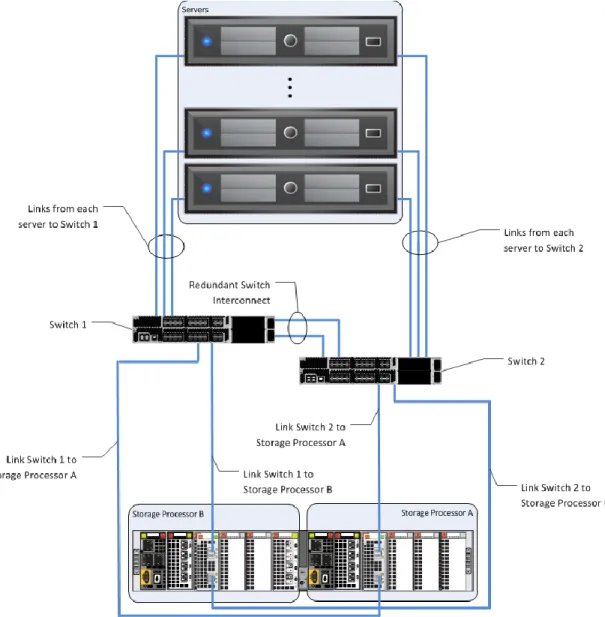
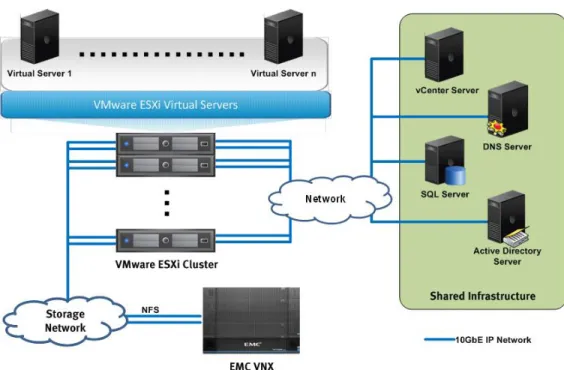
The infrastructure network requires redundant network links for each vSphere host, the storage array, the switch interconnect ports, and the switch uplink ports. This configuration provides both redundancy and additional network bandwidth. This is a required configuration regardless of whether the network infrastructure for the solution already exists, or you are deploying it alongside other components of the solution. Figure 10 and Figure 11depict an example of this highly available network topology.
Figure 10. Example of highly available network design—for block
40 EMC VSPEX Private Cloud: VMware vSphere 5.5 for up to 1,000 Virtual Machines Enabled by Mircosoft Windows Server 2012 R2, EMc VNX Series, and EMc Powered Backup-Proven Infrastructure Guide
Figure 11. Example of highly available network design—for file
This validated solution uses virtual local area networks (VLANs) to segregate network traffic of various types to improve throughput, manageability, application separation, high-availability, and security.
For block, EMC unified storage platforms provide network high-availability or redundancy by two ports per storage processor. If a link is lost on the storage processor front end port, the link fails over to another port. All network traffic is distributed across the active links.
For file, EMC unified storage platforms provide network high-availability or
redundancy by using link aggregation. Link aggregation enables multiple active (MAC) Ethernet connections to appear as a single link with a single MAC address, and potentially multiple IP addresses. In this solution, Link Aggregation Control Protocol (LACP) is configured on the VNX, combining multiple Ethernet ports into a single virtual device. If a link is lost on the Ethernet port, the link fails over to another port. All network traffic is distributed across the active links.
41 EMC VSPEX Private Cloud: VMware vSphere 5.5 for up to 1,000 Virtual Machines Enabled by Mircosoft Windows Server 2012 R2, EMc VNX Series, and EMc Powered Backup-Proven Infrastructure Guide
Storage
The storage layer is also a key component of any cloud infrastructure solution that serves data generated by applications and operating system in the data center storage processing systems. This increases storage efficiency, management flexibility, and reduces total cost of ownership. In this VSPEX solution, EMC VNX series arrays provide features and performance to enable and enhance any virtualization environment.
The EMC VNX family is optimized for virtual applications; and delivers industry-leading innovation and enterprise capabilities for file and block storage in a scalable, easy-to-use solution. This next-generation storage platform combines powerful and flexible hardware with advanced efficiency, management, and protection software to meet the demanding needs of today’s enterprises.
Intel Xeon processors power the VNX series for intelligent storage that automatically and efficiently scales in performance, while ensuring data integrity and security. It is designed to meet the high performance, high-scalability requirements of midsize and large enterprises.
Table 1 shows the customer benefits that are provided by VNX series.
Table 1. VNX customer benefits
Feature Benefit
Next-generation unified storage, optimized
for virtualized applications Tight integration with VMware allows for advanced array features and centralized management
Capacity optimization features including compression, deduplication, thin provisioning, and application-consistent copies
Reduced storage costs, more efficient use of resources and easier recovery of applications
High-availability, designed to deliver five 9s
availability Higher levels of uptime and reduced outage risk Automated tiering with FAST VP and FAST
Cache that can be optimized for the highest system performance and lowest storage cost simultaneously
More efficient use of storage resources without complicated planning and configuration
Simplified management with EMC Unisphere for a single management interface for all NAS, SAN and replication needs
Reduced management overhead and toolsets required to manage environment Up to three times improvement in
performance with the latest Intel Xeon multicore processor technology, optimized for flash
Reduced latency, increased bandwidth and IOPS result in more headroom for demanding workloads
Overview
42 EMC VSPEX Private Cloud: VMware vSphere 5.5 for up to 1,000 Virtual Machines Enabled by Mircosoft Windows Server 2012 R2, EMc VNX Series, and EMc Powered Backup-Proven Infrastructure Guide
Different software suites and packs are also available for the VNX series, which provide multiple features for enhanced protection and performance:
Software suites
FAST Suite — Automatically optimizes for the highest system performance and the lowest storage cost simultaneously.
Local Protection Suite — Practices safe data protection and repurposing. Remote Protection Suite — Protects data against localized failures, outages,
and disasters.
Application Protection Suite — Automates application copies and provides compliance.
Security and Compliance Suite — Keeps data safe from changes, deletions, and malicious activity.
Software packs
Total Efficiency Pack — Includes all five software suites.
Total Protection Pack — Includes local, remote, and application protection suites.
VNX Snapshots is a software feature introduced since VNX OE for Block Release 32, which creates point-in-time data copies. VNX Snapshots can be used for data backups, software development and testing, repurposing, data validation and local rapid restores. VNX Snapshots improves on the existing SnapView Snapshot functionality by integrating with storage pools.
Note: LUNs created on physical RAID groups, also called RAID LUNs, support only SnapView Snapshots. This limitation exists because VNX Snapshots require pool space as part of its technology.
VNX Snapshots support 256 writeable snaps per pool LUN. It supports branching, also called a Snap of a Snap, as long as the total number of snapshots for any primary LUN is less than 256, which is a hard limit.
VNX Snapshots use redirect on write (ROW) technology. ROW redirects new writes destined for the primary LUN to a new location in the storage pool. Such an
implementation is different from copy on first write (COFW) used in SnapView, which holds the writes to the primary LUN until the original data is copied to the reserved LUN pool to preserve a snapshot.
This release (Block OE Release 33) also supports consistency groups (CGs). Several pool LUNs can be combined into a CG and snapped concurrently. When a snapshot of a CG is initiated, all writes to the member LUNs are held until snapshots have been created. Typically, CGs are used for LUNs that belong to the same application. VNX SnapSure is an EMC VNX File software feature that enables you to create and manage checkpoints, which are point-in-time, logical images of a production file system (PFS). SnapSure uses a copy on first modify principle. A PFS consists of VNX Snapshots
43 EMC VSPEX Private Cloud: VMware vSphere 5.5 for up to 1,000 Virtual Machines Enabled by Mircosoft Windows Server 2012 R2, EMc VNX Series, and EMc Powered Backup-Proven Infrastructure Guide blocks. When a block within the PFS is modified, a copy containing the block’s
original contents is saved to a separate volume called the SavVol. Subsequent changes made to the same block in the PFS are not copied into the SavVol. The original blocks from the PFS in the SavVol and the unchanged PFS blocks remaining in the PFS are read by SnapSure according to a bitmap and block map data-tracking structure. These blocks combine to provide a complete point-in-time image called a checkpoint.
A checkpoint reflects the state of a PFS at the time the checkpoint is created. SnapSure supports two types of checkpoints:
Read-only checkpoint — Read-only file system created from a PFS. Writeable checkpoint — Read/write file system created from a read-only
checkpoint.
SnapSure can maintain a maximum of 96 read-only checkpoints and 16 writeable checkpoints per PFS while allowing PFS applications continued access to real time data.
Note: Each writeable checkpoint associates with a read-only checkpoint, referred to as the baseline checkpoint. Each baseline checkpoint can have only one associated writeable checkpoint.
For more detailed information, refer to Using VNX SnapSure.
EMC VNX Virtual Provisioning enables organizations to reduce storage costs by increasing capacity utilization, simplifying storage management, and reducing application downtime. Virtual Provisioning also helps companies to reduce power and cooling requirements and reduce capital expenditures.
Virtual Provisioning provides pool-based storage provisioning by implementing pool LUNs that can be either thin or thick. Thin LUNs provide on-demand storage that maximizes the utilization of your storage by allocating storage as needed. Thick LUNs provide both high performance and predictable performance for your applications. Both types of LUNs benefit from the ease-of-use features of pool-based provisioning. Pools and pool LUNs are also the building blocks for advanced data services such as FAST VP, VNX Snapshots, and compression. Pool LUNs also support a variety of additional features, such as LUN shrink, online expansion, and User Capacity Threshold setting.
EMC VNX Virtual Provisioning allows you to expand the capacity of a storage pool from the Unisphere GUI after disks are physically attached to the system. VNX systems have the ability to rebalance allocated data elements across all member drives to use new drives after the pool is expanded. The rebalance function starts automatically and runs in the background after an expand action. Monitor the
progress of a rebalance operation from the General tab of the Pool Properties window in Unisphere, as shown in Figure 12.
VNX Virtual Provisioning
44 EMC VSPEX Private Cloud: VMware vSphere 5.5 for up to 1,000 Virtual Machines Enabled by Mircosoft Windows Server 2012 R2, EMc VNX Series, and EMc Powered Backup-Proven Infrastructure Guide
Figure 12. Storage pool rebalance progress
LUN expansion
Use pool LUN expansion to increase the capacity of existing LUNs. It allows for provisioning larger capacity as business needs grow.
The VNX family has the capability to expand a pool LUN without disrupting user access. Pool LUN expansion can be done with a few simple clicks and the expanded capacity is immediately available. However, you cannot expand a pool LUN if it is part of a data protection or LUN-migration operation. For example, snapshot LUNs or migrating LUNs cannot be expanded.
For more detailed information of pool LUN expansion, refer to EMC VNX Virtual Provisioning — Applied Technology White Paper.
LUN shrink
Use LUN shrink of thin LUN to reduce the capacity of existing LUNs.
VNX can shrink a pool LUN. This capability is only available for LUNs served by Windows Server 2008 and later. The shrinking process has two steps:
4. Shrink the file system from Windows Disk Management.
5. Shrink the pool LUN using a command window and the DISKRAID utility. The utility is available through the VDS Provider, which is part of the EMC Solutions Enabler package.
The new LUN size appears as soon as the shrink process is complete. A background task reclaims the deleted or shrunk space and returns it to the storage pool. Once the task is completed, any other LUN in that pool can use the reclaimed space.
For more detailed information of thin LUN expansion, refer to EMC VNX Virtual Provisioning Applied TechnologyWhite Paper.
45 EMC VSPEX Private Cloud: VMware vSphere 5.5 for up to 1,000 Virtual Machines Enabled by Mircosoft Windows Server 2012 R2, EMc VNX Series, and EMc Powered Backup-Proven Infrastructure Guide User alerting through capacity threshold setting
Customers must configure proactive alerts when using a file system or storage pools based on thin pools. Monitor these resources so that storage is available to be provisioned when needed and capacity shortages can be avoided.
Figure 13 explains why provisioning with thin pools requires monitoring.
Figure 13. Thin LUN space utilization
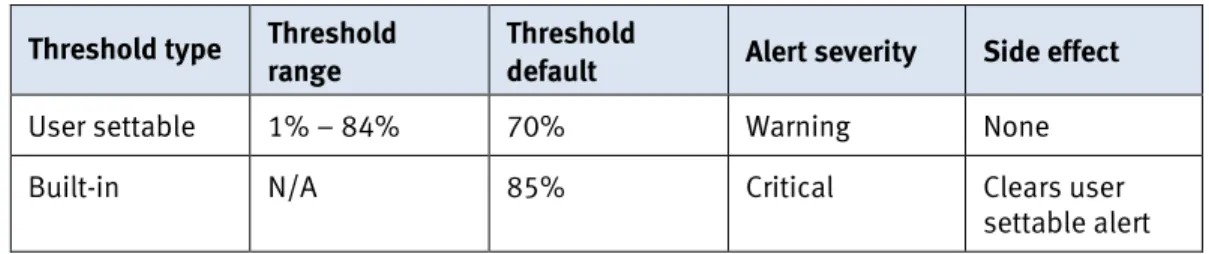
Monitor the following values for thin pool utilization:
Total capacity is the total physical capacity available to all LUNs in the pool. Total allocation is the total physical capacity currently assigned to all pool
LUNs.
Subscribed capacity is the total host reported capacity supported by the pool. Over-subscribed capacity is the amount of user capacity configured for LUNs
that exceeds the physical capacity in a pool.
Total allocation may never exceed the total capacity, but if it nears that point, add storage to the pools proactively before reaching a hard limit.