M10
Quectel Cellular Engine
Hardware Design
M10_HD_V1.01
Document Title M10 Hardware Design Revision 1.01 Date 2009-09-18 Status Release Document Control ID M10_HD_V1.01 General Notes
Quectel offers this information as a service to its customers, to support application and engineering efforts that use the products designed by Quectel. The information provided is based upon requirements specifically provided for Quectel by the customers. Quectel has not undertaken any independent search for additional relevant information, including any information that may be in the customer’s possession. Furthermore, system validation of this product designed by Quectel within a larger electronic system remains the responsibility of the customer or the customer’s system integrator. All specifications supplied herein are subject to change.
Copyright
This document contains proprietary technical information which is the property of Quectel Limited., copying of this document and giving it to others and the using or communication of the contents thereof, are forbidden without express authority. Offenders are liable to the payment of damages. All rights reserved in the event of grant of a patent or the registration of a utility model or design. All specification supplied herein are subject to change without notice at any time.
Contents
0 Revision history...7
1 Introduction...8
1.1 Related documents ...8
1.2 Terms and abbreviations...9
1.3 Safety caution...11 2 Product concept...13 2.1 Key features ...13 2.2 Functional diagram...15 2.3 Evaluation board ...16 3 Application interface...17 3.1 Pin description...17 3.2 Operating modes ...20 3.3 Power supply...22
3.3.1 Power supply pins ...25
3.3.2 Minimizing supply voltage drop...25
3.3.3 Monitoring power supply ...25
3.4 Power up and power down scenarios ...26
3.4.1 Power on...26
3.4.2 Power down...28
3.4.3 Restart module using the PWRKEY pin...31
3.5 Power saving ...32
3.5.1 Minimum functionality mode...32
3.5.2 SLEEP mode (slow clock mode)...32
3.5.3 Wake up module from SLEEP mode ...32
3.6 Summary of state transitions (except SLEEP mode)...33
3.7 RTC backup ...33
3.8 Serial interfaces...35
3.8.1 Function of serial port & debug port supporting ...36
3.8.2 Software upgrade and software debug...37
3.9 Audio interfaces...39
3.9.1 Microphone interfaces configuration...39
3.9.2 Speaker interface configuration...41
3.9.3 Earphone interface configuration ...43
3.10 Buzzer ...44
3.11 SIM card interface ...45
3.11.1 SIM card application ...45
3.11.2 Design considerations for SIM card holder...46
3.12 LCD interface...48
3.13 Keypad interface ...49
3.14 ADC...50
3.15 Behaviors of the RI ...51
3.16 Network status indication...53
3.17 General purpose input & output (GPIO) ...54
3.18 Open drain output (LIGHT_MOS)...54
4 Antenna interface ...55
4.1 Antenna installation...55
4.2 RF output power...55
4.3 RF receiving sensitivity...56
4.4 Operating frequencies ...56
5 Electrical, reliability and radio characteristics...57
5.1 PIN assignment of the module ...57
5.2 Absolute maximum ratings...59
5.3 Operating temperatures ...59
5.4 Power supply ratings ...59
5.5 Current consumption ...61
5.6 Electro-static discharge ...63
6 Product information...64
7 Mechanical dimension ...65
7.1 Mechanical dimensions of module...65
7.2 Footprint of recommendation...67
7.3 Top view of the module ...69
7.4 Bottom view of the module...69
Appendix A: GPRS Coding Schemes ...70
Appendix B: GPRS Multi-slot Classes ...71
Table Index
TABLE 1: RELATED DOCUMENTS...8
TABLE 2: TERMS AND ABBREVIATIONS ...9
TABLE 3: MODULE KEY FEATURES...13
TABLE 4: CODING SCHEMES AND MAXIMUM NET DATA RATES OVER AIR INTERFACE..15
TABLE 5: PIN DESCRIPTION ...17
TABLE 6: OVERVIEW OF OPERATING MODES...21
TABLE 7: RECOMMENDED BYPASS CAPACITORS FOR LIMITED CURRENT SUPPLY...23
TABLE 8: AT COMMANDS USED IN ALARM MODE ...28
TABLE 9: SUMMARY OF STATE TRANSITION...33
TABLE 10: LOGIC LEVELS OF THE SERIAL INTERFACE ...35
TABLE 11: PIN DEFINITION OF THE SERIAL INTERFACES ...35
TABLE 12: PIN DEFINITION OF AUDIO INTERFACE ...39
TABLE 13: TYPICAL ELECTRET MICROPHONE CHARACTERISTIC...43
TABLE 14: TYPICAL SPEAKER CHARACTERISTIC ...43
TABLE 15: PIN DEFINITION OF THE BUZZER ...44
TABLE 16: BUZZER OUTPUT CHARACTERISTIC ...44
TABLE 17: PIN DEFINITION OF THE SIM INTERFACE ...45
TABLE 18: PIN DESCRIPTION OF AMPHENOL SIM CARD HOLDER ...47
TABLE 19: PIN DESCRIPTION OF MOLEX SIM CARD HOLDER...48
TABLE 20: PIN DEFINITION OF THE LCD INTERFACE ...49
TABLE 21: PIN DEFINITION OF THE KEYPAD INTERFACE ...49
TABLE 22: PIN DEFINITION OF THE ADC...51
TABLE 23: CHARACTERISTIC OF THE ADC ...51
TABLE 24: BEHAVIOURS OF THE RI...51
TABLE 25: WORKING STATE OF THE NETLIGHT ...53
TABLE 26: PIN DEFINITION OF THE GPIO INTERFACE ...54
TABLE 27: PIN DEFINITION OF THE LIGHT_MOS ...54
TABLE 28: PIN DEFINITION OF THE RF_ANT...55
TABLE 29: THE MODULE CONDUCTED RF OUTPUT POWER...55
TABLE 30: THE MODULE CONDUCTED RF RECEIVING SENSITIVITY...56
TABLE 31: THE MODULE OPERATING FREQUENCIES...56
TABLE 32: M10 PIN ASSIGNMENT ...57
TABLE 33: ABSOLUTE MAXIMUM RATINGS...59
TABLE 34: OPERATING TEMPERATURE...59
TABLE 35: THE MODULE POWER SUPPLY RATINGS...59
TABLE 36: THE MODULE CURRENT CONSUMPTION...61
TABLE 37: THE ESD ENDURANCE (TEMPERATURE:25℃,HUMIDITY:45 %) ...63
TABLE 38: ORDERING INFORMATION ...64
TABLE 39: DESCRIPTION OF DIFFERENT CODING SCHEMES ...70
TABLE 40: GPRS MULTI-SLOT CLASSES ...71
Figure Index
FIGURE 1: MODULE FUNCTIONAL DIAGRAM ...16
FIGURE 2: REFERENCE CIRCUIT OF THE VBAT INPUT ...22
FIGURE 3: REFERENCE CIRCUIT OF THE SOURCE POWER SUPPLY INPUT...23
FIGURE 4: REFERENCE EXTERNAL BATTERY CHARGING CIRCUIT...24
FIGURE 5: RIPPLE IN SUPPLY VOLTAGE DURING TRANSMITTING BURST...25
FIGURE 6: TURN ON THE MODULE USING DRIVING CIRCUIT...26
FIGURE 7: TURN ON THE MODULE USING KEYSTROKE...27
FIGURE 8: TIMING OF TURN ON SYSTEM ...27
FIGURE 9: TIMING OF TURN OFF THE MODULE ...29
FIGURE 10: REFERENCE CIRCUIT FOR EMERG_OFF BY USING DRIVING CIRCUIT ...30
FIGURE 11: REFERENCE CIRCUIT FOR EMERG_OFF BY USING BUTTON...30
FIGURE 12: TIMING OF RESTART SYSTEM ...31
FIGURE 13: TIMING OF RESTART SYSTEM AFTER EMERGENCY SHUTDOWN...31
FIGURE 14: RTC SUPPLY FROM NON-CHARGEABLE BATTERY ...33
FIGURE 15: RTC SUPPLY FROM RECHARGEABLE BATTERY ...34
FIGURE 16: RTC SUPPLY FROM CAPACITOR ...34
FIGURE 17: SEIKO XH414H-IV01E CHARGE CHARACTERISTIC ...34
FIGURE 18: CONNECTION OF SERIAL INTERFACES ...36
FIGURE 19: CONNECTION OF SOFTWARE UPGRADE ...37
FIGURE 20: CONNECTION OF SOFTWARE DEBUG ...38
FIGURE 21: RS232 LEVEL CONVERTER CIRCUIT...38
FIGURE 22: MICROPHONE INTERFACE CONFIGURATION OF AIN1&AIN2 ...40
FIGURE 23: SPEAKER INTERFACE CONFIGURATION OF AOUT1 ...41
FIGURE 24: SPEAKER INTERFACE WITH AMPLIFIER CONFIGURATION OF AOUT1 ...41
FIGURE 25: SPEAKER INTERFACE CONFIGURATION OF AOUT2 ...42
FIGURE 26: SPEAKER INTERFACE WITH AMPLIFIER CONFIGURATION OF AOUT2 ...42
FIGURE 27: EARPHONE INTERFACE CONFIGURATION...43
FIGURE 28: REFERENCE CIRCUIT FOR BUZZER...44
FIGURE 29: REFERENCE CIRCUIT OF THE 8 PINS SIM CARD...46
FIGURE 30: REFERENCE CIRCUIT OF THE 6 PINS SIM CARD...46
FIGURE 31: AMPHENOL C707 10M006 512 2 SIM CARD HOLDER...47
FIGURE 32: MOLEX 91228 SIM CARD HOLDER ...48
FIGURE 33: REFERENCE CIRCUIT OF THE KEYPAD INTERFACE...50
FIGURE 34: INTERNAL CIRCUIT OF THE ADC ...51
FIGURE 35: RI BEHAVIOUR OF VOICE CALLING AS A RECEIVER ...52
FIGURE 36: RI BEHAVIOUR OF DATA CALLING AS A RECEIVER ...52
FIGURE 37: RI BEHAVIOUR OF DATA CALLING AS A CALLER ...52
FIGURE 38: RI BEHAVIOUR OF URC OR SMS RECEIVED ...53
FIGURE 39: REFERENCE CIRCUIT OF THE NETLIGHT...53
FIGURE 40: REFERENCE CIRCUIT OF THE LIGHT_MOS...54
FIGURE 41: M10 TOP AND SIDE DIMENSIONS(UNIT: MM)...65
FIGURE 42: M10 BOTTOM DIMENSIONS(UNIT: MM)...66
FIGURE 43: PAD BOTTOM DIMENSIONS(UNIT: MM)...66
FIGURE 44: FOOTPRINT OF RECOMMENDATION(UNIT: MM)...68
FIGURE 45: TOP VIEW OF THE MODULE ...69
FIGURE 46: BOTTOM VIEW OF THE MODULE...69
FIGURE 47: RADIO BLOCK STRUCTURE OF CS-1, CS-2 AND CS-3 ...70
FIGURE 48: RADIO BLOCK STRUCTURE OF CS-4 ...70
0 Revision history
Revision Date Author Description of change 1.00 2009-06-27 Tracy ZHANG Initial
1.01 2009-09-18 Yong AN 1. Modify VRTC voltage inputting range 2. Modify figure 1
3. Add Table 7 and Figure 4 with remark
4. Modify ordering information content in Chapter 6 5. Add VCHG pin description
6. Modify current consumption data in Table 36 7. Add appendix A and B
1 Introduction
This document defines and specifies the M10 module series. For product ordering information, please refer to Chapter 6Product Information.This document describes the hardware interface of the Quectel’s M10 module that connects to the customer application and the air interface. This document can help you quickly understand module interface specifications, electrical and mechanical details. With the help of this document, associated application notes and user guide, customer can use M10 module to design and set up mobile applications quickly.
1.1 Related documents
Table 1: Related documents
SN Document name Remark
[1] M10_ATC AT command set [2] ITU-T Draft new
recommendation V.25ter:
Serial asynchronous automatic dialing and control
[3] GSM 07.07: Digital cellular telecommunications (Phase 2+); AT command set for GSM Mobile Equipment (ME)
[4] GSM 07.10: Support GSM 07.10 multiplexing protocol
[5] GSM 07.05: Digital cellular telecommunications (Phase 2+); Use of Data Terminal Equipment – Data Circuit terminating Equipment (DTE – DCE) interface for Short Message Service (SMS) and Cell Broadcast Service (CBS)
[6] GSM 11.14: Digital cellular telecommunications (Phase 2+); Specification of the SIM Application Toolkit for the Subscriber Identity module – Mobile Equipment (SIM – ME) interface
[7] GSM 11.11: Digital cellular telecommunications (Phase 2+); Specification of the Subscriber Identity module – Mobile Equipment (SIM – ME) interface
[8] GSM 03.38: Digital cellular telecommunications (Phase 2+); Alphabets and language-specific information
[9] GSM 11.10 Digital cellular telecommunications (Phase 2); Mobile Station (MS) conformance specification; Part 1: Conformance specification
[10] GSM_UART_AN UART port application notes
[11] M10_HD_AN01 M10 hardware design application notes
1.2 Terms and abbreviations
Table 2: Terms and abbreviations
Abbreviation Description
ADC Analog-to-Digital Converter
AMR Adaptive Multi-Rate
ARP Antenna Reference Point
ASIC Application Specific Integrated Circuit BER Bit Error Rate
BOM Bill Of Material
BTS Base Transceiver Station
CHAP Challenge Handshake Authentication Protocol CS Coding Scheme
CSD Circuit Switched Data CTS Clear To Send
DAC Digital-to-Analog Converter DRX Discontinuous Reception DSP Digital Signal Processor
DTE Data Terminal Equipment (typically computer, external controller) DTR Data Terminal Ready
DTX Discontinuous Transmission EFR Enhanced Full Rate
EGSM Enhanced GSM
EMC Electromagnetic Compatibility ESD Electrostatic Discharge
ETS European Telecommunication Standard FCC Federal Communications Commission (U.S.) FDMA Frequency Division Multiple Access
FR Full Rate
GMSK Gaussian Minimum Shift Keying GPRS General Packet Radio Service
GSM Global Standard for Mobile communications HR Half Rate
I/O Input/Output IC Integrated Circuit
IMEI International Mobile Equipment Identity Imax Maximum Load Current
Inorm Normal Current
kbps Kilo Bits Per Second LED Light Emitting Diode Li-Ion Lithium-Ion
Abbreviation Description MO Mobile Originated
MS Mobile Station (GSM engine) MT Mobile Terminated
PAP Password Authentication Protocol
PBCCH Packet Switched Broadcast Control Channel PCB Printed Circuit Board
PDU Protocol Data Unit PPP Point-to-Point Protocol RF Radio Frequency
RMS Root Mean Square (value) RTC Real Time Clock
RX Receive Direction
SIM Subscriber Identification Module SMS Short Message Service
TDMA Time Division Multiple Access TE Terminal Equipment
TX Transmitting Direction
UART Universal Asynchronous Receiver & Transmitter URC Unsolicited Result Code
USSD Unstructured Supplementary Service Data VSWR Voltage Standing Wave Ratio
Vmax Maximum Voltage Value Vnorm Normal Voltage Value Vmin Minimum Voltage Value
VIHmax Maximum Input High Level Voltage Value VIHmin Minimum Input High Level Voltage Value VILmax Maximum Input Low Level Voltage Value VILmin Minimum Input Low Level Voltage Value VImax Absolute Maximum Input Voltage Value VImin Absolute Minimum Input Voltage Value VOHmax Maximum Output High Level Voltage Value VOHmin Minimum Output High Level Voltage Value VOLmax Maximum Output Low Level Voltage Value VOLmin Minimum Output Low Level Voltage Value Phonebook abbreviations
FD SIM Fix Dialing phonebook
LD SIM Last Dialing phonebook (list of numbers most recently dialed) MC Mobile Equipment list of unanswered MT Calls (missed calls) ON SIM (or ME) Own Numbers (MSISDNs) list
Abbreviation Description
RC Mobile Equipment list of Received Calls SM SIM phonebook
1.3 Safety caution
The following safety precautions must be observed during all phases of the operation, such as usage, service or repair of any cellular terminal or mobile incorporating M10 module. Manufactures of the cellular terminal should send the following safety information to users and operating personnel and to incorporate these guidelines into all manuals supplied with the product. If not so, Quectel does not take on any liability for customer failure to comply with these precautions.
When in a hospital or other health care facility, observe the restrictions about the use of mobile. Switch the cellular terminal or mobile off. Medical equipment may be sensitive to not operate normally for RF energy interference.
Switch off the cellular terminal or mobile before boarding an aircraft. Make sure it switched off. The operation of wireless appliances in an aircraft is forbidden to prevent interference with communication systems. Forget to think much of these instructions may lead to the flight safety or offend against local legal action, or both.
Do not operate the cellular terminal or mobile in the presence of flammable gas or fume. Switch off the cellular terminal when you are near petrol station, fuel depot, chemical plant or where blasting operations are in progress. Operation of any electrical equipment in potentially explosive atmosphere can constitute a safety hazard.
Your cellular terminal or mobile receives and transmits radio frequency energy while switched on. RF interference can occur if it is used close to TV set, radio, computer or other electric equipment.
Road safety comes first! Do not use a hand-held cellular terminal or mobile while driving a vehicle, unless it is securely mounted in a holder for hands-free operation. Before making a call with a hand-held terminal or mobile, park the vehicle.
GSM cellular terminals or mobiles operate over radio frequency signal and cellular network and cannot be guaranteed to connect in all conditions, for example no mobile fee or an invalid SIM card. While you are in this condition and need emergent help, Please Remember using emergency call. In order to make or receive call, the cellular terminal or mobile must be switched on and in a service area with adequate cellular signal strength. Some networks do not allow for emergency call if certain network services or phone features are in use (e.g. lock functions, fixed dialing etc.). You may have to deactivate those features before you can make an emergency call. Also, some networks require that a valid SIM card be properly inserted in cellular terminal or mobile.
2 Product concept
The M10 is a Quad-band GSM/GPRS engine that works at frequencies GSM850MHz, GSM900MHz, DCS1800MHz and PCS1900MHz. The M10 features GPRS multi-slot class 12 and supports the GPRS coding schemes CS-1, CS-2, CS-3 and CS-4. For more detail about GPRS multi-slot classes and coding schemes, please refer to Appendix A and Appendix B.
With a tiny profile of 29mm x 29mm x 3.6 mm, the module can meet almost all the requirements for M2M applications, including Tracking and Tracing, Smart Metering, Wireless POS, Security, Telematics, Remote Controlling, etc.
The M10 is an SMD type module, which can be embedded in customer application through its 64-pin pads. It provides all hardware interfaces between the module and customer’s host board.
The module is designed with power saving technique so that the current consumption is as low as 1.1 mA in SLEEP mode when DRX is 5.
The M10 is integrated with Internet service protocols, which are TCP/UDP, FTP and HTTP. Extended AT commands have been developed for customer to use these Internet service protocols easily.
The modules are fully RoHS compliant to EU regulation.
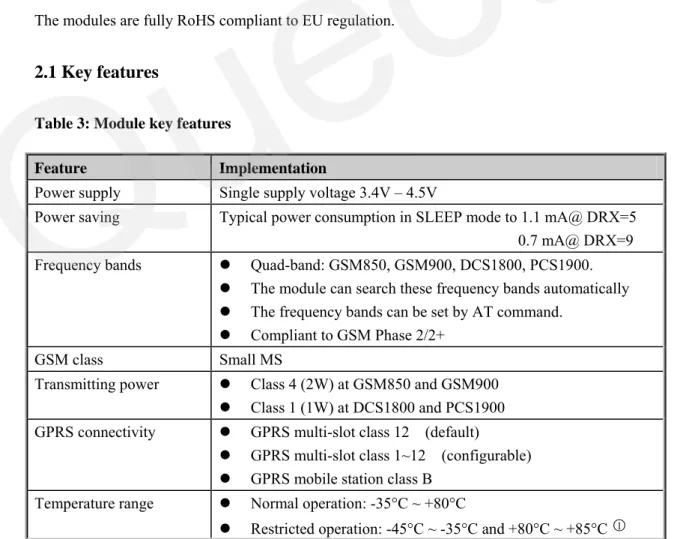
2.1 Key features
Table 3: Module key features
Feature Implementation
Power supply Single supply voltage 3.4V – 4.5V
Power saving Typical power consumption in SLEEP mode to 1.1 mA@ DRX=5 0.7 mA@ DRX=9 Frequency bands z Quad-band: GSM850, GSM900, DCS1800, PCS1900.
z The module can search these frequency bands automatically z The frequency bands can be set by AT command.
z Compliant to GSM Phase 2/2+ GSM class Small MS
Transmitting power z Class 4 (2W) at GSM850 and GSM900 z Class 1 (1W) at DCS1800 and PCS1900 GPRS connectivity z GPRS multi-slot class 12 (default)
z GPRS multi-slot class 1~12 (configurable) z GPRS mobile station class B
Temperature range z Normal operation:-35°C ~ +80°C
z Restricted operation: -45°C ~ -35°C and +80°C ~ +85°C ○1
z Storage temperature: -45°C ~ +90°C DATA GPRS:
CSD:
z GPRS data downlink transfer: max. 85.6 kbps z GPRS data uplink transfer: max. 85.6 kbps z Coding scheme: CS-1, CS-2, CS-3 and CS-4
z Support the protocols PAP (Password Authentication Protocol) usually used for PPP connections
z Internet service protocols TCP/UDP/FTP/HTTP/MMS
z Support Packet Switched Broadcast Control Channel (PBCCH) z CSD transmission rates: 2.4, 4.8, 9.6, 14.4 kbps non-transparent z Unstructured Supplementary Services Data (USSD) support SMS z MT, MO, CB, Text and PDU mode
z SMS storage: SIM card FAX Group 3 Class 1 and Class 2 SIM interface Support SIM card: 1.8V, 3V Antenna interface Connected via 50 Ohm antenna pad Audio features Speech codec modes:
z Half Rate (ETS 06.20) z Full Rate (ETS 06.10)
z Enhanced Full Rate (ETS 06.50 / 06.60 / 06.80) z Adaptive Multi-Rate (AMR)
z Echo Cancellation z Echo Suppression z Noise Reduction
Serial interface z Serial Port: Seven lines on serial port interface z Use for AT command, GPRS data and CSD data z Multiplexing function
z Support autobauding from 4800 bps to 115200bps z Debug Port: Two lines on second serial port interface
DBG_TXD and DBG_RXD
z Debug Port only used for software debugging Phonebook management Support phonebook types: SM, FD, LD, RC, ON, MC SIM Application Toolkit Support SAT class 3, GSM 11.14 Release 99
Real time clock Implemented
Alarm function Programmable via AT command Physical characteristics Size:
29±0.15 x 29±0.15 x 3.6±0.3mm Weight: 6g
Firmware upgrade Firmware upgrade over Serial Port
○1 When the module works in this temperature range, the deviations from the GSM specification might occur. For example, the frequency error or the phase error could increase.
Table 4: Coding schemes and maximum net data rates over air interface
Coding scheme 1 Timeslot 2 Timeslot 4 Timeslot
CS-1: 9.05kbps 18.1kbps 36.2kbps
CS-2: 13.4kbps 26.8kbps 53.6kbps
CS-3: 15.6kbps 31.2kbps 62.4kbps
CS-4: 21.4kbps 42.8kbps 85.6kbps
2.2 Functional diagram
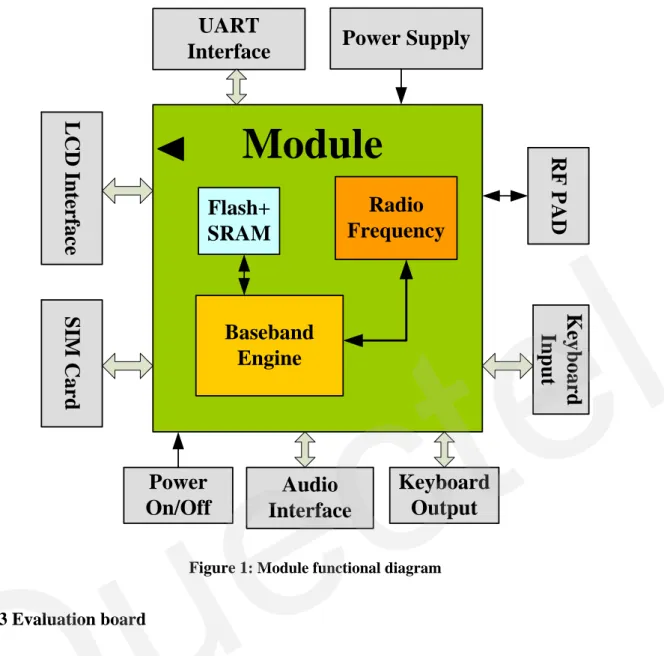
The following figure shows a block diagram of the M10 module and illustrates the major functional parts:
z The GSM baseband part z Flash and SRAM
z The GSM radio frequency part z The SMT pads interface
—LCD interface —SIM card interface —Audio interface —Key-board interface —UART interface —Power supply —RF interface
Quectel
Flash+
SRAM
Baseband
Engine
Radio
Frequency
Module
Audio
Interface
Keyboard
Output
RF PAD
SIM Card
LCD
Interface
UART
Interface
Power Supply
Keyboard
Input
Power
On/Off
Figure 1: Module functional diagram
2.3 Evaluation board
In order to help customer on the application of M10, Quectel supplies an Evaluation Board (EVB) that hosts the module directly with appropriate power supply, SIM card holder, RS-232 serial interface, handset RJ11 port, earphone port, antenna and other peripherals to control or test the module. For details,
3 Application interface
The module is equipped with a 64-pin 1.3mm pitch SMT pad that connects to the cellular application platform. Sub-interfaces included in these pads are described in detail in following chapters:
z Power supply (refer to Chapter 3.3) z Serial interfaces (refer to Chapter 3.8)
z Two analog audio interfaces (refer to Chapter 3.9) z SIM interface (refer to Chapter 3.11)
Electrical and mechanical characteristics of the SMT pad are specified in Chapter 5&Chapter7.
3.1 Pin description
Table 5: Pin description
Power Supply
PIN NAME I/O DESCRIPTION DC
CHARACTERISTICS
COMMENT VBAT I Module main power supply.
The power supply of module has to be a single voltage source of VBAT=3.4V~4.5V. It must be able to provide sufficient current in a transmitting burst which typically rises to 2A.
Vmax= 4.5V Vmin=3.4V Vnorm=4.0V
VCHG I Voltage input for the charging circuit
Vmax=6.5V Vmin=1.1 * VBAT Vnorm=5.0V
If unused, keep this pin open.
Charging function is not supported in default.
VRTC I/O Power supply for RTC when VBAT is not supplied for the system.
Charging backup battery or golden capacitor when the VBAT is supplied. VImax=VBAT VImin=2.6V VInorm=2.75V VOmax=2.85V VOmin=2.6V VOnorm=2.75V Iout(max)= 730uA Iin=2.6~5 uA Recommend to connect to a backup battery or a golden capacitor.
VDD_EXT O Supply 2.8V voltage for Vmax=2.9V 1. If unused, keep
external circuit. By
measuring this pin, customer can judge whether the system is power on or off. When the voltage is low, the system is power off.
Otherwise, the system is power on.
Vmin=2.7V Vnorm=2.8V Imax=20mA
this pin open. 2. Recommend to add a 2.2~4.7uF bypass capacitor, when using this pin for power supply.
GND Digital ground
Power on or power off
PIN NAME I/O DESCRIPTION DC
CHARACTERISTICS
COMMENT PWRKEY I Power on/off key. PWRKEY
should be pulled down for a moment to turn on or turn off the system. VILmax=0.3*VBAT VIHmin=0.7*VBAT VImax=VBAT Pull up to VBAT Internally. Emergency shutdown
PIN NAME I/O DESCRIPTION DC
CHARACTERISTICS
COMMENT EMERG_OF
F
I Emergency off. Pulled down for at least 20ms will turn off the module in case of emergency. Use it only when normal shutdown through PWRKEY or AT command can’t perform well.
VILmax=0.4V VIHmin=2.2V Vopenmax=2.8V Open drain/collector driver required in cellular device application. If unused keep this pin open.
Audio interfaces
PIN NAME I/O DESCRIPTION DC
CHARACTERISTICS
COMMENT MIC1P
MIC1N
I Positive and negative voice-band input Audio DC Characteristics refer to Chapter 3.9. MIC2P MIC2N
I Auxiliary positive and negative voice-band input
If unused keep these pins open
SPK1P SPK1N
O Positive and negative voice-band output
If unused keep
these pins open SPK2P O Auxiliary positive
voice-band output
If unused keep this pin open.
AGND AGND is separate ground connection for external audio circuits.
If unused keep this pin open.
BUZZER O Buzzer output If unused keep this
pin open
General purpose input/output
PIN NAME I/O DESCRIPTION DC
CHARACTERISTICS
COMMENT KBC0~KBC
4
I If unused keep
these pins open KBR0~KBR 4 O Keypad interface Pull up to VDD_EXT, if unused keep these pins open DISP_DATA I/O DISP_CLK O DISP_CS O DISP_D/C O DISP_RST O
LCD display interface If unused keep these pins open
NETLIGHT O Network status indication GPIO0 I/O Normal input/output port GPIO1_KBC
5
I/O Normal input/output port/Keypad interface VILmin=0V VILmax=0.67V VIHmin=1.7V VIHmax= VDD_EXT+0.3 VOLmin=GND VOLmax=0.34V VOHmin=2.0V VOHmax= VDD_EXT If unused keep these pins open
LIGHT_MO S
O Open drain output port Imax=100mA If unused keep this pin open
Serial port
PIN NAME I/O DESCRIPTION DC
CHARACTERISTICS
COMMENT DTR I Data terminal ready
RXD I Receive data
TXD O Transmitting data RTS I Request to send CTS O Clear to send
RI O Ring indicator
DCD O Data carrier detection
VILmin=0V VILmax=0.67V VIHmin=1.7V VIHmax= VDD_EXT+0.3 VOLmin=GND VOLmax=0.34V VOHmin=2.0V VOHmax= VDD_EXT If only use TXD, RXD and GND to communicate, RTS pin should be connect to GND directly. If unused keep these pins open. Debug port
DBG_TXD O DBG_RXD I
Serial interface for debugging only.
If unused keep
these pins open
SIM interface
PIN NAME I/O DESCRIPTION DC
CHARACTERISTICS
COMMENT SIM_VDD O Voltage supply for SIM card The voltage can be
selected by software automatically. Either
All signals of SIM interface should be protected against
1.8V or 3V. SIM_DATA I/O SIM data
SIM_CLK O SIM clock SIM_RST O SIM reset
VIHmin=0.7*SIM_VD D VOHmin=0.8*SIM_VD D VOLmax=0.4V When SIM_VDD=3V VILmax=0.4V When SIM_VDD=1.8V VILmax=0.2* SIM_VDD VOHmin=0.9*SIM_VD D When SIM_VDD=3V VOLmax=0.4V When SIM_VDD=1.8V VOLmax=0.2* SIM_VDD ESD with a TVS diode array. Maximum cable length 200mm from the module pad to SIM card holder.
SIM_PRESE NCE
I SIM card detection VILmax=0.67V VIHmin=1.7V
If unused , keep this pin open. AUXADC
PIN NAME I/O DESCRIPTION DC
CHARACTERISTICS
COMMENT ADC0 I General purpose analog to
digital converter.
voltage range: 0V to 2.8V
If unused keep this pin open
TEMP_BAT I ADC input for battery temperature over NTC resistor. voltage range: 0V to 2.8V NTC should be installed inside or near battery pack to deliver temperature values.
If unused keep this pin open.
RF interface
PIN NAME I/O DESCRIPTION DC
CHARACTERISTICS
COMMENT RF_ANT I/O RF antenna pad impedance of 50Ω Refer to Chapter 4
3.2 Operating modes
The table below briefly summarizes the various operating modes referred to in the following chapters.
Table 6: Overview of operating modes
Mode Function
GSM/GPRS SLEEP
The module will automatically go into SLEEP mode if DTR is set to high level and there is no interrupt (such as GPIO interrupt or data on serial port).
In this case, the current consumption of module will reduce to the minimal level.
During SLEEP mode, the module can still receive paging message and SMS from the system normally.
GSM IDLE Software is active. The module has registered to the GSM network, and the module is ready to send and receive. GSM TALK Connection is going on between two subscribers. In this case,
the power consumption depends on network settings such as DTX off/on, FR/EFR/HR, hopping sequences.
GPRS STANDBY
The module has registered to GPRS network, but PDP context is inactive. The SGSN knows the Routing Area where the module is located in.
GPRS READY
The PDP context is active, but no data transfer is going on. The module is ready to receive or send GPRS data. The SGSN knows the cell where the module is located in.
Normal operation
GPRS DATA There is GPRS data in transfer (PPP or TCP or UDP). In this case, power consumption is related with network settings (e.g. power control level), uplink / downlink data rates and GPRS configuration (e.g. used multi-slot settings).
POWER DOWN Normal shutdown by sending the “AT+QPOWD=1” command, using the PWRKEY or using the EMERG_OFF①. The power management ASIC disconnects the power supply from the base band part of the module, and only the power supply for the RTC is remained. Software is not active. The serial interfaces are not accessible. Operating voltage (connected to VBAT) remains applied. Minimum functionality mode (without remove power supply)
Use the “AT+CFUN” command can set the module to a minimum functionality mode without remove the power supply. In this case, the RF part of the module will not work or the SIM card will not be accessible, or both RF part and SIM card will be closed all, and the serial interface is still accessible. The power consumption in this case is very low.
Alarm mode RTC alert function launches this restricted operation while the module is in POWER DOWN mode. The module will not be registered to GSM network and only parts of AT commands can be available.
①Use the EMERG_OFF only when, due to serious problems. Please refer to chapter3.4.2.4.
3.3 Power supply
The power supply of the module is from a single voltage source of VBAT= 3.4V...4.5V. The GSM transmitting burst can cause obvious voltage drop at the supply voltage thus the power supply must be carefully designed and is capable of providing sufficient current up to 2A. For the VBAT input, a bypass capacitor of about 100 µF with low ESR is recommended. Multi-layer ceramic chip (MLCC) capacitor can provide the best combination of low ESR and small size but may not be economical. A lower cost choice could be a 100 µF tantalum capacitor with low ESR. A small (0.1µF to 1µF) ceramic capacitor should be in parallel with the 100µF capacitor, which is illustrated in Figure 2. The capacitors should be placed close to the M10 VBAT pins.
C2
C1
VBAT
+
C1=100uF, C2=0.1uF~1uF
Figure 2: Reference circuit of the VBAT input
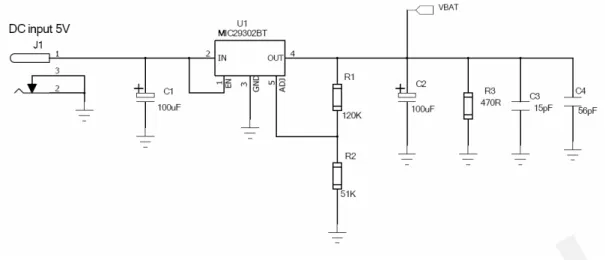
The circuit design of the power supply for the module largely depends on the power source. Figure 3 shows a reference design of +5V input power source. The designed output for the power supply is 4.16V, thus a linear regulator can be used. If there’s a big voltage difference between the input source and the desired output (VBAT), a switching converter power supply would be preferable for its better efficiency especially with the 2A peak current in burst mode of the module.
Quectel
Figure 3: Reference circuit of the source power supply input
When the power supply for the module can’t provide current of 2A, proper bigger capacitor is required so as to supply for the current demand during the burst transmission period. Reference capacitors for corresponding limited current supply are listed in Table 7.
Table 7: Recommended bypass capacitors for limited current supply
Maximum current output of power supply Capacitance ESR@ +25°C 100KHz (Ω)
Part number Quantity of
application
Vendor
1.5A 1500µF <=0.045 592D158X06R3R2T20H 1 VISHAY
1A 2200µF <=0.055 592D228X06R3X2T20H 2 VISHAY
The single 3.6V Li-Ion cell battery type can be connected to the power supply of the module VBAT directly. The Ni_Cd or Ni_MH battery types must be used carefully, because their maximum voltage can rise over the absolute maximum voltage for the module and damage it. The M10 module does not support charging function in the default hardware configuration.
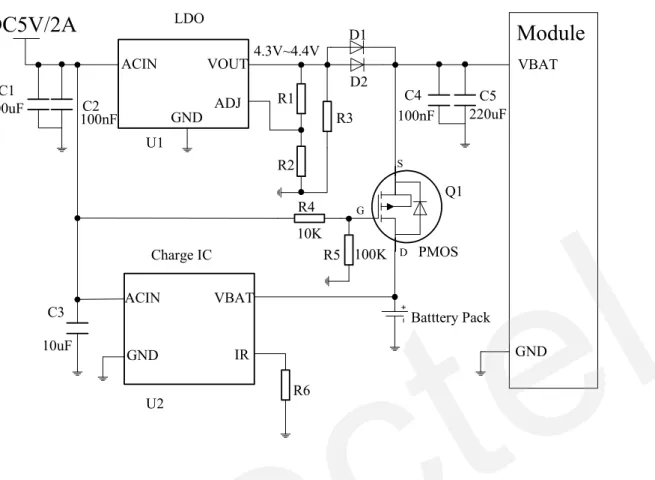
A suitable way to charge battery in M2M application is to use an external charging circuit which can charge the battery and put it into idle mode after fully charged. The VBAT is supplied by external power source instead of the battery, but when the external power source is cut off the battery will supply to the VBAT immediately. A reference block diagram for this design is shown in Figure 4.
Quectel
ACIN VBAT IR GND LDO Charge IC ACIN VOUT GND ADJ
DC5V/2A
Module
VBAT GND PMOS Batttery Pack 10K 100K 220uF G S D 100nF 100uF 10uF C1 100nFC2 C3 R1 R3 R2 R4 R5 R6 D2 D1 U1 U2 C4 C5 Q1 4.3V~4.4VFigure 4: Reference external battery charging circuit
Figure 4 shows the reference battery charging circuit for M2M application. U1 is an LDO which can supply current more than 2A and can output a voltage of 4.3~4.4V through adjusting the resistance of R1 and R2. R3 is the minimum load whose value can usually be found in the datasheet of U1. Both D1 and D2 are Schottky barrier diodes, which is capable of forward current more than 1.5A and has low forward voltage drop and fast switching feature. Q1 is a P-channel MOSFET which acts as a switch between battery supply and external power supply. When the external power supply is present, Q1 is cut off and the module is powered by external supply. Otherwise, Q1 is turned on and the module is supplied by the battery. The Q1 P-channel MOSFET must be able to supply continuous drain current bigger than 2A. Moreover, on-resistance of Drain-to-Source should be as small as possible which means lower thermal power dissipation and voltage drop. U2 is a charging IC, which should be chosen according to the requirements of the application. Since the module is powered by external supply during most of the time in common application, charging current of more than 100mA would be enough. Furthermore, the external 5V DC power supply should be capable of supplying current more than the total sum of maximum charging current and maximum module load current, which is happened in GPRS multi-slot transmission at highest power control level in GSM900MHz or GSM850MHz band.
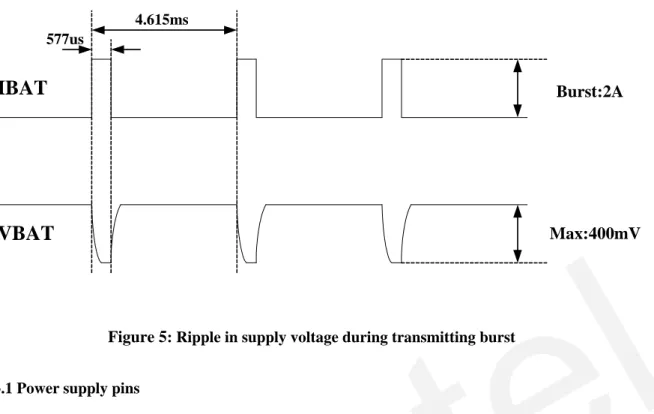
The RF Power Amplifier current (2.0A peak in GSM/GPRS mode) flows with a ratio of 1/8 of time, around 577us every 4.615ms, in talking mode. The following figure is the VBAT voltage and current ripple at the maximum power transmitting phase, the test condition is VBAT=4.0V, VBAT maximum output current =2A, C1=100µF tantalum capacitor (ESR=0.7Ω) and C2=1µF.
Max:400mV
Burst:2A
4.615ms 577usIBAT
VBAT
Figure 5: Ripple in supply voltage during transmitting burst
3.3.1 Power supply pins
The VBAT pins are dedicated to connect the module supply voltage. VRTC pin can be used to connect a rechargeable coin battery or a golden capacitor which can help to maintain the system clock when VBAT supply is not applied.
3.3.2 Minimizing supply voltage drop
Please pay special attention to the power supply design for your applications. Please make sure that the input voltage will never drop below 3.4V even in a transmitting burst during which the current consumption may rise up to 1.8A. If the power voltage drops below 3.4V, the module could be switched off. The PCB traces from the VBAT pads to the power source must be wide enough to ensure that there isn’t too much voltage drop occur in the transmitting burst mode.
3.3.3 Monitoring power supply
To monitor the supply voltage, you can use the “AT+CBC” command which include three parameters: charging status, remaining battery capacity and voltage value (in mV). It returns the 0-100 percent of battery capacity and actual value measured between VBAT and GND. The voltage is continuously measured at an interval depending on the operating mode. The displayed voltage (in mV) is averaged over the last measuring period before the “AT+CBC” command is executed.
For details please refer to document [1]
3.4 Power up and power down scenarios
3.4.1 Power on
The module can be turned on by various ways, which are described in following chapters: z Via PWRKEY pin: start normal operating mode (please refer to chapter 3.4.1.1); z Via RTC interrupt: start ALARM modes (please refer to chapter 3.4.1.2)
Note: AT command can be sent to the module after it is powered on and Unsolicited Result Code “RDY” is received from the Serial Port. However if the module was set to autobauding mode, the URC “RDY” wouldn’t be received. AT command can be sent to the module 2-3 seconds after the module is powered on. Customer can use “AT+IPR=x;&W” to set a fixed baud rate and save the configuration to non-volatile flash memory. After this configuration, the URC “RDY” should be received from the Serial Port every time when the module is powered on. Refer to Chapter “AT+IPR” in document [1].
3.4.1.1 Power on module using the PWRKEY pin
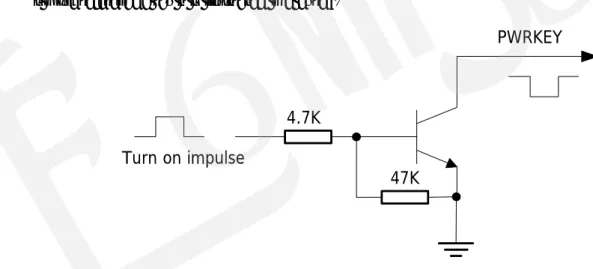
Customer’s application can turn on the module by driving the pin PWRKEY to a low level voltage for some time and then releasing it. An open collector driver circuit is suggested to control the PWRKEY. A simple reference circuit is illustrated in Figure 6.
4.7K
47K
Turn on impulse
PWRKEY
Figure 6: Turn on the module using driving circuit
The other way to control the PWRKEY is using a button directly. A TVS component is indispensable to be placed nearby the button for ESD protection. When pressing the key, electrostatic strike may generate from finger. A reference circuit is showed in Figure 7.
S1
PWRKEY
TVS1
Close to S1
Figure 7: Turn on the module using keystroke The power on scenarios illustrates as following figure.
VDD_EXT
(
OUTPUT
)
V
IL<0.2*VBAT
V
IH> 0.6*VBAT
Pulldown > 2000ms
Hiz
VBAT
PWRKEY
(INPUT)
Figure 8: Timing of turn on system
When the power-on procedure completes, the module will send out the following result code to indicate the module is ready to operate when the baud rate of the serial port is set to fixed.
RDY
This result code does not appear when autobauding is active.
3.4.1.2 Power on module using the RTC (Alarm mode)
Alarm mode is a power-on approach by using the RTC. The alert function of RTC can wake-up the module while it is in power-off state. In alarm mode, the module will not register to GSM network and the GSM protocol stack software is closed. Thus the part of AT commands related with SIM card and the protocol stack will not be accessible, and the others can be used.
Use the “AT+QALARM” command to set the alarm time. The RTC remains the alarm time if the module is powered off by “AT+QPOWD=1” or by PWRKEY pin. Once the alarm time is expired, the module will go into the alarm mode. In this case, the module will send out an Unsolicited Result Code (URC) when the baud rate of the Serial Port is set to fixed.
ALARM RING RDY
This result code does not appear when autobauding is active.
During alarm mode, use “AT+CFUN” command to query the status of software protocol stack; it will return 0 which indicates that the protocol stack is closed. After 90 seconds, the module will power down automatically. However, if the GSM protocol stack is started by “AT+CFUN=1” command during the alarm mode, the process of automatic power-off will not be executed. In alarm mode, driving the PWRKEY to a low level voltage for a period will cause the module to power down.
Table 8 briefly summarizes the AT commands that are frequently used during alarm mode, for details of these instructions please refer to document [1].
Table 8: AT commands used in alarm mode
AT command Function
AT+QALARM Set alarm time
AT+CCLK Set data and time of RTC AT+QPOWD Power down the module AT+CFUN Start or close the protocol stack
3.4.2 Power down
The following procedures can be used to turn off the module:
z Normal power down procedure: Turn off module using the PWRKEY pin z Normal power down procedure: Turn off module using command “AT+QPOWD”
z Over-voltage or under-voltage automatic shutdown: Take effect when over-voltage or under-voltage is detected
z Emergent power down procedure: Turn off module using the EMERG_OFF pin
3.4.2.1 Power down module using the PWRKEY pin
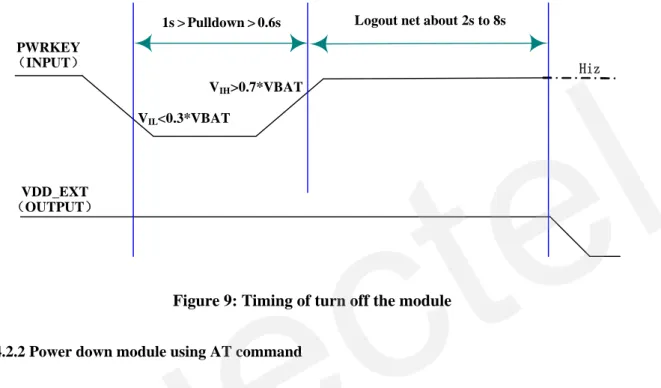
Customer’s application can turn off the module by driving the PWRKEY to a low level voltage for certain time. The power-down scenario illustrates as in Figure 9.
The power-down procedure causes the module logoff from the network and allow the software to save important data before completely disconnecting the power supply, thus it is a safe way.
Before the completion of the power-down procedure the module sends out the result code shown below: NORMAL POWER DOWN
After this moment, no further AT command can be executed. And then the module enters the POWER DOWN mode, only the RTC is still active. The POWER DOWN mode can also be indicated by VDD_EXT pin, which is a low level voltage in this mode.
PWRKEY (INPUT) VDD_EXT (OUTPUT) VIL<0.3*VBAT VIH>0.7*VBAT 1s > Pulldown > 0.6s Hiz Logout net about 2s to 8s
Figure 9: Timing of turn off the module
3.4.2.2 Power down module using AT command
Customer’s application can use an AT command “AT+QPOWD=1” to turn off the module. This command will let the module to log off from the network and allow the software to save important data before completely disconnecting the power supply, thus it is a safe way.
Before the completion of the power-down procedure the module sends out the result code shown below: NORMAL POWER DOWN
After this moment, no further AT command can be executed. And then the module enters the POWER DOWN mode, only the RTC is still active. The POWER DOWN mode can also be indicated by VDD_EXT pin, which is a low level voltage in this mode.
Please refer to document [1] for detail about the AT command of “AT+QPOWD”.
3.4.2.3 Over-voltage or under-voltage automatic shutdown
The module will constantly monitor the voltage applied on the VBAT, if the voltage ≤ 3.5V, the following URC will be presented:
UNDER-VOLTAGE WARNNING
If the voltage ≥ 4.5V, the following URC will be presented:
OVER-VOLTAGE WARNNING
The uncritical voltage range is 3.4V to 4.6V. If the voltage ≥ 4.6V or ≤ 3.4V, the module would automatically shutdown itself.
If the voltage ≤ 3.4V, the following URC will be presented: UNDER-VOLTAGE POWER DOWN
If the voltage ≥ 4.6V, the following URC will be presented: OVER-VOLTAGE POWER DOWN
After this moment, no further AT command can be executed. The module logoff from network and enters POWER DOWN mode, and only RTC is still active. The POWER DOWN mode can also be indicated by the pin VDD_EXT, which is a low level voltage in this mode.
3.4.2.4 Emergency shutdown
The module can be shut down by driving the pin EMERG_OFF to a low level voltage for over 20ms and then releasing it. The EMERG_OFF line can be driven by an Open Drain/Collector driver or a button. The circuit illustrates as the following figures.
4.7K
47K Emergency
shutdown impulse
EMERG_OFF
Figure 10: Reference circuit for EMERG_OFF by using driving circuit S1
EMERG_OFF TVS1
Close to S1
Figure 11: Reference circuit for EMERG_OFF by using button
Be cautious to use the pin EMERG_OFF. It should only be used under emergent situation. For instance, if the module is unresponsive or abnormal, the pin EMERG_OFF could be used to shutdown the system. Although turning off the module by EMERG_OFF is fully tested and nothing wrong detected, this operation is still a big risk as it could cause destroying of the code or data area of the NOR flash memory in the module. Therefore, it is recommended that PWRKEY or AT command should always be the preferential way to turn off the system.
3.4.3 Restart module using the PWRKEY pin
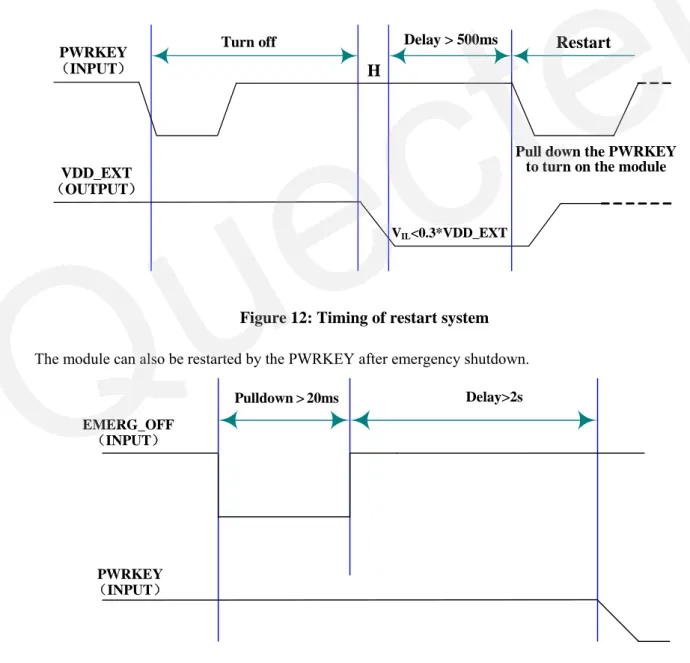
Customer’s application can restart the module by driving the PWRKEY to a low level voltage for certain time, which is similar to the way to turn on module. Before restarting the module, at least 500ms should be delayed after detecting the low level of VDD_EXT. The restart scenario illustrates as the following figure. VDD_EXT (OUTPUT)
H
PWRKEY (INPUT) VIL<0.3*VDD_EXT Delay > 500ms Turn offPull down the PWRKEY to turn on the module
Restart
Figure 12: Timing of restart system
The module can also be restarted by the PWRKEY after emergency shutdown.
PWRKEY
(INPUT)
Pulldown > 20ms Delay>2s
EMERG_OFF
(INPUT)
Figure 13: Timing of restart system after emergency shutdown
3.5 Power saving
Upon system requirement, there are several actions to drive the module enter low current consumption status. For example, “AT+CFUN” can be used to set module into minimum functionality mode and DTR hardware interface signal can be used to lead system to SLEEP mode.
3.5.1 Minimum functionality mode
Minimum functionality mode reduces the functionality of the module to minimum level, thus minimizes the current consumption when the slow clocking mode is activated at the same time. This mode is set with the “AT+CFUN” command which provides the choice of the functionality levels <fun>=0,1,4. z 0: minimum functionality;
z 1: full functionality (default);
z 4: disable phone both transmitting and receive RF circuits;
If the module is set to minimum functionality by “AT+CFUN=0”, the RF function and SIM card function would be closed. In this case, the serial port is still accessible, but all AT commands correlative with RF function or SIM card function will not be accessible.
If the module has been set by “AT+CFUN=4”, the RF function will be closed, the serial port is still active. In this case, all AT commands correlative with RF function will not be accessible.
After the module is set by “AT+CFUN=0” or “AT+CFUN=4”, it can return to full functionality by “AT+CFUN=1”.
For detailed information about “AT+CFUN”, please refer to document [1].
3.5.2 SLEEP mode (slow clock mode)
The SLEEP mode is disabled in default software configuration. Customer’s application can enable this mode by “AT+QSCLK=1”. On the other hand, the default setting is “AT+QSCLK=0” and in this mode, the module can’t enter SLEEP mode.
When “AT+QSCLK=1” is set to the module, customer’s application can control the module to enter or exit from the SLEEP mode through pin DTR. When DTR is set to high level, and there is no on-air or hardware interrupt such as GPIO interrupt or data on serial port, the module will enter SLEEP mode automatically. In this mode, the module can still receive voice, SMS or GPRS paging from network but the serial port is not accessible.
3.5.3 Wake up module from SLEEP mode
When the module is in the SLEEP mode, the following methods can wake up the module.
z If the DTR Pin is pulled down to a low level, it would wake up the module from the SLEEP mode. The serial port will be active about 20ms after DTR changed to low level.
z Receiving a voice or data call from network to wake up module. z Receiving an SMS from network to wake up module.
z RTC alarm expired to wake up module. z Keypad and PWRKEY interrupt.
Note: DTR pin should be held low level during communicating between the module and DTE.
3.6 Summary of state transitions (except SLEEP mode)
Table 9: Summary of state transition
Current mode Next mode
POWER DOWN Normal
mode
Alarm mode
POWER DOWN Use
PWRKEY
Turn on the module by RTC alarm Normal mode AT+QPOWD, use
PWRKEY pin, or use EMERG_OFF pin
Set alarm by “AT+QALARM”, and then turn off the module. When the timer expires, the module turns on automatically and enters Alarm mode. Alarm mode Use PWRKEY pin or
wait module turning off automatically
Use AT+CFUN
3.7 RTC backup
The RTC (Real Time Clock) can be supplied by an external capacitor or battery (rechargeable or non-chargeable) through the pin VRTC. A 3.9 K resistor has been integrated in the module for current limiting. A coin-cell battery or a super-cap can be used to backup power supply for RTC.
The following figures show various sample circuits for RTC backup.
RTC Core 3.9K MODULE VRTC Non-chargeable Backup Battery
Figure 14: RTC supply from non-chargeable battery
RTC Core 3.9K MODULE VRTC Rechargeable Backup Battery
Figure 15: RTC supply from rechargeable battery
RTC
Core
3.9K
MODULE
VRTC
Large-capacitance CapacitorFigure 16: RTC supply from capacitor
Coin-type rechargeable capacitor such as XH414H-IV01E from Seiko can be used.
Figure 17: Seiko XH414H-IV01E Charge Characteristic
3.8 Serial interfaces
The module provides two unbalanced asynchronous serial ports. One is the Serial Port, the other is the Debug Port. The module is designed as a DCE (Data Communication Equipment), following the traditional DCE-DTE (Data Terminal Equipment) connection. Autobauding function supports baud rate from 4800bps to 115200bps.
The Serial Port
z TXD: Send data to DTE z RXD: Receive data from DTE The Debug Port
z DBG_TXD: Send data to the RXD of COM port of debug computer z DBG_RXD: Receive data from the TXD of COM port of debug computer
When hardware flow control is required, RTS and CTS should be connected. The module supports hardware flow control in default. When the module is used as a modem, DCD and RI should be connected. Furthermore, RI could indicate the host controller when an event happens such as an incoming voice call, a URC data export.
The logic levels are described in the following table.
Table 10: Logic levels of the serial interface
Parameter Min Max Unit
VIL 0 0.67 V
VIH 1.67 VDD_EXT +0.3 V
VOL GND 0.34 V
VOH 2.0 VDD_EXT V
Table 11: Pin definition of the serial interfaces
Interface Name Pin Function
DBG_RXD 9 Receive data of the debug port Debug Port
DBG_TXD 10 Transmit data of the debug port
RI 55 Ring indicator
RTS 58 Request to send
CTS 57 Clear to send
RXD 61 Receive data of the serial port TXD 60 Transmit data of the serial port DTR 59 Data terminal ready Serial Port
DCD 56 Data carrier detection
TXD RXD RTS CTS DTR DCD RI TXD RXD RTS CTS DTR DCD RING
DBG_TXD
DBG_RXD
/TXD
/RXD
Module (DCE)
CUSTOMER (DTE)
Serial port1
Serial port
Debug port
Serial port2
Figure 18: Connection of serial interfaces
3.8.1 Function of serial port & debug port supporting
Serial Port
z Seven lines on serial interface.
z Contain data lines TXD and RXD, hardware flow control lines RTS and CTS, other control lines DTR, DCD and RI.
z Use for AT command, GPRS data, CSD FAX, etc. Multiplexing function is supported on the Serial Port . So far only the basic mode of multiplexing is available.
z Support the communication baud rates as the following:
75,150,300,600,1200,2400,4800,9600,14400,19200,28800,38400,57600,115200. The default setting is 115200bps.
z Support the following baud rates for Autobauding function: 4800, 9600, 19200, 38400, 57600, 115200bps
After setting a fixed baud rate or Autobauding, please send “AT” string at that rate, the serial port is ready when it responds “OK”. Autobauding is not compatible with multiplex mode.
Autobauding allows the module to automatically detect the baud rate of the data sent from the host controller, which gives the flexibility to put the module into operation without considering which baud rate the host application is using. Autobauding is disabled in default and can be activated by “AT+IPR”. To take advantage of the autobauding mode, special attention should be paid to the following requirements:
Synchronization between DTE and DCE:
When DCE (the module) powers on with the autobauding enabled, it is recommended to wait 2 to 3 seconds before sending the first AT character. After receiving the “OK” response, DTE and DCE are correctly synchronized.
Restrictions on autobauding operation
z The serial port has to be operated at 8 data bits, no parity and 1 stop bit (factory setting).
z The Unsolicited Result Codes like "RDY", "+CFUN: 1" and "+CPIN: READY” will not be indicated when the module is started up in Autobauding mode.
Debug Port
z Two lines: DBG_TXD and DBG_RXD z Debug Port is only used for debugging.
3.8.2 Software upgrade and software debug
The TXD、RXD can be used to upgrade software. The PWRKEY pin must be pulled down during the software upgrade process. Please refer to the following figures for software upgrade.
IO Connector
TXD
RXD
GND
PWRKEY
Module (DCE)
Serial port
TXD
RXD
GND
PWRKEY
Figure 19: Connection of software upgrade
Debug Computer
TXD
RXD
GND
Module(DCE)
Debug port
DBG_TXD
DBG_RXD
GND
Figure 20: Connection of software debug
The serial port and the debug port don’t support the RS_232 level, but only support the CMOS level. A level shifter IC or circuit may be inserted between DCE and DTE. Figure 21 shows a reference level shifter circuit when the module is connected to a PC.
9 8 7 6 5 4 3 2 1 15 14 8 9 11 125 7 6 10 4 26 2 27 13 18 20 21 16 17 19 22 23 24 3 1 25 28 GND TO PC serial port SP3238 3V GND GND T5OUT /SHUTDOWN V+ GND V-VCC T4OUT T2OUT T3OUT T1OUT R3IN R2IN R1IN /STATUS 3V ONLINE R1OUT R2OUT R3OUT /R1OUT GND T5IN T4IN T3IN T2IN T1IN C2+ C2- C1-C1+ MODULE RXD DTR RTS RI CTS TXD DCD
Figure 21: RS232 level converter circuit
Note 1:For detailed information about serial port application, please refer to document [10]
3.9 Audio interfaces
The module provides two analogy input channels and two analogy output channels.
z AIN1 and AIN2, which may be used for both microphone and line inputs. An electret microphone is usually used. AIN1 and AIN2 are both differential input channels.
z AOUT1 and AOUT2, which may be used for both receiver and speaker outputs. AOUT1 channel is typically used with a receiver built into a handset, while AOUT2 channel is typically used with headset or hands-free speaker. AOUT1 channel is a differential channel and AOUT2 is a single-ended channel. SPK2P and AGND can establish a pseudo differential mode.
z These two audio channels can be swapped by “AT+QAUDCH” command. For more details, please refer to document [1].
z For each channel, customer can use AT+QMIC to adjust the input gain level of microphone. Customer can also use “AT+CLVL” to adjust the output gain level of receiver and speaker. “AT+QECHO” is to set the parameters for echo cancellation control. “AT+QSIDET” is to set the side-tone gain level. For more details, please refer to document [1].
Note:
z Use AT command “AT+QAUDCH” to select audio channel: 0--AIN1/AOUT1 (normal audio channel), the default value is 0. 1--AIN2/AOUT2 (aux audio channel) .
Table 12: Pin definition of Audio interface
Interface Name Pin Function
MIC1P 23 Microphone1 input +
MIC1N 24 Microphone1 input -
SPK1P 22 Audio1 output+
(AIN1/AOUT1)
SPK1N 21 Audio1 output-
MIC2P 25 Microphone2 input +
MIC2N 26 Microphone2 input -
(AIN2/AOUT2)
SPK2P 20 Audio2 output+
AGND 19 Suggest to be used in audio circuit. Don’t connect to digital GND in host PCB as it could introduce TDD noise.
3.9.1 Microphone interfaces configuration
AIN1/IN2 channels come with internal bias supply for external electret microphone. A reference circuit is shown in Figure 22.
10pF 33pF 33pF 33pF Close to Microphone MICxP MICxN GND GND Differential layout
Module
Electret Microphone GND GND 10pF 10pF GND GND ESD ANTI ESD ANTI AGNDFigure 22: Microphone interface configuration of AIN1&AIN2
The 33pF capacitor is applied for filtering out 900MHz RF interference when the module is transmitting at GSM900MHz. Without placing this capacitor, TDD noise could be heard at the peer party of the voice communication. Moreover, the 10pF capacitor here is for filtering out 1800MHz RF interference. However, the resonant frequency point of a capacitor largely depends on the material and production technique. Therefore, customer would have to discuss with its capacitor vendor to choose the most suitable capacitor for filtering GSM850MHz, GSM900MHz, DCS1800MHz and PCS1900MHz separately.
The severity degree of the RF interference in the voice channel during GSM transmitting period largely depends on the application design. In some cases, GSM900 TDD noise is more severe; while in other cases, DCS1800 TDD noise is more obvious. Therefore, customer can decide which capacitor to use based on test result. Sometimes, even no RF filtering capacitor is required.
3.9.2 Speaker interface configuration SPK1P SPK1N Differential layout 10pF 10pF 33pF 33pF 33pF Close to speaker GND GND 10pF ESD ANTI ESD ANTI
Module
Figure 23: Speaker interface configuration of AOUT1
SPK1P SPK1N
Differential layout Amplifier
circuit 10pF 10pF 33pF 33pF 33pF Close to speaker GND GND 10pF ESD ANTI ESD ANTI Module
Figure 24: Speaker interface with amplifier configuration of AOUT1
Texas Instruments’s TPA6205A1is recommended for a suitable differential audio amplifier. There are plenty of excellent audio amplifiers in the market.
SPK2P AGND Differential layout 10pF 33pF Close to speaker GND ESD ANTI Module 22uF
Figure 25: Speaker interface configuration of AOUT2
SPK2P AGND
Differential layout Amplifier
circuit 10pF 10pF 33pF 33pF Close to speaker GND GND ESD ANTI ESD ANTI Module C2 C1
Figure 26: Speaker interface with amplifier configuration of AOUT2
3.9.3 Earphone interface configuration 1 2 4 3 Amphenol 9001-8905-050 SPK2P MIC2N MIC2P 22uF 68R 33pF GND GND AGND Close to Socket Differential layout 33pF AGND 33pF 10pF GND GND GND GND AGND Module
Figure 27: Earphone interface configuration
Table 13: Typical electretmicrophone characteristic
Parameter Min Typ Max Unit
Working Voltage 1.2 1.5 2.0 V Working Current 200 500 uA External Microphone Load Resistance 2.2 k Ohm
Table 14: Typical speaker characteristic
Parameter Min Typ Max Unit
Load resistance 28 32 Ohm Single Ended Ref level 0 2.4 Vpp Load resistance 28 32 Ohm Normal Output(SPK1) Differential Ref level 0 4.8 Vpp
Quectel
Load resistance 16 32 Ohm Auxiliary Output(SPK2) Single Ended Ref level 0 2.4 Vpp Maxim driving current limit of SPK1 and SPK2 50 mA
3.10 Buzzer
The pin BUZZER in the SMT pads can be used to drive a buzzer to indicate incoming call. The output volume of buzzer can be set by “AT+CRSL”. The reference circuit for buzzer is shown in Figure 28.
Module
4.7K
47K
VBAT
BUZZER
Figure 28: Reference circuit for Buzzer
Table 15: Pin definition of the Buzzer
Table 16: Buzzer output characteristic
Parameter Min Typ Max Unit
Working Voltage 2.0 2.8 VDD_EXT V
Working Current 4 mA
Name Pin Function
3.11 SIM card interface
3.11.1 SIM card application
Customer can get information in SIM card by AT Command. For more information, please refer to document [1].
The SIM interface supports the functionality of the GSM Phase 1 specification and also supports the functionality of the new GSM Phase 2+ specification for FAST 64 kbps SIM card, which is intended for use with a SIM application Tool-kit.
Both 1.8V and 3.0V SIM Cards are supported.
The SIM interface is powered from an internal regulator in the module. Table 17: Pin definition of the SIM interface
Name Pin Function
SIM_VDD 12 Supply power for SIM Card. Automatic detection of SIM card voltage. 3.0V±10% and 1.8V±10%. Maximum supply current is around 10mA. SIM_DATA 13 SIM Card data I/O
SIM_CLK 14 SIM Card Clock SIM_RST 15 SIM Card Reset SIM_PRESENCE 11 SIM Card Presence
Figure 29 is the reference circuit for SIM interface, and here an 8-pin SIM card holder is used. In order to offer good ESD protection, it is recommended to add TVS such as ST (www.st.com ) ESDA6V1W5 or ON SEMI (www.onsemi.com ) SMF05C. The 22Ω resistors should be added in series between the module and the SIM card so as to suppress the EMI spurious transmission and enhance the ESD protection. Note that the SIM peripheral circuit should be close to the SIM card socket.
To avoid possible cross-talk from the SIM_CLK signal to the SIM_DATA signal be careful that both lines are not placed closely next to each other. A useful approach is to use GND line to shield the SIM_DATA line from the SIM_CLK line.
In Figure 29, the pin SIM_PRESENCE is used to detect whether the tray of the Molex SIM socket, which is used for holding SIM card, is present in the card socket. When the tray is inserted in the socket, SIM_PRESENCE is at high level. Regardless of whether the SIM card is in the tray or not, the change of SIM_PRESENCE level from low to high level inspires the module to reinitialize SIM card. Customer’s application can use “AT+QSIMDET” to switch on or off the SIM card detection function. For detail of this AT command, please refer to document [1].
Module SMF05C SIM_VDD SIM_CLK SIM_DATA SIM_RST SIM_PRESENCE VCC GND RST VPP CLK I/O PRESENCE GND 100K 22R 22R 22R 1uF VDD_EXT MOLEX-91228 SIM CARD GND
Figure 29: Reference circuit of the 8 pins SIM card
If customer doesn’t need the SIM card detection function, keep SIM_PRESENCE open. The reference circuit using a 6-pin SIM card socket illustrates as the following figure.
Module SMF05C SIM_VDD SIM_CLK SIM_DATA SIM_RST VCC GND RST VPP CLK I/O 22R 22R 22R 1uF C707 10M006 512 2 SIM CARD GND
Figure 30: Reference circuit of the 6 pins SIM card
3.11.2 Design considerations for SIM card holder
For 6-pin SIM card holder, it is recommended to use Amphenol C707 10M006 512 2. Please visit http://www.amphenol.com for more information.
Figure 31: Amphenol C707 10M006 512 2 SIM card holder Table 18: Pin description of Amphenol SIM card holder
Name Pin Function
SIM_VDD C1 SIM Card Power supply SIM_RST C2 SIM Card Reset
SIM_CLK C3 SIM Card Clock
GND C5 Ground
VPP C6 Not Connect
SIM_DATA C7 SIM Card data I/O
For 8-pin SIM card holder, it is recommended to use Molex 91228. Please visit http://www.molex.com
Figure 32: Molex 91228 SIM card holder Table 19: Pin description of Molex SIM card holder
Name Pin Function
SIM_VDD C1 SIM Card Power supply SIM_RST C2 SIM Card Reset
SIM_CLK C3 SIM Card Clock
GND C4 Ground
GND C5 Ground
VPP C6 Not Connect
SIM_DATA C7 SIM Card Data I/O
SIM_PRESENCE C8 SIM Card Presence Detection
3.12 LCD interface
The module contains a versatile LCD controller which is optimized for multimedia application. This function is not supported in standard module firmware, but only available with Quectel Open CPU function. By using Open CPU function, customer’s application firmware can be embedded in the flash memory of the module, and it can invoke LCD related API functions to drive a suitable LCD.
The LCD controller supports many types of LCD modules including monochrome LCD, colour
LCD. It contains a rich feature set to enhance the functionality. These features are: z Up to 176×220 pixels resolution
z Supports 8-bpp (RGB332), 12-bpp (RGB444), 16-bpp (RGB565) color depths
The serial LCD display interface supports serial communication with LCD device. When used as LCD interface, the following table is the pin definition. LCD interface timing should be coordinated with the LCD device.
Table 20: Pin definition of the LCD interface
Name Pin Function
DISP_RST 5 LCD reset
DISP_D/C 4 Display data or command select
DISP_CS 3 Display enable
DISP_CLK 2 Display clock for LCD DISP_DATA 1 Display data output
Note: This function is not supported in the default firmware.
3.13 Keypad interface
The keypad interface consists of 5 keypad column outputs and 5 keypad row inputs. The basic configuration is 5 keypad columns and 5 keypad rows, giving 25 keys.
Table 21: Pin definition of the keypad interface
Name Pin Function
KBC0 33 KBC1 34 KBC2 35 KBC3 36 KBC4 37
Keypad matrix column
KBR0 28 KBR1 29 KBR2 30 KBR3 31 KBR4 32
Keypad matrix row
The keypad interface allows a direct external matrix connection. A typical recommended circuit about the keypad is shown in the following figure.
KBR4 KBR3 KBR2 KBR1 KBR0 KBC0 KBC1 KBC2 KBC3 KBC4
Module
GPIO1_KBC5Figure 33: Reference circuit of the keypad interface
If a 5×5 matrix does not provide enough keys, GPIO1 could be multiplexed as KBC5 to configure a 5 ×6 keypad matrix. Then, the keypad interface consists of 5 keypad row outputs and 6 keypad column inputs. The basic configuration is 5 keypad rows and 6 keypad columns, giving 30 keys.
Note: This function is not supported in the default firmware.
3.14 ADC
The module provides two auxiliary ADC to measure the values of voltage. AT command “AT+QADC” to read the voltage value added on ADC0 pin. For detail of this AT command, please refer to document [1].
To get the battery temperature, M10 provides the TEMP_BAT pin, which is internally pulled-up to 2.8V through 10Kohm. The battery pack should include an NTC resistor. If the NTC is not inside the battery, it must be in thermal contact with the battery. The NTC resistor must be connected between TEMP_BAT and GND. The requirement is: RNTC≈ 10kΩ @ 25°C. AT command “AT+QEADC” to read the voltage value added on TEMP_BAT pin. For detail of this AT command, please refer to document [1].