Core Java™
Volume I—Fundamentals
Ninth Edition
Cay S. Horstmann Gary Cornell
Upper Saddle River, NJ • Boston • Indianapolis • San Francisco New York • Toronto • Montreal • London • Munich • Paris • Madrid
Many of the designations used by manufacturers and sellers to distinguish their products are claimed as trademarks. Where those designations appear in this book, and the publisher was aware of a trademark claim, the designations have been printed with initial capital letters or in all capitals.
The authors and publisher have taken care in the preparation of this book, but make no expressed or implied warranty of any kind and assume no responsibility for errors or omissions. No liability is assumed for incidental or consequential damages in connection with or arising out of the use of the information or programs contained herein.
The publisher offers excellent discounts on this book when ordered in quantity for bulk purchases or special sales, which may include electronic versions and/or custom covers and content particular to your business, training goals, marketing focus, and branding interests. For more information, please contact:
U.S. Corporate and Government Sales (800) 382-3419
For sales outside the United States, please contact:
International Sales
Visit us on the Web: informit.com/ph
Cataloging-in-Publication Data is on file with the Library of Congress.
Copyright © 2013 Oracle and/or its affiliates. All rights reserved. 500 Oracle Parkway, Redwood Shores, CA 94065
All rights reserved. Printed in the United States of America. This publication is protected by copyright, and permission must be obtained from the publisher prior to any prohibited reproduction, storage in a retrieval system, or transmission in any form or by any means, electronic, mechanical, photocopying, recording, or likewise. To obtain permission to use material from this work, please submit a written request to Pearson Education, Inc., Permissions Department, One Lake Street, Upper Saddle River, New Jersey 07458, or you may fax your request to (201) 236-3290.
ISBN-13: 978-0-13-708189-9 ISBN-10: 0-13-708189-8
Text printed in the United States on recycled paper at Edwards Brothers Malloy in Ann Arbor, Michigan.
Contents
Preface
Acknowledgments
Chapter 1: An Introduction to Java
1.1 Java As a Programming Platform 1.2 The Java “White Paper” Buzzwords 1.2.1 Simple
1.2.2 Object-Oriented 1.2.3 Network-Savvy 1.2.4 Robust
1.2.5 Secure
1.2.6 Architecture-Neutral 1.2.7 Portable
1.2.8 Interpreted
1.2.9 High-Performance 1.2.10 Multithreaded 1.2.11 Dynamic
1.3 Java Applets and the Internet 1.4 A Short History of Java
1.5 Common Misconceptions about Java
Chapter 2: The Java Programming Environment
2.1 Installing the Java Development Kit 2.1.1 Downloading the JDK
2.1.2 Setting the Executable Path
2.1.3 Installing the Library Source and Documentation 2.1.4 Installing the Core Java Program Examples 2.1.5 Navigating the Java Directories
2.2 Choosing a Development Environment 2.3 Using the Command-Line Tools
2.3.1 Troubleshooting Hints
2.4 Using an Integrated Development Environment 2.4.1 Locating Compilation Errors
Chapter 3: Fundamental Programming Structures in Java
3.1 A Simple Java Program 3.2 Comments
3.3 Data Types 3.3.1 Integer Types
3.3.2 Floating-Point Types 3.3.3 The char Type
3.3.4 The boolean Type
3.4 Variables
3.4.1 Initializing Variables 3.4.2 Constants
3.5 Operators
3.5.1 Increment and Decrement Operators 3.5.2 Relational and boolean Operators
3.5.3 Bitwise Operators
3.5.4 Mathematical Functions and Constants 3.5.5 Conversions between Numeric Types 3.5.6 Casts
3.5.7 Parentheses and Operator Hierarchy 3.5.8 Enumerated Types
3.6 Strings 3.6.1 Substrings 3.6.2 Concatenation
3.6.3 Strings Are Immutable 3.6.4 Testing Strings for Equality 3.6.5 Empty and Null Strings 3.6.5 Code Points and Code Units 3.6.6 The String API
3.6.7 Reading the Online API Documentation 3.6.8 Building Strings
3.7 Input and Output 3.7.1 Reading Input 3.7.2 Formatting Output 3.7.3 File Input and Output 3.8 Control Flow
3.8.1 Block Scope
3.8.3 Loops
3.8.4 Determinate Loops
3.8.5 Multiple Selections—The switch Statement
3.8.6 Statements That Break Control Flow 3.9 Big Numbers
3.10 Arrays
3.10.1 The “for each” Loop
3.10.2 Array Initializers and Anonymous Arrays 3.10.3 Array Copying
3.10.4 Command-Line Parameters 3.10.5 Array Sorting
3.10.6 Multidimensional Arrays 3.10.7 Ragged Arrays
Chapter 4: Objects and Classes
4.1 Introduction to Object-Oriented Programming 4.1.1 Classes
4.1.2 Objects
4.1.3 Identifying Classes
4.1.4 Relationships between Classes 4.2 Using Predefined Classes
4.2.1 Objects and Object Variables
4.2.2 The GregorianCalendar Class of the Java Library
4.2.3 Mutator and Accessor Methods 4.3 Defining Your Own Classes 4.3.1 An Employee Class
4.3.2 Use of Multiple Source Files 4.3.3 Dissecting the Employee Class
4.3.4 First Steps with Constructors 4.3.5 Implicit and Explicit Parameters 4.3.6 Benefits of Encapsulation
4.3.7 Class-Based Access Privileges 4.3.8 Private Methods
4.3.9 Final Instance Fields 4.4 Static Fields and Methods 4.4.1 Static Fields
4.4.3 Static Methods 4.4.4 Factory Methods 4.4.5 The main Method
4.5 Method Parameters 4.6 Object Construction 4.6.1 Overloading
4.6.2 Default Field Initialization
4.6.3 The Constructor with No Arguments 4.6.4 Explicit Field Initialization
4.6.5 Parameter Names
4.6.6 Calling Another Constructor 4.6.7 Initialization Blocks
4.6.8 Object Destruction and the finalize Method
4.7 Packages
4.7.1 Class Importation 4.7.2 Static Imports
4.7.3 Addition of a Class into a Package 4.7.4 Package Scope
4.8 The Class Path
4.8.1 Setting the Class Path 4.9 Documentation Comments 4.9.1 Comment Insertion 4.9.2 Class Comments 4.9.3 Method Comments 4.9.4 Field Comments 4.9.5 General Comments
4.9.6 Package and Overview Comments 4.9.7 Comment Extraction
4.10 Class Design Hints
Chapter 5: Inheritance
5.1 Classes, Superclasses, and Subclasses 5.1.1 Inheritance Hierarchies
5.1.2 Polymorphism 5.1.3 Dynamic Binding
5.1.6 Abstract Classes 5.1.7 Protected Access
5.2 Object: The Cosmic Superclass
5.2.1 The equals Method
5.2.2 Equality Testing and Inheritance 5.2.3 The hashCode Method
5.2.4 The toString Method
5.3 Generic Array Lists
5.3.1 Accessing Array List Elements
5.3.2 Compatibility between Typed and Raw Array Lists 5.4 Object Wrappers and Autoboxing
5.5 Methods with a Variable Number of Parameters 5.6 Enumeration Classes
5.7 Reflection
5.7.1 The Class Class
5.7.2 A Primer on Catching Exceptions
5.7.3 Using Reflection to Analyze the Capabilities of Classes 5.7.4 Using Reflection to Analyze Objects at Runtime
5.7.5 Using Reflection to Write Generic Array Code 5.7.6 Invoking Arbitrary Methods
5.8 Design Hints for Inheritance
Chapter 6: Interfaces and Inner Classes
6.1 Interfaces
6.1.1 Properties of Interfaces
6.1.2 Interfaces and Abstract Classes 6.2 Object Cloning
6.3 Interfaces and Callbacks 6.4 Inner Classes
6.4.1 Use of an Inner Class to Access Object State 6.4.2 Special Syntax Rules for Inner Classes
6.4.3 Are Inner Classes Useful? Actually Necessary? Secure? 6.4.4 Local Inner Classes
6.4.5 Accessing final Variables from Outer Methods
6.4.6 Anonymous Inner Classes 6.4.7 Static Inner Classes
6.5.1 Properties of Proxy Classes
Chapter 7: Graphics Programming
7.1 Introducing Swing 7.2 Creating a Frame 7.3 Positioning a Frame 7.3.1 Frame Properties
7.3.2 Determining a Good Frame Size 7.4 Displaying Information in a Component 7.5 Working with 2D Shapes
7.6 Using Color
7.7 Using Special Fonts for Text 7.8 Displaying Images
Chapter 8: Event Handling
8.1 Basics of Event Handling
8.1.1 Example: Handling a Button Click
8.1.2 Becoming Comfortable with Inner Classes
8.1.3 Creating Listeners Containing a Single Method Call 8.1.4 Example: Changing the Look-and-Feel
8.1.5 Adapter Classes 8.2 Actions
8.3 Mouse Events
8.4 The AWT Event Hierarchy
8.4.1 Semantic and Low-Level Events
Chapter 9: User Interface Components with Swing
9.1 Swing and the Model-View-Controller Design Pattern 9.1.1 Design Patterns
9.1.2 The Model-View-Controller Pattern
9.1.3 A Model-View-Controller Analysis of Swing Buttons 9.2 Introduction to Layout Management
9.2.1 Border Layout 9.2.2 Grid Layout 9.3 Text Input 9.3.1 Text Fields
9.3.2 Labels and Labeling Components 9.3.3 Password Fields
9.3.5 Scroll Panes 9.4 Choice Components 9.4.1 Checkboxes
9.4.2 Radio Buttons 9.4.3 Borders
9.4.4 Combo Boxes 9.4.5 Sliders
9.5 Menus
9.5.1 Menu Building 9.5.2 Icons in Menu Items
9.5.3 Checkbox and Radio Button Menu Items 9.5.4 Pop-Up Menus
9.5.5 Keyboard Mnemonics and Accelerators 9.5.6 Enabling and Disabling Menu Items 9.5.7 Toolbars
9.5.8 Tooltips
9.6 Sophisticated Layout Management 9.6.1 The Grid Bag Layout
9.6.1.1 The gridx, gridy, gridwidth, and gridheight Parameters
9.6.1.2 Weight Fields
9.6.1.3 The fill and anchor Parameters
9.6.1.4 Padding
9.6.1.5 Alternative Method to Specify the gridx, gridy, gridwidth, and gridheight Parameters
9.6.1.6 A Helper Class to Tame the Grid Bag Constraints 9.6.2 Group Layout
9.6.3 Using No Layout Manager 9.6.4 Custom Layout Managers 9.6.5 Traversal Order
9.7 Dialog Boxes 9.7.1 Option Dialogs 9.7.2 Creating Dialogs 9.7.3 Data Exchange 9.7.4 File Dialogs 9.7.5 Color Choosers
10.1 JAR Files 10.1.1 The Manifest
10.1.2 Executable JAR Files 10.1.3 Resources
10.1.4 Sealing
10.2 Java Web Start 10.2.1 The Sandbox 10.2.2 Signed Code 10.2.3 The JNLP API 10.3 Applets
10.3.1 A Simple Applet
10.3.1.1 Converting Applications to Applets 10.3.2 The applet HTML Tag and Its Attributes
10.3.3 The object Tag
10.3.4 Use of Parameters to Pass Information to Applets 10.3.5 Accessing Image and Audio Files
10.3.6 The Applet Context
10.3.6.1 Inter-Applet Communication 10.3.6.2 Displaying Items in the Browser 10.4 Storage of Application Preferences
10.4.1 Property Maps
10.4.2 The Preferences API
Chapter 11: Exceptions, Assertions, Logging, and Debugging
11.1 Dealing with Errors
11.1.1 The Classification of Exceptions 11.1.2 Declaring Checked Exceptions 11.1.3 How to Throw an Exception 11.1.4 Creating Exception Classes 11.2 Catching Exceptions
11.2.1 Catching Multiple Exceptions
11.2.2 Rethrowing and Chaining Exceptions 11.2.3 The finally Clause
11.2.4 The Try-with-Resources Statement 11.2.5 Analyzing Stack Trace Elements 11.3 Tips for Using Exceptions
11.4.1 Assertion Enabling and Disabling
11.4.2 Using Assertions for Parameter Checking
11.4.3 Using Assertions for Documenting Assumptions 11.5 Logging
11.5.1 Basic Logging 11.5.2 Advanced Logging
11.5.3 Changing the Log Manager Configuration 11.5.4 Localization
11.5.5 Handlers 11.5.6 Filters 11.5.7 Formatters
11.5.8 A Logging Recipe 11.6 Debugging Tips
11.7 Tips for Troubleshooting GUI Programs 11.7.1 Letting the AWT Robot Do the Work 11.8 Using a Debugger
Chapter 12: Generic Programming
12.1 Why Generic Programming?
12.1.1 Who Wants to Be a Generic Programmer? 12.2 Defining a Simple Generic Class
12.3 Generic Methods
12.4 Bounds for Type Variables
12.5 Generic Code and the Virtual Machine 12.5.1 Translating Generic Expressions 12.5.2 Translating Generic Methods 12.5.3 Calling Legacy Code
12.6 Restrictions and Limitations
12.6.1 Type Parameters Cannot Be Instantiated with Primitive Types 12.6.2 Runtime Type Inquiry Only Works with Raw Types
12.6.3 You Cannot Create Arrays of Parameterized Types 12.6.4 Varargs Warnings
12.6.5 You Cannot Instantiate Type Variables
12.6.6 Type Variables Are Not Valid in Static Contexts of Generic Classes 12.6.7 You Cannot Throw or Catch Instances of a Generic Class
12.7 Inheritance Rules for Generic Types 12.8 Wildcard Types
12.8.1 Supertype Bounds for Wildcards 12.8.2 Unbounded Wildcards
12.8.3 Wildcard Capture 12.9 Reflection and Generics
12.9.1 Using Class<T> Parameters for Type Matching
12.9.2 Generic Type Information in the Virtual Machine
Chapter 13: Collections
13.1 Collection Interfaces
13.1.1 Separating Collection Interfaces and Implementation 13.1.2 Collection and Iterator Interfaces in the Java Library
13.1.2.1 Iterators
13.1.2.2 Removing Elements 13.1.2.3 Generic Utility Methods 13.2 Concrete Collections
13.2.1 Linked Lists 13.2.2 Array Lists 13.2.3 Hash Sets 13.2.4 Tree Sets
13.2.5 Object Comparison 13.2.6 Queues and Deques 13.2.7 Priority Queues 13.2.8 Maps
13.2.9 Specialized Set and Map Classes 13.2.9.1 Weak Hash Maps
13.2.9.2 Linked Hash Sets and Maps 13.2.9.3 Enumeration Sets and Maps 13.2.9.4 Identity Hash Maps
13.3 The Collections Framework 13.3.1 Views and Wrappers
13.3.1.1 Lightweight Collection Wrappers 13.3.1.2 Subranges
13.3.1.3 Unmodifiable Views 13.3.1.4 Synchronized Views 13.3.1.5 Checked Views
13.3.2 Bulk Operations
13.3.3 Converting between Collections and Arrays 13.4 Algorithms
13.4.1 Sorting and Shuffling 13.4.2 Binary Search
13.4.3 Simple Algorithms
13.4.4 Writing Your Own Algorithms 13.5 Legacy Collections
13.5.1 The Hashtable Class
13.5.2 Enumerations 13.5.3 Property Maps 13.5.4 Stacks
13.5.5 Bit Sets
13.5.5.1 The “Sieve of Eratosthenes” Benchmark
Chapter 14: Multithreading
14.1 What Are Threads?
14.1.1 Using Threads to Give Other Tasks a Chance 14.2 Interrupting Threads
14.3 Thread States 14.3.1 New Threads 14.3.2 Runnable Threads
14.3.3 Blocked and Waiting Threads 14.3.4 Terminated Threads
14.4 Thread Properties 14.4.1 Thread Priorities 14.4.2 Daemon Threads
14.4.3 Handlers for Uncaught Exceptions 14.5 Synchronization
14.5.1 An Example of a Race Condition 14.5.2 The Race Condition Explained 14.5.3 Lock Objects
14.5.4 Condition Objects
14.5.5 The synchronized Keyword
14.5.9 Final Variables 14.5.10 Atomics
14.5.11 Deadlocks
14.5.12 Thread-Local Variables 14.5.13 Lock Testing and Timeouts 14.5.14 Read/Write Locks
14.5.15 Why the stop and suspend Methods Are Deprecated
14.6 Blocking Queues
14.7 Thread-Safe Collections
14.7.1 Efficient Maps, Sets, and Queues 14.7.2 Copy on Write Arrays
14.7.3 Older Thread-Safe Collections 14.8 Callables and Futures
14.9 Executors 14.9.1 Thread Pools
14.9.2 Scheduled Execution
14.9.3 Controlling Groups of Tasks 14.9.4 The Fork-Join Framework 14.10 Synchronizers
14.10.1 Semaphores
14.10.2 Countdown Latches 14.10.3 Barriers
14.10.4 Exchangers
14.10.5 Synchronous Queues 14.11 Threads and Swing
14.11.1 Running Time-Consuming Tasks 14.11.2 Using the Swing Worker
14.11.3 The Single-Thread Rule
Appendix: Java Keywords
Preface
To the Reader
In late 1995, the Java programming language burst onto the Internet scene and gained instant celebrity status. The promise of Java technology was that it would become the universal glue that connects users with information wherever it comes from—web servers, databases, information providers, or any other imaginable source. Indeed, Java is in a unique position to fulfill this promise. It is an extremely solidly engineered language that has gained acceptance by all major vendors, except for Microsoft. Its built-in security and safety features are reassuring both to programmers and to the users of Java programs. Java even has built-in support for advanced programming tasks, such as network programming, database connectivity, and multithreading.
Since 1995, eight major revisions of the Java Development Kit have been released. Over the course of the last 17 years, the Application Programming Interface (API) has grown from about 200 to over 3,000 classes. The API now spans such diverse areas as user interface construction, database management, internationalization, security, and XML processing.
The book you have in your hands is the first volume of the ninth edition of Core Java™. Each edition closely followed a release of the Java Development Kit, and each time, we rewrote the book to take advantage of the newest Java features. This edition has been updated to reflect the features of Java Standard Edition (SE) 7.
As with the previous editions of this book, we still target serious programmers who want to put Java to work on real projects. We think of you, our reader, as a programmer with a solid background in a programming language other than Java, and we assume that you don’t like books filled with toy examples (such as toasters, zoo animals, or “nervous text”). You won’t find any of these in our book. Our goal is to enable you to fully understand the Java language and library, not to give you an illusion of understanding.
In this book you will find lots of sample code demonstrating almost every language and library feature that we discuss. We keep the sample programs purposefully simple to focus on the major points, but, for the most part, they aren’t fake and they don’t cut corners. They should make good starting points for your own code.
We assume you are willing, even eager, to learn about all the advanced features that Java puts at your disposal. For example, we give you a detailed treatment of
• Object-oriented programming • Reflection and proxies
• Interfaces and inner classes • The event listener model
• Graphical user interface design with the Swing UI toolkit • Exception handling
With the explosive growth of the Java class library, a one-volume treatment of all the features of Java that serious programmers need to know is no longer possible. Hence, we decided to break up the book into two volumes. The first volume, which you hold in your hands, concentrates on the fundamental concepts of the Java language, along with the basics of user-interface programming. The second volume, Core Java™, Volume II—Advanced Features (forthcoming, ISBN: 978-0-13-708160-8), goes further into the enterprise features and advanced user-interface programming. It includes detailed discussions of
• Files and streams • Distributed objects • Databases
• Advanced GUI components • Native methods
• XML processing
• Network programming • Advanced graphics • Internationalization • JavaBeans
• Annotations
When writing a book, errors and inaccuracies are inevitable. We’d very much like to know about them. But, of course, we’d prefer to learn about each of them only once. We have put up a list of frequently asked questions, bugs fixes, and workarounds on a web page at http://horstmann.com/corejava. Strategically placed at the end of the errata page (to encourage you to read through it first) is a form you can use to report bugs and suggest improvements. Please don’t be disappointed if we don’t answer every query or don’t get back to you immediately. We do read all e-mail and appreciate your input to make future editions of this book clearer and more informative.
A Tour of This Book
Chapter 1 gives an overview of the capabilities of Java that set it apart from other programming languages. We explain what the designers of the language set out to do and to what extent they succeeded. Then, we give a short history of how Java came into being and how it has evolved.
In Chapter 2, we tell you how to download and install the JDK and the program examples for this book. Then we guide you through compiling and running three typical Java programs—a console application, a graphical application, and an applet—using the plain JDK, a Java-enabled text editor, and a Java IDE.
Chapter 3 starts the discussion of the Java language. In this chapter, we cover the basics: variables, loops, and simple functions. If you are a C or C++ programmer, this is smooth sailing because the syntax for these language features is essentially the same as in C. If you come from a non-C background such as Visual Basic, you will want to read this chapter carefully.
that is, classes and methods. In addition to the rules of the Java language, we also give advice on sound OOP design. Finally, we cover the marvelous javadoc tool that formats your code comments
as a set of hyperlinked web pages. If you are familiar with C++, you can browse through this chapter quickly. Programmers coming from a non-object-oriented background should expect to spend some time mastering the OOP concepts before going further with Java.
Classes and encapsulation are only one part of the OOP story, and Chapter 5 introduces the other —namely, inheritance. Inheritance lets you take an existing class and modify it according to your needs. This is a fundamental technique for programming in Java. The inheritance mechanism in Java is quite similar to that in C++. Once again, C++ programmers can focus on the differences between the languages.
Chapter 6 shows you how to use Java’s notion of an interface. Interfaces let you go beyond the simple inheritance model of Chapter 5. Mastering interfaces allows you to have full access to the power of Java’s completely object-oriented approach to programming. We also cover a useful technical feature of Java called inner classes. Inner classes help make your code cleaner and more concise.
In Chapter 7, we begin application programming in earnest. Every Java programmer should know a bit about GUI programming, and this volume contains the basics. We show how you can make windows, how to paint on them, how to draw with geometric shapes, how to format text in multiple fonts, and how to display images.
Chapter 8 is a detailed discussion of the event model of the AWT, the abstract window toolkit. You’ll see how to write code that responds to events, such as mouse clicks or key presses. Along the way you’ll see how to handle basic GUI elements like buttons and panels.
Chapter 9 discusses the Swing GUI toolkit in great detail. The Swing toolkit allows you to build cross-platform graphical user interfaces. You’ll learn all about the various kinds of buttons, text components, borders, sliders, list boxes, menus, and dialog boxes. However, some of the more advanced components are discussed in Volume II.
Chapter 10 shows you how to deploy your programs, either as applications or applets. We describe how to package programs in JAR files, and how to deliver applications over the Internet with the Java Web Start and applet mechanisms. Finally, we explain how Java programs can store and retrieve configuration information once they have been deployed.
Chapter 11 discusses exception handling—Java’s robust mechanism to deal with the fact that bad things can happen to good programs. Exceptions give you an efficient way of separating the normal processing code from the error handling. Of course, even after hardening your program by handling all exceptional conditions, it still might fail to work as expected. In the second half of this chapter, we give you a large number of useful debugging tips. Finally, we guide you through a sample debugging session.
Chapter 12 gives an overview of generic programming—a major advance of Java SE 5.0. Generic programming makes your programs easier to read and safer. We show you how to use strong typing and remove unsightly and unsafe casts, and how to deal with the complexities that arise from the need to stay compatible with older versions of Java.
advantage of the standard collections that are prebuilt for your use.
Chapter 14 finishes the book with a discussion of multithreading, which enables you to program tasks to be done in parallel. (A thread is a flow of control within a program.) We show you how to set up threads and how to deal with thread synchronization. Multithreading has changed a great deal in Java SE 5.0, and we tell you all about the new mechanisms.
The Appendix lists the reserved words of the Java language.
Conventions
As is common in many computer books, we use monospace type to represent computer code.
Note
Notes are tagged with “note” icons that look like this.
Tip
Tips are tagged with “tip” icons that look like this.
Caution
When there is danger ahead, we warn you with a “caution” icon.
C++ Note
There are many C++ notes that explain the differences between Java and C++. You can skip over them if you don’t have a background in C++ or if you consider your experience with that language a bad dream of which you’d rather not be reminded.
Java comes with a large programming library, or Application Programming Interface (API). When using an API call for the first time, we add a short summary description at the end of the section. These descriptions are a bit more informal but, we hope, also a little more informative than those in the official online API documentation. The names of interfaces are in italics, just like in the official documentation. The number after a class, interface, or method name is the JDK version in which the feature was introduced.
Application Programming Interface 1.2
Listing 1.1. InputTest/InputTest.java
Sample Code
Acknowledgments
Writing a book is always a monumental effort, and rewriting it doesn’t seem to be much easier, especially with the continuous change in Java technology. Making a book a reality takes many dedicated people, and it is my great pleasure to acknowledge the contributions of the entire Core Java team.
A large number of individuals at Prentice Hall provided valuable assistance but managed to stay behind the scenes. I’d like them all to know how much I appreciate their efforts. As always, my warm thanks go to my editor, Greg Doench, for steering the book through the writing and production process, and for allowing me to be blissfully unaware of the existence of all those folks behind the scenes. I am very grateful to Julie Nahil for production support, and to Dmitry Kirsanov and Alina Kirsanova for copyediting and typesetting the manuscript. My thanks also to my coauthor of earlier editions, Gary Cornell, who has since moved on to other ventures.
Thanks to the many readers of earlier editions who reported embarrassing errors and made lots of thoughtful suggestions for improvement. I am particularly grateful to the excellent reviewing team that went over the manuscript with an amazing eye for detail and saved me from many more embarrassing errors.
Reviewers of this and earlier editions include Chuck Allison (Utah Valley University), Lance Andersen (Oracle), Alec Beaton (IBM), Cliff Berg, Joshua Bloch, David Brown, Corky Cartwright, Frank Cohen (PushToTest), Chris Crane (devXsolution), Dr. Nicholas J. De Lillo (Manhattan College), Rakesh Dhoopar (Oracle), David Geary (Clarity Training), Jim Gish (Oracle), Brian Goetz (Oracle), Angela Gordon, Dan Gordon (Electric Cloud), Rob Gordon, John Gray (University of Hartford), Cameron Gregory (olabs.com), Marty Hall (coreservlets.com, Inc.), Vincent Hardy (Adobe Systems), Dan Harkey (San Jose State University), William Higgins (IBM), Vladimir Ivanovic (PointBase), Jerry Jackson (CA Technologies), Tim Kimmet (Walmart), Chris Laffra, Charlie Lai (Apple), Angelika Langer, Doug Langston, Hang Lau (McGill University), Mark Lawrence, Doug Lea (SUNY Oswego), Gregory Longshore, Bob Lynch (Lynch Associates), Philip Milne (consultant), Mark Morrissey (The Oregon Graduate Institute), Mahesh Neelakanta (Florida Atlantic University), Hao Pham, Paul Philion, Blake Ragsdell, Stuart Reges (University of Arizona), Rich Rosen (Interactive Data Corporation), Peter Sanders (ESSI University, Nice, France), Dr. Paul Sanghera (San Jose State University and Brooks College), Paul Sevinc (Teamup AG), Devang Shah (Sun Microsystems), Bradley A. Smith, Steven Stelting (Oracle), Christopher Taylor, Luke Taylor (Valtech), George Thiruvathukal, Kim Topley (StreamingEdge), Janet Traub, Paul Tyma (consultant), Peter van der Linden (Motorola Mobile Devices), Burt Walsh, Dan Xu (Oracle), and John Zavgren (Oracle).
Cay Horstmann
Chapter 1. An Introduction to Java
In this chapter
• Java As a Programming Platform • The Java “White Paper” Buzzwords • Java Applets and the Internet
• A Short History of Java
• Common Misconceptions about Java
The first release of Java in 1996 generated an incredible amount of excitement, not just in the computer press, but in mainstream media such as The New York Times, The Washington Post, and Business Week. Java has the distinction of being the first and only programming language that had a ten-minute story on National Public Radio. A $100,000,000 venture capital fund was set up solely for products using a specific computer language. It is rather amusing to revisit those heady times, and we give you a brief history of Java in this chapter.
1.1. Java As a Programming Platform
In the first edition of this book, we had this to write about Java:
“As a computer language, Java’s hype is overdone: Java is certainly a good programming language. There is no doubt that it is one of the better languages available to serious programmers. We think it could potentially have been a great programming language, but it is probably too late for that. Once a language is out in the field, the ugly reality of compatibility with existing code sets in.”
Our editor got a lot of flack for this paragraph from someone very high up at Sun Microsystems who shall remain unnamed. But, in hindsight, our prognosis seems accurate. Java has a lot of nice language features—we examine them in detail later in this chapter. It has its share of warts, and the newer additions to the language are not as elegant as the original features because of the ugly reality of compatibility.
But, as we already said in the first edition, Java was never just a language. There are lots of programming languages out there, and few of them make much of a splash. Java is a whole platform, with a huge library, containing lots of reusable code, and an execution environment that provides services such as security, portability across operating systems, and automatic garbage collection.
As a programmer, you will want a language with a pleasant syntax and comprehensible semantics (i.e., not C++). Java fits the bill, as do dozens of other fine languages. Some languages give you portability, garbage collection, and the like, but they don’t have much of a library, forcing you to roll your own if you want fancy graphics or networking or database access. Well, Java has everything—a good language, a high-quality execution environment, and a vast library. That combination is what makes Java an irresistible proposition to so many programmers.
1.2. The Java “White Paper” Buzzwords
accomplishments. They also published a shorter summary that is organized along the following 11 buzzwords:
1. Simple
2. Object-Oriented 3. Network-Savvy 4. Robust
5. Secure
6. Architecture-Neutral 7. Portable
8. Interpreted
9. High-Performance 10. Multithreaded 11. Dynamic
In this section, we will
• Summarize, with excerpts from the White Paper, what the Java designers say about each buzzword; and
• Tell you what we think of each buzzword, based on our experiences with the current version of Java.
Note
As we write this, the White Paper can be found at www.oracle.com/technetwork/java/langenv-140151.html. The summary with the 11 buzzwords is at http://labs.oracle.com/features/tenyears/volcd/papers/7Gosling.pdf.
1.2.1. Simple
We wanted to build a system that could be programmed easily without a lot of esoteric training and which leveraged today’s standard practice. So even though we found that C++ was unsuitable, we designed Java as closely to C++ as possible in order to make the system more comprehensible. Java omits many rarely used, poorly understood, confusing features of C++ that, in our experience, bring more grief than benefit.
The syntax for Java is, indeed, a cleaned-up version of the syntax for C++. There is no need for header files, pointer arithmetic (or even a pointer syntax), structures, unions, operator overloading, virtual base classes, and so on. (See the C++ notes interspersed throughout the text for more on the differences between Java and C++.) The designers did not, however, attempt to fix all of the clumsy features of C++. For example, the syntax of the switch statement is unchanged in Java. If you know
C++, you will find the transition to the Java syntax easy.
design environment almost automatically provides a lot of the infrastructure for an application. The equivalent functionality must be programmed manually, usually with a fair bit of code, in Java. There are, however, third-party development environments that provide “drag-and-drop”-style program development.
Another aspect of being simple is being small. One of the goals of Java is to enable the construction of software that can run stand-alone in small machines. The size of the basic interpreter and class support is about 40K; the basic standard libraries and thread support (essentially a self-contained microkernel) add another 175K.
This was a great achievement at the time. Of course, the library has since grown to huge proportions. There is now a separate Java Micro Edition with a smaller library, suitable for embedded devices.
1.2.2. Object-Oriented
Simply stated, object-oriented design is a technique for programming that focuses on the data (= objects) and on the interfaces to that object. To make an analogy with carpentry, an “object-oriented” carpenter would be mostly concerned with the chair he was building, and secondarily with the tools used to make it; a “non-object-oriented” carpenter would think primarily of his tools. The object-oriented facilities of Java are essentially those of C++.
Object orientation has proven its worth in the last forty years, and it is inconceivable that a modern programming language would not use it. Indeed, the object-oriented features of Java are comparable to those of C++. The major difference between Java and C++ lies in multiple inheritance, which Java has replaced with the simpler concept of interfaces, and in the Java metaclass model (which we discuss in Chapter 5).
Note
If you have no experience with object-oriented programming languages, you will want to carefully read Chapter 4 through Chapter 6. These chapters explain what object-oriented programming is and why it is more useful for programming sophisticated projects than are traditional, procedure-oriented languages like C or Basic.
1.2.3. Network-Savvy
Java has an extensive library of routines for coping with TCP/IP protocols like HTTP and FTP. Java applications can open and access objects across the Net via URLs with the same ease as when accessing a local file system.
We have found the networking capabilities of Java to be both strong and easy to use. Anyone who has tried to do Internet programming using another language will revel in how simple Java makes many onerous tasks, such as opening a socket connection. (We cover networking in Volume II of this book.) The remote method invocation mechanism enables communication between distributed objects (also covered in Volume II).
Java is intended for writing programs that must be reliable in a variety of ways. Java puts a lot of emphasis on early checking for possible problems, later dynamic (runtime) checking, and eliminating situations that are error-prone. . . . The single biggest difference between Java and C/C++ is that Java has a pointer model that eliminates the possibility of overwriting memory and corrupting data.
This feature is also very useful. The Java compiler detects many problems that, in other languages, would show up only at runtime. As for the second point, anyone who has spent hours chasing memory corruption caused by a pointer bug will be very happy with this feature of Java.
If you are coming from a language like Visual Basic that doesn’t explicitly use pointers, you are probably wondering why this is so important. C programmers are not so lucky. They need pointers to access strings, arrays, objects, and even files. In Visual Basic, you do not use pointers for any of these entities, nor do you need to worry about memory allocation for them. On the other hand, many data structures are difficult to implement in a pointerless language. Java gives you the best of both worlds. You do not need pointers for everyday constructs like strings and arrays. You have the power of pointers if you need it—for example, for linked lists. And you always have complete safety because you can never access a bad pointer or make memory allocation errors, and you don’t have to protect against memory leaking away.
1.2.5. Secure
Java is intended to be used in networked/distributed environments. Toward that end, a lot of emphasis has been placed on security. Java enables the construction of virus-free, tamper-free systems.
In the first edition of Core Java we said: “Well, one should ‘never say never again,’” and we turned out right. Not long after the first version of the Java Development Kit was shipped, a group of security experts at Princeton University found subtle bugs in the security features of Java 1.0. Sun Microsystems has encouraged research into Java security, making publicly available the specification and implementation of the virtual machine and the security libraries. They have fixed all known security bugs quickly. In any case, Java makes it extremely difficult to outwit its security mechanisms. The bugs found so far have been very technical and few in number.
From the beginning, Java was designed to make certain kinds of attacks impossible, among them: • Overrunning the runtime stack—a common attack of worms and viruses
• Corrupting memory outside its own process space • Reading or writing files without permission
A number of security features have been added to Java over time. Since version 1.1, Java has the notion of digitally signed classes (see Volume II). With a signed class, you can be sure of who wrote it. If you trust the author of the class, the class can be allowed more privileges on your machine.
Note
controls the application as it runs, and stops it from wreaking havoc.
1.2.6. Architecture-Neutral
The compiler generates an architecture-neutral object file format—the compiled code is executable on many processors, given the presence of the Java runtime system. The Java compiler does this by generating bytecode instructions which have nothing to do with a particular computer architecture. Rather, they are designed to be both easy to interpret on any machine and easily translated into native machine code on the fly.
This is not a new idea. More than forty years ago, both Niklaus Wirth’s original implementation of Pascal and the UCSD Pascal system used the same technique.
Of course, interpreting bytecodes is necessarily slower than running machine instructions at full speed, so it isn’t clear that this is even a good idea. However, virtual machines have the option of translating the most frequently executed bytecode sequences into machine code—a process called just-in-time compilation. This strategy has proven so effective that even Microsoft’s .NET platform relies on a virtual machine.
Java’s virtual machine has other advantages. It increases security because it can check the behavior of instruction sequences. Some programs even produce bytecodes on the fly, dynamically enhancing the capabilities of a running program.
1.2.7. Portable
Unlike C and C++, there are no “implementation-dependent” aspects of the specification. The sizes of the primitive data types are specified, as is the behavior of arithmetic on them.
For example, an int in Java is always a 32-bit integer. In C/C++, int can mean a 16-bit integer, a
32-bit integer, or any other size that the compiler vendor likes. The only restriction is that the int
type must have at least as many bytes as a short int and cannot have more bytes than a long int.
Having a fixed size for number types eliminates a major porting headache. Binary data is stored and transmitted in a fixed format, eliminating confusion about byte ordering. Strings are saved in a standard Unicode format.
The libraries that are a part of the system define portable interfaces. For example, there is an abstract Window class and implementations of it for UNIX, Windows, and the Macintosh.
As anyone who has ever tried knows, it is an effort of heroic proportions to write a program that looks good on Windows, the Macintosh, and ten flavors of UNIX. Java 1.0 made the heroic effort, delivering a simple toolkit that provided common user interface elements on a number of platforms. Unfortunately, the result was a library that, with a lot of work, could give barely acceptable results on different systems. (And there were often different bugs on the different platforms’ graphics implementations.) But it was a start. There are many applications in which portability is more important than user interface slickness, and these applications did benefit from early versions of Java. By now, the user interface toolkit has been completely rewritten so that it no longer relies on the host user interface. The result is far more consistent and, we think, more attractive than in the earlier versions of Java.
The Java interpreter can execute Java bytecodes directly on any machine to which the interpreter has been ported. Since linking is a more incremental and lightweight process, the development process can be much more rapid and exploratory.
Incremental linking has advantages, but its benefit for the development process is clearly overstated. Early Java development tools were, in fact, quite slow. Today, the bytecodes are translated into machine code by the just-in-time compiler.
1.2.9. High-Performance
While the performance of interpreted bytecodes is usually more than adequate, there are situations where higher performance is required. The bytecodes can be translated on the fly (at runtime) into machine code for the particular CPU the application is running on.
In the early years of Java, many users disagreed with the statement that the performance was “more than adequate.” Today, however, the just-in-time compilers have become so good that they are competitive with traditional compilers and, in some cases, even outperform them because they have more information available. For example, a just-in-time compiler can monitor which code is executed frequently and optimize just that code for speed. A more sophisticated optimization is the elimination (or “inlining”) of function calls. The just-in-time compiler knows which classes have been loaded. It can use inlining when, based upon the currently loaded collection of classes, a particular function is never overridden, and it can undo that optimization later if necessary.
1.2.10. Multithreaded
[The] benefits of multithreading are better interactive responsiveness and real-time behavior.
If you have ever tried to do multithreading in another language, you will be pleasantly surprised by how easy it is in Java. Threads in Java can take advantage of multiprocessor systems if the base operating system does so. On the downside, thread implementations on the major platforms differ widely, and Java makes no effort to be platform-independent in this regard. Only the code for calling multithreading remains the same across machines; Java offloads the implementation of multithreading to the underlying operating system or a thread library. Nonetheless, the ease of multithreading is one of the main reasons why Java is such an appealing language for server-side development.
1.2.11. Dynamic
In a number of ways, Java is a more dynamic language than C or C++. It was designed to adapt to an evolving environment. Libraries can freely add new methods and instance variables without any effect on their clients. In Java, finding out runtime type information is straightforward.
Note
Shortly after the initial success of Java, Microsoft released a product called J++ with a programming language and virtual machine that was almost identical to Java. At this point, Microsoft is no longer supporting J++ and has instead introduced another language called C# that also has many similarities with Java but runs on a different virtual machine. There is even a J# for migrating J++ applications to the virtual machine used by C#. We do not cover J++, C#, or J# in this book.
1.3. Java Applets and the Internet
The idea here is simple: Users will download Java bytecodes from the Internet and run them on their own machines. Java programs that work on web pages are called applets. To use an applet, you only need a Java-enabled web browser, which will execute the bytecodes for you. You need not install any software. Because Oracle licenses the Java source code and insists that there be no changes in the language and standard library, a Java applet should run on any browser that is advertised as Java-enabled. You get the latest version of the program whenever you visit the web page containing the applet. Most importantly, thanks to the security of the virtual machine, you need never worry about attacks from hostile code.
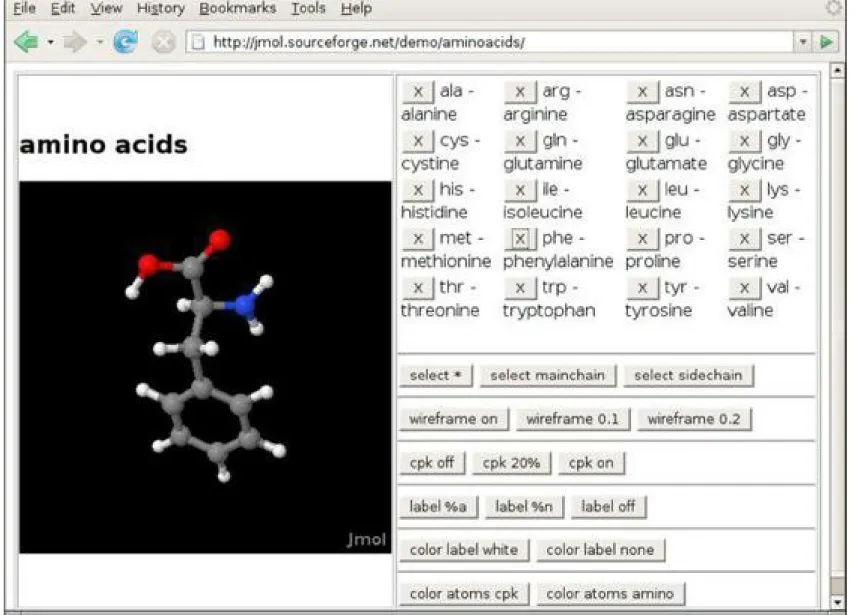
Inserting an applet into a web page works much like embedding an image. The applet becomes a part of the page, and the text flows around the space used for the applet. The point is, this image is alive. It reacts to user commands, changes its appearance, and exchanges data between the computer presenting the applet and the computer serving it.
Figure 1.1. The Jmol applet
When applets first appeared, they created a huge amount of excitement. Many people believe that the lure of applets was responsible for the astonishing popularity of Java. However, the initial excitement soon turned into frustration. Various versions of Netscape and Internet Explorer ran different versions of Java, some of which were seriously outdated. This sorry situation made it increasingly difficult to develop applets that took advantage of the most current Java version. Today, most web pages simply use JavaScript or Flash when dynamic effects are desired in the browser. Java, on the other hand, has become the most popular language for developing the server-side applications that produce web pages and carry out the backend logic.
1.4. A Short History of Java
This section gives a short history of Java’s evolution. It is based on various published sources (most importantly an interview with Java’s creators in the July 1995 issue of SunWorld’s online magazine).
different manufacturers may choose different central processing units (CPUs), it was important that the language not be tied to any single architecture. The project was code-named “Green.”
The requirements for small, tight, and platform-neutral code led the team to resurrect the model that some Pascal implementations tried in the early days of PCs. Niklaus Wirth, the inventor of Pascal, had pioneered the design of a portable language that generated intermediate code for a hypothetical machine. (Such machines are often called virtual—hence the Java Virtual Machine, or JVM.) This intermediate code could then be used on any machine that had the correct interpreter. The Green project engineers used a virtual machine as well, which solved their main problem.
The Sun people, however, came from a UNIX background, so they based their language on C++ rather than Pascal. In particular, they made the language object-oriented rather than procedure-oriented. But, as Gosling says in the interview, “All along, the language was a tool, not the end.” Gosling decided to call his language “Oak” (presumably because he liked the look of an oak tree that was right outside his window at Sun). The people at Sun later realized that Oak was the name of an existing computer language, so they changed the name to Java. This turned out to be an inspired choice.
In 1992, the Green project delivered its first product, called “*7.” It was an extremely intelligent remote control. (It had the power of a SPARCstation in a box that was 6 inches by 4 inches by 4 inches.) Unfortunately, no one was interested in producing this at Sun, and the Green people had to find other ways to market their technology. However, none of the standard consumer electronics companies were interested either. The group then bid on a project to design a cable TV box that could deal with new cable services such as video-on-demand. They did not get the contract. (Amusingly, the company that did was led by the same Jim Clark who started Netscape—a company that did much to make Java successful.)
The Green project (with a new name of “First Person, Inc.”) spent all of 1993 and half of 1994 looking for people to buy its technology. No one was found. (Patrick Naughton, one of the founders of the group and the person who ended up doing most of the marketing, claims to have accumulated 300,000 air miles in trying to sell the technology.) First Person was dissolved in 1994.
While all of this was going on at Sun, the World Wide Web part of the Internet was growing bigger and bigger. The key to the World Wide Web was the browser translating the hypertext page to the screen. In 1994, most people were using Mosaic, a noncommercial web browser that came out of the supercomputing center at the University of Illinois in 1993. (Mosaic was partially written by Marc Andreessen as an undergraduate student on a work-study project, for $6.85 an hour. He moved on to fame and fortune as one of the cofounders and the chief of technology at Netscape.)
In the SunWorld interview, Gosling says that in mid-1994, the language developers realized that “We could build a real cool browser. It was one of the few things in the client/server mainstream that needed some of the weird things we’d done: architecture-neutral, real-time, reliable, secure—issues that weren’t terribly important in the workstation world. So we built a browser.”
The actual browser was built by Patrick Naughton and Jonathan Payne and evolved into the HotJava browser. The HotJava browser was written in Java to show off the power of Java. But the builders also had in mind the power of what we now call applets, so they made the browser capable of executing code inside web pages. This “proof of technology” was shown at SunWorld ’95 on May 23, 1995, and inspired the Java craze that continues today.
going to cut it for serious application development. Sure, you could use Java 1.0 to make a nervous text applet that moved text randomly around in a canvas. But you couldn’t even print in Java 1.0. To be blunt, Java 1.0 was not ready for prime time. Its successor, version 1.1, filled in the most obvious gaps, greatly improved the reflection capability, and added a new event model for GUI programming. It was still rather limited, though.
The big news of the 1998 JavaOne conference was the upcoming release of Java 1.2, which replaced the early toylike GUI and graphics toolkits with sophisticated scalable versions and came a lot closer to the promise of “Write Once, Run Anywhere”™ than its predecessors. Three days (!) after its release in December 1998, Sun’s marketing department changed the name to the catchy Java 2 Standard Edition Software Development Kit Versions 1.2.
Besides the Standard Edition, two other editions were introduced: the Micro Edition for embedded devices such as cell phones, and the Enterprise Edition for server-side processing. This book focuses on the Standard Edition.
Versions 1.3 and 1.4 of the Standard Edition are incremental improvements over the initial Java 2 release, with an ever-growing standard library, increased performance, and, of course, quite a few bug fixes. During this time, much of the initial hype about Java applets and client-side applications abated, but Java became the platform of choice for server-side applications.
Version 5.0 was the first release since version 1.1 that updated the Java language in significant ways. (This version was originally numbered 1.5, but the version number jumped to 5.0 at the 2004 JavaOne conference.) After many years of research, generic types (roughly comparable to C++ templates) have been added—the challenge was to add this feature without requiring changes in the virtual machine. Several other useful language features were inspired by C#: a “for each” loop, autoboxing, and metadata.
Version 6 (without the .0 suffix) was released at the end of 2006. Again, there are no language changes but additional performance improvements and library enhancements.
As datacenters increasingly relied on commodity hardware instead of specialized servers, Sun Microsystems fell on hard times and was purchased by Oracle in 2009. Development of Java stalled for a long time. In 2011, Oracle released a new version with simple enhancements as Java 7, and decided to defer more ambitious changes to Java 8, which is expected in 2013.
Table 1.1 shows the evolution of the Java language and library. As you can see, the size of the application programming interface (API) has grown tremendously.
1.5. Common Misconceptions about Java
We close this chapter with a list of some common misconceptions about Java, along with commentary.
Java is an extension of HTML.
Java is a programming language; HTML is a way to describe the structure of a web page. They have nothing in common except that there are HTML extensions for placing Java applets on a web page.
I use XML, so I don’t need Java.
Java is a programming language; XML is a way to describe data. You can process XML data with any programming language, but the Java API contains excellent support for XML processing. In addition, many important third-party XML tools are implemented in Java. See Volume II for more information.
Java is an easy programming language to learn.
No programming language as powerful as Java is easy. You always have to distinguish between how easy it is to write toy programs and how hard it is to do serious work. Also, consider that only four chapters in this book discuss the Java language. The remaining chapters of both volumes show how to put the language to work, using the Java libraries. The Java libraries contain thousands of classes and interfaces, and tens of thousands of functions. Luckily, you do not need to know every one of them, but you do need to know surprisingly many to use Java for anything realistic.
Java will become a universal programming language for all platforms.
advantage of the speed of the processor and the native user interface library and have been ported to all the important platforms anyway. Among these kinds of applications are word processors, photo editors, and web browsers. They are typically written in C or C++, and we see no benefit to the end user in rewriting them in Java.
Java is just another programming language.
Java is a nice programming language; most programmers prefer it over C, C++, or C#. But there have been hundreds of nice programming languages that never gained widespread popularity, whereas languages with obvious flaws, such as C++ and Visual Basic, have been wildly successful.
Why? The success of a programming language is determined far more by the utility of the support system surrounding it than by the elegance of its syntax. Are there useful, convenient, and standard libraries for the features that you need to implement? Are there tool vendors that build great programming and debugging environments? Do the language and the toolset integrate with the rest of the computing infrastructure? Java is successful because its class libraries let you easily do things that were hard before, such as networking and multithreading. The fact that Java reduces pointer errors is a bonus, so programmers seem to be more productive with Java—but these factors are not the source of its success.
Now that C# is available, Java is obsolete.
C# took many good ideas from Java, such as a clean programming language, a virtual machine, and garbage collection. But for whatever reasons, C# also left some good stuff behind, in particular, security and platform independence. If you are tied to Windows, C# makes a lot of sense. But judging by the job ads, Java is still the language of choice for a majority of developers.
Java is proprietary, and it should therefore be avoided.
When Java was first created, Sun gave free licenses to distributors and end users. Although Sun had ultimate control over Java, they involved many other companies in the development of language revisions and the design of new libraries. Source code for the virtual machine and the libraries has always been freely available, but only for inspection, not for modification and redistribution. Java was “closed source, but playing nice.”
This situation changed dramatically in 2007, when Sun announced that future versions of Java will be available under the General Public License (GPL), the same open source license that is used by Linux. Oracle has committed to keeping Java open source. There is only one fly in the ointment— patents. Everyone is given a patent grant to use and modify Java, subject to the GPL, but only on desktop and server platforms. If you want to use Java in embedded systems, you need a different license and will likely need to pay royalties. However, these patents will expire within the next decade, and at that point Java will be entirely free.
Java is interpreted, so it is too slow for serious applications.
In the early days of Java, the language was interpreted. Nowadays, except on “micro” platforms such as cell phones, the Java virtual machine uses a just-intime compiler. The “hot spots” of your code will run just as fast in Java as they would in C++, and in some cases even faster.
Java does have some additional overhead over C++. Virtual machine startup time is slow, and Java GUIs are slower than their native counterparts because they are painted in a platform-independent manner.
are much faster than they were when these complaints started. A slow Java program will still run quite a bit better today than those blazingly fast C++ programs did a few years ago. At this point, these complaints sound like sour grapes, and some detractors have instead started to complain that Java user interfaces are ugly rather than slow.
All Java programs run inside a web page.
All Java applets run inside a web browser. That is the definition of an applet—a Java program running inside a browser. But most Java programs are standalone applications that run outside of a web browser. In fact, many Java programs run on web servers and produce the code for web pages.
Java programs are a major security risk.
In the early days of Java, there were some well-publicized reports of failures in the Java security system. Most failures were in the implementation of Java in a specific browser. Researchers viewed it as a challenge to find chinks in the Java armor and to defy the strength and sophistication of the applet security model. The technical failures that they found have all been quickly corrected, and to our knowledge, no actual systems were ever compromised. To keep this in perspective, consider the literally millions of virus attacks in Windows executable files and Word macros that cause real grief but surprisingly little criticism of the weaknesses of the attacked platform. Also, the ActiveX mechanism in Internet Explorer would be a fertile ground for abuse, but it is so boringly obvious how to circumvent it that few researchers have bothered to publicize their findings.
Some system administrators have even deactivated Java in company browsers, while continuing to permit their users to download executable files and Word documents, which pose a far greater risk. Even 15 years after its creation, Java is far safer than any other commonly available execution platform.
JavaScript is a simpler version of Java.
JavaScript, a scripting language that can be used inside web pages, was invented by Netscape and originally called LiveScript. JavaScript has a syntax that is reminiscent of Java, but otherwise there are no relationships (except for the name, of course). A subset of JavaScript is standardized as ECMA-262. JavaScript is more tightly integrated with browsers than Java applets are. In particular, a JavaScript program can modify the document that is being displayed, whereas an applet can only control the appearance of a limited area.
With Java, I can replace my computer with a $500 “Internet appliance.”
Chapter 2. The Java Programming Environment
In this chapter
• Installing the Java Development Kit • Choosing a Development Environment • Using the Command-Line Tools
• Using an Integrated Development Environment • Running a Graphical Application
• Building and Running Applets
In this chapter, you will learn how to install the Java Development Kit (JDK) and how to compile and run various types of programs: console programs, graphical applications, and applets. You can run the JDK tools by typing commands in a shell window. However, many programmers prefer the comfort of an integrated development environment. We show you how to use a freely available development environment to compile and run Java programs. Although easier to learn, integrated development environments can be resource-hungry and tedious to use for small programs. Once you have mastered the techniques in this chapter and picked your development tools, you are ready to move on to Chapter 3, where you will begin exploring the Java programming language.
2.1. Installing the Java Development Kit
The most complete and up-to-date versions of the Java Development Kit (JDK) are available from Oracle for Linux, Mac OS X, Solaris, and Windows. Versions in various states of development exist for many other platforms, but those versions are licensed and distributed by the vendors of those platforms.
2.1.1. Downloading the JDK
To download the Java Development Kit, visit the web site at www.oracle.com/technetwork/java/javase/downloads and be prepared to decipher an amazing amount of jargon before you can get the software you need. See Table 2.1 for a summary.
You already saw the abbreviation JDK for Java Development Kit. Somewhat confusingly, versions 1.2 through 1.4 of the kit were known as the Java SDK (Software Development Kit). You will still find occasional references to the old term. There is also a Java Runtime Environment (JRE) that contains the virtual machine but not the compiler. That is not what you want as a developer. It is intended for end users who have no need for the compiler.
Next, you’ll see the term Java SE everywhere. That is the Java Standard Edition, in contrast to Java EE (Enterprise Edition) and Java ME (Micro Edition).
You will occasionally run into the term Java 2 that was coined in 1998 when the marketing folks at Sun felt that a fractional version number increment did not properly communicate the momentous advances of JDK 1.2. However, because they had that insight only after the release, they decided to keep the version number 1.2 for the development kit. Subsequent releases were numbered 1.3, 1.4, and 5.0. The platform, however, was renamed from Java to Java 2. Thus, we had Java 2 Standard Edition Software Development Kit Version 5.0, or J2SE SDK 5.0.
For engineers, all of this was a bit confusing, but that’s why we never made it into marketing. Mercifully, in 2006, sanity prevailed. The useless Java 2 moniker was dropped, and the current version of the Java Standard Edition was called Java SE 6. You will still see occasional references to versions 1.5 and 1.6—these are just synonyms for versions 5.0 and 6.
Finally, when Oracle makes a minor version change to fix urgent issues, it refers to the change as an update. For example, the first update of the development kit for Java SE 7 is officially called JDK 7u1 and has the internal version number 1.7.0_01. An update does not need to be installed over a prior version—it contains the most current version of the whole JDK.
integrated development environment. That integrated environment has, at different times of its life, been named Forte, Sun ONE Studio, Sun Java Studio, and Netbeans. We do not know what the eager beavers in marketing will call it when you approach the download site. We suggest that you stay away from all bundles and install only the Java Development Kit at this time. If you later decide to use Oracle’s integrated development environment, simply download it from http://netbeans.org.
Note
The setup procedure offers a default for the installation directory that contains the JDK version number, such as jdk1.7.0. This sounds like a bother, but we have come to
appreciate the version number—it makes it easier to install a newer JDK release for testing.
Under Windows, we strongly recommend that you do not accept a default location with spaces in the path name, such as c:\Program Files\jdk1.7.0. Just take out the Program Files part of the path name.
In this book, we refer to the installation directory as jdk. For example, when we refer to the jdk/bin directory, we mean the directory with a name such as /usr/local/jdk1.7.0/bin
or c:\jdk1.7.0\bin.
2.1.2. Setting the Executable Path
After you are done installing the JDK, you need to carry out one additional step: Add the jdk/bin
directory to the executable path—the list of directories that the operating system traverses to locate executable files. Directions for this step also vary among operating systems.
• In UNIX (including Linux, Mac OS X, and Solaris), the procedure for editing the executable path depends on the shell you are using. If you use the Bourne Again shell (which is the Linux default), then add a line such as the following to the end of your ~/.bashrc or
~/.bash_profile file:
export PATH=jdk/bin:$PATH
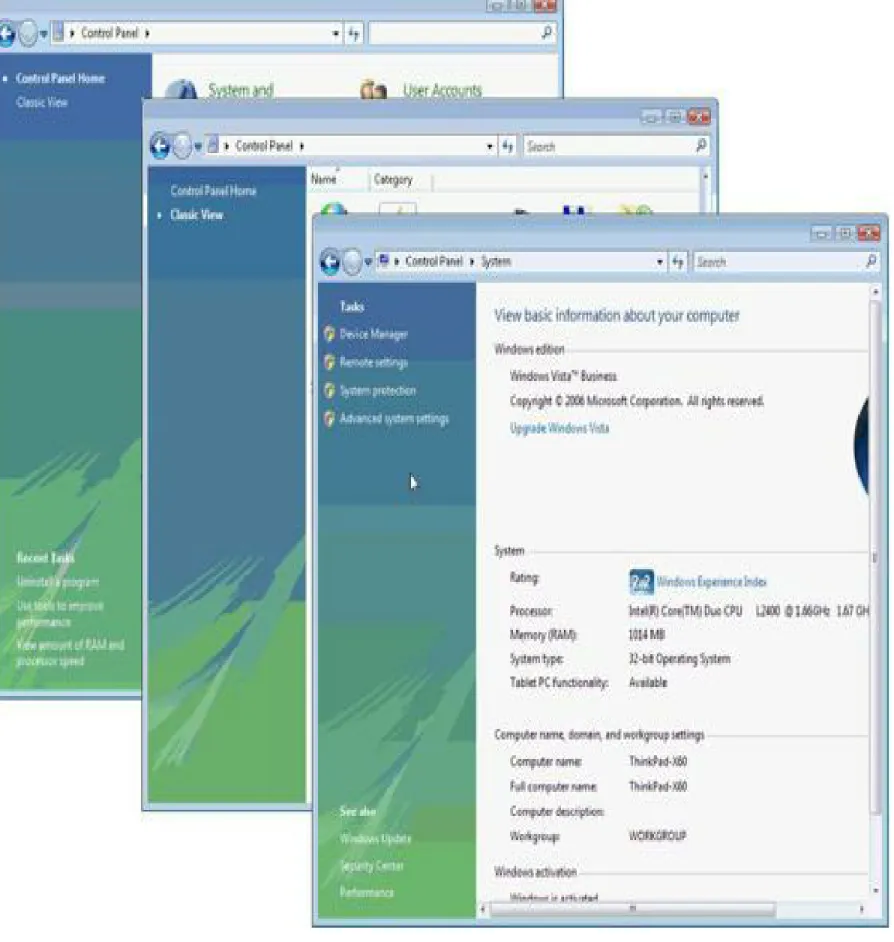
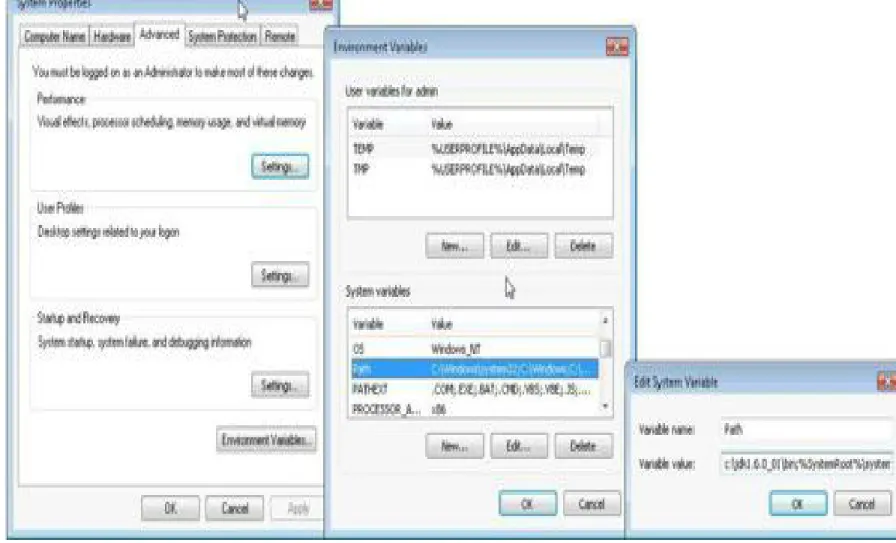
• Under Windows, log in as administrator. Start the Control Panel, switch to Classic View, and select the System icon. In Windows XP, you immediately get the system properties dialog. In Vista and Windows 7, you need to select Advanced System Settings (see Figure 2.1). In the system properties dialog, click the Advanced tab, then click on the Environment button. Scroll through the System Variables window until you find a variable named Path. Click the Edit
button (see Figure 2.2). Add the jdk\bin directory to the beginning of the path, using a
semicolon to separate the new entry, like this:
Figure 2.2. Setting the Path environment variable in Windows Vista Be careful to replace jdk with the actual path to your Java installation, such as
c:\jdk1.7.0_02. If you ignored our advice to drop the Program Files directory, enclose the
entire path in double quotes: "c:\Program Files\jdk1.7.0_02\bin";other stuff.
Save your settings. Any new console windows that you start will have the correct path. Here is how you test whether you did it right: Start a shell window. Type the line
javac -version
and press the Enter key. You should get a display such as this one:
javac 1.7.0_02
If instead you get a message such as “javac: command not found” or “The name specified is not recognized as an internal or external command, operable program or batch file”, then you need to go back and double-check your installation.
Note
In Windows, follow these instructions to open a shell window. If you use Windows XP, select the Run option from the Start menu and type cmd. In Vista and Windows 7, simply
type cmd into the Start Search field in the Start menu. Press Enter, and a shell window
appears.