Rosalie Hoogeveen
Master Thesis
Health Psychology and Technology
Faculty: Behavioural Management and Social Sciences University of Twente, Enschede
Bartiméus and University of Twente First supervisor: Dr. Christina Bode
Second supervisor: Dr. Annemarie Braakman-Jansen External supervisor Bartiméus: MSc. Sanne Eijndhoven
2
Abstract English
Visually impaired (VI) elderly are a growing population, resulting in an increasing demand in eye-care services. A rehabilitation center for VI people, Bartiméus, wants to offer eHealth services. Little is known about how VI elderly relate to eHealth services. This study gained more insights into the perceptions of VI elderly regarding eHealth services of Bartiméus. A qualitative study from a client perspective was conducted. Semi-structured interviews were telephonically held with 15 Dutch VI elderly aged over 65. The results show that VI elderly have little knowledge regarding eHealth. VI elderly consider helping aids for the visually impaired as a part of eHealth. VI elderly have the intention to exchange knowledge and experiences online with other VI people, and to contact a healthcare professional online to ask a question or to make an appointment. VI elderly showed no interest in video-communication or receiving mainly online treatment. Follow-up research should focus on how blended care can be designed by means of an client portal that partially offers services online. Values and user-requirements are explored to some extent in light of the potential services but more context of technology use should be given in future research regarding all stakeholders with the use of the CeHRes roadmap.
Abstract Nederlands
Visueel beperkte (VI) ouderen zijn een groeiende populatie wat resulteert in een stijgende vraag naar oog zorg. Een revalidatiecentrum voor visueel beperkten, Bartiméus, wil eHealth diensten aanbieden. Er is echter weinig bekend over hoe VI ouderen zich verhouden tot eHealth diensten. Dit onderzoek richt zich op het verkrijgen van meer inzicht in de percepties die VI ouderen hebben over potentiele eHealth diensten van Bartiméus. Er is een kwalitatief onderzoek gedaan vanuit het cliënt perspectief. Er zijn telefonische semi-gestructureerde interviews gehouden met 15 Nederlandse VI ouderen van 65 jaar en ouder. De resultaten laten zien dat VI ouderen weinig kennis hebben over eHealth. De VI ouderen beschouwen
3
Index
Abstract English 2
Abstract Nederlands 2
1 Introduction 5
1.1 General introduction 5
1.2 Vulnerable population 6
1.3 Use of internet and technology potentially for care at home 7 1.4 eHealth, eHealth application, benefits and barriers 7
1.5 User-Centered Design 10
1.6 eHealth for the visually impaired 11
1.7 eHealth for elderly 11
1.8 UTAUT 12
1.9 Research questions 13
2 Methods 13
2.1 Design 13
2.2 Participants and recruitment 13
2.3 Materials 15
2.4 Procedure 18
2.5 Analysis 18
3 Results 19
3.1 RQ 1: What do visually impaired elderly know/think about eHealth? 19
3.1.1 RQ 1: Summary 19
3.1.2 Knowledge 20
3.1.3 eHealth attitudes and associations to health 22
3.2 RQ 2: Do visually impaired elderly intend to use eHealth? 26
3.2.1 RQ 2: Summary 26
3.2.2 Intention to use eHealth/devices 27
3.2.3 Social influence 28
4
3.3.1 RQ 3: Summary 29
3.3.2 Effort expectancy 30
3.3.2.1 Effort expectancy: Statement 1. …is easy to learn. 30 3.3.2.2 Effort expectancy: Statement 2. …fits into my daily routine. 31 3.3.2.3 Effort expectancy: Statement 3. …is easy to do. 31
3.3.3 Performance expectancy 32
3.3.3.1 Performance expectancy: Statement 1. …makes it easier to contact 32 healthcare professionals when I want.
3.3.3.2 Performance expectancy: Statement 2. … enables me to live 33 independently for longer.
3.3.3.3 Performance expectancy: Statement 3. …works well. 33 3.3.3.4 Performance expectancy: Statement 4. ..is a pleasant way to interact. 34
3.3.4 Difficulty level of internet usage 34
3.4 RQ 4: What media is used by visually impaired elderly? 35
3.4.1 Available and actual used devices. 35
3.5 RQ 5. How can visually impaired elderly be coached to work with eHealth? 36
5.5.1 RQ 5: Summary 36
3.5.2 Channels to hear about eHealth 37
3.5.3 Ways to learn skills 37
3.5.4 Points of attention for skills training 38
4 Discussion 40
4.1 Key findings and their implications 40
4.2 Strengths and limitations of the study 43
4.3 Practical/clinical and scientific implications 44
References 46
Appendix A The interview schedule 51
Appendix B Informed consent 56
5
1 Introduction
1.1 General introduction
The visually impaired (VI) population is growing which is most seen in the aging population due to age as a major risk factor for visual impairment. This growth is mostly due to the development of age-related eye diseases such as macular degeneration, glaucoma, cataract and diabetic retinopathy. The number of people aged over 65 is growing and therefore the demand of eye-care services in the Netherlands is increasing in 2010-2020 (Keunen et al., 2011). This increase in eye-care is mainly explained by the ageing population in the
Netherlands since the life expectancy of both men and women has increased over the years (CBS Statline, 2016). In the Netherlands there is a growing number of VI people. It is estimated that in 2008 there were 311.000 VI people in the Netherlands, 77.000 people are blind and 234.000 people have low vision. This number may increase by 18% to an estimated 367.000 VI people in 2020. Thirty-one percent of all VI people is male and 69% is female. Visual impairment is most prevalent among intellectually disabled persons, independently living people aged over 50 and among elderly in nursing homes and care institutions (Limburg & Keunen, 2009). Moreover, 3% of the people aged over 50 is visually impaired and this number will increase to 4% in 2020 (ZonMw, 2011).
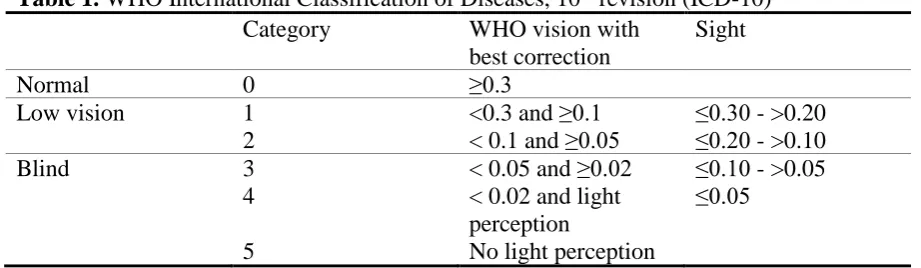
Several definitions regarding vision are given. The term blindness refers to when the person has a vision of less than 0.05 in the better eye with available correction or if the person has a vision of 10 degrees or less around the central axis. Low vision or sightedness is defined by a having a vision of less than 0.3 in the better eye with available correction or if the person has a vision between 30 or 10 degrees around the central axis. The term visual impairment is used to include both blindness and low vision. Visual impairment is defined by a person having a vision of less than 0.3 in the better eye with available correction or if a person has a vision of less than 30 degrees around the central axis (Limburg, 2007). Shown in Table 1 is a widely used classification model to classify visual impairment, the ‘International
6
Table 1. WHO International Classification of Diseases, 10th revision (ICD-10)
Category WHO vision with
best correction
Sight
Normal 0 ≥0.3
Low vision 1 <0.3 and ≥0.1 ≤0.30 - >0.20
2 < 0.1 and ≥0.05 ≤0.20 - >0.10
Blind 3 < 0.05 and ≥0.02 ≤0.10 - >0.05
4 < 0.02 and light
perception
≤0.05
5 No light perception
Note: (source: (WHO, 2016)
The setting of this study aims at a practical question from Bartiméus, a Dutch rehabilitation center for the visually impaired. Bartiméus delivers tertiary prevention care which involves the prevention of further invalidation due to the visual impairment. Bartiméus helps their clients to live and maintain a healthy life with respect to their visual impairment and all that is affected by it (e.g., mental health, daily activities, work and education). Bartiméus aims to create eHealth for their visually impaired clients to improve Bartiméus’ healthcare services. The starting point of this study is not to explore what and how eHealth technologies can improve the health and healthcare of VI elderly but rather how Bartiméus can offer their services via eHealth and how they relate to their clients.
1.2 Vulnerable population
The VI elderly with age-related eye-conditions are a vulnerable group. Among VI elderly aged 65 years or older it was found that there is an association between an age-related eye-condition and having physical impairments (i.e., poor/fair general health, physical unhealthy, activity limitation). Elderly with an age-related eye-condition have a lower quality of life (Li et al., 2011; Lotery, Xu, Zlatava, & Loftus, 2007). Visual impairment among older adults negatively affect their mobility, activities of daily living and communication which can lead to less feelings of life-satisfaction and independence (Brouwer, Sadlo, Winding, &
7
1.3 Use of internet and technology potentially for care at home
The internet is a big source of information for people of all ages and the use of the internet is increasing among older adults (Seybert, 2012a). The use of devices to access the internet is increasing among elderly aged over 65. That is, in 2016 77.6% had access to the internet, 46% owned a PC or desktop, 51.6% owned a laptop or notebook, 47.4% owned a tablet and 50,9% owned a mobile phone or smartphone (CBS Statline, 2016).
Elderly in general also use other everyday technologies. The elderly’s most common interests were in the media with the TV, radio and newspapers being most often used (Eek & Wressle, 2011). However, when using assistive technology (e.g., video monitoring, pressure mats, door alerts or fall detectors (Miskelly, 2001), VI elderly had a higher need of using these technologies (Dahlin-Ivanoff & Sonn, 2004). Moreover, Miskelly (2001) states that elderly who have visual, auditory, speech impairments or other physical or cognitive
impairments might not be able to use some of the technology due to difficulties with some of the equipment.
It is expected that with good, affordable and appropriate care elderly can live longer independently at home (Hilten, 2010). Six out of seven 80-year old’s live longer at home, with or without support (CBS, 2011). However, this depends on having a good health. One of the challenges with living independently is the efficient delivery of health and care services (Al-Shaqi, Mourshed, & Rezgui, 2016). The internet is a potential medium to support or improve health and healthcare due to the increasing use of devices to access the internet.
1.4 eHealth, eHealth applications, benefits and barriers
The use of information and communication technologies for health is defined as eHealth (WHO, 2017). Defining eHealth is difficult and several definitions have been formulated over the years. A basic form of eHealth offers information about diseases, symptoms and treatment options via the internet (Rozenkranz, Kühne, Ecknardt, & Rozenkraz, 2013). A more
commonly used definition of eHealth derives from Eysenbach (2001):
eHealth is an emerging field in the intersection of medical informatics, public health
and business, referring to health services and information delivered or enhanced through the
Internet and related technologies. In a broader sense, the term characterizes not only a
technical development, but also a state-of-mind, a way of thinking, an attitude, and a
commitment for networked, global thinking, to improve health care locally, regionally, and
8
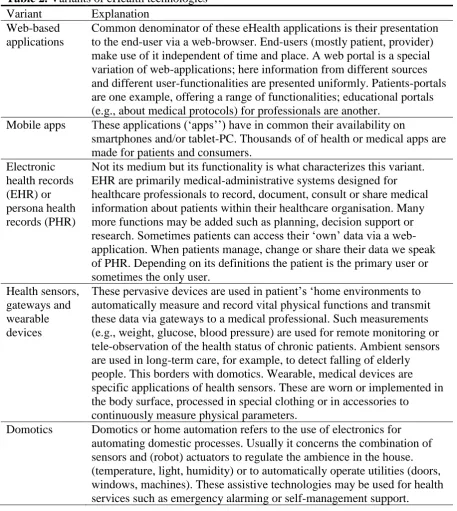
[image:8.595.70.528.204.716.2]Various technologies can be considered eHealth. Table 2 shows various eHealth technologies and applications. These applications can be used for eHealth in particular because they support or improve eHealth and healthcare (Van Gemert-Pijnen, Peters, & Ossebaard, 2013). Furthermore, eHealth can be used between professionals, between patients or between patients and professionals (Eysenbach, 2001).
Table 2. Variants of eHealth technologies Variant Explanation
Web-based applications
Common denominator of these eHealth applications is their presentation to the end-user via a web-browser. End-users (mostly patient, provider) make use of it independent of time and place. A web portal is a special variation of web-applications; here information from different sources and different user-functionalities are presented uniformly. Patients-portals are one example, offering a range of functionalities; educational portals (e.g., about medical protocols) for professionals are another.
Mobile apps These applications (‘apps’’) have in common their availability on
smartphones and/or tablet-PC. Thousands of of health or medical apps are made for patients and consumers.
Electronic health records (EHR) or persona health records (PHR)
Not its medium but its functionality is what characterizes this variant. EHR are primarily medical-administrative systems designed for healthcare professionals to record, document, consult or share medical information about patients within their healthcare organisation. Many more functions may be added such as planning, decision support or research. Sometimes patients can access their ‘own’ data via a web-application. When patients manage, change or share their data we speak of PHR. Depending on its definitions the patient is the primary user or sometimes the only user.
Health sensors, gateways and wearable devices
These pervasive devices are used in patient’s ‘home environments to automatically measure and record vital physical functions and transmit these data via gateways to a medical professional. Such measurements (e.g., weight, glucose, blood pressure) are used for remote monitoring or tele-observation of the health status of chronic patients. Ambient sensors are used in long-term care, for example, to detect falling of elderly people. This borders with domotics. Wearable, medical devices are specific applications of health sensors. These are worn or implemented in the body surface, processed in special clothing or in accessories to
continuously measure physical parameters.
9
Video
communication
Realtime video communication, videoconferencing or telepresence add a visual dimension to telecommunication as usual. This obviously enhances the relationship between patients and care provider and can easily be integrated into other technologies such as mobile apps or web-based applications it is also used for inter-professional consultation.
Robotics Robotics are electronics, mechanical machines driven by specialized software that perform certain tasks. In medicine they are operated by surgeons for minimal invasive surgery. Personal robotics assist older or disable people to relive daily tasks (vacuum cleaning) or provide emotional support.
Health information exchange
Integrated electronic networks that enable exchange of medical
information (e.g., medication data, prescriptions, radiological images) for specific professional roles, locations (regions) or functions (one specific data set e.g., results of national screenings).
Business to business gateways
General integration networks to exchange data between collaborating (commercial) partners e.g., concerning (e-)procurement or (e-)logistics.
Business intelligence and ‘big data’ solutions
Business intelligence systems analyse (un)structured data to create
information for decision support. Within healthcare this s called ‘’medical intelligence’ for instance with regard to compose quality indicators from system data. If very large data sets (in terms of tera bytes) are analysed we speak of ‘big data’ for instance with regard to genome-analysis. Note: (source: (Krijgsman & Klein Wolterink, 2012; Van Gemert-Pijnen et al., 2013, p16-17)
Various benefits of eHealth are that it should be evidence based, educational and encouraging. eHealth has no geographical boundaries. Meaning that consumers can easily obtain health services online from global providers (Eysenbach, 2001). eHealth also has the potential to increase the effectiveness of disease management by improving the continuity, accessibility and promptness of care services (Chen & Chang, 2016). Lastly, eHealth should be accessible for more people. However, this aspect can be difficult due to money, skills and access to computers and networks. If people do not have these facilities, they cannot use computers effectively (Eysenbach, 2001).
10
usability problems (Nijland, van Gemert-Pijnen, Boer, Steehouder, & Seydel, 2008; Van Gemert-Pijnen et al., 2011). When eHealth is not optimally designed, implemented or productive, it can have a lower impact. (van Gemert-Pijnen et al., 2013).
1.5 User-Centered Design
If you gather data about what the prospective user wants and needs and include this in the design of the eHealth technology, the gap between the ideas of the technology developers and the users becomes smaller, which has the potential to increase the uptake and impact of eHealth technologies (Kim, Han, Park, & Park, 2016; Van Gemert-Pijnen et al., 2011) . In UCD ‘the needs, expectations, interests and motivations of the prospective users are taken as the focal point of the design and are evaluated throughout the development process (Gould & Lewis, 1985; Van Gemert-Pijnen et al., 2013, p49). Key principles of UCD are using co-design by working together with different stakeholders, end users, to collect feedback which can be included in the design of the technology. Knowing the users, their tasks and
environments is important by involving the users as early as possible in the process to explore what their characteristics, needs and (health related) activities are. During the development of the technology, every important change needs to be tested by the user and the results need to be included in the improved version. These evaluations are iterative during the whole
development process. In addition, executing these evaluations can be done in several ways because the users might not always be able to express their preferences and abilities (Van Gemert-Pijnen et al., 2013). Applying UCD has the potential of enhancing the quality of care for patients and healthcare professionals (Maguire, 2001; Rinkus et al., 2005).
11
1.6 eHealth for the visually impaired
eHealth technologies designed for VI people are often part of assistive technology or helping aids (e.g., electronic magnifiers or speech enabling software). Whereas (eHealth)
technologies, such as mobile devices, are not yet designed to be fully beneficial for people with special needs (e.g., elderly or people with a visual impairment) (Kang, Liao, Wester, Leeder, & Pearce, 2010).
VI people still have accessibility difficulties because assistive technologies are often developed from a technology-driven perspective (Kim et al., 2016). In order to design new technologies that are more suitable for VI users it is important to identify the needs of VI people regarding technology and to identify which problems they face while using technologies (Kim et al., 2016).
The use of tablets and smartphones is rapidly increasing and with this increase in popularity these devices are becoming more user-friendly for all consumers (Irvine et al., 2014). However, some built in features of these devices (e.g., contrast, zoom, voice command and several audio feedback options) can be difficult to use for VI people. Publicly advertised features are often not related to low vision accessibility features. People are often unaware of the existence of the accessibility features which leads to the features not being utilized as frequently (Irvine et al., 2014). Companies and organizations more often take into account the guidelines of designing web or mobile applications that are easily accessible for VI people (Harper & Chen, 2012). (eHealth) technologies are becoming more suitable for VI people but the prospective user can more often be placed central during the development process.
1.7 eHealth for elderly
Little is known about how VI elderly perceive and use eHealth. Therefore it is important to explore how eHealth is perceived and used by elderly in general. Considering both the ease of use and usefulness of a technology, the elderly’s anxiety towards technology tools is a
concern (Mostaghel & Oghazi, 2017).
12
Elderly are openminded towards using eHealth. With regard to web-based applications, Freund et al. (2017) show that elderly appear to be willing to consider
technology to search for medical information online. This study also shows that elderly have the ability to improve their health-related knowledge by using customized online medical databases (Freund et al., 2017). De Veer et al., (2015) found that when offered an eHealth application, 63% of the elderly indicated they would definitely or probably intend to use it. A higher age, female gender or a lower educational level were indicators of less intention to use eHealth. Elderly who strongly believed that the eHealth applications were easy to use and that the applications would help them were more inclined to use internet applications in the future. However, the elderly who did not believe in the advantages and thought eHealth would be difficult to use, were less inclined to use eHealth (de Veer et al., 2015; Venkatesh, Morris, Davis, & Davis, 2003).
1.8 UTAUT
The current study aims at VI elderly and how they relate to eHealth by means of services that Bartiméus can offer in the future. From a UCD perspective it is needed to gain an
understanding of VI elderly’s (health related) needs and wishes so it can be included in a suitable eHealth design for the user. What is also of importance is how the users interact with the technology and how it can change attitudes or behaviour. Interactive information
technology that is designed to change attitudes or behaviours of the user is called persuasive technology (Fogg, 2003). In order to change attitudes or behaviour, it is important to describe, explain and predict which factors play a role in changing attitudes and behaviour (Ajzen, 2001). Various models exist that give insights into several aspects of human behaviour, such as the Theory of Planned Behaviour, Social Cognitive Theory, the Technology Acceptance Model and the Model of PC Utilization. Therefore, the current study uses the ‘Unified Theory of Acceptance and Use of Technology’ (UTAUT) because it integrates competing models, including the above mentioned theories, of human behaviour into one strong empirical model, the UTAUT (Venkatesh et al., 2003).
13
1.9 Research questions
The following research questions (RQ) are formulated for this explorative study to gain insights into eHealth among VI elderly. A UCD approach with the UTAUT were chosen to explore the VI elderly’s perceptions regarding eHealth as well as their intention to use eHealth, resulting in RQ 1, 2 and 3. RQ 4 and 5 were formulated from a more practical perspective to gain more insight into how eHealth ca be facilitated by Bartiméus. Based on the found literature, there are no hypothetical expectations for RQ 1, 3, 4 and 5 because of eHealth’s novelty among the population of VI elderly and due to a lack of literature regarding this topic. However, regarding RQ 2 it is expected that VI elderly are intended to use eHealth in comparison with normal sighted elderly who are intended to use eHealth.
RQ 1. What do visually impaired elderly know/think about eHealth? RQ 2. Do visually impaired elderly intend to use eHealth?
RQ 3. What do visually impaired elderly perceive to be the characteristics of eHealth? RQ 4. What media is used by visually impaired elderly?
RQ 5. How can visually impaired elderly be coached to work with eHealth?
2 Methods
2.1 Design
An exploratory, qualitative study with the use of a semi-structured interview is conducted. The perceptions of VI elderly regarding eHealth are of interest for this study. Semi-structured interviews are an appropriate tool to explore perceptions and opinions regarding complex and sometimes sensitive matters and it enables probing which in turn can lead to more information and clarified answers (Barriball & While, 1994).
2.2 Participants and recruitment
Selection criteria for the study were (1) a minimum age of 65 years, (2) having a visual impairment according to the clusters of the ICD-10 from the WHO as shown in Table 1. With cluster 0 (i.e., normal vision) being excluded from this study. The elderly (3) had to have at least a minimal level of computer skills or interest in learning computer skills1. Participants
were excluded from the study if they (4) were suffering from dementia or hearing loss. VI
1VI elderly with technology interest were recruited after discovering that interviewing VI elderly with no
14
[image:14.595.68.526.166.401.2]elderly registered at Bartiméus were recruited via their social worker, computer accessibility instructor, occupational therapist, home counselor or other counselors. The sample in this study consists of fifteen Dutch participants, their characteristics are shown in Table 3 and 4.
Table 3. Demographics paricipants VI elderly
Characteristics n
Gender Female 7 47%
Male 8 53%
Age M= 74,8
(65-99) Level of education Low (i.e., none, primary school or
prevocational education)
0 0%
Medium (i.e., secondary or vocational education)
7 47%
High (i.e., higher education or university) 8 53% Living situation/marital
status
Live together/married 7 47%
Live alone/single or widow 8 53%
Living area City 9 60%
Smaller village 5 33%
Countryside 1 7%
Table 4. Characteristics of VI elderly and visual impairment Participant Visual
impairment VI at age2 Years being VI Description of eyesight
Devices being used
Short <3 years being VI P3 Infarction of
the optic nerve
62 3 No central vision, trouble with contrast
Computer with speech/magnifying software, electronical magnifier, memo recorder
P4 Macular
degeneration
87 3 No central vision, 5% eyesight
Daisy player, memo recorder, webbox
P6 Maculopathy 71 9
months
1 blind eye, 40% eyesight in other eye
Smartphone, computer with speech/magnifying software
P14 Macular
degeneration
71 3 No central
vision, 5% eyesight
Computer with speech and magnifying software, smartphone, tablet
2 This age is an indication of when the visual impairment became noticeable or when the participant was
[image:14.595.74.526.442.689.2]15
Medium 4-12 years being VI P5 Macular
degeneration
90 9 No central vision, 15% eyesight
Daisy player, normal magnifier, screen monitor magnifier P10 Macular
degeneration
74 10 No central vision Electronical magnifier, tablet, screen monitor magnifier, webbox. daisy player P11 Acute glaucoma 55 11 Tunnel vision,
eyesight less than 5%, trouble with light and contrast
Screen monitor magnifier,
webbox, daisy player, gps, laptop with speech software,
P13 Macular degeneration
63 10 No central vision, 40% eyesight
Computer with speech and magnifying software, memo recorder, handsfree home phone P15 Macular
degeneration, faded optic nerve
61 4 No central vision, 3-4% eyesight
Smartphone, computer with speech and magnifying software, TV, webbox, screen monitor magnifier
Long >12 years being VI P1 Retinitis
pigmentosa
38 42 Tunnel vision, night blindness, hardly no sight
Computer with
speech/magnifying software, webbox, daisy player, mobile phone
P2 Macular degeneration
65 18 No central vision, hardly no eyesight
Radio, TV, webbox, daisy player, screen monitor magnifier,
electronical magnifier, memo recorder, mobile phone. P7 Glaucoma, eye
prostheses
0 68 Severe visually impaired at birth, complete blindness at age 27
Braille reading line, computer with speech software, smartphone, webbox, daisy player, light
detector P8 Retinal blastoma,
eye prostheses
0 70 Complete blindness at 9 months old
Smartphone, daisy player, computer and laptop with speech software
P9 No clear cause 52 18 1 blind eye, other eye has 20% sight with tunnel vision of 5 degrees
Smartphone, laptop with speech and magnifying software
P12 Retinal blastoma, eye prostheses
3 65 Complete
blindness at age 3
Smartphone, computer and laptop with speech software, braille reading line
2.3 Materials
16
intention to use information technology. Facilitating conditions as a determinant of usage behaviour of information technology. Moreover, four moderators were identified as integral features of the UTAUT: Age, gender, experience and voluntariness of use. Table 5 shows the definitions of the core determinants. These determinants were used in a qualitative way to elicit information from the VI elderly rather than to measure to what degree these
[image:16.595.70.526.271.386.2]determinants relate to VI elderly. For example, with questions about if the elderly find eHealth easy to use and easy to learn, followed by asking the elderly why they would think this, what stimulates them or what holds the elderly back to use eHealth.
Table 5. Definitions core determinants UTAUT
Performance expectancy The degree to which an individual believes that using the system will help him or her.
Effort expectancy The degree of ease associated with the use of the system. Social influence The degree to which an individual perceives that important
others believe he or she should use the new system. Facilitating conditions The degree to which an individual believes that an
organizational and technical infrastructure exists to support use of the system.
Note: source: (Venkatesh et al., (2003)
The current study used six examples of eHealth (see Table 6.) that stem from de Veer's et al. (2015) quantitative study among Dutch community-dwelling older adults and their intention to use eHealth. The examples were transformed to fit the potential (eHealth) services of Bartiméus in the present and future.
Table 6. Six examples of eHealth
1. Making an appointment with a healthcare professional through the use of the internet, for example, by sending an email.
2. Asking a question to a healthcare professional through the internet.
3. Following a rehabilitation course from Bartiméus through the internet by using video calls.
4. Using a tablet or smartphone to read about your visual impairment in an app from Bartiméus.
5. Following a course through the internet to learn how to deal with, for example, loneliness or depression.
17
The semi-structured interview schedule (see Appendix A) consists of open and closed questions to cover the different sections that structure the interview schedule. Each of these sections were introduced during the interview, see Appendix A for the section introusctions.
The demographic section explored gender, age, level of education, type of visual impairment and duration of being visual impaired. The technology section contained questions about what the participant owns and actually uses regarding electronical devices, how often these devices are being used and if the use of these devices contributes to their health or healthcare services. Then the elderly were asked to indicate to what extent they feel capable of working with electronical devices. To help facilitate this question the elderly were allowed to think of a number between 0 and 10 followed by an explanation to further explore this topic. The knowledge section explored what knowledge3 the participant has about eHealth and what the participant would like to know more about eHealth. Followed by the attitude section in which perceptions and attitudes regarding eHealth were explored. Using questions as to what the participant’s opinion was regarding eHealth while reminding them of the given examples of eHealth. Ending the attitude section with a question about what reasons there might be that prevent or encourage the participant to use eHealth, followed with an
explanation. The intention section explored if the participant intents to use eHealth by asking which of the given eHealth examples the participant would or would not use provided with an explanation. The three individual sections of performance expectancy, effort expectancy and social influence were all explored using several statements. The participant was allowed to answer to what extent he or she agreed with the statement to elicit an explanation belonging with that statement. The section of self-efficacy explored the level of difficulty using the internet by enabling the participant to choose from five answers ranging from very difficult to very easy to elicit an explanation. The last section, skills, explored how the participant learned about eHealth and how to work with it. What elements were (un)useful in learning to work with eHealth, how the participant would prefer to learn to work with eHealth and who/what is needed or preferred to become better in working with eHealth. The interview ended with a question to explore how the participant believes he or she is capable to work independently with eHealth in the future. To help facilitate this question the elderly were allowed to think of a number between 0 and 10 followed by an explanation to further explore this topic.
Other material used in this study are an oral and written informed consent (see
Appendix B) to obtain the elderly’s permission to participate in this study. One telephone was
3 Note that the elderly were informed about eHealth’s definition and several eHealth examples at the start of the
18
used to telephonically conduct the interview and a second telephone and laptop were used to record the interview with. The data was transcribed using F4 Transcript software and coded with Atlas.TI 8.0 software. On behalf of Bartiméus all participants received a voucher worth 10 euros as a token of appreciation for their participation.
2.4 Procedure
Two pilot tests were conducted prior to the main data collection to not only assess the utility of the interview schedule but also to provide the interviewer of valuable experience (Barriball & While, 1994). Small changes were made after pilot testing.
Recruited participants were called to inform them about the study and interview procedure. When agreeing to participate in the study, an appointment was made to carry out the interview. The interviews were telephonically conducted to not be restricted by
geographical boundaries. In addition, VI older adults can experience difficulties with their mobility and independence (Brouwer et al., 2005). During the interview a brief introduction about the interviewer was given followed by general information regarding this study (see Appendix C). Then the informed consent was explained, read out loud by the interviewer and an oral agreement was given by the elderly. After the interview the informed consent was mailed on paper to also obtain an written agreement. When starting the actual interview schedule, a thorough explanation of eHealth was given in lay terms that stem from
Eysenbach's (2001) definition of eHealth followed by six examples of eHealth (see Appendix C). During the interview and at the end of it, the elderly had the opportunity to ask questions. On average, every interview lasted one hour.
2.5 Analysis
19
[image:19.595.70.530.158.417.2]the formulated research questions. Table 7 shows the final codes and odes groups. The codes were then translated into systematically written results in which second-level codes were described throughout each paragraph of the result section.
Table 7. Code groups and codes Code groups Codes
Sample group Age, gender, level of education, living situation, marital status, living area, type of visual impairment, description of eyesight and duration of being visually impaired.
Attitude Negative and positive attitude.
Knowledge Existing knowledge and knowledge that is requested regarding eHealth.
Effort expectancy Negative and positive effort expectancy. Performance
expectancy
Negative and positive performance expectancy.
Electronical
devices/technology
What electronical devices or technology are available and what is actually being used.
Social influence Statement one and two regarding social influence.
Individual codes Contribution of electronics to health, intention to use eHealth, learned about eHealth, self-efficacy regarding difficulty using the internet, skills eHealth, skills eHealth learned by, necessities and ideas for skills training, usage frequencies of electronics, ‘other’ for all that could not be placed in one of the above codes.
3 Results
During the result section each research question will be answered with the found results. Starting with a summary of each research question, followed by the results of the codes that were categorized in accordance with the interview schedule and the research questions.
3.1 RQ 1: What do visually impaired elderly know/think about eHealth?
3.1.1 RQ 1: Summary
20
eHealth had the following values according to the VI elderly: It was considered to have no added value, a lack of personal contact, time-consuming, energy-consuming, sedentary and overwhelming. But also as energy-saving, handy, convenient and a way to keep up with society. The latter one and online information were associated with affecting their feelings of independence and therefore their health.
3.1.2 Knowledge
The majority of interviewed elderly (twelve elderly) reported not knowing anything about eHealth. Despite being informed about eHealth at the beginning of the interview. The elderly reported that they had never heard of eHealth prior to the interview. When given the chance, most elderly do not know what to ask for regarding more knowledge about eHealth.
No knoeide - P9. “Tsjah, dat weet ik helemaal niet. Ik vind het hele moeilijke vragen. Want het is compleet nieuw voor mij en ik moet antwoord geven op iets waar ik nog nooit bij stil
heb gestaan. Ik vind dat heel erg moeilijk. U praat eigenlijk over een wereld waar ik totaal
geen weet van heb, laat ik het maar zo zeggen. Over dat eHealth.”
Other elderly did not show an interest in eHealth by not wanting, needing or asking for more information when given the opportunity. The given reasons were: Not being interested in eHealth, not wanting anything to do with eHealth, not wanting to be confronted with the handicap too often and being content with the information that was already given and therefore not needing more knowledge.
No interest, no confrontation with handicap - P12.” Nee. Heb ik niet zo'n behoefte aan eigenlijk. Ik wil niet te vaak bezig zijn met mijn handicap eigenlijk.”
No interest, being content with given information - P13. “Nee, wat ik me kan herinneren van wat u noemde. Ik denk dat dat voldoende is voor mij hoor.”
After reminders of the given examples of eHealth it became clear to some elderly that they had heard of eHealth, in particular its applications, or that they had used eHealth themselves to some extent. Three elderly were immediately familiar with eHealth in its different
applications, such as health monitoring or making online contact with healthcare
21
professionals, that eHealth can be a digital platform that gathers healthcare professionals to monitor patients and that eHealth can be used to monitor and measure blood pressure, blood sugar and heartbeat.
eHealth as self-management - P8. “Ik weet dat ze er heel erg mee bezig zijn. Ook met het aansluiten van patiënten op apparatuur zodat je per dag aan artsen kan doorgeven hoe je
situatie is, je hartslag, je bloeddruk, je suikermeting voor diabetes patiënten. Ja, dat soort
dingen.”
eHealth for online messaging - P10. “Je kan er dingen mee opzoeken, je kan er mee corresponderen, berichtjes heen en weer.”
The perception of eHealth appeared to be not always clear after a thorough explanation of eHealth. eHealth got confused with general helping aids or apps that, in essence, were not eHealth, such as a digital newspaper or a helping aid like a magnifier.
eHealth as helping aid for VI - P4. “Het is toch alleen maar voor de elektronica eigenlijk? Als hulpmiddel?”
eHealth as helping aid for VI - P14. “Ik neem aan dat u met eHealth bedoelt dat de krant voorgelezen kan worden? Met dat vergrootglas?”
The elderly that did want to know more about eHealth, requested more general information about eHealth. They asked what eHealth all contained, where to find information about eHealth, if eHealth was still feasible for them, how eHealth can help them see better or how eHealth can be used with regard to helping aids for better sight, what the possibilities are with eHealth and how eHealth can be taught. The elderly did not came up easily with their
answers. Eventually the researcher gave examples on which the elderly confirmed what they wanted to know.
Feasibility of eHealth - P2. “Oudere: Wat het allemaal inhoud en of dat zin heeft voor mij. Interviewer: Dus meer over de mogelijkheden van eHealth?
Oudere: Ja, als dat voor mij nog haalbaar is.”
eHealth for better sight - P5. “Oudere: Ja ik zou dus graag weten wat voor mogelijkheden zijn er toch om meer te kunnen zien? Want dat is voor mij de allerbelangrijkste vraag
22
3.1.3 eHealth attitudes and their associations to health
The attitude regarding eHealth differs greatly among the elderly. For most elderly the subject eHealth is new and had not long been considered before expressing an opinion.
eHealth is new for VI elderly - P4. “Interviewer: Wat vindt u van eHealth? Oudere: Hoe kan ik dat nou zeggen? ik hoor het voor het eerst?
Interviewer: En gaat er dan iets door u heen als u erover hoort? Een bepaalde gedachte? Oudere: Nou tot nog toe niet.”
eHealth had both negative and positives sides since the given eHealth examples varied in required knowledge and skills. Three elderly perceived no added value of eHealth because they believe they do not specially need eHealth or technology to monitor their health or contact healthcare professionals. A few elderly believe that the ‘non-eHealth’ way is as faster or easier than using eHealth.
No added value, eHealth is no better replacement for the non-technological way - P6. “Dus net zoals hoeveel stappen je maakt op een dag enzo. En op een gegeven moment denk je
van, wat win ik er eigenlijk mee. Daar ben ik mee gestopt. Dan denk ik toch dat dat soort
gegevens een beetje loze gegevens zijn. Tot het moment dat ik bij de arts kom en dat hij vraagt
van, goh en hoeveel bloedneuzen heeft u deze maand gehad? En dan kan ik dat ook gewoon in
mijn agenda noteren, snap je. Dan heb ik daar niet een app voor nodig speciaal.”
Moreover, eHealth was perceived to be time-consuming, explaining that a phone call would be easier and faster than using eHealth. The elderly considered eHealth to be
energy-consuming due to the effort to use a computer or other device while being visually impaired. As a result of vision loss and a lack of overview, operating a device often requires more steps and can be more intensive. eHealth was also seen as sedentary and not interactive since some elderly feel like eHealth consists of equipment that you can only sit and listen to. Due to magnifying and speech enabled software, often the overview on a screen is lost. As participant 7 illustrates, it might make it more time and energy-consuming to use eHealth.
23
A phone call is faster than eHealth as a website with speech for a blind person - P7. “Dat sommige dingen een beetje te ingewikkeld zijn om te doen en teveel energie kosten.
Telefonisch een afspraak maken gaat vlugger dan dat ik het via de website ofzo doe. Want dan
moet je eerst inloggen, dan moet je kijken van waar kan je dat. Dan krijg je zoveel informatie.
En dan krijg je eerst al die lijsten met al die linken enzovoort. Dan heb je op een gegeven
moment iets en dan moet je weer daar op klikken. En dan ga je eigenlijk weer opnieuw
beginnen, dan krijg je weer al die lijsten, in braille. En een ziende die ziet dat veel vlugger. Ja
en dat weerhoudt me dan wel een beetje.”
Missing personal contact was mentioned due to the fear of losing humanity and not wanting to rely on eHealth only. Personal contact was lacking when talking about having a conversation with a healthcare professional (e.g., psychologist, doctor or physiotherapist). The elderly do not prefer to participate in a (complex) dialogue with a healthcare professional if it is not face-to-face contact. They want to experience the presence of a human, the atmosphere and hear a human voice, someone who reacts to them in a personal way. The VI elderly want the
opportunity to have a dialogue, being able to ask questions and get answers directly. Rather than mailing several times back and forth and needing to wait for an answer.
A lack of personal contact - P6. “Het enige wat ik natuurlijk altijd zou missen bij eHealth, hoe dan ook, het persoonlijk contact. Dat zal natuurlijk altijd missen. En dat heb je wel, als
patiënt , hoe dan ook nodig. Je kunt het systeem nooit helemaal loslaten van... als je mensen
van vlees en bloed tegenover je hebt zitten eens in de zoveel tijd, en een gesprek zo kunt
hebben he, dan is dat toch anders dan wanneer je dat achter de knoppen moet doen.”
A lack of personal contact -P8. Alleen moet je wel uitkijken dat het niet de menselijke maat verliest. Dat er ook persoonlijk contact moet zijn. Anders krijg je 's morgens zo'n
videostemmetje: Goedemorgen, bent u al wakker? haha. Dat lijkt me nou niks.”
24
without the help of an expert. Therefore, indicating that they do not know when to trust an online source.
Web-based eHealth is quick - P9. “Het is even opzoeken en je hebt wat. Je googled het maar en het komt wel tevoorschijn.”
Web-based eHealth is within reach - P10. “Ja, dan kan je alleen maar zeggen... dat het geweldig is. Dat je binnen handbereik dingen kan opzoeken die je niet in woordenboeken of
weet ik wat hoeft op te zoeken. In die gezondheidsboeken.”
eHealth through a technology is accessible through speech/magnifying software - P13. “Maar op de computer kan je dingen oproepen, dan wordt het voorgepraat voor je
(voorgelezen).
Trouble trusting a online source - P11. Maar moet ik naar de fysiotherapie, ooh er zijn weet ik veel hoeveel sites met allerlei oefeningen voor bijvoorbeeld een hernia. Maar ik wil echt
duidelijk advies via een... Wie zegt dat ik de goede antwoorden krijg via een eHealth?”
Web-based eHealth can be overwelming with information - P3. “Je kunt op internet heel veel vinden en af en toe kun je daar te veel op vinden want je hoort allerlei positieve en
negatieve dingen. Dat is altijd lastig om daar een juiste keuze in te maken.”
Several other advantages regarding eHealth were given: eHealth helps you keep up with society, it would make it easier to handle all appointments with a hospital online, you can take control over your own business, it is convenient in your own time and eHealth can be a
(small) addition to the knowledge provided by a healthcare professional because you can search online for extra information when needed. Especially keeping up with society was positively associated with their health by means of having the opportunity to know what is happening in the world (e.g., through a webbox, a radiolike device that is connected to the internet in order to offer spoken newsletters, magazines, subtitle and more). Therefore, feeling more independent which in turn affects their health. Fewer elderly even indicated feeling less lonely by being able to listen to (foreign spoken) news and reading newspapers, books or magazines. Without these devices some elderly miss their connection to society.
eHealth conncts you to society - P1. “Ik kan niet meer alleen zelfstandig naar buiten. Daar zie ik te weinig voor. Kijk, dan vind ik het wel. Met al die apparaten heb je een stukje
25
eHealth enables positive feelings of independence - P3. “Ja, ik denk hier wel positief over. Kijk, als je dat zelf kunt opzoeken en regelen en je kunt er zelf iets aan sturen. Dat euh,
doordat je er zelf iets mee kunt doen dan helpt je dat vooruit. Nou om me beter te voelen. Om
positiever in het leven te staan. Kijk, als je lichamelijk niet in orde bent en je kunt dat soort
middelen gebruiken, dat helpt je om je weer beter te gaan voelen en ook beter te zijn.”
eHealth makes it easier to plan appointments in the hospital - P6.” Het maakt het een stuk makkelijker voor je.” (Om afspraken in het ziekenhuis online te regelen)
eHealth is convenient in your own time - P7. “Ik denk wel gewoon makkelijker want je gaat het behandelen op een moment dat het mij uitkomt.”
Online health information is a convenient addition to the information provided by a healthcare professional - P11. “Eigenlijk als kleine aanvulling op de kennis die je kan opdoen bij een hulpverlener. (…). De laptop, de computer dat vind ik ideaal voor het
nazoeken van bepaalde gegevens, van hé, wat bedoelen ze hier mee. En kom ik er dan niet uit
dan kan ik altijd even de arts bellen.
Because helping aids were also perceived as eHealth, they were positively associated with their health by means of feeling independent. However, rather the absence of devices were considered to negatively affect their health. Explaining that without a computer or other devices, feelings of loneliness, dependence, crankiness or limitations could occur. However, the devices have to be working and accessible otherwise its usage can be exhausting or can lead to feelings of crankiness.
A lack of eHealth enables negative feelings of dependence - P14. “Maar als ik niet meer de krant zou kunnen lezen of zo de telefoon kan bedienen. Dan denk ik dat ik me eenzaam begin
te voelen en dan zal ik waarschijnlijk chagrijnig gaan worden omdat ik dan niet kan wat ik
eigenlijk wil of eigenlijk vind dat ik moet doen. Dan voel ik me echt beperkt. En dan moet ik
veel aan mijn omgeving vragen. En dat ik iedere keer moet vragen of ik met de auto... En dat
willen ze wel maar als je om de 10 minuten wat vraagt is dat weer irritant.”
A lack of technology negatively affects leisure time - P15. “Als ik mijn computer niet meer heb, dan heb ik geen hobby meer. En dan kom ik geestelijk in een verschrikkelijk dal terecht.
26
3.2 RQ 2: Do visually impaired elderly intend to use eHealth?
3.2.1 RQ 2: Summary
Overall, the majority of interviewed elderly has the intention to use eHealth. In particular to exchange knowledge and experiences with other VI people online or to contact a healthcare professional online to ask a question or make an appointment. However, the elderly do not want to follow an online course or receive online treatment. At least not entirely without human contact such as face-to-face dialogues. Various barriers were mentioned concerning eHealth that overlap and supplement the negative attitude described in RQ 1. Two thirds of the interviewed elderly believed that their friends and family would use eHealth for
themselves whereas half of the interviewed elderly believed that their friends and family think the elderly person should use it. Life spam was mentioned several times by the elderly. They explained that eHealth is easier for younger people to use and more done by younger people and that less older people use eHealth because of their age.
3.2.2 Intention to use eHealth/devices
The elderly were asked, when given the chance, if they would use one or more of the given eHealth examples shown in Table 8.
Table 8. Given examples of eHealth
1. Making an appointment with a healthcare professional through the use of the internet, for example, by sending an email.
2. Asking a question to a healthcare professional through the internet.
3. Following a rehabilitation course from Bartiméus through the internet by using video calls.
4. Using a tablet or smartphone to read about your visual impairment in an app from Bartiméus.
5. Following a course through the internet to learn how to deal with, for example, loneliness or depression.
27
Two thirds of the interviewed elderly (eleven elderly) had the intention to use at least one of the given eHealth examples. However, several barriers were mentioned that overlap with the negative attitude described in paragraph 3.1.2. The visual impairment itself plays a role in the elderly’s intention to use eHealth because being visually impaired in general costs energy too. Being visually impaired affects daily living and might therefore cost more energy. In addition, using devices might require more steps and its use can be more intensive. If an elderly intents to use eHealth, it should not add to their fatigue. Furthermore, the elderly cannot use the given examples when there is no internet connection or when the internet or available devices are not being used. In addition, some elderly did not have the money or were not willing to spend it on internet or other devices because there was no motivation or willingness to try it at all.
Due to vision loss eHealth is more energy-consuming - P6. “Euhm ja, in principe wel. Maar sinds blijkt dat ik slechtziend ben is dat wel lastig hoor. Ik zoek steeds minder op omdat
het mij zoveel moeite kost.”
Lack of internet as a barrier for eHealth - P5. “U noemt het allemaal via het internet, en als je dat nou niet hebt, niet gebruikt. Dan wordt het lastig ja.”
Other priorities for money than eHealth - P5. “Want kijk, voor die Webbox moet je ook internet hebben he. En dat heb ik dus niet, dat kan ik zo weer krijgen hoor maar dat kost ook
weer geld natuurlijk. En ik kan er toch niet mee omgaan dus waarom zou ik dat dan doen he.
Dat kan ik het geld beter voor andere dingen gebruiken.”
Missing personal contact was considered a negative attitude as well as a barrier when relating to the intension to use eHealth. Missing personal contact was most mentioned when following online treatment or an online course. Face-to-face contact was preferred in these examples.
Choosing personal contact over eHealth - P15. “Interviewer: Een cursus krijgen via het internet voor bijvoorbeeld eenzaamheid of depressieve klachten.
Oudere: (…). Maar om dat via een PC te doen.. Nee, dat doe ik liever persoonlijk, zulke
dingen.”
28
Making online appointments and searching for information - P3. “Jazeker, die eerste twee zou ik sowieso gebruiken. En ook bij Bartiméus zou ik gaan zoeken en ik zou dan ook
afspraken maken.”
Online contact with other VI people - P12. “Vooral die laatste, dingen uitwisselen met andere visueel gehandicapten, dat wel. Via internet ja.”
3.2.3 Social influence
Regarding the intention to use eHealth, social influence was explored by investigation if and how an individual perceives that important others believe he or she should use the new
system. The elderly in this study were asked to indicate how they feel about statement one and two as shown in Table 9.
Table 9. Statements for social influence
1. Contacting a healthcare professional via the internet is something that my friends and family would like to do for themselves.
2. Contacting a healthcare professional via the internet is something that my friends and family would like me to do for myself.
Almost two thirds of the elderly (nine elderly) agreed and believed that their family and friends would use eHealth for themselves in the context of contacting healthcare professionals online. The elderly believe that you can ask questions online and probably get answers more quickly than when going to the doctor. It is considered as easy and if one has computer skills, one would use it. The elderly also believe that the youth would use eHealth because they are young and eHealth should come easy to them.
Others would use eHealth because its ease and speed - P6. “Ja, daar ben ik het wel mee eens, ik denk dat ze dat wel graag zouden willen ja. Omdat je als snel kunt duidelijk maken
dat dat makkelijk is. Dat je niet meer hebt dat je wat nodig hebt maar dat er een heleboel
vragen zijn die je ook makkelijk zo kunt stellen en daar krijg je ook vrij snel antwoord op.”
eHealth is easier for younger people than older people - P9. “Oh jazeker, voor zichzelf, ja, zeker, die doen alles via internet. (…). De jeugd die doet het allemaal. De jeugd die legt je
dan wel eens wat uit en dan snap je het allemaal en dan draaien ze zich om, ze gaan weg. En
dan zeg je van hé, hoe zit dat ook alweer. En dat is iets waar ik met heel veel mensen van mijn
leeftijd over hoor. Zij denken dat wij het allemaal even gauw in de gaten hebben als zijzelf.
29
Four elderly disagreed with statement one because some elderly believe it is age-related and their friends and family are of similar age and would therefore not use it. Two elderly did not know whether their friends and family would use eHealth for themselves.
eHealth is age-related - P15. “Daar ben ik het mee oneens. Ik denk namelijk dat dat
leeftijdsgebonden is. En aangezien mijn vrienden allemaal van mijn leeftijd zijn. En de meeste
van mijn vrienden niet met Pc’s werken.”
Six elderly disagreed with statement two but were not clear in their reasoning. Two elderly did not know whether their friends and family believe the elderly person should use online contact with healthcare professionals. At last, half of the elderly (seven elderly) agreed with statement two. Despite unclear reasoning, one reason was given: It can be a comforting idea for friends and family if they know that the elderly person can take care of himself, therefore, friends and family would stimulate the behaviour of contacting healthcare professionals online.
eHealth enables independence and is therefore stimulated by family - P3. “Ook mee eens. Want dat geeft voor hun het idee van euh, hij kan zichzelf wel redden en die probeert het zelf
te doen. En daarom stimuleren ze dat wel.”
3.3 RQ 3: What do visually impaired elderly perceive to be the characteristics of eHealth?
3.3.1 RQ 3: Summary
Effort expectancy, performance expectancy and the level of difficulty using the internet were used to explore the perceived characteristics of eHealth by the VI elderly. The effort
expectancy (i.e., the degree of ease) was perceived as positive by half of the elderly.
Indicating that these elderly consider eHealth to be easy to use by thinking it is easy to learn, easy to do and that it fits into their daily routine. The other half of the elderly did not know or disagreed with eHealth being easy to use.
30
pleasant way to interact with healthcare professionals. The other half of the elderly disagreed or did not know if eHealth was helpful.
The elderly perceived eHealth, or in particular the internet usage, to be difficult
because they are not fully comfortable using devices/internet. This is also due to new required skills when becoming visually impaired in order to work with devices/internet. The other third believes that using the internet is easy because they have managed to work with computers (or other devices) over the years.
3.3.2 Effort expectancy
[image:30.595.69.528.355.442.2]eHealth’s effort expectancy was divided among the VI elderly. Effort expectancy is the degree of ease associated with the use of the system. It was explored with three statements regarding contacting healthcare professionals online as shown in Table 10.
Table 10. Statements for effort expectancy
Statement Number of elderly
Contacting a healthcare professional via the internet…
Agree Disagree d.n.k./neutral
1. …is easy to lean. 7 6 2
2. …fits into my daily routine. 8 3 4
3. …is easy to do. 7 4 4
3.3.2.1 Effort expectancy: Statement 1. …is easy to learn.
Half of the interviewed elderly (seven elderly) agreed with statement one because: You need the right skills. If you are interested in eHealth then it should be easy to learn. If eHealth was not easy then people would not be working on it. And some elderly find it easy because they could already work with computers or other devices.
eHealth is easier when technically skilled - P8. “ik kan goed de apparatuur gebruiken dus dan is het makkelijk om contact op te nemen.”
eHealth should be easy - P15. “Ik denk dat omdat ik er vanuit ga dat het gewoon gemakkelijk is. Anders was men er niet mee bezig.”
31
it was easy to learn because they felt uncomfortable expressing an opinion about something they do not have experience with.
Not easy with older age - P5. “Nee, nee, op mijn leeftijd is dat niet makkelijk.” Not easy when reluctant towards eHealth - P11. “Ik denk het niet. Ik ben al heel
terughoudend daarin, dus is het voor mij sowieso al heel erg moeilijk. Als ik het er niet mee
eens ben dan zal ik er de moeite niet voor doen.”
3.3.2.2 Effort expectancy: Statement 2. …fits into my daily routine.
Eight elderly agreed that contacting healthcare professionals via the internet fits into their daily routines because they have the time to use it and they already use a computer daily or other device. Three elderly disagreed with statement two because they do not use devices (anymore) or they have other priorities than using the internet. Four elderly were neutral or did not know if contacting a healthcare professional fits into their daily routine.
Enough time for eHealth - P15. “Omdat ik daar tijd genoeg voor heb.”
No time because of other priorities - P10. “Nee, ik ben er niet altijd mee bezig. (…) Ook al zou ik wel iets willen weten. Dan gaan andere dingen voor.”
3.3.2.3 Effort expectancy: Statement 3. …is easy to do.
Half of the interviewed elderly (seven elderly) agreed that contacting healthcare professionals via the internet is easy to do because once you know how it works, it is also easy to do.
eHealth is easy when it works - P3. “Wanneer je dus contact kan krijgen. Ja, dan gaat het prima.”
eHealth is easy once you know how it works - P10. “Als je het eenmaal kent dan is het ook makkelijk om te doen.”
32
Guaranteeing privacy requires more steps which make it difficult - P11. “Ik denk dat het enigszins moeilijk is. Want je zult ook codes moeten gebruiken. (…). Je moet weer een
wachtwoord bedenken, je moet weer.. ik denk dat het wel even een drempel is. Als ik naar
mijn huisarts iets via de skype moet. Ik denk dat er toch wel een beveiliger op moet zitten?
Dat niet iedereen zomaar kan meekijken of luisteren.”
Difficult when not technically skilled enough - P13. “Maar als je het aan mij vraagt is het nog niet makkelijk. Want ik kan er nog niet voldoende mee. Ik kan het niet makkelijk doen. In
dit stadium is het niet relevant voor mij want ik kan het niet makkelijk doen.”
3.3.3 Performance expectancy
[image:32.595.70.531.374.517.2]The performance expectancy is the degree to which an individual believes that the system will help him or her. Four statements were given regarding contacting a healthcare professional via the internet as shown in Table 11.
Table 11. Statements for performance expectancy
Statement Number of elderly
Contacting a healthcare professional via the internet…
Agree Disagree D.n.k./neutral
1. …makes it easier to contact a healthcare professional when I want.
9 3 3
2. …enables me to live independently for longer.
8 1 6
3. …works well. 7 1 7
4. …is a pleasant way to interact. 6 4 5
3.3.3.1 Performance expectancy: Statement 1. …makes it easier to contact healthcare professionals when I want.
33
back. Therefore, providing more non-online opportunities to contact or visit a healthcare professional.
Convenient in own time - P8. “Helemaal mee eens. Dan heb je een duidelijke ingang. Je kunt het doen wanneer je wil. Iemand ziet het wel een keer. En als je belt bijvoorbeeld, dan is
niet iedereen bereikbaar. En als je het via internet doet dan ziet je het een keer vanzelf.”
Online consult can be faster than going in person - P10. “Omdat het sneller gaat. Anders moet je eerst een afspraak maken, bellen. En dan moet je er nog weer naar toe. En als je het
nu zo doet, via internet. Dan moet je misschien wel wachten op het antwoord. Maar dan
draait het in ieder geval.”
Enough non-eHealth opportunities that work as good - P11. “Oneens. Iemand van de gezondheidsdienst heeft altijd wel een telefonisch spreekuur. En die heeft altijd wel een
secretaresse of secretaris, dat je even kunt vragen van, wat moet je hiermee aan. En kunnen
ze dat op dat moment niet uitleggen dan kunnen ze dan zeggen wanneer ik wel kan bellen.”
3.3.3.2 Performance expectancy: Statement 2. … enables me to live independently for longer.
Half of the interviewed elderly (eight elderly) agreed with statement two. According to the elderly contacting healthcare professionals online is easy and noncommittal which the elderly feel it would enable them to longer live independently. A third of the elderly (six elderly) were neutral or did not know how to answer statement two. One elderly person disagreed with statement two but was not clear in his reasoning.
Easy and non-comitial contact - P7. “Omdat je op die manier gewoon makkelijker en vrijblijvend contact hebt.”
3.3.3.3 Performance expectancy: Statement 3. …works well.
34
eHealth has to be well implemented - P8. “Nou, als de andere kant het ook goed heeft geïmplementeerd dan werkt het goed ja. Maar dat ligt een beetje aan de organisatie aan de
andere kant. Ik ben het er wel mee eens maar dan moet het wel aan de goede voorwaarden
voldoen.”
3.3.3.4 Performance expectancy: Statement 4. ..is a pleasant way to interact.
A third of the interviewed elderly (six elderly) agreed with statement four and four elderly disagreed. Despite agreeing or disagreeing, there was some discussion about ‘pleasant’ not being the right word to describe the online interaction. According to some elderly this way of interacting was unilateral and it could be pleasant until the online interaction becomes too complex. A real voice or face-to-face contact was preferred over online interaction. In
addition, online interaction is considered pleasant in such a way that it is easy and you do not have to leave your home to do it. A third of the interviewed elderly (five elderly) were neutral or did not know how to rate statement four.
Onlline mailing is one-sided - P8. “Oudere: Nou het is eenzijdig. (…). Het is niet een kwestie van aangenaam. Het is het sturen van een mail, het is wel aangenaam, je hebt het
gedaan. En dan moet je afwachten tot iemand reageert. Dat is niet echt een kwestie van
aangenaam het is gemakkelijk en dan ben je er vanaf, dan heb je het gedaan.”
pleasant to use form home - P12. “Je hoeft er niet voor de deur uit.”
Pleasant until becoming too complex - P14. “(…) maar zodra het gecompliceerd wordt.. dan moet het mondeling bij mij zodat ik een tussenvraag kan stellen.”
eHealth interaction can feel distant - P6. “Aangenaam dat doet mij denken aan gezellig, leuk en prettig, daar kies je voor en dat doet me denken aan persoonlijk contact. Via het
internet… Het is afstandelijker.
3.3.4 Difficulty level of internet usage
35
require more effort (i.e., carrying out extra steps) in relation to people with normal sighted skills which can make the internet more difficult for VI elderly. Two elderly were neutral or did not know about the difficulty level of internet because they are doubtful or have no experience with the internet.
Internet use is difficult - P1. “Ik vind het moeilijk. Omdat ik het internet niet machtig ben. Nee, ik zit niet op het internet, nee. Ook met die mailgroep maar verder doe ik er niet veel
mee (met de computer).”
Difficulties using internet due to vision loss - P5. “Omdat ik dat kon zien. Ik kon het nog zien. (…). Het is dus zo, als ik iets weten wil op internet dan vraag ik het aan mijn nicht. Zoek jij dat eens even voor mij op op internet. Ik kan het zelf niet.”
Difficulties using internet due to vision loss - P13. “Nee, ik vond het makkelijk, internet, toen ik nog ziende was.(…). Op dit moment is het best moeilijk voor mij, moeilijk. Door mijn
visuele beperking is het best moeilijk ja.”
Six elderly found the internet easy to use. According to them working with computers and the internet was learned over the years. Some elderly say that if you once know how it works its use will go automatically after that.
Practice makes eHealth easier - P6. “Gewoon makkelijk. Het wijst zich vanzelf op een gegeven moment. Je moet er aan gewend raken, dat wel. Maar het is allemaal een maniertje
en als je het maniertje eenmaal weet dan is dat heel makkelijk. (…). Eerst dien je ze te leren. Er moet iemand zijn die je er op wijst, hoe het moet en als je dat weet dan is het makkelijk.”
Experience make eHealth easier - P15. “Heel erg makkelijk. Omdat ik daar al, zo lang internet bestaat, al mee werk. (…). Ik gebruik al rum 35 jaar computers. Ik ben ermee opgegroeid.”
3.4 RQ 4: Which media is used by visually impaired elderly?
3.4.1 Available and actual used devices.
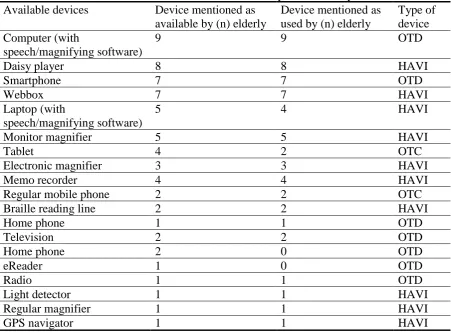
The devices that the elderly use or have access to are helping aids for the visually impaired (HAVI) or other technological devices (OTD) . Table 12 shows that the majority of