University of Warwick institutional repository: http://go.warwick.ac.uk/wrap
A Thesis Submitted for the Degree of PhD at the University of Warwick
http://go.warwick.ac.uk/wrap/56270
This thesis is made available online and is protected by original copyright. Please scroll down to view the document itself.
Manual and Automatic Authoring for Adaptive Hypermedia
By
Jonathan Gregory Kenneth Foss
A thesis submitted in partial fulfilment of the requirements for
the degree of
Doctor of Philosophy in Computer Science
Supervisor: Dr A. I. Cristea
University of Warwick, Department of Computer Science
I
Contents
List of Figures ... XI
List of Tables ... XV
Acknowledgements ... XVII
Declarations ... XVIII
Abstract ... XXI
List of Abbreviations and Acronyms ... XXII
1 Introduction ... 1
1.1 Objectives ... 1
1.2 Research Questions ... 2
1.3 Methodology ... 3
1.4 Thesis Outline ... 4
2 Related Research ... 6
2.1 Adaptive Educational Hypermedia ... 6
2.1.1 Techniques within Adaptive Hypermedia ... 6
2.1.2 Adaptive Navigation Techniques ... 6
2.1.3 Adaptive Presentation Techniques ... 7
2.1.4 Content Adaptation Techniques ... 7
2.2 Frameworks for Adaptive Hypermedia ... 7
II
2.2.2 Generic Adaptivity Model (GAM) ... 8
2.2.3 Munich Reference Model... 9
2.2.4 LAOS Model ... 9
2.2.5 Concept Adaptation Model (CAM)... 12
2.3 Authoring Systems for Adaptive Hypermedia ... 12
2.3.1 Interbook ... 12
2.3.2 AHA! ... 13
2.4 GRAPPLE ... 13
2.5 My Online Teacher ... 13
2.5.1 My Online Teacher – MOT1.0 (MOT++) ... 14
2.5.2 MOT2.0 ... 17
2.6 Adaptation Strategies in LAG ... 18
2.6.1 LAG Syntax ... 18
2.6.2 Example Strategies ... 18
2.6.3 Reusing Strategies ... 21
2.6.4 Other ‘Custom’ Strategies ... 21
2.7 Content Authoring Systems ... 23
2.8 Visualizations ... 24
2.8.1 Visualization of domain content ... 24
III
2.9 Design Principles for Adaptive Hypermedia Authoring Systems ... 26
2.9.1 Separation of concerns ... 26
2.9.2 Requirements for an Adaptive Hypermedia Authoring System ... 26
2.9.3 Description of existing tools with respect to these principles ... 30
2.10 Conclusion ... 31
3 Analysing and improving basic Adaptive Hypermedia Authoring: Creating MOT3.0 ... 32
3.1 Overview ... 32
3.2 Requirements for Improving MOT1.0 ... 32
3.3 Usability Improvements ... 34
3.3.1 Layout ... 34
3.3.2 Menus... 36
3.3.3 Visualization ... 38
3.4 Functionality Improvements ... 45
3.4.1 Compatibility with Other Systems and Standards ... 45
3.5 Evaluations ... 45
3.5.1 Hypotheses for the MOT3.0 comparison to MOT1.0 ... 46
3.5.2 Testing the Hypotheses ... 46
3.6 Updating MOT3.0 based on Evaluation Results ... 51
IV
4 Importing Content from Linear Sources ... 54
4.1 Overview ... 54
4.2 Motivation ... 54
4.2.1 Familiar Authoring Tools ... 55
4.3 Requirements to import linear material into an AHAS ... 57
4.4 Recommendations for creating adaptation from linear material ... 62
4.5 File Formats ... 64
4.6 Semi-Automatic Authoring ... 65
4.6.1 Pre-import Editing ... 65
4.6.2 Post-import Editing ... 66
4.6.3 Two Use-Cases for Semi-Automatic Authoring ... 66
4.7 Case Studies for Semi-Automatic Authoring Importers ... 67
4.7.1 Import Case Study 1: MediaWiki... 68
4.7.2 Import Case Study 2: Presentation Importer ... 80
4.8 Future Work: Extending this import principle to other formats ... 87
4.8.1 Microsoft Word ... 87
4.8.2 LaTeX ... 87
4.8.3 HTML ... 88
4.8.4 Portable Document Format ... 88
V
5 Putting it all together: The MOT Toolset ... 90
5.1 Overview ... 90
5.2 Imperatives for Authoring ... 90
5.2.1 Complexity Imperatives ... 90
5.2.2 Support Imperatives ... 91
5.3 The MOT Toolset ... 94
5.3.1 MOT3.0.1 ... 94
5.3.2 PEAL ... 95
5.4 Authoring Imperatives applied to the MOT Toolset ... 96
5.4.1 MOT3.0.1 ... 96
5.4.2 PEAL ... 102
5.5 Evaluations ... 105
5.5.1 Usage of MOT ... 109
5.5.2 Quantitative Analysis of Submitted Content ... 111
5.5.3 Qualitative Feedback... 122
5.5.4 Usage of PEAL ... 123
5.5.5 Discussion ... 128
5.6 Future Work... 130
5.7 Conclusion ... 130
VI
6.1 Overview ... 132
6.2 Scenarios... 132
6.2.1 Content Authoring ... 132
6.2.2 Adaptation Authoring ... 133
6.3 Importing the Linear Content in MOT3.0 ... 134
6.3.1 Importing Presentation Slides ... 134
6.3.2 Importing Wikipedia Content... 136
6.3.3 Importing Moodle Content ... 137
6.3.4 Editing and Enriching the imported content... 138
6.4 Creating Adaptation Strategies ... 138
6.4.1 Beginner-Intermediate-Advanced Strategy ... 138
6.4.2 Visual-Verbal Strategy ... 139
6.5 Combining and Enhancing Linear Input ... 141
6.5.1 Adding adaptive behaviour to linear content ... 141
6.5.2 Delivering adaptive courses ... 142
6.6 Evaluation and Discussion ... 142
6.7 Conclusions ... 148
7 Increasing flexibility in authoring for adaptation: Iterative development of MOT3.1 ... 149
VII
7.2 Adaptive Delivery Engine... 149
7.3 Changes from MOT3.0 to MOT3.1 ... 149
7.3.1 MySQL Improvements ... 149
7.3.2 jQuery Frontend ... 150
7.3.3 Multiple labels/weights... 152
7.3.4 Improved Wiki Importer ... 155
7.3.5 Relatedness Search ... 155
7.4 PEAL2 ... 158
7.4.1 Visual Programming User Interface in PEAL2 ... 160
7.5 Delivering a course ... 161
7.6 Evaluation ... 161
7.6.1 Analysis of Created Content ... 162
7.7 Conclusion ... 172
8 Visual graph-based authoring: GAT ... 174
8.1 Overview ... 174
8.2 Related Research: The GRAPPLE Project ... 174
8.2.1 The Generic Adaptive Learning Environment (GALE) ... 174
8.2.2 The GRAPPLE Authoring Toolset (GAT) ... 175
VIII
8.3.1 Interface Changes ... 185
8.3.2 Course Tool Changes ... 191
8.4 Conclusion ... 196
9 Different authoring paradigms: Comparison between MOT and GAT ... 198
9.1 Overview ... 198
9.2 Revisiting the Authoring Imperatives ... 198
9.2.1 Functionality Imperatives... 198
9.2.2 Complexity Imperatives ... 201
9.2.3 Support Imperatives ... 202
9.3 Applying the Authoring Imperatives ... 203
9.3.1 Functionality Imperatives... 204
9.3.2 Complexity Imperatives ... 207
9.3.3 Support Imperatives ... 216
9.4 Comparing the roles of the individual tools ... 223
9.5 Comparing the Available Adaptation Techniques ... 224
9.6 Evaluation of MOT versus GAT ... 227
9.6.1 Hypotheses ... 227
9.6.2 Questionnaire Results and Discussion ... 229
9.7 Conclusions ... 242
IX
10.1 Overview ... 243
10.2 Improving the MOT Toolset ... 243
10.3 Requirements... 243
10.3.1 Graphical Relationships ... 244
10.3.2 Multiple Labelling ... 244
10.3.3 Domain Properties ... 245
10.3.4 External Resources ... 245
10.4 Designing the Adaptation Languages ... 245
10.4.1 The LAF XML Format ... 246
10.4.2 Course Storage ... 250
10.4.3 The LAG4 Grammar ... 251
10.4.3.2 Multiple Labels ... 252
10.4.3.3 Domain Properties ... 253
10.5 Implementing My Online Teacher 4 ... 253
10.5.1 Terms Used... 253
10.5.2 Domain Design ... 254
10.5.3 Course Design ... 259
10.6 Evaluations ... 261
10.6.1 Evaluation of MOT4.0 ... 262
X
10.7.1 Look and Feel ... 274
10.7.2 Tooltips ... 275
10.7.3 Evaluation of MOT4.01 ... 276
10.7.4 Hypotheses ... 277
10.7.5 Example Strategies ... 278
10.7.6 Analysis of Submitted Content... 278
10.7.7 MOT4.01 Questionnaire ... 281
10.8 Conclusions ... 291
11 Conclusions and Future Work ... 293
11.1 Introduction ... 293
11.2 Summary of Evaluation Results ... 293
11.3 Importing Content from Linear Sources ... 296
11.4 Future Research ... 296
11.5 Future Applications ... 297
Appendix A: MOT3.1/PEAL2 versus GAT Questionnaire ... 299
Appendix B: MOT4 versus GAT survey ... 308
Appendix C: MOT4.01 Survey ... 315
XI
List of Figures
Figure 2.1: The five layer LAOS model ... 10
Figure 2.2: A basic domain and equivalent goal map within MOT1.0 ... 16
Figure 3.1: The frame-based layout of MOT1.0 ... 35
Figure 3.2: The Ajax based layout of MOT3.0 ... 36
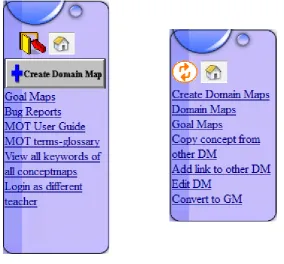
Figure 3.3: The separate navigation menus in MOT1.0 ... 37
Figure 3.4: The navigation menu in MOT3.0... 38
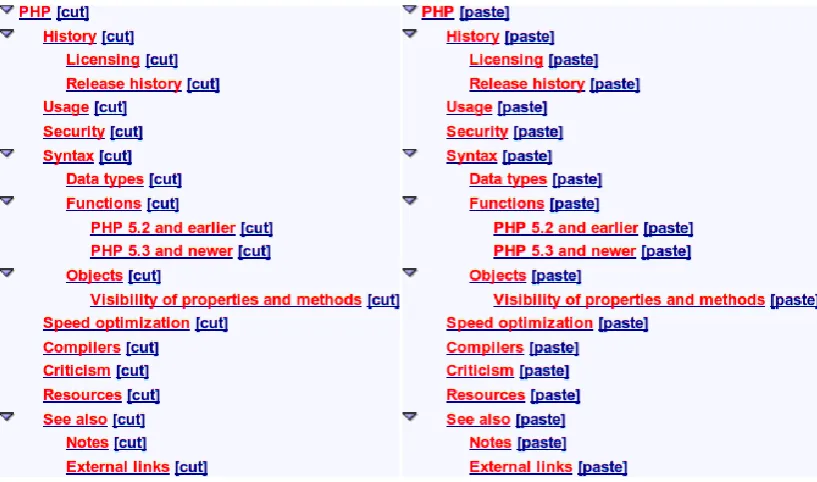
Figure 3.5: The two stages of changing a Domain hierarchy in MOT1.0 ... 39
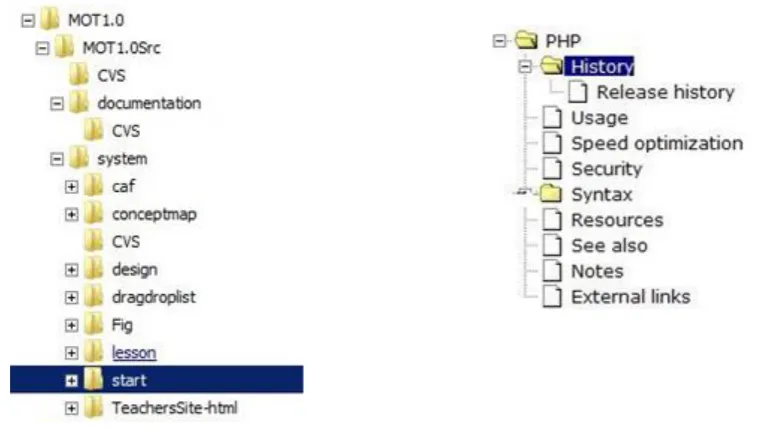
Figure 3.6: The Windows 7 file manager (left) with the MOT3.0 Domain map (right) ... 40
Figure 3.7: Copying the 'Hypermedia' topic into the 'See Also' concept within 'Adaptive hypermedia' ... 41
Figure 3.8: Changing weights and labels in MOT1.0 ... 41
Figure 3.9: Labelling within MOT3.0 ... 42
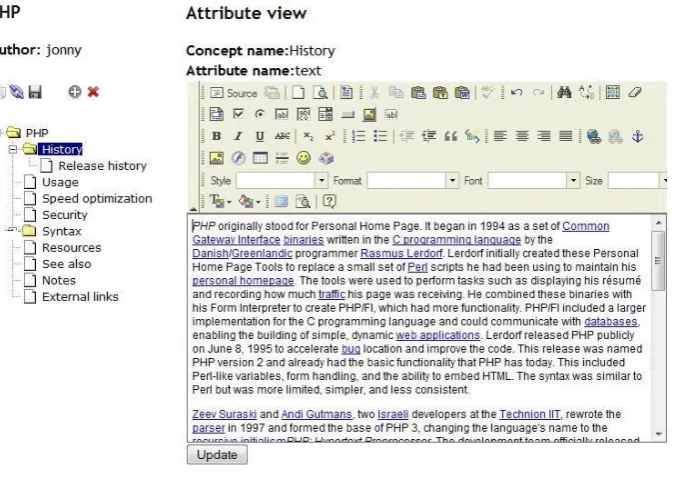
Figure 3.10: Editing an attribute in MOT3.0 ... 43
Figure 3.11: The position of the buttons in MOT3.0... 50
Figure 3.12: Copying a sub-tree of concepts ... 52
Figure 3.13: Applying the same label to more than one sublesson... 52
Figure 4.1: Some sample WikiText from the PHP article [106] ... 69
Figure 4.2: Imported Domain map in MOT3.0 based on the PHP article [106] ... 70
XII Figure 4.4: An imported Wikipedia category page, with labels and weights according
to the importance of the page ... 78
Figure 5.1: Search functionality in MOT3.0 ... 99
Figure 5.2: A domain map hierarchy created in 2008 using MOT1.0 ... 110
Figure 5.3: A domain map hierarchy created in 2009 using MOT3.0 ... 110
Figure 5.4: Sublessons and 'Groups of Sublessons' in MOT3.0 – extract based on [106] ... 121
Figure 5.5: Editing a LAG Strategy using PEAL ... 125
Figure 6.1: Domain model of an imported presentation ... 135
Figure 6.2: Domain model of the imported Wikipedia PHP article [106] ... 137
Figure 6.3: Editing a strategy in PEAL ... 139
Figure 6.4: The strategy creation wizard in PEAL ... 140
Figure 6.5: Goal model of the imported presentation... 142
Figure 6.6: Histogram display of the responses to the MOT3.0 questionnaire ... 144
Figure 7.1: The layout of MOT3.1 ... 151
Figure 7.2: Adding multiple labels in MOT3.1 ... 154
Figure 7.3. Related Concept Search using TF-IDF ... 157
Figure 7.4: Part of an initialization loop in PEAL2 ... 159
Figure 7.5 An implementation loop in PEAL2 ... 159
Figure 7.6: The default implementation section in PEAL2 ... 160
Figure 7.7: Simple code example in PEAL2 ... 160
Figure 7.8: Extract of LAG code in text mode of PEAL2 ... 161
XIII
Figure 8.1: The Properties of the Star Concept... 178
Figure 8.2: Part of the generated pages for the Mercury and Venus concepts ... 179
Figure 8.3: Part of the Milky Way example domain (the Star concept is currently selected) ... 181
Figure 8.4: A G-Prerequisite CRT rule as displayed in the CAM tool ... 182
Figure 8.5: The Welcome screen in GAT ... 187
Figure 8.6: The ‘Manage Models’ screen ... 190
Figure 8.7: A truncated list of concepts and an expanded socket ... 192
Figure 8.8: The course tool with Rule toolbox ... 192
Figure 8.9: Selecting rules by type in the Course tool ... 194
Figure 8.10: A chain of prerequisites with a related line ... 195
Figure 8.11: Part of a course with too many related lines ... 196
Figure 9.1: GALE code within the PRT tool ... 222
Figure 9.2: LAG Code within PEAL ... 222
Figure 9.3: A sample question from the questionnaire – with 4 sub-questions ... 230
Figure 10.1: A domain in MOT4 with the concept ‘The rules’ selected ... 255
Figure 10.2: Adding a relationship in MOT3.1 ... 256
Figure 10.3: Adding a relationship in MOT4 ... 256
Figure 10.4: Extract of the Milkyway Domain within GAT ... 257
Figure 10.5: Extract of the Milkyway Domain within MOT4 ... 257
Figure 10.6: Tree layout mode in MOT4 ... 258
Figure 10.7: Creating a domain with custom attributes in MOT4 ... 259
XIV
Figure 10.9: A Course (Goal Model) view in MOT4... 261
Figure 10.10: Screenshot of the course tool within MOT4 ... 275
Figure 10.11: Screenshot of the course tool within MOT4.01 ... 275
Figure 10.12: Tooltips when adding labels ... 276
Figure 10.13: The tree view of a Domain in MOT4.01 ... 287
Figure 10.14: The tree view of a Course in MOT4.01 ... 287
XV
List of Tables
Table 4.2: T-Test results compared with an expected result of 0 ... 86
Table 5.2: Goal Map Production in both MOT1.0 and MOT3.0 ... 120
Table 5.3: Strategies created by 2008 and 2009 Cohorts ... 127
Table 5.4: T-Test statistics for LAG Strategies ... 128
Table 6.1: The MOT3.0 questions and response frequencies ... 145
Table 6.2: One-Sample t-test Q4a, Q4b, Q4c (Test of mu = 0 vs not = 0) ... 146
Table 7.1: Domain Production with MOT3.1 (2010) compared with MOT3.0 (2009) and MOT1.0 (2008) ... 164
Table 7.2: Effect sizes for attribute creation in 2010 ... 165
Table 7.3: Goal Map Analysis in MOT3.1 versus that of MOT3.0 ... 167
Table 7.4: LAG Content when using PEAL2 in 2010 versus PEAL in 2009 ... 170
Table 9.1: Comparing the various features and terminology used in the MOT and GAT toolsets ... 224
Table 10.1: Domain Production for 2010 compared with 2009 and 2008 ... 265
Table 10.2: Comparison the Goal Maps created using MOT4 (in 2011) to those created in MOT3.1 (in 2010) ... 267
Table 10.3: A quantitative analysis of the strategies submitted in 2010 and 2011 268 Table 10.4: Effect size of the statistically significant differences within the quantitative analysis of the created strategies ... 269
Table 10.5: The students 'confidence' score for the tools ... 272
XVI
Table 10.8: Likert-scale responses about consistency ... 282
Table 10.10: The usage of the Domain rearrangement features ... 285
Table 10.11: The usage of the hierarchical Domain rearrangement features... 286
XVII
Acknowledgements
Sincere thanks to my family, friends and colleagues who have supported me during
my studies. I am particularly grateful for the support and supervision I have
XVIII
Declarations
This research was partially supported by the GRAPPLE IST (FP7 STREP) project
IST-2007-215434 and the University of Warwick’s IATL funded APLIC project.
Some of the material in this thesis is based on papers that I have previously
published (as first author, with a contribution of over 80%) as described below.
The introduction presents my own research questions, whilst Chapter 2 describes
related research.
Chapter 3 documents the creation of MOT3.0 based on the pre-existing MOT1.0
system (which is described as related research), and is loosely based on the
following workshop paper:
Foss, J.G.K. and Cristea, A.I. (2009) Adaptive Hypermedia Content Authoring using
MOT3.0. In: 7th International Workshop on Authoring of Adaptive and Adaptable
Hypermedia, 29 Sep - 02 Oct 2009, Nice, France.
Chapter 4 was created especially for this thesis however it is based on ideas that
were published in my other papers. Parts of the evaluation section were previously
published in:
Foss, J.G.K., Cristea, A.I. and Hendrix, M. (2010) Continuous Use of Authoring for
Adaptive Educational Hypermedia: A Long-term Case Study. In: IEEE International
Conference on Advanced Learning Technologies (ICALT 2010), 5-7 Jul 2010, Sousse,
XIX Chapter 5 presents an extended version of the following paper:
Foss, J.G.K. and Cristea, A.I. (2010) The Next Generation Authoring Adaptive
Hypermedia: Using and Evaluating the MOT3.0 and PEAL Tools. In: ACM Conference
on Hypertext and Hypermedia (Hypertext 2010), 13-16 Jun 2010, Toronto, Canada.
Chapter 6 presents an extended version of the following paper:
Foss, J.G.K. and Cristea, A.I. (2010) Transforming a Linear Module into an Adaptive
One: Tackling the Challenge. In: 10th IEEE International Conference on Intelligent
Tutoring Systems (ITS 2010), 14-18 Jun 2010, Pittsburgh, USA.
Small parts of the description of MOT3.1/PEAL2 in Chapter 7 and small parts of the
comparison between MOT3.1/PEAL2 and GAT in Chapter 9 appeared on the poster:
Foss, J.G.K. and Cristea, A.I. (2011) Two competing approaches in Authoring
Adaptive Hypermedia: MOT versus GAT. In: Hypertext 2011, June 2011, Eindhoven,
The Netherlands.
The first part of Chapter 8 is based on related research that was carried out by
other members of the GRAPPLE project (as described in the chapter). My
improvements to the course tool and shared interface were based on work that
was previously carried out by Maurice Hendrix (as described in the chapter). The
improvements to the CAM were also documented in the project deliverable:
D3.3c: Final implementation of the CAM definition tool, GRAPPLE project – available
from
XX Chapter 11 draws conclusions from the rest of the thesis and has not been
published elsewhere.
This thesis has not been previously submitted in any form for a degree at The
XXI
Abstract
Adaptive Hypermedia allows online content to be tailored specifically to the needs of the user. This is particularly valuable in educational systems, where a student might benefit from a learning experience which only displays (or recommends) content that they need to know.
Authoring for adaptive systems requires content to be divided into stand-alone fragments which must then be labelled with sufficient pedagogical metadata. Authors must also create a pedagogical strategy that selects the appropriate content depending on (amongst other things) the learner's profile. This authoring process is time-consuming and unfamiliar to most non-technical authors. Therefore, to ensure that students (of all ages, ability level and interests) can benefit from Adaptive Educational Hypermedia, authoring tools need to be usable by a range of educators. The overall aim of this thesis is therefore to identify the ways that this authoring process can be simplified.
The research in this thesis describes the changes that were made to the My Online Teacher (MOT) tool in order to address issues such as functionality and usability. The thesis also describes usability and functionality changes that were made to the GRAPPLE Authoring Tool (GAT), which was developed as part of a European FP7 project. These two tools (which utilise different authoring paradigms) were then used within a usability evaluation, allowing the research to draw a comparison between the two toolsets.
XXII
List of Abbreviations and Acronyms
ADE Adaptive Delivery Engine
AEH Adaptive Educational Hypermedia
AH Adaptive Hypermedia
AHAS Adaptive Hypermedia Authoring System
AM Adaptation Model
CAF Common Adaptation Format
CAM Concept Adaptation Model
CI Complexity Imperatives
CRT Concept Relationship Type
DM Domain Model
DP Design Principles
GAT GRAPPLE Authoring Toolset
GM Goal Model
GRAPPLE Generic Responsive Adaptive Personalized Learning Environment
LAF Learning Adaptation Format
LAG Layers of Adaptation Granularity
LMS Learning Management System
MOOC Massive Open Online Course
MOT My Online Teacher
PM Presentation Model
XXIII
RI Requirement for Import
SD Standard Deviation
SI Support Imperatives
UM User Model
URI Uniform Resource Identifier
URL Uniform Resource Locator
VLE Virtual Learning Environment
WYSIWYG What You See Is What You Get
1
1
Introduction
Adaptive hypermedia [1] (AH) can be used to provide relevant content according to
the profile of the user. To achieve this, the content needs to be authored in such a
way that sections of it can be shown or hidden according to various conditions. This
authoring process is different to the processes that many non-technical content
authors are used to, and so has not become widely popularised amongst a diverse
range of educators. A lack of content is therefore preventing students from being
able to utilise the benefits of adaptive hypermedia [2].
The research in this thesis investigates methods of increasing the usability of
editors for adaptive hypermedia, and describes how the editors can be extended to
allow more flexibility and functionality, thus encouraging a wider demographic of
content authors to create adaptive courses.
1.1 Objectives
The research presented in this thesis aims to create more usable authoring tools for
adaptive hypermedia. The thesis focuses on two case study authoring tools (MOT
[3] and GAT[4]) that employ different authoring paradigms. Through analysis of the
existent authoring tools, the research aims to generate a set of requirements for an
Adaptive Hypermedia Authoring System (AHAS).
The research also investigates ways of extracting content from files that have been
2
1.2 Research Questions
The overall research question is:
“How can the authoring process for adaptive hypermedia be simplified?”
This question is investigated from two angles
Can more graphical user interfaces assist the author with…
o structuring content?
o labelling content?
o defining adaptation strategies?
Can automated importers assist the author?
Based on these, the following sub-questions were also created:
1. Can visual programming methods assist authors with describing adaptation?
2. What role does the granularity of code fragments have in simplifying the authoring process?
3. Can visual methods assist the author in separating content into a useful Domain structure?
a. How does the ability to visualize many types of relationships (in a graph structure) affect usability?
b. Are multiple relationship types perceived as useful?
c. Do users use more (non-parent) relationships when shown in a graph structure?
4. Can visual methods assist the author in applying pedagogical metadata?
3 b. Do authors prefer to separate pedagogical metadata from the
adaptation strategy or do they prefer to label content using pedagogical rules?
5. Can content creation for AH be simplified through the use of (semi-) automatic import scripts from more traditional/linear (hyper-) media?
a. Are such imports semantically/pedagogically valid – or is more complex or human processing required?
b. Do authors perceive importing content from wikis as useful?
c. Do authors perceive importing content from presentation slides as useful?
6. How does the granularity of static content affect ease of authoring?
a. What granularity of static content do authors prefer?
b. Do current tools facilitate the creation of static content at a granularity that is adequate for both author and learner?
7. Should content be authored with the domain tool or should it use external resources?
a. Do users prefer editing content within the authoring tool to using their own separate tools, and uploading the content separately?
b. Do such external resources automatically lead to a larger granularity of content?
1.3 Methodology
This thesis attempts to answer these questions through continual refinement of a
number of authoring tools. During the development of the tools, a spiral model [5]
of software development was employed. This was an iterative process, allowing for
requirements to be gathered from adaptive hypermedia authors. Each prototype
piece of software was used in a long-term usage evaluation, during which time the
participants were invited to give feedback. New features designed to address the
4 As well as qualitative feedback, each evaluation of the MOT toolset collected usage
data. These data were statistically analysed for their complexity, and where
appropriate the statistical significance of the data was calculated using a t-test in
SPSS[6] as described by Field[7], [8].
Some of the evaluations involved gathering feedback through questionnaires. In
many cases, the questions involved Likert-type scales [9], [10]. This data was also
analysed using a t-test, however in the case of categorical data, a χ2 test, as described by Cairns and Cox [11] was also used.
The research also creates a list of imperatives, which are described in the context of
background research, and are later refined based on observations and feedback
from evaluations.
1.4 Thesis Outline
The rest of this thesis is structured as follows: Chapter 2 presents the related
research and describes the initial set of design principles for an adaptive
hypermedia authoring system. Chapter 3 describes how these design principles
were used to update the usability and functionality of an existing authoring tool for
static content. Chapter 4 describes methods of automatically extracting content
from linear material for use within an adaptive course. Chapter 5 describes the
creation of a pedagogical strategy tool and presents a long-term usability
evaluation of the authoring tools. Chapter 6 describes a scenario that explains how
real-world teachers could utilize the authoring tools. Chapter 7 describes the
5 describes a different authoring paradigm, as implemented within a European FP7
project. Chapter 9 describes the differences between these two authoring
paradigms, and presents a comparison evaluation. Chapter 10 then describes the
creation of an updated authoring tool based on the results of the comparison
evaluation. Finally, Chapter 11 presents conclusions and recommendations for
6
2
Related Research
2.1 Adaptive Educational Hypermedia
Adaptive hypermedia [1], [12], [13] allows content to be personalised according to
the needs of the user. One of the primary focuses for adaptive hypermedia is in an
educational context [14], [15], allowing content to be personalised to the needs of
the learner. For instance if ‘Page B’ requires knowledge of ‘Page A’ (i.e., ‘Page A’ is
a prerequisite of ‘Page B’) an adaptive educational hypermedia (AEH) system can
provide guidance to the user by recommending that they visit ‘Page A’ before
visiting ‘Page B’ [16]. Similarly, AEH can cater for a variety of learning styles [17–19],
allowing different users to receive educational content in a way that they are most
likely to respond to.
2.1.1 Techniques within Adaptive Hypermedia
Brusilovsky [12], [13] defined a taxonomy of techniques that can be used within
adaptive systems. More recently, this taxonomy has been updated by Knutov et al.
[20] to particularly focus on the expansion of the presentation and the content
adaptation techniques. The taxonomies describe various techniques within three
broad areas:
2.1.2 Adaptive Navigation Techniques
Adaptive navigation techniques involve ‘link-level adaptation’ [21], and can guide
the user’s browsing by recommending pages. This can be achieved by changing the
7 the traffic light system used by ELM-ART[24]. Similarly, techniques such as link
hiding (making the link look like normal text) can be used [22].
2.1.3 Adaptive Presentation Techniques
Adaptive presentation techniques involve ‘content-level adaptation’ [21] and can be
used to change the way that content is displayed to the user. Typically this involves
either hiding or showing different fragments of content (such as in AHA! [25]), or
even modifying the system’s entire layout (as demonstrated by GALE [26]).
2.1.4 Content Adaptation Techniques
Whereas Brusilovsky’s updated taxonomy [13] considers content adaptation as part
of the adaptive presentation techniques, Knutov’s taxonomy [20] makes a clearer
distinction between the two techniques. Like adaptive presentation, content
adaptation is also classed as ‘content-level adaptation’, and specifically involves the
hiding/removing of fragments (such as that made available by Interbook [27] or
AHA! [28]) or the altering of fragments (such as that available in GALE [26]).
2.2 Frameworks for Adaptive Hypermedia
To simplify the design of adaptive hypermedia systems, various frameworks have
been developed.
2.2.1 AHAM
The AHAM model [29], [30] extends the Dexter hypermedia model [31] to describe
adaptation. The Dexter model contains a ‘Runtime layer’, a ‘Storage layer’ and a
‘Within Component layer’. AHAM extends this principle through the definition of
8
The ‘domain model’ is used to store fragments of information, and describes
how these fragments are structured. Specifically, the domain model
contains ‘concepts’ (representing the subject), with each concept containing
a number of attributes.
The ‘user model’ stores information about the user, by defining an overlay
model. This means that the user model can separately address each
concept, thereby storing properties that describe the user’s knowledge of
the concept. Moreover, the user model can store other properties that link
the user to the concept, such as a property that denotes the concept has
been read.
The ‘adaptation model’ [32] (previously known as the ‘teaching model’[30])
describes how the relationships between the concepts (from the domain
model) should be interpreted to form pedagogical relationships that interact
with the user model and can therefore be used to guide the user around the
course.
2.2.2 Generic Adaptivity Model (GAM)
GAM [33] was created to provide a more generic abstraction of AHAM. Specifically,
it removes the dependence on hypermedia and expresses the process of adaptation
as a state-machine. The model consists of a ‘domain model’, ‘adaptation model’ and
‘user model’, which are all similar to that used by AHAM. One of the main
differences between GAM and AHAM is that since GAM is not specifically used
within hypertext, the structure of the domain is not specified in terms of concepts.
9 actual structure of the domain model to the designer of the system. Similarly, GAM
introduces an ‘interface model’ which defines the possible events that can be
triggered by the user, and how such events might affect the adaptation model.
2.2.3 Munich Reference Model
The Munich Reference Model [34] uses UML to specify three separate
meta-models; the ‘domain meta-model’, the ‘adaptation meta-model’, and the ‘user
meta-model’. Like AHAM, the Munich model’s meta-models all occur within the
‘Storage Layer’ of the Dexter hypermedia model. Each model performs a similar
role to its namesake from AHAM, yet the Munich model’s specification focuses on a
more formal object-oriented approach.
2.2.4 LAOS Model
The LAOS model [35] is based around the AHAM model, and consists of five
separate layers. It is designed to reduce the complexity of the authoring process by
allowing the author to focus their attention on the design of each individual layer,
rather than being concerned with authoring the entire content and adaptation
specification in one process. LAOS therefore adheres to the ‘Separation of
Concerns’ principle, described in Section 2.9.1 .
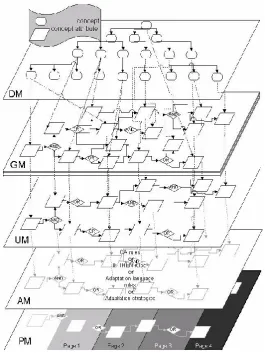
Figure 2.1 (previously published in [35]) shows the relationship between the five
10
Figure 2.1: The five layer LAOS model
A description of each individual layer is provided below.
Domain model (DM): Similar to the domain model in AHAM, the Domain
layer contains the information content in the form of concepts and
attributes. The domain model also defines how the information is structured
(but contains no pedagogical information). Although the domain model
stores relationships that define the structure of the content, the domain
model does not define the order in which the content should be studied
(unlike the domain model in AHAM). In the implementations of the LAOS
11 be a topic such as ‘Computer’, whilst an attribute could be ‘introduction’
containing some hypertext introducing the topic.
Goal and Constraints model (GM): The goal model references concept
attributes within the domain model so that pedagogical metadata can be
defined about each concept. The goal model also stores information about
the order and structure of the content. This allows different authors to
produce goal maps that use the same domain but order/structure the
content in a different way. In the implementations of the LAOS goal model
within MOT, authors can add labels and weights to sublessons to represent
when the corresponding content should be delivered. For instance, the
sublesson corresponding to the ‘introduction’ domain attribute could be
labelled ‘beginner’ so that it can be delivered to beginner users (see Section
2.6.2).
User model (UM):As with AHAM, the user model contains an overlay of the
goal model, therefore allowing the storage of information that relates the
user to each individual concept. For instance, an implementation of LAOS
would be able to store a user’s characteristics to label the user as ‘beginner’.
Adaptation model (AM): As with AHAM, the adaptation model contains the
code that determines how the course will adapt to the needs of the user.
Within LAOS, the adaptation is usually specified in the form of a LAG
strategy[36].
Presentation model (PM): The presentation model contains information
12 into a form that can be interpreted by the browser (usually using HTML). In
more recent implementations (described in Chapter 10), the presentation
model has also been used to adaptively change the screen layout.
2.2.5 Concept Adaptation Model (CAM)
The Concept Adaptation Model (CAM) [37] was developed as part of the GRAPPLE
project [38], and inherits features from both the AHAM and LAOS models.
Adaptation is specified using Concept Relationship Types (CRTs). Like both AHAM
and LAOS, there is a domain model and a user model. However, rather than
specifying adaptation within a single layer, CAM allows adaptation to be spread
between multiple layers. The implementation of the CAM within the GRAPPLE
project is described in Chapter 8 .
2.3 Authoring Systems for Adaptive Hypermedia
A number of authoring systems have been developed for adaptive hypermedia.
2.3.1 Interbook
Interbook [27] allows content to be authored based on a Microsoft Word [39] file.
The domain concepts are automatically identified according to the formatted
headings within the document. However, the author must apply a special
annotation (a comment in the Word file), to specify related and background
concepts (pre-requisites). The document is then converted to an HTML file, whilst
the annotations are used to create adaptation rules that are generated using the
LISP programming language. The author can also use LISP to specify extra
adaptation rules. However, this means that beginner users (non-programmers who
13 2.3.2 AHA!
AHA! [23], [32] follows the AHAM [29], [30] adaptation framework, and allows
adaptation to be defined using a graphical tool. Content comes in the form of
(X)HTML pages and fragments which can be created using any (X)HTML authoring
tool. Content is associated with concepts, which are connected through concept
relationships (such as prerequisites) using the ‘Graph author’ tool. In addition to
this, using special AHA!-specific tags, it is possible to conditionally include/exclude
fragments of (X)HTML content [40], [41]. However, adding such AHA!-specific tags
would necessitate the mixing of adaptation rules with the domain content, so this is
not recommended.
2.4 GRAPPLE
The GRAPPLE [42] project created a delivery tool, GALE[26], and an authoring tool
called the GRAPPLE Authoring Toolset (GAT). GAT exports files using the CAM
format [43] (see Section 2.2.5 ), and as such contains three separate tools; the
Domain Model tool [44], the Pedagogical Relationship Type tool (also known as the
Concept Relationship Type tool) [45] and the Course tool (also known as the CAM
tool)[46]. The design and implementation of GAT is detailed in Chapter 8.
2.5 My Online Teacher
This section describes the basic authoring paradigm employed by the My Online
14 2.5.1 My Online Teacher – MOT1.0 (MOT++)
Unlike Interbook [27] or AHA! [48], which are designed for both delivery and
authoring, MOT++ [47], [49] is a purpose-built authoring tool1 for use with a separate delivery system and is based around the LAOS framework [36]. Please
note that although many previous publications refer to MOT++, it has since been
renamed to MOT1.0 for ease of comparison to other tools. The XML-based CAF file
format [3] has been defined to store the first two layers of the LAOS framework, the
domain model and the goal model. This enables interoperability with compatible
delivery engines, such as AHA!, ADE [50], or GALE, the GRAPPLE FP7 STREP project’s
adaptation engine [26]. This section explains the basic functionality made available
by MOT1.0, however actual implementation and usability specifics are described in
Chapter 3 .
2.5.1.1 Domain Maps
Domain maps form a hierarchical tree structure of concepts. Each concept must
have a title attribute and can have any number of other attributes that describe the
concept. Each attribute has a type such as ‘text’, ‘keywords’, ‘image’, ‘video’,
‘introduction’ or ‘conclusion’. Each attribute can contain the static domain content
(either HTML or plaintext). MOT1.0 provides a basic interface to allow authors to
author the content of each attribute (Chapter 3 explains the interface in detail).
MOT1.0 also allows authors to copy concepts between domain maps, allowing
authors to reuse domain content (either their own, or those made by other users).
15 It is important that the content of each attribute is standalone – that is to say that
the content does not specifically require the presence of another attribute. For
instance, if a concept is described using two attributes ‘diagram’ and ‘text’ the text
attribute should not contain phrases such as “as can be seen in the diagram”, since
(depending on the adaptation strategy) it is not possible to guarantee that the user
can see the diagram.
Similarly, the author must consider the granularity of the content [51]. A resource
with coarse-grained (also known as ‘large’ or ‘low’) granularity has a large amount
of content that is stored within a single object/page/concept [52]. However,
resources with fine-grained (also known as ‘small’ or ‘high’) granularity divide the
content into smaller chunks. Using resources with fine-grained granularity means
that if the content is reused in other courses the author has greater freedom in
choosing which parts of the content to reuse. Similarly, coarse-grained content
offers less flexibility in terms of personalisation since the learning object may
contain information that is irrelevant to the user but cannot be specifically removed
by the strategy. The issues surrounding granularity are also investigated in Chapter
9 .
2.5.1.2 Goal Maps
A goal map is a hierarchical tree structure of groups of ‘sublessons’. Usually, goal
maps are created by using MOT1.0’s feature for converting domain maps into goal
maps. Goal maps initially follow the structure of the associated domain map, with
16 sublessons are arranged into groups based on the domain concept to which they
belong.
Figure 2.2: A basic domain and equivalent goal map within MOT1.0
MOT1.0 allows authors to rearrange the structure/order of concepts. Goal maps
can contain links to any number of domain maps. This means that a course author
can reuse domain content in a different goal map.
Authors can add a label and a weight to each sublesson, for use as pedagogical
metadata. There are no built-in keywords to define the meaning of weights and
labels. The meaning of the weights and labels depends purely on the adaptation
strategy.
2.5.1.3 Adaptation Strategy
Within the MOT authoring paradigm, adaptation must be authored within a LAG file
[53]. Most strategies make use of the pedagogical metadata defined by the goal
map, or even the attribute types used within the domain. The LAG file is responsible
for the definition of the Adaptation Model, User Model and Presentation Model.
17
2.5.1.4 Delivery
As described above, MOT1.0 is specifically designed as an authoring tool, rather
than a combined authoring and delivery system. For this reason, the formats
generated by the MOT authoring paradigm need to be converted into a format that
can be delivered by an external tool. Previous research has created a method of
importing content from MOT into WHURLE[54], [55], however the main target for
MOT1.0 was AHA![3], [56]. However, subsequent research (described in Chapter 7 )
created ADE [50], which is a delivery engine that was specifically created to work
with CAF and LAG files.
2.5.2 MOT2.0
MOT2.0 [57], [58] was created to research the potential of Web 2.0 style
interaction within e-learning. Rather than utilising adaptation strategies, it
encourages learners to interact with each other through collaborative tools, such as
online chat messaging, tagging and rating. MOT2.0 is therefore not a direct upgrade
of MOT1.0, however it does inherit some of its domain model and goal model
principles from LAOS[36] to form Social LAOS (SLAOS) [59].
Although MOT2.0 had different functionality to that of MOT1.0, some of the
interface and functionality aspects of MOT2.0 could clearly be brought into the
MOT1.0 authoring paradigm. Specifically, MOT2.0 introduced a WYSIWYG HTML
editor, and a graphical way of displaying the hierarchical structure of a course.
Similarly, MOT2.0 introduced methods of importing content from widely used
18
2.6 Adaptation Strategies in LAG
As described above, the MOT authoring paradigm uses LAG for the definition of
adaptation strategies [53], [61]. This section describes the basic principles of LAG,
and defines a few sample strategies that will be used as examples throughout this
thesis.
2.6.1 LAG Syntax
There are two sections to each LAG file, an initialization section, and an
implementation section.
Initialization: Code within the initialization section is only run when the
learner first registers onto the course (i.e., first visits the course). Typically,
the initialization code resets the user model variables, and hides all initially
unsuitable concepts (via ‘PM.GM.Concept.show = false’).
Implementation: The implementation section is run for every concept every
time the user clicks on a concept. Note that the expression GM.Concept
within LAG is actually used to refer to an individual sublesson rather than an
entire domain concept. Although the implementation is run for every
concept, the expression “UM.GM.Concept.access == true” can be
used to address the concept(s) that are currently being viewed.
2.6.2 Example Strategies
This section describes some of the basic strategies that are often used to
19 on the website [62] also contain comments that provide natural language
descriptions of what the strategy does and the required labels/weights/structure.
2.6.2.1 Beginner-Intermediate-Advanced
The beginner-intermediate-advanced strategy has three separate knowledge
variables; beg, int and adv, with the current value stored in the user model variable
UM.GM.knowlvl. When users first register onto the course, they are classified as
a beginner user, meaning that all sublessons that have been labelled with int or adv
will be hidden from the user. In AHA!, this means that the links to the intermediate
and advanced topics will be black (looking like normal text – link hiding) with a red
bullet point. In ADE, such intermediate/advanced concepts will not be offered on
the navigation menu at all.
The initialization part of the strategy looks at all concepts and counts how many
sublessons have each label and increments the user model variable counters
UM.GM.begnum, UM.GM.intnum and UM.GM.advnum accordingly. When
the user views one of these sublessons, the relevant counter will decrement. When
a beginner user’s UM.GM.begnum counter reaches zero (meaning they’ve visited
every beginner sublesson), their level will be changed to int, and they will be
granted access to the intermediate concepts. Similarly, when an intermediate user’s
UM.GM.intnum counter reaches zero, they will be promoted to an advanced
user.
2.6.2.2 Rollout
The goal map for a rollout strategy involves two label types; showatmost and
20 strategy counts the number of times each sublesson has been shown. If a sublesson
has a label showatmost witha weight of w1 (where w1 is a number greater than
zero)it will only be shown the first w times that the concept is requested – after
which time it will be hidden. Similarly, a sublesson that is labelled with showafter
with a weight of w2 (where w2 is a number greater than zero) will only be shown
after the concept has been requested w2 times.
2.6.2.3 Visual-Verbal Strategy
This strategy uses the label type ‘visverb’ (anything that doesn’t have this label is
shown under all circumstances). The weight belonging to the visverb label is then
used to determine how visual or verbal a sublesson is. Verbal sublessons (e.g. long
pieces of text or audio clips) are labelled ‘visverb’ with a weight between 50 and
100. Visual sublessons (images, videos, etc.) have a weight between 0 and 50.
When the user first registers, the initialization assumes the user is neutral, so sets
their UM.GM.visverb preference to 50. Users can then only see sublessons that
have a label that is within a predefined threshold of their visverb preference. For
example, if the threshold was 30, a neutral user would see all concepts that have
weights between 20 and 80. If the user clicks on a sublesson that is labelled with
‘setvisverb’, the strategy will set the user’s UM.GM.visverb preference to the
weight of that sublesson. This allows the user to manually choose whether they
prefer visual or verbal information; however variations on this strategy allow the
strategy to gradually modify the user’s visverb preference according to their
21
2.6.2.4 Multimedia Strategy
A multimedia strategy is similar to the visual-verbal strategy; however it can be
used to specify a variety of different media (such as text, images, audio, or video). If
a concept is represented by a variety of different media styles, the strategy can
deliver the appropriate content based on the user’s preference, past behaviour or
available bandwidth [63]. Rather than using a single label (like the visual-verbal
strategy uses), a simple implementation could achieve this using a variety of
categorical labels (such as ‘text’, ’image’, ’audio’ or ‘video’). Moreover, a ‘
type-based’ strategy could be used, where instead of relying on the goal model labels the
strategy would simply choose the media according to the attribute type.
2.6.3 Reusing Strategies
Keeping all adaptation specification in a separate file (LAG) to that of the static
content information (CAF) allows for greater flexibility in reuse. Specifically, this
separation is designed so that non-programmers can choose a strategy, read its
description, and then use the MOT tool to edit/label their content in such a way
that it can be used with the adaptation strategy.
2.6.4 Other ‘Custom’ Strategies
Many of the above strategies are intentionally generic enough to be applied to a
wide variety of content. However, the LAG language aims to provide authors with
the flexibility to present their content according to whatever pedagogical strategy
they feel appropriate. Indeed, some of these strategies may be domain specific, or
22
Revision strategies: A number of authors have implemented strategies that
show the ‘summary’ of a concept if the main information in the concept has
already been read. The theory behind this type of strategy is that if the
learner has already read the concept, they only need basic information
(such as bullet points, or an image) in order to remember the content. This
type of strategy has been implemented in a variety of different ways, with
different weights and algorithms to determine when a concept can be
considered as ‘read’.
Quiz strategies: Various quiz strategies have previously been implemented.
A basic quiz could be based around a Type-based strategy, which would only
show the sublessons of type ‘answer’ when the corresponding ‘question´
had been read. However, it is also possible to create a strategy that requires
users to choose the answer to a multiple choice question (by clicking on a
corresponding concept). If the user clicks on the correct concept, the
strategy could increment a UM.GM.score variable.
Combined strategies: Many previous authors have combined some of the
more common strategies in order to create new strategies. For instance, a
Visual-Verbal strategy could be combined with a
Beginner-Intermediate-Advanced strategy to ensure that the appropriate type of content is
delivered (an ‘Adaptive Presentation’ technique) whilst providing the
learner with guidance about what to study next (an ‘Adaptive Navigation’
23
2.7 Content Authoring Systems
The research presented in this thesis attempts to simplify the process of authoring
adaptive hypermedia. Ideally, a large variety of content authors would be able to
create their own content in such a way that it could be used in an adaptive system.
This would greatly increase the amount of educational material that could be
personalised to the needs of the learner. The lack of tools that can be used by an
averagely computer literate content author is therefore a major bottleneck to
domain authoring [64] and therefore the widespread usage of adaptive
hypermedia.
However, there are some non-adaptive tools that are widely used by a wide variety
of educators. For instance, many educational institutions use learning management
systems (LMSs) such as Moodle[65] or Sakai [66]. Using such systems, educators are
able to structure an online course through the creation of web pages and the
uploading of lecture slides.
The success of projects such as Coursera2 demonstrate a growing importance on
e-Learning [67]. It is therefore important that e-learning tools can be populated with
content from a wide variety of content authors. Although educators may now be
familiar with the process of authoring for such linear authoring tools, the process of
authoring for adaptive hypermedia requires content to be structured and labelled
for use within some form of adaptation (or pedagogical strategy).
24
2.8 Visualizations
2.8.1 Visualization of domain content
As previously described, the process of authoring static content for use within an
adaptive hypermedia system is rather different to the process of authoring linear
content. The author must think carefully about how their domain content is
structured, and what relationships exist between the individual concepts. For this
reason, the authoring tool must allow the user to create and view relationships
between different pieces of content (concepts).
As described in Section 2.5.1.1 , MOT1.0’s approach to this is to display content in a
hierarchical tree structure. However, this means that only parent relationships can
be clearly displayed to the author. The GRAPPLE project, however, displays content
in the form of a graph structure [44], which allows more relationship types to be
visualized. A full comparison and evaluation between the two implementations is
provided in Chapter 9 .
A similar comparison between graph-based and tree-based visualization of domain
maps was carried out by Freire and Rodriguez [68] using the WOTAN tool. Their
evaluation involved a small number of participants, with each participant using
both a tree design and a graph design over a short time period. They focussed on
the time each participant took to complete a number of certain tasks, and found
that participants were faster using their second tool rather than the first – i.e., the
25 that the graph tool is “perceived as harder to use and takes longer to get used to
than the tree tool, but seems to provide better understanding of the course layout”.
2.8.2 Visualization of adaptation content
Whilst the above section describes how static content could be visualized, adaptive
hypermedia also requires some form of adaptation strategy to be created. As
described in Section 2.6 , the MOT authoring paradigm allows non-technical authors
to reuse LAG strategies that have been created by programmers. However, in order
to provide flexibility, it is important that non-programmers should also be able to
specify their own adaptation.
Most current adaptation specifications involve the pedagogy specialist writing code.
For this reason, this thesis investigates methods of visualizing an adaptation
strategy, and therefore enabling it to be understood and modified by a
non-programmer.
This clearly has parallels with tools that allow non-programmers to design their own
software. For example, Scratch [69] is a tool that is aimed at introducing children to
program. This is achieved by using small fragments of code which are represented
as ‘building blocks’ that can be simply pieced together to form a basic program.
Similarly, App Inventor [70] can be used to program basic smartphone apps.
Although neither of these tools provides access to a full programming language,
they do allow non-programmers to specify their own code. Similarly, Microsoft’s
26 with smartphones, allowing non-programmers to visually change parameters of the
recipe for their own personal use.
2.9 Design Principles for Adaptive Hypermedia Authoring Systems
2.9.1 Separation of concerns
The separation of concerns principle is designed to ensure reusability and flexibility.
The principle ensures that (e.g.) adaptation specification is separated from the
domain content. The layered structure of the AHAM model (and therefore AHA!), is
designed to keep the domain, adaptation and user models separate from each
other. Wu et al. [29] noted the need within AHAM for separating the adaptation
model from the domain model, however adaptation content was also often stored
within the static content. For this reason, the goal and constraints layer added to
LAOS [35] was designed to ensure that only the factual domain content is stored in
the domain model, and pedagogical information is shifted to the goal model. The
separation of concerns is inherited from object-oriented programming [72]. It is
also closely related to the ‘separation of content from presentation’ principle that is
employed with XHTML2.0 and CSS [73], which allows authors to change the
presentation of a number of web pages by simply redefining the CSS files – thus
promoting reuse.
2.9.2 Requirements for an Adaptive Hypermedia Authoring System
Based on this related research, we can identify an initial set of principles that are
27 DP1. Use of Frameworks. The frameworks described in Section 2.2
demonstrate how the frameworks already implement the separation of
concerns principle to some extent. For this reason, it is recommended that
any new adaptive (delivery or authoring) system follows a framework.
Broadly, the frameworks all specify that there are two different types of
content that need to be specified; static content, and adaptive content.
a. An AHAS should adhere to a Static Content Specification. As the
above background research has demonstrated, most adaptive
hypermedia systems use HTML. However, there are no
widely-accepted standards for describing the static content used within
adaptive hypermedia. There are, however, many standards (such as
IMS-CP, IMS-QTI, IMS-LD3 and SCORM4) that are widely used within e-learning systems. In the absence of any static content standards
for adaptation, Ghali [60] created methods of allowing such
e-learning standards to be utilised within an adaptive course.
Moreover, Chapter 4 further explores standards and formats that are
frequently used for creating educational content.
b. An AHAS should adhere to an Adaptive Content Specfication. Some
previous systems (such as Interbook [27] and early versions of AHA!
[74]) combined the static content with the adaptation specification.
Using some form of specification (such as LAG, or potentially a more
3 http://www.imsglobal.org/
28 generic scripting language) the adaptive content can more easily be
separated from the content, and thus be reused. In this context, we
consider all user model and presentation model issues to be directly
related to the adaptation – and therefore also covered by this
principle.
DP2. An AHAS should support reuse. To remove the burden of authoring
new content, it is important that the authoring system allows the author to
reuse existing content. This requirement was used by Cristea et al. when
comparing frameworks in [75] and can be divided into two
sub-requirements.
a. An AHAS should allow linear content import. As Section 2.7
described, many authors will already have prepared linear resources
in various kinds of media and file formats for use within other
environments – either real-world universities (such as presentation
slides) or in virtual learning environments (such as course pages
authored in Moodle or Sakai[66]). The adaptive hypermedia
authoring system should accommodate file formats that have
already been created for other purposes and, where possible,
enhance the value of these files via adaptation. Ghali [60] previously
researched integration with learning management systems and
Chapter 4 details methods of extracting content from other linear
29 b. An AHAS should support the author with reuse. Within an adaptive
system, it is likely that authors will want to reuse educational
content that has already been created. The system should provide a
way of helping the user to maintain and reuse currently stored
content (and searching through it). This could be content that they
themselves had previously created, or the author may wish to use
content that has been created by another author, thereby allowing a
collaborative process such as that used by Baloian et al. [76].
Similarly, it is also important that reuse also applies to the
adaptation strategy, thereby allowing non-technical users to take
advantage of the code that has been implemented by programmers.
DP3. An AHAS should ensure an acceptable level of usability. To encourage
non-technical content authors to use the AHAS, the tool must be usable.
This principle can be divided into two main sections.
a. An AHAS should be consistent with other applications. The authoring
system should provide consistency [77] with other well-known
applications, especially functions that are common to more generic
authoring systems should be easily recognizable to beginner users.
b. An AHAS must have a shallow learning curve. The application should
also allow users of all abilities to create complex adaptive content
that utilizes all possible benefits of adaptive hypermedia. Such
functionality will need to be presented simply to the user, requiring a
30 2.9.3 Description of existing tools with respect to these principles
In this section, three adaptive hypermedia authoring tools are described with
respect to the above requirements.
Interbook does not use a particular framework (DP1), and therefore has no way of
separating static content from the adaptation rules (DP1.a and DP1.b). There is
scope for limited adaption reuse in Interbook, through the use of LISP. Interbook
inherits many of its user interface features from Microsoft Word. This means
authors can import existing Word documents into the system to use as the basis for
their material, and also reuse any documents prepared for adaptive hypermedia
(DP2.a and DP2.b). Although much of the interface is Microsoft Word (DP3.a), the
author still requires understanding of how to apply adaptation rules (DP3.b).
AHA! uses the AHAM [30] framework, but also allows mixing adaptation rules with
static content (DP1.a and DP1.b). Content must be authored in (X)HTML, for which
many authoring tools exist (DP2.a and DP2.b). AHA! comes with a tool to import
content (to upload it to an AHA! server). Adaptation in AHA! can be defined
graphically, without any knowledge of the adaptation rule language (DP3.a and
DP3.b). However, authors do need knowledge of the adaptation rule language in
order to define new complex adaptation rules.
Due to the combination of the LAOS framework, the HTML content, and the ability
to export to CAF, MOT1.0 fulfils requirements DP1, DP1.a and DP1.b. In terms of
content reuse, HTML can be used as a basis for static content (DP2.a). MOT1.0 also
31 reusing information from other domain maps, possible (DP2.b). MOT is a
web-based tool, and therefore inherits many user control paradigms from general web
design principles. For example, hierarchies in MOT1.0 are rendered using static
HTML. However, the interface used in MOT1.0 is inconsistent with other
applications, therefore not completely fulfilling requirement DP3.a. Previous
evaluations highlighted usability issues within MOT [46], [78] (such as too much
complexity in the process of labelling content, and the hierarchy display), therefore
highlighting problems with the interface, DP3.b. These usability issues are discussed
and addressed in Chapter 3.
Based on these requirements, MOT1.0 demonstrates the most flexibility for
authoring. However, the requirements also highlight areas that could be improved
within MOT.
2.10 Conclusion
The principles defined in Section 2.9 are the minimum requirements, which have
been extracted based on the related research presented in this chapter.
Since authoring for adaptive hypermedia is a complex task, it is vital to have greater
acceptance of the tools we propose to the users. The creation of such intuitive
authoring tools is therefore an important research challenge. The next chapter
details the basic usability and functionality issues that were identified in MOT1.0,
32
3
Analysing and improving basic Adaptive Hypermedia
Authoring: Creating MOT3.0
3.1 Overview
This chapter describes the initial usability issues that existed in MOT1.0 and
describes the steps that were taken to create a new version of My Online Teacher
named MOT3.0.
The chapter also describes an evaluation that was carried out to compare the
usability (and functionality) of MOT3.0 to that of MOT1.0.
3.2 Requirements for Improving MOT1.0
The previous chapter described the motivation for improving the authoring tools.
The first step to improving the authoring tools was to examine the feedback from
previous evaluations[78], and to make observations about the tools compared with
similar authoring tools. The results of this analysis led to the following issues with
MOT1.0 being identified.
Issue 1. The usability of MOT1.0 needed to be increased.
a. Visualization was too basic and not always intuitive.
b. The system did not assist the author with creating formatted static
content – i.e., the attribute editor only allowed plaintext (or
hand-coded HTML) content.
c. The layout of the interface was not appropriate in some cases –
specifically common features were hidden away in sub-menus.
33 e. There were inconsistencies in the interface (e.g., some menu items
had different positions, depending on which page the user was on).
f. There were few usability conventions/affordances[79] employed.
g. The existent functionality was not always obvious.
h. The search facilities were very minimal.
i. There were a number of security flaws in MOT1.0.
Issue 2. The functionality of MOT1.0 needed to be extended.
a. The number of weights and labels for pedagogical metadata
annotations was limited. This limited the opportunities for
adaptation strategies.
b. The interoperability with other formats was limited – some limited
integration with the semantic desktop had already been
implemented [80], however there was no method of automatically
populating content with teaching materials that originated from
other sources.
Issue 3. The complexity of MOT1.0 needed to be addressed.
a. MOT1.0 was limited with respect to standards that could be used.
Specifically, only HTML was supported as a presentation format, with
no support for commonly used e-learning standards.
b. It was not clear whether the separation of concerns (defined by the
LAOS model) was understood by and useful to the different types of
![Figure 4.2: Imported Domain map in MOT3.0 based on the PHP article [106]](https://thumb-us.123doks.com/thumbv2/123dok_us/9647464.466904/96.595.136.508.304.583/figure-imported-domain-map-mot-based-php-article.webp)