Memorability of Pre-designed & User-defined Gesture Sets
Miguel A. Nacenta, Yemliha Kamber, Yizhou Qiang and Per Ola Kristensson
School of Computer Science, University of St Andrews
North Haugh, St Andrews, KY16 9SX, United Kingdom
{mans, yk9, yq7, pok}@st-andrews.ac.uk
ABSTRACT
We studied the memorability of free-form gesture sets for invoking actions. We compared three types of gesture sets: user-defined gesture sets, gesture sets designed by the au-thors, and random gesture sets in three studies with 33 par-ticipants in total. We found that user-defined gestures are easier to remember, both immediately after creation and on the next day (up to a 24% difference in recall rate compared to pre-designed gestures). We also discovered that the dif-ferences between gesture sets are mostly due to association errors (rather than gesture form errors), that participants prefer user-defined sets, and that they think user-defined gestures take less time to learn. Finally, we contribute a qualitative analysis of the tradeoffs involved in gesture type selection and share our data and a video corpus of 66 ges-tures for replicability and further analysis.
Author Keywords
Gesture sets; gesture memorability; user-defined gestures. ACM Classification Keywords
H.5.2.[Information interfaces and presentation]: User Interfaces—Input devices and strategies.
INTRODUCTION
Advances in user interface research have enabled the design of gesture sets that allow people to issue a wide range of commands by performing gestures that are recognized by the computer [28,34,1,21,13]. Some examples of gestures sets include the pen-based Rubine gesture set [28], Graffiti, Unistrokes [10] and the $1 gesture set [36]. Recently, ges-ture sets have also been intensively studied for surfaces and other multi-touch devices [8,35,14,16,25] and for 3D full-body-motion tracking sensors [17,30,32,33].
There are many plausible advantages with gesture interfac-es. For example, gestures do not take screen real estate or visually clutter the interface, they might be easier to associ-ate with the intended actions, they can be invoked from multiple locations, and they are not orientation-dependent. The latter is useful in large-display collaborative scenarios [24]. Further, the industry interest in gestures interfaces is highlighted by the increasingly rich set of gestures available in touchpads and gestural interface platforms (e.g., [18]).
One of the main factors that could determine the success of gesture sets in modern interfaces is whether the gestures can be effectively learned and remembered. Researchers investigating gestural interfaces have previously highlight-ed the importance of gesture memorability (e.g., [20]), but there is little empirical evidence regarding the memorability of gestures in general, and no evidence on the memorability of user-defined vs. pre-designed gestures, one of the top-level design decisions that can affect memorability.
In this paper we empirically and analytically contribute to our understanding of the interrelationship and trade-offs between user-defined and pre-designed gestures. A key finding is that personalized gesture sets designed by the users themselves are significantly more memorable than pre-designed gestures that were, in our case, defined by two designers. This result was replicated in a series of three experiments that tested participants’ recall of gesture sets for three feature-rich applications: an image editor, a web browser, and a word processor. The advantage of user-defined gesture sets is not due to the time required for users to create user-defined gestures, as one might initially ex-pect. When controlling for time across the conditions, user-defined gestures were still significantly easier to remember. In addition, participants significantly preferred user-defined gesture sets, and they thought creating user-defined gesture sets took less time than learning pre-designed gesture sets (when in fact the actual time difference between the two conditions was negligible). In general, users experienced user-defined gestures as easier, more fun and less effortful. These results increase our understanding of gesture inter-faces and show that it is well worth enabling users to design gestures for certain application-specific actions themselves. However, there are also situations when pre-designed ges-tures, designed either by a team of designers or elicited by users, are more suitable. We therefore provide an analysis of the trade-offs between user-defined and pre-designed gestures. In summary, our contributions are four-fold:
We provide new empirical evidence on the memorability of gestures based on more than 100 hours of data gathered from 33 participants in three experiments.
We present a qualitative analysis comparing user-defined, pre-designed, and stock gesture sets.
We derive three guidelines for interface designers based on our empirical evidence.
We share the data from the user studies to enable further analysis and to ensure replicability.
Permission to make digital or hard copies of all or part of this work for personal or classroom use is granted without fee provided that copies are not made or distributed for profit or commercial advantage and that copies bear this notice and the full citation on the first page. To copy otherwise, or republish, to post on servers or to redistribute to lists, requires prior specific permission and/or a fee.
CHI 2013, April 27 – May 2, 2013, Paris, France.
Copyright © 2013 ACM 978-1-4503-1899-0/13/04...$15.00.
© ACM 2013. This is the author's version of the work. It is posted here for your personal use. Not for redistribution. The definitive Version of Record was published in the Proceedings of the SIGCHI Conference on Human Factors in Computing Systems (CHI '13),
http://dx.doi.org/10.1145/2470654.2466142
RELATED WORK
Gestures are used for a variety of tasks, including writing text (e.g. [10,1,34,26]), issuing commands (e.g. [15,3,2, 5]), and modifying objects (e.g. [27,7]). See the recent survey by Zhai et al. [39] for a comprehensive review of 2D ges-ture interfaces. In order for gesges-tures to be used they have to be designed. For this purpose, Long et al. [19] created gdt, the gesture design tool. It enables designers to create 2D gestures. Several tools for helping designers create gestures sets have been created thereafter, most recently Gesture Coder [21], $N-protractor [1] and Proton [13].
However, for users to leverage gestures in the first place, they have to discover and learn how to apply them effec-tively. An early study investigated the immediate usability of Graffiti gestures and found that users can learn the entire gesture set within five minutes [24]. Later Wobbrock et al. [34] nuanced the concept of immediate usability by study-ing what they call the guessability of individual gestures. They proposed a procedure for designing and evaluating a highly guessable gesture set from participant data. It has later been pointed out that most tabletop gesture sets are pre-designed and that such gestures may not accurately reflect users’ expectations [35]. Consequently, Wobbrock et al. [35] proposed a methodology for eliciting tabletop ges-ture sets from users and used this methodology to create a set of user-elicited gestures. A follow-up study showed that users preferred user-elicited gestures, and to a lesser extent, gestures proposed by 2–3 designers [25]. Gestures created by a single designer were the least preferred. Several others have later adopted the user-elicited paradigm to, for exam-ple, design gesture sets for mobile phones [14,30], interac-tive television [33,12], multi-display environments [16] and smart-home environments [17]. A recently conducted study on user-elicited gesture sets found that users tend to gener-ate gestures with familiar characteristics even when they are told to generate distinct and novel gestures [29].
Several systems have been developed to help users discov-er, learn and articulate gestures. Command Strokes [15] enables users to gesture textual representations of com-mands (e.g., the string “copy”) on touchscreen keyboards. To aid gesture discoverability, it continuously recognizes gestures as they are articulated on the keyboard and visually presents the most likely commands to the user. Octopocus [3] is a system similar in spirit that helps users discover and articulate free-form gesture commands on touchscreens. In multi-touch and surface environments the ShadowGuides [8] system helps users learn multi-touch and whole hand gestures. For 3D gesture interfaces, LightGuide [32] pro-jects gesture guidance hints directly onto the user’s hand. A relatively underexplored issue in gesture interfaces is memorability. In the context of text entry, Zhai and Kris-tensson [1] investigated how many unfamiliar gestures us-ers can learn via a training program. Cockburn et al. [6] investigated whether inducing effort can improve gesture recall of single-stroke gestures. Inducing effort improved
memorability but users found the effort-inducing gesture training interface less enjoyable and more frustrating. Later, in a study of strategies for teaching users gestures for sur-faces, Freeman et al. [8] found that users remembered more surface gestures when using their ShadowGuides system compared to video-based assistance. Another memorability study was conducted by Appert and Zhai [2]. When testing users’ ability to issue 14 commands, they found that they were able to recall more gestures than keyboard shortcuts. Recently, as part of a series of four experiments, Kühnel et al. [17] investigated how well ten users could rate and learn seven (for them unfamiliar) user-elicited 3D gestures in a smart home environment. The gestures were performed by holding a mobile phone in one of their hands. While Kühnel et al. [17] do not report how many gestures users remem-bered, they conclude that gestures representing frequent non-complex actions tended to result in similarly elicited gestures, which in turn tended to be easier for the users to remember. Finally, Jansen [12] investigated three ways of teaching users a set of ten (for them unfamiliar) user-elicited gestures for interactive television. Jansen [12] re-ports that users could correctly recall 61-71% of the ges-tures on average, depending on the teaching method.
PRE-DESIGNED VS. USER-DEFINED GESTURE SETS For this work we distinguish between three main different classes of gesture sets: pre-designed, stock, and user-defined. We define each type and discuss their customiza-bility, discriminacustomiza-bility, consistency, transferability and awareness, and user time and effort.
Pre-designed. These are gesture sets that are created by
designers for a particular application. Designers can take advantage of their expertise to create gestures that will be suitable for people (e.g., memorable, easy to perform), use their knowledge of the system’s recognizer technology to improve recognition rates, and put effort towards creating strong mappings between gestures and actions [35,25]. We consider user-elicited gestures [35] as a special case of pre-designed gesture sets. The gestures that comprise these sets are generated by a representative group of users in a study, generally at system design time, and are then carefully compiled and selected to form a consistent “agreed upon” gesture set that is still recognizable by the system (e.g., it does not assign identical gestures to several actions) [35]. We acknowledge that user-elicited gesture sets can differ from pre-designed gesture sets, and we discuss these differ-ences in this section and in the discussion. However, the creation of such sets introduces significant complexity and requires a full additional phase of testing. Moreover, user-elicited gesture set creation is still an evolving technique, with many variants [9]. We therefore decided not to include user-elicited gestures as a condition in our study, and leave this more fine-grained comparison for future research.
Stock. Systems can come pre-loaded with a generic stock
specifically designed relationships between gestures and application actions. These sets might be useful for systems that have not been designed with a specific user interface in mind (e.g., legacy applications). An example of this ap-proach is the MS Windows gesture API [23].
User-defined. Some systems enable individuals to define
their own gestures for actions (e.g., [19]).
Customizability
The ability to create gestures that adapt to the context and needs of the individual can be an advantage of user-defined gesture sets. Customizability can impact accessibility (e.g., people with reduced right-hand mobility could create ges-tures that do not involve that hand), and enables adaptation to the individual’s needs (e.g., frequent tasks are assigned to faster gestures). Customized gestures might also help lever-age people’s personal background (e.g., culture, personali-ty, and experiences) to provide easier to remember personal associations. In contrast, pre-defined and stock gesture sets need to be learned. However, we do not have any evidence on whether user-defined or learned gestures are easier to remember. Our work addresses this question.
Recognizer Discriminability
[image:3.612.55.293.450.598.2]Although gesture recognizer technology is constantly im-proving, recognizers are not perfect. Two gestures from a user-defined gesture set can seem very different to the user defining them, but may appear similar to the recognizer. As a result, recognizers for user-defined gesture sets need to be more sophisticated and may suffer from lower accuracies than recognizers for professionally-designed sets. Gesture designers can apply their expertise and invest more time in balancing human aspects and machine-discriminability.
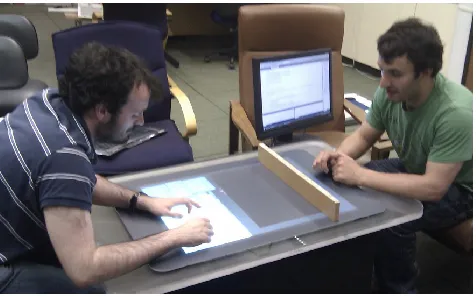
Figure 1. Experimental setup. The participant sat on the left and the experimenter sat on the right.
Consistency
Gesture sets designed by professionals are likely more con-sistent than those spontaneously generated by users. Con-sistency is a desirable property of interfaces in general, and it can be of increasing importance as the number of gestures increases. Consistently designed gesture sets can even form
a grammar that enables the invocation of many actions through combinations of relatively few subgestures [4,37].
Collaborative Awareness and Transferability
Gestures are often necessary in multi-user scenarios; a criti-cal aspect in CSCW is that collaborators can interpret and follow what others are doing (workspace awareness [11]). User-defined gestures will likely be harder to interpret by collaborators, whereas if everybody shares the same set they can follow other’s activities more easily. A unified set of gestures that is common across applications also enables people to use the same gestures in multiple systems without having to personalize the system for a particular person.
Effort/Time
Learning a set of gestures requires a certain amount of time and effort, but coming up with gestures does take time and effort as well. More importantly, the user-perceived time and effort that has to be invested into learning or creating gesture sets might be crucial for the success of the interface. As part of our study we investigate the effort and time of learning pre-defined gestures vs. inventing new ones.
EMPIRICAL EVALUATION
The related work and analysis sections above highlight im-portant unresolved questions about gesture memorability. Most importantly, can users remember gestures that they define themselves better than pre-designed or arbitrarily assigned sets? We designed a series of three studies to an-swer this question.
EXPERIMENT 1
Apparatus
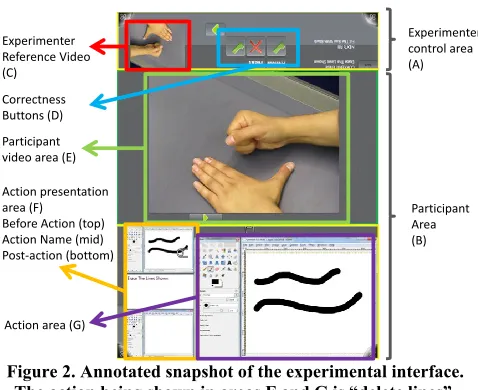
The experiment was carried out on a Microsoft Surface 1.0 device running custom experimental software. The partici-pant and the experimenter sat on opposite short ends of the surface (see Figure 1). The visible interface on the table was divided into two main areas (see Figure 2): the partici-pant area (B—85% of the display area), and the experi-menter area (A—15% of the display area). The experiment-er’s area was occluded from the participant’s line of sight by a small wooden vertical screen (see Figure 1).
The participant’s area was divided into three sections. The participant video area (Figure 2.E) was used to present ges-ture videos to the participant, the action area (2.G), where the participant would reproduce, create, or remember ges-tures, and the action presentation area (2.F), which dis-played the initial state, name of the action, and intended result of the gesture. The experimenter’s area contained an
experimenter reference video widget (2.C) and buttons to
provid-ed. The correctness of the gestures was determined by the experimenter by comparing the participant’s gesture with a pre-existing video that was not visible to the participant. A camera overlooking the action area from behind the partici-pant’s left shoulder recorded the user-defined gestures.
Experimenter control area (A)
Participant video area (E)
Action presentation area (F) Before Action (top) Action Name (mid) Post-action (bottom)
Participant Area (B) Experimenter
Reference Video (C)
Correctness Buttons (D)
[image:4.612.57.296.121.316.2]Action area (G)
Figure 2. Annotated snapshot of the experimental interface. The action being shown in areas F and G is “delete lines”.
Applications, Action Sets and Gesture Sets
The experiment followed a within-subjects design in which participants learned and remembered gestures in three or-der-balanced conditions: user-defined, pre-defined, and random gestures. For experimental purposes, three sets of 16 actions were selected for each of three applications, sim-ulating activities that could take place on or over a multi-touch surface: image editing, web browsing and word pro-cessing. These three applications were selected because they contain many possible actions (e.g., make selected text bold, access bookmark menu, create a new layer), and are familiar to most computer users. We needed familiar appli-cations that were distinct from each other in order to pre-vent the participant confounding the results by not being able to remember what an action meant. We believe that the set of actions that we selected are representative of most existing or future software-supported activities. We avoided similarity within and across applications when selecting actions. For example, because we selected the “go to previ-ous page” action in the web browser, we chose to avoid testing an “undo” action for the image editor and the word processor. The full list of actions is in the video figure. Each participant carried out three experimental cycles of learning and gesture memory testing, one in each condition (user-defined, pre-designed, and random), and with a dif-ferent application (image editor, web browser, and word processor). The applications were always visited in the same order, but condition balancing forced application-condition combinations to appear an equal number of times.
Pre-designed Gesture Set Condition
The pre-designed condition corresponds to a gesture set designed by two of the authors of the study. For each action
in a group of 16, a free-form gesture was designed that complied with the following conditions:
The gesture was specific enough to be distinguishable from simple touch manipulations such as pinching;
The gesture was distinguishable from other gestures with-in and across gesture sets;
The gesture could contain any sequence of free-form movements in the air, or hand contacts with the surface. In addition to these conditions, the designers applied their experience in the design of multi-touch gesture sets (e.g., [31]) to achieve reasonable gestures that were consistent with the task in three iterations.
User-defined Gesture Set Condition
In the user-defined gesture set condition, participants creat-ed their own gestures. Participants were given an image of the initial state, the name of the action, and the final state, and they had unlimited time to create a gesture for the ac-tion. Once they had decided on a gesture, they would repro-duce it once to be video-recorded by the experimenter. The experimenter reminded the participants multiple times that gestures did not have to be limited to contact with the sur-face (e.g., they could be articulated in the air).
Random Gesture Set Condition
The random gesture set condition was included to serve as a baseline comparison. It also represents stock gesture sets. Actions were assigned to gestures from the pre-designed set of gestures that participants did not get to see that corre-sponded to a different application. For example, if the par-ticipant went through the pre-defined, user-defined and random experiment order, they would have to learn the pre-defined gestures for the browser first, then design their own gestures for the word processor actions, and finally learn a randomly assigned set of gestures that were originally de-signed for the word processor, only randomly asde-signed to image editor actions. This approach guarantees that the ges-tures were plausible, not seen by the participant before or after, and not specifically created for the application.
Procedure
Six male volunteers (age 22 to 28) participated in the study. After providing consent and before starting the first phase of the first condition, participants went through a short demo in which they experienced a short version of the basic procedure with a set of actions not included in the rest of the experiment (“cut”, “copy”, “paste”, “print”). Partici-pants came four days to the lab to perform a Learn-Reinforce-Test cycle for each of the conditions. Testing for a learned set would always happen on the next day. For example, if L,R,T represent the three phases of each condi-tion detailed below, a participant in the user-defined (UD), pre-designed (PD), random (RD) order would do the fol-lowing sequence: Day 1 LUD+RUD; Day 2 TUD+LPD+RPD;
Day 3 TPD+LRD+RRD; Day 4 TRD. Days 1 and 4 took about
Learning/Creation
During this phase, participants were taught a gesture set. For each gesture in a series of 16, the interface would pre-sent an action in the action presentation area (Figure 2.F), which consists of an initial state, an action name, and a final state. For example, the “make bold” action would show a regular line of text in the top of the action presentation area
(top of part F in Figure 2), the words “make bold” in the middle, and the same text but in a bold typeface in the bot-tom. Then, a video would play in the participant video ar-ea, showing the specific physical gesture for the current action. The video could be played repeatedly if the partici-pant was not sure about what gesture was shown. Finally, the participant would reproduce the gesture in the action area; if the experimenter recognized the gesture as correct, this would trigger the same kind of result in the action area as was shown in the action presentation area (e.g., turning the existing text to bold).
The transitions between these stages were triggered by the participant, who had to touch on the different areas of the screen to progress through all the phases except the last, where the experimenter made sure that the reproduced ges-ture corresponded to that shown on the video. If not correct-ly reproduced, the experimenter would play the video again and ask the participant to repeat.
In the user-defined condition, participants did not have to learn a gesture set, but instead create one. The gesture crea-tion procedure was similar to the learning process, but in-stead of watching a pre-recorded video, participants were given unlimited time to design a gesture which, when a stable gesture was achieved, was video-recorded.
Reinforcement
Immediately after the full set of gestures was learned or created, the same set of gestures was tested. This phase was introduced to simulate real-world learning circumstances more realistically, where learning a gesture would not take place in isolation, but instead would happen within the con-text of actual use and application of the learned gesture set. The reinforcement process was similar to the learning phase, but participants would try to recall and reproduce the gesture corresponding to an action first, after which they would be notified of its correctness, and then shown the video of the correct gesture. In this phase, the gestures were presented in the same order as during the learning phase, and the correctness of the answer was judged by the exper-imenter and the result was logged by the system.
Next-day Testing
We collected the main memorability measure of the study in a session that took place the day after the corresponding learning phase. This testing phase was identical to the rein-forcement phase, except that no video reminding partici-pants of the right gesture was presented at the end of the trial, and the participants were not informed of the
correct-ness of their gesture (to avoid possible cross-gesture recall effects). The correctness of the gesture was judged by the experimenter with the help of the video used to teach the gesture, which was visible only to him. If the experimenter had any trouble seeing the participant’s execution of the gesture, he asked the participant to repeat the gesture again.
Measurements and Analysis
The main measure of the study was the number of correct recalls of gestures during the test phase. A gesture would be judged as correctly recalled if it involved the same parts of the hands, the same number of hands, fingers and contacts, and the same overall movement shapes and timing. If the reproduction of the gesture was similar, but with some no-ticeable difference (e.g., a different number of fingers, dif-ferent fingers used, or difdif-ferent number of taps) the gesture was considered a close gesture. The distinction between regular recall errors and close errors helps us distinguish between two types of memorability problems in gestures:
association errors (failure to associate the action with the correct gesture), and partial gesture errors (failure to recall the specifics of the gesture). The same criteria were applied to the measures during the reinforcement phase. Additional-ly, we measured the time to respond in both the reinforce-ment and test phases.
Since the gesture learning and design process was mostly participant-driven and the time spent defining or learning gestures was variable, we also measured the time that each participant spent learning or defining each gesture.
Visual inspection of the recall distributions revealed that these were plausibly normal. All time-based tests were per-formed on log-transper-formed data. No sphericity tests dis-counted sphericity. All post-hoc tests were corrected for multiple comparisons using Holm-Bonferroni corrections.
Results
Next-day tests
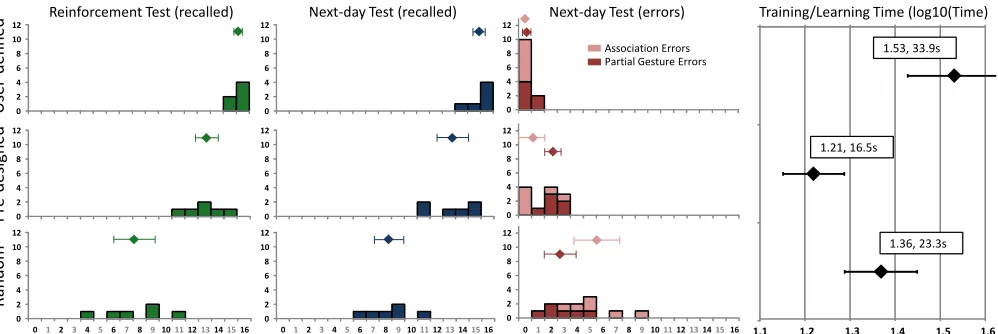
The average recall rates on the next day were 97% for the user-defined gesture set, 82% for pre-designed, and 52% for random (see Figure 3). A repeated-measures ANOVA of the recall rates showed a significant effect of the conditions (F2,10 = 58.7, p < 0.001, ηp2 = 0.92), which was also
reflect-ed in significant pairwise comparisons (all p < 0.013). To analyze the source of errors we performed a two-way RM-ANOVA of the number of errors with type of error (association, partial gesture) and gesture set (user-defined, pre-designed, random) as factors. The analysis showed sig-nificant main effects of both factors (F2,10 = 58.7, p < 0.001,
ηp2 = 0.92; F1,5 = 9.3, p = 0.028, ηp2 = 0.65) as well as an
interaction effect (F2,10 = 10.8, p = 0.003, ηp2 = 0.68). The
interaction indicates that the pattern of association errors might be different to that of partial gesture errors; to further investigate that, we ran separate ANOVAs for each type of error, which were both significant (F2,10 = 7.0, p = 0.013,
pattern in the post-hoc pairwise comparisons was different for each error type. For partial gesture errors only the dif-ferences between the random gesture set and the pre-designed and user-defined sets approached significance after adjusting for multiple comparisons (p = 0.017; p = 0.027), whereas for association errors all pairwise compari-sons were significant (all p < 0.05), with user-defined ges-tures having the least amount of average association errors (0.5), followed by pre-designed (1.3) and random (5.5).
Reinforcement tests and learning/training time
The proportion of correct answers in the reinforcement phase follows the same pattern as for the next-day test: 98% correct for user-defined, 81% for pre-designed and 47% for random. In a parallel analysis, an RM-ANOVA of the recall rates showed a statistically significant difference between conditions (F2,10 = 38, p < 0.001, ηp2 = 0.88), which was
also reflected in significant pairwise tests (all p < 0.008). Finally, we compared the amount of time that participants spent creating gestures in the user-defined condition vs. learning the gestures in the other two. An RM-ANOVA of the log-transformed times showed differences in training time (F2,10 = 17.9, p < 0.001, ηp2 = 0.78). It took participants
42.1s on average to define a gesture for the user-defined gesture set, whereas it took 25.9s and 17.9s to learn ges-tures from the random and pre-defined sets respectively (see Figure 3, column 4 for the log-transformed averages).
Summary and Discussion of Experiment 1
The results of this experiment show a potentially large ad-vantage in memorability of the user-defined gesture set (15% better recall than pre-designed on the next day, 17% right after the test), with a very clear disadvantage of the random set. Additionally, the error analysis indicates that association errors vary much more across types of gesture sets than partial gesture errors.
However, the time analysis showed that it takes approxi-mately twice the time to create a gesture than to present it to
the participant, at least in our experiment. This may have introduced a confound: it is possible that the advantages in memorability of the user-defined gesture set were due to the longer times participants spent creating it. Additionally, the data displayed in Figure 3 also shows a possible ceiling effect in the measures for the two most memorable gesture sets. Finally, the low number of participants is also a con-cern. Even though the significant results are unlikely to have been due to chance, the small sample size might have affected the reliability of the results.
EXPERIMENT 2
We designed a second experiment to address the above is-sues which a) included more participants, b) established a better control of the learning/creation time by forcing two consecutive repetitions of each gesture’s learning phase (pre-designed and random), and c) reduced ceiling effects by including larger gesture sets. Additionally, to avoid pos-sible effects due to sequential memorization, the tests used different orders for the training sequences and the test se-quences. Below we detail the changes in gesture sets and procedure with respect to the first experiment; all other el-ements of the study where kept constant.
Applications, Action Sets and Gesture Sets
The three applications were the same as in the first experi-ment, as were the three conditions. The action and gesture sets of the first experiment where expanded with six new gestures per application to reach a total of 22 per condition. The videos of the 66 gestures are in the video figure.
Procedure
Nine participants (6 males and 3 females; age 20 to 40) participated in the study for compensation. The procedure was identical to that described for the previous experiment, except for: 1) the phases took longer due to the larger num-ber of gestures, 2) the reinforcement and testing used a ran-domized order of gestures, 3) the learning of each gesture for the random and pre-designed conditions was repeated
0 2 4 6 8 10 12
0 2 4 6 8 10 12
0 2 4 6 8 10 12
0 2 4 6 8 10 12
0 2 4 6 8 10 12
0 2 4 6 8 10 12
0 2 4 6 8 10 12
0 1 2 3 4 5 6 7 8 9 10111213141516 0 2 4 6 8 10 12
0 1 2 3 4 5 6 7 8 910111213141516 0 2 4 6 8 10 12
0 1 2 3 4 5 6 7 8 910111213141516
Reinforcement Test (recalled) Next-day Test (recalled) Next-day Test (errors) Training/Learning Time (log10(Time)
User
-d
efi
n
ed
P
re
-d
esign
ed
R
an
d
om
1.1 1.2 1.3 1.4 1.5 1.6
1.53, 33.9s
1.21, 16.5s
1.36, 23.3s
[image:6.612.59.558.61.228.2]Association Errors Partial Gesture Errors
Figure 3. Results of Experiment 1. By column, (1) histogram, # of participants correctly recalling x gestures (x axis) during the re- inforcement test, (2) next-day correct recalls, (3) histogram of errors (by association/partial gesture), (4) Learning/training times (Log10). Diamonds are averages. Error bars show 95% confidence intervals.
twice to enable comparable times spent learning the pre-defined and random gestures and creating the user-pre-defined gestures, and 4) participants were incentivized to remember as many gestures as possible through a top-performer bo-nus. No participants had participated in the first experiment.
Results
Next-day tests
The average recall rates on the next day were 94% for user-defined gestures, 89% for pre-designed gestures, and 55% for random gestures (see Figure 4). An RM-ANOVA of the recall rates showed a significant difference between gesture sets (F2,16 = 44.4, p < 0.001, ηp2 = 0.85). Post-hoc pairwise
comparisons were significant between the random and both the user-defined and the pre-designed conditions (p < 0.001), but not between user-defined and pre-designed. An analysis of the distribution of the errors through a two-way ANOVA, with gesture set and type of error as main factors revealed significant effects of the gesture set (F2,16 =
44.4, p < 0.001, ηp2 = 0.85), type of error (F1,8 = 16, p <
0.004, ηp2 = 0.67), as well as a significant interaction of the
two (F2,16 = 48.1, p < 0.001, ηp2 = 0.85). A further analysis
of the two error types in separate ANOVAs for each type of error showed that association errors were significantly dif-ferent between conditions (F2,16 = 50.9, p < 0.001, ηp2 =
0.86), whereas partial gesture errors were not (F2,16 = 1.6, p
= 0.24, ηp2 = 0.16). This shows that most of the variability
in correctly recalled gestures across gesture sets can be ex-plained by different rates of association errors.
Reinforcement tests and learning/training time
Recall rates in the test immediately after the initial learning phase were 92% for user-defined, 71% for pre-designed, and 47% for the random condition (see Figure 4). The om-nibus repeated-measures ANOVA showed significant dif-ferences between conditions (F2,16 = 29.9, p < 0.001, ηp2 =
0.79). The pairwise tests were all significant (all p < 0.015). As a control, an analysis of the time spent learning or creat-ing gestures for the three gesture sets revealed no statistical-ly significant differences (F2,16 = 0.30, p = 0.74, ηp2 = 0.04).
Summary and Discussion of Experiment 2
The second experiment confirmed the results of the first experiment, with the additional assurance that the time in-vested in learning and creating was successfully controlled for across conditions. However, an important exception is that the user-defined and pre-defined gesture set were not statistically different in the next-day tests. This might again be explained as a ceiling effect. Although we tried to avoid ceiling effects by expanding the number of gestures, we also increased the learning time of pre-defined and random sets to make learning time equivalent to gesture creation time in the user-defined condition. This might have in-creased recall rates for the learned gesture sets, reintroduc-ing a ceilreintroduc-ing effect that precluded a significant difference between the pre-designed and user-defined sets.
An alternative explanation would be that the order random-ization of tests introduced in the second experiment affected each condition in a different way. Although this is unlikely, ruling out this possibility requires a third experiment.
EXPERIMENT 3
This study addresses the limitations of the second experi-ment, but we also added changes that would cast light on additional issues. We doubled the number of participants to increase the power of the statistical tests and to avoid possi-ble Type II errors. Additionally, we were interested in how recall rates of the different types of gesture sets would be affected by a longer period between learning and testing, which generalizes the results for gestures that are not im-mediately reinforced. Finally, besides the actual recall rates and times to learn/create, it is important to know whether participants perceive differences in effort, learnability, and time between sets, so we added questionnaires to elicit par-ticipants’ subjective experiences.
Procedure
18 participants (8 female; age 20 to 39) participated in the study for compensation. The procedure was identical to the second experiment except for the following elements: 1) participants only reinforced half of the gestures immediate-ly after the learning session (11 out of 22 gestures,
random-0 2 4 6 8 10 12
0 2 4 6 8 10 12
0 2 4 6 8 10 12
0 2 4 6 8 10 12
0 2 4 6 8 10 12
0 2 4 6 8 10 12
0 2 4 6 8 10 12
012345678910111213141516171819202122 0 2 4 6 8 10 12
012345678910111213141516171819202122 0 2 4 6 8 10 12
012345678910111213141516171819202122
Us
er
-d
ef
in
ed
Pr
e-d
esig
n
ed
Ran
d
o
m
Reinforcement Test (recalled) Next-day Test (recalled) Next-day Test (errors)
Association Errors Partial Gesture Errors
Train/Learn Time (log10(T))
1.3 1.4 1.5 1.6
1.42, 26.4s
1.41, 26.0s
[image:7.612.62.559.548.682.2]1.45, 28.0s
ly selected), 2) participants filled out a questionnaire with four Likert-scale questions after each gesture set’s next-day test session, 3) participants filled out a final questionnaire where they ranked the three gesture sets in terms of learning difficulty, recall difficulty, perceived time learning/creating the gestures, and fun. Participants were also incentivized. None of them had participated in any of the previous exper-iments. A different experimenter ran this study.
Results
Next-day tests
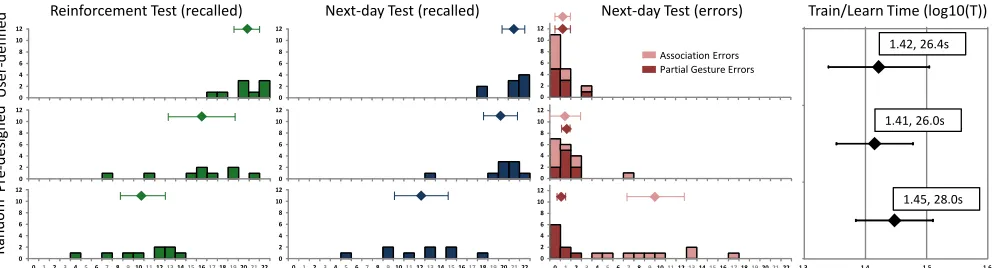
Average recall rates on the next day were 79% for user-defined gestures, 55% for pre-designed and 25% for ran-dom (see Figure 5). The reinforced (and non-reinforced) gestures were recalled in 85% (72%) of the cases for user-defined, 68% (41%) for pre-designed, and 38% (11%) for the random set. Overall values might have been lower due to the change of experimenter between experiments 1/2 and 3, but the same criteria were applied for all correctness judgments within each experiment. Differences between conditions were confirmed by a two-way RM-ANOVA with gesture set and reinforcement as factors, showing sig-nificant main effects for both factors (gesture set: F2,34 =
109.2, p < 0.001, ηp2 = 0.87; reinforcement: F1,17 =86.6, p <
0.001, ηp2 = 0.84). Post-hoc pairwise comparisons were all
significant for both factors (all p < 0.001).
Analyzing the distribution of the errors via a two-way ANOVA, with gesture set type and type of error as main factors) shows main effects of the gesture set (F2,34 = 109.2,
p < 0.001, ηp2 = 0.86), type of error (F1,17 = 59.3, p < 0.001,
ηp2 = 0.77), as well as an interaction of the two (F2,34 = 50.7,
p < 0.001, ηp2 = 0.75). Due to the interaction, we further
analyzed the two error types in separate ANOVAs for each type of error, which showed that association errors were significantly different between conditions (F2,34 = 90.9, p <
0.001, ηp2 = 0.84), whereas partial gesture errors were not
(F2,34 = 2.8, p = 0.074, ηp2 = 0.14). This shows that most of
the variability in correctly recalled gestures can be ex-plained due to association errors.
Reinforcement tests and learning/training time
The average recall rates on the reinforcement test (same day) followed the same pattern as the next-day results, but, as expected, with lower proportions: 76% for user-defined, 56% for pre-designed and 33% for random. A repeated measures ANOVA showed that the type of gesture set was significant (F2,34 = 29.8, p < 0.001, ηp2 = 0.63) as were all
post-hoc comparisons between gesture sets (all p < 0.005). Our control of the time spent learning/creating gestures was successful; there were small differences in the log-transformed time averages between the three conditions (user-defined 26.9s, pre-designed 29.8s, and random 31.2s—see Figure 5). The ANOVA was significant (F2,34 =
3.69, p = 0.035, ηp2 = 0.18) but the post-hoc tests only
showed a difference between user-defined and random (p = 0.031). The gesture set type that participants spent the most time learning was the one that had the worst recall.
Subjective measures
Participants perceived user-defined gestures as requiring less concentration to create, being easier to remember, and more fun. In the final questionnaire, participants ranked user-defined as easiest to learn, remember, less time-consuming and most fun. The non-parametric omnibus comparisons (Friedman) and post-hoc tests (Wilcoxon signed-ranks) are reported in Table 1. Finally, in a question asking about overall preference 17 out of 18 participants chose user-defined as their favorite set.
Summary and discussion of Experiment 3
This experiment provided the statistical power necessary to strengthen the findings from Experiment 1, without the pos-sible confound of learning time: user-defined gestures are
0 2 4 6 8 10 12
0 2 4 6 8 10 12
0 2 4 6 8 10 12
0 2 4 6 8 10 12
0 2 4 6 8 10 12
0 2 4 6 8 10 12
0 2 4 6 8 10 12
0 1 2 3 4 5 6 7 8 91011
0 2 4 6 8 10 12
0 1 2 3 4 5 6 7 8 91011
0 2 4 6 8 10 12
0 1 2 3 4 5 6 7 8 910111213141516171819202122
User
-d
efi
n
ed
P
re
-d
esign
ed
R
an
d
om
Reinforcement Test (recalled) Next-day Test (recalled) Next-day Test (errors)
Non-reinforced Reinforced
Association Errors Partial Gesture Errors
Training/Learning Time (log10(Time)
1.3 1.4 1.5 1.6
1.42, 26.9s
1.47, 29.8s
[image:8.612.58.558.495.674.2]1.49, 31.2s
more memorable than pre-designed or random gestures, and random gestures are difficult to remember across the board.
Omnibus Medians Post-hoc Sig
Question χ2(2)
Sig. UD PD RD UD-PD UD-RD PD-RD Concentration to learn ♦ 1 = low 12.2 0.002 5 6 7 0.001 0.01 0.17 Easy to remember ♦ 1 = very easy 22.5 <0.001 3 4.5 6.5 0.01 <0.001 0.001
Ease of articulation ♦ 1 = very easy 16.2 <0.001 3 3 4.5 0.8 0.001 0.01
Fun ♦ 1 = very boring 12.8 0.002 7 6 3.5 0.01 0.001 0.03
Difficulty learning (rank) 1 = hardest 21 <0.001 3 2 1 0.088 <0.001 0.001
Diff. remembering (rank) 1 = hardest 18.1 <0.001 3 2 1 0.16 <0.001 0.001
Learning time (rank) 1 = longest 24.1 <0.001 3 2 1 0.02 <0.001 0.001
Fun (rank) 1 = least fun 18.8 <0.001 3 2 1 0.01 <0.001 0.01
Table 1. Subjective test analyses. Medians are reported in green, yellow, red, for best, medium, worst set. Purple cells indicate statistically significant post-hoc comparisons.
The introduction of reinforced and non-reinforced gesture sets also shows that the differences between conditions hold for longer periods between learning and recall, which might be more common in real scenarios. As expected, reinforced gestures are more likely to be recalled in the next day than non-reinforced gestures.
The analysis of errors supports that the main differences in gesture set memorability can be attributed to differences in association errors, whereas the amount of partial gesture errors does not seem affected by the type of gesture set. Subjective measures indicate that participants perceived user-defined gesture sets as easier to learn, more fun, and less effortful. They also thought that they took less time to create and preferred them overall.
DISCUSSION
The data from our experiments provides strong support for the use of user-defined gesture sets over pre-designed and random sets. Overall, we can expect recall rate differences between user-defined and pre-designed gestures of up to 24%. The differences are also consistent across different time lapses. The increased memorability, in combination with other natural advantages of user-defined gestures (e.g., accessibility, optimization for the task) and the clear ad-vantages perceived by users suggest that user-defined ges-tures can be a good choice in many situations. We conjec-ture user-defined gesconjec-tures are more memorable because they allow individuals to more effectively take advantage of pre-established associations to their personal memories than what can be done by designers generically for all users. Naturally, there are many scenarios where user-defined gestures might not be applicable or desirable; for example, when people’s awareness of other’s gestures is important for the task, when the gestures are common to a large set of applications (e.g., cut, paste), and if recognizers cannot reli-ably recognize user-defined gestures. However, the rate of improvement in sensing and recognizer technology suggests that the technical limitations will be less relevant in the near future. It will still be the designer’s call whether to support pre-designed or user-defined gesture sets, but the designer
might also want to create systems that can switch from one mode to another.
For designers of gestures, our data suggests that partial ges-ture errors are less important than association errors. The associative link between action and gesture seems to be the key factor to make a gesture set memorable, as it is also highlighted by the poor performance of random gestures. Designing gestures without knowing the actions they corre-spond to (stock gestures) seems generally unadvisable.
Limitations and Future Work
Our experiments compared the memorability of user-defined sets to gesture sets designed by two authors. We believe that the latter are representative of the gesture sets that other designers will create. An empirical evaluation of the representativeness of these sets is difficult practically and methodologically, and falls out of our scope. It is pos-sible that a different designer could achieve a more memo-rable gesture set, but the large differences found in the study still show a significant advantage of user-defined sets. Similarly, our experimental design did not compare user-elicited sets. Whether user-elicitation (a sub-set of pre-designed sets) can improve memorability deserves atten-tion, but we do not anticipate user-elicited sets to have a significant advantage in this respect. Morris et al. [25], found that users preferred gestures that were created by more people, but the differences were relatively small (a 0.75 absolute difference on a 7-point Likert scale).
Our experiments are somewhat different from real-world gesture-learning contexts where gestures are learned while doing other tasks and are often used in sequences. Our re-search is a first step, but eventually our results will need to be confirmed in less controlled studies. Similarly, we chose applications for their familiarity. Applications other than browsers, image and word processors might be more com-mon on surfaces in the future.
There are other important aspects of gesture sets that might also affect gesture memorability. For example, the type of gesture (e.g., deictic, literal), the input technology (surface, in-air), and cultural background require further study.
CONCLUSIONS
[image:9.612.51.302.90.197.2] When not prevented by the context of use or the reliabil-ity of the recognizer, enable user-defined gesture sets.
To design a gesture set for better memorability, consider closely its relationship with the action that it invokes, rather than the specific features of the gesture itself.
Instead of using stock gesture sets, consider gestures designed for specific actions, or user-defined gestures. ACKNOWLEDGEMENTS
This work was supported by the Engineering and Physical Sciences Research Council (grant number EP/H027408/1) and the Scottish Informatics and Computer Science Alli-ance. Yizhou Qiang’s internship was supported by the School of Computer Science at the University of St An-drews. We thank Uta Hinrichs and Katherine Skipsey for their assistance.
REFERENCES
1. Anthony, L., Wobbrock, J.O. $N-protractor: a fast and
accu-rate multistroke recognizer. In Proc GI '12, 117-120.
2. Appert, C., Zhai, S. Using strokes as command shortcuts:
cog-nitive benefits and toolkit support. In Proc. CHI '09,
2289-2298.
3. Bau, O., Mackay, W.E. OctoPocus: A dynamic guide for
learning gesture-based command sets. In Proc. UIST '08,
37-46.
4. Baudel, T., Beaudouin-Lafon, M. 1993. Charade: remote
con-trol of objects using free-hand gestures. Commun. ACM 36, 7,
28-35.
5. Bragdon, A., Zeleznik, R., Williamson, B., Miller, T. and
LaViola, J., Joseph J. GestureBar: Improving the
approacha-bility of gesture-based interfaces. In Proc. CHI '09,
2269-2278.
6. Cockburn, A., Kristensson, P.O., Alexander, J, Zhai, S. Hard
lessons: effort-inducing interfaces benefit spatial learning. In
Proc CHI '07, 1571-1580.
7. Cohé, A. Hachet, M. Understanding user gestures for
manipu-lating 3D objects from touchscreen inputs. In Proc. GI '12,
157-164.
8. Freeman, D., Benko, H., Morris, M.R., Wigdor, D.
Shad-owGuides: visualizations for in-situ learning of multi-touch
and whole-hand gestures. In Proc. ITS '09, 165-172.
9. Frisch, M., Heydekorn, J., Dachselt, R. Investigating
multi-touch and pen gestures for diagram editing on interactive
sur-faces. In Proc. ITS '09, 149-156.
10.Goldberg, D. and Richardson, C. Touch-typing with a stylus.
In Proc. INTERACT '93 and CHI '93, 80-87.
11.Gutwin, C. Workspace awareness in real-time groupware
en-vironments. PhD. Thesis, University of Calgary, 1997.
12.Jansen, E. Teaching users how to interact with gesture-based
interfaces; a comparison of teaching-methods. MSc thesis, Eindhoven University of Technology, 2012.
13.Kin, K., Hartmann, B., DeRose, T. Agrawala, M. Proton:
mul-titouch gestures as regular expressions. In Proc. CHI '12,
2885-2894.
14.Kray, C., Nesbitt, D., Dawson, J., Rohs, M. User-defined
ges-tures for connecting mobile phones, public displays, and
tab-letops. In Proc. MobileHCI '10, 239-248.
15.Kristensson, P.O., Zhai, S. Command strokes with and without
preview: using pen gestures on keyboard for command
selec-tion. In Proc. CHI’07, 1137-1146.
16.Kurdyukova, E., Redlin, M., André, E. Studying user-defined
iPad gestures for interaction in multi-display environment. In
Proc. IUI '12, 93-96.
17.Kühnel, C., Westermann, T., Hemmert, F., Kratz, S., Müller,
A., Möller, S. I'm home: Defining and evaluating a gesture set
for smart-home control. IJHCS, V. 69, 11, Oct 2011, 693-704.
18.Leap Motion. http://leapmotion.com. Last.Acc. 2012-09-18.
19.Long, Jr., A.C., Landay, J.A., Rowe, L.A. Implications for a
gesture design tool. In Proc CHI'99, 40-47.
20.Long, Jr., A.C., Landay, J.A., Rowe, L.A., Michiels, J. Visual
similarity of pen gestures. In Proc. CHI '00, 360-367.
21.Lü, H., Li, Y. Gesture coder: a tool for programming
multi-touch gestures by demonstration. In Proc. CHI '12, 2875-2884
22.MacKenzie, I.S., Zhang, S.X. The immediate usability of
graf-fiti. In Proc. GI '97, CIPS, 129-137.
23.Microsoft Corp., Using Gestures. http://bit.ly/OXOvT4. Last.
Acc. 2012-09-19.
24.Morris, M.R., Huang, A., Paepcke A., Winograd, T.
Coopera-tive gestures: multi-user gestural interactions for co-located
groupware. In Proc. CHI '06, 1201-1210.
25.Morris, M.R. Wobbrock, J.O., Wilson, A.D. Understanding
users' preferences for surface gestures. In Proc. GI’10,
261-268.
26.Ni, T., Bowman, D., North, C. AirStroke: bringing unistroke
text entry to freehand gesture interfaces. In Proc. CHI '11,
2473-2476.
27.North, C., Dwyer, T., Lee, B., Fisher, D., Isenberg, P.
Robert-son, G.,Inkpen, K. Understanding Multi-touch Manipulation
for Surface Computing. In Proc. INTERACT '09, 236-249.
28.Rubine, D. 1991. Specifying gestures by example. In Proc.
SIGGRAPH '91, 329-337.
29.Oh, U. and Findlater, L. The challenges and potential of
end-user gesture customization. In Proc. CHI '13. Forthcoming.
30.Ruiz, J., Li, Y. and Lank, E. User-defined motion gestures for
mobile interaction. In Proc CHI'11, 197-206.
31.Schmidt, S., Nacenta, M.A., Dachselt, R., Carpendale, S., A
set of multi-touch graph interaction techniques. In Proc.
ITS’10, 113-116.
32.Sodhi, R., Benko, H. Wilson, A. LightGuide: projected
visual-izations for hand movement guidance. In Proc. CHI '12,
179-188.
33.Vatavu, R.D. User-defined gestures for free-hand TV control.
In Proc. EuroiTV '12, 45-48.
34.Wobbrock, J.O., Aung, H.H., Rothrock, B., Myers, B.A.
Max-imizing the guessability of symbolic input. In CHI '05 EA,
1869-1872.
35.Wobbrock, J.O., Morris, M.R. Wilson, A.D. User-defined
gestures for surface computing. In Proc. CHI '09, 1083-1092.
36.Wobbrock, J.O., Wilson, A.D., Li, Y. Gestures without
librar-ies, toolkits or training: a $1 recognizer for user interface
pro-totypes. In Proc. UIST '07, 159-168.
37.Wu, M., Shen, C., Ryall, K., Forlines, C., Balakrishnan, R.
Gesture registration, relaxation, and reuse for multi-point
di-rect-touch surfaces. In Proc. Tabletop’09.
38.Zhai, S. Kristensson, P.O. Shorthand writing on stylus
key-board. In Proc. CHI’03, 97-104.
39. Zhai, S., Kristensson, P.O., Appert, C., Andersen, T.H., Cao,
X. 2012. Foundational issues in touch-surface stroke gesture design - an integrative review. Foundations and Trends in