Master’s Programme in Computer, Communication and Information Sciences
Manish Thapa
Mitigating Threats in IoT Network using
Device Isolation
Master’s Thesis
Espoo, February 04, 2018
Supervisor: Professor N. Asokan Advisor: Ph.D. Samuel Marchal
Master’s Programme in Computer, Communication and In-formation Sciences
ABSTRACT OF MASTER’S THESIS Author: Manish Thapa
Title: Mitigating Threats in IoT Network using Device Isolation Date: February 04, 2018 Pages: ix + 64 Major: Mobile Computing, Services and Security
Supervisor: Professor N. Asokan Advisor: Ph.D. Samuel Marchal
In recent years, the proliferation of the Internet of Things (IoT) is seen across various sectors. There is a sharp inclination towards using IoT devices in both home and office premises. Many traditional manufacturers are enhancing their traditional appliances into IoT devices. With the myriad of devices in the market, there also exist vulnerable devices which can be exploited by adversaries. Several security solutions are trying to address different areas of security such as network security, privacy, threat detection, etc. IoT Sentinel is one such novel system that can identify device types based on their pattern of communication. IoT Sentinel proposes several isolation levels that can be used to control the traffic of devices identified as vulnerable. IoT Sentinel uses a Software-defined Networking (SDN) component for controlling the traffic flow for devices and isolating them.
In this thesis, we develop a solution to extend IoT Sentinel for device isolation, which is not dependent on SDN. The goal is to build a generic and deployable solution for network segmentation and device isolation that is suitable for home networks. The system divides the network into isolated subnets and places new devices into appropriate subnets. Communication between the subnets is con-trolled using a firewall thereby isolating them. We dynamically configure a DHCP server to place (lease IP address) new IoT devices identified by IoT Sentinel into appropriate subnets based on their level of vulnerability. Using our solution, we can confine vulnerable devices. Thus, the solution minimizes the damage that could be caused by vulnerable devices present in a network.
Finally, we evaluate the developed solution for its security requirement of device isolation. We also present the performance evaluation of our solution based on time-delay and throughput analysis. We observe that our solution adds an ac-ceptable delay to the existing IoT Sentinel processes. We also observe that the system throughput is not significantly affected by firewall rules in a home network scenario.
Keywords: IoT, IoT Sentinel, Device Isolation, Network Segmentation Language: English
I want to thank my supervisor Professor N. Asokan and my advisor Samuel Marchal from Aalto University for their support and continuous guidance.
I would like to thank my parents Mr Madhav Thapa and Mrs Meena Kumari K.C. (Thapa), my beloved wife Bimala K.C., my angel son Nirav Thapa, my brother Samujjwal Ram K.C., and my sister Parbati Subedi for the support they gave me in order to complete this thesis work.
I would like to thank my friend Gaurav Bhorkar for his never-ending motivational speeches and extensive proofreading help. I would also like to thank my other friends Sandeep Tamrakar, Kamal Panthi, Shiva Prasad Thagadur Prakash, and Sakib Nizam Khan for their countless discussions and suggestions during the work.
Otaniemi, Espoo, February 04, 2018 Manish Thapa
IoT Internet of Things
AP Access Point
BLE Bluetooth Low Energy
WLAN Wireless Local Area Network
IP Internet Protocol
SDN Software-defined Networking SOHO Small Office/Home Office
TCP/IP Transmission Control Protocol / Internet Protocol DHCP Dynamic Host Configuration Protocol
BYOD Bring Your Own Device
BS Base Station
DMZ Demilitarized Zone
EAP Extensible Authentication Protocol WEP Wired Equivalent Privacy
WPS Wi-Fi Protected Setup
PSK Pre-shared Key
CVE Common Vulnerabilities and Exposures NAT Network Address Translation
GUI Graphical User Interface JSON JavaScript Object Notation
OTS Off-the-shelf
UI User Interface
IoTSSP Internet of Things Security Service Provider AAA Authentication, Authorization, and Accounting VLAN Virtual Local Area Network
Abbreviations and Acronyms iv 1 Introduction 1 1.1 Motivation . . . 1 1.2 Contributions . . . 2 1.3 Organization . . . 3 2 Background 4 2.1 Internet of Things (IoT) Overview . . . 4
2.2 Threats in IoT Network . . . 7
2.3 IoT Sentinel . . . 9
2.3.1 System Design of IoT Sentinel . . . 9
2.3.2 Device Fingerprinting . . . 11
2.3.3 Device Type Identification . . . 11
2.3.4 Device Isolation . . . 12 2.3.5 Implementation . . . 13 2.4 Technical background . . . 14 2.4.1 Python . . . 15 2.4.2 Shell Scripting . . . 15 2.4.3 Raspberry Pi . . . 15 2.4.4 Hostapd . . . 16 2.4.5 DHCP . . . 16 2.4.6 Subnets . . . 18 2.4.7 iptables . . . 18 3 Problem Statement 20 3.1 Problem Statement . . . 20 3.2 Attacker Model . . . 21 3.2.1 Attacker Goals . . . 21 3.2.2 Attack Surface . . . 22 3.2.3 Attacker Capabilities . . . 22 v
4 Proposed Solution and Implementation 25 4.1 Proposed Solution . . . 25 4.1.1 Capabilities . . . 25 4.1.2 System Components . . . 26 4.1.3 Design . . . 27 4.1.4 Flow Diagram . . . 29 4.2 Implementation Choices . . . 31
4.2.1 Device Isolation and network segmentation . . . 31
4.2.2 Components . . . 32
4.3 Implementation . . . 32
4.3.1 Subnetting Approach . . . 32
4.3.2 DHCP Server Configuration . . . 34
4.3.3 iptables . . . 35
4.3.3.1 Rules for Isolating Subnets . . . 36
4.3.3.2 Rules for Enabling Internet Access . . . 36
4.3.3.3 Device Specific Rules . . . 37
4.3.3.4 Order of Evaluation of the rules . . . 38
4.3.4 Hostapd Configuration . . . 38 4.3.5 User Interface . . . 39 5 Evaluation 41 5.1 Security . . . 41 5.2 Functionality . . . 42 5.2.1 Performance . . . 43 5.2.1.1 Experimental Setup . . . 43 5.2.1.2 Timing Analysis . . . 44 5.2.1.3 Throughput Analysis . . . 46 5.3 Usability . . . 47 5.3.1 Deployment . . . 47
5.3.2 Demo User Interface . . . 48
6 Related Work 49 7 Conclusions 53 7.1 Summary of Contributions . . . 53 7.2 Future Work . . . 54 7.3 Conclusion . . . 55 vi
A.2 Hostapd Configuration File . . . 64
2.1 Smart home IoT Scenario [33] . . . 6
2.2 IoT Sentinel System Design [52] . . . 10
2.3 Sample Isolation Profile received from IoTSSP [53] . . . 12
2.4 Isolation Technique in IoT Sentinel [52] . . . 13
2.5 IoT Sentinel UI showing device identification [53] . . . 14
2.6 DHCP Client/Server Communication . . . 17
4.1 Network Isolation Design . . . 27
4.2 Flow Diagram . . . 30
4.3 Classing of Devices . . . 34
4.4 Example declaration for trusted subnet . . . 35
4.5 Iptables rule to prevent communication across subnets . . . . 37
4.6 Rules to enable Internet access for subnets . . . 37
4.7 UI before isolation profile is obtained . . . 40
4.8 UI after isolation profile is obtained . . . 40
5.1 System throughput vs. number of iptablesrules . . . 47
4.1 Network Segments Capabilities . . . 28
4.2 Network configuration for main network . . . 33
4.3 Subnet configuration . . . 33
5.1 Timing breakdown . . . 44
5.2 Timing Overhead Comparison . . . 45
5.3 Impact of Number of Rules in Throughput . . . 46
Introduction
1.1
Motivation
The Internet of Things (IoT) is a popular trend and is already a part of our lives. Numerous vendors are currently producing a wide range of IP-connected devices targeted for homes and offices. The number of IP-connected devices is expected to grow up to 50.1 billion by 2020 with a projected com-pound growth rate of 23.1 % between 2014 and 2020 annually [43].
In a home network, users typically connect their IoT devices to an AP (Access Point) with authentication methods such as Wi-Fi Protected Access (WPA), Wi-Fi Protected Access II (WPA2), Wi-Fi Protected Setup (WPS). Typically, all the devices become part of a single network provided by the access point. IoT devices available in the market have a varying level of secu-rity features. Many devices are sold by traditional home appliances vendors, which may not have adequate expertise in the security domain. As a result, several IoT devices are often shipped with flawed security designs and vulner-abilities. Moreover, several vendors do not provide security updates for their vulnerable devices in a timely manner. Therefore, there is a high possibility of vulnerable devices being a part of a user’s network. Vulnerable devices in the network provide an opportunity for adversaries to mount attacks by ex-ploiting vulnerabilities and perform malicious activities, for example, gaining unauthorized access to the user’s network or associated devices. Therefore, there is a need for a mechanism to identify vulnerable devices and control their communication in a network and mitigate the security risks involved.
IoT Sentinel [52] is a system that protects a user’s network from vulnera-ble devices by identifying and isolating them. The system provides an access point (AP) for IoT devices. IoT Sentinel identifies the type of a device and infers its vulnerability level. The information provided by IoT Sentinel is
called an isolation profile which defines abilities of a device for communica-tion. The communication of the vulnerable devices is controlled to mitigate the risks associated with it by isolating it from legitimate devices. IoT Sen-tinel uses a Software-defined Networking (SDN) controller to isolate devices. Traditional APs used in home networks usually do not support SDN, which limits the deployment of IoT Sentinel in home networks. In this thesis, we aim to find a generic solution which does not rely on SDN for device isolation. The goal of this thesis is to develop a solution for wireless and wired device isolation which is easily deployable for home networks. The solution is developed as an extension to IoT Sentinel. We aim to isolate devices in the network into different network segments and use generally available mechanisms for network segmentation and access control. The solution is intended to be simple, easy to use and to configure.
The proposed solution divides the user’s network into different segments using a subnetting approach. The devices in different subnets have com-munication capabilities according to their isolation profile. A DHCP server is used to define the network topology and allocate devices into different subnets. The communication across subnets is controlled using a firewall. The solution is based on customized DHCP server that uses the isolation profile from IoT Sentinel and isolates the devices by allocating them into appropriate subnets.
1.2
Contributions
The contributions of this thesis are:• A technique for automatically enforcing isolation profiles from IoT Sentinel using commonly available network primitives Our solution integrates with IoT Sentinel and automatically enforces the isolation profiles which are used to perform device isolation. IoT Sentinel uses an SDN based approach to utilize isolation profiles to perform device isolation. We proposed and implemented a mechanism to perform device isolation which uses commonly available network primitives and does not rely on SDN. Our technique divides the network into different isolated network segments. Different network segments are constructed by subnetting the network. Communication across the network segments is controlled by iptables rules. A DHCP server is customized to provide IP addresses in order to place devices into required network segments. We enforced isolation profiles to control the communication of a device with other devices in the network and the Internet.
• Evaluation of the implemented device isolation approach. We evaluated our device isolation solution to measure the delay over-head incurred on the IoT Sentinel setup for device identification. We observed a timing delay of +42.07% and +35.6% over IoT Sentinel de-vice identification while performing isolation for two test dede-vices. We also evaluated the effects of the number of firewall rules on the system throughput and observed that having 1000 iptables rules decreased the throughput by 2.72%. We also discussed the deployability of the proposed solution.
1.3
Organization
We now present the organization of this thesis and the information that is contained in subsequent chapters.
Chapter 2 describes the background information about IoT and the security in IoT networks. We also give an overview of the IoT Sentinel system and explain the related technical background for our work. Chapter 3 describes the problem statement and the attacker model. We also list and explain the requirements for our solution. Chapter 4 describes the proposed solution and the implementation details of the system. Chapter 5 evaluates the implemented system against the requirements and discusses the results. Chapter 6 presents the related work. Chapter 7 summarizes the contributions made by thesis, provides some directions for future work and draws conclusions.
Background
2.1
Internet of Things (IoT) Overview
Back in 1988, Mark Weiser coined the phrase “ubiquitous computing” which is referred to as a concept where computing is available anywhere and any-time [65]. The term “Internet of Things” was first coined by Kevin Ashton in 1999 [49]. Internet of Things, commonly referred as IoT is an ubiqui-tous concept where physical objects are connected to the Internet and have an ability to communicate over a network [56]. Such networked objects or things are referred as IoT devices and are deployed universally. The pene-tration of IoT has been seen across numerous sectors such as building and home automation, smart cities, smart manufacturing, industrial automation, automobiles, wearables, healthcare, farming etc. The power of connectivity offered by IoT has been utilized in various use cases related to such sectors. According to the analysts from the firm Juniper Research, the number of expected IoT connected devices will reach 38.5 billion by 2020 [47]. There-fore, IoT is one of the most current and popular areas of research in which many big companies are investing billions in research and development [60]. Having the extremely large number of interconnected devices, configuration and management of these devices do not seem feasible if we do not have automated approaches.
One of the application areas of IoT is Smart home. A smart home is a home with intelligent IoT household devices, which provides better living conditions to the owner. Smart home IoT devices are bought and installed in the home in order to improve the overall comfort and accessibility which makes regular household jobs automated, easier and better. The applicabil-ity of IoT devices in the home can be seen in different scenarios, for example, controlling of home lights efficiently using smart bulbs, automatically
taining the temperature and humidity of the house using smart thermostats, securing the entrances etc. People store lots of confidential and personal in-formation across such smart household devices. Such devices are connected to the Internet via the home network using the router equipment. Home is a place where people consider themselves safe and keep their belongings safe. So, maintaining the privacy of the user and securing the home network is an important task. IoT devices communicate using a different set of protocols available for communication. Different wireless standards like Wi-Fi [39], Bluetooth LE [26], ZigBee [29], Z-Wave [31] etc, exist are used to make IoT Smart home automation feasible [61] .
Figure 2.1 shows the typical IoT smart home scenario. A smart home con-sists of several smart devices. The major components in the figure are Access Point (AP), IoT devices, the Internet, the cloud service, and a control device (smartphone). AP is the central hub that connects different IoT devices to the external world. Usually, an AP is connected to the wired network and provides a point of communication among devices. Several IoT devices, for example, smart switch, smart fridge, smart TV, surveillance camera, ther-mostat, smoke detector etc are deployed in the home. These different devices have different features and tasks to support home automation. The control device is typically a smartphone which is used to configure and monitor dif-ferent IoT devices. The Internet is the major component that connects the IoT devices, AP, the control device, and cloud services together. Currently, most of the IoT devices requires vendor specific smartphone application for configuration and management purpose [4, 25] through the control device.
Whenever an IoT device is initially configured, it connects to AP for au-thentication using vendor-specific smartphone application installed on the control device. This initial configuration requires physical access to the de-vice for resetting purpose which improves the security issues that may arise due to unattended access. Dynamic Host Control Protocol (DHCP) server is a component in the router that provides IP connectivity information to devices. Once authentication is successful, IoT device gets the IP configu-ration from the DHCP server and becomes part of the network provided by AP. These devices are controllable remotely via the control device. Most IoT devices usually communicate with their vendor-specific cloud service to store and process data. Such data can be user privacy sensitive, for example surveillance cameras may send live capture of the room to their respective cloud service. The control device is used to control and monitor the IoT devices using a registered user account which displays data in a presentable way through the application.
2.2
Threats in IoT Network
The emergence of IoT has brought enormous possibilities and probable use cases that affect our lives from different aspects. With the upsides comes downsides as well. IoT has been increasingly popular and attractive even to attackers. Security problems in IoT environment arise due to careless gram design of IoT devices and heterogeneous interconnected complex pro-tocols [67]. Several attacks targeting connected devices have been reported in the media and include popular brand names like Philips [41, 44]. It has also been reported that even a single flaw can affect a wide range of prod-ucts from WiFi cameras, camera recorders and cloud storage devices from the same vendor [62]. A single fault affected multiple devices since manufacturers reuse vulnerable code across different device models. Recent news about two hackers remotely controlling the air-conditioning, radio, windshield wipers and even an accelerator of a jeep [45] present the security loophole in IoT systems installed in the jeep. Such kind of failure can be life-threatening for a driver of a jeep. There has been news [46] about WikiLeaks leaked document which reports that some models of Samsung televisions are also vulnerable. Those vulnerable TVs secretly record audio when the TV screen is off and send it to Central Intelligence Agency (CIA) server when TV is turned on and its Internet connection is re-established. In 2014, it was also revealed that more than 100,000 consumer gadgets including home networking routers, televisions, and refrigerators were targeted for a large-scale attack to send 750,000 malicious emails to individuals and business enterprises [12].
The stake of having vulnerable devices in the network is quite high. There is a strong urge to identify and control vulnerable devices before we grant them access to our home network. Securing a home network is difficult to achieve since numerous threats like denial of service, back door, and remote administration programs, malware etc exists [13]. With the enormous po-tential of IoT, it brings security and privacy concerns. Some IoT devices that are deployed in users’ network are vulnerable and can be exploited by attackers [46]. Since IoT devices are capable of connecting to the Internet, vulnerable IoT devices are attractive for attackers to target different kinds of attacks to other devices in the network and breaking into the network [57]. One solution to deal with such vulnerable devices is to patch them with an updated security solution. However, most device manufacturers do not produce patch on time because of associated overhead cost for support. It is also seen that production and support for devices are discontinued after the short period of time of its launch [1, 19].
routers which are widely used in home networks lack security measures such as wireless client isolation, guest network allocation, updated encryption modules etc. Naive users do not have adequate knowledge about the need for updating the router firmware. For a normal user, updating a firmware is a daunting task since it requires series of manual task. Thus old routers in-clude a high risk of being exploited due to lack of proper security mechanism and fixes.
Whenever a device joins the AP, it is authenticated by wireless authenti-cation mechanism implemented at the router. After successful authentiauthenti-cation of IoT device with AP, IoT device is granted IP connectivity. IP connectiv-ity leases are provided by DHCP server. In this kind of scenario, securconnectiv-ity provided by the AP is a crucial factor to protect the network. If AP is not protected with the security feature to restrict the capability of vulnerable devices, an attacker can use that vulnerable device to attack other devices in the network. For example, any compromised surveillance camera in ex-plained home setup may upload the live feed to some remote server so that attacker can have 24/7 live view of a home. This kind of situation breaches the overall security of the home which is fully against the purpose of hav-ing a camera at home. So, identification of device before granthav-ing access to the network is highly important. With proper identification of the device and defining its security boundaries, security of the overall network can be maintained.
A Wi-Fi network is one of the widely used ways to connect to the In-ternet. When IoT devices want to associate with Wi-Fi network, there is a need of establishing security relationship between IoT device and a Wi-Fi access point. The devices that want to connect to Wi-Fi networks are also referred to as supplicant. Wifi-networks make use of authentication protocol to build the trust relationship and verify the client. Different wireless secu-rity protocols, for example, WEP, WPA, WPA2-Personal, WPA2-Enterprise etc exists. Such security protocols are evolving and are enhanced to address the security need of a wireless network. These protocols ensure data confi-dentiality and integrity. Choosing older security protocols which are prone to dictionary-based brute force attacks questions the overall security of an access point. An attacker can perform an attack to extract the passphrase which can be used to join the network.
The need for identification of IoT devices and defining their capabilities for communication in a network is addressed in a recent work named IoT Sentinel [52]
2.3
IoT Sentinel
IoT Sentinel is a solution that can automatically identify the device type whenever a device is introduced in the network. It makes use of network traffic of a device during initial bootstrapping for device type identification. Device identification can help to define if the device is vulnerable or not. Based on its vulnerability assessment, IoT Sentinel provides an isolation profile for a device that can be used to define the capabilities of a device for further communication. After identification of a vulnerable device, proper protection mechanisms are deployed such that it can coexist with the other trusted devices in the network without affecting the security of the network. IoT Sentinel tries to achieve such protection by controlling the traffic flow of vulnerable devices.
2.3.1
System Design of IoT Sentinel
The system design goal of IoT Sentinel is based on the requirement of a brownfield approach. The term brownfield approach refers to scenarios where a solution needs to be integrated into an existing legacy system and the option of developing a new solution from the ground up is not available. The authors of IoT Sentinel [52] have defined a device-type to denote the combination of make, model and software version of a device. IoT Sentinel has two major components. The first component is the Security Gateway and another one is IoT Security Service. The design of IoT Sentinel is shown in Figure 2.2.
The Security Gateway is the core of IoT Sentinel implementation which collaborates with the IoT Security Service hosted in the cloud. Security Gateway acts as an access point for IoT devices to associate with the net-work. Security Gateway is deployed locally in a device capable of providing a wireless access point. Security gateway fingerprints new devices whenever they are first introduced to the network. Fingerprint capture of a device consists of some distinct communication pattern that can be used in the identification of the device. Such fingerprints are then sent to IoT Secu-rity Service for device type identification and vulnerability assessment. Once device fingerprint is received by IoT Security Service Provider (IoTSSP), it uses a machine learning-based device identification technique to compare the received fingerprint with existing reference fingerprints. After a comparison is made, the correct device type is identified. IoTSSP also maintains the database of isolation profile linked with the device type. Based on device type identified, a corresponding profile for device type is retrieved. IoT
Se-Figure 2.2: IoT Sentinel System Design [52]
curity Service returns back the corresponding isolation profile to the security gateway. Isolation profile contains information about the device name, isola-tion level, permitted IPs etc. An isolaisola-tion profile is used by security gateway to grant access to the network for a device. After the device is identified by IoTSSP and isolation profile is received by the security gateway, some de-vice isolation technique must be in place to utilize those isolation profiles and provide network access to the device. The technique adjusts network configu-ration settings and necessary enforcement rules at security gateway to ensure that the device gets connected to the network with predefined capabilities in isolation profile. The design of a system to utilize the isolation profile and maintain enforcement rules at security gateway ensures the segregation of the devices into different network segments.
2.3.2
Device Fingerprinting
Whenever a new IoT device is introduced to the network, we capture the communication involving the Wi-Fi association to build the fingerprint. The fingerprinting process is done using passively observed traffic. IoT devices have a vendor-specific procedure to associate the device to the gateway and induct into the network. So, the aim of fingerprinting procedure is to capture the distinguishable sequence of communication between the device and the gateway. When a newly observed MAC address is identified at the gateway, the fingerprint capturing process collectsnpackets{p1, p2, p3, p4...pn}. Since
device configuration time varies across different devices, a standard timeout is set to capture all the packets in two minutes. After the fingerprinting process is over, the feature extraction is done. 23 different features are extracted from each packet which generates a 23×nmatrixF, which is a device fingerprint. Packet features include different information about the typical protocols and features used during device association in Wi-Fi network. Authors then compressed the initial fingerprintF. F0is a compressed fingerprint generated from F, which is composed of 12 first unique vector packets p to produce 276-dimensional feature vector (12packets×23f eatures). F0 is used as input for device type identification.
2.3.3
Device Type Identification
The device type identification is done in two steps. The first step is finger-print classification, which relies on n classifiers. The device type identifica-tion process refers to the process of analyzing the fingerprint generated to identify the device type. For device type identification, the prerequisite is to have a classifier for each device type with reference fingerprints. They are im-plemented as Random Forest classifiers [36] which renders a binary decision if the input fingerprint matches the device type. When a new fingerprint F0 goes through the classification process, a prediction of the limited number of reference fingerprints for the candidate device types is done. In the second step, the edit distance discrimination is computed by comparing the finger-print with the subset of fingerfinger-prints matched after the classification process. The comparison is done by computing Damerau-Levenshtein distances [40]. The result of distance computation is used to get a global dissimilarity score with all the reference fingerprints. The lowest dissimilarity score gives the final predicted device type for the fingerprint.
2.3.4
Device Isolation
Device Isolation refers to the separation of a device in different network seg-ments. Once a device type is identified, IoTSSP extracts the corresponding isolation profile and returns it to the security gateway. The isolation profile is a JSON file that consists of a device name, isolation level, allowed IPs, and ID. The isolation level defined in the isolation profile determines which part of the network the device should be placed in. The isolation level values, 0, 1, and 2 correspond to strict, restricted and trusted level of isolation respec-tively. Figure 2.3 represents a sample isolation profile sent by IoTSSP. The sample isolation profile shows a device named ABCDEF with ID 1 and iso-lation level of 1 which implies that device should be placed in the restricted part of an untrusted network. The allowed ips field specifies that the device should be able to access IP address 13.20.224.22 but should not have access to the rest of the Internet. The significance of different isolation levels is explained further below.
{ "name": "ABCDEF", "allowed_ips": ["13.20.224.22"], "isolation": 1, "id": 1 }
Figure 2.3: Sample Isolation Profile received from IoTSSP [53]
Figure 2.4 depicts the isolation approach of IoT Sentinel. IoT Sentinel divides the user’s network into two network overlays: an untrusted (isolation level 0 and 1) and a trusted network (isolation level 2). Devices within these overlays should not communicate with each other. The trusted network should have unrestricted Internet access. An untrusted network is further divided into strict (isolation level 0) and restricted (isolation level 1). Internet connectivity should not available for the strict part of the untrusted network. The restricted part of the untrusted network should have limited Internet access. Untrusted devices which may need a limited set of vendor-specific cloud service access are placed on the restricted network. All vulnerable devices are isolated in the untrusted network so that they cannot mount attacks on the trusted devices. Enforcement rules are necessary to control the traffic in the network. Prior to our work, the enforcement rules in the network for these overlays are generated by a customized SDN controller according to the isolation profile. Such enforcement rules make network
isolation feasible by intercepting all traffic flows in the network and filtering them.
Figure 2.4: Isolation Technique in IoT Sentinel [52]
2.3.5
Implementation
The prototype implementation of IoT Sentinel consists of two major compo-nents, Security Gateway and a cloud-based IoT Security Service [53].
The Security Gateway is implemented in Raspberry Pi 3 device which sets up a wireless AP in infrastructure mode which ensures that all clients communicate only via the AP. The wireless AP is configured using hostapd [50]. hostapd consists of a configuration file named hostapd.conf which is used to configure different parameters required to set up an AP. The pro-totype implementation uses open-source Floodlight SDN controller v1.2 [32] which is customized to detect new devices in the network, initiate device fingerprinting and communicate with IoT Security service.
IoT Security Service is the service that is hosted in the cloud. IoT Security Service Provider in cloud hosts the machine learning based approach of IoT
Sentinel to identify the device type and return isolation profile.
Security Gateway and IoT Security Service communicates using restful API over HTTP/HTTPS.
A user Interface is developed for demo purpose and testing. User Interface depicts the real-time display of IoT Sentinel operations when a new device is detected at the gateway. It can provide information about current state of multiple devices being configured. The user interface is developed using Autobahn server [2]. Autobahn server allows tracking of real-time messaging between websockets which can be displayed in the browser. Figure 2.5 shows the user interface of the device going through IoT Sentinel device identifi-cation process. When a new device is encountered at the gateway, device features are extracted, compressed and sent to IoTSSP for classification. As seen in Figure 2.5, classification results are obtained which specifies that the device is identified as NetAmo whose isolation level is 2.
Figure 2.5: IoT Sentinel UI showing device identification [53]
2.4
Technical background
This section is intended to give a general overview of different technologies, tools, and components used in the implementation.
2.4.1
Python
Python [28] is an interpreted, object-oriented, high-level programming lan-guage. Python is highly readable and can be applied to solve various prob-lems both in product development and research prototypes. Python has been extensively used for scientific computing, web development, scripting, development of games etc. The Python implementation consists of numerous built-in and standard modules. Python distributions are available for mul-tiple platforms and are commonly used across most used operating systems (OS X, Windows, and Ubuntu). During the work, versions 3.4 and 3.5 of Python are used across different components. Several packages like Numpy, SciPy, and Pandas are available for Python which provides the basis for ef-ficient scientific computing. These packages provide high dimensional data structures and tools to work with it.
2.4.2
Shell Scripting
Shell Scripting [3] refers to the way of creating scripts that can be used in order to execute the tasks in a run time environment. Scripts help to auto-mate the tasks according to the user goals. Bash shell scripts are used widely during the implementation for automating the experimentation of prototype, invoking other external components, and maintaining the appropriate net-work configurations.
2.4.3
Raspberry Pi
Raspberry Pi is a single board basic computer developed by the Raspberry Pi foundation that is intended to raise the interest in computing for school going children [23]. It is equally popular for different purposes in academic research and prototype development because of its low cost. Several different versions of Raspberry Pi are available in the market. The considered model for im-plementation is Raspberry Pi 3 Model B which has support for Bluetooth and wireless LAN connectivity. Raspbian [7] is a free Debian based officially supported operating system which is optimized especially for Raspberry Pi hardware. Minibian [18] is the minimal version of Raspbian which does not have a GUI. The goal of using Minibian is to maximize resources utilization of Pi for our solution. Raspberry Pi device can be used as a wireless AP for prototype development.
2.4.4
Hostapd
hostapdstands for Host Access Point Daemon [50]. It is a software that can be used to turn a network interface into an access point. Using hostapd, it is possible to configure any device that supports Wireless Local Area Net-work (WLAN) in access point mode to a wireless base station. Many of the appliances that act as WLAN router are Linux computers which run hostapdsoftware. hostapdimplements IEEE 802.11 AP and IEEE 802.1/W-PA/WPA2/EAP/RADIUS Authenticators [50]. The configuration file for hostapd can be modified to set parameters such as listening wireless inter-face, Service Set Identifier (SSID) of a network, authentication algorithm to use such as WPA or WEP or both, passphrase to connect to network etc.
The 802.11 specification defines two modes of operation for wireless com-munication, namely, ad-hoc mode and infrastructure mode. In ad-hoc mode, all clients can communicate directly with each other, whereas in infrastruc-ture mode, clients are connected to a central access point through which all communication passes. The infrastructure mode provides increased wireless range and additional security controls [30].
2.4.5
DHCP
The Dynamic Host Control Protocol (DHCP) [42] is a network protocol that is widely used to automatically distribute network configuration parameters (eg. IP addresses) for hosts in a network. DHCP simplifies and automates the job of the network administrator to handle multiple devices and systems. There are different DHCP servers available, such as, isc-dhcp-server [14], dnsmasq[5] etc. The DHCP server can be customized for specifying fixed IP address for hosts and managing groups of devices.
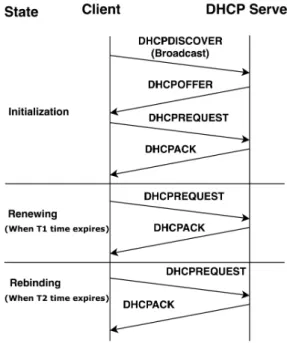
The DHCP communication between the client and server includes four different kinds of messages explained below.
1. DHCPDISCOVER: During the initialization state, when a client needs IP connectivity, it broadcasts DHCPDISCOVER packet on the network.
2. DHCPOFFER: The DHCP Server responds to the DHCPDISCOVER packet with a DHCPOFFER packet. The DHCPOFFER packet con-tains the IP address allocated to the device, default gateway, subnet mask, etc.
3. DHCPREQUEST: When a client receives the DHCPOFFER packet from the server, it responds back with DHCPREQUEST packet for an IP address offered by the server.
4. DHCPACK: The server sends back the DHCPACK packet as an ac-knowledgement to the DHCPREQUEST packet stating that the client can use the IP address for the amount of time leased.
Figure 2.6 depicts the DHCP client-server communication and the three different states of a DHCP client. In the Initialization state, a DHCP client does not have an existing lease for an IP address. To get a new lease, DHCPDISCOVER, DHCPOFFER, DHCPREQUEST and DHCPACK pack-ets are exchanged between the client and the server. The lease is limited for a certain amount of time as specified by the server.
Once half of the lease time expires (T1), the DHCP client resends DHCPRE-QUEST packet to the server asking for the renewal of the existing lease. If DHCP server has availability of address, it sends back DHCPACK back to the client which ensures the renewal of the lease.
If the renewal process is not successful after 87.5% of original lease time (T2) amount of time, the DHCP client goes in the rebinding state. The client broadcasts DHCPREQUEST messages to attempt to contact any available DHCP server. If it receives DHCPACK from any server, the rebinding is successful and client existing lease is renewed.
2.4.6
Subnets
A subnet is a logical division of an IP network [54]. The process of creating subnets is commonly known as subnetting. Subnetting help to make clear separation within a network. Two different kinds of addressing schemes are available for IP addresses. IPv4 is a 32-bit addressing scheme while IPv6 is a 128-bit addressing scheme. IPv4 address is a 32-bit 4 octant integer [37]. The value of each octant varies from 0 to 255. A single IP address basically consists of two parts: the network part and the host part. IP addresses are represented using Classless Inter-Domain Routing (CIDR) notation. For example, if we consider IP address 192.168.1.0/24, the /24 suffix at the end specifies that the first 24 bits of the IP address represents network part and last 8 bits represent the host part. We can borrow host bits to define subnets depending on the number of hosts we need in our network. If we borrow n bit from host part we can have2n subnets with2(8−n) hosts in each subnet. The efficient creation of subnets depends upon the requirements of a network.
2.4.7
iptables
Efficient filtering rules are essential in order to control the communication in a network. The Linux kernel has an inbuilt network packet processing system known as Netfilter. The configuration of Netfilter is done using iptables command. iptablesis widely used in order to create, maintain, and inspect the tables that are used for IPv4 traffic filtering. Using iptables, we can define such tables which consist of a set of rules. Using such rules we can filter/drop the packets. iptablesoperates at the network layer. We can de-fine several tables containing built-in chains or user-dede-fined chains. A chain consists of the set of rules that match the certain set of packets. Different special values like ACCEPT, DROP, QUEUE or RETURN can be specified in the rule to determine if the packet can be transmitted through the inter-face. Processing of packets is done sequentially across the rules in the chain. One simple example of iptables rule isiptables -A INPUT -i eth0 -p tcp -s 192.168.1.20 -j DROP. The rule ensures that TCP packets whose source is 192.168.1.20 are dropped at interface eth0. We can write multi-ple rules based on our requirement which can be defined based on device, network, port, interfaces etc.
iptables rules can also be used to enable Internet connectivity for net-works that are behind a Network Address Translation (NAT). IP masquerad-ing is a networkmasquerad-ing function that is used to provide connection to the Internet for devices with the private IP address that are connected to the Linux host with an Internet connection [16]. IP masquerading masks the requests from
nodes with the IP address of the host’s external device. For example, the following rule allows requests coming from source network 192.168.0.0/16 to be masked with the IP address of output interface eth0, thereby, enabling Internet connectivity.
iptables -t nat -I POSTROUTING -o eth0 -s 192.168.0.0/16 -j MASQUERADE
Problem Statement
3.1
Problem Statement
The IoT ecosystem consists of multiple devices from different vendors with varying security designs and implementations. In a typical home environment IoT setup, several IP-connected IoT devices coexist with different gateways, cloud-based systems, and other devices. Attackers are interested in the vul-nerable devices in the home network for various malicious reasons such as launching an attack against other devices in the network, exfiltrate personal data etc. Another example is that an eavesdropper can illegitimately gain access to a vulnerable device or sniff communication in the network. Thus, the presence of vulnerable IoT devices in the network introduces privacy and security concerns. Legitimate devices may also collect privacy sensitive data without the consent of the user. It is crucial to address the security of the home network effectively so that the IoT ecosystem runs with minimum security issues.
We present the following scenarios in which IoT systems can bring se-curity and privacy issues. Consider a malicious smart television, which is connected to the Internet that secretly records audio and sends it to some remote server without the knowledge of the owner. This scenario is presented by Hartley-Parkinson [46] in detail. In such a case, the malicious device must be identified and restricted from the home network. Consider another sce-nario where all the devices in a home are on a single unsegmented network. If some device is vulnerable, an attacker can access other devices or the network via the vulnerable device as a backdoor and perform malicious activities.
There is a strong need for isolating communication of vulnerable devices. A vulnerable device must be isolated such that its communication with other trusted devices in the network is restricted. If a potentially vulnerable device
connects to the network, it should coexist with other devices without affecting the level of security in the network. However, isolation should not affect the communication for secure devices. IoT Sentinel proposes a mechanism to identify vulnerable devices and protect the network against such devices.
IoT Sentinel provides the device identification service at the access point. In addition to device identification, IoT Sentinel implements device isolation in the SDN controller. SDN is more suitable for managing a large network which needs to adapt dynamically. Implementing SDN for home networks adds complexity and needs proper network administration skills. Moreover, most legacy off-the-shelf (OTS) routers do not support SDN. Thus, there is a need for a generic network segmentation solution implemented in the secu-rity gateway which can be easily deployed in home networks. The solution should replace the SDN component used in IoT Sentinel for device isolation. The new solution is intended to be a software solution, which removes the complicated aspect of SDN aided approach but provides a similar function-ality for device isolation. The solution must control communication of IoT devices within the IoT network and to the Internet. Device isolation in IoT Sentinel is based on the isolation profile of a device. Therefore, enforcement of the isolation profile obtained from IoT Sentinel provides the base of our work.
3.2
Attacker Model
To build a secure system, it is important to identify the threats to the sys-tem [55]. IoT Sentinel is targeted at a typical home or small office network setup. The AP provides IP connectivity to various wired and wireless de-vices. The authors of IoT Sentinel have assumed that when an IoT device initially connects to the AP, it might have security vulnerabilities but is ini-tially considered benign [52]. In this section, we present an attacker model for a Wi-Fi network with respect to IoT Sentinel. We explain the attacker goals, attack surface, and attacker capabilities.
3.2.1
Attacker Goals
The primary goal of an attacker is to compromise a vulnerable device. An attacker may want to use a compromised device as a stepping stone to launch attacks against other devices in the network. The attacker may communi-cate with a compromised device remotely from the Internet. If attackers have control over a compromised device in a network, they may spread malware or viruses to other devices in the network. An attacker may want to sniff,
tamper or obstruct the communication between the device and the AP or other devices. The attacker may want to tamper network parameters, exfil-trate data to the Internet, obtain security credentials etc. The attacker may use the compromised device to attack devices or services on the Internet.
3.2.2
Attack Surface
An attack surface refers to the entry points in the system where an attacker can get unauthorized access and perform malicious activities. In a home network, vulnerable devices form a major part of the attack surface and can be exploited to compromise different aspects of a network. The compromises may be related to disrupting the communication channel, the AP, or the devices themselves. The communication channel between a device and the AP forms an attack surface since it can be subject to several attacks such as sniffing and tampering. The direct device to device communication can also be considered as an attack surface since it is beyond the control of the gateway. We consider that the attacks on the devices and network are remote rather than physical. Although even physical access to the devices can lead to tampering.
3.2.3
Attacker Capabilities
A compromised IoT device serves as the entry point to the network for an attacker. An attacker can have control over a compromised device. If com-munication of IoT device is unencrypted, an attacker can passively monitor traffic [35] in the communication channel. An attacker can use compromised devices to communicate with other legitimate devices in the network. An attacker can introduce malware through a compromised device and spread the infection to other devices. An infected IoT device can be used to locate other vulnerable devices on the Wi-Fi network. A compromised device can open an attack path for remote attackers (e.g. through an SSH tunnel). An attacker can apply reverse engineering techniques on a compromised IoT de-vice to find and use backdoors (created for testing) in order to exploit the device [67]. An attacker can capture the 4-way handshake between a device and the AP and perform a dictionary attack on the message integrity data to find out the passphrase [51].
3.3
Requirements
This section explains the requirements for the solution to address the prob-lem statement explained in Section 3.1. Requirements S1 is a security re-quirement. Requirements R1, R2, and R3 are functional requirements while requirements U1 and U2 are usability requirements.
S1: Restricting communication of vulnerable devices
The solution must restrict communication of vulnerable devices and isolate them. This means that a vulnerable device should not be able to commu-nicate with rest of the network and the Internet. This would potentially restrict the capabilities of an attacker that are discussed in Section 3.2.3. With this requirement, we intend to reduce the attack surface area. All de-vice to dede-vice and dede-vice to Internet communication must be analyzed and controlled at the security gateway. Communication between devices in dif-ferent network segments should not be allowed. The solution should ensure that all communication is controlled and monitored.
R1: Enforce isolation profile from IoT Sentinel
IoT Sentinel [52] defines an isolation profile for each device type. The iso-lation profile for a device consists of information that is used to segregate it. The solution should create an isolation environment which is able to sep-arate devices into different network segments based on the isolation profile provided by IoT Sentinel.
R2: Easy and fast (re)configuration of network
Whenever a new device is introduced in a network, the reconfiguration pro-cess of the network to integrate the device should have a low overhead and no impact on other devices. An IoT device may have a specific profile allowing access to certain IP addresses after initial bootstrapping. Therefore, access control mechanism for a specific device or a group of devices should also be supported dynamically according to the information specified in the isolation profile.
R3: Performance
The usability of the system is a crucial factor to consider. The system should have a high usability, low-performance overhead, with minimum time
over-head on IoT Sentinel’s existing processes. Timing and bandwidth analysis of the introduced solution should be evaluated.
U1: Deployment
The device isolation solution is intended to be easily deployable in Off-the-shelf (OTS) routers or gateways. The choice of tools used for device isolation should be suitable for its deployment in OTS routers.
U2: Demo user interface
The isolation approach should be depicted with a user interface (UI) that is useful for showing the different steps of device isolation. The UI is intended to be helpful for collecting data for evaluation and debugging purposes.
Proposed Solution and
Implemen-tation
In this chapter, we describe the proposed solution and its implementation. The implementation work is an enhancement to IoT Sentinel to address the requirements discussed in Section 3.3. We first discuss the capabilities needed for the solution in Section 4.1.1. Sections 4.1.3 and 4.1.4 present the design and flow diagram of the solution. Section 4.2 discusses the implementation choices for the techniques and tools used in the solution. Section 4.3 describes the implementation details of the system.
4.1
Proposed Solution
4.1.1
Capabilities
The capabilities of the intended solution are as follows.
Enforcement of isolation profile As mentioned in requirement R1, the system must use the isolation profile obtained from IoT Sentinel. First, the isolation level and allowed IPs should be parsed from the isolation profile. Thereafter, the device must be placed into an appropriate network segment based on the isolation level which determines if the device is vulnerable or not.
Construction of Network The system must define a network where vices can be segregated into untrusted and trusted networks. As de-scribed in Section 2.3.4, the network should be divided into Strict, Restricted and Trusted isolated network segments.
Control of Communication The system should have the ability to control the communication between devices. The objective is to control the communication of devices according to their isolation level. One such capability is to prevent the communication of vulnerable devices to trusted devices and the Internet.
Dynamic Management of hosts The system should make sure that the devices (hosts) get the correct configuration for connectivity during initial device configuration and later device functioning. Initially, the device should have access to the Internet for device configuration. After the device is configured, based on its isolation profile, the network configuration for the device must be updated dynamically according to its network segment determined by isolation level.
4.1.2
System Components
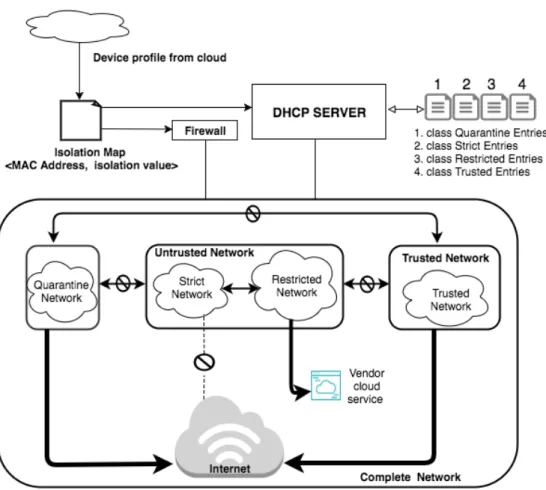
The proposed solution consists of the following components. Figure 4.1 de-picts the major components of the proposed system. The major components are isolation map, DHCP server, and firewall. User Interface is an additional component which is not responsible for core responsibilities of the solution but is useful for tracking of connected devices and debugging. The compo-nents are described below.
Isolation Map The isolation map is a list of device MAC addresses mapped to their isolation levels. The isolation map is placed locally at the se-curity gateway to keep track of connected devices and their isolation levels. The isolation map is updated every time a new device is con-nected or an isolation profile is received from IoTSSP.
DHCP Server The DHCP Server provides IP addresses and network con-figuration settings to the client connected to the wireless AP. The net-work segmentation is defined in the DHCP server in the form of sub-nets. The management of different subnets and its components enables us to fulfill the capabilities of construction of network and dynamic management of communication of devices.
Firewall The firewall is used to filter communication between the devices or network segments. This enables us to fulfill the capability of the system to control communication. By setting appropriate rule we can allow or deny Internet connectivity to the network segments. Device specific rules for connectivity to specific addresses can also be configured using the firewall.
User Interface A user interface is a demo tool that is helpful to keep track of different steps a device is going through during the device identifica-tion and device isolaidentifica-tion processes. The user interface is not a major component for actual isolation operation, but is beneficial for debug-ging the solution under development.
4.1.3
Design
Figure 4.1 describes the interaction between the components mentioned in Section 4.1.2 as well the network isolation design of the solution.
Figure 4.1: Network Isolation Design
The solution depends on IoT Sentinel device identification service in the cloud to provide the isolation profile, based on which the placement of the device in a segmented network is carried out. However, the network must be first divided into several segments which are isolated from each other.
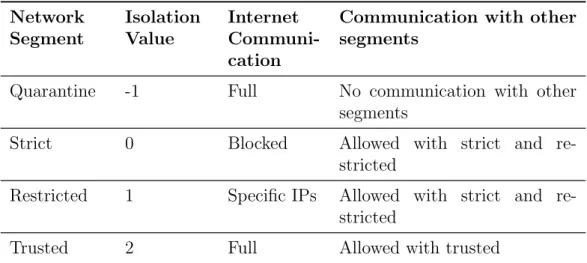
In our solution, the network is divided into four subnets namely quarantine, strict, restricted, and trusted. The quarantine subnet is the network segment where devices are initially placed during device configuration process. The isolation level for devices in quarantine segment is set to -1 until the actual isolation level is received from the cloud. The strict, restricted, and trusted subnets are for the devices with isolation value 0, 1, and 2 respectively. The abilities of network segments are illustrated in the Table 4.1. For example, the restricted subnet can access only specific IP’s specified in the isolation profile and cannot communicate with subnet other than strict and itself. The DHCP server is configured to divide the network into the four subnets described above. In order to keep the subnets isolated, a firewall must be configured according to the capabilities described in Table 4.1.
Table 4.1: Network Segments Capabilities Network Segment Isolation Value Internet Communi-cation
Communication with other segments
Quarantine -1 Full No communication with other segments
Strict 0 Blocked Allowed with strict and re-stricted
Restricted 1 Specific IPs Allowed with strict and re-stricted
Trusted 2 Full Allowed with trusted
At the security gateway, whenever a new device is associated with the AP, the solution should place the device in the quarantine network until its isolation profile is obtained from IoTSSP. We need to put the device in quarantine network because IoT Sentinel takes time to fingerprint the device and obtain the isolation profile. When the isolation profile is obtained, the device is moved to the appropriate network segment according to its isolation level.
The solution utilizes the isolation map to keep track of the isolation level of the devices. When the device is in the quarantine network, the isolation map has the default isolation level as -1 for the device. When the actual isolation level is obtained from IoTSSP, the corresponding entry in the isola-tion map is updated. The soluisola-tion keeps track of any changes in the isolaisola-tion map and configures the DHCP server accordingly. The DHCP server is used
to grant IP address and lease time to a device based on its isolation level in the isolation map.
The firewall filters the communication across the different network seg-ments defined. It also ensures the Internet connectivity required for certain network segments. The system also updates the firewall in order to apply any device-specific requirements in the isolation profile such as allowing com-munication with specific IPs.
4.1.4
Flow Diagram
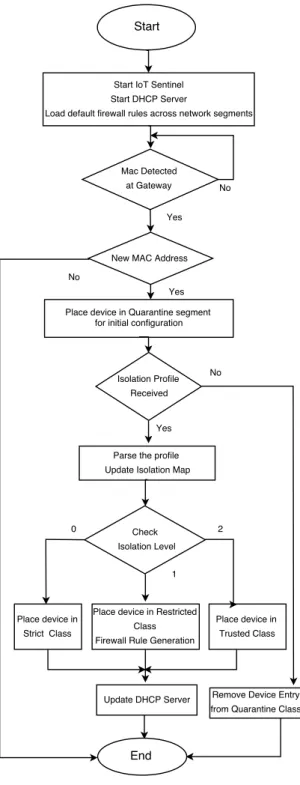
The flow diagram in Figure 4.2 presents the flow of control in the system. Firstly, IoT Sentinel is started which also starts the wireless AP to al-low IoT devices to connect to the home network. Thereafter, the solution starts the DHCP server with the configuration to create four required sub-nets namely quarantine, strict, restricted, and trusted. Then the default firewall rules are loaded which ensures the isolation of subnets as mentioned in Section 4.1.3.
Our solution then waits for detection of new MAC address. When a new MAC address is detected, we add an entry in the isolation map with isolation level -1 and then update the DHCP server to place the device in quarantine subnet for initial configuration. Meanwhile, IoT Sentinel extracts the device fingerprint and sends it to IoTSSP to obtain the isolation profile. Any errors during the fingerprinting process are reported in the dashboard on the UI. Note that, if the device has previously been configured successfully, it will already have an entry in the isolation map. In such a case, the DHCP server configuration file should ideally contain the appropriate entry for the device and it should automatically get placed in its previously assigned subnet.
The isolation level is then checked from isolation profile and the configu-ration files for DHCP server are updated and reloaded. DHCP configuconfigu-ration files are updated such that if the isolation level is 0, 1, or 2, the device is moved to strict, restricted, or trusted subnet respectively. Effectively, this means that when the lease for the device in quarantine subnet expires, the DHCP server will assign an IP address to a device in the new subnet based on the updated configuration. For example, if an isolation level for a device is 0 in isolation profile, after DHCP server update, it will get an IP address from strict subnet when its initial lease from quarantine subnet expires.
If the isolation level for a device is 1, it also consists of a set of allowed IPs that device can communicate. Thus, firewall rules are generated for the device to access certain allowed specific IPs.
In case of an error situation where the isolation profile is not received from IoTSSP, the DHCP configuration files are updated to remove the device from
the quarantine subnet and the dashboard is updated with an error message on the UI. This will effectively disconnect the device from the network when its initial lease expires. This prevents any devices from persistently being in the quarantine subnet if their isolation profiles cannot be obtained in case of any error. This ensures if isolation profile is not received for a device, it will be removed out completely from the network.
4.2
Implementation Choices
In this section, we justify the implementation choices for techniques and tools made for the solution.
4.2.1
Device Isolation and network segmentation
The objective of device isolation is to build isolated network segments within the internal private network and between the external Internet world. We studied various techniques that are used to facilitate the network segmenta-tion. We studied two different approaches to perform device isolasegmenta-tion. The first choice is setting up different isolated subnets and customization of a DHCP server to provide IPs dynamically in different subnets. Subnetting a network is done at layer 3 (network layer) of the TCP/IP model. The subnets are isolated from each other by applying relevant firewall rules. The second choice for the solution is to use a dynamic Virtual Local Area Network (VLAN) [8]. Using dynamic VLAN, we can partition the network to create isolated segment at layer 2 (data link layer) of the TCP/IP model. The subdivision of the network into multiple VLANs is done by configuring the network equipment such as a switch. A wireless user is placed in a specific VLAN based on credentials supplied by the user based on the user group set in the RADIUS server.
We decided to use the approach of subnetting to implement the device isolation and network segmentation since it does not require any additional network equipment as in the case of VLAN. Subnetting is a standard prac-tice of dividing a network into smaller segments. By creating subnets we can fulfill the solution’s capability of construction and division of the network into different segments. The subnetting approach for device isolation with a DHCP server and a firewall is not dependent on any external Authentication, Authorization, and Accounting (AAA) server like RADIUS. All the configu-ration can be done is one host thus making administconfigu-ration easier. Moreover, free and open source implementation of the DHCP server and firewall are easily available to implement the subnetting based approach.
4.2.2
Components
Another important decision is to choose the DHCP server. DHCP server to use should be able to run on the Linux platform. We have different isola-tion levels for a device which correspond to network segments. DHCP server should be customizable in order to address the need for different network segments and device isolation levels. isc-dhcp-server [14] is open source software that can be configured to manage different classes of devices and define the topology of network using subnets. The isolation level of a de-vice can be mapped to a class of dede-vice in the isc-dhcp-server which is easy to manage and configure. Therefore we use isc-dhcp-server as our choice of the DHCP server. This helps in fulfilling our solution’s capability of construction of the network and dynamic management of hosts.
We useiptables [17] for firewall in order to address the control of com-munication capability of our solution. It is also easy to obtain information about how to construct effective iptables rules. iptables is included by default in Linux distributions and is a well-known utility, thereby making it an obvious choice.
For scripting purposes we use Python [28] in order to integrate and con-figure different components (firewall, DHCP server, IoT Sentinel, etc.) to fulfill the capability of enforcing the isolation profile. Python is a simple general purpose programming language. Moreover, Python is already used in the IoT Sentinel project.
4.3
Implementation
For implementing the solution we first describe the actual IP configuration of the subnets which includes IP addresses and ranges. Then, we configure these subnets in the isc-dhcp-server DHCP server. Thereafter, we implement the iptables rules and extended the IoT Sentinel user interface. We also described the configuration of hostapdto support device-specific Pre-Shared Key (PSK).
4.3.1
Subnetting Approach
The DHCP server is configured such that the network uses the address 172.16.0.0/16. We can also use other private space depending on the size of the home IoT network. The main network configuration is presented in Table 4.2. We can accommodate a maximum total of 216−2 (65534) hosts in the whole network.
Table 4.2: Network configuration for main network Network Parameter Value
Network 172.16.0.0/16 Netmask 255.255.0.0 Broadcast 172.16.255.255 HostMin 172.16.0.1 HostMax 172.16.255.254 Hosts/Net 65534
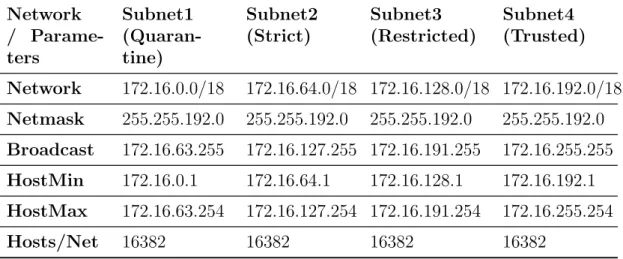
The main network is divided into four different subnets namely quaran-tine, strict, restricted and trusted. The subnet configuration is presented in Table 4.3. Since we have the total of four subnets, we borrowed two bits from the host part for subnetting. Thus, each subnet can hold up to 16382 devices. However, borrowing more bits can give more flexibility and leave space for the creation of additional subnets in the future, but less number of hosts in each subnet. Considering the number of hosts in a typical home network, the approach we used leads to a waste of host addresses in the quar-antine subnet since the number of devices that will use quarquar-antine subnet is lower compared to other subnets. For an optimized network setup, it is recommended to have a smaller quarantine subnet and bigger other subnets. Nevertheless, the current configuration is easy to understand and setup.
Table 4.3: Subnet configuration Network / Parame-ters Subnet1 (Quaran-tine) Subnet2 (Strict) Subnet3 (Restricted) Subnet4 (Trusted) Network 172.16.0.0/18 172.16.64.0/18 172.16.128.0/18 172.16.192.0/18 Netmask 255.255.192.0 255.255.192.0 255.255.192.0 255.255.192.0 Broadcast 172.16.63.255 172.16.127.255 172.16.191.255 172.16.255.255 HostMin 172.16.0.1 172.16.64.1 172.16.128.1 172.16.192.1 HostMax 172.16.63.254 172.16.127.254 172.16.191.254 172.16.255.254 Hosts/Net 16382 16382 16382 16382
4.3.2
DHCP Server Configuration
The main configuration file for isc-dhcp-server is dhcpd.conf. In the default configuration, the DHCP server listens on a network interface and provides IP address from a range defined in the configuration file. We can configure the dhcpd.conf file according to the network topology with dif-ferent subnets declarations. Each subnet declaration is specified with its address, subnet mask, lease time, etc. Four other configuration files repre-senting the class for subnets are also used by DHCP server.
A class is a grouping of client devices. The devices can be grouped in a class by matching their MAC hardware addresses. Figure 4.3 shows a sample configuration file for a Trusted class. Each subclass entry in the example configuration is a MAC address of a device that is placed in the Trusted class.
class "Trusted" {
# match hardware address of the devices match hardware;
}
# Devices (MAC addresses) in the class subclass "Trusted" 1:98:01:a7:ae:57:23; subclass "Trusted" 1:c0:ee:fb:35:73:e2; subclass "Trusted" 1:d0:27:00:02:eb:2e;
Figure 4.3: Classing of Devices
We define four classes Quarantine, Strict, Restricted and Trusted. Each class is defined for the corresponding subnet. Each class is defined in a separate files (e.g., dhcpd.conf.classQ for Quarantine class). These files are then included in the main dhcpd.conf using the include statement. This way the configuration is modular and and we only need to modify the class files in order to move the devices between different subnets. For example, if a device needs to be moved from quarantine to strict subnet we need to delete the entry from Quarantine class file and add it to theStrict class file. The full DHCP configuration file is described in Appendix A.1
The subnet declaration also contains apoolsection which defines the IP address range for the subnet and the class of devices which are allowed to be a part of the subnet. Figure 4.4 shows the configuration for a trusted subnet to allow devices from the Trusted class. Thus to place a device in a certain subnet, its entry must be present in the corresponding class. The
lease time for quarantine subnet is set for 40 seconds since we do not want the device to stay unnecessarily long in quarantine subnet after receiving the isolation profile. However, lowering the lease time further also increases the DHCP communication overhead in DHCP server.
subnet 172.16.192.0 netmask 255.255.192.0 { option broadcast-address 172.16.255.255; option routers 172.16.0.1;
default-lease-time 600; max-lease-time 600;
option domain-name "local";
option domain-name-servers 8.8.8.8, 8.8.4.4; #Range of address for Trusted Subnet
pool {
allow members of "Trusted";
range 172.16.192.1 172.16.255.254; }
}
Figure 4.4: Example declaration for trusted subnet
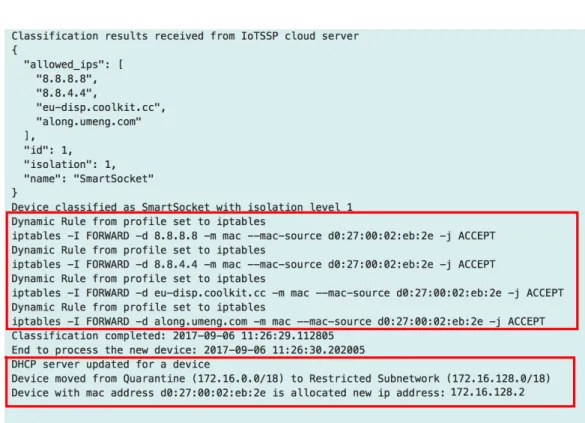
Consider an example scenario from the point of view of the device. For the first time when the device is connected to the network, the solution will put the device’s MAC address in the Quarantine class file. This will make the DHCP server to give an IP address to the device in the quarantine subnet with a lease time of 40 seconds. The lease can get renewed until its entry exists in the Quarantine class file. When the isolation level is obtained (e.g. 2), the solution will remove the device’s entry from the Quarantine class and create an entry in the Trusted class file (for isolation level 2). Thus when the lease for the device in quarantine subnet expires, the device will ask for a new lease. However, the DHCP server will not grant a new lease for the IP address in the quarantine subnet, since the device will not match the Quarantine class but the Trusted class. Instead, the DHCP server will offer an IP address in the trusted subnet with a new lease. Thus, the device is effectively moved from the quarantine subnet to the trusted subnet.
4.3.3
iptables
Firewalls are configured with a set of rules for a network interface to allow, deny or filter traffic. iptablescan be set to filter the communication based
![Figure 2.1: Smart home IoT Scenario [33]](https://thumb-us.123doks.com/thumbv2/123dok_us/10970909.2985209/15.892.163.733.182.872/figure-smart-home-iot-scenario.webp)
![Figure 2.2: IoT Sentinel System Design [52]](https://thumb-us.123doks.com/thumbv2/123dok_us/10970909.2985209/19.892.171.703.232.650/figure-iot-sentinel-system-design.webp)
![Figure 2.4: Isolation Technique in IoT Sentinel [52]](https://thumb-us.123doks.com/thumbv2/123dok_us/10970909.2985209/22.892.207.688.290.609/figure-isolation-technique-in-iot-sentinel.webp)
![Figure 2.5: IoT Sentinel UI showing device identification [53]](https://thumb-us.123doks.com/thumbv2/123dok_us/10970909.2985209/23.892.154.733.506.883/figure-iot-sentinel-ui-showing-device-identification.webp)