The University of Southern Mississippi The University of Southern Mississippi
The Aquila Digital Community
The Aquila Digital Community
DissertationsSpring 5-2016
An Assessment Comparing Community College Students’
An Assessment Comparing Community College Students’
Computer Self-Efficacy and Task Based Computer Knowledge
Computer Self-Efficacy and Task Based Computer Knowledge
Amy Nicholson StewartUniversity of Southern Mississippi
Follow this and additional works at: https://aquila.usm.edu/dissertations
Part of the Community College Education Administration Commons, Curriculum and Instruction Commons, Educational Assessment, Evaluation, and Research Commons, Higher Education
Administration Commons, Higher Education and Teaching Commons, and the Other Education Commons
Recommended Citation Recommended Citation
Stewart, Amy Nicholson, "An Assessment Comparing Community College Students’ Computer Self-Efficacy and Task Based Computer Knowledge" (2016). Dissertations. 354.
https://aquila.usm.edu/dissertations/354
This Dissertation is brought to you for free and open access by The Aquila Digital Community. It has been accepted for inclusion in Dissertations by an authorized administrator of The Aquila Digital Community. For more
The University of Southern Mississippi
AN ASSESSMENT COMPARING COMMUNITY COLLEGE STUDENTS’ COMPUTER SELF-EFFICACY AND TASK BASED COMPUTER KNOWLEDGE
by
Amy Nicholson Stewart
Abstract of a Dissertation Submitted to the Graduate School at The University of Southern Mississippi in Partial Fulfillment of the Requirements for the Degree of Doctor of Philosophy
ABSTRACT
AN ASSESSMENT COMPARING COMMUNITY COLLEGE STUDENTS’ COMPUTER SELF-EFFICACY AND TASK BASED COMPUTER KNOWLEDGE
by Amy Nicholson Stewart May 2016
This quantitative research study explored the relationship between students’ perceived computer self-efficacy and actual knowledge of computer related skills in computer hardware/technology, windows, Word, Excel, and PowerPoint and whether gender, race, and education level affected the research findings.
The participants in this study were students enrolled in an introductory computer concepts course at a community college located in the southeastern region of the United States. The computer course was a requirement for all students to receive an Associate of Arts and Associate of Applied Science degree. Data was collected in traditional face-to-face class sections and consisted of a pre- and post-computer self-efficacy survey and a pre- and post-test skills assessment on three different campuses. The scores in the area of computer hardware/technology, windows, Word, Excel, and Power Point were compared to determine whether a relationship exists between Computer self-efficacy and actual knowledge in the area of computers. In addition to a series of a one-way Analysis of Variance, a Repeated Measures Analysis of Variance, and a Bivariate Correlation, the study also utilized descriptive analysis of demographic data and responses to a
questionnaire regarding participants’ prior technology experience and usage.
Findings of the study indicated that students’ computer self-efficacy was much greater than actual knowledge in the area of computers. Findings of the study did show
no significant difference in computer self-efficacy concerning gender, race, and
education. No significant differences were found in the education level and skill level of the participants at the beginning of the CSC 1113 course. A significant difference was found in skill level among the different races at the beginning of the CSC 1113 course with the exception of Power Point. The study did show that there was no significant difference in skill level for gender except in the area of technology. The study found a positive correlation in the numbers of computer courses students completed in high school to computer self-efficacy at the beginning of the semester in the course CSC 1113.
At the completion of the course CSC 1113, Computer Concepts, computer self-efficacy scores were significantly higher. Findings also showed a significant increase in the skill levels, Windows, Word, Excel, and Power Point at the completion of the CSC 1113 course. The study had not shown significant difference in hardware/technology skills at the completion of the CSC 1113 course.
COPYRIGHT BY
AMY NICHOLSON STEWART
AN ASSESSMENT COMPARING COMMUNITY COLLEGE STUDENTS’
COMPUTER SELF-EFFICACY AND TASK BASED COMPUTER KNOWLEDGE
by
Amy Nicholson Stewart
A Dissertation
Submitted to the Graduate School
and the Department of Curriculum, Instruction, and Special Education at The University of Southern Mississippi
in Partial Fulfillment of the Requirements for the Degree of Doctor of Philosophy Approved:
________________________________________________ Dr. Shuyan Wang, Committee Chair
Professor, Curriculum, Instruction, and Special Education ________________________________________________ Dr. Kyna Shelley, Committee Member
Professor, Educational Studies and Research
________________________________________________ Dr. Jonathan Beedle, Committee Member
Associate Professor, Curriculum, Instruction, and Special Education ________________________________________________
Dr. Taralynn Hartsell, Committee Member
Associate Professor, Curriculum, Instruction, and Special Education ________________________________________________
Dr. Karen S. Coats
Dean of the Graduate School
ACKNOWLEDGMENTS
There are so many people to thank for their help and support during this process. To my chairperson and advisor, Dr. Shuyan Wang, my methodologist, Dr. Kyna Shelley, and my committee members, Dr. Taralynn Hartsell and Dr. Jonathan Beedle, faculty members at The University of Southern Mississippi that served on my dissertation committee, I will forever be grateful. I would not have made it to the finish line without their guidance, encouragement, and support. A special thank you to my wonderful husband, family, and coworkers for their support and encouragement. Also, a special thank you to my mentor, Earline Cocke, for the countless hours of proofreading, encouraging words, and accepting late night phone calls.
DEDICATION
This dissertation is dedicated to all the educators out there, who touch lives every day without even knowing it.
TABLE OF CONTENTS ABSTRACT ... ii ACKNOWLEDGMENTS ... vi DEDICATION ... vii LIST OF TABLES ...x LIST OF ILLUSTRATIONS ... xi
LIST OF ABBREVIATIONS ... xii
CHAPTER I. INTRODUCTION ...1
Statement of the Problem Purpose of the Study Theoretical Foundation Research Questions Justification Researcher Assumptions Delimitations of Study Definition of Terms Summary II. LITERATURE REVIEW ...21
Introduction
How Technology is Changing Society Value of Computer/Technology Skills Net Generation and Computing Experiences United States Community Colleges
Computer Skills of College Students Self-Efficacy Theory (SET)
Computer Self-Efficacy Theory (CSE) Assessing Computer Self-Efficacy Summary
III. METHODOLOGY ...54 Introduction Research Setting Research Participants Instrumentation Procedures Analysis Summary IV. RESULTS ...69 Introduction Final Participants Descriptive Data Findings Summary V. DISCUSSION ...82 Discussion Demographic Findings Research Findings Discussion of Findings Limitations Implications
Recommendations for Future Research Summary
APPENDIXES ...96 REFERENCES ...113
LIST OF TABLES Table
1. Relationship of Skills-based Variables, Survey Questions, and Research
Questions...64 2. Demographic Descriptive Statistics (n =367) ...71 3. Demographic effect (Race) on Skills prior to taking the course
LIST OF ILLUSTRATIONS Figure
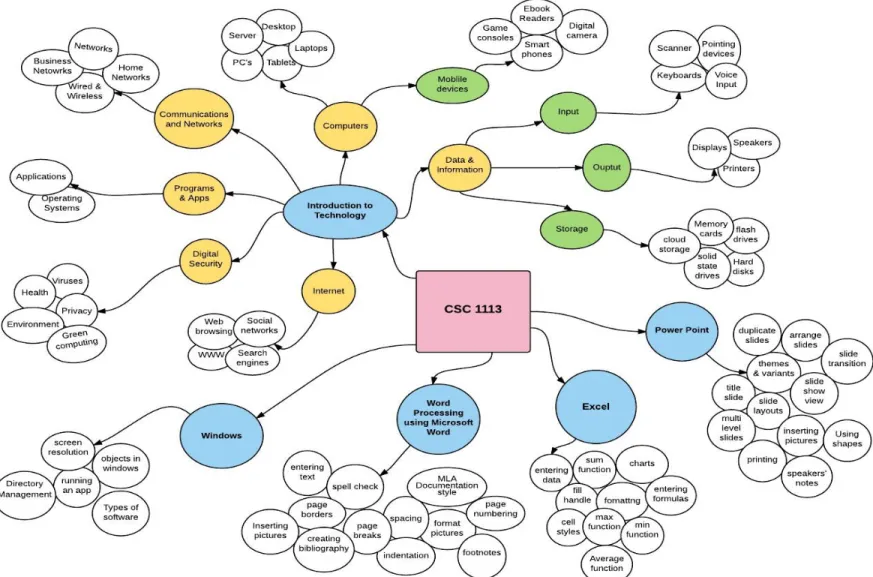
1. CSC 1113 Concept Map ...11
LIST OF ABBREVIATIONS ANOVA Analysis of Variance
CSC Computer Science CSE Computer Self-efficacy
F Fisher’s F ratio
M Mean
p Probability associated with the occurrence under the null hypothesis of a value as extreme as or more extreme than the observed value
r Pearson product-moment correlation SAM STUDENT ASSESSMENT MODULE
sd Standard Deviation SE Self-efficacy
SPSS Analytical software product original standing for Statistical Package for the Social Sciences
< Less Than > Greater Than = Equal to
CHAPTER I INTRODUCTION
Society has the perception that students of the Net Generation have the
technological aptitude to be successful in college classrooms and in the corporate world. However, many college students enter college as freshmen without the technological skills expected of college instructors to be successful in the classroom. College instructors and administrators are discontinuing introductory computer classes from college course requirements because of this misperception. Colleges cannot simply assume that students have these skills because they have grown up with technology, and there needs to be a way to determine which students have the technology skills and those who do not. Properly assessing these skills will place students into courses where they can acquire the technological skills needed to be successful in the classroom and in their careers.
The Millennials, Net Generation, and Generation Y, often dubbed as “the computer wizard” generation (Shannon, 2007), are descriptors that currently define the
teens or young adults born after 1981 (Sanchez, 2003). These children of past decades have grown up since the emergence of the World Wide Web and a myriad of other types of digital technologies that have been introduced (i.e., cell phones, text messaging, video games, and instant messaging) (Considine, Horton, & Moorman, 2009). This group referred to as those born between 1981 and 2000. Within this millennial generation, a new generation has emerged as Generation C or Generation Connected. Generation C refers to those born after 1990; they are aptly considered truly digital natives (Williams, Crittenden, Keo, & McCarty, 2012).
Societal and university faculty’s perceptions favor the general belief that the
Millennial Generation (MG) already possesses these skills (Shannon, 2007; VanLengen, 2007). However, despite their constant exposure to all things digital, the ‘connected’ generation often struggles and encounters difficulty with their academic work (Shannon, 2007). This generation has access to more information than any other generation in history, but the availability of the vast amounts of information has created a complex environment for students to navigate within (Considine et al., 2009). College faculty and administration assume that many of the current college freshmen have some basic computer proficiency skills based upon prior computer experiences. Many college and university educators also have the perception that students are more knowledgeable and competent in the area of computers (Grant, Malloy, & Murphy, 2009). Many students themselves also share this perception. According to Grant, Malloy, and Murphy (2009), students who are required to take an introductory computer applications course at the college level often feel that the course is not necessary because they have previously passed an assessment in K-12 or had a computer course in high school (9th-12th grade).
As cited by Grant and colleagues (2009), in a study reported in the Journal of Information Technology, the researchers explored college students’ computer self-efficacy across the United States and the actual scores on a computer assessment in a foundational computer course. During the first week of class, pre-tests were administered in a computer concepts class. The scores were dramatically different from how students rated their computer skill levels. On a survey prior to taking the pre-test assessment, 75% of the students rated their skills as high in the word processing application software, Microsoft Word. However, less than 50% of the students were able to answer questions
correctly pertaining to the advanced tasks. When students were asked to rate their computer self-efficacy in the spreadsheet application software, Microsoft Excel, they rated their ability levels much lower. Additionally, when post-tests were administered in the last week of the semester and computer self-efficacy was re-evaluated, the number of questions answered correctly substantially increased (Grant et al., 2009).
Lazim, Wan, Noor, and Noor (2011) reported similar findings in a study reported in the Journal of Information Systems: New Paradigms describing college freshman students’ perceptions towards their computer-related skills. The school was a public university at the East Coast of Peninsular Malaysia and used an instrument to explore 851 freshman students’ computer self-efficacy. The school also used an assessment tool to evaluate students’ skills in the following six computer related areas: word processing,
spreadsheet, databases, multimedia, desktop publishing, and Internet. Three indicators, ‘not at all,’ ‘somewhat competent,’ and ‘very competent,’ were used to rank the ability
levels. The highest percentage where students ranked themselves as ‘very competent’ was in the area of Internet Skills with the lowest being in databases. The reflections of the scores in these two areas were consistent with actual skills competency ratings.
Fredrickson, Freund, Amer, Baldauf, and Parsons (personal communication, March 7, 2013) in a question and answer session at the Cengage Course Technology Conference, shared similar views about the college students of today and the introductory computer applications course as authors of computer textbooks from across the United States. All members of the panel, with the exception of one, are not only authors but also teach introductory computer concepts at a community college or university.
One of the instructors serving on the panel in the question and answer session was Steven Freund, a Cengage author and teacher at University of Central Florida (UCF). At UCF, over 4,000 students annually take the Introduction to Computers course. When Freund was asked about the challenges he faced in teaching the Introduction to Computers course, he replied, “Many students are not motivated and engaged” (Fredrickson, Freund, Amer, Baldauf, & Parsons, personal communication, March 7, 2013). Another obstacle he mentioned is the varying levels of computer skills among the students. He added that many of the students he encountered in an online course were not equipped with the technology skills to be successful in an online course (Fredrickson, Freund, Amer, Baldauf, & Parsons, personal communication, March 7, 2013).
Lisa Fredrickson, another panel participant at the Cengage Course Technology Conference, advocated using a pre-test and post-test assessment of students to survey varying technology skills in the course. When she administered her final exam to students the first week of class to assess their skills, only 3% of her students were able to pass the test. Beverly Amar from Arizona State University indicated that when Arizona State offered the College Level Examination Program (CLEP) only one out of 100 students were able to successfully CLEP out of the course. Ken Baldauf of Florida State University commensurate by mentioning that those on the college level have been
expecting the computer literacy course to be pushed down to the high school level, which has not yet happened (Fredrickson, Freund, Amer, Baldauf, & Parsons (personal
communication, March 7, 2013).
Twenty years ago, emphasis in an introductory computer course was placed on teaching programming in BASIC; however, today the lab activities cover application
software such as word processing, spreadsheets, database, presentation, and use of the Internet. Many of these courses have reduced time spent on teaching word processing because students should have been taught and utilized word processing programs already in high school. Universities are also incorporating more Web 2.0 technologies such as blogs, wikis, and other types of social networking into instruction (VanLengen, 2007). Developing expertise in a few technologies understandably becomes much more different from being able to understand, use, and assess technology.
Computer literacy courses, once a staple, have begun a downward decline and may soon be discontinued as a graduation requirement for undergraduate students (Ritz, 2011). Schools that have not eliminated the course from the required course curriculum do require students to demonstrate computer or technology competency by taking a test similar to a CLEP in lieu of taking the course (VanLengen, 2007).
There are many reasons why these requirements have changed in colleges and universities today. One reason is an emerging change in colleges requiring a computer competency course due to reduction of program hours required to graduate. This change stems from a 2002 decision by the Southern Association of Colleges and Schools to reduce the minimum number of hours required for students to receive a baccalaureate degree from 128 hours to 120 hours. The decision was made based on the cost and the length of time to complete a baccalaureate degree. Since this change, many colleges and universities have reduced their required number of credit hours to receive a baccalaureate degree to meet this 120-hour rule (Shannon, 2007). Additionally, many programs have sought external accreditation from professional boards, and this has placed additional stress on the curriculum. Due to the eight-hour reduction in credit hours needed for an
undergraduate degree, courses have been cut from the degree requirements. One such course often on the chopping block has been the introductory computer course
requirement (Hulick & Valentine, 2008). As a result of the reduction in the number of hours that students have to take to receive a degree, courses once required as part of the academic core, such as computer concepts, have been cut all across the country (Hulick & Valentine, 2008; Shannon, 2007).
Societal perceptions make it easy to assume that the “Net Generation” has the
necessary computer skills to be successful in college. These perceptions contribute to the decision to remove basic computer courses from the curriculum. Research indicates time again that Internet usage and “Facebooking” do not give students the tech-saviness they need to think cognitively (Hulick & Valentine, 2008). Students also have to be able to apply these skills to future courses. Some students may have the computer skills
necessary to be able to bypass a computer literacy course and the ability to be successful in future classes; however, the vast majority do not retain these basic skills and abilities (Grant et al., 2009; Hulick & Valentine, 2008; Ratliff, 2009; Ritz, 2011). There needs to be a formal approach to assess students to determine whether or not they are computer literate. If students do not have these basic skill sets, they should be required to partake in a basic computer course as part of the required curriculum for their graduation program.
Statement of the Problem
Research has shown that basic computer skills, as well as advanced computer skills, are more in demand today for corporate America (Hulick & Valentine, 2008). Countries such as Brazil, Russia, India, China, and Korea (BRICK) are placing emphasis on developing computer skills and computer professions among their young people to
States are discontinuing the computer elective from high school graduation requirements, assuming that students who have grown up with technology already possess the necessary computer skills (Ritz, 2011).
Students entering college today are viewed as highly technology competent because of the many gadgets college students own today. Many of these students can be seen carrying iPods, iPads, smart phones, laptops, and other digital devices. Students’ ability to spend countless hours on the Web and “Facebooking” can be cited as support of
their being computer competent; nonetheless, they do not know how to use the devices for classroom assignment purposes. Social media skills alone do not demonstrate technology knowledge or literacy (Hulick & Valentine, 2008). Students seem to be comfortable with the basic skills of using Internet, e-mail, and word processing, whereas research shows that these students rate their computer skills very high; however, when students are asked to rate their computer self-efficacy for school related tasks, these rates drop significantly (Grant et al., 2009).
Research demonstrates that even though these undergraduates may possess a high level of computer self-efficacy, this belief does not always translate into their computer abilities or skill levels. Computer courses are still necessary to help undergraduates obtain basic computer skills. These courses are in jeopardy of being removed from college graduation requirements while their need is more in demand than ever before (Hulick & Valentine, 2008; Shannon, 2007).
A procedural or curricular change is needed by the college to determine students who possess these critical skills and those that do not. Students entering college without these skills would have a course in place to give them the instruction needed; students
already possessing the skills could waive the course altogether. Relying on students’ computer self-efficacy is not adequate to evaluate the actual technology skills of students. College advisors cannot continue to use computer self-efficacy for placement of students in computer courses. An assessment is needed to ensure that students are placed in the computer courses that match their skill level or if they show proficiency allow provisions in the advising process for students’ to bypass the computer course requirement entirely..
Purpose of the Study
The purpose of this study is to determine whether there is a relationship between community college students’ computer self-efficacy and their actual computer skills. Computer/technology skills, as defined by this study, encompass an introduction to technology (i.e., mobile devices, Internet, networking, and computer hardware), the Windows operating system, and word processing (Microsoft Word), spreadsheet Microsoft Excel), and presentation skills (Power Point). When referring to
computer/technology skills in this study the researcher is referring to computers (laptops, desktops, and tablets) and/or mobile devices. Further, this study examines whether students’ computer skills in these areas are sufficient to meet the objectives set by the
introductory computer concepts course.
Independent variables considered in this research study were the demographic factors of gender, ethnicity, and education (i.e., traditional college students, General Equivalency Diploma (G.E.D.) students, and non-traditional students). Another
independent variable examined in the study was testing time. Testing time consisted of two levels: pre-course and post-course scores. The dependent variables were the mean scores of the computer self-efficacy instruments, and the five mean scores from each of
the different skills the study surveyed (i.e. Technology/Hardware skills, Windows, Word Processing, Spreadsheet, and Presentation skills). This information was used to determine whether students’ computer skills were sufficient to meet the objectives as outlined in the
computer concepts course.
For the purpose of this study, computer skills are defined by an understanding of computer hardware/technology, Windows, Word Processing, Spreadsheets, and
Presentation skills. Course Content in CSC 1113 is outlined based on Misty Vermaat’s (2016) textbook Microsoft Office 2013 Introductory Enhanced Edition Shelly Cashman Series. The course begins with students learning about computer hardware skills such as the Input Processing Output and Storage (IPOS) Cycle. Students are educated on the different components of the computer and the primary purpose of each part. Different types of technology are taught such as iPads, laptops, Internet skills, smart phones, social networking, and networking devices. Also, operating systems using Windows are taught focusing on navigation throughout the software, how to open a program application, and file/directory management.
The course also introduces the application software word processing, spreadsheets, and presentation software. Instructors teaching word processing use the application
Microsoft Word. In Microsoft Word, students create a flyer using clipart, fonts, and borders. Students also learn how to format a research paper utilizing footnotes,
headers/footers, and the reference feature. The unit on spreadsheet applications uses the software Microsoft Excel and students are taught the SUM, AVERAGE, MAX, and MIN functions along with how to create a chart in a worksheet. The last unit covered in the semester is presentation software using PowerPoint where students have learned how to
create a multi-level slide, importing graphics, different ways to view a presentation, and incorporating sound and videos
In Figure 1, a concept map is provided showing all of the content covered in the course CSC 1113, as outlined in the required textbook for the course, titled, Microsoft Office 2013 Enhanced Edition, Shelly Cashman Series (Vermaat, 2016).
11
Theoretical Foundation
The two theoretical foundations that guide this study are Bandura’s Theory of Self-Efficacy (SE) and Bandura’s Theory of Computer Self-Efficacy (CSE). In a world where youth have grown up “connected,” educators often assume that students entering
college classrooms today possess the technology savviness to be successful in college and in their future jobs. The actual situation is that these students do not possess the type of technology skills needed for academic purposes. However, many students consider themselves computer literate even if they do not possess the skills needed to be successful in college and in the workplace (Ratliff, 2009).
Even with technology being a part of daily lives, some students are more proficient while others find technology to be a major challenge. The theory of self-efficacy explains these differences in behavior (McCoy, 2010). As defined by Bandura, self-efficacy is a belief in one’s abilities to organize and follow-through with a course of action to attain a goal (Bandura, 1995, 1997, 1999). Research consistently shows that a positive correlation of high levels of self-efficacy results in positive self-concept, higher levels of learning, and persistence in an activity. Additionally, lower levels of self-efficacy have been found to result in lower self-concept, lower performance, and unwillingness to try certain tasks (McCoy, 2010).
The rapid growth of technology in an information-based society is placing enormous pressure on individuals to be self-directed in their pursuit of knowledge. A good education should not only teach the three R’s—reading writing, and arithmetic—but also instill physiological traits and motivation to continue to learn after school is
the desire to become a lifelong learner. Self-efficacy is an intrinsic belief that one has the ability to learn new material and educate one’s self throughout a lifetime (Bandura, 1995,
1997, 1999). According to Bandura (1997), “computer self-efficacy is based on the well-researched concept of self-efficacy—the belief one has the capability to perform a specific computer related task” (as cited by Karsten & Roth, 1998a, p. 61). CSE is intellectualized as multilevel in that an individual can judge his or her ability level both on an application-specific and on a general level. While the application-specific level is a judgment of one’s ability to use specific software types such as spreadsheets, databases,
etc., the general CSE level is an individual’s belief in the ability to master skills across different areas of computers (Brown, 2008; Hong, Chiu, Shih, & Lin, 2012).
Murphy’s CSE instrument is the oldest instrument referenced for recording
computer self-efficacy. Other skills besides software and hardware are considered
important such as Internet and computer attitudes along with computer anxiety. Computer anxiety refers to a fear one may have in causing potential damage to a computer while using it or looking dumb. Attitudes associated with the Internet are only recently being studied while evaluating computer self-efficacy; positive feelings toward using
computers for Internet-related tasks contributed positively to overall computer self-efficacy. Computer attitudes can be associated with enjoyment, anxiety, and confidence using the machine to generate an individual’s computer self-efficacy score (Brown, 2008; Hong et al., 2012). This current study measures two variables: computer knowledge/skills and computer self-efficacy.
Research Questions The research questions that guided the study are:
R1a: Is there a difference in demographics (gender, race, education) regarding computer self-efficacy prior to taking the CSC 1113 course?
R1b: Is there a difference in demographics (gender, race, education) in skills assessment scores prior to taking the CSC 1113 course?
R2 = Does the number of computer courses taken in high school correlate to the computer self-efficacy prior to taking the CSC 1113 course?
R3a: Do pre- and post-CSE scores differ as a result of taking the CSC 1113 course?
R3b: Do pre- and post-skills assessment test scores differ as a result of taking the CSC 1113 course?
Justification
This study has the potential benefit of incorporating change in the academic core curriculum that includes a way for students to bypass the computer concepts core
requirement by having a test-out option. Proposed economics of a test-out procedure allow students to bypass the computer course requirement or take a more advanced course. A test-out procedure can also ensure that students who do not have the computer skills needed to be successful in undergraduate coursework could obtain those skills by taking the course CSC 1113. This policy change allows advisors to more effectively advise students and ensure proper placement of students based on their skills. The college has been relying on students’ opinions of their computer skills for placement in computer courses; this study shows that such an action is not a reliable indicator for placement.
Furthermore, students who have the necessary computer skills may be able to take other courses, thus bypassing CSC 1113, and accelerating their progress towards a degree or transfer to a university.
Kathleen M. Morris (2010) from the University of Alabama conducted a similar research study. However, the Computer self-efficacy instrument used in this study was a self-generated instrument that did not show proven reliabilities.
Researcher Assumptions
The identifiable research assumptions that guided this study are:
1. Participants answered the questions to the best of their ability and their responses were honest and based on their perceptions of skills and abilities.
2. The study assumes that, based on the demographics for the college, there will be a proportional mix of participants based on gender, race, and education level.
Delimitations of Study
The researcher had no control over the time and day the student participants were in the class or the length of class time. Students enrolled in a Monday, Wednesday, Friday section were 50-minute sessions whereas the Tuesday/Thursday student participants had 25 minutes longer in class time. A supporting assumption is that the participants required the same amount of time to complete the survey packet.
Community college students make up a very diverse population. The researcher had no control over students’ background prior to enrolling in CSC 1113. Some
participants may have been recent high school graduates while others may have been in the workforce prior to enrolling in the course. In addition, some students may have been enrolled in high schools from a rural, low-income area where others may have been from
a more affluent school district, which would have allowed some students to have been exposed to current software and computer technology.
Instructors that offered their classes to participate were on a volunteer basis and the researcher had no control over the number of sections that participated. Therefore, this may have affected the number of student surveys that were completed out of the overall classroom population.
While there is a set course syllabi and core competencies in CSC 1113, there are no restrictions to prevent an instructor from adding additional material and assignments to an individual class. There is no structured outline of the course time frame for each unit covered within each class. The researcher had no control over individual teaching styles within the various class sections. Therefore, the assumption is that the survey instrument covered the basic course objectives as outlined by the course syllabi allowing all students to have the basic knowledge required to answer the survey packet.
Because not all students completed the course, all participants may not have been able to complete both the pre- and post-course instruments, Various reasons may have caused this to happen such as students withdrawing from the course, cutting out due to attendance, and students may have been absent the day the survey was administered.
The study assumes that participants answered everything within the survey packet honestly and to the best of their ability. Assumptions were made that all research
participants could read, understand, and respond intelligently to the questions in the research instrument.
Definition of Terms
This study examined two variables, computer knowledge/skills and computer self-efficacy, based upon demographic factors. To clarify terms used throughout the study, the following definitions are provided.
College Level Examination Program (CLEP). A test given to a student to demonstrate mastery in a subject, thus allowing him or her to bypass a course.
Community College. Community college often refers to post-secondary institution that offers two-year institutions of higher education. The college usually has access to public funding (state and federal) and is not primarily dependent upon student tuition (Maloney, 2003). These types of institutions offer two different degrees and one
certificate. The Associate of Arts degree is reflective of completion of the freshman and sophomore years of college and is parallel to the four-year university with academics matching to ensure coursework transfers. The Associate of Applied Science is the second degree offered by the community college and is awarded once a student completes a two-year intensive career-technical curriculum. Lastly, a Career and Technical Education Certificate is presented to the student after completion of an intensive one-year training program that is often taught in a hands-on laboratory-type setting (“Bulletin of Northwest Mississippi Community College,” 2014).
Computer hardware/technology. As outlined by this study includes hardware, peripherals, and technology devices.
Computer Literacy, Digital Literacy, or Technology Literacy. Merriam Webster Dictionary (“Literacy,” 2014) defines literacy as knowledge that relates to a specific
subject. International Technology Education Association (ITEA) has defined technology literacy as the ability to use, manage, understand, and assess technology (Ritz, 2011).
Digital Natives. Often used to describe Generation C—those born after 1990. Generation C is the first generation that has grown up in a digital world; its members do not remember a time when society is not connected to the World Wide Web (Considine, et al., 2009; Williams et al., 2012; Worley, 2011).
Introductory Computer Course. A computer concepts course generally taught during a student’s first year of college. The course is designed to provide foundation
knowledge to students and teach them the computer/technology and application/software skills needed for future college courses.
Millennial Generation. Synonymous with the Net Generation, Generation Y, or the Computer Wizards. This group is defined to be those people who were born after 1981 (Sanchez, 2003; Shannon, 2007).
Summary
A growing problem in colleges is the societal perception that because students have grown up in a connected society, they, therefore, have the foundational computer skills required to obtain an undergraduate degree and succeed in the workplace. Preparing college students to become competitive in the technology marketplace is more important than ever before. Administrators cannot assume that students are technologically literate because they have grown up in a connected society. Students should be screened as freshmen to measure the degree of computer literacy they possess; and if the skills are not at a level of mastery, then colleges need to require them to take a class to gain these skills.
The purpose of the study was to investigate whether or not there is a correlation between students’ computer self-efficacy and their actual computer skills. Research was
obtained by administering a Computer self-efficacy survey to students the first week of class along with a test assessing computer skills that were taught over the course of the semester. The same instruments were administered at the semester’s conclusion. The study examined several constructs to see if they made a difference such as the number of high school computer courses a student had completed, gender, ethnicity, and education level.
The outcome of the study has the potential benefit of incorporating a change in the academic core curriculum to include a way for students to bypass the computer concepts core requirement by having a test-out option. This policy change will allow advisors to effectively advise students and will ensure proper placement of students based on their skills. The research obtained from this study may show if this course is a value added course in the academic core curriculum for the college.
This research study is organized into five chapters. Chapter I includes background information of the study and the problem being investigated. Also included in Chapter I is the purpose of the study, the theoretical foundation/rationale for the study, the research questions, justification, the limitations of the study, and research assumptions. Chapter II includes a review of the literature and provides background information for the study. Chapter III explains the methods used to conduct the study. Also included in Chapter III is the design of the study, along with descriptions of the research setting, selection of participants, instruments of data collection, and process of data collection. Chapter IV
presents the findings of the study and the descriptive data and analysis. Chapter V offers a summary of the findings, conclusions, and recommendations for future research.
CHAPTER II LITERATURE REVIEW
Introduction
This chapter describes the literature support for the study. Findings collected from relevant research studies are described to demonstrate why this study is important in the field of computer literacy. The review of literature consists of eight parts. These
components of the literature review describe how technology is changing society, the value of computer/technological skills, the net generation and their computing
experiences, United States Community Colleges, computer skills of college students, self-efficacy theory, computer self-efficacy theory, and assessing computer self-efficacy.
College students today are referred to as the “Net Generation” or “Millennials”
(Considine et al., 2009); these terms describe the generation born between 1981 and 2000 (Gibbs, 2008; Sanchez, 2003; Shannon, 2007; Worley, 2011). Despite growing up in this digital age, many students lack necessary computer knowledge and skills to use a
computer to complete classroom assignments. Increased usage of computers and
technology do not translate into having sufficient computer skills (Heflin, 2015; Nelson, Courier, & Joseph, 2011; Uraski, 2009; Worley, 2011). Self-efficacy is people’s
perceptions and beliefs in their capabilities to perform a particular task(Bandura 1995, 1997, 1999), and computer self-efficacy is referred to as an individual’s self-evaluation or personal assessment in one’s ability to use a computer for a variety of tasks(Brown, 2008; Celik & Yesilyurt, 2013; Hauser, Paul, Bradley, & Jeffrey, 2012; Hsiao, Tu, & Chung, 2012; Karsten & Roth, 1998b). A community college’s primary goal is to prepare
students to become successful for transfer to the university or into the world of work. As such, ensuring that students have the required technology skills is a critical element of preparedness.
How Technology is Changing Society
As societal demands become more about being mobile, there has been a major shift in the focus of the workplace. Businesses and organizations are moving toward a more mobile environment, and the trend is becoming more about individuals working on the go and being connected rather than functioning within the traditional office
boundaries (Sena, 2013). According to Business Insider (Edwards, 2015), since iPhone’s launch in 2007, a majority of Internet traffic is now on smartphones, not desktop
machines. The demand for tablets and smartphones is driving this shift in the workplace.
Forbes (High, 2014) reports the trend in 2015 is going to be more of an Internet of things propelled by user-oriented computing. 3D printing will continue to decrease in cost over the next three years. This will propel innovation in prototypes for industry, consumer applications, and in the medical field.
Smartphones and Tablets
According to Pew Research Center, 68% of adults in America now have a smartphone, which is nearly double the amount since Pew Research Center began measuring smartphone ownership in mid-2011 (Anderson, 2015). At that point 35% of adults had smartphones (Anderson, 2015). TechCrunch (Lunden, 2015) reports that smartphone users by 2020 will make up 70% of the world population. Forecasts also predict that by 2020, 80% of mobile data traffic will be from smartphones (Lunden, 2015).
Tablets have an even faster adoption rate than smartphones. Nearly half of all Americans own a tablet with 45% reporting tablet ownership. That is up 41% since 2010 when Pew Research Center first began measuring tablet ownership (Anderson, 2015). According to eMarketer, tablets surpassed the one billion mark in ownership representing 15% of the world population in 2015 (“Tablet users to surpass,”2015). Tablets are quickly becoming a popular choice among consumers and are beginning to replace both laptops and desktop computers in the workforce. Tablets have become more powerful and functional for consumer usage. Many of the same functions carried out on tablets can be completed on personal computers; however, tablets are lighter and slimmer (Mantell, 2012). Industry likes how tablets are opening up communication channels in the
workplace; they are allowing workers to communicate, capture, examine, and transmit information simultaneously. The price of tablets is also appealing to industry because they are not as expensive as traditional computer systems have been in the past (Burney, 2013).
While the demand for tablets in the workplace has gained momentum, tablets have yet to command domination over the traditional computer or personal computer in the workplace. Despite the fact that the processing capabilities of tablets continue to improve, businesses still use personal computers such as laptops and desktops. One reason for this is that personal computers last five to seven years in a business
environment. Another reason is that a traditional computer is better to keep up with the everyday productivity demands and high volume multi-tasking. While tablets provide a variety of accessories such as docking stations and keyboards, they are not quite there yet in terms of sustainability (Mantell, 2012).
Tablets should not be dismissed as they may gain advantage over personal computers in the future if current trends of smaller digital devices continue to climb. Tablets are changing the way people use computers. As tablets engulf the consumer market, they are stimulating innovation in app development and cloud-based platforms; some may go so far as to say that tablets will replace personal computers in the workforce (Mantell, 2012). In the educational arena, tablets are quickly changing the way students and instructors utilize textbook content. Projections for 2017, expect digital textbooks to account for half of the textbook market (Rivero, 2013).
E-books
Textbooks are becoming more interactive with embedded media versus the traditional text-based content. This is providing a much more immersive learning experience for readers. The learning experience can be much more engaging for the student. Rather than simply reading about a historical event, students can watch a
historical reinactment to include a blend of text and media (Bajarin, 2013; Rivero, 2013). Cengage Learning Ebooks provide cost effective means for students to access course materials and digital content. Students are also able to rent an Etextbook or Ebook, which can save them up to 65% off the cost of traditional textbooks. Students are able to go online to take interactive quizzes, utilize flashcard resources, and work on problems in a completely collaborative environment using these Ebooks (Rivero, 2013).
Apps and Cloud Technology
Apple App Store and Google Play are great resources for applications (apps). In the field of manufacturing and industry, professionals find the customization feature of apps appealing. If manufacturers find an app on the market that is similar to their needs
but does not meet all of their expectations, companies may opt to hire a developer to customize an app based on individual needs (Burney, 2013).
Many business professionals have shifted away from the larger and more traditional computers in the workplace because of the demand for and use of apps and cloud-based platforms (Mantell, 2013). According to a report published by Frost and Sullivan in which 300+ businesses were surveyed in North America, 73% of respondents stated that at least one mobile app was used by their employees on hand-held devices. In those companies that responded, 71% said that by late 2014 they plan to add one or more applications to their employees’ hand-held devices (Sterling, 2013).
Most of what allows businesses to telework or conference with customers remotely is the “cloud.” The cloud is not only transforming technology, but also
transforming businesses. Employees want to be able to access customer data anytime, anywhere, and from any device to conduct their jobs. While using the approach of access anytime anywhere through mobile devices, organizations must also consider security. Maintaining a secure network infrastructure does allow the flexibility but also brings the added responsibilities of network security and customer privacy, both of which can be challenging. Cloud computing can provide a cost-effective way to provide these information technology (IT) resources and implement strategic change (Sena, 2013).
Connectivity
Another essential element in this cloud environment is connectivity for all of these on-the-go devices. 3G/4G cellular technologies and Wi-Fi give users the ability to stay connected in this fast-paced world. iPass, the world’s largest commercial Wi-Fi network, released a report in September 2013 from a study they conducted; iPass found
that traveling business professionals rate Wi-Fi almost as important as having a
comfortable bed. Seventy-three percent of their survey participants rated the experience of using hotel Wi-Fi as “very important” or “important” to them. In addition, 81% of the surveyed participants reported having experienced inadequate service with hotel Wi-Fi in the past 12 months; most reported after a bad experience with Wi-Fi, they would not return to the hotel next time they traveled (iPass, Inc., 2013).
Mobile workers now believe Wi-Fi connectivity is a basic need like food, water, and shelter. Traveling business professionals indicated good quality Wi-Fi was more important than a restaurant or gym facilities, even if they had to pay for the Wi-Fi
services. Costs aside, workers want their hotel Wi-Fi to provide the speed and bandwidth they need to conduct their business. Wi-Fi is so essential to travelers’ needs that WI-FI is rated as the second-most essential factor, only after a comfortable bed. Inflight Wi-Fi is another growing trend to meet the demands of the mobile worker. Seventy-nine percent of the participants in the iPass report stated that they would spend as much as $10 for inflight Wi-Fi services (iPass, Inc., 2013).
Technology is changing rapidly as society transitions into more of an on-the-go society. A crucial element of the on-the-go mentality is staying connected. Tech
companies every day are developing ways to turn everyday items into portable computers, from glasses, to watches, and fitness trackers. Mobility is at the heart of these innovations (Tsukayama, 2013). Professionals are no longer working at a desk; they may work as they commute, watch their child play soccer, or stay in for the evening. Technology that allows them to do these tasks while working is the cloud capabilities of tablets, apps, Wi-Fi, and smart phones. These technological advances are also changing the way society
educates students as well. Textbooks are no longer limited to the traditional textbooks; they may be interactive and found on a tablet. Students can click on links for additional content to supplement reading assignments, or they may remediate weaker skills by using an app for learning Algebra. More important than ever is for students to be able to
navigate through this infiltration of technology as society advances and becomes more dependent on technology. College administrators and faculty members cannot simply assume that college freshmen have the technological skills to navigate through this plethora of devices and technology that have infused society and educational systems. This dissertation shows how these computer/technological skills are necessary and valuable for students to be successful in the workforce and society.
Value of Computer/Technology Skills
Computers are no longer new to the education arena or the workplace. However, many still do not have valuable skills needed in the college classroom and those skills highly sought after in the workplace. Computer/Technology skills are important for all learners in every country (Ritz, 2011). Society views college graduates as those who have grown up with the World Wide Web and have the technological aptitude to be successful workers in a connected society (Burgess, Price, & Caverly, 2012; Considine et al., 2009; Gibbs, 2008; Hulick & Valentine, 2008; Ratliff, 2009). National Council of Instructors of English (NCTE) defined 21st Century literacies (2013) as a collection of cultural and communicative practices shared among members of particular groups stating that as society and technology change, so will literacy. NCTE went on to say that because technology has increased in intensity and complexity, it is important to develop a proficiency and fluency with the tools of technology. One can conclude that it can be
overwhelming when trying to define the following: Computer Literacy, Technology Literacy, Computer Competency, and Computer Proficiency.
Computer skills, knowledge basis, and individual expertise areas all comprise a valued and prized commodity in corporate America. These traits are all highly sought after by potential employers (Hulick & Valentine, 2008; Heflin, 2015). Grant et al. (2009) emphasized the importance of teaching technology literacy and 21st century skills when they stated, “If the U.S. is to remain competitive in an ever-increasing global
economy, then it becomes increasingly important to hire workers who are adequately prepared to utilize current and future information technology” (p. 142). Moody, Stewart,
and Bolt-Lee, surveyed 1500 corporate recruiters and found the most valued skills to obtain for career paths were (a) communication (oral and written), (b) computer literacy, (c) interpersonal/social, (d) critical thinking/leadership (tied), and (e) teamwork. Only communication skills were more highly valued than computing skills by corporate America (as cited in Hulick & Valentine, 2008 p. 2).
Governments at all levels (local, state, or federal) have potential to become weakened by not adopting a stronger interest in these literacy rates. Ignoring this area, they create potential education barriers, and they are unilaterally and are continually holding people back from advancement. For instance, Lazim et al. (2011) noted, “Studies indicate that while a large majority of students indicated that they own
computers and have access to the Internet, their skills that directly relate to their courses at the institute of higher education were rather disappointing” (p. 41). Science studies, engineering studies, and computer science studies are all precursors for a country’s
China, and South Korea). There continues to be a fight for immigration roadblocks from their own countries, and improvements continue for their stance in the global economy (Ritz, 2011).
BRICK countries examine and re-examine areas of their educational systems to look at barriers and enhance curriculum such as through STEM (Science, Technology, Engineering, and Mathematics). STEM, a word often used on United States’ campuses
and in secondary schools, conveys the areas educators target for improvement in
technology advancements. Science technology, engineering, and mathematics education along with computer/technology skills are interwoven concepts, and many instructors have begun to focus curriculum on incorporating these valued technological skills (Ritz, 2011).
Computer/technology skills are important for all learners. It is important to develop proficiency and fluency with the tools of technology. These traits are all highly sought after. It becomes increasingly important to hire workers who are adequately prepared to utilize current and future information technology.
Net Generation and Computing Experiences
There are terms to describe groups of young people all over the world who are entering colleges and universities (Jones, Ruslan, Simon, & Graham 2010). Three of the most common terms are Net Generation, (Sanchez, 2003; Worley, 2011), Digital Natives, (Burgess, Price, & Caverly, 2012; Considine, Horton, & Moorman, 2009; Gibbs, 2008; Ratliff, 2009; Worley, 2011), and Millennials (Jones, Ruslan, Simon, & Graham 2010). Net Generation students include the 20 to 30 year olds used to having information at their fingertips (Sanchez, 2003; Worley, 2011). This generation is the largest generation since
the baby boomer generation, and this group makes up more than 80 million people (Worley, 2011). These students have grown up immersed in technology, and they have access to more information than any other generation before them (Considine et al., 2009; Worley, 2011). These digital natives have grown up during a time of rapidly changing technological culture (Worley, 2011). They are fluent in how to gain information instantaneously using a variety of electronic devices. These students are also used to having access to their cell phones and computers. Many obtain their news solely from the Internet. This generation is also the most diverse of any other generation in terms of economically, politically, ethnically, racially, and culturally (Sanchez, 2003; Worley, 2011). The Net Generation also studies, writes, and interacts differently than any other generation before them. This generation reads blogs where previous generations read newspapers. This generation often meets people online before they ever meet someone face-to-face. Many are more likely to send a text message rather than pick up a telephone (Palfrey & Gasser, 2008).
Students of this generation are often described as multitaskers (Bennett, Maton, & Kervin, 2008; Jones et al., 2010; Palfrey & Gasser, 2008). Many are likely sitting in class Googling, playing games, and IM-ing (Instant Messaging) all at the same time (Jones et al., 2010). Many digital natives think of Google, Instant Messaging, and texting as verbs rather than applications (Jones et al., 2010). Students of this generation prefer to learn by doing rather than by reading; they prefer to discover rather than be told (Jones et al., 2010). Immersion in this digital culture is said to have shaped how this generation learns in the classroom when compared to previous generations. Students of the Net Generation are active experimental learners, proficient in multitasking, and dependent on
communication technologies for interacting with others and accessing information (Bennett et al., 2008). They expect to be engaged by their environment with hands-on, sensory-rich activities (either online or physical) with opportunities to provide input (Jones et al., 2010).
Digital natives are constantly connected. Most aspects of their lives—social interactions, friendships, and civic activities—are mediated through digital technologies, and they have never known anything different (Palfrey & Gasser, 2008). They have friends both in real space and in virtual worlds. Many times, as they sleep, they are making connections; they wake up to encounter connections with people whom they may not have ever encountered in an offline world (Palfrey & Gasser, 2008). A 2008 survey found that 82% of university students in the United States were registered with more than one social networking site, with Facebook and MySpace being the most common. The survey also reported that these students spent approximately five hours per week on the above-mentioned sites, often logging into their accounts on a daily basis (Jones et al., 2010).
Through social networks, these natives share Instant Messaging content, photos, and videos, and they collaborate creatively. This generation is probably one of the most creative of any other generation. They consider information encountered online malleable to suit their own needs and often do so without considering they may be breaking the law. This may mean editing a video, downloading music, or downloading a movie, while not considering copyright rules and regulations (Palfrey & Gasser, 2008).
What separates this group of students from others is that they are the first generation immersed with Information Communication Technology (ICT) throughout
their entire lives (Bennett et al., 2008; Burgess 2012; Considine et al., 2009; Gibbs, 2008; Jones et al., 2010). With the pervasiveness of ICT, Millennials have access to more information than any other generation before them. Additionally, the extensive use of Information Communication Technology by this generation has created a false perception regarding this generation’s level of computer knowledge (Considine et al., 2009; Heflin, 2015; Ratliff, 2009).
Growing up immersed in a digital culture does not translate into viable computer skills. While most young people are comfortable in the digital world, few of them have the knowledge and skills of computer applications deemed suitable for higher education or for the workforce (Considine et al., 2009; Gibbs 2008; Heflin, 2015; Tanner, 2011). The perception of educators has mistakenly become the following: students who have grown up using the Internet are already adept and that these same students should be able to use a computer or demonstrate computer literacy upon entering college (Messineo & DeOllos, 2005; Ratliff, 2009). People are confusing computer use with computer knowledge and computer skills. While today’s young people are comfortable with the digital world, many of them are actually no more prepared than previous generations in regards to knowledge and skills surrounding computer applications on a level suited and usable for higher education or for the workforce (Gibbs, 2008; Messineo & DeOllos, 2005).
The Net Generation is the largest generation since the baby boomers and is probably one of the most creative of any other generation. Few of this generation have the knowledge and skills of computer applications deemed necessary for higher
education. This dissertation aims to prove these assertions and confirm the importance of computer technology skills.
United States Community Colleges
Because this study took place at a community college, it is important to understand the make-up of the community college environment. Women make up the largest demographic of community college students along with non-traditional students. Over half of this country’s community college students receive some type of financial
aid. Minorities make up nearly a third of the community college students in this country. Demographic research has consistently shown that students in these categories have the lowest computer self-efficacy levels.
Community colleges are unique in the United States’ higher educational system because they offer federal and state subsidized two-year post-secondary degrees and vocational certificates to a wide range of students. Degrees offered by community colleges offer tuition drastically cheaper than those offered by public and private 4-year institutions of higher learning (Joy, 2013).1 Community colleges serve nearly half of the undergraduate students in this country with the average age of the community college student being 29 years of age. In addition to providing training for students planning to continue their education at the 4-year college/university, community colleges also work
1 According to the Community College Board website (2014), for the 2012-2013
school year the average cost to attend a public 4-year institution of higher learning was $14,300. This figure takes into account tuition, room, and board. In contrast, the average cost to attend a community college was $10,496 for tuition, room and board. Figures are representative of in-state students only.
with individuals who may be taking non-credit classes, workforce development, and/or skills training (“Community College Trends and Statistics,” n.d.). The majority of the new jobs currently being created in 2014 are jobs requiring some post-secondary education (“Community College Trends and Statistics,” n.d.). With nearly half of the community college students receiving financial aid, the community college is a gateway for many students who would not have been able to continue their education otherwise. Many of the students making up the community college population are minorities, low income, or first generation college students (“Community College Trends and Statistics,” n.d.). According to the American Association for Community Colleges, 61% of the community college population in 2013 was made up of women, and the women making up the majority of the community college population has been a continuing trend
beginning in 1985. In terms of ethnicity, Caucasians made up the largest group with 68%, Blacks were at 27%, and Hispanic, Asian, and races unknown each scored at 1%
(“Community College Trends and Statistics,” n.d.).
Community colleges serve a diverse group of individuals ranging from students who may want to upgrade their employability skills, to students who are looking to transfer to the university, to students who are just taking a course as a hobby or to learn something new. Community colleges can also provide a way for many non-traditional students to continue their education while they work. As of 2013, more students were enrolled part-time (59%) at the community college than full-time (41%) (“Community College Trends and Statistics,” n.d.). Not only are community colleges serving older students, but younger students are being served as well. Traditional age college students are increasing in numbers at the community college, as well as high school students
attempting to get ahead in their college education by enrolling in dual enrollment courses (“Community College Trends and Statistics,” n.d.).
Over half of the students earning undergraduate degrees in this country attend a community college for a portion of their coursework. Educating a workforce helps stimulate local and state economies (“Community College Trends and Statistics,” n.d.). Because of the recession in 2008, many students opted to enroll in community college to pursue a college degree due to the lower costs of tuition as compared to the 4-year institutions (Joy, 2013). Statistics show that students who attend community college are more successful in attaining an Associate’s degree and a degree after they transfer to a 4-year institution. Students who attended community college were more likely to attain a degree at a 4-year institution and still be in pursuit of a 4-year degree, or to attain an associate’s degree at the community college (“Community College Trends and Statistics,” n.d.).
Community College Statistics in Local State
Demographics for the state where the current research study occurred are similar to the national trends. Women still make up the majority of the student population with 61% of the students being women and 39% being male. The number of full-time students however, is substantially different with 73% of the students in the state being full-time as compared to the national average being 41%. Enrollment by ethnicity is also similar with 59% being Caucasian, 36% black, race unknown at 2%, Asian, Hispanic, and Indian each being 1% (“Community College Trends and Statistics,” n.d.).
Community College Statistics for Research Institution
Demographics for the local institution where the research study was conducted closely resembled state and national trends. Women make up the majority of the student population with 60.9% and 39.1% being male. The average age of students at the local institution is 21 years of age compared to the national average of 29 years of age. The number of full-time students is 76% as compared to part-time 24%. Enrollment by ethnicity is also similar with 63.1% being Caucasian, 33.3% Black, race unknown at 0.7%, Asian, 1.5%, and Hispanic and Indian each being 0.1% (“Northwest Mississippi Community College Fact Sheet, 2014” n.d.).
Community college students make up a very diverse population. Traditionally, women make up the majority of the student population, and students are likely from lower socioeconomic status in pursuit of advanced degrees. These same demographics traditionally score lower in areas of computer skills and computer self-efficacy. To ensure these students have the necessary technological skills to succeed in their pursuit of a college degree, it is essential is to not assume these students have the computer skills needed to be successful in their coursework and are prepared for transfer to the university and professional careers.
This dissertation study aims to prove that to ensure student success, a test-out option is needed to assess which students have the computer skills and which students do not. This study has the potential benefit of incorporating a change in the academic core curriculum of the college to include a way for students to bypass the computer concepts core requirement by having a test-out option. Another benefit of the study would be if student’s show computer literacy through the test-out option they could bypass the
computer class all together or take a more advanced computer class. Currently college advisors at the college are relying on students’ computer self-efficacy as a method of placing students in computer courses.
Computer Skills of College Students
Although hard to imagine, there are still college students today who do not know how to use computers. According to Uraski (2009), who evaluated computer skills of incoming students attending Hawaii Community College, many students did not have a basic level of computer literacy. Skills that Uraski defines as basic are using a computer to register for classes, checking email using the student information system, and using other college services available online. Uraski’s study consisted of a pre-semester one-day, six-hour workshop to help students develop some of these basic technology skills. The workshop was voluntary and advertised to students who completed placement testing. Participants were surveyed through pre- and post-workshop surveys at the
beginning of the technology workshop and at the conclusion of the technology workshop. Follow-up telephone interviews were also conducted six weeks after the workshop to evaluate the participants’ perceptions of the computer skills developed as a result of the
workshop. Their experiences about having completed the workshop were also noted. Results from the post-workshop survey reflected positive gains upon completing the workshop. Additionally, findings showed in the six-week phone interview that there was relatively no loss of skills. All participants indicated that the workshop was important for new, incoming students.
In a study about an undisclosed community college in the Southeastern region of the United States, Ratliff (2009) suggested that the responsibility of higher education is to
assess the technological skills of incoming students. To determine if incoming entering college freshman had the necessary skills to be successful, instructors collaborated and developed questions to assess the following areas: personal computer basics (i.e., file and directory management), application basics (i.e., word processing, spreadsheet, and
presentation skills), and Internet Basics (i.e., how to upload a file, e-mail, and Web browsers). When the technology assessment was administered to 182 incoming freshman attending orientation (177 were high school seniors and five were non-traditional
students), the mean score was 77.07% for the group. Of the 182 participants, 41% of the students scored at or below the 75th percentile. Four additional orientation sessions were conducted with an additional 149 students taking the assessment; 48% of these scored below the 75th percentile. The average age of the students participating was 19.8 years of age. Results from this study indicated that a significant number of students were not prepared for a technology rich learning environment despite having grown up with technology.
In a study by Grant and colleagues (2009) of undergraduate students enrolled in an introductory business computer applications course, students’ perceived computer
skills were compared to actual scores on a computer assessment at time of enrollment. The college was a medium sized public university in the Eastern region of the United States. Two hundred thirty five students spread across 12 sections were included in the study. The purpose of the study was to compare and analyze students’ computer self-efficacy (i.e., low, average, and high) and actual performance in three areas (i.e., word processing, presentation graphics, and spreadsheets).