Concept Space Synset Manager Tool
Apurva S Nagvenkar
DCST, Goa University
Taleigao Plateau, Goa.
[email protected]
Neha R Prabhugaonkar
DCST, Goa University
Taleigao Plateau, Goa.
[email protected]
Venkatesh P Prabhu
Thyway Creation
Mapusa, Goa.
[email protected]
Ramdas N Karmali
DCST, Goa University
Taleigao Plateau, Goa.
[email protected]
Jyoti D Pawar
DCST, Goa University
Taleigao Plateau, Goa.
[email protected]
Abstract
The IndoWordNet1 Consortium consists of mem-ber institutions developing WordNet using the expansion approach.
The WordNets developed using expansion ap-proach are very much influenced by the source language and may not reflect the richness of the target language (Walawalikar et al., 2010). And therefore the IndoWordNet Community decided to develop concepts which were specific to their respective language viz. language-specific con-cepts which will help in increasing the WordNet coverage. Besides the above requirement it was also felt that it should be possible to maintain ad-ditional information about the concepts i.e. an image, document describing the concept, links to websites and other resources, etc.
In this paper, we discuss a Concept Space Synset Management Tool (CSS)2 which was developed to assist creation of language specific con-cepts/synsets and manage their linkages to other Indian language WordNets.
1
Background and Motivation
The IndoWordNet is a multilingual WordNet which links WordNets of different Indian lan-guages on a common identification number
1http://www.cfilt.iitb.ac.in/indowordnet 2http://indradhanush.unigoa.ac.in/concep
tspace
called as synset Id given to each concept (Bhattacharyya, 2010). WordNet is designed to capture the vocabulary of a language and can be considered as a dictionary cum thesaurus and much more (Miller, et al., 1993; Miller, 1995; Fellbaum, 1998).
Synset (Fellbaum, 1998) is composed of a gloss describing the concept, example sentences and a set of synonym words that are used for the con-cept. Besides synset data, WordNet maintains many lexical and semantic relations. Table1 gives the number of concepts/synsets created by the language groups of the Indradhanush Word-Net Consortium which is a part of the In-doWordNet Consortium.
Also a sense marked newspaper corpus (sense marking is a task to tag each word of the corpus with the WordNet sense) consisting of minimum 1,00,000 words has been created by each of the members of the Indradhanush WordNet Consor-tium. The coverage is found to be low. In order to increase the coverage of the WordNet it was decided that a corpus will be created by all lan-guage groups and the corpus will be sense marked.
To increase the coverage it was decided to add the concepts which were specific to their respec-tive language viz. language-specific concepts and nullify the effect of influence of the source lan-guage on the target lanlan-guage WordNet. The CSS Manager Tool3 was developed to assist in crea-tion of language-specific concepts, linking to other language WordNets, providing additional information about synsets, etc. The features and the detailed framework of the CSS Manager Tool is explained in section 3 and 4.
The rest of the paper is organized as follows – section 2 introduces the related work. The fea-tures of CSS Manager Tool are presented in sec-tion 3; secsec-tion 4 presents the architecture of CSS Manager Tool. Section 5 presents the implemen-tation details followed by the conclusion and fu-ture work.
2
Related Work
For many Indian languages, WordNets are con-structed using the expansion model where Hindi WordNet synsets are taken as a source using the MultiDict Tool (Chatterjee, 2010) created by IIT Bombay. The tool also had feature to add com-ments and references but it was not an ideal tool for creation of language-specific synsets.
The limitations of the MultiDict Tool are: Creating and linking of
language-specific synsets across languages was not possible,
finding the overlap of synsets across lan-guages was not possible,
Feature to provide additional information about the synset was not present,
Validation of synsets was not possible. Features to search synsets based on
do-main, date, category was not present. And therefore the CSS Manager Tool was devel-oped in order to overcome the above limitations.
3 https://www.youtube.com/watch?v=BMhixBI
7xOY&feature=youtu.be
3
Features of CSS Tool
CSS Manager Tool is a centralized tool meant for effective creation and management of synsets. The features supported currently by the CSS Manager Tool are as follows:
1. Synset Creation:
Addition/updation/validation of synsets, linking of two or more synsets with simi-lar gloss across languages,
Comments- Comments can be provided in case of any issue in the synset content. Allows adding additional information
about the synset (images, documents, links, etc.).
2. Interactive User Interface:
The CSS Manager Tool is designed keeping in mind the broadest range of users and contexts of use.
Supports both left-to-right and right-to-left text rendition.
Allows adjustment of the layout as per direction in which content language is written through a simple setting of a flag. Viewing various media added for clarity
on synsets, etc.
3. Security:
The CSS Manager Tool stores infor-mation in a centralized database system where access control mechanisms can more easily restrict access to your con-tent.
User Management supports adding/ blocking/ unblocking users, and assigns privileges to the users.
4. Use of RBAC approach
Role-based access control (RBAC) is an approach to restricting system access to authorized users.
Roles are created for various functions. The permissions to perform certain oper-ations are assigned to specific roles. Members or staff are assigned particular
roles, and through those role assignments acquire the permissions to perform par-ticular functions.
4
Architecture of CSS Tool
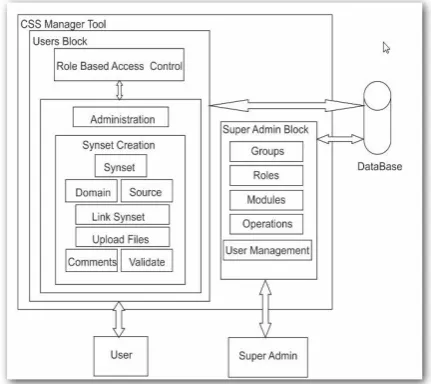
Figure 1 represents the architecture of CSS Man-ager Tool. The CSS ManMan-ager Tool is implement-ed in three blocks: User block, Super Admin block, and the Database. The CSS Manager tool is developed using the Hierarchical Role Based system with Access Control (RBAC) to control the access to certain parts and features of the CSS Manager Tool across different users. Refer Figure 2 for the block diagram of RBAC.
Figure1: Architecture of CSS Manager Tool
The User block is responsible for crea-tion/updation/validation of synsets, link-ing of synsets across languages, addlink-ing comments, source, and domain.
The Super-Admin block is responsible for the creation of groups, users, roles to be assigned to the members in a group, modules and its operations, etc.
The heart of the CSS Manager Tool is a centralized database that stores all the CSS data.
4.1 Modules of CSS Manager Tool
A module is an independent component which offers specific functionality. Each module is as-signed different operations related to the module. The different operations are: Advance search, add/view/edit/delete/link synsets, and add/delete/ change priority of example, add source, up-load/delete file/add/view/reply comments, etc. Only those operations that need to be performed by members of a language group are assigned to the modules and these modules are allotted to the roles. These modules depend on CSS database. While the addition of new modules does not re-quire any changes to the CSS database, new
ta-bles may need to be added to store data specific to module functionality.
Presently there are five modules, they are:
1. View All Synset: The view synset mod-ule allows the linguist to view synsets belonging to a language group/ category/ domain/source. The linguist/ lexicogra-pher can perform the operations which are assigned for this module.
2. Synset Creation: Allows the linguist to create synsets. The linguist/ lexicogra-pher can also add source/domain/images/ documents/links in order to give addi-tional information about the synset.
3. View Linked Synset: Allows the lin-guist to view the list of synsets linked across languages.
4. User Management: Allows the adminis-trator of a group to create new users, to block/unblock user, to assign privileges to the users, etc.
5. Synset Validation: Allows validation of synsets.
4.2 Role-Based system used in CSS
Manag-er Tool
A role hierarchy is a way of organizing roles to reflect authority, responsibility, and competency. Some general operations may be performed by all the group members such as adding, viewing, searching synsets. In this situation, it would be inefficient and administratively cumbersome to specify repeatedly these general operations for each role that gets created. Therefore role hierar-chy is used in order to avoid repetitive tasks. Al-so when a user is asAl-sociated with a role, the user can be given additional privileges.
Currently, the CSS Manager Tool has four roles: Super admin, Admin, senior linguist and junior linguist.
Figure2: Role Based system with Access Control
The Admin is responsible for managing his/her language group created by the Super admin. The admin of a group can add/block users to his group. And can use all the modules which are assigned to the Admin by the Superadmin.
The linguists are part of a language group. The operations (such as creating/ validating/ linking of synsets) performed by the junior linguists are further vali-dated and approved by the senior lin-guists of the group.
5
Implementation Details
The CSS Manager Tool is developed using PHP scripting language and is hosted on a Web Server supporting PHP version 5.3.15. Currently MySQL version 5.5.21 is used as database. The CSS Manager Tool was developed using XAMPP on 32 bit Microsoft Windows platform. It has been deployed on Fedora 16 Linux Plat-form using Apache version 2.2.22 and MySQL version 5.5.21 which come bundled with Fedora 16 Linux Platform. The screenshots of the tool are shown at the end of the paper.
6
Conclusion and Future Work
The advantages of CSS Manager Tool can be summarized as follows:
Ease in accessing synsets: The synset is represented by an identification number called as synset id. Remembering id’s is difficult for user, than remembering the concept of the synset. Earlier, the lin-guists had to remember synset id in order to perform any operation on synset in fu-ture. In CSS Manager Tool, the user
need not remember the synset ids, all the operations can be performed with the help of concept and synonymous set of the words.
Decentralized maintenance: Need of specialized software or any specific kind of technological environment to access the tool is not required. Any browser de-vice connected to the Internet would be sufficient for the job.
WordNet Enhancement: Creation of language specific concepts/synsets, add-ing additional information about the syn-set and their linkages to other Indian language WordNets is possible. The tool is being enhanced to support validation of WordNets.
Acknowledgement
This work has been carried out as a part of the Indradhanush WordNet Project (11(13)/2010-HCC(TDIL), dated 3-8-2010) jointly carried out by nine institutions. We wish to express our grat-itude to the funding agency DeitY, Govt. of India and also all the members of the Indradhanush Consortium.
References
Pushpak Bhattacharyya. 2010. IndoWordNet, Lexical Resources Engineering Conference 2010 (LREC2010), Malta.
Arindam Chatterjee, Salil Joshi, Mitesh Khapra, Pushpak Bhattacharyya. 2010. Introduction to Tools for IndoWordNet and Word Sense Disam-biguation. 3rd IndoWordNet workshop, Interna-tional Conference on Natural Language Procesing.
Christiane Fellbaum (ed). 1998. WordNet: An Elec-tronic Lexical Database. Cambridge, MA: MIT Press.
George A. Miller, Richard Beckwith, Christiane Fell-baum, Derek Gross, and Katherine Miller. 1993.
Introduction to WordNet: An On-line Lexical Da-tabase.
George A. Miller. 1995. WordNet: A Lexical Data-base for English. Communications of the ACM Vol. 38, No. 11: 39-41.
Konkani WordNet: WordNet For Konkani Language:
http://konkaniwordnet.unigoa.ac.in
IndoWordNet Website: Multilingual WordNet which links WordNets of eighteen Indian languages:
http://www.cfilt.iitb.ac.in/indowo rdnet/
Indradhanush Website: WordNets for seven Indian Languages:
http://indradhanush.unigoa.ac.in
Concept Space Synset Manager Tool (CSS Manager
Tool) :
http://indradhanush.unigoa.ac.in/c onceptspace/
Concept Space Manager Tool Tutorial link:
https://www.youtube.com/watch?v=BM hixBI7xOY&feature=youtu.be
Snapshots
1. Login Page: The login page of the CSS Manager Tool is shown below.
3. User Management: This module allows the administrator to view the users in a group, to add new users, to block or unblock user, to assign privileges to the users, etc. The User Manage-ment module is only available to the administrator of the group and not the linguist/ lexicog-rapher.
To add a new User,
View All Synset: This module allows the user to view all the synsets created so far. On selecting ‘View All Synset’ menu link, the user can view synsets belonging to a language. It also allows the user to select the number of synsets to be displayed per page, to view synsets based on the date of creation. Each module provides the user with the help files to assist in tool usage.
Based on the operations assigned to the modules and roles, the user can edit, view or validate the synsets.
View Linked Synsets: This module is similar to the View All synset module, but it only allows the users to view the synsets which are linked across languages.