Using and utilizing an innovative media development tool
ROAST, Chris <http://orcid.org/0000-0002-6931-6252>, DEARDEN, Andy
<http://orcid.org/0000-0002-5706-5978> and URUCHURTU, Elizabeth
<http://orcid.org/0000-0003-1385-9060>
Available from Sheffield Hallam University Research Archive (SHURA) at:
http://shura.shu.ac.uk/3962/
This document is the author deposited version. You are advised to consult the
publisher's version if you wish to cite from it.
Published version
ROAST, Chris, DEARDEN, Andy and URUCHURTU, Elizabeth (2011). Using and
utilizing an innovative media development tool. In: Proceeding of IHC & CLIHC
2011 : Proceedings of the 10th Brazilian Symposium on on Human Factors in
Computing Systems and the 5th Latin American Conference on Human-Computer
Interaction. Porto Alegre, Brazil, Brazilian Computer Society / ACM, 149-156.
Copyright and re-use policy
See
http://shura.shu.ac.uk/information.html
Using and utilizing an innovative media development tool
Chris Roast, Andy Dearden, Elizabeth Uruchurtu
Communication and Computing Research Centre
Sheffield Hallam University
153 Arundel Street, Sheffield, S1 2NU, UK,
+44(0)1142255555
[email protected]
ABSTRACT
This paper describes a novel commercially developed tool for supporting efficiency and effectiveness of a digital film production processes. The tool is described as are two alternative user interfaces for it. Approaches to analyzing the effectiveness of the tool prior to its widespread adoption are described and the conclusions from this analysis are illustrated.
Keywords
Automating media production, Post-production, automation, disruptive technology, user centered evaluation.
INTRODUCTION
This paper describes the analysis of a commercial design and production tool developed for a digital media production market. The tool is one of a set of related software tools that have been developed within a specific aim of simplifying and re-configuring the activities of media production and publication within the digital film industry, to reduce costs and improve quality. One example of this is the potential to reduce the duplication of work, by supporting commonly repeated activities. Hence when similar graphic design and layout work is required for a variety of audience languages in, say, a DVD menu, the need for repeated re-design for each language could be eliminated. On the face of it, this is a relatively straight forward concept. However, the reality of tool design and adoption is complicated by having to be integrated with existing work practices. In particular the tool under consideration in this paper is intrinsically "disruptive" in that it presents an innovative opportunity to optimise work to deliver a step change in efficiency. The innovation is unfamiliar to the users and involve practices that are qualitatively different to existing work activities. Standard models of the diffusion of innovations suggest that the decision to adopt an innovation is dependent on perceived ease of use and perceived benefit [10]. Hence, although
these new tools represent an opportunity to optimise work, adoption of the technology is far from assured.
The innovative nature of the tool and its introduction into live video production practice in a commercial context shapes the adoption. In particular although there is an authoritative decision to adopt the tool, the tool is available in parallel with established tools and hence its use in specific circumstances at the discretion of the individuals and teams working on specific projects.
THE TOOL CONCEPT
The working context of this research is that of digital film and related media production, and the tool concept concerns media production where international distribution requirements demand regional contributions, such as adaption of publicity material to suit different languages, or providing subtitles and/or audio dubbing to title. Complementing the demand for regional contributions, there is the commissioning studio's desire to centrally manage and control overall quality and maintain brand identity.
As an example, consider post-production for film distribution in formats such as blu-ray and DVD. These often involve sophisticated design work in areas such as the interactive menus and general viewer interaction. Such design must adhere to studio standards regarding details such as menu complexity and interactive structure. The first instance of such design is completed in a native language and style reflecting the brand of the film and studio. Once that design is approved, the same needs to be done for the full range of languages to be supported, and this can have additional design implications. The process of building and quality assuring the full design is potentially very complex. It involves the textual, visual and video content associated with different languages and regions to be brought together and combined to work as a coherent whole. Advanced tool support allows native single region/language designs to be imported and used to build and configure templates that are then capable of defining how arbitrary textual and visual assets can be used to generate a version covering all the required languages.
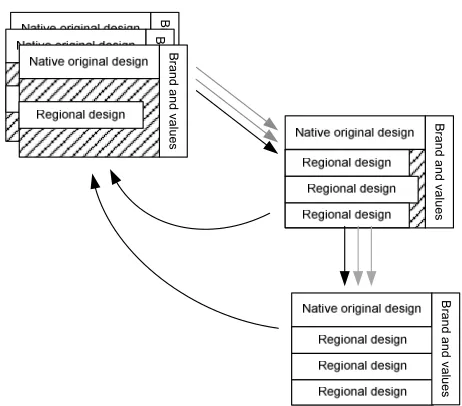
can the amount of work done independently. This strengthens the potential for centrally managing product quality, while also reducing overall effort through automated. Figures 1 and 2 illustrate this. Figure 1 shows the exiting process: the initial native version of a film title (or its related collateral), is given out to regional offices. The regional variants attempt to meet the given brand and values, however this requires central confirmation. When returned, each element is checked and revisions may be required at that point. Once all variants are integrated into a final product further checking is necessary and more revisions may be required for specific elements. Clearly, inefficiencies arise when the integrated result has to be checked for overall quality, and when regional work has to be re-done to improve quality. This involves effort and time and can make the process complex and hard to manage. Figure 2 shows the potential tool supported improvement, the branding and quality values of the initial native version are captured via abstractions such as templates and rules so that regional work is less able to disrupt quality. Once regional inputs are integrated the branding and values can be applied uniformly to all contributions, thus reducing the burden of quality checking and reducing the likelihood of having to re-work content.
The general architecture
The general architecture adopted by our industrial partner is to provide a consistent structure for the artefacts that can be imported, manipulated, processed and integrated. This then allows for generalities to be aligned to the structure. The structure used is hierarchical, with the lowest level objects in the hierarchy representing individual assets such as images or textual elements, and higher level objects grouping those beneath them. Generality is achieved by allowing variability in what a structured object can produce. This is expressed in terms of rules associated with
nodes in the hierarchy. The rules fall into a number of categories including:
• Rules that apply purely to textual features. These include rules that set or scale fonts sizes, change font faces, etc. E.g. "Set the font size on the associated cell to 12pt."
• Rules that apply purely to image-based assets. These include scaling images, replacing a default image with an alternative. E.g. "Set the height of this image to 10mm maintaining aspect ratio."
• Rules that relate, move or align nodes both relatively
and absolutely. E.g.: "Set the width of this node equal to node NODENAME."; "Align offspring to the right.", and "Move left 8px."
In addition to associating a rule with a node, the rule can be qualified with respect to regional language. Hence, the same node could have rules that are used only for specific language versions. For instance a single node might have its font set to 12pt, when using the French or Flemish translation; 10pt in Spanish; and uppercase in, say, Turkish.
The node hierarchy and the rules associated with nodes are used to generate all the required versions of the product specific to each language. Specific language translations are automatically incorporated via another service. Hence, from one structured object, numerous region-specific versions of the original native one can be specified and generated. The process of building the outputs draws together high quality assets, processes them, incorporates text translations and "builds" each language output. The process is computationally intensive, which limits the potential to interactively explore the effects that rules have.
The user interface alternatives
[image:3.595.312.534.90.258.2]Within this research two interfaces ("Node Based" and "Process Based") were available. These provided different
Figure 2. The proposed tool enhanced process.
B
ra
n
d
a
n
d
va
lu
e
s
B
ra
n
d
a
n
d
va
lu
e
s
B
ra
n
d
a
n
d
va
lu
e
s
B
ra
n
d
a
n
d
va
lu
e
s
B
ra
n
d
a
n
d
va
lu
e
[image:3.595.59.290.103.306.2]s
means by which the users are able view and manipulate the structured document and its rules.
The Node Based User Interface
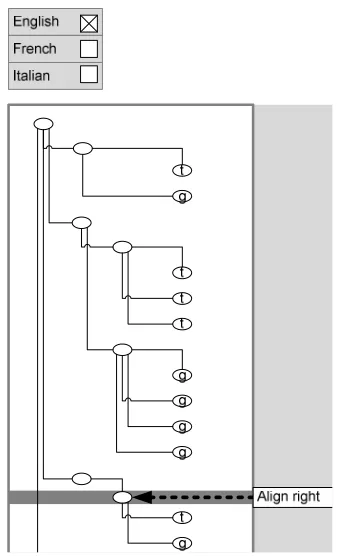
In this interface the node hierarchy is the primary means of viewing a configuration. Conventional hierarchical structure management is supported, allowing parent nodes to be "folded" and "unfolded", and node type information (textual or graphical) is evident from the leaf node icons.
In order to see what rules are used on a particular node the user has to "select" that node, then the rules associated with it are shown. Rules can also be added or deleted on a node by node basis. The language specificity of a rule is indicated by checkboxes at the top of the display. Figure 3 provides an illustration of this, in which a node is shown to have an "align right" rule that is applicable for the English language.
The Process Based User Interface
In the process based interface the node hierarchy is visible in the same way. In addition, a region of the display is used to show all the rules being used (for all the nodes). The rules are shown in the sequence in which they are used. Figure 4 provides an illustration of this. Each rule can be unfolded to see details which include the nodes it is applied to and for what languages. The figure shows also that when one of the nodes is selected its position in the hierarchy is also highlighted. Specifically, the illustration shows a scale font rule applied to three nodes for two languages cases (UK English and USA English).
ANALYSING CONTEXT AND USERS
As mentioned earlier, the value of adopting this tool concept is reliant upon tool users employing it as intended. The tool represents a significant new activity for intended end users, and as such it has the potential to disrupt established patterns of work and runs the risk of not fulfilling its aims.
In order to explore and understand issues around the adoption and suitability, the research team conducted interviews, observation and workshops with: a small group of early adopters; potential users and their managers; and also requirements analysts working for the tool developers. The aim of this process was to establish an understanding of the factors and values influencing and supporting changes of practice within end user work contexts. A related aim subsequently examined was the development processes including user involvement in design processes.
Below we characterise the intended users of the tool and then describe our approach to analysing the tool concept based upon our findings.
The users in context
The intended users are primarily professional graphic designers working in a digital context. They are commonly accredited or highly experienced in using professional graphics, layout and typesetting tools such as Photoshop and InDesign. Their experience and expertise in using such tools to create high quality static graphics is highly valued.
[image:4.595.76.245.89.367.2]Within the broad setting of digital media production individual roles, responsibilities and work flows are well established. In particular there is evidence that professionals are very "process aware" and are well aware of the implication of delays, errors and poor quality work on the overall production process. Hence although work is clearly demarcated, overall product quality and efficiency of production appear to be collectively understood. Thus, the perceived value of the tool should be positive.
Figure 3. The node based user interface illustrated.
g t
t t
g t
g g
t g
t g
Align
Move Make uppercase
Align
Scale font
Align
Scale font Scale font Languages:
Nodes:
Options:
Node 12 Node mid UK English USA English
[image:4.595.319.533.94.286.2]Node 19
In addition to their professional expertise and attitudes, it is also of value characterising the manner in which they work. In terms of psychological descriptions, they work in a highly concrete craft-like manner - what could be termed "hands-on" and working "by-eye". The values they prioritise in their work are those of visual precision in colour and layout. Their primary work tools emphasise direct manipulation: immediate visual feedback, responsiveness and visual representation of the final product. One of the terms often used in referring to design quality is to ensure that the result of their work is "pixel perfect". One illustrative example observed was that users were happier to align objects by eye than by employing build-in object alignment options.
From this perspective it can be seen that the nature for the tool examined in this paper is likely to be challenging for these users. The node hierarchy and its rules are the object worked-on and it is an object capable of generating many products - one for each language used. In this setting the notion of "pixel perfect" is not immediately relevant.
The issues faced by individuals in adopting an innovation are characterised by Rogers [10] in terms of: relative advantage; compatibility with existing practice; complexity of use; ease of trialing; the ease of observing and demonstrating the value. In the following analysis of the tool we are able to focus on the first two of these. The remaining three were governed by other factors at the organisational level and were not the primary focus of the academic collaboration.
METHOD
There is an obvious need for users to shift their work view in order to engage effectively with the tool. How do we explore and understand this challenge to inform tool design and enhance perceived ease of use? Two factors suggest that exploration of human factors in programming would be the appropriate route to follow: (i) the need for users to start focusing more upon the manipulation of the abstract information structure of nodes and rules, and (ii) the disassociation of that structure from the intended outcomes of working with it.
Lead by this observation and our engagement with intended end users, our analysis was initiated by employing domain mapping techniques and user types. These provided a means of focusing our analysis and facilitating our consultation with stakeholders. This process informed our comparative assessment the tool interfaces. Two approaches to comparative assessment were explored, the use of program comprehension techniques and the use of Cognitive Dimensions [1,3,4,5].
Domain mapping
Our approach to domain mapping is based on Ontological Sketch Modelling (see [2]). Within this approach the key concepts employed by users and supported by a system are articulated and compared in terms of how they are made obvious or available. Concepts are articulated relatively
informally, focusing upon conceptual objects and the actions that can be performed upon them.
For intended tool users their conceptual model is taken to be close to that evident from their expertise with existing graphic design tools. Hence we conclude that users are competent in understanding and working with the following objects and actions:
The Canvas; Layers that can be promoted, demoted, created, deleted, merged, grouped and ungroup; Styles that can be created, modified, deleted, applied; Tags that can assigned or un-assigned; Regions that can be selected, cleared, tagged or untagged; and so forth.
The key insight from this is that the concepts users are already familiar with map closely to some of those assumed in the tool. For example, the layer hierarchy supported in drawing tools is analogous to the node hierarchy provided in the new tool. The impact of introducing the new tool to users with this knowledge can thus be assessed in terms of what additional conceptual understanding the tool demands of them. Two key concepts apparent are:
• The introduction of regional languages. Prior to the new tool, work on the same project from different language settings would be treated as different "jobs" (with some common elements). The tool enables languages to be encoded into the work, hence the intended users view is one of having a project file that is capable of supporting several specific jobs.
• The introduction of explicit rules. Prior to the new tool the facilities closest to those offered by the tool would be styles, macros and plug-ins. With the new tool the user is able to, and expected to, assign and configure sets of rules as means of achieving a consistent style for a number of jobs within a project.
Hence, in terms of the mapping analysis the tool introduces a new level of abstraction that we'll term Project. A project embodies a set of jobs that have common purpose but vary with respect to language and region. In addition a project includes the new concept of a RuleSet.
Segmenting user types
To frame that analysis we consider three archetypal user mindsets that represent possible ways users are likely to view the tool.
1. Keep it simple. This user mindset characterises users
who make do with the tool. Although working with the rules offered, they are not confident in working in the abstract terms provided by rules. So for example, although a rule may exist to align a group of nodes, this type of user would be more than happy to perform the alignment manually. If asked, they would say they were working on getting a specific image "right" (see [6]).
2. Tool proficient. This user mindset characterises users
who view the tool as one of the many they need to use as part of their practice and therefore work at being effective with it. Given a particular project and wishing to achieve a particular effect, they identify and apply an appropriate rule. Hence they use rules but are not working towards elegant configurations of rules to capture good design. If asked, they would say they were working on (i) a known set of images that are formed by rules and (ii) getting the rules correct for the images required.
3. Keep it general. This user mindset is mirror of that
intended by the tool developers. The tool adopter understands that: (i) some initial work is traditional and focused on developing quality graphics for the native language component of a project; (ii) subsequent work is aimed at capturing that design quality in more generic terms. We could characterise them as individuals who might "re-factor" a rule configuration to minimise unnecessary repetition and localise information. If asked, they would say they were working on (i) a set of images that are formed by rules and (ii) getting the rules correct for the known images and those that may yet be required by the project.
Interviews with users and user representatives validated these characterisations and indicated that the predominant user population were "Keep it simple" - characterised as not "getting it". The preferred user type was the "Tool Proficient" and these were seen as the most likely feasible target user. The "Keep it general" user type was recognised as possibility but unlikely because of the risk of time being misspent on preparing and not "doing".
An additional factor limiting progression beyond "Tool Proficient" was the perceived risk of working on rules only to find that they are not operating as required and other rule sets would be more appropriate. The user priority is focused upon the quality of the outputs generated and not on the means by which it is achieved. In short, the traditional way of working is known, and known to work. Hence the pay-off working with the tool needs to be easily realised.
Table 1. Programming comprehension information types and their mapping to post-production and
example questions.
Functional information focuses upon information about
the overall goal of a program. Thus it is not specific to technologies or notations.
For post-production this information concerns all the outputs from a specific configuration being at the expected standard.
Q: "Is the film title always displayed on the menu and does it span the screen in all languages?"
State information focuses upon the state of variables and objects at particular points in program execution.
For post-production this concerns information regarding the positioning, scaling, etc, of the graphical and textual elements that go to form an image or a set of images.
Q: "After positioning image1, what's the position of the image2?"
Control Flow information focuses upon information relating to sequence of activities and events that occur in a program.
For post-production this concerns when more than one rule is used and the sequence by which they are used.
Q: "Will node3 be scaled then aligned or aligned then scaled?"
Data Flow information focuses upon how data is passed and manipulated.
For post-production this information concerns how elements and their scale and position influence other elements, by virtue of rules such as "align-left" or "scale-to-element"
Q: "When node4 is moved, what other nodes are affected?"
Operation information focuses upon the specific
operations that take place.
For post-production this means understanding what specific rule types do.
Q: "Will the Fit-to-bounding-box rule shrink and/or enlarge the font point size used in a text node?"
Program Comprehension
post-production using the new tool. These post-post-production tool questions were used to focus interviews and discussions with user representatives. Discussions focused around their relative relevance to different user types, and the complexity of attempting to answer them in both user interfaces available.
This analysis of information included walking-through the process of addressing the information type questions posed. For example, this involved developing a detailed description of how a user might systematically go about understanding how a given node will be affected. In this case the process involved: (i) the user maintaining a view of the affects for each language used; (ii) the user having to identify the path of ancestor nodes and understanding the cumulative effect of each; (iii) the user engaging a similar process again for any alignment or distribute rule that is associated with another node. Collectively this type of analysis was beneficial in revealing the potentially complex nature of the system, and also showing the designs that are likely to be understood. An example in this case is when the rules used are absolute in nature and not relative, in these cases the interpretation of a node is far simpler. For some information the two user interfaces could be easily contrasted, such as the fact that the process based user interface explicitly shows control flow in the form of a rules sequence on the right-hand side.
In general the analysis revealed a number of areas of where information support for users was most needed, the most significant of these were expressed as guidelines that helped examine the tool user interfaces. Two illustrations of this are:
• Meaningful navigation and views support the user in
seeing how nodes and rules are inter-related. For example, being able to see which nodes might influence another, and being able to see the set of rules that operate on those nodes. For both the node based and the process based user interface the most meaningful view is that of the hierarchy of nodes. However in the node based there is no other support for identify related nodes or easily finding them. By contrast in the process based user interface there is functionality that allows filtering on a node name, and the automatic identification of related nodes. Thus, in this area the process based interface more effectively supports the user.
• Clear concrete effect support the user in interpreting
composite effect of a series of rules. This limits the need for the user to keep a running “cumulative effect” in their head when examining a specific design. For both the node based user interface and the process based user interface there is limited support for clear concrete effects, other than familiarity with the rule names and their effect. (i.e operational information).
Numerous other guidelines were identified some of which focused upon core tool concept and design characteristics,
and also the effectiveness or otherwise of the rules available to users.
A number of other guidelines were identified some of which focused upon core tool concept and design characteristics, and also the effectiveness or otherwise of the rules available to users. Many of these related to the conceptual leap that moving from concrete manipulation to “programmed” manipulation entails. For example, analytically it could be argued that rules of a declarative nature would be less confusing. Despite this, nondeclarative procedural rules supported the concrete interpretation of how assets were manipulated. The program comprehension framework was of benefit for examining this type of tool, since it offered a basis for greatly empowering end users. However, in addition to this the authors also considered the more generic analytic framework offered by “Cognitive Dimensions” [1].
Cognitive Dimensions
Cognitive dimensions provide a set of valuable concepts for the assessment of complex interactive systems. In particular they have been derived from extensive experience of examining and analysing systems that involve a combination of interactive behaviour and the use of notational representations [3,4,5].
Our treatment of cognitive dimensions is to select and characterise the key tool concepts that arose from the domain mapping. These core concepts: rules, languages, and nodes were then used to summarise core questions about the tool. The questions used were derived from those recommended by [1] and used successfully in [9]. As in the comprehension analysis, the questions served as a basis for facilitating stakeholder reflection and potentially
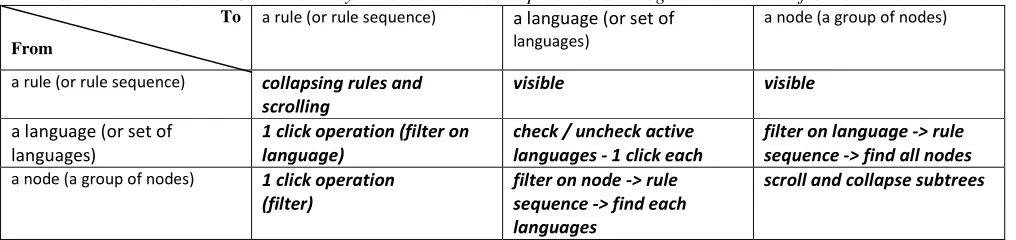
identifying interesting possibilities and alternatives. Unlike the comprehension study, the focus upon a few key concepts enabled inter-concept relations to be explored more formally and thoroughly. The materials used for discussion and reflection allowed this by following a tabular form in which differing possible relations were open for consideration. An example of this form for questions about the concept of “viscosity” is shown in figure 5. This approach was adopted so as to simply the range of alternatives that could be considered, and to avoid “leading” the assessment in a specific direction.
Initially the user activity was assessed in terms of the cognitive dimensions framework by exploring the general types of activity expected. These include: “Searching” - finding information and knowhow and referencing; “Transcribing” - copying substantial amounts of information from some other source into the system; "Incremental" – repeatedly adjusting small bits;
What are the dominant / common ways in which these concepts are shown together or reached from one another?
To
From
a rule (or rule sequence) a language (or set of
languages)
a node (a group of nodes)
a rule (or rule sequence) collapsing rules and
scrolling
visible visible
a language (or set of languages)
1 click operation (filter on language)
check / uncheck active languages - 1 click each
filter on language -> rule sequence -> find all nodes
a node (a group of nodes) 1 click operation
(filter)
filter on node -> rule sequence -> find each languages
[image:8.595.47.555.97.217.2]scroll and collapse subtrees
Figure 5. An example of the question format for examining inter-concept relations for viscosity.
Of these it appears that “incremental” activity was envisaged as the most common type of use to be supported by the tool. The only mention of “play activity” was for the local tool experts who were proficient in exploring the variety of ways in which the tool may be used. Consultation revealed the recognition of some other specific activity areas. The activity of relating given node names to the specific assets they represent was termed “visual mapping” and considered to a significant “search activity”. Also, the preparation of assets and data for importing into the tool was highlighted as a significant “reorganising activity”.
The results from exploring the questions were combined and used to draw general observations, such as:
• Rules are central concept to the tool with most information flows and activities centre on them. Despite this access to rule instances is complicated by: poor support for differentiating instances; poor rule abstractions; and poor support for rules to be partially specified, tried out and annotated.
• The node hierarchy on which a specific project is based is largely static for that project. However, that does not mean that they easily recognised or remembered when working on a project. Even a simple facility such as allowing the naming of a tool would alleviate considerable mental effort and frustration on the part of the user.
In summarising the analysis resulting from using the cognitive dimensions framework discussion, pertinent themes relating to tool improvement emerged, that were of value in assessing the tool. These included:
• Abstraction promotion The rules are in effect highly
abstract concepts, however their abstract nature (and thus power) is not promoted. If rule instances were not predicated on specific node hierarchy, their abstract nature would be clearer, as would their potential to embody to some extent knowledge about how to process some assets.
• Interpretation promotion Complementing abstraction
promotion, the interfaces as they stand do little to show
how the effect of a number of rules combine to give the cumulative result.
• Annotation and provisional rules Despite their core
importance rules cannot be introduced without being fully defined. This does not support the speculative, exploratory or "safe" use of rules. Confidence in the using and working with rules would be improved if the steps to having them in a project were not so committing. Similarly annotations to rules could be used to explain their role and purpose within specific projects.
Conclusions
We’ve reported upon the user centred analysis of a tool concept developed to improve the efficiency and effectiveness in film post-production processes. The integration of such a tool into existing working practice poses a human centred problem, that have been explored in detail through employing a number of analytic techniques. In particular, recognizing the conceptual shift demanded by the tool, and its similarity to programming, has enhanced the surface level analysis that would often be associated with user interface evaluation.
One of the most important observations from this work concerns the difficult nature tool introduction, where the tool is not immediately aligned to existing practice – i.e. a “disruptive” tool. Some of the issues include:
• Although there may be a target user population, the primary force behind the introduction of the tool is not user driven.
• The adoption of the tool by the target user population will change the way that population works, hence the concept of an authoritative user population able to effectively assess and contribute to tool development is undermined.
For tool support in the context where tool sophistication exceeds the simple “instrumentation” of existing user activity, new analysis approaches need to be considered. Selecting and using such methods is not simple, in our case study here, two rational approaches followed were that of employing a program comprehension framework and the cognitive dimensions framework. We’ve shown that each approach could be adapted to explore the tool under examination. In addition the approaches largely complemented each other.
Although the two are hard to compare, it is reasonable to say that the cognitive dimensions framework appeared to promote richer insights and also provide a stronger formative basis for design improvement.
ACKNOWLEDGMENTS
The authors would like to acknowledge the support of EPSRC and Technology Strategy Board that enabled this work, and our industrial partners for participating in this research.
REFERENCES
1. Blackwell, A. F. (2006). Ten years of cognitive dimensions in visual languages and computing: Guest Editor's introduction to special issue, Journal of Visual Languages & Computing, Volume 17, Issue 4, Ten Years of Cognitive Dimensions, August 2006, Pages 285-287, ISSN 1045-926X, DOI:
10.1016/j.jvlc.2006.04.001.
2. Blandford, A., Green, T. R. G. and Connell, I. W. (2004) Formalising an Understanding of User-System Misfits. Proceedings of EHCI-DSVIS 2004, the 9th IFIP working Conference on Engineering Human Computer Interaction (Jointly with the 11th
International Workshop on Design, Specification and Verification of Interactive Systems), Hamburg, 11-13 July 2004.
3. Clarke, S. (2001) Evaluating a new programming language. In G. Kadoda (Ed.) Proceedings of the Thirteenth Annual Meeting of the Psychology of Programming Interest Group, 275 – 289.
4. Dearden, A., Naghsh, A. & Siddiqi, J. (2003). Using Cognitive Dimensions to Compare Prototyping Techniques. Proceedings of PPIG 2003, Annual conference of the Psychology of Programming Interest Group, Keele University, UK, 8th – 10th April.
5. Green, T.R.G. and Blackwell, A.F. (1998). Design for usability using Cognitive Dimensions. Tutorial session at British Computer Society conference on Human Computer Interaction HCI'98.
6. Khazaei, B., and Roast, C.: The influence of formal representation on solution specification in
Requirements Engineering 8(1): 69-77 (2003)
7. Pennington, N. Stimulus structures and mental representations in expert comprehension of computer programs, Cognitive Psychology, 1987.
8. Roast, C. andBettle, T. The Impact of Colour on Web Application Programmers. IHM-HCI'2001 - The 15th Annual Conference of the British HCI Group (volume 2).
9. Roast, C. And Khazaei, B. (2007). An Investigation into the Validation of Formalised Cognitive Dimensions. In Interactive Systems, Design Specification and Verification. Lecture Notes in Computer Science, volume 4323, 109 – 122.