Table of contents
Executive summary... 2
Migration overview... 2
Migration summaries... 4
Porting Solaris applications from SPARC to Solaris on HP ProLiant ... 4
Phase 1. Plan... 4
Phase 2. Prepare... 5
Phase 3. Test ... 6
Phase 4. Implement ... 6
Porting Solaris applications to Linux on HP ProLiant or HP Integrity... 6
Phase 1. Plan... 6
Phase 2. Prepare... 8
Phase 3. Test ... 8
Phase 4. Implement ... 8
Case study: Application porting to ProLiant / Linux... 8
Porting Solaris applications to HP-UX on HP Integrity ... 10
Case study: Application porting to HP Integrity + HP-UX... 10
Migration and upgrade of commercial “ISV” applications to HP ... 11
Database migration... 11
Planning considerations for target platform and migration process ... 12
High level Oracle database upgrade process ... 14
Database migration tasks... 15
Phase 1. Plan... 15 Phase 2. Prepare... 17 Phase 3. Test ... 17 Phase 4. Implement ... 18 HP migration resources... 18 Services ... 18 Porting tools ... 19 Summary ... 19
For more information... 19
HP hardware... 19
HP software... 20
Services ... 20
HP partnerships ... 20
Database and application migration from SPARC
to HP + Intel
®standards-based infrastructure
Executive summary
In today’s economy, eliminating fixed costs due to older, dedicated SPARC servers is an excellent way to shift dollars and resources to projects which make the business more competitive. Many SPARC customers running mature application environments are considering their choices for new server platforms. Deploying standards-based HP ProLiant and Integrity servers, integrated with HP StorageWorks and managed through HP Systems Insight Manager, delivers a proven, tightly integrated alternative. In addition to better performance, customers get tremendous cost savings, lower power usage, reduced floor space needs, and vastly improved server and storage utilization. This translates into lower fixed costs and lower budget demands to handle growth.
The migration from SPARC to Intel®-based HP ProLiant and Integrity servers is both flexible and
straightforward. This paper leverages best practices from HP and EDS (an HP company) for porting, application upgrades, and database migration. HP is uniquely qualified to assist SPARC customers to undertake this work, having helped accounts around the world modernize applications and adopt standards-based servers.
Migration overview
The migration process from SPARC platforms to HP infrastructure requires resources in the following five areas:
Project management:Coordinating and setting priorities for the migration, while ensuring rigorous attention to detail
Infrastructure:Architecture, servers and operating system choices, workloads, consolidation, virtualization
In-house or custom applications:Evaluating source code and build inventories, architecture options, compiler compatibility, database compatibility, code updating, acceptance testing and deployment
Commercial applications:Versions, upgrade paths, database versions, helper applications
Database:Version compatibility, upgrade requirements and database upgrade and migration strategies
This paper covers the application and database migration tasks, and provides guidance to more detailed reference materials. Infrastructure migration and workload consolidation is discussed in the complementary whitepaper “Migrating from SPARC to HP + Intel®standards-based infrastructure”
4AA2-5712ENW. Project management best practices are reviewed in both. For each of the key areas, execution progresses through these four phases are detailed in the next section.
Plan:Evaluate business needs and constraints, develop approach and detailed task breakdown.
Prepare:Ready the infrastructure and tools for migration.
Test:Test the tools, applications, and data in an environment that models the production environment.
As an example, Table 1 illustrates key tasks for application porting.
Plan Prepare Test Implement
Business analysis
Application analysis & planning
Pilot & tools
optimization Applicationtransition Pre-implementation Implementation 1 to 2 weeks 2 to 4 weeks 2 to 4 weeks 4 weeks to 6 months 4 weeks to 1 year Ongoing Activities Business drivers Business process analysis Change impact analysis Total cost of ownership analysis Develop business case Business needs Application analysis (As-is) Alternatives analysis (To-be) Risk analysis Proof-of-concept Developing project estimates & plans Tools specification (Language, DB, platform & data) Selection and creation or customization Pilot source conversion DB conversion Add-on analysis Program conversion Unit testing &
functional verification Integration testing System testing Documentation Acceptance Interface development testing Stress testing Performance tuning Installation Roll-out planning User training Support processes Maintenance support Deliverables Business case Transition engineering guide Transition plan & proposal Transition automation tools Pilot results Program code Databases Environment setup
Test results & benchmarks
Support process Support
infrastructure
Table 1:Application porting process example
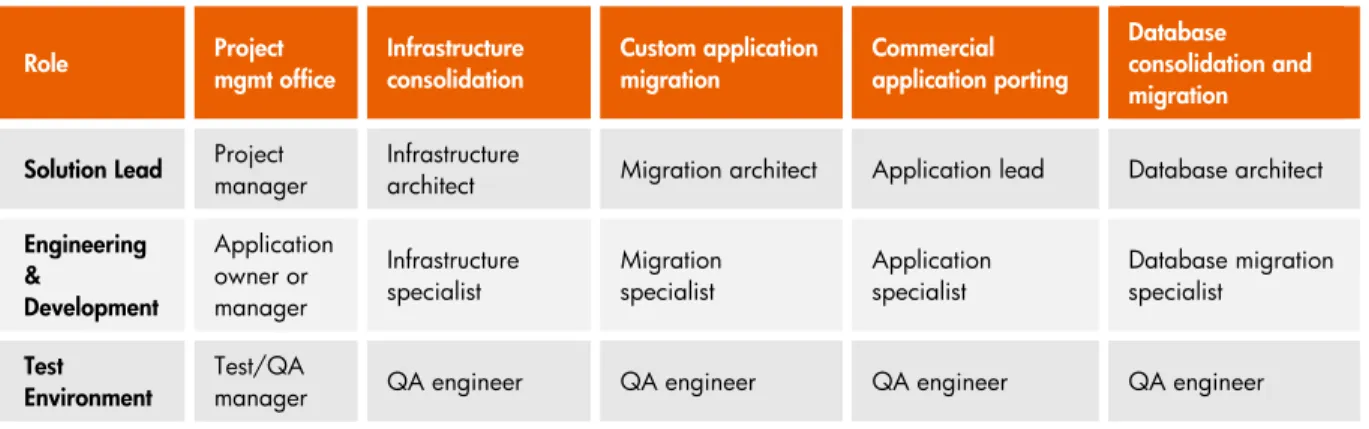
HP recommends that a project management office oversee and coordinate the individual tasks. This ensures that critical information is passed between teams on time. It also ensures consistent program review and resourcing priorities. Table 2 identifies typical roles for a project team.
Role Projectmgmt office Infrastructureconsolidation Custom applicationmigration Commercialapplication porting Databaseconsolidation and migration Solution Lead Projectmanager Infrastructurearchitect Migration architect Application lead Database architect
Engineering & Development Application owner or manager Infrastructure
specialist Migrationspecialist Applicationspecialist Database migrationspecialist
Test
Environment Test/QAmanager QA engineer QA engineer QA engineer QA engineer
Table 2:Migration project roles
In the project kickoff, the teams must agree on specifics for the development, test and QA processes and environment, as well as common tools to facilitate information sharing and documentation. HP and authorized partners can work with the customer to understand their staffing requirements, and provide specialists to meet business objectives.
At the highest level, a migration plan should address:
Stack assessment:Identify all of the target application versions and the application architecture, and validate their availability on the target platform.
Application and database upgrade path.Depending on the age and versions of the current applications, multiple upgrades of database and application may be needed. Consult your HP application specialist for detailed recommendations.
Defining and provisioning test environment.Deploy infrastructure to test all aspects of the upgrade process. This will include at least appropriate servers, storage.
Migration testing model:This can include upgrading software versions, database export and import/load
Defining full migration process:Determine downtime windows, user training, and validation. The next sections provide task breakdowns for the following key classes of migration projects:
Application porting from Solaris/SPARC to Solaris/Intel® x861Architecture – HP ProLiant servers Application porting from Solaris/SPARC to Linux/x86 and Itanium® Architectures – HP ProLiant or
HP Integrity servers
Application porting from Solaris/SPARC to HP-UX/Itanium® Architectures – HP Integrity servers Migration of commercial applications from Solaris/SPARC to HP ProLiant or HP Integrity servers
Database migration from Solaris/SPARC to HP ProLiant or HP Integrity servers
HP can provide project management services and specialists to assist with migration planning as well as migration services. To optimize TCO for the project, consider combining infrastructure application migration with workload consolidation.
Migration summaries
This section covers the major considerations for porting from SPARC to HP.
Porting Solaris applications from SPARC to Solaris on HP ProLiant
The process presented here applies to porting applications, primarily written in C, C++, and Java from Solaris on SPARC to Solaris on HP ProLiant servers. It includes recommendations for planning and executing a typical porting project. For more information, consult your HP migration specialist. Key tasks are outlined below.Phase 1. Plan
1.1 Create an inventory of all code assets that will be part of the porting process.
Traditional languages, such as C, C++; access to or gaps in source code should be noted.
Platform independent languages, such as Java; check for any helper applications which are machine-dependent.
Scripting languages such as shell, Perl, cgi, xml, make; check for any SPARC specifics, such as device names.
Database creation languages; DDL, DML, load scripts
Complementary libraries and versions
Assembly code or inline assembly code; consider whether these should be rewritten in a compiled language to simplify maintenance and updates. Performance advantages of assembly language may no longer be compelling.
In general, shell scripts behave consistently between Solaris on SPARC and x86. As with other resources, command and library paths need to be checked for validity.
1.2 Define the changes in development environment for Solaris / ProLiant. Consider whether deployment will continue on SPARC as well as Intel®architecture servers. Table 3 covers typical
areas to evaluate.
Topic Key considerations Long-term platform
flexibility
Applications have frequently been highly optimized for what are now older, slower SPARC platforms. The advances in processor performance that come with Intel® Xeon® processors, and
the option of later hosting on Linux make the Solaris x86 port an opportunity to “clean up” the code to maximize portability. For instance, consider evaluating the code for ANSI compliance and / or converting to POSIX threads. If the application shares data in mixed server
environments, include support for network byte ordering (NBO).
Compilers See the references in “For More Information” for guidance on compiler selection. If migratingaway from Sun Studio compilers, other compilers may accept different command line options. This can require some parameterization of the existing makefiles to ensure proper builds.
Database versions Application migration can be an opportunity to upgrade or change database platforms. See thesection “Database Migration” for guidance on this topic.
Porting environment
Porting requires adapting to the Solaris on x 86 platforms. Specific changes include accounting for differences in installation, device naming, build environment, executable locations, library locations, and run-time specifics. Select an appropriate versioning tool, such as mercurial. Specific environment differences include:
Root partition in a standard installation procedure is often too small for development and should be increased to at least 20 gigabytes.
Make sure all appropriate $PATHs are available, including /usr/bin, /usr/ucb, /usr/openwin/bin, /usr/ccs/bin, /usr/sfw/bin, and /opt/*/bin.
Table 3:Solaris porting planning considerations
1.3 Compare differences in operating system features required by the application, such as clustering, run-time libraries, and third party applications. Develop recommendations to address the
differences. Some items to consider:
Replace ucb functions with normal system routines unless there is a compelling reason to retain them. There are incompatibilities with libc, for example.
Check location references to all third-party utilities and libraries.
Take into account that the ISO standard for C++ allows some features to be
implementation-defined. If this approach is used, it must be addressed during migration.
When using Sun Studio during a C++ migration, select the C++ Standard Library or opt for the better-conforming, higher-performing stlport4 library.
Evaluate hardware-dependent scripts to accommodate device names for Intel® architecture
servers.
1.4 A representative sample of source code should be scanned to identify common differences in coding practice across the source and target platforms. Common areas to be identified and resolved include endian-ness and typecasting. For Java, there can be minor coding changes to comply with platform-specific standards. Take care to identify all “helper” applications and note their porting requirements.
1.5 Once the assessments are complete, estimates can be made of total lines affected, and work required to migrate them.
Phase 2. Prepare
2.1 Ensure the development and test team is trained on the development, documentation, and management tools.
2.2 The development and test environment includes makefiles, compilers, linkers and libraries. Flags and other configuration settings may need to be changed to match the new platform. Validate names, versions, and paths to libraries and other resources for consistency.
2.3 Develop a transition plan for the end users, including planning for downtime, and communicating the process to them. Update the existing source code base, with special regard to removing non-standard practices and SPARC-Solaris dependencies.
2.4 Update the application as necessary to meet Solaris on x86 requirements.
2.5 Compile the application. Take advantage of ANSI or stricter error-checking to flag potential issues.
Phase 3. Test
3.1 Validate the test environment and test plan.
3.2 Test the application rigorously with a subset of production data. 3.3 Compare with expected results.
3.4 Cycle through as needed to ensure completion to specifications.
Phase 4. Implement
4.1 Plan production deployment
1. Develop the production cut-over plan
2. Rehearse steps required for connection to production database 3. Identify test cases required to validate with production database 4. Develop contingency plan
4.2 Execute production deployment 1. Setup the production infrastructure 2. Install required software and licenses
3. Execute production test cases and validate results
4. If successful, change host names (and any other required changes) and roll over to the application and database servers
5. Conduct user-acceptance production testing.
Porting Solaris applications to Linux on HP ProLiant or HP Integrity
Porting applications from Solaris to Linux requires assessing several key aspects of the application code and defining requirements for the target Linux platform. This document gives an overview to the porting process, and cites references for additional resources. Porting an application requires adapting the existing application to the standards of the new environment while ensuring that the application continues to behave as intended. Commonly found languages that require application code updating and/or recompiling include C, C++, Java, Fortran, shell scripts, Ruby, Python, and Tcl. Key tasks are outlined below.Phase 1. Plan
1.1 Create an inventory of all code assets that will be part of the porting
Traditional languages, such as C, C++. Access to or gaps in source code should be noted.
Platform independent languages, such as Java.
Scripting languages such as shell, Perl, CGI, XML, Make
Database creation languages: DDL, DML, load scripts
Complementary libraries and versions
Assembly code or inline assembly code. Consider whether these should be written in a compiled language. Performance of current Xeon®processors may make assembly code
In general, shell scripts behave consistently between Solaris and Linux. As with other resources, command and library paths need to be checked for consistency.
1.2 Define the changes in application requirements, porting, and tools for Solaris / ProLiant. Some of the key topics are covered in Table 4.
Topic Key considerations Compilers
Multiple compilers are available for C, C++, Fortran programming languages, HP, Intel®and open
source community (GNU development tools). Intel®compilers are highly optimized for Intel®IA-32/64and Itanium® architectureson Windows and Linux. Choosing these compilers leverages benefits of the target platform
architecture and features.
64-bit Extending the existing code base rather than simply porting could provide significant performance ordeployment options. Many existing Solaris applications are 32-bit, so it makes sense to decide whether to extend support to 32/64 (IA-32, HP ProLiant) or full 64-bit (Itanium, HP Integrity) servers.
Threads Linux offers POSIX-compatible threads. Solaris Light-Weight Threads are not POSIX-compliant and mustbe converted to POSIX threads. Standards and
portability Eliminating non-standard coding during the port can reduce maintenance and enhance long termportability.
High
availability Applications written for clustering in Sun SPARC will need to be updated to reflect high availabilityoptions on Linux.
Database
versions Application migration can be an opportunity to upgrade or change database platforms. See the section“Database Migration” for guidance on this topic.
Porting environment
To support the developers, decisions on tools will also need to be made. There can be big differences in tool offerings and capabilities across Solaris and Linux. Planners should look at:
Development environment. There are many excellent Linux-based integrated development environments that provide the command-line capabilities of UNIX and the graphical interface found in Windows environments.
Source code management. RCS, SCCS and others are available on Linux. Build environment. Make, xmkmf, Ant and others are available
Test. Scripting languages, diff, expect and test frameworks are all available. Documentation. A wide variety of tools are available on Linux.
Table 4:Linux porting planning considerations
1.3 Compare differences in operating system features required by the application, such as clustering, run-time libraries, and third party applications. Develop recommendations to address the
differences. Some items to consider:
Replace ucb functions with normal system routines
Locate and correct all third-party utilities and libraries.
Take into account that the ISO standard for C++ allows some features to be
implementation-defined. If this approach is used, it must be addressed during migration.
Evaluate hardware-dependent scripts to accommodate HP ProLiant device names. 1.4 A representative sample of source code should be scanned to identify common differences in
coding practice across the source and target platforms. Common areas to be identified and resolved include endian-ness and type-casting. For Java, there can be minor coding changes to comply with platform-specific standards. Take care to identify all “helper” applications and note their porting requirements.
1.5 Once the assessments are complete, estimates can be made of total lines affected, and work required to update them.
Phase 2. Prepare
2.1 Ensure the development and test team is trained on all documentation and development tools. 2.2 The development and test environment includes makefiles, compilers, linkers and libraries. Flags
and other configuration settings may require changing to match the platform. Validate all names, versions and paths to libraries and other resources for consistency. The HP Solaris to Linux Porting Kit (SLPK) can simplify and streamline this work. See “For More Information” for a link to this resource.
2.3 Develop a transition plan for the end users, including planning for downtime, and communicating the process to them. Clean up the existing base of source code, with special regard to removing non-standard practices and SPARC-Solaris dependencies.
2.4 Update the application as necessary to meet Linux on x86 requirements.
2.5 Compile the application. Take advantage of ANSI or stricter error-checking to flag potential issues.
Phase 3. Test
3.1 Validate the test environment and test plan.
3.2 Test the application rigorously with a subset of production data. 3.3 Compare with expected results.
3.4 Cycle through as needed to ensure completion to specifications.
Phase 4. Implement
4.1 Plan production deployment
1. Develop the production cut-over plan
Rehearse steps required for connection to production database Identify test cases required to validate with production database Develop contingency plan
4.2 Execute production deployment 1. Setup the production infrastructure Install required software and licenses
Execute production test cases and validate results
If successful, change host names (and any other required changes) and roll over to the application and database servers
Conduct user-acceptance production testing.
Case study: Application porting to ProLiant / Linux
This case covers a large, custom application, which was ported from Sun SPARC + Solaris to HP ProLiant + Linux. While no two applications are identical, it is a representative example that benefited from running on lower-cost, standards-based, servers.
Business requirements
Port code “as is” with minimal changes to application or supporting environment
Minimize time and cost of porting effort
Improve performance and reduce operational support costs
Application profile
Primary language: C, C++ in 800 files with 1.3M lines of source code
Database: Oracle 9, single instance, 200GB data size
Supporting development tools: Java, Perl, Make, CGI and others
Porting environment
ProLiant DL380 servers with Intel®Xeon®processors, running Red Hat Linux ClearCase
GlancePlus
Measureware
Primary code assessment findings and adjustments
Update “iostream” APIs to address behavior differences between Solaris and gcc compilers. Solution was to embed additional code to handle state cleanup issues.
Address “endian-ness” because application on x86 + Linux (little-endian) communicated with a SPARC + Solaris server (big-endian). Solution was to update code to handle endian-reversal on each leg of the communication.
Type definitions were altered to ensure compiler compatibility due to differences in Solaris and Linux compilers.
Library calls to supporting applications were altered to be consistent with the standards in the newer version of the library.
Makefiles were adjusted for changes to include and library paths.
Shell and CGI scripts were adjusted for changes to include and library paths.
Supporting software was upgraded as necessary based on supported versions on the target platform.
Database migration
The Oracle 9i database was migrated to Linux using the export/import method.
Porting team
The onsite team consisted of two customer resources and two HP resources.
The HP offshore team consisted of three resources, which were responsible for much of the porting and testing.
Project timeframe
Six months total elapsed time, from up-front planning through deployment.
Business results
Lower operational costs to support the application (hardware cost, support, power and cooling, floor space)
Porting Solaris applications to HP-UX on HP Integrity
Porting to HP-UX is very similar to the Linux process described above. Like Solaris on SPARC, HP-UX on HP Integrity is “big-endian”. This simplifies porting relative to Linux on ProLiant or Integrity and Solaris on ProLiant. HP provides optimized compilers for HP-UX and Itanium®processors; HP-UX also
provides a rich set of high availability and virtualization services. These make HP-UX and Integrity an ideal platform for large workloads in a shared resource environment. HP offers the Solaris to HP Porting Kit (SHPK) to simplify source code scanning and updates. See “For More Information” at the end of the paper for links to additional information.
Case study: Application porting to HP Integrity + HP-UX
This case covers a resource management application. The customer ported the application from Sun SPARC + Solaris to HP Integrity + HP-UX. The SHPK (Solaris to HP-UX Porting Kit) was leveraged to streamline the port.
Business requirements
Rapid time to market
Code base was relatively complex
Customer development team lacked HP-UX experience
Application profile
Primary language: C, C++,1.5M lines of source code
Other languages: Java
Database: Oracle database
Environment: Solaris 9 to HP-UX/Integrity
Estimated porting time: 4 to 5 months
Porting environment
Integrity servers running HP-UX
Primary code assessment findings and adjustments
SHPK was integral to porting methodology
90% of changes automated by SHPK
Porting completed in 4-5 weeks, much less than the original estimates
With only 10% manual coding, low risk for unanticipated changes / errors in application
Database migration
The Oracle 9i database was migrated to HP-UX
Business results
Rapid port to HP-UX, with 30% reduction in total end to end time over initial scoping
Migration and upgrade of commercial “ISV” applications to HP
For “commercial” or off-the-shelf applications, planning steps mirror those for porting applications. While “code porting” may be limited to scripts and helper applications, the same rigor must be applied to stack assessment, test environment, acceptance testing, and deployment to production.
Business requirements.Capture additional business needs or growth that must be addressed in the 12 to 24 months after the upgrade.
Software requirements.Determine the software versions required to support current and projected business requirements.
Architecture.Define which architecture and platform best suits the projected business requirements.
Interoperability.Ensure that the planned versions on the target platform provide equivalent interoperability to other applications in the environment as the older version.
For many commercial packages, such as Oracle Database, Oracle applications, and SAP, HP provides reference architectures and sizing. HP also provides sample “Solution Block” configurations for applications deployed in bladed environments. See “For more information” at the end of the paper for the link.
HP maintains competency centers worldwide with specialists on SAP, Oracle Database, Oracle applications, and selected other applications. See your HP account manager for more information.
Database migration
The most commonly migrated database from SPARC to HP servers and storage is Oracle. However, HP can address a wide variety of migration sources, such as Sybase and Informix, and destination platforms, such as Microsoft SQL Server. Customers often couple database migration with storage consolidation onto a storage array network (SAN) such as the HP MSA, EVA or XP. Consult your HP migration specialist to determine the best approach.
This section discusses migration from Oracle Database 7, 8, or 9i to Oracle Database 10gR2, with focus on moving from Oracle 9i to Oracle 10gR2. While Oracle Database 11g2is available, 10gR2
is still the most common target release. In some cases, customers moving to HP platforms have simply maintained their use of Oracle 9i. HP currently recommends upgrade to 11g to take advantage of its many new features.
The major steps for any database migration include:
Plan.Document requirements and inventory assets. Determine optimum migration process and target environment. Gain commitment for resources.
Prepare.Install the test environment. Document and prepare for the migration process.
Test.Perform and document system upgrades, if necessary. Create test database and perform database unload and load, based on chosen process. Compare and validate source and target database and expected performance. Update the migration process.
Implement.Create new production environment. Set up migration process and fallback plan. Unload and load data. Validate data. Update servers to take over production environment. Validate performance.
Planning considerations for target platform and migration process
Oracle and third-party vendors provide a rich set of options for moving Oracle from SPARC to HP. The migration method chosen reflects cost, downtime, and other factors. Consider at least these factors while executing the Plan phase of migration:
User requirements
Target version.HP Integrity and ProLiant servers can support Oracle 9i, 10g, and 11g. Tools and procedures vary based on the targeted database version.
Cost.Migrations are typically justified by an expected Return on Investment (ROI) analysis. Costs must fit within the ROI model.
Performance.Define agreed-upon service levels for query response time and batch performance. This should reflect current and expected performance requirements.
Migration downtime.This will vary based on the process used. Depending on the transaction or update volume and timing, downtime may be a critical issue. In cases with multiple applications, a phased approach with gradual replacement of the existing system may work best.
Size.Acceptable downtime and database size are tightly linked. An approach suitable for smaller databases may take too long with large databases. Many of the more specialized tools and techniques can decrease downtime. In some cases, as discussed below, data segmentation can be effective. In this approach, older static data and more current dynamic data are migrated with separate techniques.
Environment and setup
Server OS user requirements.Permissions and access for groups and individuals to the database server.
Application support.Scripts, permissions and other setup required to integrate the databases with specific applications. For instance, supporting a multi-tier architecture with distributed servers or workloads.
Security.Encryption requirements, during and after migration. Agree on role separation, task audits and other management aspects. Determine supporting security models, such as password strength and authentication. Determine any additional security measures needed to make the database adhere to compliance regulations such as Sarbanes-Oxley (SOX) or HIPAA.
Infrastructure
Database server architecture.Single instance or cluster. See comments on Oracle RAC, below.
Storage architecture.Determine RAID and striping, overall storage requirements, and I/O requirements.
Database features.Determine required production capabilities, such as Oracle RMAN, Grid Control, and Data Guard.
Network requirements.Determine the listener configuration and port usage, including failover to standby resources. Consider firewall requirements.
Maintenance and monitoring.Determine maintenance requirements, monitoring, and notification strategies. Adopting standards-based tools, such as HP Systems Insight Manager, can improve operational efficiency and reduce downtime.
Backup and recovery.Determine an appropriate backup and recovery strategy.
Migration resources and ongoing capability
Staff resources.Skilled resources are important for the work to be done. Cost and access to specific skill sets can sway the decision from one approach to another.
Endian compatibility.There are several proven approaches for converting data to the appropriate “endian” scheme, when that is required. For example, Oracle RMAN includes conversion utilities.
Oracle tools.Migration procedures can take advantage of Oracle tools and capabilities such as export/import load, Oracle Data Pump, Transportable Tablespaces (TTS), Oracle Advanced Replication, Oracle Change Data Capture (CDC) and Oracle Data Guard. Check for restrictions on version compatibility. HP has developed optimized migration scripts that leverage Oracle products, consult your HP migration specialist for information.
Third party tools.The cost of acquisition, compared to the lifespan of use, should be considered as part of the migration plan. Examples include Veritas CDS/PDC for array replication, and
GoldenGate TDM.
Oracle RAC.Oracle Database 10gR2 can be partitioned to support Oracle Real Application Clusters (RAC). Create and validate a stable single, production-ready, instance on the target platform and version before converting to Oracle RAC. Ensure that staff is trained to implement and manage.
Upgrade-compatible Oracle Database versions
Oracle has documented versions and procedures for database upgrades. Key version information is presented in Table 5.
Oracle database
version Upgrade path Up to and including
7.3.4 Upgrade to 7.3.4, then upgrade to 8.1.7.4. Direct upgrade to Oracle 10gR2 can be done fromthis version using Oracle Transportable Tablespaces.
Oracle 8, up to
8.1.7.4 Upgrade to 8.1.7.4. Direct upgrade to Oracle 10gR2 can be done from this version using OracleTransportable Tablespaces.
Oracle 9i or 10gR2 These are available on HP platforms for direct data migration.
Table 5:Oracle Database upgrade paths
Platform compatibility
As with application migration, addressing “endian” compatibility is a component of data migration. Oracle Database on SPARC is big-endian. HP environments are classified in Table 6.
Endian scheme Platform and operating system Big HP Integrity with HP-UX
Little HP Integrity with Linux or Windows
Little HP ProLiant with Linux, Solaris, or Windows
Database move options
Most database migration processes leverage one or more approaches to moving data. Three approaches are described in Table 7. Consult your database specialist for more information.
Option Comments
Export/Import and Oracle Data Dump
This is the traditional approach for Oracle databases. It can accommodate the broadest range of source to target options, and therefore should be considered for any migration of static data. Export / Import is a straightforward procedure but can require significant downtime. This can be reduced with effective scripting – see your HP migration specialist for assistance. In some cases, export/import can be used to collapse multi-release upgrades, such as from Oracle 8 to Oracle 10gR2. Oracle Data Pump can be used with Oracle databases 10gR2 and above.
Transportable Tablespaces and Databases
The “transportable tablespace” technique reduces the effort to move data, starting with Oracle 8. Transportable Databases extend this capability, beginning with Oracle 10gR2. Transportable Databases is a highly efficient database migration technology when source and target meet the compatibility criteria. See your HP migration specialist for assistance.
Replication Oracle’s advanced data replication or change data capture tools can be used to migrate dataand reduce downtime. Third party tools offer similar functionality. Table 7:Common database migration methods
High level Oracle database upgrade process
This section provides a list of the main tasks of a database migration. It is based on an example scenario of migrating a single instance Oracle database from Oracle 9i on SPARC to Oracle 10gR2 on HP Integrity HP-UX servers. With the addition of “endian conversion” the process applies equally to HP Integrity or ProLiant servers with Linux, Solaris, or Microsoft Windows®. This scenario approach illustrates how the requirements affect the migration process selected. These baseline tasks will be very similar for migration of other database products, or other version scenarios.
The following assumptions are made for the sample scenario:
Application:Transaction application, will remain on existing platform - no change
Source database:Oracle 9i, single instance, 800GB of actual data, including indexes etc.
Database profile:Transactional database, in use 24/7, maximum offline window 3 hrs.
Source server:SPARC e-series with Solaris 10.
Resources:Internal resources are available to support the move, but they are only trained on Oracle tools. Budget is not available for third party tools.
Target database:Oracle Database 10gR2, single instance.
Target server and storage:HP Integrity with HP-UX and HP Storageworks EVA SAN Two approaches will be compared for this migration: Transportable Tablespaces, and Data
Project requirement Transportable tablespace approach Data segmentation approach
This scenario combines a large volume of data with a short downtime window.
Tools limited to Oracle products
Analysis of the number of database objects (i.e. – tables, table partitions, indexes, etc…) and size of the datafiles would be required to determine if this option could meet the 3 hour downtime window. Schema and tablespace analysis would need to be performed to determine how to segment the data to achieve maximum speed of data transfer across platforms while retaining data integrity. Prior to implementing this, the database would need to be upgraded to Oracle 10g on the source platform to allow this feature to be used. This would also need to be considered as part of the downtime window.
The large size indicates there may be an opportunity to segment the data by static and current data. The approach would be to migrate the older static data prior to cutover, potentially using Oracle export/import. Export/import or Oracle's Change Data Capture (CDC) could then pull over the delta during cutover. Using this approach the database on the source platform would not be required to be upgraded to 10g.
Table 8:Migration process comparisons
Notes
Both SPARC and HP Integrity on HP-UX are big endian platforms/operating systems so no endian conversion is required before copying the datafiles to the target server.
In either approach, the target database would need to be pre-created on the target server since the SYSTEM, UNDO, SYSAUX and TEMP tablespaces cannot be transported. HP has developed scripts to optimize migration, see your HP migration specialist for more information.
Database migration tasks
Phase 1. Plan
1.1 Assess migration requirements
1. Capture the functional and non-functional requirements, such as database design, capacity planning and performance management to ensure the database products and features are applied to meet the data management requirements.
Understand current Oracle database layout and customizations (if any) Identify versions and patch-levels, certify availability on target platform Identify external database links, dependent applications, external interfaces Understand downtime windows available for Production database cut-over Analyze current network, storage and database server environment
Evaluate new features available in the upgraded database software to determine if the features can be taken advantage. For example, whether table compression is used to reduce storage requirements while providing good performance.
1.2 Create migration plan
1. Develop detailed database migration plan and strategy. Consider whether older data can simply be archived. Two or more migration methods may be required.
2. Prepare a “backout” strategy and downgrade plan to mitigate risk\ 3. Develop test plans
4. Identify equipment, personnel required for migration 5. Procure required hardware and software
Plan summary
Storage requirements are shown in Table 9. Storage requirements
Transportable tablespace approach Data segmentation approach
800 GB of file system space allocated to the target server. Since no endian conversion is required, no additional disk space is required for staging the endian conversion.
800 GB of raw storage for Oracle datafiles.
400 GB of temporary file system space to land the export files. This space can be released after cutover.
Table 9:Storage requirements comparison
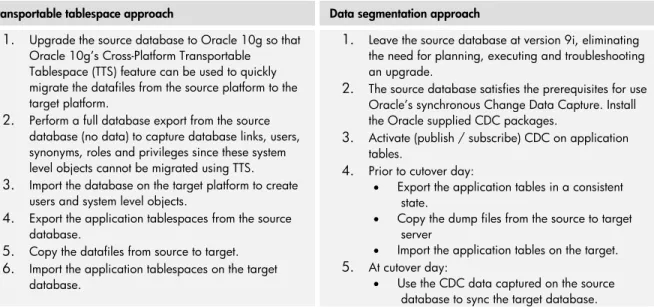
Data load/unload strategy
Transportable tablespace approach Data segmentation approach
1. Upgrade the source database to Oracle 10g so that Oracle 10g’s Cross-Platform Transportable Tablespace (TTS) feature can be used to quickly migrate the datafiles from the source platform to the target platform.
2. Perform a full database export from the source database (no data) to capture database links, users, synonyms, roles and privileges since these system level objects cannot be migrated using TTS.
3. Import the database on the target platform to create users and system level objects.
4. Export the application tablespaces from the source database.
5. Copy the datafiles from source to target.
6. Import the application tablespaces on the target database.
1. Leave the source database at version 9i, eliminating the need for planning, executing and troubleshooting an upgrade.
2. The source database satisfies the prerequisites for use Oracle’s synchronous Change Data Capture. Install the Oracle supplied CDC packages.
3. Activate (publish / subscribe) CDC on application tables.
4. Prior to cutover day:
Export the application tables in a consistent state.
Copy the dump files from the source to target server
Import the application tables on the target.
5. At cutover day:
Use the CDC data captured on the source database to sync the target database.
Table 10:Unload and load procedure comparison
Tool and staff resources
Transportable tablespace approach Data segmentation approach
Oracle tools requiring no additional licensing costs System DBA to upgrade the source database, install
Oracle 10g on the target server and import the system level object and TTS’s
Oracle tools requiring no additional licensing costs System DBA to install CDC packages
Application DBA to activate CDC on application tables Application DBA to sync the target database using the
CDC data captured on the source database
Table 11:Tool and resource comparison
Recommendations:Transportable Tablespaces was selected as the most cost-effective approach. It met the time window requirements and simplified tasks and tool requirements. The remainders of the steps reflect that approach.
Phase 2. Prepare
2.1 Set up the development infrastructure
1. Set up the development/test infrastructure i.e. server (with OS), storage and network. 2. Set up Oracle OS account.
3. Install Oracle Database with required licenses and patches, along with dependent 3rdparty
products (if any)
4. Create desired user accounts required for Oracle and other required applications 2.2 Set up database
1. Create the database schema
2. Establish connectivity between source and target environments via SAN or NFS mount
“Prepare” summary
Test environment:
Verify the tablespaces to be transported meet the transportable tablespaces requirements documented in the Oracle 10g Data Administrators Guide.
The test environment will be used to 1) test the 10g upgrade and 2) test the platform migration. a. 10g Upgrade:
i. Install Oracle 9i.
ii. Load the test environment with a copy of production iii. Perform the 9i-to-10g Upgrade.
b. Test the application on the 10g database. c. Perform the 10g upgrade on production.
Platform migration:
Create the new database on the target server. Ensure the SYSTEM tablespace type (dictionary-managed or locally (dictionary-managed) is the same between the source and target database.
Size of test database: The test database is sized to the production database. Documentation requirements:
10g upgrade documentation.
10g upgrade test plan
10g platform migration test plan
Phase 3. Test
3.1 Set up and execute data transfer
1. Ensure the source system is in a clean and consistent state and backed up. Develop migration scripts to automate the unload/load workstream
Execute the scripted migration task set based on the Transportable Tablespace approach with a sample set of data.
3.2 Validate and tune process
1. Print and compare database summary reports from the source and target environments 2. Capture historical trend data for database capacity and performance to be used for
performance and resource utilization comparisons, forward engineering, physical database design, performance tuning and ongoing comparative trend analysis
3. Run database validation test cases and compare results
4. Check application access to database and validate application functionality specific to the database
5. Fix any defects and issues related to the database migration 6. Document changes and perform another round of testing 7. Validate and tune process
3.3 Test with full database to assess execution time 1. Execute a full unload/load of database structure. Run applicable Oracle database statistics
Review log files for errors and correct accordingly Run a cold backup of target database.
Phase 4. Implement
4.1 Plan production deployment
1. Rehearse steps required for production database migration 2. Develop the production cut-over plan
3. Identify test cases required to validate production database 4. Develop contingency plan
4.2 Execute production deployment 1. Setup the production infrastructure 2. Install required software and licenses
3. Unload production data from the source platform 4. Load production data into the target environment 5. Compare database summary reports
6. Execute production test cases and validate results 7. Move to production
HP migration resources
HP has resources worldwide to assist customers to migrate to standards-based infrastructure. Services cover the complete stack, from servers and storage to application porting. HP also offers in-depth training on HP tools, operating systems, and infrastructure technologies.
Services
HP can complement your team or deliver entire sections of the project. See the “For more information” section for links to specific services.
Virtualization services.HP has specific services to help customers create a virtualization strategy, develop a design, and then move from a distributed to virtualized environment.
Application upgrades.Through the network of HP Solution Centers, HP offers proof-of-concept, design, and upgrade/migration services for Oracle applications, SAP applications and other major software vendors.
Application porting.HP offers a variety of services to port applications to HP target platforms such as Solaris on ProLiant, Linux environments on ProLiant or Integrity, and HP-UX on Integrity. HP can provide assessments, proof of concepts, assistance, or take on the entire porting assignment.
Data and database migration.Storage and database services from HP enable you to migrate data, consolidate data storage, and adopt SAN or disaster recovery configurations. HP has broad experience with Oracle, SQL Server and other commercial database products. HP offers a full set of tools to simplify data migration and minimize disruption or downtime as part of the move.
Support.HP provides a wide range of standard and mission-critical support services for HP-UX, Linux, and Windows. In addition, HP offers Solaris subscriptions and support.
Porting tools
HP offers porting kits to automate and simplify migrating applications from Solaris to Linux and HP-UX. The tools require very little domain or migration expertise, and HP has observed 90 to 95% automation. The code migrations are optimized to minimize changes to original Solaris source code and preserve performance. See “For More Information” for links. There are three kits:
Solaris to HP-UX Porting Kit (SHPK).A porting environment allowing automation of Solaris to HP-UX code migration.
Solaris to Linux Porting Kit (SLPK). A porting environment allowing automation of Solaris to Linux code migration.
Solaris Software Transition Kit (STK).A collection of tools and documents to help you transition your Solaris applications to HP platforms. It provides a consistent methodology for code analysis and guidance for addressing common APIs found in Solaris source code.
Summary
With HP, customers get a rich set of operating environments, and best practice advice on architecture choices. HP and EDS (an HP company) offer a rich set of tools and services to support customers and reduce risks during the move. Adopting standards-based infrastructure enables IT to consolidate workloads, improve performance, and simplify administration, all while delivering a platform for growth.
For more information
HP hardware
HP servers:http://www.hp.com/go/Integrity
Sun Solaris on HP ProLiant:www.hp.com/go/solaris
Linux and HP servers:www.hp.com/go/linux
HP ProLiant servers certified on Sun Solaris:
http://www.sun.com/bigadmin/hcl/data/sol/systems/views/all_servers_all_results.mfg.page5.html
HP solution blocks:
http://h18004.www1.hp.com/products/blades/solutions/solution-blocks.html
Oracle Reference Architectures
HP software
HP-UX 11i v3 http://www.hp.com/go/hpux11iv3 HP VSE http://www.hp.com/go/vse HP Serviceguard http://www.hp.com/go/Serviceguard HP Systems Insight Manager www.hp.com/go/sim
Solaris to HP-UX Porting Kit www.hp.com/go/shpk
Solaris to Linux Porting Kit www.hp.com/go/slpk
Solaris Transition Kit www.hp.com/go/stk
Services
Data center virtualization
http://h20219.www2.hp.com/services/cache/583797-0-0-225-121.html?jumpid=reg_R1002_USEN Sun to HP Migration http://www.hp.com/go/sun2hp Solaris support www.hp.com/services/solaris Solaris subscriptions http://h18004.www1.hp.com/products/servers/software/solaris-subscriptions/index.html
HP partnerships
OracleHP & Oracle Alliance www.hp.com/go/oracle
SAP
HP & SAP Alliance
http://www.hp.com/go/sap
Solaris Porting references Developer resources and forums
OpenSolaris
http://opensolaris.org/os/
Sun Developer Network Tools Forum
Technology for better business outcomes
© Copyright 2009 Hewlett-Packard Development Company, L.P. The information contained herein is subject to change without notice. The only warranties for HP products and services are set forth in the express warranty statements
accompanying such products and services. Nothing herein should be construed as
Blastwave.org - An OpenSolaris Community Site http://www.blastwave.org/
Freeware List for Intel®and Solaris 10
http://www.sunfreeware.com/programlistintel10.html
Porting guidance
64-bit Intel®architecture Migration, Debugging, and Tuning, With the Sun Studio
http://developers.sun.com/solaris/articles/amd64_migration.html
Compiler Differences Between Solaris OS, SPARC Platform and Intel®Architecture Platform
http://developers.sun.com/solaris/articles/x86_compiler_diffs.html
Selecting The Best Compiler Options
http://docs.sun.com/source/820-5242/index.html
Intel®White Paper on Endian-ness
http://www.intel.com/design/intarch/papers/endian.htm
Other Solaris references
Sun Studio Compilers and Tools
http://developers.sun.com/sunstudio/index.jsp C User’s Guide http://docs.sun.com/app/docs/doc/819-5265 C++ User’s Guide http://docs.sun.com/app/docs/doc/819-5267 Solaris Containers http://www.sun.com/software/solaris/containers/index.jsp
Oracle database: Transportable tablespace