For years, college courses in c o m p u t e r networking were t au g ht with little or no h a n d s on expe- rience. For various reasons, including some good ones, i n st r u ct or s a p p r o a c h e d the principles of c o m p u t e r networking primarily t h r o u g h equations, analyses, and abstract descriptions of protocol stacks. Textbooks might have included code, but it would have b e e n u n c o n n e c t e d to anything s t u d e n t s could get their h a n d s on. We believe, however, that s t u d e n t s learn better when they can see (and then build) concrete examples of the principles at work. And, for- tunately, things have changed. The Internet has become a part of everyday life, and access to its services is readily available to m o s t s t u d e n t s (and their programs). Moreover, copious e x a m p l e s u g o o d and b a d - - o f nontrivial software are freely available.
We wrote this book for the same r e a s o n we wrote TCP/IP Sockets in C: we n e e d e d a resource to s u p p o r t learning networking t h r o u g h p r o g r a m m i n g exercises in our courses. Our goal is to provide a sufficient introduction so that s t u d e n t s can get their h a n d s on real ne tw o r k services without too m u c h hand-holding. After grasping the basics, s t u d e n t s can t h e n move on to more advanced assignments, which s u p p o r t learning about routing algorithms, m u l t i m e d i a protocols, m e d i u m access control, and so on. We have tried to make this b o o k equivalent to our earlier book to enable instructors to allow s t u d e n t s to choose the language they use and still ensure that all s t u d e n t s will come away with the same skills and u n d e r s t a n d i n g . Of course, it is not clear that this goal is achievable, b ut in any case the scope, price, and p r e s e n t a t i o n level of the book are i n t e n d e d to be similar.
Intended Audience
This book is aimed primarily at s t u d e n t s in upper-division u n d e r g r a d u a t e or graduate courses in c o m p u t e r networks. It is i n t e n d e d as a s u p p l e m e n t to a traditional textbook that explains the problems and principles of c o m p u t e r networks. At the same time, we have tried to make the
X Preface m
book reasonably self-contained (except for the a s s u m e d p r o g r a m m i n g background), so that it can also be used, for example, in courses on operating systems or distributed computing. For uses outside the context of a networking course, it will be helpful if the s t u d e n t s have some acquaintance with the basic concepts of networking and TCP/IP.
This book's other target audience consists of practitioners who know Java and want to learn about writing Java applications that use TCP/IP. This book should take such users far e n o u g h that they can start experimenting and learning on their own. Readers are a s s u m e d to have access to a c o m p u t e r equipped with Java. This book is b a s e d on Version 1.3 of Java and the Java Virtual Machine (JVM); however, the code should work with earlier versions of Java, with the exception of a few new Java methods. Java is about portability, so the particular hardware and operating s y s t e m (OS) on which you r u n should not matter.
Approach
Chapter 1 provides a general overview of networking concepts. It is not, by any means, a com- plete introduction, but rather is intended to allow readers to synchronize with the concepts and terminology u s e d t h r o u g h o u t the book. Chapter 2 introduces the mechanics of simple clients and servers; the code in this chapter can serve as a starting point for a variety of exercises. Chapter 3 covers the basics of message construction and parsing. The reader who digests the first three chapters should in principle be able to i m p l e m e n t a client and server for a given (simple) application protocol. Chapter 4 then deals with techniques that are necessary w h e n building more sophisticated and robust clients and servers. Finally, in keeping with our goal of illustrating principles t h r o u g h programming, Chapter 5 discusses the relationship b e t w e e n the p r o g r a m m i n g constructs and the underlying protocol i m p l e m e n t a t i o n s in s o m e w h a t more detail.
Our general a p p r o a c h introduces p r o g r a m m i n g concepts t h r o u g h simple p r o g r a m exam- ples a c c o m p a n i e d by line-by-line c o m m e n t a r y that describes the p u r p o s e of every part of the program. This lets you see the i m p o r t a n t objects and m e t h o d s as they are u s e d in context. As you look at the code, you should be able to u n d e r s t a n d the p u r p o s e of each and every line.
Java m a k e s m a n y things easier, but it does not support some functionality that is c o m m o n l y associated with the C/UNIX sockets interface (asynchronous I/O, select( )-style multiplexing). In C and C++, the socket interface is a generic application p r o g r a m m i n g interface (API) for all types of protocols, not j u s t TCP/IP. Java's socket classes, on the other hand, by default work exclusively with TCP and UDP over IPv4. Ironically, there does not s e e m to be anything in the Java specification or d o c u m e n t a t i o n that requires that an instance of the Socket class use TCP, or that a DatagramSoeket instance use UDP. Nevertheless, this book a s s u m e s this to be the case, as is true of current implementations.
What This Book Is Not
To keep the price of this b o o k within a reasonable range for a s u p p l e m e n t a r y text, we have had to limit its scope and m a i n t a i n a tight focus on the goals outlined above. We o m i t t e d m a n y topics a n d directions, so it is p r o b a b l y w o r t h m e n t i o n i n g s o m e of the things this b o o k is not: • It is n o t an i n t r o d u c t i o n to Java. We focus specifically on TCP/IP socket p r o g r a m m i n g using the Java language. We expect that the r e a d e r is already acquainted with the language and basic Java libraries (especially I/O), and k n o w s h o w to develop p r o g r a m s in Java. • It is n o t a b o o k on protocols. Reading this b o o k will not m a k e y o u an expert on IP, TCP,
FTP, HTTP, or any o t h e r existing p r o t o c o l (except m a y b e the echo protocol). Our focus is on the interface to the TCP/IP services p r o v i d e d b y the socket abstraction. (It will help if you s t a r t with s o m e idea a b o u t tl~e general w o r k i n g s of TCP a n d IP, b u t C h a p t e r 1 m a y be a n a d e q u a t e substitute.)
• It is n o t a guide to all of Java's rich collection of libraries that are d e s i g n e d to hide c o m m u n i c a t i o n details (e.g., HTTPConnection) a n d m a k e the p r o g r a m m e r ' s life easier. Since we are teaching the f u n d a m e n t a l s of h o w to do, not how to avoid doing, p r o t o c o l d e v e l o p m e n t , we do not cover these p a r t s of the API. We w a n t r e a d e r s to u n d e r s t a n d p r o t o c o l s in t e r m s of what goes o n the wire, so we m o s t l y u s e simple b y t e s t r e a m s a n d deal with character encodings explicitly. As a consequence, this text d o e s n o t deal with
URL, URLConnection, and so on. We believe that once you u n d e r s t a n d the principles, using
these convenience classes will be straightforward. The n e t w o r k - r e l e v a n t classes that we do cover include InetAddress, Socket, ServerSocket, DatagramPacket, DatagramSoeket, a n d U u l t i c a s t S o c k e t .• It is n o t a b o o k on object-oriented design. Our focus is on the i m p o r t a n t principles of TCP/IP socket p r o g r a m m i n g , a n d o u r e x a m p l e s are i n t e n d e d to illustrate t h e m concisely. As far as possible, we try to adhere to object-oriented design principles; however, w h e n doing so a d d s c o m p l e x i t y t h a t o b f u s c a t e s the socket principles or b l o a t s the code, we sacrifice design for clarity. This text does not cover design p a t t e r n s f o r networking. (Though we would like to think that it provides s o m e of the b a c k g r o u n d n e c e s s a r y for u n d e r s t a n d i n g such patterns!)
• It is not a b o o k on writing p r o d u c t i o n - q u a l i t y code. Again, t h o u g h w e strive for r o b u s t n e s s , the p r i m a r y goal of our code e x a m p l e s is education. In order to avoid obscuring the principles with large a m o u n t s of error-handling code, we have sacrificed s o m e r o b u s t n e s s for brevity and clarity.
• It is n o t a b o o k on doing y o u r own native sockets i m p l e m e n t a t i o n in Java. We focus exclusively on TCP/IP sockets as p r o v i d e d b y the s t a n d a r d Java distribution a n d do not cover the various socket i m p l e m e n t a t i o n w r a p p e r classes (e.g., Socketlmpl).
X l l Preface u
• It is not a b o o k on Java applets. A p p l e t s use the s a m e Java networking API so the c o m m u - nication code should be very similar; however, there are severe security restrictions on the kinds of c o m m u n i c a t i o n an a p p l e t can p e r f o r m . We p r o v i d e a very limited discussion of these restrictions a n d a single a p p l e t / a p p l i c a t i o n e x a m p l e on the Web site; however, a c o m p l e t e description of applet networking is b e y o n d the scope of this text.
This b o o k will not m a k e y o u an e x p e r t - - t h a t takes years of experience. However, we h o p e it will be useful as a resource, even to t h o s e w h o already k n o w quite a bit a b o u t using sockets in Java. Both of u s enjoyed writing it a n d learned quite a bit along the way.
Acknowledgments
We would like to t h a n k all the p e o p l e w h o helped m a k e this b o o k a reality. Despite the b o o k ' s brevity, m a n y h o u r s went into reviewing the original p r o p o s a l a n d the draft, and the reviewers' input h a s significantly s h a p e d the final result.
First, t h a n k s to those who meticulously reviewed the d r a f t of the text and m a d e sugges- tions for i m p r o v e m e n t . These include Michel Barbeau, Carlton University; Chris E d m o n d s o n - Yurkanan, University of Texas at Austin, Ted Herman, University of Iowa; Dave Hollinger, Rensselaer Polytecnic Institute; Jim Leone, Rochester Institute of Technology; Dan Schmidt, Texas A&M University; Erick Wagner, EDS; a n d CSI4321, Spring 2001. Any errors that r e m a i n are, of course, o u r responsibility. We are very interested in weeding out such e r r o r s in future printings so if y o u find one, please email either of us. We will m a i n t a i n an errata list on the b o o k ' s Web page.
Finally, we are grateful to the folks at Morgan Kaufmarm. They care a b o u t quality a n d we appreciate that. We especially a p p r e c i a t e the efforts of Karyn Johnson, our editor, a n d Mei Levenson, our p r o d u c t i o n coordinator.
Feedback
We invite your suggestions for the i m p r o v e m e n t of any a s p e c t of this book. You can s e n d f e e d b a c k via the b o o k ' s Web page,
www.mkp.com/practical/javasockets,
or y o u can email us at the a d d r e s s e s below:Kenneth L. Calvert
[email protected]
Introduction
M i l l i o n s of c o m p u t e r s all over the w o r l d are n o w c o n n e c t e d to the w o r l d w i d e n e t w o r k k n o w n as the Internet. The I n t e r n e t enables p r o g r a m s r u n n i n g o n c o m p u t e r s t h o u s a n d s of miles a p a r t to c o m m u n i c a t e a n d e x c h a n g e i n f o r m a t i o n . If y o u have a c o m p u t e r c o n n e c t e d to a network, y o u m a y have u s e d a Web b r o w s e r - - a typical p r o g r a m t h a t m a k e s u s e of the Internet. What d o e s s u c h a p r o g r a m do to c o m m u n i c a t e with o t h e r s over a n e t w o r k ? The a n s w e r varies with the a p p l i c a t i o n a n d the o p e r a t i n g s y s t e m (OS), b u t a g r e a t m a n y p r o g r a m s get access to n e t w o r k c o m m u n i c a t i o n services t h r o u g h the s o c k e t s a p p l i c a t i o n p r o g r a m m i n g i n t e r f a c e (API). The goal of this b o o k is to get y o u s t a r t e d writing Java p r o g r a m s t h a t u s e the s o c k e t s API.
Before delving into the details of the API, it is w o r t h taking a brief look at the big p i c t u r e of n e t w o r k s a n d p r o t o c o l s to see h o w an API for T r a n s m i s s i o n Control P r o t o c o l / I n t e r n e t Protocol fits in. Our goal h e r e is n o t to t e a c h y o u h o w n e t w o r k s a n d TCP/IP w o r k - - m a n y fine texts are available for t h a t p u r p o s e [2, 4, 11, 16, 2 2 J - - b u t r a t h e r to i n t r o d u c e s o m e basic c o n c e p t s a n d terminology.
1.1
Networks, Packets, and Protocols
A c o m p u t e r n e t w o r k c o n s i s t s of m a c h i n e s i n t e r c o n n e c t e d by c o m m u n i c a t i o n channels. We call t h e s e m a c h i n e s hosts a n d routers. H o s t s are c o m p u t e r s t h a t r u n a p p l i c a t i o n s s u c h as y o u r Web b r o w s e r . The a p p l i c a t i o n p r o g r a m s r u n n i n g o n h o s t s are really the u s e r s of the n e t w o r k . R o u t e r s are m a c h i n e s w h o s e job is to relay, or forward, i n f o r m a t i o n f r o m one c o m m u n i c a t i o n c h a n n e l to a n o t h e r . They m a y r u n p r o g r a m s b u t typically do n o t r u n a p p l i c a t i o n p r o g r a m s . For our p u r p o s e s , a communication channel is a m e a n s of c o n v e y i n g s e q u e n c e s of b y t e s f r o m one h o s t to another; it m a y be a b r o a d c a s t t e c h n o l o g y like Ethernet, a dial-up m o d e m connection, or s o m e t h i n g m o r e s o p h i s t i c a t e d .
2 Chapter 1: Introduction []
I,,L]
A
W
Channel (e.g., Ethernet)"
I1 ! ( IP ] ' ~
Channel "~
I I I
L
d,p]
Host Router Host
F i g u r e 1.1 : A TCP/IP network.
small n u m b e r of communication channels; m o s t hosts need only one. Programs that exchange information over the network, however, do not interact directly with routers and generally remain blissfully unaware of their existence.
By information we mean sequences of bytes that are constructed and interpreted by pro- grams. In the context of computer networks, these byte sequences are generally called
packets.
A packet contains control information that the network uses to do its job and sometimes also includes user data. An example is information identifying the packet's destination. Routers use such control information to figure out how to forward each packet.A protocol
is an agreement about the packets exchanged by communicating p r o g r a m s and what they mean. A protocol tells how packets are s t r u c t u r e d - - f o r example, where the destination information is located in the packet and how big it ismas well as how the infor- m a t i o n is to be interpreted. A protocol is usually designed to solve a specific problem using given capabilities. For example, theHyperText Transfer Protocol (HTTP) solves the problem of
transferring hypertext objects between servers, where they are stored, and Web browsers that make t h e m available to h u m a n users.Implementing a useful network requires that a large n u m b e r of different problems be solved. To keep things manageable and modular, different protocols are designed to solve different sets of problems. TCP/IP is one such collection of solutions, sometimes called a
protocol suite. It h a p p e n s to be the suite of protocols used in the Internet, but it can be u s e d in
stand-alone private networks as well. Henceforth when we talk about the "network," we m e a n any network that uses the TCP/IP protocol suite. The main protocols in the TCP/IP suite are the Internet Protocol (IP), the Transmission Control Protocol (TCP), and the User Datagram Protocol (UDP).operating system of a host. Applications access the services provided by UDP and TCP t h r o u g h the sockets API. The arrow depicts the flow of data from the application, t h r o u g h the TCP and IP implementations, t h r o u g h the network, and back up t h r o u g h the IP and TCP implementations at the other end.
In TCP/IP, the b o t t o m layer consists of the underlying c o m m u n i c a t i o n c h a n n e l s n f o r example, Ethernet or dial-up m o d e m connections. Those channels are used by the network layer, which deals with the p r o b l e m of forwarding packets toward their destination (i.e., what routers do). The single network layer protocol in the TCP/IP suite is the Internet Protocol; it solves the p r o b l e m of making the sequence of channels and routers between any two hosts look like a single host-to-host channel.
The Internet Protocol provides a datagram service: every packet is handled and delivered by the network independently, like letters or parcels sent via the postal system. To make this work, each IP packet has to contain the address of its destination, just as every package that you mail is a d d r e s s e d to somebody. (We'll say more about addresses shortly.) Although m o s t delivery companies guarantee delivery of a package, IP is only a best-effort protocol: it a t t e m p t s to deliver each packet, but it can (and occasionally does) lose, reorder, or duplicate packets in transit t h r o u g h the network.
The layer above IP is called the transport layer. It offers a choice between two protocols: TCP and UDP. Each builds on the service provided by IP, but they do so in different ways to provide different kinds of transport, which are u s e d by application protocols with different needs. TCP and UDP have one function in common: addressing. Recall that IP delivers packets to hosts; clearly, a finer granularity of addressing is needed to get a packet to a particular application, perhaps one of m a n y using the network on the same host. Both TCP and UDP use addresses, called port numbers, to identify applications within hosts. They are called end- to-end transport protocols because they carry data all the way from one p r o g r a m to another (whereas IP only carries data from one host to another).
TCP is designed to detect and recover from the losses, duplications, and other errors that may occur in the host-to-host channel provided by IP. TCP provides a reliable byte-stream channel, so that applications do not have to deal with these problems. It is a connection- oriented protocol: before using it to communicate, two p r o g r a m s m u s t first establish a TCP connection, which involves completing an exchange of handshake messages between the TCP implementations on the two communicating computers. Using TCP is also similar in m a n y ways to file i n p u t / o u t p u t (I/O). In fact, a file that is written by one p r o g r a m and read by another is a reasonable model of c o m m u n i c a t i o n over a TCP connection. UDP, on the other hand, does not a t t e m p t to recover from errors experienced by IP; it simply extends the IP best-effort datagram service so that it works between application p r o g r a m s instead of between hosts. Thus, applications that use UDP m u s t be p r e p a r e d to deal with losses, reordering, and so on.
1.2 About Addresses
4
Chapter 1: Introduction Ia n o t h e r p r o g r a m , it m u s t tell the n e t w o r k w h e r e to find the other p r o g r a m . In TCP/IP, it takes two pieces of i n f o r m a t i o n to identify a particular p r o g r a m : an Internet address, u s e d by IP, a n d a port number, the additional a d d r e s s i n t e r p r e t e d by the t r a n s p o r t protocol (TCP or UDP).
I n t e r n e t a d d r e s s e s are 32-bit binary n u m b e r s . 1 In writing d o w n Internet a d d r e s s e s for h u m a n c o n s u m p t i o n (as o p p o s e d to using t h e m inside applications), we typically s h o w t h e m as a string of four decimal n u m b e r s s e p a r a t e d by p e r i o d s (e.g., 10.1.2.3); this is called the dotted-quad notation. The four n u m b e r s in a d o t t e d - q u a d string r e p r e s e n t the c o n t e n t s of the four b y t e s of the I n t e r n e t a d d r e s s - - t h u s , each is a n u m b e r b e t w e e n 0 a n d 255.
One special IP a d d r e s s w o r t h knowing is the loopback address, 127.0.0.1. This a d d r e s s is always a s s i g n e d to a special loopback interface, which simply echoes t r a n s m i t t e d p a c k e t s right b a c k to the sender. The l o o p b a c k interface is very u s e f u l for testing; it can be u s e d even w h e n a c o m p u t e r is not c o n n e c t e d to the network.
Technically, each Internet a d d r e s s refers to the c o n n e c t i o n b e t w e e n a h o s t a n d an u n d e r l y i n g c o m m u n i c a t i o n channel, s u c h as a dial-up m o d e m or Ethernet card. Because each s u c h n e t w o r k c o n n e c t i o n belongs to a single host, an Internet a d d r e s s identifies a h o s t as well as its c o n n e c t i o n to the network. However, b e c a u s e a h o s t can have multiple physical c o n n e c t i o n s to the network, one h o s t can have multiple Internet a d d r e s s e s .
The p o r t n u m b e r in TCP or UDP is always i n t e r p r e t e d relative to an I n t e r n e t address. R e t u r n i n g to our earlier analogies, a p o r t n u m b e r c o r r e s p o n d s to a r o o m n u m b e r at a given street a d d r e s s , say, t h a t of a large building. The p o s t a l service u s e s the street a d d r e s s to get the letter to a mailbox; w h o e v e r e m p t i e s the mailbox is t h e n r e s p o n s i b l e for getting the letter to the p r o p e r r o o m within the building. Or consider a c o m p a n y with an internal t e l e p h o n e system: to s p e a k to an individual in the company, you first dial the c o m p a n y ' s m a i n p h o n e n u m b e r to c o n n e c t to the internal t e l e p h o n e s y s t e m a n d t h e n dial the extension of the particular t e l e p h o n e of the individual t h a t you wish to s p e a k with. In these analogies, the Internet a d d r e s s is the street a d d r e s s or the c o m p a n y ' s m a i n n u m b e r , w h e r e a s the p o r t c o r r e s p o n d s to the r o o m n u m b e r or t e l e p h o n e extension. Port n u m b e r s are 16-bit u n s i g n e d binary n u m b e r s , so each one is in the range 1 to 65,535 (0 is reserved).
1.3 A b o u t Names
Most likely you are a c c u s t o m e d to referring to h o s t s by name (e.g., host.example.com). How- ever, the I n t e r n e t protocols deal with n u m e r i c a l a d d r e s s e s , not n a m e s . You s h o u l d u n d e r s t a n d t h a t the use of n a m e s i n s t e a d of a d d r e s s e s is a convenience f e a t u r e t h a t is i n d e p e n d e n t of the basic service p r o v i d e d by TCP/IP--you can write a n d use TCP/IP applications w i t h o u t ever
u s i n g a n a m e . W h e n y o u u s e a n a m e to identify a c o m m u n i c a t i o n e n d p o i n t , the s y s t e m has to do s o m e extra w o r k to resolve the n a m e into an a d d r e s s .
This extra step is o f t e n w o r t h it, for a couple of r e a s o n s . First, n a m e s are generally easier for h u m a n s to r e m e m b e r t h a n d o t t e d - q u a d s . Second, n a m e s p r o v i d e a level of indi- rection, w h i c h i n s u l a t e s u s e r s f r o m IP a d d r e s s changes. D u r i n g the writing of this book, the Web server for the p u b l i s h e r of this text, Morgan K a u f m a n n , c h a n g e d I n t e r n e t a d d r e s s e s f r o m 208.164.121.48 to 216.200.143.124. However, b e c a u s e we refer to t h a t Web server as www.mkp.com (clearly m u c h easier to r e m e m b e r t h a n 208.164.121.48) a n d b e c a u s e the c h a n g e is reflected in the s y s t e m t h a t m a p s n a m e s to a d d r e s s e s (www.mkp.com n o w resolves to the n e w I n t e r n e t a d d r e s s i n s t e a d of 208.164.121.48), the c h a n g e is t r a n s p a r e n t to p r o g r a m s t h a t use the n a m e to access the Web server.
The n a m e - r e s o l u t i o n service can access i n f o r m a t i o n f r o m a wide variety of sources. Two of the p r i m a r y s o u r c e s are the Domain Name System (DNS) a n d local c o n f i g u r a t i o n d a t a b a s e s . The DNS [9] is a d i s t r i b u t e d d a t a b a s e t h a t m a p s domain names s u c h as www.mkp.com to I n t e r n e t a d d r e s s e s a n d o t h e r i n f o r m a t i o n ; the DNS p r o t o c o l [10] allows h o s t s c o n n e c t e d to the I n t e r n e t to retrieve i n f o r m a t i o n f r o m t h a t d a t a b a s e u s i n g TCP or UDP. Local c o n f i g u r a t i o n d a t a b a s e s are generally OS-specific m e c h a n i s m s for local n a m e - t o - I n t e r n e t a d d r e s s m a p p i n g s .
1.4 Clients and Servers
In our p o s t a l a n d t e l e p h o n e analogies, each c o m m u n i c a t i o n is initiated by one party, w h o s e n d s a letter or m a k e s the t e l e p h o n e call, while the o t h e r p a r t y r e s p o n d s to the initiator's c o n t a c t by s e n d i n g a r e t u r n letter or picking u p the p h o n e a n d talking. I n t e r n e t c o m m u n i c a t i o n is similar. The t e r m s client a n d server refer to t h e s e roles: The client p r o g r a m initiates c o m m u n i c a t i o n , while the server p r o g r a m waits passively for a n d t h e n r e s p o n d s to clients t h a t c o n t a c t it. Together, the client a n d server c o m p o s e the application. The t e r m s client a n d server are descriptive of the typical s i t u a t i o n in w h i c h the server m a k e s a p a r t i c u l a r c a p a b i l i t y - - f o r example, a d a t a b a s e s e r v i c e - - a v a i l a b l e to any client t h a t is able to c o m m u n i c a t e with it.
W h e t h e r a p r o g r a m is acting as a client or server d e t e r m i n e s the g e n e r a l f o r m of its use of the s o c k e t s API to e s t a b l i s h c o m m u n i c a t i o n with its peer. (The client is the p e e r of the server a n d vice versa.) Beyond that, the client-server d i s t i n c t i o n is i m p o r t a n t b e c a u s e the client n e e d s to k n o w the s e r v e r ' s a d d r e s s a n d p o r t initially, b u t n o t vice versa. With the s o c k e t s API, the server can, if n e c e s s a r y , learn the client's a d d r e s s i n f o r m a t i o n w h e n it receives the initial c o m m u n i c a t i o n f r o m the client. This is a n a l o g o u s to a t e l e p h o n e c a l l - - i n o r d e r to be called, a p e r s o n d o e s n o t n e e d to k n o w the t e l e p h o n e n u m b e r of the caller. As with a t e l e p h o n e call, once the c o n n e c t i o n is e s t a b l i s h e d , the d i s t i n c t i o n b e t w e e n server a n d client d i s a p p e a r s .
How d o e s a client find o u t a server's IP a d d r e s s a n d p o r t n u m b e r ? Usually, the client k n o w s the n a m e of the server it w a n t s m f o r example, f r o m a Universal Resource Locator (URL) s u c h as http://www.mkp.com--and u s e s the n a m e - r e s o l u t i o n service to l e a r n the c o r r e s p o n d i n g I n t e r n e t a d d r e s s .
6
Chapter 1: Introduction u(IANA) oversees this assignment. For example, port n u m b e r 21 has been assigned to the File Transfer Protocol (FTP). When you run an FTP client application, it tries to contact the FTP server on that port by default. A list of all the assigned port n u m b e r s is maintained by the n u m b e r i n g authority of the Internet (see http://www.iana.org/assignments/port-numbers).
1.5
W h a t Is a Socket?
A socket is an abstraction t h r o u g h which an application may send and receive data, in m u c h the same way as an open file handle allows an application to read and write data to stable storage. A socket allows an application to plug in to the network and communicate with other applications that are plugged in to the same network. Information written to the socket by an application on one machine can be read by an application on a different machine and vice versa.
Different types of sockets correspond to different underlying protocol suites and different stacks of protocols within a suite. This book deals only with the TCP/IP protocol suite. The main types of sockets in TCP/IP today are stream sockets and datagram sockets. Stream sockets use TCP as the end-to-end protocol (with IP underneath) and thus provide a reliable byte- stream service. A TCP/IP stream socket represents one end of a TCP connection. Datagram sockets use UDP (again, with IP underneath) and thus provide a best-effort d a t a g r a m service that applications can use to send individual messages up to about 65,500 bytes in length. Stream and d a t a g r a m sockets are also s u p p o r t e d by other protocol suites, but this book deals only with TCP stream sockets and UDP d a t a g r a m sockets. A TCP/IP socket is uniquely identified by an Internet address, an end-to-end protocol (TCP or UDP), and a port number. As you proceed, you will encounter several ways for a socket to become b o u n d to an address.
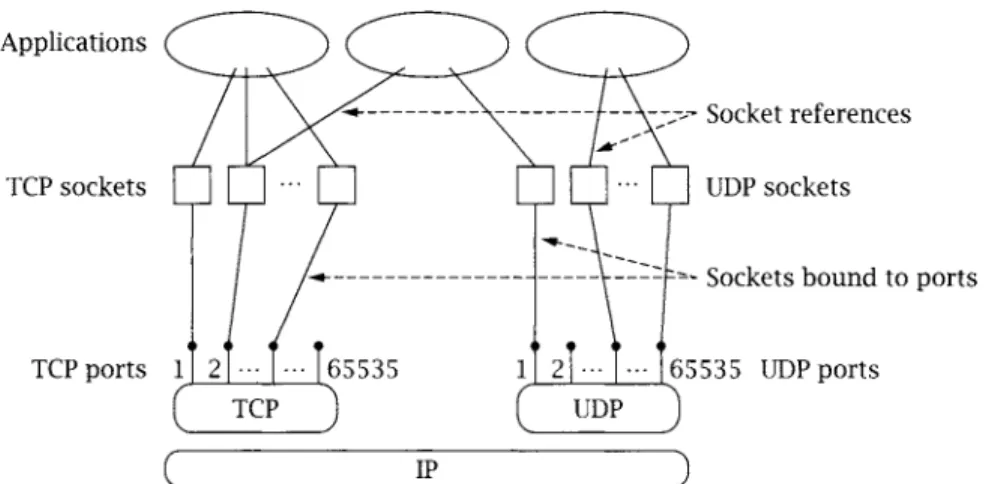
Figure 1.2 depicts the logical relationships among applications, socket abstractions, protocols, and port n u m b e r s within a single host. Note that a single socket abstraction can be referenced by multiple application programs. Each p r o g r a m that has a reference to a particular socket can communicate t h r o u g h that socket. Earlier we said that a p o r t identifies an application on a host. Actually, a port identifies a socket on a host. From Figure 1.2, we see that multiple p r o g r a m s on a host can access the same socket. In practice, separate p r o g r a m s that access the same socket would usually belong to the same application (e.g., multiple copies of a Web server program), although in principle they could belong to different applications.
1.6
Exercises
1. Can you think of a real-life example of communication that does not fit the client-server model?
Applications
TCP sockets
TCP ports 1
, - ... '~ . . . -~. uDpSOCketsocketsreferences
. . . Sockets bound to ports
5535 UDPports UDP
(" IP ")
Figure 1.2: Sockets, protocols, and ports.
c h a p t e r 2
Basic Sockets
Y o u are now ready to learn about writing your own socket applications. We begin by demonstrating how Java applications identify network hosts. Then, we describe the creation of TCP and UDP clients and servers. Java provides a clear distinction between using TCP and UDP, defining a separate set of classes for b o t h protocols, so we treat each separately.
2.1 Socket Addresses
IP uses 32-bit binary addresses to identify communicating hosts. A client m u s t specify the IP address of the host running the server p r o g r a m when it initiates communication; the network infrastructure uses the 32-bit destination address to route the client's information to the proper machine. Addresses can be specified in Java using a string that contains ei- ther the dotted-quad r e p r e s e n t a t i o n of the numeric address (e.g., 169.1.1.1) or a name (e.g., server.example.corn). Java encapsulates the IP addresses abstraction in the InetAddress class which provides three static m e t h o d s for creating lnetAddress instances, getByName() and getAllByName () take a name or IP address and r e t u r n the corresponding InetAddress instance(s). For example, InetAddress.getByName("192.168.75.13") returns an instance identifying the IP address 192.168.75.13. The third method, getLocalHost (), returns an InetAddres s instance con- taining the local host address. Our first p r o g r a m example, InetAddressExample. java, demon- strates the use of InetAddress. The p r o g r a m takes a list of names or IP addresses as command- line p a r a m e t e r s and prints the name and an IP address of the local host, followed by names and IP addresses of the hosts specified on the c o m m a n d line.
InetAdd ressExam pie.java
0 import java.net.*; // for InetAddress
1
2 public class InetAddressExample { 3
7
8
9 10 11 12 13 14 15 16 17 18 19 20 21 22 23 24 25 26 27 28 29 3O
public static void main(String[] args) {
// Get name and IP address of the local host try {
InetAddress address = InetAddress.getLocalHost(); System.out.println("Local Host:");
System.out.println("\t" + address.getHostName()); System.out.println("\t" + address.getHostAddress()); } catch (UnknownHostException e) {
System.out.println("Unable to determine this host's address");
}
for (int i = O; i < args.length; i++) {
// Get name(s)/address(es) of hosts given on command line try {
InetAddress[] addressList = InetAddress.getAllByName(args[i]); System.out.println(args[i] + ":");
// Print the first name. Assume array contains at least one entry. System.out.println("\t" + addressList[O].getHostName());
for (int j = O; j < addressList.length; j++)
System.out.println("\t" + addressList[j].getHostAddress()); } catch (UnknownHostException e) {
System.out.println("Unable to find address for " + args[i]);
}
InetAddressExample.java
1. Print i n f o r m a t i o n a b o u t t h e local host: lines 6-14
9 C r e a t e a n InetAddress i n s t a n c e f o r t h e local host: line 8 9 Print t h e local h o s t i n f o r m a t i o n : lines 9-11
getH0stName() a n d getH0stAddress() r e t u r n a string for the h o s t n a m e a n d IP a d d r e s s , respectively.
2. R e q u e s t i n f o r m a t i o n for e a c h h o s t s p e c i f i e d o n t h e c o m m a n d line: lines 16-28 9 C r e a t e a n a r r a y of InetAddress i n s t a n c e s for t h e s p e c i f i e d host: line 19
TnetAddress.getAllByName() r e t u r n s an array of InetAddress instances, one for each of the specified h o s t ' s a d d r e s s e s .
9 Print t h e h o s t i n f o r m a t i o n : lines
22-24
[] 2.1 Socket Addresses
! !
% java InetAddressExample www.mkp.com
Local Host:
t r a c t o r . f a r m . c o m 169.1.1.2 www.mkp.com:
www.mkp.com 216.200.143.124
If we k n o w t h e IP a d d r e s s of a h o s t (e.g., 169.1.1.1), we find t h e n a m e of t h e h o s t b y
% java InetAddressExample 169. i. i. 1
Local Host:
tractor, farm. com 169.1.1.2 169.1.1.1:
base. farm. com 169.1.I.i
W h e n the n a m e service is not available for s o m e reason--say, the p r o g r a m is running o n
a m a c h i n e t h a t is n o t c o n n e c t e d to a n y n e t w o r k - - a t t e m p t i n g to i d e n t i f y a h o s t b y n a m e m a y fail. M o r e o v e r , it m a y t a k e a s i g n i f i c a n t a m o u n t of t i m e to do so, as t h e s y s t e m tries v a r i o u s w a y s to r e s o l v e t h e n a m e to a n IP a d d r e s s . It is t h e r e f o r e g o o d to k n o w t h a t y o u c a n always r e f e r to a h o s t u s i n g t h e IP a d d r e s s in d o t t e d - q u a d n o t a t i o n . In a n y of o u r e x a m p l e s , if a r e m o t e h o s t is s p e c i f i e d b y n a m e , t h e h o s t r u n n i n g t h e e x a m p l e m u s t b e c o n f i g u r e d to c o n v e r t n a m e s to a d d r e s s e s , or t h e e x a m p l e w o n ' t work. If y o u c a n p i n g a h o s t u s i n g o n e of its n a m e s (e.g., r u n t h e c o m m a n d "ping
server.example.corn"),
t h e n t h e e x a m p l e s s h o u l d w o r k w i t h n a m e s . If y o u r p i n g t e s t fails or t h e e x a m p l e h a n g s , t r y s p e c i f y i n g t h e h o s t b y IP a d d r e s s , w h i c h a v o i d s t h e n a m e - t o - a d d r e s s c o n v e r s i o n a l t o g e t h e r .I n e t A d d r e s s
1
C r e a t o r s
s t a t i c I n e t A d d r e s s [ ] getAllByName(String
host)
R e t u r n s t h e list of a d d r e s s e s f o r t h e s p e c i f i e d h o s t .
host
H o s t n a m e or a d d r e s s1For each Java networking class described in this text, we present only the primary methods and omit methods that are deprecated or whose use is beyond the scope of this text. As with everything in Java, the specification is a moving target. This information is included to provide an overall picture of the Java socket interface, not as a final authority. We encourage the reader to refer to the API specifications from
static I n e t A d d r e s s getByName(String host) static I n e t A d d r e s s getLocalHost0
Returns an IP address for the specified/local host. host Host name or IP address
Accessors
byte[ ] getAddress0
Returns the 4 bytes of the 32-bit IP address in big-endian order. String getHostAddress()
Returns the IP address in dotted-quad notation (e.g., "169.1.1.2"). String getHostName()
Returns the canonical name of the host associated with the address. b o o l e a n isMulticastAddress()
Returns true if the address is a multicast address (see Section 4.3.2).
Operators
b o o l e a n equals(Object address)
Returns true if address is non-null and represents the same address as this $netAddress instance.
address Address to compare
2 . 2
T C P S o c k e t s
Java provides two classes for TCP: Socket and ServerSocket. An instance of Socket represents one end of a TCP connection. A TCP connection is an abstract two-way channel whose ends are each identified by an IP address and port number. Before being used for communication, a TCP connection m u s t go t h r o u g h a setup phase, which starts with the client's TCP sending a connection request to the server's TCP. An instance of ServerSocket listens for TCP connection requests and creates a new Socket instance to handle each incoming connection.
2.2.1
TCPClient
The client initiates communication with a server that is passively waiting to be contacted. The typical TCP client goes t h r o u g h three steps:
[] 2.2 TCP Sockets
1 3
2. C o m m u n i c a t e u s i n g the s o c k e t ' s I/O s t r e a m s : A c o n n e c t e d i n s t a n c e of Socket c o n t a i n s an InputStream a n d 0utputStream t h a t can be u s e d j u s t like any o t h e r Java I/O s t r e a m (see C h a p t e r 3).
3. Close the c o n n e c t i o n u s i n g the c l o s e ( ) m e t h o d of Socket.
Our first TCP application, called TCPEchoClient.java, is a client t h a t c o m m u n i c a t e s with an
e c h o s e r v e r u s i n g TCP. An echo server simply r e p e a t s w h a t e v e r it receives b a c k to the client. The string to be e c h o e d is p r o v i d e d as a c o m m a n d - l i n e a r g u m e n t to o u r client. Many s y s t e m s include an echo server for d e b u g g i n g a n d t e s t i n g p u r p o s e s . To t e s t if the s t a n d a r d echo server is r u n n i n g , try t e l n e t t i n g to p o r t 7 (the d e f a u l t echo port) o n the server (e.g., at c o m m a n d line " t e l n e t s e r v e r , example, corn 7" or u s e y o u r basic telnet application).
TCPEchoClient.java
5 6 7 8 9 10 11 12 13 14 15 16 17 18 19 20 21 22 23 24 25 26 27 28 29 3O 31
0 import java.net.*; // for Socket
1 import java.io.*; // for lOException and Input/OutputStream 2
3 public class rCPEchoClient { 4
public static void main(String[] args) throws IOException {
if ((args.length < 2) II (args.length > 3)) // Test for correct # of args throw new lllegalArgumentException("Parameter(s): <Server> <Word> [<Port>]");
String server = args[0]; // Server name or IP address
// Convert input String to bytes using the default character encoding byte[] byteBuffer = args[l].getBytes();
int servPort = (args.length == 3) ? Integer.parselnt(args[2]) : 7;
// Create socket that is connected to server on specified port Socket socket = new Socket(server, servPort) ;
System.out.println("Connected to server...sending echo string");
InputStream in = socket, getlnputStream() ; OutputStream out = socket, getOutputStream() ;
out.write(byteBuffer); // Send the encoded string to the server
// Receive the same string back from the server
int totalBytesRcvd = 0; // Total bytes received so far int bytesRcvd; // Bytes received in last read while (totalBytesRcvd < byteBuffer.length) {
if ((bytesRcvd = in.read(byteBuffer, totalBytesRcvd,
32 33 34 35 36 37 38 39
} }
totalBytesRcvd += bytesRcvd; }
System.out.println("Received: " + new String(byteBuffer)) ;
socket.close(); // Close the socket and its streams
TCP Ec hoCI ie nt.ja va
1. Application setup and parameter parsing: lines 0-14 [] Convert the echo string: line 12
TCP sockets send and receive sequences of bytes. The getBytes() m e t h o d of String r e t u r n s a byte array r e p r e s e n t a t i o n of the string. (See Section 3.1 for a discussion of character encodings.)
[] Determine the port of the echo server: line 14
The default echo port is 7. If we specify a third parameter, I n t e g e r . p a r s e I n t ( ) takes the string and returns the equivalent integer value.
2. TCP socket creation: line 17
The Socket constructor creates a socket and establishes a connection to the specified server, identified either by n a m e or IP address. Note that the underlying TCP deals only with IP addresses. If a n a m e is given, the i m p l e m e n t a t i o n resolves it to the correspond- ing address. If the connection a t t e m p t fails for any reason, the constructor throws an lOBxception.
3. Get socket input and output streams: lines 20-21
Associated with each connected Socket instance is an InputStream and 0utputStream. We send data over the socket by writing bytes to the 0utputStream j u s t as we would any other stream, and we receive by reading f r o m the InputStream.
4. Send the string to echo server: line 23
The w r i t e ( ) m e t h o d of 0utputStream t r a n s m i t s the given byte array over the connection to the server.
5. Receive the reply from the echo server: lines 25-33
[] 2.2 TCP Sockets
1 5
up
byteBuffer
until we receive as m a n y bytes as we sent. If the TCP connection is closed by the other end, read() returns -1. For the client, this indicates that the server p r e m a t u r e l y closed the socket.Why not just a single read? TCP does not preserve read() and w r i t e ( ) message boundaries. That is, even t h o u g h we sent the echo string with a single w r i t e ( ) , the echo server may receive it in multiple chunks. Even if the echo string is handled in one chunk by the echo server, the reply may still be broken into pieces by TCP. One of the m o s t c o m m o n errors for beginners is the a s s u m p t i o n that data sent by a single w r i t e ( ) will always be received in a single read ().
6. Print e c h o e d string: line 35
To print the server's response, we m u s t convert the byte array to a string using the default character encoding.
7. Close socket: line 37
When the client has finished receiving all of the echoed data, it closes the socket. We can communicate with an echo server n a m e d
server.example.com
with IP address 169.1.1.1 in either of the following ways:% java TCPEchoClient server.example.com "Echo this!" Received: Echo this!
% java TCPEchoClient 169. i. i. 1 "Echo this!" Received: Echo this!
See TCPEchoClientGUI. java o n the book's W e b site for an implementation of the T C P echo client with a graphical interface.
Socket
C o n s t r u c t o r s
Socket(InetAddress
remoteAddr, int remotePort)
Socket(StringremoteHost,
intremotePort)
Socket(InetAddress
remoteAddr, int remotePort,
I n e t A d d r e s slocalAddr, int localPort)
Socket(StringremoteHost, int remotePort,
I n e t A d d r e s slocalAddr, int localPort)
Constructs a TCP socket connected to the specified remote address and port. The first two forms of the constructor do not specify the local address and port, so a default local address and some available port are chosen. Specifying the local address may be useful on a host with multiple interfaces.
remoteAddr
Remote host addresslocalAddr
localPort
Local address; use null to specify using the default local address
Local port; a localPort of 0 allows the constructor to pick any available port
O p e r a t o r s
v o i d close()
Closes the TCP socket and its I/O streams.
void
shutdownTnput()Closes the input side of a TCP stream. Any u n r e a d data is silently discarded, including data buffered by the socket, data in transit, and data arriving in the future. Any subse- quent a t t e m p t to read from the socket will r e t u r n end-of-stream (-1); any s u b s e q u e n t call to getlnputStream() will cause an
lOException
to be thrown (see Section 4.5). v o i d shutdown0utput()Closes the o u t p u t side of a TCP stream. The i m p l e m e n t a t i o n will a t t e m p t to deliver any data already written to the socket's o u t p u t s t r e a m to the other end. Any s u b s e q u e n t a t t e m p t to write to the socket's o u t p u t s t r e a m or to call get0utputStream() will cause an IOException to be thrown (see Section 4.5).
Accessors/Mutators
InetAddress
getlnetAddress()int
getPort()Returns the remote socket a d d r e s s / p o r t .
InputStream
getlnputStream0OutputStream
get0utputStream0Returns a s t r e a m for reading/writing bytes f r o m / t o the socket.
boolean
getKeepAlive()
void setKeepAlive(boolean
on)[] 2.2 TCP Sockets |
InetAddress getLocalAddress()
int getLocalPort()
Returns the local socket address/port.
int getReceiveBufferSize()
int getSendBufferSize()
void setReceiveBufferSize(int
size)
void setSendBufferSize(int
size)
Returns/sets the size of the send/receive buffer for the socket (see Section 4.4).
size Number of bytes to allocate for the socket send/receive buffer
int getSoLinger()
v o i d setSoLinger(boolean on, int linger)
R e t u r n s / s e t s the m a x i m u m a m o u n t of time (in milliseconds) that c l o s e ( ) will block waiting for all data to be delivered, getSoLinger() returns - 1 if lingering is disabled (see Section 5.4). Lingering is off by default.
on If true, the socket lingers on c l o s e ( ) , up to the m a x i m u m specified time.
linger The m a x i m u m a m o u n t of time (milliseconds) a socket lingers
on close()
int getSoTimeout()
v o i d setSoTimeout(int t i m e o u t )
R e t u r n s / s e t s the m a x i m u m a m o u n t of time that a read() on this socket will block. If the specified n u m b e r of milliseconds elapses before any data is available, an I n t e r - ruptedIOException is t h r o w n (see Section 4.2).
t i m e o u t The m a x i m u m time (milliseconds) to wait for data on a read(). The value 0 (the default) indicates that there is no time limit, meaning that a read will not r e t u r n until data is available.
boolean getTcpNoDelay()
void setTcpNoDelay(boolean
on)
Returns/sets whether the Nagle algorithm to coalesce T C P packets is disabled. To avoid
small TCP packets, which make inefficient use of network resources, Nagle's algorithm (enabled by default) delays packet t r a n s m i s s i o n u n d e r certain conditions to improve the opportunities to coalesce bytes from several writes into a single TCP packet. This delay is unacceptable to some types of interactive applications.
Caveat: By default, Socket is i m p l e m e n t e d on top of a TCP connection; however, in Java, you can actually change the underlying implementation of Socket. This book is about TCP/IP, so for simplicity we assume that the underlying i m p l e m e n t a t i o n for all of the these networking classes is the default.
2.2.2 TCP Server
We now t u r n our attention to constructing a server. The server's job is to set up a communi- cation endpoint and passively wait for connections from clients. The typical TCP server goes t h r o u g h two steps:
1. Construct a ServerSocket instance, specifying the local port. This socket listens for incoming connections to the specified port.
2. Repeatedly:
9 Call the accept () m e t h o d of ServerSocket to get the next incoming client connection. Upon establishment of a new client connection, an instance of Socket for the new connection is created and r e t u r n e d by accept ().
9 Communicate with the client using the r e t u r n e d Socket's InputStream and Output- Stream.
9 Close the new client socket connection using the c l o s e ( ) m e t h o d of Socket.
Our next example, TCPEchoServer. java, implements the echo service used by our client program. The server is very simple. It runs forever, repeatedly accepting a connection, receiving and echoing bytes until the connection is closed by the client, and then closing the client socket.
TCPEchoServer.java
0 import java.net.* ; / / for Socket, ServerSocket, and InetAddress 1 import j a v a . i o . * ; / / for IOException and Input/0utputStream 2
3 public class TCPEchoServer { 4
5 6 7 8 9 10 11 12 13 14 15 16 17 18
private static final int BUFSIZE = 32; // Size of receive buffer
public static void main(String[] args) throws lOException {
if (args.length != i) // Test for correct # of args
throw new lllegalArgumentException("Parameter(s): <Port>");
int servPort = Integer. parselnt (args [0 ] ) ;
// Create a server socket to accept client connection requests ServerSocket servSock = new ServerSocket(servPort) ;
int recvMsgSize; // Size of received message
m 2.2 TCP Sockets
19
19 20 21 22 23 24 25 26 27 28 29 30 31 32 33 34 35 36 37 38
}
}
for (;;) { // Run forever, accepting and servicing connections Socket clntSock = servSock.accept() ; // Get client connection
System.out.println("Handling client at " +
clntSock.getInetAddress().getHostAddress() + " on port " + clntSock, getPort ()) ;
InputStream in = clntSock, getlnputStream() ; OutputStream out = clntSock.getOutputStream() ;
// Receive until client closes connection, indicated b y - i return while ((recvMsgSize = in.read(byteBuffer)) != -I)
out.write(byteBuffer, O, recvMsgSize) ;
clntSock, close () ; }
/* NOT REACHED */
// Close the socket. We are done with this client!
TCPEchoServer.java
1. A p p l i c a t i o n setup and p a r a m e t e r parsing: lines 0-12 2. Server s o c k e t creation: line 15
servSock listens for client connection r e q u e s t s on the port specified in the constructor. 3. Loop f o r e v e r , i t e r a t i v e l y h a n d l i n g i n c o m i n g connections" lines 20-35
9 A c c e p t an i n c o m i n g connection: line 21
The sole p u r p o s e of a ServerSocket instance is to supply a new, connected Socket instance for each new TCP connection. When the server is ready to handle a client, it calls accept (), which blocks until an incoming connection is m a d e to the ServerSocket's port. ac c e pt () then r e t u r n s an instance of Socket that is already connected to the r e m o t e socket and ready for reading and writing.
9 R e p o r t c o n n e c t e d client: lines 23-25
We can query the newly created Socket instance for the a d d r e s s and port of the connecting client. The g e t l n e t A d d r e s s ( ) m e t h o d of Socket r e t u r n s an instance of InetAddress containing the a d d r e s s of the client. We call getHostAddress() to r e t u r n the IP a d d r e s s as a d o t t e d - q u a d String. The g e t P o r t ( ) m e t h o d of Socket r e t u r n s the port of the client.
9 Get s o c k e t input and output s t r e a m s : lines 27-28
9 Receive and repeat data until the client closes: lines 30-32
The while loop repeatedly reads bytes (when available) from the input s t r e a m and i m m e d i a t e l y writes the same bytes back to the o u t p u t s t r e a m until the client closes the connection. The read() m e t h o d of InputStream reads
up to
the m a x i m u m n u m b e r of bytes the array can hold (in this case, BUFSIZE bytes) into the byte array(byteBuffer)
and r e t u r n s the n u m b e r of bytes read. read () blocks until data is available and r e t u r n s - 1 if there is no data available, indicating that the client closed its socket. In the echo protocol, the client closes the connection when it has received the n u m b e r of bytes back that it sent, so in the server we expect to receive a - 1 f r o m read(). Recall that in the client, receiving a - 1 from read() indicates an error because it indicates that the server p r e m a t u r e l y closed the connection.As previously mentioned, read() does not have to fill the entire byte array to return. In fact, it can r e t u r n after having read only a single byte. The w r i t e ( ) m e t h o d of 0utputStream writes
recvMsgSize
bytes frombyteBuffer
to the socket. The second p a r a m e t e r indicates the offset into the byte array of the first byte to send. In this case, 0 indicates to take bytes starting f r o m the front ofbyteBuffer.
If we h a d u s e d the f o r m of w r i t e ( ) that takes only the buffer argument,all
the bytes in the buffer array would have been transmitted, possibly including bytes that were not received f r o m the client!9 Close client socket: line 34
ServerSocket
C o n s t r u c t o r s
ServerSocket(int
localPort)
ServerSocket(int
localPort, int queueLimit)
ServerSocket(int
localPort,
intqueueLimit,
InetAddresslocalAddr)
Construct a TCP socket that is ready to accept incoming connections to the specified local port. Optionally, the size of the connection queue and the local address can be set.
localPort
Local port. A port of 0 allows the constructor to pick any available port.m 2.2 TCP Sockets
21
localAddr The IP address to which connections to this socket should be a d d r e s s e d (must be one of the local interface addresses). If the address is not specified, the socket will accept connections to any of the host's IP addresses. This may be useful for hosts with multiple interfaces where the server socket should only accept connections on one of its interfaces.
Operators
Socket accept()Returns a connected Socket instance for the next n e w incoming connection to the server socket. If no established connection is waiting, accept() blocks until one is established or a timeout occurs (see setSoTimeout()).
void close()
Closes the underlying T C P socket. After invoking this method, incoming client con- nection requests for this socket are rejected.
Accessors/Mutators
I n e t A d d r e s s getlnetAddress () int getLocalPort()Returns the local a d d r e s s / p o r t of the server socket. int getSoTimeoutO
v o i d setSoTimeout(int timeout)
R e t u r n s / s e t s the m a x i m u m a m o u n t of time (in milliseconds) that an accept() will block for this socket. If the timer expires before a connection request arrives, an InterruptedlOException is thrown. A timeout value of 0 indicates no timeout: calls to accept () will not r e t u r n until a new connection is available, regardless of how m u c h time passes (see Section 4.2).
2.2.3 Input and O u t p u t Streams
As illustrated by the examples above, the primary p a r a d i g m for I/O in Java is the stream abstraction. A stream is simply an ordered sequence of bytes. Java input streams s u p p o r t reading bytes, and output streams s u p p o r t writing bytes. In our TCP client and server, each Socket instance holds an InputStream and an 0utputStream instance. When we write to the o u t p u t stream of a Socket, the bytes can (eventually) be read from the input stream of the Socket at the other end of the connection.
OutputStream
data
offset
length
v o i d flush()
abstract v o i d write(int
data)
Writes a single byte to the o u t p u t stream.
data
Byte (low-order 8 bits) to write to o u t p u t s t r e a m v o i d w r i t e ( b y t e [ ]data)
Writes entire array of bytes to the o u t p u t stream.
data
Bytes to write to o u t p u t s t r e a m v o i d write(byte[ ]data, int offset, int length)
Writes
length
bytes fromdata
starting f r o m byteoffset.
Bytes from which to write to o u t p u t s t r e a m Starting byte to send indata
Number of bytes to send
Pushes any buffered data out to the stream. v o i d close()
Terminates the stream.
InputStream
is the abstract superclass of all input streams. Using anInputStream,
we can read bytes f r o m and close the input stream.InputStream
a b s t r a c t int
read()
Read and r e t u r n a single byte from the input stream. The byte read is in the least significant byte of the r e t u r n e d integer. This m e t h o d returns - 1 on end-of-stream. int read(byte[]
data)
Reads up to
data.length
bytes (or until the end-of-stream) from the input s t r e a m intodata
and returns the n u m b e r of bytes read. If no data is available, read () blocks until at least I byte can be read or the end-of-stream is detected, indicated by a r e t u r n of -1.data
Buffer to receive data from input s t r e a mint read(byte[ ]
data, int offset,
intlength)
[] 2.3 UDP Sockets
23
is available, read() blocks until at least 1 byte can be read or the end-of-stream is detected, indicated by a r e t u r n of -1.
data Buffer to receive data from input stream offset Starting byte of data in which to write length Maximum n u m b e r of bytes to read
int available()
Returns the n u m b e r of bytes available for input.
void close()
Terminates the stream.
2.3
UDP Sockets
UDP provides an end-to-end service different from that of TCP. In fact, UDP p e r f o r m s only two functions: 1) it adds another layer of addressing (ports) to that of IP, and 2) it detects data corruption that may occur in transit and discards any c o r r u p t e d messages. Because of this simplicity, UDP sockets have some different characteristics from the TCP sockets we saw earlier. For example, UDP sockets do not have to be connected before being used. Where TCP is analogous to telephone communication, UDP is analogous to communicating by mail: you do not have to "connect" before you send a package or letter, but you do have to specify the destination address for each one. Similarly, each message--called a datagram--carries its own address information and is i n d e p e n d e n t of all others. In receiving, a UDP socket is like a mailbox into which letters or packages from many different sources can be placed. As soon as it is created, a UDP socket can be used to send/receive messages t o / f r o m any address and t o / f r o m m a n y different addresses in succession.
Another difference between UDP sockets and TCP sockets is the way that they deal with message boundaries: UDP sockets preserve them. This makes receiving an application message simpler, in some ways, than it is with TCP sockets. (This is discussed further in Section 2.3.4.) A final difference is that the end-to-end t r a n s p o r t service UDP provides is best-effort: there is no guarantee that a message sent via a UDP socket will arrive at its destination, and messages can be delivered in a different order than they were sent Oust like letters sent t h r o u g h the mail). A p r o g r a m using UDP sockets m u s t therefore be p r e p a r e d to deal with loss and reordering. (We'll provide an example of this later.)
Given this additional burden, why would an application use UDP instead of TCP? One reason is efficiency: if the application exchanges only a small a m o u n t of data--say, a single request message from client to server and a single response message in the other direction-- TCP's connection establishment phase at least doubles the n u m b e r of messages (and the n u m b e r of round-trip delays) required for the communication. Another reason is flexibility: when something other than a reliable byte-stream service is required, UDP provides a minimal- overhead p l a t f o r m on which to implement whatever is needed.
2.3.1 DatagramPacket
Instead of sending and receiving streams of bytes as with TCP, UDP endpoints exchange self-contained messages, called datagrams, which are represented in Java as instances of DatagramPacket. To send, a Java p r o g r a m constructs a DatagramPacket instance and passes it as an argument to the send() m e t h o d of a DatagramSocket. To receive, a Java p r o g r a m constructs a DatagramPacket instance with preallocated space (a byte[ ]), into which the contents of a received message can be copied (if/when one arrives), and then passes the instance to the receive () m e t h o d of a DatagramSocket.
In addition to the data, each instance of DatagramPacket also contains address and port information, the semantics of which depend on whether the datagram is being sent or received. When a DatagramPacket is sent, the address and port identify the destination; for a received DatagramPacket, they identify the source of the received message. Thus, a server can receive into a DatagramPacket instance, modify its buffer contents, then send the same instance, and the modified message will go back to its origin. Internally, a DatagramPacket also has
length
and
offset
fields, which describe the location and n u m b e r of bytes of message data inside the associated buffer. See the following reference and Section 2.3.4 for some pitfalls to avoid when using DatagramPackets.Datag ram Packet
C o n s t r u c t o r s
DatagramPacket(byte[ ]
buffer,
intlength)
DatagramPacket(byte[ ]
buffer,
intoffset, int length)
DatagramPacket(byte[ ]
buffer,
intlength,
I n e t A d d r e s sremoteAddr,
intremotePort)
DatagramPacket(byte[]
buffer, int offset,
intlength,
I n e t A d d r e s sremoteAddr,
intre-
motePort)
Constructs a datagram and makes the given byte array its data buffer. The first two forms are typically used to construct DatagramPackets for receiving because the desti- nation address is not specified (although it could be specified later with setAddress() and setPort ()). The second two forms are typically used to construct DatagramPackets for sending.