- 1 -
VoIP Example 2
(Basic Calling Method)
This chapter shows another application example in VoIP function. This chapter is divided into the following sections,
Section 30.1: Direct IP Call (Call with each other without registration) Section 30.2: Intercommunication with one SIP Proxy Server(registration) Section 30.3: Intercommunication with different SIP Proxy Servers
We will introduce three basic VoIP calling methods, involving Direct IP Call, Intercommunication with one SIP Proxy Server and Intercommunication with different SIP Proxy Servers. All the settings are based on the VoIP Example 1(Basic Configuration and Registration).
30.1 Direct IP Call (Call with each other without
registration)
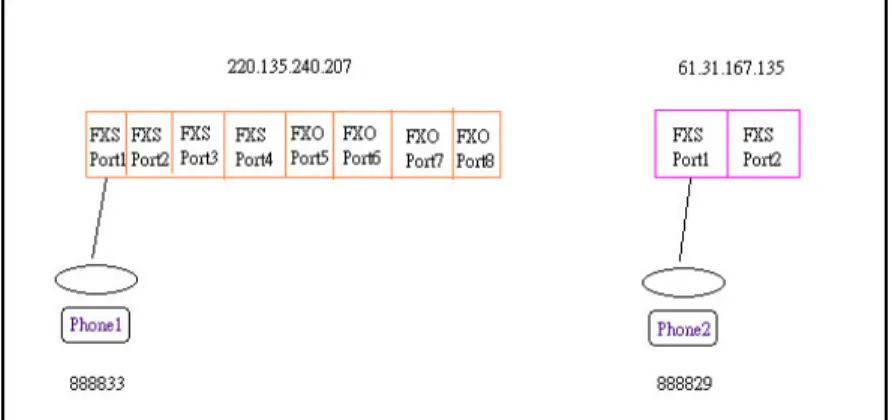
Connect a telephone into 3300V's Port1 and 2900V's Port1 respectively. They can call with each other directly with IP addresses if only 3300V and 2900V both have public IP addresses and have set up the Phone Numbers.
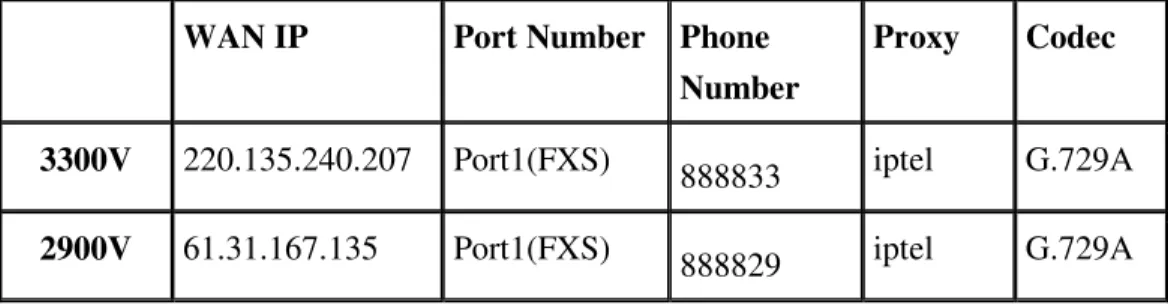
Figure 30-1. A Scenario architecture graph Table 30-1. Configuration table
- 2 -
WAN IP Port Number Phone Number
Proxy Codec
3300V 220.135.240.207 Port1(FXS) 888833 iptel G.729A
2900V 61.31.167.135 Port1(FXS) 888829 iptel G.729A
Furthermore, do NOT enable the Outbound Proxy feature when you set up 3300V and 2900V to use Direct IP Call. (It isn't active in the Example 1; please see Figure 30-2 shown below) Otherwise even if you dial the IP address, the call is still sent to the SIP Proxy Server always. And if the SIP Proxy Server doesn't forward the call to remote VoIP user's WAN IP, you can't do this action.
Figure 30-2. Outbound Proxy feature
3300V Configuration Example Step 1
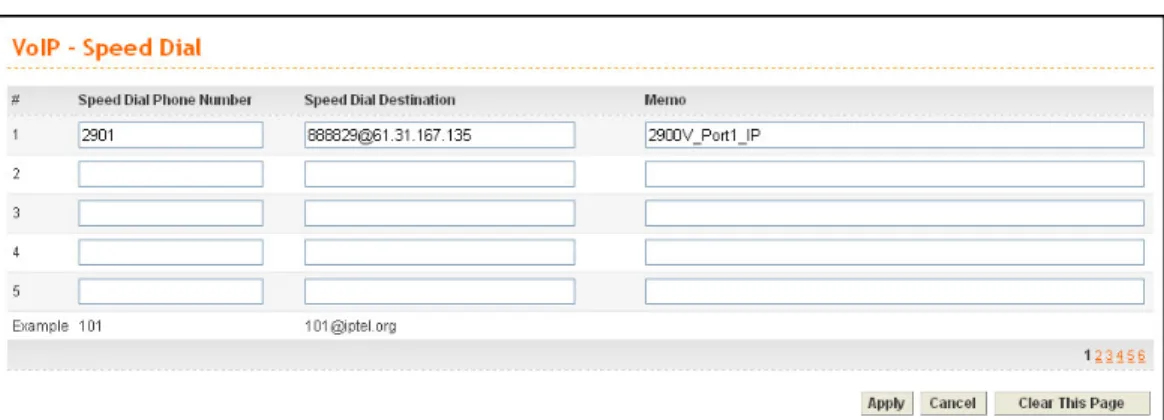
Enter VoIP - Speed Dial page, configure relevant settings for 2900V's Port1. Speed Dial Phone Number: type 2901.
Speed Dial Destination: Cal lee’s Number@IP, type [email protected]. Memo: To facilitate ease differentiation please type 2900V_Port1_IP.
- 3 -
Click Apply to save the settings and finish the configuration.
Figure 30-3. Speed dial port1 setting
2900V Configuration Example Step 1
Click DialPlan Setup in the VoIP Setup page.
Figure 30-4. DialPlan setting of Vigor2900V
Step 2
Click Index1.
- 4 -
Step 3
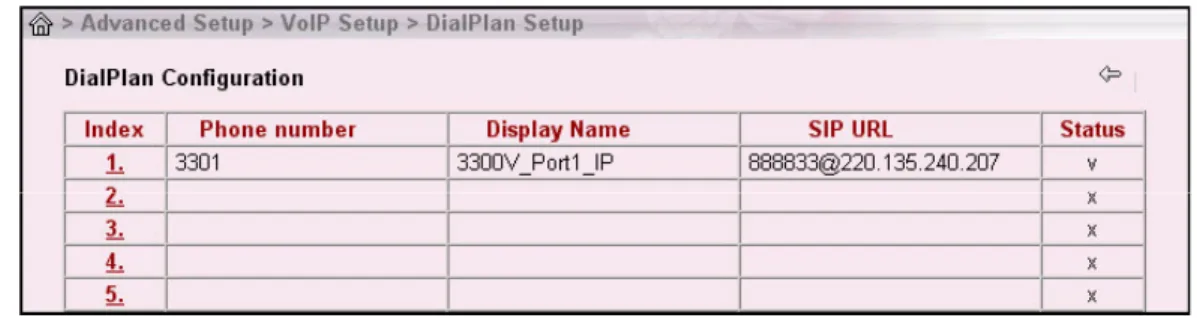
Enter relevant settings for 3300V's Port1. Click OK to save the settings. Enable: click ( ) to activate the entry.
Phone Number: type 3301.
Display Name: To facilitate ease differentiation please type 3300V_Port1_IP.
SIP URL: Cal lee’s Number@IP, please type [email protected].
Figure 30-6. Enter relevant settings of index1
Step 4
Confirm the settings are correct, and then finish the configuration.
Figure 30-7. Finish DialPlan configuration
Start to dial by using telephones Phone1 calls Phone2
Press 2901# or 888829*61*31*167*135#.
Phone2 calls Phone1
Press 3301#. Note:
# indicates termination of the phone number. After pressing #, VoIP is immediately called out. Or you may wait 3 seconds if you do not press #.
- 5 -
With 2900V you can't only dial alphanumeric addresses or @ symbols. To dial an IP address, start and end it with a # (hash) replace the dots with * (star). In this example you have to press #220*135*240*207#. But 3300V can only receive the format of Number@IP. So it is required to setup 3300V's number ([email protected]) in the DialPlan entry.
30.2 Intercommunication with one SIP Proxy Server
(registration)
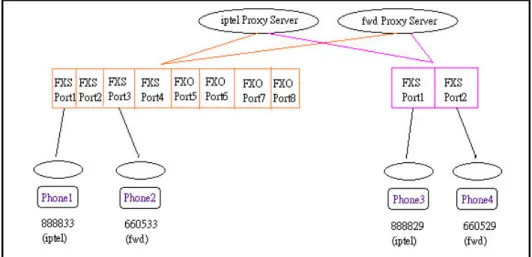
Connect telephones into 3300V's Port1 & Port3 and 2900V's Port1 & Port2 respectively. Each port needs to register in the SIP Server.
Figure 30-8. A Scenario architecture graph
Table 30-2. Configurations between Vigor3300V and 2900V
WAN IP Port Number Phone Number
Proxy Codec
Port1(FXS) 888833 iptel G.729A
3300V 220.135.240.207
Port3(FXS) 660533 fwd G.729A Port1(FXS) 888829 iptel G.729A
2900V 61.31.167.135
- 6 -
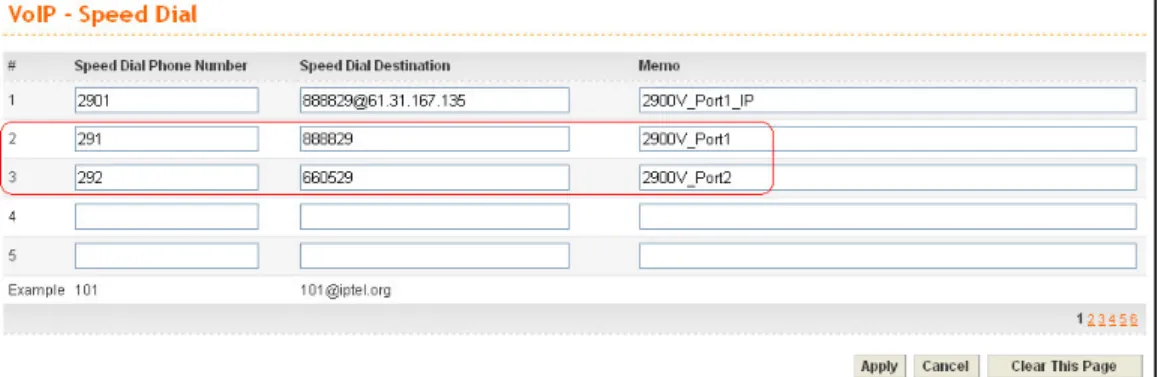
You can also add Speed Dial numbers in Speed Dial to speed up the dialing, or to accommodate the setup of company's extension numbers.
3300V Configuration Example Step 1
Enter the VoIP - Speed Dial page and add the second and third group of Speed Dial number. Then click Apply to save the settings and finish the configuration.
Figure 30-9. Speed dial port2 and port3 settings
Start to dial by using telephones Phone1 call Phone3
Press 888829# or 291#.
Phone2 call Phone4
Press 660529# or 292#. Phone3 call Phone1
Press 888833#. Phone4 call Phone2
Press 660533#.
Note:
# indicates termination of the phone number. After pressing #, VoIP is immediately called out. Or you may wait 3 seconds if you do not press #.
- 7 -
30.3 Intercommunication with different SIP Proxy
Servers
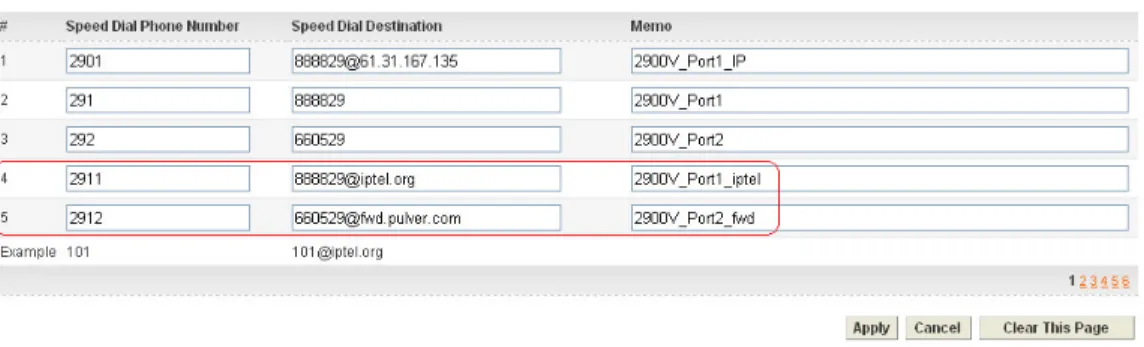
Connect telephones into 3300V's Port1 & Port3 and 2900V's Port1 & Port2 respectively. Each phone registers to the SIP Server. The settings and scenario are the same as the above example. But they must be set up in conjunction with the Speed Dial.
3300V Configuration Example Step 1
Enter the VoIP - Speed Dial page and add the 4th and 5th group of Speed Dial number. Then press Apply to save the settings and finish the configuration.
- 8 -
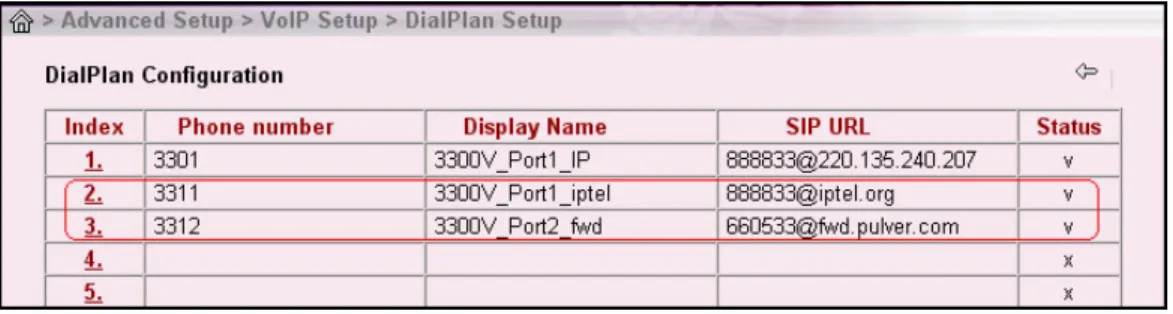
2900V Configuration Example Step 1
Click DialPlan Setup in the VoIP Setup page. Then add the second and third group of Speed Dial number.
Figure 30-11. DialPlan configuration of index2 and index3
Start to dial by using telephone Phone1 call Phone4
Press 2912#.
Phone2 call Phone3
Press 2911#.
Phone3 call Phone1
Press 3312#.
Phone4 call Phone2
Press 3311#.
Note:
# indicates termination of the phone number. After pressing #, VoIP is immediately called out. Or you may wait 3 seconds if you do not press #.