Inventory Management:
Genesis Inventory Plus
+
Genesis Inventory Plus
+
in addition to
Oracle Inventory: For a perfect
experience in Inventory Management
Table of contents
SYSTEM ARCHITECTURE WITH ORACLE eBS ... 3
EXECUTIVE SUMMARY ... 4
NO CUSTOMIZATIONS ... 4
FIRST INSIGHTS ... 5
DESCRIPTION ... 6
Why the need to develop Genesis Inventory Plus+ ... 7
SPECIFIC FEATURES ... 8
Inventory security ... 8
Stock transactions operational reports ... 8
Quantity availability at transaction date ... 8
Header and line stock data form ... 9
Distribution account generator ... 9
User interface standardization ... 9
A two-step transaction: Save and Process ... 9
Automatic reversal transactions ... 9
Managing transactions based on Stock Ledger Cards (SLC) ... 9
Cost method determination at warehouse level ... 10
Whitepaper – Informative document, January 2013 3
EXECUTIVE SUMMARY
The ERP software suppliers constantly improve the features of the component modules, trying to stay up-to-date with the customers’ increasingly complex business requirements. On the other hand, the consultants, “the fieldwork teams”, the ones who must bring to life the sold products, identify additional requirements lists, always the same, left uncovered even in new versions. The customer is faced with the feeling of buying a product that does not cover, as he imagined, a specific area of business. The ERP software vendor is also facing a problem: the application cannot be modified, only within very tide limits. Therefore, the customer receives an approximate, unsatisfactory and sometimes error-prone solution.
Genesis Software Consulting has developed in time a product suite, which includes Genesis Inventory Plus+, fully integrated into Oracle E-Business Suite, in order to respond to express requirements from customers. These products have been designed as a new work interface within ERP application, a role rather than module-oriented one, thus replacing the standard operating mode. In order to solve the same tasks in the new interface, the user is faced with less screens, the information is condensed, automated and secured, while maintaining control and the possibility to correct operating errors. Using the new interface, the customer can intervene, making changes that the product developer forbids.
It is recommended that Genesis Inventory Plus+ be used each time Oracle Inventory is implemented because a list of critical features and corrections for the user is added.
NO CUSTOMIZATIONS
We believe customizations, changes made in the standard Oracle Applications ERP, that are not supported by the vendor are something we do not recommend. Why customizations are not good? Regression – one minor customization could dramatically affect a standard set of functionalities; Standard support cannot be offered even for standard functionalities if were affected by customizations; Upgrade – new versions upgrade can become a more costly experience if customizations are in place; Know how – for standard applications you have vendor support and general documentation, while for customizations the support depends on only a few developers. These are just a few of many pitfalls of customizing the ERP software.
Whitepaper – Informative document, January 2013 5
This is why we don’t recommend and don’t support customizations of Oracle ERP. We developed our products as distinct tools over the standard functionalities of Oracle without interfere with or change these functionalities. They just channel the existing power of Oracle ERP to more efficiently solve the business problems of your company. The standard functionalities remain unaffected by our products and you can still use them, if you choose, independently of our product.
FIRST INSIGHTS
Oracle E-Business Suite Inventory module, and the related ones, represent one of the problem sources in implementation, both for users and for consultants. The consultants are forced, by the structure of the application, to ask the users (stock keepers and stock manipulators) to operate, in fact, simple stock issues-receipts, in a variety of screens, with different configurations, hard to remember and to use. For this reason, very often, managers are forced to renounce to online operation performed by stock keepers, delegating the operation to the accounting department and postponing it to the end of the month. Under these conditions, any use of material planning and tracking becomes impossible for intervals of less than a month. The inventory operations accounting audit is highly hindered by a data structure considered sometimes too simplified. The transactions must generate the documents required by legal regulations in force (Receipt Note, Consumption Note, Stock Balance Sheet). Furthermore, the operating mode must be performed more strictly, leading to a secure operation in stock management, the stock shown being the one from the system date and not the one from the transaction date, and the closing of the stock value balance not leading to accounting differences. Hence, the stock accountants lose much time identifying and reconciling operational errors. Consultants, in turn, are forced to develop complex reports having an insufficient data model.
“Eggshell” metaphor
Michael Hammer, known in the business-consulting world as the inventor of the concept of BPR – Business Process Reengineering, uses the “egg shell” metaphor to explain a consequence of the business processes fragmentation. Thus, a business process is like an egg with a whole shell. This can be rebuilt, after egg breakage, in two ways: either breaking the egg into many small pieces, a large quantity of glue being necessary to remount it, or by breaking the egg in a few larger pieces that require less glue to rebuild. The egg rebuilt from a large number of small shells will always be farther than the original than the one rebuilt from fewer larger shells. What does this mean? The higher the number of screens necessary for a process (the egg) to be operated (more shells to assemble), the more effort is needed for operation and control (glue). The higher the number of screens, the farther is the operating process from the real business.
DESCRIPTION
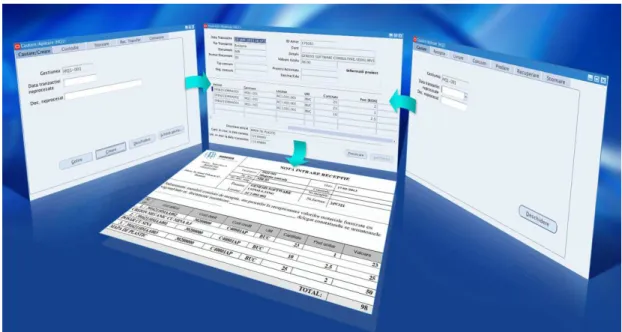
The Inventory Plus+ product developed by Genesis allows stock keepers to operate secured Inventory management movement, using fewer screens, with automatic process report generation (Goods Receipt Note, Consumption Note, etc). Stock change is made at the transaction date and not at the system date. Transactions are performed in two steps, Save and Process. The unprocessed transactions do not generate accounting entries and can be easily modified or deleted. The stock keeper can automatically perform correction transactions having an on-screen document reversal function. The transactions are auditable, from quantity and value point of view, and are connected to Stock Ledger Cards, highlighting the quantity and value left on the Card.
Fig. 1 - Genesis Inventory Plus+ Application
Genesis Inventory Plus+ improves the Oracle modules features used to track product inventory. It adds new forms of operation and viewing/auditing of transactions.
Genesis Inventory Plus+ works together with Oracle Inventory module. The new features introduced by Genesis Inventory Plus+ do not cancel in
Whitepaper – Informative document, January 2013 7
any way the standard Oracle features. The only thing changed is the user interface.
Why the need to develop Genesis Inventory Plus+
These days, customers all over the world are increasingly demanding. They want to have today what the developers promise to achieve in the future. In our view, customers are less interested in the technological process incorporated in the new versions of ERP applications and more interested in the practical solutions for their business problems.
After years of Oracle Applications implementation, Genesis Software Consulting team was able to capitalize the experience gained into a product suite, which also includes Inventory Plus+.
Successful use of Inventory Plus+ has enabled Genesis to extend ERP implementation in other areas of company business: resource requisition and forecasting. Now, stock keepers receive products based on Purchase Orders, release the raw material for consumption and receive in stock the work-based finished goods, whereas the delivery to the customer is performed on a per order basis.
SPECIFIC FEATURES
Genesis Inventory Plus+ adds to Oracle Inventory a series of new features helping to improve transaction operation by stock keepers and their auditing by stock accountants.
Inventory security
In an inventory organization nominated stock keepers are responsible for specific warehouses. For example, a person is responsible for raw materials, another one is responsible for finished goods, and so on. Each of them wants no one else to have access to the warehouse he/she is responsible for.
Genesis Inventory Plus+ adds to Oracle Inventory the warehouse security defining two new entities: warehouse and stock keeper. After configuration, a stock keeper will be allowed to operate only in the warehouses he/she is responsible for.
With Genesis Inventory Plus+ only the user with the “stock keeping” role for that nominated warehouse will operate in a specific warehouse, which leads to increasing confidence in the system.
Stock transactions operational
reports
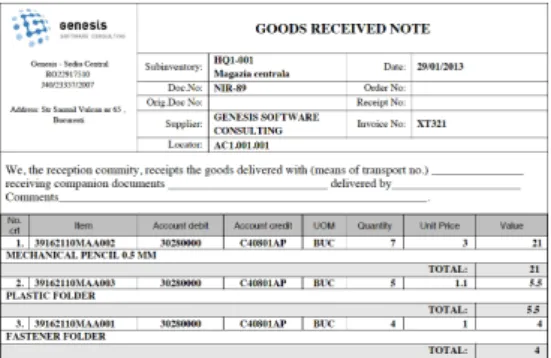
Stock receipt and issue transactions recorded by stock keepers are accompanied by filling the documents certifying product movement. The person delivering the product, as well as the person accepting it, needs a document signed together with the stock keeper in order to validate the exchange of products.
Genesis Inventory Plus+ adds to Oracle Inventory stock transactions, documents organized in a document nomenclature, associated to warehouses, with unique number sequence.
Fig. 2 Transaction-associated document
When the stock keeper records a stock transaction in a warehouse, the system will generate a transaction specific document, with a unique number, associated to the list of involved products. The document is printed to be signed by the people involved in the transaction. The documents are sent to the Accounting Department at the end of the month because they are source accounting documents.
Quantity availability at transaction date
In real life, the stock keepers do not work with negative stock. The stock issue cannot be bigger than the stock receipt. Oracle Inventory displays and uses in transactions the quantity available at system date. If an issue is operated in the past, the quantity available at the system date may lead to a negative balance in the past.
Genesis Inventory Plus+ adds to Oracle Inventory, in the new interfaces, the available quantities at transaction date. If it is operated in the past, the system takes into account only the quantities at that moment and ignores the quantities on the system date. Thus, there will never be negative stock in the stock balance regardless of the order in which the documents were recorded.
Whitepaper – Informative document, January 2013 9
Header and line stock data form
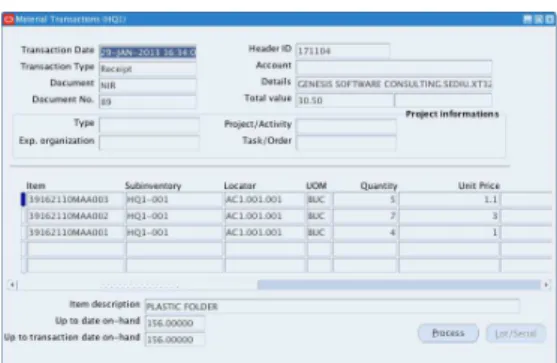
It is useful for stock keepers that the ERP interface in which they operate to be organized similar to the documents they are accustomed to, with header and lines. The header should contain general data and the lines should contain operated products specific data.
Fig 3.Header and lines organized transactions
Genesis Inventory Plus+ adds to Oracle Inventory, in the new interfaces, header and lines design. The header format changes dynamically. Depending on the type of document displays supplier data for Goods Received Note (GRN) or customer data for the Delivery Note.
Distribution account generator
Each document type needs specific accounting entry. Stock keepers, on the other hand, choose to operate the stock without being involved in accounting transactions. Genesis Inventory Plus+ adds to Oracle Inventory, in the new interfaces, mechanisms for automatic getting of distribution account using Oracle Workflow account generators. When stock keepers use the Genesis Inventory Plus+ interfaces, they do not need to operate any account-related information as this is fully automated. Stock Accountants find in Genesis Inventory Plus+ form the inventory and distribution accounts required to audit transactions performed by the stock keeper.
User interface standardization
Users appreciate simple, standardized, intuitive and easy to learn user interfaces. Genesis Inventory Plus+ provides a single form for all types of inventory transactions operated by a stock keeper.
A two-step transaction: Save and Process
In the early stages of operating, users need to be able to correct, change and delete, with no accounting implications.
Genesis Inventory Plus+ interface allows a two-step transaction: Save and Process. The saved data can be updated or deleted, with no accounting implications. After processing, the system creates the accounting. Therefore, only operating a reversal transaction can perform the correction.
Automatic reversal transactions
Stock keepers and accountants need the ERP system to include automatic correction mechanisms.
Genesis Inventory Plus+ adds correction features that reverse the faulty document. Stock keepers use the reversal feature to automatically generate a new document, which cancels the incorrect one. Stock accountants find in the system the reversed document associated with the faulty one.
Managing transactions based on Stock Ledger Cards (SLC)
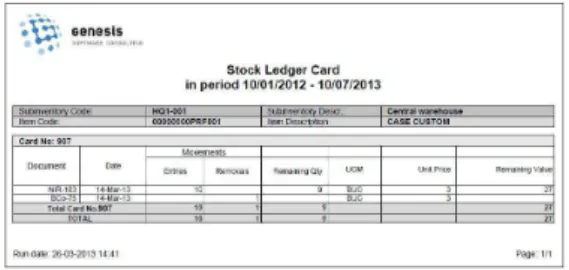
Stock accountants need the system to allow full stock audit. To that effect, the data must allow the report of an inventory balance sheet, with initial stock at the beginning of the month, receipts, issues, quantities, values and balance. The best way to track stock movement is to record the transactions of SLCs. Each stock receipt must generate a SLC number so that, subsequently, when operating issues, they can be connected to receipts.
The SLC must point out the remaining quantity and value from a receipt. The SLCs where the remaining quantity and value are equal to zero are considered closed SLCs. Genesis Inventory Plus+ adds to Oracle Inventory a new data structure that allows report of an inventory balance sheet and Stock Ledger Card. An interface is made available for stock accountants where they can view and audit the stock based on the document associated to the transaction and the SLC. They can view the remaining quantity and value on each SLC separately. The SLC is used in automatic document reversal mechanism. A stock receipt can be reversed only if its SLC is restored, respectively the remaining quantity and value are identical to the initial ones.
Managing the data in Genesis Inventory Plus+ based on SLCs excludes the potential for variance accounts.
Fig. 4. Managing data based on SLC Cost method determination at warehouse level
Stock accountants must track the balance of stocks movement at warehouse level.
Genesis Inventory Plus+ provides, in addition to Oracle Inventory, the cost method determination at warehouse level. The combination of Product line accounting
standard feature from Oracle Cost Management with Genesis Inventory Plus+ feature of cost method determination at warehouse level allows the stock accountants to track the stock balance for each warehouse separately.
Whitepaper – Informative document, January 2013 11
HOW THE PRODUCT WAS DEVELOPED
Genesis Inventory Plus+ was developed progressively, covering the business requirements raised by different customers in implementation projects, since the early 2000’s. We initially started from simple development mechanism (table triggers, packages, procedures), so as to finally obtain a stand-alone product, with proper screens and tables, which interfaces the standard modules. The result was an “encapsulation” of the expertise gained in an easy to customize and control product, similar to any Oracle product.
Genesis Inventory Plus+ includes all technical elements characterizing an Oracle product. It has its own database schema, a proper descriptive flexfield (DFF), specific configuration items, operating forms and view results forms. Genesis developers use in Genesis Inventory Plus+ the modern mechanisms offered by Oracle Workflow. Thus, the forms of operation developed, Miscellaneous Transactions and Commitment Transactions, have their own account generator used to achieve distribution account. At the same time, all operated transactions are controlled through Oracle Workflow for validation, interface and correlation when multiple transactions require interconnections. The transactions operated are simultaneously saved, both in Genesis Inventory Plus+ tables, and in Oracle Inventory tables. In Oracle Inventory, the transactions operated from Genesis Inventory Plus+ are identical.
Genesis Inventory Plus+ has its own set of reports to be added to the ones existing in Oracle Inventory. For each type of transaction/document, Genesis Inventory Plus+ submit the Transaction report in order to offer the stock keeper the document required to certify the product exchange by signature. At the end of the month, the Stock Accountant runs the inventory financial audit reports, Inventory balance sheet and Stock Ledger Card.
White paper
(Informative document) January 2013
Author: Dorian Balmuș Genesis Software Consulting
Address: 65 Samuil Vulcan St., sector 5, Bucharest, Romania
Contact person: George Faur phone: +40 741-084-009
e-mail: [email protected]
www.genesissoftware.eu
Software and
consulting
you need
Copyright © 2013, Genesis Software Consulting. All rights reserved. This document is provided for information purposes only and the contents hereof are subject to change without notice.
This document is not warranted to be error-free, nor subject to any other warranties, including implied warranties and conditions of merchantability or fitness for a particular purpose. This document is provided for marketing and information purposes, and does not entail any contractual liability. The content hereof is protected by the Copyright Law L8/1996 and allied rights, as subsequently amended and supplemented. All Genesis trademarks are used under license and are trademarks or registered trademarks of Genesis Software Consulting.