87 © Association for Educational Communications and Technology 2018
A.A. Piña et al. (eds.), Leading and Managing e-Learning, Educational Communications and Technology: Issues and Innovations,
https://doi.org/10.1007/978-3-319-61780-0_7
Infrastructure: Strategies and Opportunities
Robert L. Moore and Brian P. Fodrey
Abstract Distance education provides a wealth of opportunities and areas for inno-vation, but it also presents unique challenges for implementation and eventual suc-cess. To mitigate these challenges, this chapter will present four critical components—systems, objectives, evaluation, and personnel—that combine into one to create a technology infrastructure that can support distance delivery. Through this chapter, e-learning leaders will gain the knowledge to not only identify key features of tools used for distance delivery, but also understand and appreciate the correlation between a holistic infrastructure approach and quality distance delivery. The absence of one of these critical components will likely result in an unsuccessful technology integration. To aid in the explanation of these critical components, the chapter will focus on three main distance education delivery forms—webinars, classroom captures, and e-learning modules. The chapter will provide an overview of the types of questions and elements that should go into consideration of any dis-tance education tool, and will aid in the effective assessment and evaluation of these tools, as well as personnel considerations that should be taken into account.
Keywords Technology infrastructure • Web conferencing • Webinars • e-Learning modules • Instructional design • Distance education • Evaluation • Classroom cap-ture • Interaction
Decision-Making Guidance
This chapter will help you make decisions about developing your institution’s IT infrastructure, and after reading the chapter you will be able to:
• Understand the relationship between software tools and systems as it relates to distance delivery
R.L. Moore (*) • B.P. Fodrey
University of North Carolina at Chapel Hill,
• Identify the key features of tools for distance education content creation
• Evaluate and select the most appropriate software and systems for distance delivery
What You Need to Know
Distance education is a rapidly growing segment of higher education as more and more students are pursuing degrees, training, and certifications in this format. Ozkan and Koseler (2009) identify this tremendous growth and the “trend towards location- independent education and individualization [as a motivation for] universities to invest their resources on developing online programs” (p. 1286). Previously, dis-tance education was seen as a peripheral alternative or one that was not the focal point of many of our more traditional universities, but that too has changed. Simonson, Smaldino, and Zvacek (2015) explain that distance education is seen as a viable option for many learners and is actually the preferred method of receiving instruction for many of them. This is further evidenced by the most recent enroll-ment numbers provided by the National Center for Education Statistics. They report that in fall 2013 over 5.5 students were enrolled in distance education courses at degree-granting postsecondary institutions. In that same year, over 2.6 million, or 15.1%, of undergraduates enrolled at degree-granting postsecondary institutions took at least one distance education course, and almost 2 million, or 11.3%, did a fully online program (National Center for Education Statistics, 2016). As more data becomes available, one would expect to see the number of students taking fully online programs to continue to increase along with the number of students who take at least one online course during their postsecondary careers.
However, the quality of instruction cannot suffer, and instructional designers are often faced with the challenge of providing support for faculty while simultaneously managing new content delivery tools. At the management level, administrators are tasked with aligning institution resources to the most effective and efficient models for distance education delivery. But with so many options, it can be a challenge to identify exactly which is the best fit for an institution. Administrators need to under-stand that distance education is more than simply posting a copy of a PowerPoint presentation online; students want interaction both with their peers and with the instruction. Students also look for rich educational experiences from the location of their choosing.
A Model for Technology Infrastructure
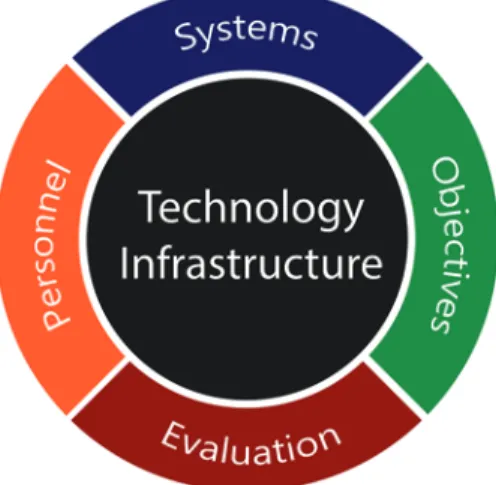
2014). Bosch, Hartenberger Toby, and Alkhomsi (2015) point out that these innova-tions now have “educators trying to find any channel possible that can deliver qual-ity education and interactions to people at a distance” (p. 137). In meeting this demand, e-learning leaders must determine the most effective and efficient ways to deliver their instructional content. As these leaders seek to meet needs, they need to manage multiple stakeholders and interests. Paul and Cochran (2013) identify the four components of institution, student, faculty, and technology as essential for dis-tance education. Taken individually, these components are critical, but “the larger risks and rewards for online education occur where these components intersect” (Paul & Cochran, 2013, p. 50). These components provide a useful framework for an institution-wide view of distance education. But within the information technol-ogy (IT) divisions that are tasked with supporting distance education initiatives, there is a need for an effective way to identify, evaluate, and implement tools that can support distance education and the organization’s instructional mission. Alsabawy, Cater-Steel, and Soar (2013) explain that “IT infrastructure services [are] a critical factor which affects the [institution’s] activities [as it relates to distance education]” (p. 431). This IT division-level framework is what will be referred to in this chapter as the technology infrastructure, the four components of which are dis-played in Fig. 1.
Each of these components are required for any distance education technology infrastructure, and the absence of one component will likely result in a less effective implementation of distance education services. There is not a specific order for this model which aligns with how projects may be initiated. For instance, a faculty member may express an interest in using GoToMeeting, a web-based video confer-encing tool, which would be in the systems part of the model. The IT Division would next need to find out the faculty member’s learning objectives, determine how or if GoToMeeting is able to meet those needs, and evaluate how it will work within the enterprise environment of the institution. Finally, the division will need to deter-mine if it has the personnel who can support this new tool, both in terms of training
the faculty member but also potentially for live-event support (if that is required). This is just one of many examples of ways that this model can work within the IT Division.
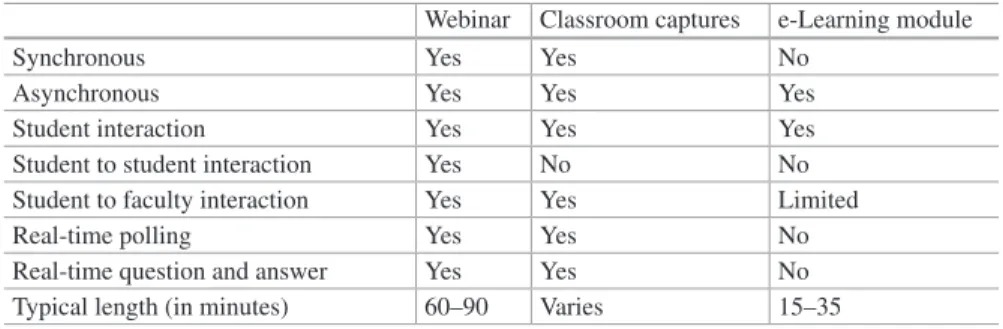
Systems. There are two aspects of interest within the systems component. The first is what format or delivery method you are using to create your instructional content, and the second is what platform or tool you will use to deliver this content. We begin with the first aspect, which is the format and delivery method. Although there are many permutations and definitions of distance education delivery meth-ods, we will focus on webinars, classroom or lecture captures, and e-learning mod-ules (Table 1).
In this chapter, the term webinar will be used to refer to a synchronous recording that features some level of direct interaction with the instructor and students and which can be recorded and archived for on-demand access by students. These syn-chronous recordings are delivered using a web platform and originate from the pre-senter’s laptop or desktop. They will include audio and visuals (typically in the form of PowerPoint slides), and may also include video of the presenter. Students will view these real-time recordings using their laptop or desktop computer. The instruc-tor may decide to leverage small groups, usually termed a breakout room, to allow students to have more student-to-student interactions during the webinar. In the live event, students will be able to answer any poll questions posed by the instructor providing immediate feedback to the instructor and also ask questions of the pre-senter using text-based chat. Typically, a webinar will run from 60 to 90 min.
Classroom or lecture captures are meant to be exactly what their name implies— a digital representation of what happened in the classroom. They are meant to cap-ture what information was transmitted via the teacher in a classroom setting but will not feature many of the collaborative elements of a face-to-face classroom such as small group work. Similar to a webinar, a classroom capture offers the opportunity for a synchronous session that can also be recorded and archived and later provided to students for asynchronous viewing. Capturing a lecture for students is a helpful study and review tool. These captures can be accessed by students interested in studying or reviewing their own notes after the class session. The length of a class-room capture will vary, but can be understood for the purposes of this chapter as being a full class session—from 45 min to 3 h. It would be presented to students as
Table 1 Overview of different delivery options
Webinar Classroom captures e-Learning module
Synchronous Yes Yes No
Asynchronous Yes Yes Yes
Student interaction Yes Yes Yes
Student to student interaction Yes No No
Student to faculty interaction Yes Yes Limited
Real-time polling Yes Yes No
Real-time question and answer Yes Yes No
one long recording, similar to what their experience would be within the classroom. Instructors will be able to offer polling during the synchronous version but should be aware that if video is being used there may be a latency issue or delay in trans-mission, which makes real-time polling difficult.
Of the three delivery options, e-learning modules are typically the most labor- intensive option for faculty to create and deliver. This is often due to the fact that an e-learning module is self-paced and is meant to provide not only instruction, but also opportunities for student interaction. This can take the form of quizzes or inter-action with the content on the slide, such as clicking on boxes to reveal information. With e-learning modules, the feedback is instant, whether that is from a quiz being marked correct or incorrect and receiving additional feedback or by having to use a drag and drop exercise to correctly position a list or objects. The modules will have a customized look and feel to match the subject matter and will have engaging con-tent including animations and audio. These modules do not have a real-time compo-nent, and the interaction will be designed by the instructor, with students completing it at their own pace and time. The results of the quizzes may be reported to a learn-ing management system (LMS) if SCORM or some other type of tracklearn-ing (http:// scorm.com/scorm-explained/) has been enabled and is supported by the LMS. For more information about LMSs, refer to the LMS chapter within this book. In these e-learning modules, students will receive their instruction using a web-enabled device that may include their laptop or mobile device such as a tablet or iPad. Since these are self-paced instructional materials, students will be interacting indirectly with their instructor. The instructor may include quiz questions with immediate feedback provided, but there will not be opportunities for real-time question and answer or polling such as with classroom captures and webinars. Typically, these modules will take between 15 and 35 min to complete.
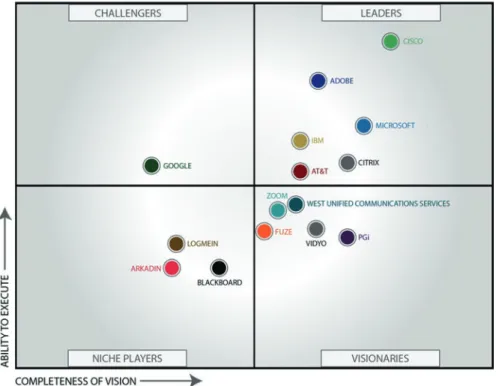
The second aspect for systems is how the content is being delivered, and this is where the specific tools come into play. Many of these tools you may already be familiar with, including Adobe Connect, GoToMeeting, or WebEx. Preset and Andrews (2015) provide what they call the “magic quadrant for web conferencing” (Fig. 2), which organizes the various tools into four quadrants of leaders, challeng-ers, visionaries, and niche players.
whole market” (p. 16). Finally, the fourth quadrant is for niche players which are defined as “[having] good technology, but are limited by their service, breadth of product line … [and] some have chosen a niche strategy” (p. 17). Companies within this quadrant include LogMeIn, Arkadin, and Blackboard.
Objectives. Moore (2014) states that it is imperative that technology supports instruction. Too often, a fun or new technology tool is added to a course before it has been carefully reviewed and vetted. This can often lead to frustration from both the students and instructor. It is critical to establish clear learning objectives and to align these with the technology tools that are selected and implemented. It will also be easier to evaluate the tools if you understand what you are trying to accomplish. For instance, an instructor may feel that students need a solid foundation in specific concepts before they can move on to higher levels of application and critical think-ing. In order to meet this need, an e-learning module may be developed that covers these fundamental concepts, and it may then be published and distributed to stu-dents using Adobe Connect. Within the module, there would be knowledge check quizzes, and the instructor could link these scores to the LMS. This would allow for an effective evaluation of the e-learning module. Conversely, if the instructor was given a tool that is suited for classroom capture to develop this e-learning module, it would fail to meet the learning objectives. Thus, it is important to properly align the technology to the learning objective.
Evaluation. There are two parts to evaluation within this model. There is the initial evaluation of the particular tool or service that is going to be used for the distance education option. Furthermore, there is also the continuous evaluation that must happen after the implementation. Ozkan and Koseler (2009) explain that “assessment has become an essential requirement of a feedback loop for continuous improvement but often this is overlooked by the IT division” (p. 1286). In many scenarios, the tool or service is deployed to the institution and then the IT division moves on to the next project. In this scenario, the IT division fails to develop a mechanism for evaluating if this solution is continuing to meet the needs of the institution. The evaluation that IT should be responsible for is how the technology is meeting the stated objectives for the course. This may require engaging with the faculty members to provide instructional objective feedback to compare with the technical evaluation and assessment that the IT team can provide. Together, this feedback loop will make sure that the technology is meeting the instructional needs. The rapid advances in technology make it critical that solutions and tools are under constant review and consideration. Preset and Andrews’ magic quadrants demon-strate that there is quite a bit of fluidity between the levels, and while one may have chosen a tool from the leader’s quadrant, a challenger or visionary company may actually be able to better meet the needs of the institution in the future.
What You Can Do
Now that you have been furnished with a model for technology infrastructure and understand the terminology, it is time to discuss how to actually evaluate the various tools that are available for use. We could provide specific tools and an evaluation of those tools, but that is a limiting exercise. Each institution will have different needs and factors that will influence these decisions. Therefore, we will discuss what things to look for when evaluating different tools. By focusing on the process of the evaluation, it will make this more applicable to a wider audience. These are merely suggestions informed by the experiences of the authors in building technology infrastructures and best practices from other practitioners. These are meant more as guideposts to get you started on developing your own institution-specific evaluation that will cater to those needs. We will focus again on the three delivery options pre-viously defined—webinars, classroom or lecture capture, and e-learning modules. The following sections provide guiding questions for each delivery option that will help make the selections.
Webinars
When evaluating options for webinars, there are six key questions that you will want to answer.
1. How Does the Solution Handle PowerPoint or Keynote Animations?
2. What Type of Participant Interaction is Needed?
We have all sat through a webinar that was nothing more than a talking head and know how painful that experience was as a participant. Good instructional practices mean that there will be participant interaction during the webinar and the different tools will handle this differently, if at all. Here is where the learning objectives come into play. If the instructor attempts to employ webinars as a means of doing a review session, they may have different needs than if they are trying to use webinars as a way to replace a face-to-face class session. The way that the participants interface with the instructor and each other may differ. At the time of this publication, some tools, such as GoToMeeting or WebEx, did not provide comparable polling features to ones offered by other tools, such as Blackboard Collaborate and Adobe Connect. Another part of participant interaction are breakout rooms. Some tools allow for a session’s participants to be moved into their own virtual breakout rooms where they can collaborate and have private discussions similar to how a face-to-face class may have small group work; other tools do not have this component.
3. How Much Customization Can Be Done for the Layout?
Some tools provide a default layout that has a space for the participant list and text- based chat and then the display of either a shared desktop screen, whiteboard area, or PowerPoint slides. This may meet the needs for most faculty, but others may want the ability to change layouts and add in different components such as video files or other multimedia components that can help engage the learners.
4. Can You Save Your Room Configurations?
For instructors who are looking to do webinars on a regular basis, such as replacing a weekly face-to-face class session or teaching a fully online course synchronously, being able to save their room configurations is a huge benefit. This connects with the previous question on customizations. If the room can be customized to have the widgets and tools that are needed, but it cannot later be saved and the faculty mem-ber must do this setup before each meeting, this will be frustrating and inefficient for the faculty member. The additional setup time may dissuade them from either using these additional components that could better engage learners or not want to use the tool at all.
5. How Many Learners Can Connect?
that to determine which package to select. Each class meeting would be considered a session, and you will want to check how many connections are allowed per ses-sion. For example, if these webinars are for online courses that have an enrollment cap of 25 students, there is no need to pay for a room that allows for 100 connec-tions as this can become cost-prohibitive when you try to scale up to support more online instruction. It is important to distinguish between how many people are con-necting to the webinar versus how many are actually going to be watching it. If each student is signing in from their own computer, those are many individual connec-tions. However, if students or participants may be meeting in groups and using a projector in a conference room to project the webinar, you would only be counting that single connection, not everyone that was in the room.
For licenses, vendors typically do not place limits on the number of times you can use an existing room during the license terms. In other words, if you pay for a 50 seat room, you would be able to use that room as many times as you wanted to. The limitations are typically in concurrency of usage. This means that while you may reuse your room URL as many times as you want, you can only host one meet-ing at a time per room URL. When recordmeet-ing is an option, most solutions will create a new URL for just the on-demand version which is different from the original room URL. At the author’s institution, Adobe Connect is used for webinars and instruc-tors use one main room for all of their webinars. The webinar room has a standard configuration for questions, polling, and other features, and then each webinar’s slides are loaded into the middle area. After recording the meeting, a new on- demand link is automatically created by the system allowing viewers to see the on- demand version and the reuse of the original room URL.
6. Do You Have the Ability to Host or Store Content?
Some of the webinar tools do not provide long-term storage options or have storage as an additional expense in addition to the fee to use the webinar tool itself. If con-tent is being created for a course, this may be an important factor. Some tools, such as Adobe Connect, provide unlimited storage of content during the length of the contract. You will also want to consider what type of export options you will have for recorded content in case you need to move services or want long-term storage. Some tools, such as Blackboard Collaborate and Adobe Connect, provide included export of recordings but may require specific playback players or have a loss in quality on these downloads. Thinking about what you want to do with the content after you have recorded it as part of your tool evaluation process will help avoid potential mismatches between needs and expectations with faculty. The last thing you want is for a faculty member to expect the content to be available for an entire semester but your tool only allows for 30 days of storage.
vendor should offer a higher education pricing that is different from the normal price points. Verifying the storage parameters and also how to export and move information from the host server to a local or different server are all things to look at when evaluating potential third-party service providers.
Classroom or Lecture Capture
Many of the same questions for webinars will also be applicable for evaluating classroom or lecture capture tools, but there are a couple that are specific to this delivery medium.
1. Is There Specific Hardware Required in Addition to the Capture Hardware?
For some tools, such as MediaSite, you may need to have a physical, vendor- specific recording appliance that simultaneously captures the video of the presenter and the PowerPoint slides. Other tools or solutions may capture the video using a simple webcam and software running from the presenter’s computer. There are pros and cons to both approaches and associated costs that will help narrow down the options based on your specific needs.
2. Is There a Livestream Option?
For some tools, learners can watch a livestream or webcast version of the presenta-tion which can be helpful if students are not able to physically convene in the same location. However, there may be some latency issues with the livestream which limit the ability to use interactive features such as polling. With MediaSite, the authors have observed as much as an 8 s latency delay between a livestream and what is actually happening in the classroom; such a large latency period makes poll-ing with livestream attendees impossible. Another factor to consider will be the network connectivity of those watching the livestream. If they are on slower con-nections, the latency period could be much higher and may impact their satisfaction with the livestream; if students are not able to reliably watch the classes, they will not be able to actively participate in the class and learning will suffer.
3. How Easily Can You Export Content and Use It In Different Locations?
e-Learning Modules
For e-learning modules, there are three questions that you should answer in evaluat-ing options.
1. How Will Modules Be Created?
In some situations, faculty may be the ones creating the modules on their own with-out the use of an instructional designer. In this case, you will want to have a tool that has a low barrier of entry in terms of costs and learning curve for using the tool. However, if your situation has faculty working closely with an instructional designer on developing the module, you can consider one of the more expensive e-learning development tools such as Adobe Captivate, Adobe Presenter, or Articulate Storyline. These rapid e-learning development tools have steep learning curves but your instructional designer should be experienced with at least one, if not all, of these tools. Their experience with the tools will likely be working with subject mat-ter experts to organize and develop the content through these tools.
2. How Will You Deliver the Content? How Will Students Access the Content?
You will want to consider how you will be sharing the content that is being devel-oped as e-learning modules. The authors are currently leveraging Adobe Connect to both host their e-learning content as well as using Adobe Connect for webinars. Since there is unlimited storage as part of the contract for the webinar rooms, the storage for the e-learning modules is not an additional cost. Files created with Articulate Storyline can also be uploaded and shared using Adobe Connect, although it cannot be published directly from Storyline to the Connect server as you can with Captivate and Presenter files. Modules created with one of these tools can be exported as zip files which can then be uploaded to a web server or within an LMS, such as Blackboard, Moodle, or Sakai, or distributed and viewed locally on stu-dents’ devices.
3. Will You Be Using SCORM or Some Other Standard?
to other formats. It will be important to make sure the LMS and software are able to communicate correctly.
Conclusion
Over the last decade, we have seen a shift from distance education being an excep-tion to gradually becoming an accepted norm for instrucexcep-tion. Public percepexcep-tion has changed to be more accepting of distance education. The previous perception was that it was not possible to receive high-quality online education, but that perception has waned over the years. Additionally, in the past, students shied away from dis-tance education out of concerns about the quality of the instructional experience, but we are also seeing these feelings shift. The authors have observed a significant increase not only in demand from students for distance education offerings but also in interest from faculty in providing more distance education offerings. These two needs present a rich justification for developing a long-term infrastructure plan that is able to meet the needs of the institution, faculty, and students as well as allow for flexibility to evolve and adjust as technology changes.
One of the limitations of this chapter is that it cannot possibly provide the answers for all situations because each institution will have a specific enterprise infrastruc-ture available. Additionally, each institution will have unique needs from the size of the student population to the percentage of online course offerings or overall course objectives. The challenge for e-learning leaders is fully understanding the underly-ing concepts and needs for a technology infrastructure plan and then adaptunderly-ing and applying it to their specific environment. This chapter aids in that process by provid-ing background information about webinars, classroom captures, and e-learnprovid-ing modules and some guiding questions to consider when evaluating each of these tools.
For More Information
• Gartner technology research: http://www.gartner.com/technology/home.jsp
• Indiana University Adobe Connect resources: https://kb.iu.edu/d/bfnl
• University of Colorado Boulder Zoom FAQs:: https://oit.colorado.edu/services/ conferencing-services/web-conferencing-zoom/faq
References
National Center for Education Studies. (2016). Digest of Education Statistics, 2014 (NCES 2016- 006). Retrieved from http://nces.ed.gov/fastfacts/display.asp?id=80.
Alsabawy, A. Y., Cater-Steel, A., & Soar, J. (2013). IT infrastructure services as a require-ment for e-learning system success. Computers & Education, 69, 431–451.doi:10.1016/j. compedu.2013.07.035
Balch, O. (2014, April 13). Four mobile-based tools that can bring education to millions. The Guardian. Retrieved from http://www.theguardian.com/sustainable-business/2014/aug/20/ mobile-phones-smartphone-education-teaching.
Bosch, A., Hartenberger Toby, L., & Alkhomsi, A. R. (2015). In a world of explofing possibili-ties in distance learning, don’t forget about the light bulb. The Quarterly Review of Distance Education, 16(2), 129–138.
Moore, R. L. (2014). Importance of developing community in distance education courses.
TechTrends, 58(2), 20–24.
Ozkan, S., & Koseler, R. (2009). Multi-dimensional students’ evaluation of e-learning systems in the higher education context: An empirical investigation. Computers & Education, 53(4), 1285–1296. doi:10.1016/j.compedu.2009.06.011
Paul, J.A & Cochran, J.D. (2013). Key interactions for online programs between faculty, stu-dents, technologies, and educational institutions: A holistic framework. The Quarterly Review of Distance Education, 14(1), 49–62.
Preset, A., & Andrews, W. (2015, December 28). Magic quadrant for web conferencing. Retrieved from http://www.gartner.com/document/3181419?ref=lib.