MEASURING USABILITY FOR APPLICATION SOFTWARE USING THE QUALITY IN USE INTEGRATION MEASUREMENT MODEL
ABDOASSLAM HATAB M KATY
A dissertation submitted in partial fulfillment of the requirement for the award of the
Degree of Master of Computer Science (Software Engineering)
Faculty of Computer Science and Information Technology Universiti Tun Hussein Onn Malaysia
v
ABSTRACT
ABSTRAK
vii
TABLE OF CONTENTS
TITLE i
DECLARATION ii
DEDICATION iii
ACKNOWLEDGEMENT iv
ABSTRACT v
ABSTRAK vi
TABLE OF CONTENTS vii
LIST OF TABLES xi
LIST OF FIGURES xiv
CHAPTER 1 INTRODUCTION 1
1.1 Research Background 1
1.2 Problem Statement 3
1.3 Project Objectives 4
1.4 Scope of Project 4
1.5 Dissertation Outline 5
CHAPTER 2 LITERATURE REVIEW 6
2.1 Introduction 6
2.2 Application Software 7
2.2.1 Application Software Domains and Their Characteristics 7 2.3 Usability and Human Computer Interaction (HCI) 8 2.4 The Efficiency of User Interface Design 9 2.5 User Interface Design and Software Quality 10 2.6 QUIM: Quality in Use Integrated Measurement 11 2.6.1 QUIM: A Roadmap for a Consolidated Model 12 2.6.2 Major Usability Factors in QUIM 14
2.6.3 Usability Criteria in QUIM 14
ix
2.8 QUIM Applications 18
2.9 Advantages of the QUIM Model 18
2.10 Overview of Usability Metrics 19
2.11 Essential Usability Metric Suite 20
2.12 Essential Use Case 20
2.13 Use Case Map (UCM) 21
2.14 Essential Efficiency (EE) 22
2.15 Related Work 22
2.16 Chapter Summary 24
CHAPTER 3 RESEARCH METHODOLOGY 25
3.1 Introduction 25
3.2 Research Methodology 25
3.2.1 Select the Case Study 27
3.2.2 Determine the Main Actors 28
3.2.3 Draw the Use Case Diagram 28
3.2.4 Show the User Interface 28
3.2.5 Use the Case Map 29
3.2.6 Calculate the 𝑺𝑬𝒔𝒔𝒆𝒏𝒕𝒊𝒂𝒍 29
3.2.7 Determine the User Interaction and System
Responsibility 29
3.2.8 Calculate the 𝑺𝑬𝒏𝒂𝒄𝒕𝒆𝒅 30
3.2.9 Calculate the EE 30
3.2.10 Map Use Cases with the EE Results 30
3.2.11 Draw the Results 30
3.2.12 Analyze and Compare the Results 31
3.3 Chapter Summary 31
CHAPTER 4 Design AND IMPLEMENTATION 32
4.1 Introduction 32
4.2 Apply Case Study (I): Student University Registration
System 32
4.2.1 User Role Model 32
4.2.2 User Role Map 33
4.2.3 Task Model 33
4.3.1 User Role Model and Description of User Roles 45
4.3.2 User Role Map 46
4.3.3 Task Model 46
4.4 Apply Case Study (III): Restaurant Menu Ordering System 63 4.4.1 User Role Model and Description of User Roles 63
4.4.2 User Role Map 65
4.4.3 Task Model 65
4.5 Chapter Summary 100
CHAPTER 5 RESULTS AND DISCUSSION 101
5.1 Introduction 101
5.2 Analysis and Comparison of the Results 101 5.2.1 Analysis of the Result of Case Study (I): Public
University Registration System 102 5.2.2 Analysis of the Result of Case Study (II): ATM
System 105 5.2.3 Analysis of the Result of Case Study (III):
Restaurant Menu Ordering System 107 5.2.4 Comparison of three case studies based on
application software. 109
5.3 Chapter Summary 113
CHAPTER 6 CONCLUSION 115
6.1 Introduction 115
6.2 Contribution of the Research 116
6.3 Recommendation for Future Work 119
REFERENCES 121
xi
LIST OF TABLES
2.1 Similarity Between the Usability Models 10
2.2 Usability in the QUIM Model (Seffah et al., 2006) 14 2.3 Examples of the Calculable Metrics in the QUIM Model
(Seffah et al., 2006) 16
3.1 Percentages of Essential Efficiency (EE) for User Interface
Design (Constantine et al., 1999) 29
4.1 User Interaction and System Response for the Submit
Department Class Schedule Use Case 34
4.2 User Interaction and System Response for the Produce
University Class Schedule Use Case 37
4.3 User Interaction and System Response for the Register for
Classes Use Case 39
4.4 User Interaction and System Response for the Produce Class
Roster Use Case 42
4.5 User Interaction and System Response for the Startup
Registration System Use Case 44
4.6 User Interaction and System Response for the System Startup
Use Case 47
4.7 User Interaction and System Response for the System
Shutdown Use Case 49
4.8 User Interaction and System Response for the Session Use
Case 51
4.9 User Interaction and System Response for the Withdrawal
Transaction Use Case 54
4.10 User Interaction and System Response for the Deposit
Transaction Use Case 56
Transaction Use Case 59 4.12 User Interaction and System Response for the Inquiry
Transaction Use Case 61
4.13 User Interaction and System Response for the Log In Use
Case 65
4.14 User Interaction and System Response for the Log Out Use
Case 67
4.15 User Interaction and System Response for the Activate Table
Use Case 70
4.16 User Interaction and System Response for the Deactivate
Table Use Case 71
4.17 User Interaction and System Response for the Accept Order
Use Case 75
4.18 User Interaction and System Response for the Deliver Item
Use Case 78
4.19 User Interaction and System Response for the Process
Bankcard Payment Use Case 80
4.20 User Interaction and System Response for the Process Cash
Payment Use Case 82
4.21 User Interaction and System Response for the Pay Bill Use
Case 83
4.22 User Interaction and System Response for the Place Order
Use Case 86
4.23 User Interaction and System Response for the Call Waiter
Use Case 88
4.24 User Interaction and System Response for the Abort Meal
Use Case 90
4.25 User Interaction and System Response for the Abort Account
Use Case 92
4.26 User Interaction and System Response for the Issue Refund
Use Case 94
4.27 User Interaction and System Response for the Accept/Reject
xiii
4.28 User Interaction and System Response for the Indicate Item
Ready Use Case 98
5.1 Essential Efficiency (EE) Percentage of the Public University
Registration System 103
5.2 Essential Efficiency (EE) Percentage of the ATM System 105 5.3 Essential Efficiency (EE) Percentage of the Restaurant Menu
Ordering System 108
5.4 Average Essential Efficiency (EE) Percentage of the Case
LIST OF FIGURES
2.1 QUIM Structure (Seffah et al., 2001) 12 2.2 Tree of Relationship Between QUIM
Components (Seffah et al., 2006) 17
3.1 Flowchart of the Research Methodology 25 4.1 Use Case Diagram for the University
Registration System (Stumpf et al., 2005) 32 4.2 User Interface for Submit Department Class
Schedule 33
4.3 Use Case Diagram for Submit Department
Class Schedule 33
4.4 User Interface for Produce University Class
Schedule 35
4.5 Use Case Diagram for Produce University
Class Schedule 36
4.6 User Interface for Register for Classes 38 4.7 Use Case Diagram Register for Classes 38
4.8 Produce Class Roster Interface 40
4.9 Use Case Diagram for Produce Class Roster 41 4.10 User Interface for the Startup Registration
System 42
4.11 Use Case Diagram for the Startup Registration
System 43
4.12 Use Case Diagram for the ATM System
(Russell, 2004) 45
xv
4.17 User Interface for Session 50
4.18 Use Case Diagram for the Session Use Case 50 4.19 User Interface for Withdrawal Transaction 52 4.20 Use Case Diagram for Withdrawal Transaction 53 4.21 User Interface for the Deposit Transaction Use
Case 55
4.22 Use Case Diagram for Deposit Transaction 55 4.23 User Interface for Transfer Transaction 57 4.24 Use Case Diagram for Transfer Transaction 58 4.25 User Interface for Inquiry Transaction 60 4.26 Use Case Diagram for the Inquiry Transaction
Use Case 60
4.27 Use Case Diagram for the Restaurant Menu
Ordering System (David, 2008) 63
4.28 User Interface of Log In 64
4.29 Use Case Diagram for the Log In Use Case 64
4.30 User Interface for Log Out 66
4.31 Use Case Diagram for the Log Out Use Case 66 4.32 User Interface for Activate Table 68 4.33 Use Case Diagram for the Activate Table Use
Case 68
4.34 User Interface for Deactivate Table 70 4.35 Use Case Diagram for the Deactivate Table
Use Case 71
4.36 User Interface for Accept Order 72
4.37 Use Case Diagram for the Accept Order Use
Case 73
4.38 User Interface for Deliver Item 75
4.39 Use Case Diagram for the Deliver Item Use
Case 75
4.40 User Interface for Process Bankcard Payment 77 4.41 Use Case Diagram for the Process Bankcard
4.42 User Interface for Process Cash Payment 79 4.43 Use Case Diagram for the Process Cash
Payment Use Case 79
4.44 User Interface for Pay Bill 82
4.45 Use Case Diagram for the Pay Bill Use Case 82
4.46 User Interface for Place Order 84
4.47 Use Case Diagram for the Place Order Use
Case 85
4.48 User Interface for Call Waiter 87
4.49 Use Case Diagram for the Call Waiter Use
Case 87
4.50 User Interface for Abort Meal 89
4.51 Use Case Diagram for the Abort Meal Use
Case 89
4.52 User Interface for Abort Account 91 4.53 Use Case Diagram for the Abort Account Use
Case 91
4.54 User Interface of Issue Refund 93
4.55 Use Case Diagram for the Issue Refund Use
Case 93
4.56 Accept/Reject Item Interface 95
4.57 Use Case Diagram for the Accept/Reject Item
Use Case 95
4.58 User Interface for Indicate Item Ready 97 4.59 Use Case Diagram for the Indicate Item Ready 98 5.1 Essential Efficiency (EE) Percentage of the
Public University Registration System 103 5.2 Essential Efficiency (EE) Percentage of the
ATM System 106
5.3 EE percentage of the Restaurant Menu
Ordering System 109
5.4 EE percentage of comparison of three case 110
CHAPTER 1
INTRODUCTION
1.1 Research Background
User interface is a representation of an application software to the user and communicates with the user through the input fields, pictures, sounds, colors, and text it displays. Even little details in the interface design play a crucial role in creating an impression of overall use. These details elaborate the interaction of the end-user with the application software from the perspective of the user. In today’s software, user interfaces are complex and of low-grade quality (Miao et al., 2010). Some software is unnecessarily difficult to comprehend and complex to use. Such software waste the time of users and causes frustration and disappointment in exploring and learning them (Bevan et al., 1994). User interface design will provide effective communication and ease-of-use for both expert and beginner users. The overall degree of use in interface design is referred to as quality in use or usability (Chao, 2009b). ISO 9241-11 (standard related to usability) defines usability as “the extent to which a product can be used by specified users to achieve specified goals with effectiveness, efficiency and satisfaction in a specified context of use" (ISO, 1998).
effort. In order to achieve user satisfaction, interface designers should consider the users so they can participate from the beginning (Chao, 2009b). For an all-inclusive view, a good quality-in-use model should capture all the features needed for a product to meet predefined usability goals in a particular context of use (Seffah et al., 2001).
Recently, usability measurement has become a major area of study for developing international standards, directives, and theory, as well as empirical research (Seffah et al., 2006). Primarily, the problems in this area are solved by developing and incorporating usability standards, metrics, data, and methods from various resources into a single knowledge base, such as the Quality in Use Integrated Measurement (QUIM), which has a repository containing 10 factors, 26 criteria, and 127 metrics (measureable attributes) for examining the usability of an application software (Padda, 2009). Such frameworks or tools provide the means for a software development team to consider the user perspective on software quality.
Research on software usability measurement has received extensive attention from researchers in human–computer interaction (HCI) communities and from software engineers (Seffah et al., 2001). These researchers have developed various measurement techniques to help establish results in terms of the quality of use of an application software. These techniques, standards, or frameworks are applicable in every stage of a system development lifecycle (SDLC), and they convert customer-oriented characteristics into measureable characteristics. Examples of other usability measurement methods are ISO 9241-11, ISO/TR 16982:2002, ISO/IEC 14598-1, Component IEEE 610, UsabilityNet (a project funded by the European Union), and ESPRIT MUSiC (Molich et al., 2010; Rudisill, 1996). However, each of these standards defines usability differently and emphasizes different sets of usability factors, such as efficiency, effectiveness, learnability, and user satisfaction (Braz et al., 2007).
3
with the ideal use case (Hawkins et al., 2012). That is, the quality of use of an overall application software indicates the general purpose of an application. By contrast, essential functionality in a specific context (use case) (Bevan et al., 1994) is for narrowing down usability (essential usability or essential efficiency).
This research analyzes the essential usability or essential efficiency (EE) of user interfaces of three types of application software related to three case studies using the QUIM model which follows the IEEE 1061 (1998) standard (Software Quality Metrics Methodology). Chapter 2 provides more details on QUIM, and Chapter 4 presents the implementation of this research.
1.2 Problem Statement
beginning of the system development lifecycle (SDLC). These standards help measure the usability of an application software from the perspective of the users.
Despite the existence of many individual methods of evaluating usability, software developers are unable to utilize as there is no integrated framework available. Each of these methods perform usability measurement individually, and this creates difficulty for developers to relate the results. To meet this problem, the consolidated model called Quality in Use Integrated Measurement (QUIM) encompasses 10 factors; each relates to specific aspect of usability identified in different standards. These 10 factors are further divided into 26 sub-factors called criteria, which are separated into 127 metrics. QUIM can be used to achieve usability goals effectively by generating usability measurement plans with specific metrics (Seffah et al., 2006). Essential efficiency (EE) is one of the 127 metrics of QUIM model, which represents the specific context through particular use cases, and is measure on how efficiently a software functions with reference to ideal use cases. A failure to measure essential usability results in a failure of the software product (Gray & Salber., 2001).
Therefor this research effectively employs the QUIM model to measure usability in terms of the EE of three types of application software. The analytical results of these case studies are then compared to determine the software application with better usability.
1.3 Project Objectives
This study embarks on the following objectives:
(i) to design the user interfaces of three application software, and (ii) to compare the EE of the three application software.
1.4 Scope of Project
5
System(David, 2008). ATM System(Russell, 2004).This research takes into account that the case studies are three variations of application software.
1.5 Dissertation Outline
This thesis comprises six chapters, including the Introduction and Conclusion chapters. The following are the synopsis of each chapter.
Chapter 1: Introduction. Apart from providing an outline of the thesis, this chapter contains an overview of the research background, problem to be solved, objectives to achieve, and scope of the study.
Chapter 2: Literature Review. This chapter presents several fundamental concepts related to user interface design and usability measurement. The targeted technique of this research, namely, QUIM, is explained in this chapter. Moreover, the usability measurement techniques applied by previous researchers to solve usability evaluation problems are reviewed in this chapter.
Chapter 3: Research Methodology. This chapter discusses the research methodology used to conduct the study systematically. The methodology and metrics used to achieve the objectives of this project are explained in this chapter.
Chapter 4: Design and Implementation. This chapter explains the implementation and detailed steps used in this work to employ the QUIM technique in the three case studies.
Chapter 5: Results and Discussion. The discussion of the analysis obtained from the experiment and the comparison of the results from the previous chapter are presented in this chapter. The final part of this chapter explains the results achieved.
CHAPTER 2
LITERATURE REVIEW
2.1 Introduction
User interface designs for application software have shifted tremendously in recent years. Currently, the user interfaces of software have become complex and of low-grade quality (Miao et al., 2010). Such interfaces utilize almost all media of communication (i.e., images, videos, text, sound, etc.) to develop an interactive software product. These interfaces define the usability of a software, which, in turn, determines its productivity and acceptance among end-users (Abran et al., 2003). Therefore, measuring the usability or efficiency of the software undergoing the design process is mandatory for the development team. This can be achieved by having specific and predefined quantifiable objectives for usability engineering (Sauro et al., 2005).
Various methods and standards have been developed to measure usability. Nonetheless, none of these approaches covers all aspects of usability because each approach targets different views of usability (Braz et al., 2007). Quality in Use Integrated Measurement (QUIM) is a consolidated method comprising of 10 factors, 26 criteria, and 127 metrics for examining the usability of an application software (Padda, 2009).
7
and essential use cases, are also presented in this chapter. As this research focuses on application software, the next section elaborates this type of software in detail.
2.2 Application Software
Application software refers to those computer programs that utilize the capacity of computer to perform specific task. Applications software (also called end-user programs) can be Web/Mobile application, Artificial intelligence software, Product-line software and etc. (Beal., 2010). These applications are programmed to perform specific tasks. There are various types of application program designed to ease the work process of computer users. A user is able to exercise flexibility and perform any task proficiently.
2.2.1 Application Software Domains and Their Characteristics
There are different types of application software utilized to make the task of the user easy (Pressman., 2005; Norton.,1999). The description of some major application software domains as below:
(i) Word Processing software: A word processor is a computer software application which performs the tasks of composition, editing, formatting and printing of documents. Today’s word processing software include innovations; such as, spell-checking programs and improved formatting options.
(ii) Spreadsheet Application: A spreadsheet is an interactive computer application for organizing, analyzing and storing data in tabular form. Spreadsheets are developed as computerized version of accounting worksheets. The program operates on data represented as cells of an array, organized in rows and columns. Each cell of the array may contain either numeric or text data, or the results of formulas that automatically calculate and display a value based on the contents of the other cells.
set of structured data, and run operations on the data requested by numerous users. Typical examples of DBMS use include accounting, human resources and customer support systems.
(iv) Graphics, Multimedia Application: This is a subclass of application software used for graphic design, multimedia development, stylized image development, technical illustration, general image editing, or simply to access graphic files. Art software uses either raster or vector graphic reading and editing methods to create, edit, and view art.
(v) Engineering / Scientific Software: A broad array of number crunching programs that range from astronomy to volcanology. From automotive stress analysis to orbital dynamics, and from computer-aided design to molecular biology. from genetic analysis to meteorology.
(vi) Embedded Software: This software resides within a product or system and is used to implement and control features and functions for the end user and for the system itself. Embedded software can perform limited and esoteric functions (e.g., key pad control for a microwave oven) or provide significant function and control capability (e.g. digital functions in an automobile such as fuel control, dashboard displays. and braking systems).
(vii) Product-line Software: Product-line software is designed to provide a specific capability for use by many different customers. Product-line software can focus on a limited and esoteric marketplace (e.g., inventory control products) or address mass consume.
(viii) Web/Mobile Applications: This network-centric software category spans a wide array or applications and encompasses both browser based applications and software that reside on mobile devices.
2.3 Usability and Human Computer Interaction (HCI)
9
evaluate, practical visible and provide job satisfaction to the users. Adopting these aspects in the system development process, including the sustainable design will measure and accomplish users' goals and tasks by using a specific technology (Issa & Isaias., 2015). In simple words, usability is defined as the ease of use and learnability of an application software for the end user. Moreover, in further logical terms, usability comprises three quality components: ease of use (EOU) or utility, reliability, and efficiency. These elements define quality in use and are the needs of any user of application software (Speicher, 2015).
Studies have shown the importance of EOU in measuring user satisfaction, which strongly relates to software usability and its acceptance. User interface features associated with EOU also help enhance the learnability and adoptability of the application software among its users (Calisir et al., 2004). Many would argue that EOU is the inverse of complexity or it exists independently of usefulness, and can thus be optimized separately. However, EOU appears different in practice. Research should be conducted to determine the relationship among complexity, usefulness, and EOU (Keil et al., 1995).
Efficiency is another element of usability, which allows the user to perform functions fast and with less effort. This research focuses on measuring usability in terms of efficiency. The following section builds the concept of efficiency in broader detail.
2.4 The Efficiency of User Interface Design
The efficiency of a software system and its interface encompasses a variety of aspects taken together, such as execution time, performance, user satisfaction, and learnability. To achieve the desired goals of accuracy and completion of the task, an efficient user interface should also be able to expend resources easily to the user (Abran et al., 2003; ISO, 1998).
interface design technology have played an important role in aiding interface designers to apply these important principles. Objects like transparent/semi-transparent windows, menus, work areas, and other objects that help users see through underlying layers have eased the work of interface designers to a considerable extent. Such interfaces provide the user with a more efficient mechanism to perform tasks without being overly disruptive (Buxton et al., 2000).
The process of designing an efficient user interface starts with establishing usability goals based on business needs and desired results. These potential usability objectives may include the characteristics discussed above (Church, 1993). Perhaps, the methods and standards should be employed to measure the effectiveness of user interfaces and identify significant problems early in the design stage (Bevan et al., 1994).
The quality of software depends on ergonomic concepts of usability. Therefore, failure to meet the usability or efficiency of user interface will surely provide a basis for software failure (Bevan, 1999; Seffah et al., 2006). The following section briefly discusses the relationship between user interface design and quality of a software product.
2.5 User Interface Design and Software Quality
Software quality reflects how well the product conforms to a desired design. Thus, user interfaces play a vital role in software quality because both are interrelated. Every little detail in an interface has an impact on the user, and thus contributes to user experience either positively or negatively (Guntupalli, 2008). To produce a quality software product, maintaining the involvement of targeted users throughout the designing stage is mandatory to help design the product according to user expectations or determine compliance to client requirements regarding the software design (Mandel, 1997; McConnell, 1993).
11
However, removal of errors from the software alone may not reflect the quality of the software. Usability and quality have clear connections. Quality of use, which to an extent satisfies stated and implicit needs under a particular context, determines the quality of the software (Winter et al., 2007).
Seffah et al. (2006) reviewed the usability standards and models for usability measurement and consolidated them into one hierarchical model called QUIM. A detailed discussion is presented in the subsequent section.
2.6 QUIM: Quality in Use Integrated Measurement
[image:24.595.111.525.489.695.2]Usability is inconsistently defined by different standards and models used to measure the efficiency of user interface. For instance, ISO/IEC 9126-1 (2001) standard specifies usability as one of six software quality attributes; ISO 9241-11 (1998) defines it in terms of efficiency, effectiveness, user satisfaction, and achievement of goals in a specific context of use; and Directive 90/270/ECC of the Council of the European Union (1990) measures it in terms of minimum safety and health requirements when working on computers. By contrast, models such as Metrics for
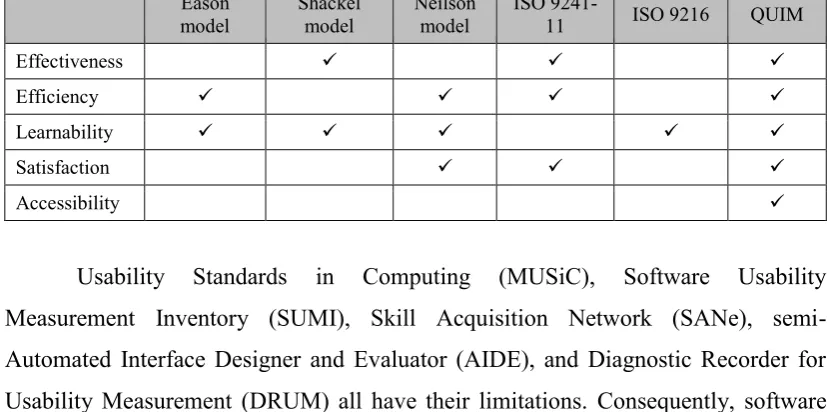
Table 2.1: Similarity of Usability Models
Eason
model Shackel model Neilson model ISO 9241-11 ISO 9216 QUIM
Effectiveness
Efficiency
Learnability
Satisfaction
Accessibility
differences and similarities among usability measurement models based on a few attributes. These attributes were selected based on the frequency in each model and observed similarities in studies by other researchers. Table 2.1 illustrates the similarities among these models and show that QUIM has a consolidated approach.
To resolve the abovementioned issues, Seffah et al. (2006) developed a consolidated model combining different standards and methods to measure usability effectively through factors and metrics. According to the authors, such consolidation is motivated by three major reasons. First, models indicated in Table 2.1 have several common limitations. They are fuzzy in their definitions and have limited guidance on applying scores from specific quality metrics and determining the degree of influence of different quality factors. Second, most software quality models are static with no significant connection with the stages of SDLC or project milestones. Furthermore, these models provide no guidance on usability measures in quality risk identification. Third, these models are difficult to apply in practice. No clear relation is specified among usability factors, criteria, and metrics.
The consolidated model of QUIM establishes the relation among various usability factors, criteria, and metrics with a clear and consistent approach. The model is also flexible and helpful to developers with no or little background in usability metrics. The upcoming section provides additional information about its structure.
2.6.1 QUIM: A Roadmap for a Consolidated Model
The proposed QUIM by Seffah et al. (2006) is a consolidated model that can be used to measure usability. Comparable to existing software engineering models in terms of usability and measurement, QUIM is hierarchical because it decomposes usability into factors, then into criteria, and finally into specific metrics. QUIM follows the IEEE 1061 (1998) standard (Software Quality Metrics Methodology), which contains methods for identifying, implementing, analyzing, and validating both process and quality metrics (Schneidewind, 1992; Yamada et al., 1995).
13
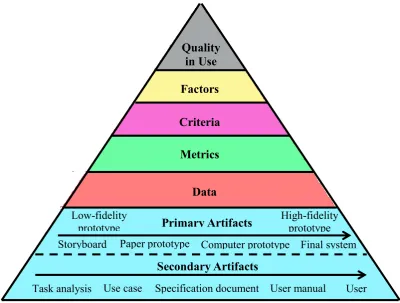
base to predict usability because the QUIM model decomposes usability into factors, criteria, and metrics. Furthermore, it is a hierarchical model containing two levels: data and data collection methods. The quantifiable elements of usability metrics are referred to as data combined into a function to form a metric. Figure 2.1 shows the structure of a QUIM hierarchical model.
[image:26.595.119.520.287.590.2]The QUIM hierarchical model contains four related levels called factors, criteria, metrics, and data. The rest of the levels (primary artifacts, secondary artifacts) are not part of the project because of linkage difficulty between them and the rest of the layers, which have different performance levels from the first four.
Figure 2.1: QUIM Structure (Seffah et al., 2001)
The subsequent sections provide details on the factors, criteria, and metrics encompassed in QUIM.
Quality in Use
Factors
Criteria
Metrics
Data
Low-fidelity prototype
High-fidelity prototype
Primary Artifacts
Secondary Artifacts
Storyboard Paper prototype Computer prototype Final system
2.6.2 Major Usability Factors in QUIM
The key element of usability is ease of learning or learnability without necessarily implementing high task execution. Seffah et al. (2006) incorporated following 10 usability factors in the QUIM consolidated model:
1. Efficiency: Software resources are extended efficiently; thus, the user is able to perform smoothly the specified task in a predefined context of use.
2. Effectiveness: A user is able to perform a task accurately and completely.
3. Productivity: This factor refers to the amount of quality output produced when a user interacts with the software.
4. Satisfaction: This factor relates to the subjective response from an individual user of the software system.
5. Learnability: This factor refers to the ease of mastering the features required to perform a specific task on the software system and the capability of the software to allow the user to learn unknown functionalities easily.
6. Safety: A software system should reduce the risk of harm to users or other resources, including hardware and data stored. It also enables the software to meet user requirements without any harm to the operational environment.
7. Trustfulness: A user should be able to perform transactions trustfully without any doubt of losing important information or breaching security.
8. Accessibility: Users with visual, hearing, or psychomotor disability should be able to use the software product optimally.
9. Universality: Localization of user interfaces is a common feature of software/website products that allows the maximum number of users from all over the globe to be accommodated.
10.Usefulness: The software system has practical utility depending on the skill level of the user and on the software.
2.6.3 Usability Criteria in QUIM
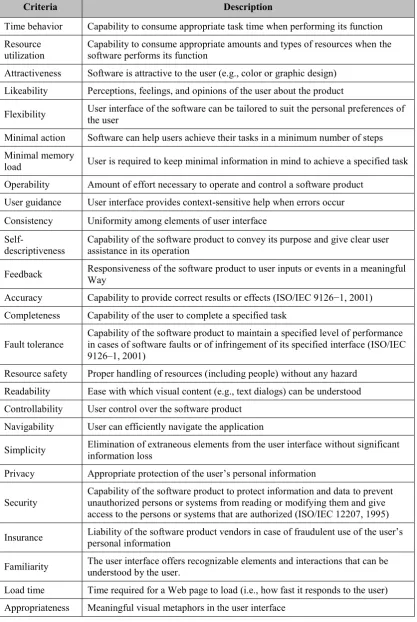
15
Table 2.2: Usability in the QUIM Model (Seffah et al., 2006)
Criteria Description
Time behavior Capability to consume appropriate task time when performing its function Resource
utilization Capability to consume appropriate amounts and types of resources when the software performs its function Attractiveness Software is attractive to the user (e.g., color or graphic design)
Likeability Perceptions, feelings, and opinions of the user about the product
Flexibility User interface of the software can be tailored to suit the personal preferences of the user
Minimal action Software can help users achieve their tasks in a minimum number of steps Minimal memory
load User is required to keep minimal information in mind to achieve a specified task Operability Amount of effort necessary to operate and control a software product
User guidance User interface provides context-sensitive help when errors occur Consistency Uniformity among elements of user interface
Self-descriptiveness Capability of the software product to convey its purpose and give clear user assistance in its operation
Feedback Responsiveness of the software product to user inputs or events in a meaningful Way
Accuracy Capability to provide correct results or effects (ISO/IEC 9126−1, 2001) Completeness Capability of the user to complete a specified task
Fault tolerance Capability of the software product to maintain a specified level of performance in cases of software faults or of infringement of its specified interface (ISO/IEC 9126–1, 2001)
Resource safety Proper handling of resources (including people) without any hazard Readability Ease with which visual content (e.g., text dialogs) can be understood Controllability User control over the software product
Navigability User can efficiently navigate the application
Simplicity Elimination of extraneous elements from the user interface without significant information loss
Privacy Appropriate protection of the user’s personal information
Security
Capability of the software product to protect information and data to prevent unauthorized persons or systems from reading or modifying them and give access to the persons or systems that are authorized (ISO/IEC 12207, 1995)
Insurance Liability of the software product vendors in case of fraudulent use of the user’s personal information
Familiarity The user interface offers recognizable elements and interactions that can be understood by the user.
2.7 Usability Metrics in QUIM
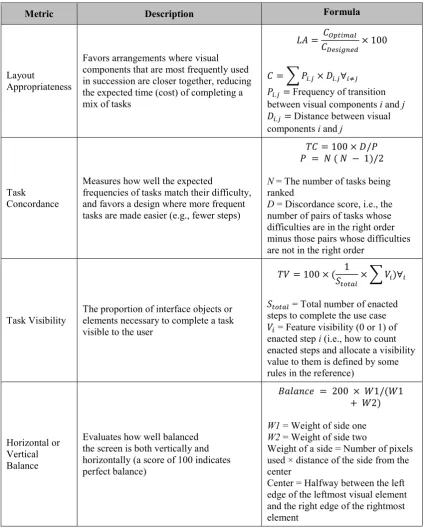
Seffah et al. (2006) identified 127 usability metrics by reviewing usability measurement standards and models. A few of these metrics are defined in terms of formula, whereas others are just quantifiable data. The quantifiable metrics can be extracted from data collected from log files, videos, interviews, surveys, or any other sources. Such metrics could be percentage of tasks completed, success-to-failure ratio, frequency of help usage, and time spent resolving one error. Depending on the phase of the SDLC in which they are applied, the usability metrics can be classified into one of two major categories, testing and predictive.
According to Seffah et al. (2006)The metrics defined in terms of formula are calculable metrics. These metrics are the results of mathematical calculations, algorithms, or heuristics based on raw observational data or countable metrics. Table 2.3 lists a few examples of calculable metrics in QUIM.
Only the metric of calculating EE is discussed in here, as discussing all 127 metrics in detail is out of the scope of this research. Predictable metrics are mathematical calculations; hence, the algorithms or outcomes of heuristics are based on raw observational data or countable metrics. Moreover, EE is a countable metric for calculating task efficiency as follows:
𝐸𝐸 =𝑆𝐸𝑠𝑠𝑒𝑛𝑡𝑖𝑎𝑙
𝑆𝐸𝑛𝑎𝑐𝑡𝑒𝑑 × 100, (2.1)
17
Table 2.3: Examples of the Calculable Metrics in the QUIM Model (Seffah et al., 2006)
Metric Description Formula
Layout
Appropriateness
Favors arrangements where visual components that are most frequently used in succession are closer together, reducing the expected time (cost) of completing a mix of tasks
𝐿𝐴 = 𝐶𝑂𝑝𝑡𝑖𝑚𝑎𝑙 𝐶𝐷𝑒𝑠𝑖𝑔𝑛𝑒𝑑
× 100
𝐶 = ∑ 𝑃𝑖.𝑗× 𝐷𝑖.𝑗∀𝑖≠𝑗 𝑃𝑖.𝑗= Frequency of transition
between visual components i and j 𝐷𝑖.𝑗 = Distance between visual
components i and j
Task Concordance
Measures how well the expected
frequencies of tasks match their difficulty, and favors a design where more frequent tasks are made easier (e.g., fewer steps)
𝑇𝐶 = 100 × 𝐷/𝑃 𝑃 = 𝑁 ( 𝑁 − 1)/2
N = The number of tasks being ranked
D = Discordance score, i.e., the number of pairs of tasks whose difficulties are in the right order minus those pairs whose difficulties are not in the right order
Task Visibility The proportion of interface objects or elements necessary to complete a task visible to the user
𝑇𝑉 = 100 × ( 1
𝑆𝑡𝑜𝑡𝑎𝑙× ∑ 𝑉𝑖)∀𝑖
𝑆𝑡𝑜𝑡𝑎𝑙 = Total number of enacted
steps to complete the use case
𝑉𝑖 = Feature visibility (0 or 1) of
enacted step i (i.e., how to count enacted steps and allocate a visibility value to them is defined by some rules in the reference)
Horizontal or Vertical Balance
Evaluates how well balanced the screen is both vertically and horizontally (a score of 100 indicates perfect balance)
𝐵𝑎𝑙𝑎𝑛𝑐𝑒 = 200 × 𝑊1/(𝑊1 + 𝑊2)
W1 = Weight of side one W2 = Weight of side two
Weight of a side = Number of pixels used × distance of the side from the center
2.8 QUIM Applications
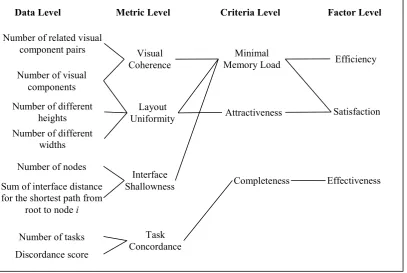
[image:31.595.114.522.193.466.2]The QUIM application is not exactly a tree. For example, a specific metric can affect more than one criterion and is then connected to more than one criterion node, as in every level of QUIM.
Figure 2.2: Tree of Relationship Among QUIM Components (Seffah et al., 2006) Figure 2.2 shows the relationships among data. The number of visual components is an input to two metrics, namely, Visual Coherence and Layout Uniformity. These metrics affect the Minimal Memory Load criterion, which affects the factors Efficiency and Satisfaction. The example map above shows the complex relationship among QUIM components.
2.9 Advantages of the QUIM Model
As illustrated in Table 2.3, QUIM covers most of the aspects of usability measurement. According to Seffah et al. (2006), the following are the advantages of QUIM over other models, such as ISO 9241:
Data Level Metric Level Criteria Level Factor Level
Number of related visual component pairs
Number of visual components
Number of different heights Number of different
widths
Sum of interface distance for the shortest path from
root to node i
Number of tasks Number of nodes
19
(ix) QUIM is a dynamic model, which means the organization can add its own factors, criteria, and metrics to the model.
(x) Similar to other fixed models, QUIM is easy to use and supports any developer other than usability experts to create a usable interface. Working with these models requires experience in usability.
(xi) QUIM offers organizations the power of prediction using predictive metrics over models, which mostly provide the power of evaluation.
(xii) QUIM makes different system interfaces consistent because of the nature of its metrics, which facilitates the job of both the developer and the end-user.
2.10 Overview of Usability Metrics
Metrics are used to measure software quality attributes, such as efficiency, effectiveness, and learnability. A metric is a unit that can be defined for more than one quality attribute. These metrics have group quality attributes and are used as mechanisms to evaluate product quality in terms of efficiency, portability, usability, maintainability, reliability, and functionality (Bertoa et al., 2004; ISO, 1998). Henceforth, with the use of metrics, software development and maintenance projects can be understood, controlled, supervised, guessed, and predicted for the implementation of quality software application (Basili et al., 1996).
Usability metrics are used to subjectively assess the perceived usability of an application. They are designed to provide results similar to those obtained using the 10-item System Usability Scale organized around the ISO 9241-11 definition of usability. These metrics are designed to measure success rate (whether user can perform the task at all), execution time required for a task, error rate, and subjective satisfaction of users (Finstad, 2010). Usability metrics are important because they result in products that are easy to use. Usability can help bring a system closer to the final user. A system that is usable is easy to learn and use, enabling the user to use it productively (Constantine et al., 1999).
2.11 Essential Usability Metric Suite
The user interface is complex because capturing and evaluating them for better search is a very challenging task. Evaluation requires different perspectives, and for this purpose, metric suites are the most possible and best solution to create better interface designs rich in user interaction (Constantine et al., 1999). The demand of process improvement has also increased the value of these metric suites. Metric suites have to include functional and non-functional attributes of usability measurement. Therefore, essential usability metric suites have diverse perspectives to consider in the same place. The five major components to usability metrics are EE, task concordance, task visibility, layout uniformity, and visual coherence (Venkatesan et al., 2009).
The use case or task-sensitive-based usability evaluations are conducted by the EE, task concordance, and task visibility. The precise parts of the user interface or entire user interfaces are evaluated using the aforementioned metrics of the evaluation. Furthermore, semantic metrics, such as visual coherence and content sensitive, are used to evaluate interfaces partially or interface architectures completely. The normalized range of these metrics is between 0 to 100 for them to be easily converted to percentage and evaluated percentage wise (Constantine et al., 1999).
The essential usability metric suite must comply with the essential use cases developed to ensure basic functionality of the software system. The next section provides further details on essential use cases.
2.12 Essential Use Case
21
may be used to produce a user interface design; after this process, the use cases can be translated into a detailed description of the underlying system (Biddle et al., 2002).
An essential use case works as a dialog between the user and the system. Its technology-free nature improves the requirement-gathering process by capturing design-specific details. Abstraction in an essential use case means it relates to steps of the use case rather than to the use case as a whole. It states the sequence of abstract interactions. The labeling of essential use cases is more of an abstract but rich approach. Generally, the user part of the dialog is referred to as “intention,” while the system part is called “responsibility” (Biddle et al., 2012).
Essential use case is simpler than its conventional counterpart is because it contains an abstract for essential steps only and the interest of the user, which targets “what the system must do” (Kamalrudin et al., 2011). A use case map is used to interconnect user requirements and form a complete system. This topic will be discussed in Section 2.12.
2.13 Use Case Map (UCM)
Use cases of a complete software system may number up to dozens or even hundreds, and in any large software system, these use cases will be interrelated. The use cases correlate and form a complete structure of system components and user interfaces. For this purpose, a UCM represents the interrelationships among use cases by mapping the whole system structure (Amyot et al., 2003). It is employed early in the design stage of the development process because it provides a way to capture and integrate functional and design requirements. UCM component notation is generic and abstract to represent both software (i.e., object, database, server, etc.) and non-software (i.e., actors, hardware, etc.) entities. The connection between these components depends on scenarios provided about their dependencies (Hassine, 2011).
2.14 Essential Efficiency (EE)
The convention and ideal evaluation limits are measured by EE with regard to the interface designed and the essential use case model (Constantine et al., 1999). EE is a countable metric for calculating task efficiency, as shown in Eq. (2.1). It is one of the five major ingredients of usability, which also include task concordance, task visibility, layout uniformity, and visual coherence. The usability of an application software is always linked with a context; hence, EE represents a specific context through particular use cases, measured on how efficiently a software functions with reference to ideal use cases (Seffah et al., 2006; Venkatesan et al., 2009).
EE captures the essential operational aspects of a user interface by measuring the relationship between essential and enacted steps. For better results, having a good use case model is important. Furthermore, EE can be computed for a mix of tasks. For this purpose, EE is weighted by the probability of each task as
𝐸𝐸𝑤𝑒𝑖𝑔ℎ𝑡𝑒𝑑 = ∑ 𝑝𝑖 ∙ 𝐸𝐸𝑖 ∀𝑖
, (2.2)
where 𝑝𝑖 and 𝐸𝐸𝑖 are the probability of task i and the EE of task i respectively. Having a
weighted EE is beneficial for considering design adjustments and evaluating the overall impact of change (Constantine et al., 1999).
2.15 Related Work
Software usability measurement has extensively attracted researchers, HCI communities, and software engineers. Various techniques for measuring usability have been developed in the form of frameworks, methods, and standards. Most of these approaches can be applied in any stage of a SDLC (Seffah et al., 2001). Many researchers have contributed in this area, and a few of these contributions are discussed in this section.
23
measurement. Hussain et al. (2008) noted that few studies related to usability measurement utilizing a metric have been published. A usability measurement tool was developed by Winter et al. (2007) for vast market software systems. These software products are targeted to achieve the broadest possible category of users. Their tool uses metrics to show the usability for efficiency, effectiveness, and satisfaction. They started their research by first analyzing UIQ Technology Usability Metrics and observing the relationship between quality and usability. According to Winter et al. (2007), usability is not just the removal of errors, but rather user satisfaction.
Seffah et al. (2006) proposed the QUIM model to consolidate usability factors, criteria, metrics, and data mentioned in various standards or models for software quality. The model defines the relationship between these elements of usability measurement. Their model helped in generating usability measurement plans where specific metrics are identified. This research utilizes this model to measure usability of three application software of three different case studies. An extended detail of this model is provided in Section 2.4. Rauterberg (1996) also worked on similar objectives and presented an approach to measure and quantify the usability attributes and efficiency of user interfaces. In the research, the tasks were completed independently, and the descriptive concept of functional interaction points was introduced to obtain the measureable factors of interface design. Moreover, Rauterberg (1996) introduced general and clear descriptive language to quantify and classify interface types using two metrics: functional feedback and interactive directness. Of the other than these metrics, they defined and validated two other quantitative metrics, namely, flexibility of the dialog interface and flexibility of the application interface.
measures, the context of use and the domain of the application play important roles and are crucial for the HCI community, because considering all these aspects of usability together is a challenge (Frøkjær et al., 2000). Keeping this idea in view, Frøkjær et al. (2000) suggested that efficiency, effectiveness, and user satisfaction should be considered independently from the aspect of usability.
2.16 Chapter Summary
Existing interface designs for application software have improved tremendously from previous designs. These interfaces utilize almost all media of communication to develop intelligent and interactive software systems. The scale of usability defines productivity and acceptance among end-users as it is a user-centered software development. However, various aspects taken together are considered to measure the efficiency of user interfaces or usability. These aspects include execution time, performance, user satisfaction, learnability, accuracy, and completion of task. Therefore, determining the usability of efficiency of user interface during a SDLC is important to minimize user frustration. For this purpose, numerous researchers and HCI communities have introduced various methods and standards. Nevertheless, the problem is these frameworks, standards, or techniques target different views of usability. Therefore, software development teams have been hesitant about implementing these methods to evaluate usability.
120
REFERENCES
Abran, A., Khelifi, A., Suryn, W., & Seffah, A. (2003). Usability meanings and interpretations in ISO standards. Software Quality Journal, 11(4), 325-338. Amyot, D., He, X., He, Y., & Cho, D. Y. (2003). Generating Scenarios from Use
Case Map Specifications. QSIC, 3, 108-115.
Aziz, N. S., Kamaludin, A., & Sulaiman, N. (2013). Assessing web site usability measurement. International Journal of Research in Engineering and Technology, 2(9), 386-392.
Basili, V. R., Briand, L. C., & Melo, W. L. (1996). A validation of object-oriented design metrics as quality indicators. Software Engineering, IEEE Transactions on, 22(10), 751-761.
Bertoa, M., & Vallecillo, A. (2004). Usability metrics for software components. Paper presented at the 8th International Workshop on Quantitative Approaches in Object-Oriented Software Engineering (QAOOSE’2004), Oslo, Norway.
Bevan, N. (1999). Quality in use: Meeting user needs for quality. Journal of Systems and Software, 49(1), 89-96.
Bevan, N., & Macleod, M. (1994). Usability measurement in context. Behaviour & information technology, 13(1-2), 132-145.
Biddle, R., Noble, J., & Tempero, E. (2002). Essential use cases and responsibility in object-oriented development. Paper presented at the Australian Computer Science Communications.
Biddle, R., Noble, J., & Tempero, E. (2012). Use Case Cards and Roleplay for Object Oriented Development.
Buxton, W. A., Harrison, B. L., & Vicente, K. J. (2000). Graphical user interface with optimal transparency thresholds for maximizing user performance and system efficiency: Google Patents.
Calisir, F., & Calisir, F. (2004). The relation of interface usability characteristics, perceived usefulness, and perceived ease of use to end-user satisfaction with enterprise resource planning (ERP) systems. Computers in human behavior, 20(4), 505-515.
Chao, G. (2009a). Human-computer interaction: process and principles of human-computer interface design. Paper presented at the Computer and Automation Engineering, 2009. ICCAE'09. International Conference on.
Chao, G. (2009b). Human-computer interaction: The usability test methods and design principles in the human-computer interface design. Paper presented at the Computer Science and Information Technology, 2009. ICCSIT 2009. 2nd IEEE International Conference on.
Church, R. L. (1993). Measuring usability against usability goals during the product development cycle. Paper presented at the Northcon/93. Conference Record. Constantine, L. L., & Lockwood, L. A. (1999). Software for use: a practical guide to
the models and methods of usage-centered design: Pearson Education.
David, C. (2008). Restaurant Menu & Ordering System. from https://www.scribd.com/doc/48168335/restaurant-srs-problem
Finstad, K. (2010). The usability metric for user experience. Interacting with Computers, 22(5), 323-327.
Frøkjær, E., Hertzum, M., & Hornbæk, K. (2000). Measuring usability: are effectiveness, efficiency, and satisfaction really correlated? Paper presented at the Proceedings of the SIGCHI conference on Human Factors in Computing Systems.
Galitz, W. O. (2007). The essential guide to user interface design: an introduction to GUI design principles and techniques: John Wiley & Sons.
Guntupalli, R. C. C. (2008). User interface design: methods and qualities of a good user interface design.
122
Hassine, J. (2011). Early availability requirements modeling using use case maps. Paper presented at the Information Technology: New Generations (ITNG), 2011 Eighth International Conference on.
Hawkins, C., Ross, M., & Staples, G. (2012). Software Quality Management VI: Quality Improvement Issues: Springer Science & Business Media.
Hussain, A., & Ferneley, E. (2008). Usability metric for mobile application: a goal question metric (GQM) approach. Paper presented at the Proceedings of the 10th International Conference on Information Integration and Web-based Applications & Services.
Issa, T., & Isaias, P. (2015). Usability and Human Computer Interaction (HCI). In Sustainable Design (pp. 19-36).
ISO, S. (1998). 9241-11. 1998. Ergonomic Requirements for Office Work with Visual Display Terminals (VDTs)–Part II Guidance on Usability.
Kamalrudin, M., Hosking, J., & Grundy, J. (2011). Improving requirements quality using essential use case interaction patterns. Paper presented at the Proceedings of the 33rd International Conference on Software Engineering. Keil, M., Beranek, P. M., & Konsynski, B. R. (1995). Usefulness and ease of use:
field study evidence regarding task considerations. Decision Support Systems, 13(1), 75-91.
Mandel, T. (1997). The elements of user interface design (Vol. 20): Wiley New York.
McConnell, S. (1993). Code complete: a practical handbook of software construction (Redmond, WA: Microsoft Press.
Miao, Y., & Yang, X. (2010). An FSM based GUI test automation model. Paper presented at the Control Automation Robotics & Vision (ICARCV), 2010 11th International Conference on.
Molich, R., Chattratichart, J., Hinkle, V., Jensen, J. J., Kirakowski, J., Sauro, J., . . . Traynor, B. (2010). Rent a Car in Just 0, 60, 240 or 1,217 Seconds?-Comparative Usability Measurement, CUE-8. Journal of Usability Studies, 6(1), 8-24.
Norton, P. (1999). Peter Norton's introduction to computers. Glencoe/McGraw-Hill.pp23-232
Padda, H. (2009). QUIM: A Model for Usability/Quality in use Measurement. Pressman, R. S. (2005). Software engineering: a practitioner's approach: Palgrave
Macmillan.
Rauterberg, M. (1996). How to measure and to quantify usability attributes of man-machine interfaces. Paper presented at the Robot and Human Communication, 1996., 5th IEEE International Workshop on.
Rudisill, M. (1996). Human-Computer Interface Design: success stories, emerging methods, and real-world context: Morgan Kaufmann Pub.
Russell. (2004). Automatic teller machine (ATM). from
http://www.mathcs.gordon.edu/courses/cs211/ATMExample/Links.html
Sauro, J., & Kindlund, E. (2005). How long should a task take? identifying specification limits for task times in usability tests. Paper presented at the Proceeding of the Human Computer Interaction International Conference (HCII 2005), Las Vegas, USA.
Schneidewind, N. F. (1992). Methodology for validating software metrics. Software Engineering, IEEE Transactions on, 18(5), 410-422.
Seffah, A., Donyaee, M., Kline, R. B., & Padda, H. K. (2006). Usability measurement and metrics: A consolidated model. Software Quality Journal, 14(2), 159-178.
Seffah, A., Kececi, N., & Donyae, M. (2001). QUIM: a framework for quantifying usability metrics in software quality models. Paper presented at the Quality Software, 2001. Proceedings. Second Asia-Pacific Conference on.
Speicher, M. (2015). What is Usability?
Stumpf, R. V., & Teague, L. C. (2005). Object-oriented analysis and design: Tsinghua University Press, Beijing, China. pp.
Venkatesan, V. P., & Krishnamoorthy, M. (2009). A metrics suite for measuring software components. Journal of Convergence Information Technology, 4(2), 138-153.
124
Yamada, S., Hong, J.-K., & Sugita, S. (1995). Development and evaluation of hypermedia for museum education: validation of metrics. ACM Transactions on Computer-Human Interaction (TOCHI), 2(4), 284-307.