1
Android Anti-Theft Application using Google Drive
Ms. Amitha N S*, Ms. Deepika N*, Ms. Manasa S*, Ms. Bhavana J*
*
UG Students
Department of Computer Sceince and Engineering Siddaganaga Institute of Technology
Tumakuru, India [email protected], Mrs. Shruthi K, Assistant Professor Department of Computer Science and Engineering
Siddaganaga Institute of Technology Tumakuru, India
Abstract---Smart phones have become more and more popular over years with more people getting addicted to it. It is no more a luxury commodity now. As a result of evolution in the field of cell phones at present these can be used for various purposes from communication till making online payments. However the challenging part due to these developments is data security when the device is lost or hacked. This android anti-theft application helps in doing this job of securing data in an efficient way. This application is designed to do operations like location tracking, protect the device’s data even when the device is lost or hacked, store the retrieved data on Google drive and lock the phone. Here we achieve this using Android programming, Google APIs and Google drive. The commands are validated using cryptographic algorithms like Hashing techniques.
Keywords: Anti-Theft application, Android, Google drive, Google APIs, Cryptographic algorithms, Hashing.
1. INTRODUCTION
In today’s world the most common thing which everyone carries with them is smart phone. There will be lot of personal information and some important credentials in it. There is a chance that one may miss their smart phone, and if some third person finds it they might misuse. So, there is a need to secure the smart phone which is lost so that information leak can be prevented and some measures can be taken to recover the important information like phone numbers, call history etc. The purpose behind developing this application is to provide the user the facility to track their lost or misplaced device and to retrieve some important information. Though there are multiple server-based apps in Android and iOS app store, it’s always been a challenge to protect the device and secure the data even after the server is hacked. In order to overcome this, a unique method has to be implemented. The proposed android application will include most unique and secured features such as finding the location using three methods which will be selected automatically based on the availability, lock the lost device, erase the content, and hide the app to work in stealth mode. These features will be included using 2 methods, by coding the feature and few are done by integrating the Google APIs. In API’s Google drive is the central control management for the functioning of the app with all vital security properties. Android programming will be used to accomplish the project and a secure cryptographic algorithm will be deployed to encrypt the authentication of commands and communication between the devices.
This paper is organized as follows:
• The second section is literature survey where we have described about the ideas which we have taken from various related papers.
• The third section is Requirements specification where we are explaining about the tools and technologies required for this application.
• The fourth section is design and implementation. Here we are explaining the architecture, implementation details of the application.
• In the fifth section we have presented the expected outcomes of this application when finally built. • In the sixth section we describe about the conclusion
and future scope of the application.
2. LITERATURE SURVEY
[1]Anti-Theft Application for Android Based Devices [2] • Application deploys an enterprise security solution that
meets users’ immediate and long-term requirements by providing the images and videos of the thief and also providing the information about the location of the android based smart phone with the help of text messages. With the advent of time, technology is evolving every day.
• It is keep on checking for SIM number, once a thief changes the SIM, it will detect that SIM is changed by comparing new SIM unique number with stored one and send the signal to start services.
• As soon as signal is received, services gets started in the background which will start making video recording from front camera if present otherwise from back camera and also take 2-3 snapshots, which are stored in the SD card.
2 setting for multimedia messages and internet
connectivity.
[2]SMS Based Emerging Techniques for Monitoring and Controlling Android Mobiles. [3]
• By this application user can perform various
operations in its mobile even if mobile is very far from him, like by sending a single text message we can fetch and store our contact numbers, fetch our device's location, auto respond to the incoming messages, send SMS from our remote mobile, fetching SIM and mobile details used for GSM network.
• The features of this Applications are Telephony,
Authentication Module, Location Based Services, Convenience to the user and efficiency.
[3] Cloud based Anti-Theft Application for Android Devices[4]
• SMS alert and snapshots of the thief.
• Track current location of the lost device and detects the thief using GPS.
• Services will be activated whenever application detects the change of SIM card.
• SIM change alert notification would be sent to the alternate mobile number of the user. The snapshots would be taken by the camera and would be sent to the registered valid email address without taking any permission from the user.
[4] Remote Android Assistant with Global Positioning System Tracking [5]
• The mobile’s data can be accessed and retrieved even when the mobile is not present near us. • Information such as contacts, call logs, SMS logs,
location of the mobile can be fetched.
• GPS, which is satellite based is used to get the location of the mobile.
• The web server acts like a server and android phone acts like client.
[5] Mobile Tracking Based on Phone Theft Detection [6] • In this application user can set the mode as safe
when he only needs to change the SIM card in the cases when the user is using dual SIM.
• When the user’s mobile is stolen or misplaced, he can send SMS to his lost android phone which is having this anti-theft application installed on it. • The functionalities of the SMS sent by the user
are,
o If the SMS sent is ‘locate’, then the GPS value of the lost mobile is received. o If the SMS sent is ‘ring’, then the
application changes the lost mobile from silent to general mode.
o If the SMS sent is ‘wipe’, then the memory card content of the lost mobile is deleted by the application.
3. REQUIREMENTSSPECIFICATION A. Software Requirements
• Knowledge about Android
o Android is an open source and Linux-based operating system for smart phones.
o Android was developed by the Open Handset Alliance, led by Google, and some other companies.
o Android programming is based on Java programming language, so knowledge about java is required. • Android studio
o It is official integrated development environment for android operating system, and is used to develop the android applications.
• Google Drive:
o Google drive is the service provided by the Google for file storage and synchronization purpose. It allows the users to store the files on their servers, to synchronize their files and to share the files between the devices. o Most of the applications interact with database servers
to fetch the data to the mobile, but the interaction between the server and the mobile application is not secured, Google drive is used as server to store the data got from the lost mobile, as Google drive uses https and it is very secure. In Google drive the data is hidden and it can be accessed only by the anti-theft application • Google API’s
o Google API’s are the application programming interfaces which are developed by the Google and they allow communicating with Google services and they can be integrated to other services.
o In our project location API is used for getting the location of the lost device. Location API is built entirely in google play services. Location API needs network connection for providing pinpoint location of any mobile system. It is also proven that location API is much better than hardware GPS, as location API is more reliable source.
. B. Security Requirements
• Cryptographic algorithms like hash function.
o Hash function is any function which is used to map data of any length to fixed size. The return value of the hash functions is called hash values.
o In our project commands are sent by the alternative mobile’s theft application to the lost mobile anti-theft application in order to get location or call logs of the lost mobile. Those commands have to be authenticated, to get to know that those commands are actually sent by the owner of the lost mobile. In order to achieve this unique hash value can be assigned to each command sent by the user. Both the command and its hash value are sent to the lost mobile. When the hash value and command is received by the anti-theft app installed in the lost phone, hash value is calculated for the command got. If the calculated hash value matches the hash value sent, the authentication is achieved and the command is validated.
3 • Locking the phone.
• Locating the phone
• Retrieving important information like phone numbers and call history
• Stealth mode to hide the app. • Erasing the content of the mobile.
4.DESIGN AND IMPLEMENTATION
Architecture of the Application
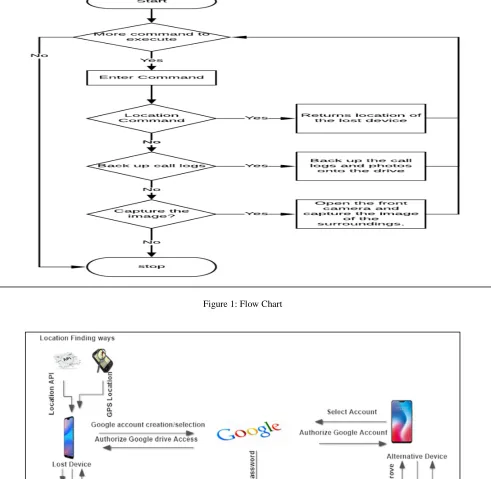
The figure 1 shows the architecture of the application. This gives the overall functioning of the app starting from installation till execution of the commands.
i. Lost Device side:
The first step here starts with installation of the app on to the device. Then the users have to register by choosing the existing Google account or else creating one. Then authorize the Google drive access and give admin access to the app. Then set 4 digits PIN, set password. Encrypt these two entities and store them on to the Google drive of the selected Google account.
ii. Alternate Device side:
Here also, first step is to install the app on the alternate device. Then select the same Google account that is related to lost device account. Then again authorize the Google drive access. Then app asks for 4 digits PIN and password by the user. Then it is compared with the ones stored on the Google drive. If matched then the user credentials are validated. Then the user can perform various command operations.
iii. Command execution:
Now after installations are done and the credentials are verified then the user can send commands from the Alternate mobile device to the lost device through Google drive. Then the commands are authenticated at lost mobile side using hashing technique. Then the commands are executed and the results of the execution are sent back to the Google drive which can be accessed on the alternate mobile. figure. 2 shows the flow chart for command execution. The commands which can be executed by the user are:
1. Location of the lost device 2. Backup call logs and erase 3. Backup photos in gallery and erase 4. Capture the image
A. Retrieving the call logs and photos
When we give command to retrieve the call records log entries of the calls are created along with timestamp and stored in the Google drive, and similarly we can give the command to retrieve the images stored in the lost device to the Google drive.
B. Location tracking service
When we give locate command the location of the lost device can be retrieved using three main techniques chosen by a decision making algorithm. The techniques are: 1. Location API: Using Google’s Location API which is
built in Google play services. We need network connection to work in location API. This method gives the exact location of any device. Hence, this method is given the first priority.
2. Hardware GPS: This method doesn’t require network connection. The algorithm gives a second priority to this method which less efficient when compared to location API because accuracy of the result of this method lies till 100 meters. It will only provide us the approximate location.
3. Last location: This method has least priority. It is selected by the algorithm only when the other two methods fail to work. In the android system, there is a telephony manager from which we can get to know the last known location of the last device which is stored in the system. The location of the mobile will be stored in the system during circumstances like change in the cell tower, when the mobile has very low battery charge or when the signal broke off.
C. Google drive connectivity and Command Validation Google drive is used as a server for interacting with the last device. It is highly secured as it uses HTTPS. The commands can’t be sent without the knowledge of the user because it will be authenticated by using hash function. Google drive also offers additional property for the anti-theft app to remotely store the data on the cloud. Google drive is also used to hide the important files that can be accessed only by the antitheft app. So, even if the Google account is hacked the stored files can’t be retrieved. Authentication of commands can be achieved by assigning a unique hash value for each command requested by the user. When the user selects the command it will lead to the generation of the assigned hash code which is sent to the user’s device as a method of verification.
D. The offline feature of the Google Drive:
When the internet connection is not there for the anti- theft application, for uploading the files or logs in the drive, the application saves all the data in the cache memory following a queue data structure. Then the data is uploaded to the drive from the queue once the internet connection is available to the anti-theft application in the lost mobile.
E. Capturing image from the front camera
4 Figure 1: Flow Chart
5 5. EXPECTED OUTCOME
The proposed application was developed to secure the communication medium and data of lost device. A unique algorithm involving
• Establishing the connection between lost device and an alternative device using Google account. • Getting the location of the lost device in the
alternative device.
• Restoring the call logs and other important data using Google drive and Erasing the content. • Opening the front camera and capturing the image.
Storing that image on to Google drive.
• Uninstallation protected and Working in stealth mode to hide the app.
6. CONCLUSION
This android application will be developed to secure the communication medium and data of lost device.We wil make use of unique algorithm involving hash methods for authenticating the commands sent by the user to protect from sniffing, man-in-the-middle attack etc. Google drive API integration provides HTTPS channel for data communication which tremendously prevents network attacks.
If the lost mobile switched off this application will not work, for future scope we can implement a new algorithm, where in the phone should make it switch on automatically, whenever the phone is switched off for more than 48 hours.
Acknowledgment
We offer our humble pranams at the lotus feet of His Holiness, Dr.SreeSreeSivakumaraSwamigalu, Founder President for bestowing upon hisblessings.We deem it as a privilege to thank Dr. M N Channabasappa, Director, SIT, Tumakuru and Dr. K P Shivananda, Principal, SIT, Tumakuru for fostering an excellent academic environment in this institution, which made this endeavour fruitful. We would like to express our sincere gratitude to Dr. R Sumathi, Professor and Head, Department of CSE, SIT, Tumakuru for her encouragement and valuable suggestions. We thank our guide and convener Mrs. Shruthi K, Assistant Professor, Department of Computer Science and Engineering, SIT, Tumakuru for the valuable guidance, advice and encouragement. Above all, we would like to express thanks to our parents for their support all along.
REFERENCES
[1] ShwetaDhanu, Afsana Shaikh, Shweta Barshe, 2016, “Anti-Theft Application for Android Based Devices,”International Journal of Advanced Research in
Computer and Communication Engineering, 5(3), pp. 2278-1021.
[2] Deepak Kumar and Mohammed Abdul Qadeer, 2012, ”SMS Based Emerging Techniques for Monitoring and Controlling Android Mobiles,” International Journal of Engineering and Technology, 4(6), pp. 798-802. [3] Sagar Choudhary, Ajit Rathod, Vishal Mundhe and
Prof. Mohit Dighe, 2015, “Cloud based anti theft application for android device,” International Journal for Scientific Research & Development, 3(10), pp. 2321-0613.
[4] Jyothi T. S., Catherine Mathew, Irene George, 2014, “Remote Android Assistant with Global Positioning System Tracking,” IOSR Journal of Computer Engineering (IOSRJCE), 16(2), pp. 95-99.